

Page 1
2267-40
Original instructions
Page 2
4
5
1
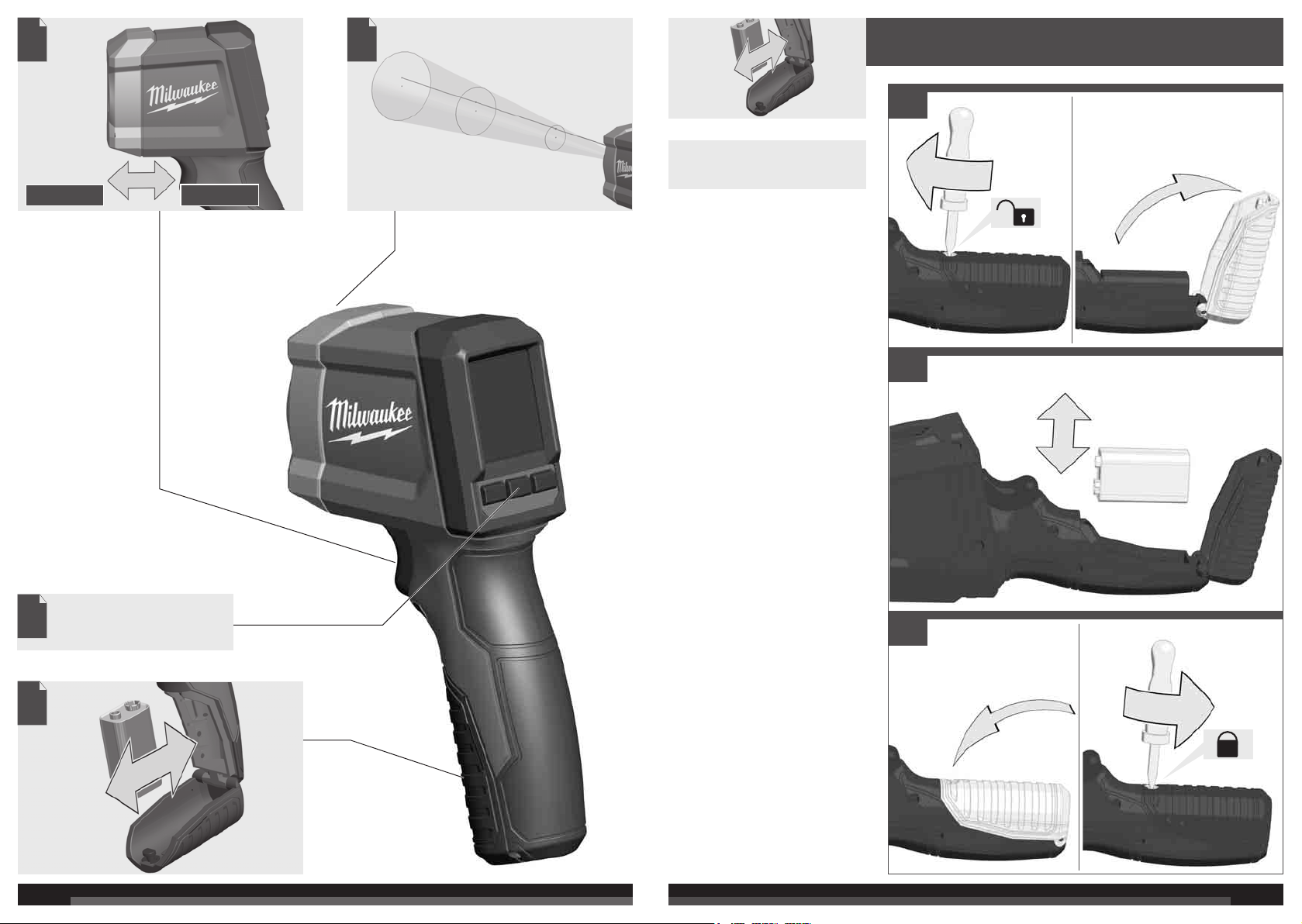
Remove the battery pack before
starting any work on the machine.
STOP
Description of Buttons, Basic
Settings, Operation
Important Informations and Notes
5
START
2
3
3
32
Page 3
ON
OFF
a
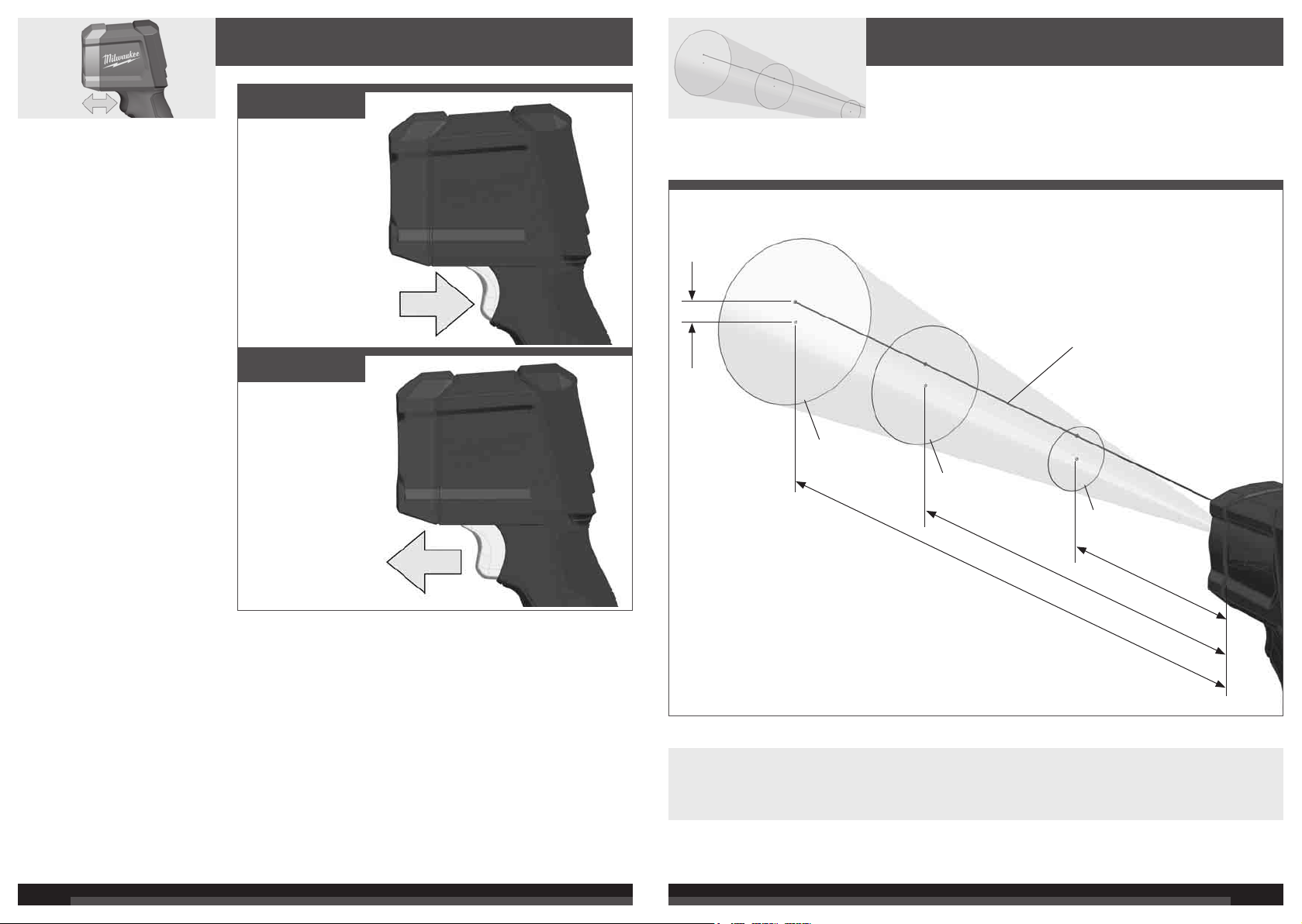
Laser
b
= ø 150 mm
3
c
= 1,5 m
3
b
= ø 100 mm
2
c
= 1 m
2
b
= ø 50 mm
1
c
= 0,5 m
1
c : b ≈ 10 : 1
a - Distance laser point to center of spot temperature area (19 mm)
b - Temperature area
c - Distance Laser Thermometer to measure point
The rate between distance Laser Thermometer and measure point is approx. 10:1.
4 5
Page 4
TECHNICAL DATA LASER THERMOMETER 2267-40
Laser class ............................................................................2
Max. Power.......................................................................... <1 mW
Wavelength .................................................................630-670 nm
IR Temperature range ..........................................-30°C to 400 °C
IR Accuracy
-30°C to -18°C .................................................................. ±2 °C +0.1/1 °C
-18°C to 0°C ................................................................. ±2.5 °C
0°C to 400°C.................................................................... ±2 °C or 2% of reading, whichever is greater
Assume ambient operating temperature of 23°C ±2°C
Min. measuring distance...................................................... 50 mm < 50 °C, 100 mm > 50 °C
Temperature display resolution .......................................... 0.1 °C in Primary and Secondary
Emissivity .......................................................................... 0.95
Response time................................................................. <500 msec
Spectral response......................................................... 8 to 14 μm
Distance to spot ............................................................ 10 to 1
Repeatability ..................................................................... ±0.8 % or ±1°C(whichever is greater)
Operating temperature .............................................0°C to 50 °C
Storage temperature..............................................-20°C to 60 °C w/o battery
Relative humidity: ........................................................ 1
Voltage Battery ...................................................................... 9 V
Battery life......................................................................... > 12 h with all functions
Weight according EPTA-Procedure 01/2014 ..................... 290 g
WARNING! Read all safety warnings and all
instructions. Failure to follow the warnings and instructions
may result in electric shock, fi re and/or serious injury.
Save all warnings and instructions for future reference.
SAFETY INSTRUCTIONS
Do not stare into beam. Do not point laser light at other
persons.
Do not view directly into beam with optical instruments
(binocular, telescope).
Do not point laser at refl ective surfaces.
Avoid exposure to laser radiation. Laser may emit
hazardous radiation.
Avoid dangerous environments. Do not use in rain, snow,
damp or wet locations. Do not use in the presence of
explosive atmospheres (gaseous fumes, dust or fammable
materials) because sparks may be generated when inserting
or removing battery pack, possibly causing fi re.
This tool is designed to be powered by 9 V battery properly
inserted into the Instrument. Do not attempt to use with any
other voltage or power supply.
Do not leave batteries within the reach of children.
Do not mix new and used batteries. Do not mix brands (or
types within brands) of batteries.
Do not mix rechargeable and non-recharge-able batteries.
Install batteries according to polarity (+ / –) diagrams.
Properly dispose of used batteries immediately.
Battery acid may leak from damaged batteries under
extreme load or extreme temperatures. In case of contact
with battery acid wash it off immediately with soap and
water. In case of eye contact rinse thoroughly for at least 10
minutes and immediately seek medical attention.
This appliance is not intended to
be used or cleaned by persons
with reduced physical, sensory or
mental capabilities, or lack of
experience or knowledge, unless
they have been given instructions
concerning the safe use of the
0 to 85 % RH non-condensing at 25°C ambient, decreasing linearly to 10 to 45% at 50°
responsible for their safety. They
should be supervised whilst using
the appliance. Children shall not
use, clean or play with this
appliance, which when not in use
should be secured out of their
reach.
Warning! To reduce the risk of fi re, personal injury, and
product damage due to a short circuit, never immerse your
tool, battery pack or charger in fl uid or allow a fl uid to fl ow
inside them. Corrosive or conductive fl uids, such as
seawater, certain industrial chemicals, and bleach or bleach
containing products, etc., can cause a short circuit.
SPECIFIED CONDITIONS OF USE
The Laser Thermometer can be used for non-contact
temperature measurement.
Do not use this product in any other way as stated for
normal use.
DISPLAY
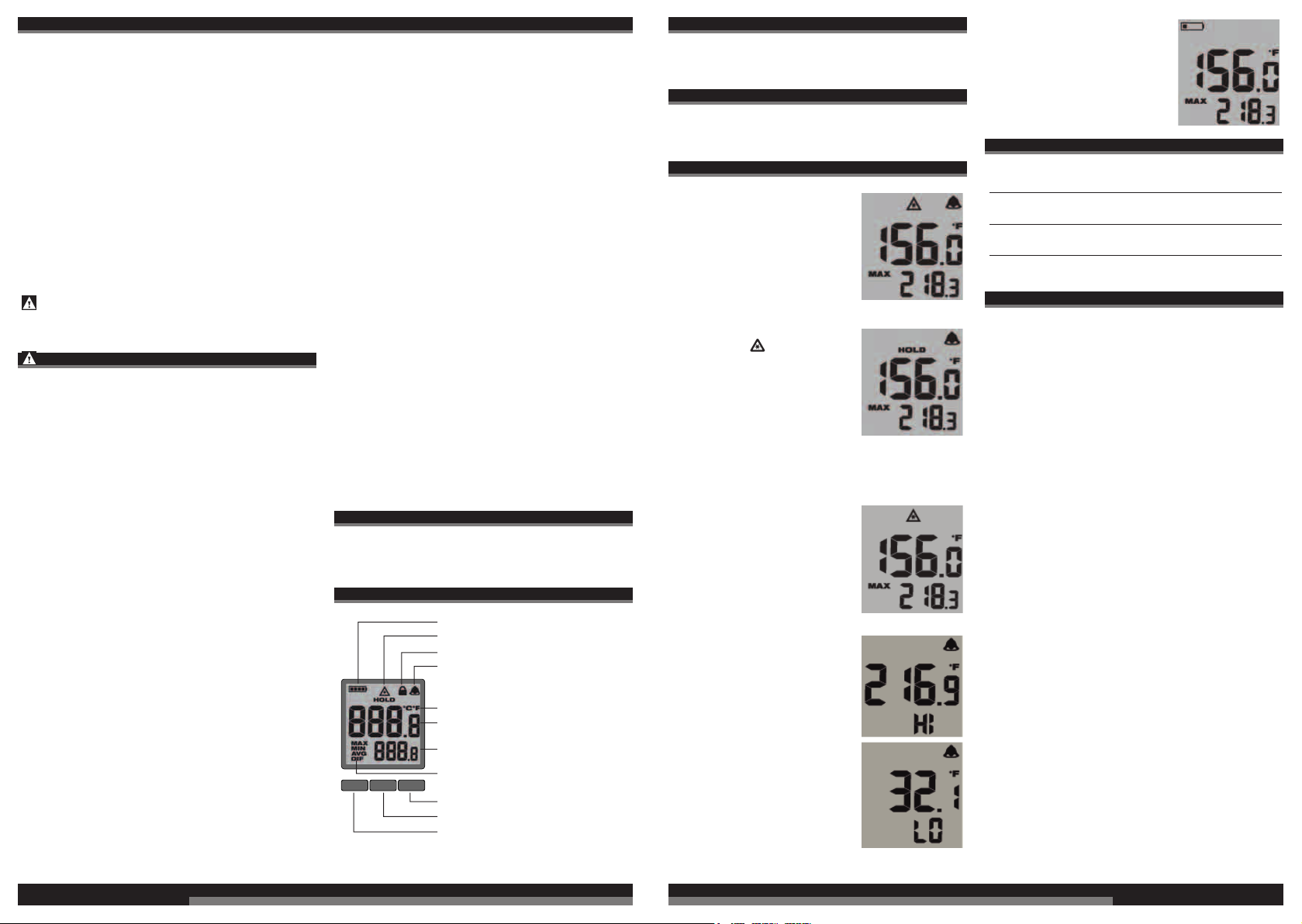
Battery Indicator
Hold Indicator
Trigger Lock Indicator
Alarm indicator
°C or °F indicator
Primary measurement
Secondary measurement
Mode indicator
Alarm button
Set button
Mode button
appliance by a person legally
SELECTING CELSIUS OR FAHRENHEIT
To set the temperature scale, pull the trigger and then press
the SET button three times. Press the buttons above the up
and down arrows to toggle between °C and °F. Wait 5
seconds for the setting to save and exit.
SETTING THE LASER LOCK
To turn the laser on and off , pull the trigger and then press
the SET button four times. Press the buttons above the up
and down arrows to toggle between ON and OFF. Wait 5
seconds for the setting to save and exit.
OPERATION
Scanning Object IR Temperature
1. Pull and hold the trigger for
at least 2 seconds and scan
the surface temperature of an
object. A laser pointer indicates
the center of the circular area
being scanned.
NOTE: The object should be
larger than the spot being
scanned. If not, readings will
be aff ected. See Distance To
Spot for necessary object size.
2. As you continue to hold the
trigger, the icon is
displayed along with the
surface temperature (primary
measurement) and maximum
temperature (secondary
measurement) readings.
3. Release the trigger. HOLD
is displayed until the screen
shuts off in about seven
seconds.
NOTE: A quick change in temperature (>10°C) aff ects the
meter’s readings. Allow the meter to reach ambient
temperature before use (5 to 30 minutes, depending on
temperature change).
Temperature Alarm
Press the ALARM button to
turn on the alarm function. The
bell icon is displayed. If the
temperature reading is outside
the preset range, the
temperature reading will fl ash.
Setting Preset Range for the Alarm
1. To set the alarm range, pull
the trigger and then press the
SET button. Repeat to toggle
between HI and LO settings.
2. Press the up or down arrow
soft keys to toggle between
temperatures. Wait 5 seconds
for the ranges to save and exit.
Low Battery
When the Low Battery icon is
displayed, change the
batteries.
MODE INDICATOR
Displays maximum temperature measured during
MAX
a continuous reading
Displays minimum temperature measured during
MIN
a continuous reading
Displays average temperature of last 20
AVG
measurements during a continuous reading4
Displays the diff erence between MAX and MIN
DIF
during a continuous reading
MAINTENANCE
Clean the laser windows with a soft, moist cloth to keep
them clean and clear. Remove battery before cleaning.
Warning!
To reduce the risk of personal injury and damage, never
immerse your tool in liquid or allow a liquid to fow inside it.
Clean dust and debris from tool. Keep tool handles clean,
dry and free of oil or grease. Use only mild soap and a
damp cloth to clean the tool since certain cleaning agents
and solvents are harmful to plastics and other insulated
parts. Never use fl ammable or combustible solvents around
tools
Use only Milwaukee accessories and Milwaukee spare
parts. Should components need to be replaced which have
not been described, please contact one of our Milwaukee
service agents (see our list of guarantee/service addresses).
If needed, an exploded view of the tool can be ordered.
Please state the Article No. as well as the machine type
printed on the label and order the drawing at your local
service agents or directly at: Techtronic Industries GmbH,
Max-Eyth-Straße 10, 71364 Winnenden, Germany.
6 7
ENGLISH
ENGLISH
Page 5

SYMBOLS
LASER
2
CAUTION! WARNING! DANGER!
Please read the instructions carefully before
starting the machine.
Do not stare into beam.
This product corresponds to the laser class 2 in
accordance with IEC60825-1.
This tool is only suitable for indoor use. Never
expose tool to rain.
Do not dispose electric tools, batteries/rechargeable
batteries together with household waste material.
Electric tools and batteries that have reached the end
of their life must be collected separately and returned
to an environmentally compatible recycling facility.
Check with your local authority or retailer for recycling
advice and collection point.
European Conformity Mark
British Confomity Mark
Ukraine Conformity Mark
EurAsian Conformity Mark
ENGLISH
98
Page 6

10 11
Page 7

Copyright 2020
Techtronic Industries GmbH
Max-Eyth-Str. 10
71364 Winnenden
Germany
+49 (0) 7195-12-0
www.milwaukeetool.eu
Techtronic Industries (UK) Ltd
Fieldhouse Lane
Marlow Bucks SL7 1HZ
UK
(10.20)
4100 4148 50
 Loading...