

Page 1

MILAN VORTEX WIRELESS MULTISENSOR
USER MANUAL
Page 2

SLEV05
Milan Vortex Wireless Multisensor
User Manual
Promoting Secure Living
Offered by
www.milanity.com
Page 3

1. Introduction
2. Product Description
3. Features and Specifications
4. Installation
5. Warranty Policy
Table of contents
Page 4

1. Introduction
Features
Specifications
Compact
in
size Wireless frequency
868.4
2 MHz
(Europe
)
Thank you for purchasing Milanity’s digital living products. We have designed and developed our
products with emphasis on ease-of-use and cost-effectiveness. This manual contains information on
the features and specifications of this product and its installation procedures. When this product is
installed and used in the intended manner, you will be able to enjoy the vast benefits that Milan
Digital Living Experience (DLE) has to offer.
2. Product Description
The Milan Vortex Wireless Multisensor is used to sense the temperature and humidity in a room,
enables the monitoring of human movement in the area in which it is installed and also senses the
change in illumination levels in a room. This product needs to be paired with a Milan Infoway using a
web-based configuration tool called Milan Infomap (see separate instructions for using this
software).
3. Features and Specifications
The following are the key features and specifications of this product:
Each Sensor installed on any location can
enable monitoring of motion ,
temperature, humidity and light levels
from the Milan DLE app Battery AAA battery * 2
Change in temperature will be indicated
by a different LED color Wireless range 100 feet line-of-sight
Easy to install and integrate with Milan
Infoway using Milan Infomap Hidden tamper prevention Trigger
Activate any MoodPro Scene when the
Sensor property changes (such as when
a motion is detected) Low battery detection
Trigger scenes such as automatically
turning on lights if it is dark in the home
when motion is detected Humidity alert
Temperature and humidity information
from the Sensor can be used to
automatically control air-conditioners
when integrated with Milan DLE Operating temperature: -15°C~60°C
Page 5
4. Installation
It is easy to install the Milan Vortex Wireless Multisensor.
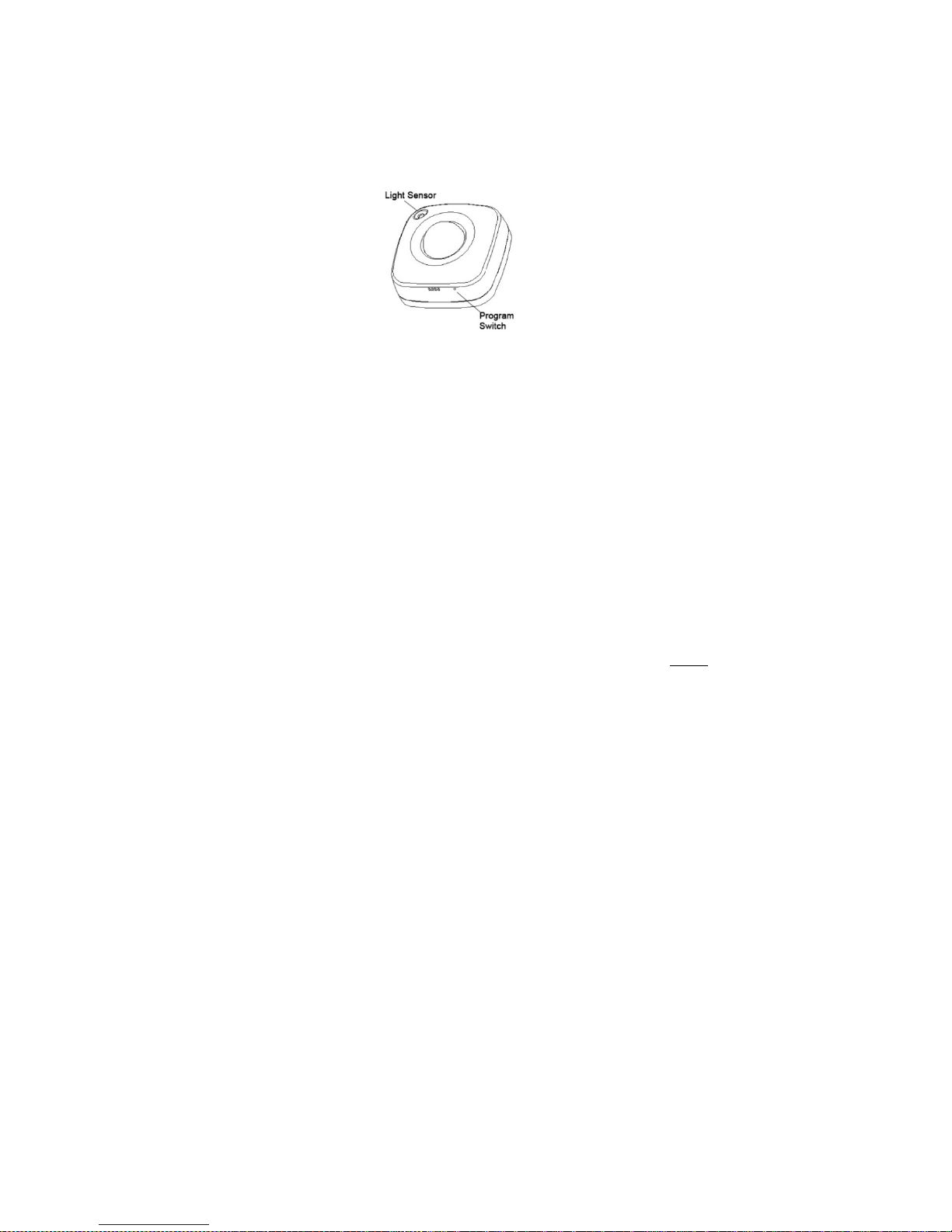
Figure 1: Milan Vortex Wireless Multisensor
Step 1: Release the cover tab to open the cover and insert the batteries in its compartment. The LED will
now begin to flash slowly
Step 2: Integrate the Milan Vortex Wireless Multisensor with a Milan Infoway
a. Ensure that the Milan Infoway is functional
b. Open Milan Infomap configuration tool in a web browser (see separate instructions for using
this software)
c. Click on the “Security” tab from the Milan Infomap menu
d. Click on the “Wireless Security” tab from the Milan Infomap menu
e. Click the “Add” button
f. Press the Program Switch (see Figure 1) at the bottom of the sensor twice in quick
succession
g. Check if this sensor has been added to the list of wireless devices in Milan Infomap (when
successfully added you will see the Product Name, Manufacturer, Product Type and the
Node ID)
h. If the sensor has not been added to Milan Infomap, please repeat steps f and g above
ensuring that the Milan Infomap is still in the Add mode in the Wireless tab
i. Should you ever need to remove this sensor from your Milan DLE, please follow the same
steps as above except select the “Remove” button in step e above
Step 3: Install Milan Vortex Wireless Multisensor in the desired place (use adhesive tape for affixing to
walls). You can now experience the benefits of Milan DLE offered by this product.
Page 6

5. Warranty Policy
This Limited Warranty offered to the original purchaser only applies to products purchased directly
from a Milanity authorized partner by the original purchaser. Milanity warrants this product for one
(1) year from the date of purchase with respect to defects arising from materials or workmanship,
with the exceptions as stated below.
This Limited Warranty does not cover damages resulting from misuse, accident, modifications or
alterations to the hardware or software, tampering, using the product in an unsuitable environment,
improper maintenance or failure to use the product as specified in the instructions.
All Rights Reserved. © 2015 Milanity. All non-Milan DLE brands and product names are trademarks or
registered trademarks of their respective companies. Product appearance and/or specifications are
subject to change without notice.
Page 7

 Loading...