

Page 1
Page 2

PROPERTY RIGHTS INFORMATION:
The trademark “mi-football” and all the developed mi-football (A4 name) products
with this label are registered, and belong to Mi-Dockspeakers Ltd. Our company
reserves all rights and will not allow reprinting. Other concerned trademarks all belong
to their proprietors. As to the constant update and development of the products, our
company reserves the right to change and rework our products without notice.
Mi-Dockspeakers Ltd and Foshan Lanchiya Digital Technology Co Ltd are co-partners
in the production of the A4 mi-football.
SAFETY INSTRUCTIONS
To ensure your safety and enjoyment, read and follow the safety instructions and
use in the directed manner. Keep this manual for future reference. We strongly
recommend that you play your A4 by using the remote control; we do not
recommend that you play your A4 by pressing on your iPod buttons whilst docked,
as this may cause the iPod slot to bend and break.
WARING: To prevent any fire or electrical hazards, do not
remove or dissemble any parts from this unit. Please ensure
that you use a qualified technician to service it.
• Do not expose the unit to rain, water or moisture
• Do not place liquid on or close to unit
• Do not place unit on or near an open fire such as candles or light
• Keep away from heat and dust
• Place unit on a stable and level platform
• Do not place any items on top of unit
• Do not use excessive force when pushing the unit buttons
• Do not attempt to pull the power cord from a distance to shut the power
• Secure all cords and connections and do not use pinched or defective one
• Unplug the power cord if the unit is left unused for extended periods
• Clean with a damp cloth only
• Operating temperature 0ºC-55ºC (32ºF~131ºF)
Page 3
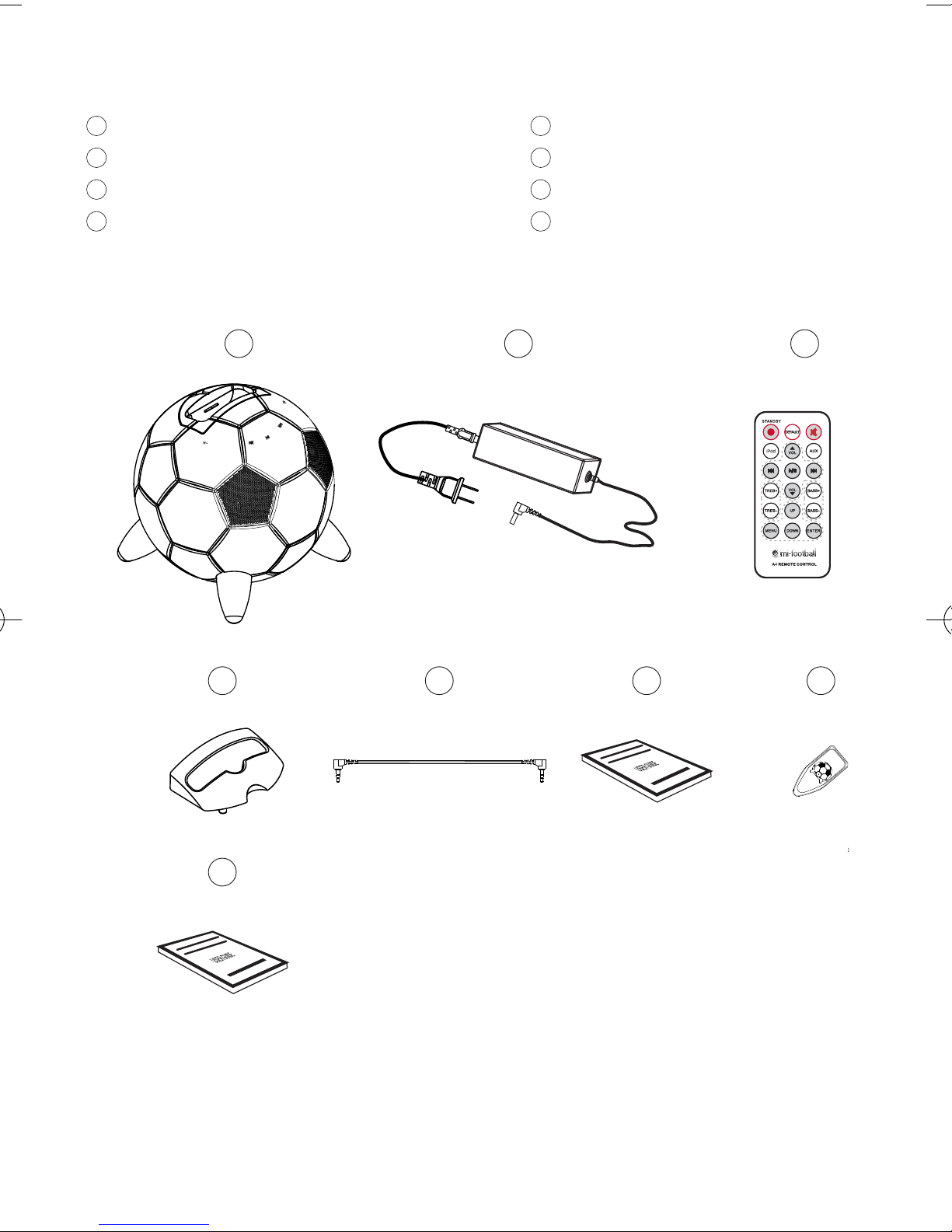
PACKAGE CONTENTS
1
Mi-football with upper docking station
2
AC Adaptor
3
Remote control
4
iPod cradle
1
5
Audio connection cable
6
User Guide
7
Lever handle
8
Warranty
2 3
4
8
5 67
Page 4
OPERATING INSTRUCTIONS
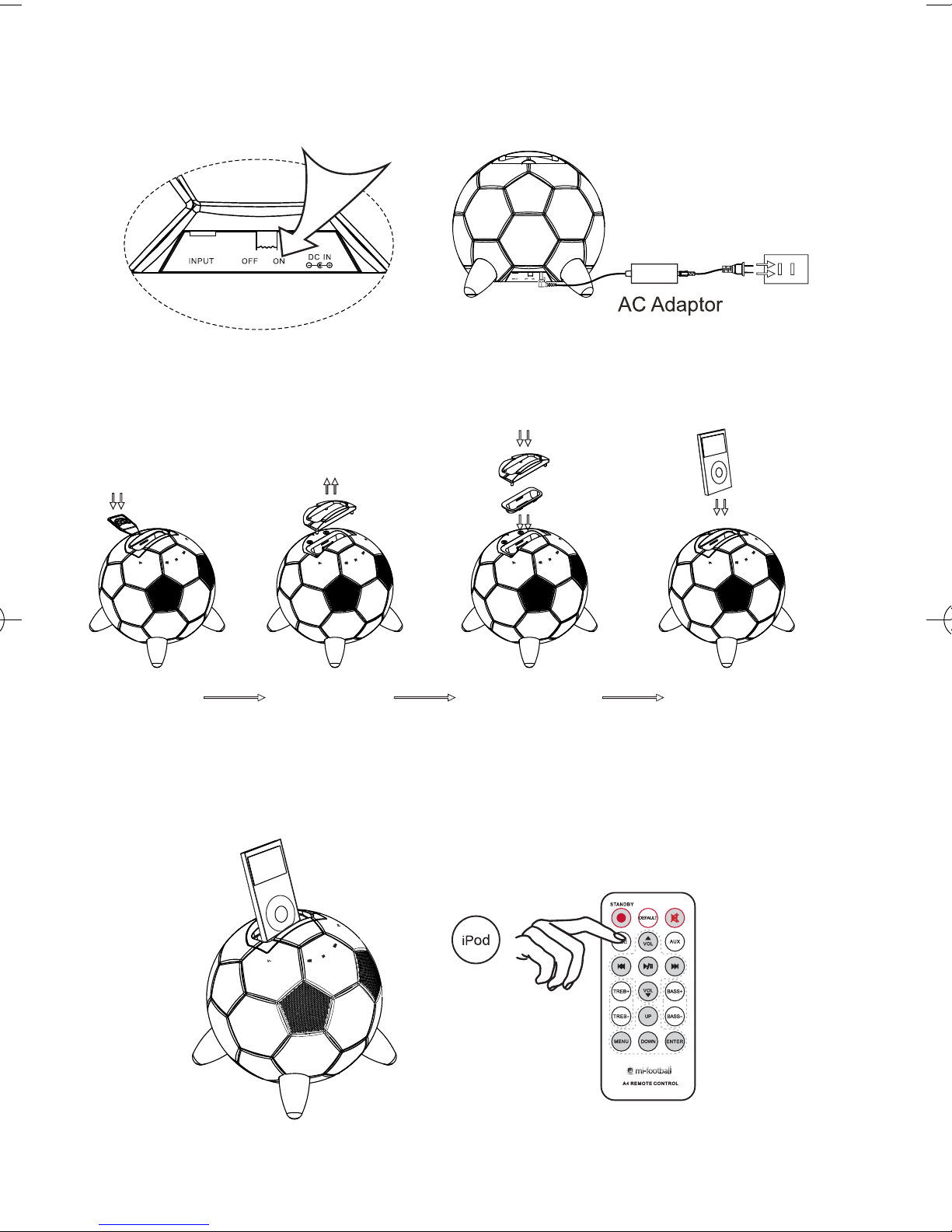
1. Connect mi-football with AC adaptor and switch the unit on.
2. a. Remove the iPod cradle by tools as per picture
b. Set up the iPod universal Dock on the top of football
c. Put the iPod cradle on the mi-football
d. Put the iPod on the cradle
a b cd
3. To listen to music from an iPod, connect the iPod to the mi-football, the
mi-football will choose iPod as current audio source automatically or press
the ‘‘iPod’’ button on the remote control to play the music
Attention: Make Sure your mi-football is on the ‘‘ON’’ position prior to docking
your iPod.
Page 5
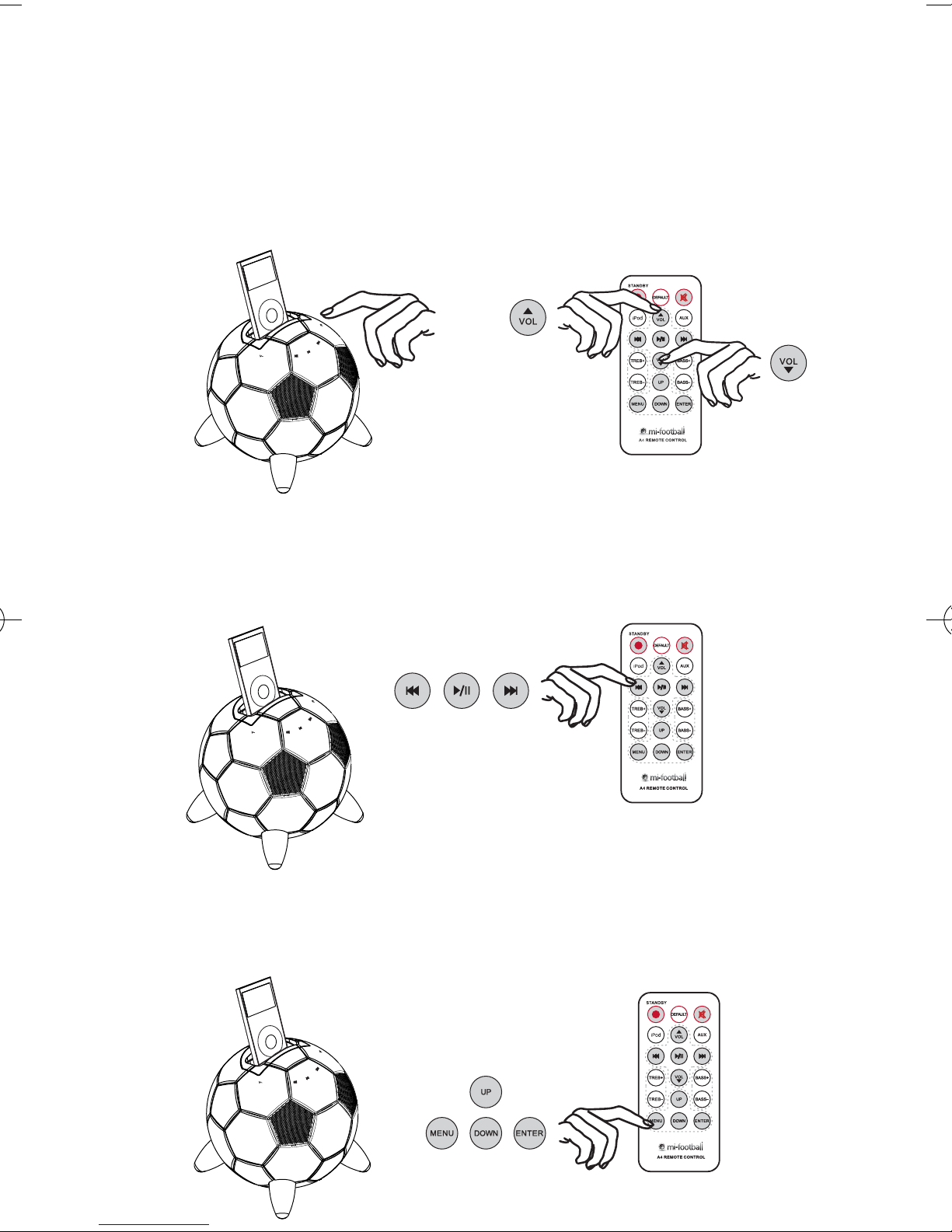
4. To adjust volume: touch the panel of the mi-football to reduce the volume
and the right panel to increase the volume. (NOTE: This is touch sensitive
and you do not need to press on the panels) alternatively press ‘‘VOL+’’/
‘‘VOL-’’ on the remote control. When the volume is adjusted to MAX or MIN
the light (at the front of the mi-football) will stop flashing.
5. To select music from the iPod, please press (left arrow, play/pause/ right
arrow) on the control panel on the mi-football or use the remote control to
select preview, play, pause and next. You also can fast forward and
backwards the song by long pressing the (right arrow/ left arrow) button.
6. If you want to navigate the menu on the iPod, press the ‘‘MENU’’ button
on the remote control to activate, press ‘‘UP’’/ ‘‘DOWN’’ to select then press
‘‘ENTER’’ to confirm.
Page 6
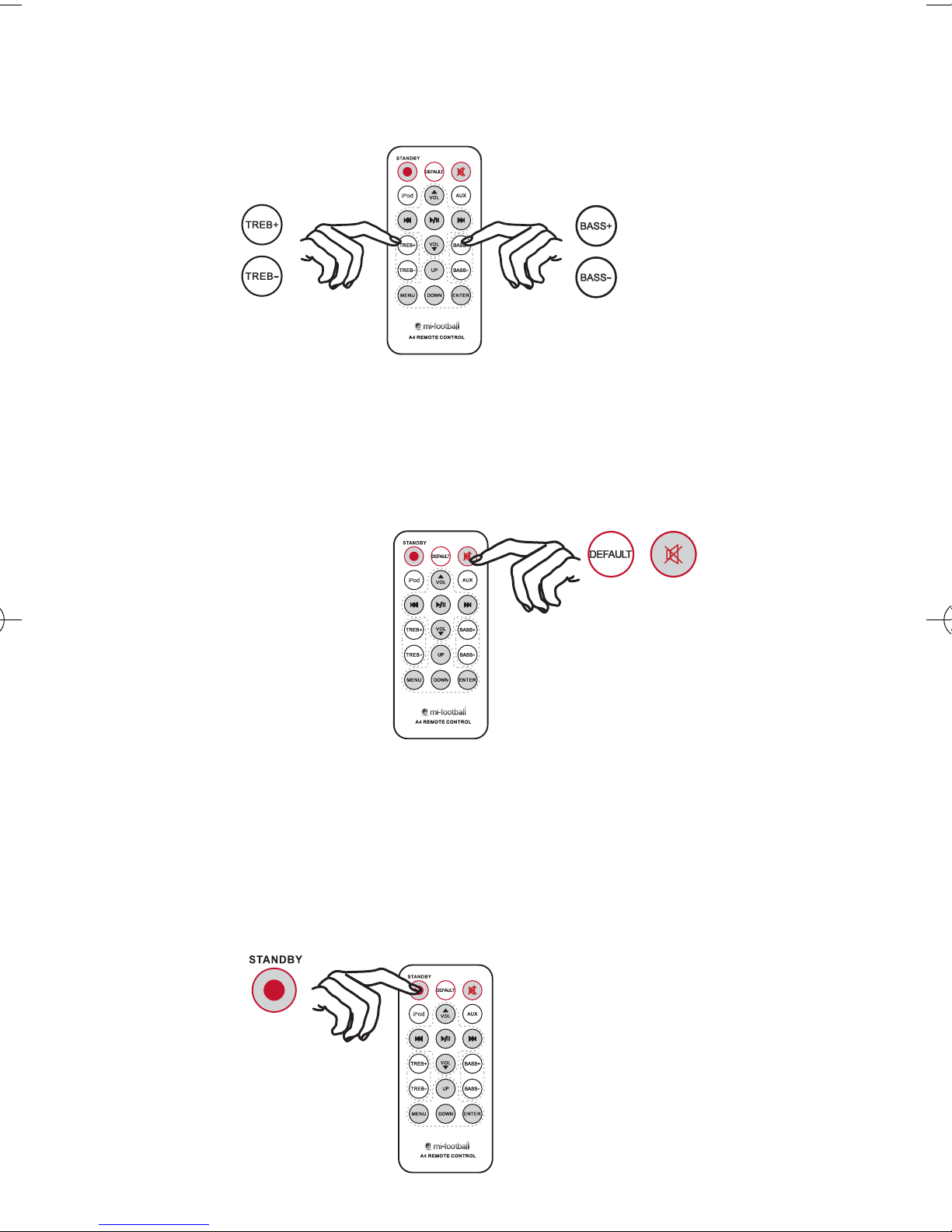
7. Press ‘‘TREB+’’/ ‘‘TREB-’’and “BASS+”/ ‘‘BASS- ’’ to adjust the level
of the ‘‘TREBLE and BASS’’.
8. Press the ‘‘DEFAULT’’ button to enter background music setting, to mute, press
the ‘‘(mute speaker) ’’ the light will keep flashing every 1sec Press ‘‘DEFAULT’’ or
“(mute speaker)’’ again to resume normal volume, you can also press any
volume button.
9. The ‘‘STANDBY’’ button will switch the mi-football on and will also put the unit
into standby mode. When the unit is in standby mode, the indication light will
illuminate for 1.5 second every 2 seconds
Page 7
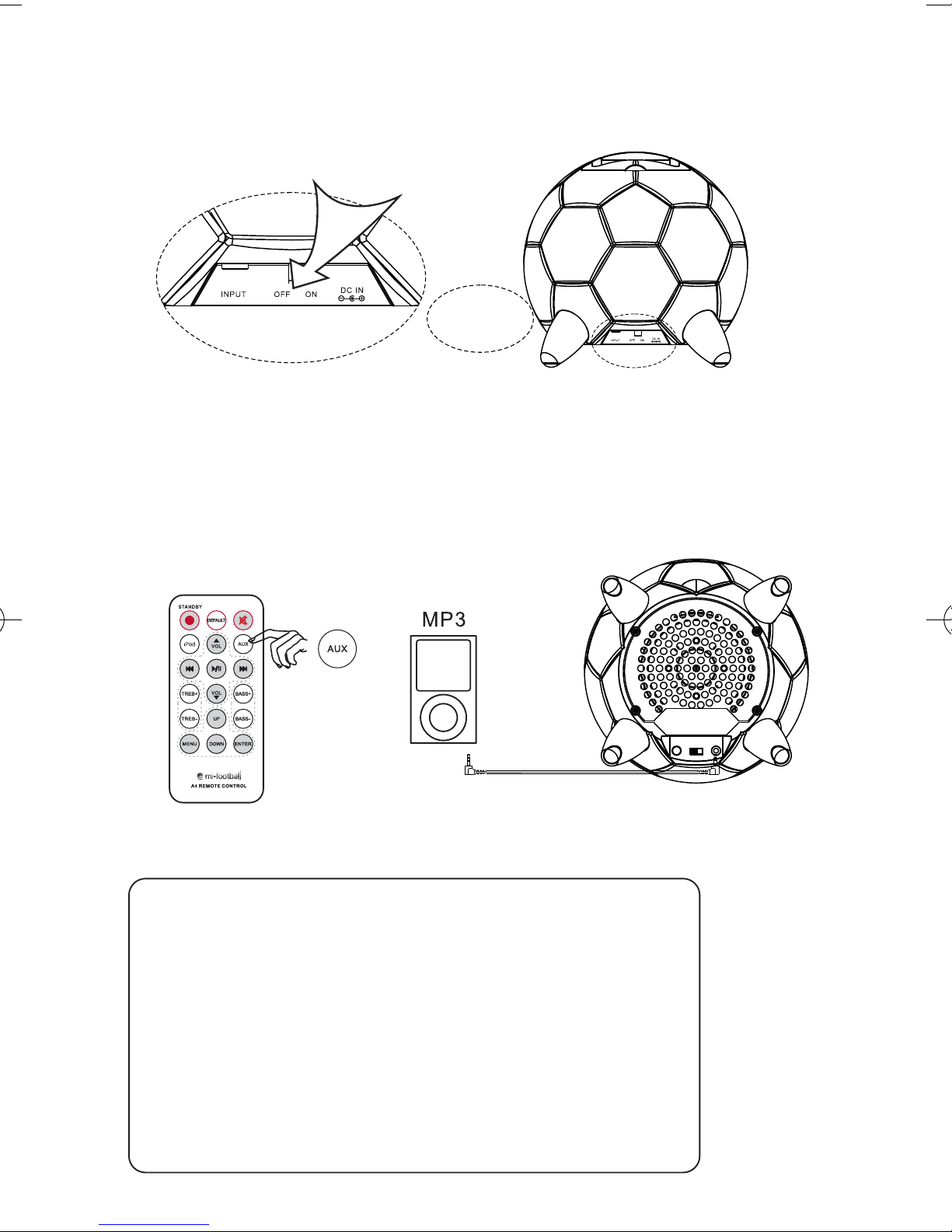
10. After using the mi-football, please flick the switch to the ‘‘OFF’’ position at the
back of the unit then take the iPod off.
11. Should you require listening to music from an external source (i.e. Laptop)
Connect it to the mi-football input jack and press the ‘‘ AUX ’’ button on the
remote. If you iPod is not connected, mi-football will choose the external
source automatically.
Product model: A4
Amplifier output power: Left/Right 4W x 2
Subwoofer 15W x 1
Amplifier input sensitivity: ≤ 400mV
Amplifier SNR: ≤ 82dB
Amplifier distortion: ≤ 0.7%
Frequency response: 50Hz ~ 20KHz
Speaker units: Tweeter ø35mm
Subwoofer ø94mm
Power Voltage: AC110 - 240V, 50/60Hz
≤
Page 8

mi-football is part of the Mi-Dockspeakers Ltd range.
Made for mi-Dockspeakers Ltd by Foshan LANCHIYA Digital Technology Co Ltd China
Sole Distribution in United Kingdom
Armour Home Electronics, Stortford Hall Industrial Park
Dunmow Road, Bishops Stortford, Hertfordshire, CM23 5GZ
MADE IN CHINA
www.armourhome.co.uk
 Loading...