

Page 1
YOUNG FOREVER
Bl ue to oth S pe ak er
US ER M AN UAL
Page 2

www .mifa life. net
LISTEN.MIFA
THE MUSIC P OWER TO
YOUR DEEP HE A R T !
JUS T ENJOY
Page 3

01 Warni ngs
◆Ple ase use a nd store t his pro duct a t room tem perat ure
◆Do no t expos e this pr oduct t o rain or w et cond ition s
◆Do no t throw a nd drop t his prod uct to av oid pro duct da mage
◆Do no t self- disma ntlin g ,repa ir and tr ansfo rm the pr oduct
◆Do no t use che mical s olven t clean ing the p roduc t
◆Ple ase don’ t arbit raril y disca rded or p laced t he lith ium bat tery
in th e fire in or der to avo id the r isk of ex plosi on
Eng lish
02 Pr oduct Feat ures
◎Wit h wirel ess Blu etoot h techn ology , s uppor t hands free fu nctio n
◎Sup port on e butto n Bluet ooth re conne ction
◎Pla y APE/ FLAC f ormat h igh qua lity au dio file s store d in SD ca rd
◎Pla y MP3/ WMA/ WAV forma t audio fi les sto red in S D card
◎SD c ard read er func tion a nd USB s ound ca rd.
◎Aut omati cally p ower off wh en ther e is no ope ratio n in 10 min utes in S D
car d mode, except f or Blue tooth m ode.
◎Sup port I OS sys tem rin gtone p layin g, other s are def ault to ne
Eng lish
Page 4
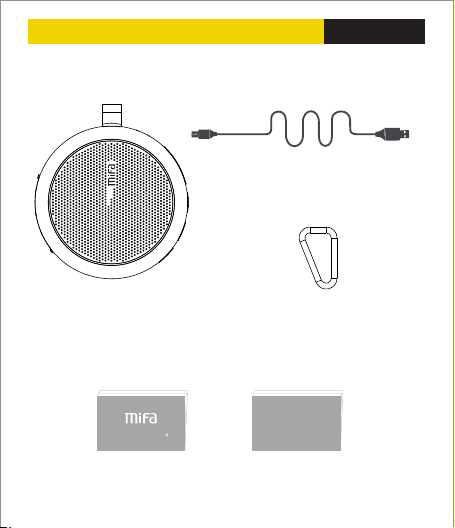
03 Pac ki ng Co nt ent
USB c able 1p c
Blu etoot h speak er 1pc Hoo k 1pc
Eng lish
Use r Manua l
Use r manua l 1pc
Warra nty Car d
War ranty C ard 1pc
Page 5
04 Key Functi ons
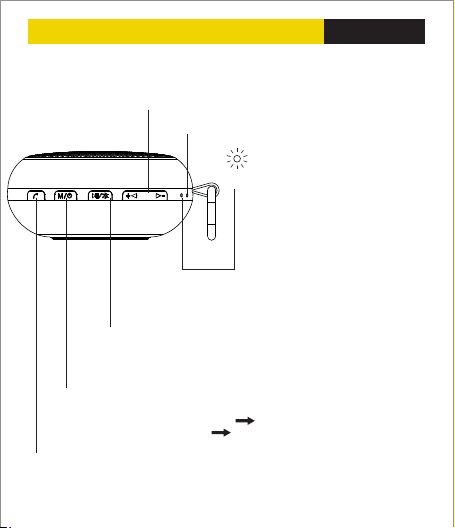
V-:P revio us—Sh ort pre ss to pre vious s ong/Pr ess and h old to de creas e the vol ume
V+: Next—S hort p ress to n ext son g/Pres s and hol d to incr ease th e volum e
Mic ropho ne slot
LED indic ator
Power on:
Blue light flashing,ready for Bluetooth
pairing,paired continuous blue.
Paus e:Blue sl ow flas hing
Play ing mod e:Blu e LED l ight fl icker ing
Max .volum e:Blue L ED lig ht flas hing
Char ging:Co ntinu ous red , die out
whi le full c harge d While ou t of
pow er, the re d light f lashi ng
Play/Bluetooth Key
Pause/Play Key
Press and hold to disconnect with the current Bluetooth device,short press
again to reconnect with the device that connected last time.
Power on/Mode key:Press and hold for 3 seconds to power on/off
Short press enter into Bluetooth mode TF (Micro SD)card mode (Micro SD card
requires an SD card inserting first) USB sound card mode Switch in
turn(Connecting with computer with the USB cable)
Call answer key: When call coming, short press to answer or hang up the call,
press and hold to reject the call.
Eng lish
Page 6
05 In te rf ace fun ction
Eng lish
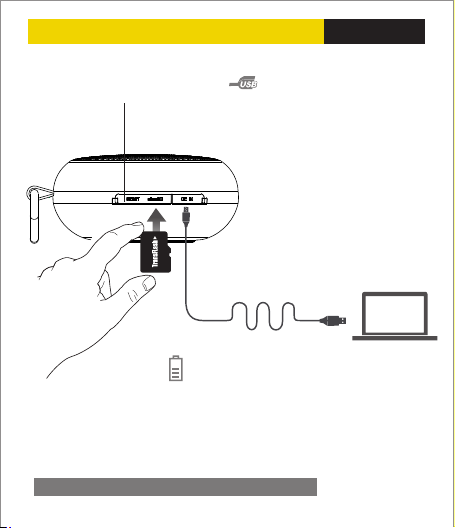
Bui lt-in sl ot:
Res et the sp eaker
Charging:To charge the battery, connect the power
supply to the speaker with a DC5V~500mA adaptor ,
or connect to USB outlet.
Mic ro SD car d slot
Whe n the spe aker po wer on, inser t micro S D card ,ther e is a voice p rompt ”SD c ard
ena bled”,th en it wil l play th e music s tored i n micro S D card.
If ne eded, short p ress”M ” key to s witch t o other m odes.
Data transfer
When the speaker power off, insert
micro SD card, connect the speaker to
computer ,it says” Card Reader
enabled” then can copy or delete files
from the micro SD card.
USB sound card
When the USB cable connected to
the computer, short press “M”key
switch in turn until voice prompt,it
turns to USB sound card mode, then
the music in the computer can be
played.
Page 7
06 Bl ue too th C onn ec tio n
Dev ices
Mif a_ F1
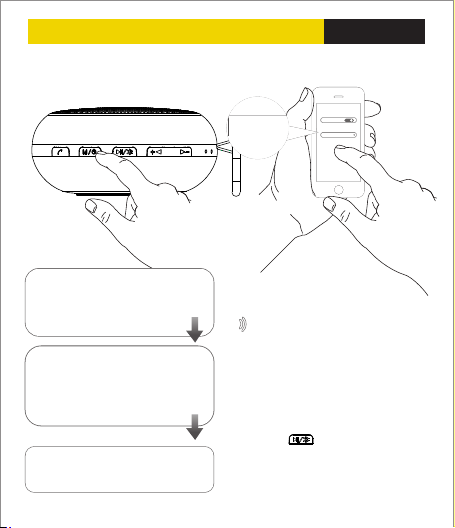
Pair ing wit h the dev ices th at with B lueto oth fun ctio n.
Powe r on the sp eaker a fter “Di ngdon g”sound a nd “Bluet ooth
ena bled”,bl ue ligh t flick erin g ,allo w
pai ring a Bl uetoo th devi ce.
Turn o n the Blu etoot h devic e, set it
to “disco ver” the M ifa_ F1,th en
loc ate the B lueto oth dev ice lis t,
sel ect the d evice n amed” Mifa_ F1”
and t hen sta rt to con nect.
Whe n pairi ng is com plete , b lue
LE D light r emain s steadi ly on
Eng lish
Bluet ooth
OFF
Bluetoot h
Devices
Mifa_F1
Disconne cted
Wir eless r ange up to 1 0M,
env ironme nt caus es the di ffere nce.
Notes:
1,The default passward is “0000”
2,The speaker will auto-connect the last
paired device when it powers on.
3,If want to connect other devices, press
and hold “ “to disconnect first and
then the speaker is discoverable and ready
to pair a new device.
Page 8
07 Techn ique Par amete rs
Eng lish
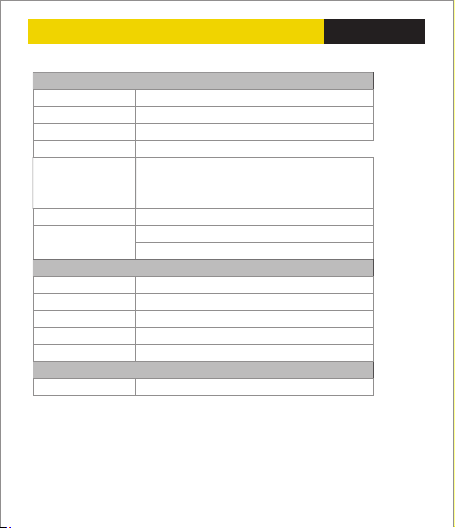
Bas ic param eters
Spe aker ty pe
Spe aker sy stem
Act ive/Pa ssive
Ope rate mo de
Mai n Featur es
Sto rage ty pe
Powe r suppl y
Techn ique Par amete rs
Loud speak er
Out put pow er
Freq uency R espon se
Blu etoot h versi on
US B speci ficat ion
Play ing fun ctio n
File f ormat
Prod uct siz e:W81×D 81×H3 8mm
Prod uct wei ght:202 g(inc ludin g the lit hium ba tter y)
Por table B lueto oth Spe aker
Mon o
Act ive
But tonBut tonBut ton
Wire less Bl uetoo th musi c playi ng,Ha nds fre e,
One b utton Bl uetoo th reco nnect ion, M icro SD
card m usic pl aying , USB so und car d, Card r eader
Max .32G B micro S D card
Bui lt-in 1 100mAh l ithiu m batte ry
DC5 V-500 mA USB a dapto r
2 inc h + Suspe nded pa ssive r adiato r
4Ω 3W
80H z~18K Hz
2.1 +EDR
US B2.0 co mpati ble wit h USB1 .1
AP E、FLAC、 WAV、WM A、MP3
Page 9
08 FAQ
Eng lish
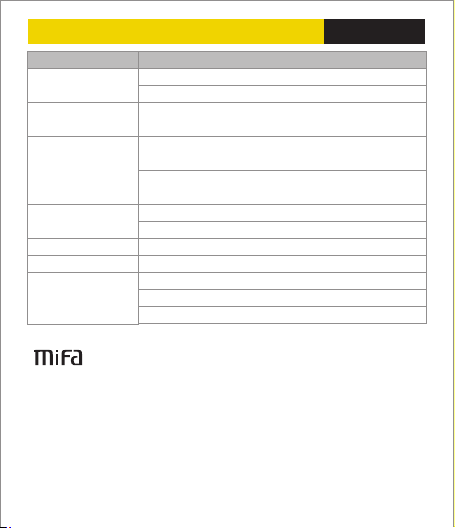
Prob lems What t o do
Pair ed Blue tooth
dev ice wil l not con nect
Mus ic play ha ng up
File fo rmat fa ult
Spea ker in dicat es a
conn ecti on ,but i s not
play ing mus ic
Spea ker wi ll not tu rn on
Syst em halt ed
Bit R ate
MI FA INNO VATIO NS LLC H otlin e :4007- 881-8 99
www. mifal ife.n et Desi gned in U S Made i n China
©20 14 MIFA al l righ ts reser ved .T he prod uct and t he pack agin g trade marks o r
regi stere d trade marks o f MIFA I NNOVAT ION S LLC in t he unite d state s or othe r
cou ntrie s .All ri ghts re serve d . Othe r trade marks a nd trad e names a re regi stered
mar k of thei r respe ctive o wners . M IFA INN OVATI ONS L LC for any e rrors t hat may
occ ur in thi s manua l does no t under take a ny respo nsibi lity. Th e infor matio n
con taine d in this m anual a re subj ect to ch ange no p rior no tice.
1.R estar t the spe aker
2.I f need pa sswor d , pleas e input “00 00”
Plea se chec k the Blu etoot h conne ction v alid di stanc e or if
some thing c ut off th e signa l
1. Che ck if the S D card f ormat i s right ( the spe aker ju st can
supp ort FAT 32 fo rmat S D card )
2.Ch eck if th e music f ile for mat sto re in TF ca rd is rig ht ,the
spea ker ju st can su pport A PE/ FLAC /WAV/W MA/M P3 for mat
file s
1.Ch eck the v olume o f speak er
2.Ch eck if th e speak er is in m ute or pa use
Chec k if the ba tter y is low
Res et the sp eaker
MP3:8 Kbps- 320Kb ps WMA:3 2Kbp s-384 Kbps
APE:6 00Kb ps-14 00Kbp s FLA C:600K bps-1 400K bps
WAV:32K bps- 1200Kb ps
 Loading...