

Page 1
MI FA INNO VATIO NS LLC
www. mifa. net Des igned i n USMad e in Chin a
Cop yrigh t © MIFA. All r ights reserv ed.
MIFA, t he MIFA log o and oth er MIFA mar ks are al l owned a nd registe red by MIFA INNO VATIO NS LLC. Al l other
tra demar ks are th e prope rty of thei r respecti ve owne rs. The in formatio n conta ined he re is sub ject to c hange
wit hout pr ior not ice.
A10
SPE AKE R
US E R MA N UA L
Page 2

01 - 10 English
Warnings
01
Engl ish
Table of Contents
11 - 19 日本語
20 - 29 Deutsch
30 - 39 Français
40 - 49 Español
50 - 59 Italiano
◆To ensure p roper u se and troub le-free o perat ion, pleas e caref ully re ad this user m anual fi rst.
◆For the first us e, a full c harge i s rec ommen ded.
◆Ple ase use and store the p rod uct at ro om temp eratu re.
◆Do no t throw a nd drop the pr oduct t o avoid dama ges.
◆Do no t expose the pro duct to fi re, high tem perat ure, direc t sunlight, etc.
◆Do no t use org anic so lvent s or othe r chemi cals to c lean the pro duct.
◆Do no t allow s mall pa rticles t o get int o the produc t.
◆Ple ase kee p volum es of the s peaker mo derat e to av oid tem porar y or perman ent hea ring impairmen t.
◆Do no t disse mble th e produ ct, or make a ny modi ficati ons to th e struc ture or a ny pa rts of it.
◆Keep th e product out of c hildren’s re ach.
Page 3
Product Features
02
◎Impressively cl ear and f ull-r ange so und
◎Automatical ly conn ects to the last -connec ted dev ice
◎Aux-in j ack and 3 .5mm au dio cab le for non-B lueto oth dev ices
◎Bui lt-in M ic for ha nds-free c alls
◎Sup ports up to 3 2 GB Micro- SD card
◎Sup ports MP3 , WMA,WAV, FL AC, APE
◎Automatical ly turns off after 10 minutes if t here is n o manual operatio n and no de vice connected
Engl ish
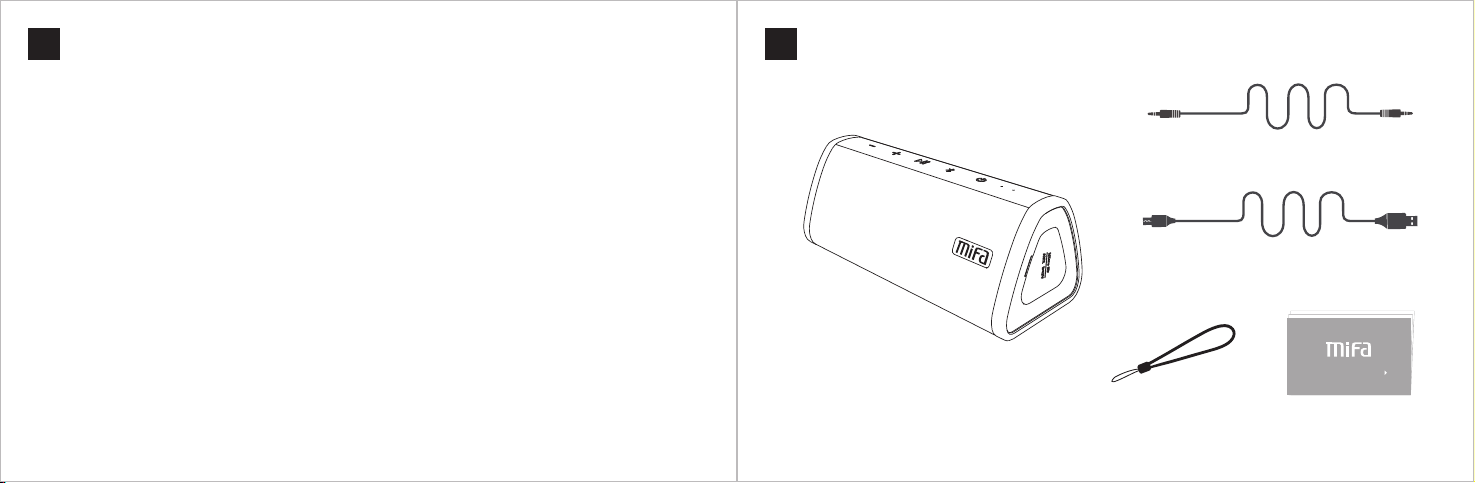
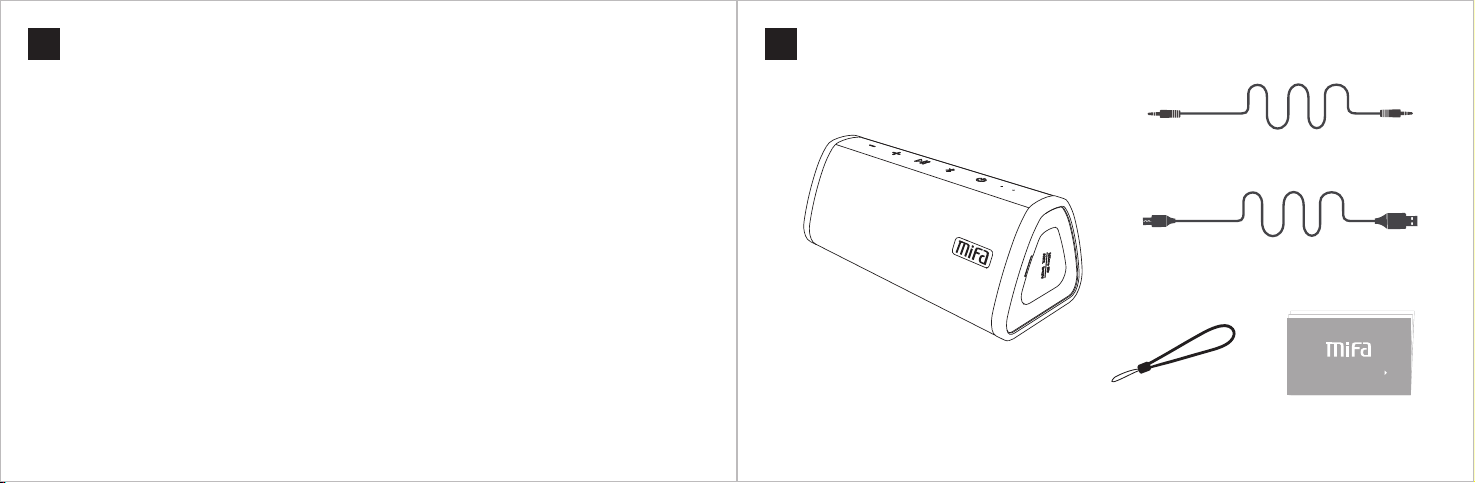
Packing Contents
03
Engl ish
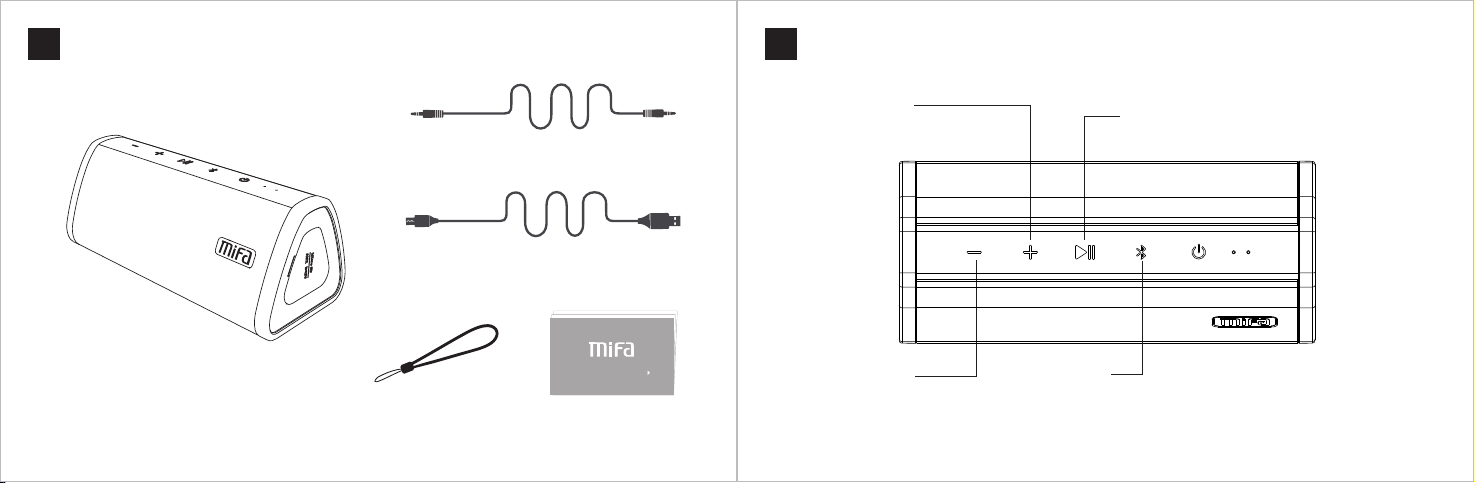
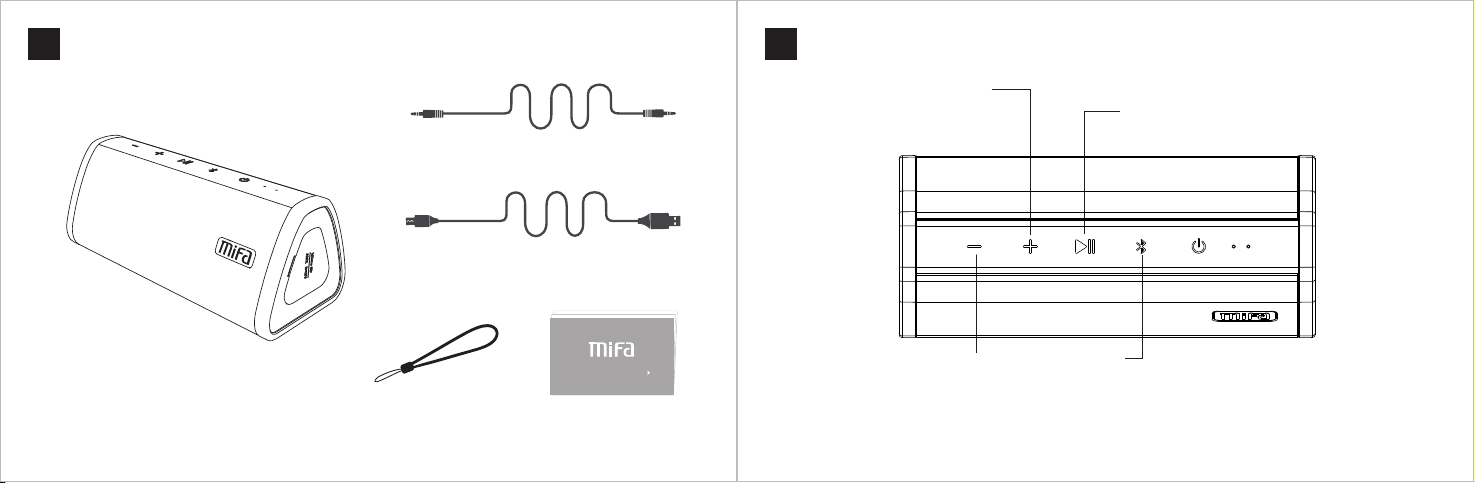
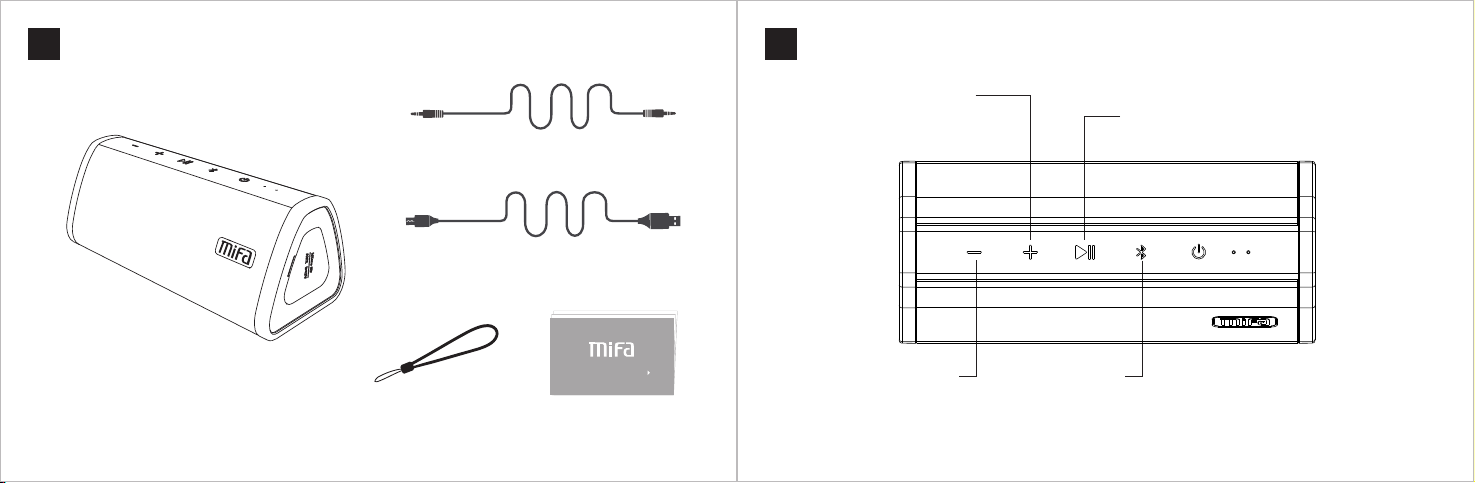
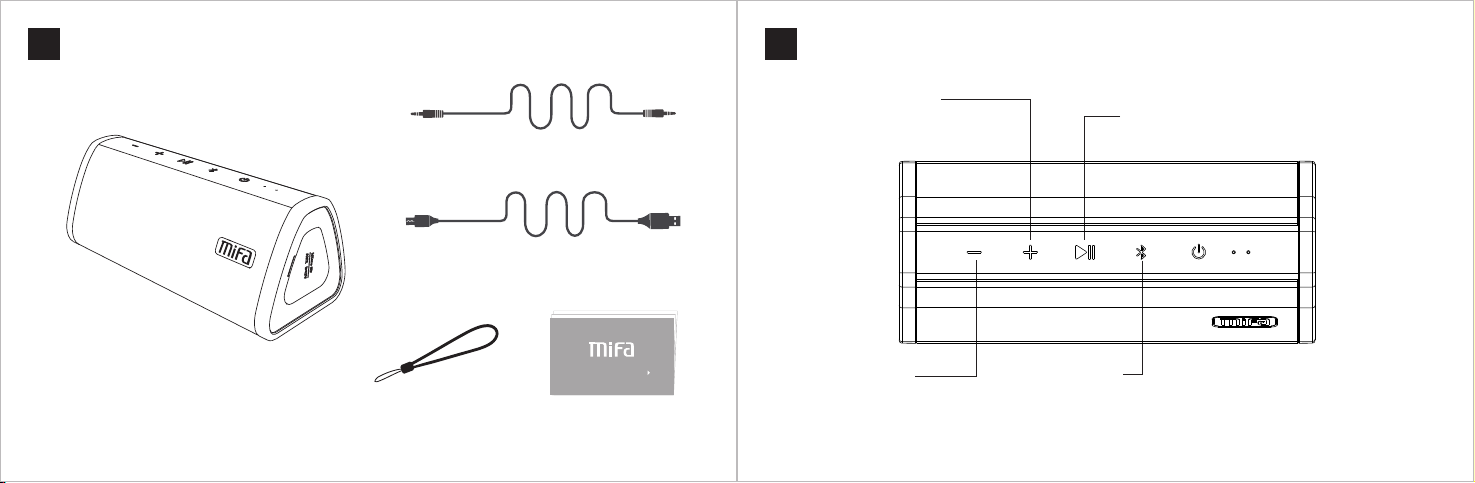
1 × 3.5 m m Audio C able
1 × Mi cro USB Cable
Use r Manua l
1 × A10 B lueto oth Spe aker
1 × Det achab le Stra p
1 × Use r Manual
Page 4
Keys Functions
04
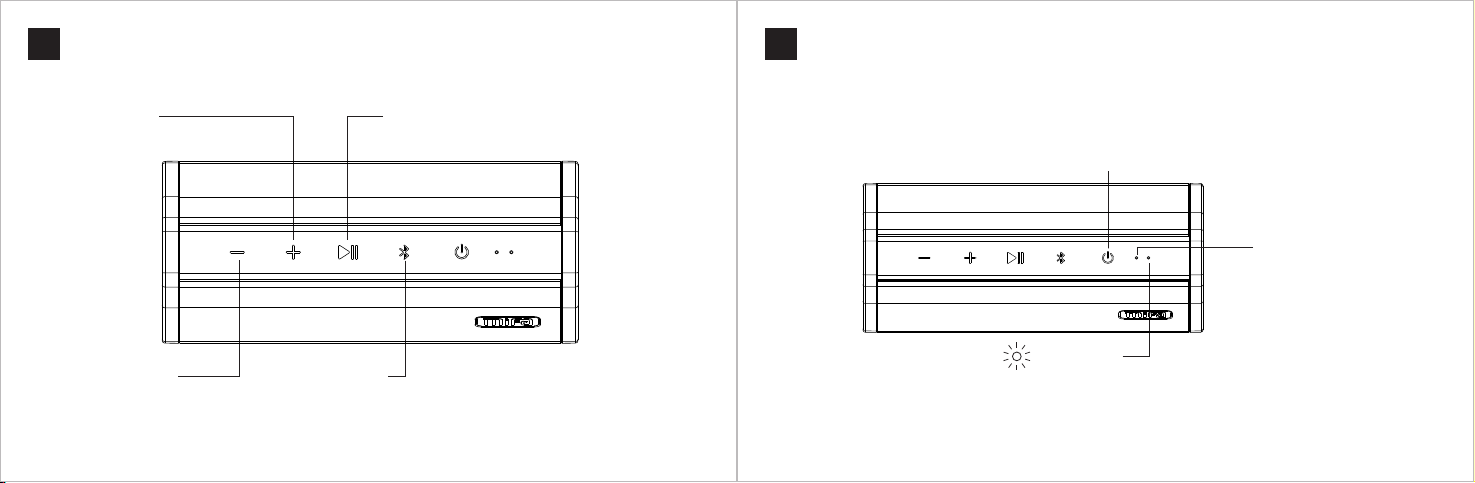
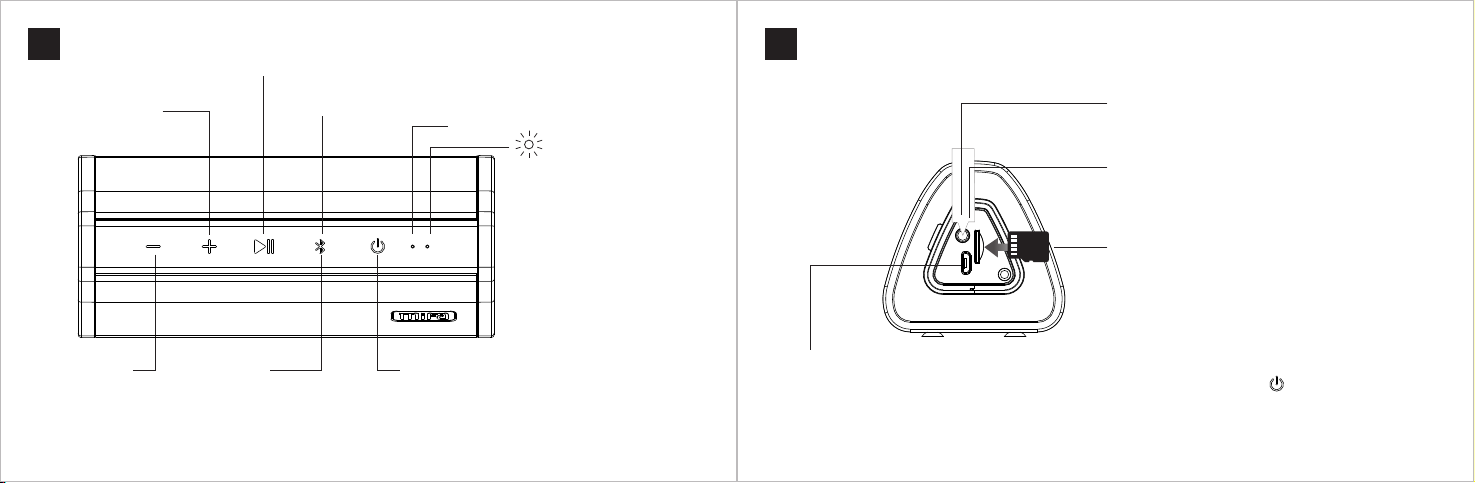
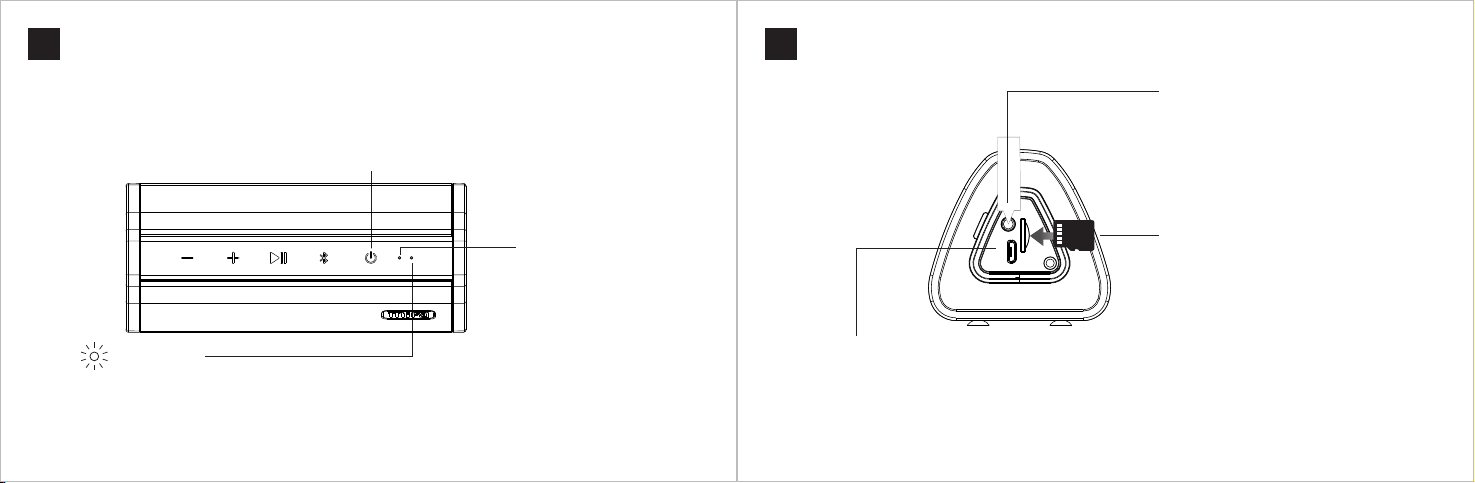
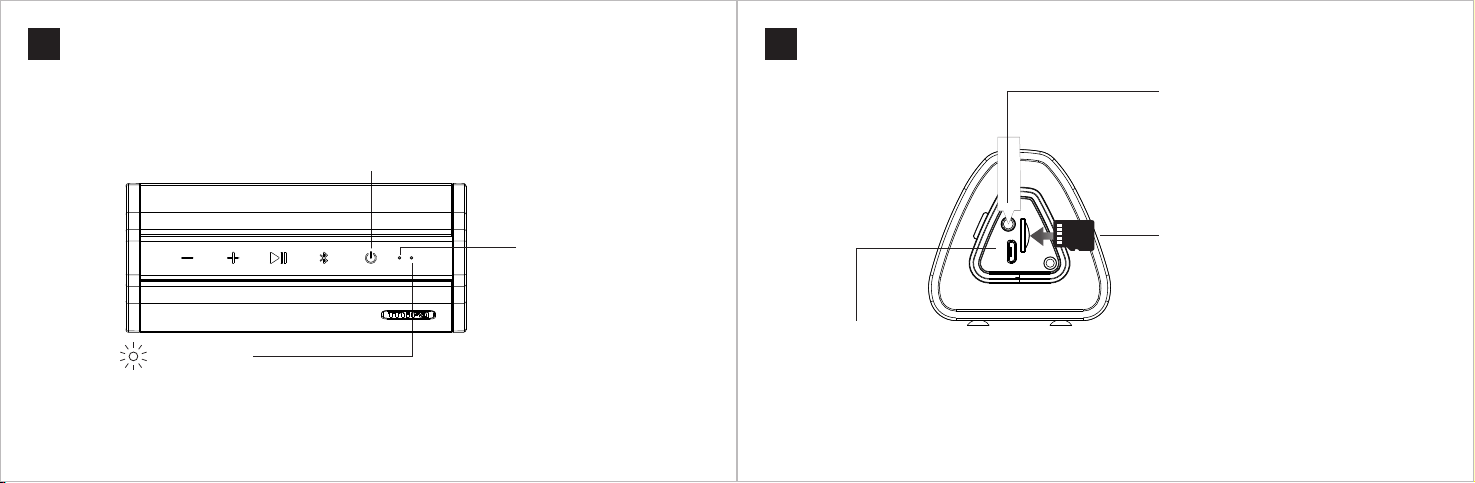
Volu me Up But ton
Sho rt pres s to incr ease th e volum e
Lon g press to p lay the n ext so ng
Play / P ause Bu tton
Sho rt pres s to paus e or play
Engl ish
Keys Functions
05
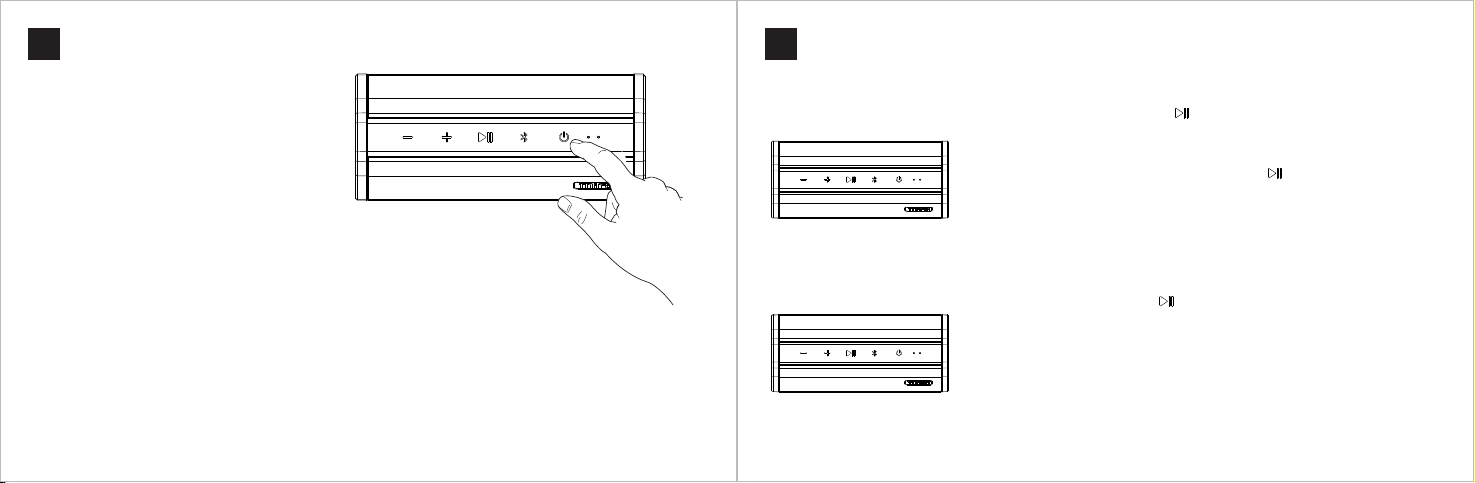
Powe r Butto n
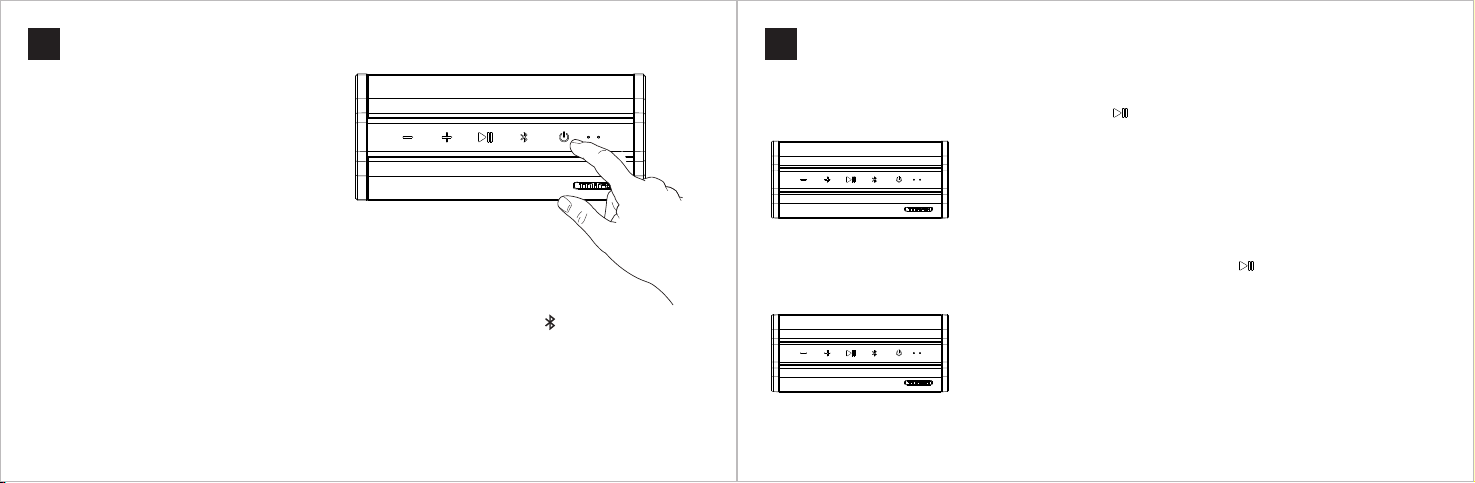
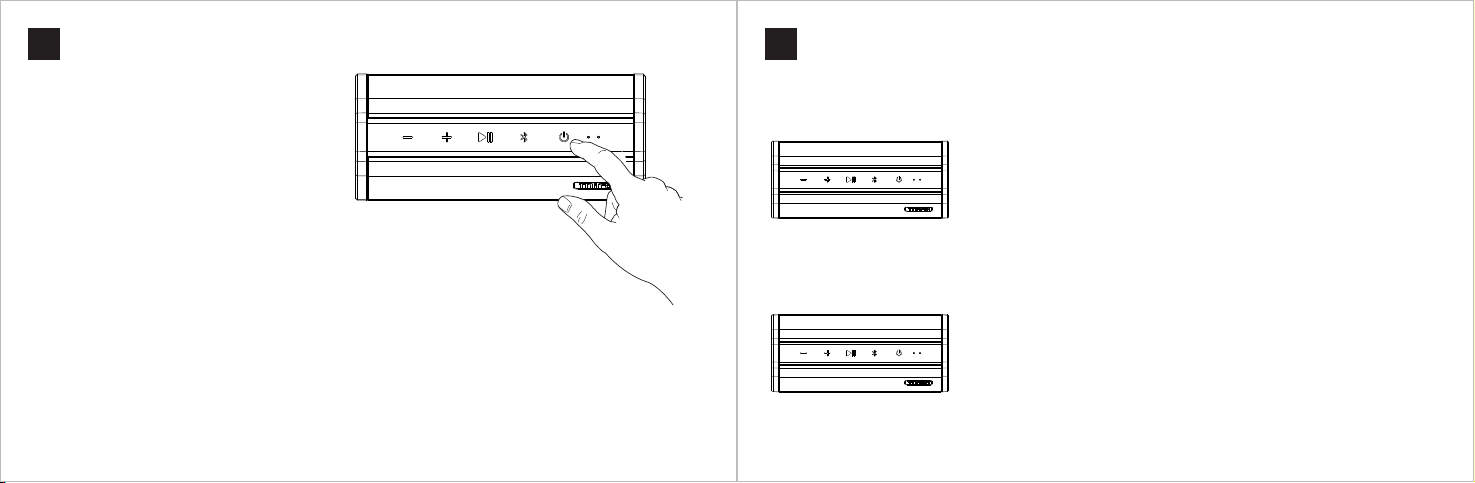
• Pres s and hol d the but ton for 2 s econd s to turn o n or turn o ff
• Sho rt pres s to swit ch the mo de in the p owere d-on st atus
• • If it i s inser ted wi th a Micr o SD card o r an audi o cable , modes s witch i n turns : Bluet ooth mo de
→ Mic ro SD car d mode or A ux-in m ode
• • If it i s inser ted wi th a Micr o-SD ca rd and an a udio ca ble, mo des swi tch in tu rns: Bl uetoo th
mod e → Micro S D card mo de → Aux- in mode
Engl ish
Bui lt-in M ic
Volu me Down B utton
Sho rt pres s to decr ease th e volum e
Lon g press to p lay the p revio us song
Blu etoot h Butto n
• When a c all com ing, sh ort pre ss to ans wer or ha ng up; lo ng pres s to reje ct
• Pres s and hol d the but ton for 2 s econd s to disc onnec t the pai red dev ice. The
spe aker en ters pa iring m ode. To rec onnec t it to the l ast-c onnec ted dev ice, sh ort
pre ss it.
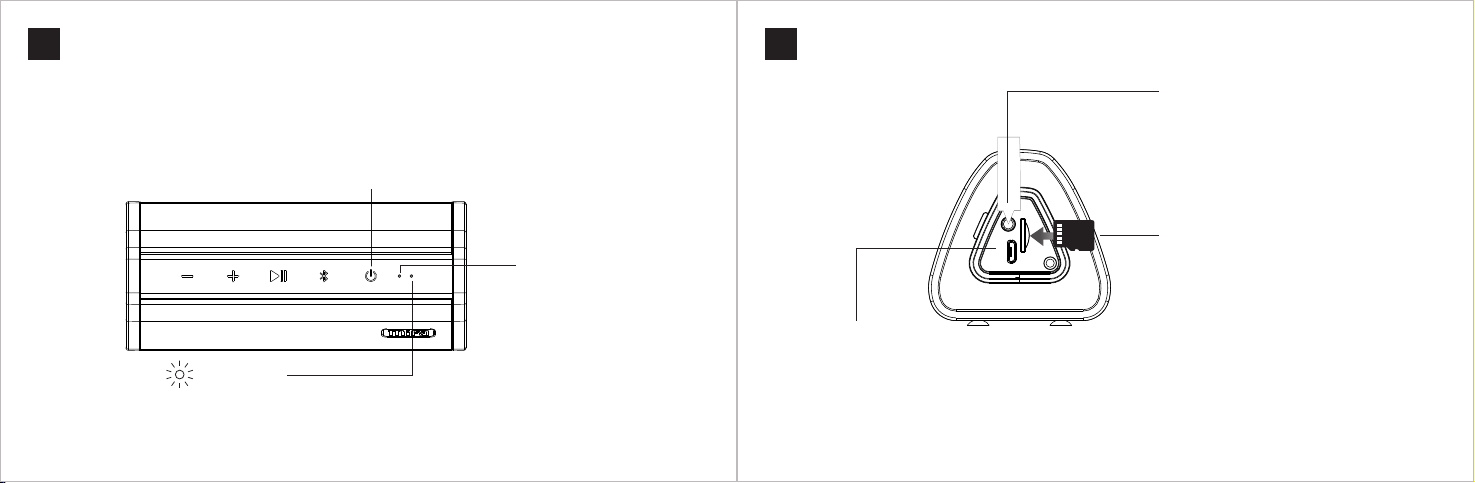
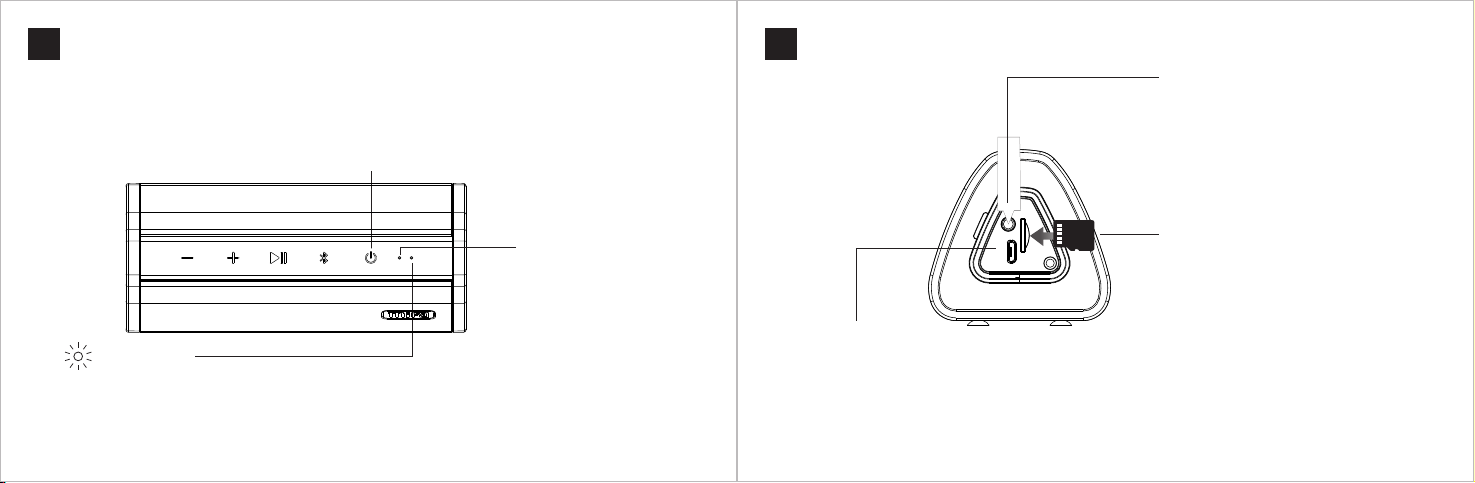
LED I ndica tor
Whi te ligh t flash es afte r power ed on
Whi te ligh t stays o n after c onnec ted to a de vice
Whi te ligh t stays o n while p layin g
Whi te ligh t flash es slow ly when p layin g is paus ed
Whi te ligh t flash es rapi dly at th e max / min v olume
Red l ight st ays on wh ile cha rging ; when fu lly cha rged, re d light g oes off
Page 5
Ports Functions
06
Engl ish
Bluetooth Connection
07
Engl ish
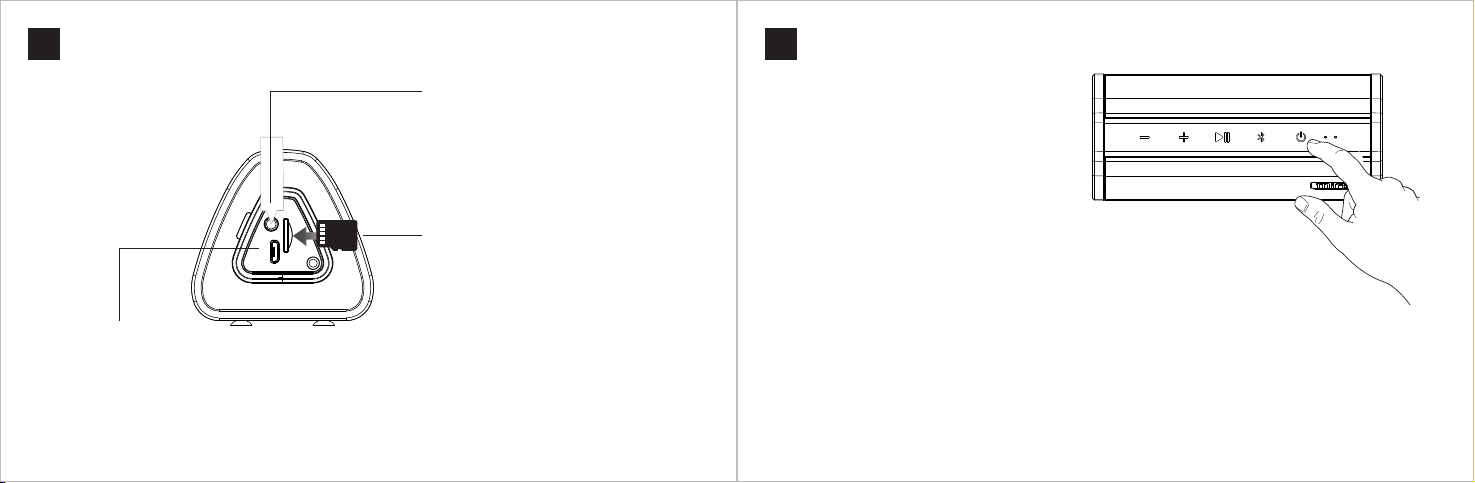
Aux -in jac k
• In the powered- on stat e, inse rt an audio cabl e.
It will b eep to in dicate a suc cessf ul conn ectio n.
• To reset the s peaker, press t he reset but ton in
the j ack wit h a needl e.
MICRO
SD
Mic ro USB po rt
• Cha rging : use a DC 5V / 1 A adaptor or c onnec t it to a com puter t o charge the s peake r
• Dat a trans missi on: in th e powered- off sta te, ins ert a Mi cro-S D card an d conne ct it to a co mpute r. Press
and h old the p ower bu tton for 2 s econd s to turn it on. Then y ou can ma nage mu sic fil es in the c ard on th e
com puter.
Mic ro SD Car d Slot
In the powered- on stat e, inse rt a Mic ro-SD c ard
int o the slo t. It will pl ay the mu sic stored i n the
car d autom atica lly aft er two be eps.
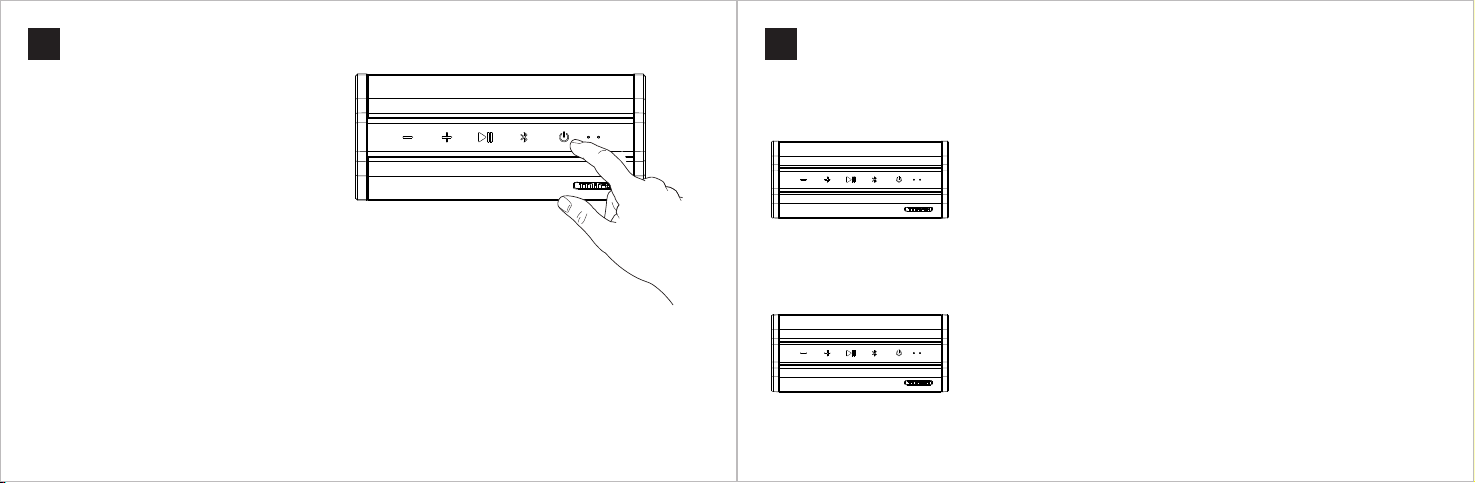
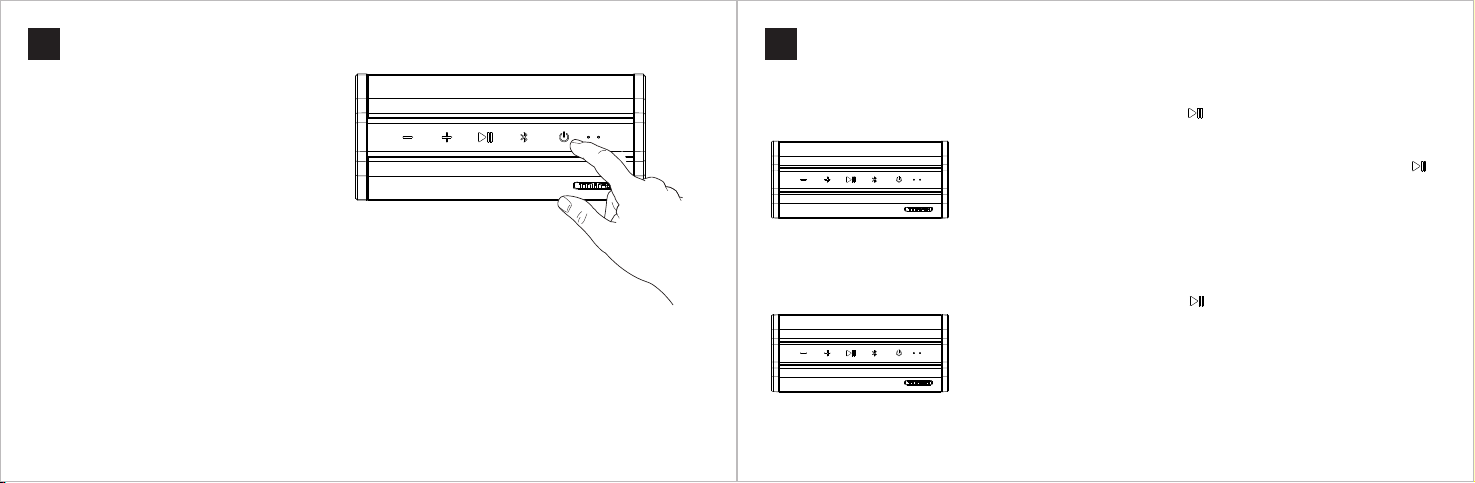
1. Turn o n the spe aker
Pres s and hol d the pow er butt on for more than 2
sec onds un til it is sues a so und of Di ngDon g and
the n a sound o f Ding with a fl ashin g white L ED
lig ht. It e nters the pa iring m ode.
2. Co nnect i t to your d evice
Turn on th e Bluet ooth of your d evice a nd sele ct
Mifa_A10 . Once th e conne ction i s compl eted, i t
wil l beep an d the whi te LED li ght wil l stay on .
The sp eaker wil l conne ct to the l ast-c onnec ted •
dev ice aut omati cally o nce the d evice 's
Blu etoot h is turn ed on.
Oth er Ins truct ions
To conn ect to an other d evice , press and ho ld the •
Blu etoot h butto n for 2 seconds. The p aired one wi ll be
dis conne cted an d the spe aker will e nter the .pai ring mo de
To reconne ct it to th e last us ed devi ce, sho rt pres s the •
Blu etoot h butto n.
Page 6
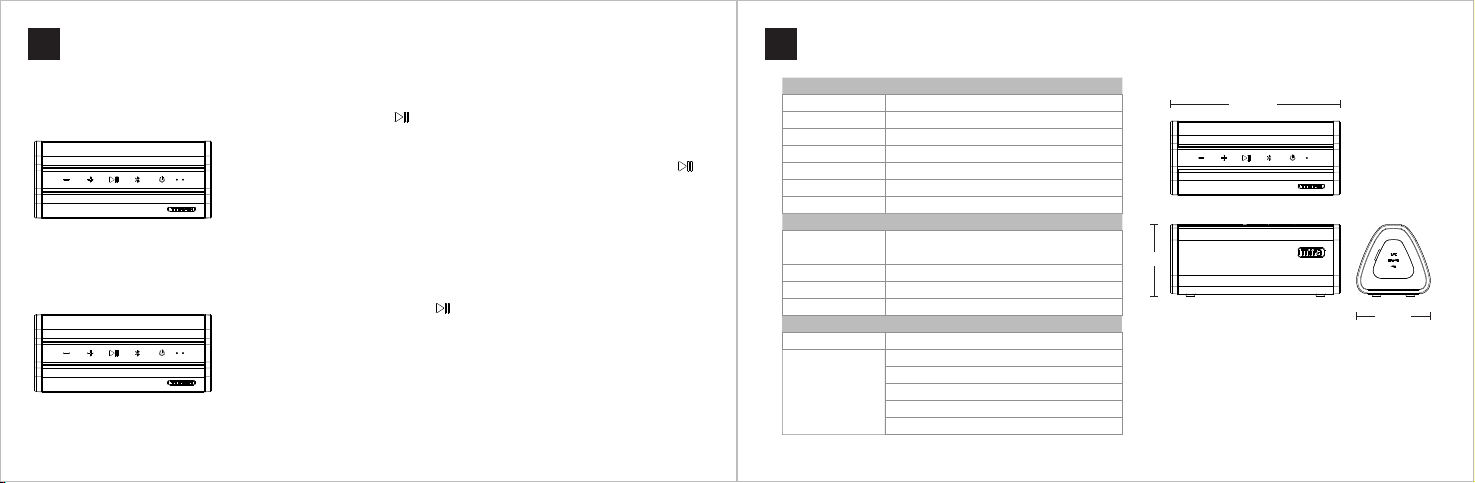
True Wireless Stereo Function
08
1. Se t up the TW S system
Tur n on two A1 0 speak ers and m ake sur e no devi ce conn ects w ith eit her of th em. Long
pre ss one sp eaker 's butt on and th ere wil l be a soun d of "Don g" to ind icate p airin g
is ta king p lace. On ce pair ing is c omple te, ther e will be a s ound of " Dong Do ng".
*For th e first t ime of se tting u p the TW S syste m, the sp eaker y ou pres s the but ton
on wi ll work a s the mai n speak er and th e other a s the dep enden t one.
2. Pai r two TWS s peake rs with a B lueto oth dev ice
Spe aker 1
Spe aker 1
Sel ect Mi fa_A1 0 in the Bl uetoo th sett ings me nu of the B luetoo th dev ice. The re will be
a sou nd indi catin g a succe ssful c onnec tion an d the blu e LED ind icato r keeps o n.
3. St op the TWS
Lon g press ei ther sp eake r's but ton to di sconn ect it wi th the ot her one .
Tips
1. The t rue wire less st ereo fu nctio n suppo rts on ly 2 spea kers.
2. To set up t he TWS s ystem b etwee n two A10 s peake rs, ple ase mak e sure ne ither o f them co nnec ts to a
Blue tooth d evice .
3. Af ter the f irst co nnect ion, th e main sp eaker w ill ke ep work ing as th e main sp eake r and the d epend ent
one wi ll kee p work ing as th e depen dent on e in the fu ture con nect ion.
4. Af ter set ting up t he TWS sy stem, t he depe ndent s peake r's blu e LED ind icato r keep s stead y and the
main o ne's LE D indic ates yo ur oper ation .
5. Af ter the T WS syst em is set u p succe ssful ly, you ju st need t o opera te eith er spea ker. The o ther on e will
do the s ame ope ratio n simul taneo usly.
Engl ish
Specifications
09
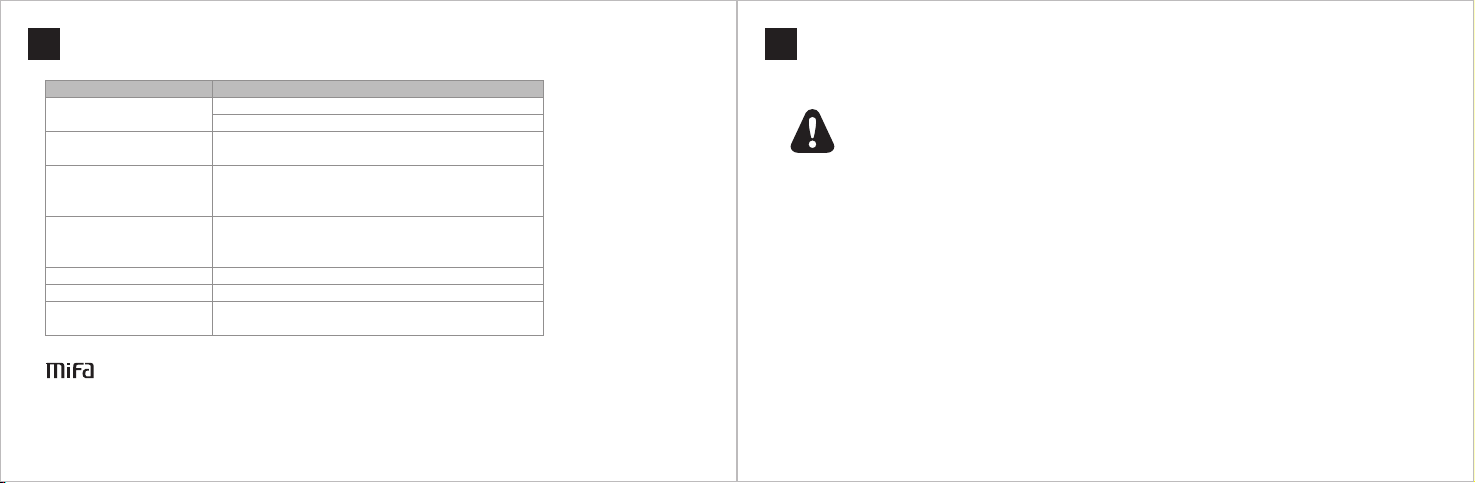
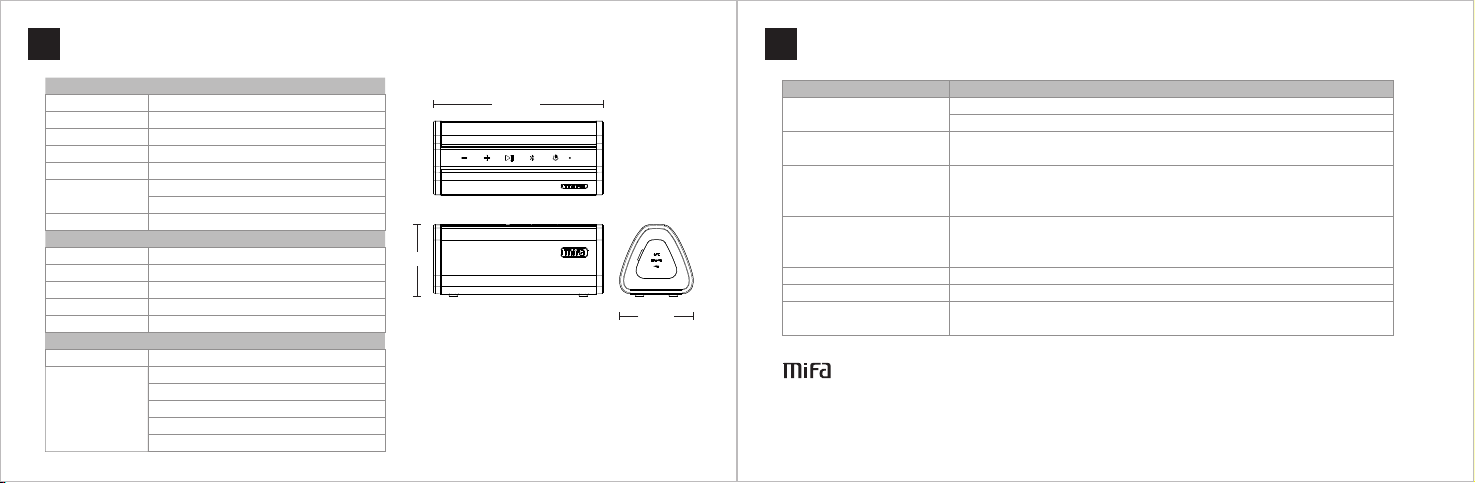
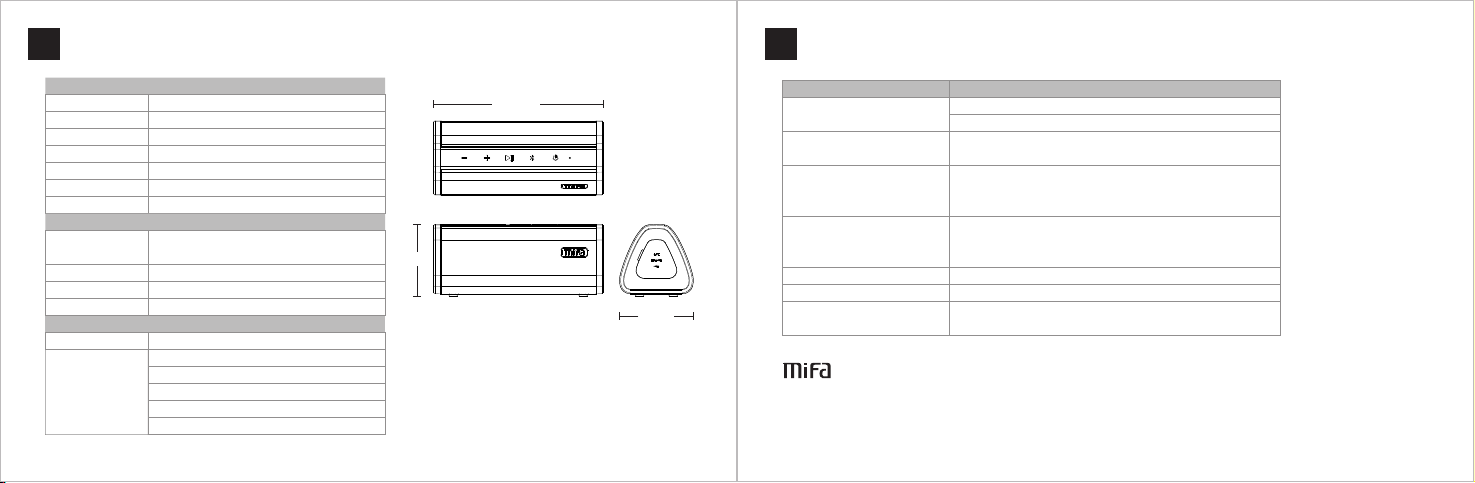
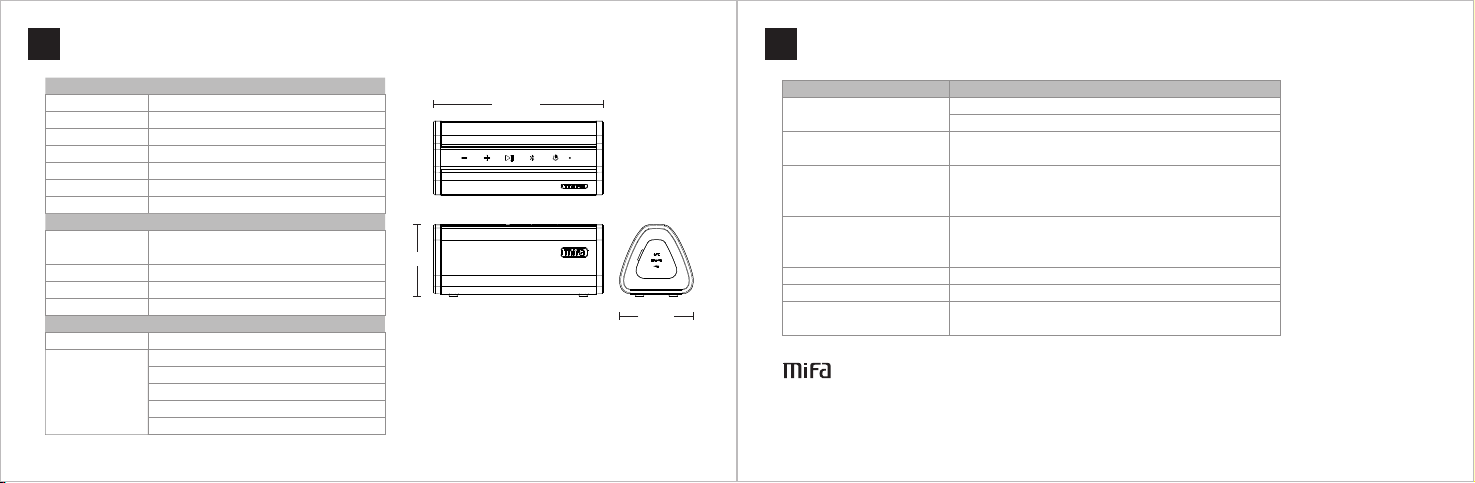
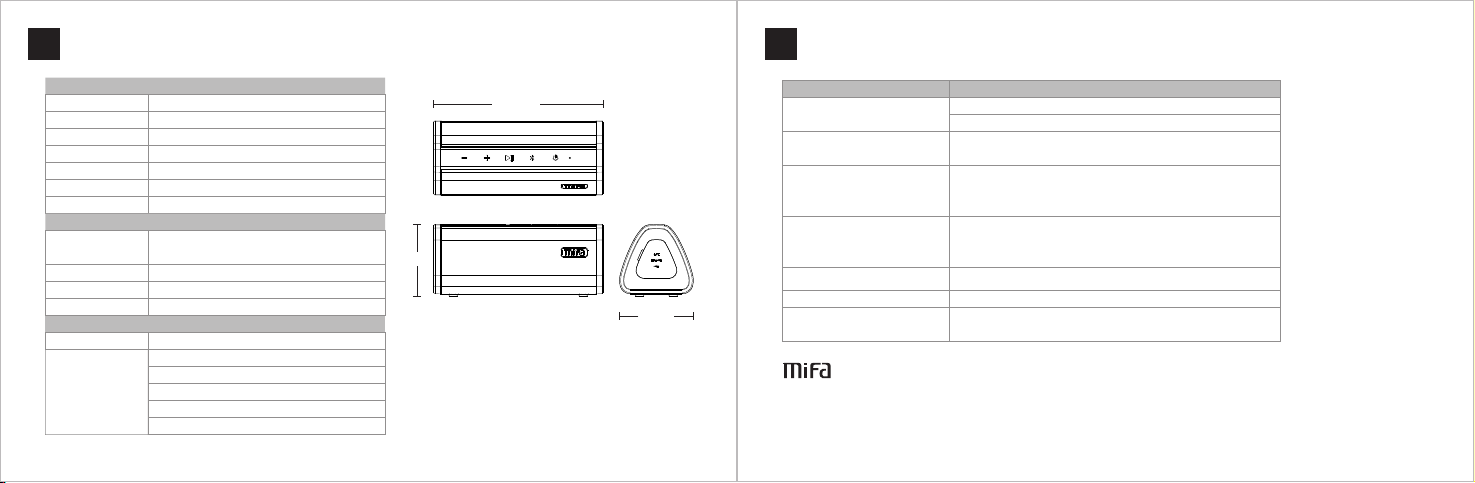
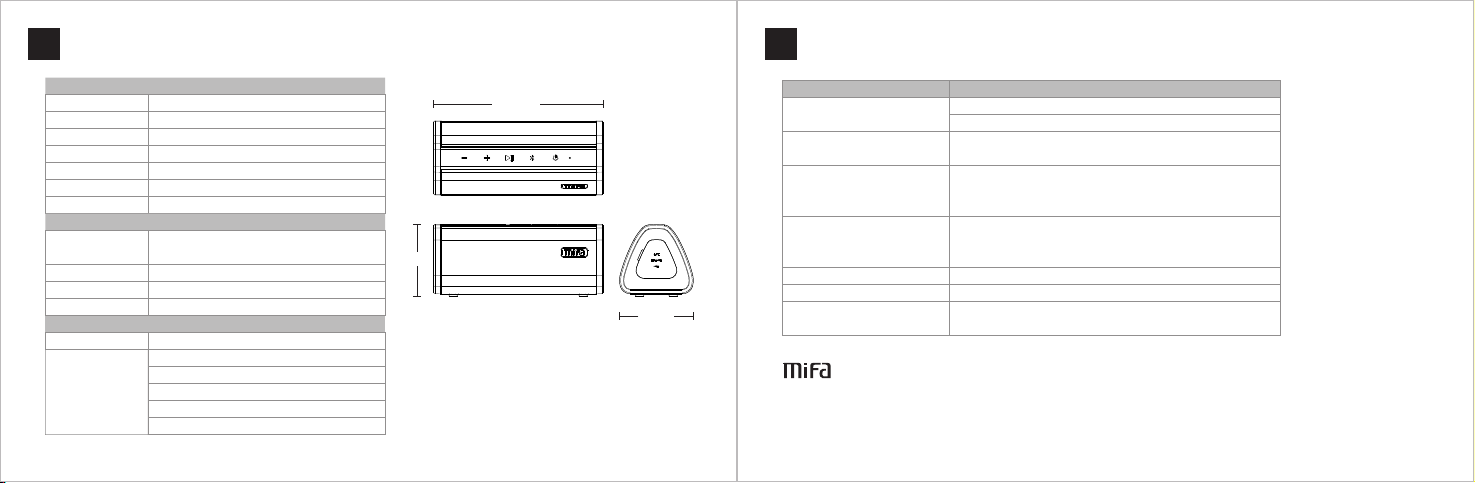
Bas ic Param eters
Spe aker Typ e
Spe aker Sy stem
Act ive / Pass ive
Bat tery
Inp ut
Sup porte d Stora ge
Cha rging Ti me
Techn ical Pa ramete rs
Lou dspea ker
Out put Powe r
Freq uency R espon se
US B Stand ard
Pla ying Par amete rs
Sup porte d Medi a Type
Bit R ate
Por table B lueto oth Spe aker
Dua l-cha nnel + Ba ss
Act ive
Bui lt-in 2 200 mAh L ithiu m batter y
5V / 1A
Up to 3 2 GB Mic ro SD ca rd (FAT32 )
Abo ut 3 hour s with 1A o utput a dapte r
Dua l 1.5 inc hes int ernal m agnet ic
spe akers + L ow freq uency a mplif ier
2 × 5W, THD =3%
50 Hz - 2 0 KHz
US B 2.0 (co mpati ble wit h USB 1. 1)
AP E\FL AC\WAV \WMA \MP3
MP3 : 8Kbp s-320 Kbps
WMA : 5Kbp s-384 Kbps
AP E: 100K bps-1 200K bps
FL AC: 100 Kbps- 1200K bps
WAV: 32 Kbps -384K bps
Engl ish
6.0 i n
2.5 in
2.6 i n
Siz e: 6.0 × 2. 6 × 2.5 in / 15 2 × 66 × 64 mm
Weight : 12 oz / 341 g
(in cludi ng the bu ilt-i n Lithi um batt ery)
Page 7
Trouble Shooting
10
Engl ish
11
注意事項
⽇本 語
FAQ Sol ution s
Not ab le to con nect
to you r devic e
Kee ps cutt ing out w hen pla ying
Not ab le to pla y the mus ic in
Mic ro SD card
No sou nd when p layin g
No sou nd in AUX- in mode Plea se ensu re the au dio cab le is con necte d well
Not ab le to tur n on Plea se try t o charg e the spe aker fo r about 3 h ours
No res pond to a ny oper ation
MI FA INNO VATIO NS LLC
www. mifa. net Des igned i n USMad e in Chin a
Cop yrigh t © MIFA. All r ights reserv ed.
MIFA, t he MIFA log o and oth er MIFA mar ks are al l owned a nd registe red by MIFA INNO VATIO NS LLC. Al l other
tra demar ks are th e prope rty of thei r respecti ve owne rs. The in formatio n conta ined he re is sub ject to c hange
wit hout pr ior not ice.
1. Re start t he spea ker and t ry aga in
2. If y our dev ice req uires a Pi n Code, p lease e nter 00 00
Plea se ensu re the sp eaker i s withi n the ope ratin g range a nd ther e
are no o bstac les bet ween th e speak er and t he devi ce
1. Ple ase ens ure the f ormat o f the Mic ro SD car d is FAT32. It o nly
supp orts FAT32 M icro S D card
2. Ple ase ens ure the f ormat s of the mu sic fil es are AP E, FLAC, WAV, WM A
or MP3
1. Ple ase adj ust the v olume o f the spe aker
2. Ple ase adj ust the v olume o f your de vice
3. Ple ase che ck if the s peak er is pau sed
Plea se try t o reset t he spea ker by pr essin g the res et
butt on in the A UX-in ja ck
◆本 書を よく お読 みください 。
◆本 書す べて の指 ⽰に従って くだ さい 。
◆室 温で 製品 を保 管し、使⽤ して くだ さい 。
◆ラ ジエ ータ ー、 暖房送⾵⼝ 、ス トー ブ等 の熱を発す る装 置( アン プを含む) の近 くで 使⽤ しないで
くだ さい 。
◆ス ピー カー の開 ⼝部を塞い だり 、も のを スピーカー の通 気孔 、隙 間に⼊れた りし ない でく ださい。
◆落 下に よる 破損 を避ける為 、製 品を 投げ たりしない でく ださ い。
◆ス ピー カー 定格 電圧の充電 器の みを 使⽤ して充電し てく ださ い。
◆ス テレ オ⾳ 声ケ ーブルは製 品と 合致 しな い場合、お 買い 上げ にな った販売店 にお 問い 合わ せくださ
い。
◆聴 ⼒を 守る ため 、⾳量を適 切に 調節 して ください。
◆製 品に なん らか の損傷が⽣ じた 場合 、MI FAサー ビス セン ター に修 理をご依頼 くだ さい 。ご ⾃分で分
解す ると 、品 質保 証は無 効と なり ます 。
Page 8
製品特性
12
◎ワ イヤ レス でBl uetoo thデ バイ スと 接続し 、⾳ 楽を 再⽣ しま す。
◎⼀ 度ペ アリ ング すると 、再 度電 源ONに なる 場合、 ⾃動 的にB lu et ooth接続 され ます 。
◎Bl ue to ot hハンズ フリ ー通 話は 可能 です。
◎Mi cr oSDカ ード でAPE、F LA C形式 の⾳ 楽ファ イル を再 ⽣で きま す。
◎Mi cr oSDカ ード でMP3、W MA 、W AV形 式の⾳ 楽フ ァイ ルを 再⽣ できます。
◎Mi cr oSDカ ード 対応可 です 。
◎3. 5m mオー ディ オ⾳声 ケー ブル 経由 の⾳ 楽再⽣ は対 応可 です 。
◎Bl ue to ot h接続し ない まま で⼀ 時停 ⽌状態 でス ピー カー を操 作しないで ⼗分 経過 する と、電源が
OF Fにな りま す。
◎IO Sシス テム 着信 ⾳は再 ⽣で きま す。 ほか のシス テム の場 合、 着信 ⾳はスピー カー のシ ステ ム⾳にな
りま す。
⽇本 語
包装リスト
13
⽇本 語
3.5 mmステレ オ⾳ 声ケーブル⼀ 本
給電 ⽤US Bケーブ ル ⼀本
Use r Manua l
スピ ーカ ー本 体 1台
スト ラッ プ ⼀本
ユー ザー マニ ュア ル ⼀冊
Page 9
ボタン機能
14
短押し : 音量増
長押し :次の曲
短押し : 再生/一時停止
電話応 答ボタン:
短押し は電話に応 答と電話を 終了 です。長 押しは応答 拒否です
内蔵マ イク
⽇本 語
LEDライト
電源オ ン:白色に 点滅して、
Blu etoot hペア リング 準備 中。接 続
される と、 白色に点 灯します
再生停 止:白色に ゆるやかな 点滅
再生状 態:白色に 点灯
最大/最小 音量:白色 に速い点滅
充電: 赤色に点灯 。完了する と消灯
します 。
コネクタ機能
15
MICRO
SD
⽇本 語
AUX外 部接 続オー ディ オ
ステレ オケーブル で接続して 、ヒント音 「ちりん」 の後
に自動 的に外部接 続オーディ オモードに なります。
内蔵リ セットボタ ン:
細い棒 で押して、 リセットに なります。
Mic ro SDカード
電源ONの 状態でMic ro SDカード を入 れて、 シス テム音 は
鳴り、M icro SDカ ード 中の音 楽フ ァイル は自動的に 再生
されま す。
短押し :音量減
長押し :前の曲
Blu etoot hボタン:
長押し して、目下 のペアリン グが解除さ
れ、ペ アリング準 備状態にな ります。短
押しし て、前回の 設備を接続 します。
電源ボ タン:2秒押し て、電源ON /OFF切り 替えます。
モード ボタン:短 押ししてモ ードの切り 替えになり ます。
Blu etoot hモー ド →Mic ro SDカ ードモード →A UX外部接続
モード 順次に切り 替えます。 (Micro S Dカー ドとス テレオ
ケーブ ル挿入は必 要)
データー伝 送
電源OF Fで、Micr o SDカ ードが 挿入 された 状態で、US Bケーブルで パソ コンと接続 しま す。 ボタ ンを 長押し して 、「ち
りん」 の音の後に 音楽ファイ ルをMicr o SDカ ードに コピ ーでき ます。
充電:D C5V~1 A以上のUSB電 源ア ダプターで 充電 します 。ま た、パ ソコ ンUSBコ ネク タと接続し て充 電しま す。
Page 10
Bluetooth 接続
16
1、電源ON
電源ボタン を長 押し して、シス テム 音の 後、
LEDランプ は白 色に 点滅して、
Bluet oo thペアリン グ準 備状 態に なります。
2、デバイス を接 続
デバイスのB lu etooth機能 をONに しま す。
Bluet oo th機器リス トか らMi fa_A10を選 択し て
ください。 ペア リン グすると、 ヒン ト音 が出る
同時に、LE Dライ トは 白色に点灯 しま す。
一回ペアリ ング する と、デバイ スの
Bluet oo th機能をONに すれ ば、 自動 的にペアリ
ングされま す。
⽇本 語
その他の説 明:
別のデバイ スと 接続 する場合、 を 長押 しし て、目下の ペ
アリングは 解除 され 、ペアリン グ準 備状 態に戻りま す。
17
TWS機能
スピー カー1
スピー カー2
⽇本 語
1、 TWSペ アリング
当スピ ーカーを2 台用意し、 電源をONにし て、2台と もBluet oothは接 続しない状 態を確保し
ます。 そのうちの 1台の ボタン を長押しし ます。「ポ ン」の音は 鳴ると、TWSペア リン
グ中で す。「ポン ポン」の音 は鳴ると、 2台のスピ ーカーはT WSペア リング 済みです。
2、 ペアリ ング済 みのスピー カーをBlu etoot hデバイスと ペアリング
お手持 ちのデバイ スのBlue toothを オープンし 、Bluet oot h設備一覧でM ifa_A 10を選択し 、ペ
アリン グします。 ペアリング すると、シ ステム音は 鳴り、LEDラ ンプは点灯 します。
3、 TWSペ アリングを 切断
ペアリ ング済みの スピーカー 2台。その うち1台の ボ タンを長押 しして、「 ポン」の音 は
鳴り、T WSペアリ ングは 切断さ れます。
その他
1) 2台の スピーカー を初回にTW Sペアリング する際、ボ タン操作さ れたスピー カーは主ス ピーカーと なり、残り の
1台は 従スピーカ ーとなりま す。
2) 1度TW Sペアリング されると、 2台のスピ ーカーはそ の主従関係 を記憶しま す。その後 、どのスピ ーカーを操 作
してペ アリングし ても、主従 関係は変わ りません。
3) TWSペ アリングす ると、従ス ピーカーのL EDランプは 常に点灯し ます。主ス ピーカーのL EDランプは 再生中・一 時
停止・B lueto oth接続等 の状態を表し ます。
4) TWSペ アリングは 2台のスピ ーカーのみ でご利用い ただけます 。
5) TWSペ アリングし た後、任意 の1台スピ ーカーを操 作すると、 残り1台の 状態も同様 に変わりま す。
Page 11
技術パラメータ
18
⽇本 語
困ったときは
19
⽇本 語
基本パ ラメータ
スピー カータイプ
スピー カーシステ ム
アクテ ィブ/パッシブ
操作方 法
メモリ タイプ
電源
充電時 間
技術パ ラメータ
スピー カーユニッ ト
入力パ ワー
再生周 波数
ワイヤ レス接続
US B規格
播放功 能
ファイ ル形式
Bit R ate
Blu etoot h Mini スピーカー
2.0チ ャンネル+ 低周波加圧
アクテ ィブ
ボタン
32G以 内のMicr o SDカー ドを対応
内蔵22 00mAhリ チウム電池
DC5 V-100 0mAのUSB電 源アダプタ
DC5 V-100 0mA以上の 環境で充電 約3時間
1.5イ ンチインサ イドマグネ ットクラク ション×2 + 低周波アン プ
5W X 2 TH D=3%
50H z-20K Hz
Blu etoot h
USB 2.0、コン パチUSB1 .1
APE、F LAC、WAV、WMA、M P3
MP3 :8Kbp s-320 Kbps
WMA :5Kbp s-384 Kbps
APE :100K bps-1 200Kb ps
FL AC: 100Kb ps-12 00Kbp s
WAV:3 2Kb ps-38 4Kbps
6.0 i n
2.5 in
製品規格:6 .0 × 2.6 × 2. 5 in / 152 × 66 × 6 4 mm
製品純量:1 2 oz / 341g (内 蔵リ チウ ム電池)
2.6 i n
問題点
Blu etoot hデバイスに 接続できな い
再生す るとき、音 が途切れる
Mic ro SDカード トラブル
音が出 ない
AUX接 続して音が 出ない 1、ステ レオケーブ ルの両端を しっかりと 接続してい るかご確認 ください。
電源が 入らない 1、電池 切れかどう かチェック してくださ い。
操作で きない
MIFA IN NOVATION S LLC
www. mif a.net D esign ed in US Ma de in Chi na
著作権は ©Mi faに 所有 。Mifaのす べて の商 標はMIFA INNOVATIONS LLCに所 有さ れて 、 あるいは登 録さ れた 。ほ
かの商標は 各自 の所 有者の財産 であ る。 本マニュア ルに 可能 なミスに対してM IFA IN NO VATION S LLCは 責任 を一切
負わない。 本マ ニュ アルに変更 があ る場 合、前もっ て知 らせ ないですが、ご 了承 くだ さい。
1、スピ ーカーをOF Fにして、再 起動してく ださい
2、パス キーが必要 な場合、00 00を入力し てください 。
1、デバ イスは有効 接続距離を 超えている か、また、
スピー カーとデバ イスの間に 障害物があ るかご確認 ください
1、M icro SDカ ードの仕様 ご確認くだ さい。 (FAT32のMi cro SDを対応 できます)
2、M icro SDカ ード中のフ ァイルはAP E、FLA C、WAV、WM A、MP3で あるかどう か、
ご確認 ください。
1、スピ ーカーの音 量を調節し てください 。
2、ミュ ートモード や一時停止 状態である かご確認く ださい。
1、スピ ーカーシス テムがフリ ーズ。リセ ットボタン を短押しし て、
システ ムを再起動 してくださ い。
解決方法
Page 12

Warnungen
20
◆Um ei ne sach sgemä ße Benu tzung u nd eine n störu ngsfreien Betrieb z u gewäh rleis ten,
bit te lese n zuers t diese B edien ungsa nleit ung sor gfält ig durc h.
◆Für de n erste n Gebra uch wir d eine Vol lladu ng empfohlen.
◆Das Prod ukt bitte be i Raumtemper atur be nutze n und lag ern.
◆Das Prod ukt nicht we rfen und fa llen lasse n, um Schäden zu vermeiden.
◆Das Prod ukt nicht un ter Feuer, Ho chtemper atur, direkte r Sonne neins trahl ung usw. exp onieren.
◆Ver wende n keine org anisc hen Lösung smitt el oder a ndere Chemik alien, um d as Produ kt zu rei nigen .
◆Las sen keine k leinen Partikeln in das Prod ukt gel angen.
◆Bit te stel len die Lautstärke de s Lauts prech ers mäß ig ein, u m vorüb ergehend e oder da uerhaft e
Hör behinderun gen zu ve rmeiden.
◆Dem ontie ren das Produkt nicht, oder mac hen keine M odifizieru ng an der S trukt ur oder Tei le davon.
◆Hal ten das Produkt a ußerhal b der Rei chw eite von Kinde rn.
Deut sch
Produktmerkmale
21
◎Bee indru ckend klare r Klang m it voll er Reic hweite
◎Automatisch e Kopplun g zum zul etzt an gesch losse nen Ger ät
◎Aux-In-B uchse u nd 3,5- mm-Audiokabe l für Nic htblu etoot h-Gerät e
◎Ein gebau ter Micro für Freispre chanr ufe
◎Bis z u 32 GB Micro -SD-Karte unt erstü tze n
◎MP3 , WMA, WAV, FLAC, AP E unterstü tzen
◎Automatisch es Auss chalten in 1 0 Minuten , falls k eine manuell e Bedie nung un d kein Gerä t anges chlos sen ist
Deut sch
Page 13
Lieferumfang
22
Deut sch
Tasten Funktionen
23
Deut sch
1 × A10 B lueto oth Lau tspre cher
1 x 3,5 m m Audio ka bel
1 × Mi cro USB Kabe l
1 x abn ehmba rer Rie men
Use r Manua l
1 × Ben utzer handb uch
Lau tstär ke-Au f-Taste
Kur z drück en, um d ie Laut stärk e zu erh öhen
Lan ge drüc ken, um d en näch sten Li ed zu
spi elen
Lau tstär ke-Ab -Taste
Kur z drück en, um d ie Laut stärk e zu
ver ringe rn
Lan ge drüc ken, um d en vorh erig en
Lie d zu spie len
Abs piele n / Pause -Tast e
Kur z drück en, um z u pausi eren od er abzu spiel en
Blu etoot h-Taste
• Wenn e in Anru f kommt , kurz d rücke n, um zu an twor ten ode r aufzu legen ; Lange
drü cken, u m abzul ehnen
• Drü cken fü r 2 Seku nden, u m das gek oppel te Gerä t zu tren nen. De r
Lau tspre cher we chsel t in den Ko pplun g-Mod us. Um es w ieder m it dem zu letzt
ang eschl ossen en Gerä t zu verb inden , drück en es ku rz.
Page 14
Tasten Funktionen
24
An- /Aus-S chalt er
• Drü cken zu m Einsc halte n oder Au sscha lten fü r 2 Sekun den.
• Kur z drück en, um d en Modu s im eing escha ltete n Zusta nd zu sch alten .
•We nn es mit e iner Mi cro SD- Kart e oder ei nem Aud ioka bel ein geleg t ist, di e Modi ei ner nac h dem and eren zu
wec hseln : Bluet ooth- Modus → Micro S D-Ka rten modus o der Aux- In-M odus.
• Wenn e s mit ein er Micr o SD-K arte u nd eine m Audio kabel e ingel egt ist , die Mo di eine r nach de m andere n zu
wec hseln : Bluet ooth- Modus → Micro S D-Ka rten modus → A ux-In -Modu s.
Deut sch
Anschlüsse Funktionen
25
Deut sch
Aux -In-B uchse
• Im eingesc halte ten Zus tand, ein Audio kabel
ein steck en. Es wi rd piep en, um ei ne erfolgreiche
Ver bindu ng anzu zeigen.
• Um de n Lauts prech er zurü ckzus etzen , drück en
Sie d ie Rese t-Taste in der B uchse m it eine r Nadel.
Ein gebau tes Mik
LED -Anze ige
Wei ßes Lic ht blin kt nach d em Eins chalte n
Wei ßes Lic ht blei bt ange schal tet nach d er Verb indun g mit ein em Gerä t
Wei ßes Lic ht blei bt ange schal tet bei Wi ederg abe
Wei ßes Lic ht blin kt lang sam, wen n die Wie derga be paus iert is t
Wei ßes Lic ht blin kt schn ell bei m ax / min La ustst ärke
Rot es Lich t bleib t beim La den ang escha ltet; w enn es vo ll aufge laden i st, geh t das rot e Licht a us
MICRO
SD
Mic ro USB An schlu ss
• Auf laden : Einen D C 5V / 1A Adapte r verwe nden od er ihn mi t einem C omput er verb inden , um den
Lau tspre cher au fzula den
• Dat enübe rtragung: Im a bgesc halte ten Zus tand, e ine Mic ro-SD-K arte e inste cken und mi t einem
Com puter v erbin den. Dr ücken den Netz schal ter 2 Sek unden l ang, um i hn einz uscha lten. D ann kön nen
Sie M usikdateie n in der Karte auf dem C omputer ve rwalten.
Mic ro-SD -Kar tenei nschu b
Im angesch altet en Zust and, eine Mi cro-S D-
Ka rte in de n Einsc hub ein steck en, die in de r
Ka rte ges peich erte Musi k werden nac h zwei
Sig naltö nen automa tisch a bspie len.
Page 15
Bluetooth Verbindung
26
1. De r Lauts prech er eins chalt en
Drü cken den Netzs chalt er für me hr als 2
Sek unden , bis es ei nen Ton von D ingD ong und
dan n einen Ton v on Ding mi t einem b link enden
wei ßen LED -Lich t ausgi bt. Es ge ht in den
Kopplung -Modu s.
2. Mi t Ihrem G erät ve rbind en
Sch alten d ie Blue tooth I hres Ge rätes a n und
wäh len Mifa_A10 a us. Sob ald die Ve rbind ung
abg eschl ossen i st, pie pt der La utspr echer u nd
ble ibt das We ißes LE D-Licht eing escha ltet.
Der L autsp reche r wird au tomatisc h mit dem
zul etzt an gesch losse nen Ger ät verb inden ,
sob ald die B lueto oth des G eräte s anges chalt et
ist .
Deut sch
Weit ere Anl eitun gen
Um ei nem and eren Ge rät anz uschl ießen , drück en die
Blu etoot h-Taste für 2 Se kunde n. Der Ge koppelt e wird
abg etren nt und de r Lauts precher we chsel t in den Ko pplun g-
Mod us.
Um es w ieder m it dem zu letzt v erwendeten G erät zu
ver binde n, drüc ken ku rz die Bl uetoo th-Taste.
Echte drahtlose Stereo-Funktion
27
1. TW S-Syst em einr ichte n
Sch alten S ie zwe i A10-L autsp reche r ein und s tellen S ie sich er, das s sich ke in Gerä t mit
ein em der be iden A1 0-Lau tspre cher ve rbind et. Drü cken Si e lange a uf die Pl ay / Pause -
Tast e eines L autsp recher s und es er tönt e in "Don g", um anzu zeigen , dass d ie Kopp lung
*Bei m erste n Einri chten d es TWS -Syste ms wird d er Laut sprec her, auf d em Sie di e
Wie derga be / Pause -Taste dr ücke n, als Ha uptla utspr echer u nd der an dere als
2. Verb inden S ie zwei T WS-La utspr echer m it eine m Bluet ooth- Gerät
Spe aker 1
Spe aker 1
Wäh len Sie M ifa_A 10 im Blu etoot h-Ein stell ungsm enü des B lueto oth-G eräts a us. Es
ert önt ein S ignal ton und d ie blau e LED-A nzeig e leuch tet.
3. St oppen S ie die TWS
Drü cken Si e lange a uf die Pl ay / Pause -Taste d es Laut sprech ers, um i hn mit de m
Tipp s
1. Die e chte Wi reles s-Ster eo-Fu nktio n unter stütz t nur 2 Lau tsprec her.
2. Um da s TWS- Syste m zwis chen z wei A10- Lauts prech ern ei nzuri chten , verge wisse rn Sie si ch bitt e, dass
kei nes von b eiden m it eine m Bluet ooth- Gerät v erbun den ist .
3. Nac h der ers ten Verb indun g arbe itet de r Haupt lauts preche r weite rhin al s Haupt lauts prech er und de r
Nebe nlaut sprec her arb eitet w eiter hin als d er Nebe nspre cher in d er zukü nfti gen Verb indun g.
4. Nac h dem Ein rich ten des T WS-Sy stems b leibt d ie blau e LED-A nzeig e des abh ängig en Laut sprec hers
stab il und di e Haupt -LED ze igt Ih ren Betr ieb an .
5. Nac hdem da s TWS- Syste m erfol greic h einge richt et wurd e, müss en Sie nu r einen L autsp recher
bedi enen. D er and ere wird d ie glei che Ope ratio n gleic hzeit ig ausf ühren .
Deut sch
Page 16
Technische Einzelheiten
28
Deut sch
Fehlerbehebung
29
Deut sch
Gru ndpar amete r
Lau tspre chert yp
Lau tspre chers ystem
Akt iv / Passi v
Bat terie
Inp ut
Unt erstü tzte Sp eiche rung
Lad ezeit
Trag bare Bl uetoo th Laut sprec her
Zwe ikana l + Bass
Akt iv
Ein gebau te 2200 m Ah Lith iumba tteri e
Ein gang 5V / 1A
Bis z u 32 GB M icro SD K art e (FAT32)
Ca. 3 S tunde n mit 1A A usgan g Adapt er
Techn ische P aramet er
Lau tspre cher
Aus gangs leist ung
Freq uenzg ang
US B Stand ard
Dop pel 1,5 Z oll int erne ma gneti sche
Lau tspre cher + N ieder frequ enzv erstä rker
2 × 5W, THD =3%
50 Hz - 2 0 KHz
US B 2.0 (ko mpati bel mit U SB 1.1 )
Wied ergab e Param eter
Unt erstü tzter M edien typ
Bit rate
AP E\FL AC\WAV \WMA \MP3
MP3 : 8Kbp s-320 Kbps
WMA : 5Kbp s-384 Kbps
AP E: 100K bps-1 200K bps
FL AC: 100 Kbps- 1200K bps
WAV: 32 Kbps -384K bps
6.0 i n
2.5 in
2.6 i n
Grö ße: 6,0 × 2,6 × 2,5 Zoll / 1 52 ×66 ×6 4 mm
Gew icht: 1 2 Unze / 34 1g
(ei nschl ießli ch der ei ngeba uten Li thium -Batt erie)
FAQ Lös ungen
Nic ht imst ande Ver bindu ng
zu Ih rem Ger ät herz ustel len
Stän dige Un terb rechun g
bei Wi ederg abe
Nic ht imst ande, d ie Musi k in
Mik ro SD- Kart e abzus piele n
Kei n Ton bei Wied ergab e
Kei n Ton im AUX-I n-Mod us Bitt e siche rstel len, da ss das Au diok abel ri chtig v erbun den ist
Nic ht imst ande ei nzusc halte n Bitt e den Lau tspre cher fü r ca. 3 Stu nden au fzula den ver suche n
Kei ne Antw ort auf i rgend eine
Bedi enung
MI FA INNO VATIO NS LLC
www. mifa. net Ent worf en in US He rgest ellt in C hina
Cop yrigh t © MIFA Alle R echte v orbeh alten .
MIFA, d as MIFA-L ogo und a ndere MIFA-M arken sin d alle vo n MIFA INNO VATIO NS LLC besessen u nd registr iert. All e
and eren Ma rken sind E igent um der je weili gen Bes itzer. D ie hier e nthal tenen I nform ation en können o hne vor herig e
Ank ündig ung geä nder t werden.
1. De n Lauts preche r neu sta rten u nd noch mal ver suche n.
2. Wenn I hr Ger ät eine n Pin-C ode ben ötigt , geben S ie bitt e 0000 ei n
Prüfe n und sic herst ellen , dass si ch der La utspr echer i nnerh alb des
Betr iebs bereic hs befi ndet un d es kei ne Hind ernis se zwi schen d em
Laut sprec her und d em Gerä t gibt
1. Bit te sich erste llen, d ass das Fo rmat d er Micr o SD-K arte FAT32 i st. Es
unte rstüt zt nur FAT32 M icro SD K arte .
2. Bit te sich erste llen, d ass die Fo rmate d er Mus ikdat eien AP E, FLAC ,
WAV, WMA od er MP3 si nd
1. Bit te die La utstä rke de s Lauts prech ers ein stell en.
2. Bit te die La utstä rke Ih res Ger ätes ei nstel len.
3.Bi tte übe rprü fen, ob de r Lauts prech er ange halte n ist
Bitt e versu chen de n Lauts prech er zurü ckzus etzen b eim Drü cken
der R eset-Tas te in der AU X-Ein gangs buchs e
Page 17

Avertissement
30
◆Pour ass urer l’ utili satio n corre cte et le foncti onnement sans pro blème, il faut atte ntive ment et l ire c e
man uel d’utilis ateur.
◆Pour la pr emière fois d’utilis ation , une cha rge com plète e st recommandée.
◆Utiliser e t range r le prod uit dan s la temp ératu re am biant e.
◆Ne pa s jeter e t dépos er le produit pour éviter to ut domm age.
◆Ne pa s expos er le pro duit au feu, à u ne haute tem pérat ure, à la lumi ère directe du sole il etc.
◆Ne pa s utili ser les s olvan ts orga nique s ou les au tres produ its chi mique s pour ne ttoyer le produit .
◆Ne pa s laiss er les pe tites p articul es à entrer dans le pro duit.
◆Garder le vo lume mo déré de parleur pou r évite r la défi cienc e audit ive tem porai re ou p ermanente.
◆Ne pa s dissi muler l e produ it, ne pa s modif ier la struc ture ou toute pa rt ie.
◆Garder le pr oduit hors d e la portée d ’enfan t.
Français
Caractéristiques de produit
31
◎Son i mpres sionn ant cla ir et com plet
◎Con nection auto matiq ue au der nier péri phéri que con necté
◎Aux-in i nterfac e et câbl e audio 3 .5mm po ur les pé riphéri ques no n-Blu etoot h
◎Microphone inté gré pour l’appel de mains li bres
◎Sup port pour l a carte 32 GB M icro-SD
◎Sup port pour M P3, WMA, WAV, FLAC e t APE
◎Éte int aut omatique après 10 m inute s s’il n’y a pa s du fonctionneme nt manu el et
du pé riphéri que non c onnec té.
Français
Page 18
Contenu d’emballage
32
1 × 3.5 m m câble a udio
1 × Mi cro USB câble
Français
Fonction de touche
33
Bou ton d’au gment ation d e volum e
App uyer br ièvem ent pou r augme nter le
vol ume.
App uyer lo nguem ent pou r jouer d e la
cha nson pr ochai ne.
Français
Bou ton Lec ture/ Pause
App uyer br ièvem ent pou m ettre e n pause o u la lect ure.
1 × A10 B lueto oth par leur
1 × san gle dét achab le
Use r Manua l
1 × man uel d’utilis ateur
Bou ton de ré ducti on de vol ume e
App uyer br ièvem ent pou r rédui re le
vol ume.
App uyer lo nguem ent pou r jouer d e
la ch anson p récéd ente.
Blu etoot h bouton
•Lo rsqu’u n appel a rrive , appuy er briè vemen t pour fa ire la ré ponse o u le
rac corde ment; a ppuye r longu ement p our le rej et.
•Ap puyer p endan t 2 secon des pou r décon necte r le péri phéri que app airé. L e
par leur en tre en mo de d’ap parie ment. P our se re conne cter au d ernie r
pér iphér ique co nnect é, appu yer bri èveme nt sur ce lui- ci.
Page 19
Fonction de touche
34
Bou ton d’al iment ation
•Ap puyer p endan t 2 secon des pou r s’allu mer et s’é teind re
. App uyer br ièvem ent pou r commu ter le mo de en éta t activ é.
. Si la c arte M icro SD e t le câbl e audio e st insé ré, pour c ommut er le mod e: Blue tooth m ode → mod e de
Mic ro SD car te ou Aux -in mod e.
. Si la c arte M icro SD e t le câbl e audio e st insé ré, pour c ommut er le mod e: Blue tooth m ode → mod e de
Mic ro SD car te → Aux- in mode .
Français
Fo nctiondeport
35
Français
Aux -in inte rfac e
•Dan s l’état d e la mise s ous ten sion, u n câble
aud io est in séré. I l va envoyer u n bip pou r
ind iquer u ne conn ectio n réuss ie.
•Pour réini tiali ser le pa rleur, l e bouto n de
réi nitia lisat ion dan s l’interface est a ppuyé avec
une a iguil le.
Mic ropho ne inté gré
Ind icate ur LED
Le voy ant bla nc clig note ap rès la mi se sous t ensio n.
Le voy ant bla nc rest e allum é après q ue un pér iphér ique es t conne cté.
Le voy ant bla nc rest e allum é penda nt la lec ture.
Le voy ant bla nc clig note le nteme nt lors que la le cture e st en pau se.
Le voy ant bla nc clig note ra pidem ent au vo lume ma ximal / m inima l.
Le voy ant rou ge rest e allum é penda nt la rec harge ; lorsq u’il est c omplè temen t rechar gé, le vo yant ro uge s’éte int.
MICRO
SD
Mic ro USB po rt
.Re charg e: util iser un a dapta teur DC 5 V / 1A ou fai re la con necti on à un ord inateur po ur rech arger le
par leur.
.Transmis sion de d onnée s: dans l ’état de l a mise ho rs tension , une Mic ro-SD car te est in sérée , ensui te elle
est c onnec tée ave c un ordi nateur. Le bo uton d’ alime ntati on est ap puyé pe ndant 2 s econd es pour
l’a lluma ge. Ens uite, vous p ouvez g érer les fic hers de m usiqu e dans la c arte su r l’ordi nateu r.
Fent e pour Mi cro-S D cart e
Dan s l’état d e la mise s ous ten sion, u ne Micr o-
SD ca rte est inséré e dans la fe nte. Il jouera
aut omati queme nt de la mu sique e nregistrée
dan s la carte après d eux signau x sonores.
Page 20
Bluetooth Connection
36
1. Allu mer le pa rleur
Le bo uton d’ alime ntati on est ap puyé pe ndant
plu s de 2 seco ndes ju squ’à ce qu’i l envoie un
son d e DingD ong, en suite le son d e Ding est
env oyé avec l e voyan t LED bla nc clig noté. I l
ent re dans l e mode d’ appar iemen t.
2. Se c onnec ter à vot re péri phéri que
All umer le B lueto oth de vo tre pér iphér ique et •
sél ectio nner Mifa _A10. U ne fois que la
con necti on est te rminé e, le par leur va e nvoye r
un bi p et le voy ant LED b lanc se ra allu mé.
•Le p arleu r sera au tomat iquem ent con necté a u
der nier pé riphéri que con necté , une fois que le
Blu etoot h de péri phéri que est a llumé .
Français
Aut res inst ruct ions
Pour se co nnect er à un aut re péri phéri que, le B lueto oth •
bou ton est a ppuyé p endan t 2 secon des. Le co uplag e sera
déc onnec té et le pa rleur e ntrer a en mode d ’appari ement .
•Pour se reco nnect er au der nier pé riphé rique uti lisé, le
Blu etoot h bouto n est bri èveme nt appu yé.
Véritable fonction stéréo sans fil
37
1. Me ttre en pl ace le sy stème T WS
All umez de ux haut -parl eurs A1 0 et assu rez-vo us qu'a ucun pé riphé riqu e ne se con necte à l 'un
d'e ntre eu x. Appu yez long uemen t sur le bo uton Le cture / Pa use d'u ne ence inte et i l y aura un
son d e "Dong " pour in dique r que l'a ppair age est e n cours . Une fois l 'appa rieme nt ter miné, il y
aur a un son de " Dong Do ng".
*Lors d e la prem ière in stall ation d u systè me TWS , le haut- parl eur sur l equel vo us appu yez sur l e
bou ton Lec ture / Pau se fonc tionn e comme h aut-pa rleu r princ ipal et l 'autr e comme h aut-pa rleu r
dép endan t.
Spe aker 1
Spe aker 1
2. Pai re deux h aut-p arleu rs TWS ave c un péri phéri que Blu etoot h
Sél ectio nnez Mi fa_A1 0 dans le m enu des p aramè tres Bl uetoo th du pér iphér ique B luetoo th. Il y
aur a un son in diqua nt une co nnexi on réus sie et le v oyant LE D bleu re ste all umé.
3. Arr êtez le T WS
App uyez lo nguem ent sur l e bouto n Lectur e / Pause d e chaqu e encei nte pou r la déco nnect er
ave c l'aut re.
Cons eils
1. La vé ritab le fonc tion st éréo sa ns fil pr end en ch arge se uleme nt 2 haut- parl eurs.
2. Pou r confi gurer le s ystèm e TWS en tre deu x haut- parle urs A10 , assur ez-vou s qu'au cun d'e ntre eu x ne se
conn ecte à un p ériph ériq ue Blue tooth .
3. Apr ès la pre mière c onnex ion, l' encei nte pri ncipa le cont inue de fo ncti onner e n tant qu e haut-p arle ur prin cipal
et l'e ncein te dépe ndant e conti nue de fo nctio nner en t ant que p erson ne dépe ndant e dans la f uture co nnex ion.
4. Apr ès la con figur ation d u systè me TWS , l'ind icateu r LED ble u de l'en ceint e dépen dante r este al lumé et l a LED
prin cipal e indiq ue votr e opéra tion.
5. Une f ois le sy stème T WS corr ectem ent con figur é, il vou s suffi t d'uti liser l 'un ou l' autre d es haut -parl eurs. L'au tre
fera l a même op érati on simu ltané ment.
Français
Page 21
Spécifications
38
Français
Dépannage
39
Français
Para mètre s de base
Type d e parl eur
Sys tème de p arleu r
Act if/pa sif
Bat terie
Ent rée
Mém oire su pport ée
Temps d e recha rge
Blu etoot h parle ur port able
Dou ble can al + bass e
Act if
Bat terie d e lithi um 2200 mAh int égrée
5V / 1A
Jus qu’à Mi cro SD c arte à 32 G B (FAT32 )
Env iron 3 he ures ave c l’ada ptate ur de sor tie 1A
Para mètre s techn iques
Hau t-par leur
Puis sance d e sort ie
Fréq uence d e répon se
US B Stand ard
Dou ble par leur ma gnéti que int erne à
1.5 p ouces + a mplif icate ur de bas se fréqu ence
2 × 5W, THD =3%
50 Hz - 2 0 KHz
US B 2.0 (co mpati ble ave c USB1 .1)
Para mètre s de jeu
Typ e de médi a suppo rté
Déb it bina ire
AP E\FL AC\WAV \WMA \MP3
MP3 : 8Kbp s-320 Kbps
WMA : 5Kbp s-384 Kbps
AP E: 100K bps-1 200K bps
FL AC: 100 Kbps- 1200K bps
WAV: 32 Kbps -384K bps
6.0 i n
2.5 in
Tail le: 6.0 × 2.6 × 2.5 i n / 152 × 66 × 64 m m
Poids: 1 2 oz / 341g (y com pris la b atter ie
de li thium i ntégrée)
2.6 i n
FAQ Sol ution s
Votr e périp hériq ue ne peu t
pas êt re conn ecté.
Mai nteni r le cour age pen dant
la lec ture.
La mus ique da ns Mic ro SD
car te ne peu t pas êtr e jouée.
Il n’y a p as du son p endan t la lect ure
Il n’y a p as du son e n AUX-in m ode Assu rer que l e câble a udio es t bien co nnect é.
L’allu mage ne p eut pas ê tre fai t Essa yer de re charg er le par leur pe ndant e nviro n 3 heure s.
Il n’y a p as la rép onse po ur
tout e opéra tion
MI FA INNO VATIO NS LLC
www. mifa. net Con çu aux Et ats-U nis et fa briq ué en Chi ne
Cop yrigh t © MIFA. Tous le s droit s sont réser vés.
MIFA, l e logo MI FA et l’ autre m arque de MIFA so nt déte nues et e nregistrées p ar MIFA INN OVATIONS L LC. Toutes l es
aut res marque s sont la p ropri été de le urs propri étair es resp ectifs. Les info rmations con tenue s ici son t sujet tes à la
mod ifica tion sa ns préa vis.
1. Re démar rer le pa rleur e t le rées sayer.
2.Si v otre pé riphé riqu e requie rt un Pin c ode, il f aut ent rer 000 0.
Véri fier et a ssure r que le pa rleur e st mis da ns la pla ge de fon ction nemen t
et qu’i l n’y a auc un obst acle en tre le par leur e t le péri phéri que.
1.As surer q ue le for mat de Mi cro SD ca rte est FAT3 2. Il sup port e
seul ement M icro S D carte à FAT3 2.
2. Ass urer qu e le form at du fic hier de m usiqu e est APE , FLAC, WAV,
WMA ou M p3.
1. Aju ster le v olume d e parle ur.
2. Aju ster le v olume d e votre p ériph ériqu e
3. Vér ifier s i le parl eur est m is en pau se
Essa yer de ré initi alise r le parl eur en ap puyan t le bout on de
réin itial isati on dans A UX-in in terf ace
Page 22

Advertencias
40
◆Para gar antiz ar el uso correc to y funcion amien to sin pr oblemas, l ea dete nidamente este ma nual de
usu ario.
◆Para el pr imer us o, se recomi enda un a carga c omple ta.
◆Utilice y al macen e el prod ucto a te mpera tura am bient al.
◆No ti re y deje c aer el produ cto par a evitar daños .
◆No ex ponga e l produ cto al fu ego, al ta tempera tura, l uz sola r direc ta, etc .
◆No ut ilice d isolv entes o rgá nicos u o tros pr oduct os químicos para li mpiar e l produ cto.
◆No pe rmita que pequ eñas pa rtícula s entre n en el pro ducto.
◆Por favor, mantenga el volum en mode rado de a ltavoz par a evitar la defic ienci a audit iva tem poral o
per manente.
◆No de smont e el producto, ni hag a ningu na modi ficaci ón a la est ructura o cual quier p arte de ell a.
◆Mantenga e l produ cto fue ra del al cance de los n iños.
Espa ñol
Características del Producto
41
◎Son ido imp resio nante mente clar o y de gama c omple ta
◎Se co necta automá ticam ente al ú ltimo d ispos itivo c onect ado
◎Ent rada au xilia r y cable d e audio d e 3,5 mm pa ra disp ositi vos que n o sean Bl uetoo th
◎Micrófon o incor porad o para llama das man os libr es
◎Adm ite tarjet a Micro-S D de hast a 32 GB
◎Sop orta MP3, WMA, WAV, FL AC, APE
◎Se ap aga aut omáti camen te desp ués de 10 m inuto s si no hay oper ación m anual y n o hay nin gún
dis posit ivo con ectad o
Espa ñol
Page 23
Contenido del paquete
42
1 ×Ca ble de au dio de 3, 5 mm
1 × Cable M icro U SB
Espa ñol
Funciones de Teclas
43
Bot ón de aum ento de vo lumen
Pul se breve mente p ara aum entar
el vo lumen
Pul sar larg ament e para re produ cir
la si guien te canc ión
Bot ón de rep roducc ión / pau sa
Pul se breve mente p ara hac er una pa usa o rep roduc ir
Espa ñol
1 × A10 A ltavoz Bluetoot h
1 × Cor rea des monta ble
Use r Manua l
1 × Manual del u suario
Bot ón de red ucción d e volum en
Pres ione br eveme nte par a dismi nuir
el vo lumen
Pres ione la rgame nte par a repro ducir
la ca nción a nteri or
Bot ón Blue tooth
• Cua ndo lle gue una l lamad a, pres ione br eveme nte par a contes tar o col gar;
Pul se larga mente p ara rec hazar.
• Pres ione po r 2 segun dos par a desco necta r el disp ositi vo empa rejad o. El
alt avoz en tra en mo do de emp arejam iento . Para vol ver a con ecta rlo al úl timo
dis posit ivo con ectad o, pres ione br eveme nte.
Page 24
Funciones de Teclas
44
Espa ñol
Funciones de puertos
45
Espa ñol
Bot ón de ali menta ción
• Pul se por 2 se gundo s para en cende r o apaga r.
• Pres ione br eveme nte par a cambi ar el mod o en el est ado enc endid o.
• Si se i nsert a con una t arjet a Micr o SD o un cab le de aud io, los m odos al terna n entre sí : Modo
Blu etoot h → Modo de t arjet a Micro S D o modo au xilia r.
• Si se i nsert a con una t arjet a Micr o-SD y un c able de a udio, l os modo s alter nan ent re sí: Mo do
Blu etoot h → Modo de t arjet a Micro S D → Modo a uxili ar.
Mic i ncorp orado
Ind icado r LED
La lu z blanc a parpa dea des pués de e ncend ida.
La lu z blanc a perma nece en cendi da desp ués de ha ber sid o conec tada a un d ispos itivo .
La lu z blanc a perma nece en cendi da mien tras se r eprod uce.
La lu z blanc a parpa dea len tamen te cuan do la rep roduc ción se d etien e.
La lu z blanc a parpa dea ráp idame nte al vo lumen m áximo / m ínimo .
La lu z roja pe rmane ce ence ndida d urant e la carg a; Cuan do está c omple tamen te carg ada, la l uz roja se a paga.
Ent rada au xilia r
• En el e stado d e encen dido, i nsert e un cabl e de
aud io. Se em itirá u n pitid o para in dicar u na
con exión s atisf actor ia.
• Para restab lecer el alt avoz, presion e el botó n
de re inici o en el con ector c on una ag uja.
MICRO
SD
Pue rto mic ro USB
• Car ga: u tilice un a dapt ador D C 5V / 1A o conéc telo a u n orden ador pa ra car gar e l alt avoz.
• Transmi sión de d atos: en el es tado de a pagad o, inse rte una t arjet a Micro-S D y conéc tela a un a
com putad ora. Pre sione e l botón d e encen dido po r 2 segun dos par a encen derlo. A continua ción, p uede
adm inist rar arc hivos d e músic a en la tar jeta en e l ordenado r.
Ran ura par a tarje ta Micr o-SD
En el e stado d e encen dido, i nsert e una tar jeta
Micro -SD en la r anura . Repro ducir á la músi ca
alm acena da en la ta rjeta a utomá ticam ente
des pués de d os piti dos.
Page 25
Conexión Bluetooth
46
1. En ciend a el alta voz
Pres ione el b otón de e ncend ido por m ás de 2
seg undos h asta qu e emite u n sonid o DingDo ng
y lue go un son ido de Di ng con una lu z blanc a
LED i nterm itent e. Entra en el m odo de
emp areja mient o.
2. Co necta a t u dispo sitiv o
Enc ienda e l Bluet ooth de s u dispo sitiv o y •
sel eccio ne Mifa_A10. U na vez qu e se haya
com pleta do la con exión , el alta voz emi tirá un
pit ido y la lu z LED bla nca per manec erá
enc endid a.
•El a ltavo z se cone ctará a utomá ticam ente al
últ imo dis posit ivo con ectad o una vez q ue se
hay a activ ado el Bl uetoo th del di sposi tivo.
Espa ñol
Otr as Inst rucci ones
• Para conect arse a ot ro disp ositi vo, presione el b otón
Blu etoot h por 2 seg undos . El otro empa rejado se
des conec tará y el a ltavo z entra rá en el mo do de
emp areja mient o.
• Para volver a cone ctarl o al últi mo disp ositi vo util izado ,
pre sione b revement e el botó n Bluetoot h.
Verdadera función inalámbrica estéreo
47
1. Con figur ar el sis tema TW S
Enc ienda d os alta voces A 10 y aseg úrese de q ue ning ún disp ositi vo esté c onect ado con
nin guno de e llos. Pr esion e los bot ones de u n altav oz simul tánea mente y s e escuc hará un
son ido de "D ong" pa ra indi car que s e está re aliza ndo el em pareja mient o. Una ve z que el
emp areja miento e sté com pleto , habrá u n sonid o de "Don g Dong".
*Por pr imera v ez, al co nfigu rar el si stema T WS, lo s boton es del al tavoz qu e presi one
fun ciona rán com o el alta voz pri ncipa l y el otro co mo el dep endie nte.
2. Em pareje d os alta voces TW S con un di sposi tivo in telig ente
Spe aker 1
Spe aker 1
Sel eccio ne Mifa _A10 en e l menú de c onfig uraci ón de Blu etoot h del dis posit ivo. Ha brá un
son ido que i ndica u na cone xión ex itosa y e l indic ador LE D azul se m antie ne ence ndido .
3. De tener TW S
Pres ione cu alqui era de lo s boton es de los a ltavo ces sim ultán eamen te para d escon ectar lo
con e l otro.
Cons ejos:
1. La ve rdade ra func ión est éreo in alámb rica so lo admi te 2 alta voces .
2. Par a confi gurar e l siste ma TWS en tre dos a ltavo ces A10 , asegú rese de q ue ning uno de el los se co necte
con un d ispos itivo B lueto oth.
3. De spués d e la prim era con exión , el alta voz pri ncipa l segui rá func ionan do como e l altavo z prin cipal y e l
depe ndien te segu irá tra bajan do como d epend iente d espué s.
4. De spués d e confi gurar e l sistem a TWS, e l indic ador LE D azul de l altav oz depe ndien te se man tiene
esta ble y el LE D prin cipal i ndica s u funci onami ento.
5. De spués d e confi gurar e l sistem a TWS co n éxito , solo ne cesit a opera r cualq uiera d e los alt avoce s. El
otro h ará la mi sma ope ració n simul tánea mente .
Espa ñol
Page 26
Especificaciones
48
Espa ñol
Solución de problemas
49
Espa ñol
Pará metro s básic os
Tip o de alta voz
Sis tema de a ltavoz
Act ivo /Pas ivo
Bat ería
Ent rada
Alm acena mient o sopor tado
Tie mpo de ca rga
Alt avoz Por tátil B lueto oth
Dob le cana l + Bajo
Act ivo
Bat ería de l itio in corpo rada 22 00mAh
5V / 1A
Tarj eta de Mi cro SD (FAT32) d e hasta 3 2GB
Apr oxima damen te adap tador d e salid a 1A por 3 ho ras
Pará metro s técni cos
Alt oparl ante
Pote ncia de s alida
Res puest a de frec uenci a
Est ándar U SB
Alt avoz ma gnétic o inter no dob le de
1,5 p ulgad as + Ampl ifica dor de ba ja frec uenci a
2 × 5W, THD =3%
50 Hz - 2 0 KHz
US B 2.0 (co mpati ble con U SB 1.1 )
Pará metro s de repr oducci ón
Tip o de medi o sopor tado
Vel ocida d de bits
AP E\FL AC\WAV \WMA \MP3
MP3 : 8Kbp s-320 Kbps
WMA : 5Kbp s-384 Kbps
AP E: 100K bps-1 200K bps
FL AC: 100 Kbps- 1200K bps
WAV: 32 Kbps -384K bps
6.0 i n
2.5 in
2.6 i n
Tama ño: 6,0 × 2 ,6 × 2,5 pu lgada s / 152 × 66 × 64 m m
Peso:1 2 oz / 341 g (incl uyend o la batería
de li tio inc orpor ada)
Prob lemas Sol ucion es
No se pu ede con ecta r a tu
disp ositi vo
Man tiene e l corte c uando
repr oduce
No se pu ede rep roduc ir la
músi ca en la ta rjeta M icro S D
No hay s onido d urant e
la rep roduc ción.
No hay s onido e n el modo d e
entr ada aux iliar
No se pu ede enc ender. Int ente ca rgar el a ltavoz p or unas 3 h oras
No res ponde a n ingun a opera ción.
MI FA INNO VATIO NS LLC
www. mifa. net Dis eñado e n EE.UU . Hecho e n China
Cop yrigh t © MIFA. Todos l os dere chos reser vados.
MIFA, e l logot ipo del M IFA y otras m arcas d el MIFA son p ropie dad de MI FA INNOVATIO NS LLC. Todas las dem ás
mar cas com erciales s on prop iedad d e sus respec tivos p ropie tario s. La inform ación a quí con tenida est á sujet a a
cam bios si n previ o aviso.
1. Re inici a el altav oz y inte nta de nu evo.
2. Si tu d ispos itivo r equie re un cód igo de Pin , por fav or intr oduzc a 0000
Veri fique y a segúr ese de qu e el alta voz est á dentr o del ran go de
oper ación y n o hay obs tácul o entre e l altav oz y el dis posit ivo.
1. Ase gúres e de que el f ormat o de la tar jeta Mi cro SD es FAT32 . Sólo
admi te tarj etas FAT32 M icro SD
2. Ase gúres e de que lo s forma tos de lo s archi vos de mús ica son A PE,
FLAC , WAV, WMA o Mp3
1. Aju ste el vo lumen d el alta voz
2. Aju ste el vo lumen d e su disp ositi vo
3. Com prueb e si el alt avoz es tá en pau sa
Por fa vor ase gúres e de que el c able de a udio est á conec tado b ien.
Por fa vor int ente res table cer el al tavoz p or pres ionar e l botón d e
rein icio en l a toma de e ntrad a auxil iar
Page 27

Avvertenze
50
◆Per gara ntire u n uso cor retto e un fun ziona mento s enza pr oblemi, si prega di l eggere attentam ente
que sto man uale ut ente.
◆Per il primo uso, u na cari ca comp leta è ra ccoma ndata .
◆Si pr ega di us are e c onser vare il pro dotto a temp eratu ra ambi ente.
◆Non g ettar e e far cad ere i l prodo tto per e vitare dan ni.
◆Non e sporre il prod otto a fuoco , alta tempe ratur a, luce d irett a del sol e, ecc.
◆Non u tiliz zare so lventi org anici o a ltri prodott i chimi ci per pu lire il p rod otto.
◆Non f are ent rare picco le partic elle ne l prodo tto.
◆Si pr ega di tener e i volum i dell'altoparlante mo derat i per evi tare un d anneg giamento u ditiv o
tem poran eo o perm anent e.
◆Non d isimb allar e il prodott o, né effettu are q ualsi asi mod ifica al la stru ttura o a q ualsi asi par te di esso.
◆Tenere il p rodot to fu ori dalla p or tata dei bam bini.
Ital iano
Caratteristiche del prodotto
51
◎Str aordi naria mente c hiaro e una ga mma com pleta d i suono .
◎Con nette a utoma ticamente all'u ltimo d ispos itivo c olleg ato .
◎Jac k aux-i n e cavo audio da 3,5mm p er disp ositi vi non- Bluet ooth.
◎Mic inc orpor ato per l e chiam ate a man i libere.
◎Sup porta fin o a sched a Micro-S D da 32 GB.
◎Sup porta i for mati MP3, WMA, WAV, FLA C, e APE.
◎Si sp egne au tomatica mente d opo 10 mi nuti se n on c'è al cuna op erazi one man uale e ne ssun
dis posit ivo col legat o.
Ital iano
Page 28
Contenuto della confezione
52
1 × Cav o Aud io da 3,5 mm
1 x Cavo Micr o US B
Ital iano
Funzioni dei pulsanti
53
Puls ante Volu me Su
Prem i breve mente p er aume ntare i l volum e
Prem i lunga mente p er ripr odurr e la canz one
suc cessi va
Puls ante Pl ay / Pausa
Prem i breve mente p er mett ere in pa usa o rip rodur re
Ital iano
1 × A10 A ltopa rlant e Bluet ooth
1 × Cin ghia St accab ile
Use r Manua l
1 × Manuale Utente
Puls ante Volu me Giù
Prem i breve mente p er dimi nuire i l
vol ume
Prem i lunga mente p er ripr odurr e la
can zone pr ecede nte
Puls ante Bl uetoo th
• Qua ndo vie ne in arr ivo una c hiama ta, pre mi brev ement e per ris ponde re o
ria gganc iare; p remi lu ngame nte per r ifiut are.
• Prem i per 2 sec ondi pe r sconn etter e il disp ositi vo acco ppiat o. L'al topar lante e ntra
nel la moda lità di a ccopp iamen to. Per ri conne tterl o all'u ltimo d ispos itivo c olleg ato,
lo pr emi bre vemen te.
Page 29
Funzioni dei pulsanti
54
Ital iano
Funzioni delle porte
55
Ital iano
Puls ante di A ccensi one
• Prem i per 2 sec ondi pe r accen dere o sp egner e.
• Prem i breve mente p er comm utare l a modal ità nel lo stat o di acce nsion e.
• Se è in serit o con una s cheda M icro SD o u n cavo au dio, le m odali tà camb iano a tu rno: Mo dalit à
Blu etoot h → Modal ità sch eda Mic ro SD o Mo dalit à aux-in .
• Se vi ene ins erito c on una sc heda M icro SD e un c avo aud io, le mo dalit à cambi ano a tur no:
Mod alità B lueto oth → Mod alità s cheda M icro S D → Modal ità aux- in.
Mic I ncorp orato
Ind icato re LED
La lu ce bian ca lamp eggia d opo l'a ccens ione.
La lu ce bian ca rima ne acce sa dopo e ssere c olleg ato a un di sposi tivo.
La lu ce bian ca rima ne acce sa dura nte la ri produ zione .
La lu ce bian ca lamp eggia l entam ente qu ando la r iprod uzion e è in paus a.
La lu ce bian ca lamp eggia r apida mente a l volum e max/m in.
La lu ce ross a riman e acces a duran te la car ica; qu ando è co mplet ament e caric a, la luc e rossa s i spegn e.
Jac k aux-i n
• Nel lo stat o di acce nsion e, inse risci u n cavo
aud io. Eme tterà un seg nale ac ustic o per
ind icare u na conn essio ne rius cita.
• Per re setta re l'al topar lante , premi i l pulsa nte di
res et nel ja ck con un a go.
MICRO
SD
Por ta Micr o USB
• Car ica: us i un adat tator e CC 5V/1A o lo co llegh i a un comp uter pe r caric are l'a ltopa rlant e.
• Trasmis sione d ei dati : nello s tato di speg nimen to, inseri sci una s cheda M icro SD e c olleg arlo a un
com puter. Premi il pu lsant e di acce nsion e per 2 sec ondi pe r accen derlo . Quind i è possi bile ge stire i file
mus icali n ella sc heda su l compu ter.
Fess ura per s cheda M icro SD
Nel lo stat o di acce nsion e, inseris ci una sc heda
Micro SD nel la fessu ra. Riprodur rà
aut omati camen te la mus ica mem orizz ata nel la
sch eda dop o due seg nali ac ustic i.
Page 30
Connessione Bluetooth
56
1. Accen dere l' altop arlan te
Prem i il puls ante di a ccens ione pe r più di 2
sec ondi fi nché em ette un s uono di D ingDo ng e
poi u n suono d i Ding con una l uce LED
lam peggi ante bi anca. E ntra ne lla mod alità d i
acc oppia mento .
2. Conn etterl o al tuo di sposi tivo
Acc endi il B lueto oth del t uo disposi tivo e
sel ezion i Mifa_A10. Un a volta c omple tata la
con nessi one, l' altoparl ante em etter à un
seg nale ac ustic o e la luce b ianca L ED rima rrà
acc esa.L'a ltopa rlant e si coll egher à
aut omati camen te all' ultim o dispo sitivo
col legat o una vol ta che il B lueto oth del
dis posit ivo è acc eso.
Ital iano
Alt re istr uzion i
•Per con netterlo a d un altr o dispo sitiv o, premi il pulsa nte
Blu etoot h per 2 sec ondi. I l dispo sitiv o accop piato v errà
dis conne sso e l'a ltopa rlant e entre rà nell a modal ità di
acc oppia mento.
•Per ric onnet terlo a ll'ul timo di sposi tivo ut ilizz ato, premi
bre vemen te il pul sante Blue tooth .
Vere funzioni stereo wireless
57
Spe aker 1
Spe aker 1
Ital iano
1. Con figur are il si stema TW S
Acc endi du e altopa rlan ti A10 e as sicur ati che n essun d ispos itivo s ia coll egato a ne ssuno d i essi.
Prem ere con tempo ranea mente i p ulsan ti di un al topar lante e v errà em esso un s uono
"Do ng" per i ndica re che l' accop piame nto è in co rso. Una v olta co mplet ato l'a bbina mento ,
ver rà emes so un suo no "Don g Dong".
*Per la p rima vo lta che s i confi gura il s istem a TWS, l 'alto parla nte che s i preme s ui puls anti
fun zione rà come a ltopa rlant e princ ipale e l 'altr o come di pende nte.
2. Ass ociar e due alt oparl anti TW S a un disp ositi vo intel ligen te
Sel ezion are Mif a_A10 n el menu d elle im posta zioni B lueto oth del d ispos itivo i ntell igent e. Ci
sar à un suon o che ind ica una c onnes sione r iusci ta e l'in dicat ore LED b lu rima ne acce so.
3. Arr estar e TWS
Prem ere con tempo ranea mente i p ulsan ti di ent rambi g li alto parla nti per s colle garlo c on
l'a ltro.
Cons igli:
1. La ve ra funz ione st ereo se nza fil i suppo rta so lo 2 altop arla nti.
2. Per c onfig urare i l siste ma TWS tr a due alt oparl anti A1 0, assi curar si che ne ssuno d i quest i si conn etta
con un d ispos itivo B lueto oth.
3. Do po la pri ma conn essio ne, l'al topar lante p rinc ipale c ontin uerà a fu nzion are com e altopa rlan te
pri ncipa le e quel lo dipe ndent e conti nuerà a f unzion are com e dipen dente i n segui to.
4. Do po aver co nfigu rato il s istem a TWS, l 'indi catore L ED blu de ll'al topar lante d ipend ente r imane f isso e il
LED pr inci pale in dica il f unzio namen to.
5. Do po che il s istema T WS è sta to conf igura to corr ettam ente, è s uffic iente ut ilizz are uno d ei due
alto parl anti. L'al tro far à la stes sa oper azion e simul tanea mente .
Page 31
Specifiche
58
Ital iano
Ri soluzionedeipro blemi
59
Ital iano
Para metri d i Base
Tip o di Alto parla nte
Sis tema di A ltopa rlant e
Att ivo/Pa ssivo
Bat teria
Ing resso
Mem orizz azion e Suppo rtat a
Tempo d i Cari ca
Alt oparl ante po rtati le Blue tooth
Dop pio can ale + Bas so
Att ivo
Bat teria i ncorp orata a l litio 2 200mA h
5V/ 1A
Fino a 3 2GB di s cheda M icro S D (FAT32)
Cir ca 3 ore co n l'ada ttator e di usci ta 1A
Para metri t ecnic i
Alt oparl ante
Pote nza di Us cita
Freq uenza d i Rispo sta
Sta ndard U SB
Dop pio alt oparl ante ma gneti co inte rno da
1,5 p ollic i + ampli ficat ore a bass a frequ enza
2 × 5W, THD =3%
50 Hz - 2 0 KHz
US B 2,0 (co mpati bile co n USB 1, 1)
Para metri d i ripro duzio ne
Tip o di Med ia Supp ortat o
Bit R ate
AP E\FL AC\WAV \WMA \MP3
MP3 : 8Kbp s-320 Kbps
WMA : 5Kbp s-384 Kbps
AP E: 100K bps-1 200K bps
FL AC: 100 Kbps- 1200K bps
WAV: 32 Kbps -384K bps
6.0 i n
2.5 in
Dim ensio ni: 6,0 ×2,6× 2,5 pol lici / 15 2×66× 64mm
Peso: 12 oz / 341g (com presa l a batteria a l litio
inc orpor ata)
2.6 i n
FAQ Sol uzion i
Non è in g rado di c onnet tersi
al tuo d ispos itivo
Man tiene i l tagli o duran te
la ri produz ione
Non è in g rado di r iprod urre
la mus ica nel la sche da Mic ro SD
Ness un suon o duran te la ri produz ione
Ness un suon o in moda lità au x-in Si pre ga di ass icura rsi che i l cavo au dio sia c olleg ato ben e.
Non è in g rado di a ccend ere Prov are a car icare l' altop arla nte per ci rca 3 ore .
Ness una ri spost a a quals iasi op erazi one
MI FA INNO VATIO NS LLC
www. mifa. net Pro getta to negl i Stati U niti e pro dotto i n Cina
Cop yrigh t © MIFA. Tutti i dir itti riservati.
MIFA, i l logo MI FA e alt ri marc hi MIFA son o tutti d i propr ietà e re gistrati d a MIFA INNO VATIO NS LLC. Tut ti gli al tri
mar chi son o di proprie tà dei rispett ivi propri etari . Le informa zioni q ui cont enute s ono sog gette a m odifi che sen za
pre avvis o.
1. Ri avvi l' altop arlan te e provi d i nuovo
2. Se i l tuo dis posit ivo ric hiede u n codic e pin, in seris ci 0000
Si pre ga di con troll are e ass icura re che l' altop arlan te si trov a all'i nter no
del ca mpo di fu nzion ament o e non ci so no osta coli tr a l'alt oparl ante e il d ispos itivo .
1. Si pr ega di as sicur are che i l forma to dell a sched a Micro S D sia FAT32.
Supp orta s olo la sh eda Mic ro SD FAT32.
2. Si pr ega di as sicur are che i f ormat i dei fil e music ali son o APE, FL AC,
WAV, WMA o Mp 3.
1. Si pr ega di re golar e il volu me dell 'alto parla nte.
2. Si pr ega di re golar e il volu me del tu o dispo sitiv o.
3. Si pr ega di co ntrol lare se l 'alto parla nte è in pa usa.
Si pre ga di pro vare a re setta re l'alt opar lante pr emend o il puls ante
di res et nel ja ck aux- in
 Loading...