

Page 1

Model GXT5000 Series
Page 1 www.midlandradio.com
TABLE OF CONTENTS 1
Introduction 2
Important Notice, FCC Licensing 3
LCD Display 4
Controls 4
Battery Installation 5
Installing the Belt Clip 5
Charging the Battery Pack 6
Low Battery Level Indicator 6
Operating Your Radio 7 - 13
External Speaker/Microphone Jack 13
Troubleshooting Guide 14
Use and Care 14
Specifications and Frequency Charts 15 - 16
Warranty Information 17
MIDLAND Family Products 18
Accessories 19 - 21
Accessories Order Form 23
Page 2

Model GXT5000 Series
Page 2 www.midlandradio.com
This device complies with Part 15 of the FCC Rules. Operation is subject to the following
two conditions : (1) this device does not cause harmful interference, and (2) this radio must
accept any interference that may cause undesired operation.
To maintain compliance with FCC’s RF exposure guidelines, for body-worn operation, this
radio has been tested and meets the FCC RF exposure guidelines when used with Midland
Radio Corp. accessories supplied or designated for this product. Use of other accessories
may not ensure compliance with FCC RF exposure guidelines. (Tested with Headset
Model: AVP-1)
Welcome to the world of Midland electronics
Congratulations on your purchase of a high quality MIDLAND product. Your
2-way radio represents the state-of-the-art in high-tech engineering.
Designed for GMRS (General Mobile Radio Service) operation, this
compact package is big in performance. It is a quality piece of electronic
equipment, skillfully constructed with the finest components. The circuitry is
all solid-state and mounted on a rugged printed circuit board. Your two-way
radio is designed for reliable and trouble-free performance for years to
come.
Features
- 22 GMRS/FRS Channel
- 121 Privacy Codes (38 CTCSS / 83 DCS)
- Waterproof IP67* Standard
- VOX
- Selectable Call Alert
- Dual Watch
- Time-Out Timer
- Out-of-Range Alert
- Monitor Function
- Roger Beep Tone
- Silent Operation
- Keypad Lock
- Channel Scan Function
- SOS Siren
- Power HI/LO Settings
- Auto Squelch
- Speaker / Microphone Jacks
- Battery Meter / Battery Low Indicator
* Ingress of water in harmful quantity shall not be possible when the enclosure is
immersed in water (up to 1 m of submersion for 30 minutes)
Page 3

Model GXT5000 Series
Page 3 www.midlandradio.com
IMPORTANT NOTICE, FCC LICENSE REQUIRED FOR GMRS OPERATION
The GXT5000 Series operates on GMRS (General Mobile Radio Service)
frequencies which require an FCC (Federal Communications Commission)
license. You must be licensed prior to operating on channels 1 - 7 or 15 - 22,
which comprise the GMRS channels of the GXT5000 Series. Serious penalties
could result for unlicensed use of GMRS channels, in violation of FCC rules,
as stipulated in the Communications Act's Sections 501 and 502 (amended).
You will be issued a call sign by the FCC which should be used for station
identification when operating the radio on GMRS channels. You should also
cooperate by engaging in permissible transmissions only, avoiding channel
interference with other GMRS users, and being prudent with the length of their
transmission time.
To obtain a license or ask questions about the license application, contact the
FCC at 1-888-CALL FCC or go to the FCC's website:
http://www
.fcc.gov and request form 605.
Exposure To Radio Frequency Energy
Your Midland radio is designed to comply with the following national and
international standards and guidelines regarding exposure of human being to
radio frequency electromagnetic energy:
- United States Federal Communications Commission, Code of Federal
Regulations: 47 CFR part 2 sub-part J
- American National Standards Institute (ANSI)/Institute of Electrical &
Electronic Engineers (IEEE) C95. 1-1992
- Institute of Electrical and Electronic Engineer (IEEE) C95. 1-1999 Edition
- National Council on Radiation Protection and Measurements (NCRP) of the
United States, Report 86, 1986
- International Commission on Non-lonizing Radiation Protection (ICNIRP)
1998
To control your exposure and ensure compliance with the general population
or uncontrolled environment exposure limits, transmit no more than 50% of
the time. The radio generates measurable RF energy exposure only when
transmitting.
IMPORTANT: Changes or modifications to this unit not expressly approved by
MIDLAND RADIO CORP. could void your right to operate this unit. Your radio is
set up to transmit a regulated signal on an assigned frequency. It is against the
law to alter or adjust the settings inside the COMMUNICATOR to exceed those
limitations. Any adjustment to your radio must be made by qualified technicians.
Page 4
Model GXT5000 Series
Page 4 www.midlandradio.com
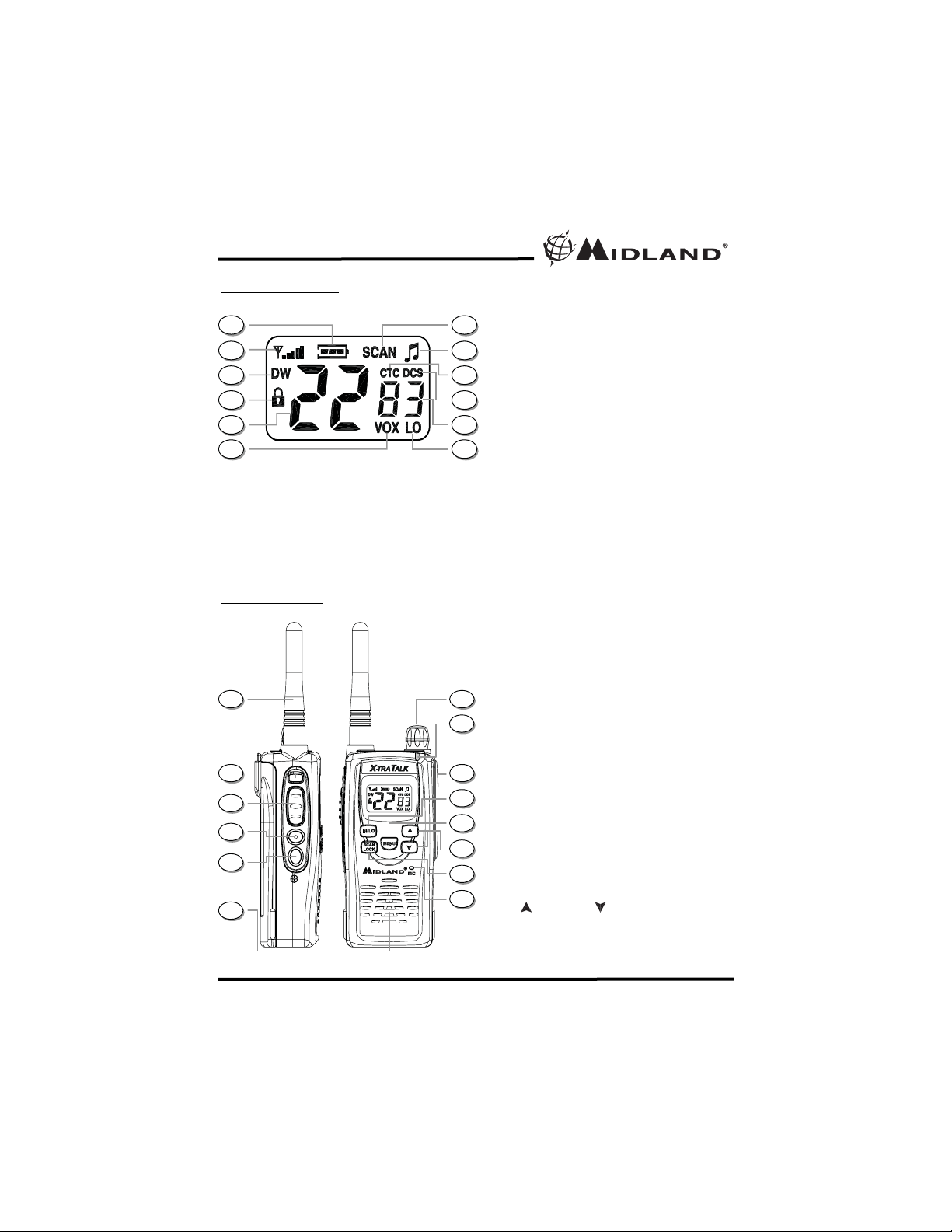
CONTROLS
LCD DISPLAY
1. BATTERY METER – Indicates the battery
level.
2. SIGNAL STRENGTH METER – Indicates the
transmit and receive signal strength.
3. DUAL WATCH ICON – Indicates the Dual
Watch function is on.
4. KEY LOCK ICON – Indicates KEY LOCK
mode is on.
5. CHANNEL NUMBER – Changes from 1~22 on
GMRS/FRS band.
6. VOX ICON – Indicates when VOX mode is
active.
7. CHANNEL SCAN ICON – Indicates when the
Channel Scan function is on.
8. ROGER BEEP ICON – Indicates when the
Roger Beep function is on.
9. CTCSS ICON – Indicates the radio is set with a
CTCSS Privacy Code.
10. DCS ICON – Indicates the radio is set with a
DCS Privacy Code.
11. PRIVACYCODE – Indicates Privacy Code
selected by user (oF~38/oF~83).
12. TRANSMIT POWER LEVEL LO ICON –
Indicates TX Power is at Lo setting.
13. ANTENNA
14. SOS Siren Button – Press and hold to turn
on the Siren.
15. PTT Button – Press and hold to transmit
voice communication.
16. MONITOR Button – Press and hold to enter
MONITOR mode.
17. CALL Button – Press to send a CALL Alert
signal.
18. SPEAKER – Built-in speaker.
19. POWER/VOLUME KNOB – Turn clockwise to
turn the power on and increase the volume
level. Turn counter-clockwise to decrease the
volume level and turn the power off.
20.
TRANSMIT (TX)/RECEIVE (RX) LED Indicator
– Indicates RED when the radio is in TX
mode. Indicates GREEN when the radio is
receiving the correct Channel and Privacy
Code, or when the Privacy Code is set to
OFF. Indicates ORANGE when the radio is
receiving the correct channel but wrong
Privacy Code.
21. EXTERNAL SPEAKER/MIC JACK.
22. TRANSMIT POWER HI/LO Button – Press to
toggle between Transmit Power HI and LO.
23. MENU Button – Press to access
Menu mode.
24. UP and DOWN Button – Press to make
the adjustments in MENU mode.
25. SCAN/LOCK Button – Press to enter SCAN
mode. Press and hold to turn KEY LOCK
on/off.
26. MIC – Built-in microphone.
1
12
11
10
9
8
7
6
5
4
3
2
13
14
24
23
22
21
20
19
18
17
16
15
26
25
Page 5
Model GXT5000 Series
Page 5 www.midlandradio.com
BATTER
Y INSTALLATION
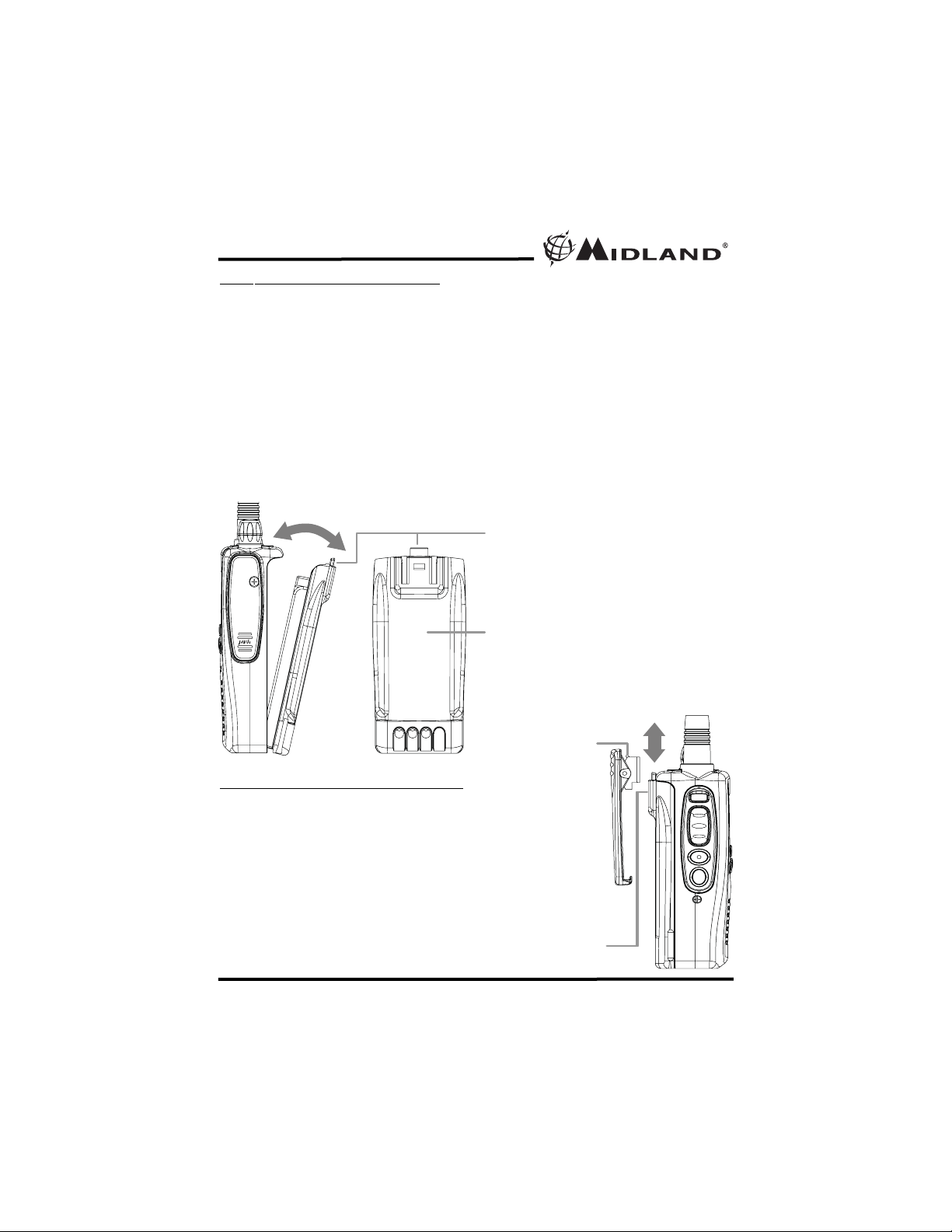
Your GXT5000 Series radio can be fitted with the 2200mAh Li-ion battery
pack.
To install the battery pack:
1. With the back of the radio facing you, insert the bottom part of the
Li-ion battery pack to the bottom of the radio.
2. Push down the Li-ion battery pack into the radio until the Battery
Lock Tab locks into place.
To remove the battery pack:
1. Press the Battery Lock Tab downward until the Li-ion battery pack
unlocks from the radio.
2. Pull the Li-ion battery pack away from the radio.
INSTALLING THE BELT CLIP
To install the BELT CLIP, slide the clip down into the
slot on the back of the radio until the BELT CLIP
LATCH clicks. To remove the BELT CLIP, press the
LOCK TAB down , then gently pull the belt clip up
toward the top of the radio.
BATTERYLOCK TAB
2200mAh Li-ion Battery Pack
BELT CLIP
LOCK TAB
BELT CLIP
LATCH
Page 6
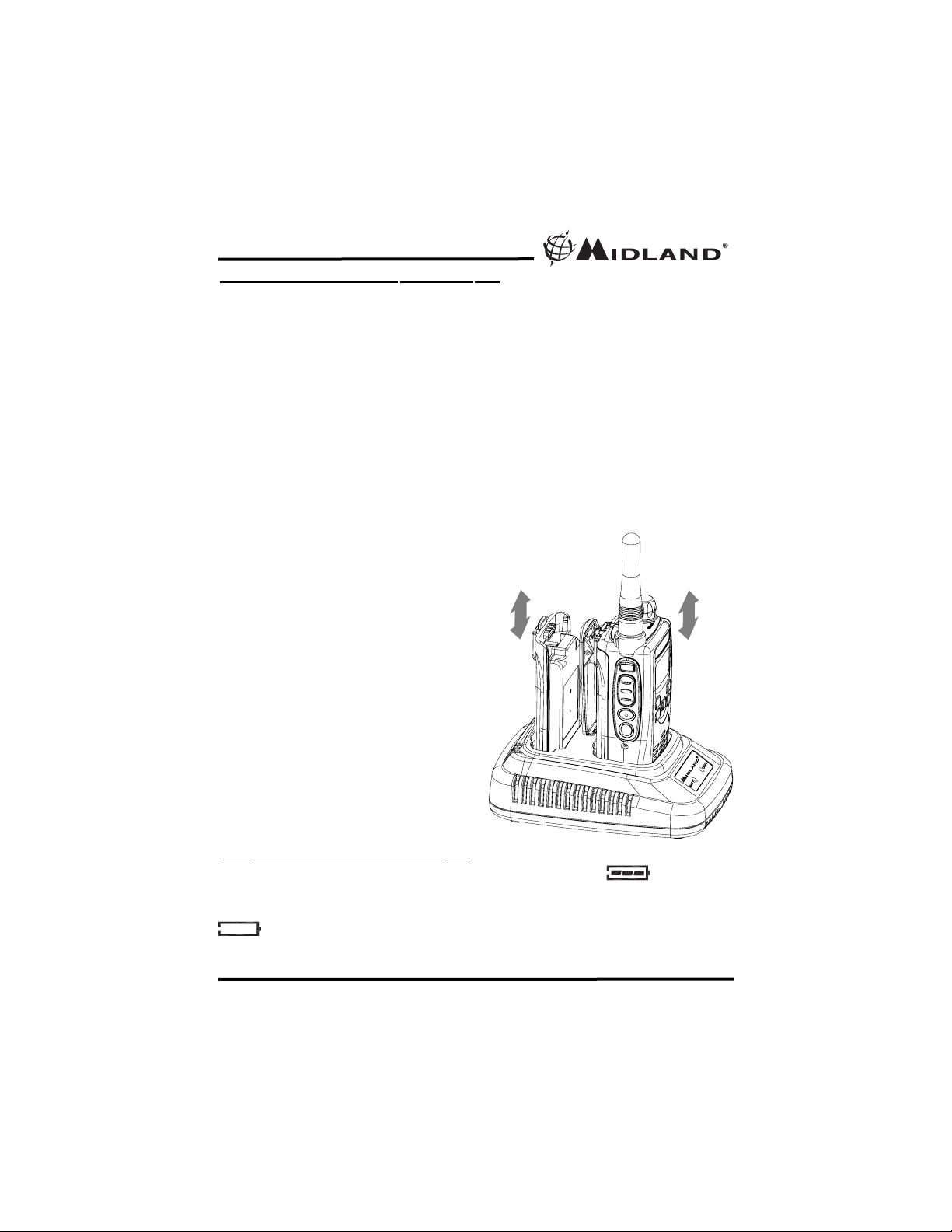
Your GXT5000 Series can be recharged using the Desktop Charger. The
Desktop Charger can charge both one radio and a separate Li-ion battery
pack at the same time.
To charge using a Desktop Charger:
1.Insert the AC adapter plug into the desktop charger jack. Connect the
AC adapter into an AC wall outlet.
2. Place the GXT5000 radio and a separate Li-ion battery pack (if needed)
to the appropriate charger slots as shown in the figure. The LED
indicator with RED color will light up indicating charging function, and will
change to GREEN color once they are fully charged.
If the Li-ion battery pack is new, it is necessary to fully charge it before
using it. The battery provides maximum efficiency after 3~4 full
charge/recharge cycles.
BATTERY LEVEL INDICATOR
Your GXT5000 Series has a BATTERY LEVEL METER that shows
the battery power level. The greater the number of bars visible, the stronger
the battery level. When the battery level is low, the Battery Shell
icon will flash in the display indicating your batteries should be
replaced or recharged.
1. Only use our Li-ion battery
pack.
2. Do not attempt to charge any
battery packs other than the
one indicated in the manual.
This may cause leakage and
damage to the radio.
3. For long term storage of the
radio, turn the radio OFF and
remove the batteries from the
radio.
!
Model GXT5000 Series
Page 6 www.midlandradio.com
CHARGING
THE BATTERY PACK
Page 7
Model GXT5000 Series
Page 7 www.midlandradio.com
POWER ON/OFF AND
VOLUME
Rotate the POWER/VOLUME knob clockwise to turn the radio on and
increase the volume level. Rotate the control counter-clockwise to reduce
the volume level and to turn the radio off. During Power On, the radio will
beep 2 times with different tones, the LCD will display all icons for 1
second and the LCD display will indicate the last channel selected.
CHANNEL SELECTION (GMRS/FRS BAND)
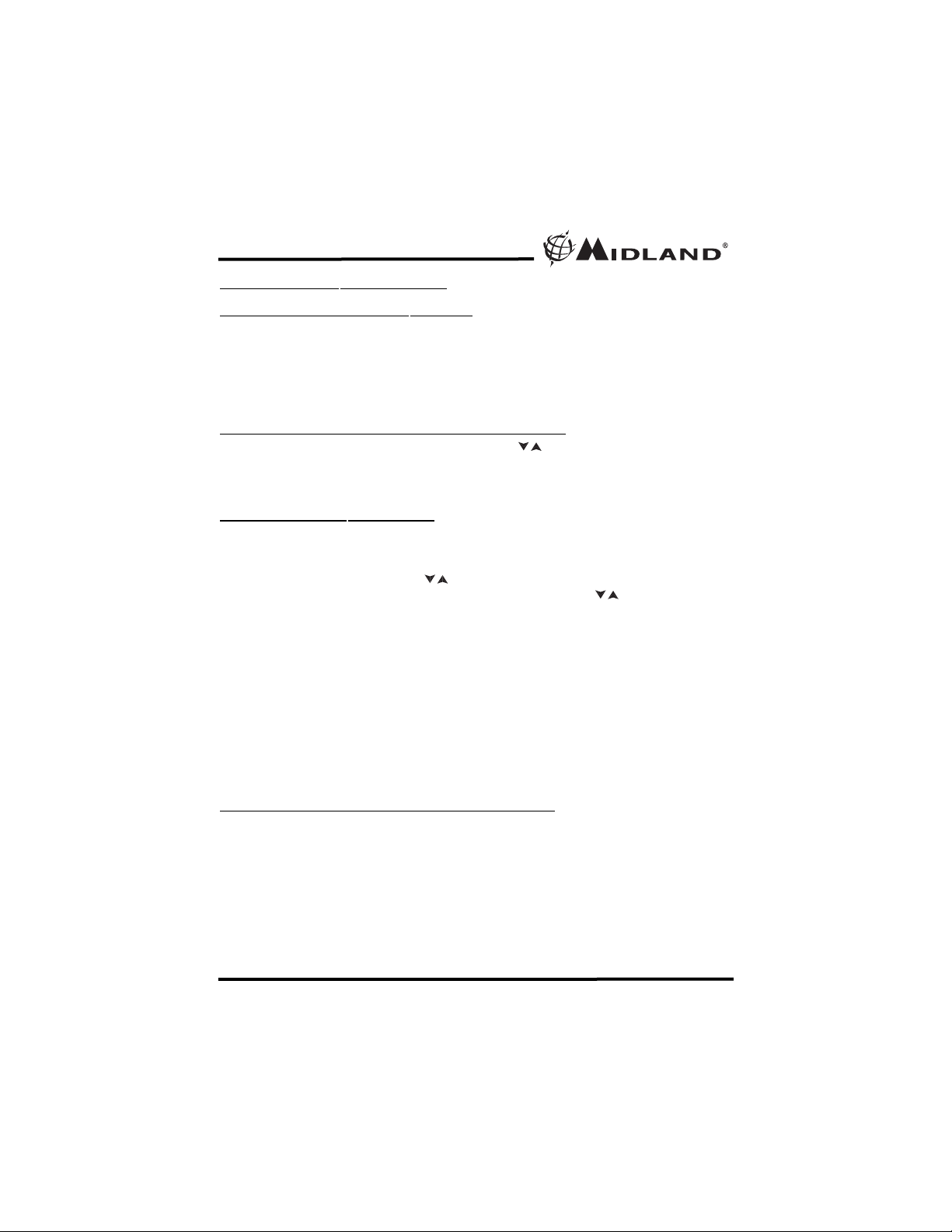
Press the MENU button once, and then the buttons to select one of the
22 GMRS/FRS channels. To confirm the selection, press the PTT button or
press the MENU button again to move to the next feature setting.
SETTING PRIVACY CODES
Your GXT5000 Series has 121 Privacy Codes available which can be
used on channels 1~22. The selected Privacy Code may be different for
each channel. To select a Privacy Code for the current channel press the
MENU button twice, and the buttons to select one of the 38 CTCSS
Codes. Press the MENU button three times, and the button to select
one of the 83 DCS Codes.
The CTCSS or DCS icon will appear on the display to show your Privacy
Code selection. To confirm the selection, press the PTT button or press
MENU button again to move to the next feature setting.
Note : If you select any CTCSS Privacy Code, any pre-selected DCS
Privacy Code will be cancelled and vice-versa.
Selecting a Privacy Code of "oF" will disable the Privacy
feature. To communicate between two GXT5000 Series
radios, all radios in your group must be set to the same
channel and Privacy Code selections.
TRANSMITTING AND RECEIVING A CALL
To communicate, all radios in your group must be set to the same channel
and Privacy Code.
1. For maximum clarity, hold the radio 2 to 3 inches from your mouth.
2. Press and hold the PTT button and speak in a normal voice into the
microphone. The TX/RX LED Indicator will light up RED while
transmitting. The Signal Strength Meter will also appear and show
the current TX power level setting.
OPERATING YOUR RADIO
!
/
/
/
Page 8
3. To receive a call, release the PTT button. The TX/RX LED Indicator
will light up GREEN when your radio is receiving a transmission with
correct channel and Privacy Code. The TX/RX LED Indicator will light
up ORANGE when your radio is receiving a transmission with correct
channel but wrong Privacy Code.
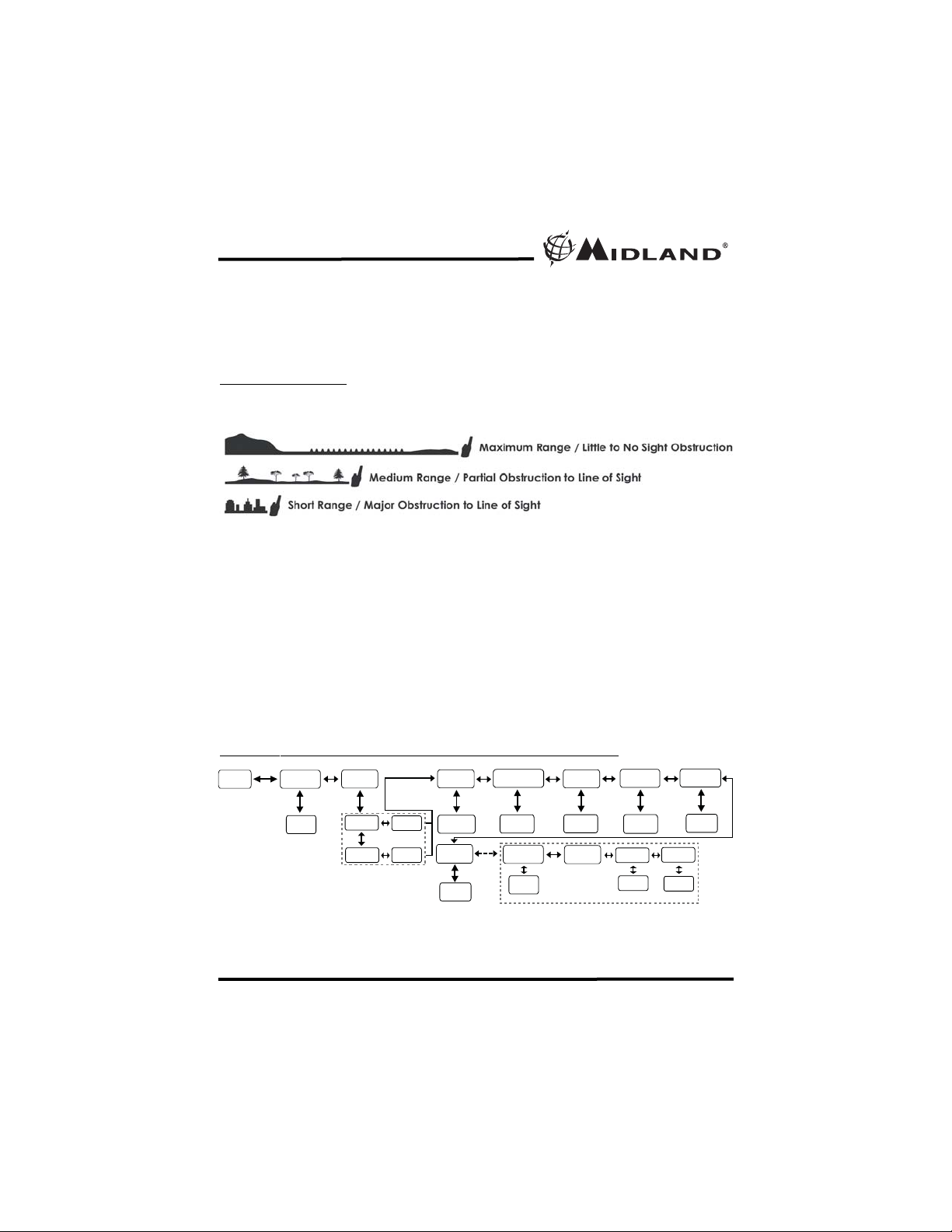
ABOUT RANGE
Your GXT5000 Series radios are designed to give you maximum range
under optimum conditions.
Optimum Conditions are:
l Over water
l Open rural areas without obstructions
l Flat areas where you can see the other person
To ensure you get maximum range:
l Be sure to use fresh or fully charged batteries - low batteries will
cause low power conditions
l Be sure you are on a GMRS channel - FRS channels are restricted by
the FCC to low power
l Be sure to set your radio to use Hi power.
GXT5000 SERIES QUICK REFERENCE CHART
Model GXT5000 Series
Page 8 www.midlandradio.com
MENU
Channel
Privacy
VOX
Roger Beep
1~22
CTCSS
DCS
oF~38
oF~83
oF~5
Out-ofRange
On/Off
On/Off
Dual Watch
Channel
oF~22
bP
On/Off
Dual Watch
Privacy
*** Only when Out-of-Range is OFF
DUAL WATCH FUNCTION
Call Tone
oF~5
CTCSS
oF~38 oF~83
DCS
Time Out
Timer
oF~90
Page 9
SOS SIREN
To activate the SOS SIREN function, press and hold the SOS SIREN
button for 2 seconds. The display will show “SOS” blinking, and the radio
will send out a loud siren sound. To deactivate the SOS SIREN function
press the PTT button twice.
Warning: The SOS Siren is to be used only in the event of an
emergency. Midland Radio Corporation is not responsible if there
is no response to the SOS Siren.
MONIT
OR
Pressing and holding the MONITOR button for around 3 second will let you
hear noise so you can adjust the volume level of the radio when not
receiving a signal. This should be used to check activity on your current
channel before transmitting.
Press and hold the MONITOR button for 3 second again to get out of
MONITOR mode.
CALL ALERT
Your GXT5000 Series can transmit a call alert for a fixed length of time. To
send a call alert, press the CALL button. The TX/RX LED Indicator will
light up RED while transmitting a call alert and a tone can be heard on the
speaker for confirmation.
Note : The GXT5000 radio does not support the Vibrate Alert
function of other Midland GMRS/FRS radios. If you send a Call
Alert signal to other radios with Vibrate Alert function the
receiving radios will not Vibrate and only the Call Tone will be
heard on the speaker.
TRANSMIT (TX) PO
WER LEVEL SELECTION
Your GXT5000 Series has 2 power level settings. To select the power level
on channels 1~7, 15~22 press the TRANSMIT POWER HI/LO button to
toggle between HI and LO power.
When the TX power level is set to HI mode then the Signal Strength Meter
will indicate during transmission.
When the TX power level is set to LO mode then the Signal Strength
Meter will indicate during transmission.
If the Battery Meter drops to 1 bar, the TX Power will automatically
switch from HI to LO level.
Note : You cannot adjust the power setting on the FRS channels
(8~14 ). They are set to Low power per FCC regulations.
Model GXT5000 Series
Page 9 www.midlandradio.com
!
!
!
Page 10
Model GXT5000 Series
Page 10 www.midlandradio.com
SCAN
Your GXT5000 Series can scan all 22 channels for activity. To enter,
quickly press the SCAN/LOCK button. Repeat the same procedure to exit.
Your radio will rapidly scan each of the 22 channels and stop on any active
channel. Your radio will resume scanning after 4 seconds when the
channel is no longer active. The CHANNEL SCAN icon will also appear on
the display.
When you press the PTT button to transmit on an active channel, the
scanning function will stop and remain on the active channel for 5 seconds
before resuming scan when PTT button is no longer pressed.
To resume scanning, quickly press the button.
KEYP
AD LOCK
To avoid accidentally changing the radio setting, press the SCAN/ LOCK
button for 2 seconds. The KEY LOCK icon will appear on the display. PTT,
SOS, MONITOR, and CALL buttons will still be active. Repeat the same
procedure to unlock the keypad.
DISPLA
Y ILLUMINATION
During Power on, the display illumination will activate for approx. 5
seconds. The display illumination can also be activated when the MENU,
TRANSMIT POWER HI/LO, and SCAN/LOCK buttons are pressed.
V
OX (Hands-free
Transmission)
Your radio has 5 VOX level settings: (oF/1~5).
To set VOX on, press the MENU button until the display shows “VOX”
blinking while on the right of the CHANNEL NUMBER display , an “oF” icon
appears. Select “1~5” by pressing the buttons and push the PTT key,
or press MENU button again to move to the next feature setting.
VOX will be more sensitive on the “1” setting than on the “5” setting.
To turn VOX off, press the MENU button until the display shows “VOX”
blinking while on the right of the CHANNEL NUMBER display, a “1~5” icon
appears. Select “oF” by pressing the buttons and push the PTT key, or
press MENU button again to move to the next feature setting.
ROGER BEEP (end of transmission) TONE
When the PTT button is released, the radio will beep to confirm to other
users that your transmission has finished.
To turn the ROGER BEEP tone on, press the MENU button until the icon
appear on the display, while on the right an “oF” icon appears.
/
/
/
Page 11
Model GXT5000 Series
Page 11 www.midlandradio.com
Select “on” by pressing the buttons and push the PTT key, or press
MENU button to move to the next feature setting.
To turn the ROGER BEEP tone off, press the MENU button until the icon
appear on the display, while on the right an “on” icon appears. Select “oF”
by pressing the buttons and push the PTT key, or press MENU button
to move to the next feature setting.
SILENT OPERATION
Your GXT5000 Series has a SILENT OPERATION mode. In this mode, all
“beeps” and “tones” are disabled.
To turn the SILENT OPERATION mode on, press the MENU button until
the display shows an “bP” icon while on the right of the “bP” display, an
“on” icon appears. Select “of” by pressing the buttons and push the
PTT key or MENU button.
To turn the SILENT OPERATION mode off, press the MENU button until
the display shows an “bP” icon while on the right of the “bP” display, an
“oF” icon appears. Select “on” by pressing the buttons and push the
PTT key or MENU button.
CALL ALERT SELECTION
Your GXT5000 Series has 5 selectable CALL ALERTS. To select, press
the MENU button until a “CA” icon appears and to the right of the “CA” icon
the current CALL ALERT setting is displayed. Then press the buttons
to make the CALL ALERT selections, the radio will emit a corresponding
tone for each selection. To confirm, press the PTT button or press MENU
button to move to the next feature setting.
TIME OUT
TIMER
Your GXT5000 has a TIME OUT TIMER function to limit the time you can
transmit continuously. To select, press the MENU button until a “to” icon
appears on the display, and to the right an “oF” icon appear. Then press
the buttons to select the TIME OUT time between “15”, “30”, “45”, “60”,
and “90” seconds. To confirm, press the PTT button or press MENU button
to move to the next feature setting.
When TIME OUT TIMER function is on, the radio will automatically stop
transmitting once you reached the selected TIME OUT time and go to
standby or receive mode until you release the PTT button and press it
again to resume transmission.
/
/
/
/
/
/
Page 12

OUT-OF
-RANGE ALERT
Your GXT5000 has a OUT-OF-RANGE ALERT function to indicate
whether two GXT5000 radios are within usable range. To turn on the OUT-
OF-RANGE ALERT function press the MENU button until an “oU” icon
appears on the display , and to the right an “oF” icon appear. Select “on” by
pressing the buttons. To confirm, press the PTT button or press MENU
button to move to the next feature setting.
The OUT-RANGE ALERT setting of both the transmitting and
receiving radios must be on for this function to work properly.
When the OUT-OF-RANGE ALERT function is on, the radio will
automatically transmit an OUT-OF-RANGE code every 3 minutes. If
another GXT5000 radio (with OUT-OF-RANGE function on and within
usable range) receives the tone, it will automatically reply by sending a
confirmation code to the transmitting radio. This cycle will continue every 3
minutes.
If the transmitting radio does not receive a confirmation code (the receiving
GXT5000 radio’s OUT-OF-RANGE function is off and/or outside its usable
range) then the transmitting GXT5000 Series radio will “beep” every 20
seconds and the ANTENNA icon will continue to blink until it receives a
correct confirmation code.
If the GXT5000 beep and tone is disabled (see SILENT OPERATION) and
it is outside the usable range, then it will not “beep” every 20 seconds and
only the ANTENNA icon will continue to blink until it receives a correct
confirmation code.
To turn off the OUT-OF-RANGE ALERT function press the MENU button
until an “oU” icon appears on the display, and to the right an “on” icon
appear. Select “oF” by pressing the buttons.
To confirm, press the PTT button or press MENU button to move to the next
feature setting.
DUAL WATCH FUNCTION
Your GXT5000 Series has a DUAL WATCH function, to enable user to
scan 2 channels for any activity. The first channel will be the current
channel setting and the second channel will be the selected channel on
the MENU.
To turn the DUAL WATCH on, press the MENU button until the “DW” icon
appears blinking on the left of the display, while the “oF” icon appears on
the display. Select the second channel by pressing the button. Press
again the MENU and the button to choose the CTCSS Privacy Code
(oF ~ 38), or press again the MENU and button to set the DCS Privacy
Code (oF~83).
Model GXT5000 Series
Page 12 www.midlandradio.com
/
/
/
/
/
Page 13
Model GXT5000 Series
Page 13 www.midlandradio.com
Pls. note that the DUAL WATCH function is only available as a MENU
selection if the OUT-OF-RANGE is turned off.
To confirm, press the PTT button or press MENU.
The “DW” icon will appear all the same time to signify that the DUAL
WATCH function is on and the radio will start to scan both the current
channel/code-in-use and the selected channel/code. It will stop scanning
on a channel if either is active. Your radio will resume scanning after 4
seconds when the channel is no longer active.
When you press the PTT button to transmit on an active channel, the
scanning function will stop and remain on the active channel for 5 seconds
before resuming scan when PTT button is no longer pressed.
To resume scanning, quickly press the button.
To turn the DUAL WATCH function off, press the SCAN button.
Please note that the DUAL WATCH function is only available
as a MENU selection if the OUT-OF-RANGE is turned off.
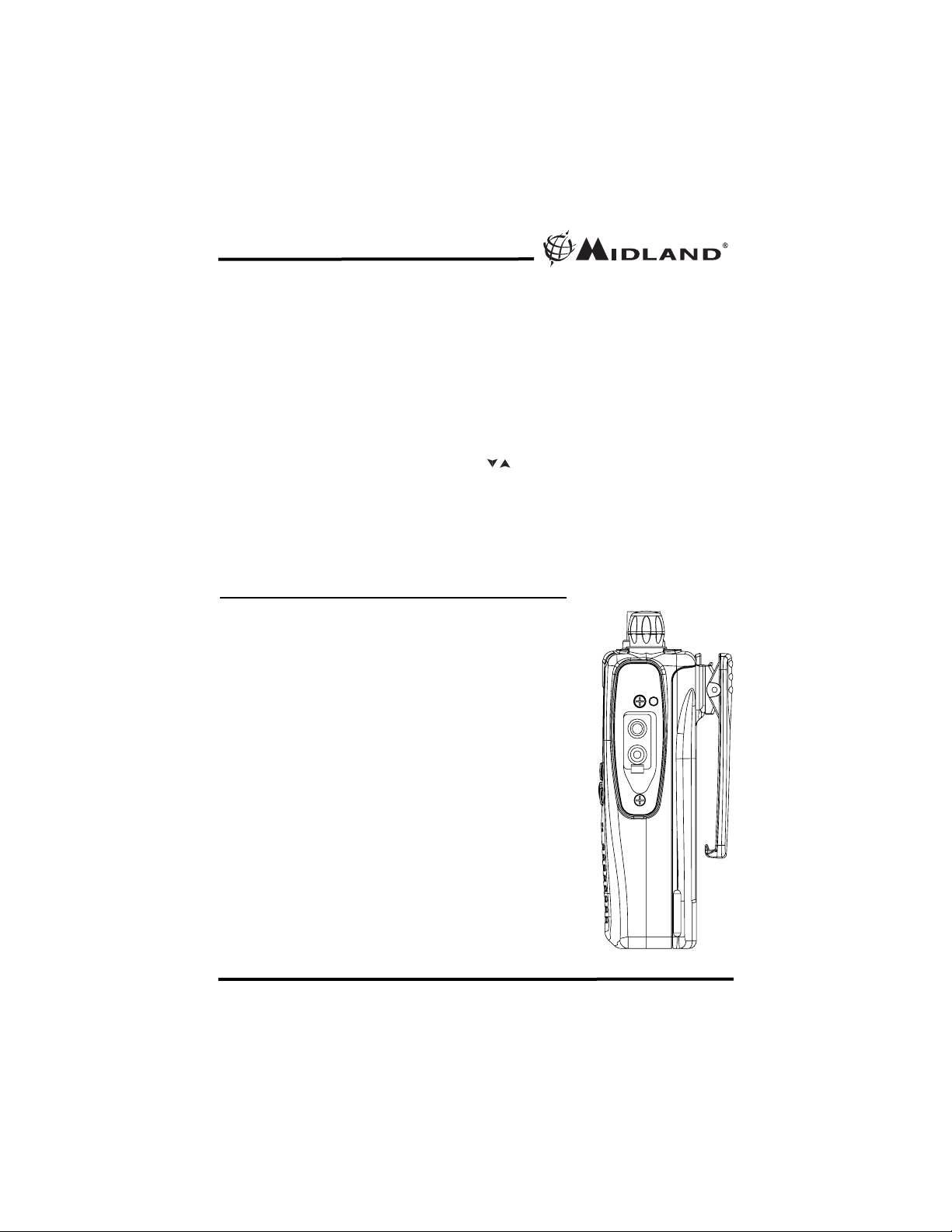
EXTERNAL SPEAKER/MICROPHONE JACK
Your GXT5000 Series can be used with an optional
external speaker/ microphone or headset, freeing your
hands for other tasks. To use an optional speaker/
microphone or headset:
l Cover must first be removed. Loosen the screw
and remove the Cover.
l Insert the plug(s) into the SPK/MIC jacks
l Place the earbud into your ear, and adjust
the mic into your desired position.
Note : The radio will no longer be water
proofed when the accessory jack cover is
removed.
/
!
!
Page 14
Model GXT5000 Series
Page 14 www.midlandradio.com
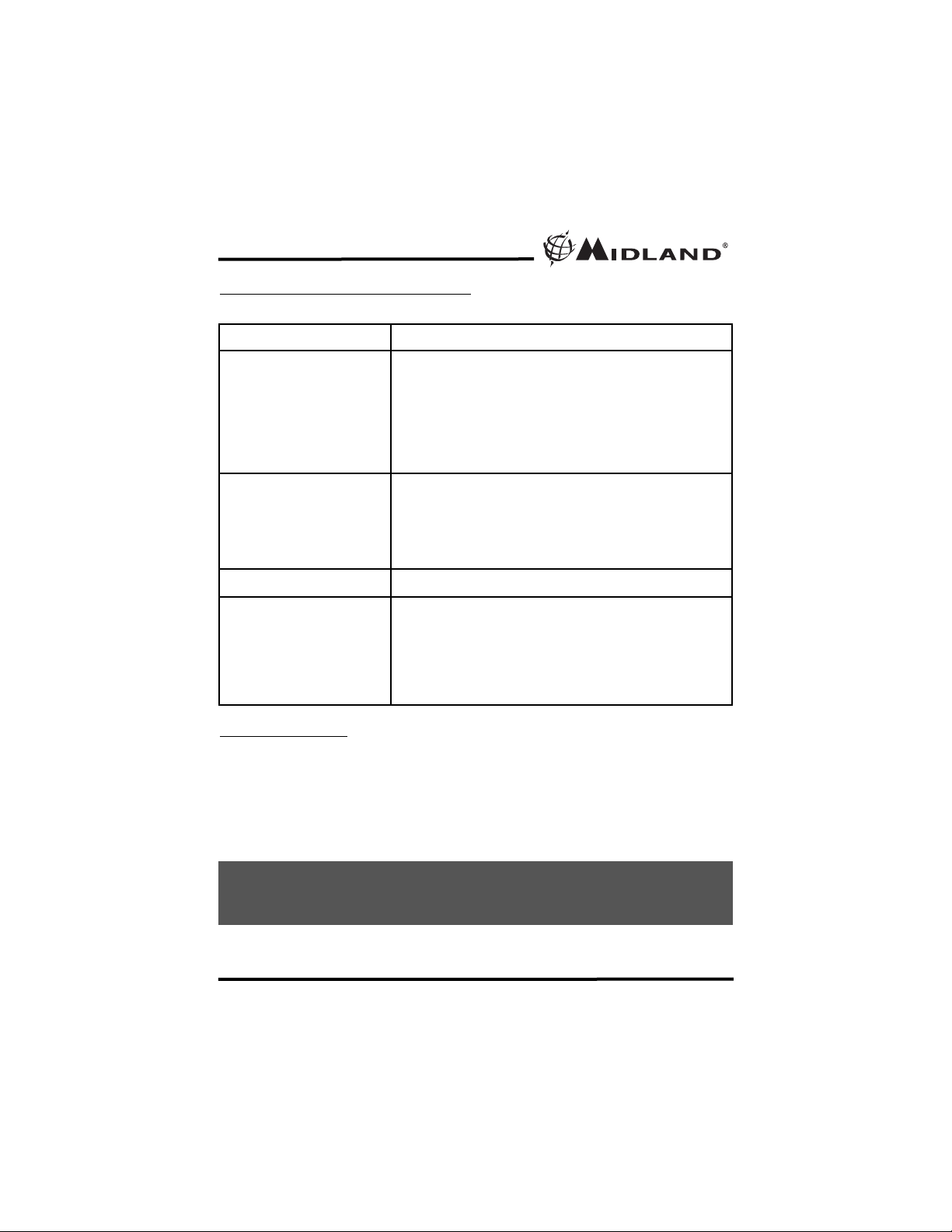
PROBLEM SOLUTION
No Power - Check battery installation and/or replace batteries
Cannot Receive
Messages
- Confirm the radios have the same channel and
Privacy Code settings.
- Make sure that you are within range of the other
transceivers.
- Buildings and other structures may interfere with
your communication.
(See ABOUT RANGE on Page 8)
Radio is not responding to
button presses
- Make sure key lock is not on. See "Keypad Lock"
(Page 10).
- Radio might need to be reset. Turn radio off then
on.
- Ensure accessory microphone is set properly
Display is dim - Recharge or replace batteries.
Charger not functioning - Contacts on the bottom of the radio may require
cleaning.
- Ensure the outlet where the charger is plugged into
is functioning properly.
- Check that the battery pack is installed in the radio
properly.
USE
AND CARE
1. Use a soft damp cloth to clean the radio
2. Do not use alcohol or cleaning solutions to clean the radio.
3. Dry the radio with dry lint-free cloth should it get wet.
4. Turn off the radio and remove the batteries during long-term
storage.
If you have a problem which you believe requires service, please call
first and speak with a service technician. Many problems can be
remedied over the phone without returning the unit for service.
TROUBLESHOOTING GUIDE
Page 15
Model GXT5000 Series
Page 15 www.midlandradio.com
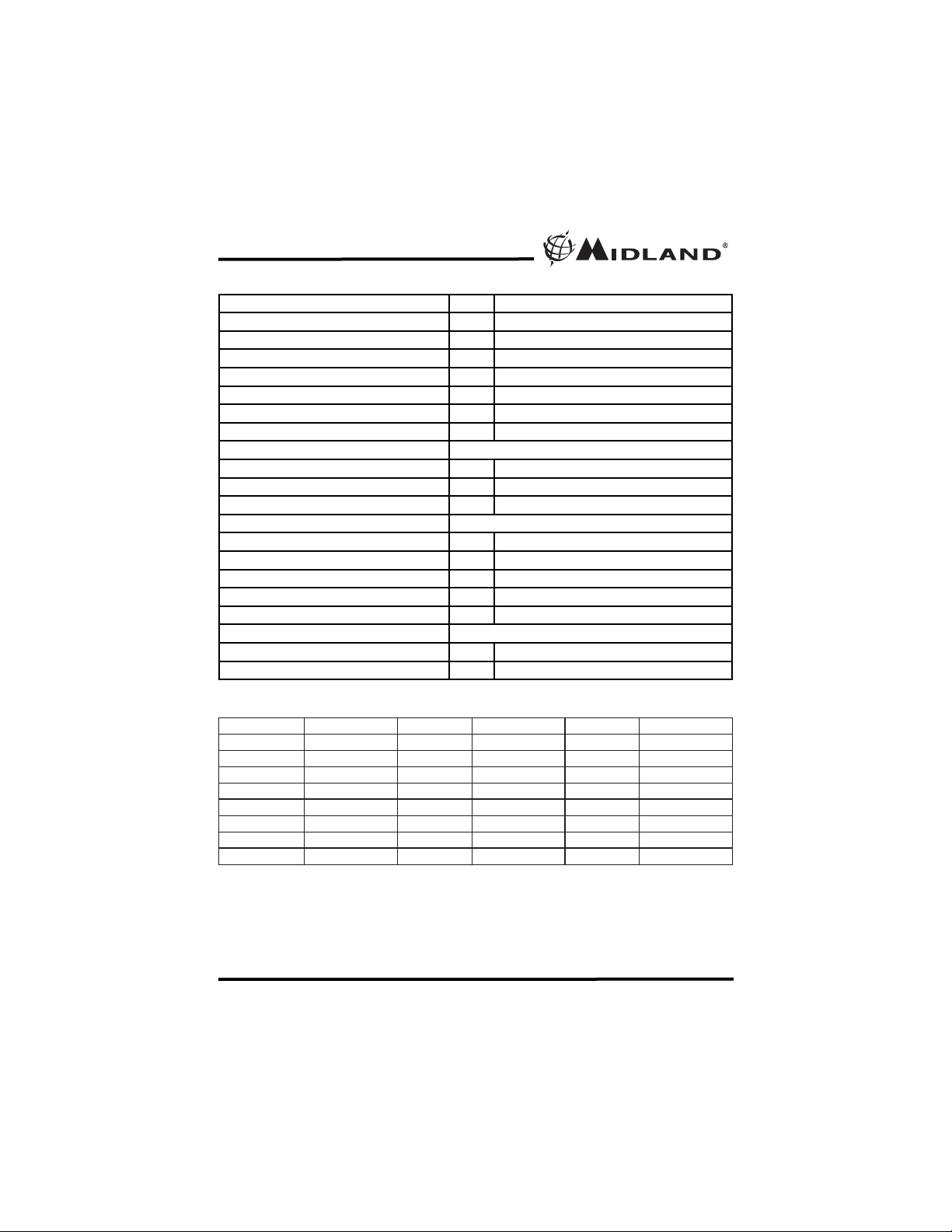
GMRS/FRS FREQUENCY CHART (MHz)
CH. No
CH. Freq.
CH. No
CH. Freq.
CH. No
CH. Freq.
1
462.5625
9
467.5875
17
462.6000
2
462.5875
10
467.6125
18
462.6250
3
462.6125
11
467.6375
19
462.6500
4
462.6375
12
467.6625
20
462.6750
5
462.6625
13
467.6875
21
462.7000
6
462.6875
14
467.7125
22
462.7250
7
462.7125
15
462.5500
8
467.5625
16
462.5750
* Channels 8~14 are low-power FRS license free channels
GENERAL SPECIFICATION
Channels 22 15 GMRS and 7 FRS channels
Frequency Generation - PLL synthesizer
Frequency range MHz From 462.5500 to 467.7125MHz
Antenna Type “Rubber ducky” in rubber
Rated power supply Vdc From 4.5 to 7.2Vdc
Operating temperature ºC From -30º to +60º
Size (HxLxD with antenna) mm 113 x 54 x 35
Weight (without battery) g 180
TRANSMITTER
Output power (ERP) W 0.5
Type of circuit - FM
Suppression of spurious signals - Compliant with TIA/EIA-603-B
RECEIVER
Sensitivity at 12dB SINAD uV Above 0.25
Audio output power (10% THD) W 1
Spurious signals rejection dB 50
Medium Frequencies MHz First 21.4
kHz Second 450
CONNECTIONS
Connection for external microphone - 2.5mm stereo jack
Connector for external speaker - 3.5mm mono jack
Page 16
Model GXT5000 Series
Page 16 www.midlandradio.com
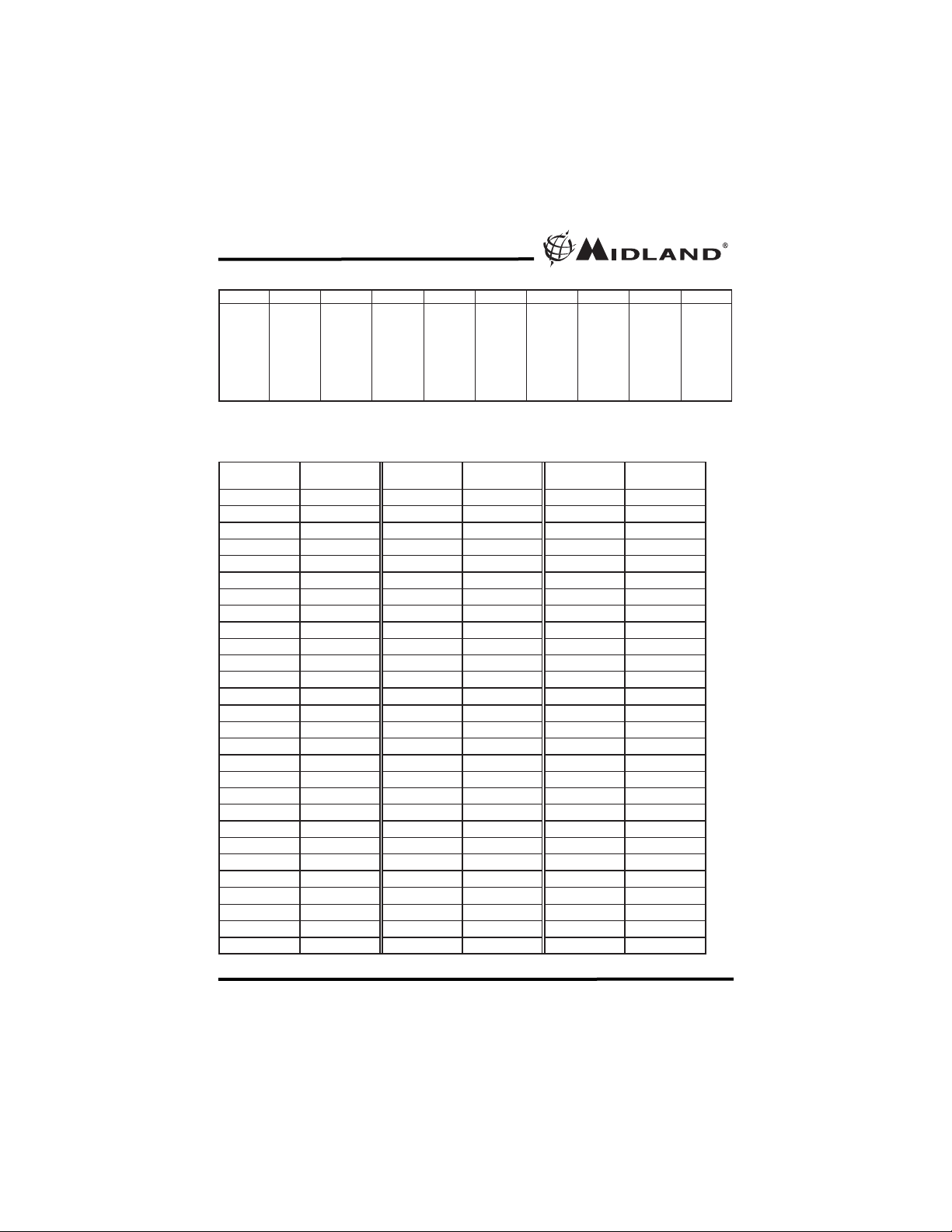
DCS PRIVACY CODE CHART
Note: Privacy codes can be programmed for use on Channels 1~22
CTCSS PRIVACY CODES FREQUENCY CHART (Hz
)
Code Freq. Code Freq. Code Freq. Code Freq. Code Freq.
Note: Privacy codes can be programmed for use on Channels 1~22
1 67.0 9 91.5 17 118.8 25 156.7 33 210.7
2 71.9 10 94.8 18 123.0 26 162.2 34 218.1
3 74.4 11 97.4 19 127.3 27 167.9 35 225.7
4 77.0 12 100.0 20 131.8 28 173.8 36 233.6
5 79.7 13 103.5 21 136.5 29 179.9 37 241.8
6 82.5 14 107.2 22 141.3 30 186.2 38 250.3
7 85.4 15 110.9 23 146.2 31 192.8
8 88.5 16 114.8 24 151.4 32 203.5
No.
CODE No. CODE No. CODE
1 023 29 174 57 445
2 025 30 205 58 464
3 026 31 223 59 465
4 031 32 226 60 466
5 032 33 243 61 503
6 043 34 244 62 506
7 047 35 245 63 516
8 051 36 251 64 532
9 054 37 261 65 546
10 065 38 263 66 565
11 071 39 265 67 606
12 072 40 271 68 612
13 073 41 306 69 624
14 074 42 311 70 627
15 114 43 315 71 631
16 115 44 331 72 632
17 116 45 343 73 654
18 125 46 346 74 662
19 131 47 351 75 664
20 132 48 364 76 703
21 134 49 365 77 712
22 143 50 371 78 723
23 152 51 411 79 731
24 155 52 412 80 732
25 156 53 413 81 734
26 162 54 423 82 743
27 165 55 431 83 754
28 172 56 432 - -
Page 17

Model GXT5000 Series
Page 17 www.midlandradio.com
LIMITED WARRANTY
Midland Radio Corporation will repair or replace, at its option without
charge, any Midland FRS/GMRS transceiver which fails due to a defect in
material or workmanship within Five Years following the initial consumer
purchase. This warranty does not apply to battery leak or abuse.
Accessories have a 90 day warranty from date of purchase, including any
antennas, chargers, or earphones. This warranty does not include the cost
of labor for removal or re-installation of the product in a vehicle or other
mounting. Performance of any obligation under this warranty may be
obtained by returning the warranted product, prepaid freight, along with
proof of purchase to:
Midland Radio Corporation
Warranty Service Department
5900 Parretta Drive
Kansas City, MO 64120
This warranty gives you specific legal rights, and you may also have other
rights, which vary from state to state.
Note : The above warranty applies only to merchandise purchased in the
United States of America or any of the territories or possessions thereof, or
from a U.S. Military exchange.
Midland Radio Corporation
5900 Parretta Drive
Kansas City, MO 64120
Tel: (816) 241-8500
E-mail: [email protected]
URL: www.midlandradio.com
Page 18

Model GXT5000 Series
Page 18 www.midlandradio.com
Page 19
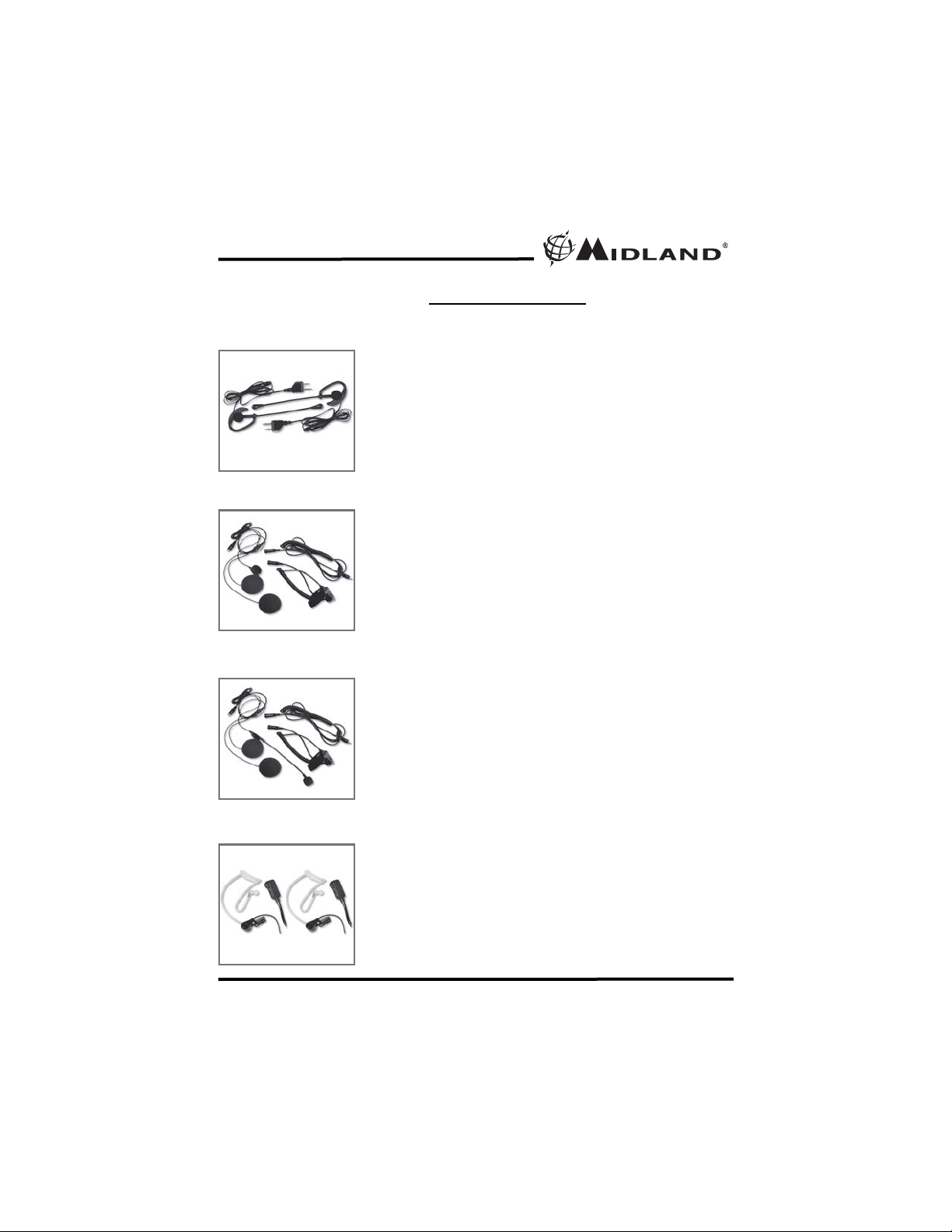
AVP-11
AVP-HH1
AVP-HH2
AVP-HH3
Model GXT5000 Series
Page 19 www.midlandradio.com
ACCESSORIES
Accessories can be purchased at www
.midlandradio.com
or fill in the form on the
following page and mail it to our address.
- 1 Open Face Helmet
Microphone Kit
- $49.99
- 1 Closed Face Helmet
Microphone Kit
- $49.99
- 2 Over the Ear Mic. Headsets
w/ PTT
- $19.99
- 2 Surveillance Headset
- $39.99
Page 20
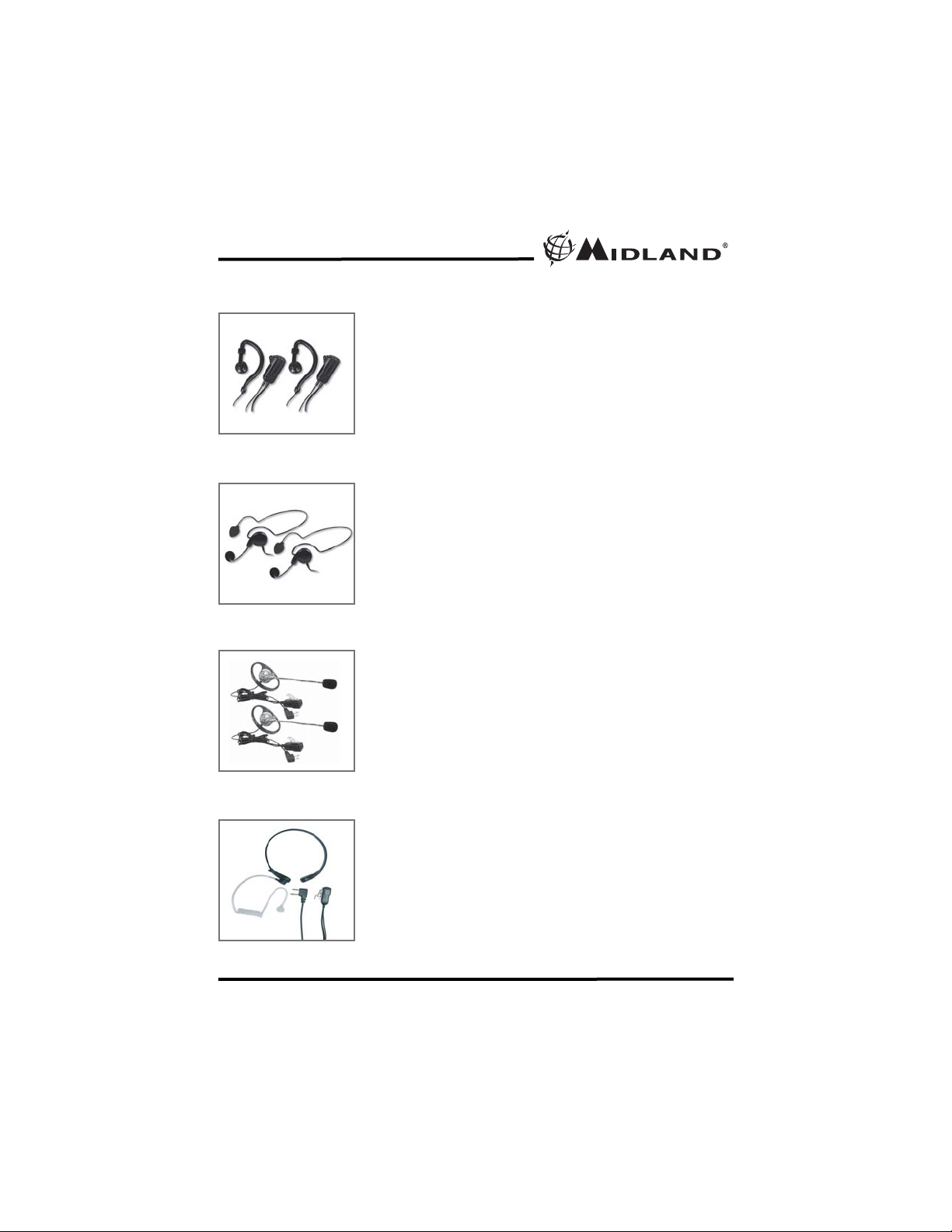
AVP-HH4
AVP-HH5
AVP-HH7
AVP-HH8
Model GXT5000 Series
Page 20 www.midlandradio.com
- 2 Behind the Head Headset
- $39.99
- 2 Mossy Oak Around the Ear
Headsets with Boom Mic
- $39.99
- 1 Action Throat Mic with
Acoustic Ear Tube
- $39.99
- 2 Ear Wrap Headset
- $39.99
Page 21
Model GXT5000 Series
Page 21 www.midlandradio.com
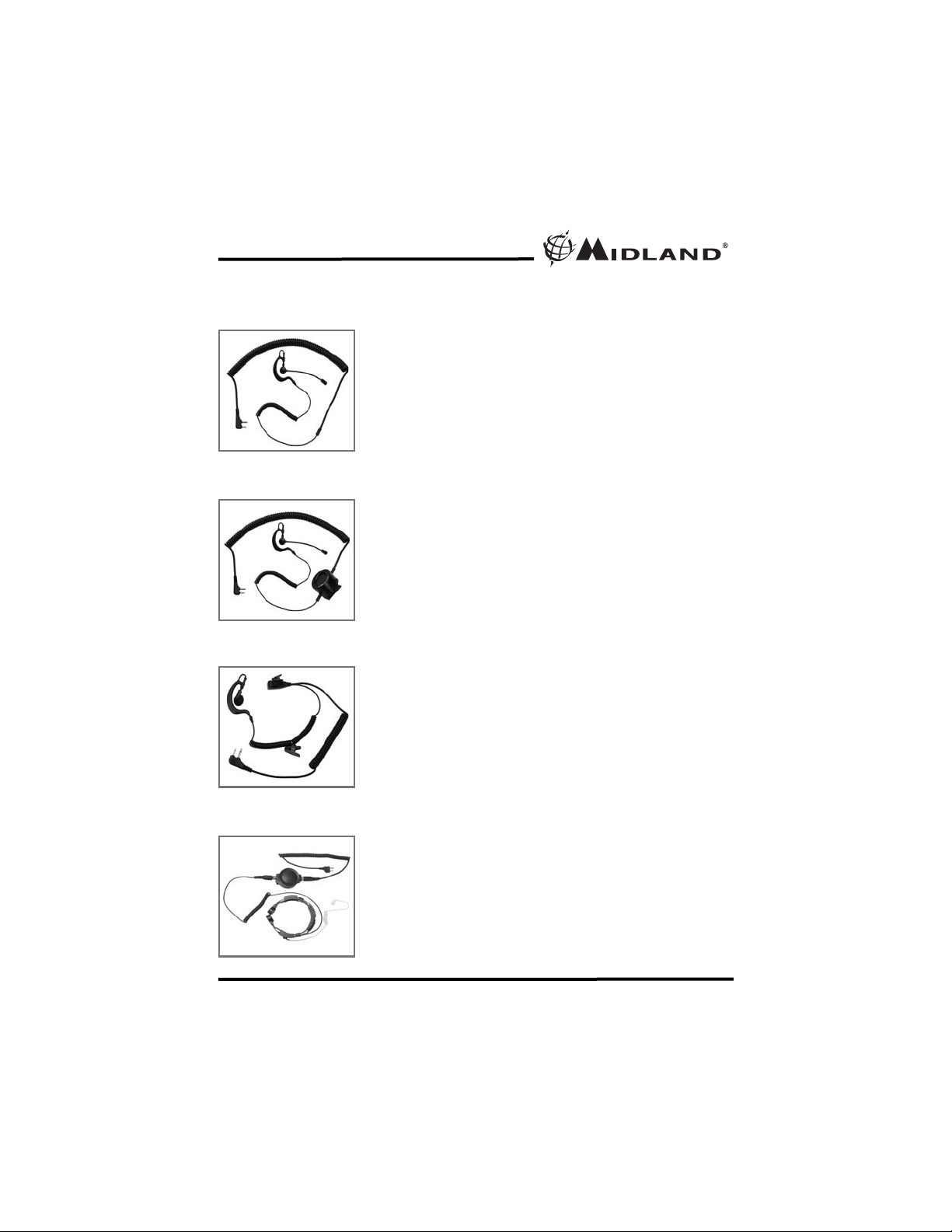
TH1
TH2
TH3
TH4
- Earphone Mic with Boom
- $39.99
- Earphone Mic with PTT
- $29.99
- Tactical Action Boom Mic with
Tactical PTT
- $99.99
- Action Throat Mic with Tactical
PTT and Pneumatic Earphone
- $109.99
TACTICAL HEADSETS
Page 22
Model GXT5000 Series
Page 22 www.midlandradio.com
NOTES
Page 23
Model GXT5000 Series
Page 23 www.midlandradio.com
Please send Money Order or fill in Visa/MasterCard information and mail to
the address below. Please DO NOT send cash or checks. Make Money
Order to Midland Radio Corporation.
Name: ___________________________________________________________
Address: _________________________________________________________
City: _____________________ State __________ Zip Code _____________
Tel: ______________________ email: _________________________________
CC# _____________________ Type: __________ Exp. _________________
ACCESSORIES ORDER FORM
Mail To:
Midland Radio Corporation
Consumer Dept.
5900 Parretta Drive
Kansas City, MO 64120
---------------Or Call 816.241.8500.
---------------To order online go to
www.midlandradio.com
Sub-Total ___________
Tax (MO, CO, IL, FL only) ___________
S & H _____ $14.95
(Applies to Domestic U.S. only.
For Hawaii, Alaska, and Puerto
Rico S&H will be $36.25 for 1lb
and $64.25 for 2lbs or more).
Total $___________
Qty Item Price Total
AVP-1 $19.99
AVP-H1 $49.99
AVP-H2 $49.99
AVP-H3 $39.99
AVP-H4 $39.99
AVP-H5 $39.99
AVP-H7 $39.99
AVP-H8 $39.99
TH1 $39.99
TH2 $99.99
TH3 $29.99
TH4 $109.99
Page 24

Model GXT5000 Series
Page 24 www.midlandradio.com
Rev C
 Loading...