

Page 1
NTY
g
g
a
d
will repair or replace, at its option without charge, any Midland FRS/GMRS
to a defect in material or workmanship within One Year followin
rranty does not apply to water damage, battery leak damage or abuse.
lude any carryin
product, or the cost of labor for removal or re-installation of the product in a
on under this warranty may be obtained by returning the warranted product,
roof of purchase date, to:
oration
epartment
Missouri 64116.
cific legal rights, and you may also have other rights, which vary, from state to
applies only to merchandise purchased in the United States of America or any of
thereof, or from a U.S. Military exchange.
om
Printed in Thailand
cases, earphones, or antennas, which may be a part of or
the initial
User’s Guide
Model M-222P
General Mobile R
Featuring:
• 22 Channels
• 38 CTCSS co
• VOX
Page 2

ency Chart
r
ge
g
r
a
n
e
o
c
Channel Frequency Channel Number Channel Frequency
(MHz) (MHz)
462.5625 12 467.6625
462.5875 13 467.6875
462.6125 14 467.7125
462.6375 15 462.5500
462.6625 16 462.5750
462.6875 17 462.6000
462.7125 18 462.6250
467.5625 19 462.6500
467.5875 20 462.6750
467.6125 21 462.7000
467.6375 22 462.7250
hart
Code Freq Code Freq Code Freq Code Freq
(Hz) (Hz) (Hz) (Hz)
9 91.5 17 118.8 25 156.7 33 210.7
10 94.8 18 123.0 26 162.2 34 218.1
11 97.4 19 127.3 27 167.9 36 225.7
12 100.0 20 131.8 28 173.8 36 233.6
13 103.5 21 136.5 29 179.9 37 241.8
14 107.2 22 141.3 30 186.2 38 250.3
15 110.9 23 146.2 31 192.8
16 114.8 24 151.4 32 203.5
Introduction
Your M-222P represents the state-of-the art in high-tech enginee
for General Mobile Radio Service operation, this compact packa
performance. It is a quality piece of electronic equipment, skillfull
with the finest components. The circuitry is all solid-state and mo
rugged printed circuit boards. Your M-222P is desi
ned for many
reliable, trouble-free performance.
FCC Licensing Information
Your M-222P operates on General Mobile Radio Service (GMRS) f
is subject to the Rules and Regulations of the Federal Communic
mission (FCC). The FCC requires that all operators using General
Service (GMRS) frequencies obtain a radio license before operati
equipment for business, personal or recreational use. A GMRS lic
individual may be shared by immediate family members. To obtai
application forms, call the FCC forms hotline at 1-800-418-3676
http://www.fcc.gov. Please request forms 605 and 159 which in
necessary forms and instructions.
For questions concerning licensing, please contact the FCC at 1-8
(1-888-225-5322), or go to http://www.fcc.gov
.
Page 3
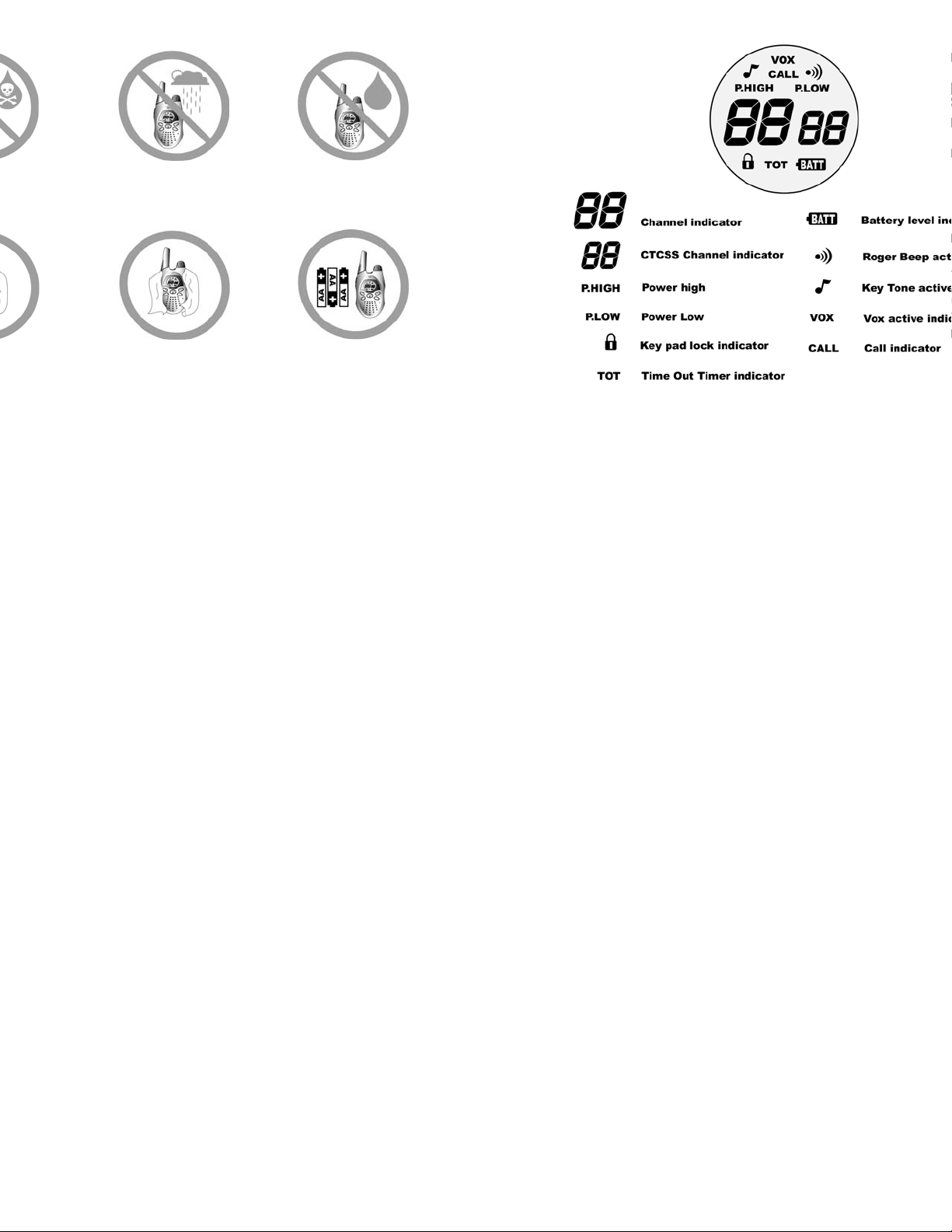
e LCD Display
lcohol or
tions to
adio.
t damp
he radio.
Do not immerse the
radio in water.
Do dry the radio with a
dry lint free cloth should
it get wet.
Do not use the radio
until completely dry.
Do turn off the radio
and remove the
batteries when storing.
Page 4

To avoid accidentally changing radio operation, press for 3
g
g
grou
h
n
w
n
icon will be appear. When the is on the menu functions
buttons are disabled. When locked, you will be able to turn the
, increase or decrease volume, monitor, transmit and send a call
press for 3 seconds.
r M-222P has 10 different call tones available. To select the call
radio on, repeatedly press until CALL appears. The current
setting will begin to flash.
or to chan
speaker.
or the PTT button to save the new call tone and exit the
the call tone to 0 disables the call tone function.
ne: Whenever you release the PTT button, a “Roger Beep” tone
ted to let your friends know you are finished talking. To enable
turn the radio off. Press and hold as you turn your radio
will appear in the upper right position of the display. Repeat
to turn off the Ro
e the call tone. The new call tone will be heard
er Beep.
Operation
Power On/Off: Turn the knob on the top of the radio clockwise
radio on. Turn the knob counterclockwise to turn the radio off.
Volume: Rotate the knob clockwise to increase the volume and
counterclockwise to decrease the volume.
Talking and Listening: To communicate, all radios in your
the same channel and CTCSS code.
• For maximum clarity, hold radio 2 to 3 inches from mout
• Press and hold PTT button and speak in a normal voice i
microphone. The LED indicator light glows continuously
transmitting
• To receive messages, release the PTT button.
Disabling Button Beeps: A feedback beep is normally sounded
front panel button on the radio is pressed. To turn this feature o
and hold the button 3 seconds while turning the radio on. Th
be on when beeps are enabled.
Page 5
d
C
Technical Specifications
6
A
8
1
ion 1
icators 2
3
4
5
10
harts 12
13
Back Cover
s with Part 15 of the FCC rules. Operation is subject to
hat this device does not cause harmful interference.
pliance with the FCC’s RF exposure guidelines, this
its antenna must maintain a separation distance of at
from your body. To transmit, hold the radio with the
p and away from your face, with the radio at least two
r face. Speak in a normal voice into the microphone.
General
Frequency Range 462.5
Channels
CTCSS Codes
Antenna Impedance
Speaker Impedance
Power Supply 3 A
Modulation Type
Intermediate frequencies 1
Receiver
Sensitivity (for 12 dB Sinad)
Audio out put power (@ 10%THD)
Audio distortion (@ 500 mVrms)
Signal/Noise ratio
Image Rejection
Adjacent channel selectivity
Current drain (standby)
Transmitter
Modulation FM 1.
Signal/Noise ratio
Current drain (max)
st
IF = 21.7 MHz
Page 6
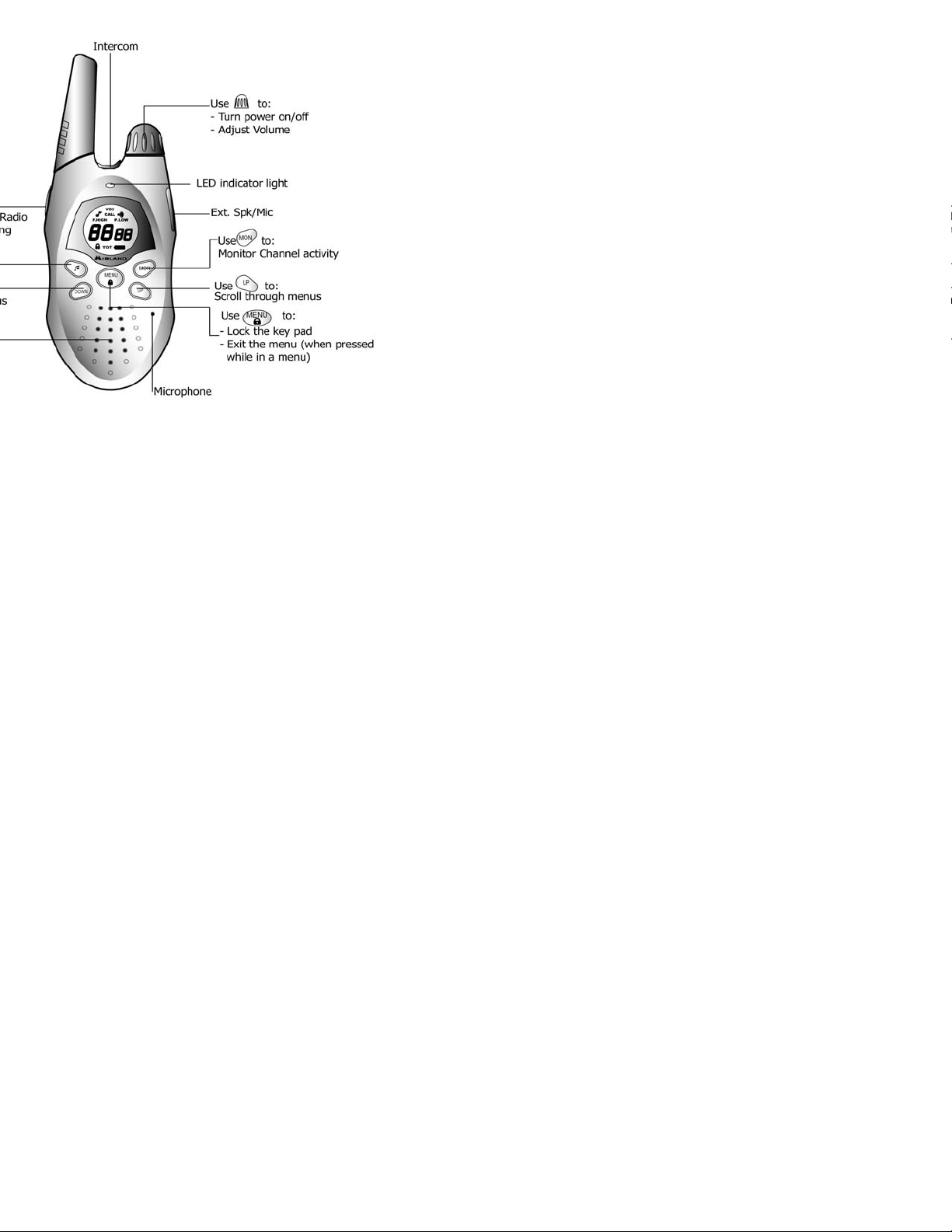
ons & Indicators
e
a
h
g
b
External Speaker/Microphone Jack: Your M-222P can be us
optional external speaker/microphone or headset, freeing your h
tasks. To use an optional speaker/microphone or headset:
• Open the SPK/MIC cover on right side of the radio.
• Insert the plug(s) into the SPK/MIC jacks.
Intercom: Your M-222P can be used with optional accessories t
radio to operate as an intercom system.
• Open the INT cover on top of the radio.
• Insert the appropriate plug into the INT jack.
Belt clip: Your M-222P comes with a belt clip. To install the belt
• Slide the clip down into the slots on the back of the radio
latching mechanism clicks.
To remove the belt clip:
• Pull outward on the latchin
the top of the radio.
tab while gently sliding the
Page 7
atteries
g
n
a
p
j
i
r
d
g
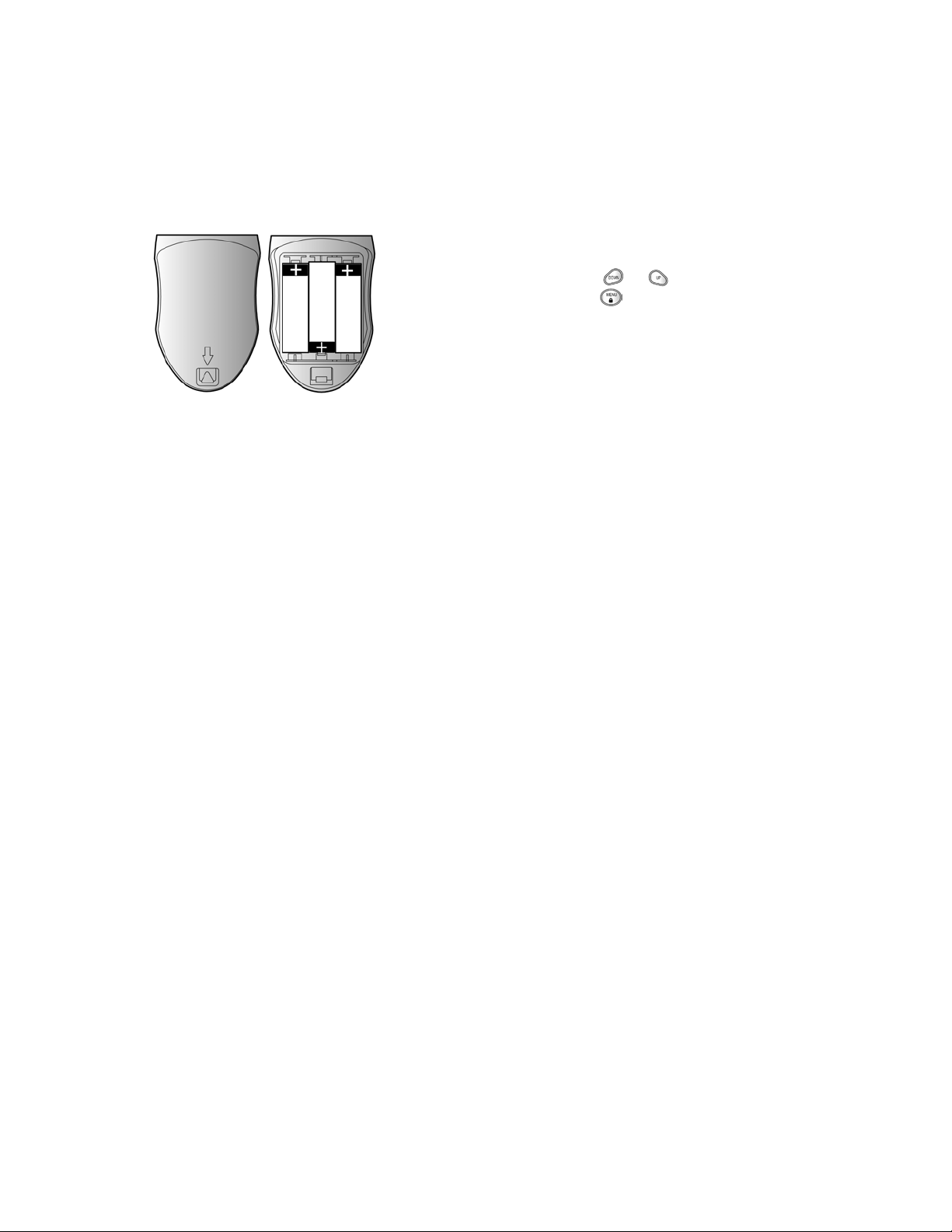
io operates with 3 AA Alkaline batteries. The belt clip should be
battery installation or removal. To install or remove batteries:
f radio facing you, gently press the triangular battery latch
op of the radio.
e bottom edge of the battery cover and lift the cover off.
batteries observin
o alignment tabs on the top edge of the cover into their slots
own on the bottom of the cover to secure.
are not included.
the polarity as shown.
VOX: VOX (voice operated transmit) operation allows you to tra
using the PTT button when using a headset. To enable VOX oper
• Open the SPK/MIC cover on right side of the radio.
• Insert the headset plug(s) into the SPK/MIC jacks.
• Set the VOX switch on headset to VOX position.
• Turn on the radio. The VOX icon will appear.
Note: The VOX level must be set properly for correct VOX o
VOX Level setup: Your M-222P has three selectable VOX levels.
should be ad
usted so that your voice causes the radio to transm
environmental noise does not. To set the VOX level:
• With the radio on, repeatedly press until
VOX appea
VOX setting will begin to flash.
• Press or to change the VOX level.
• Press or the PTT button to save the new call tone an
menus.
Note: Selectin
level 0 will disable VOX operation without regard
switch setting on the headset.
Page 8

ion: Your M-222P has 22 channels available. To change
g
o
e
d
a
j
c
T
e
t
d
T
g
l
e radio on, repeatedly press until the current channel
n flashes.
or buttons to change the channel.
or the PTT button to save the new channel and exit the
n: Your M-222P has 38 CTCSS codes available. The selected
y be different for each channel. To select a CTCSS code for the
desired channel selected, repeatedly press until the current
code number flashes.
or buttons to chan
e the CTCSS code number.
or the PTT button to save the new CTCSS code and exit the
a CTCSS code of 0 will disable the CTCSS feature. To
tween two M-222P radios, both the channel and
CTCSS code selections must be the same. To communicate with
and brands of radios the actual radio frequency and CTCSS frequ
matched. The frequency charts at the back of this book are inclu
this selection. In general, the first fourteen channel selections m
communicate with most FRS radios.
Monitor button: Pressing and holding the button lets you h
so you can ad
ust the volume level of the radio level when not re
he should be used to check activity on current channel befo
Time out Timer: The Time-out Timer feature helps extend batt
preventing accidental continuous transmission. The radio will emi
tone if the PTT button is pressed continuously for 60 seconds an
stop transmitting.
Power Selection: Your M-222P has two transmit power levels.
power level on channels 1-7 and 15-22:
• Press until the P.HIGH or P.LOW icon flashes.
• Press or for select between hi
h and low power
• Press the PTT button for save and exit.
Note: On channels 8-14 no power level selection is possible.
Page 9
 Loading...