

Page 1
OWNER’S MANUAL
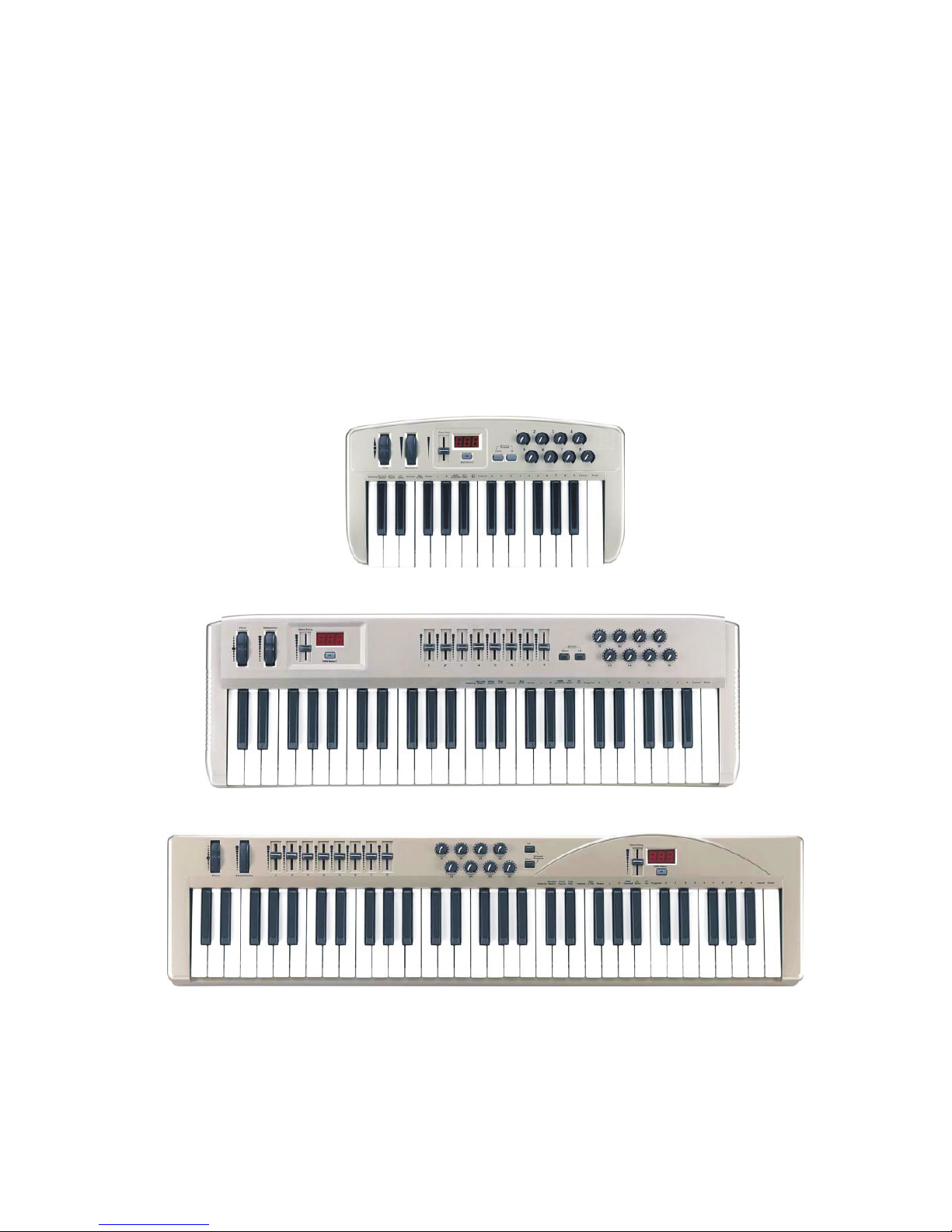
Origin Series
MIDIPLUS
www.midiplus.com.tw
Page 2

Page 3

Contents
Preface ........ .
Safety Information..................................................................................................2
Features......................................................................................................................3
Operation Panel ......................................................................................................6
Rear Panel ...............................................................................................................14
Trouble Shooting...................................................................................................15
Specifications ........................................................................................................18
MIDI Implementation Chart ...............................................................................19
................................................................ ............................................ ...1
origin series
Page 4

Page 5

Preface
Congratulations on purchasing the MIDIPLUS origin series master MIDI controller
keyboard.It is one of the finest products of its kind, made after extensive research into what
customers require from a MIDI Controller.
When using your MIDIPLUS origin series in conjunction with a computer and appropriate
music software, you will be able to discover the wonderful world of Computer Music, with a
set of complete musical instruments from your sound card or workstation.
This manual is written to help you become familiar with the powerful features of the MIDIPLUS
origin series
Please read the manual carefully to discover all the features of your MIDIPLUS origin series
after reading the manual, you will have a clear understanding of how to transmit different
MIDI messages to other instruments and equipment. For ease of use of MIDI implementation,
we strongly recommend you to have the manual at hand when you are using the keyboard,
especially if you are new to the world of MIDI.
origin series
1
Page 6

IMPORTANT SAFETY INFORMATION
Please kindly note that it is very important to read the following safety instructions first.
1. Keyborad should be kept off water or wet environment nearby like bathroom or
swimming pool.
2. Keyborad should be kept off heating elements nearby like a radiator or similar,also
don`t put keyboard in the places with high tempearture or direct sunshine.
3. Use the power supply that is declared in our Specification.
4. If you don`t use the keyboard for a long time,please plug power off.
5. Don`t let small or metal objects like a coin or paperclip fallen into the keyboard
resulting in short circuit.
6. Do not open the keyboard, this is allowed by qualified technicians only.
7. Do not let keyboard switched on all the time.
8. Children should be informed about these secure information by an adult, if children
are too young to understand this information.
9. Electromagnetic fields like places near of a radio,audio amplifiers or televison can
be disturbing. Enough distance is important.
10. For cleaning,never use petrol, alcohol or solvent,resulting in damaging of the
housing. Before using a dry or little wet rag for cleaning,please unplug power supply
or USB connector to avoid electrical shock.
11. Never unplug the keyboard when the power supply is powered.
12. Don`t throw the Keyboard, and also never let them crash down.
13. When it will be thunderstorm,please unplug all connectors.
2
origin series
Page 7

Features
- WHAT’S NEW
- The MIDIPLUS origin series MIDI master controller keyboard is based on a powerful
platform. It use an ARM7 chip to process the MIDI, bring you a nice feeling.
USB 2.0 full-speed, powerful precessing capability, small latency time.
- MAIN FEATURE
The MIDIPLUS origin series MIDI master controller keyboards provide 25/49/61 dynamic
Piano keys, which can draw 5V DC power directly from your PC USB Port. Therefore, you
don't need an external power-supply or batteries to activate your instrument when used with
a PC. MIDIPLUS origin series can also use 6 x AA size battery for portability.
To set up the MIDI connection of your MIDIPLUS origin series to your PC`s sound card, your
MIDIPLUS origin series comes with an USB cable. This cable connects your MIDIPLUS origin
series keyboard to your PC USB- port, which makes it simple to expand your system.
The MIDIPLUS origin series provides two MIDI OUT socket for connecting to other MIDI
devices such as sound modules or synthesisers. There is also a socket for an optional
sustain-footswitch. Although the MIDIPLUS origin series has no built-in sound capabilities, it
offers a great variety of useful MIDI functions.
- WHAT`S THE MIDI FUNCTIONS
MIDI is the acronym for Musical Instrument Digital Interface, which makes all digital musical
instruments equipped with this standardised interface capable of exchanging their MIDI data
or "talk to each other"! To explain how MIDI works on your instrument in more detail, the
following illustrations will outline the MIDI functions of the MIDIPLUS origin series, which
allow you to connect the keyboard to other MIDI instruments. The versatile MIDI capability of
the MIDIPLUS origin series will offer you tremendous power in a MIDI environment.
3
origin series
Page 8
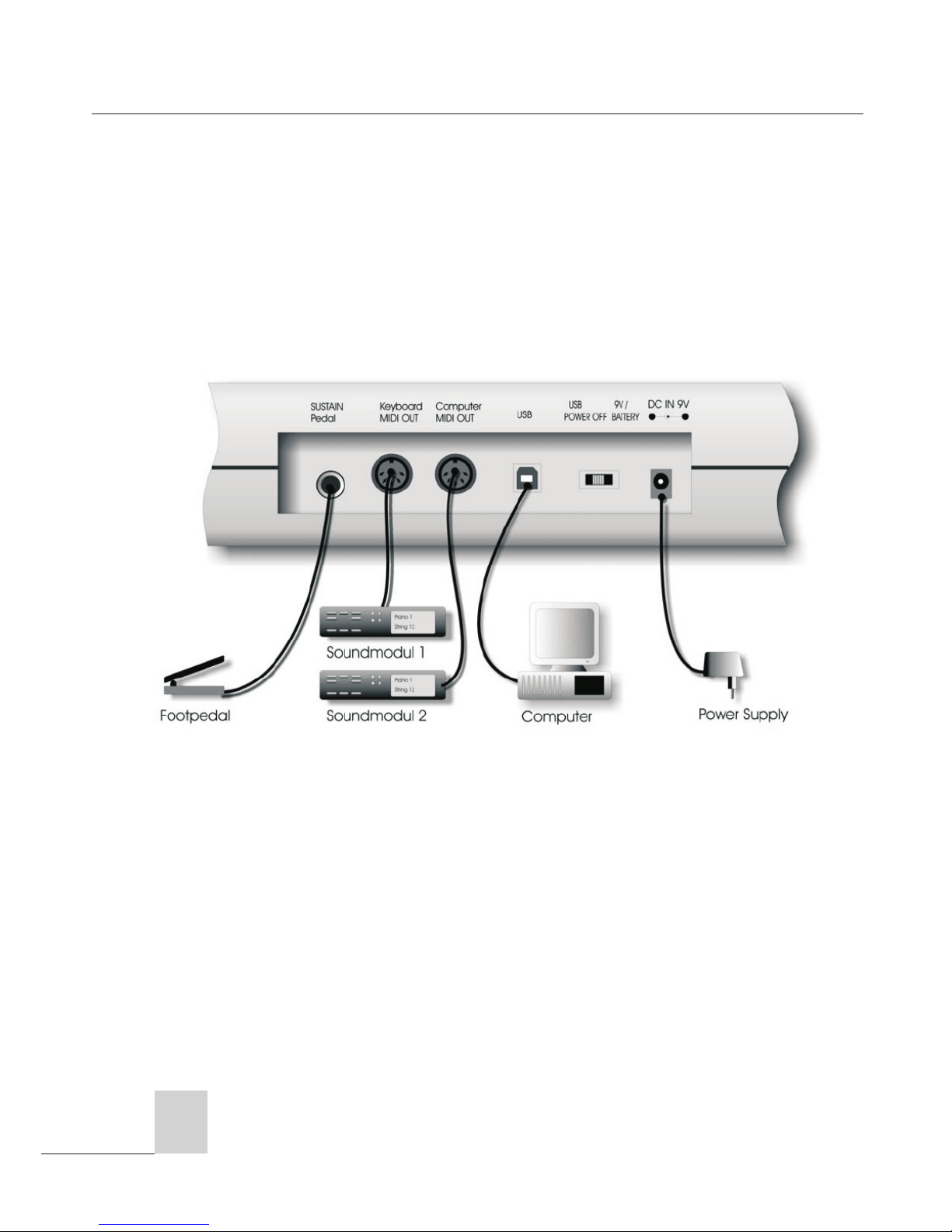
- HOW TO USE THE MIDI FUNCTIONS
1. Connecting the keyboard to other MIDI instruments:
To transmit MIDI data from your keyboard to other professional MIDI instruments, please
purchase a MIDI cable and use it to connect the MIDI OUT jack of your MIDIPLUS origin
series to the MIDI IN jack of the other instrument.Make sure that the MIDI “transmit” channel
on your MIDIPLUS origin series matches the MIDI "receive" channel of the other instrument.
2.Please refer to the following diagram for the MIDI connection:
origin series
4
Page 9
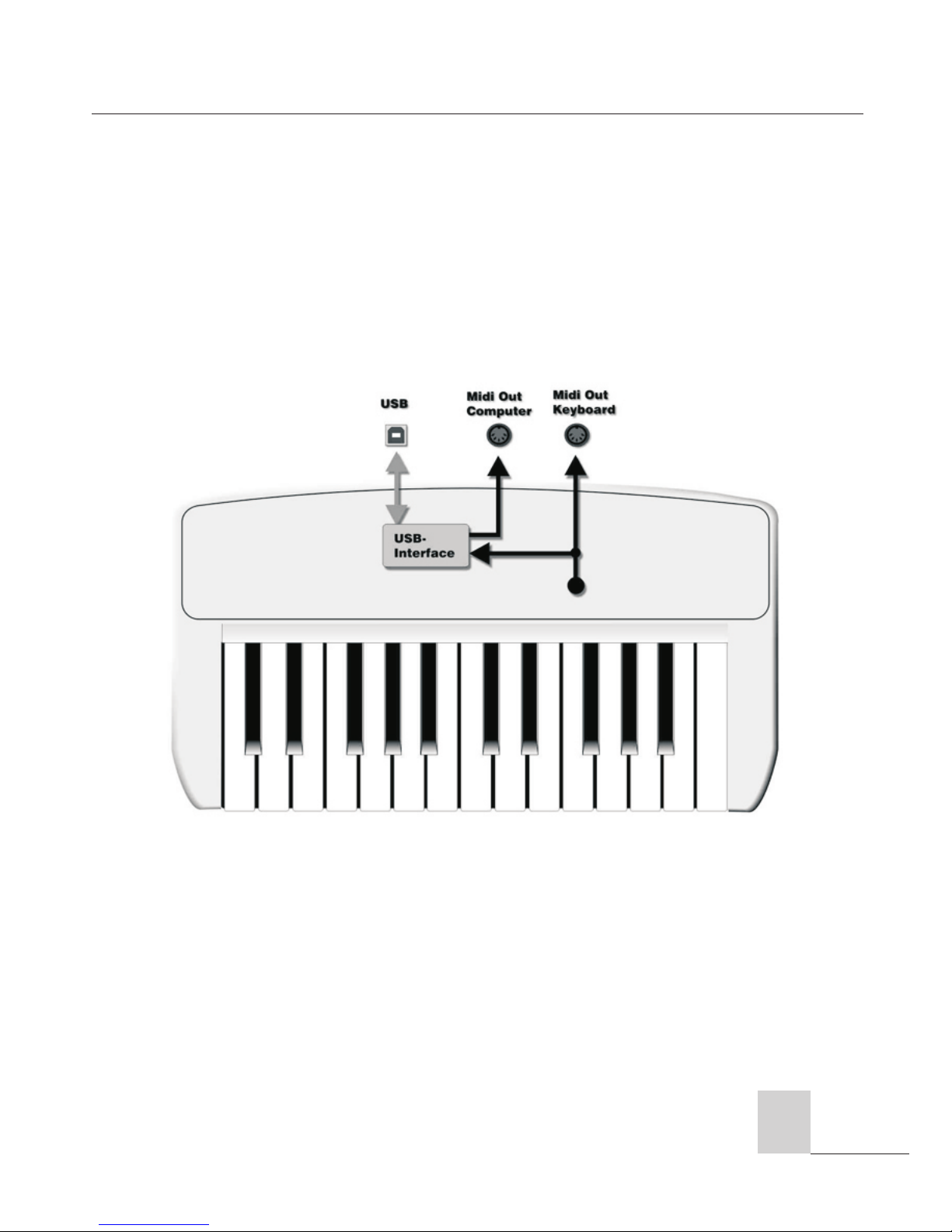
- Using the MIDI-Interface
The MIDPLUS origin series Keyboard has a build-in midi-interface, which transfers the
midi data from the keyboard to the computer, but also from the computer to the midiout at the keyboard. The booth midi-out is separate usable, to control a sound
expander or maybe an effect device. In your music program you can set the midiout-port of the interface as the output of the keyboard, and also the input-port of the
interface as the input of the keys of the keyboard. If the driver installation is correct,
you can use the interface without problems.
origin series
5
Page 10
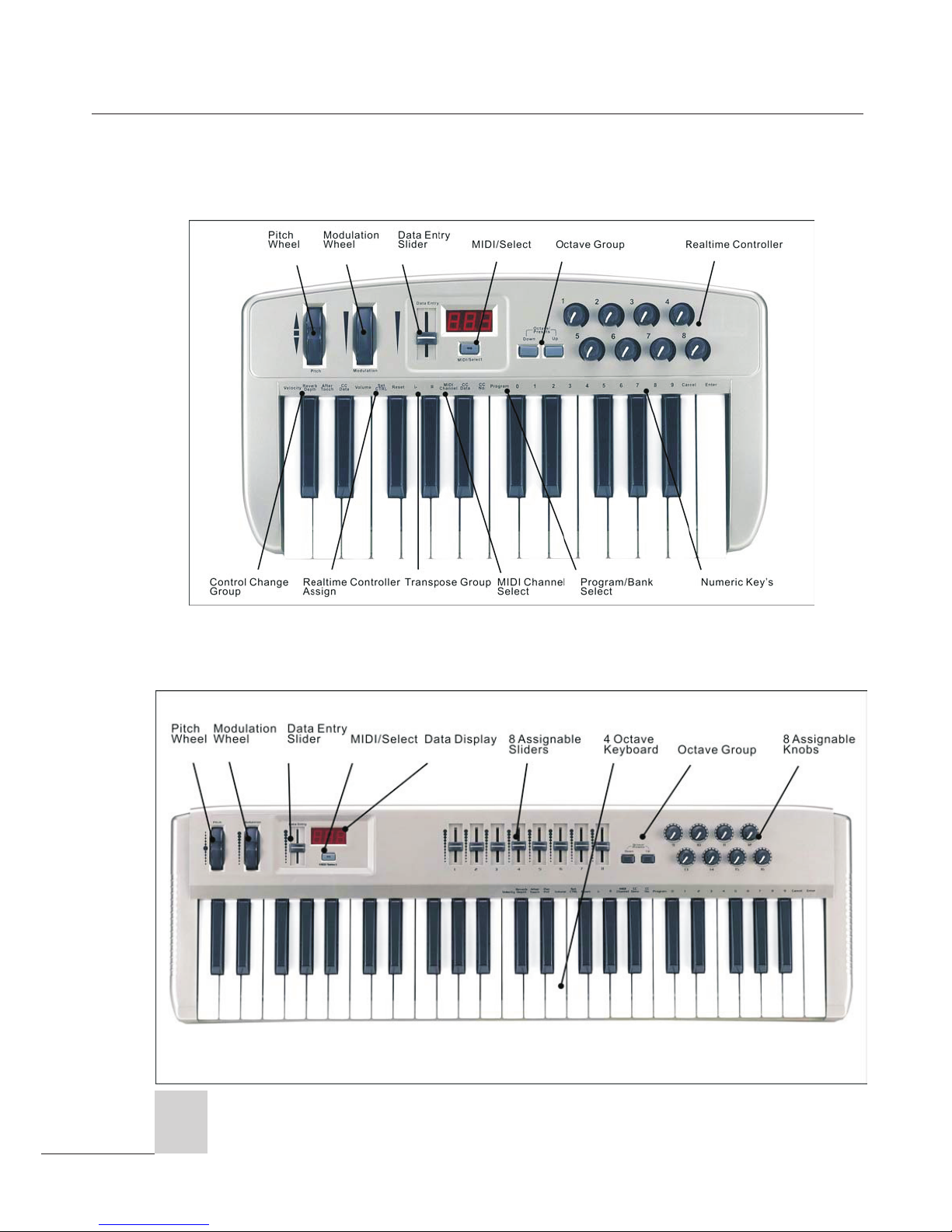
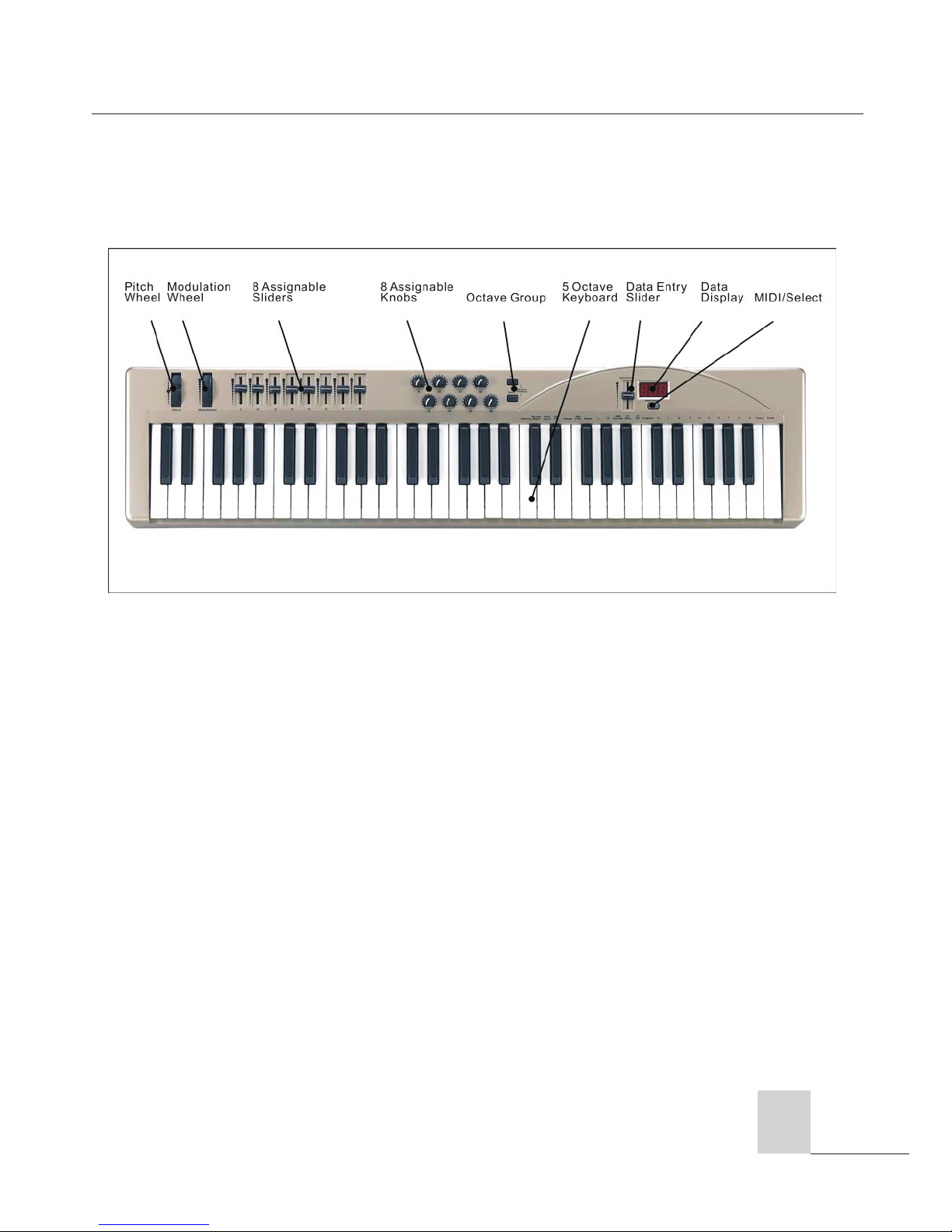
Operation panel
origin series
6
Origin 25
Origin 49
Page 11
origin series
Origin 61
7
Page 12

origin series
Operation
MIDI / SELECT button
MIDI / SELECT button enable you to change keyboard from Edit Mode to Normal Mode
or from Normal Mode to Edit Mode.
When press MIDI / SELECT button,it enter Edit Mode,Data Display shows .That
means you can choose a command to change setting.After press a relevant key of
command and press “Enter” to complete setting,Data Display shows that
means it is successful in changing setting.If Data Display shows that means invalid
inputs,please input parameters again.
Please kindly note that saving Preset Group and Velocity Curve setting have been
done via changing keyboard from Edit Mode to Normal Mode.
MIDIPLUS Origin series provides several groups of MIDI commands and here will show you
how to concretely use them :
Pitch Bend Wheel
The Pitch Bend wheel is used for raising or lowering the pitch of a voice during
performance. The range of pitch numeric value depends on the sound generator (sound
card or module) being used. Please refer to the manuals of your devices for
information on how to change the Pitch Bend range. To bend the pitch up, please
move the wheel away from you. To bend the pitch down, please move the wheel
towards you.
Modulation Wheel
It is very common to use the modulation wheel to change the intensity of effects:
mainly Vibrato( pitch change), Tremolo (change the volume), and Modulation (change
the tone). The Modulation wheel produces a vibrato effect shortly after the sound is
generated. It is most effective for voice such as Saxophone Strings and Oboe.
Data Entry Slide
This controller is used to enter numeric value while editing and as an assigned CC
controller while playing. In normal mode,This slide controller allows you to adjust
Volume,Reverb, Pan pot(Origin 49 and 61 have this function but Origin 25),and
8
 Loading...