

Page 1
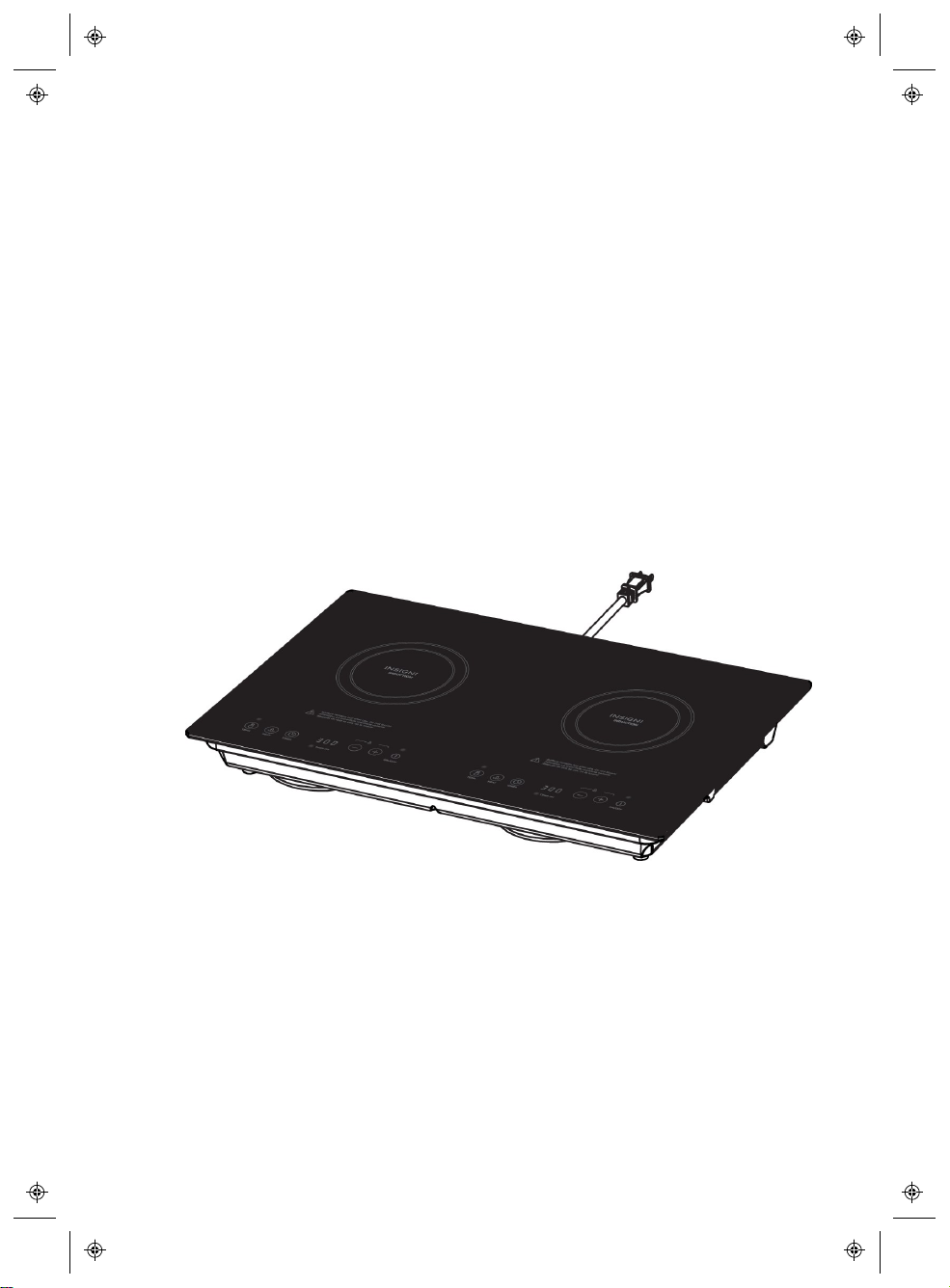
User Manual
V1
FINAL
FOR PRINT
Product Name: Induction Cooker
Model: MC-ID175, NS-IC2ZBK7
Manufacture: UL-CCIC Company Limited
Before using your new product, please read these instructions to pr event any damage.
Page 2

Table of Contents
Safety information
Features 8
Package contents 8
Cooktop 8
Controlpanel 9
Cookware compatibility 9
Assembling your cooktop 10
Installing your cooktop 11
Positioning your cooktop 11
Installing your cooktop 12
Using your cooktop 14
Checking pan compatibility 14
Using touch controls 14
Cooking with your cooktop 14
Using the timer 16
Locking the control panel 16
Cleaning and maintenance 17
Troubleshooting 17
3
Specifications 20
Legal Notices 20
One-Year Limited Warranty 21
www.insigniaproducts.com
2
Page 3
Safety information
Important - Save for the local electrical inspector's use.
CAUTION
RISK OF ELECTRIC SHOCK
DO NOT OPEN
This symbol indicates that dangerous voltage constituting a
risk of electric shock is present within your cooktop.
This symbol indicates that there are important operating and
maintenance instructions in the literature accompanying your
cooktop.
When using electrical appliances, basic safety precautions should always be
followed, including the following:
1. READ ALL INSTRUCTIONS.
2. DONOTTOUCHSURFACE UNITSORAREAS NEARUNITS. Surface units
may be hot even though they are dark in color. Areas near surface units may
become hot enough to cause burns. During and after use, do not touch, or
let clothing or other flammable materials contact surface units or areas near
units until they have had sufficient time to cool.
3. To protect against fire, electric shock, and injury to persons, do not immerse
cord, plugs, or the cooktop in water or other liquid.
4. Close supervision is necessary when any appliance is used by or near
children. Do not allow children to sit or stand on any part of the appliance.
5. Do not operate any appliance with a damaged cord or plug or after the
appliance malfunctions, or has been damaged in any manner. Return
appliance to the nearest authorized service facility for examination, repair, or
adjustment.
6. The use of accessory attachments not recommended by the appliance
manufacturer may result in fire, electric shock, or injury to persons.
7. This electrical appliance is not recommended for use outdoors.
8. Do not let the cord hang over the edge of a table or counter, or touch hot
surfaces.
9. Do not place on or near a hot gas or electric burner, or in a heated oven.
www.insigniaproducts.com
3
Page 4

10. To disconnect, turn any control to “off,” then remove the plug from the wall
outlet.
11. Do not use the appliance for other than its intended use.
12. Do not attempt to modify or extend the power cord of this appliance.
13. Do not handle the plug with wet hands. This could result in an electric shock.
14. Unplug the power cord by holding the plug, never by pulling the cord.
15. This appliance has a polarized plug (one blade is wider than the other). To
reduce the risk of electric shock, this plug is intended to fit into a polarized
outlet only one way. If the plug does not fit fully into the outlet, reverse the
plug. If it still does not fit, contact a qualified electrician. Do not attempt to
modify the plug in any way.
16. Extreme caution must be used when moving an appliance containing hot oil
or other hot liquids.
17. Household Use Only.
18. Do not cook on a broken cooktop. If the cooktop should break, cleaning
solutions and spills may penetrate the broken cooktop and create a risk of
electric shock.
19. Be careful when you clean the cooktop. If a wet sponge or cloth is used to
wipe spills on a hot cooking surface, be careful to avoid steam burn. Also,
some cleaners can produce noxious fumes if applied to a hot surface.
20. Do not place metallic objects, such as knives, forks, spoons, and lids, on the
cooktop, because they can get hot.
21. User Servicing – Do not repair or replace any part of the appliance unless
specifically recommended in the manual. All other servicing should be
referred to a qualified technician.
22. Use Only Dry Potholders – Moist or damp potholders on hot surfaces may
result in burns from steam. Do not let potholder touch hot heating elements.
Do not use a towel or other bulky cloth.
23. Use Proper Pan Size – This appliance is equipped with one or more surface
units of different size. Select utensils having flat bottoms large enough to
cover the surface unit heating element. The use of undersized utensils will
expose a portion of the heating element to direct contact and may result in
ignition of clothing. Proper relationship of utensil to burner will also improve
efficiency.
24. Utensil Handles Should Be Turned Inward and Not Extend Over Adjacent
Surface Units – To reduce the risk of burns, ignition of flammable materials,
and spillage due to unintentional contact with the utensil, the handle of a
utensil should be positioned so that it is turned inward, and does not extend
over adjacent surface units.
www.insigniaproducts.com
4
Page 5

SAVE THESE INSTRUCTIONS
WARNING
Electric Shock Hazard
Failure to follow these instructions can result in electric shock, fire, or
death.
Additional safety concerns
1. Never heat foods in sealed containers, such as compressed products, cans,
or coffee pots, to avoid explosion caused by heat expansion.
2. Do not directly rinse this cooktop under water. Do not spill water or soup into
the internal parts of the cooktop.
3. To avoid affecting product performance and to prevent injury, do not heat
empty pots. When in use, do not leave the appliance without supervision for
a long time. When leaving the appliance without supervision, make sure that
there is enough water in the pot.
4. To avoid accidents, do not use the cooktop on a gas stove (the magnetic
lines can heat the metal parts of the gas stove).
5. Do not heat iron items on the cooktop to avoid danger caused by high
temperatures.
6. To avoid injuries such as scalding, do not let children operate the appliance
alone. Children should be supervised to ensure that they do not play with
the appliance.
7. To avoid danger, do not block or insert any foreign object into the air
ventilation opening or air entry port.
8. To avoid danger, do not place paper, aluminum foil, cloth, or other
unsuitable articles onto the cooktop heating plate for indirect heating.
9. When using the cooktop, do not put it on any metal platform (such as iron,
stainless steel, or aluminum), or place a non-metal pad less than 4.7 in. (12
cm) thick on the heating plate.
10. Warning: People with heart pacemakers should consult a doctor. Only use
the appliance after confirming that it does not affect the pacemaker.
11. To avoid damage, avoid causing impacts on the heating plate. If damaged,
please stop using it and take it to a maintenance and repair site to have it
replaced.
www.insigniaproducts.com
5
Page 6

12. When using the cooktop, place it horizontally and allow at least 4.7 in. (12
cm) of free space between the sides and back of the cooktop and the wall.
Do not use the cooktop in narrow spaces. To avoid overheating, do not
cover the ventilation opening.
13. To avoid danger, if the power cord is damaged, have it replaced by agents of
the manufacturer, its maintenance department, or specialized personnel
from a similar department.
14. Use a dedicated and high quality power outlet with a high power rating,
equal to or above 15A. Do not use poor quality outlets. Do not share the
power outlet with electrical appliances with high power ratings such as air
conditioners or electrical stoves, to avoid fires caused by overheating the
outlet.
15. This cooktop should be kept clean during and after use. Protect the cooktop
from bugs, dust, and humidity. Avoid letting anything fall into the interior of
the cooktop, which could result in a short circuit of the electrical components.
When not in use for a long period, clean it and put it into a plastic bag to
store it.
16. Do not touch the cooktop surface with sharp tools, to avoid cracking or
damaging the surface. If the cooktop surface is cracked, turn off the
appliance to avoid electrical shock.
17. Do not use the cooktop on a carpet, tablecloth, or thin paper, to avoid
blocking the air inlet opening or air outlet opening, which could result in
overheating.
18. Do not use the cooktop near a gas stove, kerosene stove, gas cooker, or in
any space with an open fire or an environment with high temperatures.
19. Do not overload the cooktop. Overloading the cooktop may damage the
plastic cover and cooktop surface.
20. Always clean the cooktop to prevent dirt from getting into the fan, which
could influence the normal operation of the appliance.
21. When operating the appliance or after moving the cookware, the cooking
area remains hot for a period of time. Do not touch it and be careful of
scalding caused by the high temperature.
22. This appliance is not intended for use by persons (including children) with
reduced physical, sensory, or mental capabilities or lack of experience and
knowledge, unless they have been given supervision or instruction
concerning the use of the appliance by a person responsible for their safety.
23. This appliance is intended to be used in household and similar applications.
24. Never use the cooktop without food in the cookware, as its performance may
be affected and a safety hazard may result.
www.insigniaproducts.com
6
Page 7

25. Warning: We suggest that you periodically check to make sure that there are
no objects (glass, paper, or similar items) that could obstruct the inlet under
your cooktop.
26. Warning: Keep electrical appliances out of reach from children or persons
with reduced physical, sensory, or mental capabilities or lack of experience
and knowledge. Do not let them use the appliance without supervision.
27. Warning: Do not operate this appliance by means of an external timer or
separate remote-control system.
28. Do not use water on grease fires. Smother fire or flame or use dry chemical
or foam-type extinguisher.
29. Wear proper apparel. Loose-fitting or hanging garments should never be
worn while using the appliance.
30. Never leave surface units unattended at high heat settings. Boilover causes
smoking and greasy spillovers that may ignite.
31. Storage on appliance. Flammable materials should not be stored near
surface units.
32. Caution:Do not store items of interest to children in cabinets above a range
or on the backguard of a range. Children climbing on the range to reach
items could be seriously injured.
www.insigniaproducts.com
7
Page 8
Features
l Glass cooktop evenly distributes heat
l 10-stage power levels and 3-hour timer for versatile use
l Feather-touch controls for easy operation
l Temperature protection and child lock provide added safety
Package contents
l Induction Cooktop
l Fan covers (2)
l User Guide
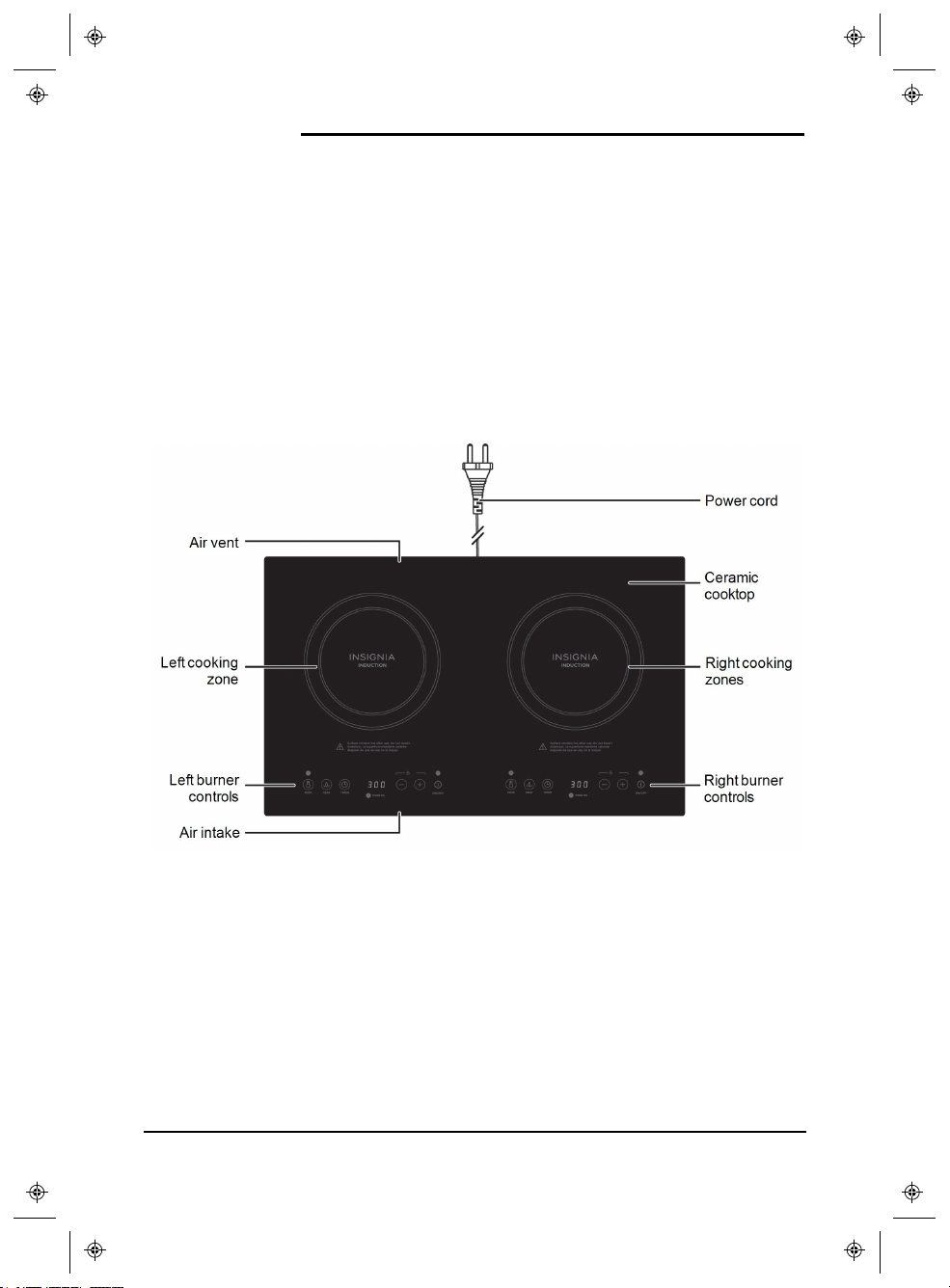
Cooktop
www.insigniaproducts.com
8
Page 9

Control panel
Cookware compatibility
l Hold a magnet to the bottom of your cookware. If it clings, it will usually work
with your cooktop:
Works Does not work
Cast iron, iron,
steel/stainless steel,
enameled iron
Glass, ceramic, aluminum,
copper, and other nonmagnetic materials
l Use a pan with a flat bottom.
l Use pans with a 4.7 in. (12 cm) diameter or larger. The cooktop cannot
detect smaller pans and will not heat.
www.insigniaproducts.com
9
Page 10

Assembling your cooktop
1. Carefully turn the cooktop upside down.
2. Push the fan cover connectors into the holes next to the fans until you hear a
click.
Note
The connectors are different sizes. If they don't fit in the holes, turn the
fan cover 180°.
3. To install the cooktop into your counter, see Installing your cooktop (on the
facing page).
10
www.insigniaproducts.com
Page 11

Installing your cooktop
Follow these instructions to install the cooktop into your counter. Make sure that
your cooktop is properly installed by a qualified technician.
Positioning your cooktop
Before cutting, make sure that your cooktop will have:
l At least 30” (76.2 cm) between the cooktop and overhead surfaces
l At least 6” (15.2 cm) between the bottom of the cooktop and surfaces below
l At least 1” (2.5 cm) from the edge of any walls or cabinets
l An available power outlet under your counter
Caution
To eliminate the risk of burns or fire by reaching over heated surface units,
cabinet storage space located above the surface units should be avoided. If
cabinet storage is to be provided, the risk can be reduced by installing a
range hood that projects horizontally a minimum of 5 in. (12.7 cm)beyond the
bottom of the cabinets or 30 in. (76.2 cm)minimum clearance between the top
of the cooking surface and the bottom of an unprotected wood or metal
cabinet.
www.insigniaproducts.com
11
Page 12

Installing your cooktop
Note
When cutting, use tools that are appropriate for your counter and cupboard.
1. Cut a 23.3 × 14.2 in. (59.1 × 36.1 cm) hole into the top of your counter.
2. Cut a 8 × 1 in. (20.3 × 2.5 cm) hole into the front of your cupboard to vent
your cooktop.
12
www.insigniaproducts.com
Page 13

3. Cut a 20 × 1.2in. (50.8 × 3.0 cm) hole into the back wall of your cupboard to
vent your cooktop. Make sure that the cut is centered and 1 in. (2.5 cm) from
the surface of your counter.
4. Carefully place the cooktop into the hole in your counter.
Note
Before installing your cooktop, make sure that the fan covers are
attached. See Assembling your cooktop (on page10) for instructions.
www.insigniaproducts.com
13
Page 14

IMPORTANT INSTRUCTIONS
Using your cooktop
Note
After the first use, it is normal for white spots to appear on the bottom of your
pan. See Cleaning and maintenance (on page17) for more information.
Checking pan compatibility
l Hold a magnet to the bottom of your cookware. If it clings, it will usually work
with your cooktop. See Cookware compatibility (on page9) for more
information.
Using touch controls
l Touch the controls with the ball of your finger (not the tip). The controls
respond to touch so you don’t need to apply any pressure.
l Make sure that the controls are clean, dry, and uncovered.
Cooking with your cooktop
1. Read the nameplate on the back of the cooktop before connecting the power
cord.
14
www.insigniaproducts.com
Page 15

2. Plug the power cord into a power outlet.
Note
Do not use an extension cord to connect your cooktop. If the power cord
is too short, have a qualified electrician or serviceman install an outlet
near the appliance.
3. Place a pan on the cooktop.
4. Press ON/OFF to turn on your cooktop. The cooktop beeps once.
Note
If there is no operation within 10 seconds, the cooktop turns off
automatically. If there isn’t a compatible pan on the cooktop, the display
shows “U” for 10 seconds to indicate a pan is required.
5.
Press
TEMP to enter temperature mode, then press or to select the
temperature you want:
Level 1 2 3 4 5 6 7 8 9 10 11
150°F
180°F
210°F
240°F
270°F
300°F
330°F
360°F
Temper ature
(66°C)
(82°C)
(99°C)
(116°C)
(132°C)
(149°C)
(166°C)
(182°C)
390°F
(199°C)
OR
Press HEAT to enter heating mode, then press or to select the
wattage you want.
Level 1 2 3 4 5 6 7 8 9 10
Wattage
300W 500W 750W 800W 850W 900W 950W 1100W 1300W 1440W
www.insigniaproducts.com
420°F
(216°C)
450°F
(232°C)
15
Page 16

Using the timer
Use timer mode with temperature or heat mode to select how long you want the
cooktop to run.
While in temperature mode, press
1.
and “0:00” blinks on the screen.
Press
2.
minute to three hours.
or to adjust the time duration. You can set the timer from one
TIMER. The “timer” indicator lights up
Tip
Press briefly to change the time by one minute increments. Press and
hold to adjust by 10 minute increments.
3. When the countdown is done, the cooktop beeps until you press ON/OFF to
turn off the timer.
Locking the control panel
To lock the cooktop, press and hold
l
indicator lights up.
and for three seconds. The lock
Note
While locked, removing a pan, pressing the ON/OFF button, or a
finished timer countdown will turn off the cooktop.
To unlock the cooktop, press and hold
l
indicator turns off.
www.insigniaproducts.com
16
and for three seconds. The lock
Page 17

Cleaning and maintenance
Cleaning your pans
l After the first use, it is normal for white spots to appear on the bottom of your
pan. To remove the spots, pour vinegar into your cookware, heat it to about
140-176°F (60-80°C), then wipe the spots away with a brush.
Cleaning your cooktop
l Before cleaning, turn off the cooktop and wait until the cooktop is cool.
l Never immerse the cooktop or power cord in water.
l To clean the ceramic cooktop, wipe with a soft, moist cloth and a mild
detergent.
l Use a ceramic glass cooktop cleaner to remove tough residue and stains.
l Use a razor blade or scraper to remove burnt-on food.
l After a while, the air intake and vent may accumulate dust or other debris.
Wipe it with a dry cloth, soft brush, or mini vacuum cleaner. Do not rinse with
water.
l Do not use abrasive cleaners or cloths.
Troubleshooting
Problem Solution
The display
does not light
up
l Make sure that the power cord is plugged into a
working outlet.
l Make sure that the power cord is not damaged.
www.insigniaproducts.com
17
Page 18

Problem Solution
l Make sure that you are using a compatible pan.
See Cookware compatibility (on page9).
l Make sure that the pan's bottom is flat, centered,
and large enough for the cooking zone.
l The cooktop cannot detect smaller pans. Make
sure that the pan's diameter is at least 4.7 in. (12
The cooktop
does not heat
The cooktop
stops heating
cm).
l Make sure that the pan is centered on the cooking
zone.
l Make sure that the cooktop is plugged into a
working outlet.
l Make sure that the correct cooking zone is being
used.
l Make sure that the cooktop is not locked.
l Make sure that the air intake and vent are not
blocked.
l Make sure that the controls are clean.
l The cooktop automatically turns off if the pan is
removed for more than 10 seconds.
l The heating time may have finished. Reset the
timer.
l Make sure that the temperature of the cooking oil is
not too hot when frying foods.
l Built-in safeguards may have turned it off. Wait
several minutes before attempting to turn your
cooktop back on.
Cooking zone
heats food too
hot or not hot
enough
Scratches on
the cooktop
18
l Make sure that you are using good quality pans
(not lightweight or warped pans).
l Adjust the temperature level until the correct
amount of heat is used.
l Do not scrape utensils across the cooktop.
l Do not use abrasive cleaners on the cooktop.
l Use a ceramic glass cooktop cleaner to remove the
marks.
www.insigniaproducts.com
Page 19

Problem Solution
E1
The main sensor has an open circuit. If the error persists,
bring your cooktop to a repair technician to be fixed.
The
display
shows
an
error
code
E2
E3
E4
E5
E6
E7
E8
EA
EB
The main sensor has short circuited. If the error persists,
bring your cooktop to a repair technician to be fixed.
The main sensor is too hot:
l If the cooktop is hot, wait for it to cool.
l If the error persists when the cooktop is cool, bring
your cooktop to a repair technician to be fixed.
The IGBT sensor has an open circuit. If the error persists,
bring your cooktop to a repair technician to be fixed.
The IGBT sensor has short circuited. If the error persists,
bring your cooktop to a repair technician to be fixed.
The IGBT sensor is hot. If the error persists, bring your
cooktop to a repair technician to be fixed.
The voltage is too low. If the error persists, bring your
cooktop to a repair technician to be fixed.
The voltage is too high. If the error persists, bring your
cooktop to a repair technician to be fixed.
The cooktop may be dry burning. If the error persists,
bring your cooktop to a repair technician to be fixed.
The main sensor is invalid. If the error persists, bring
your cooktop to a repair technician to be fixed.
EC
The fan is malfunctioning. If the error persists, bring your
cooktop to a repair technician to be fixed.
www.insigniaproducts.com
19
Page 20

Specifications
Dimensions 24.4 × 15 × 2.8 in. (62.0 × 38.1 × 7 cm)
Weight 14.1 lbs. (6.4 kg)
Voltage 12V AC, 60 Hz
Left burner: 1440W
Wattage
Right burner: 1440W
Both burners: 1440W
Country of origin China
Legal Notices
FCC statement
This equipment has been tested and found to comply with Part 18 of the FCC
Rules. Operation is subject to the following two conditions: (1) This device may not
cause harmful interference, and (2) this device must accept any interference
received, including interference that may cause undesired operation.
This equipment generates, uses and can radiate radio frequency energy and, if
not installed and used in accordance with the instructions, may cause harmful
interference to radio communications. However, there is no guarantee that
interference will not occur in a particular installation. If this equipment does cause
harmful interference to radio or television reception, which can be determined by
turning the equipment off and on, the user is encouraged to try to correct the
interference by one or more of the following measures:
l Reorient or relocate the receiving antenna.
l Increase the separation between the equipment and receiver.
l Connect the equipment into an outlet on a circuit different from that to which
the receiver is connected.
l Consult the dealer or an experienced radio/ TV technician for help.
FCC Caution
Changes or modifications not expressly approved by the party responsible for
compliance could void the user's authority to operate the equipment.
20
www.insigniaproducts.com
Page 21

One-Year Limited Warranty
Definitions:
The Distributor* of Insignia branded products warrants to you, the original
purchaser of this new Insignia-branded product (“Product”), that the Product shall
be free of defects in the original manufacturer of the material or workmanship for a
period of one (1) year from the date of your purchase of the Product (“Warranty
Period”).
For this warranty to apply, your Product must be purchased in the United States
from a Best Buy branded retail store or online at www.bestbuy.com
packaged with this warranty statement.
How long does the coverage last?
The Warranty Period lasts for 1 year (365 days) from the date you purchased the
Product. Your purchase date is printed on the receipt you received with the
Product.
What does this warranty cover?
During the Warranty Period, if the original manufacture of the material or
workmanship of the Product is determined to be defective by an authorized
Insignia repair center or store personnel, Insignia will (at its sole option): (1) repair
the Product with new or rebuilt parts; or (2) replace the Product at no charge with
new or rebuilt comparable products or parts. Products and parts replaced under
this warranty become the property of Insignia and are not returned to you. If
service of Products or parts are required after the Warranty Period expires, you
must pay all labor and parts charges. This warranty lasts as long as you own your
Insignia Product during the Warranty Period. Warranty coverage terminates if you
sell or otherwise transfer the Product.
How to obtain warranty service?
If you purchased the Product at a Best Buy retail store location, please take your
original receipt and the Product to any Best Buy store. Make sure that you place
the Product in its original packaging or packaging that provides the same amount
of protection as the original packaging. If you purchased the Product from a Best
Buy online web site (www.bestbuy.com), mail your original receipt and the
Product to the address listed on the web site. Make sure that you put the Product
in its original packaging or packaging that provides the same amount of protection
as the original packaging.
To obtain warranty service, in the United States call 1-888-BESTBUY. Call agents
may diagnose and correct the issue over the phone.
and is
www.insigniaproducts.com
21
Page 22

Where is the warranty valid?
This warranty is valid only in the United States at Best Buy branded retail stores or
websites to the original purchaser of the product in the county where the original
purchase was made.
What does the warranty not cover?
This warranty does not cover:
l Customer instruction/education
l Installation
l Set up adjustments
l Cosmetic damage
l Damage due to weather, lightning, and other acts of God, such as power
surges
l Accidental damage
l Misuse
l Abuse
l Negligence
l Commercial purposes/use, including but not limited to use in a place of
business or in communal areas of a multiple dwelling condominium or
apartment complex, or otherwise used in a place of other than a private
home.
l Modification of any part of the Product, including the antenna
l Display panel damaged by static (non-moving) images applied for lengthy
periods (burn-in).
l Damage due to incorrect operation or maintenance
l Connection to an incorrect voltage or power supply
l Attempted repair by any person not authorized by Insignia to service the
Product
l Products sold “as is” or “with all faults”
l Consumables, including but not limited to batteries (i.e. AA, AAA, C etc.)
l Products where the factory applied serial number has been altered or
removed
l Loss or Theft of this product or any part of the product
l Display panels containing up to three (3) pixel failures (dots that are dark or
incorrectly illuminated) grouped in an area smaller than one tenth (1/10) of
the display size or up to five (5) pixel failures throughout the display. (Pixel
based displays may contain a limited number of pixels that may not function
normally.)
22
www.insigniaproducts.com
Page 23

l Failures or Damage caused by any contact including but not limited to
liquids, gels or pastes.
REPAIR REPLACEMENT AS PROVIDED UNDER THIS WARRANTY IS YOUR
EXCLUSIVE REMEDY FOR BREACH OF WARRANTY. INSIGNIA SHALL NOT BE
LIABLE FOR ANY INCIDENTAL OR CONSEQUENTIAL DAMAGES FOR THE
BREACH OF ANY EXPRESS OR IMPLIED WARRANTY ON THIS PRODUCT,
INCLUDING, BUT NOT LIMITED TO, LOST DATA, LOSS OF USE OF YOUR
PRODUCT, LOST BUSINESS OR LOST PROFITS. INSIGNIA PRODUCTS MAKES
NO OTHER EXPRESS WARRANTIES WITH RESPECT TO THE PRODUCT, ALL
EXPRESS AND IMPLIED WARRANTIES FOR THE PRODUCT, INCLUDING, BUT
NOT LIMITED TO, ANY IMPLIED WARRANTIES OF AND CONDITIONS OF
MERCHANTABILITY AND FITNESS FOR A PARTICULAR PURPOSE, ARE
LIMITED IN DURATION TO THE WARRANTY PERIOD SET FORTH ABOVE AND
NO WARRANTIES, WHETHER EXPRESS OR IMPLIED, WILL APPLY AFTER
THE WARRANTY PERIOD. SOME STATES, PROVINCES AND JURISDICTIONS
DO NOT ALLOW LIMITATIONS ON HOW LONG AN IMPLIED WARRANTY
LASTS, SO THE ABOVE LIMITATION MAY NOT APPLY TO YOU. THIS
WARRANTY GIVES YOU SPECIFIC LEGAL RIGHTS, AND YOU MAY ALSO
HAVE OTHER RIGHTS, WHICH VARY FROM STATE TO STATE OR PROVINCE
TO PROVINCE.
www.insigniaproducts.com
23
Page 24

FCC Caution.
This product has been tested and found to comply with the limits for
Induction Cooker, pursuant to Part 18 of the FCC Rules.
This product can radiate radio frequency energy, which could cause interference to
such products as radio, TV, baby monitor, cordless phone, Bluetooth, wireless
router,
etc., which can be confirmed by turning this product off and on. If present, the user
is
encouraged to try to correct by taking one or more of the following
countermeasures:
(1) Increase the spacing distance between the Induction Cooker and other product
receiving the interference.
(2) If possible, use a properly installed receiver antenna and/or reorient the receiving
antenna of the other product receiving the interference.
(3) Plug the Induction Cooker into a different outlet from the other product receiving
the interference.
(4) Clean door and sealing surfaces of the oven. (See Care and Cleaning of Your
Induction Cooker)
 Loading...