

Page 1
MicW
Audio
a member of BSWA Technology Ltd.
Unit 1003, North Ring Center, No.18 Yumin Road, Xicheng District
Beijing 100029, China
Phone: +86-10-51285118
Fax: +86-10-8225 1626
Email: [email protected]
Web: www.mic-w.com
2008,
MicW
microphones
Product features and specifications are subject to change without notice.
E418/E418-Pair
Studio Microphone
User’s Manual
www.mic-w.com
Page 2

MICROPHONE E418/E418-Pair
Capsule diameter
7 mm
Polar pattern
Omni
Sensitivity (±2dB)
10mv/Pa; -40 dB re. 1v/Pa
Frequency Response
20 Hz ~ 20kHz
Power Supply
48 V Phantom power
Total harmonic distortion
(THD)
<1% up to 135 dB SPL peak
Thermal Noise
<26 dBA
Output impedance
<75 Ohm
Length
145mm
weight
135g
Connector
3-pin XLR
8. SPECIFICATIONS:
9. Contents in the case
E418/E418-Pair/M418 microphone(s);
Wind screen;
User’s manual..
Polar Pattern
1. INTRODUCTION
Welcome to use
MicW
2. SAFETY INSTRUCTION
3. POWER SUPPLY
4. APPLICATIONS
E418 has outstanding characteristics that make the microphone a valuable
tool in the studio, measurement and on the stage.
It is important to read all safety precautions and operating instructions before
attempting to operate the unit. Keep all safety precautions and operating
instructions for future reference.
Warning:
Condenser microphones are extremely moisture-sensitive. Never use your
microphone in close proximity to water (e.g. bath tubs, wash basins, sinks,
washing machines, pools, etc.). When doing voice recordings, always use the
enclosed windscreen to safely protect the capsule from moisture.
Please don’t touch the vibration parts especially the diaphragm behind the
protection grid. Don’t move the capsule when it is in operation. Take care not to
drop your microphone as this can lead to severe damage.
liability for any damage caused by the user.
After each use, place it back into its protective casing. Then, lay the small bag
containing the moisture-absorbing crystals on top of the microphone head.
Phantom power (+48 V) is required to operate your microphone. We assume no
liability for damage caused to your E418 through defective phantom power.
Before activating phantom power, mute your playback system and connect the
E418 to the microphone input of your mixing console. After activating phantom
power, the E418 requires several seconds to stabilize itself.
The
MicW
well-suited for stereo recordings. Regardless of whether you are miking an entire
ensemble or a single sound source (e.g. drums, piano or background vocals), this
microphone lets you achieve outstanding spatial impressions in every recording
session.
MicW
series professional microphones!
MicW
assumes no
E418 is a state-of-the-art stereo kit. Therefore, it is particularly
Page 3
Of course, you can use
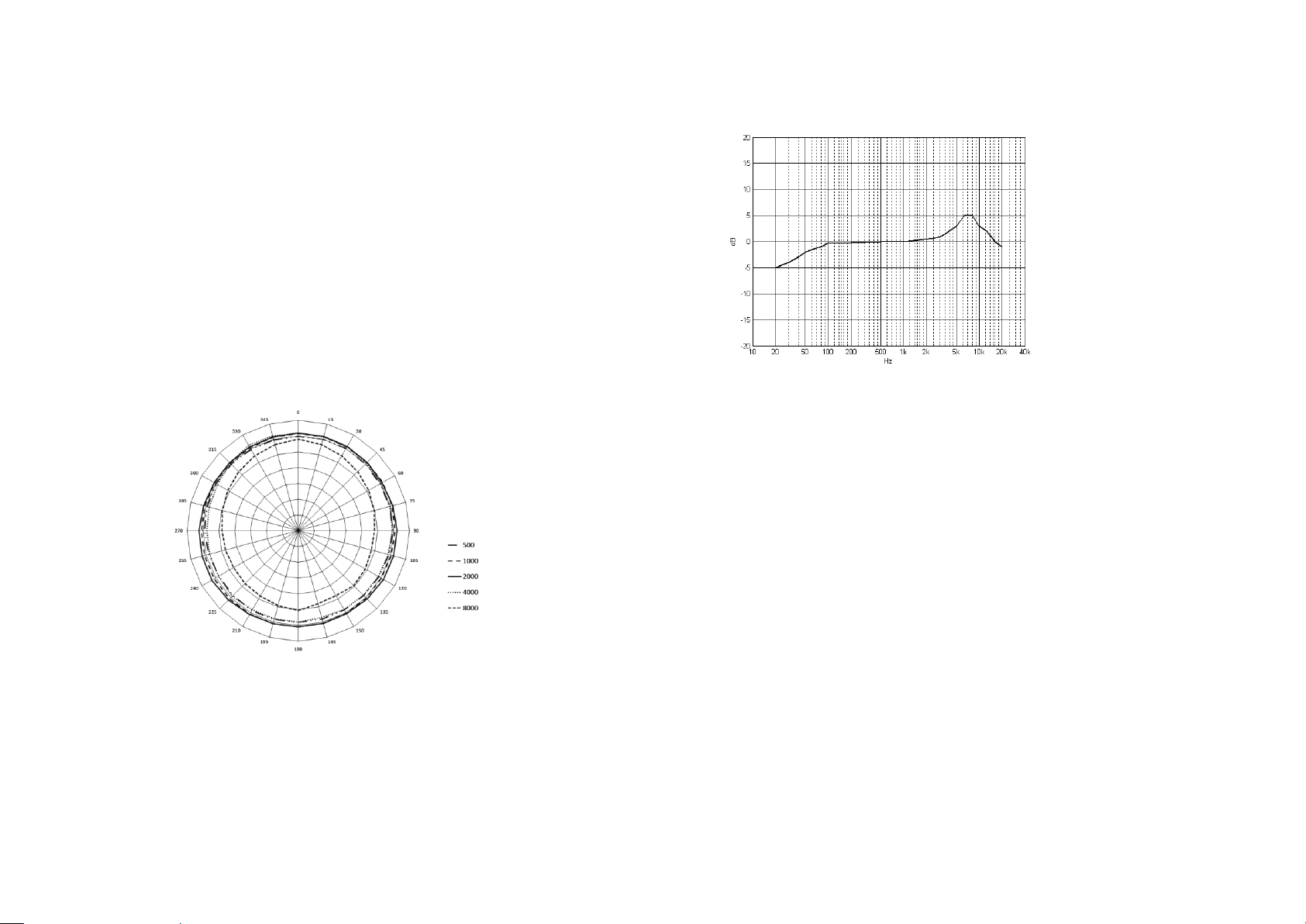
Polar pattern
Polar Pattern
E418/E418-Pair Frequency Response
microphones as well. Each pair is guaranteed to the sensitivity match within 0.5
dB and phase match within 5°.
MicW
E418-pair that feature two matched E418
5. MICROPHONE INSTALLATION
First screw a clamp onto the stand before attaching the microphone itself.
6. AUDIO CONNECTION
To connect the E418 to your equipment, use a balanced XLR microphone cable
with the following pin assignment: Pin 1 = shielding, pin 2 = +, pin 3 = -. Since all
contact points of the E418 are gold-plated, your microphone cable should feature
gold-plated connectors, if possible.
7. DIRECTIONAL CHARACTERISTIC
The microphone features a capsule with Omni pickup pattern. Microphones with
this polar pattern are most sensitive to sound coming from in each angle of the
microphone.
Page 4

 Loading...