

Page 1
B22 User Manual V1.0
https://www.mictrack.com
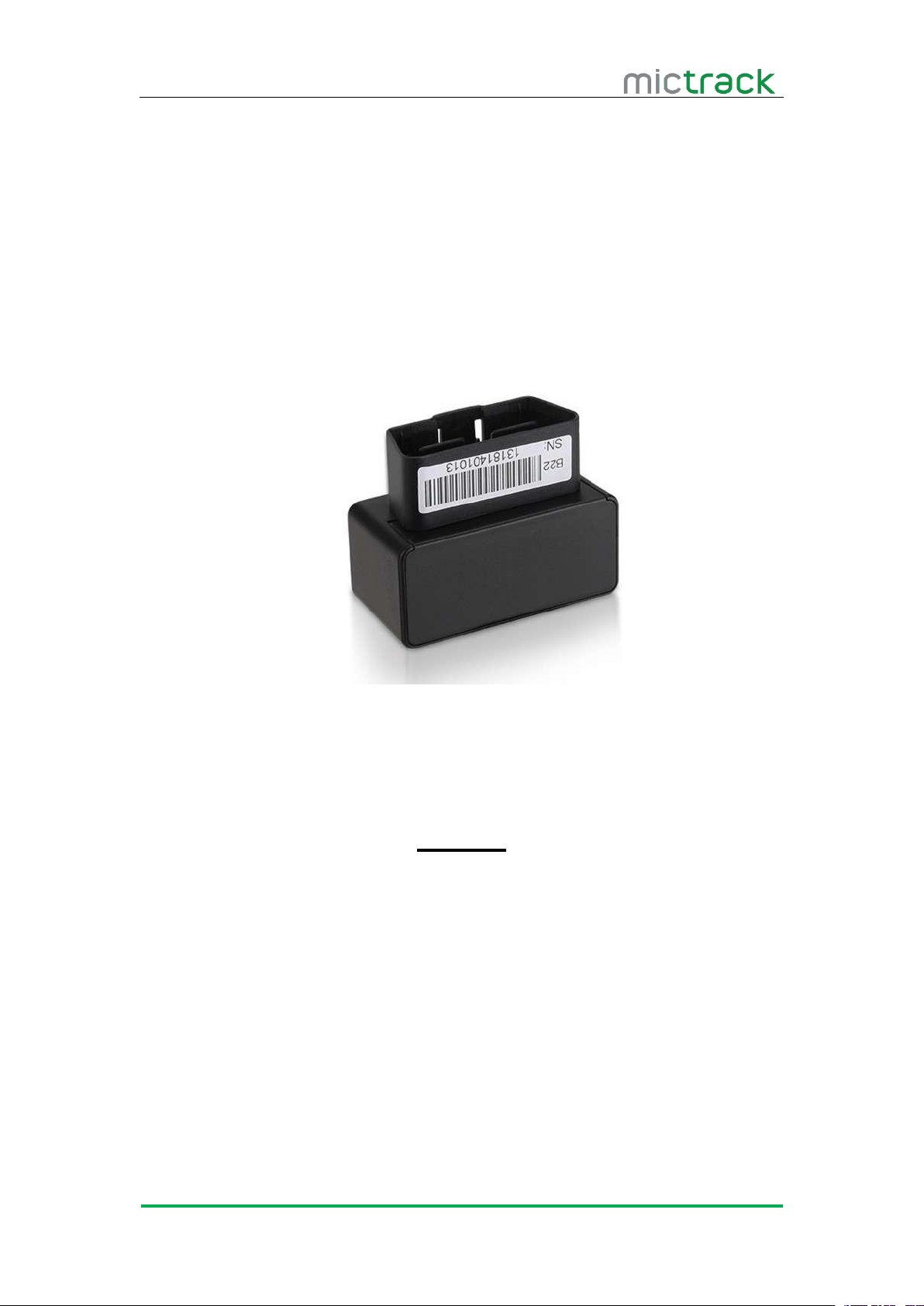
B22 OBD GPS Tracker
User Manual V1.0
Preface
Congratulations on choosing Mictrack B22 OBD GPS tracker. This manual shows
how to easily program and setup the tracker for best results. Make sure to read this
manual carefully before using this product, so as to avoid delays or confusion with it’s
operation. Please note that specifications and instructions are subject to change
without notice to facilitate product improvement. Updates and changes will be
integrated into the latest release. The manufacturer assumes no responsibility for any
errors or omissions in outdated documents.
Page 2

B22 User Manual V1.0
https://www.mictrack.com
Contents
1. Overview
2. Application...................................................................................................................................1
3. Specifications............................................................................................................................. 1
4. B22 interface..............................................................................................................................2
5. Installation
5.1 SIM Card installation
5.2 LED Indications
6. Setup and Configuration......................................................................................................... 3
6.1 Monitor (optional)
6.2 Set IP and Port
6.3 Set APN
6.4 Setup Timezone..............................................................................................................4
6.5 Setup Over speed......................................................................................................... 4
6.6 Configure:......................................................................................................................... 4
6.7 Check the Config:
6.8 Restart:
6.9 APP & PC tracking platform
.....................................................................................................................................
...................................................................................................................................
.....................................................................................................
...............................................................................................................
5.2.1 GSM indicator (RED)...................................................................................... 3
5.2.2 GPS indicator (BLUE)....................................................................................... 3
...........................................................................................................
..............................................................................................................
...........................................................................................................................
..........................................................................................................
.............................................................................................................................
.......................................................................................
6.9.1 Subscribe the server plan................................................................................ 5
6.9.2 App install & Login............................................................................................ 5
6.9.3 PC login................................................................................................................5
6.9.4 Real time tracking
6.9.5 History playback
6.9.6 Vehicle moving detection
6.9.7 Driving behavior analysis................................................................................. 8
..............................................................................................
.................................................................................................
..................................................................................
1
2
2
3
3
3
4
4
5
5
6
7
8
Page 3
B22 User Manual V1.0
https://www.mictrack.com
1
1. Overview
B22 OBD tracker is a small GPS tracking device that plugs directly into the OBD port of
2. Application
Driving Behavior Monitoring
VIN Detection
Real-time tracking
Vehicle vibrate alarm
Geo-Fence
Disconnect alarm
ACC Monitoring
Over-Speed alarm
Vehicle Crash alert
Low batter alarm
Mileage statistics
History record playback
OTA
3. Specifications
Item
Specifications
Dimension
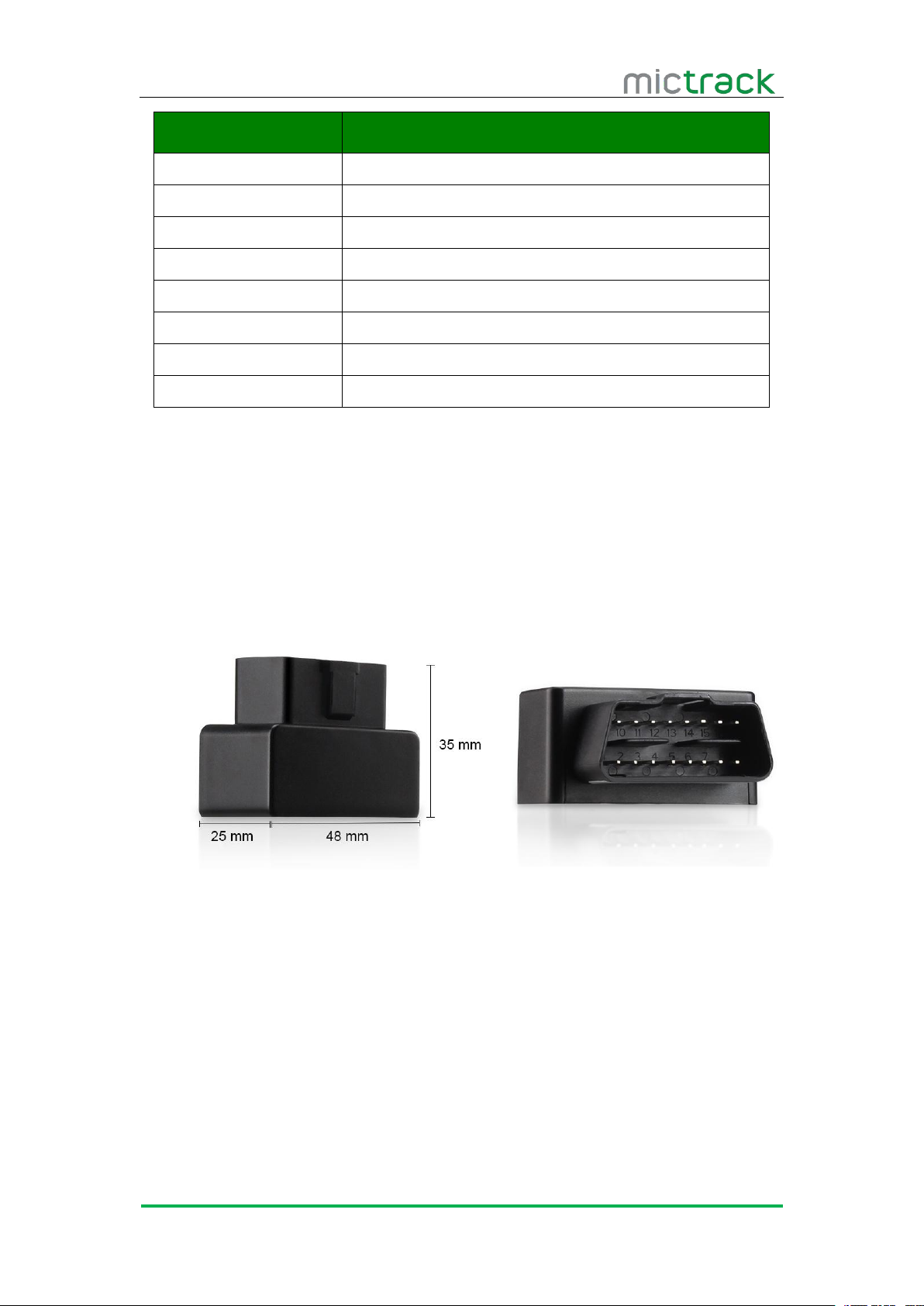
48(L)*25(W)*35(H)mm
Weight
33g
Input Voltage
10V-18V (DO NOT SUPPORT 24V)
Backup battery
50mAh/3.7v
GSM Bands
850/900/1800/1900MHz
OBD2 Protocols
ISO9141-2
ISO14230
ISO15765
Power consumption
10mA standby current
GPS Chip
U-BLOX7
GPS Sensitivity
-162dBm
Channel
56 Channel
Positioning Accuracy
10m
any vehicle. No tools or wiring required. Simply plug the device to car’s OBD port.
It can be used tracking the vehicles via PC or Mobile App, also can monitoring vehicle’s
data such as fuel consumption, rapid acceleration or deceleration etc.
Page 4
B22 User Manual V1.0
https://www.mictrack.com
2
Item
Specifications
Hot start
1s on average
Warm start
15s on average
Cold start
30s on average
Working temperature
-20°C to 60°C
Humidity
5%~95% non-concretion
Antenna
Internal GSM & GPS antennas
Sensor
3D G-sensor
SIM Card interface
Micro Size SIM
4. B22 interface
Standard 16PIN OBD2 interface
Built in GPS & OBD module
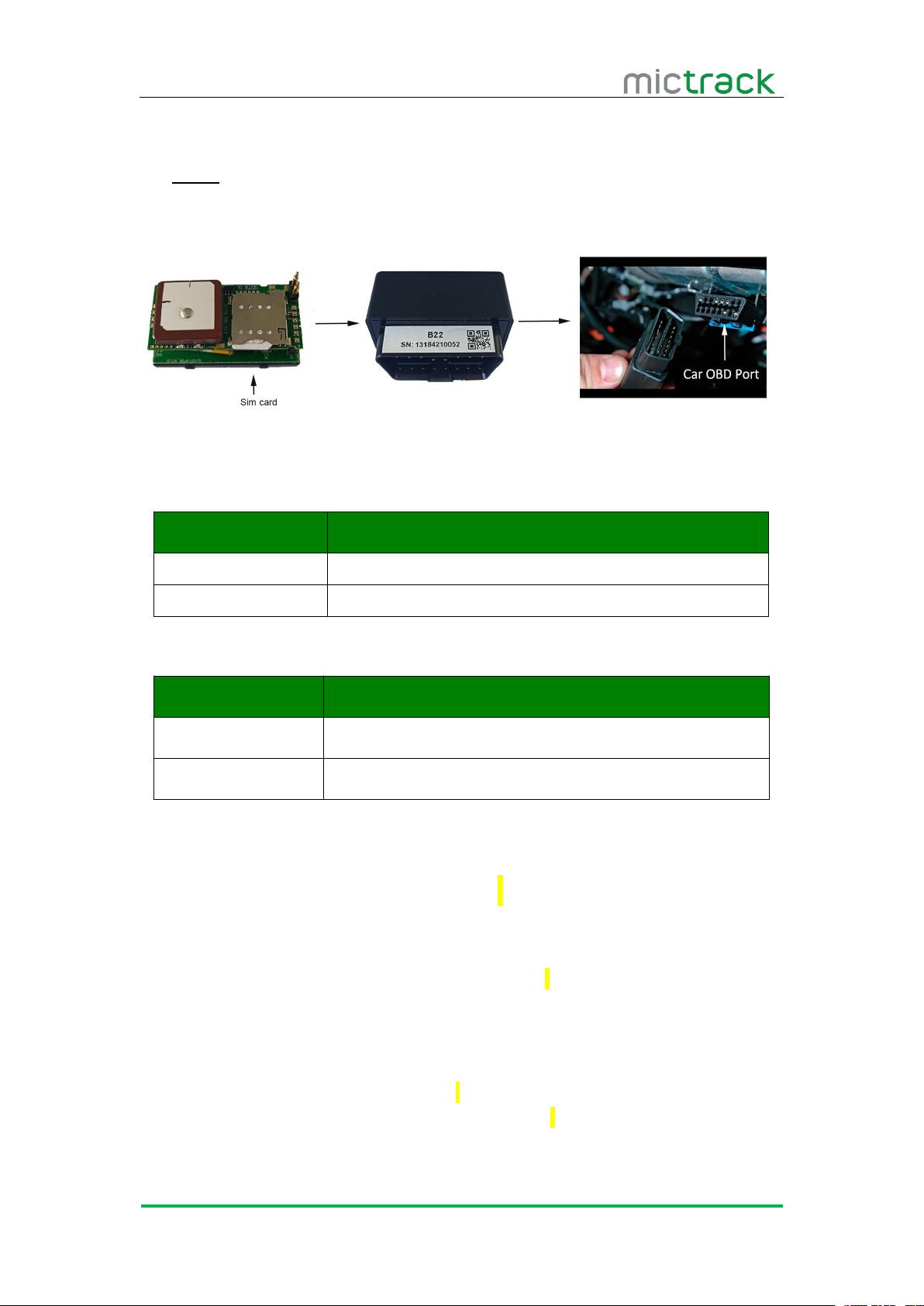
Insert SIM card to the SIM card slot.
Attach back the housing.
Directly insert the ODB tracker to vehicle’s OBD2 interface.
5. Installation
5.1 SIM Card installation
Please read the following before installing the SIM card:
Ensure the SIM card has balance
Ensure the SIM card has caller ID and GPRS functions enabled
Ensure the SIM card PIN is disabled
Gently open the case using screwdriver.
Insert SIM card to the SIM card slot.
To install the SIM card, perform the following operations:
Page 5
B22 User Manual V1.0
https://www.mictrack.com
3
Attach back the housing.
Directly insert the ODB tracker to vehicle’s OBD2 interface.
Note:
The device only supports Micro Size SIM card;
5.2 LED Indications
5.2.1 GSM indicator (RED)
Status
Description
Flashing
No SIM Card (or) No Network Reception
Constant ON
Access GSM network successful.
5.2.2 GPS indicator (BLUE)
6. Setup and Configuration
Note: All the end of SMS command is ‘;’
6.1 Monitor (optional)
6.2 Set IP and Port
Status
Description
Flashing
GPS / Satellites Unavailable – Out of Range
Constant ON
GPS/Satellite available
Format:AS7777AT+AUTHNUMBER=number 1, number 2, number 3;
Example: AS7777AT+AUTHNUMBER=13424392330,,;
Reply: +AUTHNUMBER:13424392330,, OK
Note: This functions is optional.
Format: AS7777AT+MSERVER=IP,Port,1;
Example: AS7777AT+MSERVER=47.91.230.66,7018,1;
Reply: +MSERVER:47.91.230.66,7018,1 OK
Note: support the IP and domain.
Page 6
B22 User Manual V1.0
https://www.mictrack.com
4
6.3 Set APN
Format: AS7777AT+APN=APN,USER,Password;
6.4 Setup Timezone
6.5 Setup Over speed
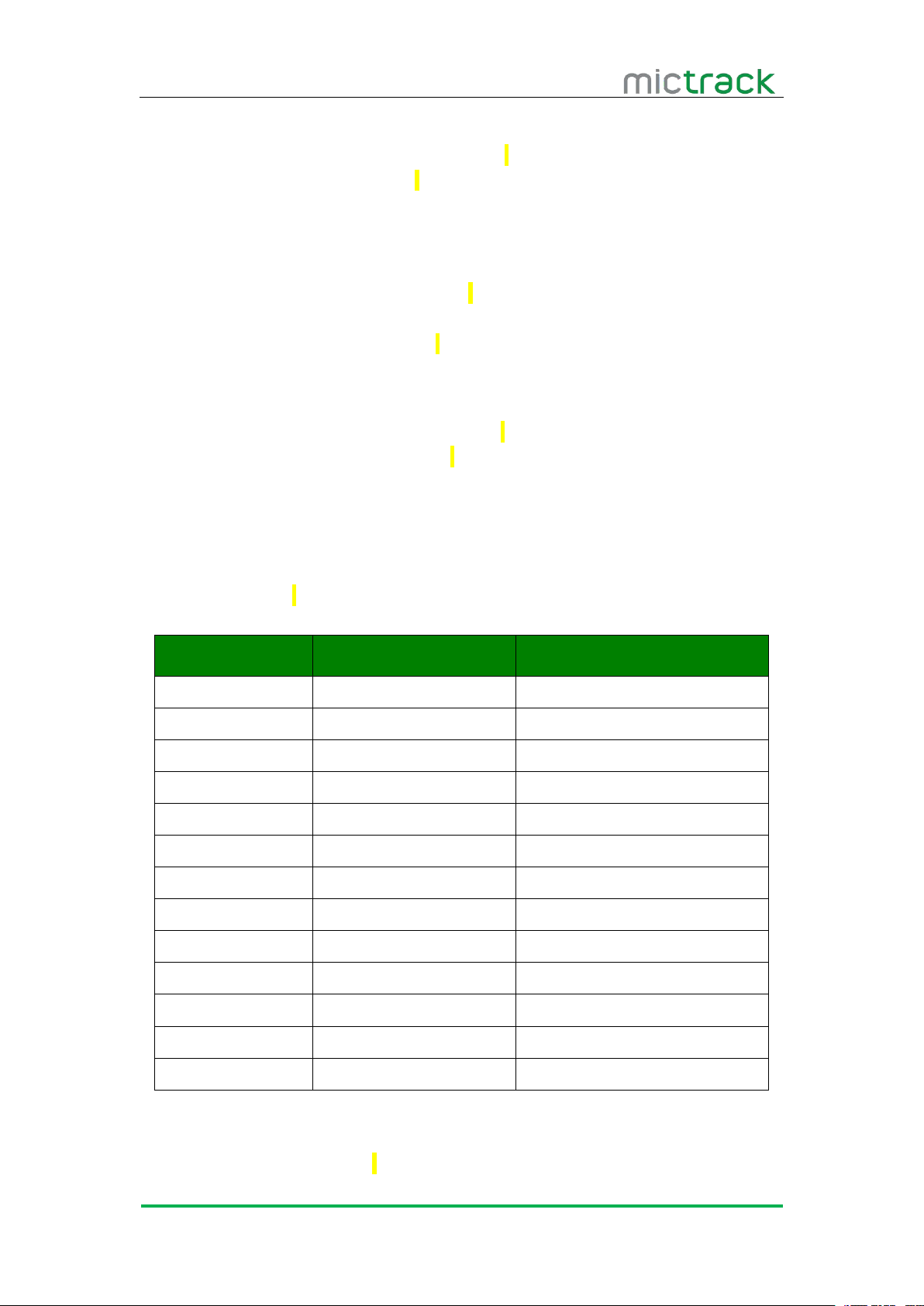
6.6 Configure:
Parameter
Example
Description
IP
47.91.230.66
Server IP address
Port
7018
Server port
Protocol
1
TCP Protocol
ID
13184210052
Device ID number
Timezone
E8
Time zone=E[0~12] or W[0~12]
ACC ON interval
10
[10,300] seconds
ACC OFF interval
5
[5,15] minutes
Distance interval
0
Fix to 0, can not change
Heartbeat
30
[1,60] seconds
Sleep ACC OFF
5
[1,10] minutes
Protocol version
1
Fix, can not change
Event for upload
3
Fix, can not change
Wake-up
60
[1,999] minutes
6.7 Check the Config:
Example: AS7777AT+APN=cmnet,,;
Reply: +APN:cmnet,, OK
Note: Please CALL your sim card provider to get the correct APN
Format: AS7777AT+TIMEZONE=time zone;
Time zone=E[0~12] or W[0~12]
Example : AS7777AT+TIMEZONE=E8;
Reply: +TIMEZOONE:E8 OK
Format: AS7777AT+LIMITSPEED=Speed Value;
Example: AS7777AT+LIMITSPEED=100;
Reply: +LIMITSPEED:120,100 OK
Note: The speed value must over 100
Format: AS7777AT+CONFIG=SN01*47.91.230.66*1*7018*cmnet*13184210052*E8*10*
5*0*30*5*1*3*60*;
RE: CONFIG:<SN01*47.91.230.66*1*7018*cmnet*1318421002*E8*10*5*0*30*5*1*3*60> OK
Format: AS7777AT+CONFIG;
Page 7
B22 User Manual V1.0
https://www.mictrack.com
5
Reply:
6.8 Restart:
6.9 APP & PC tracking platform
6.9.1 Subscribe the server plan
Contact your sales or distributor to active your device
Subscribe the server from our official shop:
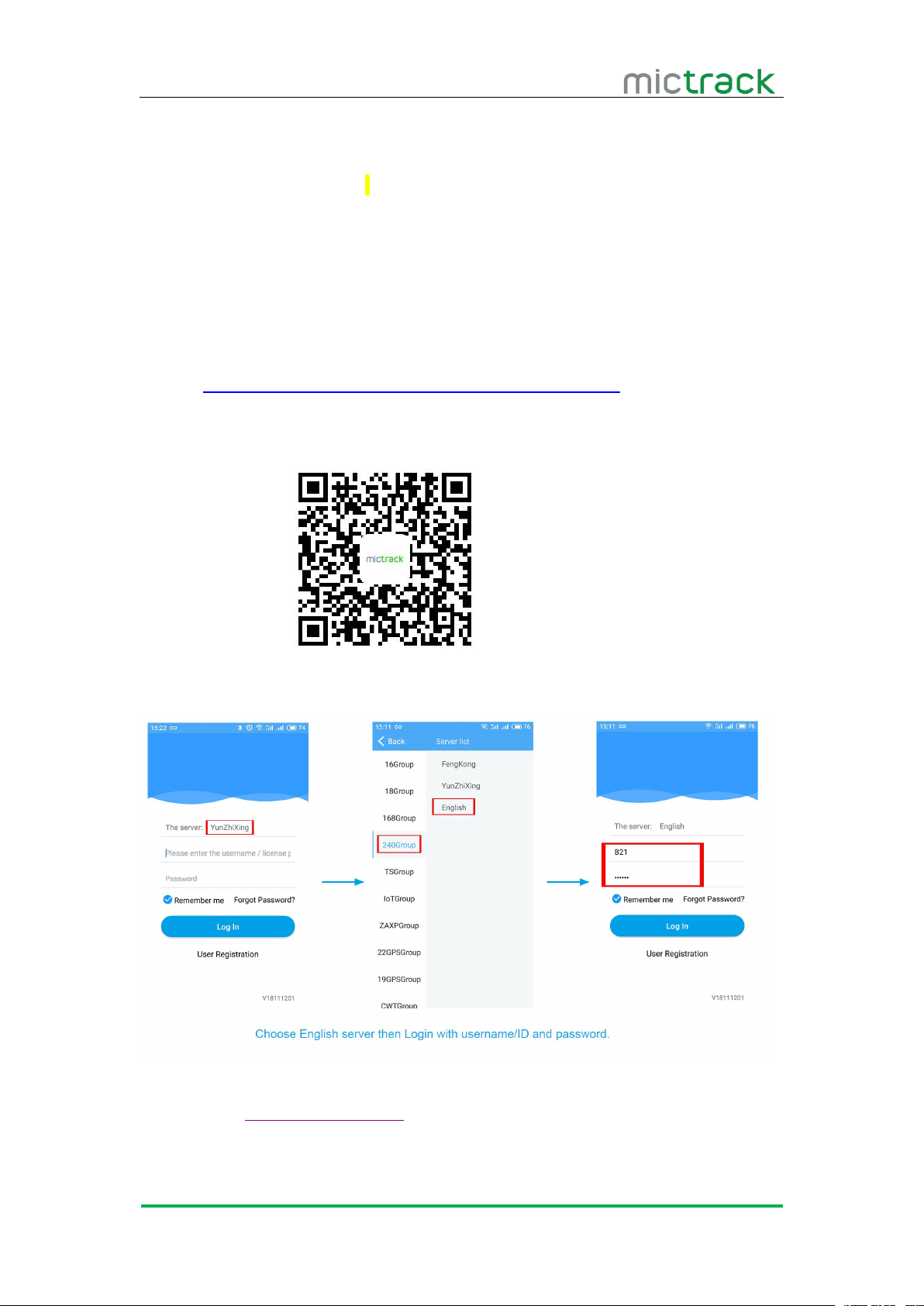
6.9.2 App install & Login
Scan the following QR code to download the App
Choose English server
Input username(or device ID)and password(default is 123456) to Login.
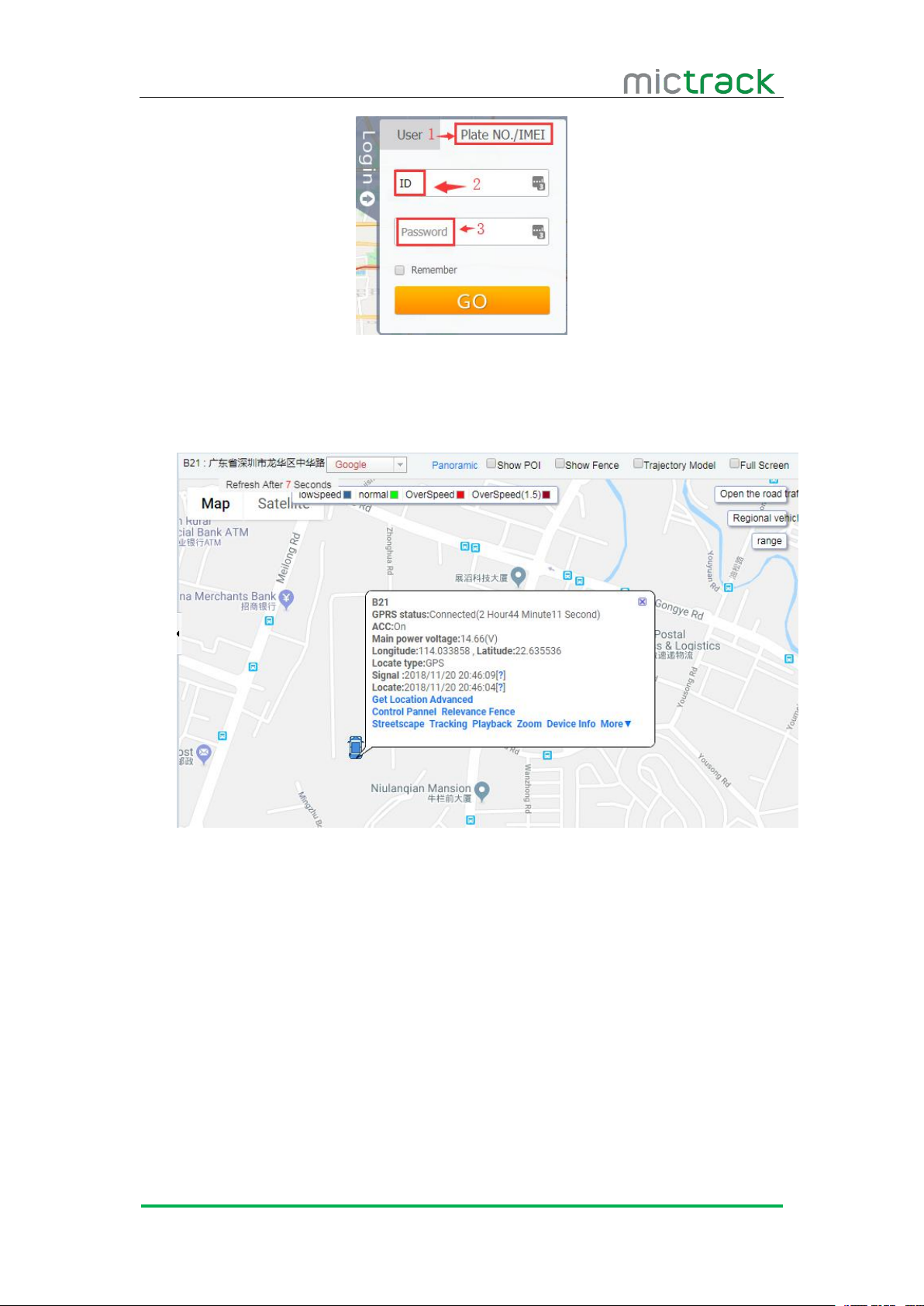
6.9.3 PC login
Web: http://gps.mictrack.com
Choose “Plate No./IMEI”
Input your device’s ID number and password(default is 123456)
Format: AS7777AT+RESET;
Reply: OK
+CONFIG:<SN01*47.91.230.66*1*7018*cmnet*13184210052*E8*10*5*0*30*5*1*3*60*>
https://www.mictrack.com/shop/gps-tracking-platform-service
Page 8
B22 User Manual V1.0
https://www.mictrack.com
6
6.9.4 Real time tracking
On the GPS system, you will tracking the vehicle real time, it will show the position
and status as below.
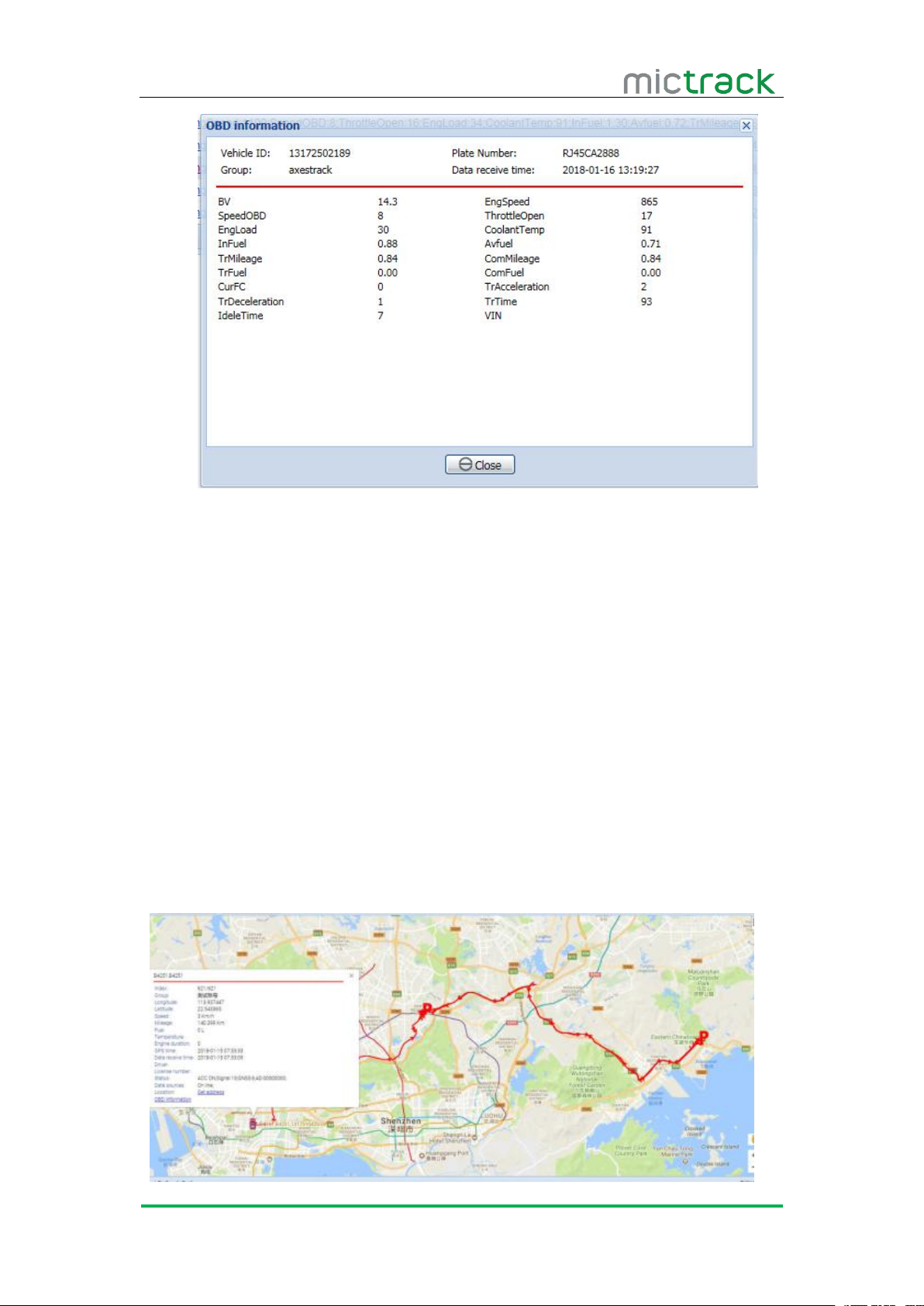
The OBD data will be report to server while engine is on, then you can get OBD
information on the tracking system, Click [OBD], it will show the detail of OBDII
information, as below
Page 9
B22 User Manual V1.0
https://www.mictrack.com
7
Vehicle VIN
Host read and upload the vehicle VIN when vehicle starts.
OBD2 Standard fault code
OBD2 Standard data stream
6.9.5 History playback
Read vehicle Standard fault code and report.
Engine speed, vehicle speed, battery voltage, throttle opening, engine load,
coolant temperature, instantaneous fuel consumption, average fuel consumption, the
mileage, the total mileage, the fuel consumption, the cumulative fuel consumption,
the current number of fault codes, the number of acceleration, the number of
slowdown and so on.
Note: it base on the vehicles, some of vehicle model do not support the sensors, so
ca not ge the data via OBD devices.
GPS tracking system will save the history data, you can easy playback the history.
Page 10

B22 User Manual V1.0
https://www.mictrack.com
8
6.9.6 Vehicle moving detection
The G-Sensor real-time detect the vehicle status, such as illegal vehicle movement,
6.9.7 Driving behavior analysis
Accumulated travel time/current driving time
Accumulated idle time/The idling time
Average speed
The highest speed in history / the highest speed
Cumulative number of rapid acceleration
Mileage
This time driving fuel consumption
The idle fuel consumption
vehicle collision, etc.
Note: Please remember to monitor the credit balance of your SIM card, to
avoid confusion or delays in setting up your new unit. This can be a common issue,
especially when initially setting up a new unit, and the unit fails to reply to a correct
SMS command sequence.
If you have any questions please do not hesitate to contact us [email protected].
 Loading...