

Page 1
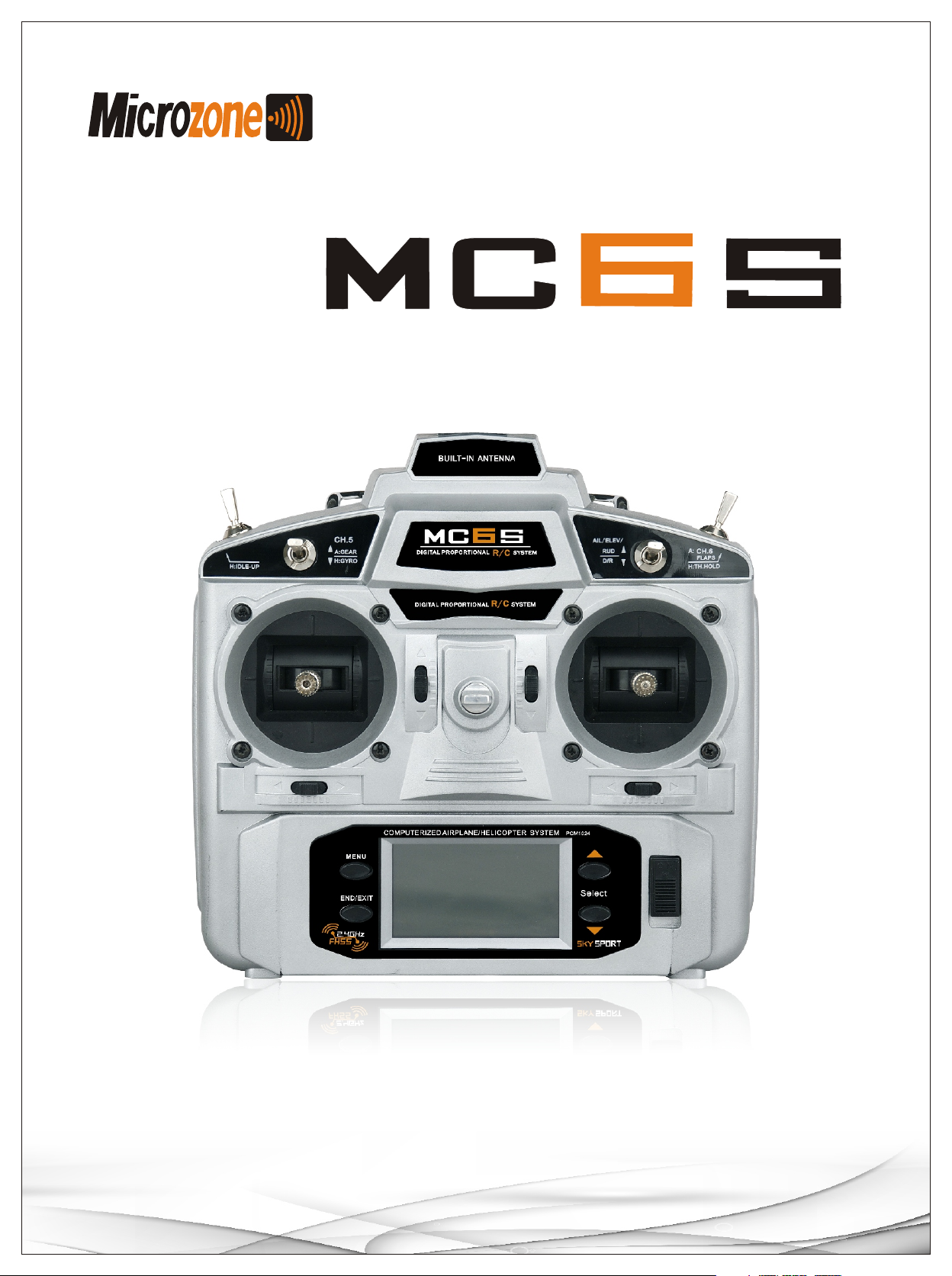
Manual
成品尺寸:210x285mm
www.microzone.hk
Page 2

Index
Introduction
03
Usage precaution
04
Product Specification
05
Transmitter controls
06
Airplane Basic operation
07
Helicopter Basic operation
09
02
Page 3

Introduction
Thank you for purchasing MC6S from Microzone,please carefully read all this instruction before you
start to use it.Meantime,please keep this instruction carefully for fur ther possible guide in the future.
!
1.This model is only used for Hobby flight.
2.Any problem caused by changing, replaced spare par ts is not Microzone’s responsibility,thank you
for your understand.
Warning About usage and change on this product.
03
Page 4

Usage precaution
Before using this model, please check to make sure all the spare parts for this model are included, all
the power for receiver,ser vo and transmitter is ready to star t well. If no function,please check whether
the batteries are full of power.For rechargeable batter y,it should be first charged for first usage or
long time not used. Please make sure the voltage is correct for this radio,if it is suppor ted by li-poly
batter y or other device.
If spare par ts missing, bad function happening,please contact with the distributor or our company for
detailed support. Please specifically pay attention to following notices for safety usage.
1. Children under 14 must be accompanied and instructed by experienced pilot.
2.Donot fly models at night, raining day or strong wind,etc.
3.Special attention should be paid before you turn on the transmitter,while other
models are flying or running.
4.If there is a special regulation for 2.4Ghz radio system at your flying area,please
abide by all regulations for safely flying with this model.
5.Please check ever y servo works properly and eliminate any inter fering signal before
you fly with it.
6.All the Microzone radios are only compatible with Microzone receivers, couldnot be
compatible with other brands’.
04
Page 5
Product Specification
MC6S
MC6S Digital trim Transmitter function
1.Application: Helicopte r, ai rpl ane , car , boat
2.Big Dot matrix LCD di spl ay, resolution 128*64
3.Frequ enc y: 2401.5MHz~2445.5MHz
4.Power : <100mW
5.Working current : <12 0mA
6.Type: PCM1024
7.Trim: Digi tal Trim
8.Comfor table menu design, easier to us e and s etu p
9.New joystick design, adjustable tightness and height
10.Multiple swashplate set up, per fectly support CCPM
11.Digital trim, display both graph an d number
12.10 models memor y, 3 set s programmable mixer
13.More than 4 type flight mode, easier to fly aero batic function
14.11 sets of cur ve design ,9 point editing each set
15.Compute riz ed 6c h,m oni tor each detail
16.Dozens of functions for airplane and helicopter control, make fli ght e asi er
17.Low Vol tag e Not ice : Bat ter y < 8 .4V, power light 1/500m s
18.Modulation: FHSS
MC6DR 6CH 2.4Ghz Receiver
Application: Airplane ,helicopte r,c ar an d boat
Frequency:
Sensitivity: -97dBm
Range on the ground: >700m
Type: PCMS 1024 / 4096
Power: 4.8-6V
Size: 45×24×13mm
Weight: 5.8g
2401.5MHz~2445.5MH z
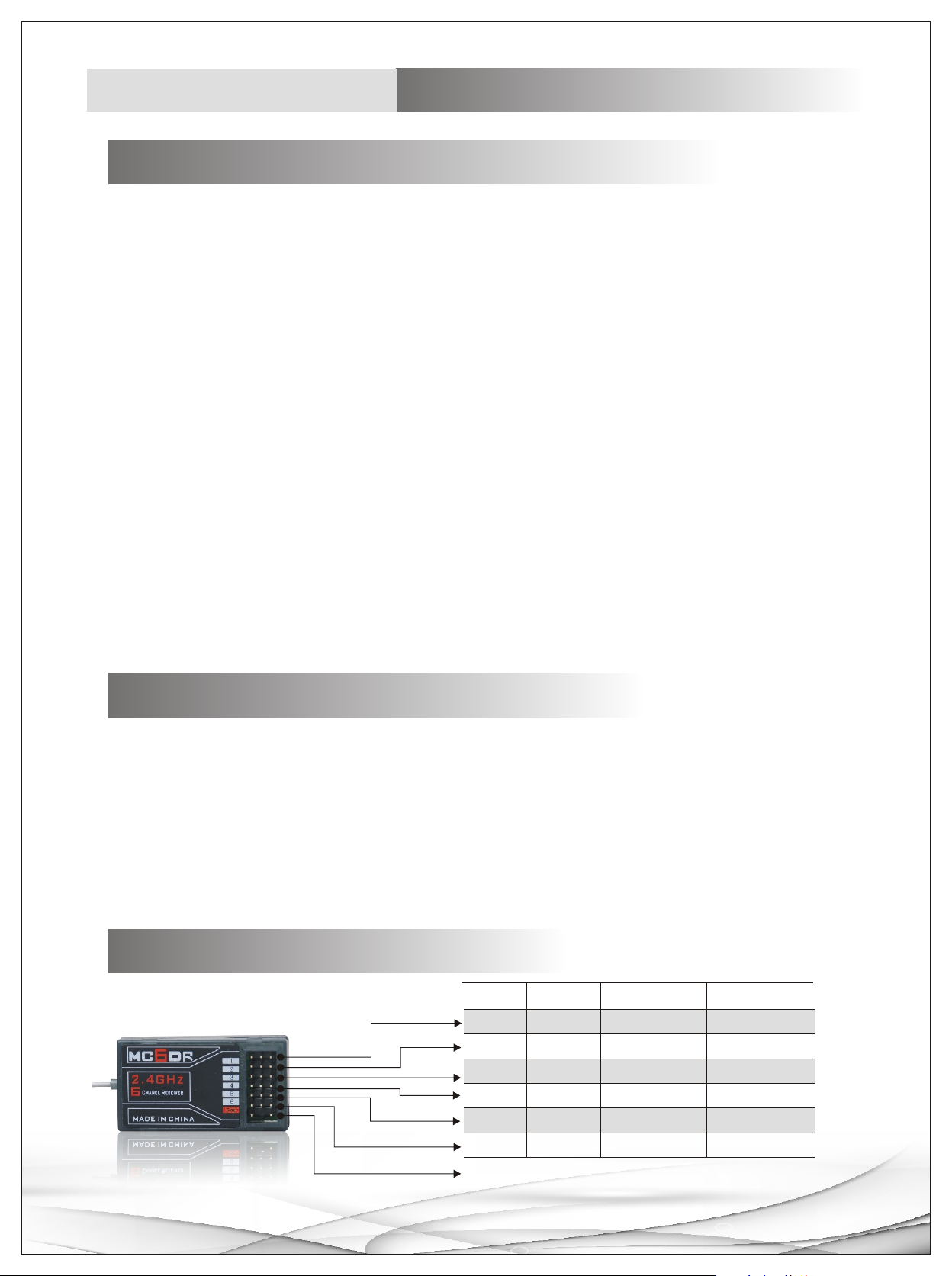
Receiver connection
CH
1
2
3
4
5
6
Ch1
CH2
CH3
CH4
CH5
CH6
Airplane
Aileron
Elevator
Throttle
Rudder
Landing gear
Flap
Helicopter
Aileron
Elevator
Throttle
Rudder
Gyro
Pitch
Frequency
05
Page 6
Transmitter controls
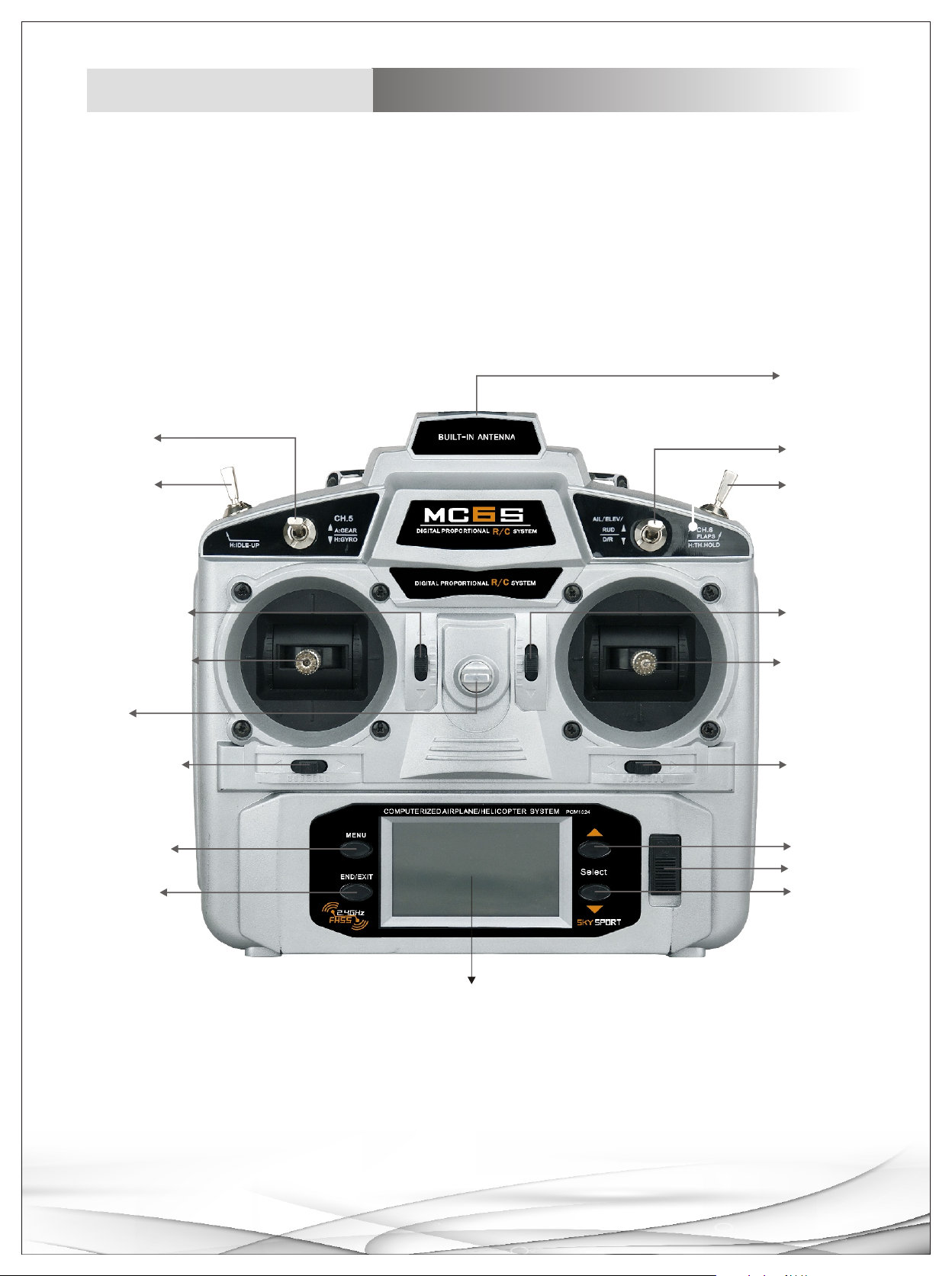
Antenna
Switch2
Switch1
Elevator Trim
Elevator
Rudder
Hook
Rudder Trim
MENU Key
END Key
/
Switch 4
Switch 3
Throttle
Trim
Aileron/
Throttle
Aileron
Trim
+ Key
Power switch
- Key
LCD Display
06
Page 7
Airplane
Display instruction
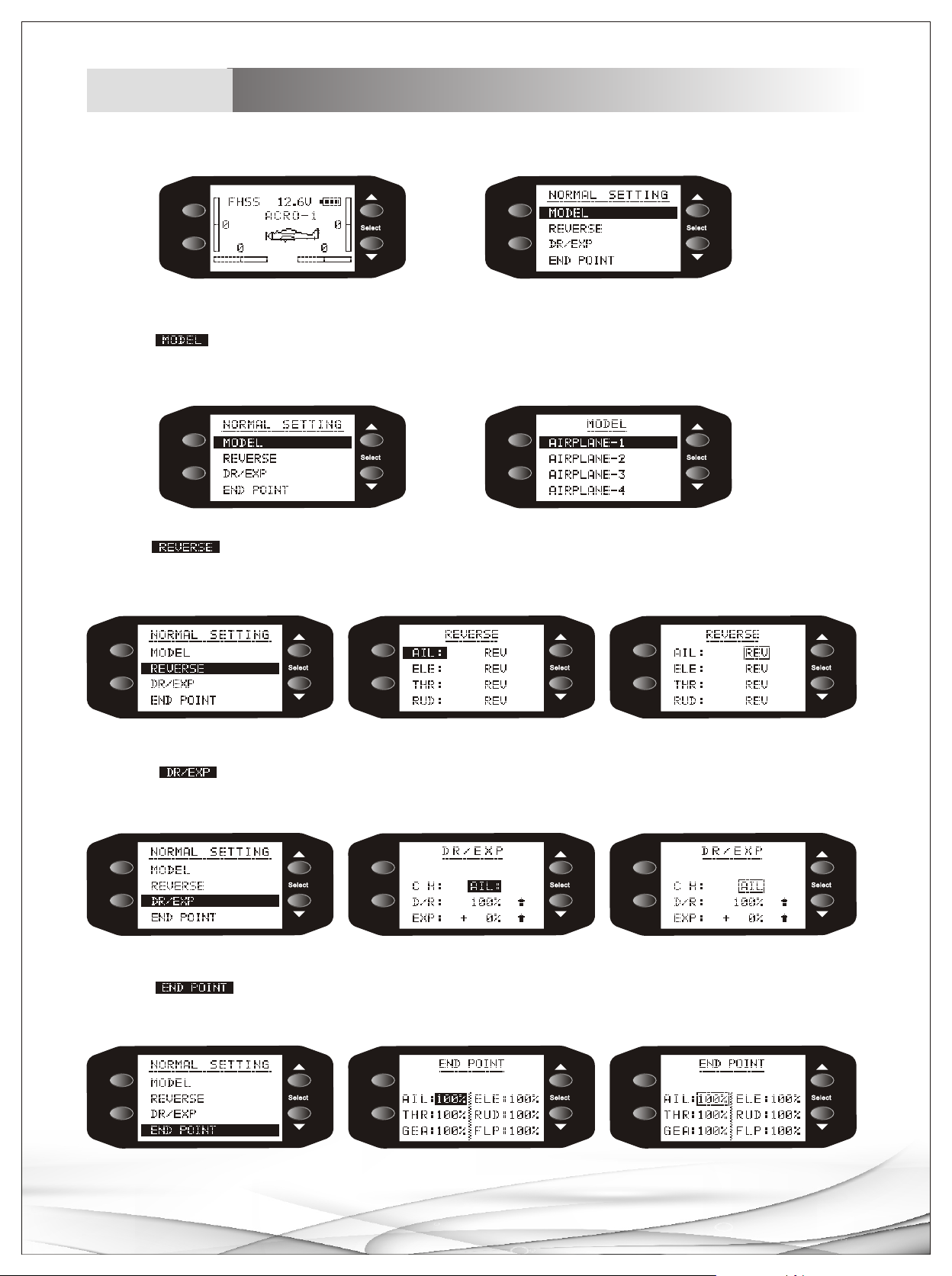
1.Switch on, press MENU button to main menu, press +/- to choose differen t title.。
MENU
END/ EXIT
Main menu
MENU
END/ EXIT
Menu
2.Choose MODEL sub-menu with +/- buttons, Press MENU button to enter sub menu, choose any mode with +/-
buttons , press MENU button to c onf irm it, Press END button to ret urn m ain m enu .
MENU
END/ EXIT
MENU
END/ EXIT
3.Choose REVERSE s ub- men u with +/- buttons, Press ME NU bu tton to enter sub menu, c hoose an y cha nne l with +/-
buttons , press MENU but ton to ente r REV/NOR se tup of this channel, select REV or NOR with +/- bu ttons, pre ss END to
retu rn main menu.
MENU
MENU
MENU
END/ EXIT
4.Choose sub-menu with +/- buttons , Pre ss MENU button to enter sub men u, choose any title with +/-
DR/EXP
END/ EXIT
END/ EXIT
buttons , press MENU button to c onf irm chosen title, setup parameters with +/- bu ttons, press END to return main menu.
MENU
END/ EXIT
5.Choose sub-menu with +/- buttons, Press MENU b utton to e nter sub m enu , choose any t itl e with +/-
END POINT
MENU
END/ EXIT
MENU
END/ EXIT
buttons , press MENU button to c onf irm chosen title, setup parameters with +/- bu ttons, press END to return main menu.
MENU
END/ EXIT
MENU
END/ EXIT
MENU
END/ EXIT
07
Page 8
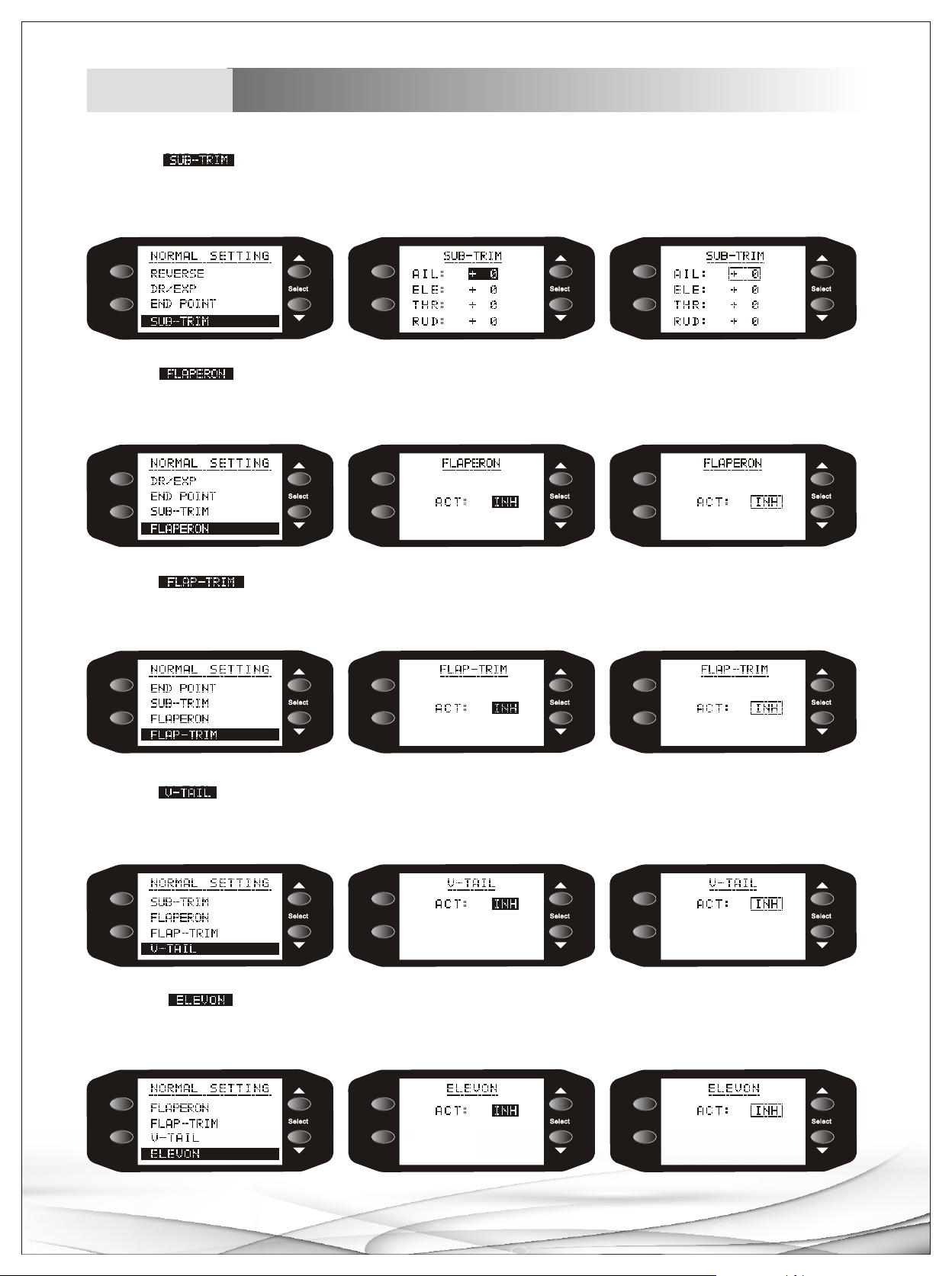
Airplane
Display instruction
6.Choose sub-menu with +/- buttons, Press MENU button to enter sub menu, choose any title
SUB-TRIM
with +/- buttons, press MENU button to confirm chosen title, setup parameters with +/- buttons, press END
to return main men u.
MENU
END/ EXIT
7.Choose sub-menu with +/- buttons, Press MENU button to enter sub menu, choose any title
FL APERON
MENU
END/ EXIT
MENU
END/ EXIT
with +/- buttons, press MENU button to confirm chosen title, setup parameters with +/- buttons, press END
to return main men u.
MENU
END/ EXIT
8.Choose sub-menu with +/- buttons, Press MENU button to enter sub menu, choose any title
FL AP-TRIM
MENU
END/ EXIT
MENU
END/ EXIT
with +/- buttons, press MENU button to confirm chosen title, setup parameters with +/- buttons, press END
to return main men u.
MENU
END/ EXIT
9.Choose sub-menu with +/- buttons, Press MENU button to enter sub menu, choose any title with
V-TAIL
MENU
END/ EXIT
MENU
END/ EXIT
+/- buttons, press MENU button to confirm chosen title, se tup parameters with +/- buttons, press END to
return main menu.
MENU
END/ EXIT
10.Choose sub-menu with +/- buttons, Press MENU button to enter sub menu, choose any title
ELVON
MENU
END/ EXIT
MENU
END/ EXIT
with +/- buttons, press MENU button to confirm chosen title, setup parameters with +/- buttons, press END
to return main men u.
MENU
END/ EXIT
MENU
END/ EXIT
MENU
END/ EXIT
08
Page 9
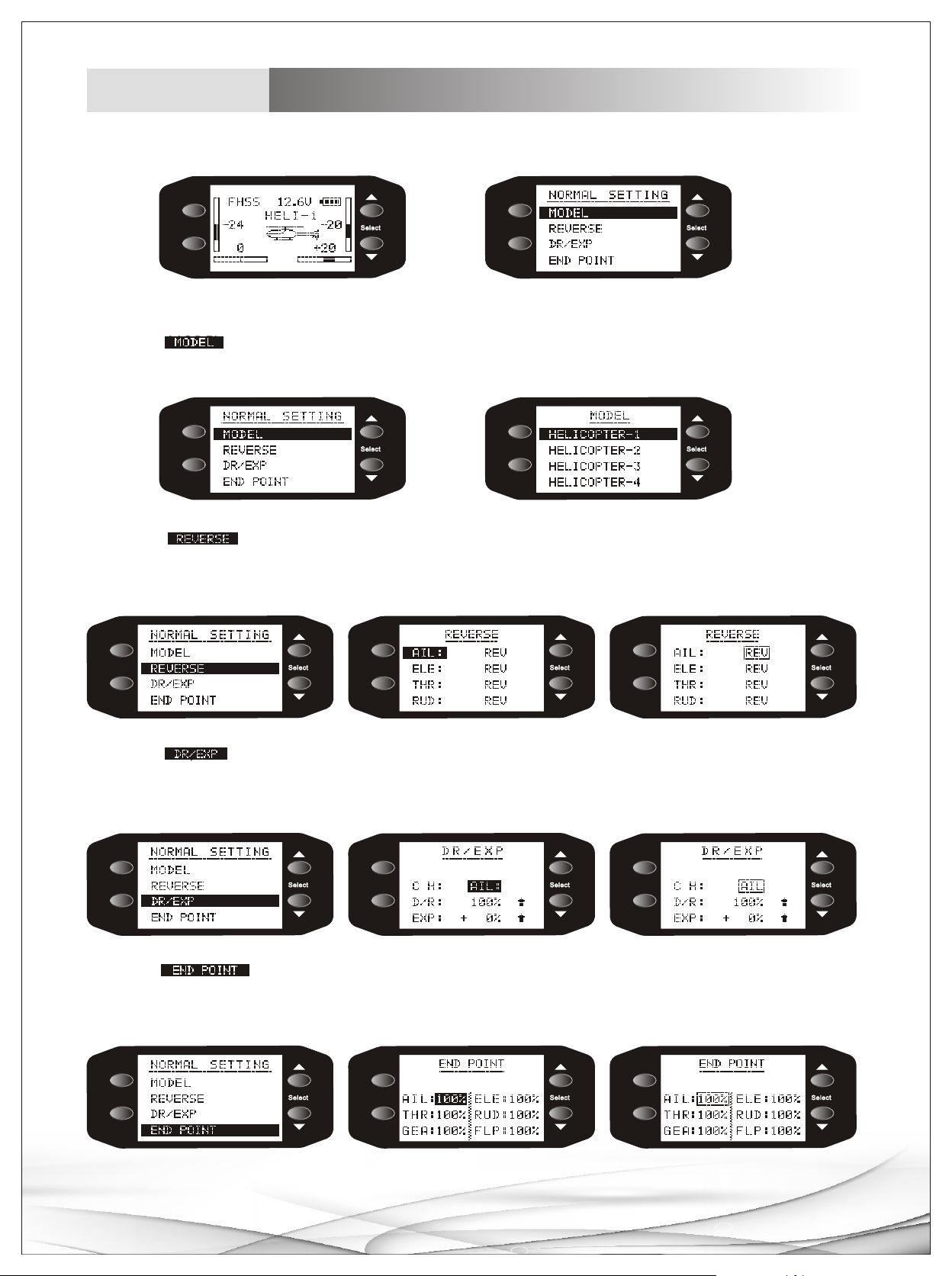
Helicopter
Display instruction
1.Switch on, press MENU button to main menu, press +/- to choose diferent title.
MENU
END/ EXIT
MENU
END/ EXIT
Main menu Menu
2.Choose MODEL sub-menu with +/- buttons, Press MENU button to enter sub menu, choose any mode
with +/- buttons, press MENU button to confirm it, Press END button to return main menu.
MENU
END/ EXIT
MENU
END/ EXIT
3.Choose REVERSE sub-menu with +/- buttons, Press MENU button to enter sub menu, choose any
channel with +/- buttons, press MENU button to enter REV/NOR setup of this channel, select REV or NOR
with +/- buttons, press END to return main menu.
MENU
MENU
MENU
END/ EXIT
END/ EXIT
END/ EXIT
4.Choose DR/EXP sub-menu with +/- buttons, Press MENU button to enter sub menu, choose any title
with +/- buttons, press MENU button to confirm chosen title, setup parameters with +/- buttons, press END
to return main men u.
MENU
END/ EXIT
MENU
END/ EXIT
MENU
END/ EXIT
5.Choose END POINT sub-menu with +/- buttons, P ress MENU button to enter sub menu, choose any title
with +/- buttons, press MENU button to confirm chosen title, setup parameters with +/- buttons, press END
to return main men u.
MENU
END/ EXIT
MENU
END/ EXIT
MENU
END/ EXIT
09
Page 10
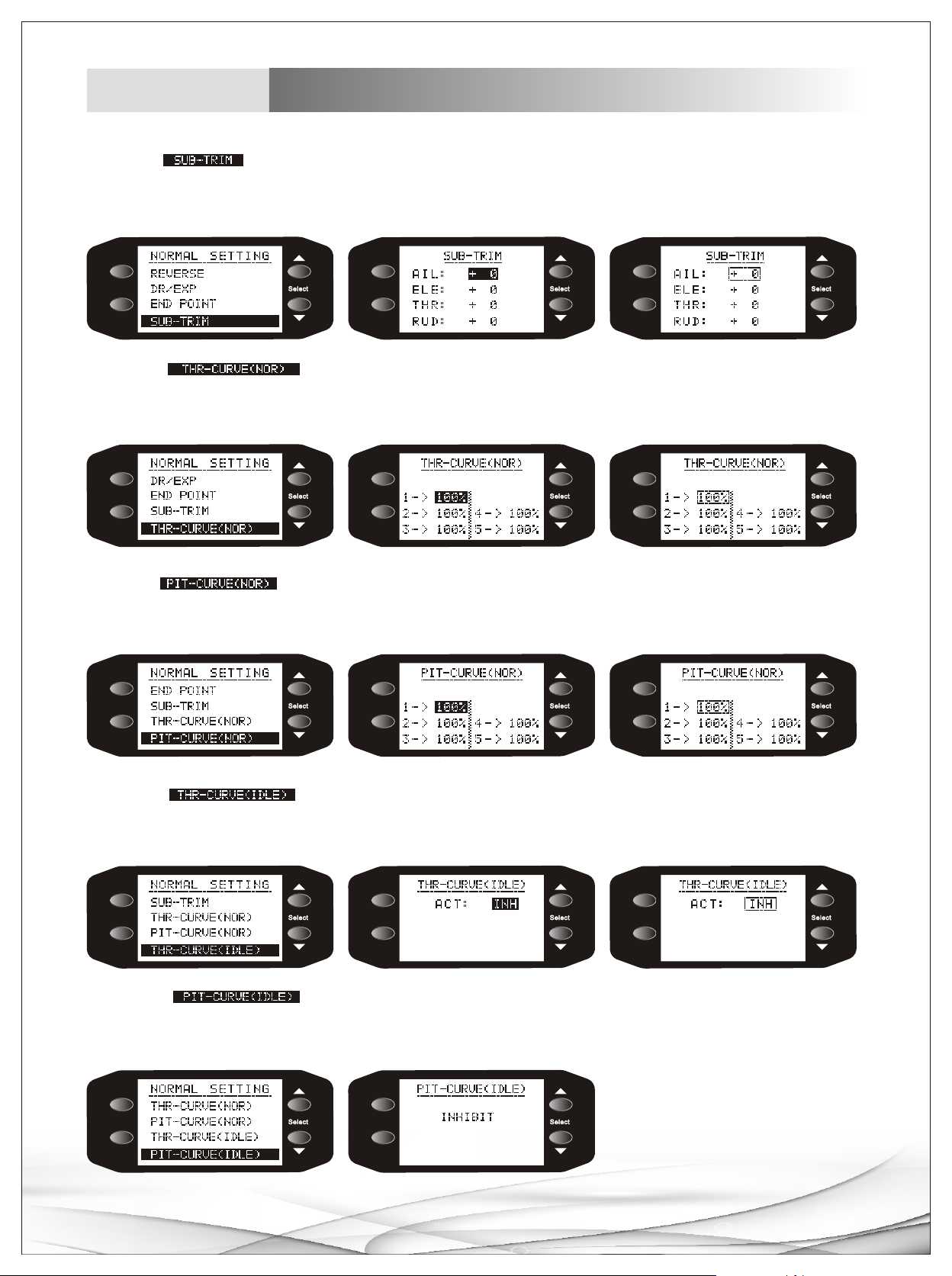
Helicopter
Display instruction
6.Choose SUB-TRIM sub-menu with +/- buttons, Press MENU button to enter sub menu, choose any title
with +/- buttons, press MENU button to confirm chosen title, setup parameters with +/- buttons, press END
to return main men u.
MENU
END/ EXIT
MENU
END/ EXIT
MENU
END/ EXIT
7.Choose sub-menu with +/- buttons, Press MENU button to enter sub menu, choose
any title with +/- buttons, press MENU button to confirm chosen title, setup parameters with +/- buttons,
press END to return main menu.
MENU
END/ EXIT
MENU
END/ EXIT
MENU
END/ EXIT
8.Choose sub-menu with +/- buttons, Press MENU button to enter sub menu, choose any
title with +/- buttons, press MENU button to confirm chosen title, setup parameters with +/- buttons, press
END to return main menu.
MENU
MENU
MENU
END/ EXIT
END/ EXIT
END/ EXIT
9.Choose sub-menu with +/- buttons, Press MENU button to enter sub menu, choose
any title with +/- buttons, press MENU button to confirm chosen title, setup parameters with +/- buttons,
press END to return main menu.
MENU
END/ EXIT
MENU
END/ EXIT
MENU
END/ EXIT
10.Choose sub-menu with +/- buttons, Press MENU button to enter sub menu, choose
any title with +/- buttons, press MENU button to confirm chosen title, setup parameters with +/- buttons,
press END to return main menu.
MENU
END/ EXIT
MENU
END/ EXIT
10
Page 11
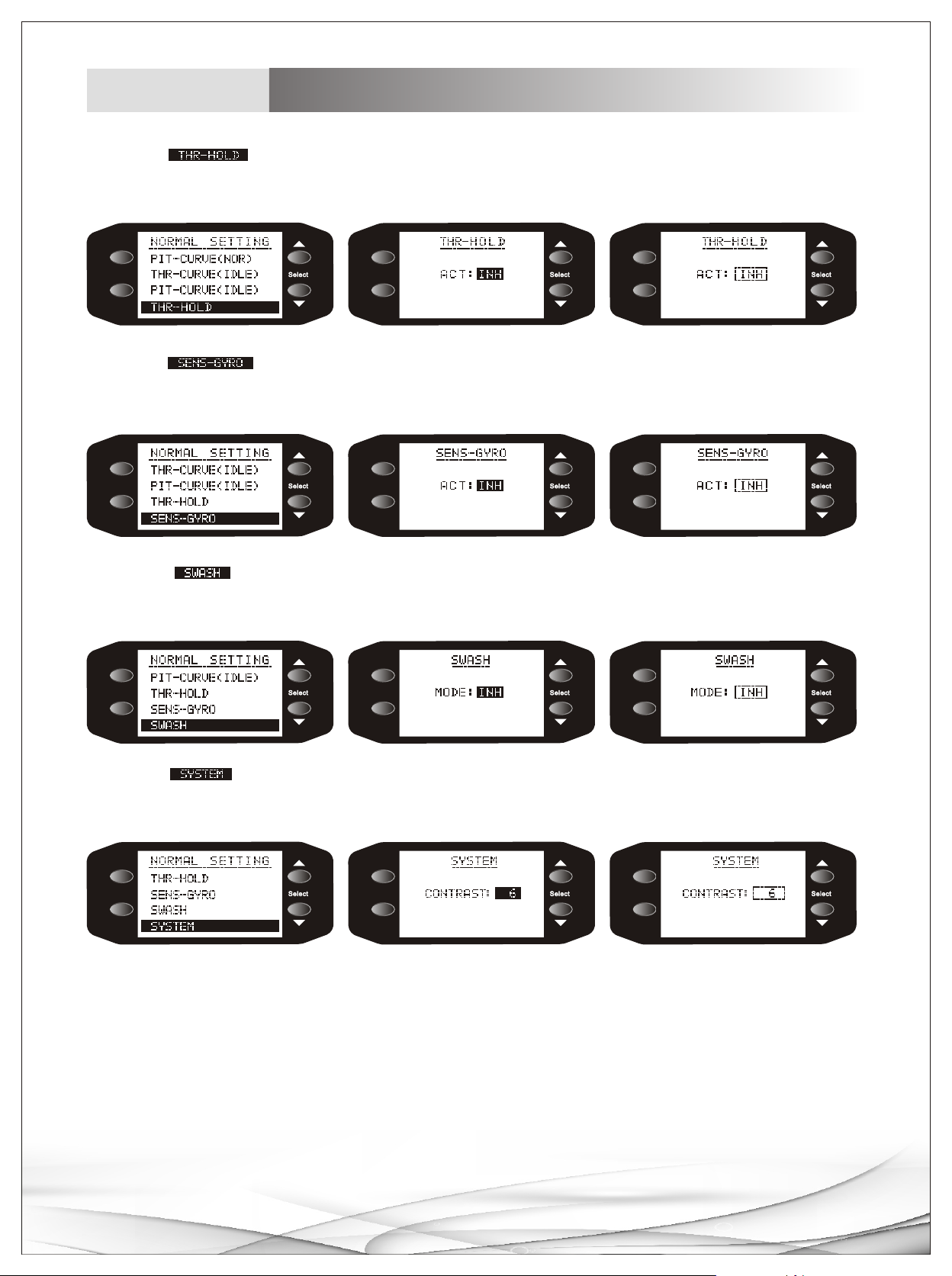
Helicopter
Display instruction
11.Choose sub-menu with +/- buttons, Press MENU button to enter sub menu, choose any title
with +/- buttons, press MENU button to confirm chosen title, setup parameters with +/- buttons, press END
to return main men u.
MENU
END/ EXIT
MENU
END/ EXIT
MENU
END/ EXIT
12.Choose sub-menu with +/- buttons, Press MENU button to enter sub m enu, choose a ny title
with +/- buttons, press MENU button to confirm chosen title, setup parameters with +/- buttons, press END
to return main men u.
MENU
END/ EXIT
MENU
END/ EXIT
MENU
END/ EXIT
13.Choose sub-menu with +/- buttons, Press MENU button to enter sub menu, choose any title
with +/- buttons, press MENU button to confirm chosen title, setup parameters with +/- buttons, press END
to return main men u.
MENU
MENU
MENU
END/ EXIT
END/ EXIT
END/ EXIT
14.Choose sub-menu with +/- buttons, Press MENU button to enter sub menu, choose any title
with +/- buttons, press MENU button to confirm chosen title, setup parameters with +/- buttons, press END
to return main men u.
MENU
END/ EXIT
MENU
END/ EXIT
MENU
END/ EXIT
11
Page 12

MICROZONE ELECTRONICE(HK)CO.,LTD
www.microzone.hk
12
 Loading...