

Page 1

IIC
INVISIBLE-IN-THE-CANAL
OPERATIONS MANUAL
Page 2
3
2
Table of Contents
Overview
Features, Controls and Identification . . . . . . . . . . . . . 3
Preparation
Batteries . . . . . . . . . . . . . . . . . . . . . . . . . . . . . . . . . . . 4
Battery Indicators . . . . . . . . . . . . . . . . . . . . . . . . . . . . 6
Insertion and Removal . . . . . . . . . . . . . . . . . . . . . . . . 7
Operation
On & Off . . . . . . . . . . . . . . . . . . . . . . . . . . . . . . . . . . 10
Multimemory Settings . . . . . . . . . . . . . . . . . . . . . . . . 11
T2 (touch-tone) Function . . . . . . . . . . . . . . . . . . . . . . 12
Troubleshooting Guide . . . . . . . . . . . . . . . . . . . . . . . 13
Telephone Use . . . . . . . . . . . . . . . . . . . . . . . . . . . . . . 14
Reminder . . . . . . . . . . . . . . . . . . . . . . . . . . . . . . . . . . 17
Summary of Settings . . . . . . . . . . . . . . . . . . . . . . . . . 18
Instrument Care . . . . . . . . . . . . . . . . . . . . . . . . . . . . . 19
Hearing System Care
Service and Repair . . . . . . . . . . . . . . . . . . . . . . . . . . . 21
Troubleshooting Guide . . . . . . . . . . . . . . . . . . . . . . . 21
Tips for Better Communication
For You . . . . . . . . . . . . . . . . . . . . . . . . . . . . . . . . . . . . 22
For Your Family and Friends . . . . . . . . . . . . . . . . . . . 23
FDA Information
Required Information . . . . . . . . . . . . . . . . . . . . . . . . . 24
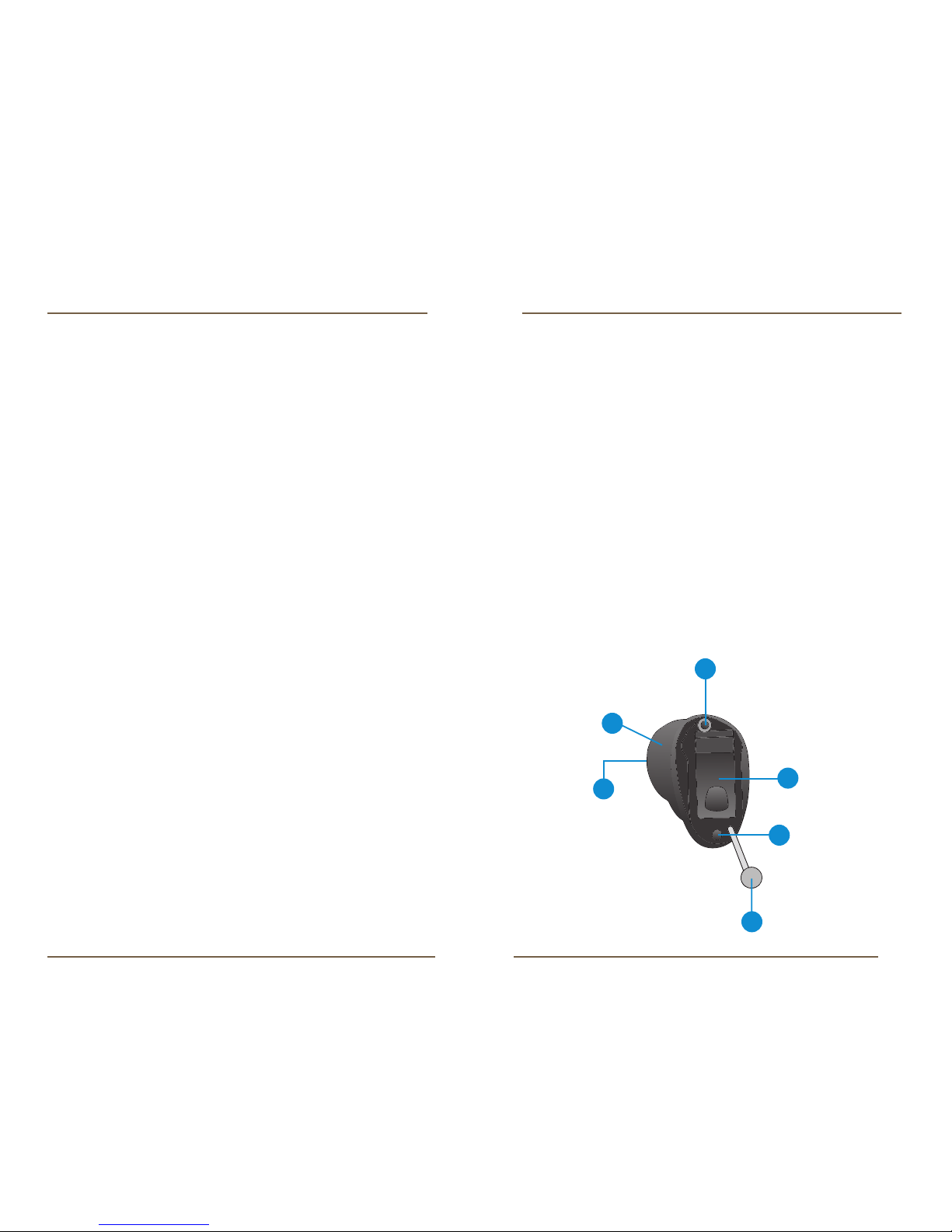
Features, Controls and Identification
Your hearing system controls include:
1. Microphone opening
2. Sound outlet (receiver)
3. Battery compartment (on/off control)
4. Removal handle
5. Vent (optional)
Your hearing system can be identified by the
whiteR for the right ear and L for the left ear
and the serial number:
6. Location of serial number
IIC Overview
1
3
5
4
6
Page 3
4 5
Preparation
Batteries
Your hearing system uses a battery as its power
source. This battery size can be identified by the
yellow (10) color code on the packaging.
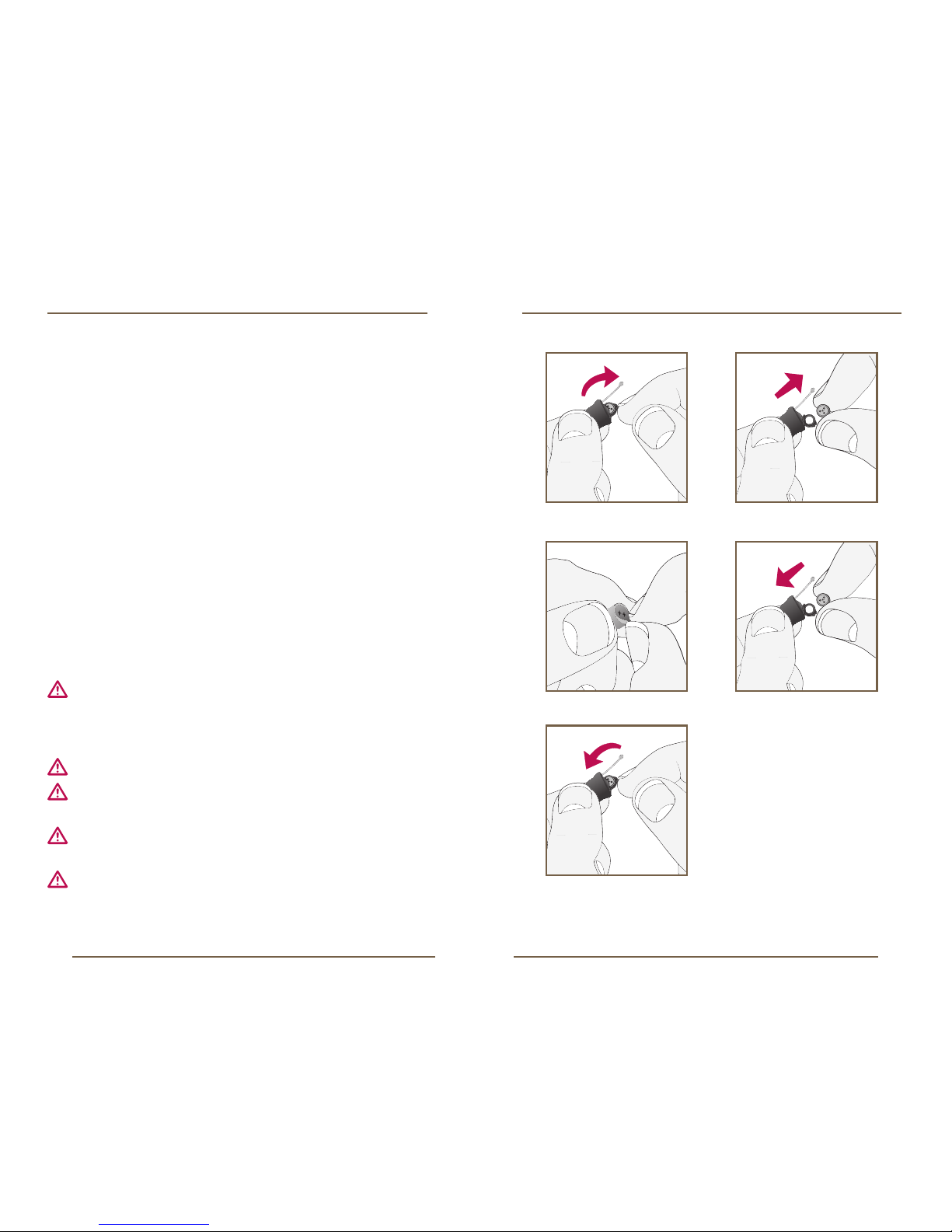
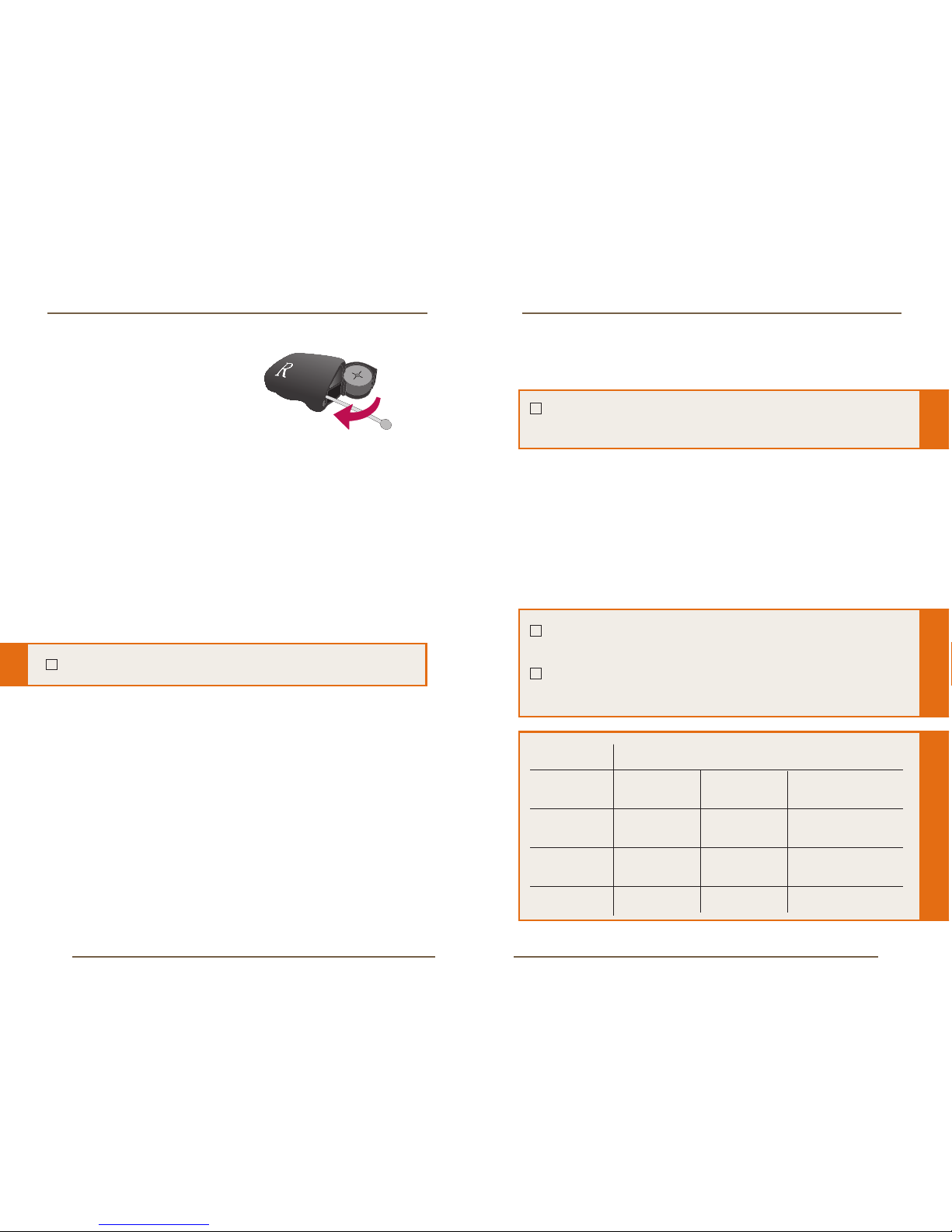
To insert or replace the battery:
1. Use the nail grip on the battery door.
2. Open the battery door gently and remove
the old battery.
3. Remove the tab from the new battery.
4. Line up the battery’s “+” sign (flat side of the
battery) with the “+” on the battery door.
5. Close the battery door.
Preparation
Warnings
Batteries are dangerous if swallowed. To help
prevent the accidental ingestion of batteries:
Keep out of reach of children and pets
Check your medications before taking them –
batteries have been mistaken for pills
Never put batteries in your mouth, as they can
easily be swallowed
National Button Battery Ingestion Hotline:
202-625-3333
1 2
3 4
5
Page 4
6 7
Preparation
Battery Indicator Tones
An indicator will sound when the battery voltage is
low. You have approximately 5 minutes* to replace
the battery. An indicator will sound just before the
battery stops working.
* Actual time between low battery indicator and
shut down will vary depending on environmental
noise levels and brand of battery used.
Helpful Hints
• NEVER FORCE THE BATTERY DOOR SHUT;
this could result in serious damage; if the door will
not close securely, check that the battery is
inserted correctly.
• Do not open the battery door too far or damage is
likely to occur.
• Because of their size, it’s a good idea to change
and replace batteries above a table or desk to
reduce the risk of dropping the instrument or
battery.
• Dispose of used batteries immediately in the
proper waste or recycling container.
•
Because batteries can vary in size and
performance, your hearing care professional is your
best source for lifespan estimates and verification
that you are using the proper size and type.
Preparation
Insertion and Removal
It is very important that you work closely with your
hearing professional to develop an insertion
technique that is specific for the shape and
contours of your ear. Improper insertion will
result in unsatisfactory performance and comfort.
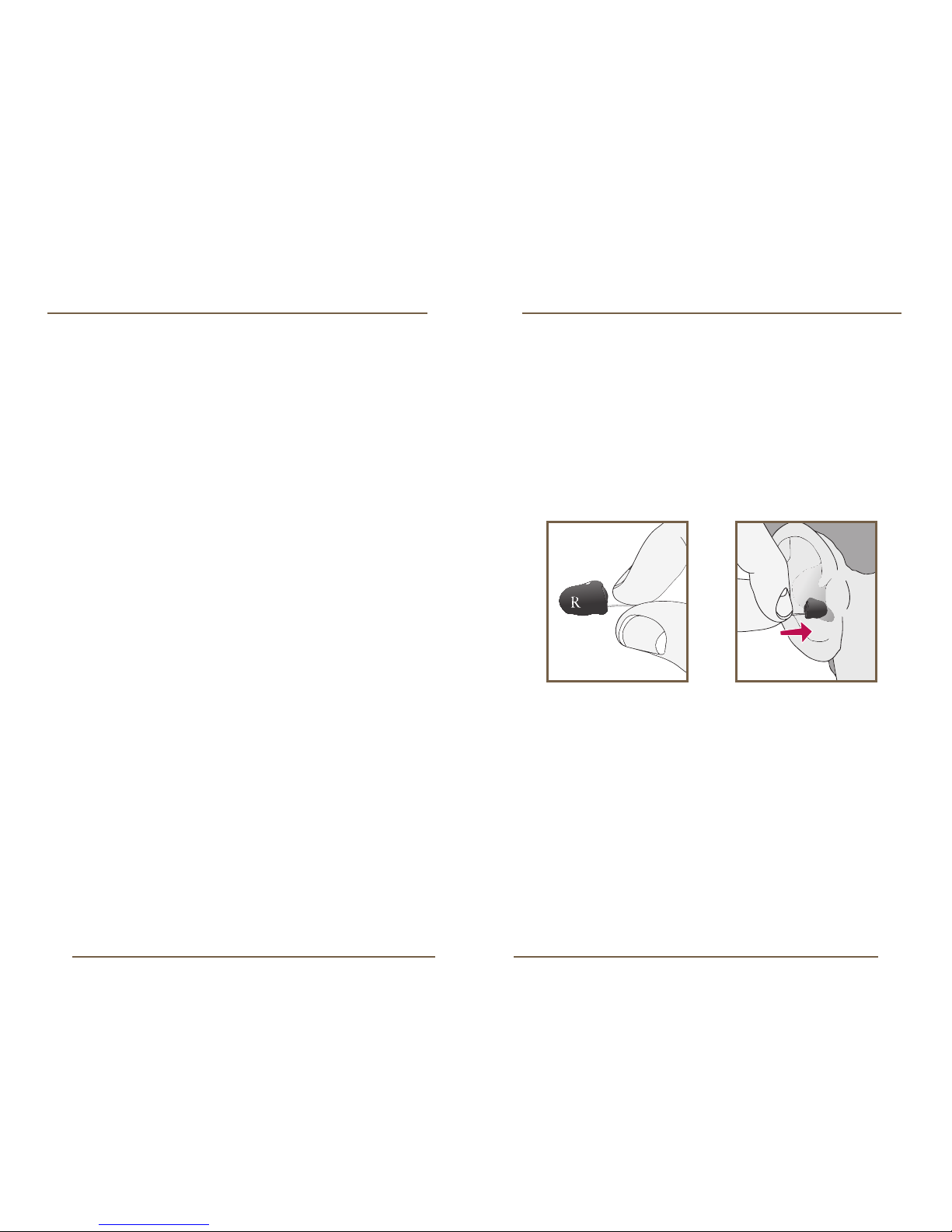
To insert the hearing instrument:
1) Determine Left or Right by locating the side
marker on the hearing instrument.
2) Hold the instrument in the same side hand with
the dot marker on top.
3) Lift the device to the ear and place at the opening
of the ear canal.
4) Push the device into place in the ear, using the
end of the removal cord as indication that the
device is inserted all the way.
Page 5
8 9
Preparation
Helpful Hints
• It is not unusual for the hearing aid to feel quite
foreign in the ear canal initially, but very natural
over time as your ear adapts. It may be necessary
to adopt a wearing schedule that gradually
increases the time that you wear your hearing aids.
Work with your hearing professional to develop a
wearing schedule appropriate for your needs.
•
Minor irritation and inflammation may occur as your
ear becomes accustomed to having an object in it;
if so, please contact your hearing care professional.
• If an actual allergi
c reaction occurs, alternative
materials are available; contact your hearing
care professional.
• Severe swelling, discharge from the ear, excessive
wax, or other unusual conditions warrant
immediate consultation with a physician.
• If desired, apply a small amount of Oto-Ease to the
outside of the hearing instrument being careful to
not get any in the receiver/sound opening.
• It may be helpful to lift the external ear with your
opposite hand to straighten the ear canal during
insertion. You will know the hearing instrument is
in position when it sits firmly and comfortably in
the ear.
• Verify proper insertion visually with a stationary
hand mirror reflecting the opening of the ear
canal, and finally adjust the position of the removal
handle as directed by your hearing professional.
Preparation
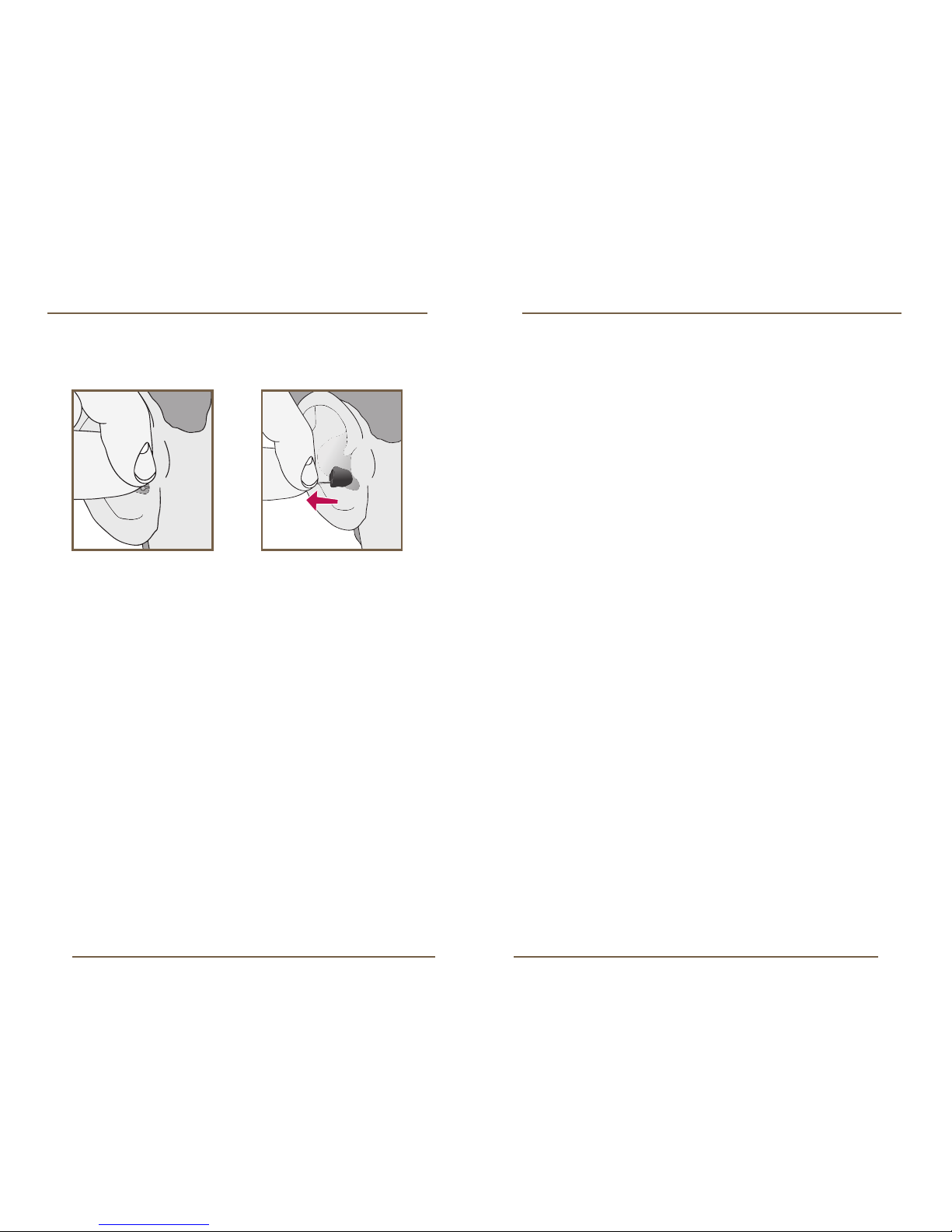
To remove the hearing instrument:
Grasp the removal handle found at the bottom
of the ear canal and gently remove the hearing
instrument from the ear.
Page 6
10 11
Operation
Insert a battery and
completely close the
battery door.
To turn OFF:
Open the battery door until
the battery is no longer touching
the battery contacts.
Some hearing instruments are programmed to
have a Power-On delay. Your hearing professional
will place a check in the box below if your hearing
instruments have this feature.
The Power-On delay means that your instruments
will take several seconds to power up once they
have been turned on. This feature allows you to
get the hearing instruments in your ear before they
start to amplify sound. You may hear a tone series
indicating that your device is fully powered on.
On & Off
To turn ON:
Operation
Volume Control
Your hearing system has been set to a specific
volume level by your hearing care professional.
If sounds are generally too loud or too soft, please
contact your hearing care professional for advice
and adjustment.
Multimemory Settings
My hearing instrument has a Power-On delay.
My hearing instrument uses T2 for Multimemory
control. Please read the section below.
My hearing instrument does not have Multimemory.
See page 14.
Program Tone Speech Environment
1 1 Tone “One” Normal
2 2 Tones “Two”
3 3 Tones “Three”
4 4 Tones “Four”
My hearing instrument uses T2 for volume control.
See page 12.
Page 7
12 13
Operation
T2 (touch-tone) Function
You may use a cell phone, cordless telephone, or
corded telephone to adjust your hearing system. The
telephone MUST “beep” when the keys are pressed
for this function to work. If your telephone does not
“beep” when the keys are pressed, consult your
telephone operator’s manual or contact your
telephone service provider.
•
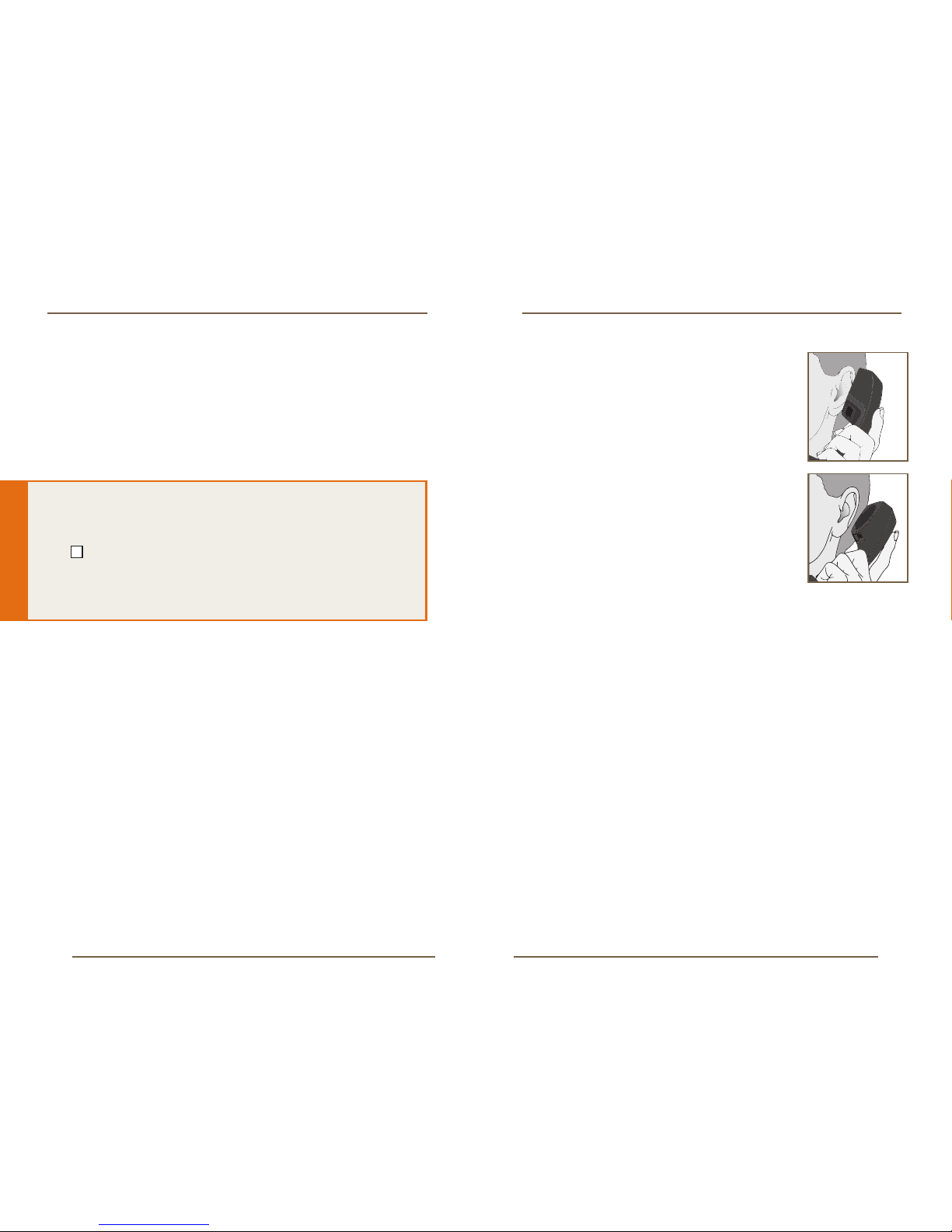
Hold the phone approximately 3 inches from the ear
•
Press ** to “wake” T² (a tone series indicates that it
is ready for a command)
•
Press the telephone key that corresponds to the
desired function
•
T² will “sleep” after 20 seconds
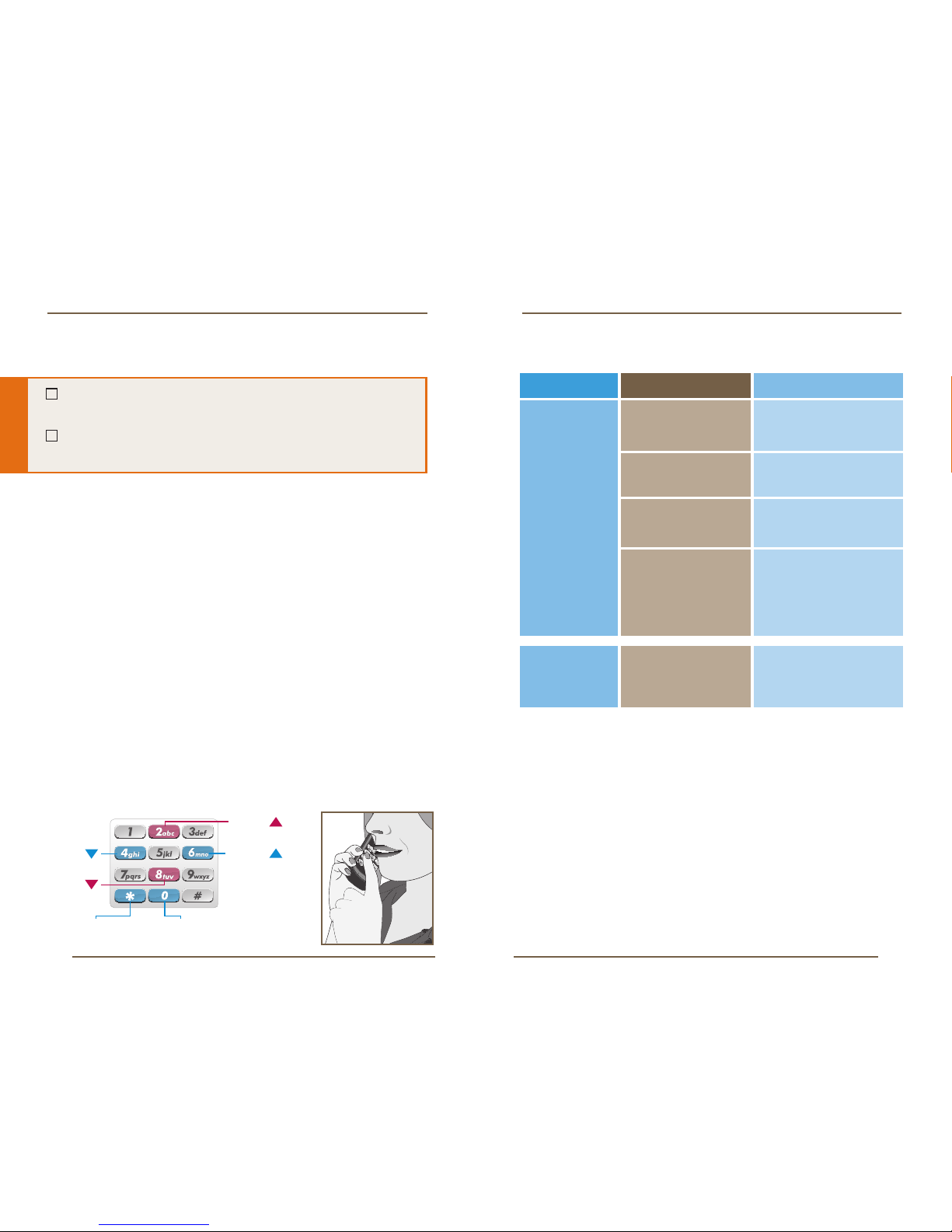
Use the following keypad buttons to
remotely adjust your hearing aid settings.
My hearing instrument has T2 capability.
Please read the section below.
My hearing instrument does not have
T2 capability. See page 14.
Volume
Memory
Memory
Press 2 times
to wake
Mute
Volume
Operation
SYMPTOM POSSIBLE C AUSES SOLUTIONS
Hearing system
not responding
to telephone
command
Telephone keys not
emitting beep tones
Consult telephone
operator’s manual to
enable beep tones
T² not unlocked prior
to command
Press ** and listen for
unique T² indicator
Telephone too far
from hearing system
Bring telephone closer
to hearing system
microphone
Incorrect key command
Press ** to wake then
press 2 or 8 to increase
or decrease volume or
4 or 6 to change programs
if device has multiple
programs
Hearing system
responded but
won’t respond to
later command
T² automatically
“sleeps” 20 seconds
after last command
Press ** to wake then
press key that corresponds
to desired action
Troubleshooting Guide
Page 8
14 15
Operation
General Telephone Use
Some hearing instruments work best
by holding the phone close to, but
not fully covering your ear. In some
instances, if you encounter whistling
(feedback), tilt the receiver at an
angle until the whistling stops. Your
hearing professional can provide
instructions and techniques for your
specific needs.
DISCLAIMER – Some hearing aid
users have reported a buzzing sound in their hearing
aids when they are using cell phones, indicating
that the cell phone and hearing aid may not be
compatible. According to the ANSI C63.19 standard
(ANSI C63.19-2006 American National Standard
Methods of Measurement of Compatibility Between
Wireless Communications Devices and Hearing Aids),
the compatibility of a particular hearing aid and cell
phone can be predicted by adding the rating for
the hearing aid immunity to the rating for the cell
phone emissions. For example, the sum of a hearing
aid rating of 2 (M2/T2) and a telephone rating of 3
(M3/T3) would result in a combined rating of 5. Any
combined rating that equals at least 5 would provide
“normal use”; a combined rating of 6 or greater
would indicate “excellent performance.”
Operation
Telephone Use
Your hearing instruments are equipped with tools
to help you effectively communicate on the
telephone. Your hearing professional will check the
box/boxes that represent the telephone settings in
your instruments.
My hearing instruments have the following
telephone setting(s):
A beep or indicator tone is enabled on my
instruments to signal when the device switches
to the telephone setting.
Page 9
16 17
Operation
Reminder
Some hearing systems have been programmed
with a Reminder indicating that it is time to
schedule an appointment. Your hearing care
professional will check the box below if this feature
is activated.
The Reminder will occur automatically. When you
hear the Reminder indicator, please contact your
hearing care professional.
My Reminder feature is activated.
My Reminder indicator is a:
Speech Indicator (“Make Appointment”)
Tone Indicator
Operation
The immunity of this hearing aid is at least M2/
T2. The equipment performance measurements,
categories and system classifications are based
upon the best information available but cannot
guarantee that all users will be satisfied.
NOTE: The performance of individual hearing aids
may vary with individual cell phones. Therefore,
please try this hearing aid with your cell phone
or, if you are purchasing a new phone, be sure to
try it with your hearing aid prior to purchase. For
additional guidance, please ask your cell phone
provider for the booklet entitled “Hearing Aid
Compatibility with Digital Wireless Cell Phones.”
Page 10
18 19
Operation
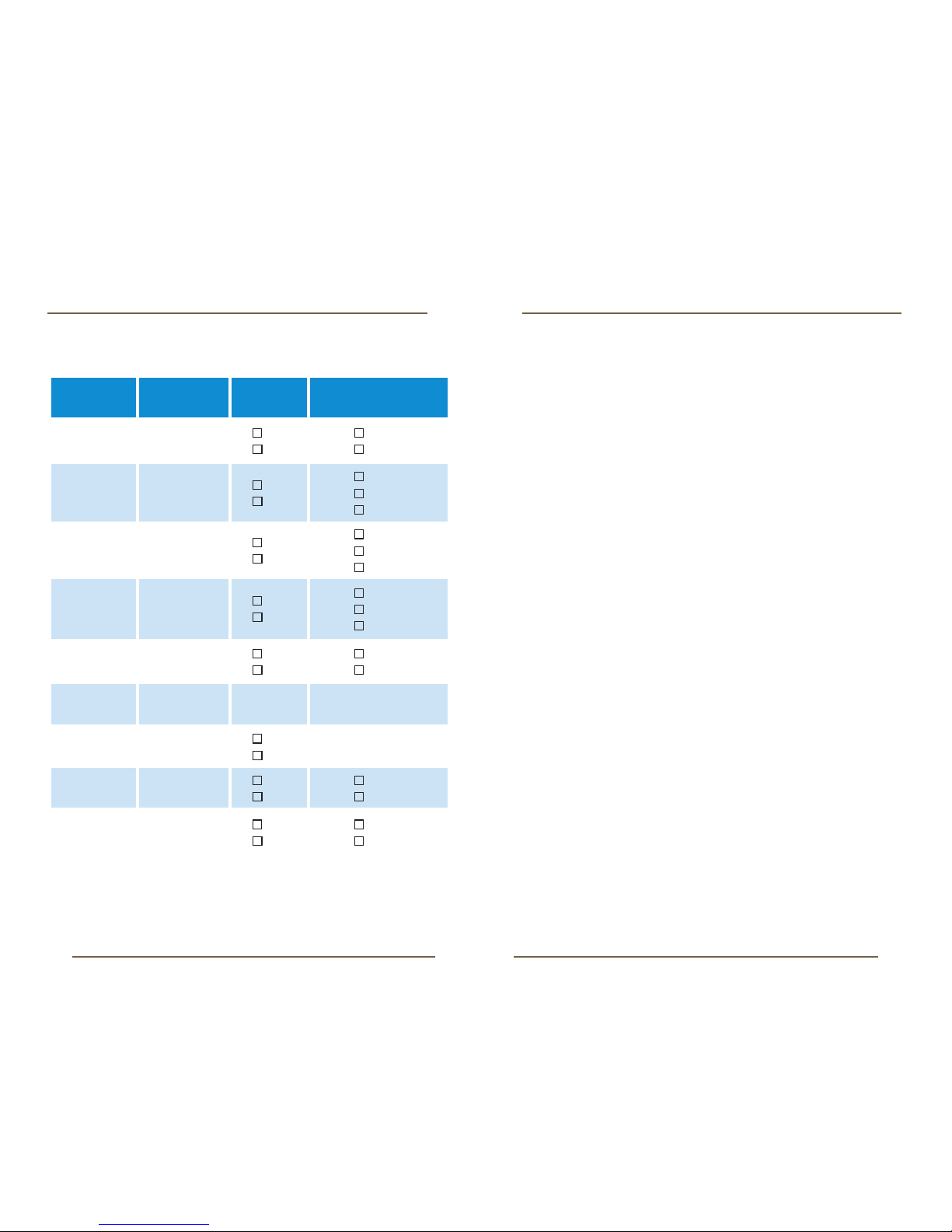
Summary of Settings
Environment
Indicator
Tone On
Indicator
Tone Type
Program 1 Normal
Yes
No
Speech
1 Tone
Program 2
Yes
No
Speech
2 Tones
Tone Series
Program 3
Yes
No
Speech
3 Tones
Tone Series
Program 4
Yes
No
Speech
4 Tones
Tone Series
Low Battery —
Yes
No
Speech
Tone Series
Power On — Tone Series
Mute —
Yes
No
Tone Series
Self Check —
Yes
No
Speech
Tone Series
Reminder —
Yes
No
Speech
Tone Series
Operation
Instrument Care
Because of the variability of individual ear canal
physiology, maintenance needs vary. Work
with your hearing professional to develop a
maintenance routine best for you.
General maintenance guidelines:
a. Inspect your hearing aid with good light and
a magnifying glass if necessary, and become
familiar with the look of a properly maintained
hearing aid.
b. Wiping the exterior of the hearing aid off with
a soft cloth or tissue in the morning before
wearing is typically the best routine.
c. Inspect the microphone and receiver ports
every morning and brush away any wax or
debris.
d. Depending on the conditions of your ear, a
desiccating kit or appliance may be necessary
to ensure reliable performance. Please check
with your hearing professional.
Your hearing care professional can provide further
information on additional maintenance procedures
for your hearing system if needed.
Page 11

20 21
Hearing System Care Hearing System Care
Service and Repair
If, for any reason, your hearing system does not
operate properly, do NOT attempt to fix it yourself.
Not only are you likely to violate any applicable
warranties or insurance, you could easily cause further
damage. Should your hearing system fail or perform
poorly, check the guide below for possible solutions.
If problems continue, contact your hearing care
professional for advice and assistance.
Troubleshooting Guide
SYMPTOM POSSIBL E CAUSE S SOLUTIONS
Not Loud Enough
Low battery Replace battery
Wax or debris in
the microphone or
receiver
Clean both microphone
and receiver with brush
Hearing change Contact your hearing
care professional
Inconsistent
Performance
Low battery Replace battery
Unclear, Distorted
Performance
Low battery Replace battery
Defective hearing
instrument
Contact your hearing
care professional
Dead
Low battery Replace battery
Wax or debris in
the microphone or
receiver
Clean both microphone
and receiver with
brush.
Helpful Hints
• When not wearing your hearing instruments,
open the battery door to allow any moisture to
evaporate
• When not in use, remove the batteries
completely; place your hearing system in the
storage container and store:
– In a dry, safe place
– Away from direct sunlight or heat to avoid
extreme temperatures
– Where you can easily find them
– Safely out of reach of pets and children
• Do not take apart your hearing instruments or
insert the cleaning tools inside them
Page 12

22 23
Tips for Better Communication
Your hearing care professional will recommend an
appropriate schedule to help you adapt to your
new hearing system. It will take practice, time and
patience for your brain to adapt to the new sounds
that your hearing system provides. Hearing is only
part of how we share thoughts, ideas and feelings.
Reading lips, facial expressions and gestures
can help the learning process and add to what
amplification alone may miss.
Please review the following simple
communication tips:
For You
• Move closer to and look at the speaker
• Sit face-to-face in a quiet room
• Try different locations to find the best place
to listen
• Minimize distractions
• Background noises may be frustrating at first;
remember, you have not heard them for a while
Tips for Better Communication
• Let others know what you need; keep in mind
that people cannot “see” your hearing loss
• Develop realistic expectations of what your
hearing instruments can and cannot do
• Better hearing with hearing instruments
is a learned skill combining desire, practice
and patience
For Your Family and Friends
Your family and friends are also affected by your
hearing loss. Request that they:
• Get your full attention before beginning
to speak
• Look at you or sit face-to-face in a quiet room
• Speak clearly and at a normal rate and level;
shouting can actually make understanding
more difficult
• Rephrase rather than repeat the same words;
different words may be easier to understand
• Minimize distractions while speaking
Page 13

24 25
FDA Information
Required Information
The following additional information is provided in compliance with
U.S. Food and Drug Administration (FDA) regulations:
WARNING TO HEARING INSTRUMENT DISPENSERS. A hearing
instrument dispenser should advise a prospective hearing instrument user
to consult promptly with a licensed physician (preferably an ear specialist)
before dispensing a hearing instrument if the hearing instrument
dispenser determines through inquiry, actual observation, or review of
any other available information concerning the prospective user, that the
prospective user has any of the following conditions:
i. Visible congenital or traumatic deformity of the ear.
ii. History of active drainage from the ear within the previous 90 days.
iii. History of sudden or rapidly progressive hearing loss within the
previous 90 days.
iv. Acute or chronic dizziness.
v. Unilateral hearing loss of sudden or recent onset within the previous
90 days.
vi. Audiometric air-bone gap equal to or greater than 15 decibels at
500 Hertz (Hz), 1,000 Hz and 2,000 Hz.
vii. Visible evidence of significant cerumen accumulation or a foreign
body in the ear canal.
viii. Pain or discomfort in the ear.
Special care should be exercised in selecting and fitting a hearing
instrument whose maximum sound pressure level exceeds 132 decibels
because there may be risk of impairing the remaining hearing of the
hearing instrument user.
IMPORTANT NOTICE FOR PROSPECTIVE HEARING INSTRUMENT
USERS. Good health practice requires that a person with a hearing
loss have a medical evaluation by a licensed physician (preferably a
physician who specializes in diseases of the ear) before purchasing
a hearing instrument. Licensed physicians who specialize in diseases
of the ear are often referred to as otolaryngologists, otologists, or
otorhynolaryngologists. The purpose of the medical evaluation is to
assure that all medically treatable conditions that may affect hearing
are identified and treated before the hearing instrument is purchased.
FDA Information
Following the medical evaluation, the physician will give you a written
statement that states that your hearing loss has been medically evaluated
and that you may be considered a candidate for a hearing instrument.
The physician will refer you to an audiologist or hearing instrument
dispenser, as appropriate, for a hearing instrument evaluation.
The audiologist or hearing instrument dispenser will conduct a hearing
instrument evaluation to assess your ability to hear with and without a
hearing instrument. The hearing instrument evaluation will enable the
audiologist or dispenser to select and fit a hearing instrument to your
individual needs.
If you have reservations about your ability to adapt to amplification, you
should inquire about the availability of a trial-rental or purchase-option
program. Many hearing instrument dispensers now offer programs
that permit you to wear a hearing instrument for a period of time for
a nominal fee after which you may decide if you want to purchase the
hearing instrument.
Federal law restricts the sale of hearing instruments to those individuals
who have obtained a medical evaluation from a licensed physician.
Federal law permits a fully informed adult to sign a waiver statement
declining the medical evaluation for religious or personal beliefs that
preclude consultation with a physician. The exercise of such a waiver is
not in your best health interest and its use is strongly discouraged.
A hearing aid will not restore normal hearing and will not prevent or
improve a hearing impairment resulting from organic conditions. Use
of a hearing aid is only part of hearing habilitation and may need to be
supplemented by auditory training and instruction in lip reading. In most
cases infrequent use of a hearing aid does not permit a user to attain full
benefit from it.
CHILDREN WITH HEARING LOSS. In addition to seeing a physician for
a medical evaluation, a child with a hearing loss should be directed to
an audiologist for evaluation and rehabilitation since hearing loss may
cause problems in language development and the educational and social
growth of a child. An audiologist is qualified by training and experience
to assist in the evaluation and rehabilitation of a child with a hearing loss.
Page 14

26 27
LIMITED WARRANTY LIMITED WARRANTY
LIMITED WARRANTY:
This Limited Warranty provided by MicroTech Hearing Instruments (“MicroTech”), to
you, the original purchaser of a MicroTech hearing instrument, covers your new
hearing instrument when sold by a hearing professional authorized by MicroTech.
The duration of this Limited Warranty begins when you first take delivery of your
hearing instrument from an authorized hearing professional and ends twenty-four
(24) months later (“warranty period”).
LIMITATION ON DURATION OF IMPLIED WARRANTIES:
IMPLIED WARRANTIES, IF ANY, ARISING BY WAY OF STATE LAW, INCLUDING ANY
IMPLIED WARRANTY OF MERCHANTABILITY AND/OR ANY IMPLIED WARRANTY
OF FITNESS FOR A PARTICULAR PURPOSE, ARE LIMITED IN DURATION TO THE
WARRANTY PERIOD. There is no warranty of any nature made by MicroTech beyond
this Limited Warranty. No person has authority to enlarge, amend, or modify this
Limited Warranty. MicroTech is not responsible for any undertaking, representation,
or warranty (written, express, or implied) made by any hearing professional or other
person beyond those expressly set forth in this Limited Warranty.
Some States do not allow limitations on how long an implied warranty lasts, so the
above limitation may not apply to you.
WHAT THIS LIMITED WARRANTY COVERS:
This Limited Warranty covers only a “defect” in the workmanship performed and/or
materials used to manufacture your hearing instrument. “Defect” means the failure
of the workmanship performed and/or materials used to conform the hearing
instrument to MicroTech’s design and manufacturing specifications and tolerances.
Your hearing professional may have issued a warranty or service plan that goes
beyond the provisions of this Limited Warranty. Please contact him or her for further
information.
MicroTech will either replace the hearing instrument or repair any covered defect in
your hearing instrument, provided that you deliver your hearing instrument to one of
MicroTech’s authorized hearing professionals and notify the hearing professional of
the defect during the warranty period and within thirty (30) days of discovering the
defect. There will be no cost to you for MicroTech’s repair or replacement of the
instrument itself, but the hearing professional may charge a fee for services he or she
provides. Performance of warranty repairs on your hearing instrument shall not
extend the duration of the warranty period. Any repairs performed on your hearing
instrument after the warranty period has expired shall be considered “good will”
repairs, which shall not alter the terms of this Limited Warranty.
HOW TO OBTAIN WARRANTY SERVICE:
Deliver your hearing instrument (at your expense) to the MicroTech authorized
hearing professional from whom you purchased it. If that professional is unavailable,
visit www.starkey.com or call the toll-free telephone number on the back of the
Operations Manual to locate another authorized MicroTech hearing professional.
WHAT THIS LIMITED WARRANTY DOES NOT COVER:
Batteries, earmolds, accessories, or damage to your hearing instrument caused by
misuse or neglect, accident, unauthorized alteration, or failure to provide reasonable
and necessary maintenance and cleaning.
DISCLAIMER OF CONSEQUENTIAL AND INCIDENTAL DAMAGES:
THE PURCHASER SHALL NOT BE ENTITLED TO RECOVER FROM STARKEY ANY
CONSEQUENTIAL OR INCIDENTAL DAMAGES RESULTING FROM ANY DEFECT
IN THE HEARING INSTRUMENT, INCLUDING BY WAY OF EXAMPLE ONLY,
EXPENSES TO DELIVER THE HEARING INSTRUMENT TO AN AUTHORIZED
HEARING PROFESSIONAL, HOTEL ROOMS, OR LOST WAGES. THIS EXCLUSION
AND DISCLAIMER OF CONSEQUENTIAL AND INCIDENTAL DAMAGES SHALL BE
DEEMED INDEPENDENT OF, AND SHALL SURVIVE, ANY FAILURE OF THE
ESSENTIAL PURPOSE OF ANY REMEDY OF THIS LIMITED WARRANTY.
Some States do not allow the exclusion or limitation of consequential or incidental
damages, so the above exclusions may not apply to you.
YOUR LEGAL REMEDIES:
THIS LIMITED WARRANTY DOES NOT “EXTEND TO FUTURE PERFORMANCE.”
ANY ACTION TO ENFORCE THIS LIMITED WARRANTY OR ANY IMPLIED
WARRANTIES MAY AND SHALL NOT BE COMMENCED MORE THAN 90 DAYS
AFTER THE EXPIRATION OF THE WARRANTY PERIOD. THE PERFORMANCE OF
REPAIRS SHALL NOT SUSPEND THIS LIMITATIONS PERIOD FROM EXPIRING.
UNDER NO CIRCUMSTANCES SHALL STARKEY BE OBLIGATED TO REFUND ALL
OR ANY PART OF THE PURCHASE PRICE OF THE HEARING INSTRUMENT. Some
States do not allow the reduction in the limitation period, so the above reduction in
the limitation period may not apply to you.
This warranty gives you specific legal rights. You may also have other rights which
vary from State to State.
This warranty is valid only in the United States.
MicroTech Hearing Technologies
6425 Flying Cloud Drive
Eden Prairie, MN 55344
800.745.4327
www.mthearing.com
Page 15

© 2010 MicroTech Hearing Technologies All Rights Reserved
84507-004 11/10 BKLT0191-02-EE-MT Rev. C
6425 Flying Cloud Drive
Eden Prairie, MN 55344
800.745.4327
www.mthearing.com
 Loading...