

Page 1
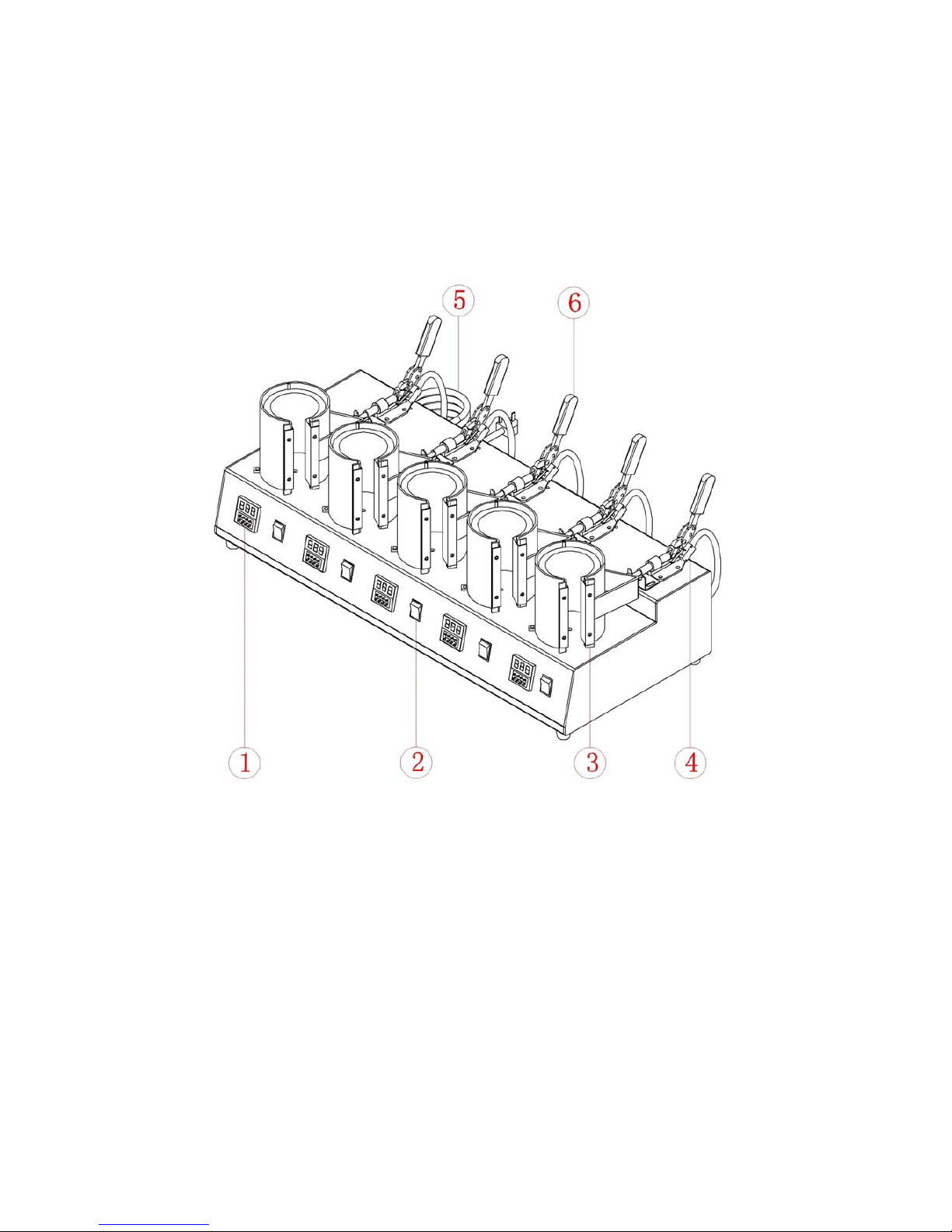
Digital 5-IN-1 Mug Heat Press Manual
Model No.: MPA-500B
CONTENTS
I. Assembly Drawing -----------------------------------------------------------------------------------2
II. Technical Parameters ------------------------------------------------------------------------------2
III. Operation Process ----------------------------------------- --------------------------------------3-4
IV. Maintenance ------------------------------------------------------------------------------------------5
V. Trouble Shooting For Transfer Print Quality------------------------------------------------5
VI. Circuit Diagram -------------------------------------------------------------------------------------6
VII. Explosion View -------------------------------------------------------------------------------------7
- 1 -
Page 2
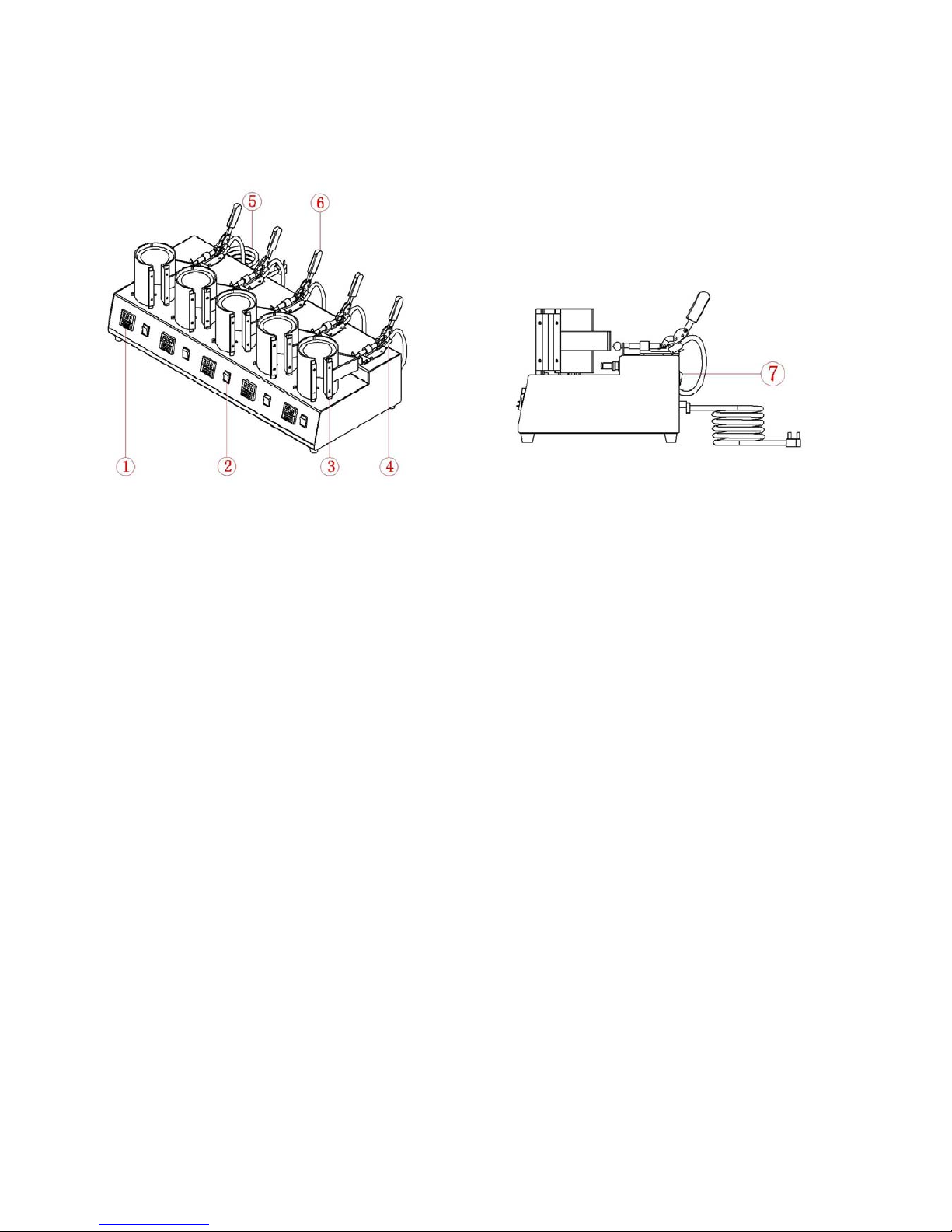
I. Assembly Drawing
○
1
Digital Controller ○2Individual Power Switch ○3Mug Heat Element ○4 Limit Switch
○5 Power Cord ○
6
Handle Bar Grip
⑦Main Power Switch
II. Technical Parameters
1. Model No.: MPA-500B(5 Individual Digital Temp & 5 Timer)
2. Machine Dimension: 820*365*285mm
3. Mug Heater Size: Dia.6-7.5cm for 6oz,9oz,10oz etc Mug
Dia.7.5-9.0cm for 11oz,15oz etc Mug
4. Printable Articles Max Size: φ100*120mm
5. Voltage: 220V/1Phase; 110V/1Phase
6. Power: 1.5KW
7. Recommend Setting: 30~280s; 180~200°C
Time Range: 0~450s
Maximum Temp: 225 C°
8. Packing Size: 93*45*37cm
9. Gross Weight: 29kg
- 2 -
Page 3
III. Operating Process
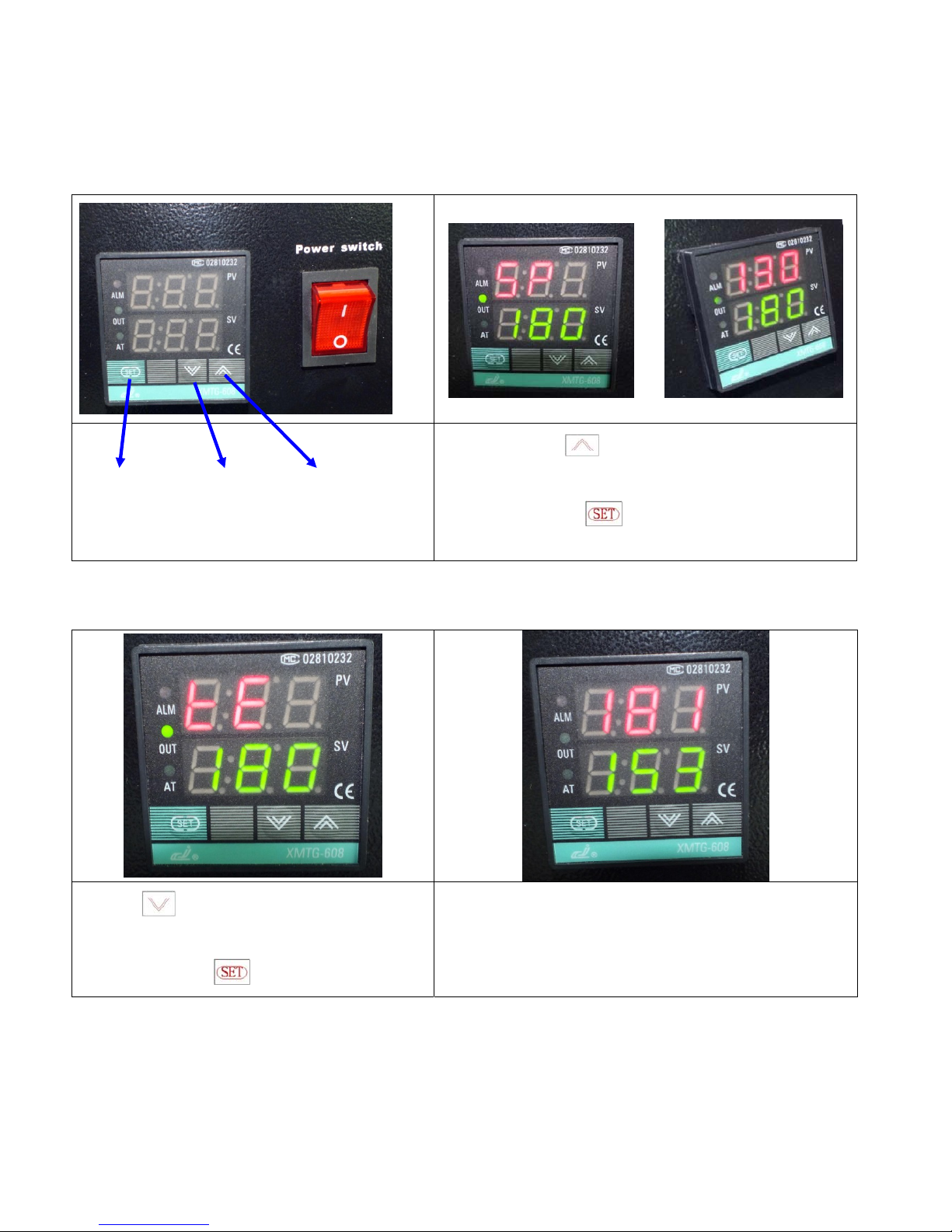
1. Set temperature required
Power on, press the button for 2 seconds, then start to set the
moderate temperature by pressing the increase and decrease button;
after finished, press the
button, then the temperature is
heating up to the set value.
“Set” button “Decrease” “Increase”
button button
2. Set time required
Press the button for 2 seconds, then start to set the
moderate time by pressing the increase and decrease
button, then press the
button to confirm.
When rising to the set temperature, press down the mug
heater shaft. Then the timer starts to countdown.
3. Printing methods
- 3 -
Page 4

- 4 -
Step 1: Make sure the cord is connected well to the wall socket. Place the mugs in the mug heater in advance, and
transfer paper with images facing down the mug, adjust moderate pressure, and power on.
P.S: use heat resistant tape to fix the transfer paper, make sure transfer paper is exactly attached to mug heater;
Step 2: Set the temperature and time required separately, then temperature starts to rise.
Step 3: When the temperature rises to the setting temperature, the buzzer sends out sounds; then press the handle,
(meantime the sounds stop) and starts to transfer.
Step 4: Then the time counter is on, once time is up, take out the mugs. Transfer work finished.
Note: if you want to transfer 5 mugs at one time, pls set the time and temperature separately for each mug heater.
5. Recommendations:
Ceramic Mug transfer:
Set temperature: 180 .℃
Set time: 150 seconds
NOTE:
1) Please switch off the machine and unplug the power cord when the machine is not in use.
2) The heater will cool down to the room temperature, if heat press stays un-use for more than 30 minutes.
3) For better maintenance of mug heat press, the maximum setting temperature is 210 degrees C (410 degrees F).
Page 5

- 5 -
IV. Maintenance
1. No action after turn on the machine
1). Check the plug whether it connects well or whether it is broken.
2). Check the power switch or digital controller whether it is broken.
3). Check the fuse whether it has been burnt out.
4). Indicating light is on, but no display on screen, check the 5 cable of Railway transformer. If it’s loosening,
showing the problem is poor connection. If they connects well, showing that the Transformer is faulty.
2. The display screen are working well, but no temperature increasing on the mug heater.
1). Check whether the thermocouple of the mug heater touches well. If the thermocouple is loose, the display will
show 255℃. and machine keeps beeping.
2). Check if the indicating light of solid-state relay is on, if not, check if the relay or digital controller is broken.
3). If you already changed the new solid-state relay but the mug heater still can’t heating up, check if the mug
heater is faulty or the mug heater’s power cable is loose, need to change by new mug heater.
3. The display screen show 255℃ once you power on.
1). Check whether the thermocouple is loose or not.
2). If the thermocouple touches is not in loose state, but still show 255℃, then it is faulty.
4. The machine is heating during 0~180℃, but display number jumps to above 200℃ or 300℃ suddenly, or
the numbers on display jumps irregularly.
1). Check whether the thermocouple of the mug heater touches well.
2). If the thermocouple is good, It shows that the program of digital controller is broken, which namely IC or is
broken, need to change by new controller.
5.
The temperature is out of control: Set 180℃,but the actual temperature is above 200℃。
1). It means the solid-state relay is broken, out of control, need to change the relay.
2). Or the digital controller is faulty and it keeps conveying electric to relay, need to change controller.
6. The setting temp and time becomes abnormal after exchange the mug heater.
1). Please reset the temp and time according the operation process manual.
7. Other notice
1). In order to prolong the machine service life, please add the lubrication oil regularly on the joints.
2). In order to keep the mug heater's good transfer effect, pls protect it carefully whenever you are using or not.
3). Please keep the machine in dry place.
4). The mug heater is belong to consumables. You need to change a new one after doing transfer print for about
700 times. If use our Grade A mug heater, then can change mug heater after 2000 times transfer.
5). If you are not able to solve the electrical parts problem, please kindly contact the supplier and get technical
support.
V. Trouble shooting for transfer print quality
1. If the print color is pale: the temperature is too low / the pressure is not correct / or not pressed long enough.
2. If the print color is too brown or the transfer paper is almost burnt: reduce the setting temperature.
2. If the print is blurring: too much transfer time causes proliferation.
3. If print color is different/ partial transfer effect is not good enough: the pressure is not enough / or not pressed
long enough / or poor quality transfer paper.
4. If transfer paper stick to the object after transfer: the temperature is too high/ or poor quality printing ink.
Page 6

VI. Circuit Diagram
K0: Power Switch K11-K15: Individual Limit
FU:Fuse
EH1EH2:Heating Pipe
K1-K5: Individual Power Switch C1-C5: Buzzer A(B): Thermocouple
618T: Digital Controller
- 6 -
Page 7

VII. Explosion View
- 7 -
Serial No. Part Name Qty
1 Machine Body 1
2 Cover Plate 1
3 Rubber Foot 4
4 Transformer 1
5 Digital Controller 1
6 Solid State Relay 1
7 Power Switch 5
8 Heater Installation Holder 5
9 Mug Heater 5
10 Fuse 1
11 Power Cord 1
12 Main Power Switch 1
13 Micro Switch 1
14 Speeding Clip 5
15 Clip Position Limiter 5
 Loading...