

Page 1
Quick Start Guide
3DM-DH3
Version
• 3DM-DH3
• 3DM-DH3™ software 1.0.2
Starter Kit
The 3DM-DH3
• 3DM-DH3
• RS-422 communication and power ribbon cable (3 meters)
• EasySYNC
• EasySYNC
• USB cable (2 meters)
• 9 VDC power supply (100-240VAC, 4 universal adapters)
• 3DM-DH3
Software Installation
• Insert the 3DM-DH3
• Insert the EasySYNC
Hardware Installation
• Insert the 16-pin black connector on the RS-422 ribbon cable into the end connector on
• Connect the 9-pin DB9 connector of the ribbon cable into the EasySYNC
• Set the EasySYNC
• Connect the power supply to the power pigtail on the RS-422 ribbon cable and into a
• Connect the USB cable to the EasySYNC
• Depress the 2-position red switch on the ribbon cable to its IN position.
Software Operations
• Launch the 3DM-DH3
• Click File and a drop-down menu will appear.
• Click Connect and the Connect window will appear.
™
Downhole Orientation Sensor and Data Logger
™
firmware 10
™
starter kit contains:
™
orientation sensor/datalogger
™
RS-422/RS-232 adapter
™
driver CD
™
utility software CD (Windows® XP, Vista, 7)
™
utility software CD into your CD-ROM drive and follow the on-
screen instructions to install the software.
™
driver CD into your CD-ROM drive and follow the on-screen
instructions to install the driver.
the 3DM-DH3
™
observing the keyway.
connector.
™
dip switches 1, 2, 3 and 4 to the ON position to enable RS-422
operation.
power receptacle.
™
utility software and the Main screen will appear.
™
Serial
™
USB connector and into your host PC.
1
Page 2
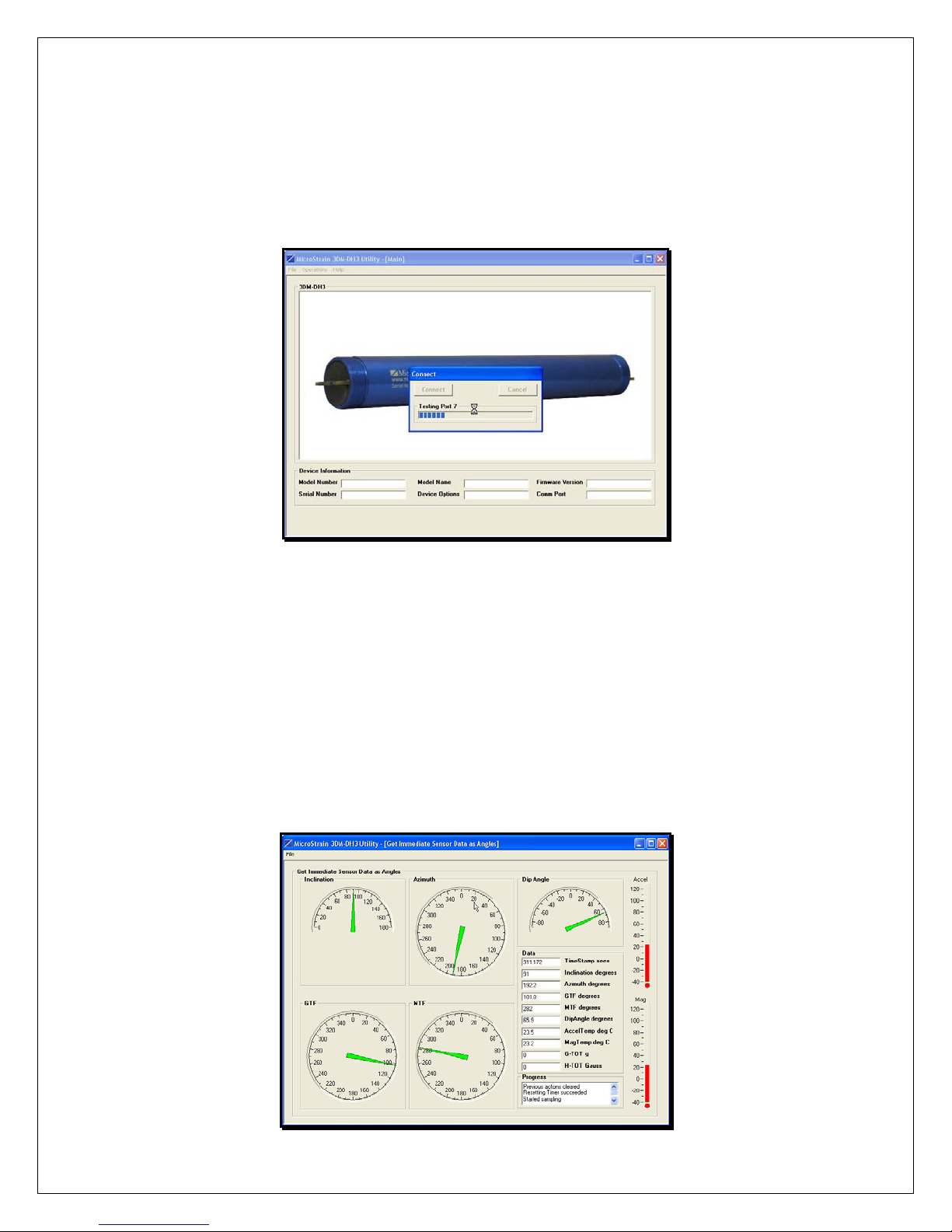
• Click the Connect button and the application will auto-detect the 3DM-DH3
™
• When found, a message box will appear indicating successful connection.
• Click OK and the message box will disappear.
• The model number, serial number, model name, device options, firmware version and
comm port will now be displayed.
Figure 1
• Click Operations and a drop-down menu will appear.
• Click Data.
• Click Get Immediate Sensor Data As Angles and the Get Immediate Sensor Data As
Angles screen will appear.
• Click File and a drop-down menu will appear.
• Click Get Immediate Sensor Data As Angles.
™
• The software will begin continuous sampling of the 3DM-DH3
for inclination, azimuth,
dip angle, GTF, MTF, G-TOT, H-TOT, accelerometer temperature and magnetometer
temperature.
• All measurements will be output to the screen and automatically written to file.
.
Figure 2
2
Page 3
• To stop sampling, click File and a drop-down menu will appear.
• Click Get Immediate Sensor Data As Angles (a check appears to the left indicating
sampling is active) and sampling will cease.
• Click Return and return to the Main screen.
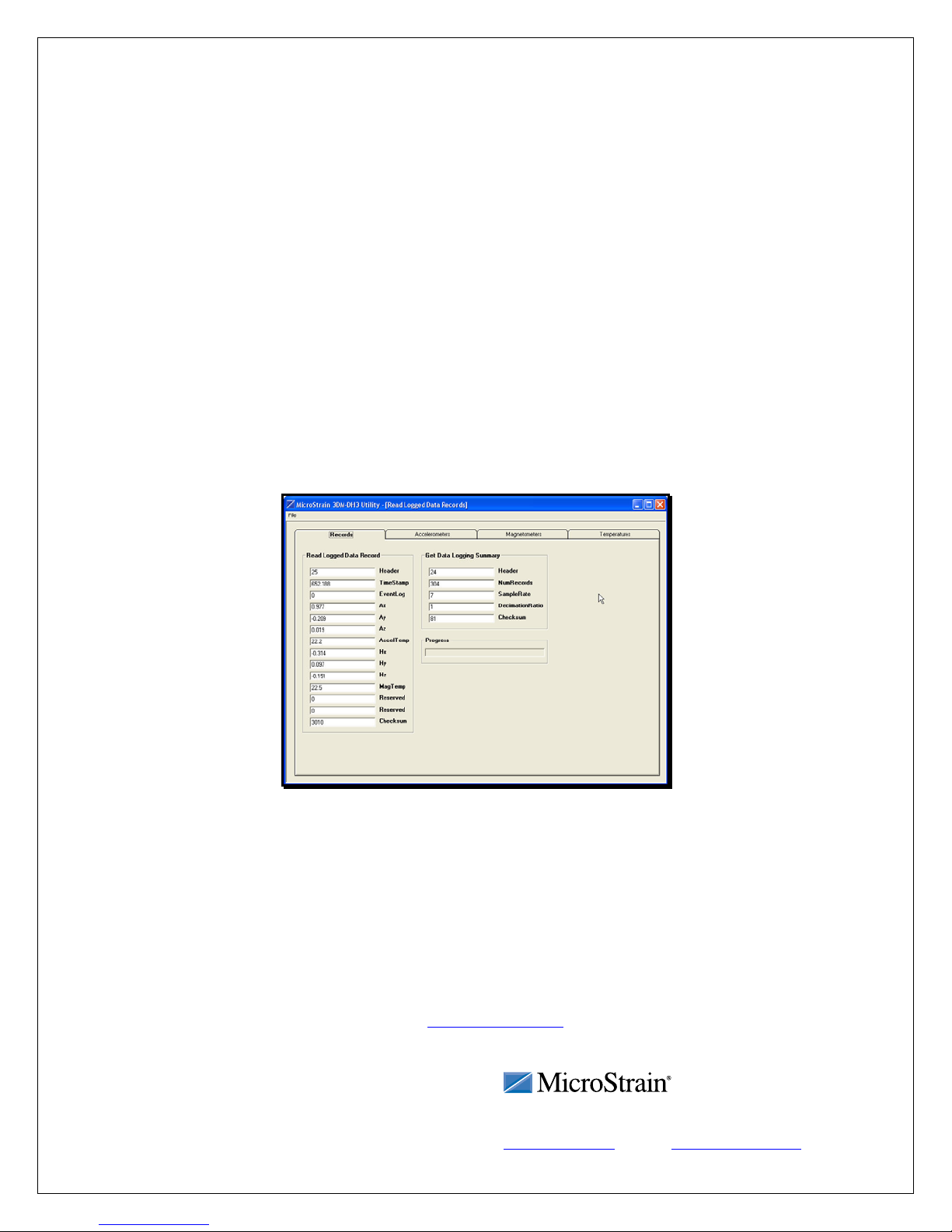
• Click Operations, click Data, click Read Logged Data Records and the Read Logged
Data Records screen will appear.
• Click File. Click Read Logged Data Records.
• The software will download all data records that have been previously recorded and
™
stored on the 3DM-DH3
.
• When complete, a message box will appear indicating success.
• Click OK and the message box will disappear.
• The data will include X, Y and Z accelerometer, X, Y and Z magnetometer,
accelerometer and magnetometer temperatures.
• All measurements will be graphed to the screen and automatically written to file.
• Click the Accelerometers, Magnetometers or Temperatures tabs to see the individual data
sets.
Congratulations!
You are off and running! Please carefully read the 3DM-DH3
to successfully put your downhole orientation sensor and datalogger to work.
Note: 2-position Button on Ribbon Cable
• By depressing the button, a channel is opened to the host computer for communication; it
must be depressed to communicate.
• By releasing the button, the 3DM-DH3
Sleep Mode and will continue in either state until depressed.
• Please note on page 7 and 9 of the
equivalent to shorting pins 2 and 3 together at J2 and releasing the button is equivalent to
open-circuiting pins 2 and 3 at J2.
Rev 1.0 Williston, VT 05495 USA fax: 802-863-4093
Copyright © 2010 MicroStrain, Inc.
Figure 3
™
Operation Manual to learn how
™
is switched to begin Data Logging or Deep
Operation Manual that depressing the button is
MicroStrain, Inc.
459 Hurricane Lane, Unit 102 ph: 800-449-3878
www.microstrain.com [email protected]
3
 Loading...