

Page 1
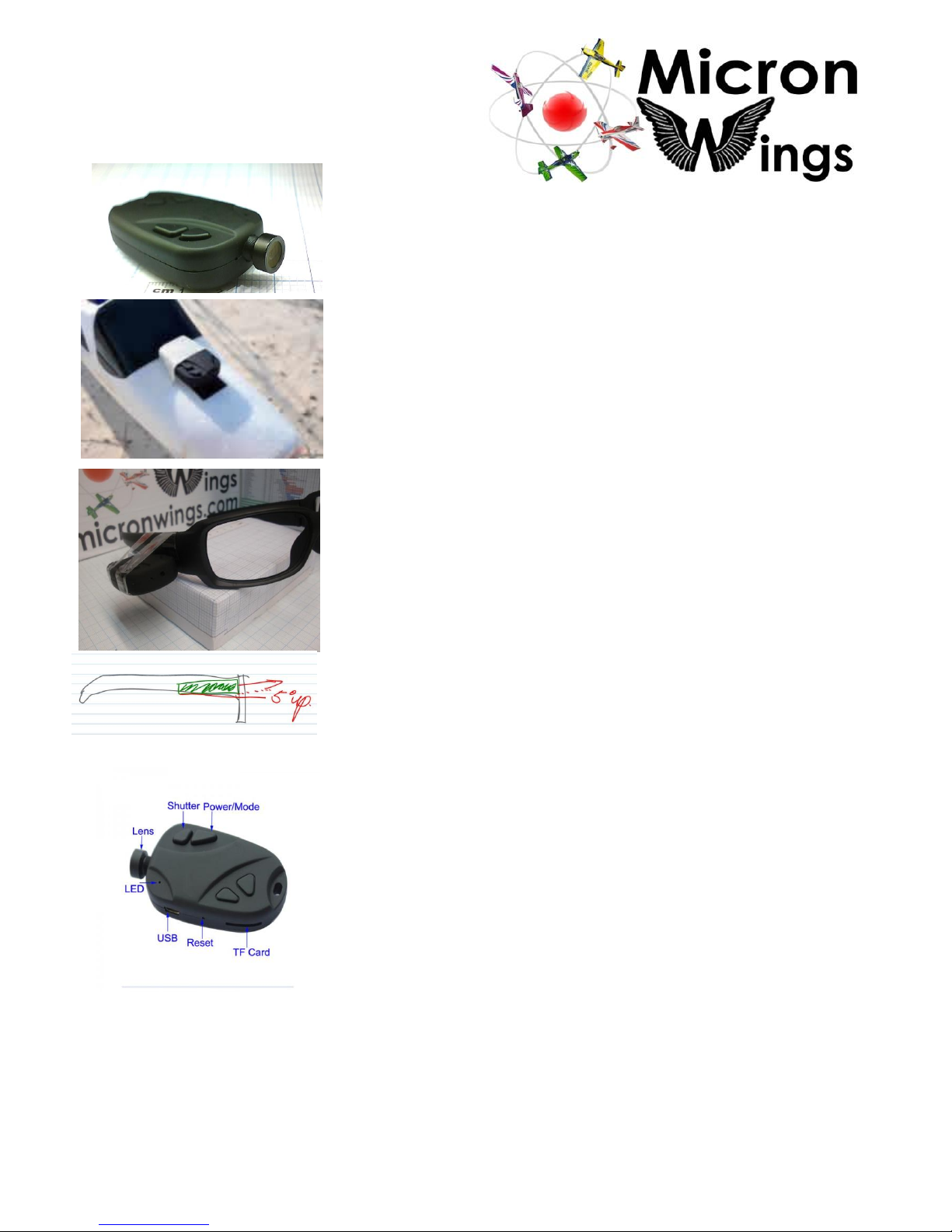
#18 - 808 Flight Camera
(HD 720P with AV Out Functionality)
This "keychain" camera at just 21 grams is a perfect video camera to record
your flights. It has a 250mah lithium ion battery built in and can take videos in
720P HD in continuous 15 minute segments which are only limited by your
memory card capacity.
Plane Mounting
The units are fully self-contained with their own battery and memory card slot
so they can be attached to your aircraft in just about any location quite easily.
Also, at 16 grams these cameras can be attached to smaller "park flyers". But
remember, the smaller the plane the more important it is to have the camera
mounted somewhere close to the CG.
Ground Cam
The unit can also be mounted to a hat visor or a pair of sunglasses to take video
of the plane in flight. Mounting to the arm of a pair of glasses is the best option.
This is because the glasses remain in the same position and at the same angle
each time you wear them unlike a cap which can be worn in different ways each
time. Attach the camera to the glasses with tape or use a foam shim cut to size
as a base for a more permanent setup.
It is also important to angle the camera up at about 5degrees from the line of
sight of the glasses. This is because the human eyeballs rotate up in their
sockets when we look up above the horizon. A bit of experimenting will be
needed to adjust the angle and position for your particular setup.
Functioanlity:
True H.264 720P HD
720P high def video 1280 x 720 H.264. 30fps .AVI
Records sound as well
4 in 1 function: video recording, camera, webcam, AV Output.
5.0 Mega pixels Photo JPEG format: 2048 x1536.jpg
Burst Photography – takes 3 photos in quick succession
PC-Webcam 640x480.
Dedicated car charger configuration allows video recording while charging.
Mass storage - can support up to 32GB Micro SD card
(Not included- Micro SD memory card ).
Easy connection with PC/Laptops, no driver needed.
Built-in rechargeable high volume Lithium-ion Battery 400mA
Built-in Charger socket for USB
Dimensions (mm): 50 (L) x 32 (W) x13 (H)
Page 2
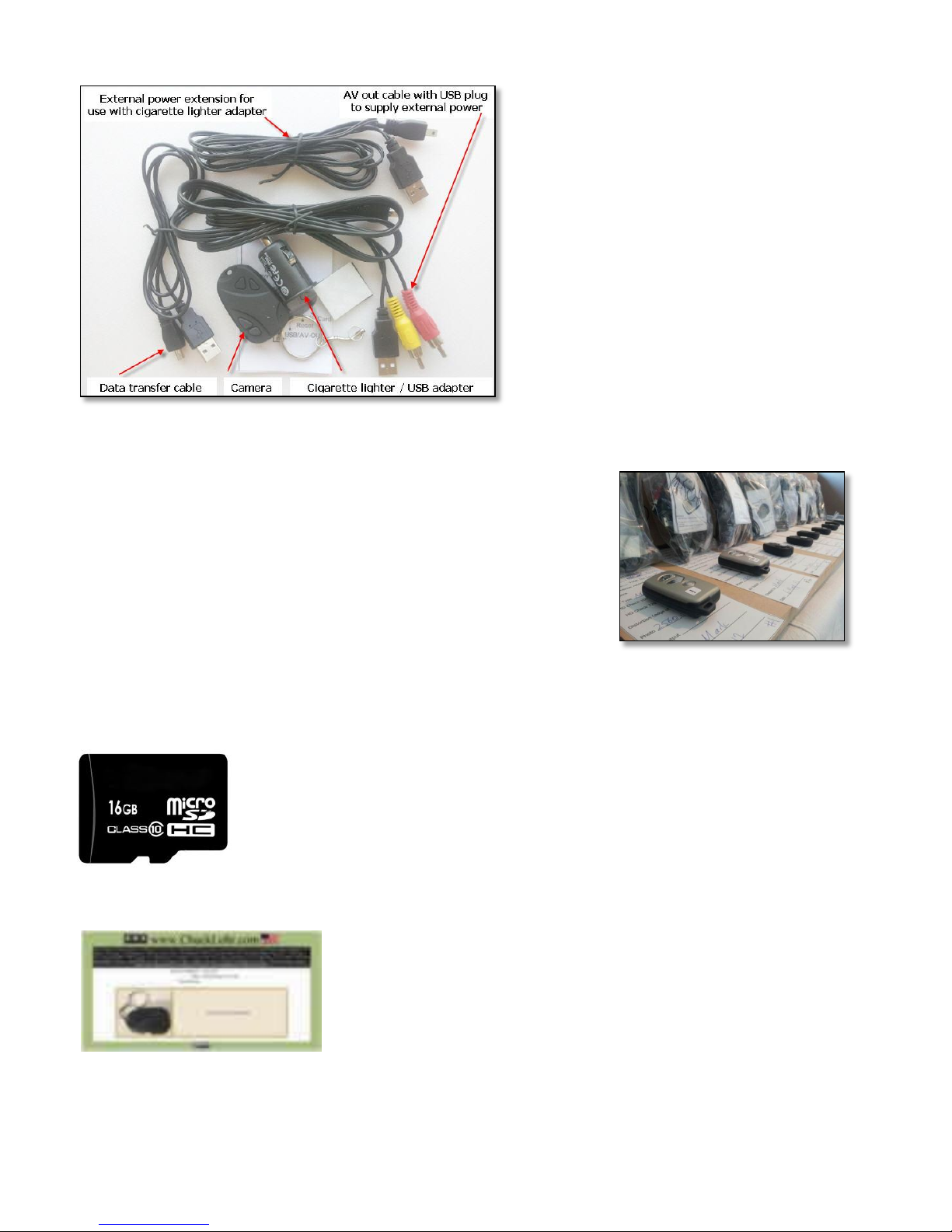
Package Contents:
1X HD Camera
1 X Car Cigarette Socket Charger
1 X USB data cable
1 X USB extended cable for USB power
1 x USB AV out cable with USB power input
1 X Velcro mounting pads
1 X User Manual
1 X keychain
Note:
All cameras sold by MicronWings have the latest firmware update already
done which removes the date stamp on the video only (not photo) and
changes the functionality so that when the battery dies, the current recording
is now saved, rather than lost. The camera will close the recording and create
a new file every 20 minutes. If your video is longer than 20 minutes it will
span multiple files. MicronWings also tests each unit before we sell them to
you so you can be assured that the camera you receive is a genuine product
in good working order.
Micro SD cards
We recommend that you use a micro SD card with a speed class 4 or speed class 10 for best
results. These high speed micro SD cards are a bit more expensive but will reduce the chance
of having "jumps" in the video caused by the card not being able to keep up with the amount
of data being recorded on to it. Look for a seller on Ebay in Australia who tests each card with
H2testw software to ensure the card is a genuine class 4 or 10.
* For more general information on 808 cameras see Chuck Lorhr's Forum
http://chucklohr.com/808/C11/
Chuck has a lot of information on the various models of 808 cameras as well as
specs and
hardware tweaks for each model. He is very much the authority when it comes
to these cameras
Page 3

Basic Usage Instructions
HOW TO TAKE A VIDEO
1. Start with the camera off
2. Press the power/mode button. This turns the LED and the camera on.
3. Press the shutter (video/image) button. The LED flashes 3 times then the LED goes off.
The camera is recording video and audio.
4. Press the shutter button to stop video recording.
The video recording stops, the video is written to the memory card, and the LED turns on.
5. Press and hold the power/mod button. The camera and the LED turn off.
HOW TO TAKE A PHOTO
1. Start with the camera off.
2. Press the power/mode button. This turns the LED orange and the camera is now on.
3. Press the power/mode button briefly (just a click - down and up again).
4. Now to take a photo press the shutter button. The LED briefly goes off, then comes back on again and flashes
three times. The camera has taken a burst of three photos. Press shutter button again to take another picture
4. Press and hold the power/mode button. The camera and the LED turn off.
Note: You can go back and forth between photo and video mode without turning the unit on and off in between.
Example: once the unit is powered on it is in video mode. Press the shutter button to take a video and again to stop
taking a video. Then simply press (quickly - just a click) the power/mode button to change to photo mode. Now each
time you press the shutter button it will take a picture (light goes off and back on straight away). Of course you can
then press the power/mode button again quickly to go back to video mode.
HOW TO TAKE A VIDEO WITH THE POWER LEAD CONNECTED
You can use the camera to record continuous videos up to the limit of the Micro SD card. However the battery in the
camera will only last about one hour, so you need to use the power lead to connect it to power. The power lead is
the one with 2 wires joined together with a USB connector at one end. Please note – this is not a data lead and
cannot be used to access files on the camera. The shorter lead is the data lead and this lead also allows the unit to
charge.
1. Start with the camera off.
2. Press the power/mode button. This turns the LED orange and the camera is now on.
3. Connect the power lead and the LED will now turn red to indicate it is charging
(Note: the LED only turns red if battery is not fully charged already)
4 .Press the shutter button briefly to start the recording. The LED will flash quickly 3 times and then turn off (or if the
battery is not fully charged it will turn red to indicate it is still charging).
5. The camera will continue to record video in 20 minute segments until the limit of the Micro SD card is reached or
until the recording is stopped in the normal way.
Note: If you are using the camera as a driving cam and you turn off the engine (cutting power to the cigarette lighter
and USB lead) the unit will continue to record while it still has charge in the battery (about 60 minutes if fully
charged). If the battery goes flat it will close and save the video before it turns off. Also, if you are doing continuous
recording and have the unit in a hot place like on the dashboard of a car, the unit may get very hot. If it gets too hot
the unit will automatically shut down and stop recording, but it is best to avoid these situations as overheating may
damage the unit or battery life.
For more information on these cameras please see the MicronWings website – www.micronwings.com
For support please mail us at [email protected] or call us on 04 3320 1123
 Loading...