

Page 1
WCDMA/GPS Tracker
AT PLUS(3G)
User Manual
Revision: 1.00
Document Title
Version
Finale Date
Status
Document Control ID
AT PLUS(3G) User manual
1.00
2016-01-20
Released
TRACKER AT PLUS(3G)
PDF pdfFactory Pro www.fineprint.cn
1
Page 2

Contents
1 Introduction....................................................................................................................................3
2 Product Overview..........................................................................................................................3
2.1 Appearance..........................................................................................................................3
2.2 Buttons/Micro USB Interface Description..........................................................................3
2.3 LED Description.................................................................................................................4
3 Getting Started...............................................................................................................................5
3.1 Parts List.............................................................................................................................5
3.2 Battery Charging.................................................................................................................5
3.3 AT PLUS(3G) Data Cable...................................................................................................5
3.4 Power on/Power off............................................................................................................6
4 Trouble shooting and Safety info...................................................................................................7
4.1 Trouble shooting.................................................................................................................7
4.2 Safety info...........................................................................................................................7
2
PDF pdfFactory Pro www.fineprint.cn
Page 3
1 Introduction
AT PLUS(3G) is a powerful GPS locator which is designed for vehicle, pets and assets tracking.
With superior receiving sensitivity, fast WCDMA frequencies 850/1900 and GSM frequencies
850/900/1800/1900. Its location can be real time or schedule tracked by backend server or
specified terminals. Based on the embedded wireless tracking protocol, AT PLUS(3G) can
communicate with the backend server through WCDMA or GSM/GPRS network, and transfer
reports of emergency, Geo-fencing, device status and scheduled GPS position etc… Service
provider is easy to setup their tracking platform based on the functional wireless tracking protocol.
2 Product Overview
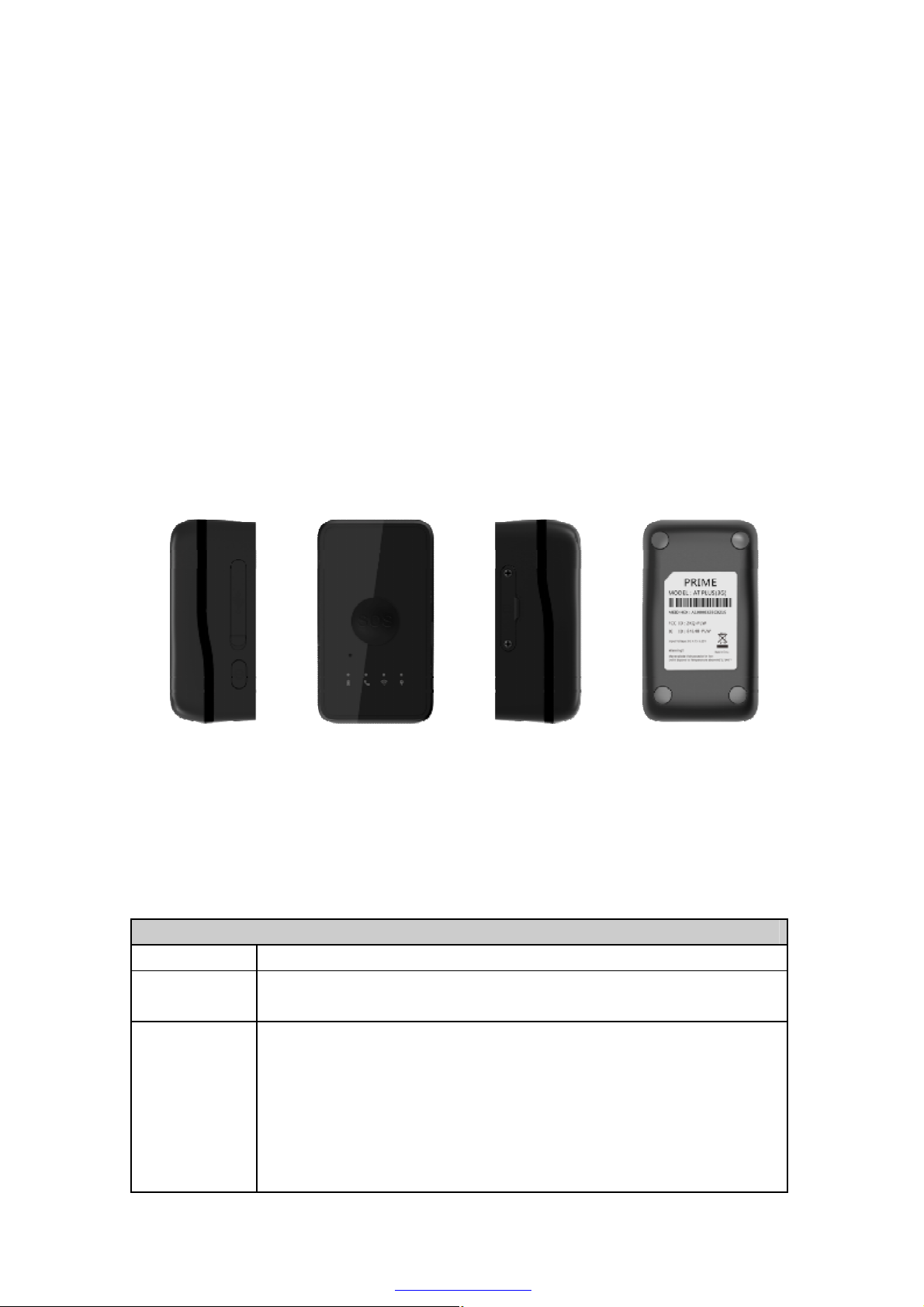
2.1 Appearance
Figure 1-1
2.2 Buttons/Micro USB Interface Description
Button /Micro USB Interface Description
KEY/interface Description
Power Key
Function Key
Power on AT PLUS(3G)
Power off AT PLUS(3G) (If power key is enabled)
Geo-Fence mode
Long press the key to enable/disable Geo-Fence ID0
Geo-Fence in current position mode
Long press the key to enable/disable Geo-Fence ID0. If enable Geo-Fence
ID0, using the current position as the centre of Geo-Fence 0.
SOS mode (default)
Long press the key to active SOS alarm
3
PDF pdfFactory Pro www.fineprint.cn
Page 4
Micro USB
interface
Connect a 3.7V Li-ion or Li-Polymer battery can power on AT PLUS(3G)
Backend server developer or administrator can use the data cable to configure
AT PLUS(3G)
Reset Key
Click the key will turn off internal VBAT when OS is abnormal, and then
press Power Key to restart AT PLUS(3G).
2.3 LED Description
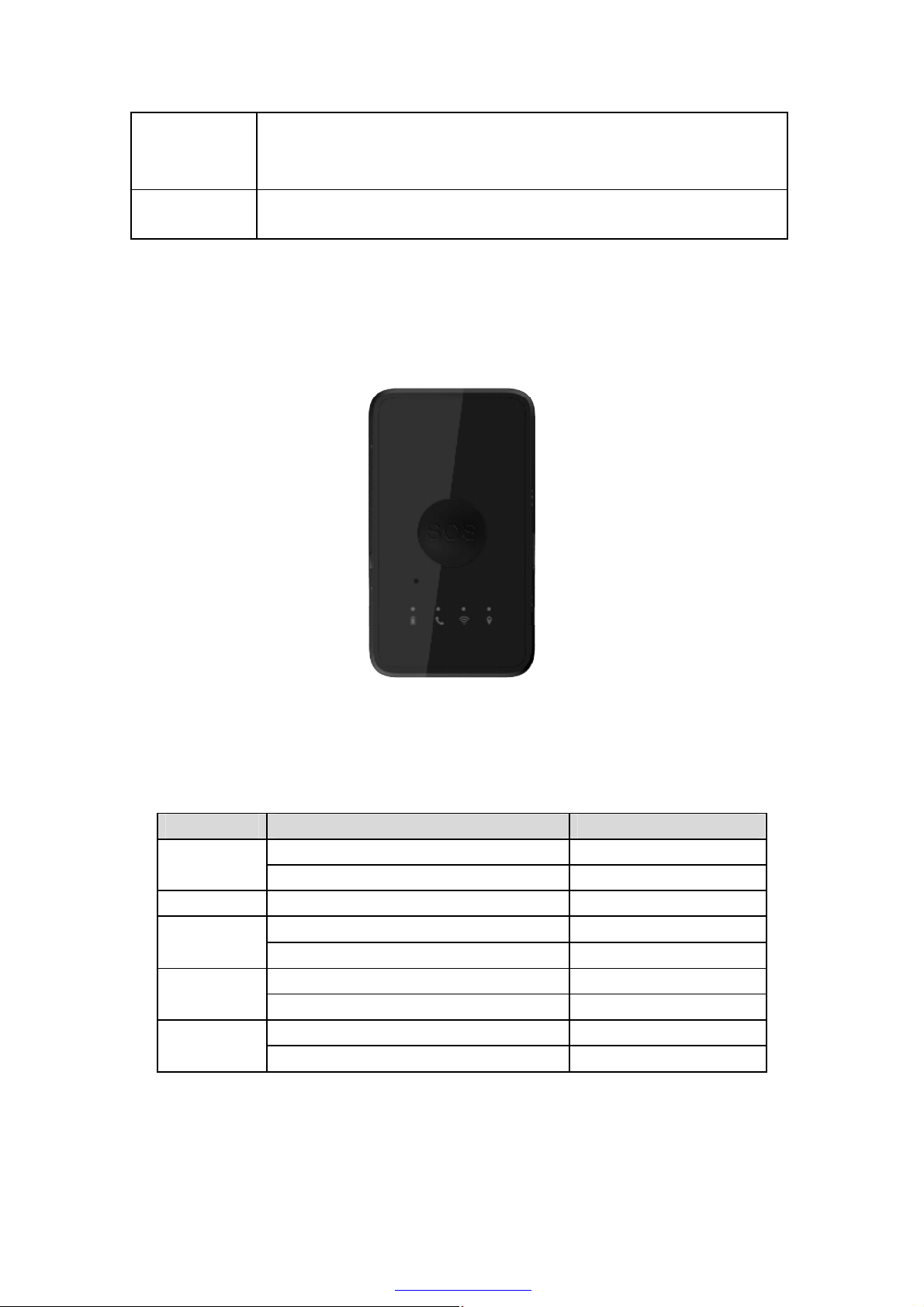
Figure 1-2
There are four LED lights in AT PLUS(3G) device, the description as following.
Light Event State
Power on and normal Dark Power LED
Fully charged Solid
LED
In charging Slow flash
Power on and normal Slow flash WCDMA
Power off Dark
WIFI on Slow flash WIFI LED
WIFI off Dark
GPS fixed Fast flash GPS LED
GPS has been turned off Dark
4
PDF pdfFactory Pro www.fineprint.cn
Page 5
3 Getting Started
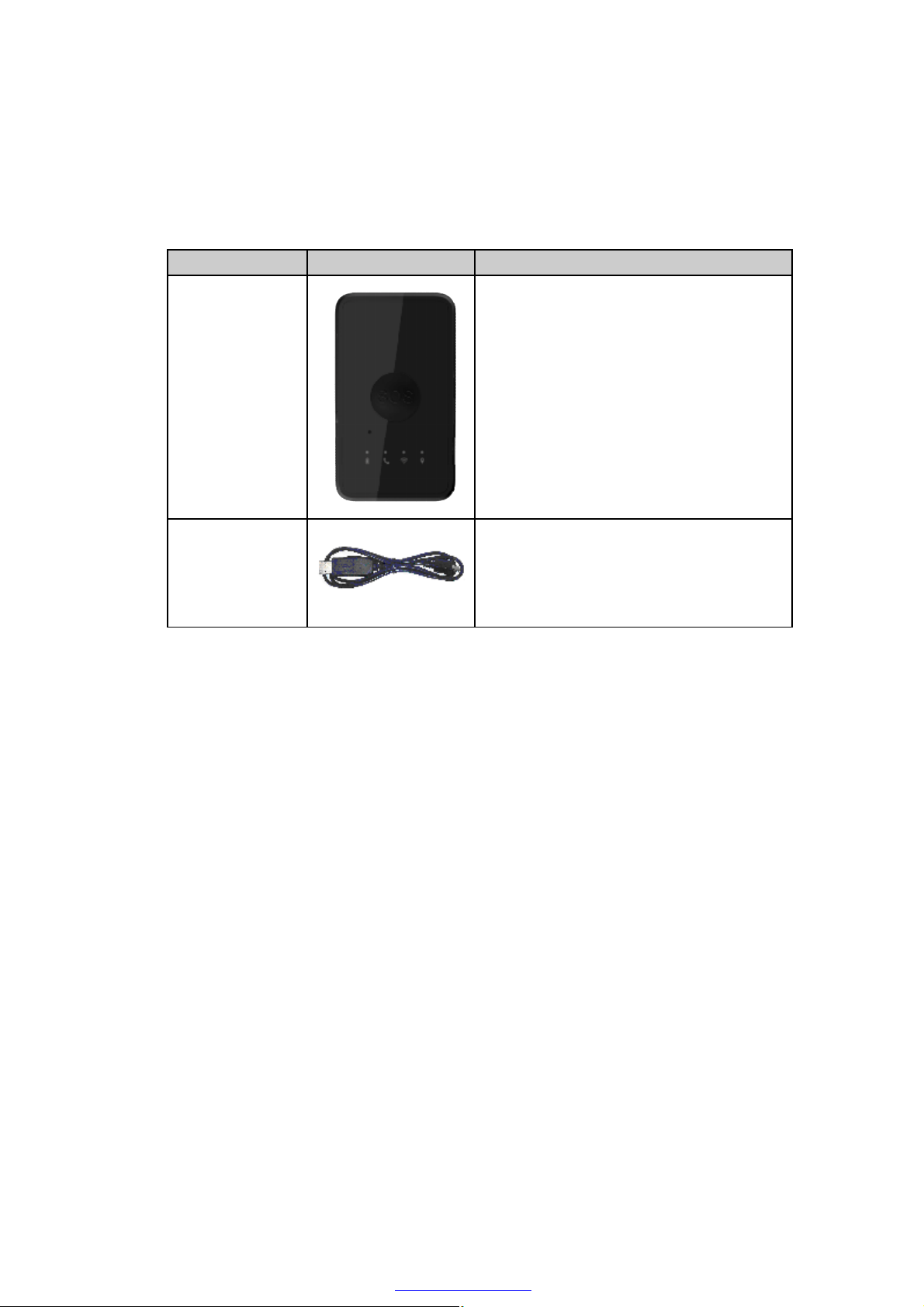
3.1 Parts List
Name Picture Remark
AT PLUS(3G)
Locater
The WCDMA/GPS locator.
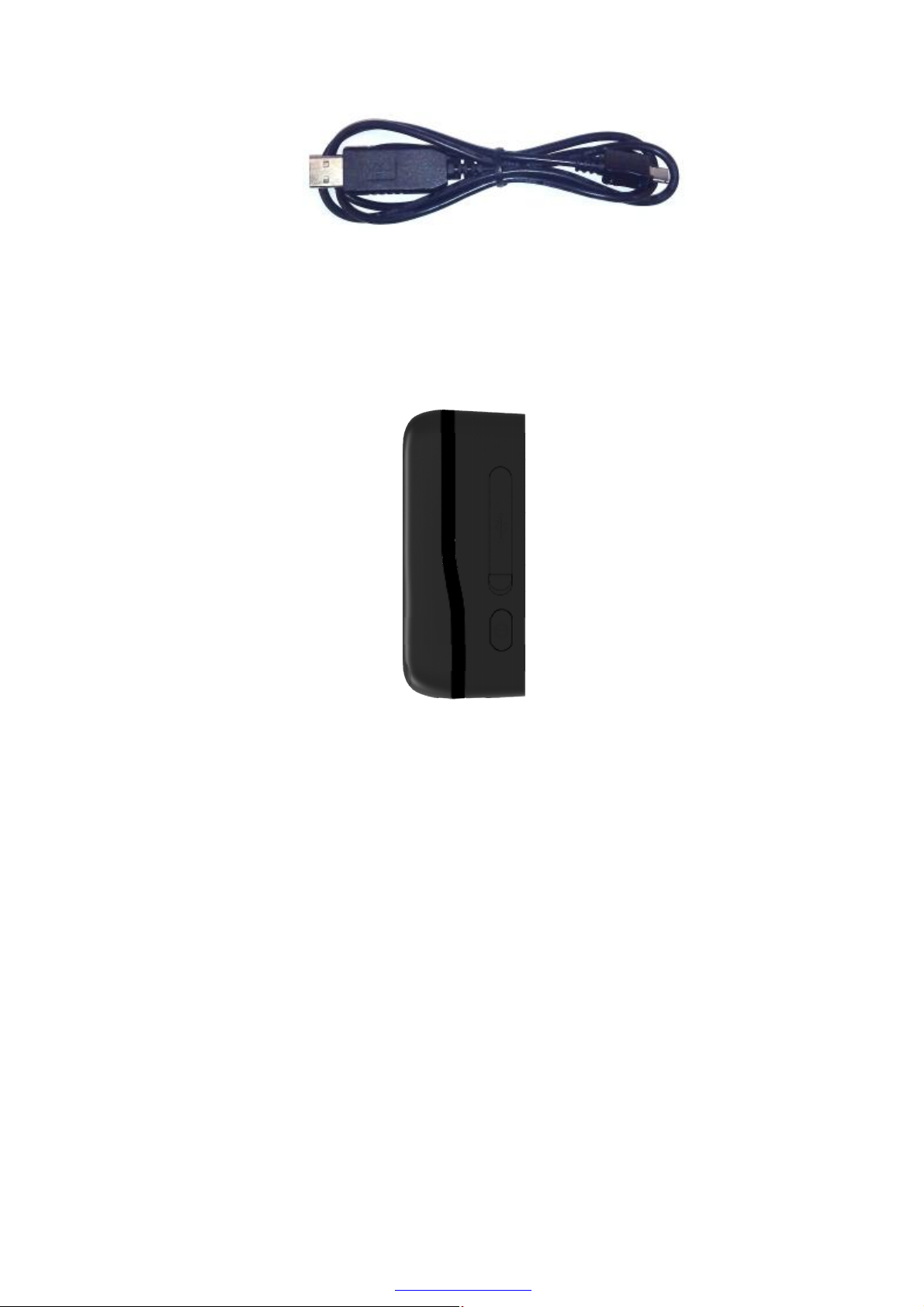
AT PLUS(3G)
Data and charger
Cable
It the USB data cable which can be used for
firmware upgrading and configuration.
It also includes the charger interface on the
AT PLUS(3G).
3.2 Battery Charging
The following items are suggestion for battery charge, please pay more attention.
u During the charging process, the Power LED light will solid. When the battery is
fully charged, the Power LED light will be Ever-light.
u You can charge the battery using USB cable which connects AT PLUS(3G) device
with the PC.
u Charging will last about 5 hours.
Note: If the AT PLUS(3G) device is firstly used, please make sure the battery is fully
charged, which will make the life of battery much longer.
3.3 AT PLUS(3G) Data Cable
AT PLUS(3G) Data Cable is a cable with a Micro USB connector.
The USB data cable is used for data download, which will be used for firmware update
or configuration and can be used for charging at the same time.
PDF pdfFactory Pro www.fineprint.cn
5
Page 6
3.4 Power on/Power off
Figure 2-1
Figure 2-2
Power on:
u Press the Power key at least 3 seconds and release it to power on AT PLUS(3G)
device. Note that, the Power LED light will fast flash.
Power off:
u Press the power key about 3 seconds; Power LED light will fast flash and then turn
off, which indicates that AT PLUS(3G) device has been powered off.
Note: the user can not power off AT PLUS(3G) if the power key is disabled
by protocol.
6
PDF pdfFactory Pro www.fineprint.cn
Page 7
4 Trouble shooting and Safety info
4.1 Trouble shooting
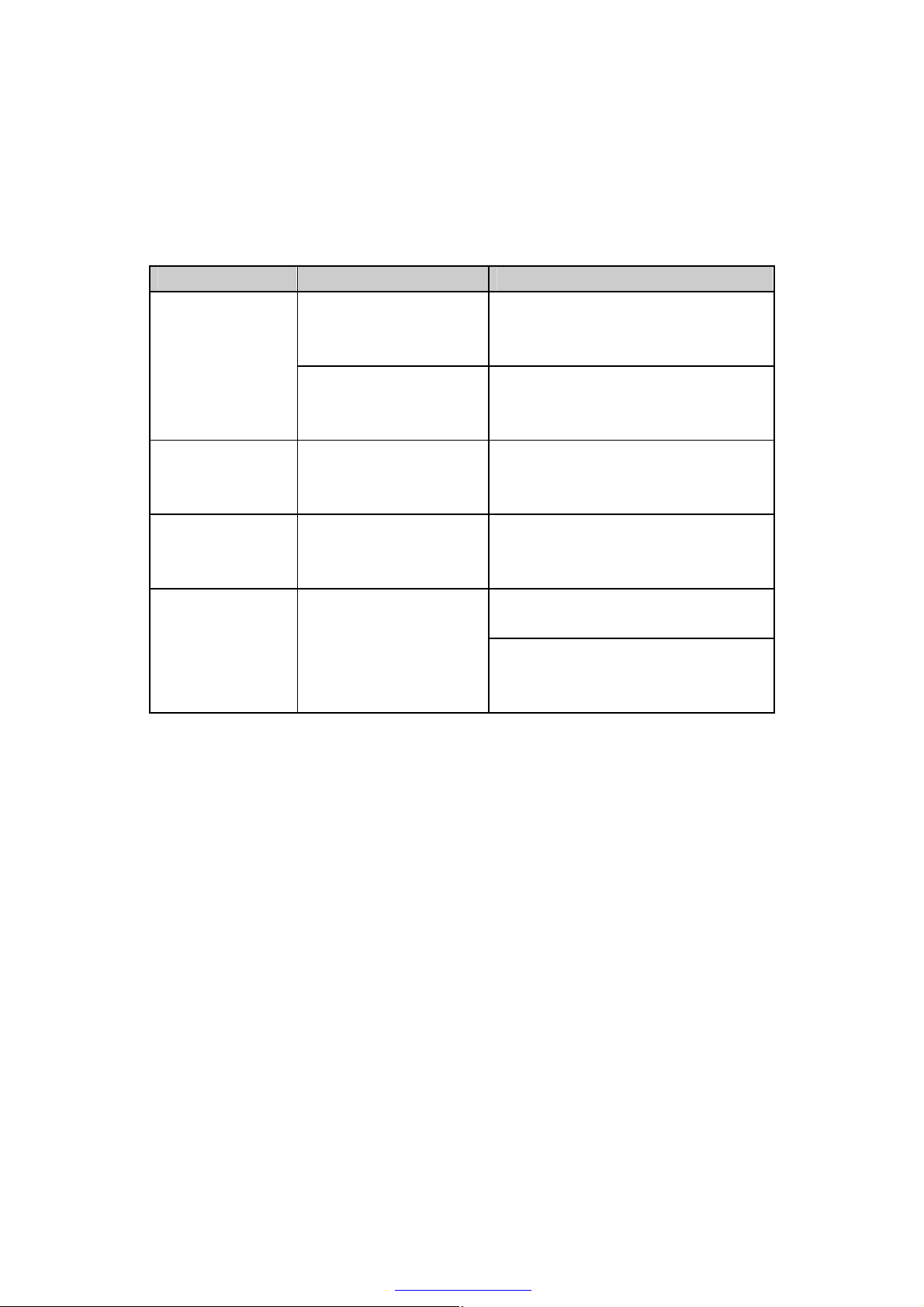
Trouble Possible Reason Solution
Messages can’t be
reported to the
backend server by
Mobile network.
Unable to power
off AT PLUS(3G).
Battery can not be
charged
AT PLUS(3G)
can’t fix GPS
successfully.
APN is wrong. Some
APN can not visit the
internet directly.
The IP address or port of
the backend server is
wrong.
The function of power key
was disabled by
AT+GTFKS.
The battery has not been
used for too long time and
has been locked.
The GPS signal is weak.
Ask the network operator for the right
APN.
Make sure the IP address for the
backend server is an identified address
in the internet.
Enable the function of power key by
AT+GTFKS.
Using a external power source with 3.6V
to 4.2V DC power supply to active the
battery or apply for after sale help.
Please move AT PLUS(3G) to a place
with open sky.
It is better to let the top surface face to
the sky. (The same surface with
indication LED)
4.2 Safety info
The following items are suggestion for safety use, please pay more attention.
u Please do not disassemble the device by yourself.
u Please do not put the device on the overheating or too humid place, avoid exposure
to direct sunlight. Too high temperature will damage the device or even cause the
battery explosion.
u Please do not use AT PLUS(3G) on the airplane or near medical equipment.
7
PDF pdfFactory Pro www.fineprint.cn
Page 8

FCC Statement
1. This device complies with Part 15 of the FCC Rules. Operation is subject to
the following two conditions:
(1) This device may not cause harmful interference.
(2) This device must accept any interference received, including interference
that may cause undesired operation.
2. Changes or modifications not expressly approved by the party responsible
for compliance could void the user's authority to operate the equipment.
NOTE:
This equipment has be en tes ted and fou nd to comply w ith t he limits for a Class
B digital device, pursuant to Part 15 of the FCC Rules. These limits are
designed to provide reasonable protection against harmful interference in a
residential installation.
This equipment generates uses and can radiate radio frequency energy and, if
not installed and used in accordance with the instructions, may cause harmful
interference to radio communications. However, there is no guarantee that
interference will not occur in a particular installation. If this equipment does
cause harmful interference to radio or television reception, which can be
determined by turning the equipment off and on, the user is encouraged to try
to correct the interference by one or more of the following measures:
Reorient or relocate the receiving antenna.
Increase the separation between the equipment and receiver.
Connect the equipment into an outlet on a circuit different from that to which
the receiver is connected.
Consult the dealer or an experienced radio/TV technician for help.
SAR Information Statement
Your wireless phone is a radio transmitter and receiver. It is designed and
manufactured not t o ex c eed t he emission limits for exposure to radiofr eq uency
(RF) energy set by the Federal Communications Commission of the U.S.
Government. These limits are part of comprehensive guidelines and establish
permitted levels of RF energy for the general population. The guidelines are
based on standards that were developed by independent scientific
organizations throug h per iodi c and thor o ug h evaluation of scientific studies.
The standards include a substantial safety margin designed to assure the
safety of all persons, regardless of age and health. The exposure standard for
wireless mobile phones employs a unit of measurement known as the Specific
Absorption Rate, or SAR. The SAR limit set by the FCC is 1.6 W/kg. * Tests for
SAR are conducted with the phone transmitting at its highest certified power
level in all tested frequency bands. Although the SAR is determined at the
highest certifie d p ower level, the ac tu al S AR l evel of the phone w hil e operating
can be well below the maximum value. This is because the phone is designed
to operate at multiple power levels so as to use only the power required to
reach the network. In general, the closer you are to a wireless base station
antenna, the lower the power output. Before a phone model is available for
sale to the public, it must be tested and certified to the FCC that it does not
exceed the limit established by the government adopted requirement for safe
exposure. The tests are performed in positions and locations (e.g., at the ear
Page 9

and worn on the body) as requir ed by the FCC for each m odel . and when wor n
on the body, as described in this user guide, is 1.234W/Kg(Body-worn
measurements differ among phone models, depending up on available
accessories and FCC requirements). While there may be differences between
the SAR levels of various phones and at various positions, they all meet the
government requirement for safe exposure. The FCC has granted an
Equipment Authorization for this model phone with all reported SAR levels
evaluated as in compliance with the FCC RFexposure guidelines. SAR
information on this model phone is on file with the FCC and can be found
under the Display G r a nt s ecti o n of http://www .fcc. g ov/ oet/fccid after s ear chi ng
on
FCC ID: ZKQ-PLWAdditional information on Specific Absorption Rates (SAR)
can be found on the Cell ular Telec ommu nica tions Indus try Asso-ciation (CTIA)
web-site at http://www.wow-com.com. * In the United States and Canada, the
SAR limit for mobile phones used by the publi c is 1.6 w atts/kg ( W/kg) averaged
over one gram of tissue. The standard incorporates a sub-stantial margin of
safety to give additional protection for the public and to account for any
variations in measurements.
Body-worn Operation
This device was tested for typical body-worn operations. To comply with RF
exposure requirements, a minimum separation distance of 5mm must be
maintained between the user’s body and the handset, including the antenna.
Third-party belt-clips, holsters, and similar accessories used by this device
should not contain any metallic components. Body-worn accessories that do
not meet these requirements may not comply with RF exposure requirements
and should be avoided. Use only the supplied or an approved antenna.
 Loading...