

Page 1
EarscanEarscan
Earscan
EarscanEarscan
®
MicrMicr
Micr
MicrMicr
opropr
ocessor Purocessor Pur
opr
ocessor Pur
opropr
ocessor Purocessor Pur
OPERATING GUIDE
START UP
1. Insert headphone plug into side panel "phone" location.
2. Insert patient response button plug into side panel
"button" location.
3. Plug unit into grounded outlet.
4. Press rocker switch on back panel to "on" position. After
Earscan does a brief system check you are ready to
begin testing.
SETTING PARAMETERS
Allows frequency and stimulus selection. Test parameters
will default to factory pre-set levels when power is shut off.
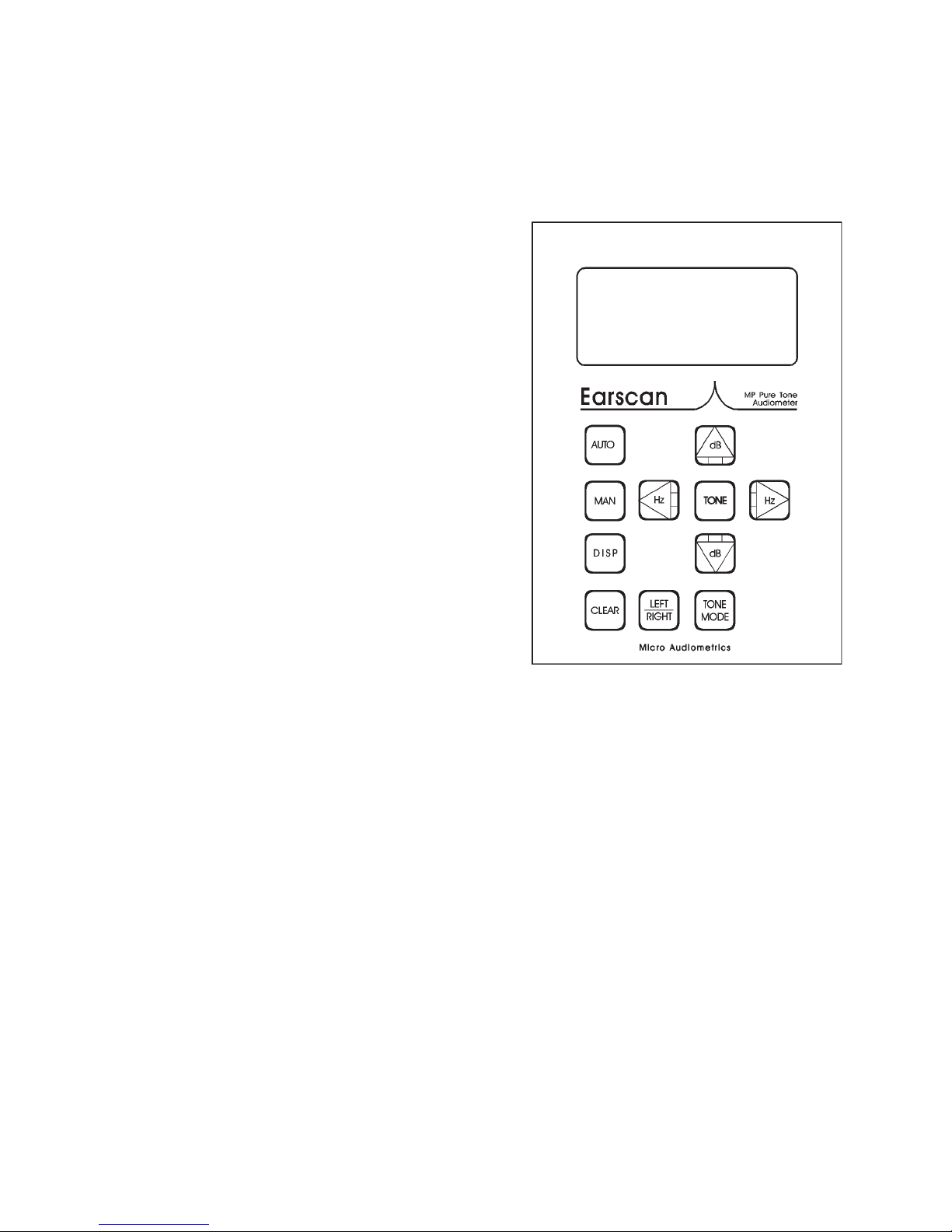
1. Press <MAN> and hold until "AUDIOMETER SET-UP
MODE" appears on LCD.
2. Press <DISP> to observe keys operating function.
3. Press <DISP>. Use <Hz
frequency.
Press <TONE> to include frequency.
Press <CLEAR> to remove frequency.
Press <AUTO> to set starting frequency.
4. Press <DISP> to access stimulus range programming.
Press <Hz
<dB
Press <Hz
<dB
5. Press <MAN> to save parameters; exit programming
mode.
⇐⇐
⇐> to select minimum stimulus range. Toggle
⇐⇐
⇓⇓
⇓> and <dB
⇓⇓
⇓⇓
⇓> and <dB
⇓⇓
⇑⇑
⇑> to set the desired minimum dB level.
⇑⇑
⇒⇒
⇒> to select maximum stimulus range. Toggle
⇒⇒
⇑⇑
⇑> to set the desired maximum dB level.
⇑⇑
⇐⇐
⇐> and <Hz
⇐⇐
⇒⇒
⇒> to select
⇒⇒
e Te T
e T
e Te T
one Aone A
one A
one Aone A
udiomeudiome
udiome
udiomeudiome
tt
t
tt
erer
er
erer
PATIENT SET-UP
1. Seat patient so the front panel of the audiometer cannot
be seen by the patient.
2. Place headphones securely over ears, making sure red
phone covers right ear and blue phone covers left ear.
3. Instruct the patient to listen for either a continuous tone
or a series of beeping sounds. He should raise his
hand on the same side the sound is coming from. If
the patient response button is used, the patient should
press and release the button whenever a sound is
heard.
MANUAL TESTING
1. Press <DISP>, then press and hold <CLEAR> until NEW
TEST appears.
2. Press <RIGHT/LEFT> to select test ear.
3. Increase and decrease frequency using the Hz keys.
4. Increase and decrease dB level using the dB keys.
5. Press <TONE> to present stimulus.
AUTOMATIC TESTING
1. Follow steps 1 and 2 of manual testing.
2. Press <AUTO>.
3. Earscan will determine and store thresholds for each
frequency. Earscan will signal the completion of testing
by presenting a series of tones.
HAND-RECORDING RESULTS
1. Press <DISP>. Repeated pressing toggles results on LCD.
2. Record test results on audiogram pad.
O = right ear
X = left ear
IMPORTANT NOTES
1. Rerun any test if the results are in question.
2. DO NOT swap headsets among units. Each Earscan is
calibrated to match a particular headset. The last digits
of the Earscan serial number are engraved on each
headphone label.
Page 2
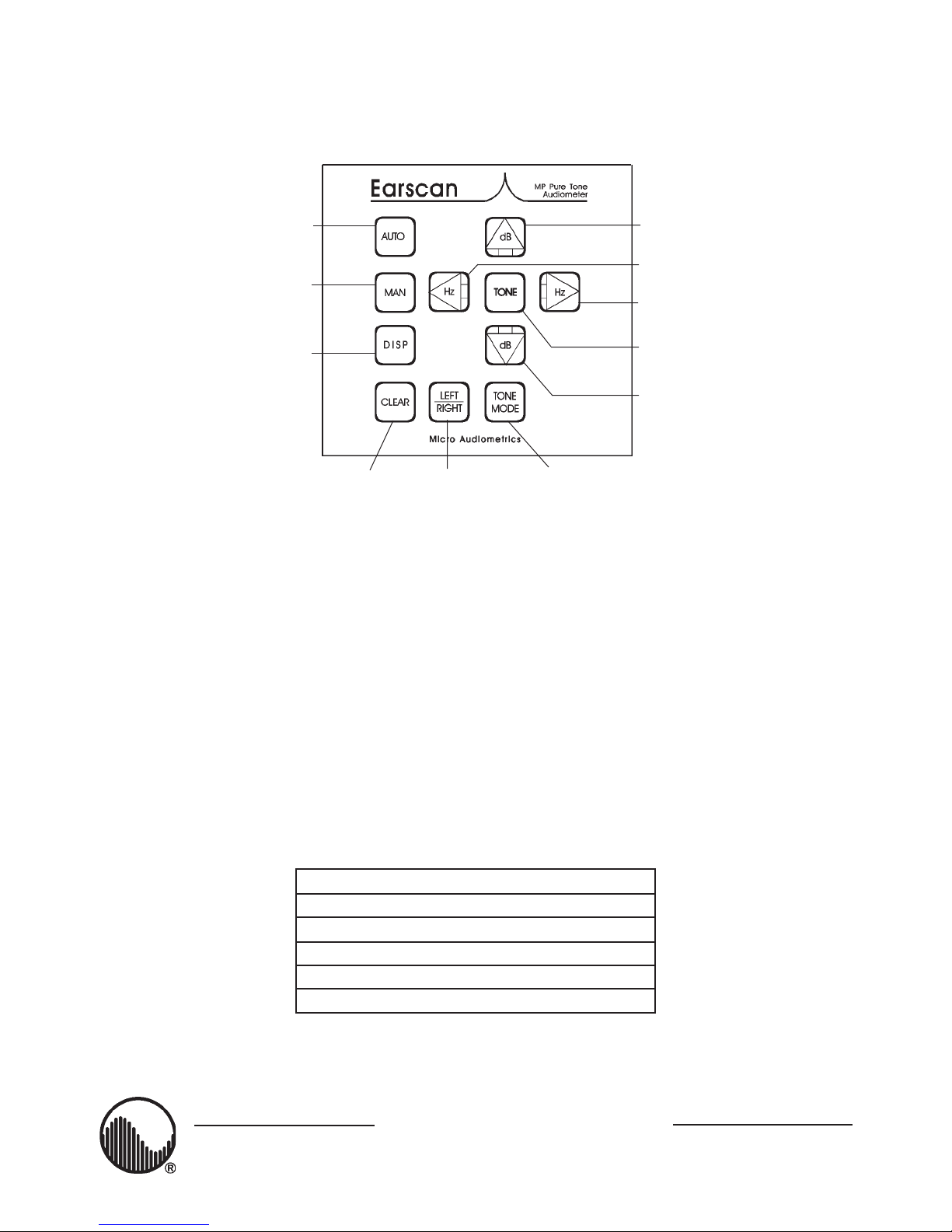
Automatic audiometry.
KEYPKEYP
KEYP
KEYPKEYP
AD SUMMARAD SUMMAR
AD SUMMAR
AD SUMMARAD SUMMAR
YY
Y
YY
Increment stimulus level in
manual audiometry.
Manual audiometry.
Stop automatic, revert to
manual audiometry mode.
Display audiometric
thresholds. Exit automatic
audiometry test to "Display
Thresholds" mode. Used in
conjunction with the
(CLEAR) key to start a new
test; (DISP)(CLEAR) clears
all thresholds.
Reset/erase/abort key. Clear single
thresholds in manual audiometry
mode. Exit error condition during
"automatic" testing.
Select
earphone.
Decrement stimulus frequency in
manual audiometry.
Increment stimulus frequency in
manual audiometry.
Present stimulus tone in manual
audiometry.
Decrement stimulus level in
manual audiometry.
Toggle between "pulsed"
and "continuous" tone in
manual audiometry.
SCALE OF HEARING LOSSSCALE OF HEARING LOSS
SCALE OF HEARING LOSS
SCALE OF HEARING LOSSSCALE OF HEARING LOSS
Reporting the degree of hearing loss is somewhat subjective in that not all hearing tests are
conducted in the same manner. Test results may vary from person to person depending on
ambient noise levels present at the same time of testing. If testing conditions are optimal, the
following scale may be helpful in understanding or reporting results.
0dB - 20dB Hearing within normal limits
25dB - 40dB Slight to mild hearing loss
45dB - 55dB Moderate hearing loss
60dB - 70dB Moderately severe hearing loss
75dB - 90dB Severe hearing loss
90dB+ Profound hearing loss
Micro Audiometrics Corp.Micro Audiometrics Corp.
Micro Audiometrics Corp.
Micro Audiometrics Corp.Micro Audiometrics Corp.
655 Keller Rd. • Murphy, NC 28906-5889
Voice: (828) 644-0771 • Orders: (800) 729-9509 • Fax: (828) 644-0772 • www.microaud.com
 Loading...