

Page 1
User Manual of Wireless Full Touch Color Screen Alarm System X6
Ⅰ. FOREWORD
Thank you for buying our 7 inch true color full touch screen alarm host. this product is a kind of high
performance home guard of high-tech product, it can provide more wonderful life interest to you!
In order to use this alarm system properly and efficiently, please read the following information before
use.
Ⅱ. SYSTEM CONFIGURATION
This alarm is composed of alarm host and matching accessories.
Note: alarm model is different, have different matching accessories category, please consult
supplier for details
Alarm host Accessories optional
GSM 7 inch
true color full
touch screen
alarm host
wireless remote controller, wireless door sensor series, wireless wide angle PIR
sensor series, wireless indoor siren series, wireless smoke detector, wireless keypad,
wireless gas detector, wireless doorbell button, wireless repeater, wireless emergency
button, etc.
Ⅲ. SYSTEM INTRODUCTION
FEATURES
1, 7 "color screen, graphic display, friendly man-machine interface.
2, Multi-languages optional (simplified Chinese, traditional Chinese, English, German, French,
Russian…etc.)
3, 3/4 band GSM alarm information transmission, the realization of the telephone voice alarm,
protection zones/SMS alarm;
4, 30 wireless defence areas, extensible 8 wired defence areas and wired siren . preset up five
groups of alarm telephone, each group can be arbitrary set to phone call or SMS alarm, automatic
cycle dial;
5, Intelligent logic analysis technology, while alarm, display the corresponding protection zones ,
installation location, name of probe ,etc…
6, Alarm priority, random recording, voice alarm, SMS alarm, on-site monitoring, power off
information preservation, AC/DC power supply optional;
Page 2

7, Text messaging, remote controller, host keypad, remote control keypad (optional), long
distance telephone five ways control arm/disarm ;
8, Doors & windows condition monitoring automatically, can be extended to realize the wireless
doorbell "ding dong" function;
9, Host low-voltage alarm;
10, "One-click" arm operation , "learning type" match the wireless detector, configure up to eight
remote control; 29 wireless defence areas , each area configure max with four detectors;
11, Prompt function of defence ares detection in disarm conditions , can track the children
12, Detectors low-voltage alarm, and display the low-voltage detector name and location ;
13 Bypass and open each defence area , defence areas type, enter time delay ,can be set via the
menu Settings.
14, High capacity lithium battery, perfecting system self-inspection, can prompt telephone wire
cut , battery low voltage, without external electricity.
15, A "black box" data record function, can store 99 operation and alarm information;
16, Compatible with “CID” protocol;
TECHNICAL PARAMETERS
1. Power supply: 100VAC~240VAC
2. Static current: ≤140Ma, alarm current: ≤500Ma
3. Working condition: temperature -10℃~50℃ Humidly <80%
4. Support max 8 wireless remote controllers, and max 116pcs wireless sensors, like door/window
sensor, PIR sensor, and wireless gas detector;
5. System wireless frequency 433.92MHz or 868.35MHz;
6. Backup battery: rechargeable lithium battery 7.4V 1200mAH;
7. 3 Bands 900/1800/1900MHz or 4 Bands 850/900/1800/1900MHz is optional for GSM host;
8. Product dimension: 230mm*140mm*22mm
Page 3
DRAFT
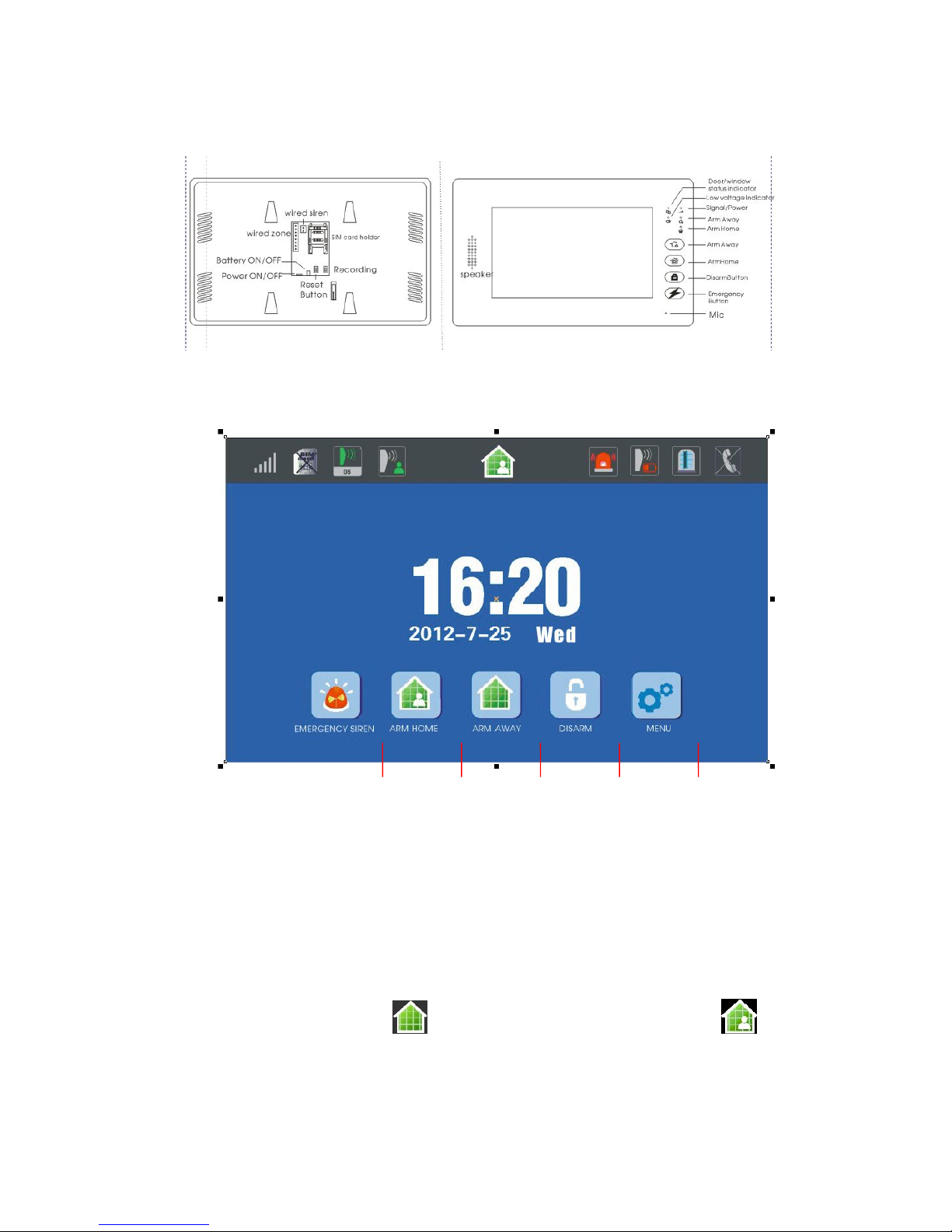
● STANDBY INTERFACE
INTRODUCTION ABOUT STANDBY SCREEN IN STATUS BAR
1. “GSM signal level” icon: max 5 level;
2. “SIM card status” icon: SIM card icon will be displayed if the SIM card is installed; On the contrary, the
SIM card icon won’t be displayed if the SIM card isn’t installed;
3. “Sensor triggered” icon: the sensor name and zone No. will be displayed for 4 seconds in disarm
status;
4. “Zone monitoring notification” icon: this icon will be displayed when this zone is triggered if the zone
monitoring notification function is activated;
5. “Arm/Disarm status” icon: this icon will be displayed when Arm Away is enabled; icon will
be displayed when Arm Home is enabled; no display in Disarm status;
6. “To be checked emergency” icon: this icon will flash frequently if any emergency record needs to be
checked, it will disappear if you click it and finish checking this record;
Page 4

7. “Sensor in low voltage” icon: this icon will come if the sensor which has low voltage emitting function,
sends the low voltage signal to the alarm host when it is in low voltage; this icon will disappear if you click
and finish browsing this records;
8. “Door/Window status” icon: this icon will be displayed when door/window opens after smart sensor
function is enabled; it won’t be displayed when door/window is closed;
9. “Landline cable offline” icon: this icon will be displayed when the landline is cut, won’t be displayed
when the landline is connected; if the landline offline notification function is enabled;
10. Status bar: Status Bar lays on the top of the standby screen
● DEFENSE LINES AND INTRODUCTION
Defense lines include 1stdefense line, 2nddefense line and 24Hours defense line
Definitions:
1. 1stdefense line: it refers to the 1stdefense line which the crimes will pass by such as the door,
window . usually in this area wireless door\window sensor, wireless PIR curtain sensor are
installed.
2. 2nddefense line: it refers to the 2nddefense line which the crimes pass by such as living room,
aisles and bedrooms, etc. , usually wireless wide angle PIR sensor is installed.
3. 24Hours defense line: it is an area under monitoring all day, such as, emergency call, medical
rescue, gas leakage and fire alarm, etc. Usually wireless emergency button, wireless gas sensor,
wireless smoke sensor are installed in this area.
● ARM TYPE AND INTRODUCTION
1. “Arm Away” mode: This mode is used when nobody is home, if any detectors in 1stDefense Line
and 2ndDefense Line get triggered, the host will alarm immediately and dial the alarm number\send
SMS automatically at the same time.
2. “Arm Home” mode: This mode is set when family member is home, if any detectors in 1stDefense
Line get triggered, the host will alarm immediately and dial “Panic” automatically. It will not alarm if
any detectors in 2ndDefense Line are triggered now.
HOW TO OPERATE THE ALARM HOST
A. PREPARATION BEOFRE USE
*Do this procedure 1 and 2 when system in power off status;
1. Insert SIM card in the back of the alarm host properly;
2. Connect power supply;
3. Switch the power button in the back to position “ON” to turn on the backup battery;
4. Check the GSM signal;
Host Frequency range GSM signal is OK
Signal is bad or SIM card
is not installed well
3
Bands
900MHz/1800MHz/1900MHz
Indicator flashes every 2
seconds
1. Indicator flashes every
1 second; 2. SIM card
icon will be
displayed in Status Bar;
4
Bands
850MHz/900MHz/1800MHz/1
900MHz
Indicator flashes every 3
seconds
Page 5
B. ABOUT PROGRAM SETTING
NOTE:
*The buttons without any click within 40 seconds after operation, the host automatically quit
programming and into the screen protection sleep state;
*All operations shall be effective under the state into the “programming menu”
*Input the wrong password three times, the host automatically restore the initial state
上面这段红字是加多的内容
*Major keys in system: ESC, DEL, ENT. ESC button can make setting page
escape to last page; DEL button is to delete the existing digits, mostly used to set time, date, phone
number, zone code, group code …; ENT button is to confirm setting.
*The progress, we pair a wireless sensor together with an alarm host, is called “LEARNING”;
*The host will get back to standby screen if no operation is processed within 40 seconds
*All operation will be enabled after you get into the SYSTEM MENU;
*If you enter in the user codes by mistake for 3 times, the host will get back to the standby screen;
*Please click ENT or ESC button to escape/confirm this setting after each “type in”;
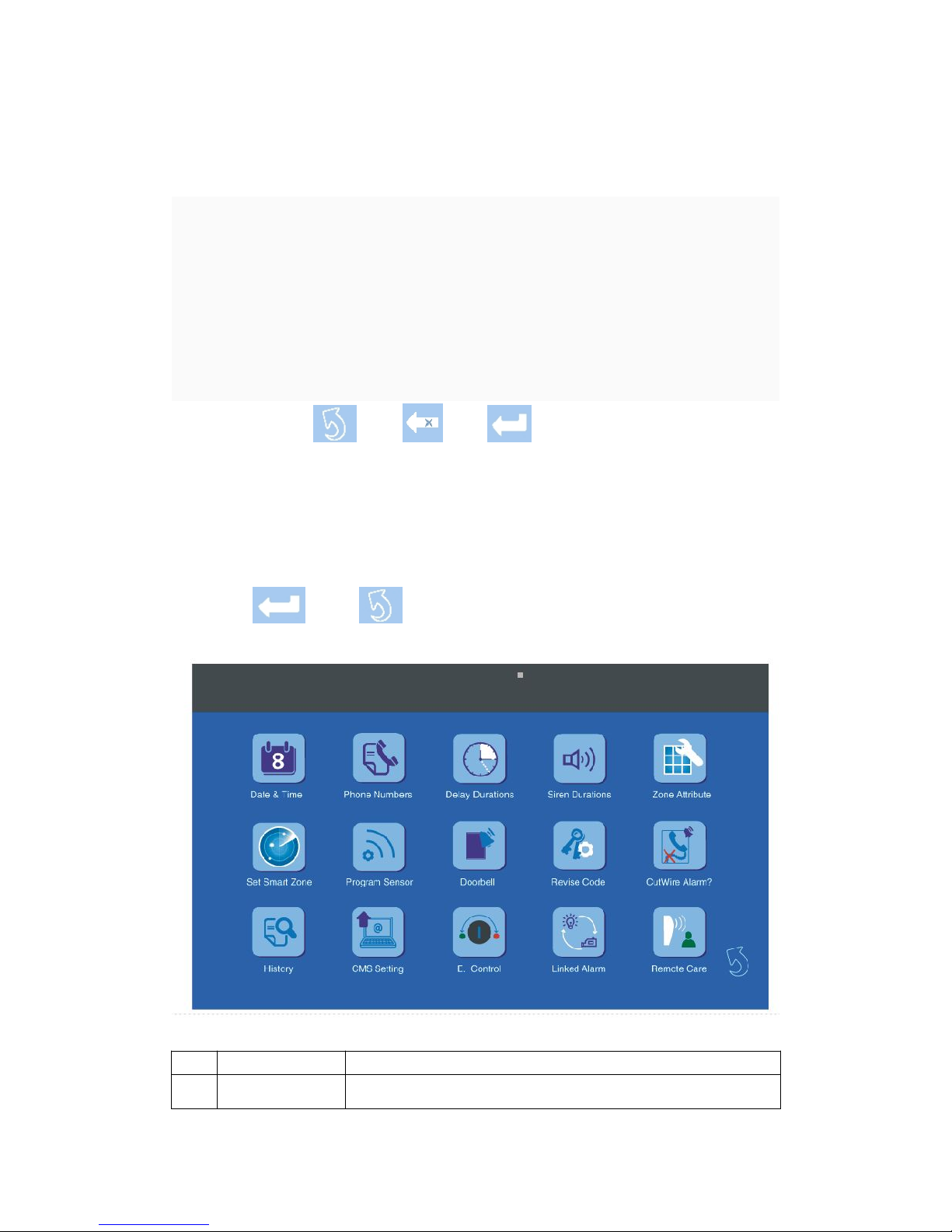
1. System Menu
NO Menu Introduction
1 Date & Time Current Year/Month/Day/Week/Hour/Minute/Second setting;
Page 6
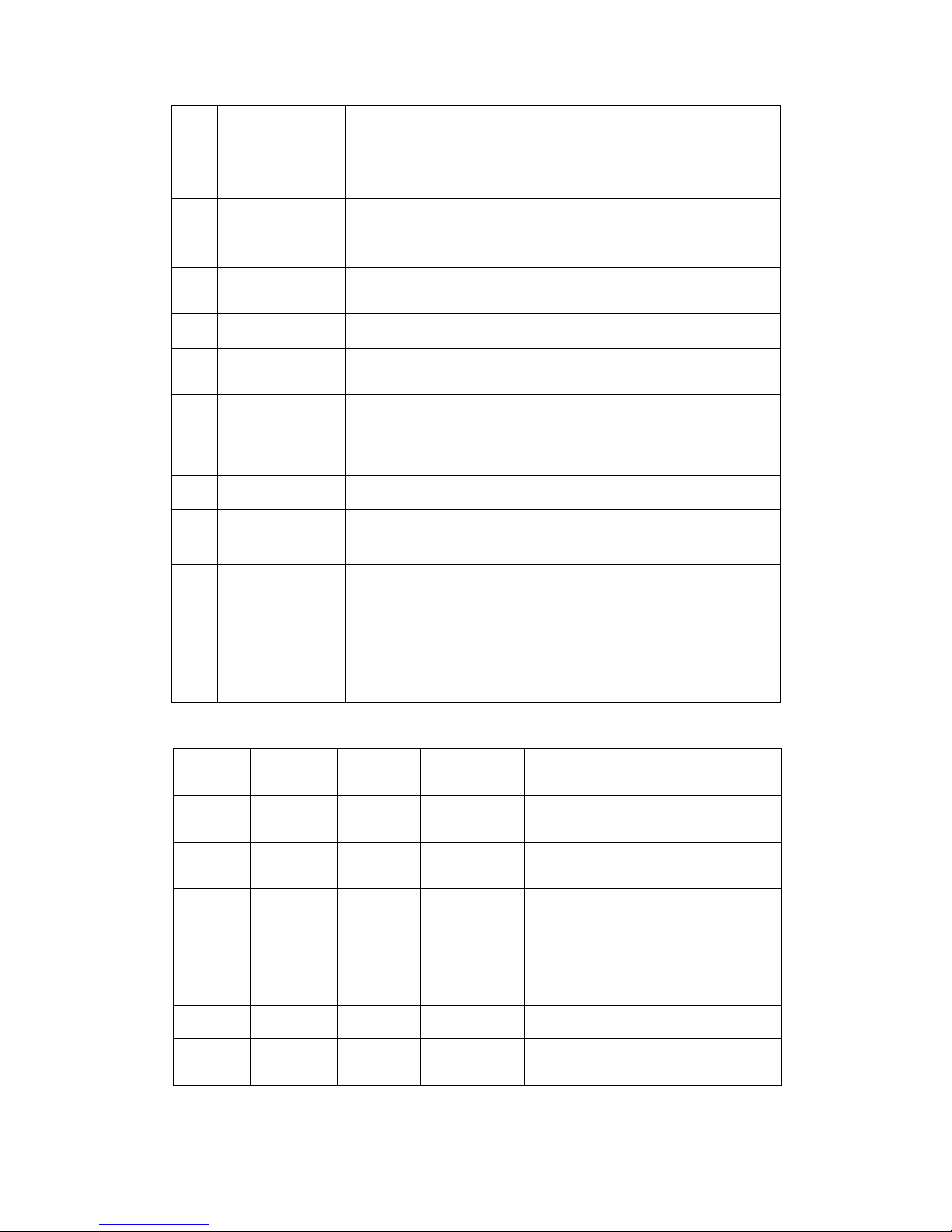
2. Preview of Zone Info
Zone
Code
Group Code Zone Type
Defense Line
Type
Available sensors
00、01 0、1、2、3 wireless ——
Wireless remote controller, wireless
keypad, etc.
02 ~ 10
0、1、2、3
wireless
24H Defense
Line
Wireless emergency button, wireless gas
sensor, wireless smoke sensor, etc.
11 ~ 20 0、1、2、3 wireless
1stDefense
Line
Wireless door/window sensor, wireless
smart door/window sensor, wireless
curtain PIR sensor, etc.
21 ~ 29
0、1、2、3
wireless
2ndDefense
Line
Wireless wide angle PIR sensor, etc.
30 0、1、2、3 wireless —— Wireless doorbell button
31 ~ 33 —— wired
1stDefense
Line
Wired door/window sensor, wired curtain
PIR sensor, etc.
2 Phone Numbers
Alarm call/SMS setting, 5 groups; Group 1 for CID protocol CMS, group
2~5 for personal use;
3 Delay Time
Arm delay and alarm delay setting, host will beep one DI every second in
delay duration;
4 Alarm Time
Alarm time setting, individually set the alarm time for 24H defense line,
1stdefense line,2nddefense line; System will give notification or not when
system is Armed/Disarmed;
5 Zone Attribute
Zone Code, sensor type, installation position, defense line type, zone
function and alarm delay setting;
6 Smart Zone Set Zone Code, Activate Sensor, Default Door Status and Door Chime;
7 Program Sensor
For adding/deleting sensors, includes Zone Code, Group Code, You
want to (adding/deleting) setting
8 Doorbell
Wireless doorbell sensor is set in Zone 30, includes Zone Code, Group,
You want to (adding/deleting) setting
9 Revise Code User Code setting, default code is 8888;
10 Cut Wire Alarm NA
11 History
Record 99 previous working records and alarm records, includes NO,
Zone NO, Sensor Name, Installation Location, Time setting;
12 CMS Setting Set network alarm, includes User Code, Arm/Disarm uploads
13 E. Control To be added
14 Linked Alarm To be added
15 Remote Care To be added
Page 7

34 ~ 35 —— wired
2ndDefense
Line
Wired wide angle sensor, etc.
36 ~ 38 —— wired
24H Defense
Line
Wired emergency button, wired gas
sensor, wired smoke sensor, etc.
NOTE: Each wireless zone can accept 4 groups (group 0, group 1, group 2, group 3), one wireless
sensor takes one group; each wired zone can accept one wired sensor;
C. Detailed program setting
How to get into Program Setting Page: In standby screen, click “MENU”, enter the user code 4 digits
xxxx, and click ENT, now you are in program setting page. Default user code is 8888;
How to set “Date & Time”: In program setting page, click Date & Time, in the new page, click white
blank under Time, Date and Week to make correction.
NOTE: Please delete existing digits by DEL button before you enter the new digits.
How to set “Phone Numbers”: In program setting page, click Phone Numbers, in the new page,
enter phone number for each group by clicking corresponding white blank. And select “Phone#’” or
“SMS” for each group.
NOTE: If you select “Phone#’”, the phone number owner will get the alarm call once system alarms;
if you select “SMS”, the phone number owner will get SMS once system alarms.
* The first group phone number is fixed for CMS, in C ID protocol;
* The 2-5 groups are for personal phone numbers;
How to set “Delay Time”: In program setting page, click Delay Time, in the new page enter new
digits for “Exit Delay” or ”Entry Delay”. Press to confirm new setting;
NOTE: Default setting is 10 seconds, digit range from 00~59.
How to set “Alarm Time”: In program setting page, click Alarm Time, in the new page enter new
digits by clicking the white blank for “Siren in Emergency Zone”, ”Siren in 1stDefense Zone”
or ”Siren in 2ndDefense Zone” after deleting old records. In bellowing setting “Arm/Disarm Beep”, if
YES, system will give beep notification when you Arm/Disarm alarm system; if NO, system won’t
give beep notification when you Arm/Disarm system.
For example, if you enter 02 Minutes for “Motion Siren”, the siren will alarm for 2 minutes when the
sensors in 2ndDefense Line are triggered.
NOTE: Default alarm time is 1 minute, digit range from 00~59.
How to set “Zone Attribute”: In program setting page, click Zone Attribute, in the new page click
white blank of each item to make correction. You can redefine wireless sensor and the
corresponding zone properties. Including Sensor type and Installation position, zone type and zone
function.
* This is to change zone properties and sensor properties, including changes of Zone Code, Sensor
type, Installation position, Zone type, Zone function and Alarm Delay Setting;
* For more details, please refer to “Preview of Zone Info”.
How to set “Smart Zone”: In program setting page, click Smart Zone, in the new page click the white
blank to enter the Zone Code, which you want to set as Smart Zone. Then select Activate YES/NO,
if you select YES, this smart zone will be enabled; and select default door status CLOSE/OPEN, if
you select OPEN, it means the default status of door/window is OPEN in smart zone, usually we
Page 8

define the default of door/window status is closed; and select Door Chime YES/NO, default is YES.
*In smart zone, the default door status is Close. If you set the default status of door as Open, a
“Window Icon” will appear on the Status Bar on the top of screen. It means in this mode you can’t
arm system unless you select “Arm by Force” in the new page after you click the “Window Icon”;
*Please refer “Preview of Zone Info” for more details about zone attribute.
How to set “Program Sensor”: In program setting page, click Program Sensor, in the new page click
the white blank of Zone Code, Group and {You want to} to set corresponding zone info and sensor
info. If you click “Activate Sensor” after all info is settled, it will show “Learning” on screen, now
trigger the sensor. If you see a “Success” on screen, the learning progress is successful; If you see
a “Failed”, the learning progress isn’t successful, now you need repeat the learning progress;
* Zone Code: it is selectable from 00~29 for sensor installation, you need input corresponding Zone
Code for a certain sensor;
* Group: In system totally have 4 groups to select, group 0, group 1, group 2, group 3. It means
maximum 4pcs wireless sensors are acceptable in one zone; if you enter other Group Codes,
except 0, 1, 2, 3, it is null.
* Here you need select the operation type, “Activate Sensor is for learning a new sensor into the alarm
system”; “Delete Sensor” is for deleting a sensor from a certain zone.
* The corresponding relationship between Zone Code and sensor type, please check Table “Preview
of Zone Info”.
How to set “Doorbell”: In program setting page, click Doorbell, in the new page, click white blank of
“Group” and “You want to” to set doorbell info.
Operation Guide: If you want to learn a new doorbell sensor into a system: Zone Code 30 <30 can’t
be changed> + new Group Code 0/1/2/3 + ENT + Activate Sensor + ENT + Trigger doorbell sensor
by pressing the doorbell button 2~3 times quickly, if a “Success” appears on the screen, the learning
progress is successful;
If you want to delete a doorbell sensor in Group 3 of a system: Zone Code 30 + new Group Code 3
< chosen from 0/1/2/3> + ENT + choose Delete Sensor + ENT, if a “Success” appears on the screen,
it means operation is successful;
* Zone code of doorbell is fixed to 30;
* In an alarm system, you may learn 4pcs wireless doorbell, separately in zone 0, 1, 2, 3;
How to set “Revise Code”: In program setting page, click Revise Code, in the new page, input the
old code xxxx + ENT + input the new code xxxx + ENT + repeat the new code xxxx again + ENT, the
operation is successful if a “Success” appears on the screen;
*System code is 4 digits;
How to set “Cut Wire Alarm”: In program setting page, click Cut Wire Alarm, in the new page select
“YES” or “NO” to enable/disable cut wire alarm function. If you choose YES, system will beep DiDi
when the landline is cut; If you choose NO system won’t give beep notification if landline cable is
cut.
*The system will beep DiDi every 7 seconds if the landline cable is cut;
*This setting is null for pure GSM alarm system;
How to set “Cut Wire Alarm”: NA for GSM alarm system;
*Each page, 5 records. You can go to second page by clicking “ ” or “ ”, or escape by
clicking “ ”
How to set “CMS Setting”: In program setting page, click CMS Setting, in new page, you can set
Page 9

user code and Upload Status or not.
*User code is selectable from 0001~9999;
*If you choose YES to Upload Status, status info of alarm system will be sent to CMS; if NO to
Upload Status, status info of alarm system won’t be sent to CMS;
E. Control: Full name is “Electrical Equipment Control”, introduction is to be added.
Linked Alarm: Introduction is to be added.
Remote Care: Introduction is to be added.
D. Important system operations
1. Record
Keep pressing “record button” on the back of the alarm host, talk to the microphone, then release, the
voice will be recorded. Record time maximum can be 10 seconds.
2. Arm system
By wireless remote controller: press the arm button on the wireless remote controller, the host will
beep Di to confirm your successful arm operation;
By host button: Press arm button on the host screen to arm the system;
NOTE:
① Arm away is usually used when nobody stays in the monitored space; System will alarm if any sensor
triggered;
② Arm home is usually used when somebody still stay in the monitored space; System will alarm if only
sensor is triggered in 1stDefense Line;
By SMS: Edit SMS text “user code + 1” (if the user code is 6666, then you edit 66661) in your mobile
phone and send it to entered phone number in host SIM card. The host will arm automatically if the
SMS is received, at the same time host will send a reply “Arm successfully” to you; The SMS option
can be only used for arm away of system.
By phone call: make a call to entered phone number in host SIM card; about 30s later you will hear
a Di, now input the “user code+#” and digit 1 or 2, system will be armed successfully after giving a
Di; 1 means Arm Away, 2 means Arm Home;
3. Disarm system
By wireless remote controller: press the disarm button on the wireless remote controller, the host
will beep DiDi to confirm your successful disarm operation;
By Disarm button: Press disarm button on the host screen, enter user code xxxx + ENT to disarm
the system;
By SMS: Edit SMS text “user code + 0” (if the user code is 6666, then you edit 66660) in your mobile
phone and send it to entered phone number in host SIM card. The host will disarm automatically if
the SMS is received, at the same time host will send a reply “Disarm successfully” to you; The SMS
option can be only used for arm away of system. <This SMS arm option is ready for GSM network
alarm host and dual-network alarm host>;
By phone call: make a call to entered phone number in host SIM card; about 30s later you will hear
a Di, now input the user code and digit 3, system will disarm successfully; Phone call Arm option
can be only used for arm away mode of system.
4. Emergency Help
Alarm system will send alarm info to entered phone number holders for emergency help.
By remote controller: Press emergency button on the wireless remote controller, the alarm system
will alarm right now. and make calls/send SMS to entered phone number holders.
Page 10

By clicking the Emergency button on the screen of alarm host, the alarm system will alarm right now,
and make calls/send SMS to entered phone number holders.
5. What can you do when you get an alarm call?
You will hear the recorded voice immediately after receiving alarm call, the recorded voice will be played
for 30 seconds repeatedly, and then you can make the following operations:
Input digit “8” to let alarm host enter into the 20s Monitoring Status automatically, you will hear if
anybody talks in the monitored space; At the same time, alarm host enters into Monitoring Status,
the alarm sound will stop; The alarm sound will start again when Monitoring Status is finished;
Input “#” to repeat the recorded voice; (this function is better in CMS appliance, because the
monitoring staff in CMS can get your recorded voice message repeatedly, like “Hi, xxx CMS, this is
Tina in Building A, Floor 21th, Room 2112, please help me”. If the first time the CMS man does not
get your position clearly, the second or third time he can get your location info clearly);
Input “*” to cancel alarm call finally from the alarm host, the host won’t send any alarm call;
If you hang off the phone, the alarm host will stop to dial next group Phone Number;
7. What can you do if you get the alarm SMS?
In Phone Number setting, if you set, your phone number will get the SMS once alarm system is triggered,
then your phone number will get a SMS like “SSSS alarm system xx zone xxxx alarming”. In this phrase,
SSSS stands for user code, xx stands for the Zone Code, xxxx stands for the sensor name;
8. Remote operations
Make a call to SIM card in alarm host, after a Di enter user code + # (xxxx+#), then after second Di, you
can
Enter digit “1” to enable “Arm Away”;
Enter digit “2” to enable “Arm Home”;
Enter digit “3” to enable “Disarm”;
Enter digit “4” to start remote monitoring 20 seconds;
Enter digit “6” to retrieve recorded message;
Enter symbol “*” to hang off the phone;
NOTE: The alarm host will hang off your call automatically if no operation is made in 20 seconds;
9. Monitor door/window status function
This is a smart function of our alarm system, monitor door/window status function will be enabled if smart
door/window sensor is installed and corresponding setting is enabled.
NOTE AND EXAMPLE:
Firstly, a smart sensor (for example, we call it sensor α) should be learned into a zone (For example,
we call it zone β);
Go to Zone Attribute in System Menu, enter Zone Code β, select sensor type、installation position、
zone type、select ON for zone function (this is to enable the smart zone function)、select alarm delay,
then press to confirm;
Go to Smart Zone in system menu, enter Zone Code β, select ON for Activate, Close for Door
Status, Yes for Door Chime, press to confirm;
Now the smart function is activated. If now you arm alarm system by remote controller or alarm host,
but a door/window is open, a winking “Half-open” icon will be displayed in Status Bar, at the same
time alarm host will give beep “DiDiDiDi”, and status indicator of door/window will light itself all the
time;
Click the “Half-open” icon, in the new page, click Arm by Force to arm the system; Or disable this
Page 11

smart function for this zone;
NOTE:
A. This smart zone function needs smart door/window sensor, like wireless smart sensor、wireless
smart control door/window sensor…
B. If you want to arm alarm system, which has smart zone, by SMS or phone call, it is an ordinary
operation like common arm operation, one time will work;
C. If you want to arm alarm system, which has smart zone, by wireless remote controller or wireless
keypad, you need operate twice to arm alarm system;
D. When this “Half-open” icon appears, close the two parts of door/window sensor will make this
icon disappear, indicator of door/window status will go out;
10. Wireless doorbell function
Press the doorbell button on the wireless doorbell sensor, the alarm host will give two “Dingdong”;
NOTE:
A. This is an optional function, Dingdong doorbell function will be realized with the help of wireless
Doorbell sensor;
B. This doorbell will work only if power supply of alarm host is connected;
11. Zone indicator
This function can be individually set for each zone. If this function is enabled for zone β, the alarm host
will give DiDiDiDiDi once this zone β is triggered in disarm status; Normally, system will give no
notification if any zone is triggered in disarm status;
NOTE: This function is valid for wireless sensors in 1STDefense Line and 2ndDefense Line;
12. How to cancel low voltage icon and alarm icon in Status Bar?
Click and check icon info in the Status Bar will cancel the icons;
13. How to reset password?
One press on the RESET button and release, then long press on the RESET button for 5 seconds and
release, alarm host will give a long Di beep for 5 seconds, now the password has been reset;
NOTE: Default password is 4 digits, 8888;
E. Attention in operation
1. About Alarm call:
① In Phone Numbers setting, choose “By SMS” for one number means alarm host will send alarm info
“by SMS”; Choose send alarm info “By call” means alarm host will send alarm info by making a call;
② If you choose to send alarm info by call, when alarm system is triggered, the host will make calls to the
entered phone numbers from the first group to the fifth Group Code, if the entered phone number is
empty, this number will be ignored; Every entered number will get the alarm call 3 times repeatedly
unless you deal with this alarm call rightly by pressing * to terminate it;
③ Alarm call in first priority: If the alarm call comes when you are answering a call, your call will hang up
for you to handle the alarm call;
*About Arm Delay notification:
① The host will beep Di every second in Arm Delay is triggered;
② If the alarm host is making a dingdong doorbell notification while the triggering info is received by the
alarm host, the host will give the alarm sound instead of the dingdong doorbell sound, and make the
alarm call to the property owner;
F. System beep notification
No. Status How is the beep
Page 12
1 Arm Delay One Di every second in Delay
2 Alarm Delay One Di every second in Delay
3 Arm One Di
4 Disarm Two Di
5 Landline is off
Two Di every 30 seconds <Cut Wire Alarm setting should
be enabled >
6 AC is OFF / AC is ON One Di
7 Sensor is in low voltage status One Di
8 Sensor is triggered in disarm status
Continuous Five Di <In Alarm Time setting, Arm/Disarm
Beep should be ON>
9
Arm system when door/window
opens
Continuous Four Di<In Smart Zone setting, Activate of
corresponding zone should be ON; In Zone Attribute
setting, Zone function of corresponding zone should be
ON>
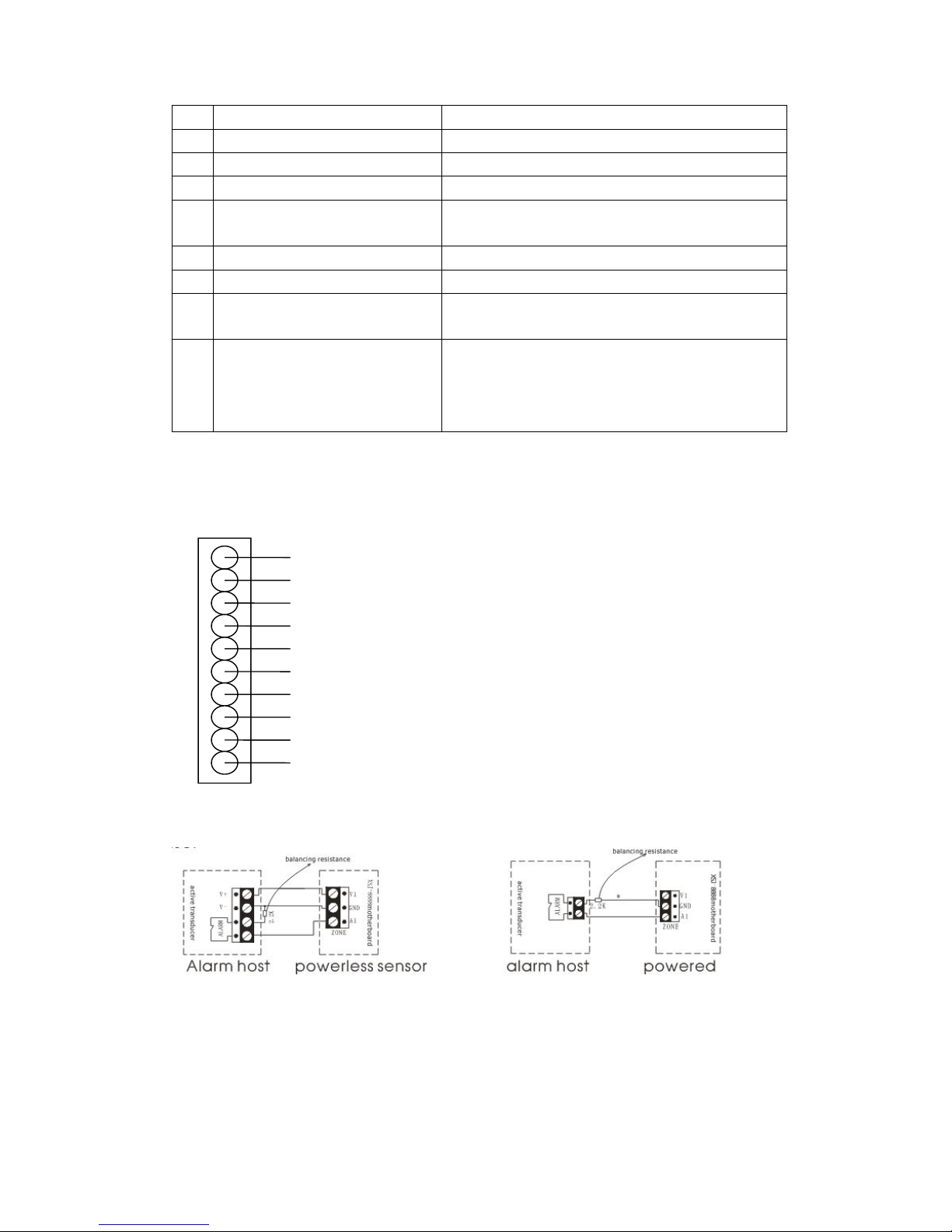
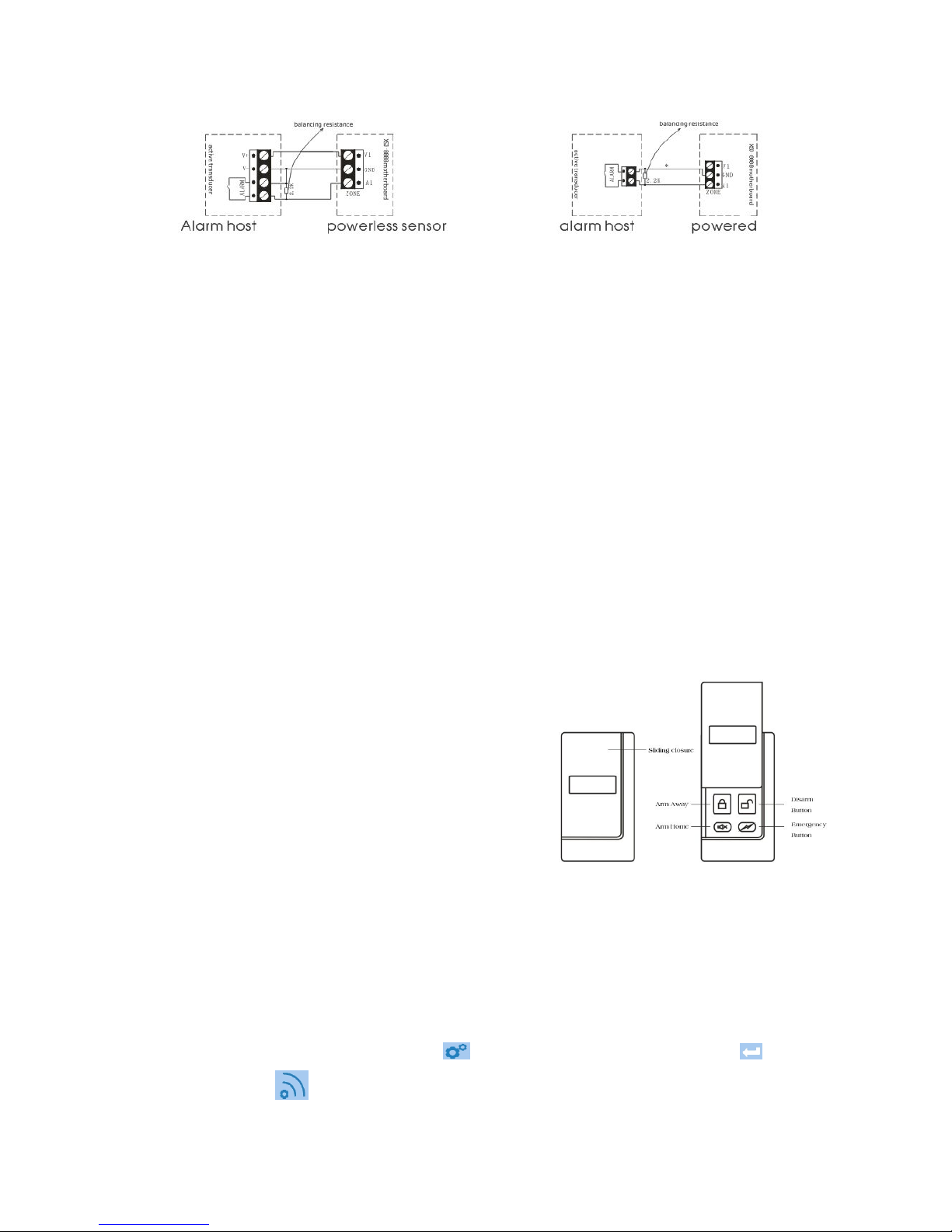
G. How to connect wired sensors
2.2K balance resistor is necessary; please refer this info if you want to connect wired sensors)
1
Red + sensor +12V power output
Black - GND
White Zone 31 door sensor
Yellow Zone 32 curtain PIR sensor
Blue Zone 33 curtain PIR sensor
Green Zone 34 wide angle PIR sensor
Purple Zone 35 wide angle PIR sensor
Brown Zone 36 emergency button
Grey Zone 37 gas sensor
Orange Zone 38 smoke sensor
10
NC sensor
NO sensor
Page 13
Ⅳ. ABOUT PERIPHERAL SENSORS
*This chapter includes two parts: introduction of wireless sensors, and how to learn/delete wireless
sensors into/from alarm system.
Wireless Remote Controller
Features
1. To control the alarm host to arm home/arm away/disarm the alarm system.
2. Press emergency button to send emergency alarm for urgent help
Specifications
1. Power supply: disposable alkaline battery 12V27A
2. Emitting distance: ≥100m (in open area)
3. Service life of battery: ≤ 1 year
4. Static current: N/A working current: 15mA
5. Wireless frequency: 868MHz
Installation and Usage
1. For taking along with yourself;
2. Generally,
A. press the “Away” key to arm the alarm system before
leaving detected space;
B. press “Disarm” key to disarm the alarm system when
system is alarming;
C. press “Home” key to disarm the alarm system partly to
make all sensors in 2ndDefense Line free when you
stay in detected space. When you press Home key, it
means you will stay in detected space, and now only
sensors in 1STDefense Line (like door sensor, curtain PIR sensor) and sensors in Emergency
zone (like Gas sensor, Smoke sensor, Glass sensor, Emergency button) are enabled.
3. Please change the batteries in one year, if you notice the control distance is getting shorter and
shorter.
How to learn\delete wireless remote controller into\from alarm system
1. How to learn wireless remote controller into alarm system:
In standby screen, press Menu Button + Enter program code xxxx + ENT Button +
Program Sensor + Click Zone Code and enter YY <Zone Code is the code of target zone, where
Page 14

the wireless remote controller will stay> + ENT Button + Click Group Code to enter X <Group Code
is the code of target group, where the wireless remote controller will stay> + ENT Button + Click
Activate Sensor in item You want to + ENT Button to confirm. Now press any button on the wireless
remote controller 2~3 times, if it displays Success on screen, it means the learning operation is
successful; if it displays Failed, it means your operation isn’t successful, you need repeat the learning
progress;
2. How to delete wireless remote controller from alarm system:
In standby screen, press Menu Button + Enter program code xxxx + ENT Button +
Program Sensor + Click Zone Code and enter YY <Zone Code is the code of target zone, where
the wireless remote controller stays>+ ENT Button + Click Group to enter X <Group Code is the
code of target group, where the wireless remote controller stays> + ENT Button + Click Delete
Sensor in item You want to + ENT Button to confirm. Usually the deletion operation is successful;
3. YY stands for Zone Code, 2 digits, including 00 and 01; X stands for Group Code, 1 digit, includes 0,
1, 2, 3;
4. Each time only 1pc wireless remote controller can be learned\deleted into\from alarm system, an
alarm system supports maximum 8pcs wireless remote controllers;
5. Each group supports only 1pc wireless sensor, the first learned wireless sensor will be covered if
the second wireless sensor is learned into same group.
Wireless Door/Window Sensor
Features
1. Generally used in 1STDefense Line to monitor the door/window status;
2. This is a smart door/window sensor; it will monitor the door/window status while you are arming the
system. The system will send notification on its screen if any door/window sensor opens, now you
can arm the system by force.
Specifications
1. Power supply: rechargeable lithium battery 3.7v200mAH
2. Wireless frequency: 433MHz or 868MHz
3. Emitting distance: ≥100m (in open area)
4. Service life of lithium battery: ≤3 year
(rechargeable)
5. Alarm distance: <4cm
6. Static current: 15μA working current: 15mA
Installation and Usage
1. The suggested installation position is on the top of the door frame;
2. Fix the small magnetic part onto the moving part of the door;
3. Then fix the emitting part onto door frame, distance to ground should be higher than 1.6m to prevent
from children touch;
4. The space between the two parts shall be less than 10mm;
5. If the LED indicator flashes frequently in red, please recharge the built-in lithium battery;
Page 15
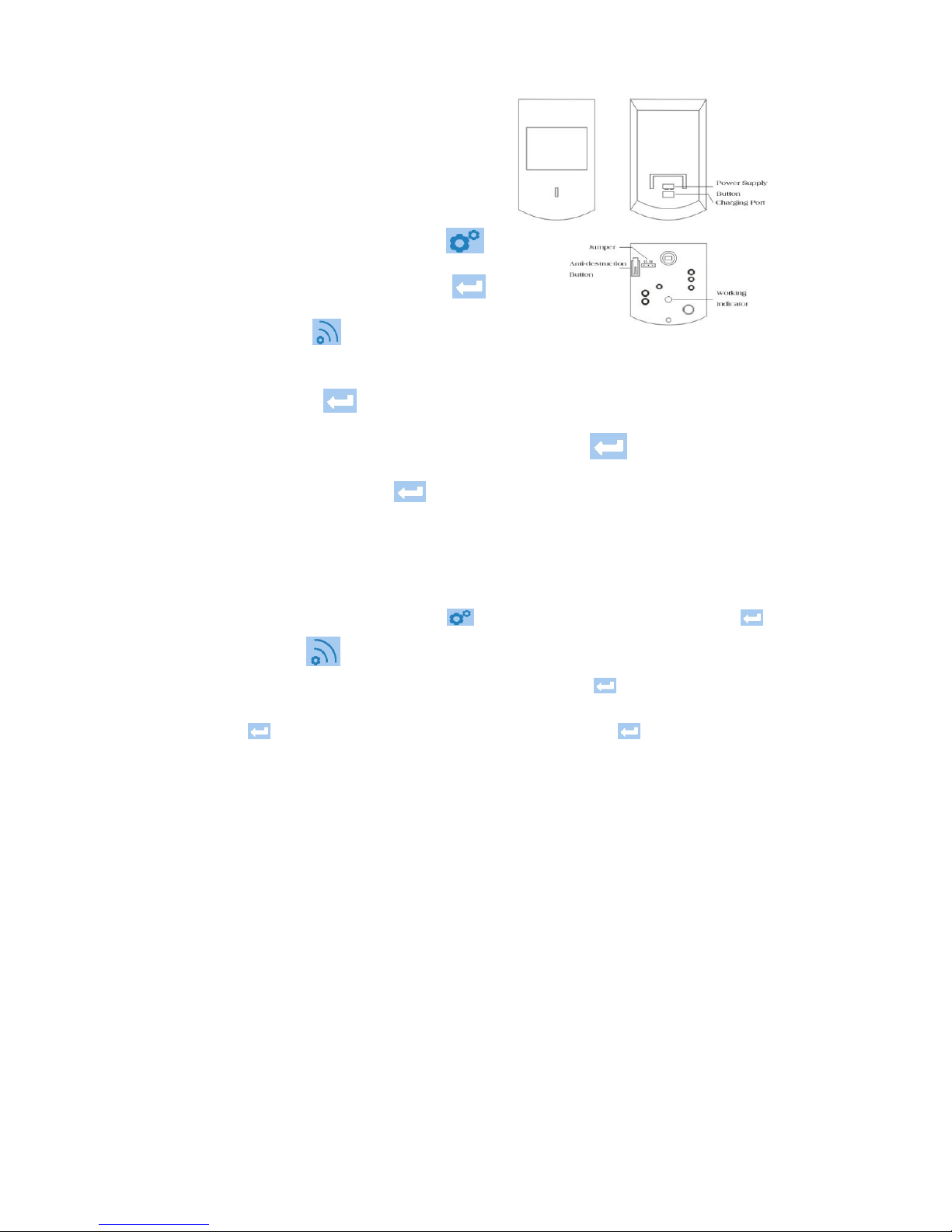
How to learn\delete wireless intelligent door sensor
into\from alarm system
1. How to learn wireless intelligent door sensor into
alarm system:
In standby screen, press Menu Button +
Enter program code xxxx + ENT Button +
Program Sensor + Click Zone Code and
enter YY <Zone Code is the code of target zone, where the wireless intelligent door sensor will
stay> + ENT Button + Click Group Code to enter X <Group Code is the code of target group,
where the wireless intelligent door sensor will stay> + ENT Button + Click Activate Sensor in
item You want to + ENT Button to confirm. Now separate the main part and magnetic part,
put them together and repeat this progress 2~3 times, if it displays Success on screen, it means the
learning operation is successful; if it displays Failed, it means your operation isn’t successful, you
need repeat the learning progress;
2. How to delete wireless intelligent door sensor from alarm system:
In standby screen, press Menu Button + Enter program code xxxx + ENT Button +
Program Sensor + Click Zone Code and enter YY <Zone Code is the code of target zone,
where the wireless intelligent door sensor stays>+ ENT Button + Click Group to enter X
<Group Code is the code of target group, where the wireless intelligent door sensor stays> + ENT
Button + Click Delete Sensor in item You want to + ENT Button to confirm. Usually the
deletion operation is successful;
3. YY stands for Zone Code, 2 digits, from 11 to 20; X stands for Group Code, 1 digit, includes 0, 1, 2,
4. Each time only 1pc wireless intelligent door sensor can be learned\deleted into\from alarm system,
each zone supports maximum 4pcs wireless intelligent door sensors;
5. Each group supports only 1pc wireless intelligent door sensor, the first learned wireless sensor will
be covered if the second wireless sensor is learned into same group.
Wireless Intelligent Wide Angle PIR Sensor
Features
1. Mainly detect indoor space, generally set in 2ndDefense Line;
2. When body enters into the detected area, the PIR sensor will send a signal to the alarm host, then
the host will give alarm sound;
3. Power supply type is optional, with disposable battery type, or with rechargeable lithium battery
type;
Page 16
Specifications
1. Power supply: disposable battery/rechargeable lithium battery 3.7v800mAH
2. Emitting distance: ≥100m (in open area)
3. Service life of disposable battery ≤1 year, of lithium battery ≤3 years
4. Detecting distance: 110°, 10m*10m
5. Wireless frequency: 433MHz or 868MHz
6. Static current: 50uA working current: 15mA
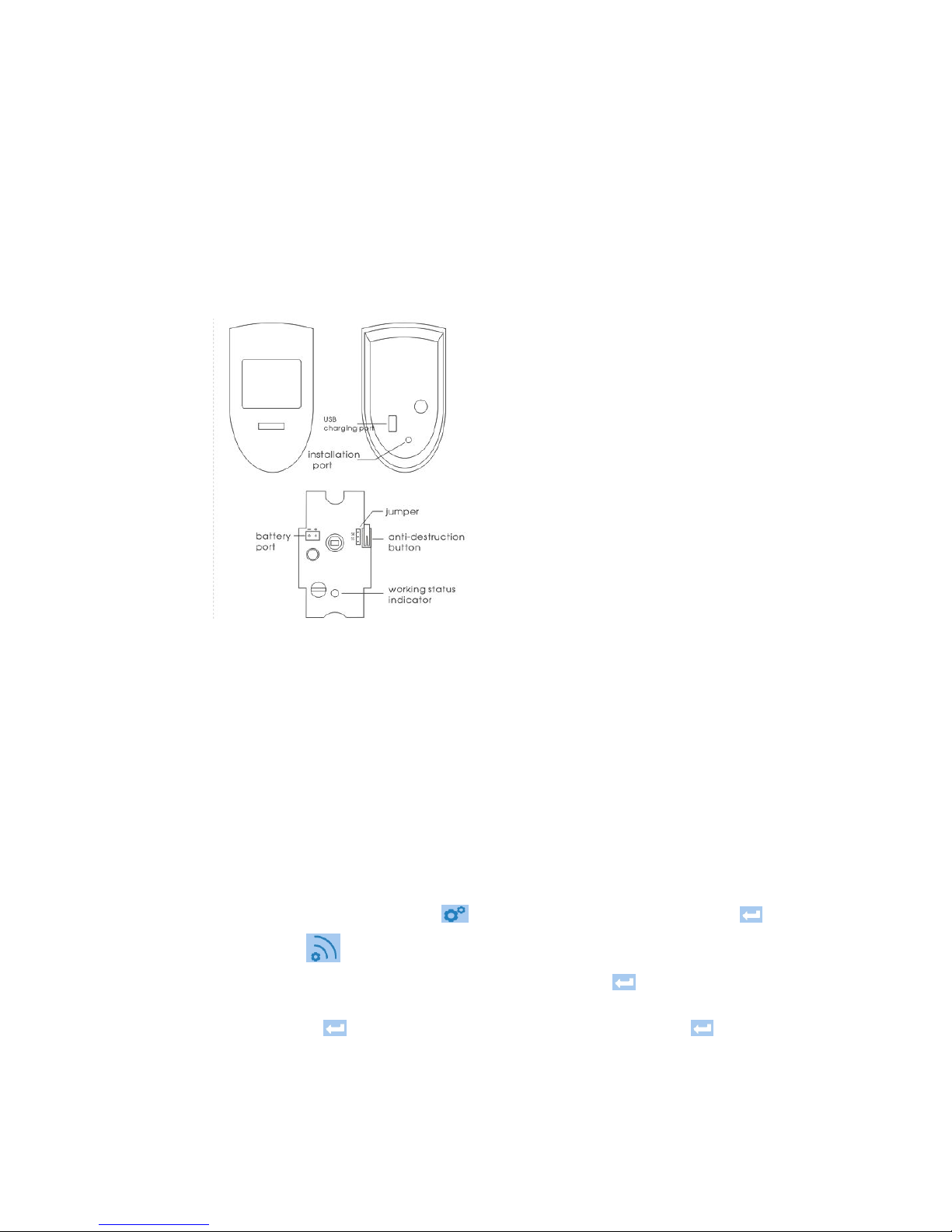
Installation and Usage
1. Fix the bracket onto the wall surface or wall
corner at a height of 2m~2.4m above the ground;
2. Open the sensor back cover to check the battery connection, adjust jumper line (short circuit “5S”:
The sensor will detect once every 5 seconds; short circuit “5MIN”: The sensor will detect once every
5 minutes);
3. Suggestion: short circuit “5S” for testing and “5MIN” for normal use;
4. Fix the sensor onto the bracket;
5. Adjust the sensor to a proper angle and then slide the power switch on the side to “ON”, and it will
enter into the normal working state after 30 seconds;
6. Upon the working light flashes frequently in green, please replace/recharge the batteries.
图片要换成英文的
How to learn\delete wireless wide angle PIR sensor into\from alarm system
1. How to learn wireless wide angle PIR sensor into alarm system:
In standby screen, press Menu Button + Enter program code xxxx + ENT Button +
Program Sensor + Click Zone Code and enter YY <Zone Code is the code of target zone,
where the wireless wide angle PIR sensor will stay> + ENT Button + Click Group Code to
enter X <Group Code is the code of target group, where the wireless wide angle PIR sensor will
stay> + ENT Button + Click Activate Sensor in item You want to + ENT Button to confirm.
Now trigger wireless wide angle PIR sensor by waving your hands in front of Fresnel lens of PIR
sensors 2~3 times, if it displays Success on screen, it means the learning operation is successful; if
it displays Failed, it means your operation isn’t successful, you need repeat the learning progress;
Page 17
2. How to delete wireless wide angle PIR sensor from alarm system:
In standby screen, press Menu Button + Enter program code xxxx + ENT Button +
Program Sensor + Click Zone Code and enter YY <Zone Code is the code of target zone,
where the wireless wide angle PIR sensor stays>+ ENT Button + Click Group to enter X
<Group Code is the code of target group, where the wireless wide angle PIR sensor stays> + ENT
Button + Click Delete Sensor in item You want to + ENT Button to confirm. Usually the
deletion operation is successful;
3. YY stands for Zone Code, 2 digits, from 21 to 29; X stands for Group Code, 1 digit, includes 0, 1, 2,
3
4. Each time only 1pc wireless wide angle PIR sensor can be learned\deleted into\from alarm system,
each zone supports maximum 4pcs wireless wide angle PIR sensors;
5. Each group supports only 1pc wireless wide angle PIR sensor, the first learned wireless sensor will
be covered if the second wireless sensor is learned into same group.
Wireless Indoor Siren
Features
1. Works with alarm host, receives wireless alarm signals from alarm
host; spot alarm with sound and flash;
2. Usually for indoor use.
3. Power supply type is optional, with disposable battery type, or with
rechargeable lithium battery type;
4. Maximum alarm time 3 minutes;
Specifications
1. Power supply: 100VAC~240VAC+rechargeable lithium battery 3.7v800mAH or 100VAC~240VAC;
2. Receiving distance: ≥100 M(In open area);
3. Service life of lithium battery ≤3 years;
4. Static current: <15mA working current: <200mA;
5. Wireless frequency: 433MHz or 868MHz;
6. Charging time: ≤12H;
7. Product size: 105mm*65mm*35mm;
Installation and Usage
1. Plug the wireless indoor siren into suitable power socket;
2. Suggested installation height is about 1.8M from the ground;
How to learn\delete wireless indoor siren into\from alarm system
1. How to learn wireless indoor siren into alarm system:
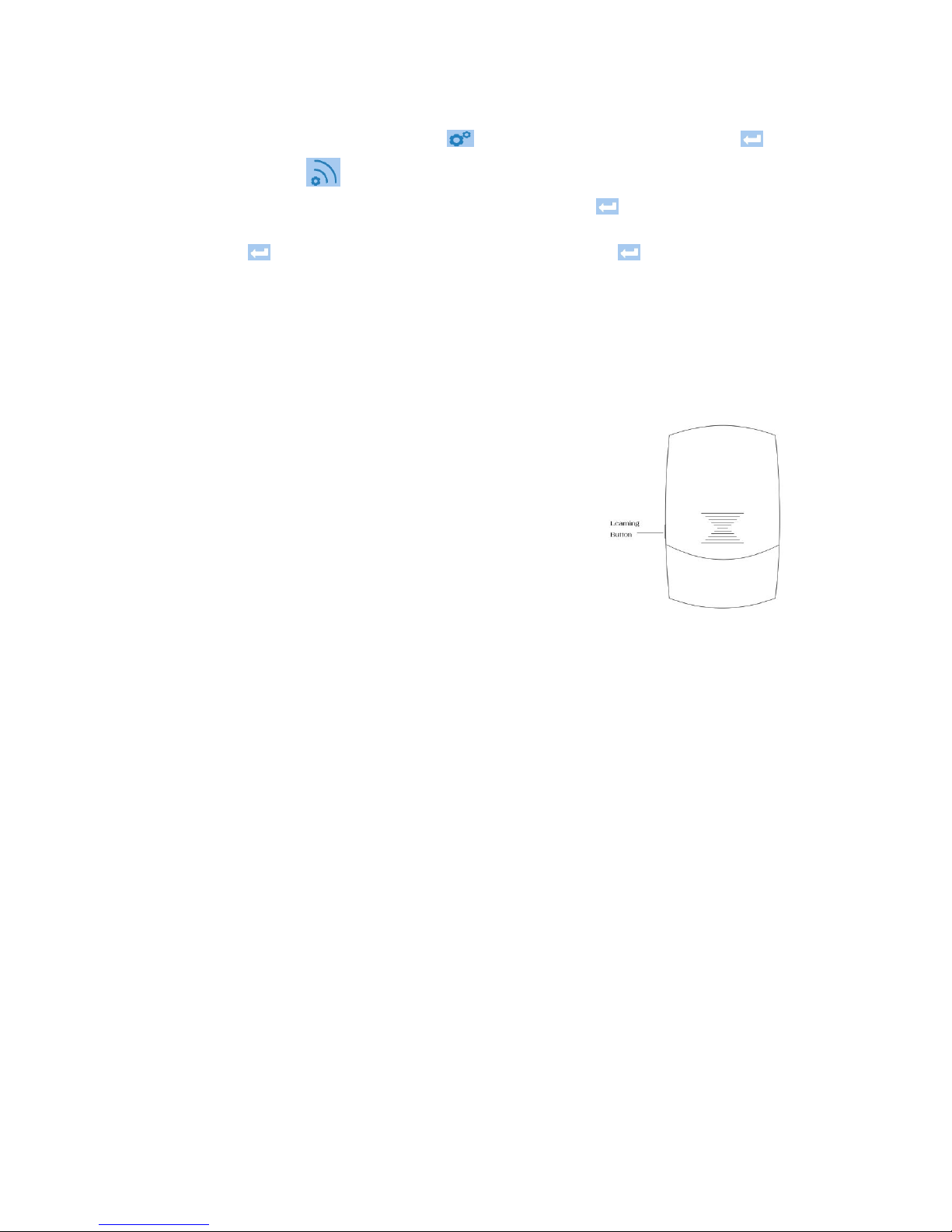
A. Connect the indoor siren to the power source, you will find the LED light on the siren will flash
4 times;
B. Press the learning button on side of the siren, now the LED light of the siren will be ON, it
means I am waiting;
Page 18

C. Press Emergency Alarm Button on the host screen more times to trigger the alarm host and
make host send signal.
D. If LED light on indoor siren flashes 5 times then goes off, it means learning operation is
successful; Otherwise, you need repeat the progress;
2. How to delete wireless indoor siren from alarm system:
A. Connect the indoor siren with the power,
B. Keep pressing the “Learning button ”on side of siren for 5 seconds and release;
C. If LED light on siren flashes 1 time and then goes off, it means the deletion is successful;
3. Each time only 1pc wireless indoor siren can be learned into alarm system. One siren can be
learned into max 10 wireless alarm hosts, but one wireless alarm host can hold as many as wireless
indoor sirens;
4. If you want to confirm whether this siren has been learned into alarm system, just press the
Emergency Button on the panel. If now the indoor siren alarms, it means they are paired; if not, it means
learning operation was failed;
How to add or delete other wireless sensors
NOTE:
1. All operation should be started in standby screen
2. Here is an operation sequence of adding sensor: Setting stage: make corresponding setting in alarm
host→Trigger-learning stage: trigger sensor to send wireless signal to alarm host→Confirmation stage:
alarm host receives signal, learning operation is successful;
Sensor Type How to add sensor How to delete sensor
Wireless wide
angle PIR sensor
1. Operation is same to learning
operation of wireless intelligent wide
angle PIR sensor;
2. Zone code is optional from 21~29
1. Operation is same to deleting
operation of wireless intelligent wide
angle PIR sensor;
2. Zone code is optional from 21~29
wireless door
sensor
1. Operation is same to learning
operation of wireless intelligent door
sensor;
2. Zone code is optional from 11~20
1. Operation is same to deleting
operation of wireless intelligent door
sensor;
2. Zone code is optional from 11~20
Wireless
intelligent control
door sensor
1. Operation is same to deleting
operation of wireless door sensor;
2. Zone code is optional from 11~20
1. Operation is same to deleting
operation of wireless door sensor;
2. Zone code is optional from 11~20
Wireless gas
detector
1. Operation is same to learning
operation of wireless wide angle PIR
sensor;
2. In trigger-learning stage, trigger
gas sensor by releasing gas close to
1. Operation is same to deleting
operation of wireless wide angle PIR
sensor;
2. Zone code is optional from 02~10
Page 19
it, to make gas sensor send wireless
signal to alarm system;
3. Zone code is optional from 02~10
Wireless smoke
detector
1. Operation is same to learning
operation of wireless wide angle PIR
sensor;
2. In trigger-learning stage, trigger
smoke sensor by pressing button on
side of sensor more times, to make
gas sensor send wireless signal to
alarm system;
2. Zone code is optional from 02~10
1. Operation is same to deleting
operation of wireless wide angle PIR
sensor;
2. Zone code is optional from 02~10
wireless outdoor
siren
Operation is the same to learning
operation of wireless indoor siren;
Operation is the same to deleting
operation of wireless indoor siren;
Wireless panic
button
1. Same to the learning operation of
wireless wide angle PIR sensor;
2. In trigger-learning stage, trigger
wireless panic button by pressing
button on sensor more times
3. Zone code is optional from 02~10
Operation is the same to deleting
operation of wireless indoor siren;
Wireless keypad
1. Prepare wireless keypad into
learning status;
2. Trigger wireless keypad more
times by press Siren button on
screen;
Refer to user manual of wireless keypad
V. PROBLEMS AND SOLUTIONS
Symptom of problems Possible cause Solution
The alarm host can’t
fully record
Did not keep pressing the
record button all the time
while recording
Keep pressing the record button all the
time while recording is going, and finish
recording in 10 seconds
Repeatedly receive
alarm call
Fail to follow the operation
instruction about alarm call
Follow the operation instruction after call is
picked up and recorded message is over:
1. Input digit “8” to enter into 20s
monitoring status;
2. Input symbol “#” to repeat the recorded
message;
Page 20

3. Input symbol “*” to stop alarm phone call
finally from the host, the host won’t call
your phone number anymore;
4. Hang off the alarm call, the host will dial
next group No.
Can’t receive alarm
SMS or can’t receive
SMS reply after made
arm or disarm operation
by SMS
1. SIM card is not inserted
properly;
2. GSM signal is not good
enough;
3. The SIM card is full with
SMS;
1. Adjust SIM card installation properly
2. Adjust alarm host’s installation position,
or use optional extension antenna to reach
better signal till the signal status is “OK”;
3. Delete the SMS in the SIM card
manually if the SIM card is used for the first
time; In future use, the SMS deletion will be
automatically;
The host does not
alarm after the detector
is triggered in arm state
1. Caused by arm mode
(Armed Away and Armed
Home);
2. System is in delay status
1. In “Arm Away” mode: system will alarm
when any sensor is triggered;
2. In “Arm Home” mode: system will alarm
when any sensor in 1stDefense Zone is
triggered, system won’t alarm if any sensor
in 2ndDefense Zone is triggered;
3. Program to adjust the time for Entry
Delay or Exit Delay
The PIR sensor doesn’t
work
1. The disposable battery or
lithium battery is
disconnected;
2. The battery died;
3. The PIR sensor is in
self-check progress;
4. The PIR sensor was not
learned into the alarm
system;
5. The power supply switch
of lithium battery type PIR
sensor stays at “OFF”
position;
1. Open the back cover, check the
installation position of battery, adjust its
connection;
2. Replace the exhausted battery with a
new one;
3. Wait for 30s when the self-check
progress is finished;
4. Relearn the PIR sensor into the alarm
host;
5. Switch the button to ON position;
Meaning of jumper position:
“5S”: detect once every 5 seconds;
“5MIN”: detect once every 5 minutes;
The detecting distance
of PIR sensor gets
shorter
The ambient temperature in
the detecting area is too
high, it will affect the
detection distance;
1. Test PIR sensor in a normal temperature
circumstance;
2. If the PIR sensor is in higher or unstable
temperature condition, the detection
distance gets shorter can’t be avoided;
The host does not
alarm after newly added
wireless sensor is
triggered
The sensor was not learned
into the alarm host
successfully
Relearn the wireless sensor into the alarm
host
The LED light of PIR Battery is dying
Replace the battery with a new one, please
Page 21
VI. DAILY MAINTENANCE AND CARE
To make the alarm system work for a long time stably and to prolong his service life, it is recommended
that
Try to put the alarm host in the dry and well-ventilated places, suggested in a higher position to
avoid the children touch.
Do not put the host and wireless sensors in too cold、 too hot or dusty places, to prevent from
curtailing the service life of electric elements, and prevent the plastic shell from distorting and
accelerating to be aged.
Do not put the host in too exposed places to prevent from being found by intruders, we suggest you
to buy a wireless operation keypad to remote control the alarm host. Wireless operation keypad is
recommended to installed at the door, install the alarm host in a hidden place, like bedroom, avoid
being found and destroyed;
Regular testing is necessary for finding and resolving problems in advance.
Regularly check the battery status of alarm host and all wireless sensors is necessary. Replace the
batteries, which are to be run out, to ensure they are working normally.
sensor flashes
frequently in green
pay attention to the battery type
The door sensor’s
indicator flashes
frequently.
Battery is dying
Replace the battery with a new one, please
pay attention to the battery type
The distance of the
remote controller gets
shorter
Battery is dying
Replace the battery with a new one, please
pay attention to the battery type
 Loading...