

Page 1
Page 2
2
The
PlusDlite
v2015.1
Floppydisc and joystick Interface for the ZX Spectrum
Based on the MGT PLUS D from Miles Gordon Technology
Read this manual before using the PlusDlite interface!
Manufactured by Ben Versteeg
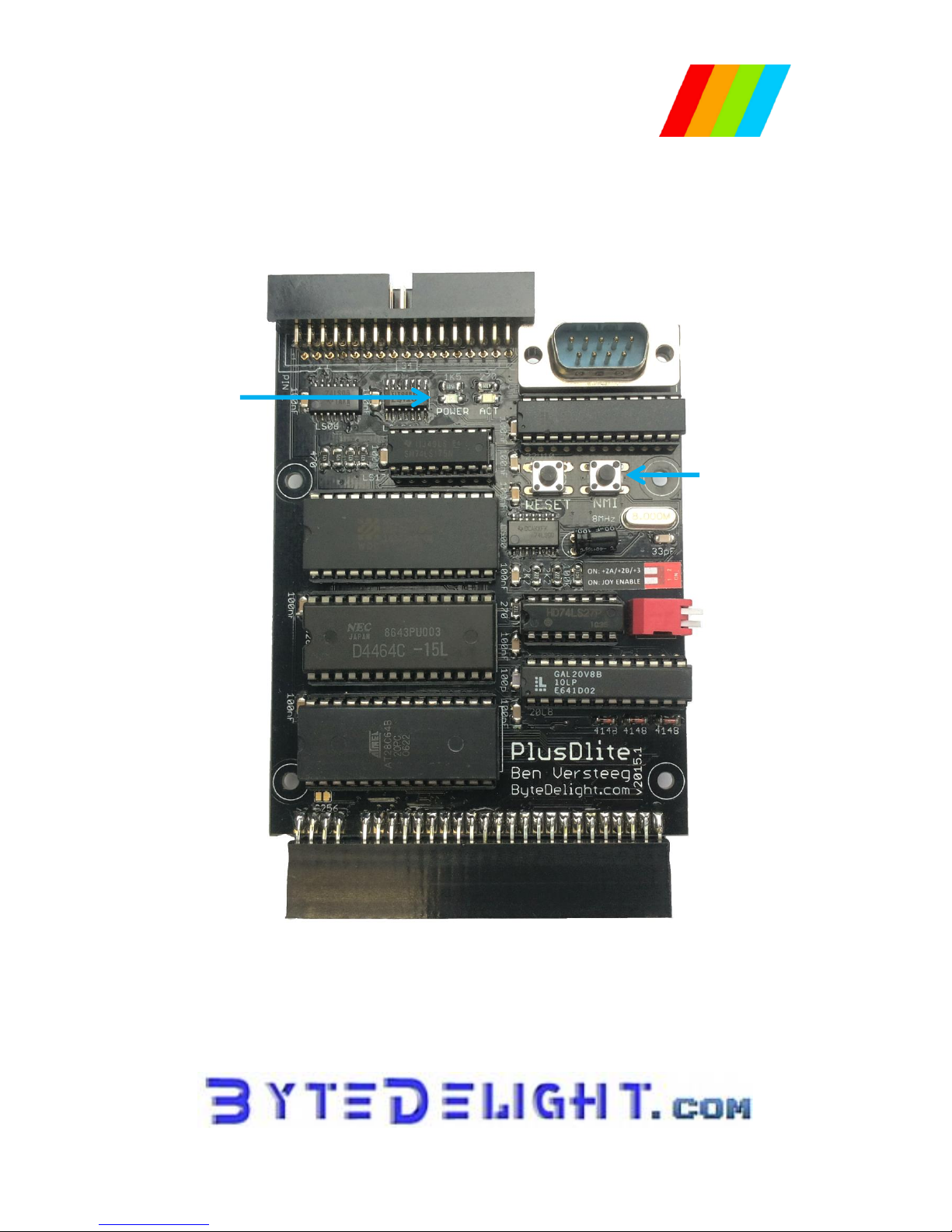
Floppydrive connector
Joystick connector
Configuration
DIP switches
To ZX Spectrum edge connector
Reset and NMI
buttons
Power and status
LEDs
Page 3

3
Compatibility
The PlusDlite is compatible with the ZX Spectrum 16K, 48K, Plus, 128K, +2, +2A, +2B and +3.
It is also compatible with the Multiface, but not with other (storage) interfaces with their own ROM.
PlusDlite Quick Reference Guide
To reference to a drive, use ‘D1’ and ‘D2’ or use ‘D*’ for the currently selected drive.
Filename wildcards * and ? can be used with SAVE...TO, ERASE, CAT.
RUN
Boots the system
CAT *
Displays catalogue
CAT *!
Displays shortened catalogue
SAVE D*"filename"
Saves file
VERIFY D*"filename"
Confirms save has been made
LOAD D*"filename"
Loads file (except Snapshot files)
LOAD Pn
Loads a program by number, incl. Snapshots
LOAD D*"filename" S
Loads 48K Snapshot file
LOAD D*"filename" K
Loads 128K Snapshot file
LOAD D*"filename"SCREEN$
Loads screen file
ERASE D*"file" TO "new file"
Renames a file
ERASE D*"filename"
Erases a file
SAVE D1"file" TO D2
Copies a file from drive1 to drive2
MOVE D1"fileA" TO D2"fileB"
Reads file; writes it to 2nd file
FORMAT D1
Formats disc in drive 1
FORMAT D1 TO 2
Formats drive 1; copies from 2 to 1
Advanced commands
LOAD @ D,T,S,Address
Reads a specified sector to memory
SAVE @ D,T,S,Address
Writes to specified sector to disc
CLS #
Clears screen & attributes area
SAVE D*"filename"X,Address
Saves 510 byte Execute file
LOAD D*"filename"X
Executes file in PLUSDLITE RAM
Streams
OPEN #n;D*"filename"IN
Opens an input file on stream n
OPEN #n;D*"filename"OUT
Opens an output file on stream n
MOVE D*"filename" TO #n
Reads file; outputs to stream n
CLEAR #
Clears all open streams & channels
CLOSE #*n
Closes file on stream n
CLOSE #*
Closes all open files
SNAPSHOT BUTTON
3 - Screen save
4 - 48K Snapshot save
5 - 128K Snapshot save
X - returns to program
Symbols Used in this Manual
The descriptions of the BASIC commands in this manual contain the following placeholders:
[1/2/*]
- one of ‘1’, ‘2’ or ‘*’; drive 1, 2 or current drive
[filename]
- the user chosen filename
Page 4

4
Configuring your PlusDlite
Switch 1 enables or disables the joystick interface.
Switch 2 selects whether or not using a ZX Spectrum +2A, +2B or +3.
Connecting your PlusDlite
WARNING: power off your ZX Spectrum before connecting or disconnecting any
peripherals, including the PlusDlite!
Compatible Disc Drives
The PlusDlite will work with any floppy disc drive which is configured as the Shugart standard.
PC floppydrives can be used; please check ByteDelight.com/PlusDlite for more information.
Dual Floppydrive sets are available at ByteDelight.com.
Powering on your system with PlusDlite
Power your floppy disc drives first, and power the ZX Spectrum secondly.
Because of different power supply specifications, there is a chance that the ZX Spectrum with
PlusDlite will not boot up correctly the first attempt.
When this happens, power off the ZX Spectrum only, wait for 10 seconds and power it on again.
G+DOS
G+DOS stands for the Gordon Disc Operating System for the PlusDlite.
The G+DOS system is a combination of ROM and system file on disc.
The system file is named ‘+SYSTEM.CDE’.
The maximum number of files per disc with G+DOS is 80.
Filenames can be up to ten characters long, in upper case or lower case characters, or a mixture.
Booting the G+DOS System
After powering on your ZX Spectrum with PlusDlite, the normal Spectrum title screen will appear,
and the LEDs on the PlusDlite and on disc drive 1 will light up.
Insert a floppy disc with the PlusDlite system file in disc drive 1.
Type RUN, then ENTER.
The PlusDlite now searches for the system file on the floppy disc.
During this process the PlusDlite led will temporarily go out (the led always goes out while the
PlusDlite is executing a command).
When the System is loaded, the screen will display:
“Miles Gordon Technology G+DOSxx” where ‘xx’ represents the system file version.
If there is no ‘autoload’ file on the floppy disc, this message is shown:
O.K. G+DOS, 0:1
You will need to boot the G+DOS system it each time your power up your system.
After the booting process is ready, you can use the PlusDlite commands.
Page 5

5
Disc Drive Specifiers
The PlusDlite’s BASIC commands are followed by a disc drive Specifier: a code to let the computer
know that the instructions are directed toward the disc drive.
The following options are available:
D1 or d1 = a command for drive 1
D2 or d2 = a command for drive 2
D* or d* = a command for the last drive in use
Upper or lower case
By typing an upper case 'D' rather than a lower case 'd' when saving a file, the abbreviated disc
catalogue will be displayed automatically when the save is complete or after erasing or renaming a
file.
The Catalogue
Normal catalogue
CAT [1/2/*]
Example:
CAT 1
Abbreviated catalogue
CAT [1/2/*]!
Displays an abbreviated catalogue.
This will show the PlusDlite disc catalogue, a list of the files on the disc with various comments and
the amount of free space on the disc in kilobytes.
Program numbers
The catalogue shows the program number in the first column on the left; files are not shown in
alphabetical order.
Whenever you save a file, the PlusDlite will give it the first available program number. This program
number will stay the same until the file is erased.
File size
The catalogue also shows the number of disc sectors used in the third column. Each sector holds 512
bytes (= 1/2 kilobyte), so to find out the number of kilobytes used for each file, divide the number in
the third column by 2.
File types
The catalogue shows the file type in the fourth column, one of:
BAS = BASIC Program
CDE = Code File
SNP 48K = 48K Snapshot File
SNP128K = 128K Snapshot File
SCREEN$ = Screen File
M/DRIVE = Microdrive Type File
SPECIAL = Special File
D.ARRAY = Numeric Data Array
$.ARRAY = Character Array
OPENTYPE = File created by OPEN # statement
EXECUTE = Execute File
Other program info
The right-hand column of the catalogue shows either:
- the start address and length of a CODE file
- or for a BASIC file, the line at which the program autoruns
Free space
The amount of free space left on the disc is displayed in kilobytes at the end of the catalogue.
Page 6

6
Loading a File
Normal
LOAD [d/D][1/2/*]"[filename]"
Example:
LOAD D1"coolgame"
Abbreviated syntax
LOAD [p/P][program number]
Example:
LOAD p1
The filename when loading a program is case-insensitive.
Whether or not the saved program has upper or lowercase does not matter when loading.
When the program does not autorun, the ‘O.K. G+DOS, 0:1’ message should appear when the
program has been loaded.
To load Snapshot files, you need to add ‘S’ or ‘K’ after the above syntax!
With the abbreviated syntax you don't need to include the S, K or SCREEN$ identifiers to load
snapshot files.
The abbreviated syntax also makes it much easier to load code files.
MERGE and VERIFY can also be used with the program number in this way - but ERASE cannot.
Wild-Cards
Wild-cards in a file name allow you to CATalogue, copy (using SAVE...TO) or ERASE a group of similar
files in a single operation.
Example: when you want to earse a series of files called:
"numbers1", "numbers2", "numbers3" and "numbers4", you can enter:
ERASE D1 "n*"
You could also enter:
ERASE D1 "??mb*"
You would then erase all the files which have "mb" as their third and fourth letters.
Using ‘?’ and ‘*’ is also possible with the SAVE...TO and CAT commands. Thus if you wanted to copy
all the files on disc 1 to disc 2, you could enter:
SAVE D1 "*" TO D2
If you want for example to copy all files starting with "numbers" to drive 2 and also give them a new
file-name, you could enter:
SAVE D1 "numbers*" TO D2 "figures*"
Note that if you are using wild-cards, the new file name must have the same number of characters as
the first - in this case eight.
Page 7

7
Saving a File
SAVE [d/D][1/2/*]"[filename]"
Example:
SAVE D1"coolgame"
When a program with the same name already exists, the PlusDlite asks you whether you wish to
overwrite the existing file.
You can then press Y (= Yes) or N (= No).
Don't use the characters ? or * in your file names when saving, as this causes problems with wildcard
support.
Saving an autorun file
SAVE D1"[filename]" LINE [line number]
When a program is saved this way, it will run at line [line number] automatically when loading it.
Creating an autoload file
An autoload file is one which loads as soon as you "BOOT" the operating system. You are allowed one
autoload file per disc.
The autoload file must be named "Autoload" (case insensitive).
Verifying a File
VERIFY [d/D][1/2/*]"[filename]"
Example:
VERIFY D1"coolgame"
This performs a further check to ensure that the program has been correctly saved, but will only
work directly after saving a program, when the program is still in memory.
Renaming a File
ERASE [d/D][1/2/*]"[old filename]" TO "[new filename]"
Example:
ERASE D1"Squares" TO "Example 1"
Erasing a File
ERASE [d/D][1/2/*]"[filename]"
Example:
ERASE D1"Example 1"
Interface 1 compatibility
Unlike Interface 1, the PlusDlite returns an error message if you try to erase a non-existent file. When
using programs originally written for Microdrive, you may sometimes need to delete ERASE
commands in the listing to avoid the error message when the program is running.
Page 8

8
Copying a File
With the same name
SAVE [d/D][1/2/*]"[old filename]" TO [d/D][1/2/*]
Example:
SAVE D1"Example 1" TO D2
With a new name
SAVE [d/D][1/2/*]"[old filename]" TO [d/D][1/2/*]"[new filename]"
Example:
SAVE D1"Example 1" TO D2"Newcopy"
One drive copying
When the target drive is the same as the source drive, you are prompted to "Insert TARGET disc Press SPACE". After copying you
are told "Insert SOURCE disc - Press SPACE", mainly to see if there are any other files to be copied
(due to wildcard support).
Automatic reset
When copying is complete, the Spectrum automatically resets.
Unsupported file types
The SAVE...TO command will NOT copy three file types: snapshots, files created by the OPEN #
statement and Microdrive Type files (created by some machine code programs written for
microdrives).
Formatting New Discs
FORMAT [d/D][1/2/*]
Example:
FORMAT D1
Before a floppy disc can be used for the first time with the PlusDlite, it must be formatted. You can
also format a previously used disc; the effect will be to wipe the disc clean of information.
Using HD floppy discs
Modern floppy disc drives are HD (high density) drives.
For example Ben Versteeg’s dual floppy sets use HD drives only.
These HD drives do support DD (double density) formatting supported by the PlusDlite, but only
when the DD type floppy discs are used.
All floppy discs have a hole for write protection, but HD floppy discs have an extra hole to let the
floppy disc drive know a HD floppy disc is inserted. To still let the floppy disc drive act as DD drive
with these floppy discs, cover the HD hole with a non-transparent tape or sticker.
Creating a bootable system disc
After formatting a new disc, it's a good idea to copy the PlusDlite system file onto it.
You can copy the system to a new disc by entering:
SAVE D[1/2/*] "+SYSTEM" CODE 8192,6656
Page 9

9
Interface 1 Syntax Compatibility
Alternatively, the PlusDlite also understands the Interface 1 syntax. For example, you can load a file
by entering:
LOAD *"m";1;"file-name"
This way most programs written for the Microdrive will be able to run without alteration on the
PlusDlite's disc system.
One small change may be required: if a Microdrive program uses a “CLOSE #n” statement, you will
have to modify this to:
“CLOSE #*n”
We are obliged to add the * to the syntax in order to correct a small bug in the Spectrum's ROM.
The PlusDlite’s Reset Button
For those ZX Spectrum models without a reset button, the PlusDlite has an onboard reset button.
When you press the reset button, everything stored in the ZX Spectrum's RAM will be lost as usual,
but the PlusDlite still retains the operating system in its own memory.
This way you don't need to reload the PlusDlite's system from the system disc after resetting.
Sector by Sector Copying – Two Drives
FORMAT D1 TO 2
or
FORMAT D2 TO 1
The first command formats the disc in drive 1 and copies the contents of the disc in drive 2 to the
disc in drive 1.
The FORMAT...TO command will give you a disc which is identical in every respect to the one which
has been copied. This command should only be used on a TWO DRIVE system.
Reading and Writing to a Sector
LOAD @D,T,S,Address / SAVE @D,T,S,Address
Example:
LOAD @1,4,1,30000
These commands are used for reading (or writing) a specified sector on the disc, where:
- D = the drive number (type either 1 or 2 - not the D)
- T = the track number from 0-79 or 128-207 for the second side
- S = the sector number from 1-10
- Address = 512 byte area where the contents is stored.
Clear screen and reset attributes
CLS #
This command clears the screen and attribute area, and resets BORDER, PAPER, INVERSE, BRIGHT,
OVER and FLASH to the normal Spectrum start-up values.
Page 10

10
The Execute File
An execute file is a machine code file occupying up to one sector length of memory (510 bytes).
When loaded from disc it is executed (RANDOMIZE USR) in the PlusDlite RAM, not in the Spectrum
memory, hence giving a programmer the ability to execute utility routines - such as renumbering a
program - without affecting or using the Spectrum memory.
To save a sector length of memory as an execute file, enter:
SAVE D1"filename"X,Address
- X = the execute file identifier - just type X
- Address = the location in the Spectrum of the machine-code program, which has been assembled
to run at 15318 (3BD6 hex).
To load and run the execute file, enter:
LOAD D1 "filename" X or LOAD P[n].
After execution, control is returned to the Spectrum.
Streams and Channels
Open a stream
OPEN #S;D[1/2] "filename" [IN/OUT]
This command opens a file on the disc and attach a stream number to it, so that you can print out to
or input from that stream.
- S = Stream number - from 4 to 16 (type the number only)
- IN = When you specifically need an input or read file opened
- OUT = When you specifically need an output or write file opened
If you do not specify IN or OUT, it is an input file if the file-name is found in the catalogue, and an
output file if the file-name is not found.
Also available is Microdrive syntax: OPEN #S;"m";1;"filename"
Closing a stream
CLOSE #*S
This closes the file and stream opened in the previous command.
S = Stream number; if not supplied, then all current open streams will be closed. Note the addition of
the * to Microdrive syntax.
Moving a file
MOVE D[1/2]"filename" TO #S
Moves a file, one sector at a time, to either another file or a stream. This command reads the file and
outputs it to the specified stream.
S = the stream number, from 4 to 16.
MOVE D[1/2]"filename-1" TO D[1/2]"filename-2"
In this case MOVE copies the first file to the second file.
Clearing all open streams and channels
CLEAR #
This command clears all open streams and channels, but it does not CLOSE an output file.
Page 11

11
Snapshots
The snapshot feature allows to transfer virtually any piece of ZX Spectrum software (for example:
loaded from tape) to disc easily by means of the Snapshot Button.
But this is also useful if you are a games-player, to be able to:
- start a game at an advanced level instead of at the beginning;
- come back to a game on another occasion and start at exactly the point where you had to leave it
last time;
- keep a permanent record of your high scores.
You can create a Snapshot at any time and as often as you like.
Anything and everything held in the Spectrum's memory at that time is saved to the currently active
drive, shown by the indicator light on the disc drive.
When you press the Snapshot Button, you'll notice that your program will be frozen at its current
status, and you will see multi-coloured lines filling the borders on the screen.
You now have three Snapshot save options:
- Press key 3 to save only the current SCREEN.
- Press key 4 for a 48K PROGRAM to be saved to disc.
- Press key 5 for a 128K PROGRAM to be saved to disc. The procedure here is slightly different. The
save will commence but then the program will appear to be frozen again.
If the picture on your screen (the picture - not the border) has changed, press key 'Y' (= Yes): if it
has not, press key 'N'.
After each of these actions when the save is complete, the program will continue at the same point
from which you left it.
Snapshot filenames
Your Snapshot file has been automatically labelled "Snap A/B/C" etc. with the letter of the alphabet
dependent upon the file's position in the catalogue. Clearly, it would be difficult to remember the
precise contents of your snapshot file if this were the only name possible. So it’s wise to give your
Snapshot file an identifiable filename.
Save on the other drive
If you have loaded the program on drive 1, but wish to save your snapshot file to drive 2 - or vice
versa - press the CAPS SHIFT key on the Spectrum at the same time as pressing key 3, 4, or 5.
Exit snapshot function
If you hit the Snapshot Button accidentally, and wish to return immediately to your program, press
key X on the Spectrum.
Load a snapshot
LOAD D*"[filename]"S (for a 48K file)
LOAD D*"[filename]"K (for a 128K file)
LOAD D*"[filename]" SCREEN$ (for a screen file)
Without the S, K and SCREEN$ identifiers, the Snapshot files
will not load - unless you use the special abbreviated syntax.
Page 12
12
Error Reports
When you are using the PlusDlite, there are some additional error reports which refer specifically to
disc handling problems. These are some of the more important you may meet.
NONSENSE IN BASIC
This is a standard Spectrum error report, and if it appears as soon as you start trying to use the
PlusDlite, you have probably not
Loaded the PlusDlite system by performing the booting process, or you may have made a typing
error.
Nonsense in G+DOS
The PlusDlite can't understand the command; check the syntax.
FORMAT Data Lost
This means that the disc has been damaged or the file has been corrupted.
Remember floppy discs are sensitive to magnetic fields!
Copy any remaining files to another disc immediately.
Be careful using the same disc again.
SECTOR Error
This means that the information you've tried to save has been corrupted, but your disc has not been
damaged and doesn’t need to be reformatted. The numbers after the error message tell you which
track and which sector have been corrupted.
If the Sector Error or Format Data Lost messages appear regularly, you may have a problem with your
disc drive. The head may be dirty, or the drive may not be centring the discs correctly on insertion.
Disc Write PROTECTED
You cannot save, erase, or modify files on this disc until you uncover the security lock on the disc.
File NOT FOUND
You are trying to load, copy, verify, erase or rename a file which is not present on the disc. Make sure
that you have used the file identifier - S, K or SCREEN$ - if necessary.
Not enough SPACE on disc
The file you are trying to save is too large for the space remaining on the disc.
Directory FULL
The PlusDlite's directory can hold a maximum of 80 files. Either ERASE some files to create space or
insert another disc.
More information
There are numerous more articles written for the PlusD (and hence for the PlusDlite), in magazines
and on www.worldofspectrum.org, with lots of technical hints.
Document version 1.2 – june 2015
 Loading...