

Page 1
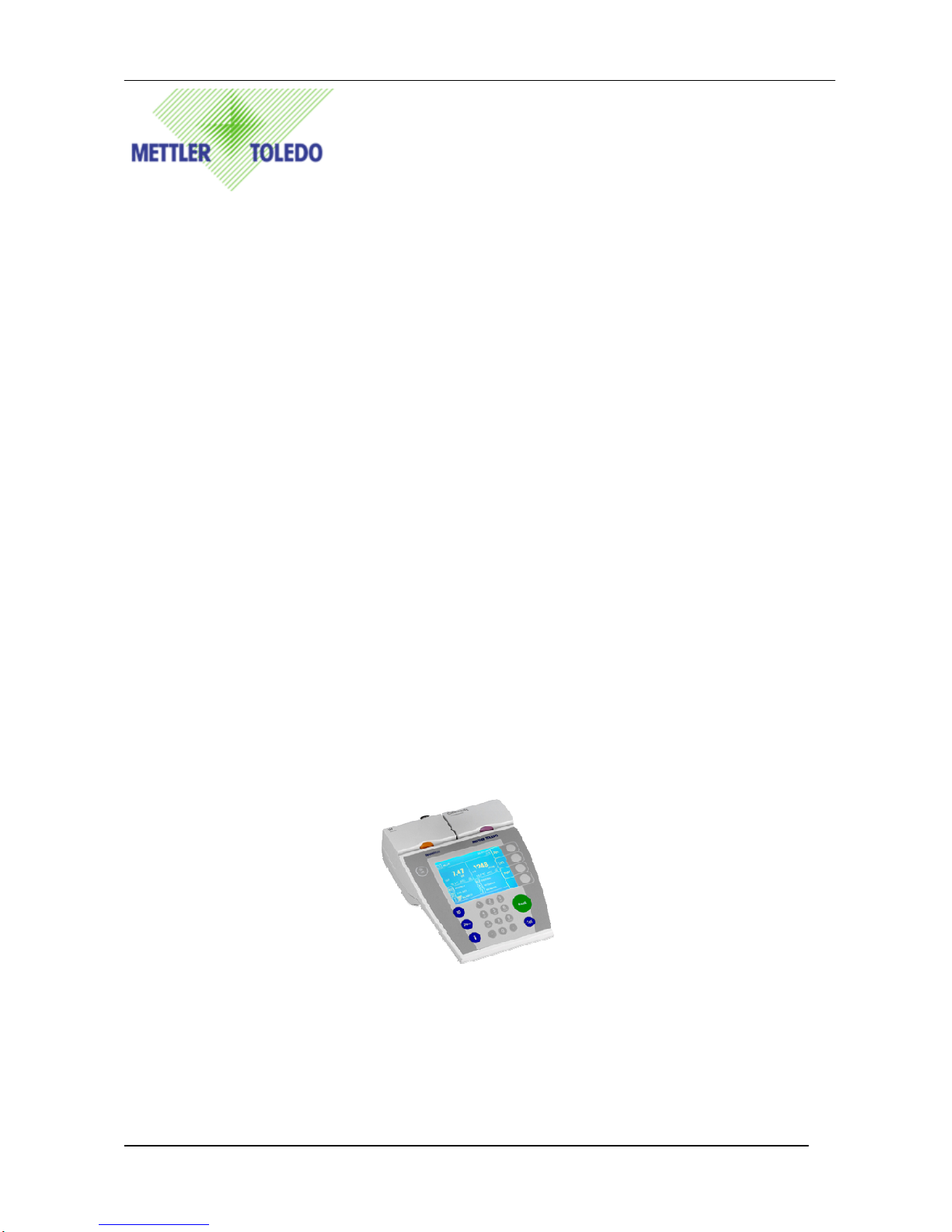
SevenMulti Command Set
1
SevenMulti
Command Set
Reference Manual
draft 0.98
METTLER TOLEDO
Page 2

SevenMulti Command Set
2
Content
0. Version History...................................................................................................3
1. Basic Information On Data Interchange With The SevenMulti..........................4
1.1 Command Formats......................................................................................4
1.2 Response Formats.......................................................................................4
1.3 Format Of The Response With Measurement Value..................................4
1.4 Format Of The Response Without Measurement Value.............................5
1.5 Error Message..............................................................................................6
1.6 Tips For The Programmer............................................................................6
2. Commands And Response.................................................................................7
2.1 Special Commands......................................................................................7
2.2 System Parameters Setting.......................................................................14
2.3 Dual Channel Commands..........................................................................18
2.4 Measurement And Calibration Commands................................................29
2.5 Set pH Parameters Commands.................................................................47
2.6 Set Rel.mV Parameters Commands..........................................................53
2.7 Set ION Parameters Commands...............................................................54
2.8 Set Conductivity Parameters Commands..................................................65
2.9 Data access commands.............................................................................75
draft 0.98
METTLER TOLEDO
Page 3
SevenMulti Command Set
3
0. Version History
Title: SevenMulti Command Set Reference Manual
Product: SevenMulti
Document Number: Version : 1.0
Writer: Pony Ma & Terry Wang Date Created: June 14, 2005
Last Revision Date: July 26, 2006
Comments:
Nr. Version Change Description User Date
1 0.96 Add Command Terry
2 0.97 Fully Check Terry
3 0.98 Add CM14, CM15, CM16 Terry
draft 0.98
METTLER TOLEDO
Page 4

SevenMulti Command Set
4
1. Basic Information on Data Interchange with the SevenMulti
Each command received by the SevenMulti via the data interface is acknowledged by a
response of SevenMulti to the transmitter.
Commands and responses are data strings with a fixed format, and will be described in
detail.
1.1 Command Formats
Commands sent to the SevenMulti comprise or more characters of Unicode character set.
Here, the following must be noted:
• Enter command only in uppercase.
• The possible parameters of the command must be separated from one another and
from the command name by a space.
• Each command must be closed by CRLF
The characters CRLF, which can be inputted using the Enter or Return key of most entry
keypads, are not listed in this description, but it is essential they be included for
communication with the SevenMulti.
Example
Load a method of “PH1” to right channel.
DC10 0 “PH1” The command terminator CRLF is not shown.
Comment
The quotation marks “ ” must be inserted in the entry.
1.2 Response Formats
All responses sent by the SevenMulti to the transmitter to acknowledge the received
command have one of the following formats:
• Response with measurement value
• Response without measurement value
• Error message
1.3 Format Of The Response With Measurement Value
A general description of the response with measurement value is the following.
draft 0.98
METTLER TOLEDO
Page 5
SevenMulti Command Set
5
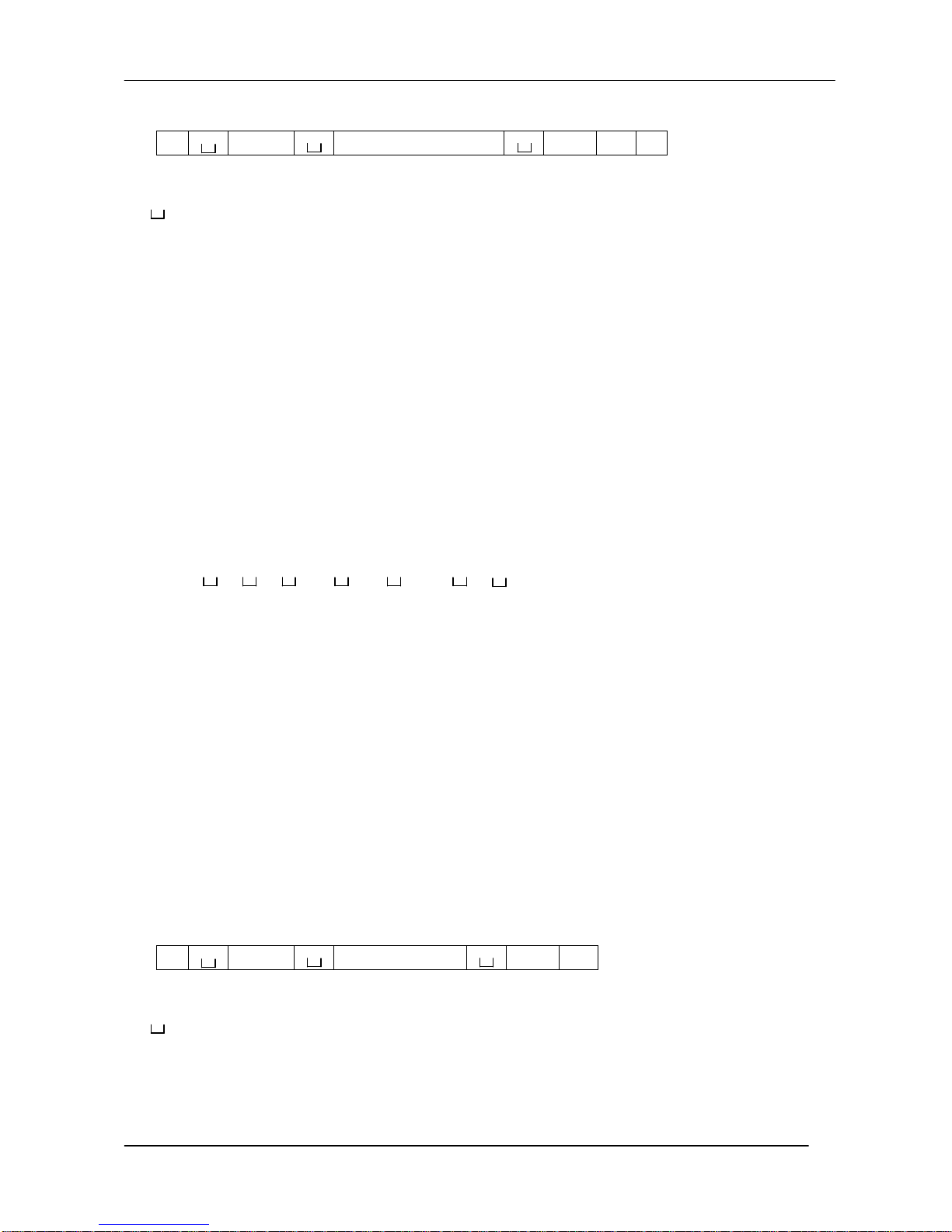
ID Status Measurement value Unit CR LF
ID: Response identification, 1-4 characters
: Space (0x20H)
Status: Status of the SevenMulti, see description of the commands and
responses.
Measurement value: shown as number with 10 decimal.
Unit: Measurement unit.
CR: Carriage return (0x0DH)
LF: Line feed (0x0AH)
Comment
CRLF will not be show in this description
Examples
Response with dynamic pH value of 7.02 and 25.2 ºC auto temperature compensation in
right channel.
MF06 A D 7.02 pH 25.2 0 0
MF06:
A: Command acknowledged
D: The measurement value is unstable
7.02: Measurement value
pH: Measurement Unit
25.2: Temperature value
0: Temperature Unit ºC
0: ATC(auto temperature compensation)
1.4 Format Of The Response Without Measurement Value
A general description of the response without measurement value is the following
ID Status Parameters CR LF
ID: Response identification, 1-4 characters
: Space(0x20H)
Status: Status of the SevenMulti, see description of the commands and
responses.
Parameters: Command-dependent response code.
draft 0.98
METTLER TOLEDO
Page 6

SevenMulti Command Set
6
CR: Carriage return(0x0DH)
LF: Line feed(0x0AH)
Comment
CRLF will not be show in this description
1.5 Error Message
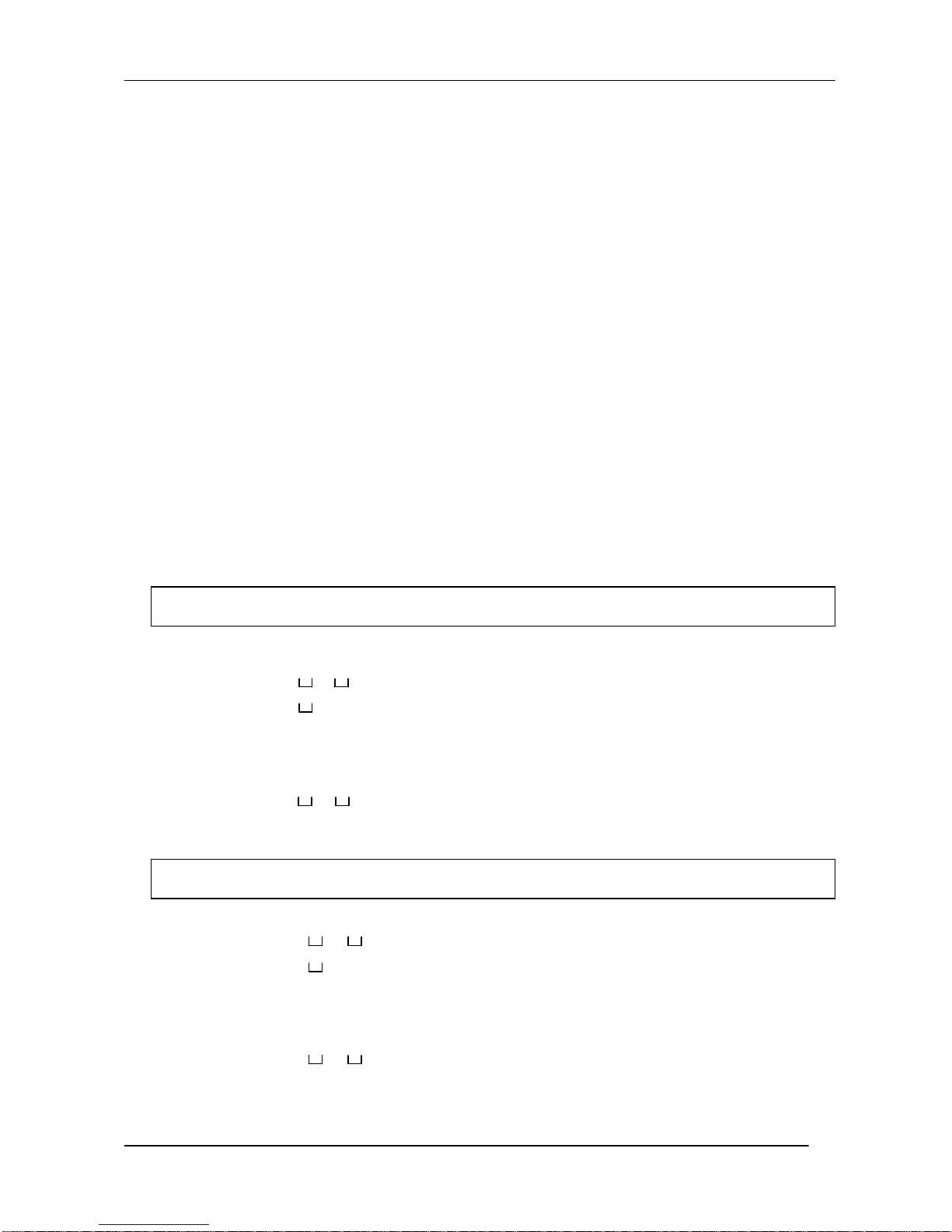
ID CR LF
There are three different error messages; the identification always comprises two
characters
ID Error identification
Possible error message are
ES Syntax error
SevenMulti has not recognized the received
command
ET Transmission error
The SevenMulti has received a “faulty” command,
e,g.owing to a parity error or interface break
EL Logical error
The SevenMulti cannot execute the received
command.
CR: Carriage return(0x0DH)
LF: Line feed(0x0AH)
Comment
CRLF will not be show in this description
1.6 Tips For The Programmer
Command and response
You can improve the dependability of your application software by having your program
evaluate the response of the SevenMulti to a command; The response is the
acknowledgement that the SevenMulti has received the command.
Reset
draft 0.98
METTLER TOLEDO
Page 7
SevenMulti Command Set
7
I1
Inquiry command set version
I2
Inquiry type of product
To be able to start from a determined state, when establishing the communication between
SevenMulti and system, you should send a reset command to the SevenMulti, When the
SevenMulti or system is switched on or off, faulty characters can be received or sent.
Quotation marks” ”
Quotation marks included in the command must always be entered.
2. Commands And Response
The SevenMulti receives commands from the system computer and acknowledge the
command with an appropriate response.
The following sections contain a detailed description of all commands of the commands set
in alphabetical order with associated responses. Commands and responses are closed
with CRLF, These termination characters are not shown in the following description, but they
must always be entered with commands or sent with responses.
2.1 Special Commands
Command I1 Inquiry of pH command set version
Responses I1 A “text” Command set version as “text”
I1 I Command understood, not executable at present
Examples
Command I1 Inquiry of pH command set version
Response I1 A “0.10” Command set version 0.10
Command I2 Inquiry type of product
Responses I2 A “text” Type of product as “text”
I2 I Command understood, not executable at present
Examples
Command I2 Inquiry type of product
Response I2 A “SevenMulti”
Type of product is SevenMulti
draft 0.98
METTLER TOLEDO
Page 8
SevenMulti Command Set
8
I3
Inquiry software version
I4
Inquiry instrument serial number
LRC
Remote control connection
IS
Inquiry current state of instrument
Command I3 Inquiry software version
Responses I3 A “text” software version as “text”
I3 I Command understood, not executable at present
Examples
Command I3 Inquiry software version
Response I3 A “V2.00B95”
Software version is 2.00 built95.
Command I4 Inquiry serial number of Instrument
Responses I4 A “text” Instrument serial number as “text”
I4 I Command understood, not executable at present
Examples
Command I4 Inquiry serial number of Instrument
Response I4 A “0123456”
serial number of Instrument is 0123456.
Command LRC 1 Request instrument to connect with remote control
LRC 0 Disconnect instrument with remote control
Responses LRC A Command is executed; instrument is connected with
remote control.
LRC L Wrong parameters
LRC I Command cannot be executed currently.
Examples
Command LRC 1 Request instrument to connect with remote control
Responses LRC A Command is executed; instrument is connected with
remote control.
Command IS Inquiry current state of instrument
Responses IS A x
x represents current state
draft 0.98
METTLER TOLEDO
Page 9
SevenMulti Command Set
9
2 = Measurement
3 = Instrument Login Password Input Screen
4 = Measurement Menu
5 = Calibration
7 = Calibration Menu
8 = i Menu
9 = ID Menu
10 = Data Menu
11 = Calibration result screen
12 = Electrode Test
13 = ION Incremental Techniques Screen
14 = Conductivity Determine Temperature
Correction Coefficient
15 = Rondolino Measurement
16 = Help Screen
18 = ISFET Offset Adjustment
IS I Command cannot be executed currently.
Examples
Command IS Inquiry current state of instrument
Responses IS A 2 The instrument is measuring the values
Command W x1 x2 Send Warning ID x2 to Labx
x1: 0 = Right channel
1 = Left channel
x2: Warning ID
1 = Measurement out of range
2 = Measurement database is full
3 = Calibration reminder out of time
4 = Temperature reading exceeds maximum
limitation
5 = Temperature reading below minimum
limitation
10 = pH reading exceeds maximum limitation
11 = pH reading below minimum limitation
15 = mV reading exceeds maximum
limitation
16 = mV reading below minimum limitation
draft 0.98
METTLER TOLEDO
Page 10

SevenMulti Command Set
10
20 = Rel.mV reading exceeds maximum
limitation
21 = Rel.mV reading below minimum
limitation
25 = mmol reading exceeds maximum
limitation
26 = mmol reading below minimum limitation
30 = mol reading exceeds maximum
limitation
31 = mmol reading below minimum limitation
35 = ppm reading exceeds maximum
limitation
36 = ppm reading below minimum limitation
40 = mg/l reading exceeds maximum
limitation
41 = mg/l reading below minimum limitation
45 = % reading exceeds maximum limitation
46 = % reading below minimum limitation
47 = Please calibrate electrode
55 = ISFET pH reading exceeds maximum
limitation
56 = ISFET pH reading below minimum
limitation
57 = Adjust ISFET offset first
65 = ISFET mV reading exceeds maximum
limitation
66 = ISFET mV reading below minimum
limitation
70 = ISFET rel.mV reading exceeds
maximum limitation
71 = ISFET rel.mV reading below minimum
limitation
75 = Conductivity reading exceeds maximum
limitation
76 = Conductivity reading below minimum
limitation
77 = Conductivity exceeds USP limit
78 = Conductivity exceeds EP limit
79 = Conductivity exceeds EP(Ultra pure
water) limit
80 = Temperature out of nLF correction
range
draft 0.98
METTLER TOLEDO
Page 11

11
85 = TDS reading exceeds maximum
limitation
86 = TDS reading below minimum limitation
90 = Salinity reading exceeds maximum
limitation
91 = Salinity reading below minimum
limitation
95 = Resitivity reading exceeds maximum
limitation
96 = Resitivity reading below minimum
limitation
135 = pH slope out of range
136 = pH offset out of range
137 = pH slope reading exceeds maximum
limitation
138 = pH slope reading below minimum
limitation
139 = pH offset reading exceeds maximum
limitation
140 = pH offset reading below minimum
limitation
145 = ISFET slope out of range
146 = ISFET offset out of range
147 = ISFET slope reading exceeds
maximum limitation
148 = ISFET slope reading below minimum
limitation
149 = ISFET offset reading exceeds
maximum limitation
150 = ISFET offset reading below minimum
limitation
155 = ION slope reading exceeds maximum
limitation
156 = ION slope reading below minimum
limitation
160 = Conductivity cell constant reading
exceeds maximum limitation
161 = Conductivity cell constant reading
below minimum limitation
Examples
Command W 0 1 Send right channel warning ID
“Measurement out of range”to Labx
SevenMulti Command Set
draft 0.98
METTLER TOLEDO
Page 12
SevenMulti Command Set
12
K
Key control
Set key control type
Command K x Control the key
x: 1 = When a key is pressed, execute the
corresponding function, but do not send.
2 = When a key is pressed, do not execute
the corresponding function and send it’s
key code.
3 = When a key is pressed, execute the
corresponding function and send it’s key
code.
4 = When a key is pressed, execute the
corresponding function and can also
receive key code to control the key
( K C x )
Responses K A Command is executed
K I Command cannot be executed currently.
K L Wrong parameters
Examples
Command K 3 When a key is pressed, execute the corresponding
function and sent it’s key code.
Responses K A Command is executed
Send key code
Command K x Send key code
x represents key code
x: 1 = Cal
2 = Data
3 = ID
4 = Read
5 = Software key 1
6 = Software key 2
7 = Software key 3
8 = Software key 4
9 = i
10 = 0
11 = 1
12 = 2
draft 0.98
METTLER TOLEDO
Page 13

13
13 = 3
14 = 4
15 = 5
16 = 6
17 = 7
18 = 8
19 = 9
20 = 21 = .
22 = On/Off
Key Control
Command K C x Use key code to control the key
x represents key code
x: 1 = Cal
2 = Data
3 = ID
4 = Read
5 = Software key 1
6 = Software key 2
7 = Software key 3
8 = Software key 4
9 = i
10 = 0
11 = 1
12 = 2
13 = 3
14 = 4
15 = 5
16 = 6
17 = 7
18 = 8
19 = 9
20 = 21 = .
22 = On/Off
Responses K A Command is executed
K I Command cannot be executed currently.
K L Wrong parameters
Examples
Command K 4 Execute the “Read” key function
SevenMulti Command Set
draft 0.98
METTLER TOLEDO
Page 14
SevenMulti Command Set
14
S01
Inquiry /Se
t language setting
S02
Inquiry/Set system time
Responses K A Command is executed
2.2 System Parameters Setting
These commands only available when measurement or calibration is stopped.
Inquiry language setting
Command S01 Inquiry language setting
Responses S01 A x
x: 0 = English
1 = Deutsch
2 = Français
3 = Español
4 = Italiano
Set language setting
Command S01 x Set language setting
Responses S01 A Language has been set.
S01 I Command cannot be executed currently.
S01 L Wrong parameters
Examples
Command S01 1 Set language setting to English
Responses S01 A Language has been set.
Inquiry system time
Command S02 Inquiry system time
Responses S02 A hh:mm hh:mm represents the system time in 24 hour
format
Set system time
Command S02 hh:mm Set system time
Responses S02 A system time has been set.
S02 I Command cannot be executed currently.
S02 L Wrong parameters
Examples
Command S02 14:35 Set system time to 14 and 35 o’clock
Responses S02 A system time has been set.
draft 0.98
METTLER TOLEDO
Page 15
SevenMulti Command Set
15
S03
Inquiry/Set system date in yyyy/mm/dd format
S04
Inquiry/Set date and time format in SevenMulti
Inquiry system date
Command S03 Inquiry system date
Responses S03 A yyyy-mm-dd
yyyy-mm-dd: represents the system date in
yyyy/mm/dd format
Set system date
Command S03 yyyy-mm-dd Set system date
Responses S03 A System date has been set.
S03 I Command cannot be executed currently.
S03 L Wrong parameters
Examples
Command S03 2006-01-23
Set system date to 23rd Jan 006
Responses S03 A System date has been set.
Inquiry system date and time format
Command S04 Inquiry date format setting
Responses S04 A x1 x2
System date format
x1: 0 = 24-hour format
1 = 12-hour format
x2: 0 = mm/dd/yyyy
1 = dd/mm/yyyy
Set system date and time format
Command S04 x1 x2
Set date and time format
Responses S04 A System date format has been set.
S04 I Command cannot be executed currently.
S04 L Wrong parameters
Examples
Command S04 1 0 Set system date to mm/dd/yyyy format
Set system time to 12 hour format
Responses S04 A System date format has been set.
draft 0.98
METTLER TOLEDO
Page 16
SevenMulti Command Set
16
S05
Inquiry/Set screen contrast
S06
Inquiry/Set time for screen saver
S07
Inquiry/Set Ins
trument ID
Inquiry screen contrast
Command S05 Inquiry screen contrast
Responses S05 x x represents the value of screen contrast
x = 0 -- 32
Set screen contrast
Command S05 x Set screen contrast
Responses S05 A Screen contrast has been set.
S05 I Command cannot be executed currently.
S05 L Wrong parameters
Examples
Command S05 12 Set screen contrast with the value 12
Responses S05 A Screen contrast has been set.
Inquiry screen saver
Command S06 Inquiry screen saver
Responses S06 x x represents the value of screen saver
x = 5 – 99 minutes
x = 0 Screen saver off
Set screen saver
Command S06 x Set time for screen saver
Responses S06 A Screen saver has been set.
S06 I Command cannot be executed currently.
S06 L Wrong parameters
Examples
Command S06 10 Set screen saver with the value 10 minutes
Responses S06 A Screen saver has been set.
Inquiry Instrument ID
Command S07 Inquiry Instrument ID
Responses S07 A “Text” “Text” represents the instrument ID
Set Instrument ID
draft 0.98
METTLER TOLEDO
Page 17
SevenMulti Command Set
17
S08
Inquiry/Set expansion unit ID
S09
Inquiry/Set user ID
Command S07 “Text” Set instrument ID
Responses S07 A system date has been set.
S07 I Command cannot be executed currently.
Examples
Command S07 “LabStation” Set instrument ID to “LabStation”
Responses S07 A Instrument ID has been set.
Inquiry expansion unit ID
Command S08 x Inquiry expansion unit ID
x: 0 = Right channel
1 = Left channel
Responses S08 A “Text” “Text” represents the expansion unit ID
Set expansion unit ID
Command S08 x “Text” Set expansion unit ID
Responses S08 A Expansion unit ID has been set.
S08 I Command cannot be executed currently.
Examples
Command S08 0 “pHLab2”
Set right channel expansion unit ID to “pHLab2”
Responses S08 A Right channel expansion unit ID has been set.
Inquiry user ID
Command S09 Inquiry user ID
Responses S09 A “Text” “Text” represents the user ID
Set user ID
Command S09 “Text” Set user ID
Responses S09 A User ID has been set.
S09 I Command cannot be executed currently.
Examples
Command S09 “Mike” Set user ID to “Mike”
Responses S09 A User ID has been set.
draft 0.98
METTLER TOLEDO
Page 18
SevenMulti Command Set
18
DC01
Inquiry/Switch channel
DC02
Inquiry mounted expansion unit type and SN
2.3 Dual Channel Commands
Inquiry current working channel
Command DC01 Inquiry current working channel
Responses DC01 A x x represents current working channel
x: 0 = Right channel
1 = Left channel
2 = Dual channel
Switch working channel
Command DC01 x x represents current working channel
Responses DC01 A Command is executed.
DC01 I Command cannot be executed currently.
DC01 L Wrong parameters.
Examples
Command DC01 1 Switch to left channel
Responses DC01 A Command is executed.
Command DC02 x Inquiry mounted expansion unit type and SN
x: 0 = Right channel
1 = Left channel
Responses DC02 A x “Text”
x represents expansion unit type
x: 0 = No expansion unit
1 = pH expansion unit
2 = ION expansion unit
3 = ISFET expansion unit
4 = Conductivity expansion unit
“Text” represents SN of expansion unit
Examples
Command DC02 1 Inquiry left channel expansion unit type and SN
Responses DC02 A 1 “301234”
Left channel is mounted a pH expansion unit with
SN 301234
draft 0.98
METTLER TOLEDO
Page 19
SevenMulti Command Set
19
DC03
Inquiry/Set endpoint format
DC04
Set display resolution
Inquiry endpoint format
Command DC03 x Inquiry endpoint format for channel x
x: 0 = Right channel
1 = Left channel
Responses DC03 A x1 x2
x1 represents endpoint format
1 = Auto endpoint
2 = Manually endpoint
3 = Timed endpoint
0 = Not available ( no expansion unit
mounted)
x2 represents endpoint time(5-3600s)
(Only display at the Timed endpoint)
Set endpoint format
Command DC03 x1 x2 x3
Set endpoint format for channel x1
x1: 0 = Right channel
1 = Left channel
x2: 1 = Auto endpoint
2 = Manually endpoint
3 = Timed endpoint
x3: Endpoint time(5-3600s)
(Only work at the Timed endpoint)
Responses DC03 A Command is executed
DC03 L Wrong parameters
DC03 I Command can not be executed currently.
Examples
Command DC03 0 1 Set right channel with auto endpoint
Responses DC03 A Command is executed
Command DC04 x1 x2 Set display resolution for channel x1
x1: 0 = Right channel
1 = Left channel
x2: 0 = 0 digits
1 = 1 digits
draft 0.98
METTLER TOLEDO
Page 20
SevenMulti Command Set
20
DC05
Inquiry/Set MTC
DC06
Inquiry/Set data transfer mode
2 = 2 digits
3 = 3 digits
Responses DC04 A Command is executed
DC04 L Wrong parameters
DC04 I Command can not be executed currently.
Examples
Command DC04 0 1 Set right channel 1 digit display
Responses DC04 A Command is executed
Inquiry MTC
Command DC05 x Inquiry MTC value for channel x
x: 0 = Right channel
1 = Left channel
Responses DC05 A x x represents the value of MTC
Set MTC
Command DC05 x1 x2 Set MTC value for channel x1
x1: 0 = Right channel
1 = Left channel
x2: MTC value
Responses DC05 A Command is executed
DC05 L Wrong parameters
DC05 I Command can not be executed currently.
Comment
The unit of temperature is always degree C.
Examples
Command DC05 0 25.6 Set right channel with MTC 25.6 ºC
Responses DC05 A Command is executed
Inquiry a data transfer mode
Command DC06 x Inquiry auto data transfer mode for channel x
x: 0 = Right channel
1 = Left channel
Responses DC06 A x x represents auto data transfer mode
x: 0 = Manual Data Transfer to Memory
draft 0.98
METTLER TOLEDO
Page 21
SevenMulti Command Set
21
DC07
Inquiry/Set sensor ID and sensor SN
1 = Auto Log to memory
2 = Auto Log to Interface
3 = Auto Log to Memory and Interface
Set auto data transfer mode
Command DC06 x1 x2 Set auto data transfer mode for channel x1
x1: 0 = Right channel
1 = Left channel
x2: 0 = Manual Data Transfer to Memory
1 = Auto Log to memory
2 = Auto Log to Interface
3 = Auto Log to Memory and Interface
Responses DC06 A Command is executed
DC06 L Wrong parameters
DC06 I Command can not be executed currently.
Examples
Command DC06 0 1 Set right channel with auto data log to memory
Responses DC06 A Command is executed
Inquiry sensor ID and SN
Command DC07 x Inquiry sensor ID and SN for channel x
x: 0 = Right channel
1 = Left channel
Responses DC07 B 1 “Text1”
DC07 B 2 “Text2”
DC07 A 3 x
“Text1” represents sensor ID
“Text2” represents sensor SN
x: Last calibration date
Set sensor ID and SN
Command DC07 x “Text1” “Text2” Set sensor ID and SN for channel x
Responses DC07 A Command is executed
DC07 L Wrong parameters
DC07 I Command can not be executed currently.
Examples
Command DC07 0 “Lab370” “235689”
Set right channel with auto data log to memory
draft 0.98
METTLER TOLEDO
Page 22
SevenMulti Command Set
22
DC08
Change mode
DC09
Save current settings as a method
Responses DC07 A Command is executed
Command DC08 x1 x2 Change mode for channel x1
x1: 0 = Right channel
1 = Left channel
x2: 1 = pH mode
2 = mV mode
3 = RelmV mode
4 = ION mode
5 = ISFET pH mode
6 = ISFET mV mode
7 = ISFET RelmV mode
8 = Conductivity mode
9 = TDS mode
10 = Sal mode
11 = Restivity mode
Responses DC08 A Command is executed
DC08 L Wrong parameters
DC08 I Command can not be executed currently.
Comment
The destination mode must corresponding to the mounted expansion unit
Examples
Command DC08 0 1 Set right channel to pH mode
Responses DC08 A Command is executed
Command DC09 x1 “Text”
Save current setting as a method for channel x1
x1: 0 = Right channel
1 = Left channel
“Text” represents method ID
Responses DC09 A Command is executed
DC09 L Wrong parameters
DC09 I Command cannot be executed currently.
draft 0.98
METTLER TOLEDO
Page 23
SevenMulti Command Set
23
DC10
Load a stored method from memory
DC11 Inquiry
current working method ID
Comment
This command is only available when measurement or calibration is stopped.
Examples
Command DC09 0 “pH”
Save right channel current settings as a Method
Responses DC09 A Command is executed
Command DC10 x1 “Text”
Load a method from memory for channel x1
x1: 0 = Right channel
1 = Left channel
“Text” represents method ID
(Note: Use “Default” to load default method)
Responses DC10 A Command is executed
DC10 L Wrong parameters
DC10 I Command cannot be executed currently.
Comment
This command is only available when measurement or calibration is stopped.
Examples
Command DC10 0 “mypH” Load “mypH” method from memory for right
channel
Responses DC10 A Command is executed
Inquiry current working method ID
Command DC11 x Inquiry sensor ID and SN for channel x
x: 0 = Right channel
1 = Left channel
Responses DC11 A “Text”
draft 0.98
METTLER TOLEDO
Page 24
SevenMulti Command Set
24
DC12
Inquiry/Set calibration mode
DC13
Inquiry/Set calibration reminder
“Text” represents method ID
Examples
Command DC11 0
Inquiry right channel method ID
Responses DC11 A “LABPH1” Command is executed
Inquiry pH calibration mode
Command DC12 x Inquiry calibration mode for channel x
Responses DC12 A x
x represents calibration mode
x: 0 = Linear
1 = segment
DC12 I Command cannot be executed currently.
Set pH calibration mode
Command DC12 x1 x2 Set pH calibration mode
x1: 0 = Right channel
1 = Left channel
x2: 0 = Linear
1 = segment
Responses DC12 A Command is executed
DC12 L Wrong parameters
DC12 I Command can not be executed currently.
Examples
Command DC12 1 1 Set left channel calibration to linear mode
Responses DC12 A Command is executed
Inquiry pH calibration reminder
Command DC13 x Inquiry calibration reminder for channel x
Responses DC13 A x
x represents calibration reminder setting
x: 0 = calibration reminder off
1---1000hours
draft 0.98
METTLER TOLEDO
Page 25
SevenMulti Command Set
25
DC14
Inquiry/Set alarm limit
DC13 I Command cannot be executed currently.
Set pH calibration reminder
Command DC13 x1 x2
x1: 0 = Right channel
1 = Left channel
x2 represents calibration reminder setting
x2: 0 = calibration reminder off
1---1000hours
Responses DC13 A Command is executed
DC13 L Wrong parameters
DC13 I Command cannot be executed currently.
Examples
Command DC13 0 72 Set right channel calibration reminder to
72 hours
Responses DC13 A Command is executed
Inquiry alarm limit
Command DC14 x1 x2 Inquiry alarm limit for channel x1
x1: 0 = Right channel
1 = Left channel
x2: Measurement Mode
1 = pH
2 = mV
3 = Rel.mV
4 = ION
5 = ISFET pH
6 = ISFET mV
7 = ISFET Rel.mV
8 = Conductivity
9 = TDS
10 = Salinity
11 = Resitivity
Responses DC14 B x1 x2
DC14 B x1 x2
…
DC14 A x1 x2
draft 0.98
METTLER TOLEDO
Page 26

SevenMulti Command Set
26
x1 represents alarm type
x1: 0 = No alarm is activated
1 = Max Temperature
2 = Min Temperature
3 = Max Offset
4 = Min Offset
5 = Max Slope
6 = Min Slope
7 = Max pH
8 = Min pH
9 = Max mV
10 = Min mV
11 = Max Cond
12 = Min Cond
13 = Max CellC
14 = Min CellC
15 = Max TDS
16 = Min TDS
17 = Max Sal
18 = Min Sal
19 = Max Res
20 = Min Res
21 = Max mmol
22 = Min mmol
23 = Max mol
24 = Min mol
25 = Max ppm
26 = Min ppm
27 = Max mg/L
28 = Min mg/L
29 = Max %
30 = Min %
x2 represents alarm limit value
DC14 I Command cannot be executed currently.
Comment
DC14 only send out activated alarm limit.
Set alarm limit
Command DC14 B x1 x2
DC14 B x3 x4 x5
DC14 B x3 x4 x5
…
draft 0.98
METTLER TOLEDO
Page 27

27
DC14 A x3 x4 x5
Set alarm limit for channel x1
x1: 0 = Right channel
1 = Left channel
x2: Measurement Mode
1 = pH
2 = mV
3 = Rel.mV
4 = ION
5 = ISFET pH
6 = ISFET mV
7 = ISFET Rel.mV
8 = Conductivity
9 = TDS
10 = Salinity
11 = Resitivity
x3: Alarm type
1 = Max Temperature
2 = Min Temperature
3 = Max Offset
4 = Min Offset
5 = Max Slope
6 = Min Slope
7 = Max pH
8 = Min pH
9 = Max mV
10 = Min mV
11 = Max Cond
12 = Min Cond
13 = Max CellC
14 = Min CellC
15 = Max TDS
16 = Min TDS
17 = Max Sal
18 = Min Sal
19 = Max Res
20 = Min Res
21 = Max mmol
22 = Min mmol
23 = Max mol
24 = Min mol
25 = Max ppm
26 = Min ppm
SevenMulti Command Set
draft 0.98
METTLER TOLEDO
Page 28
SevenMulti Command Set
28
DC1
5 Inquiry/Set
s
tability criteria
27 = Max mg/L
28 = Min mg/L
29 = Max %
30 = Min %
x4: Alarm on or off
0 = off
1 = on
x5: Alarm limit value (Only set at the alarm on)
Responses DC14 A Command is executed
DC14 L Wrong parameters
DC14 I Command cannot be executed currently.
Examples
Command DC14 B 0 1 Set right channel ph mode alarm limit
DC14 B 1 1 55 Set max temperature limit on, value is 55
DC14 B 7 0 Set max ph alarm limit off
DC14 A 8 1 2 Set min ph limit on, value is 2
Responses DC14 A Command is executed
Inquiry stability criteria
Command DC15 x Inquiry stability criteria type for channel x
x: 0 = Right channel
1 = Left channel
Responses DC15 A x x represents stability criteria type
x: Stability criteria
1 = Fast
2 = Normal
3 = Strict
DC15 L Wrong parameters
DC15 I Command cannot be executed currently.
Set stability criteria
Command DC15 x1 x2 Inquiry stability criteria for channel x1
x1: 0 = Right channel
1 = Left channel
draft 0.98
METTLER TOLEDO
Page 29
SevenMulti Command Set
29
MF01
Inquiry/Set sample ID
and auto sequential on or off
x2: Stability criteria
1 = Fast
2 = Normal
3 = Strict
Responses DC15 A Command is executed
DC15 L Wrong parameters
DC15 I Command cannot be executed currently.
2.4 Measurement And Calibration Commands
With screen saver activity all command are still available, if start calibration or
measurement, the backlight should be lit on automatically.
Inquiry sample ID
Command MF01 x Inquiry sample ID for channel x
x: 0 = Right channel
1 = Left channel
Responses MF01 A “Text” x
“Text” represents sample ID for channel x
x: 0 = auto sequential off
1 = auto sequential on
Set sample ID
Command MF01 x1 “Text” x2
Set sample ID for channel x
x1: 0 = Right channel
1 = Left channel
x2: 0 = auto sequential off
1 = auto sequential on
Responses MF01 A Command is executed
MF01 L Wrong parameters
MF01 I Command can not be executed currently.
Examples
Command MF01 0 “Water01” 1
Set right channel with sample ID “Water01’
and set auto sequential on
Responses MF01 A Command is executed
draft 0.98
METTLER TOLEDO
Page 30
SevenMulti Command Set
30
MF02
Reserve
MF03
Start measurement
MF
04 Measurement
stopped
MF05
Stop measurement manually
Command MF03 Start mesurement
Responses MF03 A Command is executed
MF03 I Command cannot be executed currently.
Comment
This command can be sent to instrument to start measurement.
Examples
Command MF03
Responses MF03 A Command is executed
Command MF04 x1 x2 x3 x4 Measurement end
x1: 0 = Right channel
1 = Left channel
x2: Time stamp
x3: Date stamp
x4: Endpoint format
1 = Auto endpoint
2 = Manually endpoint
3 = Timed endpoint
Comment
This command will be sent out as a spontaneous even when user presses key to stop the
measurement or measurement reaches to endpoint and stop itself automatically.
Examples
Command MF04 0 15:56 2006-01-16 1
Command MF05 Stop measurement
Responses MF05 A Command is executed
draft 0.98
METTLER TOLEDO
Page 31
SevenMulti Command Set
31
MF06
Send measurement value immediately
MF05 I Command cannot be executed currently.
Examples
Command MF05
Responses MF05 A Command is executed
Command MF06 x Send measurement value immediately
x: 0 = Right channel
1 = Left channel
Responses MF06 B x1 x2 x3 x4
……
MF06 A x1 x2 x3 x4
Measurement value of channel x
x1: 0 = Right channel
1 = Left channel
x2: represents measurement item, the possible item
are:
x3: represents the value or text for each item
1 = Date
2 = Time
3 = Sensor ID
4 = Sensor SN
5 = Last Cal
6 = Inst.ID
7 = Inst.SN
8 = Exp.-U.ID
9 = Exp.-U.SN
10 = User
11 = Method
12 = Endpoint
x3: 1 = Auto endpoint
2 = Manually endpoint
3 = Timed endpoint
13 = ATC/MTC
x3: 0 = ATC
1 = MTC
14 = T-Int.
x3: 0 = Off
draft 0.98
METTLER TOLEDO
Page 32

SevenMulti Command Set
32
15 = Automation
x3: 0 = Off
16 = Offs.det
x3: 0 = Reference Sample
1 = Manual
17 = Offs.Value
18 = Sample ID
19 = Result
20 = mV
21 = Temperature
22 = Ref.Temp
23 = Temp.Comp
x3: 0 = Off
1 = Non -Linear
24 = TDS-Factor
25 = Sal.Type
x3: 0 = Practical
1 = Natural
26 = Cal.Mode
x3: 0 = Linear
1 = Segmented
27 = Buffer
28 = Slope
29 = Slope[%]
30 = Offset
31 = Standard
x3: 0 = 10 μS
1 = 84 μS
2 = 500 μS
3 = 1413 μS
4 = 1288 mS
5 = Sat. NaCl
6 = Enter CellC
32 = CellC
33 = Ion
x3: 0 = Blank
1 = Ag+
2 = BF4 3 = Br 4 = Ca2+
5 = Cd2+
6 = Cl 7 = CN-
draft 0.98
METTLER TOLEDO
Page 33

33
8 = CO2
9 = Cu
2+
10 = F 11 = H+
12 = I-
13 = K+
14 = Na+
15 = NH3
16 = NH
17 = NO
18 = NO
+
4
-
2
-
3
19 = NOx
20 = Pb2+
21 = S2 22 = SCN 23 = Ion+
24 = Ion2+
25 = Ion-
26 = Ion
2-
34 = Unit
x3: 4 = mmol/l
5 = mol/l
6 = ppm
7 = mg/l
8 = %
35 = Std.Temp
36 = Inc.Tech.
x3: 1 = KA
2 = KS
3 = SA
4 = SS
37 = C(stand)
38 = V(stand)
39 = V(sample)
40 = Stability
x3: 1 = Fast
2 = Normal
3 = Accurate
41 = Warning
x3: 3 = Calibration reminder out of time
4 = Temperature reading exceeds
maximum limitation
SevenMulti Command Set
draft 0.98
METTLER TOLEDO
Page 34

SevenMulti Command Set
34
5 = Temperature reading below
minimum limitation
10 = pH reading exceeds maximum
limitation
11 = pH reading below minimum
limitation
15 = mV reading exceeds maximum
limitation
16 = mV reading below minimum
limitation
20 = Rel.mV reading exceeds
maximum limitation
21 = Rel.mV reading below minimum
limitation
25 = mmol reading exceeds maximum
limitation
26 = mmol reading below minimum
limitation
30 = mol reading exceeds maximum
limitation
31 = mmol reading below minimum
limitation
35 = ppm reading exceeds maximum
limitation
36 = ppm reading below minimum
limitation
40 = mg/l reading exceeds maximum
limitation
41 = mg/l reading below minimum
limitation
45 = % reading exceeds maximum
limitation
46 = % reading below minimum
limitation
55 = ISFET pH reading exceeds
maximum limitation
56 = ISFET pH reading below
minimum limitation
65 = ISFET mV reading exceeds
maximum limitation
66 = ISFET mV reading below
minimum limitation
draft 0.98
METTLER TOLEDO
Page 35

SevenMulti Command Set
35
70 = ISFET rel.mV reading exceeds
maximum limitation
71 = ISFET rel.mV reading below
minimum limitation
75 = Conductivity reading exceeds
maximum limitation
76 = Conductivity reading below
minimum limitation
77 = Conductivity exceeds USP limit
78 = Conductivity exceeds EP limit
79 = Conductivity exceeds EP(Ultra
pure water) limit
80 = Temperature out of nLF
correction range
85 = TDS reading exceeds maximum
limitation
86 = TDS reading below minimum
limitation
90 = Salinity reading exceeds
maximum limitation
91 = Salinity reading below minimum
limitation
95 = Resitivity reading exceeds
maximum limitation
96 = Resitivity reading below
minimum limitation
137 = pH slope reading exceeds
maximum limitation
138 = pH slope reading below
minimum limitation
139 = pH offset reading exceeds
maximum limitation
140 = pH offset reading below
minimum limitation
147 = ISFET slope reading exceeds
maximum limitation
148 = ISFET slope reading below
minimum limitation
149 = ISFET offset reading exceeds
maximum limitation
150 = ISFET offset reading below
minimum limitation
draft 0.98
METTLER TOLEDO
Page 36

SevenMulti Command Set
36
155 = ION slope reading exceeds
maximum limitation
156 = ION slope reading below
minimum limitation
160 = Conductivity cell constant
reading exceeds maximum
limitation
161 = Conductivity cell constant
reading below minimum
limitation
x4: represents measurement unit, the possible unit
are:
1 = pH
2 = mV
3 = Rel.mV
4 = mmol/l
5 = mol/l
6 = ppm
7 = mg/l
8 = %
9 = μS/cm
10 = mS/cm
11 = S/cm
12 = g/l
13 = ppt
14 = psu
15 = Ω.cm
16 = MΩ.cm
17 =°C
18 = /cm
19 = %/°C
20 = ml
21 = mV/px
22 = mV/pH
23 =°F
MF06 I Command cannot be executed currently.
Examples
Command MF06 0
Response
MF06 B 0 1 2006-1-16
MF06 B 0 2 10:15
draft 0.98
METTLER TOLEDO
Page 37
SevenMulti Command Set
37
MF07
Send measurement value immediately and repeat
......
MF06 A 0 21 25 17
Command MF07 x1 x2 Send measurement value immediately
x1: 0 = Right channel
1 = Left channel
x2: Time for interval output
x2 = 1 --- 2400 seconds
Responses MF07 x0 x1 “Text ” x2 x3 x4 x5 x6
Measurement value of channel x
x0: D = The value is changing
S = The value is stable
x1: 0 = Right channel
1 = Left channel
“Text” represents sample ID for channel x1
x2: represents measurement value for channel x
x3: represents measurement unit, the possible
unit are:
1 = pH
2 = mV
3 = Rel.mV
4 = mmol/l
5 = mol/l
6 = ppm
7 = mg/l
8 = %
9 = μS/cm
10 = mS/cm
11 = S/cm
12 = g/l
13 = ppt
14 = psu
15 = Ω.cm
16 = MΩ.cm
17 =°C
18 = /cm
19 = %/°C
20 = ml
21 = mV/px
22 = mV/pH
draft 0.98
METTLER TOLEDO
Page 38
SevenMulti Command Set
38
M
F10
Measurement
started
MF08 Reserved
MF09 Reserved
23 =°F
x4: represents temperature value for channel x
x5: represents temperature unit
x6: represents ATC or MTC
0 = ATC
1 = MTC
MF07 L Wrong parameters.
MF07 I Command cannot be executed currently.
Comment
MF07 is overwritten by the command MF06, MF03 and hardware break and hence
cancelled.
Examples
Command MF07 0 5 Send measurement value of right channel and
repeat with 3 every seconds
Response
MF07 D 0 “abcdefg” 7.02 1 25.2 17 0
D: The measurement value is changing
0: Right channel
“abcdefg”: Sample ID
7.02: Measurement value
1: Measurement Unit “pH”
25.2: Temperature value
17: Temperature Unit ºC
0: ATC(auto temperature compensation)
Command MF10 x1 x2 x3 x4 Measurement started
x1: 0 = Right channel
1 = Left channel
x2: Time stamp
draft 0.98
METTLER TOLEDO
Page 39
SevenMulti Command Set
39
MR01
Set measurement pa
rameters for Rondolino sample changer
x3: Date stamp
x4: Time for interval output
Comment
This command will be sent out as a spontaneous even when user presses key to start
measurement
Examples
Command MF10 0 12:12 2006-01-16 3
Inquiry sample changer
Command MR01 x Inquiry sample changer for channel x
x: 0 = Right channel
1 = Left channel
2 = Dual channel
Responses MR01 B “Text”
MR01 B “Text”
…
MR01 A “Text”
“Text” represents Sample ID for each position
Set sample changer
Command MR01 B x “Text”
…
MR01 A x “Text”
Set measurement parameter for rondolino sample
changer
x: 0 = Right channel
1 = Left channel
2 = Dual channel
“Text” represents Sample ID for each position
Responses MR01 A Command is executed
MR01 I Command cannot be executed currently.
MR01 L Wrong parameters.
Comment
Up to 9 positions with sample ID could be defined by user.
Examples
Command MR01 B 0 “water01”
draft 0.98
METTLER TOLEDO
Page 40
SevenMulti Command Set
40
CF01
Start calibration
MR02
Start Rondolino measurement
MR03
Exit Rondolino measurement
MR01 B 0 “water02”
MR01 B 0 “water03”
MR01 B 0 “water04”
MR01 B 0 “water05”
MR01 A 0 “water06”
Set right channel measurement parameters for
rondolino sample changer 6 positions with the
sample ID “water01” to “water06”
Responses MR01 A Command is executed
Command MR02 x Start rondolino measurement for channel x
x: 0 = Right channel
1 = Left channel
2 = Dual channel
Responses MR02 A Command is executed
MR02 I Command cannot be executed currently.
Examples
Command MR02 1
Responses MR02 A Command is executed
Command MR03 Exit rondolino measurement
Responses MR03 A Command is executed
MR03 I Command cannot be executed currently.
Examples
Command MR03
Responses MR03 A Command is executed
Command CF01 Start calibration
Responses CF01 A Command is executed
draft 0.98
METTLER TOLEDO
Page 41
SevenMulti Command Set
41
CF0
2 Cancel calibration
CF0
5 Save
calibration
result
CF0
3 End
calibration
CF04
Reserved
CF01 I Command cannot be executed currently.
Examples
Command CF01
Responses CF01 A Command is executed
Command CF02 Cancel calibration
Responses CF02 A Command is executed
CF02 I Command cannot be executed currently.
Examples
Command CF02
Responses CF02 A Command is executed
Command CF03 End calibration
Responses CF03 A Command is executed
CF03 I Command cannot be executed currently.
Examples
Command CF03
Responses CF03 A Command is executed
Command CF05 Save calibration result
Responses CF05 A Command is executed
CF05 I Command cannot be executed currently.
Examples
Command CF05
Responses CF05 A Command is executed
draft 0.98
METTLER TOLEDO
Page 42
SevenMulti Command Set
42
CF0
7 Calibration
stopped
CF0
6 Calibration
started
CF0
8 Stop calibration
CF0
9 Calibration result saved
Command CF06 x1 x2 x3 Calibration started
x1: 0 = Right channel
1 = Left channel
x2: Time stamp
x3: Date stamp
Comment
This command will be sent out as a spontaneous even when user press key to start
calibration
Examples
Command CF06 0 16:12 2006-01-16
Command CF07 x1 x2 x3 Calibration stopped
x1: 0 = Right channel
1 = Left channel
x2: Time stamp
x3: Date stamp
Comment
This command will be sent out as a spontaneous even when user press key to stop
calibration
Examples
Command CF07 0 16:13 2006-01-16
Command CF08 Stop calibration
Responses CF08 A Command is executed
CF08 I Command cannot be executed currently.
Examples
Command CF08
Responses CF08 A Command is executed
draft 0.98
METTLER TOLEDO
Page 43
SevenMulti Command Set
43
CF
10 Inquiry
calibration
data
Command CF09 x1 x2 x3 Calibration result has been saved
x1: 0 = Right channel
1 = Left channel
x2: Time stamp
x3: Date stamp
Comment
This command will be sent out as a spontaneous even when user press soft key to save
calibration result
Examples
Command CF09 0 16:13 2006-01-16
Command CF10 x1 x2 Inquiry current channel calibration data
x1: 0 = Right channel
1 = Left channel
x2: 0 = Current saved calibration data
1 = Current new calibration data
Responses CF10 B x1 x2 x3 x4
…
CF10 A x1 x2 x3 x4
Send out calibration result
x1: 0 = Right channel
1 = Left channel
x2: represents measurement item, the possible
item are:
1 = Date
2 = Time
3 = Sensor ID
4 = Sensor SN
5 = Last Cal
6 = Inst.ID
7 = Inst.SN
8 = Exp.-U.ID
9 = Exp.-U.SN
10 = User
11 = Method
12 = Endpoint
1 = Auto endpoint
2 = Manually endpoint
draft 0.98
METTLER TOLEDO
Page 44

SevenMulti Command Set
44
3 = Timed endpoint
13 = ATC/MTC
0 = ATC
1 = MTC
14 = T-Int.
0 = Off
15 = Automation
0 = Off
16 = Offs.det
0 = Reference Sample
1 = Manual
17 = Offs.Value
18 = Sample ID
19 = Result
20 = mV
21 = Temperature
22 = Ref.Temp
23 = Temp.Comp
0 = Off
1 = Non -Linear
24 = TDS-Factor
25 = Sal.Type
0 = Practical
1 = Natural
26 = Cal.Mode
0 = Linear
1 = Segmented
27 = Buffer
28 = Slope
29 = Slope[%]
30 = Offset
31 = Standard
0 = 10 μS
1 = 84 μS
2 = 500 μS
3 = 1413 μS
4 = 1288 mS
5 = Sat. NaCl
6 = Enter CellC
32 = CellC
33 = Ion
0 = Blank
1 = Ag+
draft 0.98
METTLER TOLEDO
Page 45

SevenMulti Command Set
45
2 = BF4 3 = Br 4 = Ca2+
5 = Cd2+
6 = Cl 7 = CN 8 = CO2
9 = Cu
2+
10 = F 11 = H+
12 = I 13 = K+
14 = Na+
15 = NH3
16 = NH
17 = NO
18 = NO
+
4
-
2
-
3
19 = NOx
20 = Pb2+
21 = S2 22 = SCN 23 = Ion+
24 = Ion2+
25 = Ion-
26 = Ion
2-
34 = Unit
4 = mmol/l
5 = mol/l
6 = ppm
7 = mg/l
8 = %
35 = Std.Temp
36 = Inc.Tech.
1 = KA
2 = KS
3 = SA
4 = SS
37 = C(stand)
38 = V(stand)
39 = V(sample)
x3: Item result
draft 0.98
METTLER TOLEDO
Page 46
SevenMulti Command Set
46
CF
11 Calibration
ended
x4: represents measurement unit, the possible unit
are:
1 = pH
2 = mV
3 = Rel.mV
4 = mmol/l
5 = mol/l
6 = ppm
7 = mg/l
8 = %
9 = μS/cm
10 = mS/cm
11 = S/cm
12 = g/l
13 = ppt
14 = psu
15 = Ω.cm
16 = MΩ.cm
17 =°C
18 = /cm
19 = %/°C
20 = ml
21 = mV/pX
22 = mV/pH
23 =°F
CF10 I Command cannot be executed currently.
Comment
Up to 5 point of calibration is possible, which means the length of response is variant.
Command CF11 x1 x2 x3 Calibration stopped
x1: 0 = Right channel
1 = Left channel
x2: time stamp
x3: date stamp
Comment
This command will be sent out as a spontaneous even when user press soft key to end
calibration
Examples
draft 0.98
METTLER TOLEDO
Page 47
SevenMulti Command Set
47
PM01
Inquiry/Set pH buffer
CR01
Start calibration with Rondolino sampl
e changer
CR02
Exit Rondolino calibration
Command CF11 0 16:13 2006-01-16
Command CR01 x1 x2 Start calibration with rondolino for channel x1
x1: 0 = Right channel
1 = Left channel
x2: number of calibration points
x2 = 1-9
Responses CR01 A Command is executed
CR01 I Command cannot be executed currently.
CR01 L Wrong parameters
Examples
Command CR01 0 3 3 point of calibration for right channel using
rondolino
Responses CR01 A Command is executed
Command CR02 Exit rondolino calibration
Responses CR02 A Command is executed
CR02 I Command cannot be executed currently.
Examples
Command CR02 Exit rondolino calibration
Responses CR02 A Command is executed
2.5 Set pH Parameters Commands
These command only available with single channel and pH mode.
Inquiry pH buffer
Command PM01 x Inquiry buffer group setting for channel x
x: 0 = Right channel
1 = Left channel
draft 0.98
METTLER TOLEDO
Page 48
SevenMulti Command Set
48
Responses PM01 A x
x represents current using buffer group and auto
buffer reorganization is on
x: 0 = User defined buffer group
1 = 1.68, 4.01, 7.00, 10.01 (25℃)
2 = 2.00, 4.01, 7.00, 9.21, 11.00 (25℃)
3 = 2.00, 4.00, 7.00, 9.00, 12.00 (20℃)
4 = 1.680, 4.008, 6.865, 9.184, 12454 (25℃)
5 = 1.09, 4.65, 6.796, 9.23, 12.75 (25℃)
6 = 1.680, 4.003, 6.864, 9.182, 12.460 (25℃)
7 = 2.00, 4.01, 7.00, 10.00 (25℃)
or PM01 B x x1
PM01 B x xn
….
PM01 A x xn
x is identifier
x: 0 = buffer group
1 = buffer value in the group
x1 represents current using buffer group and auto
buffer reorganization is off
xn represents each point in the buffer group for
sequential calibration.
Set pH buffer
Command PM01 x1 x2 Set buffer group for channel x1
x2 represents set current using buffer group and
auto buffer reorganization is on
x2: 0 = User defined buffer group
1 = 1.68, 4.00, 7.00, 10.01 (25℃)
2 = 2.00, 4.01, 7.00, 9.21, 11.00 (25℃)
3 = 2.00, 4.00, 7.00, 9.00, 12.00 (20℃)
4 = 1.09, 4.65, 6.79, 9.23, 12.75, (25℃)
7 = 2.00, 4.01, 7.00, 10.00 (25℃)
or PM01 B x1 x2 x3
PM01 B x1 x2 x3
….
PM01 A x1 x2 x3
draft 0.98
METTLER TOLEDO
5 = 1.680, 4.003, 6.846, 9.182, 12.460 (25℃)
6 = 1.680, 4.003, 6.846, 9.182, 12.460 (25℃)
Page 49

SevenMulti Command Set
49
x1: 0 = Right channel
1 = Left channel
x2 represents set current using buffer group and
auto buffer reorganization is off
x2: 0 = User defined buffer group
1 = 1.68, 4.00, 7.00, 10.01 (25℃)
2 = 2.00, 4.01, 7.00, 9.21, 11.00 (25℃)
3 = 2.00, 4.00, 7.00, 9.00, 12.00 (20℃)
4 = 1.09, 4.65, 6.79, 9.23, 12.75, (25℃)
5 = 1.680, 4.003, 6.846, 9.182, 12.460 (25℃)
6 = 1.680, 4.003, 6.846, 9.182, 12.460 (25℃)
7 = 2.00, 4.01, 7.00, 10.00 (25℃)
x3 represents current serial of buffers for calibration
0 = 1st buffer in the buffer group
1 = 2nd buffer in the buffer group
2 = 3rd buffer in the buffer group
3 = 4th buffer in the buffer group
4 = 5th buffer in the buffer group
Responses PM01 A Command is executed
PM01 L Wrong parameters
PM01 I Command cannot be executed currently.
Examples
Command PM01 B 0 2 4 Set to right channel buffer group 2.00,
4.01, 7.00, 9.21, 11.00 (25℃) , and
auto buffer reorganization is
off,1st calibration point is 11.00pH
PM01 B 0 2 0 2nd calibration point is 2.00pH
PM01 B 0 2 1 3rd calibration point is 4.01pH
PM01 B 0 2 2 4th calibration point is 7.00pH
PM01 A 0 2 3 5th calibration point is 9.21pH
Responses PM01 A Command is executed
Example for one point set
Command PM01 B 0 2 4
PM01 A Set to right channel buffer group 2.00, 4.01, 7.00,
9.21, 11.00 (25℃) , and auto buffer
reorganization is off,1st calibration point is 11.00pH
draft 0.98
METTLER TOLEDO
Page 50
SevenMulti Command Set
50
PM02
Inquiry/Set pH customized buffer group tabl
e
Responses PM01 A Command is executed
Inquiry pH customized buffer group table
Command PM02 x Inquiry pH customized buffer group table of channel x
Responses PM02 B x t1…xn
PM02 B x x1…xn
….
PM02 A x x1…xn
x is identifier
x: 0 = temperature value
1 = pH buffer value
t1 represents first temperature values
tn represents n temperature values
x1 represents pH values for first buffer under each
predefined temperature
xn represents pH values for n buffer under each
predefined temperature
(* represents null value for the certain point)
Set pH buffer
Command PM02 B x xi t1…tn
PM02 B x xi x1…xn
….
PM02 A x xi x1…xn
x: 0 = Right channel
1 = Left channel
xi is identifier
xi: 0 = temperature value
1 = pH buffer value
t1 represents first temperature values
tn represents n temperature values
x1 represents pH values for first buffer under each
predefined temperature
xn represents pH values for n buffer under each
predefined temperature
(Using * to represent null value for the certain point)
Responses PM02 A Command is executed
PM02 L Wrong parameters
PM02 I Command cannot be executed currently.
draft 0.98
METTLER TOLEDO
Page 51
SevenMulti Command Set
51
PM03
Start pH electrode test
PM04
Exit
Electrode Test Data
Comment
Up to 5 temperatures could be defined. The number of pH values for each buffer under
different temperature cannot more than the number of temperature predefined.
Examples
Command PM02 B 1 0 10.0 15.0 20.0 25.0 30.0
Define temperature for customized buffer group
PM02 B 1 1 5.00 * 5.00 5.01 5.01
User buffer 1
PM02 B 1 1 8.00 8.00 * 8.01 8.02
User buffer 2
PM02 A 1 1 10.00 10.01 10.00
User buffer 3
Responses PM02 A Command is executed
Start pH electrode test
Command PM03 x1 x2 Start pH electrode test immediately
x1: 0 = Right channel
1 = Left channel
x2 represents operation type
x2: 1 = Start test
2 = Continue test
Responses PM03 A Command is executed
PM03 I Command cannot be executed current
Examples
Command PM03 0 1 Start right channel pH electrode test immediately
Responses PM03 A
Command PM04 Exit electrode test
Responses PM04 A Command is executed
PM04 I Command cannot be executed currently.
Examples
Command PM04 Exit the test
Responses PM04 A
draft 0.98
METTLER TOLEDO
Page 52
SevenMulti Command Set
52
PM05
Electrode T
est Started
PM06
Electrode Test Stopped
PM07
Electrode Test End
Command PM05 x1 x2 x3 Electrode Test Started
x1: 0 = Right channel
1 = Left channel
x2: Time stamp
x3: Date stamp
Comment
This command will be sent out as a spontaneous even when test start.
Examples
Command PM05 0 15:56 2006-01-16
Command PM06 x1 x2 x3 x4 Electrode Test stopped
x1: 0 = Right channel
1 = Left channel
x2: Time stamp
x3: Date stamp
x4: Endpoint format
1 = Auto endpoint
2 = Manually endpoint
3 = Timed endpoint
Comment
This command will be sent out as a spontaneous even when user presses key to stop the
test or test reaches to endpoint and stop itself automatically.
Examples
Command PM06 0 15:56 2006-01-16 1
Command PM07 x1 x2 x3 x4 Electrode Test end
x1: 0 = Right channel
1 = Left channel
x2: Time stamp
x3: Date stamp
x4: Endpoint format
1 = Auto endpoint
draft 0.98
METTLER TOLEDO
Page 53
SevenMulti Command Set
53
PM08
Send
Electrode Test Data
RM01
Inquiry/Set offset of Rel.mV
2 = Manually endpoint
3 = Timed endpoint
Comment
This command will be sent out as a spontaneous even when all the test point finished.
Examples
Command PM07 0 15:56 2006-01-16 1
Command PM08 x Send incremental measurement data of x channel
Responses PM08 x1 x2
x1 represents the identifier for each item
x2 represents the value or text for each item
x1: 1 = Sensor ID
2 = Slope
3 = Offset
4 = Drift
5 = Response Time
6 = Test result
x2: 0 = Critical
1 = OK
7 = Buffer
8 = mV
9 = Temperature
PM08 I Command cannot be executed currently.
2.6 Set Rel.mV Parameters Commands
These command only available with single channel and Rel.mV mode.
Inquiry offset of Rel.mV
Command RM01 x Inquiry offset of Rel.mV for channel x
Responses RM01 A x
x represents value of Rel.mV
RM01 I Command cannot be executed currently.
draft 0.98
METTLER TOLEDO
Page 54
SevenMulti Command Set
54
RM02
Measure the value of Rel.mV
IM01
Inquiry/set ION
Electrode type
RM03
Exit the Rel.mV value measurement
Set pH offset of Rel.mV
Command RM01 x1 x2 Set offset of Rel.mV
x1: 0 = Right channel
1 = Left channel
x2 represents value of Rel.mV
Responses RM01 A Command is executed
RM01 I Command cannot be executed currently.
Examples
Command RM01 1 3.6 Set 3.6mV to Rel.mV for channel left
Responses RM01 A Command is executed
Command RM02 x Measuring the value of Rel.mV for channel x
x: 0 = Right channel
1 = Left channel
Responses RM02 A x x represents value of Rel.mV
Examples
Command RM02 1 Measuring left channel the value of Rel.mV
Responses RM02 A 3.6 Rel.mV value is 3.6mV
Comment
Responses only appear after the end of Rel.mV measurement
Command RM03 Exit the Rel.mV value measurement
Responses RM03 A Command is executed
RM03 I Command cannot be executed currently.
2.7 Set ION Parameters Commands
These command only available with single channel and ION mode
draft 0.98
METTLER TOLEDO
Page 55

SevenMulti Command Set
55
Inquiry ION electrode type
Command IM01 x Inquiry ION electrode type for channel x
Responses IM01 A x
x represents ION electrode type
x: 0 = Blank
1 = Ag+
2 = BF4 3 = Br 4 = Ca2+
5 = Cd2+
6 = Cl-
7 = CN-
8 = CO2
9 = Cu
2+
10 = F-
11 = H+
12 = I-
13 = K+
14 = Na+
15 = NH3
16 = NH
17 = NO
18 = NO
+
4
-
2
-
3
19 = NOx
20 = Pb2+
21 = S2-
22 = SCN-
23 = Ion+
24 = Ion2+
25 = Ion-
26 = Ion2-
IM01 I Command cannot be executed currently.
Set ION electrode type
Command IM01 x1 x2 Set ION electrode type
x1: 0 = Right channel
1 = Left channel
x2 represents ION electrode type
Responses IM01 A Command is executed
IM01 I Command cannot be executed currently.
Examples
Command IM01 2 Set ION electrode type
Responses IM01 A Command is executed
draft 0.98
METTLER TOLEDO
Page 56
SevenMulti Command Set
56
IM02
Inquiry/set
ION calibration standard
Inquiry ION calibration standard
Command IM02 x1 x2 Inquiry ION calibration standard for channel x1
x1: 0 = Right channel
1 = Left channel
x2 represents ION concentration units
x2: 1 = mmol/l
2 = mol/l
3 = ppm
4 = mg/l
5 = %
Responses IM02 B x x1
IM02 B x x2
IM02 B x x3
…
IM02 A x x3
x represents identifier for each item
x: 1 = concentration units
2 = concentration temperature
3 = concentration volume
x1 represents ION concentration units
x1: 1 = mmol/l
2 = mol/l
3 = ppm
4 = mg/l
5 = %
x2 represents concentration temperature
x3 represents concentration volume
IM02 I Command cannot be executed currently.
Set ION calibration standard
Command IM02 B x1 x2 x3
IM02 B x1 x2 x4
IM02 B x1 x2 x5
…
IM02 A x1 x2 x5
x1: 0 = Right channel
1 = Left channel
x2 represents identifier for each item
x2: 1 = concentration units
2 = concentration temperature
draft 0.98
METTLER TOLEDO
Page 57
SevenMulti Command Set
57
IM03
Inquiry/set ION
incremental measurement parameters
3 = concentration volume
x3 represents ION concentration units
x3: 1 = mmol/l
2 = mol/l
3 = ppm
4 = mg/l
5 = %
x4 represents concentration temperature
x5 represents concentration volume
Responses IM02 A Command is executed
IM02 I Command cannot be executed currently.
Examples
Command IM02 B 0 1 2
Set right channel ION concentration unit to mol/l
IM02 B 0 2 25 Set concentration temperature to 25°C
IM02 B 0 3 1.00E+00
IM02 B 0 3 1.00E+01
IM02 A 0 3 1.00E+02
Responses IM02 A Command is executed
Inquiry ION incremental measurement parameters
Command IM03 x1 x2 Inquiry ION incremental measurement parameters
x1: 0 = Right channel
1 = Left channel
x2 represents ION incremental measurement type
x2: 1 = KA
2 = KS
3 = SA
4 = SS
Responses IM03 B x1 x2
…
Responses IM03 A x1 x2
x1 identifier for item
x1: 1 = Standard concentration
2 = Standard volume
3 = Sample volume
x2 represents value
IM03 I Command cannot be executed currently.
draft 0.98
METTLER TOLEDO
Page 58
SevenMulti Command Set
58
IM04
Select an incremental measurement type to run
Set ION incremental measurement units
Command IM03 B x1 x2
IM03 B x1 x3 x4
…
IM03 A x1 x3 x4
x1: 0 = Right channel
1 = Left channel
x2 represents ION incremental measurement type
x2: 1 = KA
2 = KS
3 = SA
4 = SS
x3 identifier for item
x3: 1 = Standard concentration
2 = Standard volume
3 = Sample volume
x4 represents value
Responses IM03 A Command is executed
IM03 I Command cannot be executed currently.
Examples
Command IM03 A 0 3 Set right channel SA incremental measurement
IM03 A 0 1 1.00E-02
IM03 A 0 2 100
IM03 A 0 3 1
IM03 B 0 3 1
Responses IM03 A Command is executed
Command IM04 x1 x2 x3
Start or continue measuring with an incremental
measurement type
x1: 0 = Right channel
1 = Left channel
x2 represents ION incremental measurement type
x2: 1 = KA
2 = KS
3 = SA
4 = SS
x3 represents operation type
draft 0.98
METTLER TOLEDO
Page 59
SevenMulti Command Set
59
IM05
Exit incremental measurement
IM06
Incremental measurement st
arted
IM07
Incremental measurement stopped
1 = Start
2 = Continue
Responses IM04 A Command is executed
IM04 I Command cannot be executed currently.
Examples
Command IM04 0 2 1 Start KS incremental measurement
Responses IM04 A Command is executed
Command IM05 Exit incremental measurement
Responses IM05 A Command is executed
IM05 I Command cannot be executed currently.
Command IM06 x1 x2 x3 Incremental measurement started
x1: 0 = Right channel
1 = Left channel
x2: Time stamp
x3: Date stamp
Comment
This command will be sent out as a spontaneous even when measurement starts.
Examples
Command IM06 0 15:56 2006-01-16
Command IM07 x1 x2 x3 x4 Incremental measurement stopped
x1: 0 = Right channel
1 = Left channel
x2: Time stamp
x3: Date stamp
x4: Endpoint format
1 = Auto endpoint
2 = Manually endpoint
3 = Timed endpoint
Comment
draft 0.98
METTLER TOLEDO
Page 60
SevenMulti Command Set
60
IM08
Incremental measurement end
ed IM09
Send Incremental measurement data
This command will be sent out as a spontaneous even when user presses key to stop the
measurement or measurement reaches to endpoint and stop itself automatically.
Examples
Command IM07 0 15:56 2006-01-16 1
Command IM08 x1 x2 x3 x4 Electrode Test stopped
x1: 0 = Right channel
1 = Left channel
x2: Time stamp
x3: Date stamp
x4: Endpoint format
1 = Auto endpoint
2 = Manually endpoint
3 = Timed endpoint
Comment
This command will be sent out as a spontaneous even when all the measurement point
finished.
Examples
Command IM08 0 15:56 2006-01-16 1
Command IM09 x Send incremental measurement data of x channel
Response D03 B x1 x2 x3
D03 B x1 x2 x3
…
D03 A x1 x2 x3
x1 represents channel
x1: 0 = Right channel
1 = Left channel
x2 represents the identifier for each item
x3 represents the value or text for each item
x2 1 = Date
2 = Time
3 = Sensor ID
4 = Sensor SN
draft 0.98
METTLER TOLEDO
Page 61

SevenMulti Command Set
61
5 = Last Cal
6 = Inst.ID
7 = Inst.SN
8 = Exp.-U.ID
9 = Exp.-U.SN
10 = User
11 = Method
12 = Endpoint
x3: 1 = Auto endpoint
2 = Manually endpoint
3 = Timed endpoint
13 = ATC/MTC
x3: 0 = ATC
1 = MTC
14 = T-Int.
x3: 0 = Off
15 = Automation
0 = Off
16 = Offs.det
x3: 0 = Reference Sample
1 = Manual
17 = Offs.Value
18 = Sample ID
19 = Result
20 = mV
21 = Temperature
22 = Ref.Temp
23 = Temp.Comp
x3: 0 = Off
1 = Non -Linear
24 = TDS-Factor
25 = Sal.Type
x3: 0 = Practical
1 = Natural
26 = Cal.Mode
x3: 0 = Linear
1 = Segmented
27 = Buffer
28 = Slope
29 = Slope[%]
30 = Offset
31 = Standard
x3: 0 = 10 μS
draft 0.98
METTLER TOLEDO
Page 62

SevenMulti Command Set
62
1 = 84 μS
2 = 500 μS
3 = 1413 μS
4 = 1288 mS
5 = Sat. NaCl
6 = Enter CellC
32 = CellC
33 = Ion
x3: 0 = Blank
1 = Ag+
2 = BF4 3 = Br 4 = Ca2+
5 = Cd2+
6 = Cl 7 = CN 8 = CO2
9 = Cu
2+
10 = F 11 = H+
12 = I 13 = K+
14 = Na+
15 = NH3
16 = NH
17 = NO
18 = NO
+
4
-
2
-
3
19 = NOx
20 = Pb2+
21 = S2 22 = SCN 23 = Ion+
24 = Ion2+
25 = Ion-
26 = Ion
2-
34 = Unit
x3: 4 = mmol/l
5 = mol/l
6 = ppm
7 = mg/l
8 = %
35 = Std.Temp
36 = Inc.Tech.
draft 0.98
METTLER TOLEDO
Page 63

63
x3: 1 = KA
2 = KS
3 = SA
4 = SS
37 = C(stand)
38 = V(stand)
39 = V(sample)
40 = Stability
x3: 1 = Fast
2 = Normal
3 = Accurate
41 = Warning
x3: 3 = Calibration reminder out of time
4 = Temperature reading exceeds
maximum limitation
5 = Temperature reading below
minimum limitation
10 = pH reading exceeds maximum
limitation
11 = pH reading below minimum
limitation
15 = mV reading exceeds maximum
limitation
16 = mV reading below minimum
limitation
20 = Rel.mV reading exceeds
maximum limitation
21 = Rel.mV reading below minimum
limitation
25 = mmol reading exceeds maximum
limitation
26 = mmol reading below minimum
limitation
30 = mol reading exceeds maximum
limitation
31 = mmol reading below minimum
limitation
35 = ppm reading exceeds maximum
limitation
36 = ppm reading below minimum
limitation
40 = mg/l reading exceeds maximum
limitation
SevenMulti Command Set
draft 0.98
METTLER TOLEDO
Page 64

SevenMulti Command Set
64
41 = mg/l reading below minimum
limitation
45 = % reading exceeds maximum
limitation
46 = % reading below minimum
limitation
55 = ISFET pH reading exceeds
maximum limitation
56 = ISFET pH reading below
minimum limitation
65 = ISFET mV reading exceeds
maximum limitation
66 = ISFET mV reading below
minimum limitation
70 = ISFET rel.mV reading exceeds
maximum limitation
71 = ISFET rel.mV reading below
minimum limitation
75 = Conductivity reading exceeds
maximum limitation
76 = Conductivity reading below
minimum limitation
77 = Conductivity exceeds USP limit
78 = Conductivity exceeds EP limit
79 = Conductivity exceeds EP(Ultra
pure water) limit
80 = Temperature out of nLF
correction range
85 = TDS reading exceeds maximum
limitation
86 = TDS reading below minimum
limitation
90 = Salinity reading exceeds
maximum limitation
91 = Salinity reading below minimum
limitation
95 = Resitivity reading exceeds
maximum limitation
96 = Resitivity reading below
minimum limitation
137 = pH slope reading exceeds
maximum limitation
draft 0.98
METTLER TOLEDO
Page 65
SevenMulti Command Set
65
CM01
Inquiry/Set
conductivity
/TDS/
r
esistivity
reference temperature
138 = pH slope reading below
minimum limitation
139 = pH offset reading exceeds
maximum limitation
140 = pH offset reading below
minimum limitation
147 = ISFET slope reading exceeds
maximum limitation
148 = ISFET slope reading below
minimum limitation
149 = ISFET offset reading exceeds
maximum limitation
150 = ISFET offset reading below
minimum limitation
155 = ION slope reading exceeds
maximum limitation
156 = ION slope reading below
minimum limitation
160 = Conductivity cell constant
reading exceeds maximum
limitation
161 = Conductivity cell constant
reading below minimum
limitation
IM09 I Command cannot be executed currently.
2.8 Set Conductivity Parameters Commands
These command only available with single channel and conductivity mode
Inquiry conductivity reference temperature
Command CM01 x Inquiry conductivity reference temperature of
channel x
Responses CM01 A x x represents reference temperature
x: 0 = 25°C
1 = 20°C
CM01 I Command cannot be executed currently.
draft 0.98
METTLER TOLEDO
Page 66
SevenMulti Command Set
66
CM02
Inquiry/Set
cond
uctivity
/TDS
temperature correction method
Set conductivity reference temperature
Command CM01 x1 x2 Set conductivity reference temperature
x1: 0 = Right channel
1 = Left channel
x2: 0 = 25°C
1 = 20°C
Responses CM01 A Command is executed
CM01 I Command cannot be executed currently.
Examples
Command CM01 0 1 Set conductivity reference temperature to 20°C of
channel right
Responses CM01 A Command is executed
Inquiry conductivity temperature correction method
Command CM02 x Inquiry conductivity temperature correction method
of channel x
Responses CM02 A x x represents temperature correction method
x: 0 = Linear
1 = non-linear
2 = Off
3 = USP
4 = EU highly purified water
5 = EU purified water
CM02 I Command cannot be executed currently.
Set conductivity temperature correction method
Command CM02 x1 x2 Set conductivity temperature correction method
x1: 0 = Right channel
1 = Left channel
x2: 0 = Linear
1 = non-linear
2 = Off
3 = USP
4 = EU highly purified water
5 = EU purified water
Responses CM02 A Command is executed
CM02 I Command cannot be executed currently.
Examples
Command CM02 3 Set conductivity temperature correction to USP
draft 0.98
METTLER TOLEDO
Page 67
SevenMulti Command Set
67
CM03
Inquiry/set
conductivity
/TDS/
r
esistivity
alpha
coefficient
CM04
Inquiry/set
conductivity USP factor
Responses CM02 A Command is executed
Inquiry conductivity alpha coefficient
Command CM03 x Inquiry conductivity alpha coefficient of channel x
Responses CM03 A x x represents conductivity alpha coefficient
CM03 I Command cannot be executed currently.
Set conductivity alpha coefficient
Command CM03 x1 x2 Set conductivity alpha coefficient
x1: 0 = Right channel
1 = Left channel
x2 represents conductivity alpha coefficient
Responses CM03 A Command is executed
CM03 I Command cannot be executed currently.
Examples
Command CM03 0 4.5 Set conductivity alpha coefficient 4.5 of right channel
Responses CM03 A Command is executed
Inquiry conductivity USP factor
Command CM04 x Inquiry conductivity alpha coefficient of channel x
Responses CM04 A x x represents conductivity USP factor
CM04 I Command cannot be executed currently.
Set conductivity USP factor
Command CM04 x1 x2 Set conductivity USP factor
x1: 0 = Right channel
1 = Left channel
x2 represents conductivity USP factor
Responses CM04 A Command is executed
CM04 I Command cannot be executed currently.
Examples
Command CM04 0 80 Set conductivity USP factor to 80% for right channel
Responses CM04 A Command is executed
draft 0.98
METTLER TOLEDO
Page 68
SevenMulti Command Set
68
CM05
Inquiry/Set
conductivity measurement value format
CM06
Inquiry/Set
TDS factor
Inquiry conductivity display format
Command CM05 x Inquiry conductivity measurement value format of
channel x
Responses CM05 A x x represents conductivity display format
x: 0 = auto unit
1 = Scientific unit
CM05 I Command cannot be executed currently.
Set conductivity measurement value format
Command CM05 x1 x2 Set conductivity measurement value format
x1: 0 = Right channel
1 = Left channel
x2: 0 = auto unit
1 = Scientific unit
Responses CM05 A Command is executed
CM05 I Command cannot be executed currently.
Examples
Command CM05 0 2 Set conductivity measurement value format for
channel right
Responses CM05 A Command is executed
Inquiry TDS factor
Command CM06 x Inquiry TDS factor of channel x
Responses CM06 A x x represents TDS factor
CM06 I Command cannot be executed currently.
Set TDS factor
Command CM06 x1 x2 Set TDS factor
x1: 0 = Right channel
1 = Left channel
x2 represents TDS factor
Responses CM06 A Command is executed
CM06 I Command cannot be executed currently.
Examples
Command CM06 0 2.56 Set TDS factor to 2.56 for channel right
Responses CM06 A Command is executed
draft 0.98
METTLER TOLEDO
Page 69
SevenMulti Command Set
69
CM07
Inqui
ry/set salinity
type
CM08
Inquiry/Set conductivity customized
standard
table
Inquiry salinity type
Command CM07 x Inquiry salinity type for channel x
Responses CM07 A x x represents salinity type
x: 0 = Practical Salinity Scale 1978
1 = Natural Sea Water Scale 1966
CM07 I Command cannot be executed currently.
Set salinity type
Command CM07 x1 x2 Set salinity type
x1: 0 = Right channel
1 = Left channel
x2: 0 = Practical Salinity Scale 1978
1 = Natural Sea Water Scale 1966
Responses CM07 A Command is executed
CM07 I Command cannot be executed currently.
Examples
Command CM07 0 1 Set salinity to practical salinity scale 1978 for
channel left
Responses CM07 A Command is executed
Inquiry conductivity customized standard table
Command CM08 x Inquiry conductivity customized standard table
of channel x
Responses CM08 B x t1…xn
CM08 A x x1…xn
x is identifier
x: 0 = temperature value
1 = conductivity standard value
t1 represents first temperature values
tn represents n temperature values
x1 represents conductivity standard value s for first
buffer under each predefined temperature
xn represents conductivity standard value s for n
buffer under each predefined temperature
(* represents null value for the certain point)
draft 0.98
METTLER TOLEDO
Page 70
SevenMulti Command Set
70
CM09
Start alpha coefficient determine
Set conductivity standard value
Command CM08 B x xi t1…tn
CM08 A x xi x1…xn
x: 0 = Right channel
1 = Left channel
xi is identifier
xi: 0 = temperature value
1 = conductivity standard value
t1 represents first temperature values
tn represents n temperature values
x1 represents conductivity standard value s for first
buffer under each predefined temperature
xn represents conductivity standard value s for n
buffer under each predefined temperature
(Using * to represent null value for the certain point)
Responses CM08 A Command is executed
CM08 L Wrong parameters
CM08 I Command cannot be executed currently.
Comment
Up to 5 temperatures could be defined. The number of values for each standard under
different temperature cannot more than the number of temperature predefined.
Examples
Command CM08 B 1 0 10.0 15.0 20.0 25.0 30.0
Define temperature for customized standard
CM08 A 1 1 5.00 * 5.00 5.01 5.01
User standard
Responses CM08 A Command is executed
Command CM09 x1 x2 Start alpha coefficient determine immediately
x1: 0 = Right channel
1 = Left channel
x2 represents operation type
x2: 1 = Start test
2 = Continue test
draft 0.98
METTLER TOLEDO
Page 71
SevenMulti Command Set
71
CM10
Exit
alpha coefficient determine
CM11
Alpha coefficient determine started
CM12
Alpha coeffici
ent determine
Stopped
Responses CM09 A Command is executed
CM09 I Command cannot be executed currentl
Examples
Command CM09 0 1 Start right channel alpha coefficient determine
immediately
Responses CM09 A
Command CM10 Exit alpha coefficient determine
Responses CM10 A Command is executed
CM10 I Command cannot be executed currently.
Examples
Command CM10 Exit test
Responses CM10 A
Command CM11 x1 x2 x3 Alpha coefficient determine stopped
x1: 0 = Right channel
1 = Left channel
x2: Time stamp
x3: Date stamp
Comment
This command will be sent out as a spontaneous even when determine starts.
Examples
Command CM11 0 15:56 2006-01-16
Command CM12 x1 x2 x3 x4 Alpha coefficient determine stopped
x1: 0 = Right channel
1 = Left channel
x2: Time stamp
x3: Date stamp
x4: Endpoint format
1 = Auto endpoint
2 = Manually endpoint
draft 0.98
METTLER TOLEDO
Page 72
SevenMulti Command Set
72
CM13
Alpha coefficient determine
End
CM14 Inquiry/
S
et
conductivity
EP( highly purified water
)
factor
3 = Timed endpoint
Comment
This command will be sent out as a spontaneous even when user presses key to stop the
measurement or measurement reaches to endpoint and stop itself automatically.
Examples
Command CM12 0 15:56 2006-01-16 1
Command CM13 x1 x2 x3 x4 Alpha coefficient determine end
x1: 0 = Right channel
1 = Left channel
x2: Time stamp
x3: Date stamp
x4: Endpoint format
1 = Auto endpoint
2 = Manually endpoint
3 = Timed endpoint
Comment
This command will be sent out as a spontaneous even when all the determine point
finished.
Examples
Command CM13 0 15:56 2006-01-16 1
Inquiry conductivity EP( highly purified water) factor
Command CM14 x Inquiry conductivity EP( highly purified water) factor
of channel x
Responses CM14 A x x represents conductivity EP factor
CM14 I Command cannot be executed currently.
Set conductivity EP( highly purified water) factor
Command CM14 x1 x2 Set conductivity EP( highly purified water) factor
x1: 0 = Right channel
draft 0.98
METTLER TOLEDO
Page 73
SevenMulti Command Set
73
CM
15 Inquiry/
S
et
conductivity
EP (purified water)
factor
CM16 Inquiry/Set
c
onductivi
ty
/TDS/
s
alinity
/r
esistivity
calibration standard
1 = Left channel
x2 represents conductivity EP factor
Responses CM14 A Command is executed
CM14 I Command cannot be executed currently.
Examples
Command CM14 0 80 Set conductivity EP factor to 80% for right channel
Responses CM14 A Command is executed
Inquiry conductivity EP( purified water) factor
Command CM15 x Inquiry conductivity EP( purified water) factor of
channel x
Responses CM15 A x x represents conductivity EP factor
CM15 I Command cannot be executed currently.
Set conductivity EP( purified water) factor
Command CM15 x1 x2 Set conductivity EP(purified water) factor
x1: 0 = Right channel
1 = Left channel
x2 represents conductivity EP factor
Responses CM15 A Command is executed
CM15 I Command cannot be executed currently.
Examples
Command CM15 0 80 Set conductivity EP factor to 80% for right channel
Responses CM15 A Command is executed
Inquiry conductivity/TDS/salinity/resistivity calibration standard
Command CM16 x Inquiry calibration standard type of channel x
Responses CM16 A x x represents calibration standard type
x: 0 = Standard group
1 = Saturated NaCl
2 = Enter Cell Constant during Calibration
3 = Enter Your Special Standard
CM16 I Command cannot be executed currently.
draft 0.98
METTLER TOLEDO
Page 74
SevenMulti Command Set
74
Set conductivity/TDS/salinity/resistivity calibration standard
Command CM16 x1 x2 x3 Set calibration standard type
x1: 0 = Right channel
1 = Left channel
x2 represents calibration standard type
x2: 0 = Standard group and auto standard
recognition on
x3: Nominal Cell Constant
1 = Saturated NaCl
2 = Enter Cell Constant during Calibration
3 = Enter Your Special Standard
Responses CM16 A Command is executed
CM16 I Command cannot be executed currently.
Examples
Command CM16 0 1 Set right channel calibration standard type to
Saturated NaCl
Responses CM16 A Command is executed
Set conductivity/TDS/salinity/resistivity custom calibration standard when auto
standard recognition off
Command CM16 B x1 0 x2 Set custom calibration standard
CM16 B x1 0 x2
...
CM16 A x1 0 x2
x1: 0 = Right channel
1 = Left channel
x2: represents the serial of standard group
x2: 0 = 1st buffer in the buffer group
1 = 2nd buffer in the buffer group
2 = 3rd buffer in the buffer group
3 = 4th buffer in the buffer group
4 = 5th buffer in the buffer group
Examples
Command CM16 B 1 0 1 Set left channel custom standard first
position’s standard is 84μS/cm
CM16 B 1 0 0 Second position’s standard is 10μS/cm
CM16 A 1 0 3 Third position’s standard is 1413μS/cm
Responses CM16 A Command is executed
draft 0.98
METTLER TOLEDO
Page 75
SevenMulti Command Set
75
D01 Access measurement data
2.9 Data access commands
These commands only available with measurement or calibration are stopped.
Command D01 x1 x2 “Text”
Access measurement data
x1 represents the search criteria
x1: S = Stop read data
0 = by “All”
1 = by “Date” with yyyy-mm-dd format
2 = by “User ID”
3 = by “Single Sample ID”
4 = by “From Sample ID” and “To Sample ID”
5 = by “Sensor ID”
x2: Unit Type
1 = pH
2 = ION
3 = ISFET
4 = Conductivity
6 = by “Method ID”
x2: Measurement Mode
1 = pH
2 = mV
3 = Rel.mV
4 = ION
5 = ISFET pH
6 = ISFET mV
7 = ISFET Rel.mV
8 = Conductivity
9 = TDS
10 = Salinity
11 = Resitivity
“Text” represents condition for search
Response D01 B x1 x2 x3 x4 x5
D01 B x1 x2 x3 x4 x5
…
D01 A x1 x2 x3 x4 x5
x1 represents amount of total coincident records
draft 0.98
METTLER TOLEDO
Page 76

SevenMulti Command Set
76
x2 represents number of current reading record
x3 represents channel
x3: 0 = Right channel
1 = Left channel
x4 represents the identifier for each item
x5 represents the value or text for each item
x4 1 = Date
2 = Time
3 = Sensor ID
4 = Sensor SN
5 = Last Cal
6 = Inst.ID
7 = Inst.SN
8 = Exp.-U.ID
9 = Exp.-U.SN
10 = User
11 = Method
12 = Endpoint
x5: 1 = Auto endpoint
2 = Manually endpoint
3 = Timed endpoint
13 = ATC/MTC
x5: 0 = ATC
1 = MTC
14 = T-Int.
x5: 0 = Off
15 = Automation
x5: 0 = Off
16 = Offs.det
x5: 0 = Reference Sample
1 = Manual
17 = Offs.Value
18 = Sample ID
19 = Result
20 = mV
21 = Temperature
22 = Ref.Temp
23 = Temp.Comp
x5: 0 = Off
1 = Non -Linear
24 = TDS-Factor
25 = Sal.Type
x5: 0 = Practical
draft 0.98
METTLER TOLEDO
Page 77

77
1 = Natural
26 = Cal.Mode
x5: 0 = Linear
1 = Segmented
27 = Buffer
28 = Slope
29 = Slope[%]
30 = Offset
31 = Standard
x5: 0 = 10 μS
1 = 84 μS
2 = 500 μS
3 = 1413 μS
4 = 1288 mS
5 = Sat. NaCl
6 = Enter CellC
32 = CellC
33 = Ion
x5: 0 = Blank
1 = Ag+
2 = BF4 3 = Br 4 = Ca2+
5 = Cd2+
6 = Cl 7 = CN 8 = CO2
9 = Cu
2+
10 = F 11 = H+
12 = I 13 = K+
14 = Na+
15 = NH3
16 = NH
17 = NO
18 = NO
+
4
-
2
-
3
19 = NOx
20 = Pb2+
21 = S2 22 = SCN 23 = Ion+
24 = Ion2+
SevenMulti Command Set
draft 0.98
METTLER TOLEDO
Page 78

SevenMulti Command Set
78
25 = Ion-
26 = Ion
2-
34 = Unit
x5: 4 = mmol/l
5 = mol/l
6 = ppm
7 = mg/l
8 = %
35 = Std.Temp
36 = Inc.Tech.
x5: 1 = KA
2 = KS
3 = SA
4 = SS
37 = C(stand)
38 = V(stand)
39 = V(sample)
40 = Stability
x5: 1 = Fast
2 = Normal
3 = Accurate
41 = Warning
x5: 3 = Calibration reminder out of time
4 = Temperature reading exceeds
maximum limitation
5 = Temperature reading below
minimum limitation
10 = pH reading exceeds maximum
limitation
11 = pH reading below minimum
limitation
15 = mV reading exceeds maximum
limitation
16 = mV reading below minimum
limitation
20 = Rel.mV reading exceeds
maximum limitation
21 = Rel.mV reading below minimum
limitation
25 = mmol reading exceeds maximum
limitation
26 = mmol reading below minimum
limitation
draft 0.98
METTLER TOLEDO
Page 79

SevenMulti Command Set
79
30 = mol reading exceeds maximum
limitation
31 = mmol reading below minimum
limitation
35 = ppm reading exceeds maximum
limitation
36 = ppm reading below minimum
limitation
40 = mg/l reading exceeds maximum
limitation
41 = mg/l reading below minimum
limitation
45 = % reading exceeds maximum
limitation
46 = % reading below minimum
limitation
55 = ISFET pH reading exceeds
maximum limitation
56 = ISFET pH reading below
minimum limitation
65 = ISFET mV reading exceeds
maximum limitation
66 = ISFET mV reading below
minimum limitation
70 = ISFET rel.mV reading exceeds
maximum limitation
71 = ISFET rel.mV reading below
minimum limitation
75 = Conductivity reading exceeds
maximum limitation
76 = Conductivity reading below
minimum limitation
77 = Conductivity exceeds USP limit
78 = Conductivity exceeds EP limit
79 = Conductivity exceeds EP(Ultra
pure water) limit
80 = Temperature out of nLF
correction range
85 = TDS reading exceeds maximum
limitation
86 = TDS reading below minimum
limitation
draft 0.98
METTLER TOLEDO
Page 80
80
D02 Read calibration data
D01 I Command can not be executed currently.
Command D02 x “Text”
Access calibration data
SevenMulti Command Set
90 = Salinity reading exceeds
maximum limitation
91 = Salinity reading below minimum
limitation
95 = Resitivity reading exceeds
maximum limitation
96 = Resitivity reading below
minimum limitation
137 = pH slope reading exceeds
maximum limitation
138 = pH slope reading below
minimum limitation
139 = pH offset reading exceeds
maximum limitation
140 = pH offset reading below
minimum limitation
147 = ISFET slope reading exceeds
maximum limitation
148 = ISFET slope reading below
minimum limitation
149 = ISFET offset reading exceeds
maximum limitation
150 = ISFET offset reading below
minimum limitation
155 = ION slope reading exceeds
maximum limitation
156 = ION slope reading below
minimum limitation
160 = Conductivity cell constant
reading exceeds maximum
limitation
161 = Conductivity cell constant
reading below minimum
limitation
draft 0.98
METTLER TOLEDO
Page 81
SevenMulti Command Set
81
x represents filter by electrode type
x 1 = by pH electrode sensor ID
2 = by ION electrode sensor ID
3 = by ISFET electrode sensor ID
4 = by conductivity electrode sensor ID
S = Stop read data
“Text” represents sensor ID
Response D02 B x1 x2 x3 x4 x5
D02 B x1 x2 x3 x4 x5
…
D02 A x1 x2 x3 x4 x5
x1 represents amount of total coincident records
x2 represents number of current reading record
x3 represents electrode type
x3 1 = pH
2 = ION
3 = ISFET
4 = Conductivity
x4 represents the identifier for each item
x5 represents the value or text for each item
x4 1 = Date
2 = Time
3 = Sensor ID
4 = Sensor SN
5 = Last Cal
6 = Inst.ID
7 = Inst.SN
8 = Exp.-U.ID
9 = Exp.-U.SN
10 = User
11 = Method
12 = Endpoint
x5: 1 = Auto endpoint
2 = Manually endpoint
3 = Timed endpoint
13 = ATC/MTC
x5: 0 = ATC
1 = MTC
14 = T-Int.
x5: 0 = Off
15 = Automation
x5: 0 = Off
draft 0.98
METTLER TOLEDO
Page 82

SevenMulti Command Set
82
16 = Offs.det
x5: 0 = Reference Sample
1 = Manual
17 = Offs.Value
18 = Sample ID
19 = Result
20 = mV
21 = Temperature
22 = Ref.Temp
23 = Temp.Comp
x5: 0 = Off
1 = Non -Linear
24 = TDS-Factor
25 = Sal.Type
x5: 0 = Practical
1 = Natural
26 = Cal.Mode
x5: 0 = Linear
1 = Segmented
27 = Buffer
28 = Slope
29 = Slope[%]
30 = Offset
31 = Standard
x5: 0 = 10 μS
1 = 84 μS
2 = 500 μS
3 = 1413 μS
4 = 1288 mS
5 = Sat. NaCl
6 = Enter CellC
32 = CellC
33 = Ion
x5: 0 = Blank
1 = Ag+
2 = BF4 3 = Br 4 = Ca2+
5 = Cd2+
6 = Cl 7 = CN 8 = CO2
9 = Cu
2+
draft 0.98
METTLER TOLEDO
Page 83

83
10 = F 11 = H+
12 = I 13 = K+
14 = Na+
15 = NH3
16 = NH
17 = NO
18 = NO
19 = NOx
20 = Pb2+
21 = S2 22 = SCN 23 = Ion+
24 = Ion2+
25 = Ion-
26 = Ion
34 = Unit
x5: 4 = mmol/l
5 = mol/l
6 = ppm
7 = mg/l
8 = %
35 = Std.Temp
36 = Inc.Tech.
x5: 1 = KA
2 = KS
3 = SA
4 = SS
37 = C(stand)
38 = V(stand)
39 = V(sample)
40 = Stability
x5: 1 = Fast
2 = Normal
3 = Accurate
41 = Warning
x5: 3 = Calibration reminder out of time
4 = Temperature reading exceeds
maximum limitation
5 = Temperature reading below
minimum limitation
SevenMulti Command Set
+
4
-
2
-
3
2-
draft 0.98
METTLER TOLEDO
Page 84

SevenMulti Command Set
84
10 = pH reading exceeds maximum
limitation
11 = pH reading below minimum
limitation
15 = mV reading exceeds maximum
limitation
16 = mV reading below minimum
limitation
20 = Rel.mV reading exceeds
maximum limitation
21 = Rel.mV reading below minimum
limitation
25 = mmol reading exceeds maximum
limitation
26 = mmol reading below minimum
limitation
30 = mol reading exceeds maximum
limitation
31 = mmol reading below minimum
limitation
35 = ppm reading exceeds maximum
limitation
36 = ppm reading below minimum
limitation
40 = mg/l reading exceeds maximum
limitation
41 = mg/l reading below minimum
limitation
45 = % reading exceeds maximum
limitation
46 = % reading below minimum
limitation
55 = ISFET pH reading exceeds
maximum limitation
56 = ISFET pH reading below
minimum limitation
65 = ISFET mV reading exceeds
maximum limitation
66 = ISFET mV reading below
minimum limitation
70 = ISFET rel.mV reading exceeds
maximum limitation
draft 0.98
METTLER TOLEDO
Page 85

SevenMulti Command Set
85
71 = ISFET rel.mV reading below
minimum limitation
75 = Conductivity reading exceeds
maximum limitation
76 = Conductivity reading below
minimum limitation
77 = Conductivity exceeds USP limit
78 = Conductivity exceeds EP limit
79 = Conductivity exceeds EP(Ultra
pure water) limit
80 = Temperature out of nLF
correction range
85 = TDS reading exceeds maximum
limitation
86 = TDS reading below minimum
limitation
90 = Salinity reading exceeds
maximum limitation
91 = Salinity reading below minimum
limitation
95 = Resitivity reading exceeds
maximum limitation
96 = Resitivity reading below
minimum limitation
137 = pH slope reading exceeds
maximum limitation
138 = pH slope reading below
minimum limitation
139 = pH offset reading exceeds
maximum limitation
140 = pH offset reading below
minimum limitation
147 = ISFET slope reading exceeds
maximum limitation
148 = ISFET slope reading below
minimum limitation
149 = ISFET offset reading exceeds
maximum limitation
150 = ISFET offset reading below
minimum limitation
155 = ION slope reading exceeds
maximum limitation
draft 0.98
METTLER TOLEDO
Page 86
SevenMulti Command Set
86
D03 Read incremental techniques measurement data
156 = ION slope reading below
minimum limitation
160 = Conductivity cell constant
reading exceeds maximum
limitation
161 = Conductivity cell constant
reading below minimum
limitation
D02 I Command can not be executed currently.
Command D03 x Access incremental techniques measurement data
x: S = Stop read data
Response D03 B x1 x2 x3 x4 x5
D03 B x1 x2 x3 x4 x5
…
D03 A x1 x2 x3 x4 x5
x1 represents amount of total coincident records
x2 represents number of current reading record
x3 represents channel
x3: 0 = Right channel
1 = Left channel
x4 represents the identifier for each item
x5 represents the value or text for each item
x4 1 = Date
2 = Time
3 = Sensor ID
4 = Sensor SN
5 = Last Cal
6 = Inst.ID
7 = Inst.SN
8 = Exp.-U.ID
9 = Exp.-U.SN
10 = User
11 = Method
12 = Endpoint
x5: 1 = Auto endpoint
2 = Manually endpoint
draft 0.98
METTLER TOLEDO
Page 87

SevenMulti Command Set
87
3 = Timed endpoint
13 = ATC/MTC
x5: 0 = ATC
1 = MTC
14 = T-Int.
x5: 0 = Off
15 = Automation
x5: 0 = Off
16 = Offs.det
x5: 0 = Reference Sample
1 = Manual
17 = Offs.Value
18 = Sample ID
19 = Result
20 = mV
21 = Temperature
22 = Ref.Temp
23 = Temp.Comp
x5: 0 = Off
1 = Non -Linear
24 = TDS-Factor
25 = Sal.Type
x5: 0 = Practical
1 = Natural
26 = Cal.Mode
x5: 0 = Linear
1 = Segmented
27 = Buffer
28 = Slope
29 = Slope[%]
30 = Offset
31 = Standard
x5: 0 = 10 μS
1 = 84 μS
2 = 500 μS
3 = 1413 μS
4 = 1288 mS
5 = Sat. NaCl
6 = Enter CellC
32 = CellC
33 = Ion
x5: 0 = Blank
1 = Ag+
draft 0.98
METTLER TOLEDO
Page 88

SevenMulti Command Set
88
2 = BF4 3 = Br 4 = Ca2+
5 = Cd2+
6 = Cl 7 = CN 8 = CO2
9 = Cu
2+
10 = F 11 = H+
12 = I 13 = K+
14 = Na+
15 = NH3
16 = NH
17 = NO
18 = NO
+
4
-
2
-
3
19 = NOx
20 = Pb2+
21 = S2 22 = SCN 23 = Ion+
24 = Ion2+
25 = Ion-
26 = Ion
2-
34 = Unit
x5: 4 = mmol/l
5 = mol/l
6 = ppm
7 = mg/l
8 = %
35 = Std.Temp
36 = Inc.Tech.
x5: 1 = KA
2 = KS
3 = SA
4 = SS
37 = C(stand)
38 = V(stand)
39 = V(sample)
40 = Stability
x5: 1 = Fast
2 = Normal
draft 0.98
METTLER TOLEDO
Page 89

89
3 = Accurate
41 = Warning
x5: 3 = Calibration reminder out of time
4 = Temperature reading exceeds
maximum limitation
5 = Temperature reading below
minimum limitation
10 = pH reading exceeds maximum
limitation
11 = pH reading below minimum
limitation
15 = mV reading exceeds maximum
limitation
16 = mV reading below minimum
limitation
20 = Rel.mV reading exceeds
maximum limitation
21 = Rel.mV reading below minimum
limitation
25 = mmol reading exceeds maximum
limitation
26 = mmol reading below minimum
limitation
30 = mol reading exceeds maximum
limitation
31 = mmol reading below minimum
limitation
35 = ppm reading exceeds maximum
limitation
36 = ppm reading below minimum
limitation
40 = mg/l reading exceeds maximum
limitation
41 = mg/l reading below minimum
limitation
45 = % reading exceeds maximum
limitation
46 = % reading below minimum
limitation
55 = ISFET pH reading exceeds
maximum limitation
56 = ISFET pH reading below
minimum limitation
SevenMulti Command Set
draft 0.98
METTLER TOLEDO
Page 90

SevenMulti Command Set
90
65 = ISFET mV reading exceeds
maximum limitation
66 = ISFET mV reading below
minimum limitation
70 = ISFET rel.mV reading exceeds
maximum limitation
71 = ISFET rel.mV reading below
minimum limitation
75 = Conductivity reading exceeds
maximum limitation
76 = Conductivity reading below
minimum limitation
77 = Conductivity exceeds USP limit
78 = Conductivity exceeds EP limit
79 = Conductivity exceeds EP(Ultra
pure water) limit
80 = Temperature out of nLF
correction range
85 = TDS reading exceeds maximum
limitation
86 = TDS reading below minimum
limitation
90 = Salinity reading exceeds
maximum limitation
91 = Salinity reading below minimum
limitation
95 = Resitivity reading exceeds
maximum limitation
96 = Resitivity reading below
minimum limitation
137 = pH slope reading exceeds
maximum limitation
138 = pH slope reading below
minimum limitation
139 = pH offset reading exceeds
maximum limitation
140 = pH offset reading below
minimum limitation
147 = ISFET slope reading exceeds
maximum limitation
148 = ISFET slope reading below
minimum limitation
draft 0.98
METTLER TOLEDO
Page 91
SevenMulti Command Set
91
D04 Read method data
149 = ISFET offset reading exceeds
maximum limitation
150 = ISFET offset reading below
minimum limitation
155 = ION slope reading exceeds
maximum limitation
156 = ION slope reading below
minimum limitation
160 = Conductivity cell constant
reading exceeds maximum
limitation
161 = Conductivity cell constant
reading below minimum
limitation
D03 I Command can not be executed currently.
Command D04 x
Read method data
x represents mode type
x 1 = pH
2 = mV
3 = Rel.mV
4 = ION
5 = ISFET pH
6 = ISFET mV
7 = ISFET Rel.mV
8 = Conductivity
9 = TDS
10 = Salinity
11 = Resitivity
S = Stop read data
Response D04 B x1 x2 x3 x4 x5
D04 B x1 x2 x3 x4 x5
…
D04 A x1 x2 x3 x4 x5
x1 represents amount of total coincident records
x2 represents number of current reading record
x3 represents mode type
draft 0.98
METTLER TOLEDO
Page 92

SevenMulti Command Set
92
x3 1 = pH
2 = mV
3 = Rel.mV
4 = ION
5 = ISFET pH
6 = ISFET mV
7 = ISFET Rel.mV
8 = Conductivity
9 = TDS
10 = Salinity
11 = Resitivity
x4 represents the identifier for each item
x5 represents the value or text for each item
x4 1 = Method ID
2 = Cal.Buffer
3 = Cal.Std
x5: 0 = Predef.Std.
1 = Sat.NaCl
2 = CellC
3 = Special Std
4 = Cal.Mode
x5: 0 = Linear
1 = Segment
5 = Cal.Remind
x5: 0 = Off
6 = Cal.Setting
7 = Resolution
x5: 0 = X
1 = X.X
2 = X.XX
3 = X.XXX
8 = Endpoint
x5: 1 = Auto
2 = Manual
3 = Timed
9 = Stability
x5: 1 = Fast
2 = Normal
3 = Accurate
10 = MTC Setting
11 = T-int
x5: 0 = Off
draft 0.98
METTLER TOLEDO
Page 93

93
12 = Data trans
x5: 0 = Manual
1 = Memory
2 = Interface
3 = Mem & Interface
13 = Offset det
x5: 0 = Manual
1 = Ref.Sample
14 = Temp.Comp
x5: 0 = Off
1 = Non-Linear
15 = Ref.Temp
x5: 0 = None
16 = Cond.Unit
x5: 0 = Auto Range
1 = X.XX E-X S/m
17 = Analog_out
x5: 0 = 20μs
1 = 200µs
2 = 2ms
3 = 20ms
4 = 200ms
5 = Whole Range
18 = TDS-Factor
19 = Sal.type
x5: 0 = Sal.Type 1978
1 = Sal.Type 1966
20 = Ion
21 = Unit
22 = Inc.techn
x5: 0 = KA
1 = KS
2 = SA
3 = SS
23 = C(stand)
24 = V(stand)
25 = V(sample)
26 = Max Temp
27 = Min Temp
28 = Max Offset
29 = Min Offset
30 = Max Slope
31 = Min Slope
SevenMulti Command Set
draft 0.98
METTLER TOLEDO
Page 94
94
32 = Max pH
D05 Delete measurement data
33 = Min pH
34 = Max mV
35 = Min mV
36 = Max Cond
37 = Min Cond
38 = Max CellC
39 = Min CellC
40 = Max TDS
41 = Min TDS
42 = Max Sal
43 = Min Sal
44 = Max Res
45 = Min Res
46 = Max mmol
47 = Min mmol
48 = Max mol
49 = Min mol
50 = Max ppm
51 = Min ppm
52 = Max mg/L
53 = Min mg/L
54 = Max %
55 = Min %
56 = Method left
57 = Method right
58 = Rinsing pos.
D04 I Command can not be executed currently.
Command D05 “Text1” x “Text2” x2
Delete measurement data
“Text1” represents password of deletion
x represents mode type
x 0 = by “All”
1 = by “Date” with yyyy-mm-dd format
2 = by “User ID”
3 = by “Single Sample ID”
4 = by “From Sample ID” and “To Sample ID”
5 = by “Sensor ID”
SevenMulti Command Set
draft 0.98
METTLER TOLEDO
Page 95
SevenMulti Command Set
95
D06 Delete method data
x2: Unit Type
1 = pH
2 = ION
3 = ISFET
4 = Conductivity
6 = by “Method ID”
x2: Measurement Mode
1 = pH
2 = mV
3 = Rel.mV
4 = ION
5 = ISFET pH
6 = ISFET mV
7 = ISFET Rel.mV
8 = Conductivity
9 = TDS
10 = Salinity
11 = Resitivity
7 = Delete incremental techniques
measurement data
“Text2” represents condition for search
Response D05 A x Command is executed
x represents amount of total deleted records
D05 I Command cannot be executed currently.
Examples
Command D05 “password” 4 “water001” “water221”
Response D05 A 221
Command D06 “Text1” x “Text2”
Delete method data
“Text1” represents password of deletion
x represents mode type
x 1 = pH
2 = mV
3 = Rel.mV
4 = ION
5 = ISFET pH
6 = ISFET mV
draft 0.98
METTLER TOLEDO
Page 96
96
7 = ISFET Rel.mV
D07
Del
ete calibration data
D08 Database statistic
8 = Conductivity
9 = TDS
10 = Salinity
11 = Resitivity
“Text2” represents method ID
Response D06 A Command is executed
D06 I Command cannot be executed currently.
Examples
Command D06 “Password” 6 “UtraWater01”
Response D06 A
Command D07 “Text1” x “Text2”
Delete calibration data
“Text1” represents password of deletion
x represents filter by electrode type
x 1 = by pH electrode sample ID
2 = by ION electrode sample ID
3 = by ISFET electrode sample ID
4 = by conductivity electrode sample ID
“Text2” represents sensor ID
Response D07 A Command is executed
D07 I Command cannot be executed currently.
Examples
Command D07 “Password” 7 “UtraWater01”
Response D07 A
Command D08 Database statistic
Response D08 B x1 x2
D08 B x1 x2
D08 B x1 x2
SevenMulti Command Set
draft 0.98
METTLER TOLEDO
Page 97

SevenMulti Command Set
97
D08 A x1 x2
x1 represents database type
x1 1 = Measurement database
2 = pH Calibration database
3 = ION Calibration database
4 = ISFET Calibration database
5 = Conductivity Calibration database
6 = Method database
7 = Incremental techniques measurement database
x2 represents total records amount of each database,
for calibration database x2 represents total sensor number
D08 I Command cannot be executed currently.
draft 0.98
METTLER TOLEDO
 Loading...