

Page 1
PumpGuard
PUMP CORD PIGGYBACK
SWITCH CORD
™
INSTALLATION INSTRUCTIONS
Pump High Water Alarm & Primary Switch Dated: 4/12/07
Override System Supersedes: 6/13/06
Document No.: SPG-IN-01 Page 1 of 4
Notice! For use with pumps with piggyback
switches only!
Applications
The PumpGuard is an easy to use high water alarm/
secondary pump switch override system designed
specicallyforusewithfullyautomaticsumporsewagepumpswithatwo-cordpiggybackswitchsystem.
The PumpGuard givesyou the comfort ofknowing
thatifyourprimarypumpswitchfails,thePumpGuard
• Canbeusedwithany115-voltsumporsewagepump
withatwo-cordpiggybackswitcharrangement.
is their to alert you and to continue to operate your
pump if your primary switch fails. Helps eliminate the
possibilityofunnecessaryooddamage.
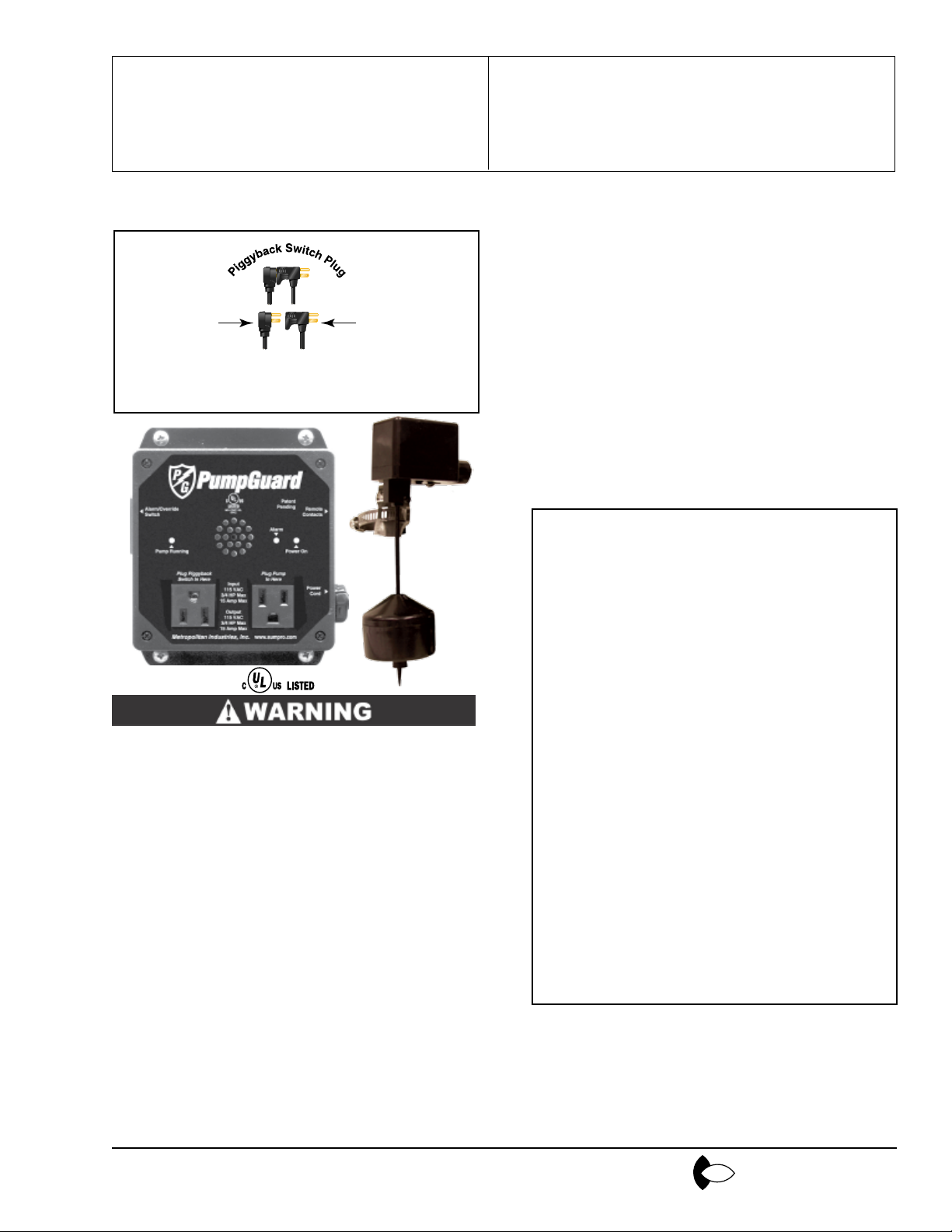
PumpGuard
includes Pump-
Guard control
box,vertical
alarm/override
switch & pig-
gybackjumper
plug
Patent Pending
This product has a NEMA-1 rated enclosure and
can only be used in an indoor environment!
Advantages
• Two-cordpiggybackpumpswitcharrangement.
• AddedProtection,if yourprimarypumpswitch fails,the
high water alarm switch will override your primary pump
switch,soundthealarmandkeepyourpumpinoperation
untilrepairscanbemade.
Specications
Voltage: Model #200 120 VAC, 15
amps max. running load, 1
hp or less.
Enclosure: NEMA-194V0polycarbonate
plastic enclosure with all necessary electrical receptacles
pre-mounted and wired for
easy installation.
Alarm Switch: Verticaloat switch.Impact
resistant non-corrosive PVC
plastic for use in liquids up
to 140°F (60°C) 10 ft. 16
gauge,2 conductor SJOWA(UL), SJOW (CSA) water
resistant cord. NOTE: This
alarm switch must be used
only with the PumpGuard
duplex pump alternator and
alarm system.
Alarm Horn: 80db.at10ft.
• RemoteAlarmContacts,canbetiedintoyourhomesecuritysystemoranautomaticdialertoalertyoutotrouble
when you are away from home.
• Quickandeasysetup,justmounttheunitonthewall,plug
inyourpump&switchcords,jumperplug,andalarm/overrideoat,plugitinandyouaresettogo!
• PumpGuard can be plugged directly into the optional
SumproBatteryBackupSystemensuringsystemopera-
tion during power outages.
Register your product at
www.sumpro.com
Indicator Lights: Power on, Pump Running,
and Alarm
Metropolitan
www.metropolitanind.com
Page 2
PumpGuard
PUMP CORD PIGGYBACK
SWITCH CORD
Pump High Water Alarm & Primary Switch Dated: 4/12/07
Override System Supersedes: 6/13/06
Document No.: SPG-IN-01 Page 2 of 4
™
INSTALLATION INSTRUCTIONS
Notice! Thisdevicemustbeusedwithpumpsthathaveatwo-cordpiggybackswitch
arrangement. See Figure A.
Figure A
Ifyourpumpdoesnothavethetwo-cordpiggyback
switch system shown above, you must replace the
pump with one that does.
Installation
TURN OFF POWER SOURCE BEFORE INSTALLING OR ADJUSTING THIS DEVICE. FAILURE TO
TURN OFF POWER COULD RESULT IN SERIOUS
OR FATAL ELECTRIC SHOCK!
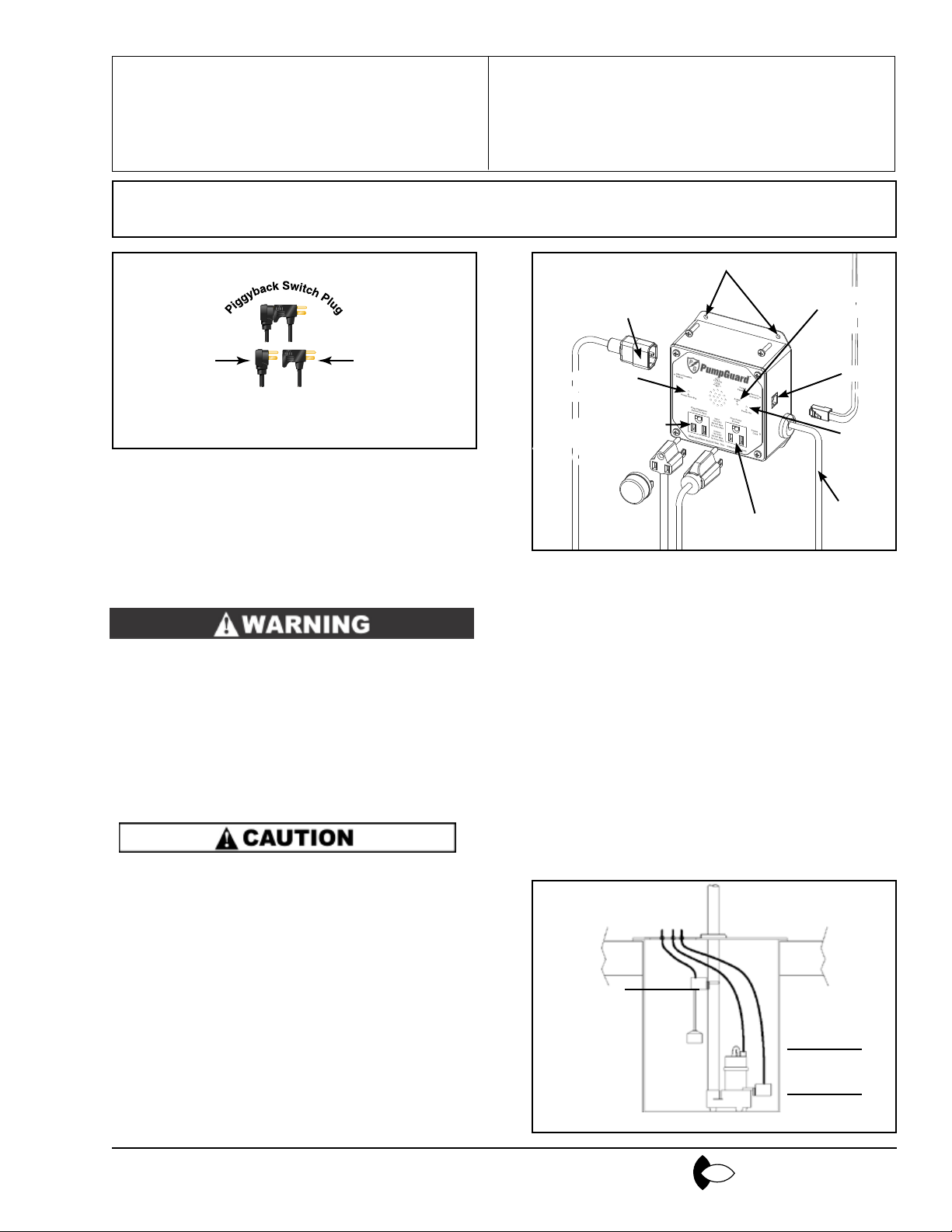
Figure 1
SECONDARY
ALARM/OVERRIDE
SWITCH CORD
PUMP RUNNING
INDICATOR LIGHT
PIGGYBACK SWITCH
AND JUMPER
PLUG OUTLET
Mounting PumpGuard™ Panel
1. Determineanindoorlocationthatissuitableforthe
placement of this product near the pump pit.
2. Securely mount the PumpGuard™ panel to the wall
using the four mounting holes on the enclosure (see
Figure 1).
MOUNTING HOLES
PUMP MOTOR
PLUG OUTLET
ALARM
INDICATOR
LIGHT
RJ11
PHONE
JACK
POWER
INDICATOR
LIGHT
POWER
CORD
NOTE: Tank must be vented in accordance with
local plumbing codes. Do Not install PumpGuard™
in locations classied as hazardous in accordance
the National Electrical Code, ANSI/NFPA 70-1993.
Read these instructions carefully.
• Checklocalcodesbeforeinstalling.Werecommend
this product be installed in accordance with the
national and local electrical codes.
• Makesureaproperlygroundedthreeprongoutlet
is used.
• Do not connect this product while standing on a wet
or damp surface.
• Retain these instructions when installation is
complete.
Register your product at
www.sumpro.com
3. Makesureyoursumppumpisproperlyinstalled.
4. Mount the alarm/override oat on the pump dischargepipeandadjustitsothatitwillonlyactivate
at a level higher than the turn on level of the pump
(see Figure 2).
High Water
Alarm On
Level
Figure 2
Pump On
Level
Pump Off
Level
Metropolitan
www.metropolitanind.com
Page 3
PumpGuard
1 2 3 4 5 6
WHT -
BLK -
RED -
GRN -
YEL -
BLU -
™
INSTALLATION INSTRUCTIONS
Pump High Water Alarm & Primary Switch Dated: 4/12/07
Override System Supersedes: 6/13/06
Document No.: SPG-IN-01 Page 3 of 4
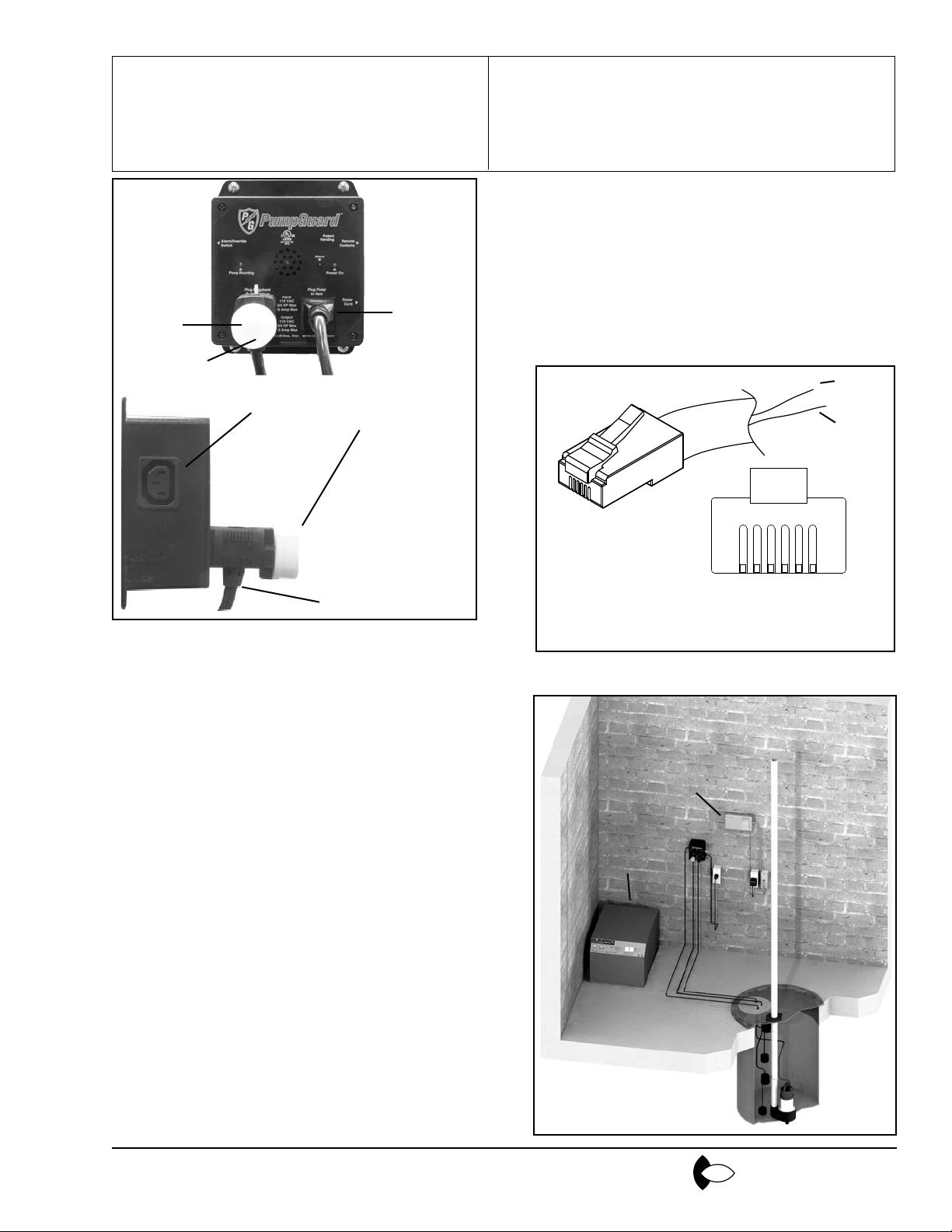
Figure 3
PIGGYBACK
SWITCH PLUG
OUTLET
JUMPER
PLUG
ALARM OVERRIDE
FLOAT RECEPTACLE
JUMPERPLUG
PLUGGED INTO
PIGGYBACK OUTLET
PRIMARY FLOAT SWITCH
CORD WITH PIGGYBACK
OUTLET
PUMP
PLUG
OUTLET
5. Afterallofthepreviousstepshavebeencompleted
itis timetoplug thepumpcord, switchcord and
alarmoatintothePumpGuard™.First,separate
thepumpcordfromthepiggybackswitchcord.The
pumpcord(plugwithnopiggybackreceptacle)is
tobe pluggedintothe“PumpPlugOutlet”onthe
right hand side of the front cover (see Figure 3). The
switchcord(plugwiththepiggybackreceptacle)is
plugged into the “Piggyback Switch Plug Outlet”
on the left hand side of the front cover (see Figure
3). Once the cords are plugged into the proper
receptacles,thejumperplugmustbepluggedinto
thebackofthepiggybackswitchplug(Locatedon
the left side) to complete the circuit (see Figure 3).
Thealarmoatmustbepluggedintothereceptacle
on the left-hand side of the enclosure.
8. The PumpGuard™ also has a set of remote contacts
thatcanbetiedintoahomealarmsystemorexternal
dialer for added protection. The receptacle is a stan-
dardRJ11phonejackresidential6x4quad.Theactive
wiresarepins3and4,whicharetheredandgreen
wiresinthe cable. The red and greenwirescan be
tieddirectlyintoahomealarmsystem,anautomatic
dialer or any other type of remote sensing device.
(See Figure 4)
Figure 4
Green
Red
VIEW LOOKING INTO
RJ-11RESIDENTIAL6X4
Typical Installation
OPTIONAL DIALER
OPTIONAL
BATTERY
BACKUP
6. Nowthatall ofthewiringhasbeen properly connected,plugthePumpGuard™intothedesignated
receptacle.
7. Fillthepumptankwithwaterandallowthesystem
to cycle several times to ensure proper operation.
By lifting the alarm oat you should activate the
alarmandrunthepump.Note,thePumpGuard™
alarm/overrideswitch,whenactivated,willsound
theaudiblealarmandactivatethepumpwetherthe
primary switch has failed or not.
Register your product at
www.sumpro.com
Metropolitan
www.metropolitanind.com
Page 4

PumpGuard
Pump High Water Alarm & Primary Switch Dated: 4/12/07
Override System Supersedes: 6/13/06
Document No.: SPG-IN-01 Page 4 of 4
™
INSTALLATION INSTRUCTIONS
LIMITED WARRANTY
PumpGuardiswarrantedtobefreefromdefectsinmaterialandworkmanshipandtoperformwithinapplicable
specicationsforaperiodofone(I)year.Obligationunderthiswarrantyislimitedtorepairingorreplacingany
partthereof,whichshallwithinoneyearbereturnedtouswithtransportationchargesprepaid,andprovetobe
defective.
Theabovelimitedwarrantytakestheplaceofallotherwarranties,expressorimpliedandcorrectionofsuch
defectsbyreplacementorrepairshallconstituteafulllmentofallobligationsunderthetermsofthewarranty,
whichspecicallyEXCLUDESanyincidentaldamagescausedbyorassociatedwiththisproductorituse.The
warrantydoesnotcoveranyunitwhichhasbeendamagedeitherintransitorbymisuse,accidentornegligence.
Nowarrantyorrepresentationnotcontainedhereinshallbebinding.
LABOR,ETC.COSTS:MetropolitanshallINNOEVENTberesponsibleorliableforthecostofeldlaboror
otherchargesincurredbyanycustomerinremovingand/orafxinganyMetropolitanproduct,partorcomponent
thereof.
Register your product at
www.sumpro.com
Metropolitan
www.metropolitanind.com
 Loading...