

Page 1
HYDROS 21 INTEGRATOR GUIDE
SENSOR DESCRIPTION
The HYDROS 21 is a low-cost, accurate tool for monitoring water level, electrical conductivity (EC), and
temperature in both groundwater and surface water. The sensor employs a precision pressure transducer to
sense water levels between 0 and 10 m for the CTD-10. The sensor cable is vented to remove the effects of
barometric pressure changes. The integrated 4-probe electrical conductivity transducer accurately senses EC
up to 120 mS/cm. The sensor also features a precision thermistor to measure temperature. The HYDROS21 has
a compact 3.4-cm-diameter body made of rugged Delrin
marine-grade epoxy to protect the sensor in corrosive environments.
For a more detailed description of how this sensor makes measurements, refer to the HYDROS 21 User Manual.
APPLICATIONS
• Aquifer recharge and recovery
• Saltwater intrusion, desalination, and wastewater
• Wetland monitoring
• Groundwater contamination monitoring
• Surface water monitoring
®
resin. The electronic circuitry is encapsulated in a
18281-00
1.13.2021
ADVANTAGES
• Precision pressure transducer for water depth measurements
• Accurate 4-probe EC measurement
• Robust thermistor for accurate temperature measurements
• Differential pressure measurement referenced to atmospheric
pressure so no external pressure sensor is needed
• Robust marine-grade epoxy encapsulation to resist
corrosive environments
• Stainless steel cover improves durability
• Three-wire sensor interface: power, ground, and data
• Digital sensor communicates multiple measurements over a
serial interface
• Low-input voltage requirements
• Low-power design supports battery-operated data loggers
• Supports SDI-12 or DDI serial communications protocols
• Modern design optimized for low-cost sensing
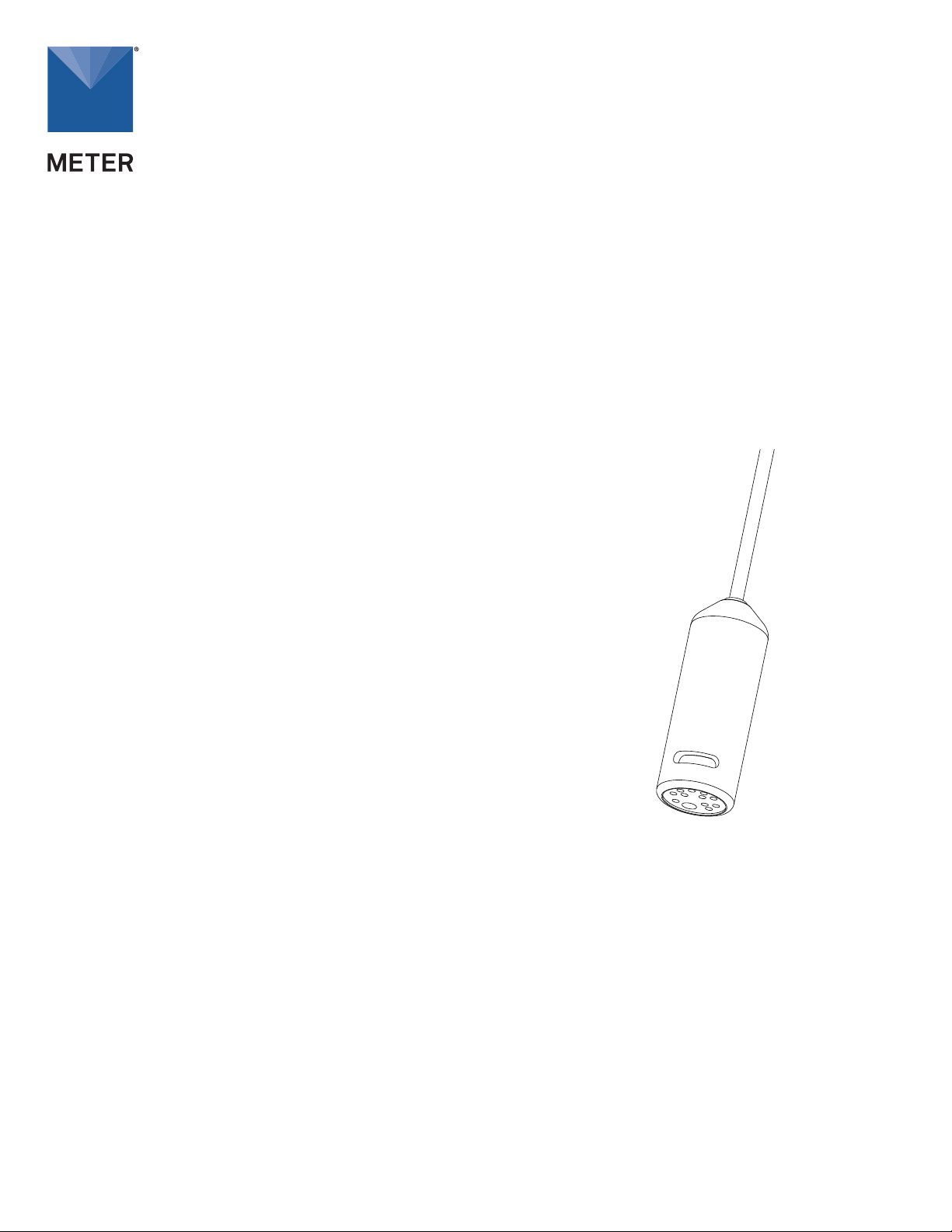
Figure 1 HYDROS 21 sensor
PURPOSE OF THIS GUIDE
METER provides the information in this integrator guide to help HYDROS 21 customers establish communication
between these sensors and their data acquisition equipment or field data loggers. Customers using data
loggers that support SDI-12 sensor communications should consult the data logger user manual. METER
sensors are fully integrated into the METER system of plug-and-play sensors, cellular-enabled data loggers,
and data analysis software.
COMPATIBLE FIRMWARE VERSIONS
This guide is compatible with firmware versions 3.99 or newer for the HYDROS 21 Gen 1.
METER Group, Inc. USA
2365 NE Hopkins Court, Pullman, WA 99163
T +1.509.332.2756 F +1.509.332.5158
E info@metergroup.com W metergroup.com
Page 2

SPECIFICATIONS
MEASUREMENT SPECIFICATIONS
HYDROS 21 GEN 1
Bulk Electrical Conductivity (EC)
Range 0−120 dS/m
Resolution 0.001 dS/m
Accuracy ±0.01 dS/m or ±10%,
whichever is greater
NOTE: The EC measurement is corrected to a standard
temperature of 25 °C.
Temperature
Range −11 to +49 °C
Resolution 0.1 °C
Accuracy ±1 °C
COMMUNICATION SPECIFICATIONS
Output
DDI serial or
SDI-12 communication protocol
PHYSICAL SPECIFICATIONS
Dimensions
Length 9.0 cm (3.5 in)
Width 3.4 cm (1.3 in)
Operating Temperature Range
Minimum 0 °C
Maximum 50 °C
NOTE: Sensors may be used at higher temperatures under
certain conditions; contact Customer Support for assistance.
Water Depth
Range 0−10,000 mm
Resolution 1 mm
Accuracy ±0.5% of full scale at 20 °C
NOTE: Depth measurement accuracy assumes no abrupt
temperature variations.
Data Logger Compatibility
METER ZL6 data loggers and any data
acquisition system capable of 3.6- to 15-VDC
power and serial or SDI-12 communication
Cable Length
10 m (standard)
20 m
40 m (maximum cable length)
Cable Diameter
6 mm
Connector Types
3.5-mm stereo plug connector or stripped and
tinnedwires
ELECTRICAL AND TIMING CHARACTERISTICS
Supply Voltage (VCC to GND)
Minimum 3.6 V
Typical NA
Maximum 15.0 V
Digital Input Voltage (logic high)
Minimum 2.8 V
Typical 3.6 V
Maximum 5.0 V
Digital Input Voltage (logic low)
Minimum –0.3 V
Typical 0.0 V
Maximum 0.8 V
Digital Output Voltage (logic high)
Power Line Slew Rate
Current Drain (during measurement)
2
Minimum NA
Typical 3.6 V
Maximum NA
Minimum 1.0 V/ms
Typical NA
Maximum NA
Minimum 0.5 mA
Typical 0.5 mA
Maximum 1.0 mA
Page 3
HYDROS 21 GEN 1
range)
GND
ATA
GND
220PF
Ground
n
Current Drain (while asleep)
Minimum NA
Typical 0.3 mA
Maximum NA
Measurement Duration
Minimum NA
Typical 350 ms
Maximum 500 ms
Power Up Time (DDI serial)
Minimum NA
Typical 475 ms
Maximum 500 ms
COMPLIANCE
Manufactured under ISO 9001:2015
EM ISO/IEC 17050:2010 (CE Mark)
Power Up Time (SDI-12)
Minimum 300 ms
Typical 475 ms
Maximum 500 ms
EQUIVALENT CIRCUIT AND CONNECTION TYPES
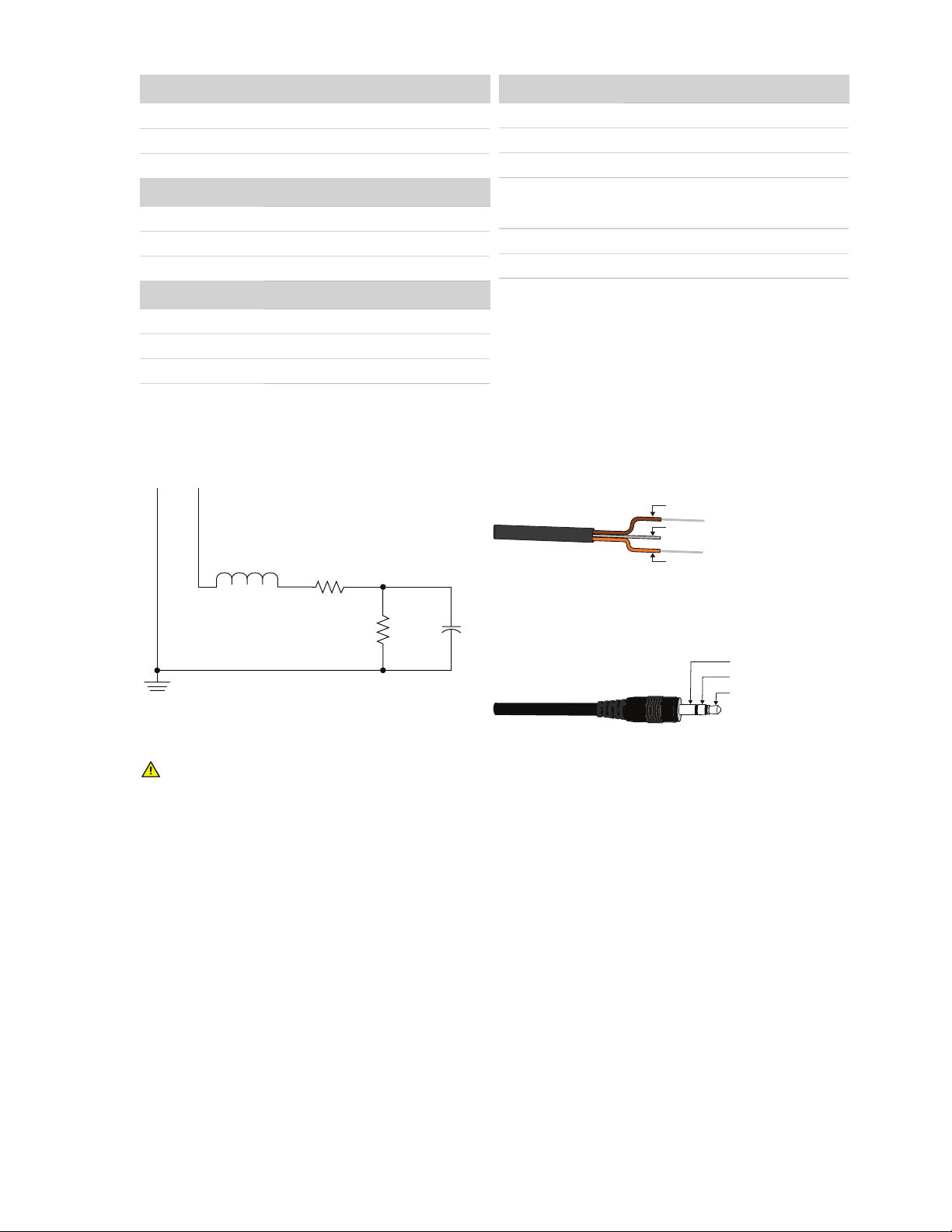
Refer to Figure 2 and Figure 3 to connect the HYDROS 21 to a data logger. Figure 2 provides a low-impedance
variant of the recommended SDI-12 specification.
PIGTAIL CABLE
D
Power (brown)
Ground (bare)
L1
10UH
R1
510
R2
NOTE: Early HYDROS 21 (CTD) units may have the older Decagon
wiring scheme where the power supply is white, the digital out is red,
and the black and bare wires are ground.
C1
100K
STEREO CABLE
Digital communication (o
Digital communicatio
Power
Figure 2 Equivalent circuit diagram
Figure 3 Connection types
PRECAUTIONS
METER sensors are built to the highest standards, but misuse, improper protection, or improper installation
may damage the sensor and possibly void the warranty. Before integrating sensors into a sensor network,
follow the recommended installation instructions and implement safeguards to protect the sensor from
damaging interference.
SURGE CONDITIONS
Sensors have built-in circuitry that protects them against common surge conditions. Installations in
lightning-prone areas, however, require special precautions, especially when sensors are connected to a
well-grounded third-party logger.
Read the application note Lightning surge and grounding practices on the METER website for more information.
POWER AND GROUNDING
Ensure there is sufficient power to simultaneously support the maximum sensor current drain for all the
sensors on the bus. The sensor protection circuitry may be insufficient if the data logger is improperly
powered or grounded. Refer to the data logger installation instructions. Improper grounding may affect the
sensor output as well as sensor performance.
Read the application note Lightning surge and grounding practices on the METER website for more information.
3
Page 4

HYDROS 21 GEN 1
CABLES
Improperly protected cables can lead to severed cables or disconnected sensors. Cabling issues can be
caused by many factors, including rodent damage, driving over sensor cables, tripping over the cable, not
leaving enough cable slack during installation, or poor sensor wiring connections. To relieve strain on the
connections and prevent loose cabling from being inadvertently snagged, gather and secure the cable
travelling between the HYDROS 21 and the data acquisition device to the mounting mast in one or more
places. Install cables in conduit or plastic cladding when near the ground to avoid rodent damage. Tie excess
cable to the data logger mast to ensure cable weight does not cause sensor to unplug.
SENSOR COMMUNICATIONS
METER digital sensors feature a serial interface with shared receive and transmit signals for communicating
sensor measurements on the data wire (Figure 3). The sensor supports two different protocols: SDI-12 and DDI
serial. Each protocol has implementation advantages and challenges. Please contact Customer Support if the
protocol choice for the desired application is not obvious.
SDI12 INTRODUCTION
SDI-12 is a standards-based protocol for interfacing sensors to data loggers and data acquisition equipment.
Multiple sensors with unique addresses can share a common 3-wire bus (power, ground, and data). Two-way
communication between the sensor and logger is possible by sharing the data line for transmit and receive
as defined by the standard. Sensor measurements are triggered by protocol command. The SDI-12 protocol
requires a unique alphanumeric sensor address for each sensor on the bus so that a data logger can send
commands to and receive readings from specific sensors.
Download the SDI-12 Specification v1.3 to learn more about the SDI-12 protocol.
DDI SERIAL INTRODUCTION
The DDI serial protocol is the method used by the METER data loggers for collecting data from the sensor. This
protocol uses the data line configured to transmit data from the sensor to the receiver only (simplex). Typically,
the receive side is a microprocessor UART or a general-purpose I/O pin using a bitbang method to receive data.
Sensor measurements are triggered by applying power to the sensor.
INTERFACING THE SENSOR TO A COMPUTER
The serial signals and protocols supported by the sensor require some type of interface hardware to be
compatible with the serial port found on most computers (or USB-to-serial adapters). There are several
SDI-12 interface adapters available in the marketplace; however, METER has not tested any of these
interfaces and cannot make a recommendation as to which adapters work with METER sensors. METER data
loggers and and the ZSC and PROCHECK handheld devices can operate as a computer-to-sensor interface for
making on-demand sensor measurements. For more information, please contact Customer Support.
METER SDI12 IMPLEMENTATION
METER sensors use a low-impedance variant of the SDI-12 standard sensor circuit (Figure 2). During the
power-up time, sensors output some sensor diagnostic information and should not be communicated with
until the power-up time has passed. After the power-up time, the sensors are fully compatible with all
commands listed in the SDI-12 Specification v1.3 except for the continuous measurement commands (aR3 and
aRC3). M, R, and C command implementations are found on page 7. The aR3 commands are used by METER
systems and as a result uses a space delimiter, instead of a sign delimiter as required by the SDI-12 standard.
Out of the factory, all METER sensors start with SDI-12 address 0 and print out the DDI serial startup string
during the power-up time. This can be interpreted by non-METER SDI-12 sensors as a pseudo-break condition
followed by a random series of bits.
The HYDROS 21 will omit the DDI serial startup string when the SDI-12 address is nonzero. Changing the address
to a nonzero address is recommended for this reason.
4
Page 5

HYDROS 21 GEN 1
SENSOR BUS CONSIDERATIONS
SDI-12 sensor buses require regular checking, sensor upkeep, and sensor troubleshooting. If one sensor goes
down, that may take down the whole bus even if the remaining sensors are functioning normally. Power cycling
the SDI-12 bus when a sensor is failing is acceptable, but METER does not recommend scheduling power cycling
events on an SDI-12 bus more than once or twice per day. Many factors influence the effectiveness of the bus
configuration. Visit metergroup.com for articles and virtual seminars containing more information.
SDI12 CONFIGURATION
Table1 lists the SDI-12 communication configuration.
Table1 SDI-12 communication configuration
Baud Rate 1,200 bps
Start Bits 1
Data Bits 7 (LSB first)
Parity Bits 1 (even)
Stop Bits 1
Logic Inverted (active low)
SDI12 TIMING
All SDI-12 commands and responses must adhere to the format in Figure 4 on the data line. Both the
command and response are preceded by an address and terminated by a carriage return and line feed
combination (<CR><LF>) and follow the timing shown in Figure 5.
START STOPD0 D1 D2 D3 D4 D5 D6 EP
Figure 4 Example SDI-12 transmission of the character 1 (0x31)
SENSORDATA LOGGER
Break
(at least 12 ms)
Marking
(at least 8.33 ms)
Figure 5 Example data logger and sensor communication
Command Response
Marking
(at least 8.33 ms)
Maximum time*Sensor must respond
within 15 ms
*Maximum time is dependent upon the amount of data returned for the command sent.
COMMON SDI12 COMMANDS
This section includes tables of common SDI-12 commands that are often used in an SDI-12 system and the
corresponding responses from METER sensors.
IDENTIFICATION COMMAND aI!
The Identification command can be used to obtain a variety of detailed information about the connected
sensor. An example of the command and response is shown in Example 1, where the command is in bold and
the response follows the command.
5
Page 6

HYDROS 21 GEN 1
Example 1 1I!113DECAGON ␣CTD ␣ ␣ ␣389631800001
Fixed
Character
Parameter
1I!
1
13
DECAGON␣
CTD ␣ ␣ ␣
389
631800001
Length Description
3
1
2 Indicates that the target sensor supports SDI-12 Specification v1.3.
8
6
3
≤13,
variable
Data logger command.
Request to the sensor for information from sensor address 1.
Sensor address.
Prepended on all responses, this indicates which sensor on the bus is returning
the following information.
Vendor identification string.
(DECAGON and one space ␣)
Sensor model string.
This string is specific to the sensor type.
For the HYDROS 21, the string is
Sensor version.
This number divided by 100 is the METER sensor version
(e.g., 389 is version 3.89).
Sensor serial number.
This is a variable length field. It may be omitted for older sensors.
CTD ␣ ␣ ␣.
CHANGE ADDRESS COMMAND aAB!
The Change Address command is used to change the sensor address to a new address. All other commands
support the wildcard character as the target sensor address except for this command. All METER sensors
have a default address of 0 (zero) out of the factory. Supported addresses are alphanumeric (i.e., a–z, A–Z, and
0–9). An example output from a METER sensor is shown in Example 2, where the command is in bold and the
response follows the command.
Example 2 1A0!0
Fixed
Character
Parameter
1A0!
0
Length Description
4
1
Data logger command.
Request to the sensor to change its address from 1 to a new address of 0.
New sensor address.
For all subsequent commands, this new address will be used by the targetsensor.
ADDRESS QUERY COMMAND (?!)
While disconnected from a bus, the Address Query command can be used to determine which sensors are
currently being communicated with. Sending this command over a bus will cause a bus contention where all
the sensors will respond simultaneously and corrupt the data line. This command is helpful when trying to
isolate a failed sensor. Example 3 shows an example of the command and response, where the command is in
bold and the response follows the command. The question mark (?) is a wildcard character that can be used in
place of the address with any command except the Change Address command.
Example 3 ?!0
Fixed
Parameter
?!
0
Character
Length Description
2
1
Data logger command.
Request for a response from any sensor listening on the data line.
Sensor address.
Returns the sensor address to the currently connected sensor.
COMMAND IMPLEMENTATION
The following tables list the relevant Measurement (M), Continuous (R), and Concurrent (C) commands and
subsequent Data (D) commands, when necessary.
6
Page 7

HYDROS 21 GEN 1
MEASUREMENT COMMANDS IMPLEMENTATION
Measurement (M) commands are sent to a single sensor on the SDI-12 bus and require that subsequent Data
(D) commands are sent to that sensor to retrieve the sensor output data before initiating communication with
another sensor on the bus.
Please refer to Table2 and for an explanation of the command sequence and to Table6 for an explanation of
response parameters.
Table2 aM! command sequence
Command Response
aM! atttn
aD0! a+<pressure>±<temperature>+<electricalConductivity>
NOTE: The measurement and corresponding data commands are intended to be used back to back. After a measurement command is
processed by the sensor, a service request a <CR><LF> is sent from the sensor signaling the measurement is ready. Either wait until ttt
seconds have passed or wait until the service request is received before sending the data commands. See the SDI-12 Specifications v1.3
document for more information.
CONCURRENT MEASUREMENT COMMANDS IMPLEMENTATION
Concurrent Measurement (C) commands are typically used with sensors connected to a bus. C commands
for this sensor deviate from the standard C command implementation. First, send the C command, wait the
specified amount of time detailed in the C command response, and then use D commands to read its response
prior to communicating with another sensor.
Please refer to Table3 for an explanation of the command sequence and to Table6 for an explanation of
response parameters.
Table3 aC! measurement command sequence
Command Response
aC! atttnn
aD0! a+<pressure>±<temperature>+<electricalConductivity>
NOTE: Please see the SDI-12 Specifications v1.3 document for more information.
CONTINUOUS MEASUREMENT COMMANDS IMPLEMENTATION
Continuous Measurement (R) commands trigger a sensor measurement and return the data automatically
after the readings are completed without needing to send a D command.
Please refer to Table4 through Table5 for an explanation of the command sequence and see Table6 for an
explanation of response parameters.
Table4 aR0! measurement command sequence
Command Response
aR0! a+<electricalConductivity>±<temperature>
Table5 aR3! measurement command sequence
Command Response
aR3! a<TAB><electricalConductivity>␣<temperature><CR><sensorType><Checksum>
NOTE: This command does not adhere to the SDI-12 response format or timing. See METER SDI-12 Implementation for more information. The
values in this command are space delimited. As such, a + sign is not assigned between values and a – sign is only present if the value is negative.
7
Page 8

HYDROS 21 GEN 1
PARAMETERS
Table6 lists the parameters, unit measurement, and a description of the parameters returned in command
responses for HYDROS 21.
Table6 Parameter Descriptions
Parameter Unit Description
±
a
n
nn
ttt
<TAB>
<CR>
<LF>
<electricalConductivity>
<pressure>
<temperature>
<sensorType>
<Checksum>
— Positive or negative sign denoting sign of the next value
— SDI-12 address
— Number of measurements (fixed width of 1)
— Number of measurements with leading zero if necessary (fixed width of 2)
s Maximum time measurement will take (fixed width of 3)
— Tab character
— Carriage return character
— Line feed character
µS/cm Electrical conductivity
mm Pressure. Values will typically range from 0 to 4,000 mm
°C Temperature
—
— METER serial checksum
ASCII character denoting the sensor type
For HYDROS 21, the character is t
DDI SERIAL COMMUNICATION
The DDI serial communications protocol is ideal for systems that have dedicated serial signaling lines for each
sensor or use a multiplexer to handle multiple sensors. The serial communications are compatible with many
TTL serial implementations that support active-high logic levels using 0–3.6 V signal levels. When the sensor
is first powered, it automatically makes measurements of the integrated transducers then outputs a response
over the data line. Systems using this protocol control the sensor excitation to initiate data transfers from the
sensor. This protocol is subject to change as METER improves and expands the line of digital sensors and data
loggers.
The HYDROS 21 will omit the DDI serial startup string when the SDI-12 address is nonzero. Changing the
address to a nonzero address is recommended for this reason.
NOTE: Out of the factory, all METER sensors start with SDI-12 address 0 and print out the startup string when power cycled.
DDI SERIAL TIMING
Table7 lists the DDI serial communication configuration.
Table7 DDI serial communication configuration
Baud Rate 1,200 bps
Start Bits 1
Data Bits 8 (LSB first)
Parity Bits 0 (none)
Stop Bits 1
Logic Standard (active high)
At power up, the sensor will pull the data line high within 100 ms to indicate that the sensor is taking a reading
(Figure 6). When the reading is complete, the sensor begins sending the serial signal out the data line adhering
to the format shown in Figure 7. Once the data is transmitted, the sensor goes into SDI-12 communication
mode. To get another serial signal, the sensor must be power cycled.
NOTE: Sometimes the signaling from the sensor can confuse typical microprocessor UARTs. The sensor holds the data line low while
taking measurements. The sensor raises the line high to signal the logger that it will send a measurement. Then the sensor may take some
additional measurements before starting to clock out the first data byte starting with a typical start bit (low). Once the first start bit is sent,
typical serial timing is valid; however, the signal transitions before this point are not serial signaling and may be misinterpreted by theUART.
8
Page 9

HYDROS 21 GEN 1
Measurement
Up to 100 ms
duration
DDI serial
SDI-12 ready
Power applied
Figure 6 Data line DDI serial timing
START STOPD0 D1 D2 D3 D4 D5 D6 D7
Figure 7 Example DDI serial transmission of the character 9 (0x39)
DDI SERIAL RESPONSE
Table8 details the DDI serial response.
Table8 DDI serial response
COMMAND RESPONSE
NA
NOTE: There is no actual command. The response is returned automatically upon power up. The values in this command are space delimited.
As such, a + sign is not assigned between values and a – sign is only present if the value is negative.
<TAB><electricalConductivity> <temperature><CR><sensorType><Checksum>
DDI SERIAL CHECKSUM
These checksums are used in the continuous commands R3 as well as the DDI serial response. The legacy
checksum is computed from the start of the transmission to the sensor identification character, excluding the
sensor address.
Example input is <TAB>542 22.3 245 0<CR>t and the resulting checksum output is U (capital U).
uint8_t LegacyChecksum(const char * response)
{
uint16_t length;
uint16_t i;
uint16_t sum = 0;
// Finding the length of the response string
length = strlen(response);
// Adding characters in the response together
for( i = 0; i < length; i++ )
{
sum += response[i];
if(response[i] == '\r')
{
// Found the beginning of the metadata section of the response
break;
}
}
// Include the sensor type into the checksum
sum += response[++i];
// Convert checksum to a printable character
sum = sum % 64 + 32;
return sum;
}
9
Page 10

HYDROS 21 GEN 1
CUSTOMER SUPPORT
NORTH AMERICA
Customer service representatives are available for questions, problems, or feedback Monday through Friday,
7:00 am to 5:00 pm Pacific time.
Email: support.environment@metergroup.com
sales.environment@metergroup.com
Phone: +1.509.332.5600
Fax: +1.509.332.5158
Website: metergroup.com
EUROPE
Customer service representatives are available for questions, problems, or feedback Monday through Friday,
8:00 to 17:00 Central European time.
Email: support.europe@metergroup.com
sales.europe@metergroup.com
Phone: +49 89 12 66 52 0
Fax: +49 89 12 66 52 20
Website: metergroup.de
If contacting METER by email, please include the following information:
Name
Address
Phone number
NOTE: For products purchased through a distributor, please contact the distributor directly for assistance.
Email address
Instrument serial number
Description of problem
REVISION HISTORY
The following table lists document revisions.
Revision Date Compatible Firmware Description
00 1.13.2021 3.99 Rebranded document for METER.
10
 Loading...