

Page 1
Lion ZigBee
User Manual
v3.21
Page 2

- 2 -
Page 3

- 3 -
Table of Contents
Chapter 1 System Information
1.1 About this manual 4
1.2 How to set up the parameter 4
Chapter 2 System Setup
2.1 Terminator 6
2.2 String Options (Prefix & Suffix) 7
2.3 Setup Insertion 8
Chapter 3 BarCode parameters setting
3.1 UPC-A 12
3.2 UPC-E 15
3.3 EAN-13 18
3.4 EAN-8 20
3.5 Code39 22
3.6 Codabar 25
3.7 Code93 29
3.8 Code128 31
3.9 Interleaved2 of 5 34
3.10 Industrial 2of 5 36
3.11 Matrix 2 of 5 38
3.12 China Postage 40
3.13 MSI/Plessey 42
3.14 Code 32 44
3.15 Code 11 46
3.16 Telepen 48
3.17 GS1 DataBar 50
Appendix 52
Page 4

- 4 -
Chapter 1 - System Information
1.1 About this manual
This User's Guide provides detailed programming instructions. Barcode
scanners are factory programmed for the most common communication
setting. If you need to change these settings, programming is accomplished
by scanning the bar codes in this guide.
1.2 How to set up the parameter -I
(1) Scan Start Configuration
(2) Scan all necessary labels for parameters that meet your applications.
(3) Scan End Configuration to end the programming.
Start configuration End configuration
Default setting
Check Version
An asterisk (*) next to an option indicate the default setting.
Page 5
- 5 -
1.2 How to set up the parameter - II
Most of time the scanner only requests one read of parameters when
changing to new values. You will hear two beeps when you successfully
set to the new values. But for some special parameters, multiple reads are
needed to complete the configuration. When use these special
parameters. In some cases, you might need to read one or more barcodes,
such as:
Hexadecimal barcodes. For example: prefix, suffix, etc.
Numeric barcodes. For example: inter-character delay, max/min length
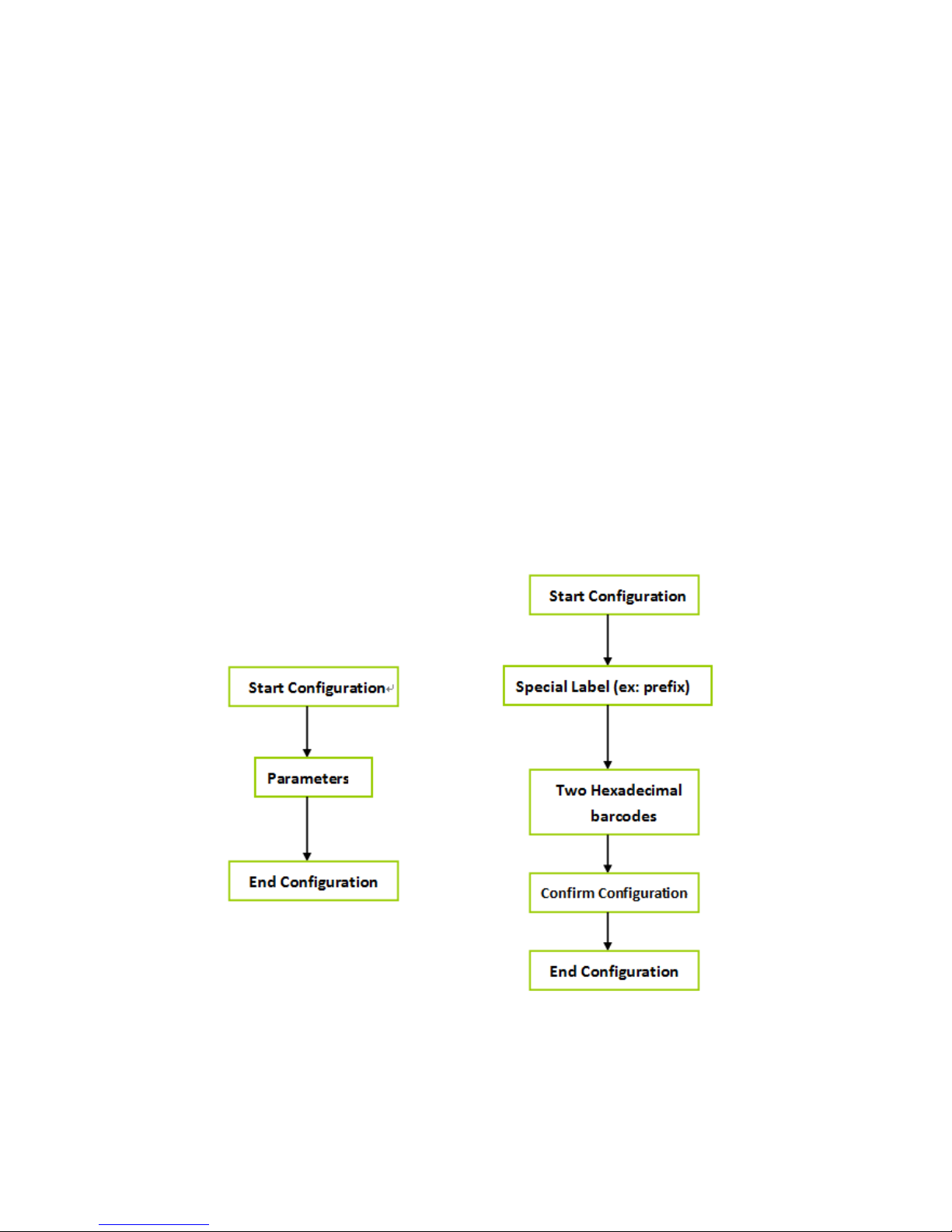
To complete the change of setting you will need to read the “Confirm”
barcode after you read the parameter. Below is the flow chart to explain
two different configurations.
Page 6

- 6 -
Chapter 2 - System setup
Start configuration End configuration
2.1 Terminator
ITEM OPTION
None
*CR+LF
CR
LF
Tab
Output Characters
Page 7

- 7 -
2.2 String Options (Prefix & Suffix)
This section describes the alterations which can be made to the format of
the transmitted data string. A prefix and suffix of maximum 10 direct
input may be included in front and at the end of scanned barcode.
Format
{Prefix} {Code ID} {Bar Code} {Suffix}
How to set up a prefix?
To configure “## “as prefix
(1) Scan Start Configuration barcode
(2) Scan Preamble bar code
(3) Scan ‘#” twice from FULL ASCII table
(4) Scan Confirm configuration barcode
(5) Scan End Configuration barcode.
How to set up a suffix?
To configure “$$” as suffix
(1) Start configuration barcode
(2) Scan Postamble barcode
(3) Scan ‘$” twice from FULL ASCII table
(4) Scan Confirm configuration barcode
(5) Scan End configuration barcode.
Page 8
- 8 -
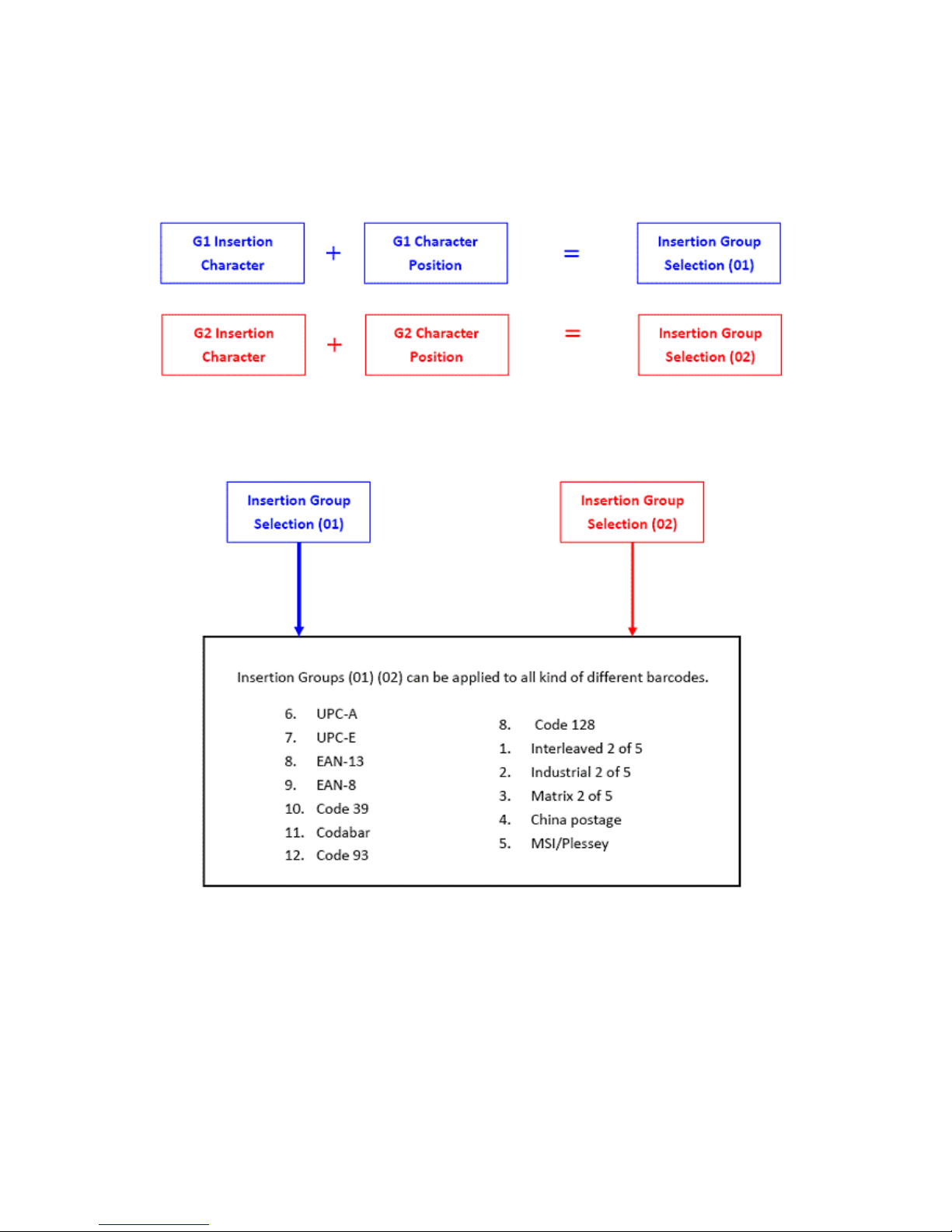
2.3 Setup Insertion
This section describes how to setup the insertion of output.
NOTE :
Max. 10 charters can be inserted each time
Max. Insertion group is only two.
Insertion group (01) or (02) can be used in different kinds of
barcodes at the same time
Page 9

- 9 -
Example:
:
To insert character “A” before the third digit(3)
Make the decoded data: 12A3456789
How to set up a character you want to insert
(1) Scan Start Configuration barcode
(2) Scan “G1 Insertion character”
(3) Scan “4” and “1” from FULL ASCII Table
(4) Scan Confirm configuration barcode
(5) Scan End configuration barcode
How to set up position you wish to place the character
(6) Scan Start Configuration barcode
(7) Scan “G1 Character Position”
(8) Scan “0” and “3” from FULL ASCII Table (which presents the position)
(9) Scan Confirm configuration barcode
(10) Scan End configuration barcode
How to set up insertion for code 39
Go to chapter 3.5 (code 39)
(11) Scan Start Configuration barcode
(12) Scan “Insert group selection” bar code
(13) scan “0” and “1” from FULL ASCII Table
(which presents the group- 01 you just set up previously)
(14) Scan Confirm configuration bar code
(15) Scan End configuration barcode
Page 10

- 10 -
Start configuration End configuration
Confirm configuration
ITEM OPTION
Preamble
(Default:00)
Ref: Appendix
Postamble
(Default:00)
Ref: Appendix
G1 Insertion character
(Default:00)
Ref: Appendix
G2 Insertion character
(Default:00)
Ref: Appendix
G1 Character Position to be
inserted (Default:00)
Ref: Appendix
G2 Character Position to be
inserted (Default:00)
Ref: Appendix
Page 11
- 11 -
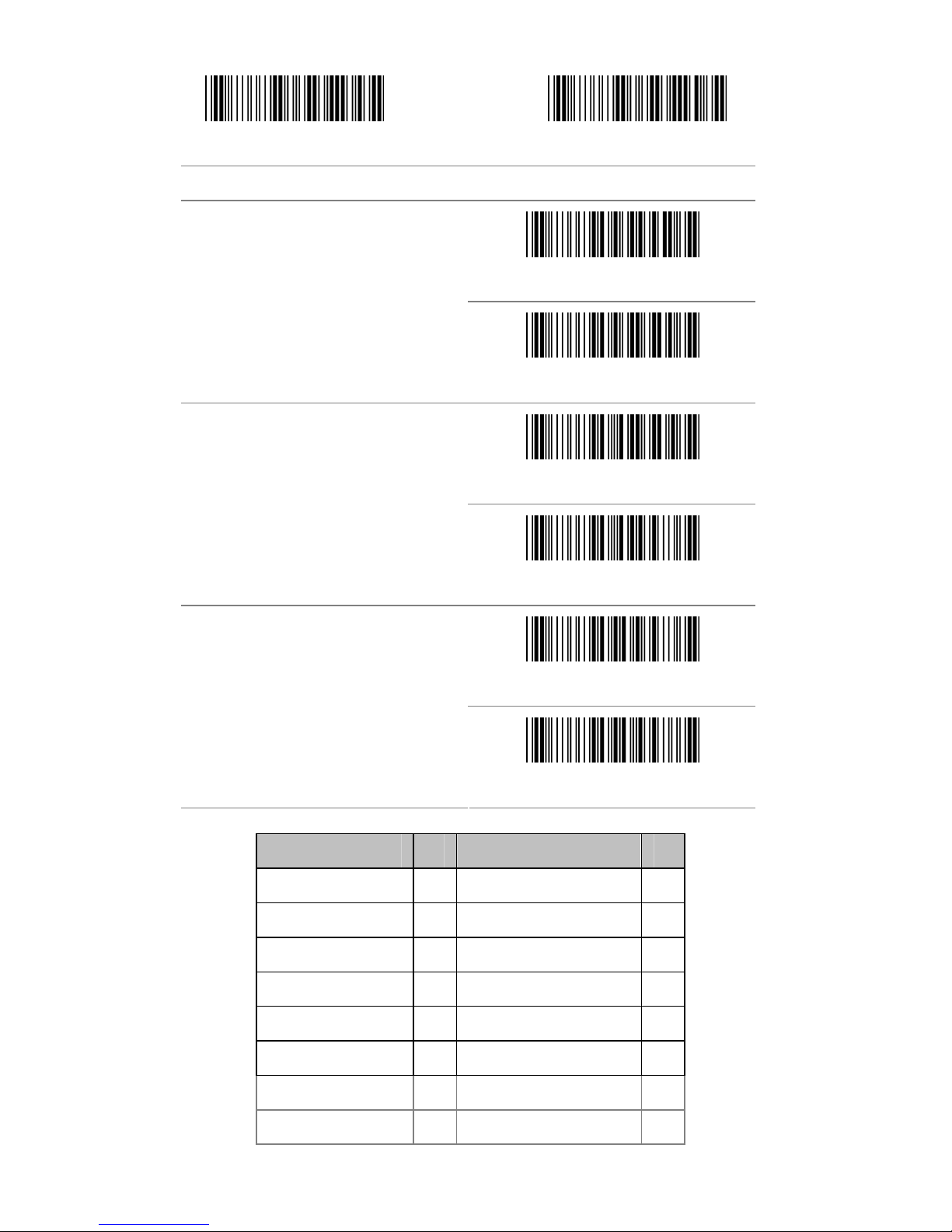
Start configuration End configuration
ITEM OPTION
*Disable
Bar Code ID
Enable
* Read 1 Time
Accuracy
Read 2 Times
Negative bar codes
Positive and negative bar codes
*Positive bar codes
Code Type ID Code Type ID
UPC-A F Interleaved 25 N
UPC-E G Industrial 25 O
EAN-13 H Matrix 25 P
EAN-8 I China Postal Code Q
Code 39 J MSI/Plessey R
Codabar K Code 32 S
Code 93 L Code 11 T
Code 128 M Telepen V
Page 12

- 12 -
Chapter 3 - BarCode parameters setting
How to set up a Code ID?
(1) Scan Start configuration bar code
(2) Go to the ASCII Table and scan label that represent the desired
characters to be inserted.
(3) Scan Confirm configuration bar code
(4) Scan End configuration bar code.
Start configuration End configuration
Confirm configuration
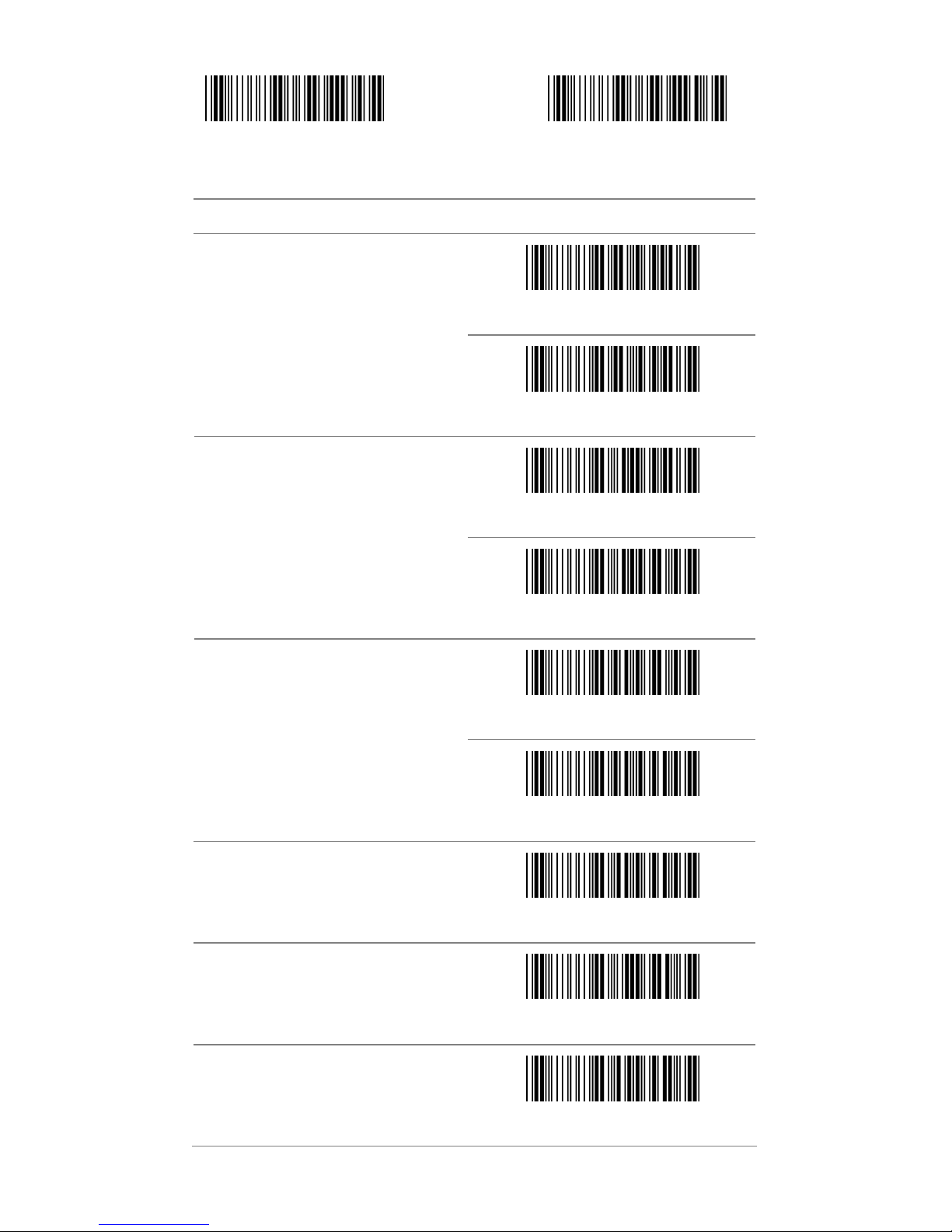
3.1 UPC-A
ITEM OPTION
Disable
Read
* Enable
Code ID Setting
(Default : F )
Ref: Appendix (20-7EH)
Page 13
- 13 -
Start configuration End configuration
ITEM OPTION
* Disable
UPC-A Expand to EAN-13
Enable
Disable
Check Digit Send
* Enable
* Disable
Truncate Leading Zero
Enable
Truncate Leading
(Default:00)
Ref: Appendix (00-0DH)
Truncate Ending
(Default:00)
Ref: Appendix (00-0DH)
Insert group selection
Ref: Appendix(00—02H)
Page 14

- 14 -
Start configuration End configuration
ITEM OPTION
* NONE
2 digits
5 digits
2 or 5digits
Supplement digits
Auto-discriminate Supplement
Page 15

- 15 -
3.2 UPC-E
Start configuration End configuration
ITEM OPTION
Disable
Read
* Enable
Code ID setting
(Default : G)
Ref: Appendix (20-7EH)
Page 16
- 16 -
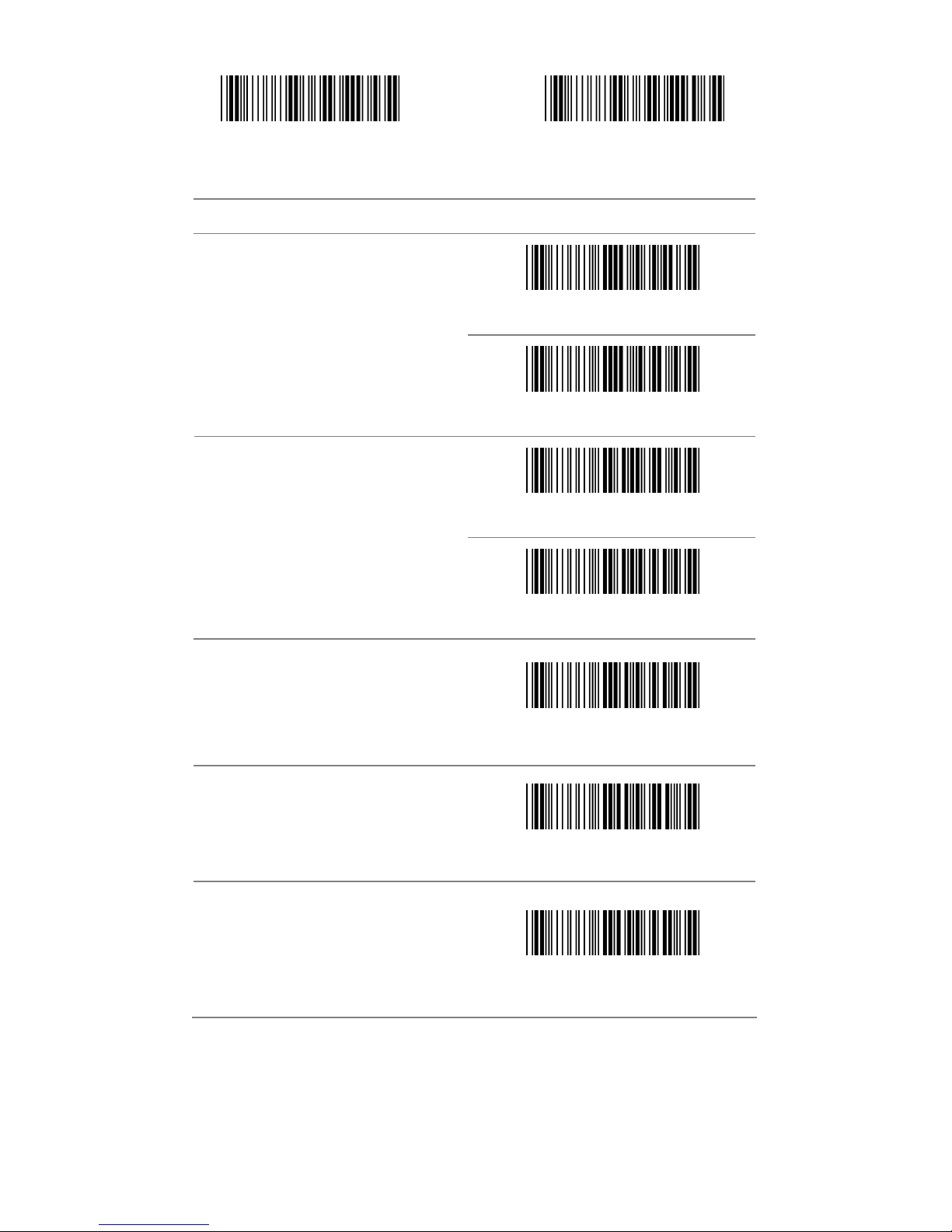
Start configuration End configuration
ITEM OPTION
* Disable
UPC-E Expand to UPC-A
Enable
Disable
Check Digit Send
* Enable
Truncate Leading
(Default:00)
Ref: Appendix (00-08H)
Truncate Ending
(Default:00)
Ref: Appendix (00-08H)
Insert group selection
(Default:00)
Ref: Appendix (00-02H)
Page 17
- 17 -
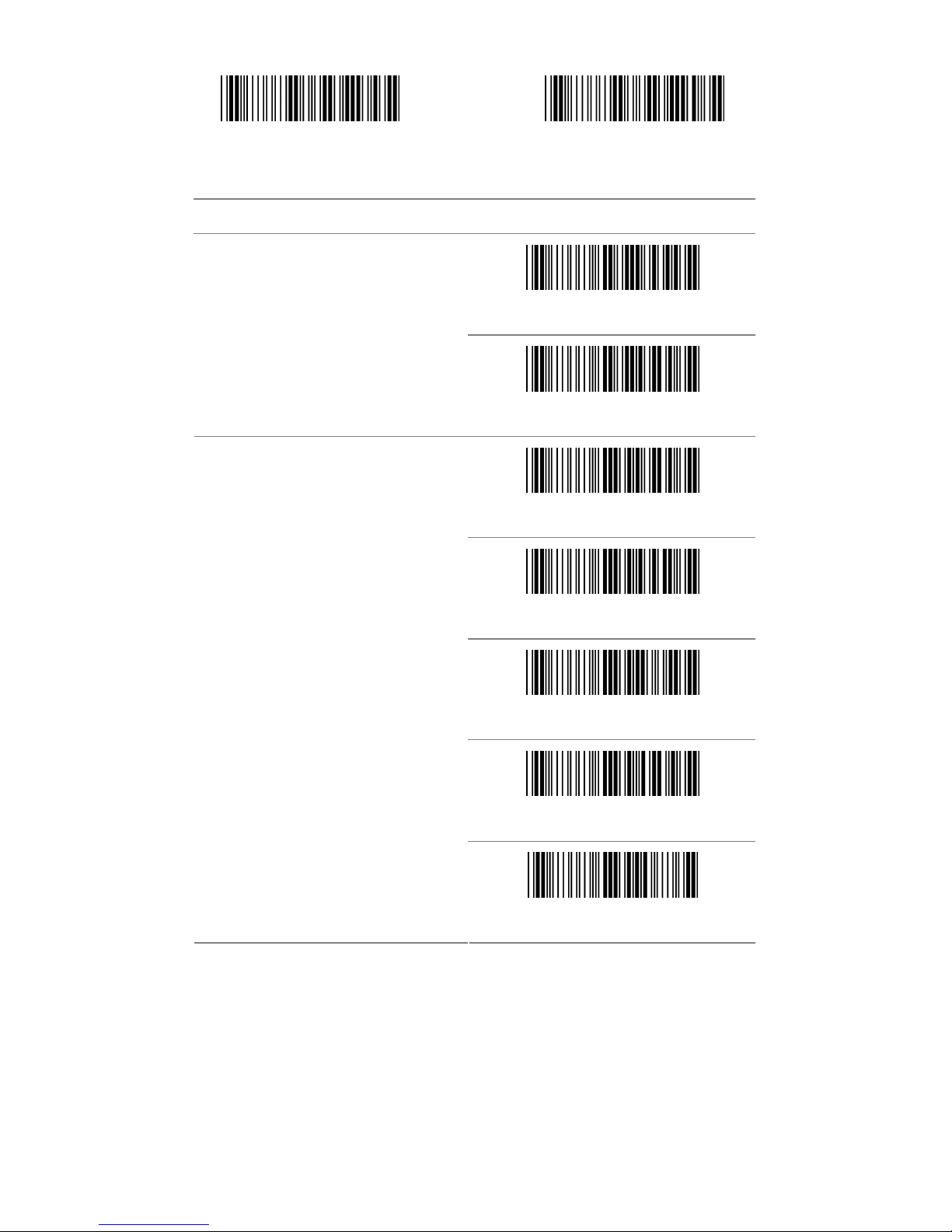
Start configuration End configuration
ITEM OPTION
*Disable
Truncate Leading Zero
Enable
* None
2 digits
5 digits
2 or 5 digits
Supplement digits
Auto-discriminate Supplement
Page 18
- 18 -
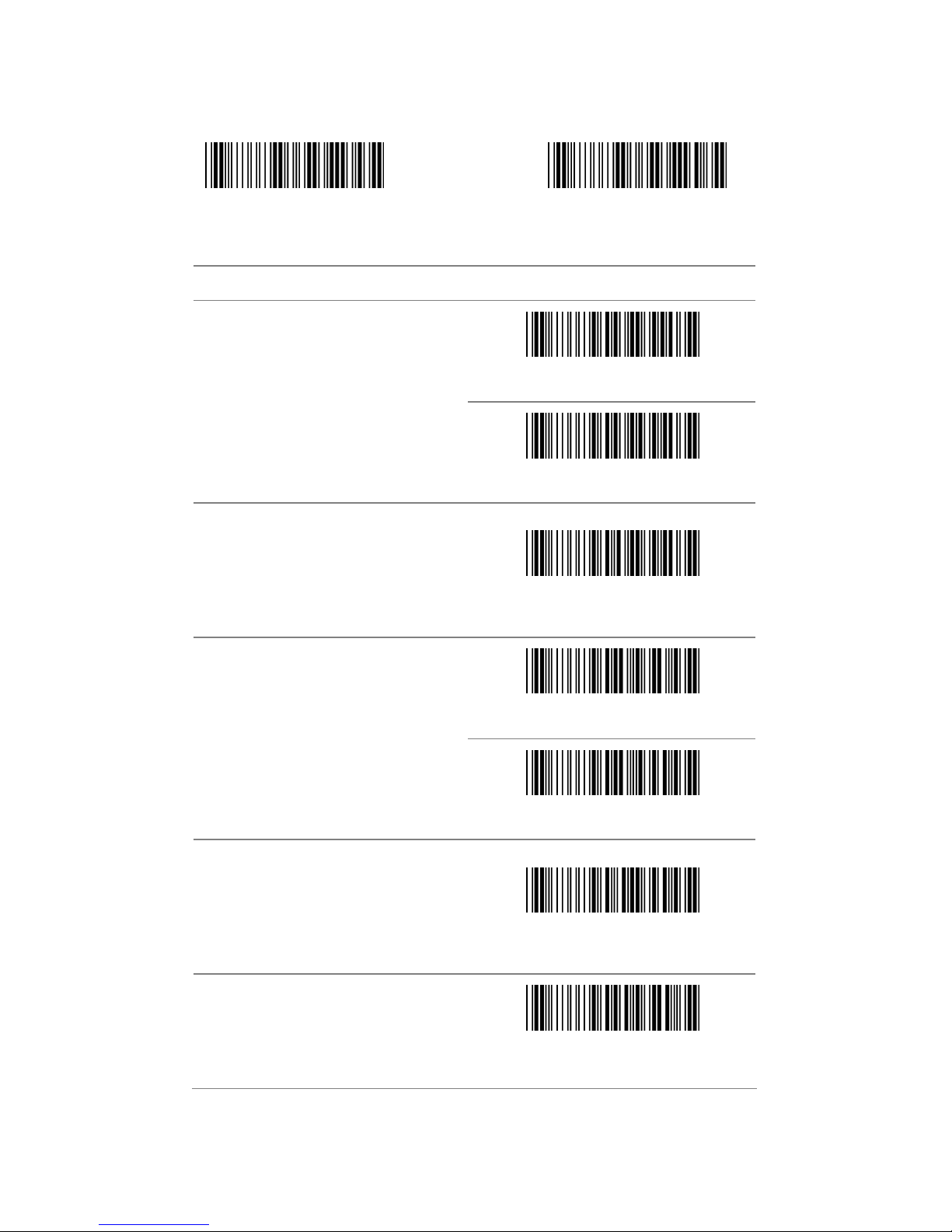
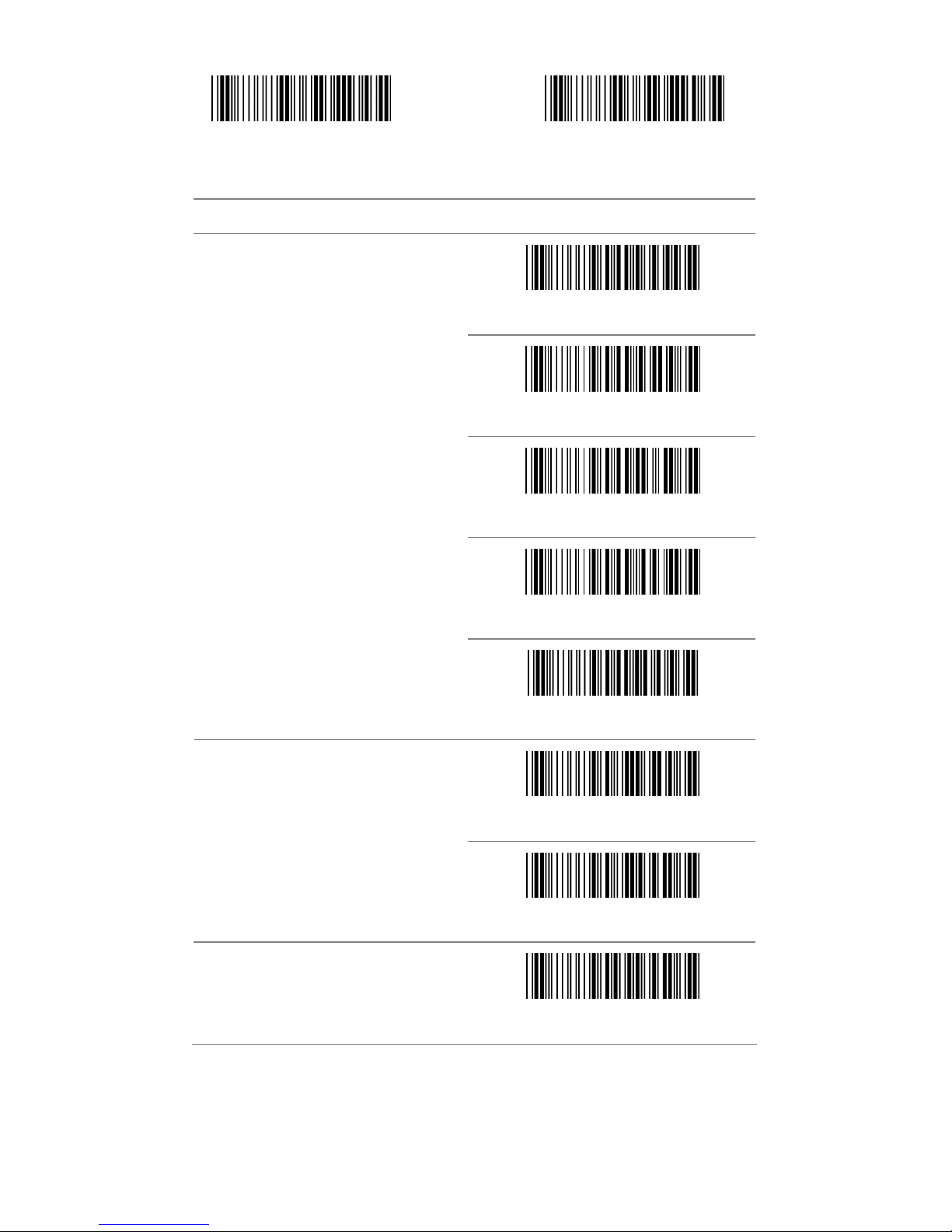
3.3 EAN-13
Start configuration End configuration
ITEM OPTION
Disable
Read
* Enable
Code ID setting
(Default : H)
Ref: Appendix (20-7EH)
Disable
Check Digit Send
* Enable
Truncate Leading
(Default : 00 )
Ref: Appendix (00-0DH)
Truncate Ending
(Default : 00 )
Ref: Appendix (00-0DH)
Page 19
- 19 -
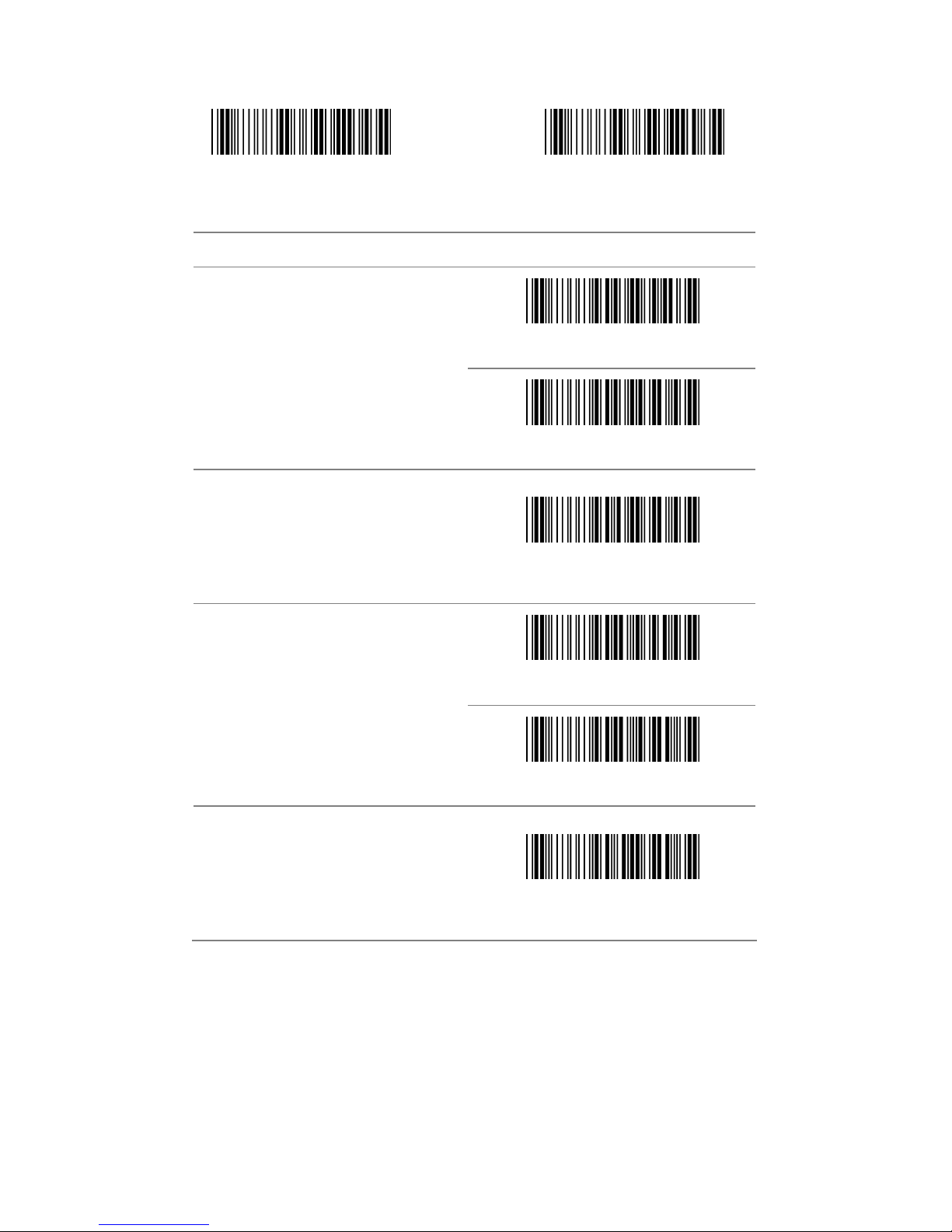
Start configuration End configuration
ITEM OPTION
* None
2 digits
5 digits
2 or 5 digits
Supplement digits
Auto-discriminate Supplement
* Disable
ISBN/ISSN Conversion
Enable
Insert group selection
(Default : 00 )
Ref: Appendix (00-02H)
Page 20
- 20 -
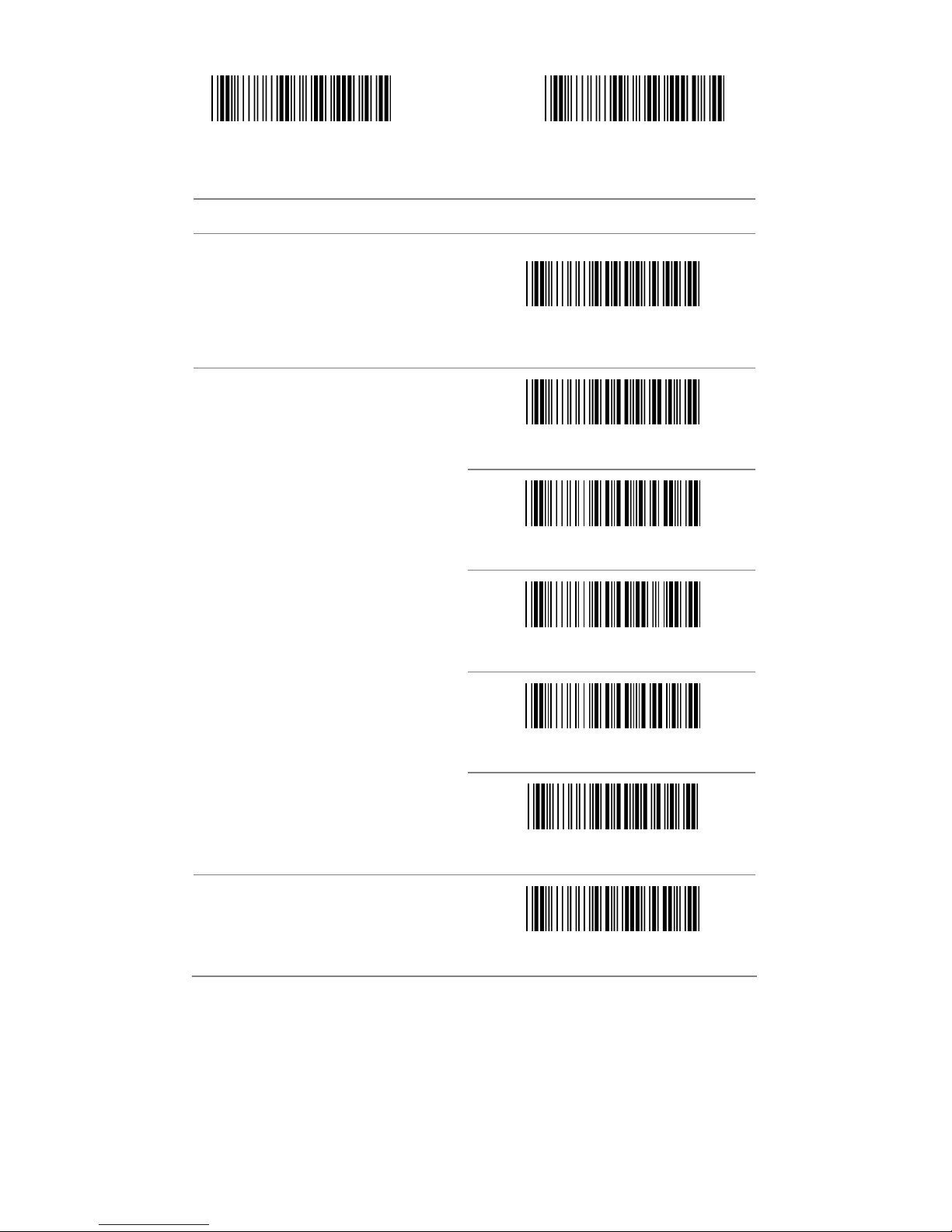
3.4 EAN-8
Start configuration End configuration
ITEM OPTION
Disable
Read
* Enable
Code ID setting
(Default : I)
Ref: Appendix (20-7EH)
Disable
Check Digit Send
* Enable
Truncate Leading
(Default : 00)
Ref: Appendix (00-08H)
Page 21
- 21 -
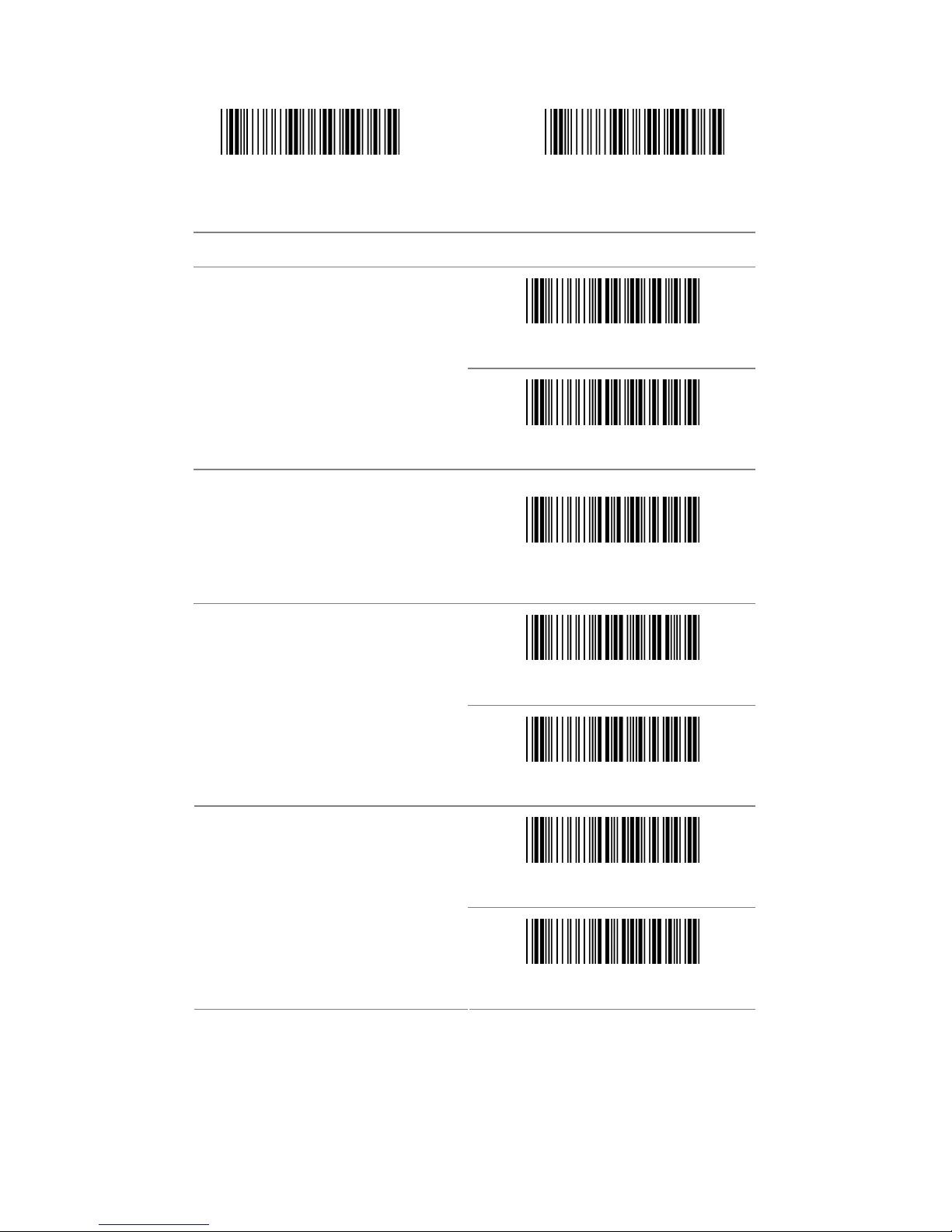
Start configuration End configuration
ITEM OPTION
Truncate Ending
(Default : 00)
Ref: Appendix (00-08H)
* None
2 digits
5 digits
2 or 5 digits
Supplement digits
Auto-discriminate Supplement
Insert group selection
(Default : 00)
Ref: Appendix (00-02H)
Page 22
- 22 -
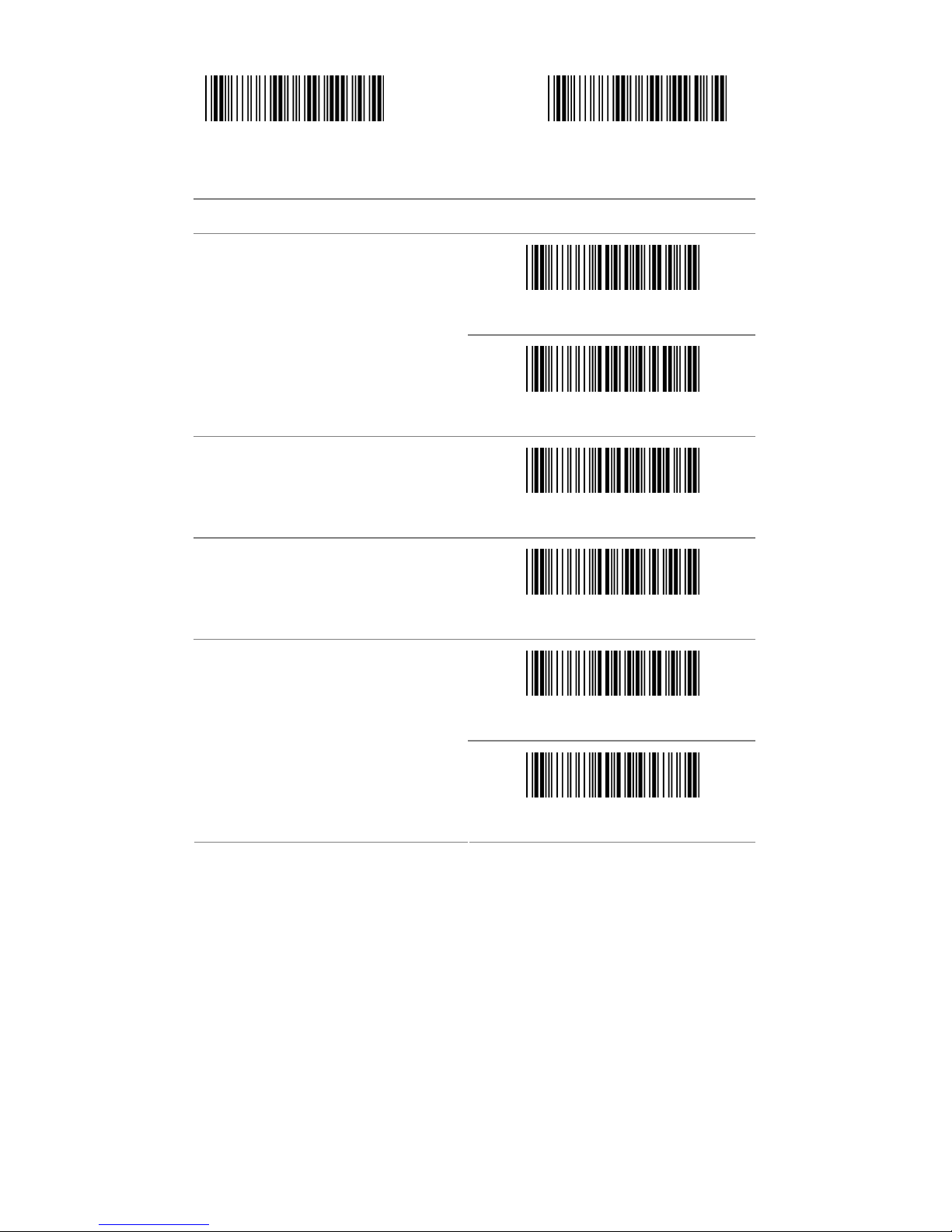
3.5 Code39
Start configuration End configuration
ITEM OPTION
Disable
Read
* Enable
Code ID setting
(Default : J)
Ref: Appendix (20-7EH)
* Disable
Check-sum verification
Enable
Disable
Check-sum transmission
* Enable
Page 23
- 23 -
Start configuration End configuration
ITEM OPTION
* Disable
Append
Enable
Min. code length
(Default: 00)
Ref: Appendix (00-32H)
Max. code length
(Default: 32H)
Ref: Appendix (00-32H)
* Standard Code39
Format
Code 39 Full ASCII
Page 24

- 24 -
Start configuration End configuration
ITEM OPTION
* Disable
Transmit Start/End Character
Enable
Truncate Leading
(Default: 00)
Ref: Appendix (00-32H)
Truncate Ending
(Default: 00)
Ref: Appendix (00-32H)
Insert group selection
(Default: 00)
Ref: Appendix (00-02H)
Page 25

- 25 -
3.6 Codabar
Start configuration End configuration
ITEM OPTION
Disable
Read
* Enable
Code ID setting
(Default : K)
Ref: Appendix (20-7EH)
Page 26
- 26 -
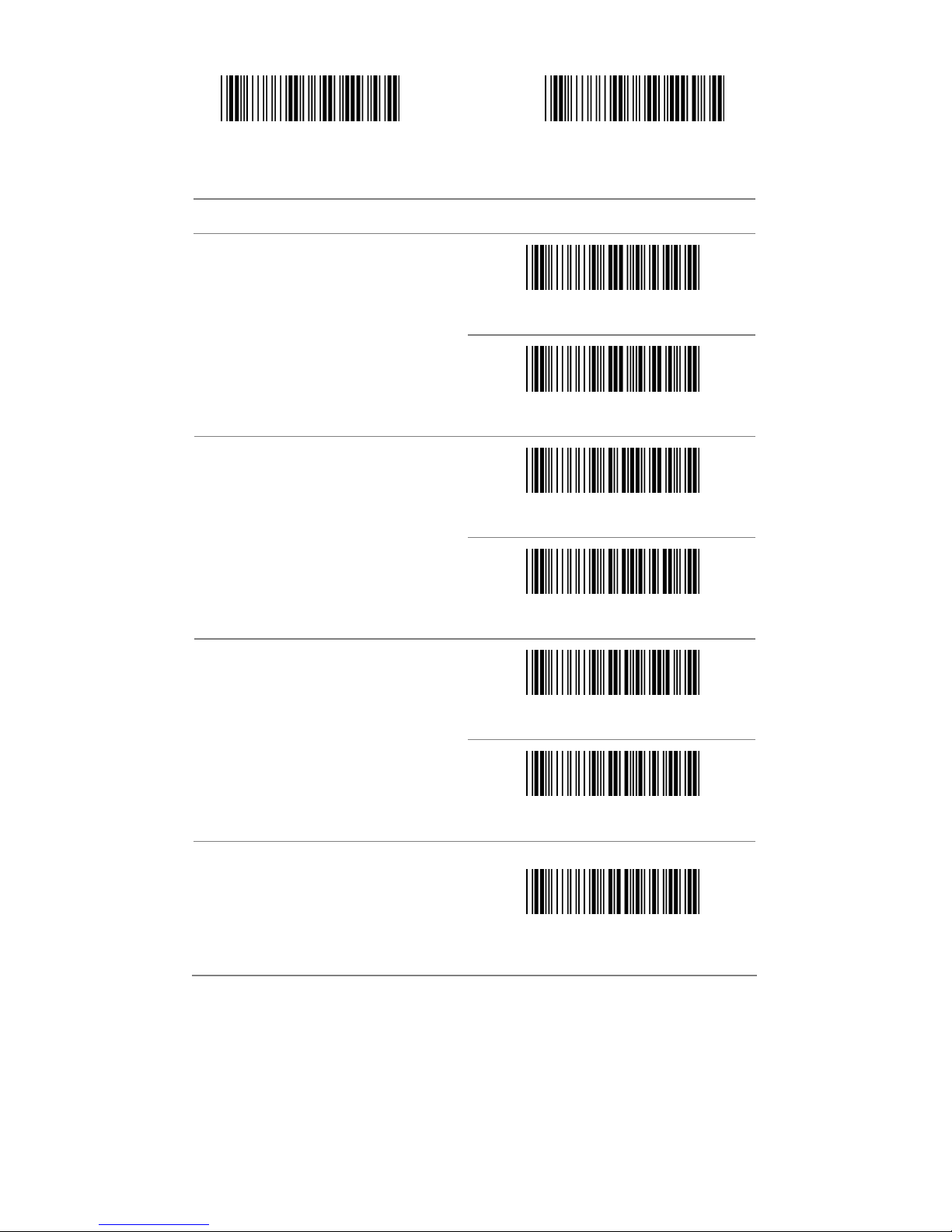
Start configuration End configuration
ITEM OPTION
Disable
Check-sum verification
* Enable
* Disable
Check-sum transmission
Enable
* Disable
Append
Enable
Truncate Leading
(Default:00)
Ref: Appendix (00-7EH)
Page 27
- 27 -
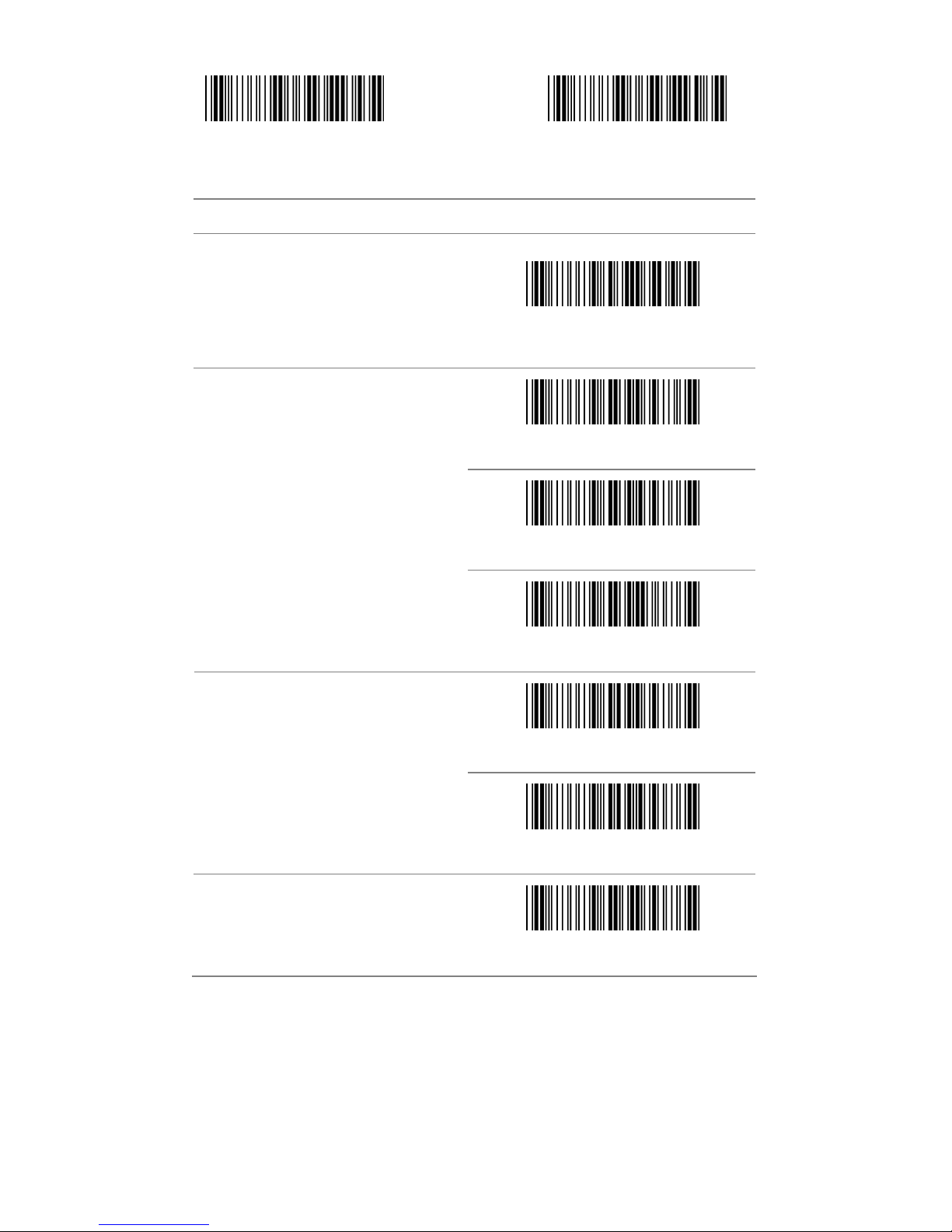
Start configuration End configuration
ITEM OPTION
Truncate Ending
(Default:00)
Ref: Appendix (00-7EH)
* ABCD/ABCD
abcd/abcd
Start/End type
abcd/tn*e
* Disable
Start/End transmission
Enable
Min. code length
(Default: 05)
Ref: Appendix (00-3CH)
Page 28

- 28 -
Start configuration End configuration
ITEM OPTION
Max. code length
(Default: 3CH)
Ref: Appendix (00-3CH)
Insert group selection
(Default: 00)
Ref: Appendix (00-02H)
Page 29

- 29 -
3.7 Code93
Start configuration End configuration
ITEM OPTION
Disable
Read
* Enable
Code ID setting
(Default : L)
Ref: Appendix (20-7EH)
Disable
Check-sum verification
* Enable
Page 30
- 30 -
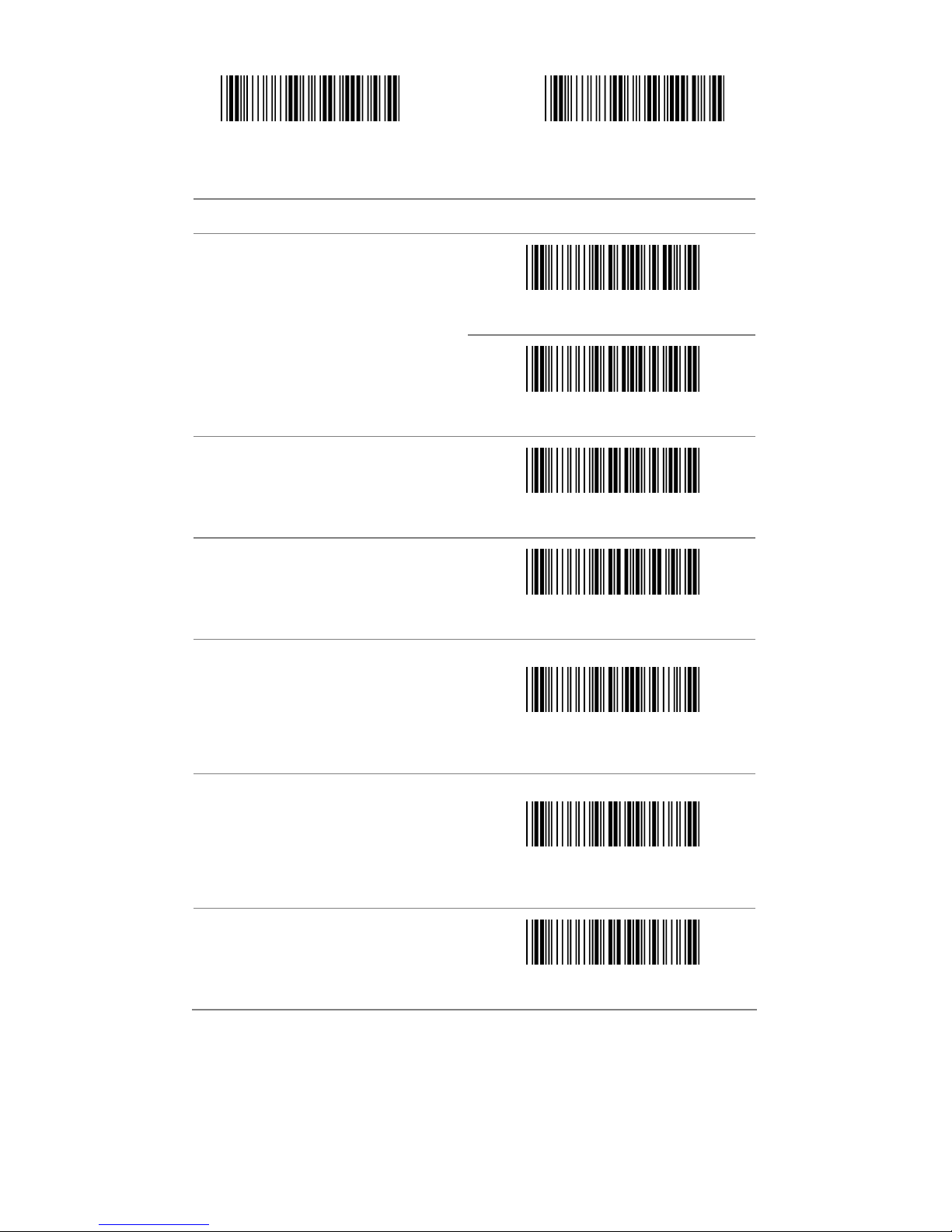
Start configuration End configuration
ITEM OPTION
* Disable
Check-sum transmission
Enable
Min. code length
(Default: 00)
Ref: Appendix (0-50H)
Max. code length
(Default: 50H)
Ref: Appendix (0-50H)
Truncate Leading
(Default: 00)
Ref: Appendix (00-7EH)
Truncate Ending
(Default: 00)
Ref: Appendix (00-7EH)
Insert group selection
Ref: Appendix (00-02H)
Page 31

- 31 -
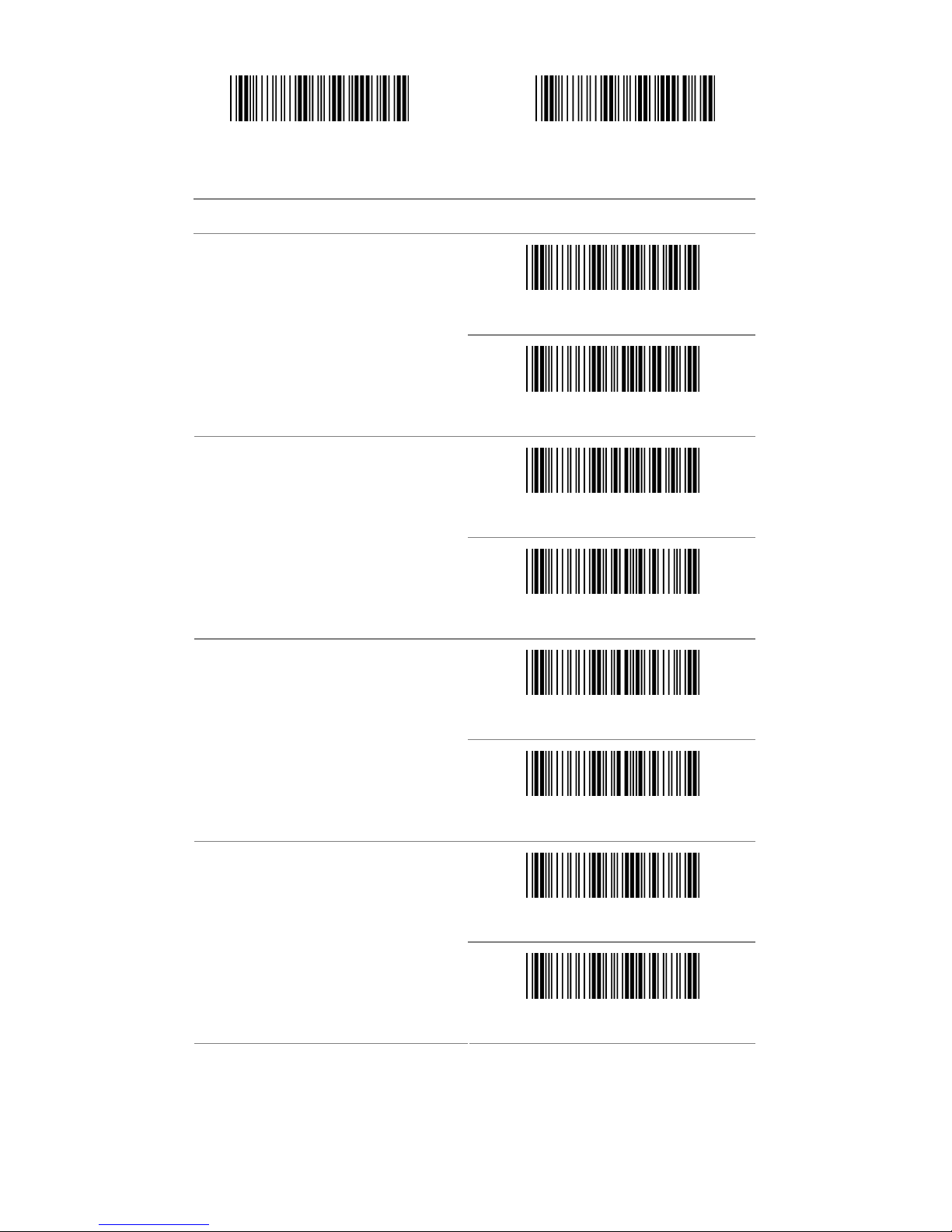
3.8 Code 128
Start configuration End configuration
ITEM OPTION
Disable
Read
* Enable
Code ID setting
(Default : M)
Ref: Appendix (20-7EH)
Disable
Check-sum verification
* Enable
Page 32
- 32 -
Start configuration End configuration
ITEM OPTION
* Disable
Check-sum transmission
Enable
* Disable
FNC2 Append
Enable
* Disable
UCC/EAN128
Enable
* Disable
FNC1 transmission
Enable
Page 33
- 33 -
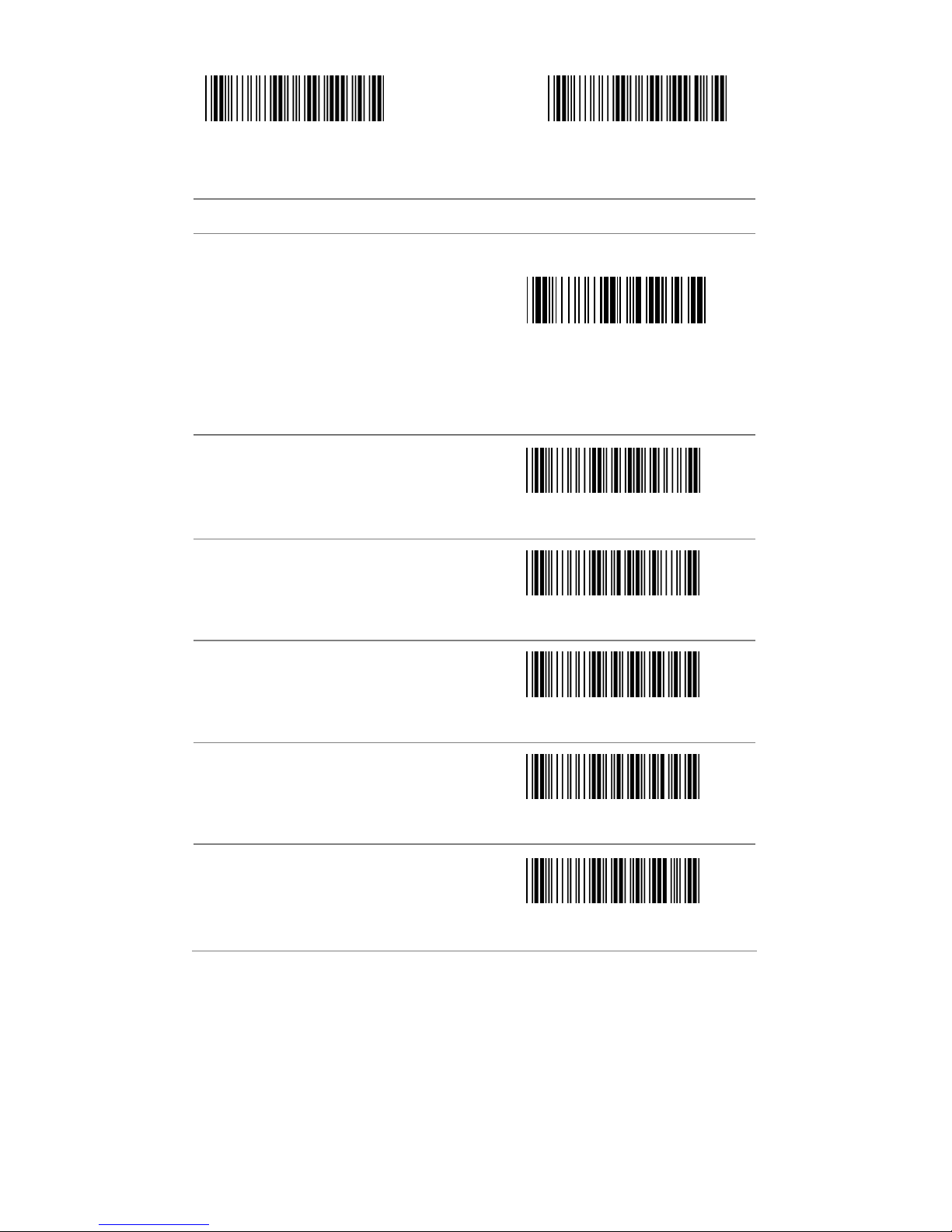
Start configuration End configuration
ITEM OPTION
FIELD SEPARATOR DEFINED
(GS CHARACTER)
Enable Field Separator
Ref: Appendix
Truncate Leading
(Default: 00)
Ref: Appendix (00-7FH)
Truncate Ending
(Default: 00)
Ref: Appendix (00-7FH)
Min. code length
(Default: 00)
Ref: Appendix (00-7FH)
Max. code length
(Default: 7FH)
Ref: Appendix (00-7FH)
Insert group selection
(Default: 00)
Ref: Appendix (00-02H)
Page 34
- 34 -
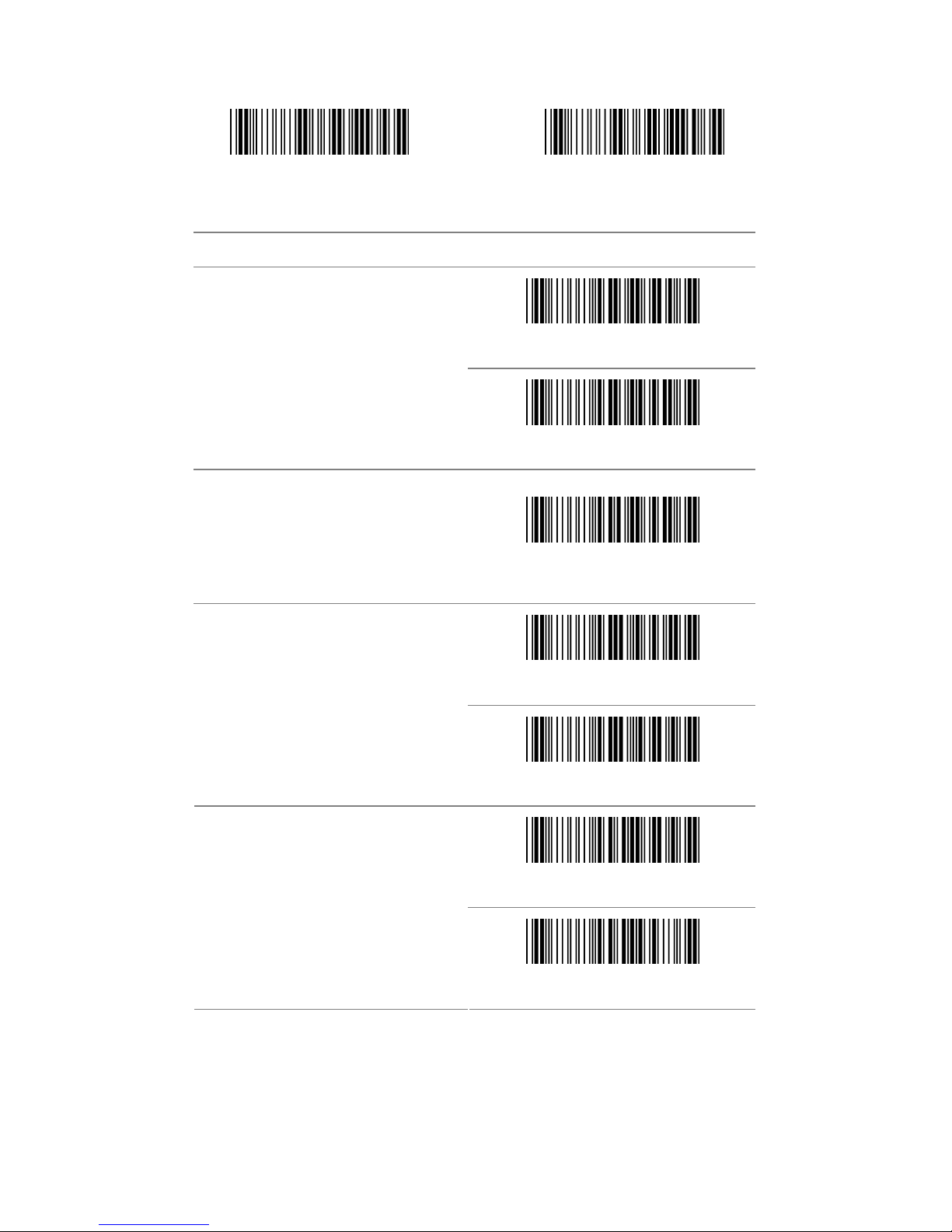
3.9 Interleaved 2 of 5
Start configuration End configuration
ITEM OPTION
* Disable
Read
Enable
Code ID setting
(Default : N)
Ref: Appendix (20-7EH)
Disable
Check-sum verification
* Enable
Disable
Check-sum transmission
* Enable
Page 35

- 35 -
Start configuration End configuration
ITEM OPTION
Truncate Leading
(Default : 00)
Ref: Appendix (00-7EH)
Truncate Ending
(Default : 00)
Ref: Appendix (00-7EH)
Min. code length
(Default : 04)
Ref: Appendix (04-7FH)
Max. code length
(Default : 7FH)
Ref: Appendix (00-7FH)
Insert group selection
(Default : 00)
Ref: Appendix (00-02H)
Page 36

- 36 -
3.10 Industrial 2 of 5
Start configuration End configuration
ITEM OPTICON
* Disable
Read
Enable
Code ID setting
(Default : O)
Ref: Appendix (20-7EH)
Min. code length
(Default : 00)
Ref: Appendix (00-32H)
Max. code length
(Default : 32H)
Ref: Appendix (00-32H)
Page 37
- 37 -
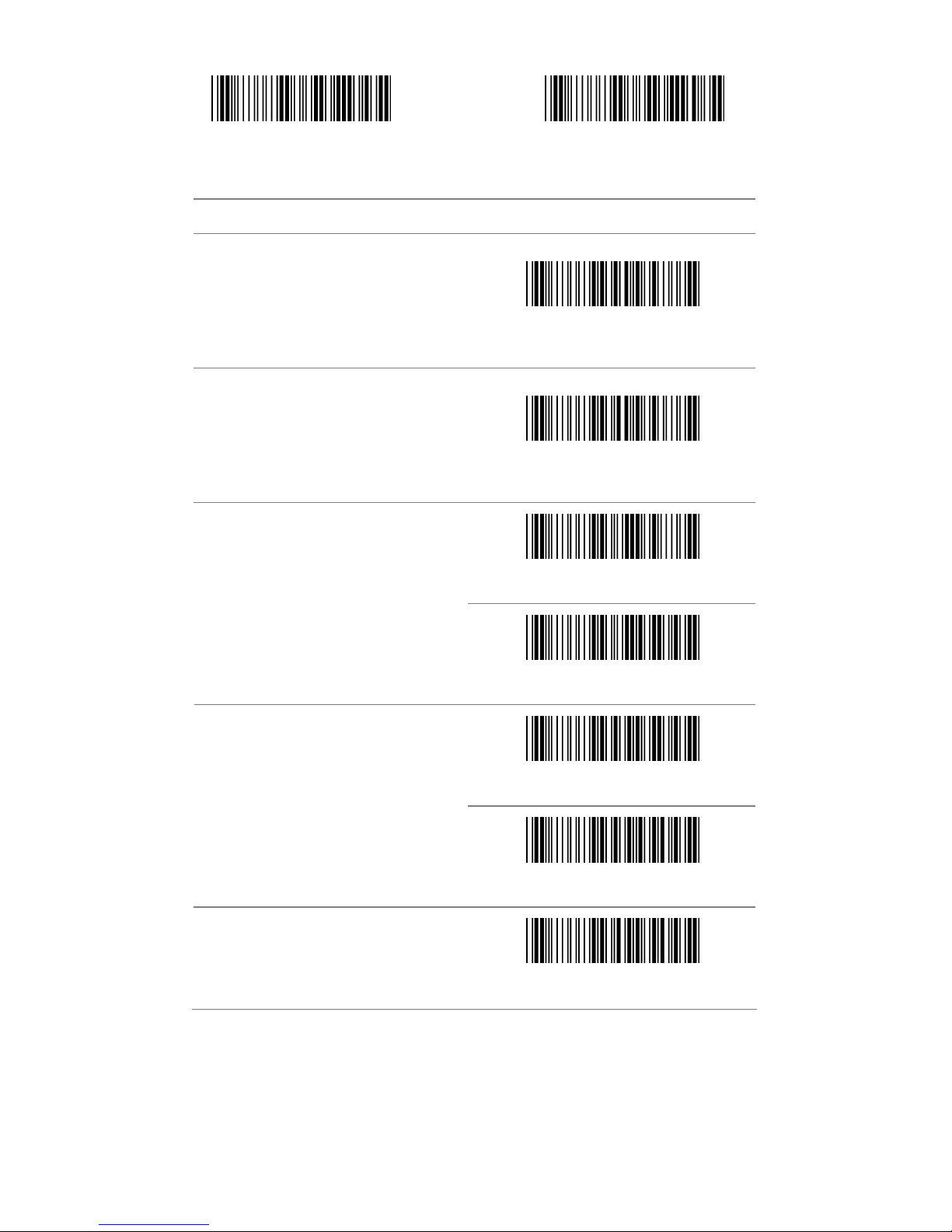
Start configuration End configuration
ITEM OPTION
Truncate Leading
(Default : 00)
Ref: Appendix (00-32H)
Truncate Ending
(Default : 00)
Ref: Appendix (00-32H)
* Disable
Check-sum verification
Enable
Disable
Check-sum transmission
* Enable
Insert group selection
(Default : 00)
Ref: Appendix (00-02H)
Page 38

- 38 -
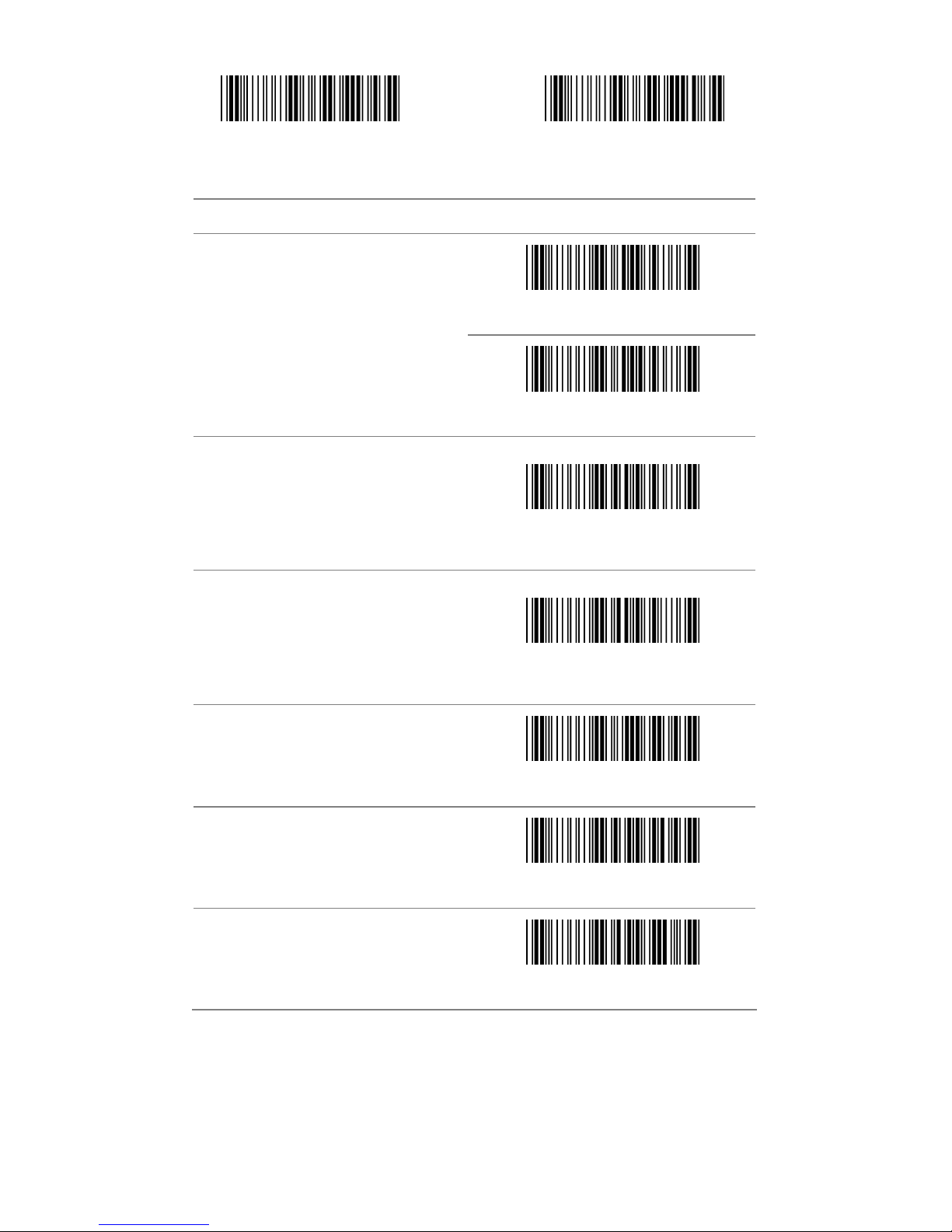
3.11 Matrix 2 of 5
Start configuration End configuration
ITEM OPTION
* Disable
Read
Enable
Code ID setting
(Default : P)
Ref: Appendix (20-7EH)
* Disable
Check-sum verification
Enable
Page 39
- 39 -
Start configuration End configuration
ITEM OPTION
Disable
Check-sum transmission
* Enable
Truncate Leading
(Default : 00)
Ref: Appendix (00-50H)
Truncate Ending
(Default : 00)
Ref: Appendix (00-50H)
Min. code length
(Default : 0B)
Ref: Appendix (00-50H)
Max. code length
(Default : 50H)
Ref: Appendix (00-50H)
Insert group selection
(Default : 00)
Ref: Appendix (00-02H)
Page 40
- 40 -
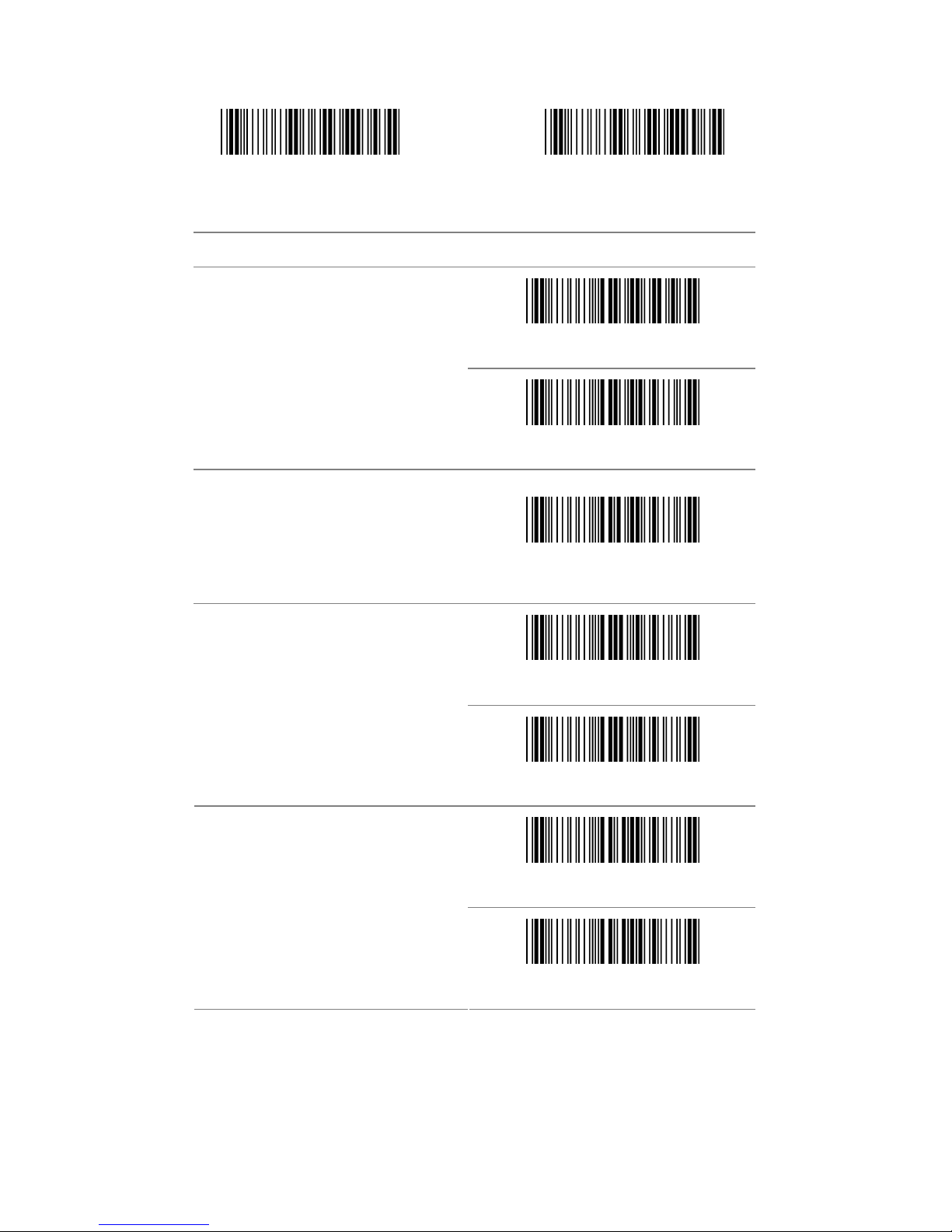
3.12 CHINA POSTAL CODE
Start configuration End configuration
ITEM OPTION
* Disable
Read
Enable
Code ID setting
(Default : Q)
Ref: Appendix (20-7EH)
* Disable
Check-sum verification
Enable
Disable
Check-sum transmission
* Enable
Page 41

- 41 -
Start configuration End configuration
ITEM OPTION
Truncate Leading
(Default : 00)
Ref: Appendix (00-50H)
Truncate Ending
(Default : 00)
Ref: Appendix (00-50H)
Min.code length
(Default : 00)
Ref: Appendix (00-50H)
Max.code length
(Default : 50H)
Ref: Appendix (00-50H)
Insert group selection
(Default : 00)
Ref: Appendix (00-02H)
Page 42
- 42 -
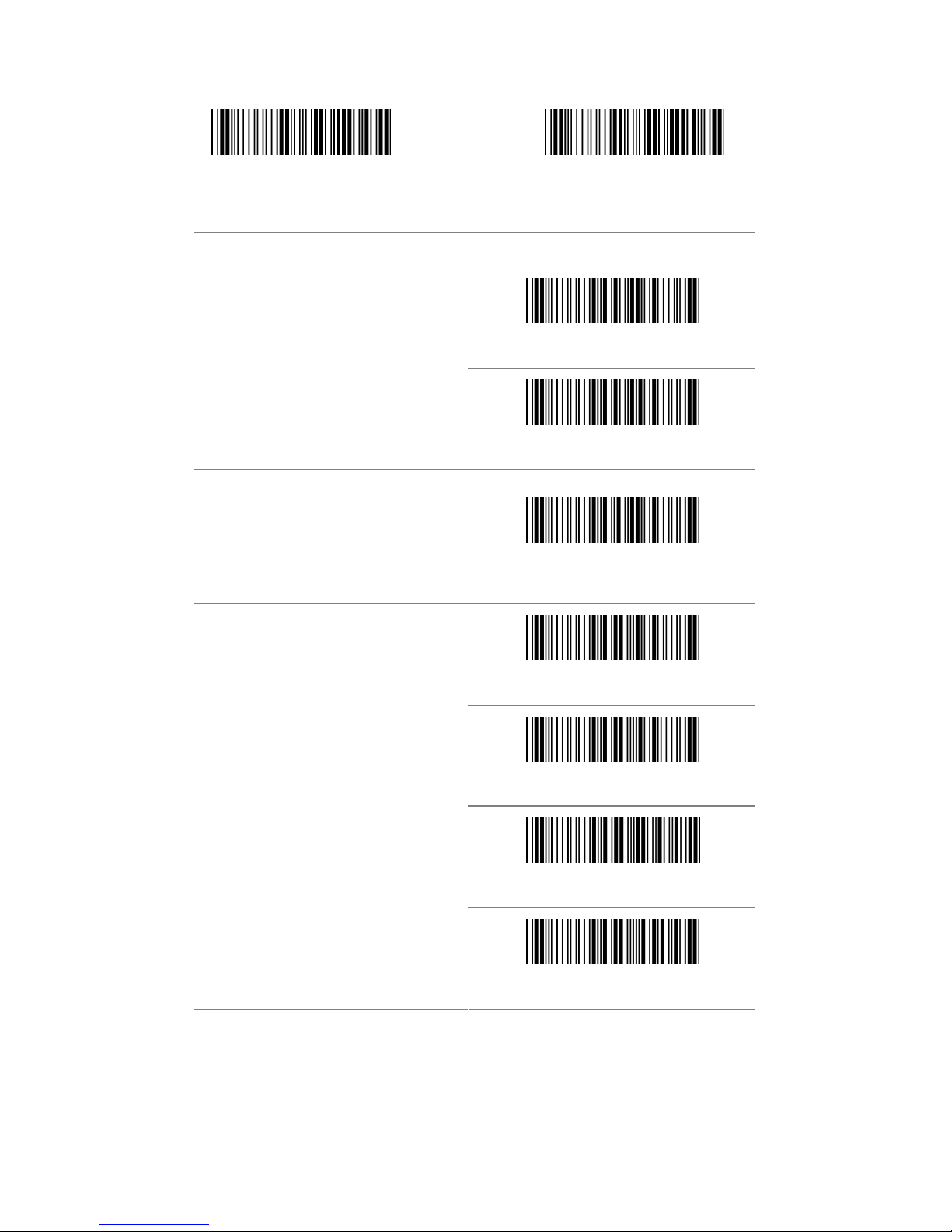
3.13 MSI/Plessey
Start configuration End configuration
ITEM OPTION
* Disable
Read
Enable
Code ID setting
(Default : R)
Ref: Appendix (20-7EH)
* Disable
MOD 10
MOD 10/10
Check-sum verification
MOD 11/10
Page 43
- 43 -
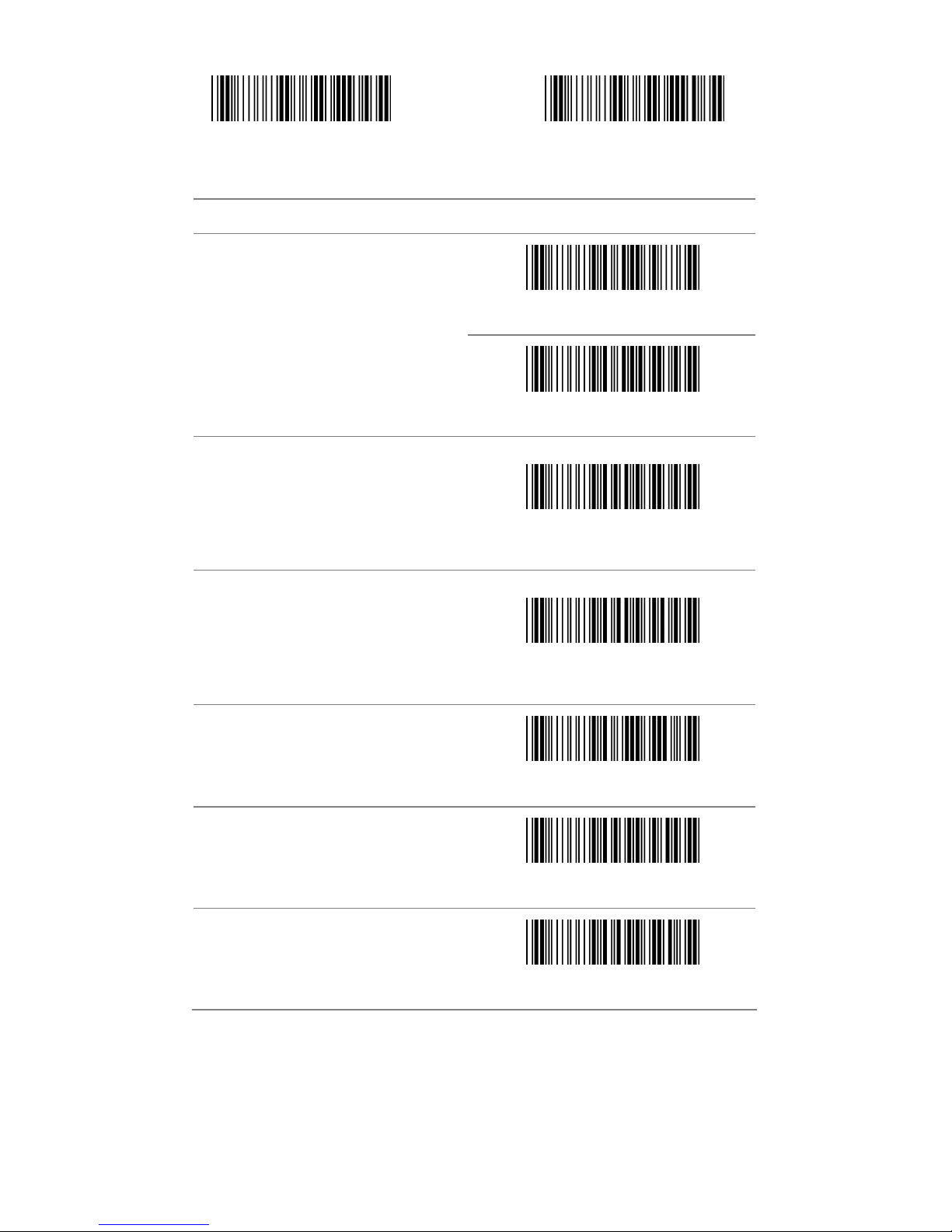
Start configuration End configuration
ITEM OPTION
Disable
Check-sum transmission
* Enable
Truncate Leading
(Default : 00)
Ref: Appendix (00-3CH)
Truncate Ending
(Default : 00)
Ref: Appendix (00-3CH)
Min. code length
(Default : 00)
Ref: Appendix (00-3CH)
Max. code length
(Default : 3CH)
Ref: Appendix (00-3CH)
Insert group selection
(Default : 00)
Ref: Appendix (00-02H)
Page 44
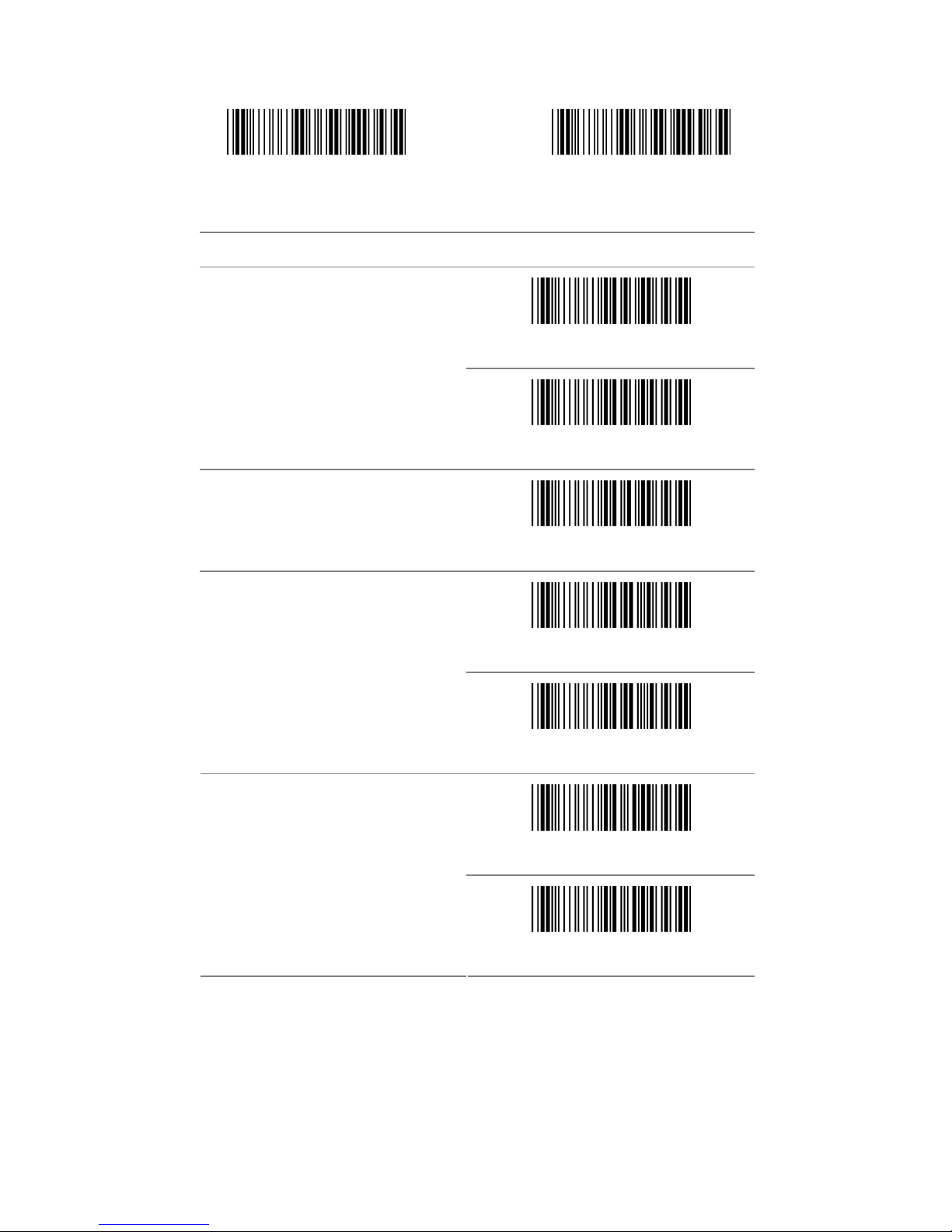
- 44 -
3.14 CODE 32
Start configuration End configuration
ITEM OPTION
* Disable
Read
Enable
Code ID Setting
(Default:S)
Ref: Appendix (20-7EH)
Disable
Check-sum verification
* Enable
Disable
Check-sum transmission
* Enable
Page 45

- 45 -
Start configuration End configuration
ITEM OPTION
Truncate Leading
(Default : 00)
Ref: Appendix (00-0AH)
Truncate Ending
(Default : 00)
Ref: Appendix (00-0AH)
Insert group selection
(Default : 00)
Ref: Appendix (00-02H)
Page 46

- 46 -
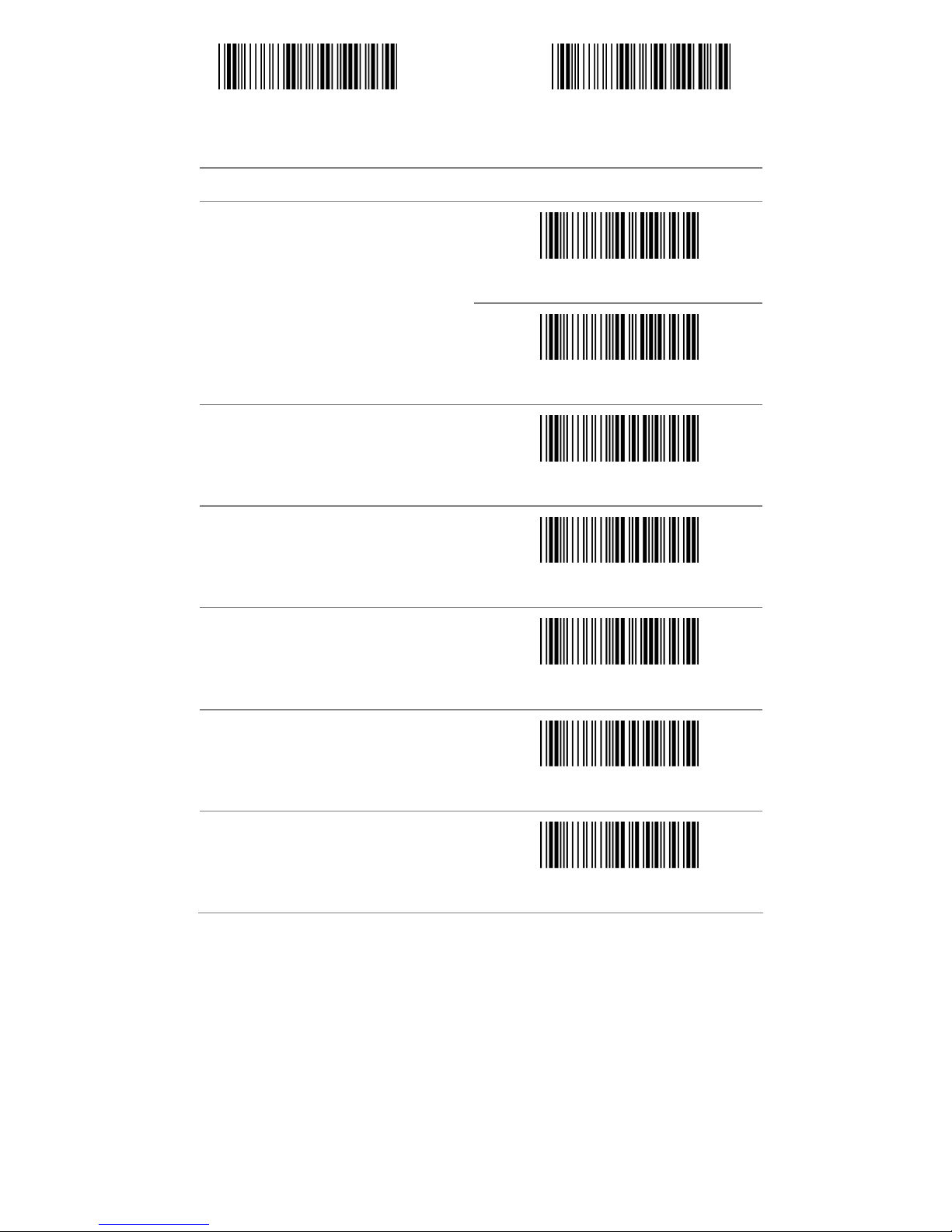
3.15 CODE 11
Start configuration End configuration
ITEM OPTION
* Disable
Read
Enable
Code ID setting
(Default:T)
Ref: Appendix (20-7EH)
Disable
Check-sum verification
* Enable
Page 47
- 47 -
Start configuration End configuration
ITEM OPTION
* Disable
Check-sum transmission
Enable
Truncate Leading
(Default : 00)
Ref: Appendix (00-50H)
Truncate Ending
(Default : 00)
Ref: Appendix (00-50H)
Min. code length
(Default : 00)
Ref: Appendix (00-50H)
Max. code length
(Default : 50H)
Ref: Appendix (00-50H)
Insert group selection
(Default : 00)
Ref: Appendix (00-02H)
Page 48

- 48 -
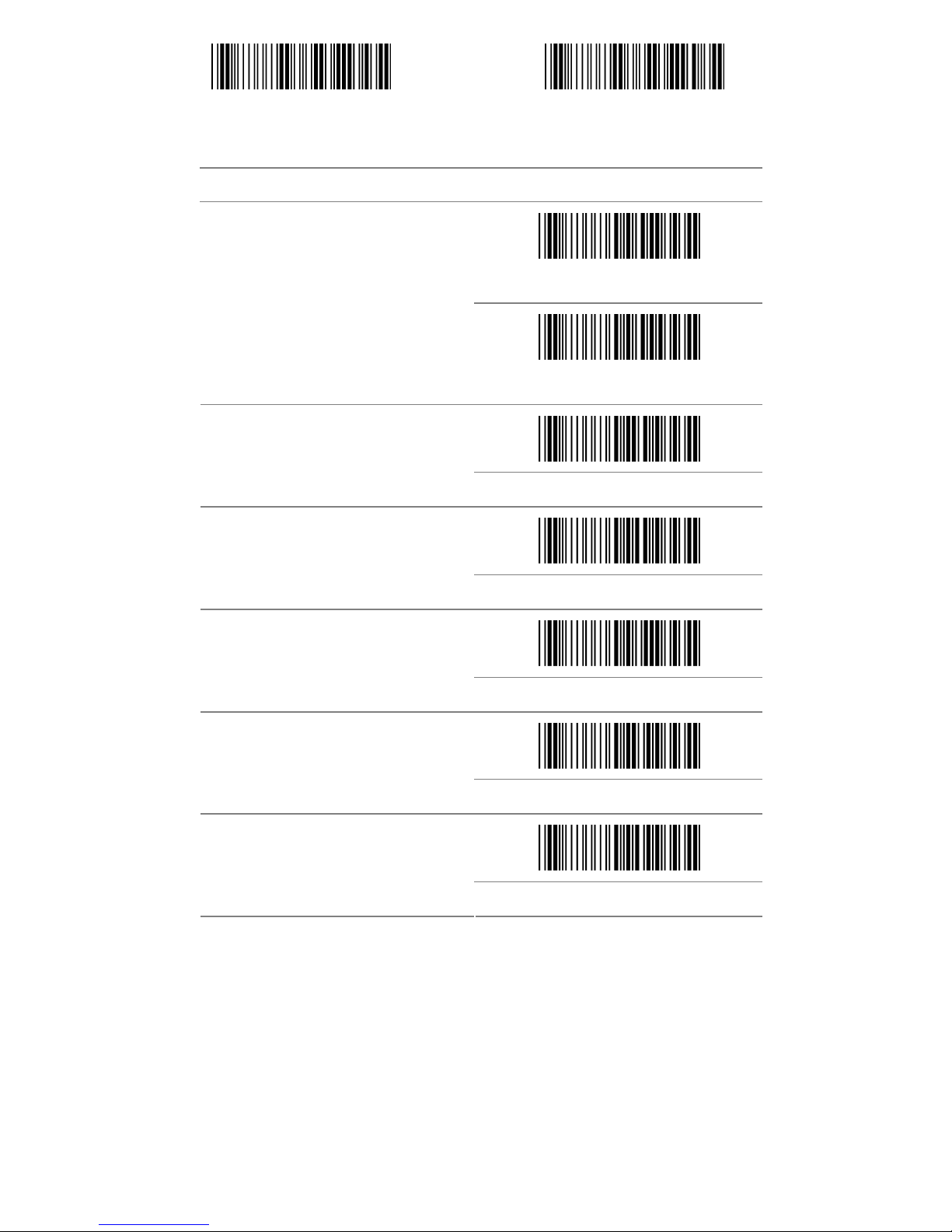
3.16 Telepen
Start configuration End configuration
ITEM OPTION
* Disable
Read
Enable
Code ID setting
(Default:V)
Ref: Appendix (20-7EH)
Disable
Check-sum verification
* Enable
Only Numnic
Data Format
*Full ASCII
Page 49
- 49 -
Start configuration End configuration
ITEM OPTION
* Disable
Check-sum transmission
Enable
Truncate Leading
(Default : 00)
Ref: Appendix (00-40H)
Truncate Ending
(Default : 00)
Ref: Appendix (00-40H)
Min. code length
(Default : 00)
Ref: Appendix (00-40H)
Max. code length
(Default : 40H)
Ref: Appendix (00-40H)
Insert group selection
(Default : 00)
Ref: Appendix (00-02H)
Page 50
- 50 -
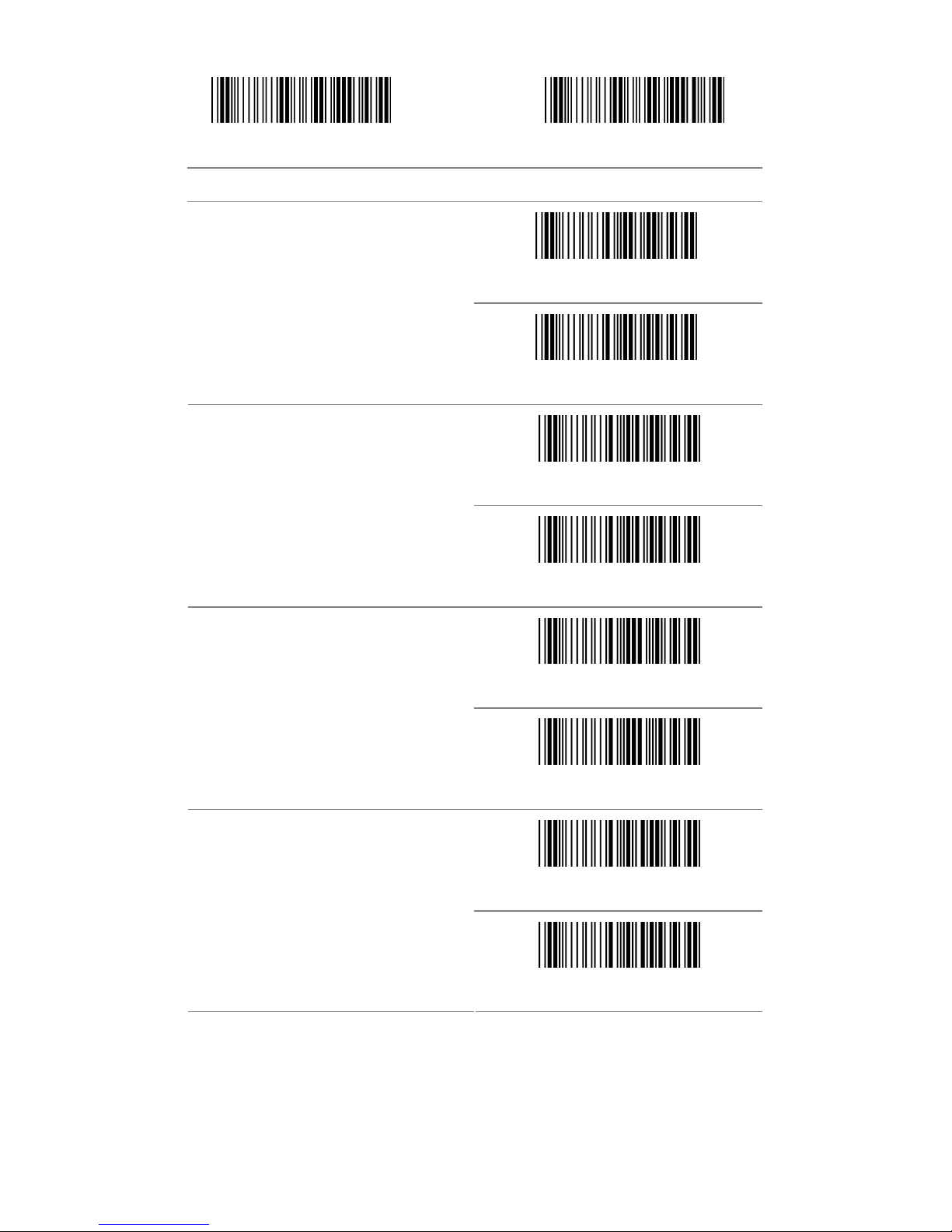
3.17 GS1 Data Bar (RSS)
Start configuration End configuration
ITEM OPTION
Enable
RSS-14
*Disable
Enable
RSS-14 LIMITED
*Disable
Enable
RSS-14 EXPANDED
*Disable
Enable
RSS TO UPC/EAN
*Disable
Page 51

- 51 -
Start configuration End configuration
ITEM OPTION
*Enable
APPLICATION ID TRANSMISSION
Disable
*Enable
CHECKSUM TRANSMISSION
Disable
Page 52

- 52 -
Appendix A –
Page 53

KBD Wedge Character Table
0 1 2 3 4 5 6 7
Type 1 Type 2 Type 1 Type 2
0 DLE SP 0 @ P ` p
1 SOH Insert DC1 F1 ! 1 A Q a q
2 STX Delete DC2 F2 “ 2 B R b r
3 ETX Home DC3 F3 # 3 C S c s
4 ETO End DC4 F4 $ 4 D T d t
5 EAQ Up NAK F5 % 5 E U e u
6 ACK Down SYN F6 & 6 F V f v
7 BEL Left ETB F7 ‘ 7 G W g w
8 BS Backspace CAN F8 ( 8 H X h x
9 HT TAB EM F9 ) 9 I Y i y
A LF LF SUB F10 * : J Z j z
B VT Right ESC F11 + ; K [ k {
C FF PageUp FS F12 , < L \ l |
D CR Enter GS ESC - = M ] m }
E SO PageDown RS . > N ^ n ~
F SI US / ? O _ o DEL
Note 1:If scan the following barcode the output data pleaser
refer to type 1 (in blue)
Type 1
Note 2:If scan the following barcode the output data please refer
to type 2 (in red)
Type 2
- 53 -
Right ALT
Enter key
on Num
keypad
Page 54

- 54 -
Dec Hex Char. Dec Hex Char.
0 00 NUL 32 20 SP
1 01 SOH 33 21 !
2 02 STX 34 22 “
3 03 ETX 35 23 #
4 04 EOT 36 24 $
5 05 ENQ 37 25 %
6 06 ACK 38 26 &
7 07 BEL 39 27 ‘
8 08 BS 40 28 (
9 09 HT 41 29 )
10 0A LF 42 2A *
11 0B VT 43 2B +
12 0C FF 44 2C ,
13 0D CR 45 2D -
14 0E SO 46 2E .
15 0F SI 47 2F /
16 10 DLE 48 30 0
17 11 DC1 49 31 1
18 12 DC2 50 32 2
19 13 DC3 51 33 3
20 14 DC4 52 34 4
21 15 NAK 53 35 5
22 16 SYN 54 36 6
23 17 ETB 55 37 7
24 18 CAN 56 38 8
25 19 EM 57 39 9
26 1A SUB 58 3A :
27 1B ESC 59 3B ;
28 1C FS 60 3C <
29 1D GS 61 3D =
30 1E RS 62 3E >
31 1F US 63 3F ?
Page 55

- 55 -
Dec Hex Char. Dec Hex Char.
64 40 @ 96 60 ‘
65 41 A 97 61 a
66 42 B 98 62 b
67 43 C 99 63 c
68 44 D 100 64 d
69 45 E 101 65 e
70 46 F 102 66 f
71 47 G 103 67 G
72 48 H 104 68 h
73 49 I 105 69 i
74 4A J 106 6A j
75 4B K 107 6B k
76 4C L 108 6C l
77 4D M 109 6D m
78 4E N 110 6E n
79 4F O 111 6F o
80 50 P 112 70 P
81 51 Q 113 71 q
82 52 R 114 72 r
83 53 S 115 73 s
84 54 T 116 74 t
85 55 U 117 75 u
86 56 V 118 76 v
87 57 W 119 77 w
88 58 X 120 78 x
89 59 Y 121 79 y
90 5A Z 122 7A z
91 5B [ 123 7B {
92 5C \ 124 7C |
93 5D } 125 7D }
94 5E ^ 126 7E ~
95 5F _ 127 7F DEL
Page 56
- 56 -
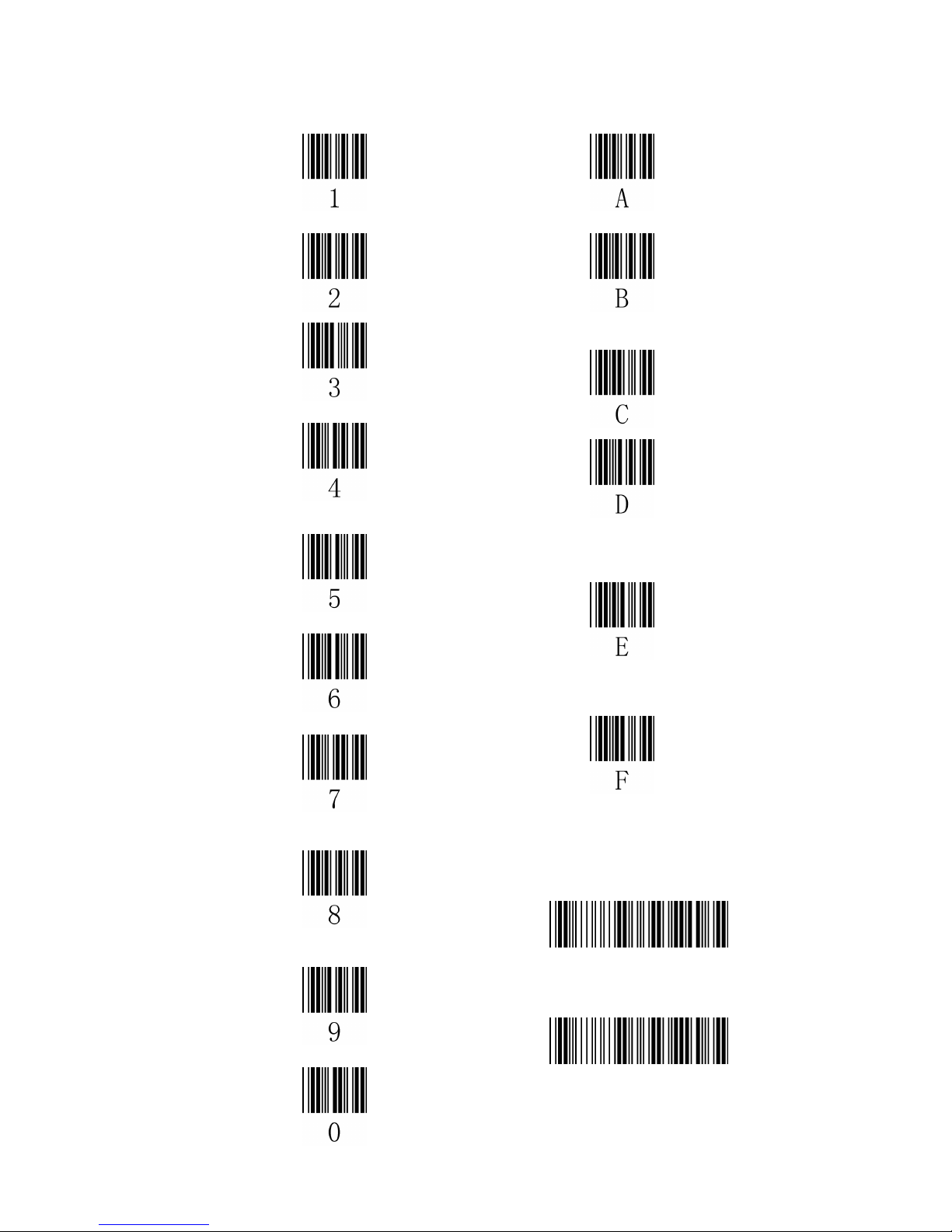
Table-Hex HEXADCIMAL
Confirm configuration
End Configuration
 Loading...