

Page 1
Metaflow, Ltd.
MF-V2-UM-00
Rev: 02
Lumen V2 User Manual Document
Name
Signature
Date
Maintained By
Ofer Vitner
25-Aug-2019
Checked By
Merav Mor
Approved By
Daniel Tal
Page 2

Metaflow, Ltd.
Table Of Content
Table Of Content 1
Introduction 2
Charging the battery 2
Getting Started 3
General Functions 3
Lights Status 3
Spec related bullet points 4
Charger requirements 4
Temperature working range 4
IP ratings 4
Sign up procedure (Add the activation code here) 4
Pairing (Broadcasting) 4
Dynamic Firmware Update (DFU) 5
Regulations 5
FCC Regulations US 5
Safety 7
Health Warnings 7
Food Grade 7
Pacemakers 7
Other medical devices 7
RF signals 7
In The Box 8
Having problems 8
Draft
File: Lumen V2 User Manual Document
Page 1 Of 9
Metaflow Ltd.
6 David Elazar St., Tel-Aviv, IL
MF-02-UM-01
Rev: 02
Page 3

Metaflow, Ltd.
1. Introduction
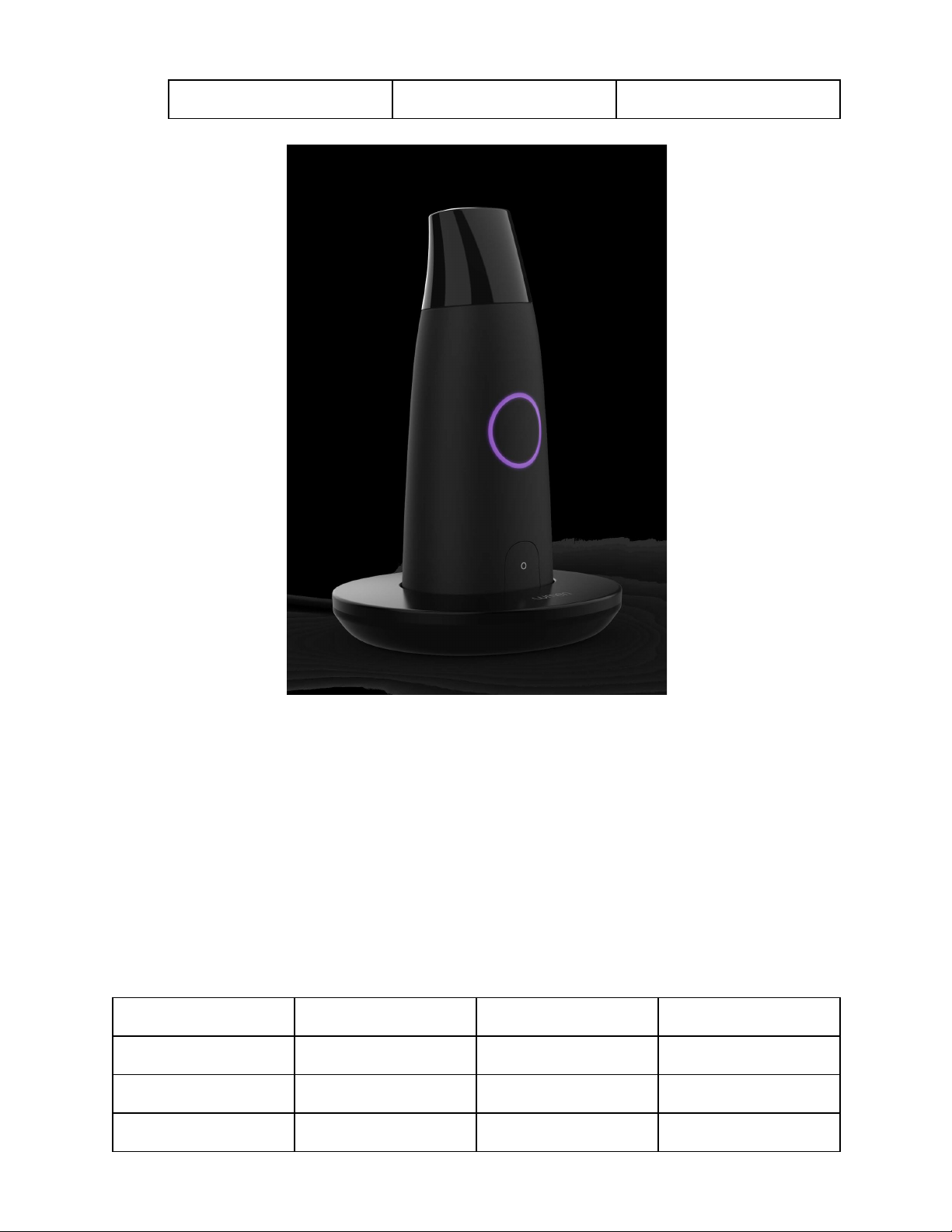
Thank you for purchasing the Lumen device
Metaflow Ltd. Lumen device objective, along with its complementary application over
android and iOS, is to help users to best fit their nutrition in order to reach improved
metabolic flexibility, as well as to lose weight.
The manual will help you to get familiar with it.
2. Charging the battery
The device holds a 2Cell 500mAh Poly Ion battery that can be charged when docking
the device onto the docking station. Light indicators help to identify battery status.
Using it for the 1st time?
Please connect the docking station using the USB-C cable provided to either a UL
certified wall charger or a computer USB port.
Please dock the device onto the docking station. Slow dimming purple ring indicated
charging is in process.
Remove from docking station once green ring indicator is identified. Battery is now fully
charged.
Draft
File: Lumen V2 User Manual Document
Page 2 Of 9
Metaflow Ltd.
6 David Elazar St., Tel-Aviv, IL
MF-02-UM-01
Rev: 02
Page 4
Metaflow, Ltd.
3. Getting Started
3.1. General Functions
The lumen device has a single On/Off button, and illuminated light ring.
The device’s SW can be upgraded remotely, pending on user acceptance. The
App will guide the user with the process.
3.2. Lights Status
Table 1: Light Legend
Status
Constant or
Blinking
Color code
Notes
White
Constant
Device is On
Short press: Device ON.
(Shuts off automatically after
15secs)
Purple
Blinking
Charging
Slowly blinking
Red
Constant
Battery
needs
charging
Green
Constant
Battery
charged
Fully charged battery
Purple
Constant
Connected
via BLE
Broadcasting established
with a smartphone
Blue
Constant
DFU mode
Device is ready to have a
SW update
Red
Constant
DFU in
process
SW upgrade in Process
Draft
File: Lumen V2 User Manual Document
Page 3 Of 9
Metaflow Ltd.
6 David Elazar St., Tel-Aviv, IL
MF-02-UM-01
Rev: 02
Page 5

Metaflow, Ltd.
3.3. Spec related bullet points
3.3.1. Charger requirements
The charger (AC/DC adapter) is not supplied by Metaflow Ltd., yet the
recommendation is a UL certified wall mount charger. Alternatively, use
similar charger procured when purchasing a mobile phone/tablet.
AC/DC adapter:
Input requirements: 100 - 240 VAC, 50/60 Hz.
Output requirements: 5VDC, 1A.
3.3.2. Temperature working range
The device is designed to work in closed environments, +15 to +40 degC,
in a non condensing environment.
3.3.3. IP ratings
The device meets IP20 rating, meaning will not operate when introduced
to liquids, and will not permit objects bigger than 5mm to get into the
device.
4. Sign up procedure (Add the activation code
here)
On the package label you will find the ActCode number (6 digits), that you will be asked
to enter in the sign up process. The application will guide you through it.
5. Pairing (Broadcasting)
The device will be connected to any mobile solution that installed the app, and will have
the BT and location services turned on.
Once connected, constant purple ring light will appear on the device, and connectivity
acknowledge will be indicated in the App.
Draft
File: Lumen V2 User Manual Document
Page 4 Of 9
Metaflow Ltd.
6 David Elazar St., Tel-Aviv, IL
MF-02-UM-01
Rev: 02
Page 6

Metaflow, Ltd.
When disconnected via the app, the ring color will turn white. If power button is pressed
for 2 seconds, the device will turn off and connectivity will be lost. Light ring will be
turned off as well.
6. Dynamic Firmware Update (DFU)
The device can have its internal SW (FW) upgraded per need.
Trigger to this process will be made via the app. Once approved by the user, device light
ring will turn blue, and the user will be asked to place the device gently onto the docking
station
Once FW upgrade will be in process, color will alter to red
Once successfully finished, a success indicator will be observed in the app, in parallel to
the device full shut down.
7. Regulations
7.1. FCC Regulations US
Metaflow Ltd. MF-V2-01
Manufactured by:
Metaflow Ltd. 6 David Elazar St., Tel-Aviv, 6107402, ISRAEL
This equipment has been tested and found to comply with the limits for a
Class B digital device, with part 15 of the FCC rules, and its operation is
subject to the following 2 conditions:
(1) This device may not cause harmful interference, and
(2) This device must accept any interference received, including
interference that may cause undesired operation.
The limits are designed to provide reasonable protection against harmful
interference in a residential installation.
Draft
File: Lumen V2 User Manual Document
Page 5 Of 9
Metaflow Ltd.
6 David Elazar St., Tel-Aviv, IL
MF-02-UM-01
Rev: 02
Page 7

Metaflow, Ltd.
Changes or modifications not expressly approved by the part responsible
for compliance could void the user’s authority to operate the device.
Draft
File: Lumen V2 User Manual Document
Page 6 Of 9
Metaflow Ltd.
6 David Elazar St., Tel-Aviv, IL
MF-02-UM-01
Rev: 02
The equipment generates, uses and can radiate radio frequency energy
and, if not installed and used in accordance with the instructions, may
cause harmful interference to radio communications. However, there is no
guarantee that interference will not occur in a particular installation. If this
equipment does cause harmful interference to radio or television
reception, which can be determined by turning the equipment off and on,
the user is encouraged to try to correct the interference by one or more of
the
following measures:
— Reorient or relocate the receiving antenna
— Increase the separation between the equipment and receiver
— Connect the equipment into an outlet on a circuit different from that to
which the receiver is connected
— Consult the dealer or an experienced radio/TV technician for help.
Page 8

Metaflow, Ltd.
8. Safety
8.1. Health Warnings
8.1.1. Food Grade
The device was designed to ensure you will not inhale hazardous materials.
All materials that are directly in contact with the user's mouth are by design ‘food
grade’.
8.1.2. Pacemakers
The health Industry Manufacturers Association recommends that a minimum
separation of about six inches (or 16 cm) to be maintained between a mobile
phone or wireless device and a pacemaker to avoid potential interference with
the pacemaker. Be sure not to interfere with the functionality of personal medical
devices.
8.1.3. Other medical devices
If you use any other personal medical device, consult the manufacturer of your
device and/ or your physician to determine if it is adequately shielded from
interference caused by external RF energy. Your physician may be able to assist
you in obtaining this information.
8.1.4. RF signals
Certain electronic equipment may not be shielded against the RF signals
emanating from your wireless equipment.
Draft
File: Lumen V2 User Manual Document
Page 7 Of 9
Metaflow Ltd.
6 David Elazar St., Tel-Aviv, IL
MF-02-UM-01
Rev: 02
Page 9
Metaflow, Ltd.
9. In The Box
Table 2: Deliverables content
#
P/N
Item
Qty
1
MFL-01-1000-00
Lumen V2 Device
1 2 MFL-01-2000-00
Lumen V2 Docking Station
1 3 MFL-01-2100-00
USB-C charging cable
1 4 MFL-01-3100-00
Booklet (in an envelope)
1 5 MFL-01-3200-00
Soft shell sleeve
1 6 MFL-01-3000-00
Lumen V2 package
1
10. Having problems?
Feel free to approach [email protected] for any issues
Draft
File: Lumen V2 User Manual Document
Page 8 Of 9
Metaflow Ltd.
6 David Elazar St., Tel-Aviv, IL
MF-02-UM-01
Rev: 02
 Loading...