

Page 1
DSP420
Digital Signal Processing
In-Wall Loudspeaker System
M420
Analogue Active In-Wall
Loudspeaker System
The world’s first DSP In-wall
based on technology used
in Meridian’s famous DSP
speakers
INSTALLATION & OPERATION
New analogue active version
also available
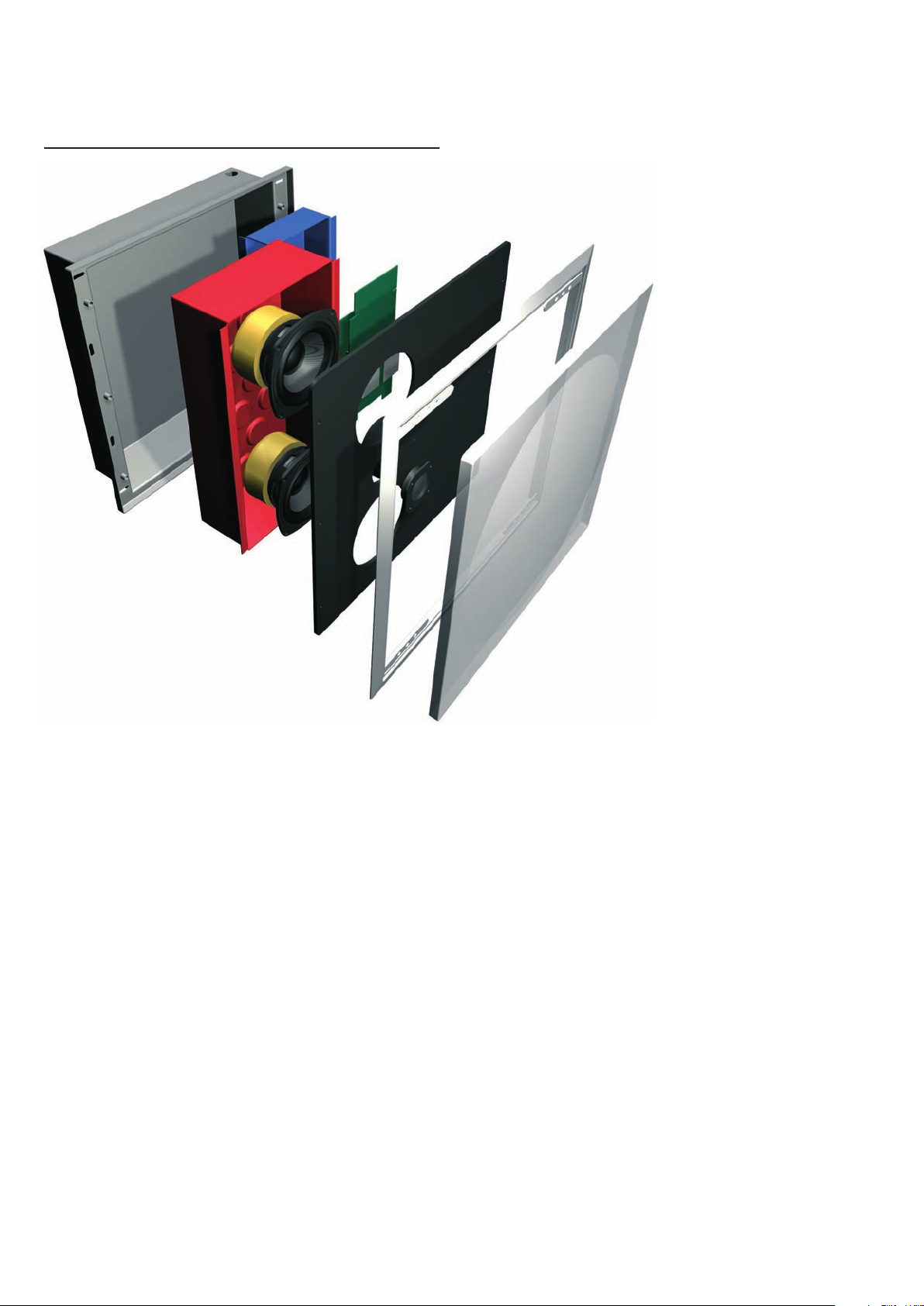
Easy-install sealed preconstruction enclosure with
redesigned, simplified backbox
Double sealed and damped
acoustic enclosure
Separate, on-board,
85W bass and 65W treble
power amplifiers
2 way active speaker with
DSP (DSP420) or analogue
line-level (M420) crossover
Custom paintable grille/
frame
The DSP420 accepts up to 96kHz/
24-bit inputs including Meridian
MHR Smart Link. The M420
accepts line-level balanced
analogue inputs. Unit is
designed to comply fully
with international building
regulations
Background
In-wall loudspeakers are not a new invention.
Indeed they have been employed for many years
by installers who wish to provide an unobtrusive
audio solution to customers who have been
unwilling or unable to install conventional freestanding loudspeakers.
However, the design restraints generally imposed
on an in-wall design – limited space and thus
limited enclosure volume, physical limitations on
materials and other restrictions – have meant
that in-walls have traditionally offered a level of
quality and performance that has lagged some
distance behind their free-standing counterparts.
Meridian’s DSP420 breaks that mould with
an in-wall loudspeaker that is a cut above the
rest. Inside each unit, Meridian’s unique high
technology digital signal processing is used to
free the sound from the walls: the result is clear
and open with a wide response, very much in
line with the performance of Meridian’s smaller
free-standing DSP-based loudspeaker models,
and with a similar character, enabling in-wall and
free-standing speakers to be combined in a single
system as required.
As a result, the DSP420 has become one of
Meridian’s most popular loudspeakers. Following
its success, and in response to customer
demand, an active analogue variant, the M420,
is now available, with the same bass drivers
and power amplifiers as the DSP version. In
addition, the back-box available for both units
has been redesigned to permit easier and quicker
installation, including BNC connectors on the
digital version and XLRs on the analogue.
Truly Active In-Walls
The DSP420 and M420 are truly active in-wall
speakers with separate internal amplification
for high and low frequency bands. Rated
at 65 and 85 Watts respectively and using
carefully selected bipolar output devices, the
idealised low feedback designs are based on
those used in other Meridian loudspeakers to
deliver exceptionally fast bass response and
Page 2

high resolution. These amplifiers are coupled
directly to the drive units for the most efficient
delivery of power and the best possible control
over driver excursion. Both analogue and digital
variants exhibit extremely low levels of noise and
distortion, aided by careful star earthing, while
the power supply includes a substantial toroidal
transformer and audiophile-grade capacitors.
Meridian DSP
The DSP420 accepts digital input signals up to
96kHz/24bit, including Meridian High Resolution
(MHR) streams from Meridian Surround
Controllers, Processors and DVD Players.
Enclosed in a fully shielded housing, Meridian’s
unique DSP processing is performed on a
specially-designed six-layer PCB using a powerful
100 MIPS Motorola DSP engine. Thanks to
this sophisticated audio computer, the DSP420
embodies identical high-technology features
to those found throughout the Meridian DSP
Loudspeaker family. These include:
• Position control to compensate for speaker
location
• FIFO memory buffer at the input for the lowest
possible jitter
• Linear-phase crossover for precision drive unit
integration
• Tweeter delay for perfect driver alignment
• 48-bit resolution volume control
• Minimal frequency equalisation, delivering a
frequency response free from drive unit or
electronic colouration
• Transparent tone controls
• Absolute phase control
• Phase-corrected balance control
Active Bass Extension
A further DSP-enabled enhancement to the audio
performance of the DSP420 is Meridian’s active
bass extension. This deepens the response of the
system without excessive woofer excursion and
in turn produces a convincingly ‘big box’ sound
from an in-wall unit. At moderate volumes, a
psychoacoustically-correct filter significantly
extends the bass response, while at high volumes
dynamic DSP bass protection is used to prevent
the woofers from bottoming.
Analogue or Digital – Your Choice
Following the success of the original DSP420, the
loudspeaker is now also available in an analogue
active version, the M420. The M420 features a
balanced line-level audio input (which may be
unbalanced), with an XLR link from back-box
to speaker unit (the digital unit is connected
to the back-box via a 15-pin DSUB cable) and
analogue crossover. The amplifiers, bass drivers
and enclosure are identical in both variants. In
addition, a redesigned back-box is available,
common to both units, that features several
design improvements based on installer feedback
from the original design. Audio and power
interfacing are built into fire-retardant boxes.
The available redesigned back-box kit includes
both analogue and digital input boards, allowing
the correct board to be installed as appropriate.
While the original screw terminals are retained,
digital audio and Meridian Comms connections
also employ BNC connectors, while analogue
audio is on XLR. Power is hard-wired into the
back-box and supplied to the speaker assembly
via an IEC connector, thus helping to maximise
the speed and efficiency of installation.
Acoustics
The DSP420/M420 front baffle and acoustic
back box are made from aluminium. This offers
very low resonance at low frequencies and is
further damped by the incorporation of stiffening
into the back-box. Additional high frequency
damping means that the whole system suffers
exceptionally low cabinet colouration and delivers
excellent mid-range transparency. All damping
materials have been fully tested and in all cases
comfortably meet or exceed building regulations
for in-wall design.
The bass drive units are two parallel 5in woofers
with cast alloy chassis, carbon fibre cones and
very large shielded magnets that provide excellent
drive and control.
The tweeter (aluminium-domed in the DSP420,
silk-domed in the M420) has a Neodymium
magnet and a protective grille, while an
acoustically transparent grille protects the front
baffle and drive units from harm when installed.
Its powder finish means the grille can be easily
painted, helping the unit to blend in with its
surroundings.
Page 3
DSP420
Digital Signal Processing
In-Wall Loudspeaker System
M420
Analogue Active In-Wall
Loudspeaker System
INSTALLATION & OPERATION
Introduction
The DSP420 Digital In-Wall Loudspeaker System
uses high technology digital signal processing to
remove the compromises previously associated
with in-wall speakers, allowing them to achieve
the same clear open sound and wide frequency
response as traditional free-standing speakers.
The M420 Analogue In-Wall Loudspeaker System
employs a similar design to the DSP model, but
instead of digital inputs provides a line level
analogue audio input.
DSP420 or M420 loudspeakers are ideal as part
of a home theatre system, or as the basis for a
compact stereo system where the loudspeakers
need to be hidden or unobtrusive.
Configuration: DSP420
The DSP420 can be configured either with a
PC, using the Meridian graphic configuration
program or via RS232 commands. The use of
the configuration application is described in
its manual, which can be downloaded, along
with the latest version of the program, from the
Meridian web site, www.meridian-audio.com.
RS232 control: DSP420
The primary RS232 command to which the
DSP420 responds is the Position command, which
adjusts the loudspeaker parameters according
to its position in the room. Send the command
PO followed by 0 (default), 1 or 2. 0 sets the
loudspeaker for the tweeter at ear level. Use 1 if
the speaker is near the ceiling and 2 if it is in a
corner. The complete list of RS232 commands is
available from the Meridian web site.
To reset the configuration of the DSP420
Available accessories
The DSP420 is shipped ready to be used as a
speaker in a small Meridian Digital Theatre with
a Meridian optical disc player such as the 800 or
G98, or a Meridian Digital Surround Controller
such as the 861 or G68. The M420 may be
attached to a controller or preamplifier with
analogue outputs at line level.
Other applications, and some advanced features,
may require one or more of the following
accessories, which can be purchased from your
Meridian dealer:
• Meridian System Remote Plus.
• G12 Remote Eye for infrared remote control
reception.
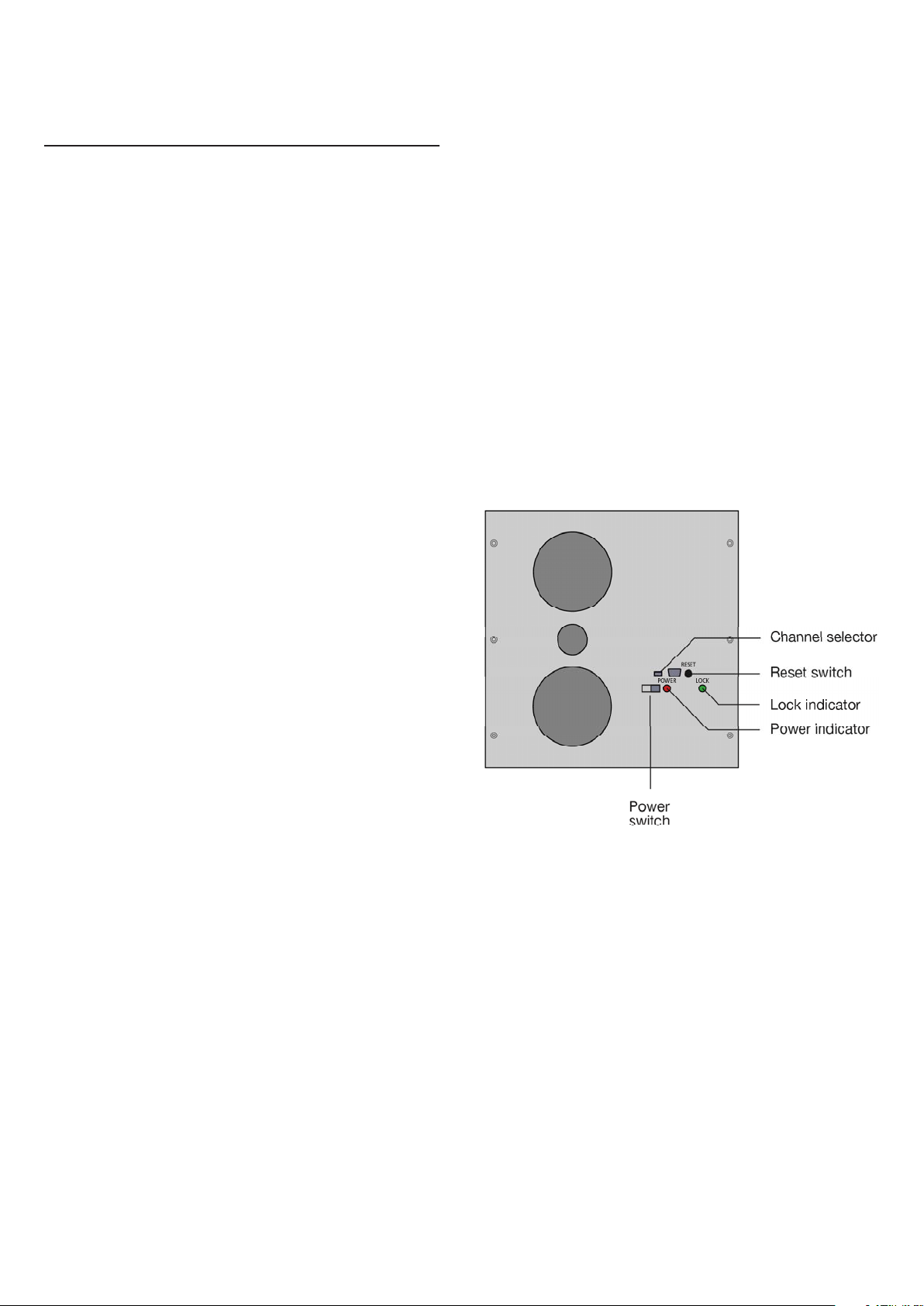
Indicator lights: (*DSP420 only)
The following table explains the function of the
indicator lights on the front panel:
Light State What it means
Red On Power supplied to speaker.
Flashing Speaker is being reset, or
speaker has overheated and
has shut down.
*Green On Speaker is locked to a digital
input.
Off Speaker is in standby.
Note: The indicator lights are blanked if the
Meridian system displays have been blanked.
The following procedure can be used to reset the
configuration of the DSP420 loudspeaker to the
default settings, without needing a computer,
using the reset switch accessible below the front
panel.
• Turn off the power at the front panel.
• Press and hold in the reset switch, using a
suitable object such as a bent paperclip or the
grille removal tool.
• Turn on the power. The red power indicator on
the front panel will flash. When the indicator
stops flashing:
• Release the reset switch.
Troubleshooting
This section provides suggested solutions to
typical problems that may occur when setting
up the M420 and DSP420 loudspeaker(s). If you
are still not able to resolve a difficulty with the
Page 4

help of this section, please contact your Meridian
dealer or Meridian Audio Ltd.
Red power indicator on front panel not lit
Check the following:
• The power switch on the front panel of the
unit is turned on.
If the power indicator will still not illuminate,
check any fuses in your power supply and the
fuse on the front panel of the loudspeaker. If
these are all intact, contact your dealer.
Red power indicator on front panel is flashing
This normally indicates that the unit has
overheated, and that it has shut down to cool
down. If the unit is cold, it may indicate a fault.
• Allow the unit to cool down. It should then
operate normally.
Service
Meridian components are carefully designed to
give years of untroubled service. There are no
user-serviceable parts inside the case, nor do the
units require any form of maintenance.
In the unlikely event that your unit fails to
function correctly, it should be returned, in its
original packaging, to your Meridian dealer.
In case of difficulty within the UK or USA
please contact the appropriate sales and service
address, printed elsewhere on this sheet. In case
of difficulty outside the UK or USA, contact
the importing agent for the territory. A list
of Meridian agents abroad is available from
Meridian Audio or from the web site.
Green lock indicator will not light (DSP420 only)
The green indicator lights when the product is
out of standby and is locked to a digital source.
• Check that the digital audio input is wired
correctly and that it is connected to an active
S/PDIF source.
• Check that the COMMS is wired correctly and
that the Meridian system is out of standby.
Note: The DSP420 boots to an out-of-standby
state, unlike other Meridian DSP speakers, so
repowering the unit will ensure that it is out of
standby.
Drive units move when the speaker is switched
on or off
This is normal as the speaker active electronics
settle.
Sound is odd or mono (DSP420)
• Check the channel selector switches on both
loudspeakers are correctly set.
Only the master loudspeaker plays (DSP420)
• Check the S5 cables are connected correctly.
No responsibility can be accepted for the unit
whilst in transit to the factory or an agent, and
customers are therefore advised to insure the
unit. When seeking service under guarantee,
proof of the date of purchase will be required.
Guarantee
The DSP420 DSP In-Wall Loudspeaker System
is guaranteed against defects in material and
workmanship for two years from the date of
purchase. The guarantee is void if the In-Wall
Loudspeaker System has been subject to misuse,
accident, or negligence, or has been tampered
with or modified in any way without the written
authorisation of Meridian Audio Limited.
Note: Connecting anything other than the
correct network lead to the COMMS sockets
may cause damage to the DSP420 DSP In-Wall
Loudspeaker System which will not be covered
by this guarantee. Attempted servicing by
unauthorised people may also invalidate this
guarantee. Labour and carriage charges are not
covered unless by local agreement.
Centre not working (DSP420)
• Check that the channel switch is set to LEFT/
CENTRE.
Configuring the DSP420 does not have any effect
• Make sure that you are configuring
the DSP420 used as the master digital
loudspeaker in the system. This determines the
configuration of all digital loudspeakers in the
system.
Outside the UK, local warranty liability is
restricted to equipment purchased within the
territory. Our agents abroad are only under
contractual obligation to service under guarantee
equipment sold through them. They are entitled
to make a non-refundable charge for any service
carried out on other equipment.
This guarantee does not limit your statutory rights
within the United Kingdom.
P81513
Page 5
DSP420
REFER
TO
INSTRUCT
I
ONS
BEFO
R
E WIRI
NG
AU
DIO
CO
NNEC
T
IONS
C
A
U
T
I
O
N
R
I
SK OF
E
LECT
R
I
C
SH
OC
K
DO
NO
T OPEN
AV
I
S:
R
I
S
QU
E
D
E
CHOC
E
L
E
CT
R
I
Q
U
E
-
N
E
P
AS
O
U
V
R
I
R
RE
F
ER
TO
IMPOR
T
AN
T
SA
F
E
T
Y
INSTRU
C
TI
O
NS
BE
F
ORE
IN
S
TA
L
LA
TI
O
N
~
1
00
-2
4
0
V 50
-
6
0H
z
OU
T
LET SUI
TA
BLE FO
R
L
OA
D
S UP
TO
1000
W
1
0A
M
AXIMUM
100
-1
2
0V
~
or
10
0
0V
A
5A MAXIMU
M
fo
r
22
0-
2
40
V
~
R
E
F
E
R
T
O
IN
S
T
R
U
C
T
I
O
N
S
B
E
F
O
RE
W
IR
IN
G
A
UD
IO
C
O
N
N
E
C
T
I
O
NS
C
A
U
T
I
ON
R
I
S
K
O
F
EL
E
C
T
R
I
C
SH
O
C
K
D
O
N
O
T
O
P
E
N
A
V
I
S:
R
I
S
Q
U
E
D
E
C
H
O
C
E
L
E
C
T
R
I
Q
U
E
-
N
E
P
A
S
O
U
V
R
I
R
R
E
F
E
R
T
O
I
M
P
O
R
T
A
N
T
S
A
F
E
T
Y
I
N
S
T
R
U
C
T
IO
N
S
B
E
F
O
RE
I
N
S
T
A
L
L
A
T
I
O
N
~
1
0
0
2
40
V
5
0
6
0
H
z
O
U
T
L
E
T
S
U
I
T
A
B
L
E
F
O
R
L
O
A
D
S
U
P
T
O
1
0
0
0
W
1
0
A
M
A
X
I
M
U
M
1
0
0
-
1
2
0
V
~
o
r
1
0
00
V
A
5
A
M
A
X
IM
U
M
f
or
2
20
-
2
4
0
V
~
Digital Signal Processing
In-Wall Loudspeaker System
M420
Analogue Active In-Wall
Loudspeaker System
INSTALLATION & OPERATION
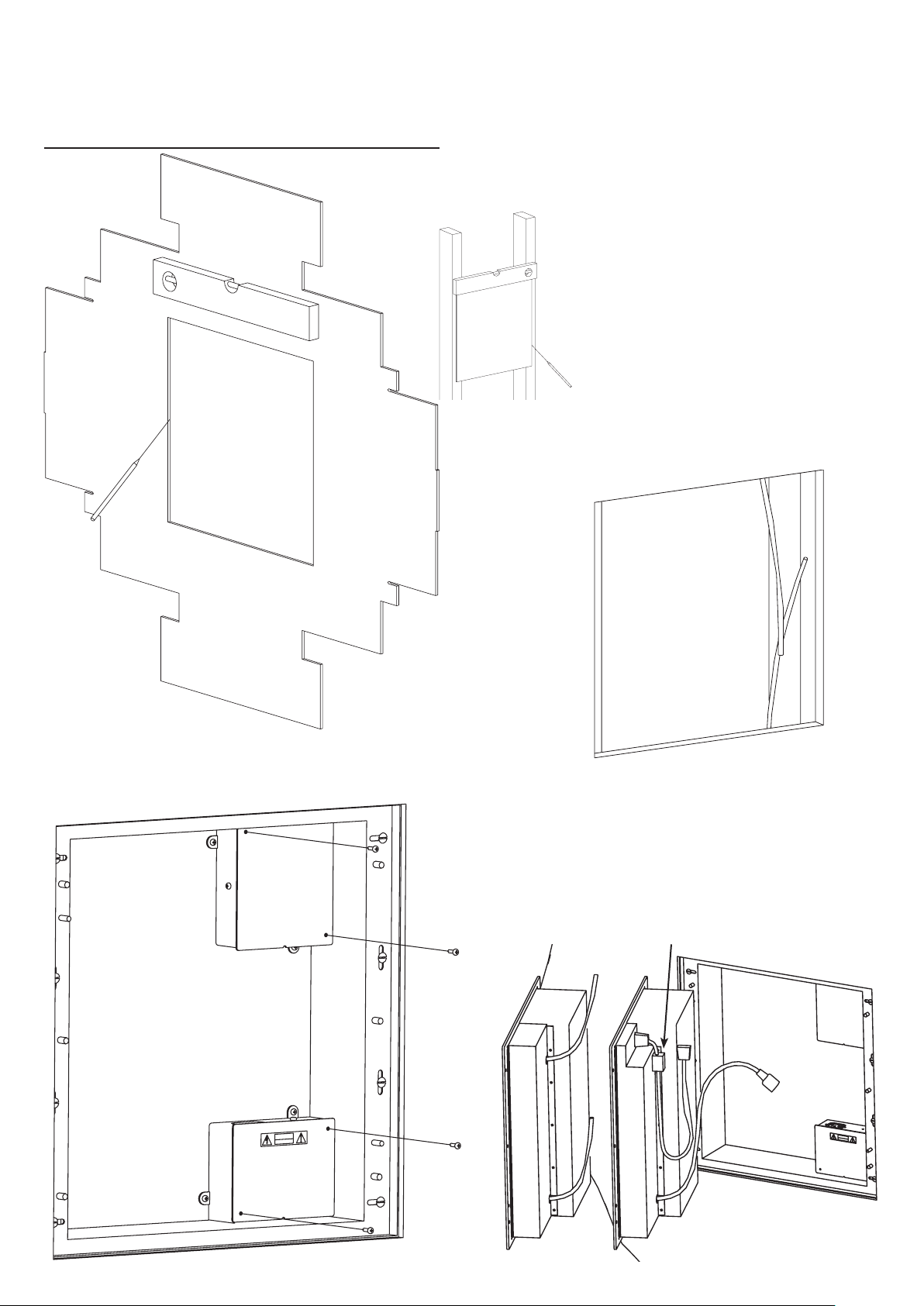
Fitting Instructions
See separate sheet for important safety
instructions! Illustrations are not all to the
same scale.
❶
❷
Step 1: Use the template (provided
as part of the packaging) to mark wall
for cut-out (far left). Position equally
between battens. Use this alternative
method (left) to mark battens prior to
wall covering.
Step 2: Ensure that 12in (300mm) of
each cable is present in the wall cutout.
❺
Step 5: Tidy and clamp all cables. Fit
covers to power and audio boxes.
❻
Step 6: Carefully connect power and
audio between loudspeaker unit and
back box. An IEC connector is used
for power; XLR for analogue; DSUB
for digital audio. Be sure to install the
digital cable with the choke on the
end next to the speaker.
Analogue
Digital
Page 6
C
A
U
T
I
O
N
R
I
SK
O
F
E
L
E
C
T
R
I
C
S
H
O
C
K
D
O
N
O
T
O
P
E
N
A
V
I
S
:
R
I
S
Q
U
E
D
E
C
H
O
C
E
L
E
C
T
R
I
Q
U
E
-
N
E
P
A
S
O
U
V
R
I
R
REFE
R
T
O
I
MP
O
R
T
A
N
T
SA
F
E
T
Y
I
N
ST
RU
C
T
I
ON
S
B
E
F
O
RE
I
N
S
TA
L
L
AT
IO
N
~
1
0
0
-
2
4
0
V
5
0
-
6
0
H
z
O
U
T
L
ET
S
UI
T
A
B
L
E
F
O
R
LO
A
DS
UP
TO
1
0
0
0
W
1
0
A
M
A
X
IMUM
1
00
-
1
20
V
~
o
r
1
0
0
0
V
A
5
A
M
A
X
I
M
U
M
f
or
2
2
0
-
24
0
V
~
❸
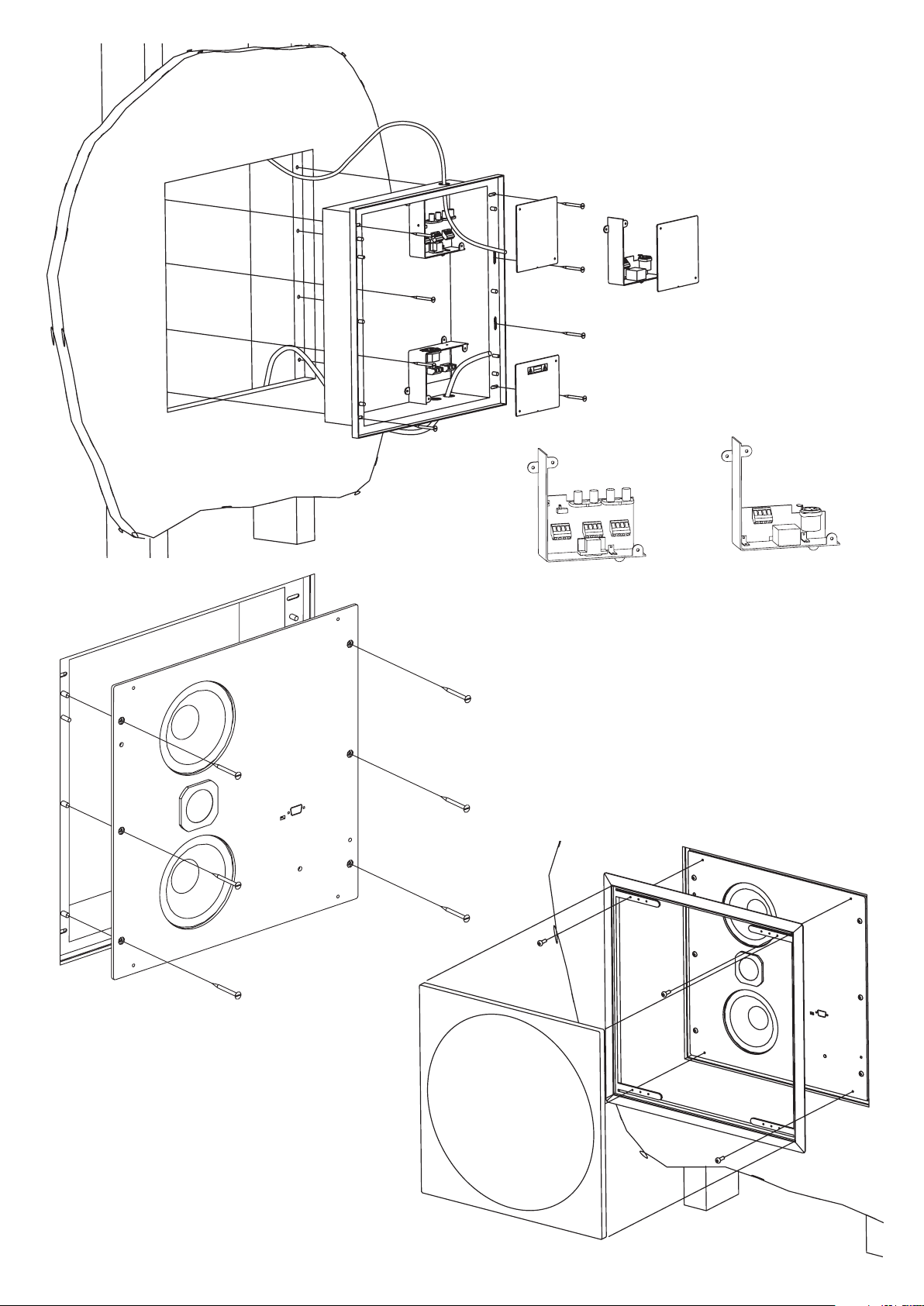
Step 3: Fix back-box into cut-out.
Thread cables through correct holes
in back box: audio/comms cables
come in from the top; power from the
bottom (see separate sheet for power
wiring installation instructions).
❹
❽
Step 4: Fix the required audio junction
box in top right position. The digital
board (left) is already installed; the
analogue board (right) is supplied loose.
You can use either the connectors or the
terminal blocks provided.
Step 8: Secure frame and fit grille.
Grille can be carefully removed using the
extraction tools supplied.
❼
Step 7: Neatly position power
and comm cables and push the
loudspeaker unit all the way in so
that it locates on the pegs in the
back-box. Secure using the six M5
x 12 button-head socket screws
supplied, Meridian part number
H61513.
Page 7
DSP420
IR
Gnd
In
In
In
GND
+8V
Out
Gnd
In
Gnd
Gnd
Out
Out
Slave
Master
Digital
Audio
Out
GND
Meridian
Comms
Digital Signal Processing
In-Wall Loudspeaker System
M420
Analogue Active In-Wall
Loudspeaker System
INSTALLATION & OPERATION
Audio wiring instructions
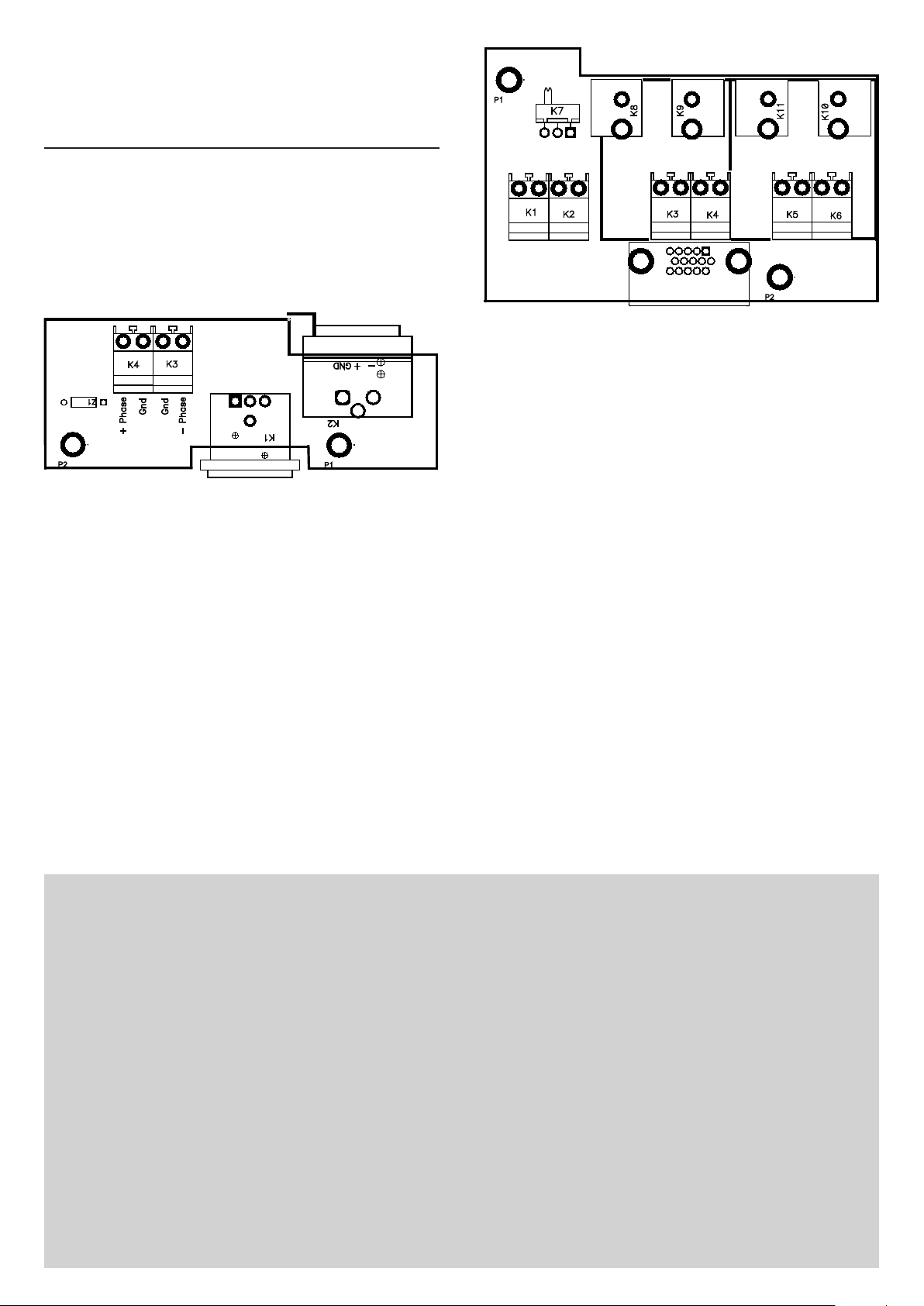
First remove the cover labelled audio connections.
M420
If it is intended to use the wall box with a M420
loudspeaker, then select the analogue input card.
Audio connections are made in one of two ways:
• XLR connection using a male XLR plug
connected to K2. The XLR wiring is
conventional “pin 2 hot”, ie:
Pin 1 ground / shield; Pin 2 ‘+ phase’ / hot;
Pin 3 ‘– phase’ / cold
• Hard wired to the terminal block, connected as
marked. It is recommended balanced wiring is
installed, if however single-ended wiring has
been fitted then wire the signal to ‘+ phase’
and the outer / shield to the gnd terminals,
‘– phase’ should be left unconnected.
DSP420
If it is intended to use the wall box with a DSP420
then use the digital input card.
In order to function correctly, the DSP420 requires
connections to be made to both Meridian
Comms and digital audio.
Connections to both the Comms and digital
audio can be made using either BNC connections
or can be hard-wired to the terminals as marked.
A remote IR connection can be optionally
accommodated from a remote sensor such as a
Meridian G12 or 512, which can be wired to a
master speaker as follows: Red to +8V, blue to IR
and screen GND.
Meridian Digital link cable is suitable for the
Comms and audio but it does not have approvals
such as UL. If alternative cable is required, then
the following specifications should be adhered to:
Comms: Single screened cable, 100pF/m or less
Digital Audio: 75Ω coaxial cable, shielded with
braid and foil
Outline Specifications
Inputs: DSP420—1 x 75Ω coaxial digital input,
IEC958 (S/PDIF), 44.1kHz – 96kHz.
FIFO locks at 44.1, 48, 88.2, & 96kHz
±150 PPM, PCM & MHR.
M420—1 x 300Ω balanced line-level
input on XLR connector
Enclosure: Aluminium front baffle with sealed, me-
chanically damped and insulated
Grille finished in easy-to-paint white
Acoustics: 2-way Infinite Baffle enclosure.
Response: 55Hz – 20kHz ±3dB.
acoustic enclosure. Baffle finished in
textured black enamel.
powder coat, backed by acousticallytransparent scrim. White moulded custom paintable frame.
2 x 127mm high-efficiency long-throw
custom bass drivers,
1 x Meridian 25mm tweeter with aluminium (DSP420) or silk (M420) dome.
Amplification: Internal 85W woofer, 65W tweeter.
6VA (quiescent) – 200VA (full output).
DSP (DSP420): 100MHz Motorola 56364, Linear Phase
Crossover, 96kHz, 24-bit DAC.
Controls & Indicators: Front baffle controls for power
and channel selection.
LED indicators for power, lock (DSP ver-
sion) and thermal warning.
Approx. Dimensions: Frame 450mm (17.72in) square,
depth 102mm (4.02in) Hole cutout 357
x 388mm (14.10 x 15.28in) Note: dimensions are approximate. See installation
drawings for detailed information. The
DSP420 and M420 are designed to fit
standard 16in stud centres.
Approx. Weight: 8.5 kg (18.7 lb) main unit without frame,
grille or connection boxes.
Mounting: Easy-install frame with fire-retardant
power and audio connection boxes. Templates provided for both new construction and installation into existing walls.
Page 8
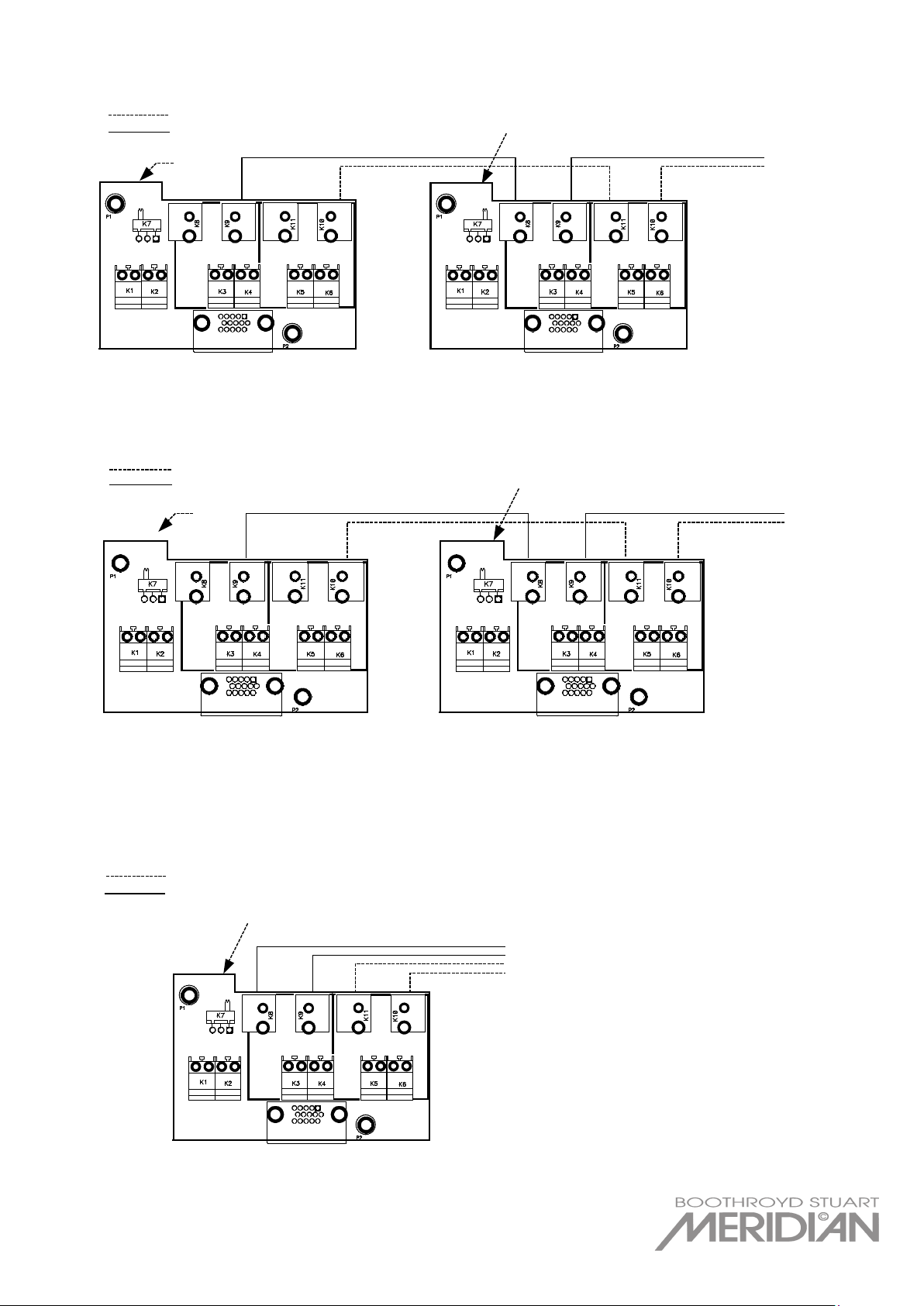
Connecting a pair of DSP420s as a stereo system
Digital Audio (75 Ohm Coax)
Master Speaker
Set to slave
Set to master
Slave Speaker
Comms (Single Screened)
To equipment e.g. G08
To equipment e.g. G68
Set to slave
Digital Audio (75 Ohm Coax)
Slave Speaker
Slave Speaker
Comms (Single Screened)
Set to slave
Digital Audio (75 Ohm Coax)
Comms (Single Screened)
To equipment e.g. G68
Set to Master
Centre Master Speaker
Connecting a pair of DSP420s as slaves in a theatre system
Connecting a DSP420 as a centre master in a theatre system
Meridian America Inc
8055 Troon Circle Suite C,
Austell, Atlanta
GA 30168-7849, USA
T +1 (404) 344 7111 F +1 (404) 346 7111
Meridian Audio Limited
Latham Road,
Huntingdon,
Cambridgeshire PE29 6YE, UK
T +44 (0) 1480 445678 F +44 (0) 1480 445686
www.meridian-audio.com
P81514 • DM420INF v1.2 20061003 RE
 Loading...