

Page 1

2008 Sprinter
2008
OWNER’S MANUAL
Sprinter
Page 2

VEHICLES SOLD IN CANADA
With respect to any Vehicles Sold in Canada, the name
Chrysler LLC shall be deemed to be deleted and the
name Chrysler Canada Inc. used in substitution therefor.
DRIVING AND ALCOHOL
Drunken driving is one of the most frequent causes of
accidents.
Your driving ability can be seriously impaired with blood
alcohol levels far below the legal minimum. If you are
drinking, don’t drive. Ride with a designated non-drinking
driver, call a cab, a friend, or use public transportation.
WARNING!
Driving after drinking can lead to an accident. Your
perceptions are less sharp, your reflexes are slower,
and your judgment is impaired when you have been
drinking. Never drink and then drive.
This manual illustrates and describes the operation of
features and equipment that are either standard or optional on this vehicle. This manual may also include a
description of features and equipment that are no longer
available or were not ordered on this vehicle. Please
disregard any features and equipment described in this
manual that are not on this vehicle.
Chrysler LLC reserves the right to make changes in
design and specifications, and/or make additions to or
improvements to its products without imposing any
obligation upon itself to install them on products previously manufactured.
Copyright © 2007 Chrysler LLC
Page 3

Thank you for choosing the new
Sprinter Vehicle.
Before your first journey, please familiar ize yourself with y our v ehi cle an d how i t
operates, as well as its driving, control
and convenience functions.
Before you drive off, read these Operating Instructions. This will help you get
the most out of your vehicle and avoid
endangering yourself and others.
Since the scope of delivery is based on
the sales order, your vehicle’s equipment may differ from s ome descr iptions
and illustrations. Items of optional
equipment are also desc ribed in these
Operating Instructions, should you require a description of the way they work.
Country-specific vehicle equipment, limited availability of items of special equipment or different product labeling is
possible in some countries.
Chrysler Vans LLC reserves the right to
introduce changes in design, equipment
and technical features. You cannot,
therefore, base any claims on the data,
illustrations or descriptions contained in
these Operating Instructions.
Your nearest authorized Sprinter Dealer
will be happy to assist you further if you
have any other questions.
The Operating Instructions, brief instructions, Sprinter Service Booklet, Owner’s
Warranty Information Book and equipment-related supplementary operating
instructions are considered part of the
vehicle. For this reason, you should always keep them in the vehicle and pass
them on to the new owner if you sell the
vehicle.
The technical documentation team at
ChryslerVans LLC wishes you safe and
pleasant driving.
Page 4

Symbols Trademarks
* Optional equipment
G
H
!
i
Action required
Sequence of actions (several )
Continuation symbol
page Page reference
Display
Warning
Environmental note
Caution
Tip
Display in the multifunction
display
ESP® is a registered trademark of
Chrysler Vans LLC.
Page 5

Contents
Introduction
At a glance1
Safety2
Controls in detail3
Operation
4
Practical hints5
*Technical data6
Index.............................................637
............................5
............................17
.....................................33
..................81
............................301
....................429
.................599
3
Page 6

Page 7

Environmental protection
Introduction
Environmental protection
Introduction
Environmental note H
Chrysler’s declared policy is one of comprehensive environmental protection.
The objectives ar e for the natur al resources which form the basis of our existence
on this planet to be used sparingly and in
a manner which tak es the requirements
of both nature and humanity into account.
You too can contribute to environmental
protection by operating your vehicle in an
environmental ly - re s ponsible manner.
Fuel consumption and engine, transmission, brake and tire wear depend on the
two following factors:
Operating conditions of your vehicle
Your personal driving style
You can influence both fact or s.
Observe the following notes:
Operating conditions
Avoid driving short distances as this
increases fuel consumption.
Make sure that the tire pressures a re
always correct.
Do not carry any unn ec essa ry we i gh t
in/on the vehicle.
Keep an eye o n the v ehi cle ’s f uel con-
sumption.
Remove roof racks once you no long-
er need them.
A regularly serviced vehicle will con-
tribute to environmental protection.
You should therefore adhere to the
specified service intervals.
Always have main tenance work car-
ried out at an authorized Sprinter
Dealer.
5
Page 8

Introduction
Environmental protection
Personal driving style
Do not depres s th e a cce lera tor p ed al
when starting the engine.
Do not warm up the engine when the
vehicle is stationary.
Adopt an anti cipatory style of drivin g
and keep a sufficient distance from
other vehicles.
Avoid frequent, sudden acceleration.
Switch off the engi ne in stationary
traffic.
6
Environmental concerns and recommendations
In this manual, whenever you see instructions to discard materials, you
should first attempt to reclaim and recycle them. To preserve our environment,
follow appropr iate environmental rules
and regulations when disposing of materials.
Page 9

Operating safety
Introduction
Operating safety
Warning G
Engine exhaust, some of its constituents,
and certain vehicle components contain
or emit chem icals known to the State of
California to cause cancer and birth defects or other reproductiv e harm.
In addition, certain fluids contained in vehicles, and certain products of component wear, contain chemicals known to
the State of California to cause cancer
and birth defects or other reproductive
harm.
Warning G
Work carried out incorrectly on electronic
equipment and its software could c ause
the equipment to stop wo rking. The electronic systems are networked with each
other via interfaces. Tampering with the
electronic systems may also cause malfunctions in systems that have not been
modified. These malfunctions, however,
can jeopardize the op erating safety of
your vehicle and ther efore put your own
safety at considerable risk.
Continued
Warning (Continued) G
Other work carried out incorrectly or
modifications to the vehicle could also
jeopardize operating safety.
Some safety systems only function while
the engine is running. Therefore, you
should not switch off the engine while
driving.
7
Page 10

Introduction
Operating safety
Warning G
Always have main tenance work carried
out at an authorized Sprinter Dealer which
has the necessary specialist knowledge
and tools to carry out the work required.
The manufac t urer recommends that you
use an authorized Sprinter Dealer for this
purpose.
In particular, work relevant to safety or on
safety-related systems must be carried
out at an authorized Sprinter Dealer.
8
Warning G
A heavy impac t to th e un der body, tir es or
wheels, for exa mple when bottoming out
on rough terrain or driving over an obstacle at high speed, could damage your vehicle. This also applies to vehicles
equipped with underbody protection.
In this case, have your vehicl e checked at
an authorized Sprinter Dealer which has
the necessary specialist knowledge and
tools to carry out the wor k requ ired. The
manufacturer recommends that you use
an authorized Sp ri nt er Dealer for this pur pose.
Continued
Warning (Continued) G
In particular, work relevant to safety or on
safety-related systems must be carried
out at an authorized Sprinter Dealer.
Page 11

Service and warranty information
The manufacturer warrants to the original and each subsequent owner of a
Mercedes-Benz heavy-duty on highway
diesel engine that:
(1) the engine was designed, built and
equipped so as to conform at the
time of sale with the applicable regulations adopted by the Federal Environmental Protection Agency, and
(2) the emission control system of such
engine is free from defects in materials and workmanship which would
cause it not to conform with those
regulations for a period of use of five
years or 100000 miles (160000 km)
or 3000 hours of engine operation,
whichever occurs first.
The Owner’s Warranty Information Book
contains detailed information about the
warranties covering your Sprinter Veh icle.
Registering your vehicle
The manufacturer may instruct its authorized Sprinter Dealer to carry out
technical inspections on certa in vehicles
to improve their quality or safety.
If you did not purchase your vehicle from
an authorized dea lership and your vehicle has not yet bee n inspected at an au-
Introduction
Operating safety
thorized Sprinter Dea ler, there is a
possibility that your vehicle has not been
registered in your name with the manufacturer. The manufacturer will only be
able to infor m you about vehicle inspe ctions if the manufacturer is in possession of your registration data.
It is advisable to have your vehicle registered at an authorized Sprinter Dealer.
Inform the manufacturer as soon as possible if your addr ess has changed or
there has been a change of vehicle owner.
9
Page 12

Introduction
Operating safety
Digital speedometer and total
distance recorder
Do not allow the electronically stored total distance covered by your vehicle to
be modified as a result of tampering with
the electronics system.
This type of modification or failing to inform the buyer when selling the veh ic le
could constitute an offense punishable
by law, depending on the country concerned.
10
Modifying the engine power output
Having the engine power output of your
vehicle increa sed by tamp erin g with the
electronic engine management system
will invalidate the vehicle’s general operating permit and insurance coverage, as
well as your warranty and warranty entitlement.
Modifications to the output of the engine
must be reported to the insurance provider and require the vehicle to be recertified. The tires, chassis, brake and
cooling systems must be adapted to the
increased engi n e power output.
Tampering with the electronic engine
management system modifies emission
values and it will not be possible to guarantee the operating safety of the engine
in every case. Increases in performance
may lead to malfunctions and consequential damage to other assemblies.
If you sell the vehicle, failing to inform
the buyer of the modified engine power
output could constitute an offense punishable by law, depending on the country
concerned.
Page 13

Vehicle alterations
The manufacturer recommends the use
of genuine Sprinter parts and conversion
parts as well as accessories that have
been expressly approved for your vehicle model (
These parts have been subjected to special tests in order to determine their
safety, reliability and suitability.
page 600).
Body builder guideline
If you intend on making any alterations
to the vehicle, we strongly recommend
that you select one of the following options in order to obtain all necessary information:
Contact the authorized Sprinter
Dealer nearest you to obtain a copy
of the Sprinter Body Builder Guideline.
Call Chrysler Vans LLC at telephone
(800) 992-1997 to request a copy of
the Sprinter Body Builder Guideline
(there may be a charge).
Write to the following address and
order the Sprinter Body Builder
Guideline (there may be a charge).
Introduction
Operating safety
Chrysler Vans LLC
P.O. Box 21-8004
Auburn Hills, MI 48321-8004
United States of America
11
Page 14

Introduction
Operating safety
Body builders and dealers who make any
modifications which may affec t the final
certification of the engine, vehicle or
equipment assum e the sole responsibility for the vehicle, including labeling and
documentation, affected by their modifications.
It is their responsibility to certify that the
altered vehicle conforms to all applicable standards and regulations affected
by the vehicle alteration or continues to
comply with the motor vehicle safety
standards and emissions regulations.
They are responsible for ensuring that
modifications or equipment installation
does not affect the safety of the vehicle.
12
Warning G
Any modifications or alterations of the
Sprinter vehicle not in compliance with
the Sprinter Body Builder Guideline and
the Sprinter Operator’s Manual may seriously inhibit its roadworthiness and safety and may lead to an accident resulting
in seriou s personal injury or death.
Consult the Sprinter Body Builder Guideline and the Sprinter Operator’s Manual
prior to initiating any alterations or modifications.
The manufacturer is not responsible for
any final certification or claims regarding product liability, or warranty claims,
which result from any component, assembly, or system being altered, or
which cause non-compliance with any of
the emission control standards or motor
vehicle safety standards, or which would
otherwise cause the vehicle to be or become defective or unsafe.
The manufacturer does not assume the
responsibility as th e final stage manufacturer or the consequential product liability.
Page 15

Correct use
Warning G
Be sure to read the Operating Instructions.
Otherwise, you may no t be awa re o f cert ain
risks and could in jure you rse lf or o the rs.
Observe the following information when
using your vehicle:
The safety notes in this manual
The “Technical data” section in this
manual
Traffic rules and regulations
Motor vehicle laws and safety stan-
dards
Stickers and warning labels
Warning G
Various warni ng lab els a re affi xed to your
vehicle. These wa rning labels are intended to make you and others aware of various risks. You should not remove any of
these warning labels unless explicitly instructed to do so by information on the label itself. Remova l o f any of these labels
may cause you and othe rs to be unaw are
of certain risks which may re sult in an accident and/or personal injury.
Introduction
Operating safety
Problems with your vehicle
If you should experi ence a p roblem w ith
your vehicle, partic ularly one that you
believe may affect its safe operation, we
urge you to immediately contact an authorized Sprinter Dea ler to have the
problem diagnosed and corrected if required.
If the matter is not handled to your satisfaction, please discuss the problem
with the Sprinter Dea ler management,
or if necessary contact us at the following address.
13
Page 16

Introduction
Operating safety
In the USA:
In Canada:
Chrysler Vans LLC Customer Center
P.O. Box 21-8004
Auburn Hills, MI 4832 1- 8001
United States of America
Telephone: 800-992-1997
14
Chrysler Canada, Inc. Customer Center
P.O. Box 1621
Windsor, Ontario N9A 4H6
Telephone: (800) 465-2001
Page 17

Introduction
REPORTING SAFETY DEFECTS
REPORTING SAFETY DEFECTS
In the 50 United States and Washington D.C.: If you believe that your vehicle has a defect, which could cause a crash or cause
injury or death, you should immediately inform the National Highway Traffic Safety Administration (NHTSA) in addition to notifying the manufacturer.
If the NHTSA receives similar complaints, it may open an investigation, and if it finds that a safety defect exists in a group of
vehicles, it may order a recall and remedy campaign. However, NHTSA c annot becom e in volve d in indi vidual prob lems betwe en
you, your dealer, and the manufacturer.
To contact NHTSA, you may either call the Auto Safety Hotline toll f ree at 1–888–327–4236 (TTY: 1- 800-424-9153),
or go to http://www.safercar.gov; or write to: Administrator, NHTSA, 400 Seventh Street, SW., Washington DC 20590. You can
also obtain other information about motor vehicle safety from http://www.safercar.gov.
In Canada:
If you believe that your vehicle has a safety defect , you should contact the Custome r Service Department immediately.
Canadian customers who wish to report a safety defect to the Canadian government should write to
Transport Canada, Motor Vehicle Defect Investigations and Recalls, 2780 Sheffield Road, Ottawa, Ontario K1B 3V 9.
15
Page 18

Introduction
Information regarding electronic recording devices
Information regarding electronic recording devices
(Including notice pursuant to California Code § 9951)
Please note that your vehicle is equipped with devices that can record vehicle systems data.
This information helps, for example, to diagnose vehicle systems after a collision and to continuously improve vehicle safety.
Chrysler Vans LLC may access the information and share it with others
for safety research or vehi cle diagnosis purposes
with the consent of the vehicle owner or lessee
in response to an official request by law enforcement or other government agency
for use in dispute resolution involving Chrysler Vans LL, its affiliates or sales/service organization and/or
as otherwise required or permitted by law.
16
Page 19

At a glance
At a glance
Cockpit............. 18
Instrument cluster............. 20
Steering wheel with buttons*............. 25
Center console............. 26
Overhead control panel*............. 27
Switch units............. 28
Door control panel............. 31
17
1
Page 20
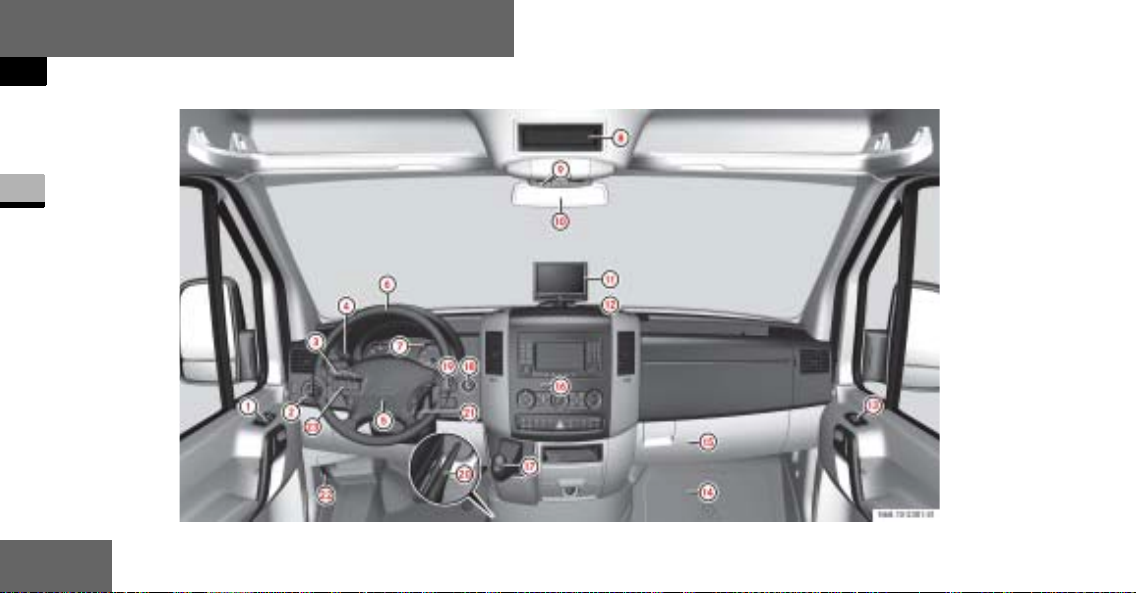
At a glance
Cockpit
Cockpit
1
18
N68.10-2287-31
Page 21

At a glance
Cockpit
Function Page
1 Door control panel 31
2 Light switch 130
3 Combin ation switch
Turn signals
High-beam head-
lamps
Windshield wipers
Rear window wiper*
4 Cruise control lever* 249
5 Horn
6 Steering wheel without/
with* buttons
135
131
210
212
25
Function Page
7 Instrument cluster 20,
142
8 Storage compartment
9 Storage compartment
with interior lamp
Overhead co ntrol panel* 27
a Rear-view mirror* 208
b Rear view camera moni-
tor*
c Warning display for Park-
tronic system*
d Opens/closes the right-
hand side window
137
261
256
244
Function Page
e Jack and vehicle tool kit 515
f Glove box 288
g Center console 26
h Selector lever (automatic
transmission)
j Ignition lock 111
k Additional switch unit 29
l Handbrake 191
m Steer ing wheel adjust-
ment
n Hood lock release 318
o Additional switch unit 29
185
127
19
1
Page 22
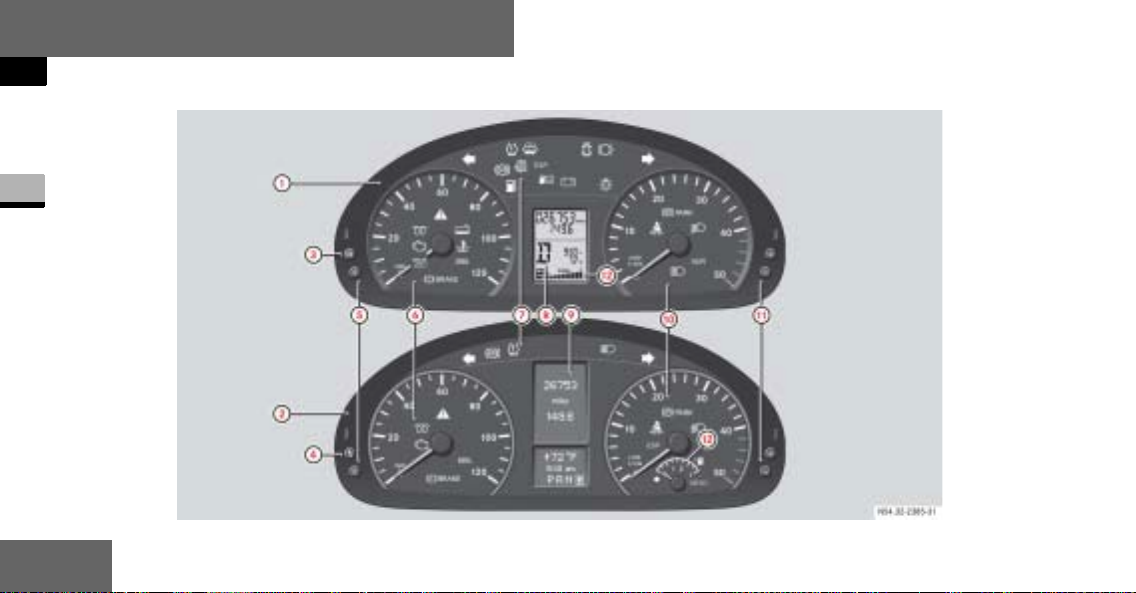
At a glance
Instrument cluster
Instrument cluster
1
20
Page 23

At a glance
Instrument cluster
Function Page
1 Instrument cluster on ve-
hicles without steering
wheel buttons
2 Instrument cluster on ve-
hicles with steering wheel
buttons*
3 On vehicles without
steering wheel b uttons:
Changes the
standard display
Selects menus
142
142
148
Function Page
4 On vehicles with
steering wheel buttons*:
Checks the engine
oil level
5 Reset button 142
6 Speedometer with: 145
Indicator and warning
lamps
7 Indicator and warning
lamps
157
22
22
Function Page
8 Display on vehicles with-
out steering wheel buttons
9 Display on vehicles with
steering wheel buttons*
a Tachometer with: 145
Indicator and warning
lamps
b Instrument lighting
brighter/
dimmer
148
157
22
144
21
1
Page 24

At a glance
Instrument cluster
Function Page
c Fuel gauge with:
1
Reserve fuel warning
lamp
Fue l filler flap location
indicator
Ö: Fuel filler flap is
22
on the lefthand side
145
475
i
Vehicles without steerin g w heel
buttons:
Display
gauge.
Vehicles with steering wheel buttons*:
The tachometer contains an analog
fuel gauge.
8 contains a digital fuel
Indicator and Warning Lamps
v ESP
/ Coolant level too low 474
D Coolant temperature
1 Restraint syst ems
®
warning lamp 72
ASR warning lamp 73
too high
malfunction
Page
468
74
465
475
469
Page 25

At a glance
Instrument cluster
Indicator and Warning Lamps
Brake fluid level too
low
EBV malfunction 462
Malfunction in trailer's
brake booster
N Engine oil level warning as47
± Engine diagnostic
indicator lamp
q Pre-glow system, die-
sel engine only
Turn signal, left 135
Page
463
464
477
186
476
Indicator and warning lamps Page
X Combination low tire
pressure/TPMS malfunction telltale, USA
only
Low tire pressure telltale, Canada only
1
J Windshield washer/
headlamp cleaning system* washer fluid level
too low
Door open 483
2 Brake pads/linings
worn
478
478
482
470
Indicator and warning lamps Page
Turn signal, right 135
- ABS malfunction 466
k ASR malfunction 465
BAS malfunction 465
# ESP
‰ Air cleaner dirty 477
A Reserve fuel 475
®
malfunction 468
Fuel filler flap open 476
23
1
Page 26

At a glance
Instrument cluster
Indicator and warning lamps Page
Water in the fuel 482
# Battery charge mal-
1
function
. Defective b ulb 483
Handbrake applied 191
B Low-beam headlamps
on
™ Operating speed gov-
ernor on*
A High-beam headlamps
on
< Seat belt reminder 482
24
469
131
273
131
i
Vehicles with steering wheel buttons:
Corresponding messages may also
be shown in display
(
page 157).
9
Page 27
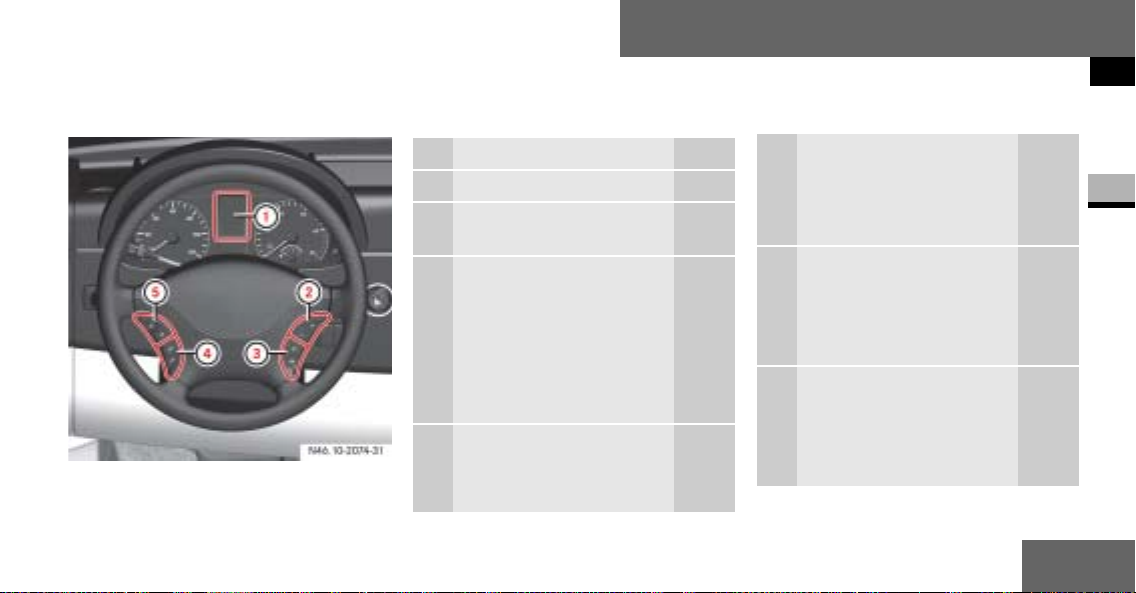
Steering wheel with buttons*
At a glance
Steering wheel with buttons*
N46.10-2074-31
Function Page
1 Display 151
Controlling the operating system
2 To select a submenu or
adjust the volume
+
Up/increases the
volume
-
Down/decreases
the volume
3 Telephone* functions 178
s Accepts a call/
starts dialing
151
Function Page
t Ends a call/
rejects an incom-
ing call
4 To jump from one menu
to another
è
Forward
·
Backward
5 To jump from one
submenu to another
j
Forward
k
Backward
1
151
151
25
Page 28
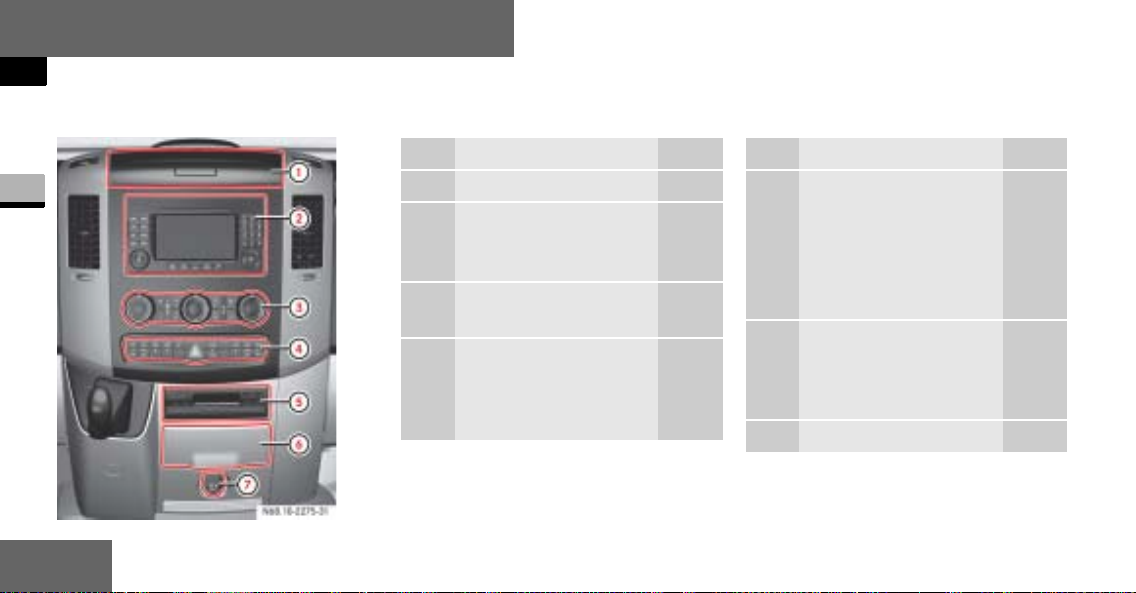
At a glance
Center console
Center console
Function Page
1
N68.10-2288-31
1 Storage compartment 290
2 Radio* or COMAND*,
see the separate operating instructions
3 Air-conditioning control
panel
4 Center console switch
unit
218
28
Function Page
5 Storage compart-
ment or
CD changer*,
see the separate
operating instructions
6 Cup holder with
Ashtray
Cigarette lighter
7 12 V socket 297
291
294
295
26
Page 29
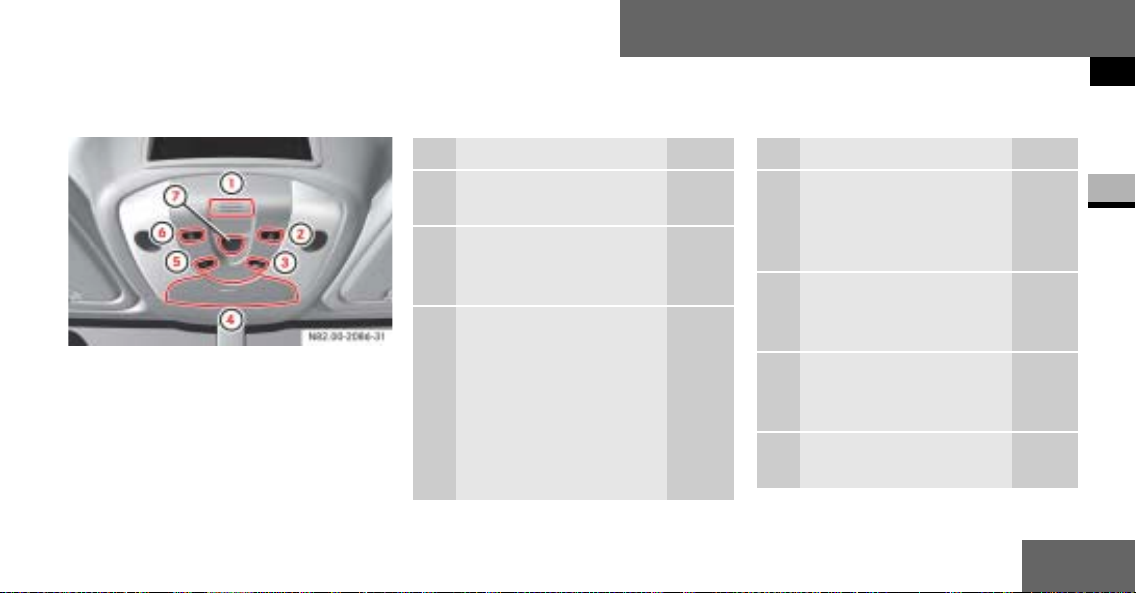
Overhead control panel*
At a glance
Overhead control panel*
Function Page
1 Hands-free microphone
for telephone*
2 Switches the right-hand
reading lamp
on/off
3 Switches the automatic
interior lighting
on/off
137
137
Function Page
4 Eyeglass
compartment or
Anti-theft alarm sys-
tem (ATA)*
5 Switches the interior
lighting
on/off
6 Switches the left-hand
reading lamp
on/off
7 Opens/closes the slid-
ing sunroof*
290
77
137
137
245
27
1
Page 30
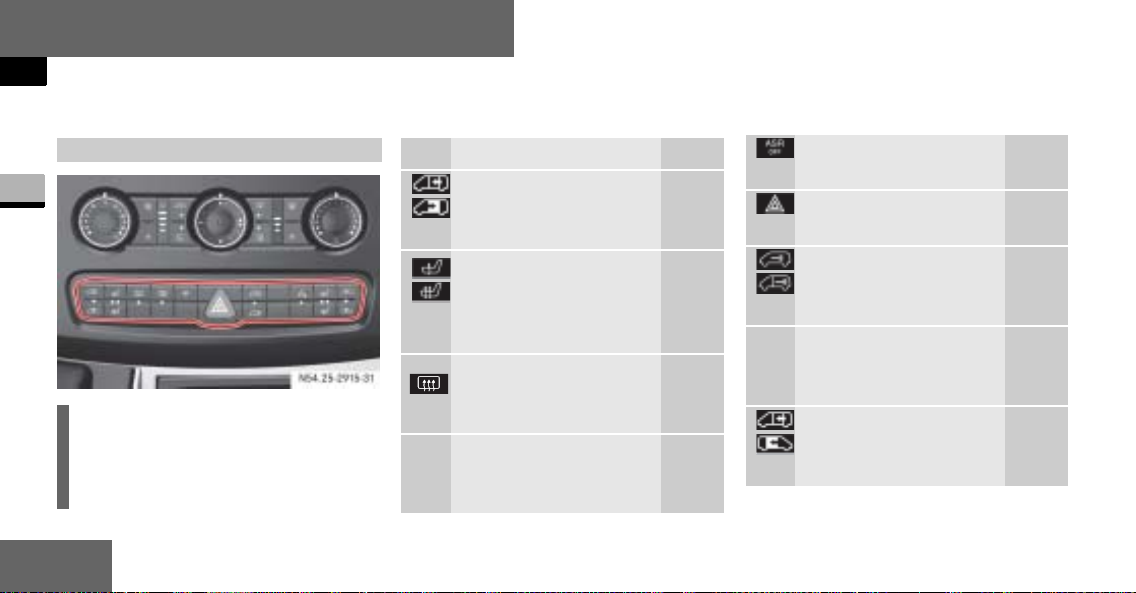
At a glance
Switch units
Switch units
Center console switch unit
1
N54.25-2915-31
i
The number of switches may vary,
depending on the vehicle’s equipment.
28
Function Page
Opens/closes the lefthand electric sliding
door*
Switches the left/right
seat heating*
on/off
&
Switches the rear window heating*
on/off
P Switches the windshield
heating*
on/off
92
122
214
213
Activates/deactivates
ASR
Switches the hazard
warning flashers on/off
Central locking
Interior/rear
compartment
! Switches the Parktronic
system (PTS)*
on/off
Opens/closes the righthand electric sl iding
door*
74
136
104
253
92
Page 31

At a glance
Switch units
Additional switch units
N54.25-2913-31
Switch unit between the light switch and
the steering wheel
Function Page
³ Switches the heater
booster function*
on/off
ö
Switches auxiliary
³
heating*on/off
Switches the heater
booster function*
on/off
Adjusts the working
engine speed*
Switches the operating
speed governor*
on/off
234
238
234
275
273
Ventilates the load
compartment,
air in/air out*
247
i
The layout of the switches may vary,
depending on the vehicle’s equipment.
29
1
Page 32

At a glance
Switch units
1
N54.25-2912-31
Switch unit between the steering wheel
and the ignition lock
30
Function Page
Switches the rear-compartment convenience
interior lighting*
on/off
140
i
The layout of the swi tches may vary,
depending on the vehi cle’s equipment.
Page 33

Door control panel
N54.25-2914-31
Function Page
1 Adjusts the exterior
mirrors*
2 Selects an exterior
mirror*
3 Opens/closes the left-
hand side window
4 Opens/closes the right-
hand side window
208
208
244
244
At a glance
Door control panel
1
31
Page 34

Page 35

Safety
Safety
Occupant safety............. 34
Emergency exit............. 66
Driving safety systems............. 69
Anti-theft systems............. 77
33
2
Page 36

Safety
Occupant safety
Occupant safety
Restraint systems
This section contains all the most important information about the restraint systems in your vehicle. In an accident, your
2
vehicle collides with another object, e.g.
another vehicle. This may cause your vehicle to accelerate or decelerate extremely quickly. During this acceleration
or deceleration, th e vehicle occupants
will be moved in the opposite directio n
to the force of the impact. There is therefore the risk of vehicle occupants injuring themselves on the vehicle interior or
on parts of the vehicle. The purpose of
supplemental restraint systems, i.e.
34
principally the seat belts supplemented
by emergency tensioning retractors, belt
force limiters and airbags when necessary, is to minimize this risk of injury.
However, the seat belts and airbags cannot generally prevent injuries caused by
objects penetrating the vehicle from the
outside.
The most impor tant restraint systems
are:
the seat belts
restraint systems for children, since
they are the most effective means of
reducing the extent to which the occupants are moved in the event of an
accident
Additional protection is provided by:
SRS (Supplemental Restraint Sys-
tem), comprising:
emergency tensioning retractors
belt force limiters
airbags
iAn airbag increases the degree of
protection afforded to vehicle occupants
wearing a seat belt and is therefore only
to be considered as an additional restraint system to the seat belt. Airbags
do not in any way relieve any vehicle occupants of the need to wear their seat
belt correctly at all times.
Page 37

This is partly because an airbag is
not activated in all accident situations because in some cases it would
not provide any additional protection
to that alread y aff ord ed b y a co rre ctly fastened seat belt.
Furthermore, an activated airbag can
only provide increased protection if the
seat belt is being worn correctly, because:
the belt helps to hold the vehicle
occupant in th e b es t position in relation to the airbag
the belt prevents the vehicle occup-
ant from being propelled in the opposite direction to the force of impact,
e.g. in the event of a head-on collision, and is therefore better able to reduce the risk of injury
In accidents in which an airbag is
activated, the airbag will therefore
only offer an increa se in the protection provided by the seat belt, i.e. additional protection, if the seat belt is
worn correctly.
Safety
Occupant safety
Warning G
Modifications to or work incorrectly carried out on a restraint system (seat belt
and seat belt anchorages, emergency
tensioning retractor, belt force limiter or
airbag) or its wiring, or tamperin g with
other networked electronic systems,
could cause the restraint systems to stop
working correctly.
Continued
35
2
Page 38

Safety
Occupant safety
Warning (Continued) G
The airbags or emergency te nsioning retractors could, for example, be activated
inadvertently or could fail in accidents in
2
which the deceleration force is sufficient
to trigger the airbag. For this reason, do
not modify the restraint systems. Do not
tamper with electronic components or
their software.
36
Airbags
Warning G
Airbags do offer additional protection but
they are not a substitute for the seat
belts. To reduce the risk of serious or fatal
injuries, make sure t hat all occupants – in
particular, expectant mothers – wear
their seat belt c orre ctl y at all time s, hav e
adopted a normal sitting position and that
the seat is positioned as upright as possible.
Seat belts
The most important restraint systems in
the vehicle are the seat belts and child
restraint system s. They are the most effective means of preventing vehicle occupants from moving towards the point
of impact and thus reducing the risk of
occupants hitting parts of the vehicle interior.
i
In many countries there are regulations concerning the use of seat
belts and child restraint systems.
Page 39

Safety
Occupant safety
Warning G
A seat belt that is wor n inc or rectly or not at
all, or that is no t cor rect ly e nga ged in the
seat belt buckle, cann ot perform its intend ed
protective funct ion. In cer tain circum st ances, you could be se rio usly or e ven fata lly injured. Make sure, tha t all occupa nts – in
particular, expectant mothers – wear their
seat belt correct ly at a ll tim es.
You must make sure that the belt:
is routed as low as possible across your
pelvic area, for example across your hip
joints and not across your abdomen
Continued
Warning (Continued) G
fits closely
is not twisted
is routed across the middle of your shoul-
der
is not routed across your neck or under
your arm
is pulled tight across the lap by pulling up-
wards on the shoulder belt
Do not secure any objects with a seat belt
if it is being used by one of the vehicle’s
occupants.
Warning (Continued) G
Avoid wearing b ulky clot hing, for exa mple
a winter coat.
Do not route the belt strap over sharp or
fragile objects, especially if these are located in or on your clothing, for example
eyeglasses, pens or keys. The belt strap
could otherwise tear in the event of an accident and you or other vehi cle occupants
could be injured as a result.
Only one person may use each seat belt at
any one time.
Continued
37
2
Page 40

Safety
Occupant safety
Warning (Continued) G
A child must never be carried sitting on
the lap of a vehicle occupant. It would not
be possible to restrain the child, and the
2
child and other vehicle occupants could
be seriously or fatally injured in the ev e nt
of abrupt braking or an accident.
Persons less than 1.50 m tall or children
under 12 years of age cannot wear their
seat belt properly. They therefore require
additional restraint systems on suitable
vehicle seats for protection in an accident. Always observe the installation instructions issued by the manufacturer of
the child restraint systems.
38
Warning G
The seat belt only provides its intended
degree of protection if the seat backrest
is positioned as vertically as possible, allowing the occupant to sit upright. Avoid
seat positions th at d o no t all ow the seat
belt to be routed correctly. Therefore, position the back rest as vertically as possible. Never drive with the ba ckrest tilted
too far back. You could otherwise be seriously or even fatally injured in the event of
an accident or abrupt braking.
Warning G
The seat belt cannot perform its protective function correctly if the seat belt
strap or buckle are dirty or damaged. You
should therefor e k ee p the belt strap and
buckle clean, as otherwise the belt latch
plate may not be able to engage correctly.
Check regul ar ly th at the seat belts:
are not damaged
are not routed ov er sharp edges
are not trapped
Continued
Page 41

Warning (Continued) G
Safety
Occupant safety
Wearing seat belts
Warning (Continued) G
The belt strap could otherwise tear in the
event of an accident. You or others could
be seriously or fatally injured.
Always have seats belts that ar e damaged
or have been su bjecte d to a heavy lo ad in
an accident replaced, and t heir anch orag es checked, at a qu alifie d spe cia list work shop which has the necessary specialist
knowledge and tools to car ry out the work
required.
Continued
The manufacturer recommends that you
use an authorized Sprinter Dealer for this
purpose. In particular, work relevant to
safety or on safety-related system s must
be carried out at a qualified specialist
workshop .
For safety reasons, th e ma nufa ct urer r ec ommends that you only use seat belts
that have been spec ially approved for
your vehicle by the manufacturer.
2
1 Be lt sash guide ( page 40)
2 Belt latch plate
3 Relea s e button
4 Buckle
39
Page 42

Safety
Occupant safety
Pull the belt smoothly from the seat
belt reel holder .
Route the belt ov er your shoulder.
Click belt latch plate 2 into buckle
2
4.
Adjust the belt to the correct height
if necessary.
Pull the shoulder section of the belt
upwards to tighten the belt against
your body if necessary.
40
Adjusting the belt height
Warning G
Only adjust the belt height when the vehicle is stationary and the handbrake is applied.
You could otherwise lose control of the
vehicle as a result of the seat adjusting
movement and thereby endanger yourself
and others.
You can adjust the belt height for the following seats:
Driver’s seat
Outer passenger’s seat
Adjust the belt height in such a way that
the shoulder belt is routed over the middle of the shoulder.
Belt sash guide with height adjustment
5 Relea se button
Page 43

To raise the belt height: slide belt
sash guide
Belt sash guide
ous positions.
To lower the belt height: press and
hold release button
Slide belt sash guide1 to the de-
sired height.
Let go of release button 5 and
make sure that belt sash guide
engages.
1 upward.
1 engages in vari-
5.
1
SRS (Supplemental Restraint System)
The SRS (S
tem) may consist of the f ollowing components, depending on the equipment
level:
1 warning lamp
Emergency tensioning retractors
Belt force limiters
Airbag system with:
Airbag control unit
Airbags
upplemental R estraint Sys-
Safety
Occupant safety
1 warning lamp
The SRS performs a self-test at regular
intervals when the ignition is switched
on and while the engine is running. Malfunctions can th erefore be detected in
good time.
The
1 warning lamp in the in stru-
ment cluster (
approximately 4 seconds when you
switch on the ignition.
page 20) comes on for
41
2
Page 44

Safety
Occupant safety
Warning G
A malfunction has occurred if the 1
warning lamp:
does not come on when you switch on the
2
ignition
does not go out af ter appro ximatel y 4 sec -
onds
lights up again
Individual systems may be activated unin-
tentionally or may not b e tr ig g er ed in th e
event of an accident with a high rate of vehicle deceleration.
42
Continued
Warning (Continued) G
In this case, have the SRS system
checked and repaired imm edi at el y at a
qualified specialist workshop which has
the necessary specialist knowledge and
tools to carry out the wor k requ ired.
The manufacturer recommends that you
use an authorized Sprinter Dealer for this
purpose. In particular, work relevant to
safety or on safety-related systems must
be carried out at a qualified specialist
workshop.
Activation of emergency tensioning
retractors, belt force limiters and airbags
In the event of a collision, the sensor in
the airbag control unit evaluates important physical data, such as duration, direction and rate of vehicle deceleration
or acceleration. Based on the evaluation
of this data and depending on the vehicle’s rate of longitud inal deceleration in
a collision, in the f irst stage, the airbag
control unit pre-e mptively triggers the
emergency tensioning retractors.
Page 45

The front airbags are not triggered unless a second activation threshold is exceeded, i.e. if there is a greater rate of
vehicle deceleration in a longitudinal direction.
Criteria for triggering of emergency
tensioning retractors and airbags
To determine whether it is necessary to
trigger an emergency tensioning retractor or airbag, th e airbag contr ol unit evaluates the duration and direction of
deceleration or acceleration during the
initial phase of the collision.
The emergency tensioning retractor and
airbag activation thresholds are variable
and are adapted to the rate of the vehicle deceleration. This process is preemptive in nature as the airbag must be
deployed during – and not at the end of
– the collision.
Safety
Occupant safety
i
Airbags are not triggered in all types of
accident. They are actually controlled
by complex sensor technology and evaluation logic. This process is pre-emptive
in nature as airbag deployment must
take place during the impact and must
be adapted to provide calculated, additional protection for the vehicle occupants. Not all airbags are triggered in an
accident.
The various airbag systems work independently of each other. However, all
systems depend on the type (head-on
or side impa ct) and sever ity (i n part icular vehicle deceleration or acceleration)
of accident determined in the initial
phase of the accident.
43
2
Page 46

Safety
Occupant safety
Vehicle deceleration or acceleration and
the direction of the force are essentially
determined by:
the distribution of the force during
the impact
the collision angle
2
the deformation characteristics of
the vehicle
the composition of the object in-
volved in the collision, for example
the other vehicle
Factors that cannot be seen or measured until after the colli sion are not
used to determine whether the airbag
should be triggered and are not decisive
for this.
44
The vehicle may be substantially deformed
without an airbag being t rigge red , for example if only relativ ely easily-deformable
vehicle parts such as the hood or fenders
are affected by the collision and the required deceleration threshold is not
reached. On the other hand, airbags may
be triggered even though the vehicle o nly
displays minor deformation, if, for example, rigid vehicle parts such as a longitudinal member are affected by the impact,
thus causing vehicle deceleration to exceed the pre-determined threshol d.
Emergency tensioning retractors, belt force limiters
If the vehicle is equipped with a driver’s
airbag, the driver’s and the passenger’s
seat belts are equipped with emergency
tensioning retractors.
A belt force li miter add itio nally ins tal led
in the seat be lt reduces the load exe rted
by the seat belt on the occupant when it
is triggered.
Emergency tensioning retractors tension the se at belts in a n accident, pulling
them close against the body.
Page 47

i
Emergency tensioning retractors do
not correct:
incorrect sitting positions
incorrectly worn seat belts
Emergency tensioning retractors do
not pull occupants back towards the
backrest.
When the ignition is on, the emergency
tensioning retractor is activated:
only if the restraint systems are op-
erational (the
comes on for approximately 4 seconds after the ignition is switched
on.) (
page 41).
in the event of a head-on or rear-end
collision, if there is a high rate of vehicle acceleration or deceleration in
the initial stages o f a collision
in the event of a side impact, if the
vehicle suddenly decelerates or accelerates in a lateral direction at the
initial stage of the impact and the vehicle is equipped with thorax/
sidebags and/or windowbags.
1-warning lamp
Safety
Occupant safety
If the emergency tensioning retractors
are triggered, you will hear a bang that is
generally harmless to your hearing. A
small amount of powder may also be released. The
up.
Warning G
If the emergenc y tensioning retractors
have been trigg ered, have them replaced
at a qualified specialist workshop which
has the necessary specialist knowledge
and tools to carry out the work required.
1 warning lamp lights
Continued
45
2
Page 48

Safety
Occupant safety
Warning (Continued) G
The manufac t urer recommends that you
use an authorized Sprinter Dealer for this
purpose. In particular, work relevant to
2
safety or on safety-related systems must
be carried out at a qualified specialist
workshop.
Observe the safety re gulations when disposing of emergency tensioning retractors. You can see a copy of these
regulations at any authorized Sprinter
Dealer.
46
Airbag system
Warning G
To reduce the risk of serious or fatal
injuries in th e event of an accident
with a high rate of deceleration, for
example due to an airbag inflating
within milliseconds, or due to sudden
braking, please observe the following
points:
Continued
Warning (Continued) G
All vehicle occupants must select a seat
position in which they can wear their seat
belt correctly and which is as far back
from the airbag as possible. The seat position of the driver must be such that the
vehicle can be driven safely. The distance
from the driver’s seat to the pedals must
be such that the driver can fully depress
the pedals. The distance between the
driver’s ches t and the ce nter of the a irbag
cover must be more than 25cm. The driver’s arms should be slightly bent when
holding the steering wheel.
Continued
Page 49

Safety
Occupant safety
Warning (Continued) G
Vehicle occupants should wear their
seat belt correctly at all times and
lean back against th e backrest, whi ch
should be positioned as upright as
possible. The head restraints should
support the back of the head at about
eye level.
Move the passenger’s seat as far to
the rear as possible, especially if a
child is secu red in a restraint system
installed on this seat.
Continued
Warning (Continued) G
On vehicles with a passenger’s air-
bag, it is not permitted to secure a
rearward-facing child restraint system to the passenger’s seat
( page 56). Childr en in a rearwardfacing child restraint system must be
secured on a suitable rear seat.
Do not lean forward, for example over
the padded boss of the stee ring
wheel, especially when the vehicle is
in motion.
Continued
Warning (Continued) G
Only hold the ste ering wheel by the
outer rim. This allows the airbag to inflate fully. If you hold the inside of the
steering wheel, you could be injured if
the airbag were to be triggered.
Do not put your feet on the das h-
board.
Do not lean on the doors from inside
the vehicle.
Make sure that no persons, animals
or objects are presen t between the
vehicle occupants and the deployment range of the airbags.
Continued
47
2
Page 50

Safety
Occupant safety
Warning (Continued) G
Do not cover the pad d ed boss of the
steering wheel, the passenger’s airbag cover, the windowbag cover or
the thorax/sidebag cov er with film or
2
other material. Do not affix any badges or stickers to these areas.
Do not hang any hard objects, for ex-
ample coat hangers, on the grab handles or coat hooks.
Do not place any item s in the s torage
compartment above the passenger’s
airbag if they protrude from the compartment. The passenger’s airbag
must be able to inflate unimpeded.
The risk of injuries from an airbag cannot
be entirely ruled out du e to the hig h speed
at which the airb ag is required to inflate.
48
Your vehicle is equipped with the following airbags, depending on the equipment version:
Driver’s front airbag, located in the
steering wheel
Passenger’s front airbag, located
above the glove bo x
Thorax sidebags* in the outer sides
of the driver’s seat and the passenger’s individual seat
Windowbags* in the side of the roof
frame between the A an d B-pillars
Each airbag's cover is marked with the
letters "SRS/AIRBAG" or "AIRBAG".
How airbags work
An airbag inflates with in milliseconds.
The
1 warning lamp in the instru-
ment cluster comes on.
i
If the airbags are triggered, you will
hear a bang and a small amount of
dust may also be released. The bang
will not damage your hearing and the
dust does not constitute a health
hazard.
Airbag inflation slows down and restricts
the movement of the vehicle occupant.
Page 51

When the vehicle occupant makes contact with the airbag, hot gas flows out of
the inflated airbag. This reduces the load
on the head and upper body of the vehicle occupant . The airbag i s therefore i n a
deflated state after an accident.
Warning G
After an airbag has been tr ig g er ed:
airbag parts are hot – do not touch
them, otherwise you could be burn t
the airbags must be replaced at a
qualified specialist workshop which
has the necessary specialist knowledge and tools to carr y out the work
required. The manufacturer recommends that you use an authorized
Sprinter Dealer fo r this purpose.
In particular, work relevant to safety
or on safety-related system s mu st be
carried out at a qualified specialist
workshop.
Safety
Occupant safety
Warning G
A small amoun t of fine powd er is release d as
an airbag inflates. This powder does not constitute a health ha zard, nor doe s it imply that
fire has broken out in the vehicle. This powder could cause short-term breat hing difficulties for persons suffering from asthma or
other respiratory conditions. To avoid these
breathing difficulties, you should either:
leave the vehicle immediately, if it is
possible to do so safely
or
open the window to allow fresh air to
enter
49
2
Page 52

Safety
Occupant safety
Front airbags
The front airbags are designed to increase protection to the driver’s and
passenger’s/passengers' he ad and
chest.
2
The driver’s airbag is locate d in th e
steering wheel housing; the passenger’s
is above the glove box .
50
N91.60-2140-31
1 Driver’s airbag
2 Passenger’s airbag
Driver’s front airbag1 inflates in front
of the steering wheel; passenger’s front
airbag
2 inflates in front of and above
the glove box and the center console.
The driver’s front airbag and passenger’s
front airbag are triggered:
in the initial stages of an accident
with a high rate of vehicle acceleration or deceleration in a longitudinal
direction
if the system determines that airbag
deployment can offer additional protection to that provided by the seat
belt
independently of other airbags in the
vehicle
Page 53

Thorax sidebags*
Warning G
For safety reasons, the manufacturer recommends that you use seat covers that
have been tested for Sprinter vehicles
and that have a seam for thorax/
sidebags. A thorax/sidebag may otherwise not inflate correctly and could fail to
provide the intended degree of protection
in the event of a col lisio n. Y ou ca n o btai n
these cover s f rom a n a utho ri zed S pr inte r
Dealer, for example.
Warning G
To reduce the risk of injury to occupants
if a thorax/sidebag is triggered, make
sure that:
no persons , animals or objects are
present between the vehicle occupants and the thorax/sidebag deployment range
no accessories, fo r exam ple cup hol d-
ers, are secured to the doors
only light items of clo th ing are hung
from the coat hooks in the vehicle
there are no heavy or sharp objects in
the pockets of items of clothing
Safety
Occupant safety
Warning G
Observe the following to reduce the risk of
serious or fatal injury if the thorax/
sidebag is triggered:
Vehicle occupants – in partic ular, chil-
dren – must never lean their head
against the area of the window in
which the thorax/sidebag inflate s.
Vehicle occupants must wear their
seat belt correctly at all times and
lean back agains t the backre st, which
should be positioned as upright as
possible.
Always secure children who are less
than 5 ft (1.50 m) tall or under
12 years of age in a suitable child restraint system.
51
2
Page 54

Safety
Occupant safety
The purpose of the thorax/sidebags is
to increase the level of protection for the
thorax (but not the head, neck and arms)
of the occupants on the side of the vehicle on which the impact occurs.
The thorax/sidebags are installed in the
2
outer sides of the backrests on th e driver’s seat and the pass en ger’s individual
seat
52
1 Thorax sidebag
The thorax sidebags are triggered:
in the initial stages of an accident
with a high rate of vehicle acceleration or deceleration in a lateral direction, for example in the event of a
side impact
on the side on which an impact oc-
curs
if the system determines that airbag
deployment can offer additional protection to that provided by the seat
belt
independently of the front airbags
In the event of an accident, the thorax
sidebag next to the outer seat side inflates between the door and the chest
area of the occupant.
Page 55

i
You will find additional information
about airbag deployment on
(
page 48).
You will find additional information
about the triggering of emergency
tensioning retractors and belt forc e
limiters on (
page 44).
Windowbags*
Warning G
To ensure that windowbags can provide
the intended degree of protection when
deployed, make sure that no persons, animals or objec ts are present between t h e
vehicle occupants and the deployment
range of the windowbags.
Safety
Occupant safety
Warning G
Observe the following to reduce the risk
of serious or fatal injury if the win dowbag
is triggered:
Vehicle o ccupants – in particular,
children – must never le an th eir hea d
against the area of the window in
which the windowb ag inflates.
Vehicle occupants must wear their
seat belt correctly at all times.
Always secure children who are less
than 5 ft (1.50 m) tall or under
12 years of age in a suitable child restraint system.
53
2
Page 56

Safety
Occupant safety
The windowbags are designed to increase protection to the head (but not to
the chest or arms) of the vehicle occupants on the side on which the impact
occurs.
The relevant window bag is installed in
2
the side of the roof frame behind the
trim panel between the A an d B-pillar.
54
1 Windowbag
The windowbags are triggered:
in the initial stages of an accident
with a high rate of vehicle acceleration or deceleration in a lateral direction
on the side on which an impact oc-
curs
independently of the front airbags
i
You will find additional information
about airbag deployment on
(
page 48).
You will find additional information
about the triggering of emergency
tensioning retractors and belt force
limiters on (
page 44).
Page 57

Safety
Occupant safety
Children in the vehicle
If a child is traveling in the vehicle:
secure the child in a child restraint
system appropriate to his/her age
and size, preferably on a suitable
seat in the rear
ensure that the child is strapped in
throughout the trip
You can obtain child seats and information about the correct child restraint system from any authorized Sprinter
Dealer.
Warning G
Do not leave childr en unsupe rvised in the
vehicle even if they are secured in a child
restraint system. The children could:
injure themse lves on parts of the
vehicle
be seriously or even fata ll y i njure d by
prolonged exposure to extreme heat
or cold
Do not expose child restraint systems to
direct sunlight. M e ta ll ic p ar ts o f the chi ld
restraint system could heat up, for example, and the child could burn him/herself
on the hot parts .
Warning G
If the children open a door , they could:
cause injury to others as a result
get out of the vehicle and could either
injure themselv es when doing so or
they could be injured by passing vehicles
sustain serious inj uries if the y were to
fall out of the v ehicle, due in particular
to the height of the passenger compartment from the ground
Continued
55
2
Page 58

Safety
Occupant safety
Warning (Continued) G
Do not carry heavy or hard objects inside
the vehicle or load compartment unless
they are secured. You w ill find further in-
2
formation under “Transporting”
( page 276) and “Features”
( page 287) in the “Controls in detail”
section.
An unsecured or in correc tl y posit ione d loa d
increases the risk of injury to occupants, particularly children, in the event of:
sharp braking
a sudden change of direction
an accident
56
Child restraint systems
We recommend all infants and childr en
be properly restrained at all times while
the vehicle is in motion.
All lap-shoulder belts except the driver’s
seat belt have special seat belt re tractors for secure fastening of chil d restraints.
To fasten a child restraint, follow child
restraint instructions for mounting. Then
pull the shoulder belt ou t completely
and let it retract. During seat belt retraction, a ratcheting sound can be heard to
indicate that the special seat belt retractor is activated. The b elt is now locked.
Push down on child restraint to take up
any slack.
Page 59

To deactivate, release seat belt buckle
and let seat belt retract completely. The
seat belt can again be used in the usual
manner.
Warning G
Never release th e seat belt buckle while
the vehicle is in mo tion, sin ce the s pecia l
seat belt retractor will be deactivated.
Warning G
To reduce the risk of serious or fatal injury
to a child in the event of an accident,
sharp braking or a sudden change in direction:
Always secure children less than 5 ft
(1.50 m) tall or under 12 years of age
in a special child restraint system installed on a suitable vehicle seat,
since the seat belts are not designed
for this body size.
Continued
Safety
Occupant safety
Warning (Continued) G
It is not pe rmi tted to sec ure a ch il d in the
passenger’s seat or the center position of
the front bench seat if the vehicle is
equipped with a passenger’s airbag.
Only secure a rearward-facing child restraint system on a suitable rear seat.
Continued
57
2
Page 60

Safety
Occupant safety
Warning (Continued) G
A child must never be carried sitting on
the lap of a vehicle occupant. It would not
be possible to restrain the child as a result
of the forces acting in the event of an ac-
2
cident, braking or abrupt changes in direction. The ch ild would be thrown
against parts of the vehicle int erior and be
seriously or fatally injured.
Vehicle occupants must wear their seat
belt correctly at all times.
58
Warning G
If the child restraint system is not installed correctly on a suitable vehicle
seat, the child may not be restrained in
the event of an acciden t or su d den brak ing and may be seriously or fatally injure d.
For this reason, al ways observ e the i nstallation instructions issued by the child restraint system manufacturer and the
intended use fo r the child restraint system when fitting it.
It is advisable to install the child restraint
system on one of the rear seats. The child
is generally better protected there.
Continued
Warning (Continued) G
Do not place obj ec t s ( f or ex a mple a cushion) underneath the child restraint system. The entire base of the child restraint
system must be in contact with the seat
cushion at all times.
Child restraint system s m u st not be u sed
without the original cover. Replace damaged covers only with or iginal covers.
On the rear seats , onl y use ch ild re strai nt
systems recommended by the manufacturer.
Page 61

Safety
Occupant safety
Warning G
If you no longer require the child restraint
system, remove it from the vehicle or secure it with the sea t belt.
The restraint system could otherwise be
thrown through the vehicle interior in th e
event of an accident.
Warning G
A child secured in a child re straint system
could be seriously or fatally injured in th e
event of an accident, braking or a sudden
change in direction if the child restraint
system or its securing system is already
damaged or has been subjected to a load
in an acciden t .
Continued
Warning (Continued) G
Have restraint systems and their secur ing
systems which have been damaged or
subjected to a load in an accident
checked and, if necessary, replaced immediately at a qualified specialist workshop which has the necessary specialist
knowledge and too ls fo r the work required.
The manufacturer recommends that you
use an authoriz ed Sprint er Dea ler for this
purpose. All wo rk relev ant to sa fety or on
safety-related systems must be carried
out at a qualified specialist workshop.
59
2
Page 62

Safety
Occupant safety
The use of i nfa nt o r ch ild res tra int s i s re quired by law in all 50 states, the District
of Columbia, the U.S. territories and all
Canadian provinces.
Infants and small children should be
seated in an appropriate infant or child
2
restraint system properly secured by a
lap/shoulder belt or, if so equipped, a
top tether anchorage point and a child
restraint lower anchorage system that
complies with U. S. Federal Motor Vehicle Safety Standards 213 and 225 and
Canadian Motor Vehicle Safety Standard
213 and 210.2.
60
A statement by the child restraint manufacturer of compliance with this standard can be found on the instruction
label on the restraint and in the instruction manual provided with the restraint.
When using any infant or child restraint
system, make sure to carefully read and
follow all manufacturer’s instructions for
installation an d use .
Please read and observe warning labels
affixed to inside of vehicle and to infant
or child restraints.
Passenger sun visor with warning sticker
Page 63

ISOFIX child seat securing system/ Child seat anchors - LATCH type
ISOFIX is a standardized securing system on the rear seats for special LATCH
Lower Anchors and Tethers for Chil-
(
dren) child restraint systems with
matching mounting fittings.
Safety
Occupant safety
i
Non-LATCH type child seats may also
be used and can inst alled using the
vehicle’s seat belt system. Install
child seat accord i ng to manu facturer’s instructions.
2
N00.00-2620-31
Warning symbol for rearward-facing child
seat
The LATCH type anchors fo r child restraint systems are installed between
the seat cushion and the backrest:
on the outside left and right on nar-
row rear bench seats with 3 seats
on the outside left on rear bench
seats with 2 seats
61
Page 64

Safety
Occupant safety
Warning G
A LATCH type child restra int syst em t hat
has been secured using the ISOFIX child
seat securing system is una ble to provide
2
adequate protection for children who
weigh more than 48 lbs (22 kg). For this
reason, only s ecure children weighing
less than 48 lbs (22 kg) in a LATCH type
child restraint system se cur e d using the
ISOFIX child seat securing system. If the
child weighs more than 48 lbs (22kg),
you should secure the LATCH type child
restraint system with a lap-shoulder belt.
62
Warning G
If the child restraint system has not been
installed correctly on a suitable vehicle
seat, the child cannot be restr ained in the
event of an accident or sudden braking
and could be seriously or fatally injured.
You must therefore observe the installation instructions issued by the child restraint system manufacturer when
installing a child restraint system.
Continued
Warning (Continued) G
On the rear bench seat, only use LATCH
type child restraint systems with ISOFIX
child seat mountings that have been recommended by the manufacturer.
An incorrectly installed child restraint system could come loose and the child or
other vehicle occupants could be fatally
injured. You mus t th erefore make sure
that the child restraint sy stem is engaged
in the securin g ri ng s on th e left and righthand sides after it has been installed.
Page 65

Safety
Occupant safety
Warning G
If the child restraint system or its securing
system, for example the ISOFIX child seat
securing system, are damaged or have
been subjected to a load in an accident,
the child secured in it could suffer severe
or fatal injuries in the event of an accident, heavy braking or a sudden chan g e
of direction.
Continued
Warning (Continued) G
For this reason, have restraint systems
and their mountings checked immediately
and replaced if necessary at a qualified
specialist workshop which has the necessary specialist knowledge and tools to
carry out the work required if they are
damaged or have been subjected to a
load in an accident.
The manufacturer recommends that you
use an authorized Sprinter Dealer for this
purpose. In particular, work relevant to
safety or on safety-related system s must
be carried out at a qualified specialist
workshop.
!CAUTION
Take care not to trap the seat belt on
the middle seat when you install the
child restraint system.
2
1 Securing rings - LATCH type anchors
63
Page 66

Safety
Occupant safety
Warning G
Do not leave c hildren unsupe rvised i n the
vehicle, even if they are secured by a child
restraint system. The children could:
2
injure themselv es on parts of the ve-
hicle
be seriously or even fat ally injure d by
prolonged exposure to extreme heat
or cold
64
Warning G
Do not expose child restraint systems to
direct sunlight. Me tall ic parts of th e chil d
restraint system could heat up, for example, and the child could burn him/herself
on the hot parts.
If the children open a door, they could:
cause injury to others as a result
get out of the veh icle and could eit her in-
jure themselves when doing so or they
could be injured by passing vehicles
sustain serious inju ries if they were to
fall out of the vehicle, due in part icular
to the height of the passenger compartment from the ground
TopTether
The TopTether anch orages are on the
feet of the rear bench seat.
1 Head restraints
2 TopTether anchorages
Page 67

2 TopTether anchorag e
3 TopTether hook
4 TopTether belt of LATCH type child re-
straint system
Slide head restraint 1 upward.
Guide TopTether belt 4 under head
restraint
tween the two head restraint bars.
Hook TopTether hook 3 into
TopTether anchorage
of the bench seat.
1 from the front and be-
2 on the feet
Safety
Occupant safety
If necessary, slide head restraint 1
back down a little (
Make sure that TopTether belt
can move freely .
Install the LATCH type child restraint
system with To pTether. The manufacturer’s inst allation instructions
must be observed.
page 121).
4
65
2
Page 68

Safety
Emergency exit
Emergency exit
Emergency exit window*
The vehicle can be equipped with an
emergency exit window. The emergency
exit window is only intended for emer-
2
gencies and may only be opened when
the vehicle is stationary.
In an emergency or following an accident, the occupants of the vehicle can
exit the vehicle via t he op en emer gen cy
exit window.
The emergency exit w in dow is the first
window behind the driver’s seat on the
driver’s side. It bears the letters “Emergency Exit”.
66
Handles
1
2 Safety bolts
3 Locking mechanisms
Warning G
Compliance with the following requirements is esse ntial in order to be able to
safely use the emergency exit window in
the event of an emerge ncy:
Inform the vehicl e occupants about
the emergency exit win d ow and explain its op erat ion b efo re setting ou t.
Clearly point out the known risks
here.
Continued
Page 69

Safety
Emergency exit
Warning (Continued) G
Only vehicle occupants who are able
to operate the em ergency exit window are permitted to sit next to the
emergency exit window.
Access to th e emergency ex it window
must be free of obstacles. Do not
place any large or heavy objec ts on
the seats or in front of the seat s next
to the emergency ex it wind o w.
Do not use the window handles as
hooks, e.g., for lightweight objects,
bags or items of clothing.
Warning G
Please observe the following instructions
to reduce the risk of an accident or injury
when exiting the vehicle through the
emergency exit win d ow:
Only open the emergency exit window
when the vehicle is stationary.
Take care not to trap anyone when
closing and opening t he emergency
exit window. Somebody must hold the
emergency exit window open .
Continued
Warning (Continued) G
Pay attention to the traffic conditions
when opening the emergency exit
window and make sure there is sufficient clearance.
Pay attention to the traffic conditions
when exiting the vehicle and take account of the vehicle height and the
surrounding conditions.
Extreme cau tion must be exercis ed in particular if there are children in the vicinity.
67
2
Page 70

Safety
Emergency exit
Warning G
If you continue your journey without closing and locking the emergen cy exit window, it may come o u t of its frame and
2
cause an accident.
You should, therefore , check the locking
mechanism and safety bolts on the emergency exit wind ow before setting out.
The emergency exit window may only be
opened when the vehicle is stationary.
68
!CAUTION
Make sure there is enough space to
open the emergency exit window.
You must hold the open window in
position. Othe rwise, you could damage it.
To open: turn both handles 1 to a
vertical position. This release s the
safety bolts
The window is unlocked.
Use the handles to push the window
outward and ho ld it steady. Make
sure you have enough space to do
this.
2.
To close: close the window. Turn both handles 1 to a horizontal
position. Make sure that the locking
mechanisms
3 are located on the
inside of the window frame.
The window is locked.
Renew the safety bolts 2 before dri-
ving the vehicle again.
Please contact your authorized
Sprinter Dealer for information about
how to do this.
Page 71

Driving safety systems
In this section , you will find information
about the following driving safety systems:
ABS (Antilock Brak e System)
BAS (Brake Assist)
®
ESP
ASR (acceleration skid control)
EBV (electronic brake force distribu-
(Electronic Stability Program)
tion)
i
The maximum effect of ABS, BAS,
®
ESP
, ASR and EBV can only be
achieved if you:
always drive with the correct tire
pressures adj usted according to
the load (
use winter tires (M+S tires) in
wintry conditions, with snow
chains if necessary
page 361)
Safety
Driving safety systems
Warning G
There is an in crease d ris k of an ac ciden t if
you:
drive too fast , in pa rticu lar wh en c orne r-
ing and on a wet or slippery road surface
drive too close to the vehicle in front
The driving safety systems described in
this section cannot reduce this risk and
are unable to override the laws of physics.
Always adapt y our driv ing st yle to t he prevailing road an d weather conditions, and
maintain an adequately safe distance
from other road users as well as any obstacles on the road.
69
2
Page 72

Safety
Driving safety systems
i
Only use wheels with the recommended tire sizes (
erwise the driving safety systems will
not work correctly.
page 623), oth-
2
Antilock Brake System (ABS)
ABS regulates the brake pressure in
such a way that the wheels do not lock
when you brake. This allows you to continue steering when braking.
ABS works from a speed of about 3mph
(5 km/h) upwards, regardless of road
surface conditions.
ABS works on slippery surfaces, even
when you only brake gently.
Warning G
Do not depress the brake pedal several
times in quick succession (pumping). Depress the brake firmly and evenly. Pumping the brake pedal may reduce the
braking effect.
There is a malfunction if the
tor lamp is permanently lit while the engine is running (
Despite this, the norm al driving and
braking functions remain available.
page 466).
- indica-
70
Page 73

Braking
If ABS inter venes during b raking, you wi ll
feel the steering wheel vibrate gently
and the brake pedal pulsate.
If ABS intervenes:
Continue to depress the brake pedal
firmly until the br aking situation is
over.
For full brake application:
Depress the br ake pedal with maxi-
mum force.
Warning G
Always adapt your driving style to the prevailing road and weathe r cond i ti ons, and
maintain an adequately safe distance
from other road users as well as any obstacles on t he road.
If ABS malfunctions, the wheels could
lock when you brake. This means that the
steerability of the vehicle is restricted
during braking and the stopping distance
may increase. If ABS is deactivated due to
a malfunction, BAS is also deactivated.
Safety
Driving safety systems
Brake Assist (BAS)
Brake Assist operates in emergency
braking situations. If you depress the
brake pedal qu i ck ly, BAS automatica ll y
increases the brake pressure, thereby
reducing the stopping distance.
Keep the brake pedal firmly de-
pressed until the emergency braking
situation is over.
ABS prevents the wheels from locking.
When you release the brake pedal, the
brakes will work as normal again. BAS is
deactivated.
71
2
Page 74

Safety
Driving safety systems
Vehicles without steering w h eel buttons:
There is a malfunction if the
cator lamp is permanently lit while the
engine is running (
page 73).
2
Warning G
If BAS malfunctions, the brake system is
still available wit h th e f u ll b r ak e boo s ti ng
effect. In an emergency braking situation,
however, the braking force will not be additionally boosted automatically and the
stopping distance may increase.
72
k indi-
Electronic Stability Program
®
)
(ESP
®
ESP
monitors driving stability and detects a tendency of the vehicle to understeer or oversteer (skidding) in good
time. ESP
®
stabilizes the veh icle by
braking individ ual wheels, limiting the
engine power output, and greatly assists
you when driving on wet or slippery road
surfaces. ESP
®
also stabilizes the vehi-
cle when braking.
When ESP
®
intervenes, the v warn-
ing lamp in the speedometer flashes.
Warning G
Proceed as follows if the v warning
lamp in the speedometer flashes:
Do not deactivate ASR under any cir-
cumstances.
Only depress the accelerator pe dal as
far as necessary when pulling away.
Adapt your driving style to suit the
prevailing road and weather conditions.
Otherwise, the vehicle could begin to
skid.
®
ESP
cannot reduce the risk of an accident if you drive too fast. ESP
to override the laws of physics.
®
is unable
Page 75

There is a malfuncti on if the # indica-
tor lamp is permanently lit while the engine is running (
®
If ESP
malfunctions , eng ine powe r out -
put may be reduced.
page 468).
!CAUTION
Only operate the vehicle b riefly (ma ximum of 10 seconds) on a brake dynamometer. The key must b e turned
to position
ing this time. You could damage the
drive train or the brake system.
1 in the ignition lock dur-
!CAUTION
Do not operate t he vehicle o n a roller
dynamometer (for example for performance testing). If you wish to operate the vehicle on a roller
dynamometer, please consult an authorized Sprinter Dealer beforehand.
You could otherwise damage the
drive train or the brake system.
Safety
Driving safety systems
Acceleration skid control (ASR)
ASR improves traction for a sustained
period, i.e. the transfer of power from
the tires to the road surface, and thus
also improves the driving stability of the
vehicle. ASR assists you when pulling
away and accelerating, especially on
smooth and slippery surfaces.
ASR brakes indivi dual drive wheels and
limits the engine torque to prevent the
drive wheels from spinning. When ASR
intervenes, the
the speedometer flashes.
v indicator lamp in
73
2
Page 76

Safety
Driving safety systems
If the road surface is no t cap ab le of pr oviding sufficient traction, bearing in
mind the tires, load and gradient, it is
not be possible to pull away smoothly
even with ASR.
Vehicles without steering w h eel but-
2
tons:
There is a malfunction if the
cator lamp is permanently lit while the
engine is running (
If ASR malfunctions, engine power output may be reduced.
page 73).
k indi-
74
Activating/deactivating ASR
ASR is automatically activated as soon
as the engine is switched on.
It may be best to deactivate ASR in the
following situatio n s:
if snow chains are being used
in deep snow
on sand or gravel
If you deactivate ASR:
the engine’s torque is then no longer
limited and the drive wheels could
spin; the spinning wheels produce a
cutting effect for better traction
traction control still intervenes by
braking if one drive wheel reaches its
grip limit, for example if the surface
under one side of the vehicle is slippery. The wheel is then braked to increase traction in this situation.
®
ESP
still intervenes to stabilize the
vehicle
Page 77

Warning G
ESP® remains active despite ASR having
been deactivated and carries out braking
interventions if this is necessary to improve driving stability. The v warning
lamp flashes.
If ASR is deactivated, there is an increased risk that the brake system of your
vehicle could overheat and be damaged
when subjected to high loads for a long
period of time. A hot brake system also increases the stopping distance.
For this reason, onl y deactivate ASR when
it is absolutely necessary.
The ASR switch is located on the center
console.
N54.25-2916-31
1 To deactivate/activate ASR
Driving safety systems
To switch off: press upper
section
The
ometer lights up.
To switch on: press upper
section
The
ometer goes out.
1 of the switch.
v warning lamp in the speed-
1 of the switch again.
v warning lamp in the speed-
Safety
2
75
Page 78

Safety
Driving safety systems
Electronic brake force distribution (EBV)
EBV monitors and regulates the brake
pressure at the rear wheels to improve
driving stability during braking.
2
76
Warning G
If EBV malfunctions, the brake system is
still available with the full brake boosting
effect. However, the rear wheels may
lock, for example if the brakes are applied
with maximum force. You could then lose
control of the vehicle and cause an accident. Always adapt your driving style to
the change in handling characteristics.
Have the system checked at an authorized Sprinter Deale r as soon as po ssible .
There is a malfunction if the
#, k,
- and 6 indicator lamps are per-
manently lit while the engine is running
(
page 462).
Page 79

Anti-theft systems
Immobilizer Anti-theft alarm system (ATA)*
The immobilizer prev ents the vehicle
from being started without the correct
key.
To switch on: remove the key from
the ignition lock (
To switch off: switch on the ignition
(
page 111).
page 111).
A visual and audib le alar m is trigg ered if
the alarm system is enabled and:
a door is opened
the hood is opened
Enabling the alarm system
Close all the doors.
Lock the vehi cle using the ‹ but-
ton on the key (
The indicator lamp
locking switch (
page 83).
in the central
page 104) flas hes.
Safety
Anti-theft systems
Deactivating the anti-theft alarm system
Unlock the vehicle using the Œ
button on the key (
The indicator lamp
locking switch (
out.
page 83).
in the central
page 104) goes
i
The vehicle lo cks again automatically if you do not open a door within 40
seconds after unlo cking the vehicle.
2
77
Page 80

Safety
Anti-theft systems
i
The alarm system will be triggered if
the vehicle has been locked with the
key and is then unlocked from the inside.
2
Switching off the alarm
Insert the key into the ignition lock.
or
Press the Πbutton ( page 83).
The alarm is switched off.
78
Tow-away protection*
A visual and a udib le alar m is tr igge red if
the inclination of the vehicle changes
while tow-away prot ection is enabled.
i
The tow-away protection alarm is
triggered shortly before the wheel
leaves the ground if the vehicle is being jakked up on one side, for example.
Enabling tow-away protection
Tow-away protection is automatically
enabled approximately 20 seconds after
you lock the vehicle.
Tow-away protection is automatically
deactivated when you unlock the vehicle.
Deactivating the tow-away protection for transportation
Deactivate tow-away protection if the
vehicle is transported or loaded onto another vehicle. This will prevent false
alarms.
The button is located in the overhead
control panel.
Page 81

Turn the key to position 0 or 1
(
page 111) in the ign ition lock or
remove the key.
i
When the ignition is s witched off
(
page 111), you cannot deactivate
tow-away protection.
Safety
Anti-theft systems
Interior motion sensor*
If the anti-theft alarm system is enabled
and the vehicle is locked, a visual and
audible alarm is triggered if one of the
side windows or the rear window on your
vehicle is smashed and someone reaches into the interior, for example.
2
1 To deactivate tow-away protection
2 Indicator lamp
Press button 1.
Indicator lamp
proximately 5 sec onds after the button is released.
Lock the vehicle using the key.
Tow-away protection remains deactivated until you lock the vehicle again.
2 lights up for ap-
Enabling the interior motion sensor
Close:
the side windows
the sliding sunroof
This will prevent false alarms.
Lock your vehicle.
79
Page 82

Safety
Anti-theft systems
The interior motion sensor is enabled
after approximately 40 seconds.
i
Do not leave anything (for example
2
mascots or coat hangers) hanging on
the rear-view mirror or on the grab
handles on the roof t rim. This w ill prevent false alarms.
Deactivating the interior motion sensor
Deactivate the interior motion sensor if
people or animals remain in the locked
vehicle. This will prevent false alarms.
The button is located in the overhead
control panel.
80
1 To deactivate the interior motion sensor
2 Indicator lamp
Turn the key to position 0 or 1
(
page 111) in t he ignition lock or
remove the key.
Press button 1.
Indicator lamp
proximately 5 sec onds after the button is released.
2 lights up for ap-
i
The interior motion sensor remains
deactivated until you lock the vehicle
again.
Page 83

Controls in detail
Controls in detail
Opening and closing............. 83
Key positions........... 111
Seats........... 112
Steering wheel adjustment........... 127
Lighting........... 129
3
Instrument cluster........... 142
Operating system without steering wheel buttons........... 147
Operating system with steering wheel buttons*........... 151
Driving and parking........... 183
Automatic transmission........... 201
Good visibility........... 208
81
Page 84

Controls in detail
Air conditioning........... 215
Auxiliary heating/ventilation*........... 236
Open air........... 244
Driving systems........... 248
Operating the vehicle........... 273
3
Transporting........... 276
Features........... 287
82
Page 85

Opening and closing
Your vehicle is supplied with either 2 or
4* remote keyless entry transmitters or
4 keys* without remote control.
Vehicle keys* w hich were not included
with delivery must be activated before
they can be us ed. You c an obtain further
information at any authorized Sprinter
Dealer.
When leaving the vehicle, always take
the key* or remote keyless entry transmitter with you and lock the vehicle. The
engine could be started by anyone with
a valid key* or remote keyless entry
transmitter that is left inside the vehicle.
You will find information about opening
and closing your vehicle with the key in
the “Locking and unlocking the vehicle
with the key” section (
Remote control with key
Included with your vehicle are 2 or 4* remote keyless entry transmitters with a
folding mechanical key.
page 88).
Controls in detail
Opening and closing
i
USA only:
This device complies with Part 15 of
the FCC rules. Operatio n is subject
to the following two conditions:
(1) This device may not cause harm-
ful interference, and
(2) this device must accept any interference received, in cluding interference that may cause undesired
operation.
Any unauthorized modification to
this device could void the user’s authority to operate the equ ipment.
83
3
Page 86

Controls in detail
Opening and closing
i
Canada only:
This device complies with RSS-210
of Industry Canada.
Remote controls with keys which were
not included with delivery must be activated at an authoriz ed Sprinter Dealer
3
before they can be used.
The remote keyless entry transmitter
transmits in all directions. It does not
have to be pointed at the vehicle.
The remote keyless entry transmitter
has an average range of about 32 ft
(about 10 m). Always verify the correct
operation of the rem o te keyless entry
84
transmitter by checking whether the
locking knobs on the driver's and passenger's doors move down and whether
the turn signals flash.
The remote cont rol unlocks the driver's
door and/or all doors centrally. If programmed as a factory setting, it locks
the following cent r a lly:
the driver’s and passenger’s door
the sliding doors
the rear doors
i
If the driver’s o r pa ssenger’s door is
not completely closed, the respective
door is not locked.
If one sliding door or rear door is not
completely closed, all doors of the
load compartment are not locked.
The remote keyless en try transmitter
will not function when there is a vehicle
key inserted in the ignition lock.
Page 87

Warning G
Do not leave chil dren u nsuperv ised i n the
vehicle, even if they are secured by a child
restraint system.
The children could:
injure themselves on parts of the vehicle
unlock the door on vehicle s wit h an el ec-
tric sliding door by pressing the central
locking button, and then open the doors
and thereby injure othe r persons
Continued
Warning (Continued) G
get out of the vehicle and could either injure themselves when doing so or they
could be injured by passing vehicles
be severely or even fatally injured by prolonged exposure to intense heat
Controls in detail
Opening and closing
Remote control with key
1 To unlock the sliding doors and
rear doors and opens or closes the electric sliding door*
2 ΠUnlocking button
3 ‹ Locking button
4 Releas e button for mechanical key
5 Battery check lamp.
!
Do not expose the key to high levels
of electromagnetic radiation, otherwise this may interfere with the functions of the key.
Protect the key from moisture to prevent malfunctions.
3
85
Page 88

Controls in detail
Opening and closing
i
To prevent theft, only use the remote
control in the imm ediate vicinity of
the vehicle.
In an emergency, the driver’s door
and rear door can also be unlocked
manually using the key.
3
As a precaution, both remote controls
should always be c arried.
Checking the batteries
Press the Œ or ‹ button for
longer than 2 seconds.
86
The battery check lamp
briefly to indicate that the remote
control batteries are in order.
Change the batter ie s immediately if
the lamp
during check (
does not light up briefly
page 540).
5 comes on
i
If the batteries are checked within
signal range of the veh icle, pressing
the
Œ or ‹ button will lock or
unlock the vehicle accordingly.
Locking and unlocking the vehicle with the remote control
Unlocking the driver's door
Press the Πbutton.
The turn signals flash once.
The anti-thef t alarm system (ATA)* is
deactivated.
i
If you unlock the v ehicle using the
key and do not open a door within 40
seconds, the vehicle locks again automatically.
Page 89

Unlocking the vehicle centrally
Unlock the driver's door.
Press the Πbutton within 2 sec-
onds again.
The turn sig nals flash once.
Locking the vehicle centrally
Press the ‹ button.
The turn signals flash three times if:
the drive authorization system or
the anti-theft alarm system
(ATA)* is activated
all the doors are closed
Controls in detail
Opening and closing
Unlocking the sliding doors and the
rear door*
When the vehicle is locked, the
button can only be used to unlock the
sliding doors and the rear door.
Press the button.
The turn signals flash once.
3
i
Make sure that the locking knobs
have dropped down.
Opening the electric sliding doors
Press and hold the button.
The turn signals flash once.
87
Page 90

Controls in detail
Opening and closing
Locking and unlocking the vehicle with the key
If the doors can no longer be locked or
unlocked with the remote control, you
can lock and unlock the driver's door
and the rear doors with the key.
3
88
Unlocking the vehicle
N72.10-2149-31
Driver's door
1 To lock
2 To unlock
NCV2
N72.10-2147-31
Rear door
1 To lock
2 To u nlock
Insert the key all the way into the
door lock and turn it in direction
2.
The door is unlocked.
Page 91

i
The anti-theft alarm system (ATA) is
triggered when you open the vehicle
using the key.
The alarm can be disabled in the following ways:
Press the Πbutton on the remote
control.
or
Insert the key into the ignition lock.
Locking the vehicle
Only the driver's door and the rear doors
can be lock ed with the key.
For all other doors, press the locking
knob down.
Close the doors.
The doors are l ocked.
Insert the key all the way into the
rear door lock and turn it to the left.
The rear doors are locked.
Insert the key all the way into the
driver’s door lock and turn it to the
right.
The driver’s door is locked.
Controls in detail
Opening and closing
Opening the driver’s or passenger’s door from the inside
Warning G
Make sure nobody can become trapped
when you close or open the doors. Take
particular care, especial ly whe n chil d ren
are near the vehicle.
Make sure there is suff icient clearance
and that the tr affic area is clear w hen opening the doors.
You could otherwise inj u re yourself and
others.
89
3
Page 92

Controls in detail
Opening and closing
You can open the driver’s/passenger’s
door from the inside at any time, even if
it is locked. Open door only when conditions are safe to do so.
3
1 Inside door handle
2 Locking knob
Pull door handle 1.
The door opens.
90
Sliding door
Warning G
If the vehicle is parked on an incline, the
sliding door may move of its ow n accord if
it is open but not engaged. You or others
could be trapped.
Make sure that the sliding door is engaged
in the active retaine r.
i
The sliding door is equipped with an
active retainer, which engages the
door at the end stop when opened.
Always make sure that the open sliding door is correctly engaged in the
detent.
To open the sliding d o or, it is necessary to pull the outside door handle
first, or press the button on the inside
handle, to release the sliding door
from its detent.
Page 93

i
When you open/close the sliding
door, you can also detent it around
half way so that it is not always necessary to open the door to the end
stop to get in and out of the vehicle.
The intermediate detent does not fully engage the sliding door.
1 Outside door handle
2 Button
3 Inside door handle
4 Locking knob
Controls in detail
Opening and closing
Opening/closing the sliding door from the outside
To open:
open the sliding door.
Hold door handle 1 and slid e the
sliding door towards the rear as far
as the stop.
To close: pull door handle 1, to re-
lease the sliding door from its detent
and,
door firmly towards the front until it
engages.
pull door handle 1 to
holdi ng door handle1, pull the
91
3
Page 94

Controls in detail
Opening and closing
Opening/closing the sliding door from the inside
Open sliding door only when conditions
are safe to do so.
To unlock: pull locking knob 4 up.
Only this slidin g door unlocks. The
3
other doors remain locked.
To open: press button 2 to open
the unlocked sliding door.
Hold door handle 3 and slid e t he
sliding door towards the rear as far
as the stop.
92
To close: press button 2 to release
the sliding door from its detent and,
holding door handle 3, pull the door
firmly towards the front until it engages.
To lock: press locking knob4
down.
Only this sliding door is locked.
Electric closing aid*
Your vehicle may be equipped with an
electric closing aid.
The electric closing aid helps you to
close the sliding door. Closing the door
does not require as much effort.
Electric sliding door*
Depending on the vehicle’ s equipment,
there are electric sliding doors on the
left and/or right-hand side.
Open sliding door only when conditions
are safe to do so. You can operate the
electric sliding doo r as follows:
Switch on the center console
Switch in the doorway (B-pillar)
Inside door handle
Outside door handle
Remote control
Page 95

i
Following a b att ery dis con nec tio n or
malfunction, it is necessary to fully
close the sliding door once by pressing and holding the switch on the
center console or in the doorway
(
page 93) and then to fully open
and close the door once by pressing
one of the switches briefly. This restores normal operation of the sliding door.
If the electric drive of the sliding door is
at risk of overheating, e.g. as a result of
frequent opening and closing within a
short amount of time, the sliding door
opens completely and is locked (function override). After approx. 30 seconds,
the sliding door is again operational.
i
In the event of a malfunction or if the
battery is disconnected, you can disconnect the sliding door from the
electric drive via the unlocking mechanism and then open/close the sliding door manually (
page 96).
Controls in detail
Opening and closing
Opening/closing using the switch
Observe the notes on anti-trap protection (
page 98).
N72.16-2135-31
Sliding door switch on the center console
1 To close the sliding door/to program the
key ( page 97)
2 To open the sliding door
93
3
Page 96

Controls in detail
Opening and closing
N72.16-2119-31
3
Sliding door switch in the doorway (B-pillar)
3 To open/close the sliding door
94
i
On vehicles with a partition, the
switch is located on the partition
near the doorway level with the inside door handle.
To unlock the sliding door from in-
press lower part of the central
side:
locking switch on the center console
(
page 104).
The indicator lamp in the switch goes
out.
or
Pull the locking kn ob of the sliding
door up (
page 91).
To open the sliding door: br iefly
press lower part
the center console or briefly press
switch
3 in the doorway.
The indicator lamp in the switch flashes. The sliding door opens.
To close the sliding door: briefly
press uppe r part
the center console or briefly press
switch
3 in the doorway.
The indicator lamp in the switch
flashes. The sliding door closes and a
signal sounds.
2 of the switch on
1 of the switch on
Page 97

To stop the sliding door: press lo-
wer/upper part of the switch on the
center console or press switch
the doorway.
The sliding door stops.
To lock the sliding door from in-
press lower part of the central
side:
locking switch on the center console
(
page 104).
The indicator lamp in the switch comes on.
or
Press the locking knob of the sliding
door down (
page 91).
3 in
Proceed as follows in the event of unfavorable operating conditions, e.g. frost,
ice or heavy soiling:
To open the sliding door: press
lower part
center console
switch
The indicator lamp in the switch
flashes. The sliding door unlocks and
opens, and a signal sounds.
To close the sliding door: press up-
per part
ter console
switch
2 of the switch on the
or press and hold
3 in the doorway.
1 of the switch on the cen-
or press and hold
3 in the doorway.
Controls in detail
Opening and closing
The indicator lamp in the switch
flashes. The sliding door closes and a
signal sounds.
Release the switc h. The sliding door stops. To stop the sliding door: press lo-
wer/upper part of the switch on the
center console or press switch
the doorway.
The sliding door stops.
To lock the sliding door from in-
press lower part of the central
side:
locking switch on the center console
(
page 104).
3 in
95
3
Page 98

Controls in detail
Opening and closing
The indicator lamp in the switch
comes on.
or
Press the locki ng kn ob of the s lid ing
door down (
page 91).
i
3
The indicator lamp in the switch on
the center console lights up whenever the sliding door is open.
The sliding door can jam under un favorable operating conditions such as frost,
icing or heavy dirt. In this case, clean the
door entry and proceed as follows:
To open the sliding door: unlock
the sliding door (
page 94).
96
Press and hold lower part 2 of the
switch on the center console or press
and hold switch
The indicator lamp in the switch
flashes. The sliding door opens.
Release the switch.
The sliding door stops.
To close the sliding door: press
and hold upper part
on the center console or press and
hold switch
The indicator lamp in the switch
flashes. The sliding door closes and a
signal sounds.
Release the switch.
3
in the doorw ay .
1 of the switch
3 in the doorway.
The sliding door stops.
Opening/ closing using the inside and outside door handles
Observe the notes on anti-trap protec-
page 98).
tion (
N72.16-2118-31
1 Button
Page 99

2 Outside door handle
Briefly press button 1 or pull out-
side door handle
The sliding door opens or closes.
When closing, a signal sounds.
2.
Press button 1 again or p ull outside
door handle
The sliding door stops.
Opening/closing with the remote control
Press and hold the button for
more than half a second.
The sliding door unlocks and opens
or closes.
Press the button agai n.
The sliding door stops.
2 again.
Controls in detail
Opening and closing
Programming the remote control
If the vehicle is equipped with 2 sliding
doors, it is only possible to program the
remote control f or one of the sliding
doors.
3
N72.16-2136-31
1 Switch for sliding door on left-hand side
2 Switch for sliding door on right-ha nd side
97
Page 100

Controls in detail
Opening and closing
Make sure that the doors are closed.
Switch on the ignition ( page 111).
Press and hold the upper pa rt of
relevant switch
ter console for 5 seconds.
The indicator lamp in the switch for
3
the sliding doo r concerned flashes
and a warning tone sounds three
times as confirmation.
1 or 2 on the cen-
Anti-trap protection
Warning G
The anti-trap protection function does not
eliminate the po ssibility of fing ers or other
parts of the body being trapped against
the door frame and therefore does not
eliminate the risk of injury.
Always make sure that nobody is within
the operating ra ng e of th e s li d ing do or.
If the sliding door is obstructed during
the closing procedur e, it opens fully
again.
i
The anti-trap protection is programmed to be less sensitive when
you press and hold the switch on the
center console or the switch in the
doorway than when the door opens
of its own accord.
98
If the sliding door is obstructed during
the opening procedure, it moves back in
the opposite direction slightly and stops.
Resetting the electric sliding door
In the event of serious malfunctions or if
you disconnect the battery, you will
need to reset the sliding door.
 Loading...