

Page 1
CLK-Class Cabriolet
Operator’s Manual
Page 2

CLK 320
CLK 430
CLK 55 AMG
Page 3

Our company and staff congratulate you on the purchase of your new Mercedes-Benz.
Your selection of our product is a demonstration of your trust in our company name. Further, it exemplifies your desire
to own an automobile that will be as easy as possible to operate and provide years of service.
Your Mercedes-Benz represents the efforts of many skilled engineers and craftsmen. To ensure your pleasure of
ownership, and for your safety and that of your passengers, we ask you to make a small investment of your time:
• Please read this manual carefully before putting it aside. Then return it to your vehicle where it will be handy for
your reference.
• Please abide by the recommendations contained in this manual. They are designed to acquaint you with the
operation of your Mercedes-Benz.
• Please abide by the warnings and cautions contained in this manual. They are designed to help improve the safety
of the vehicle operator and occupants.
We extend our best wishes for many miles of safe, pleasurable driving.
DaimlerChrysler AG
Page 4

Introduction
Product information .......................... 7
Operator’s manual ............................. 8
Where to find it ................................ 13
Reporting Safety Defects ................ 15
Instruments and controls
Instruments and controls ............... 18
Center console ..............................20
Overhead control panel ............... 21
Operation
Vehicle keys ...................................... 24
Start lock-out ....................................26
General notes on the
central locking system ...............26
Central locking system ...................27
Radio frequency and infrared
remote control ..............................27
Opening and closing
windows from outside ................. 31
Panic button ................................. 32
Mechanical keys .......................... 32
Doors ................................................. 33
Central locking switch .................... 35
Automatic central locking .......... 36
Emergency unlocking in
case of accident .......................... 36
Trunk ................................................. 37
Trunk lamp ....................................... 39
Trunk lid release switch ................ 40
Trunk lid emergency release .........41
Trunk lid emergency release ........ 42
Antitheft alarm system ................... 43
Tow-away alarm ............................... 44
Power seats, front ............................ 45
Front head restraints ...................51
Roll bar and head
restraints, rear ............................ 52
Backrest ............................................ 54
Multicontour seat ............................ 55
Heated seats ..................................... 56
Seat belts and integrated
restraint system .......................... 58
Seat belts ........................................... 58
Seat belt nonusage
warning system ............................ 59
TM
BabySmart
airbag
deactivation system .................... 64
TM
Self-test BabySmart
without
special child seat installed .........65
Supplemental restraint
system (SRS) ................................ 65
Emergency tensioning
retractor (ETR) .............................66
Airbags ..............................................67
Safety guidelines for the
seat belt, emergency tensioning
retractor and airbag ..................... 73
Infant and child
restraint systems .......................... 75
Adjusting telescoping
steering column .......................... 77
Inside rear view mirror .................. 78
Antiglare night position .............. 78
Exterior rear view mirrors .............79
Instrument cluster ........................... 82
Indicator lamps in the
instrument cluster ...................... 84
1Contents
Page 5

2Contents
Multifunction steering wheel,
multifunction display ................. 88
Trip and main odometer
and sub menu ..............................92
Audio systems ..................................93
Radio ..............................................93
CD player ....................................... 94
Cassette player ............................. 95
Telephone ..........................................96
Telephone book ............................96
Redialing ....................................... 98
Incoming call .............................. 100
Navigation system .......................... 101
Trip computer ................................. 102
Malfunction/warning
message memory ...................... 104
Individual settings ......................... 106
Setting the audio volume .............. 108
Flexible service system
(FSS) ............................................ 109
Engine oil level indicator .............. 112
Engine oil consumption .................113
Exterior lamp switch ......................114
Night security illumination ..........115
Headlamp cleaning system ........... 116
Combination switch .......................117
Hazard warning flasher
switch .......................................... 119
Automatic climate control ............ 120
Display and controls ................. 122
Basic setting ............................... 122
Economy ...................................... 123
Special settings .......................... 123
Rear window defroster .............. 124
Air recirculation ........................ 125
Residual engine heat
utilization .................................... 125
Dust filter .................................... 126
Audio and telephone,
operation .................................... 127
Power windows .............................. 146
Interior lighting ............................. 149
Sun visors ........................................150
Illuminated vanity mirrors ...........150
Interior .............................................151
Storage compartments, armrest
and cup holder ...........................151
Glove box ......................................151
Ashtray ............................................ 154
Lighter ............................................. 155
Cargo tie down rings ..................... 156
Parcel net in front
passenger footwell .................... 156
Armrest, rear bench ...................... 156
Telephone, general ........................ 157
Cellular telephone ......................... 157
Garage door opener ....................... 158
Soft top ............................................ 162
Wind screen .................................... 170
Driving
Control and operation of
radio transmitters ..................... 178
The first 1 000 miles
(1 500 km) ................................. 179
Maintenance ................................... 179
Catalytic converter ........................ 180
Emission control ............................ 181
Tele Aid ........................................... 182
Steering lock ................................... 192
Starting and turning off
the engine .................................. 194
Page 6

Automatic transmission ...............195
Parking brake .................................204
Driving instructions ......................205
Drive sensibly –
save fuel .......................................205
Drinking and driving .................205
Pedals ...........................................205
Power assistance ........................206
Brakes ..........................................206
Driving off ...................................207
Parking ........................................208
Tires .............................................208
Snow chains ................................ 211
Winter driving
instructions ................................. 211
Deep water .................................. 213
Passenger compartment ........... 213
Traveling abroad ........................ 213
Cruise control ................................. 214
Brake assist system
(BAS) ........................................... 216
Antilock brake system
(ABS) ........................................... 218
Electronic stability program
(ESP) ........................................... 220
What you should know
at the gas station ...................... 224
Check regularly and
before a long trip ...................... 226
Instrument cluster display
Malfunction and
indicator lamps in the
instrument cluster .................... 228
On-board diagnostic system
Check engine malfunction
indicator lamp ............................ 228
Brake warning lamp .................. 229
Supplemental restraint
system (SRS) indicator lamp .... 230
Fuel reserve and fuel cap
placement warning ................... 230
Electronic stability program
(ESP) — warning lamp ............... 231
BAS/ESP malfunction
indicator lamp ............................ 231
ABS malfunction
indicator lamp ............................. 231
Telescoping steering column –
indicator lamp .............................232
Seat belt warning lamp .............232
Malfunction and
indicator lamps in the
center console ...........................232
AIRBAG OFF indicator lamp .....232
Roll bar warning lamp ...............233
Malfunction and
warning messages in the
multifunction display ...............234
DISPLAY DEFECTIVE
(engine control unit) ..................235
DISPLAY DEFECTIVE
(several systems) ........................235
BATTERY/ALTERNATOR ...........236
ABS-SYSTEM ...............................237
BRAKE ASSIST ...........................237
BRAKE LINING WEAR ..............238
BRAKE FLUID .............................238
PARKING BRAKE .......................239
3Contents
Page 7

4Contents
ENGINE FAN ...............................239
COOLANT (coolant level) ..........240
COOLANT TEMP.
(coolant temperature) ................ 241
LIGHTING SYSTEM ....................242
LIGHT SENSOR ...........................243
STEER. WHEEL ADJUST. ...........243
ENGINE OIL LEVEL ...................244
ELEC. STABIL. PROG.
(Electronic stability
program) ......................................245
REMOVE KEY .............................245
WASHER FLUID ..........................246
TELE AID .....................................247
Practical hints
First aid kit .....................................250
Shelf below rear window ..............250
Stowing things in
the vehicle ..................................250
Luggage cover .................................250
Fuses ................................................252
Hood .................................................254
Checking engine oil level .............256
Automatic transmission
fluid level ................................... 257
Coolant level ................................... 257
Adding coolant ........................... 258
Windshield washer / headlamp
cleaning system ........................ 259
Windshield and headlamp
washer fluid mixing ratio ........ 259
Spare wheel, vehicle tools,
storage compartment ............... 260
Vehicle jack .................................... 261
Wheels ............................................ 262
Tire replacement ....................... 262
Rotating wheels ......................... 263
Spare wheel .................................... 264
Changing wheels ........................... 266
Tire inflation pressure ..................271
Battery ............................................. 272
Jump starting ..................................274
Towing the vehicle .........................276
Exterior lamps ............................... 280
Headlamp assembly .................. 281
Taillamp assemblies .................. 283
Adjusting headlamp aim .............. 285
Changing batteries in
the electronic key .....................288
Synchronizing remote
control .........................................290
Raising soft top manually .............291
Antenna ...........................................298
Manual release for
fuel filler flap .............................299
Replacing wiper blade insert .......299
Vehicle care
Cleaning and care
of the vehicle .............................302
Power washer ..............................303
Paintwork, painted body
components .................................303
Engine cleaning ..........................304
Tar stains .....................................304
Vehicle washing .........................304
Ornamental moldings ................304
Headlamps, taillamps,
turn signal lenses ......................305
Window cleaning .......................305
Plastic and rubber parts ............305
Page 8

Wiper blade .................................305
Light alloy wheels ......................305
Instrument cluster .....................306
Steering wheel and
gear selector lever ......................306
Cup holder ...................................306
Seat belts .....................................306
Headliner .....................................306
Upholstery ...................................307
Hard plastic trim items .............307
Plastic and rubber parts ............307
Wind screen ...............................307
Rubber weatherstrip .................307
Soft top .........................................308
Technical data
Spare parts service ........................310
Warranty coverage .........................310
Identification labels ....................... 311
Layout of poly-V-belt drive ............312
Technical data .................................313
Fuels, coolants, lubricants etc. –
capacities ....................................318
Engine oils ...................................... 320
Engine oil additives ...................... 320
Air conditioner
refrigerant ................................. 320
Brake fluid ...................................... 320
Premium unleaded
gasoline ...................................... 321
Fuel requirements ......................... 321
Gasoline additives .........................322
Coolants ...........................................322
Consumer information ..................324
Index
Index ................................................326
5Contents
Page 9

Page 10

Product information
Kindly observe the following in your own best interest:
We recommend using Mercedes-Benz original parts as well as conversion parts and accessories
explicitly approved by us for your vehicle model.
We have tested these parts to determine their reliability, safety and their special
suitability for Mercedes-Benz vehicles.
We are unable to make an assessment for other products and therefore cannot be held responsible
for them, even if in individual cases an official approval or authorization by governmental or other
agencies should exist. Use of such parts and accessories could adversely affect the safety, performance
or reliability of your vehicle. Please do not use them.
Mercedes-Benz original parts as well as conversion parts and accessories approved by us are available
at your authorized Mercedes-Benz Center where you will receive comprehensive information, also on
permissible technical modifications, and where proper installation will be performed.
7Introduction
Page 11

8Introduction
Operator’s manual
This Operator’s Manual contains a great deal of useful information. We urge you to read it carefully and familiarize
yourself with the vehicle before driving.
For your own safety and longer service life of the vehicle, we urge you to follow the instructions and warnings
contained in this manual. Ignoring them could result in damage to the vehicle or personal injury to you or others.
Vehicle damage caused by failure to follow instructions is not covered by the Mercedes-Benz Limited Warranty.
Your vehicle may have some or all of the equipment described in this manual. Therefore, you may find explanations
for optional equipment not installed in your vehicle. If you have any questions about the operation of any equipment,
your authorized Mercedes-Benz Center will be glad to demonstrate the proper procedures.
Service and warranty information
The Service and Warranty Information Booklet contains detailed information about the warranties covering your
Mercedes-Benz, including:
• New Car Limited Warranty,
• Emission System Warranty,
• Emission Performance Warranty,
• California, Massachusetts, and Vermont Emission Control System Warranty
(California, Massachusetts, and Vermont only),
• State Warranty Enforcement Laws (Lemon Laws).
Page 12

Important notice for California retail buyers of Mercedes-Benz automobiles
Under California law you may be entitled to a replacement of your vehicle or a refund of the purchase price or lease
price, if Mercedes-Benz USA, LLC and/or its authorized repair or service facilities fail to fix one ore more substantial
defects or malfunctions in the vehicle that are covered by its express warranty after a reasonable number of repair
attempts. During the period of 18 months from original delivery of the vehicle or the accumulation of 18 000 miles on
the odometer of the vehicle, whichever occurs first, a reasonable number of repair attempts is presumed for a retail
buyer or lessee if one or more of the following occurs: (1) the same substantial defect or malfunction results in a
condition that is likely to cause death or serious bodily injury if the vehicle is driven, that defect or malfunction has
been subject to repair two or more times, and you have directly notified Mercedes-Benz USA, LLC in writing of the
need for its repair and have given us a direct opportunity to perform a repair ourselves, (2) the same substantial defect
or malfunction of a less serious nature than category (1) has been subject to repair four or more times and you have
directly notified us of the need for its repair and given us the opportunity to repair ourselves, or (3) the vehicle is out
of service by reason of repair of the same or different substantial defects or malfunctions for a cumulative total of
more than 30 calender days. Written notification should be sent to us, not a dealer, at Mercedes-Benz USA, LLC,
Customer Assistance Center, One Mercedes Drive, Montvale, NJ 07645-0350.
Maintenance
The Service Booklet describes all the necessary maintenance work which should be performed at regular intervals.
Always have the Service Booklet with you when you take the vehicle to your authorized Mercedes-Benz Center for
service. The service advisor will record each service in the booklet for you.
9Introduction
Page 13

10Introduction
Roadside assistance
The Mercedes-Benz Roadside Assistance Program provides factory trained technical help in the event of a breakdown.
Calls to the toll-free Roadside Assistance number:
1-800-FOR-MERCedes (in the USA)
1-800-387-0100 (in Canada)
will be answered by Mercedes-Benz Customer Assistance Representatives 24 hours a day, 365 days a year.
For additional information refer to the Mercedes-Benz Roadside Assistance Program brochure in your glove box.
Change of address or ownership
If you change your address, be sure to send in the “Change of Address Notice” found in the Service and Warranty
Information Booklet, or simply call the Mercedes-Benz Customer Assistance Center (in the USA) at 1-800FOR-MERCedes, or Customer Service (in Canada) at 1-800-387-0100. It is in your own interest that we can contact you
should the need arise.
If you sell your Mercedes, please leave all literature with the vehicle to make it available to the next operator.
If you bought this vehicle used, be sure to send in the “Notice of Purchase of Used Car” found in the Service and
Warranty Information Booklet, or call the Mercedes-Benz Customer Assistance Center (in the USA) at
1-800-FOR-MERCedes, or Customer Service (in Canada) at 1-800-387-0100.
Page 14

Operating your vehicle outside the USA or Canada
If you plan to operate your vehicle in foreign countries, please be aware that:
• Service facilities or replacement parts may not be readily available,
• unleaded gasoline for vehicles with catalytic converters may not be available; the use of leaded fuels will damage
the catalysts,
• gasoline may have a considerably lower octane rating, and improper fuel can cause engine damage.
Certain Mercedes-Benz models are available for delivery in Europe under our European Delivery Program. For details,
consult your authorized Mercedes-Benz Center or write to:
In the USA: In Canada:
Mercedes-Benz USA, LLC
European Delivery Department
One Mercedes Drive
Montvale, NJ 07645-0350
Mercedes-Benz Canada, Inc.
European Delivery Department
849 Eglinton Avenue East
Toronto, Ontario M4G 2L5
11Introduction
Page 15

12Introduction
We continuously strive to improve our product, and ask for your understanding that we reserve the right to make
changes in design and equipment. Therefore, information, illustrations and descriptions in this Operator’s Manual
might differ from your vehicle.
Optional equipment is also described in this manual, including operating instructions wherever necessary. Since they
are special-order items, the descriptions and illustrations herein may vary slightly from the actual equipment of your
vehicle.
If there are any equipment details that are not shown or described in this Operator’s Manual, your authorized
Mercedes-Benz Center will be glad to inform you of correct care and operating procedures.
The Operator’s Manual and Service Booklet are important documents and should be kept with the vehicle.
Page 16

Where to find it
The Operator’s Manual is divided into eight sections:
• Instruments and controls: An overview of all the controls that can be operated from the driver’s seat.
•Operation: Information on the vehicle’s equipment and its operation.
•Driving: Important information on driving.
• Instrument cluster display: Displays and indicator lamps on the instrument cluster with brief instructions.
•Practical hints: Assistance and instructions in the event of an emergency.
• Car care: Instructions on caring for your vehicle.
• Technical data: All the important technical data for your vehicle as well as consumer information such as fuels,
coolants, lubricants etc. is contained here.
•Index: Key terms to help you find a topic quickly.
Other documents may also be supplied, depending on your vehicle’s equipment.
Explanation of color used:
Warning notices for the protection of yourself and
others appear on red background.
13Introduction
Page 17

14Introduction
Problems with your vehicle
If you should experience a problem with your vehicle, particularly one that you believe may affect
its safe operation, we urge you to immediately contact your authorized Mercedes-Benz Center to
have the problem diagnosed and corrected if required. If the matter is not handled to your
satisfaction, please discuss the problem with the Mercedes-Benz Center management, or if
necessary contact us at the following addresses:
In the USA: Customer Assistance Center
Mercedes-Benz USA, LLC
One Mercedes Drive
Montvale, NJ 07645-0350
In Canada: Customer Relations Department
Mercedes-Benz Canada, Inc.
849 Eglinton Avenue East
Toronto, Ontario, M4G 2L5
Page 18

For the USA only:
The following text is published as required of manufacturers under Title 49, Code of U.S. Federal Regulations,
Part 575 pursuant to the “National Traffic and Motor Vehicle Safety Act of 1966”.
Reporting Safety Defects
If you believe that your vehicle has a defect which could cause a crash or could cause injury or
death, you should immediately inform the National Highway Traffic Safety Administration
(NHTSA) in addition to notifying Mercedes-Benz USA, LLC.
If NHTSA receives similar complaints, it may open an investigation, and if it finds that a safety
defect exists in a group of vehicles, it may order a recall and remedy campaign. However, NHTSA
cannot become involved in individual problems between you, your dealer, or Mercedes-Benz USA,
LLC.
To contact NHTSA, you may either call the Auto Safety Hotline toll-free at 1-888-327-4236 or write
to: NHTSA, U.S. Department of Transportation, Washington, D.C. 20590. You can also obtain other
information about motor vehicle safety from the Hotline.
15Introduction
Page 19

Page 20

Instruments and controls
Instruments and controls ............... 18
Center console ..............................20
Overhead control panel ............... 21
Instruments
and controls
Operation Driving
Instrument
cluster display
17Contents – Instruments and controls
Practical hints Car care Index
Technical
data
Page 21
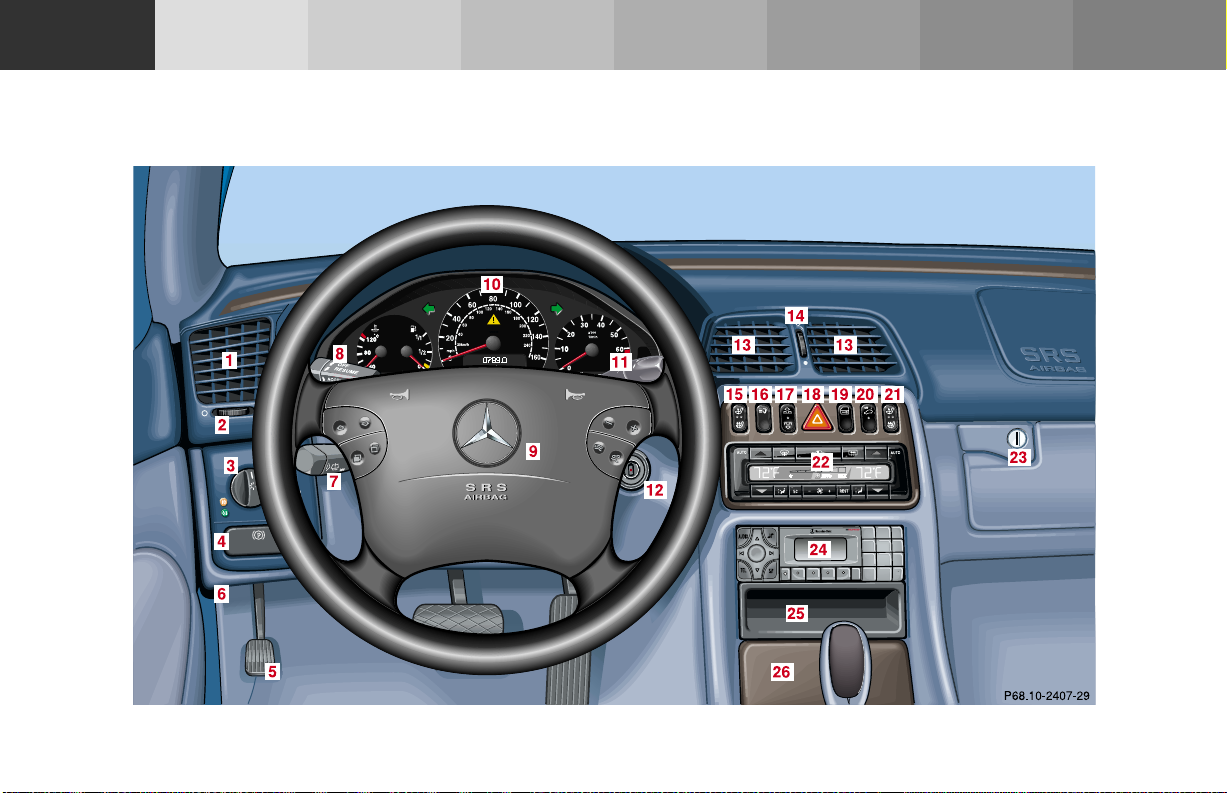
Instruments and controls
Operation Driving
Instruments and controls
Instrument
cluster display
Practical hints Car care Index
Technical
data
18Instruments and controls
Page 22

For more detailed descriptions see Index on page 326.
For adjustment of air outlets, refer to automatic climate
control, see page 120.
1 Side air outlet, adjustable
2 Air volume control for side air outlet
3 Exterior lamp switch, see page 114
4 Parking brake release, see page 204
5 Parking brake pedal, see page 204
6 Hood lock release, see page 254
7 Combination switch, see page 117
8 Cruise control switch, see page 214
9 Multifunction steering wheel, see page 88
Horn (with electronic key in steering lock
position 1 or 2)
10 Instrument cluster, see page 82
11 Voice recognition system switch, see separate
operating instructions
12 Steering lock with ignition/starter
switch, see page 192
13 Center air outlets, adjustable
14 Air volume control for center air outlets
15 Left front seat heater switch, see page 56
16 Headlamp washer switch, see page 116
17 Roll bar switch, see page 53
Roll bar warning lamp, see page 233
18 Hazard warning flasher switch, see page 119
19 Central locking switch, see page 35
20 Switch for tow-away alarm, see page 44
Indicator lamp for antitheft alarm system, see
page 43
21 Right front seat heater switch, see page 56
22 Automatic climate control, see page 120
Rear window defroster switch, see page 124
23 Glove box (illuminated with electronic key in
steering lock position 1 or 2), see page 151
24 Audio system, see page 127
25 Storage compartment
26 Ashtray with lighter, see page 154
Instruments
and controls
Operation Driving
Instrument
cluster display
19Instruments and controls
Practical hints Car care Index
Technical
data
Page 23
Instruments
and controls
Operation Driving
Instrument
cluster display
Practical hints Car care Index
20Instruments and controls
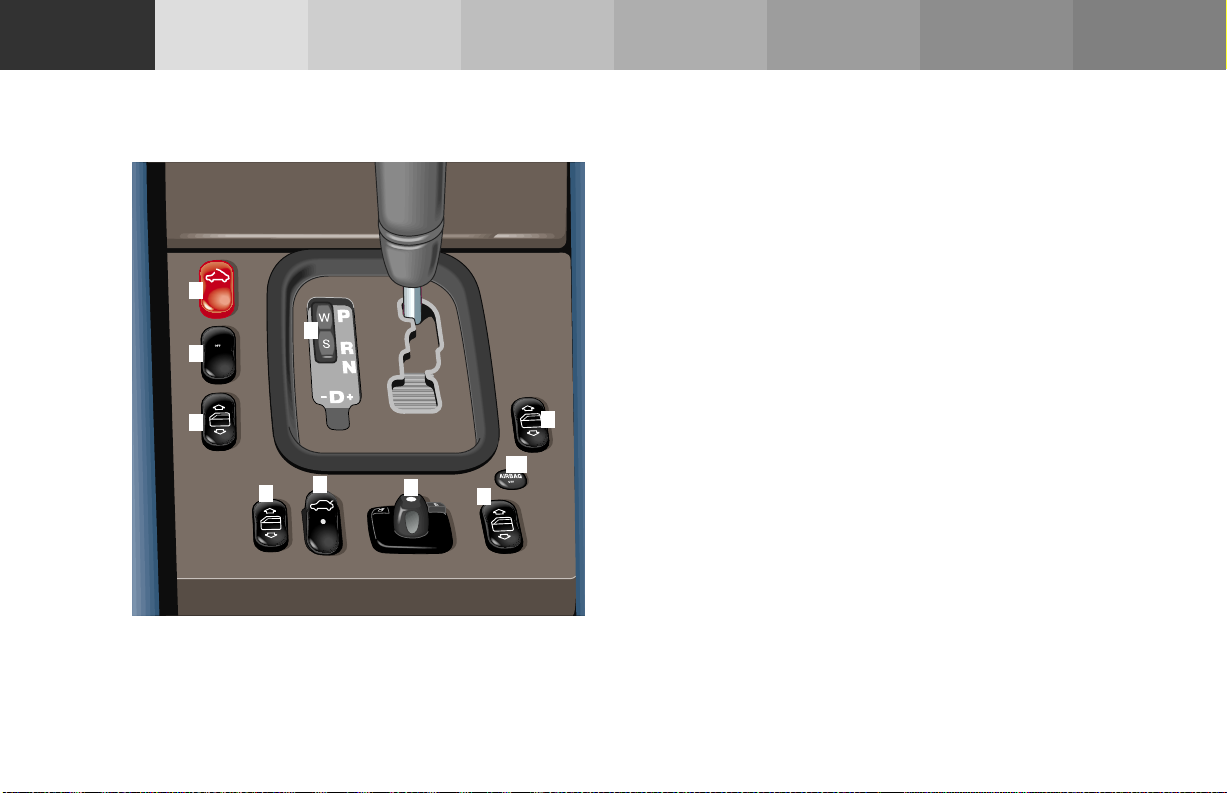
Center console 1 Soft top switch, see page 162
2 ESP control switch, see page 222
3 Program mode selector switch, see page 202
4 Left power window switch (front), see page 146
5 Right power window switch (front), see page 146
1
ESP
ESP
2
3
6 Left power window switch (rear), see page 146
7 Trunk lid release switch, see page 40
8 Mirror adjustment switch, see page 79
9 Right power window switch (rear), see page 146
10
5
10 AIRBAG OFF indicator lamp, see page 232
4
7
6
8
9
Technical
data
P68.10-2555-27
Page 24
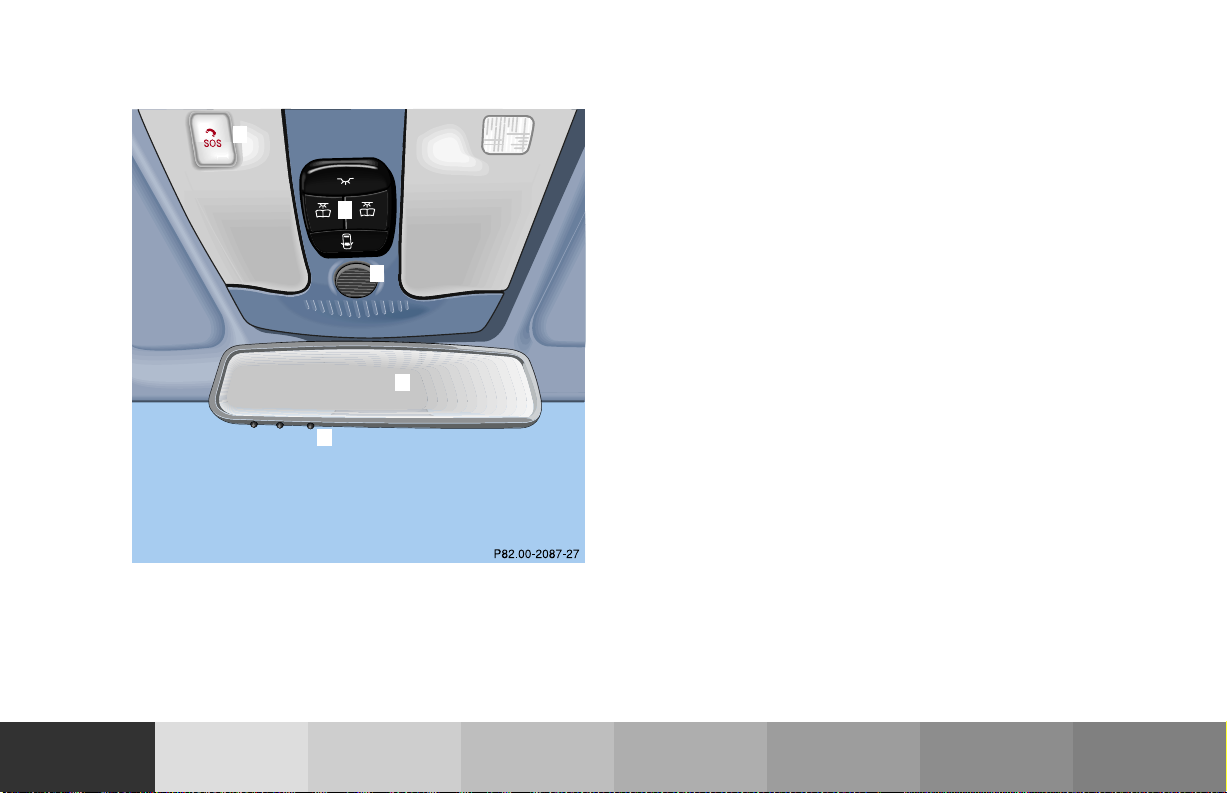
Overhead control panel 1 Tele Aid (emergency call system), see page 182
2 Interior lighting, see page 149
1
3 Hands-free microphone for Tele Aid, telephone and
voice recognition system.
2
4 Rear view mirror, see page 78
5 Garage door opener, see page 158
3
4
5
Instruments
and controls
Operation Driving
Instrument
cluster display
21Instruments and controls
Practical hints Car care Index
Technical
data
Page 25

Instruments
and controls
Operation Driving
Instrument
cluster display
Practical hints Car care Index
Technical
data
22Contents – Operation
Operation
Vehicle keys ...................................... 24
Start lock-out ....................................26
General notes on the
central locking system ...............26
Central locking system ...................27
Radio frequency and infrared
remote control ..............................27
Opening and closing
windows from outside ................. 31
Panic button ..................................32
Mechanical keys ...........................32
Doors .................................................. 33
Central locking switch .................... 35
Automatic central locking ..........36
Emergency unlocking in
case of accident ........................... 36
Trunk .................................................37
Trunk lamp ....................................... 39
Trunk lid release switch ................. 40
Trunk lid emergency release ......... 41
Trunk lid emergency release .........42
Antitheft alarm system ................... 43
Tow-away alarm ............................... 44
Power seats, front ............................ 45
Front head restraints ...................51
Roll bar and head
restraints, rear ............................ 52
Backrest ............................................ 54
Multicontour seat ............................ 55
Heated seats ..................................... 56
Seat belts and integrated
restraint system .......................... 58
Seat belts .......................................... 58
Seat belt nonusage
warning system ............................ 59
TM
BabySmart
airbag
deactivation system ................... 64
TM
Self-test BabySmart
without
special child seat installed ......... 65
Supplemental restraint
system (SRS) ............................... 65
Emergency tensioning
retractor (ETR) ............................ 66
Airbags ..............................................67
Safety guidelines for the
seat belt, emergency tensioning
retractor and airbag ..................... 73
Infant and child
restraint systems .......................... 75
Adjusting telescoping
steering column .......................... 77
Inside rear view mirror .................. 78
Antiglare night position .............. 78
Exterior rear view mirrors .............79
Instrument cluster ........................... 82
Indicator lamps in the
instrument cluster ...................... 84
Multifunction steering wheel,
multifunction display .................88
Trip and main odometer
and sub menu .............................. 92
Audio systems ..................................93
Radio ..............................................93
CD player ....................................... 94
Cassette player ............................. 95
Page 26

Telephone ..........................................96
Telephone book ............................96
Redialing ....................................... 98
Incoming call .............................. 100
Navigation system .......................... 101
Trip computer ................................. 102
Malfunction/warning
message memory ...................... 104
Individual settings ......................... 106
Setting the audio volume .............. 108
Flexible service system
(FSS) ............................................ 109
Engine oil level indicator .............. 112
Engine oil consumption .................113
Exterior lamp switch ......................114
Night security illumination ..........115
Headlamp cleaning system ...........116
Combination switch .......................117
Hazard warning flasher
switch ...........................................119
Automatic climate control ............ 120
Display and controls ................. 122
Basic setting ............................... 122
Economy ...................................... 123
Special settings .......................... 123
Rear window defroster .............. 124
Air recirculation ........................ 125
Residual engine heat
utilization .................................... 125
Dust filter .................................... 126
Audio and telephone,
operation .................................... 127
Power windows .............................. 146
Interior lighting ............................. 149
Sun visors ........................................150
Illuminated vanity mirrors ...........150
Interior .............................................151
Storage compartments, armrest
and cup holder ...........................151
Glove box ......................................151
Ashtray ............................................ 154
Lighter ............................................. 155
Cargo tie down rings ..................... 156
Parcel net in front
passenger footwell .................... 156
Armrest, rear bench ...................... 156
Telephone, general ........................ 157
Cellular telephone ......................... 157
Garage door opener ....................... 158
Soft top ............................................ 162
Wind screen .................................... 170
Instruments
and controls
Operation Driving
Instrument
cluster display
23Contents – Operation
Practical hints Car care Index
Technical
data
Page 27

Instruments
and controls
Operation Driving
Instrument
cluster display
Practical hints Car care Index
Technical
data
24Central locking system
Ve hi cl e ke ys
Included with your vehicle are 2 electronic keys with
integrated radio frequency and infrared remote controls
plus removable mechanical key.
The locking tabs for the mechanical key portion of the
two electronic keys are a different color to help
distinguish it.
Warn in g!
When leaving the vehicle always remove the
electronic key from the steering lock, and lock your
vehicle. Do not leave children unattended in the
vehicle, or with access to an unlocked vehicle.
Unsupervised use of vehicle equipment may cause
serious personal injury.
Page 28
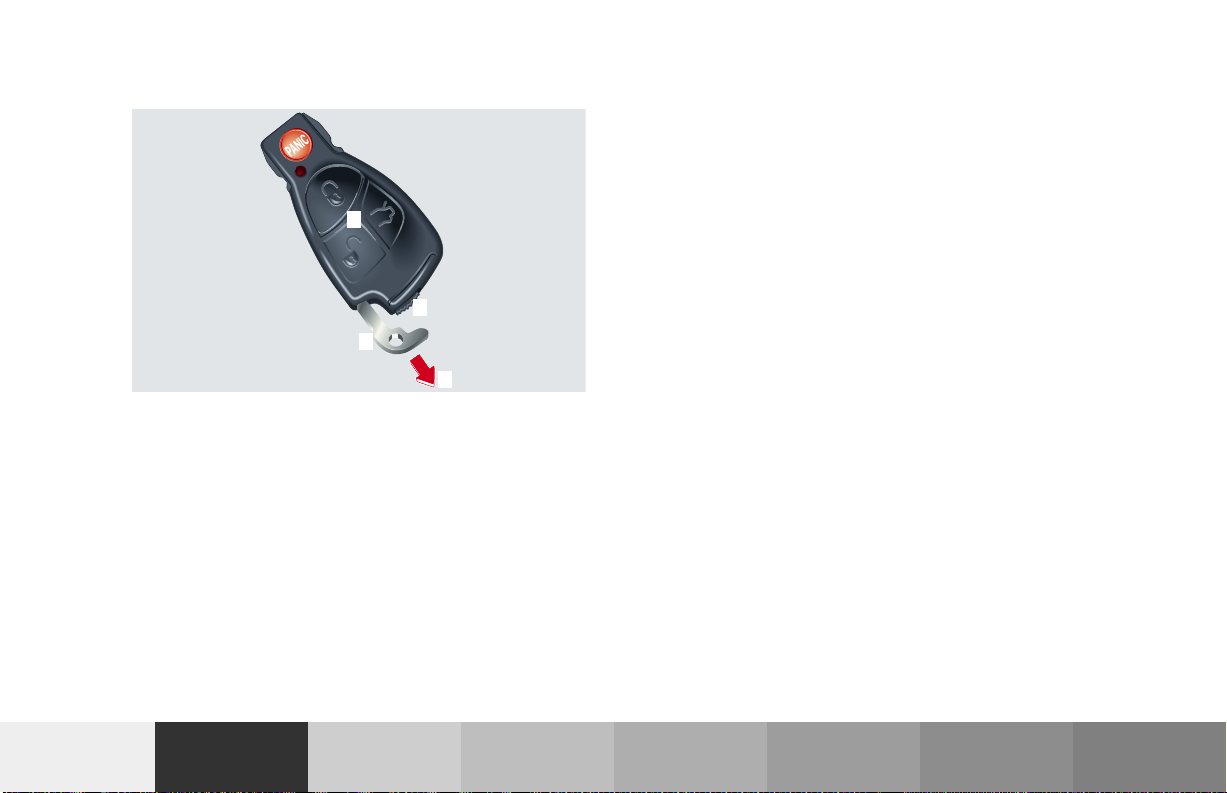
Electronic key
1
3
2
4
P80.35-2031-26
The electronic key has an integrated radio frequency
and infrared remote control, plus removable mechanical
key.
The remote control (1) operates all locks on the vehicle.
The mechanical key (2) works only in the driver’s door,
trunk, and glove box lock.
When using the mechanical key (2) for lock operations,
it can be removed by sliding it out of the remote control.
To do so, move locking tab (3) to the right and slide the
mechanical key (2) in direction of arrow (4).
The remote control transmitter is located in the
electronic key.
The infrared receivers are located in the door handles.
Notes:
Remove the mechanical key from the electronic key
when using valet parking service. To prevent access to
trunk or storage compartments lock them separately
and retain the mechanical key.
See page 37 for separate locking of trunk and page 151
for locking of glove box.
Obtaining replacement keys
Your vehicle is equipped with a theft deterrent locking
system requiring a special key manufacturing process.
For security reasons, replacement keys can only be
obtained from your authorized Mercedes-Benz Center.
Instruments
and controls
Operation Driving
Instrument
cluster display
25Central locking system
Practical hints Car care Index
Technical
data
Page 29

Instruments
and controls
Operation Driving
Instrument
cluster display
Practical hints Car care Index
26Central locking system
Technical
data
Start lock-out
Important!
Removing the electronic key from the steering lock
activates the start lock-out. The engine cannot be
started.
Inserting the electronic key in the steering lock
deactivates the start lock-out.
Note:
In case the engine cannot be started (vehicle’s battery is
in order), the system is not operational. Contact an
authorized Mercedes-Benz Center or call 1-800-FORMERCedes (in the USA) or 1-800-387-0100 (in Canada).
General notes on the central locking system
If the electronic key is inserted in the steering lock, the
vehicle cannot be locked or unlocked with the remote
control.
If the vehicle cannot be locked or unlocked:
• Aim transmitter eye at a receiver of either door
hand le. Check the batteries of the elec tronic key, se e
page 288, or synchronize the remote control, see
page 290.
• Use the mechanical key to unlock the driver’s door.
To start the engine, insert the electronic key in the
steering lock. There could be a slight delay until the
electronic key can be turned in the steering lock.
Important!
When unlocking the driver’s door with the mechanical
key, the exterior lamps will flash and the alarm will
sound.
To cancel the alarm, insert the electronic key in the
steering lock or press button Œ or ‹ on the
electronic key.
Page 30
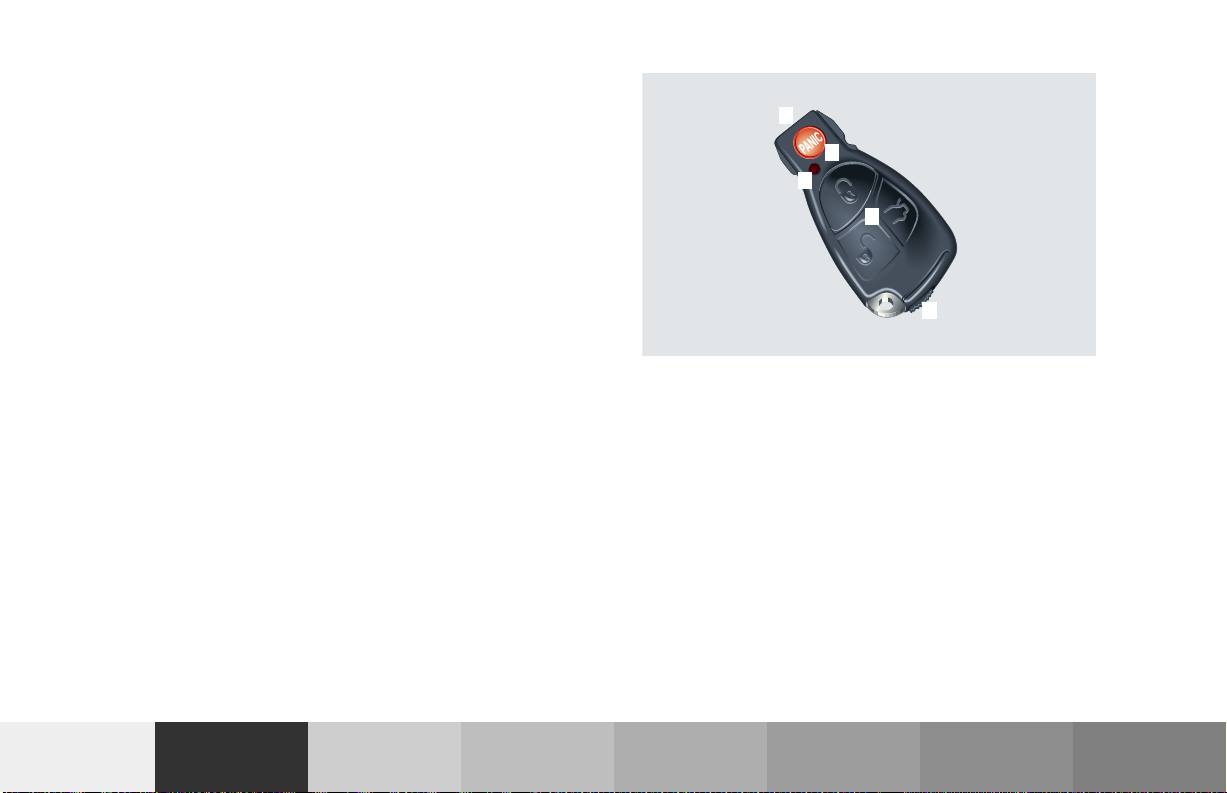
Central locking system
Radio frequency and infrared remote control
The electronic key has an integrated radio frequency
and infrared remote control.
Due to the extended operational range of the remote
control, it could be possible to unintentionally lock or
unlock the vehicle by pressing the transmit button. If
one of the transmit buttons is pressed, the battery check
lamp lights up briefly – indicating that the batteries are
in order. See page 288 for checking batteries.
The vehicle doors, trunk and fuel filler flap can be
centrally locked and unlocked via remote control.
Opening and closing the windows remotely can only be
done with the infrared portion of the remote control.
Aim transmitter eye at a receiver (6 or 7), press and
hold transmit button Œ or ‹.
If the electronic key is inserted in steering lock, the
vehicle cannot be locked or unlocked with the remote
control.
4
3
2
1
5
P80.35-2032-26
1 Transmit button
‹ Locking
ΠUnlocking
Š Opening trunk (if not separately locked)
2 Lamp for battery check (see page 288 for changing
batteries if it does not light up briefly)
3 PANIC button
4 Transmitter eye
5 Locking tab for mechanical key
27Central locking system
Instruments
and controls
Operation Driving
Instrument
cluster display
Practical hints Car care Index
Technical
data
Page 31

Instruments
and controls
Operation Driving
Instrument
cluster display
Practical hints Car care Index
Technical
data
28Central locking system
6
P80.30-2081-26
7
P80.30-2082-20
6 Infrared receiver in driver’s door handle 7 Infrared receiver in passenger door handle
Page 32

Locking and unlocking with remote control
Unlocking:
Press transmit button Œ. All turn signal lamps blink
once to indicate that the vehicle is unlocked.
The remote control can be programmed for two kinds of
unlocking modes (see below):
Selective unlocking mode –
Press transmit button Œ once to unlock driver’s door
and fuel filler flap.
Press transmit button Πtwice to unlock both doors,
fuel filler flap, and trunk.
Global unlocking mode –
Press transmit button Πonce to unlock both doors,
fuel filler flap, and trunk.
Notes:
If the trunk was previously locked separately, it will
remain locked, see page 37.
The presently active unlocking mode (selective or
global) can only be determined by unlocking the vehicle
with the remote control (see below for changing mode).
If within 40 seconds of unlocking with the remote
control, neither door nor trunk is opened, the electronic
key is not inserted in the steering lock, or the central
locking switch is not activated, the vehicle will
automatically lock.
Locking:
Press transmit button ‹ once. All turn signal lamps
blink three times to indicate that the vehicle is locked.
If they do not blink three times, a door or trunk is not
properly closed.
Note:
If the vehicle cannot be locked or unlocked by pressing
the transmit button, then it may be necessary to change
the batteries in the electronic key (if ok, battery check
lamp in electronic key will light briefly when pressing
transmit button) or to synchronize the remote control,
see pages 288 and 290.
Instruments
and controls
Operation Driving
Instrument
cluster display
29Central locking system
Practical hints Car care Index
Technical
data
Page 33

Instruments
and controls
Operation Driving
Instrument
cluster display
Practical hints Car care Index
30Central locking system
Technical
data
Choosing global or selective mode on remote control
Press and hold transmit buttons ‹ and Œ
simultaneously for approx. 6 seconds to reprogram the
remote control. Battery check lamp will blink two times
indicating the completed mode change.
Opening the trunk
Press transmit button Š until trunk lid is released.
A minimum height clearance of 5.9 ft. (1.8 m) is
required to open the trunk lid.
Important!
Do not place remote control in trunk since trunk is
locked when the lid is closed if the vehicle is centrally
locked.
Note:
If the trunk was previously locked separately, it will
remain locked, see page 37.
Page 34

Opening and closing windows from outside
Aim transmitter eye of remote control at a door receiver.
To open:
Continue to press transmit button Πafter unlocking
the vehicle.
The windows begin to open after approx. 1 second.
To interrupt opening procedure, release transmit
button.
To close:
Continue to press transmit button ‹ after locking
the vehicle.
The windows begin to close after approx. 1 second.
To interrupt closing procedure, release transmit button.
Note:
If the windows cannot be operated automatically by
pressing the transmit button of the remote control then
it may be necessary to change the batteries in the
electronic key (if ok, battery check lamp in electronic
key will light briefly when pressing transmit button), or
to synchronize the remote control, see page 288
and 290.
Warn in g!
Never operate the windows if there is the
possibility of anyone being harmed by the opening
or closing procedure.
In case the procedure causes potential danger, the
procedure can be immediately halted by releasing
the remote control button. To reverse direction of
movement press Œ for opening or ‹ for
closing.
Instruments
and controls
Operation Driving
Instrument
cluster display
31Central locking system
Practical hints Car care Index
Technical
data
Page 35

Instruments
and controls
Operation Driving
Instrument
cluster display
Practical hints Car care Index
Technical
data
32Central locking system
Panic button
1
P80.35-2035-26
To activate press and hold button (1) for at least one
second. An audible alarm and blinking exterior lamps
will operate for approximately 3 minutes.
To deactivate press button (1) again, or insert electronic
key in steering lock.
Note:
For operation in the USA only: This device complies
with Part 15 of the FCC Rules. Operation is subject to
the following two conditions:
(1) This device may not cause harmful interference, and
(2) this device must accept any interference received,
including interference that may cause undesired
operation.
Any unauthorized modification to this device could void
to the user’s authority to operate the equipment.
Mechanical keys
The mechanical keys work only in the driver’s door,
trunk, and storage compartment locks.
Notes:
The mechanical key does not operate the central locking
system or antitheft alarm system.
The fuel filler flap cannot be locked or unlocked with
the mechanical key.
Page 36

Doors
3
1
2
1
Instruments
and controls
1 Opening – pull handle
2 Unlocking driver’s door
3 Locking driver’s door
4 Individual door from inside:
• Push lock button down to lock.
• Pull inside door handle to unlock.
Operation Driving
Instrument
cluster display
Important!
The mechanical key does not operate the central locking
system or antitheft alarm system.
When you lock the driver’s door with the mechanical
key, the door lock button should move down.
The passenger door must be locked with the door lock
button – the driver’s door can only be locked when it is
closed.
33Central locking system
Practical hints Car care Index
Technical
data
Page 37

Instruments
and controls
Operation Driving
Instrument
cluster display
Practical hints Car care Index
34Central locking system
Technical
data
If the vehicle has previously been locked from the
outside, opening a door from the inside will trigger the
alarm. When opening a door while the central locking
system is in the:
• selective unlocking mode, only that individual door
is unlocked. The remaining door, the trunk and fuel
filler flap remain locked,
• global unlocking mode, both doors, the trunk and
fuel filler flap are unlocked.
Notes:
When opening a door, the door window lowers slightly.
After closing the door, the window closes again.
In case of a malfunction in the central locking system
the doors can be locked and unlocked individually.
To lock, push down lock button and turn mechanical key
in driver’s door lock to position 3. In addition lock the
trunk.
To unlock, pull inside door handle and turn mechanical
key in driver’s door lock to position 2.
When unlocking the driver’s door with the mechanical
key, the exterior lamps will flash and the alarm will
sound.
To cancel the alarm, insert the electronic key in the
steering lock or press button Œ or ‹ on the
electronic key.
Page 38

Central locking switch
1 Locking
2 Unlocking
The central locking switch is located in the center
console.
The doors and trunk can only be locked with the central
locking switch, if both doors are closed.
If the vehicle was previously locked with the central
locking switch, while in the selective remote control
mode, only the door opened from the inside is unlocked.
If the vehicle was previously locked with the central
locking switch, while in the global remote control mode,
the complete vehicle is unlocked when a door is opened
from the inside.
Notes:
If the vehicle was previously locked with the remote
control, the doors and trunk cannot be unlocked with
the central locking switch.
If the vehicle has previously been locked from the
outside, opening a door with the inside door handle will
trigger the alarm. To cancel the alarm, insert the
electronic key in the steering lock or press button Œ
or ‹ on the electronic key.
The fuel filler flap cannot be locked or unlocked with
the central locking switch.
Warn in g!
When leaving the vehicle always remove the
electronic key from the steering lock, and lock your
vehicle. Do not leave children unattended in the
vehicle, or with access to an unlocked vehicle.
Unsupervised use of vehicle equipment may cause
serious personal injury.
Instruments
and controls
Operation Driving
Instrument
cluster display
35Central locking system
Practical hints Car care Index
Technical
data
Page 39

Instruments
and controls
Operation Driving
Instrument
cluster display
Practical hints Car care Index
36Central locking system
Technical
data
Automatic central locking
The central locking switch also operates the automatic
central locking.
Wit h the automatic central l ocking system activated, the
doors and trunk are locked at vehicle speeds of approx.
9 mph (15 km/h) or more. The fuel filler flap remains
unlocked.
To activa te :
With electronic key in steering lock position 2 hold
upper portion of switch (1) for a minimum of 5 seconds.
To deactivate:
With electronic key in steering lock position 2 hold
lower portion of switch (2) for a minimum of 5 seconds.
Notes:
If doors are unlocked with the central locking switch
after activating the automatic central locking, and
neither door is opened, then the doors remain unlocked
even at vehicle speeds of approx. 9 mph (15 km/h) or
more.
If a door is opened from the inside at speeds of approx.
9 mph (15 km/h) or less with the automatic central
locking activated, the door will again be automatically
locked at speeds of approx. 9 mph (15 km/h) or more.
Important!
When towing the vehicle, or with the vehicle on a
dynamometer test stand, please, note the following:
With the automatic central locking activated and the
electronic key in steering lock position 2, the vehicle
doors will lock if the left front wheel as well as the right
rear wheel spin at vehicle speeds of approx. 9 mph
(15 km/h) or more.
To prevent the vehicle door locks from locking,
deactivate the automatic central locking.
Emergency unlocking in case of accident
The doors unlock automatically a short time after a
strong deceleration is detected, such as in a collision
(this is intended to aid rescue and exit).
Driving on rough roads may cause the vehicle to unlock.
If necessary, the vehicle can be locked again with the
central locking switch, see page 35.
Page 40

Trunk
When the trunk is separately locked, it remains locked
when centrally unlocking the vehicle.
To deny any unauthorized person access to the trunk,
lock it separately with the mechanical key. Leave only
the electronic key less its mechanical key with the
vehicle.
Notes:
The mechanical key does not operate the central locking
system or antitheft alarm system.
When unlocking the trunk with the mechanical key, the
exterior lamps will flash and the alarm will sound.
To cancel the alarm, insert the electronic key in the
steering lock or press button Œ or ‹ on the
electronic key.
0 Neutral position – push to open (arrow)
1 Unlocking
2 Separate locking of trunk – remove mechanical key
in this position (only vehicles built prior 09/ 01).
The vehicle production date (e.g. 09/01) can be
found on the certification label, which is located on
the driver’s door pillar, see page 311.
The trunk lid cannot be opened by the trunk lid release
switch or the electronic key when previously locked
separately with the mechanical key.
Instruments
and controls
Operation Driving
Instrument
cluster display
37Central locking system
Practical hints Car care Index
Technical
data
Page 41

Instruments
and controls
Operation Driving
Instrument
cluster display
Notes:
In case of a malfunction in the central locking system
the trunk can be unlocked individually.
To unlock and open the trunk lid, turn mechanical key
to position 1, hold and push to open.
If the fuel filler flap cannot be opened, see page 299.
Important!
Do not place mechanical key inside trunk, si nce trunk is
locked when the lid is closed if the vehicle has been
previously centrally locked.
To prevent damage to the trunk lid and the soft top
compartment cover, do not open the trunk lid while the
soft top is being raised or lowered.
Practical hints Car care Index
Technical
data
38Central locking system
1
P88.50-2009-26
Lower trunk lid using handle (1) and close it with hands
placed flat on trunk lid. Please remember to keep your
fingers out of the space between the lid and the vehicle.
Page 42

Trunk lamp If the trunk is to remain open for a long period of time,
the trunk lamp can be switched off by pulling out the
plunger in the switch (arrow). This prevents the vehicle
battery from being discharged.
When the trunk lid is closed, the switch will reset and
turn on the lamp next time the lid is opened.
P82.20-2029-26
Instruments
and controls
Operation Driving
Instrument
cluster display
39Trunk lamp
Practical hints Car care Index
Technical
data
Page 43

Instruments
and controls
Operation Driving
Instrument
cluster display
Practical hints Car care Index
40Central locking system
Technical
data
Trunk lid release switch
The switch is located on the center console.
A minimum height clearance of 5.9 ft. (1.8 m) is
required to open the trunk lid.
To open the trunk, the vehicle must be at standstill. Pull
up on switch until trunk lid is open.
The indicator lamp in the switch remains on with trunk
lid open.
Notes:
The trunk can also be opened by using the electronic
key. Press Š button.
The trunk lid cannot be opened by the switch or the
remote control when previously locked separately with
the mechanical key. To open, see page 37.
The trunk lid cannot be opened with the trunk lid
release switch when the vehicle was previously locked
with the central locking switch. To unlock vehicle with
the central locking switch, see page 35.
Page 44

Trunk lid emergency release
(vehicles built prior to September 2001)
Note:
The emergency release button (1) only unlocks and
opens the trunk while the vehicle is not in motion.
Important!
The emergency trunk lid release button (1) does not
open the trunk lid, if the trunk has been locked using
the mechanical key or if the vehicle battery is
discharged or disconnected.
Instruments
and controls
1
The emergency release button (1) is located in the trunk
lid.
Briefly press emergency release button (1).
All doors, the fuel filler flap, and the trunk unlock; and
the trunk lid opens.
The vehicle production date (e.g. 09/ 01) can be found
on the certification label, which is located on the
driver’s door pillar, see page 311.
Operation Driving
Instrument
cluster display
Illumination of the emergency release button (1):
The button will blink for 30 minutes after opening the
trunk.
The button will blink for 60 minutes after closing the
trunk.
41Central locking system
Practical hints Car care Index
Technical
data
Page 45

Instruments
and controls
Operation Driving
Instrument
cluster display
Practical hints Car care Index
Technical
data
42Central locking system
Trunk lid emergency release
(vehicles built September 2001 and later)
1
The emergency release button (1) is located in the trunk
lid.
Briefly press emergency release button (1).
The trunk unlocks and the trunk lid opens.
The vehicle production date (e.g. 09/ 01) can be found
on the certification label, which is located on the
driver’s door pillar, see page 311.
Important!
The emergency trunk lid release button (1) does not
open the trunk lid, if the vehicle battery is discharged or
disconnected.
Illumination of the emergency release button (1):
The button will blink for 30 minutes after opening the
trunk.
The button will blink for 60 minutes after closing the
trunk.
Page 46

Antitheft alarm system
1
1 Indicator lamp in switch located in center console
The antitheft alarm is automatically armed or disarmed
with the remote control by locking or unlocking the
vehicle.
The antitheft alarm is armed within approx. 10 seconds
after locking the vehicle.
A blinking lamp (1) indicates that the alarm is armed.
Operation:
Once the alarm system has been armed, the exterior
vehicle lamps will flash and an alarm will sound when
someone:
• opens a door,
• opens the trunk,
• opens the hood,
• attempts to raise the vehicle.
The alarm will last approximately 3 minutes in form of
flashing exterior lamps. At the same time an alarm will
sound for 30 seconds. The alarm will stay on even if the
activating element (a door, for example) is immediately
closed. The antitheft alarm system is switched off
automatically if the vehicle is unlocked with the
electronic key. If the alarm stays on for more than
20 seconds, an emergency call is initiated automatically.
See Tele Aid on page 182.
Note:
When you unlock the driver’s door with the mechanical
key, the exterior lamps will flash and the alarm will
sound. To interrupt the alarm, insert the electronic key
in the steering lock or press button Œ or ‹ on the
electronic key.
Instruments
and controls
Operation Driving
Instrument
cluster display
43Antitheft alarm system
Practical hints Car care Index
Technical
data
Page 47

Instruments
and controls
Operation Driving
Instrument
cluster display
Practical hints Car care Index
44Tow-away alarm
Technical
data
Tow-away alarm
The switch is located in the center console.
1 Press to switch off
2 Indicator lamp
Once the alarm system has been armed, the exterior
vehicle lamps will flash and an alarm will sound when
someone attempts to raise the vehicle.
The alarm will last approximately 3 minutes in form of
flashing exterior lamps. At the same time an alarm will
sound for 30 seconds. The alarm will stay on even if the
vehicle is immediately lowered. The tow-away alarm
system is switched off automatically if the vehicle is
unlocked with the electronic key.
If the alarm stays on for more than 20 seconds, an
emergency call is initiated automatically. See Tele Aid
on page 182.
To prevent triggering the tow-away alarm feature, switch
off the tow-away alarm before towing the vehicle, or
when parking on a surface subject to movement, such
as a ferry or auto train.
To do so, turn electronic key in steering lock to
position 1 or 0, or remove electronic key from steering
lock. Press tow-away alarm switch (1). The indicator
lamp (2) illuminates briefly.
Exit vehicle, and lock vehicle with the remote control.
The tow-away alarm remains switched off until the
vehicle is locked again with the remote control, at which
time it is automatically reactivated.
Page 48

Power seats, front
Wa rn in g!
Do not adjust the driver’s seat while driving.
Adjusting the seat while driving could cause the
driver to lose control of the vehicle.
Never ride in a moving vehicle with the backrest
reclined. Sitting in an excessively reclined position
can be dangerous. You could slide under the seat
belt in a collision. If you slide under it, the belt
would apply force at the abdomen or neck. That
could cause serious or even fatal injuries. The
backrest and seat belt provide the best restraint
when the wearer is in an upright position and the
belt is properly positioned on the body.
Never place hands under seat or near any moving
parts while a seat is being adjusted.
Warn in g!
When leaving the vehicle always remove the
electronic key from the steering lock, and lock your
vehicle.
The power seats can also be operated with the
driver’s or passenger door open. Do not leave
children unattended in the vehicle or with access
to an unlocked vehicle. Unsupervised use of vehi cle
equipment may cause serious personal injury.
To operate the front power seat adjustment switches,
turn electronic key in steering lock to position 1 or 2
(with the driver’s or passenger’s door open, the power
seats can also be operated with the electronic key
removed or in steering lock position 0).
45Seats
Instruments
and controls
Operation Driving
Instrument
cluster display
Practical hints Car care Index
Technical
data
Page 49

Instruments
and controls
Operation Driving
5
8
7
4
2
1
Instrument
cluster display
2
3
The slide switches are located in each door.
We recommend to adjust the power seat in the following
order:
1 Seat, up/down
Press the switch (up/down direction) until
comfortable seating position with still sufficient
headroom is reached.
2 Seat, fore/aft
Press the switch (fore/aft direction) until a
comfortable seating position is reached that still
allows you to reach the accelerator/brake pedal
Practical hints Car care Index
Technical
data
46Seats
safely. The position should be as far rearward as
possible, consistent with ability to properly operate
controls.
Note:
Do not move the front passenger seat completely
forward if objects are stored in the parcel net in the
front passenger side footwell. Items in the net may
be damaged.
3 Seat cushion tilt
Press the switch in the direction of the arrow until
your legs are lightly supported.
4 Backrest tilt
Press the switch in the direction of the arrow until
your arms are slightly angled when holding the
steering wheel.
5 Head restraint
During seat adjustment, the head restraint is
automatically adjusted based on seat (fore/aft)
position to support the back of the head
approximately at ear level. Please check the position
of the head restraint to assure that it supports the
back of the head approximately at ear level. The
head restraint angle can also be adjusted manually.
Page 50

Notes:
Your vehicle is equipped with power head restraints, do
not try to raise or lower them manually.
Only minor personal adjustments, as described below,
should then be required.
For steering wheel adjustment, see page 77;
inside rear view mirror, see page 78;
exterior rear view mirrors, see page 79.
Caution!
Do not remove head restraints except when mounting
seat covers. For removal see page 51. Whenever
restraints have been removed be sure to reinstall them
before driving.
Instruments
and controls
Operation Driving
Instrument
cluster display
47Seats
Practical hints Car care Index
Technical
data
Page 51

Instruments
and controls
Operation Driving
Instrument
cluster display
Practical hints Car care Index
48Seats
Technical
data
Memory storing and recalling
6 Memory button
7 Position buttons
Storing
Three sets of seat/head restraint positions may be
programmed into memory.
Together with the driver’s seat position you can store
the exterior rear view mirror positions.
After the seat/head restraint and exterior rear view
mirrors are positioned, push memory button (6),
release, and within 3 seconds push position button “1”.
A second and third set of positions for the same seat/
head restraint and exterior rear view mirrors can be
programmed into memory by pushing first memory
button (6) and then “2”, respectively “3”.
Note:
See page 79 for instructions on adjustment of mirrors.
Page 52

Recalling
To recall a seat/head restraint and exterior rear view
mirror position, push and hold position button “1”, “2”
or “3” until seat/head restraint and exterior rear view
mirror movement has stopped. The seat/head restraint
and exterior rear view mirror movement stops when the
position button is released.
Caution!
Do not operate the power seats using the memory
button if the backrest is in an excessively reclined
position. Doing so could cause damage to front or rear
seats.
First move the backrest to an upright position.
Synchronizing power seats and head restraints
If the power supply was interrupted (battery
disconnected or empty), the power seats and head
restraints are no longer adjusted automatically.
To resynchronize the adjustment feature, turn
electronic key in steering lock to position 2, move the
seat completely forward and the head restraint fully
down, and hold respective buttons for approx.
2seconds.
Instruments
and controls
Operation Driving
Instrument
cluster display
49Seats
Practical hints Car care Index
Technical
data
Page 53

Instruments
and controls
Operation Driving
Instrument
cluster display
Practical hints Car care Index
Technical
data
50Seats
Important!
Prior to operating the vehicle, the driver should adjust
the seat height for proper vision as well as fore/aft
placement and backrest angle to insure adequate
control, reach, operation, and comfort. The head
restraint should also be adjusted for proper height. See
also airbag section on page 67 for proper seat
positioning.
In addition, also adjust the steering wheel to ensure
adequate control, reach, operation, and comfort.
Both the inside and outside rear view mirrors should be
adjusted for adequate rearward vision.
Fasten seat belts. Infants and small children should be
seated in a properly secured restraint system that
complies with U.S. Federal Motor Vehicle Safety
Standard 213 and Canadian Motor Vehicle Safety
Standard 213.
All seat, head restraint, steering wheel, and rear view
mirror adjustments as well as fastening of seat belts
should be done before the vehicle is put into motion.
Warn in g!
Children 12 years old and under must never ride in
the front seat, except in a Mercedes-Benz
authorized BabySmart
which operates with the BabySmart
TM
compatible child seat,
TM
system
installed in the vehicle to deactivate the passenger
side front airbag when it is properly installed.
Otherwise they will be struck by the airbag when it
inflates in a crash. If this happens, serious or fatal
injury can result.
According to accident statistics, children are safer
when properly restrained in the rear seating
positions than in the front seating positions.
Infants and small children must ride in back seats
and be seated in an appropriate infant or child
restraint system, which is properly secured with
the vehicle’s seat belt, fully in accordance with the
child seat manufacturer’s instructions.
A child’s risk of serious or fatal injuries is
significantly increased if the child restraints are
not properly secured in the vehicle and the child is
not properly secured in the child restraint.
Page 54

Front head restraints
Wa rn in g!
For your protection, drive only with properly
positioned head restraints.
Adjust head restraint to support the back of the
head approximately at ear level.
Do not drive the vehicle without the seat head
restraints. Head restraints are intended to help
reduce injuries during an accident.
Removal:
Tilt the backrest rearward for easier removal of the front
head restraints.
Push button (1) up to bring the power adjustable head
restraint to its highest position.
Pull out head restraint completely with both hands.
Installation:
Push button (1) of the power adjustable head restraint
up for approximately 5 seconds.
Insert the head restraint and push it down to the stop.
Adjust head restraint to the desired position.
For positioning of head restraints see also power seats,
front on page 45, and head restraints, rear on page 53.
Instruments
and controls
Operation Driving
Instrument
cluster display
51Seats
Practical hints Car care Index
Technical
data
Page 55

Instruments
and controls
Operation Driving
Instrument
cluster display
Practical hints Car care Index
52Seats
Technical
data
Roll bar and head restraints, rear
The rear head restraints are integrated in the roll bar.
The roll bar will be automatically raised in an accident
or in a potentially dangerous driving situation. A ratchet
noise can be heard when the roll bar is automatically
raised.
The roll bar can be lowered again after an automatic
deployment by pressing the upper half of the roll bar
switch (for at least 8 seconds) until the roll bar drive
mechanism audibly engages. Then press the lower half
of the switch to lower the roll bar.
If the roll bar was raised using the switch, it will be
automatically lowered when activating the soft top
switch.
Warn in g!
Raising or lowering of the roll bar could injure rear
seated occupants.
Before operating the roll bar switch make sure that
the roll bar’s path is clear and no persons due to
inattention are injured by the moving roll bar.
For your own safety we recommend to drive with
the roll bar raised, if
• the outside temperature is below +5
• the rear seats are occupied by passengers.
Before working on the vehicle, e.g. when changing
wheels, the roll bar should be raised with the
switch, and the electronic key should be removed
from the steering lock, to prevent possible injury.
In case of potential danger release the switch to
immediately interrupt the operating procedure.
°F (-15°C).
Page 56

Switch for roll bar and head restraints, rear
With the engine running and the roll bar lowered, the
warning lamp in the roll bar switch will blink for
approx. 15 seconds. The blinking is reminding you to
raise the roll bar if the rear passenger seats are
occupied. See also page 233 for roll bar warning lamp.
1
Important!
The roll bar is intended to be a safety enhancement to
the other features designed into the vehicle. No system
in any vehicle can eliminate the possibility of serious
2
injury or fatality in an accident. Properly fastened seat
belts and child restraints must be used!
Instruments
and controls
P91.59-2001-26
The switch is located in the center console.
Turn electronic key in steering lock to position 2.
Press switch:
1 Raise roll bar
2 Lower roll bar
The lowering or raising procedure is immediately
interrupted by releasing the roll bar switch.
Operation Driving
Instrument
cluster display
Notes:
If the warning lamp in the switch comes on, then a
malfunction has been detected. In this case, drive only
with the roll bar raised until the problem has been
corrected. Raise the roll bar by pressing the upper half
of the roll bar switch.
Have the system checked at your authorized
Mercedes-Benz Center as soon as possible.
Items being transported in the rear passenger
compartment should be placed in such a manner as not
to affect the movement of the roll bar when being
raised.
53Seats
Practical hints Car care Index
Technical
data
Page 57

Instruments
and controls
Operation Driving
Instrument
cluster display
Practical hints Car care Index
54Seats
Technical
data
Backrest
1 Release lever
Folding forward:
Lift release lever (1) and fold backrest forward. The seat
will automatically slide forward and the head restraint
will move down.
Folding back:
Lift release lever (1) and fold backrest back. The seat
and head restraint return to their previous positions.
To interrupt the procedure, activate the power seat
switch.
Notes:
The automatic seat slide is provided with a safety
feature. The automatic process is interrupted, if the
backrest of the sliding seat is pushed against an
occupant or object. The seat will slide forward, stop, and
make 3 attempts sliding backward.
To halt the automatic process, activate the power seat
switch. Investigate and correct the cause of interruption.
Now use memory button or power seat switch to bring
seat into desired position.
The backrest release lever (1) also serves as a rest for
the front seat belt, bringing it within easy reach.
Warn in g!
When leaving the vehicle always remove the
electronic key from the steering lock, and lock your
vehicle.
The power seats can also be operated with the
driver’s or passenger door open. Do not leave
children unattended in the vehicle or with access
to an unlocked vehicle. Unsupervised use of vehi cle
equipment may cause serious personal injury.
Never place hands under seat or near any moving
parts during a seat adjustment procedure.
Page 58

Multicontour seat
(optional; standard on model CLK 55 AMG)
4
3
1
2
P91.25-2063-26
Some models may be equipped wit h multicontour seats.
These seats have movable seat cushions, and inflatable
air cushions built into the backrest to provide additional
lumbar and side support.
We recommend to adjust the multicontour seat in the
following order:
1 Seat cushion depth
Slide the switch fore or aft until your legs are
supported comfortably.
2 Backrest bottom
3 Backrest center
4 Side bolster adjustment
Adjust the side bolster to provide good lateral
support.
The seat cushion movement and amount of backrest
cushion height and curvature can be continuously
varied with regulators (1, 2 and 3) after turning the
electronic key in steering lock to position 2.
The side bolsters of the backrest can be adjusted with
rocker switch (4):
• press to the right – increase side support,
• press to the left – decrease side support.
If the engine is turned off, the last cushion setting is
retained in memory, and automatically adjusts the
cushion to this setting when the engine is restarted.
Instruments
and controls
Operation Driving
Instrument
cluster display
55Seats
Practical hints Car care Index
Technical
data
Page 59

Instruments
and controls
Operation Driving
Instrument
cluster display
Practical hints Car care Index
Technical
data
56Seats
Heated seats, front
(optional, standard on model CLK 55 AMG)
1
2
P54.25-2036-26
The front seat heater switches are located in the center
console.
The front seat heaters can be switched on with the
electronic key in steering lock positions 1 or 2.
Press switch to turn on seat heater:
1 Normal seat heating mode. One indicator lamp in
the switch lights up.
2 Rapid seat heating mode. Both indicator lamps in
the switch light up.
After approximately 5 minutes in the rapid seat
heating mode, the seat heater automatically
switches to normal operation and only one indicator
lamp will stay on.
Turning off seat heater:
If one indicator lamp is on, press upper half of switch.
If both indicator lamps are on, press lower half of
switch.
If left on, the seat heater automatically turns off after
approximately 30 minutes of operation.
Page 60

Notes:
When in operation, the seat heater consumes a large
amount of electrical power. It is not advisable to use the
seat heater longer than necessary.
The seat heaters may automatically switch off if too
many power consumers are switched on at the same
time, or if the battery charge is low. When this occurs,
the indicator lamp in the switch will blink (both
indicator lamps blink during rapid seat heating mode).
The seat heaters will switch on again automatically as
soon as sufficient voltage is available.
If the blinking of the indicator lamps is distracting to
you, the seat heaters can be switched off.
Instruments
and controls
Operation Driving
Instrument
cluster display
57Seats
Practical hints Car care Index
Technical
data
Page 61

Instruments
and controls
Operation Driving
Instrument
cluster display
Practical hints Car care Index
Technical
data
58Restraint systems
Seat belts and integrated restraint system
Your vehicle is equipped with seat belts for all seats,
emergency tensioning retractors for the front seat belts,
dual front airbags, door mounted side impact airbags
and knee bolsters for driver and front passenger. Their
protective functions are designed to complement one
another.
Seat belts
Important!
Laws in most states and all Canadian provinces require
seat belt use.
All states and provinces require use of child restraints
that comply with U.S. Federal Motor Vehicle Safety
Standard 213 and Canadian Motor Vehicle Safety
Standard 213.
All child restraint systems are designed to be secured in
vehicle seats by lap belts or the lap belt portion of a lapshoulder belt.
For your safety and that of your passengers we strongly
recommend their use.
Warn in g!
Children 12 years old and under must never ride in
the front seat, except in a Mercedes-Benz
authorized BabySmart
which operates with the BabySmart
TM
compatible child seat,
TM
system
installed in the vehicle to deactivate the passenger
side front airbag when it is properly installed.
Otherwise they will be struck by the airbag when it
inflates in a crash. If this happens, serious or fatal
injury will result.
According to accident statistics, children are safer
when properly restrained in the rear seating
positions than in the front seating positions.
Infants and small children must ride in back seats
and be seated in an appropriate infant or child
restraint system, which is properly secured with
the vehicle’s seat belt, fully in accordance with the
child seat manufacturer’s instructions.
A child’s risk of serious or fatal injuries is
significantly increased if the child restraints are
not properly secured in the vehicle and the child is
not properly secured in the child restraint.
Page 62

Wa rn in g!
Never ride in a moving vehicle with the backrest
reclined. Sitting in an excessively reclined position
can be dangerous. You could slide under the seat
belt in a collision. If you slide under it, the belt
would apply force at the abdomen or neck. That
could cause serious or even fatal injuries. The
backrest and seat belt provide the best restraint
when the wearer is in an upright position and the
belt is properly positioned on the body.
Note:
For cleaning and care of the seat belts, see page 306.
Seat belt nonusage warning system
With the electronic key in steering lock position 2, a
warning sounds for a short time if the driver’s seat belt
is not fastened. See also seat belt warning lamp on
page 232.
Warn in g!
Failure to wear and properly fasten and position
your seat belt greatly increases your risk of
injuries and their likely severity in an accident.
You and your passengers should always wear seat
belts.
If you are ever in an accident, your injuries can be
considerably more severe without your seat belt
properly buckled. Without your seat belt buckled,
you are much more likely to hit the interior of the
vehicle or be ejected from it. You can be seriously
injured or killed.
In the same crash, the possibility for injury or
death is lessened if you are wearing your seat belt.
Warn in g!
Never let more people ride in the vehicle than there
are seat belts available. Be sure everyone riding in
the vehicle is correctly restrained with a separate
seat belt.
Instruments
and controls
Operation Driving
Instrument
cluster display
59Restraint systems
Practical hints Car care Index
Technical
data
Page 63

Instruments
and controls
Operation Driving
Instrument
cluster display
Practical hints Car care Index
Technical
data
60Restraint systems
Fastening of seat belts
2
1 Latch plate
2 Buckle
3 Release button
Push latch plate (1) into buckle (2) until it clicks. Do not
twist the belt. A twisted seat belt may cause injury.
To help avoid severe or fatal injuries, the lap belt must
be positioned as low as possible on your hips and not
across the abdomen.
1
Warn in g!
Always fasten your seat belt before driving off.
Always make sure your passengers are properly
restrained – even those sitting in the rear.
3
Page 64

P91.40-2102-26
Unfastening of seat belts
3
2
1
Instruments
and controls
Tighten the lap portion to a snug fit by pulling shoulder
portion up.
The shoulder portion of the seat belt must be pulled
snug and checked for snugness immediately after
engaging it.
Adjust seat belt so that shoulder portion is located as
close as possible to the middle of your shoulder (it
should not touch the neck).
Operation Driving
Instrument
cluster display
Push the release button (3) in the belt buckle (2). Allow
the retractor to completely rewind the seat belt by
guiding the latch plate (1).
Operation
The inertia reel stops the belt from unwinding during
sudden vehicle stops or when quickly pulling on the
belt. The locking function of the reel may be checked by
quickly pulling out the belt.
61Restraint systems
Practical hints Car care Index
Technical
data
Page 65

Instruments
and controls
Operation Driving
Instrument
cluster display
Practical hints Car care Index
62Restraint systems
Technical
data
Caution!
For safety reasons, avoid adjusting the seat or backrest
into positions which could affect the correct seat belt
position.
Wa rn in g!
USE SEAT BELTS PROPERLY.
• Seat belts can only work when used properly.
Never wear seat belts in any other way than as
described in this section, as that could result
in serious injuries in case of an accident.
• Each occupant should wear t heir seat belt at all
times, because seat belts help reduce the
likelihood of and potential severity of injuries
in accidents, including rollovers. The
integrated restraint system includes “SRS”
(driver airbag, front passenger airbag, door
mounted side impact airbags), “ETR” (seat belt
emergency tensioning retractors), and front
seat knee bolsters. The system is designed to
enhance the protection offered to properly
belted occupants in certain frontal (front
airbags) and side (side impact airbags) impacts
which exceed preset deployment thresholds.
• Never wear belts over rigid or breakable
objects in or on your clothing, such as
eyeglasses, pens, keys etc., as these might
cause injuries.
• Never wear the shoulder belt under your arm,
against your neck or off your shoulder. In a
crash, your body would move too far forward.
That would increase the chance of head and
neck injuries. The belt would also apply too
much force to the ribs or abdomen, which
could severely injure internal organs such as
your liver or spleen.
• Position the lap belt as low as possible on your
hips and not across the abdomen. If the belt is
positioned across your abdomen, it could cause
serious injuries in a crash.
• Each seat belt should never be used for more
than one person at a time. Do not fasten a seat
belt around a person and another person or
other objects.
• Belts should not be worn twisted. In a crash,
you wouldn’t have the full width of the belt to
manage impact forces. The twisted belt against
your body could cause injuries.
Page 66

• Pregnant women should also use a lapshoulder belt. The lap belt portion should be
positioned as low as possible on the hips to
avoid any possible pressure on the abdomen.
• Never place your feet on the instrument panel
or on the seat. Always keep both feet on the
floor in front of the seat.
Wa rn in g!
USE CHILD RESTRAINTS PROPERLY.
Children 12 years old and under must never ride in
the front seat, except in a Mercedes-Benz
authorized BabySmart
which operates with the BabySmart
TM
compatible child seat,
TM
system
installed in the vehicle to deactivate the passenger
front airbag when it is properly installed.
Otherwise they will be struck by the airbag when it
inflates in a crash. If this happens, serious or fatal
injury will result.
According to accident statistics, children are safer
when properly restrained in the rear seating
positions than in the front seating positions.
Infants and small children must ride in back seats
and be seated in an appropriate infant or child
restraint system, which is properly secured with
the vehicle’s seat belt, fully in accordance with the
child seat manufacturer’s instructions.
A child’s risk of serious or fatal injuries is
significantly increased if the child restraints are
not properly secured in the vehicle and the child is
not properly secured in the child restraint.
Children too big for child restraint systems must
ride in back seats using regular seat belts. Position
shoulder belt across chest and shoulder, not face or
neck. A booster seat may be necessary to achieve
proper belt positioning.
Instruments
and controls
Operation Driving
Instrument
cluster display
63Restraint systems
Practical hints Car care Index
Technical
data
Page 67

Instruments
and controls
Operation Driving
TM
BabySmart
Special BabySmart
airbag deactivation system
TM
compatible child seats, designed
Instrument
cluster display
for use with the Mercedes-Benz system and available at
any authorized Mercedes-Benz Center are required for
use with the BabySmart
TM
airbag deactivation system.
With the special child seat properly installed, the
passenger front airbag will not deploy. The 7
indicator lamp located on the center console will be
illuminated, except with electronic key removed or in
steering lock position 0. The system does not deactivate
the door mounted side impact airbag.
BabySmartTM is a trademark of Siemens Automotive Corp.
Practical hints Car care Index
Technical
data
64Restraint systems
Warn in g!
TM
The BabySmart
airbag deactivation system will
ONLY work with a special child seat designed to
operate with it. It will not work with child seats
which are not BabySmart
TM
compatible.
Never place anything between seat cushion and
child seat (e.g. pillow), since it reduces the
effectiveness of the deactivation system. The
bottom of the child seat must make full contact
with the passenger seat cushion. An incorrectly
mounted child seat could cause injuries to the
child in case of an accident instead of protecting
the child.
Follow the manufacturer’s instructions for
installation of special child seats.
The passenger side front airbag will not deploy
only if the 7 indicator lamp remains
illuminated.
Please be sure to check the indicator every time
you use the special system child seat.
Should the light go out while the restraint is
installed, please check installation. If the light
remains out, do not use the BabySmart
TM
restraint
to transport children on the front passenger seat
until the system has been repaired.
Page 68

TM
Self-test BabySmart
without special child seat installed
After turning electronic key in steering lock to
position 1 or 2, the 7 indicator lamp located on the
center console comes on for approx. 6 seconds and then
extinguishes.
If the indicator lamp should not come on or is
continuously lit, the system is not functioning. You must
see an authorized Mercedes-Benz Center before seating
any child on the front passenger seat.
BabySmartTM is a trademark of Siemens Automotive Corp.
Supplemental restraint system (SRS)
Airbags are intended as a supplement to seat belts.
Airbags alone cannot protect as well as airbags plus
seat belts in impacts for which the airbags were
designed to operate, and do not afford any protection
whatsoever in crashes for which the airbags are not
designed to deploy.
The SRS uses two crash severity levels (thresholds) to
activate either the emergency tensioning retractor (ETR)
or front airbag or both. Activation depends on the
direction and severity of the impact exceeding the
preset thresholds and whether the seat belt is fastened.
Seat belt fastened
• first threshold exceeded: ETR activates
• second threshold exceeded: airbag also activates
Seat belt not fastened
• first threshold exceeded:
airbag activates, but not ETR
Driver and front passenger systems operate
independently of each other.
Instruments
and controls
Operation Driving
Instrument
cluster display
65Restraint systems
Practical hints Car care Index
Technical
data
Page 69

Instruments
and controls
Operation Driving
Instrument
cluster display
Practical hints Car care Index
66Restraint systems
Technical
data
Emergency tensioning retractor (ETR)
The seat belts for the front seats are equipped with
emergency tensioning retractors. These tensioning
retractors are located in each belt’s inertia reel and
become operationally ready with the electronic key in
steering lock position 1 or 2.
The emergency tensioning retractors are designed to
activate only when the seat belts are fastened during
frontal impacts exceeding the first threshold of the SRS
and in rear impacts exceeding a preset severity level.
They remove slack from the belts in such a way that the
seat belts fit more snugly against the body restricting its
forward movement as much as possible.
In cases of other frontal impacts, angled impacts,
roll-overs, certain side impacts, or other accidents
without sufficient frontal or rear impact forces, the
emergency tensioning retractors will not be activated.
The driver and passengers will then be protected by the
fastened seat belts and inertia reel in the usual manner.
For seat belt and emergency tensioning retractor safety
guidelines see page 73.
Page 70

Airbags
2
SRS
SRS
AIRBAG
AIRBAG
1
Instruments
and controls
1 Driver airbag
The driver airbag is located in the steering wheel hub.
Operation Driving
Instrument
cluster display
2 Front passenger airbag
The passenger front airbag is located in the dashboard
ahead of the front passenger.
67Restraint systems
Practical hints Car care Index
Technical
data
Page 71

Instruments
and controls
Operation Driving
Instrument
cluster display
Practical hints Car care Index
Technical
data
68Restraint systems
mounted side impact airbags can provide increased
protection to belted front passengers on the impacted
side of the vehicle in side impacts exceeding its preset
threshold.
3
P91.60-2122-26
3 Side impact airbag
The side impact airbags are located in the doors.
The most effective occupant restraint system yet
developed for use in production vehicles is the seat belt.
In some cases, however, the protective effect of a seat
belt can be further enhanced by an airbag.
In conjunction with wearing the seat belts, the driver
and front passenger airbags can provide increased
protection for the driver and front passenger in certain
frontal impacts exceeding preset thresholds. Door
Important!
The operational readiness of the airbag system is
verified by the indicator lamp “SRS” in the instrument
cluster when turning the electronic key in steering lock
to position 1 or 2. If no fault is detected, the lamp will go
out after approximately 4 seconds; after the lamp goes
out, the system continues to monitor the components
and circuitry of the airbag system and will indicate a
malfunction by coming on again. If the lamp does not
come on at all or if it fails to extinguish after
approximately 4 seconds or if it comes on thereafter,
a malfunction in the system has been detected.
The following system components are monitored or
undergo a self-check: crash-sensor(s), airbag ignition
circuits, front seat belt buckles, emergency tensioning
retractors, seat sensor.
Page 72

Initially, when the electronic key is turned from steering
lock position 0 to positions 1 or 2, malfunctions in the
crash-sensor are detected and indicated (the “SRS”
indicator lamp stays on longer than 4 seconds or does
not come on).
Have the system checked at your authorized
Mercedes-Benz Center immediately.
In the operational mode, after the indicator lamp has
gone out following the initial check, interruptions or
short circuits in the airbag ignition circuit and in the
driver and front passenger seat belt buckle harnesses,
and low voltage in the entire system are detected and
indicated.
Wa rn in g!
In the event a malfunction of the “SRS” is indicated
as outlined above, the “SRS” may not be
operational. For your safety, we strongly
recommend that you visit an authorized MercedesBenz Center immediately to have the system
checked; otherwise the “SRS” may not be activated
when needed in an accident, which could result in
serious or fatal injury, or it might deploy
unexpectedly and unnecessarily which could also
result in injury.
Front airbags
The driver and front passenger front airbags are
designed to activate only in certain frontal impacts
exceeding a preset threshold.
The front passenger airbag deploys only if the front
passenger seat is occupied and the indicator lamp on
the center console is not illuminated.
Note:
Heavy objects on the front passenger seat can appear to
the “SRS” to indicate the presence of an occupant in
that seat which causes the passenger front airbag to
deploy in a crash exceeding the appropriate threshold.
Instruments
and controls
Operation Driving
Instrument
cluster display
69Restraint systems
Practical hints Car care Index
Technical
data
Page 73

Instruments
and controls
Operation Driving
Instrument
cluster display
Practical hints Car care Index
70Restraint systems
Technical
data
Side impact airbags
The side impact airbags are designed to activate only in
certain side impacts exceeding a preset threshold. Only
the side impact airbag on the impacted side of the
vehicle deploys.
The side impact airbag for the front passenger deploys
only if the front passenger seat is occupied.
Side impact airbags operate best in conjunction with a
properly positioned and fastened seat belt.
Note:
Heavy objects on front passenger seat can cause the
side impact airbag to deploy in a crash.
Important!
Airbags are designed to activate only in certain
frontal (front airbags) impacts, or side (side impact
airbags) impacts which exceed preset thresholds.
Only during these types of impacts, if of sufficient
severity to meet the deployment thresholds, will
they provide their supplemental protection.
The driver and passenger should always wear their
seat belts, otherwise it is not possible for the airbags
to provide their intended supplemental protection.
In cases of other frontal impacts, angled impacts,
roll-overs, other side impacts, rear collisions, or
other accidents in which the airbags are not
designed to deploy, the airbags will not be activated.
The driver and passenger will then be protected by
the fastened seat belts.
We caution you not to rely on the presence of the
airbags in order to avoid wearing your seat belt.
Page 74

Wa rn in g!
Airbags are designed to reduce the potential of
injury in certain frontal (front airbags) impacts,
and side (side impact airbags) impacts which may
cause significant injuries, however, no system
available today can totally eliminate injuries and
fatalities.
The activation of the “SRS” temporarily releases a
small amount of dust from the airbags. This dust,
however, is neither injurious to your health, nor
does it indicate a fire in the vehicle. The dust might
cause some temporary breathing difficulty for
people with asthma or other breathing trouble. To
avoid this, you may wish to get out of the vehicle as
soon as it is safe to do so. If you have any breathing
difficulty but cannot get out of the vehicle after the
airbag inflates, then get fresh air by opening a
window or door.
Your vehicle was originally equipped with airbags
which are designed to activate in certain impacts
exceeding a preset threshold to reduce the potential
and severity of injury. It is important to your safety
and that of your passengers that you replace
deployed airbags and repair any malfunctioning
airbags to ensure the vehicle will continue to
provide crash protection for occupants.
Warn in g!
To reduce the risk of injury when the front airbags
inflate, it is very important for the driver and front
passenger to always be in a properly seated
position and to wear their seat belts.
For maximum protection in the event of a collision
always be in normal seated position with your back
against the backrest. Fasten your seat belt and
ensure that it is properly positioned on your body.
Since the airbag inflates with considerable speed
and force, a proper seating and hands on steering
wheel position will help to keep you at a safe
distance from the airbag. Occupants who are
unbelted, out of position or too close to the airbag
can be seriously injured by an airbag as it inflates
with great force in the blink of an eye:
Instruments
and controls
Operation Driving
Instrument
cluster display
71Restraint systems
Practical hints Car care Index
Technical
data
Page 75

Instruments
and controls
Operation Driving
Instrument
cluster display
Practical hints Car care Index
Technical
data
72Restraint systems
• Sit properly belted in an upright position with
your back against the backrest.
• Adjust the driver seat as far as possible
rearward, still permitting proper operation of
vehicle controls. The distance from the center
of the driver’s breastbone to the center of the
airbag cover on the steering wheel must be at
least ten inches (25 cm) or more. You should be
able to accomplish this by a combination of
adjustments to the seat and steering wheel. If
you have any problems, please see your
authorized Mercedes-Benz Center.
• Do not lean with your head or chest close to the
steering wheel or dashboard.
• Keep hands on the outside of steering wheel
rim. Placing hands and arms inside the rim
can increase the risk and potential severity of
hand/arm injury when the driver front airbag
inflates.
• Adjust the front passenger seat as far as
possible rearward from the dashboard when
the seat is occupied.
• Occupants, especially children, should never
lean their heads in the area of the door where
the side airbag inflates. This could result in
serious injuries or death should the airbag be
triggered. Always sit upright, properly use the
seat belts, and appropriate size infant or child
restraint system.
• Children 12 years old and under must never
ride in the front seat, except in a
Mercedes-Benz authorized BabySmart
compatible child seat, which operates with the
BabySmart
TM
system installed in the vehicle to
TM
deactivate the passenger front airbag when it
is properly installed. Otherwise they will be
struck by the airbag when it inf lates in a crash.
If this happens, serious or fatal injury can
result.
Failure to follow these instructions can result in
severe or fatal injuries to you or other occupants.
Page 76

Wa rn in g!
Accident research shows that the safest place for
children in an automobile is in the rear seat.
Should you choose to place a child 12 years old or
under in the front passenger seat of your vehicle,
you must properly use a BabySmart
restraint which will turn off the passenger side
front airbag. BabySmart
TM
will not, however, turn
TM
child
off the passenger’s side impact airbag.
It should be noted however that there is a
possibility for a side airbag related injury if
occupants, especially children, are not properly
seated or restrained when next to a side airbag
which needs to deploy rapidly in a side impact in
order to do its job.
To help avoid the possibility of injury, please follow
these guidelines: (1) occupants, especially
children, should never place their bodies or lean
their heads in the area of the door where the side
airbag inflates. This could result in serious
injuries or death should the side airbag be
activated; (2) always sit upright, properly use the
seat belts and use an appropriately sized infant or
child restraint system for all children 12 years old
or under; and (3) always wear seat belts properly.
Safety guidelines for the seat belt, emergency tensioning retractor and airbag
Warn in g!
• Damaged seat belts or belts that were highly
stressed in an accident must be replaced and
their anchoring points must also be checked.
Use only belts installed or supplied by an
authorized Mercedes-Benz Center.
• Do not pass belts over sharp edges.
• Do not make any modification that could
change the effectiveness of the belts.
• Airbags and ETR’s are designed to function on
a one-time-only basis. An airbag or emergency
tensioning retractor (ETR) that was activated
must be replaced.
Instruments
and controls
Operation Driving
Instrument
cluster display
73Restraint systems
Practical hints Car care Index
Technical
data
Page 77

Instruments
and controls
Operation Driving
Instrument
cluster display
Practical hints Car care Index
74Restraint systems
Technical
data
• No modifications of any kind may be made to
any components or wiring of the “SRS”. This
includes changing or removing any component
or part of the “SRS”, the installation of
additional trim material, badges etc. over the
steering wheel hub, front passenger airbag
cover, or front door trim panels, and
installation of additional electrical/electronic
equipment on or near “SRS” components and
wiring. Keep area between airbags and
occupants free of objects (e.g. packages,
purses, umbrellas, etc.).
• An airbag system component within the
steering wheel gets hot after the airbag has
inflated. Do not touch.
• Improper work on the system, including
incorrect installation and removal, can lead to
possible injury through an unintended
activation of the “SRS”.
• In addition, through improper work there is
the risk of rendering the “SRS” inoperative or
causing unintended airbag deployment. Work
on the “SRS” must therefore only be performed
by an authorized Mercedes-Benz Center.
• For your protection and the protection of
others, when scrapping the airbag unit or
emergency tensioning retractor, our safety
instructions must be followed. These
instructions are available at your authorized
Mercedes-Benz Center.
• Given the considerable deployment speed and
the textile structure of the airbags, there is the
possibility of abrasions or other injuries
resulting from airbag deployment.
When you sell the vehicle we strongly urge you to give
notice to the subsequent owner that it is equipped with
an “SRS” by alerting him to the applicable section in the
Operator’s Manual.
Page 78

Infant and child restraint systems
We recommend all infants and children be properly restrained at all times while the vehicle is in motion. All
lap-shoulder belts except the driver’s seat belt have
special seat belt retractors for secure fastening of child
restraints.
To activate, pull shoulder belt out completely and let it
retract. During the seat belt retraction a ratcheting
sound can be heard to indicate that the special seat belt
retractor is activated. The belt is now locked.
To deactivate, release seat belt buckle and let seat belt
retract completely. The seat belt can again be used in
the usual manner.
Wa rn in g!
Never release the seat belt buckle while vehicle is
in motion, since the special seat belt retractor will
be deactivated.
Important!
The use of infant or child restraints is required by law in
all 50 states and all Canadian provinces.
Infants and small children should be seated in an
appropriate infant or child restraint system properly
secured by a lap-shoulder belt, and that complies with
U.S. Federal Motor Vehicle Safety Standard 213 and
Canadian Motor Vehicle Safety Standard 213.
A statement by the child restraint manufacturer of
compliance with this standard can be found on the
instruction label on the restraint and in the instruction
manual provided with the restraint.
When using any infant or child restraint system, be sure
to carefully read and follow all manufacturer’s
instructions for installation and use.
Please read and observe warning labels affixed to inside
of vehicle and to infant or child restraints.
Instruments
and controls
Operation Driving
Instrument
cluster display
75Restraint systems
Practical hints Car care Index
Technical
data
Page 79

Instruments
and controls
Operation Driving
Instrument
cluster display
Practical hints Car care Index
Technical
data
76Restraint systems
Wa rn in g!
Children 12 years old and under must never ride in
the front seat, except in a Mercedes-Benz
authorized BabySmart
which operates with the BabySmart
TM
compatible child seat,
TM
system
installed in the vehicle to deactivate the passenger
front airbag when it is properly installed.
Otherwise they will be struck by the airbag when it
inflates in a crash. If this happens, serious or fatal
injury can result.
According to accident statistics, children are safer
when properly restrained in the rear seating
positions than in the front seating positions.
Infants and small children must ride in back seats
and be seated in an appropriate infant or child
restraint system, which is properly secured with
the vehicle’s seat belt, fully in accordance with the
child seat manufacturer’s instructions.
Infants and small children should never share a
seat belt with another occupant. During an
accident, they could be crushed between the
occupant and seat belt.
Children too big for child restraint systems must
ride in back seats using regular seat belts. Position
shoulder belt across chest and shoulder, not face or
neck. A booster seat may be necessary to achieve
proper belt positioning for children from 41 lbs. to
the point where a lap/shoulder belt fits properly
without one.
When the child restraint is not in use, remove it
from the vehicle or secure it with the seat belt to
prevent the child restraint from becoming a
projectile in the event of an accident.
Do not leave children unattended in the vehicle;
even if the children are secured in a child restraint
system. Unsupervised children in a child restraint
system may use vehicle equipment and may cause
serious personal injury.
Page 80

Adjusting telescoping steering column Unlocking:
Pull handle (1) out to its stop. The indicator lamp,
located in the instrument cluster, comes on.
Adjusting:
To lengthen or shorten the steering column, pull out or
push in steering wheel.
Locking:
1
Push handle (1) in until it engages. The indicator lamp,
located in the instrument cluster, goes out.
Important!
With the electronic key in steering lock position 2, the
P46.10-2020-26
indicator lamp in the instrument cluster comes on.
It should go out when the engine is running.
Wa rn in g!
Do not adjust the steering wheel while driving.
The telescoping adjustment must be locked while
driving. Adjusting the steering wheel while
driving, or driving without the telescoping
adjustment locked could cause the driver to lose
If the indicator lamp does not go out after starting the
engine, the adjustable steering column is not locked
properly.
Do not drive the vehicle until you have properly locked
the steering column.
control of the vehicle.
Instruments
and controls
Operation Driving
Instrument
cluster display
77Adjusting telescoping steering column
Practical hints Car care Index
Technical
data
Page 81

Instruments
and controls
Operation Driving
Instrument
cluster display
Practical hints Car care Index
78Rear view mirrors
Technical
data
Inside rear view mirror
Manually adjust the inside mirror.
Use your inside mirror to determine the size and
distance of objects seen in the passenger side convex
mirror.
Antiglare night position
With the electronic key in steering lock position 2, the
mirror reflection brightness responds to changes in
light sensitivity.
With gear selector lever in position “R”, or with the
interior lamp switched on, the mirror brightness does
not respond to changes in light sensitivity.
Note:
The automatic antiglare function does not react, if
incoming light is not aimed directly at sensors in the
inside rear view mirror.
The automatic antiglare function will not react for
example, if the wind screen is installed.
Warn in g!
In the case of an accident liquid electrolyte may
escape the mirror housing when the mirror glass
breaks.
Electrolyte has an irritating effect. Do not allow the
liquid to come into contact with eyes, skin,
clothing, or respiratory system. In cases it does,
immediately flush affected area with water, and
seek medical help if necessary.
Page 82

Exterior rear view mirrors
The switch is located on the center console.
Turn electronic key in steering lock to position 2.
First select the mirror to be adjusted – press button:
% Left mirror
& Right mirror
To adjust, toggle the switch forward, backward or to
either side.
With the electronic key in steering lock position 2, the
driver’s side mirror reflection brightness responds to
changes in light sensitivity.
With gear selector lever in position “R”, or with the
interior lamp switched on, the driver’s side mirror
brightness does not respond to changes in light
sensitivity.
Warn in g!
Exercise care when using the passenger-side
mirror. The passenger-side exterior mirror is
convex (outwardly curved surface for a wider field
of view). Objects in mirror are closer than they
appear. Check your inside rear view mirror or
glance over your shoulder before changing lanes.
Notes:
The exterior mirrors have electrically heated glass. The
heater switches on automatically, depending on outside
temperature.
If an exterior mirror housing is forcibly pivoted from its
normal position, it must be repositioned by applying
firm pressure until it snaps into place.
Instruments
and controls
Operation Driving
Instrument
cluster display
79Rear view mirrors
Practical hints Car care Index
Technical
data
Page 83

Instruments
and controls
Operation Driving
Instrument
cluster display
Practical hints Car care Index
80Rear view mirrors
Technical
data
Wa rn in g!
In the case of an accident liquid electrolyte may
escape the mirror housing when the mirror glass
breaks.
Electrolyte has an irritating effect. Do not allow the
liquid to come into contact with eyes, skin,
clothing, or respiratory system. In cases it does,
immediately flush affected area with water, and
seek medical help if necessary.
Important!
Electrolyte drops coming into contact with the vehicle
paint finish can only be completely removed while in
their liquid state, by applying plenty of water.
Storing mirror positions in memory
The exterior rear view mirror positions are stored in
memory with the seat/head restraint position and can
be recalled when necessary, see page 48.
Page 84

Parking position
The passenger-side exterior mirror can be adjusted and
programmed to assist the driver during parking
maneuvers (e.g. to observe the curb or other objects
close to the vehicle).
With electronic key in steering lock position 2, and the
exterior rear view mirror switch in the passenger side
position, the passenger-side mirror will be turned
downward when placing the gear selector lever in “R”
Reverse.
The passenger-side mirror position can now be adjusted
as desired.
At speeds above approx. 6 mph (10 km/h), upon shifting
gear selector lever from “R” Reverse, or upon pressing
the driver’s side mirror button, the passenger-side
mirror will return to its previous position.
Readjust the mirror as desired.
One passenger-side mirror position can be stored in
memory. To do so:
1. Turn electronic key to steering lock position 2.
The vehicle must be stationary.
2. Select passenger-side mirror & and adjust the
mirror to view the curb.
3. Press green memory button located in switch cluster
for driver seat, see page 48.
4. Within 3 seconds pull the mirror toggle switch
rearward. The mirror should not move.
Repeat the memory procedure if the mirror moves.
The passenger-side mirror will return to its previous
position after approx. 20 seconds.
Instruments
and controls
Operation Driving
Instrument
cluster display
81Rear view mirrors
Practical hints Car care Index
Technical
data
Page 85

Instruments
and controls
Operation Driving
Instrument cluster
Instrument
cluster display
Practical hints Car care Index
Technical
data
82Instrument cluster
Page 86

1 Push buttons V and W for intensity of instrument
lamps, see page 85
2 Push button J for resetting trip odometer, see
page 87, or to acknowledge a malfunction or
warning message, see page 104.
3 Coolant temperature gauge, see page 86
4 Fuel gauge with reserve and fuel cap placement
warning lamp, see page 230
5 Outside temperature indicator, see page 86
6 Left turn signal indicator lamp, see combination
switch on page 117
7 ESP warning lamp, see page 231
8 Speedometer
9 Trip odometer, see page 87
10 Main odometer
11 Multifunction indicator, see page 88
or FSS indicator, see page 109
or engine oil level indicator, see page 112
12 Right turn signal indicator lamp, see combination
switch on page 117
13 Tachometer, see page 87
14 Gear range indicator display, see selector lever
positions on page 198
15 Clock, see page 106
Instruments
and controls
Operation Driving
Instrument
cluster display
83Instrument cluster
Practical hints Car care Index
Technical
data
Page 87

Instruments
and controls
Operation Driving
Instrument
cluster display
Practical hints Car care Index
Technical
data
84Instrument cluster
Indicator lamps in the instrument cluster
High beam
ABS
BRAKE
ABS malfunction, see page 231
Brake fluid low (except Canada),
seepage229
Parking brake engaged, see page 229
Brake fluid low (Canada only),
seepage229
Parking brake engaged, see page 229
BAS
ESP
BAS malfunction, see page 231
ESP malfunction, see page 231 and 245
ESP. Adjust driving to road condition,
seepage220
Fasten seat belts, see page 232
Telescoping steering column not locked,
seepage232
SRS malfunction, see page 230
SRS
CHECK
ENGINE
Function indicator lamp on the center console
If the “CHECK ENGINE” malfunction
indicator lamp comes on when the engine is
running, it indicates a malfunction of the
fuel management system, emission control
system, systems which impact emissions, or
the fuel cap is not closed tight. In all cases,
we recommend that you have the
malfunction checked as soon as possible,
seepage228.
Front passenger airbag automatically
switched off, see page 64.
Page 88

Activating instrument cluster display
The instrument cluster is activated by:
• Opening the door.
• Pressing button J, V or W on the instrument
cluster.
• Turning the electronic key in steering lock to
position 1 or 2.
• Switching on the exterior lamps.
Display illumination
The display for temperature, odometer, multifunction
indicator, FSS indicator and clock is illuminated briefly
when opening the driver’s door.
The display illumination brightness responds
automatically according to changes in the surrounding
light sensitivity.
To briefly illuminate the display (with electronic key
removed or in steering lock position 0), press button J.
Instrument lamps
Activate the instrument cluster.
Press V or W button to vary intensity of instrument
lamps.
Instruments
and controls
Operation Driving
Instrument
cluster display
85Instrument cluster
Practical hints Car care Index
Technical
data
Page 89

Instruments
and controls
Operation Driving
Instrument
cluster display
Practical hints Car care Index
86Instrument cluster
Technical
data
Coolant temperature gauge (3)
During severe operating conditions and stop-and-go city
traffic, the coolant temperature may rise close to the red
marking.
The engine should not be operated with the coolant
temperature in the red zone. Doing so may cause
serious engine damage which is not covered by the
Mercedes-Benz Limited Warranty.
Wa rn in g!
• Driving when your engine is badly overheated
can cause some fluids which may have leaked
into the engine compartment to catch fire. You
could be seriously burned.
• Steam from an overheated engine can cause
serious burns and can occur just by opening
the engine hood. Stay away from the engine if
you see or hear steam coming from it.
Turn off the engine, get out of the vehicle and do
not stand near the vehicle until it cools down.
Outside temperature indicator (5)
The temperature sensor is located in the front bumper
area. Due to its location, the sensor can be affected by
road or engine heat during idling or slow driving. This
means that the accuracy of the displayed temperature
can only be verified by comparison to a thermometer
placed next to the sensor, not by comparison to external
displays (e.g. bank signs etc.).
Adaptation to ambient temperature takes place in steps
and depends on the prevailing driving conditions (stopand-go or moderate, constant driving) and amount of
temperature change.
Warn in g!
The outside temperature indicator is not designed
to serve as an Ice-Warning Device and is therefore
unsuitable for that purpose. Indicated
temperatures just above the freezing point do not
guarantee that the road surface is free of ice.
Page 90

Trip odometer (9)
To reset to “0” miles/km:
Activate the instrument cluster if it is not already
activated by pressing the J button on the instrument
cluster.
Press button è or ÿ on the multifunction
steering wheel repeatedly until the trip odometer
appears if it is not displayed. See page 92.
Press button J on the instrument cluster to reset trip
odometer.
Tachometer (13)
The red marking on tachometer denotes excessive
engine speed.
Avoid this engine speed, as it may result in serious
engine damage that is not covered by the
Mercedes-Benz Limited Warranty.
To help protect the engine, the fuel supply is interrupted
if the engine is operated within the red marking.
Instruments
and controls
Operation Driving
Instrument
cluster display
87Instrument cluster
Practical hints Car care Index
Technical
data
Page 91

Instruments
and controls
Operation Driving
Instrument
cluster display
Multifunction steering wheel, multifunction display
Practical hints Car care Index
Technical
data
88Multifunction steering wheel, multifunction display
Page 92

Depending on your vehicle’s equipment, you may use
the buttons on the multifunction steering wheel to call
up, control and set the following systems in the
multifunction display:
1 Trip and main odometer, see page 92
Vehicle speed, see page 92
Flexible service system (FSS), see page 109
Engine oil level indicator, see page 112
2 Audio systems, see page 93
Radio, see page 93
CD player (optional), see page 94
Cassette player, see page 95
3 Navigation system (optional), see page 101
4 Malfunction message memory, see page 104
5 Individual settings, see page 106
6 Trip computer, see page 102
After start
After reset
Fuel tank content
7 Telephone (if so equipped), see page 96
Press the è or ÿ button repeatedly until the
required system is displayed.
Pressing the è button advances the display to the
next system.
Pressing the ÿ button returns the display to the
previous system.
You may call up additional displays within some of these
categories by pressing the j or k button.
Warn in g!
A driver’s attention to the road must always be his /
her primary focus when driving.
For your safety and the safety of others, selecting
features through the multifunction steering wheel
should only be done by the driver when traffic and
road conditions permit it to be done safely.
Programming individual settings in the system can
only be made while the vehicle is at standstill.
Instruments
and controls
Operation Driving
Instrument
cluster display
89Multifunction steering wheel, multifunction display
Practical hints Car care Index
Technical
data
Page 93

Instruments
and controls
Operation Driving
1
1
Instrument
cluster display
Practical hints Car care Index
Technical
data
90Multifunction steering wheel, multifunction display
Turn the electronic key in steering look to position 1
or 2.
Press button:
2
80
100
60
120 140
160
100
80
180
40
60
200
VDO
40
20
mph
OFF
RESUME
5
6 7
6
5
9 9
3
3
0
4
4
220
20km/h
240
1 Multifunction steering wheel
2 Multifunction display
3 è for next system
120
140
10
160
8
8
7
10
10
9
4 ÿ for previous system
5 j for next display in system
6 k for previous display in system
7 æ to increase the volume
8 ç to decrease the volume
9 í to dial a telephone number, see page 96
See page 100 for instructions on answering an
L
E
T
incoming call.
10 ì to end a call
Page 94

Press the è or ÿ button repeatedly until the
required system is displayed.
Pressing the è button advances the display to the
next system.
Pressing the ÿ button returns the display to the
previous system.
You may call up additional displays in some systems by
pressing the j or k button.
Note:
The displays in the multifunction display can be set to
German, English, French, Italian or Spanish language.
See the “TEXT” individual setting on page 106 for
instructions on changing the language setting.
The displays for the audio systems (radio, CD player,
cassette player) will appear in English, regardless of the
language selected.
Instruments
and controls
Operation Driving
Instrument
cluster display
91Multifunction steering wheel, multifunction display
Practical hints Car care Index
Technical
data
Page 95

Instruments
and controls
Operation Driving
Instrument
cluster display
Practical hints Car care Index
92Multifunction steering wheel, multifunction display
Trip and main odometer and sub menu 1 Trip and main odometer
See page 87 for instructions on resetting the trip
odometer.
2 Vehicle speed
3 FSS (Flexible service system), see page 109.
4 Engine oil level indicator, see page 112.
Press è or ÿ button repeatedly until the trip and
main odometer display (1) appears.
Press the j or k button repeatedly until the
required display (2, 3, 4, 1) appears.
Pressing the è or ÿ button displays the next or
previous system.
Technical
data
Page 96

Audio systems
Radio
P54.30-2936-27
1 Audio system is switched off.
2 The radio is switched on.
3 Wave band setting and memory location number,
where appropriate.
4 Station frequency.
5 This only appears when “MEMORY” rather than
“FREQUENCY” has been selected in the individual
setting menu “STATION SEARCH USING”. See
page 106.
The radio must be switched on.
Press the è or ÿ button repeatedly until
display (2) appears.
Press button j or k repeatedly until the required
station or frequency is displayed.
Use the j of k button to select a stored station or
station frequency. This depends on the selection made
in the “STATION SEARCH USING” setting menu.
Pressing the è or ÿ button displays the next or
previous system.
Instruments
and controls
Operation Driving
Instrument
cluster display
93Multifunction steering wheel, multifunction display
Practical hints Car care Index
Technical
data
Page 97

Instruments
and controls
Operation Driving
CD player (optional) 1 Audio system is switched off.
Instrument
cluster display
Practical hints Car care Index
94Multifunction steering wheel, multifunction display
2 The CD player is switched on.
3 The number of the CD currently playing is displayed
if you are using a CD changer.
4 Track number.
The radio must be switched on.
The CD player must be switched on.
Press the è or ÿ button repeatedly until
display (2) appears.
Press the j or k button repeatedly until the
required track number (4) is displayed.
Pressing the è or ÿ button displays the next or
previous system.
Note:
To select a CD from the magazine (only vehicles
equipped with CD changer), press a number on the
audio system or the (optional) COMAND system key pad
located in the center dashboard.
Technical
data
Page 98

Cassette player 1 Audio system is switched off.
2 The cassette player is switched on.
3 Side being played.
The radio must be switched on.
The cassette player must be switched on.
Press the è or ÿ button repeatedly until
display (2) appears.
Pressing the j button fast forwards on to the next
track.
Pressing the k button rewinds the cassette to the
beginning of the current track.
Pressing the è or ÿ button displays the next or
previous system.
Notes:
To select the reverse side of the tape, press button below
track number on the audio system display, or enter
request on the (optional) COMAND system located in
the center dashboard.
To eject the inserted tape, press “EJ” on the audio
system (see page 135) or “EJT” on the (optional)
COMAND system.
Instruments
and controls
Operation Driving
Instrument
cluster display
95Multifunction steering wheel, multifunction display
Practical hints Car care Index
Technical
data
Page 99

Instruments
and controls
Operation Driving
Instrument
cluster display
Practical hints Car care Index
Technical
data
96Multifunction steering wheel, multifunction display
Telephone
Telephone book
8
P54.30-3578-27
1 The telephone is switched off.
2 The vehicle is currently outside the transmitter or
receiver range.
3 The telephone is ready for use.
4 Name selected from the telephone book.
5 Number for the name selected. Dialing commences.
6 Dialing is completed. The name is displayed. The
display remains for the duration of the call.
7 Duration of call.
8 Memory location number.
Page 100

The telephone must be switched on.
Press the è or ÿ button repeatedly until the
display (3) appears. Refer to the separate telephone
instruction manual.
Pressing j or k “browses” alphabetically
forwards or backwards through the telephone book,
providing it was previously downloaded. See telephone
operator’s manual for details concerning downloading.
Pressing button j or k for longer than a second
“browses” rapidly through the telephone book.
The name selected appears in the display.
Note:
Press the ì button if you do not wish to make a call.
The procedure is cancelled and display (3) appears.
Press the í button when the name you require
appears in the display (4). The telephone number (5) is
dialed.
The name will be displayed when dialing is completed.
Display (6) remains for the duration of the call.
Pressing the ì button hangs up and display (3)
appears.
Pressing the è or ÿ button displays the next or
previous system.
Instruments
and controls
Operation Driving
Instrument
cluster display
97Multifunction steering wheel, multifunction display
Practical hints Car care Index
Technical
data
 Loading...