

Page 1

OWNER'S
MANUAL
CM'MBmD/,p,Xo
COLOR TELEVISION MT1134
MT1194
Ia CAOT,ON
hanges or modifications not expressly approved by the party responsible for compli-|
nce with the FCC Rules could void the user's authority to operate this equipment. ,,)
If you purchase a universal remote control from your local retailer, please contac
It ATTENTION tl
he remote manufacturer for the required programming code.
When shipped from the factory, the TV/CATV menu option is set to the "CATV"
I TV/CATV MODE SELECTION 1
(Cable Television) mode. If not using CATV, set this menu option to "IV" mode.
FEATURES
Quartz PLL Frequency Synthesized Tuning System - Electronically locks in and
memorizes available channels for perfect reception.
181 Channel Tuner - The tuning system is capable of receiving all 68 VHF/UHF
standard broadcast channels that are available in your area. When operating on a cable
system, it can tune to the standard VHF channel frequencies plus up to 113 cable
channel frequencies. The actual number of channels received depends upon channel
reception in your area or your cable system.
On-Screen 3 Language Display - This TV can display the on screen language in
English, Spanish or French.
Picture Adjustments Using The Remote Control - The On-Screen display allows
precise remote control adjustment of BRIGHTNESS, COLOR, CONTRAST,
SHARPNESS and TINT.
Sleep Timer - Operable from the remote control, this TV can be programmed up to 120
minutes to turn off automatically.
Memory Back Up - This system prevents loss of memorized channel selections in case
a power interruption to the TV should occur.
Closed Captioned Decoder - Displays text captions or 1/2 of full screen text on the
screen for hearing impaired viewers.
V-Chip - The V-Chip function can read the rating of a TV program or movie content if the
program is encoded with this information. The V-Chip will allow you to set a restriction level.
Page 2
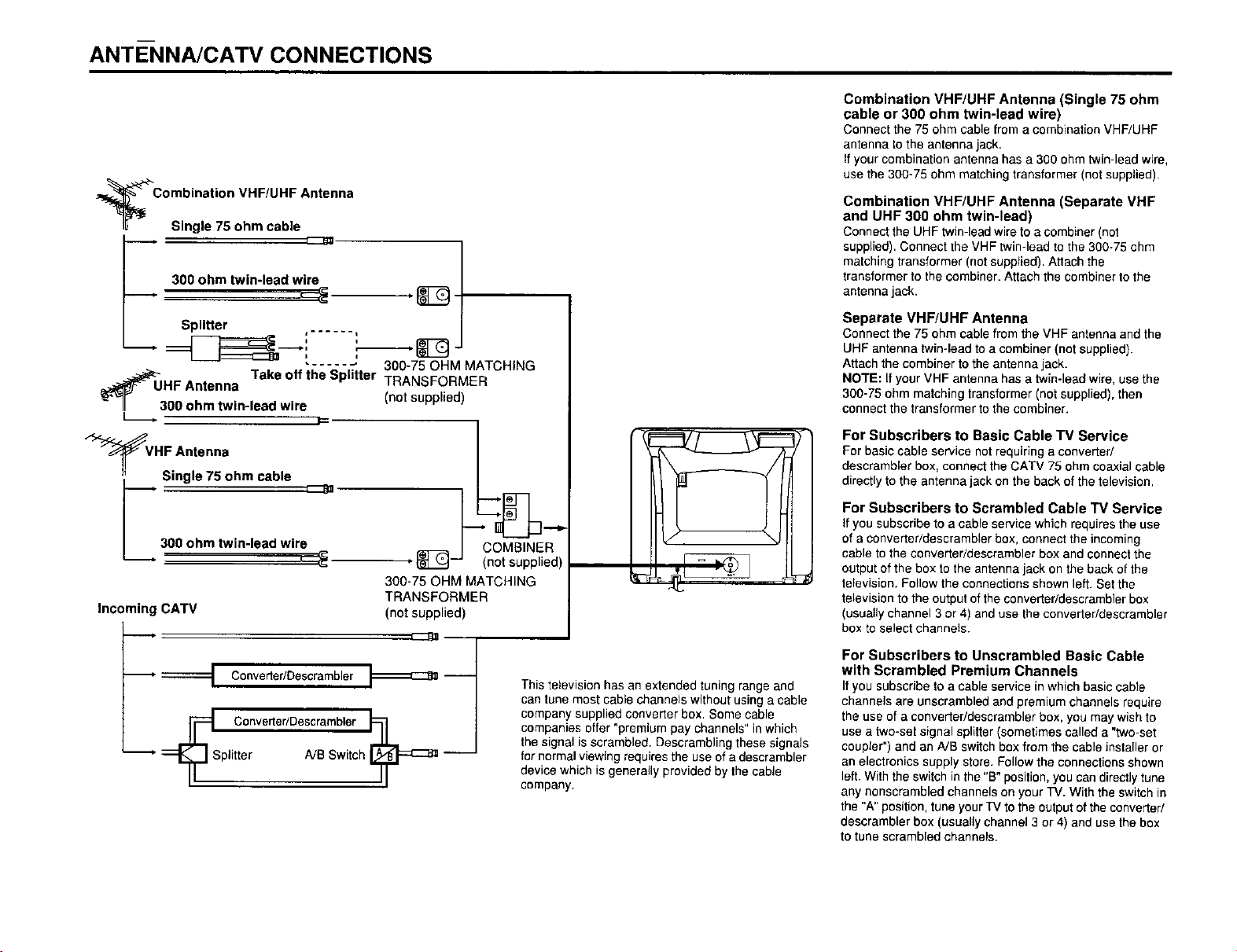
ANTE-NNA/CATV CONNECTIONS
_C ° si_i_:: i:: ::F/:a_ _ Antenna
300 ohm twin-lead wile
Splitter ,- ..... I
__. J
....... 300-75 OHM MATCHING
_ UHF Antenna Take off the Splitter TRANSFORMER
_- (not supplied)
II 300 ohm twin-lead wire
_VHF Antenna
Single 75 ohm cable
300 ohm twin-lead wire
-_. ____
300-75 OHM MATCHING
Incoming CATV
TRANSFORMER
(not supplied)
COMBINER
(not supplied)
Combination VHF/UHF Antenna (Single 75 ohm
cable or 300 ohm twin-lead wire)
Connect the 75 ohm cable from a combination VHF/UHF
antenna to the antenna jack.
If your combination antenna has a 300 ohm twin-lead wire,
use the 300-75 ohm matching transformer (not supplied).
Combination VHF/UHF Antenna (Separate VHF
and UHF 300 ohm twin-lead)
Connect the UHF twin-lead wire to a combiner (not
supplied). Connect the VHF twin-lead to the 300-75 ohm
matching transformer (not supplied). Attach the
transformer to the combiner. Attach the combiner to the
antenna jack.
Separate VHF/UHF Antenna
Connect the 75 ohm cable from the VHF antenna and the
UHF antenna twin-lead to a combiner (not supplied).
Attach the combiner to the antenna jack.
NOTE: If your VHF antenna has a twin-lead wire, use the
300-75 ohm matching transformer (not supplied), then
connect the transformer to the combiner.
For Subscribers to Basic Cable TV Service
For basic cable service not requiring a converter/
descrambler box, connect the CATV 75 ohm coaxial cable
directly to the antenna jack on the back of the television.
For Subscribers to Scrambled Cable TV Service
If you subscribe to a cable service which requires the use
of a converter/descrambler box, connect the incoming
cable to the converter/descrambler box and connect the
output of the box to the antenna jack on the back of the
television. Follow the connections shown left. Set the
television to the output of the converter/descrambler box
(usually channel 3 or 4) and use the converter/descrambler
box to select channels.
ConverteriDescrambler
p._ Converter/Descrambler
"--" _ Splitter A/B Switch _ --
This television has an extended tuning range and
can tune most cable channels without using a cable
company supplied converter box. Some cable
companies offer "premium pay channels" in which
the signal is scrambled. Descrambling these signals
for normal viewing requires the use of a descrambler
device which is generally provided by the cable
company.
For Subscribers to Unscrambled Basic Cable
with Scrambled Premium Channels
Ityou subscribe to a cable service in which basic cable
channels are unscrambled and premium channels require
the use of a converter/descrambler box, you may wish to
use a two-set signal splitter (sometimes called a "two-set
coupler") and an A/B switch box from the cable installer or
an electronics supply store. Follow the connections shown
left. With the switch in the "B" position, you can directly tune
any nonscrambled channels on your TV. With the switch in
the "A" position, tune your TV to the output of the converted
descrambler box (usually channel 3 or 4) and use the box
to tune scrambled channels.
Page 3

TO MEMORIZE CHANNELS
This TV is equipped with a channel memory feature which allows channels to skip up or down to the
next channel set into memo_% skipping over unwanted channels.
Before selecting channels, they must be programmed into the TV's memory, in addition to normal
VHF and UHF channels, this TV can receive up to 113 Cable TV channels. TO use this TV with an
antenna, set the TV!CATV menu option to the TV setting. When shipped from the factory, this menu
option is in the CATV setting,
TV!CATV SELECTION
Press the MENU button,
Press the SET + or- button until the indicator next to "CH SETUP"
begins to flash, then press the ENTER button.
I b_NGUtL_
I CHIPSET
-- OH SEI'Jp
Press the SET + or- button until the indicator next to "TV/CATV"
begins to flash.
Press the ENTER button to select the TV or CATV mode. The arrow
indicatesthe selected mode.
I ALTO}OH t,_N0rT_
Press the MENU button twice to return to normal TV viewing.
The chart below is typical ofmany cable system channel allocations,
CATV CHART
Number or this TV
Co_lespondia# CATV channel
23 24 25 _'_ 27 28 29 30 31
J K L M N O P Q R
41 42 -¢3 44 45 46 47 48 49
EE FF GG HH II J,_ KK LL MM
59 60 61 82 63 64 85 66 67
WW AAA BBB CCC DDD EEE FFF GGG NHH
77 78 79 80 81 82 83 84 85
_RR SSS TTT UUU WVW_#,_X×× YYY ZZZ
95 96 97 98 99 100 101 102 103
A-5 A-4 A-3 A-2 A-I 100 101 102 103
113 114 115 116 117 118 119 120 121
113 114 115 116 117 118 119 120 121
NOTE:
Contact your cable company to determine the type of cable system used in your are&
Press the SET - button until the indicator next to "CH SETUP" , c_,r_u_
AUTOMATIC CHANNEL+or MEMORY f"_'_'_ 1
_ Press the MENU button. -[_! c_SEtuP
begins to flash, then press the ENTER button. , vc..Psa
Press the SET + or- button until the indicator next to "AUTO CH
MEMORY" begins to flash, then press the ENTER button. The TV will ,I,'7" • c_,_
numbers will remain red until auto memorizing is complete. , _O,SE_T_
begin memorizing all the channels available in your area. Channel k-i!-,_,o _ M_r._
Press the MENU button twice to return to normal TV viewing.
14 15 1_ 17 18 19 20 21 22
A _ C D E F G H
32 33 34 35 36 37 38 39 40
S T U V W AA BB CC DD
50 51 52 53 54 55 56 57 58
NN OO PP QQ RR SS TT UU W
68 69 70 71 72 73 74 75 76
I1_ JJJ KKK LLL MMMNNN OOO PPP QOQ
86 87 88 89 90 91 92 93 94
86 87 88 89 90 91 92 93 94
104 10S 106 107 108 109 110 111 112
104 10S 106 107 108 109 110 111 112
122 123 124 125 01
122 123 124 125 5A
11_ F/0_J_E
/ENIER _M_NL0
TO ADD/DELETE CHANNELS
Press the MENU button.
Press the SET + or - button until the indicator next to "CH SETUP"
begins to flash, then press the ENTER button.
Press the SET + or- button until the indicator next to "ADD/
DELETE" begins to flash, then press the ENTER button.
_ Select the desired channels to be added or deleted using the Direct
Channel Selection buttons (10 keys. 0-g), the CN _ or v button
or the SET + or - button.
Press the ENTER button to select ADD or DELETE.
if an unmemohzod channel was selected (step 4), the channel
indicator will be red. Press the ENTER button if you wish to ADD the
unmemorized channel. The channel indicator will change from red to
green when a channel is added and the channel will be mernodzed.
ff a memorized channel was selected (step 4). the channel indicator
will be green.
Press the ENTER button if you wish to DELETE the channel from
memory. The channel indicator will change from green to red when a
channel is deleted.
Repeat steps 4 and 5 for each channel to be added or deleted.
Press the MENU button three times after adding or deleting all of the
desired channels, to return to normal TV viewing.
-- I _H _ET_Jp
/I_p_CTJ_E
I V_lP _ET
ADJUSTING PICTURE
You can adjust he se tings for Color, sharpness, centrast, bhghmess and tint.
Press the MENU button.
Press the SET + or - button until the indicator next to "PICTURE" pegins to
flash, then press the ENTER button.
Press the ENTER button repeatedly to select the item you want to adjust.
BRIGHTNESS -_> CONTRAST-_> COLOR-_> TtNT -_> SHARPNESS
t
Press the SET + or - button to odium the setting.
+
BRIGHTNESS increase brightness decrease brightness
CONTRAST increase contrast decrease contrast
COLOR be brilliant color be pale color
TINT be greenish color be reddish color
SHARPNESS clearer makes picture softer
TO RETURN TO INITIAL SETTING
Press the RESET button while the picture adjusting iTIode appears on-screen.
CONNECTION TO OTHER EQUIPMENT
The exact arrangement you use to intercennect various video and audio components to the TV is
dependent on the model and features of each cornpenent. Check the Owner's Manual provided with
each component for the location of video and audio inputs and outputs.
The connection diagrams below are offered as suggestions. You may need to modify them to
accommodate your particular assortment of components. The diagrams are intended to show
compenent video and audio interconnections only.
TV!AV SELECTION
If you connect the TV to a VCR, camcorder or TV
ame, through the audio/video in jacks_ use the TV/
_V button Io make your selection.
Press the TV/AV buito_ repeatedly Io select the
desired mode
"AUX" will display o_ the screen for 4 seconds.
1. TO connect the TV to a VCR
VCR Front ol TV
t t ToAudio! WD_O VAUDIo
Video OUT
{not supplied)
/
2. TO connect the TV to a TV Game
The TV can also be used as a display device for
many video g_ames However. due to the wide
variely of different types of signal generalod by
these devices a_d subse_quenl hook-up variations
required. Ihey have not all bees i_cludod in Ihe
suggested connection diagra_s You'll _eed to
co_sult each componem's Owner's Manual lot
additional inlormaito_.
To Audio/Video OUT From of TV
ff
(not supplied)
3. To connect the TV to a camcorder
TO playback Irom the camcorder, connect the
camcorder to the TV as shown.
TO AV OUT
Fronl of TV
TROUBLESHOOTING GUIDE <notsup ,o
Before requesit_g service, please refer to the following chart for the symptom and possible solution
SYMPTOMS POSSIBLE SOLUTIONS
• Make sure lhe power cord is plugged in.
TV does not operate. * Power is off, check fuse or circuit breaker.
Poor sound or NO sound. * Check SOLIndadjustments _UME and MUTE).
Poor picture or NO picture. * Check aalenna or CATV connections, odjusl antenna
Poor receplion on some * Make sure channels are set into memory.
channels. * Stalio_ is weak. od ust antenna to receive desired statio_
Poor color or no color. * Check picture control ad'ustments.aj
Picture wobbles or drifts.. CATV corr_pany is scrambling signal.
NO CATV reception. * Set TViCATV menu option to the CATV mode.
Horizontal or diagonal bars * Check a_ten_a connections odjusl or re-direct antenna
on screen * Check for sources of possibJe intedere_ce.
NO reception above * Make sure TV/CATV menu option is in the appropriate mode.
channel 13. • If using antenna, check UHF anlenna connections.
NO Remote operatio_ * Make sure Remote is aimed at sensor
TV shLIIS off. * Sleep Timer is set.
Closed - Caption is not Try anolher channel _ ,
activated. * CI-eck CATV connection or VHF, UHF antenna, re._gosJtol or rolate antel_na
• Try.another AC OLrdeL
• Unpk_g Lmit for an hour. then pk_git back in.
• Stalio_ or CATV experiencin roblems, tune to another slation
• Check for SOL_rceso puss b e i_tedere_ce.
• Station or CATV experiencing problems, tune to another slation
• Make sure channels are set into memory
• Check for sources of possible intedere_ce.
• Check picture control adjL_stments.
• Station or CATV experiencing problems, tune to another elation
• Check for SOLFCeSof possible ntederence.
• Station or CATV experiencing problems, tune to another slation
• Make sure channels are set into memory
• Check a_ten_a or CATVconnections odjusl antenna
• Check for SOL_rceso puss b e i_tedere_ce.
• Station or CATV experiencing problems, tune to another station.
• Make sure channels are set into memory.
• AdjL_st antenna.
• Check all CATV co_neclions.
• Station or CATV system problems, try another station.
• Batleries are weak. dead or inserlod incorredl)l.
• Rerr_ote is out of range, move closer to TV (will, in t 5 feet).
• CoMirm there are no obstructions between the Remote and the TV.
• Make sure Ihe power cord is plugged in.
NO broadcast on station tLmod
• Power interrupted
• TV station ex.pedencin_ p_ob eros of p{o_ram tu_ed is not cosed capl cued.
• Pre_s_TV/CAP, TEXT' button to turn on the clo_edcaption_ decoder.
SPECIFICATIONS
. Model MT1134 MT1194
AC Power InpLrc 12OV. 60Hz
AC Power Consumption: 54 Watls 73 Watts
Chassis ConstrL_ction: IC Solid state
Picture TL_be: 13" measured diagonally) lg" (measured d agona y
Horizontal resolution: 260 lines
AL_dio Power Output Rating: 1.0 Waits 1.5 Watts
Speaker: 3" Full Raage, 8 ohm
Tuner Type: 18t Channel Quartz PLL Frequency Synlhesized
Remote Conlrok + h_frared. Direct Access. 2 x AAA batleries (nol supplied)
Receiving Channels: 98-99 (A-2)-(A-t)
A_tenna Inpul Impedance: 75 Ohm (VHF/UHF!CATV) Coaxial Input
Input: Video: 1O Vp-p 75 ohm
Dimeasions: 14"1,4" (W) x 14-3/16" (D) x 19-3/I 6" (W) x 18-5/I 6" (D) x
ACCESSORIES
Retools Control
Tele_copic A_te_na (MTt 134 only)
+
VHF 2-13
UHF 14"69
CATV 0t*97{5A)-(A-3)
14"22 (A).(I)
23-36 {J)-(W)
37_65 {AA).(PPF)
L_-125 (GGG)-(125)
Audio: 300 mV, 47k ohm
12_518" (H) t 6-3,8 H
Page 4

90 Day Full Warranty
tf this (product) experiences any failure due to a defect in material or workmanship within 90 days from the date
of purchase, return it to your nearest Sears store, and it will be replaced free of charge.
This warranty applies only if this (product) is used for private household purposes.
This warranty gives you specific legal rights, and you may also have other rights which vary from state to state.
Sears, Roebuck and Co., Dept. 817WA, Hoffman Estates, IL 60179
Please keep all packaging material for at least 90 days in case you need to return this product.
For parts, accessories, and service information, see the back cover.
Printed in Thailand
Page 5

Get it fixed, at your home or ours!
Your Home
For repa=r - in your home - of all major brand apphances,
lawn and garden equipment, or heating and cooling systems.
no matter who made it, no matter who sold It!
For the replacement parts, accessories and
owner s manuals that you need to do-it-yourself.
For Sears profess=onal installat=onof home apphances
and =terns like garage door openers and water heaters.
1-800-4-MY-HOME ® (1-800-469-4663)
Call anytime, day or n=ght(U S A and Canada)
WWW.Sears.com www.sears.ca
Our Home
For repair of carry-In items like vacuums, lawn equipment,
and electronics, call or go on-line for the location of your nearest
Sears Parts & Repair Center.
1-800-488-1222
Call anytime, day or night (U S A only)
www sears com
To purchase a protection agreement (U S.A)
or maintenance agreement (Canada) on a product serviced by Sears
1-800-827-6655 (U S A ) 1-800-361-6665 (Canada)
Para ped=rserviciode reparac=on
a dOmlCl]lO, y para ordenarplezas
1-888-SU-HOGAR _
(1-888-784-6427)
® RagB_amd Tr;u_mark / v_ TradenmdL t _ Se_/=ceMarl(of Seam Roel_ck ar.d Co
® Mama Reglstrada I _ _ de F6brlca I m Mama de Se_'icio [_ Sears Roebuck snd CO
M_rque de commence/ '_ Mar o_e d_<Jsee de Sea_ R_abuck and Co
Au Canada pour serwce en fran(_a=s
1-800-LE-FOYER "c
(1"800-533-6937)
WWW sears
JIIIIIIIIIIl{lllllllllllllllllllllllllllllillIIIlUJ
04/04 [] *I3R0060IA*
O Seats, RoJ_au¢_ _ CO
 Loading...