

Page 1
Introduction
E20, a pair of truly wireless smart earphones. Its
innovative lightweight design and best in class
technology gives you freedom and comfort to listen to
your tracks for hours. Communicate or listen to music up
to 2.5 hours with the built-in wireless Bluetooth
microphone. With capacity 420mAh battery of portable
charging case, fully charged for 1 hours. Earphones can
be charged five times for use a full day.
Packaging Contents
EarBuds
Charging Case
User Guide
2Pcs Small Eartips
2Pcs Large Eartips
Specifications
Model Name: E20 Bluetooth Version:5.0
Charging Case Input: 5V 500mA
Charging Case Output: 5V 40mA*2
Earphones Charging Time: *1 hours
Playing Time: *2.5 hours
Battery Capacity: Earbud 40mAh/pcs, Charging case
420mAh
Weight: Earbud *4.5g/pcs, Charging case *63g
*The actual data will be different from the product or
other factors.
Features
True Wireless: Earphones without any cable hanging
on your neck. It's the most technically advanced
earphones with superior sound.
Ergonomic Design: For secure and comfort wear, the
shape of the earbuds is carefully designed according to
ear geometry.
Safety Design: You can listen to the sound of the
surrounding environment while crossing the street by
triple-click left or right function key.
With 420mAh Battery Capacity: The E20 portable
charging case equipped with 420mAh battery capacity
which can charge the earbud.
Audio Evolved: Experience acoustic bliss with
wirelessly streamed audio that lets you feel every note of
your music when you hear it.
Long Battery Life: Built-in rechargeable lithium
polymer battery, it supports up to 2.5 hours playing/ talk
time.
Compatibility: The E20 is compatible with Android,
iOS and other Bluetooth-enabled devices.
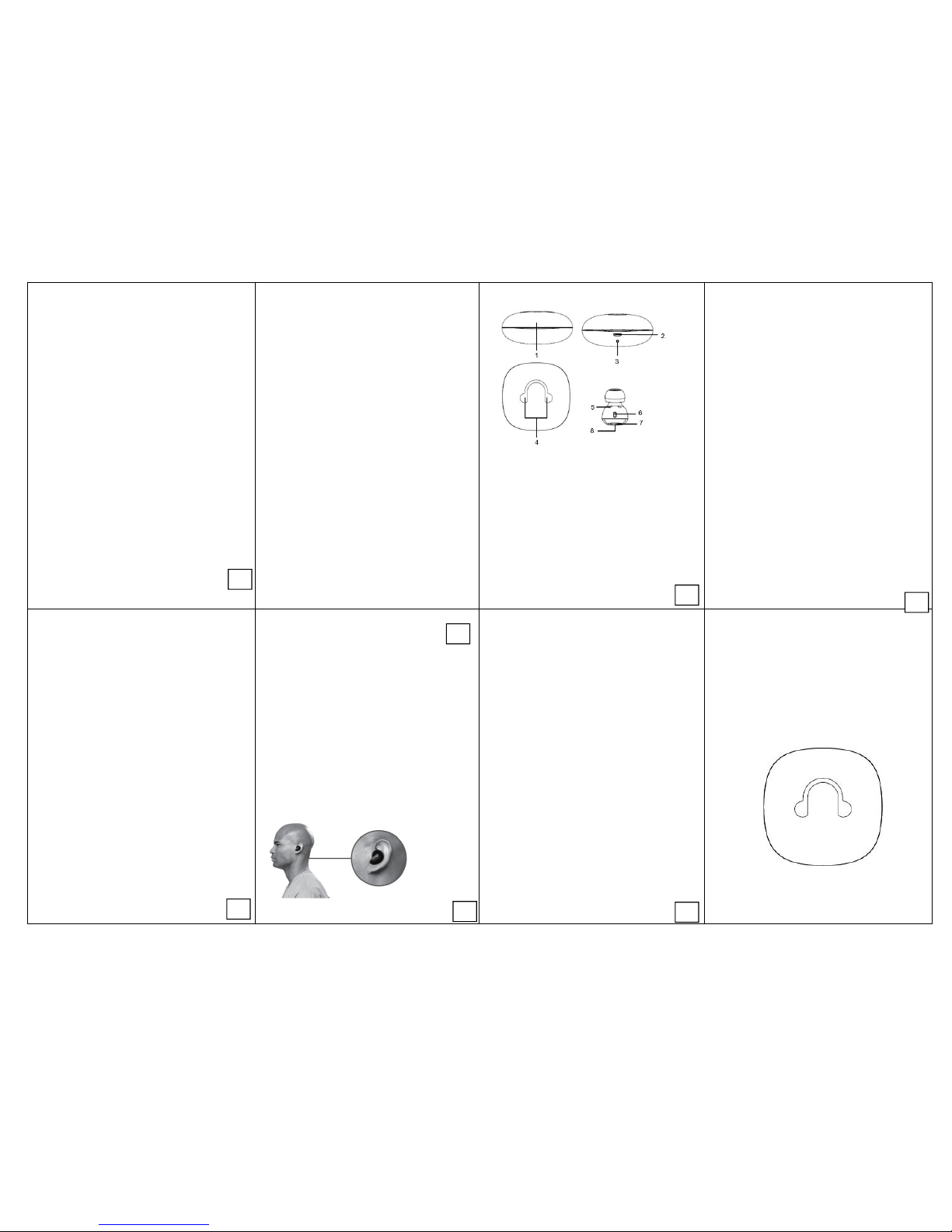
Appearance & Interface Description
1. Press type switch
2. USB Charging Port
3. Charging Case LED Indicator
4. Ear Bud Charging State Viewport
5. Charging Connector
6. Mic
7. Ear Bud LED Indicator
8. Multi-function Button
Operation Instructions
1. Switching E20 On/Off
To turn on E20, press and hold the Multi-function Button
on both earpieces for about 3 seconds until the Blue LED
starts flashing.
To turn off E20 manually, press and hold the Multifunction Button for about 4 seconds.
The earpieces turn off automatically when placed in the
charging box.
The earpieces turn off automatically unconnected
devices beyond 5mins.
2. Pairing E20
Before connecting E20 to your device, make sure that
E20 is in pairing mode.
When using the E20 for the first time, the left and right
earphones have been paired successfully by factory
default.
Open the lid, take earpieces out of charging case.
(1) Press and hold on the LEFT earphone for 3 seconds
until the LED light on.
(2) Press and hold on the RIGHT earphone for 3 seconds
until the LED light on.
(3) Wait about 8 seconds until the LEFT earphone LED
flashes Red and Blue, and the RIGHT earphone LED
flashes Blue to indicate that the earpieces have entered
paring mode.
(4) Activate Bluetooth on your phone, search & select
E20 pairing.Both earpieces LED flashes Blue when
connecting successful.
*Note:
*Only one E20 displays in your mobile Bluetooth device
list when the earphones in pairing mode.
*There will be two E20 displayed in your mobile Bluetooth
if the pairing is unsuccessful, please restore to factory
settings.
3. Call Function
Answering a Call: Press the Multi-function Button on the
left earpiece once to answer an incoming call.
Ending a Call: Press the Multi-function Button on the left
earpiece once to end an ongoing call.
4. Charging Earphones & Charging Case
To charge the charging case
(1) Plug one end of the charging cable into charging case
charging input and the other end into a USB Power
Adapter.
(2) The blue LED turns on and start flashing to indicate
that the charging case is charging. Once completely
charged all of the bule LED would turn on.
To charge the earphones
(1) Place the earpieces into the charging case to charge
the earpieces.
(2) The earphones LED flashed red to indicate that the
earphones is charging normally and will turn off once fully
charged.
5. Music Function:
Pause / Play: When playing music, simply press the left
or right function key once.
Next Song: When playing music, press left or right
function key twice.
6. Environmental S ound Function:
Turn On/Off : Triple-click the left or right function key to
turn on/off after your earbuds well connected with the
devices.
7. Restore Factory Settings
(1) Place the LEFT and RIGHT earphones back into the
charging case to make sure that earphoes was turn off.
(2) Delete all “E20” paired from your moblie Bluetooth
device list and turn off the Bluetoot h function.
(3) Take the LEFT earphone from charging case, press
and hold on the earphone for 8 seconds until the LED
flashes Red and Blue;
(4) Take the RIGHT earphone from Charging case,
press and hold on the earphone for 8 seconds until the
LED flashes Red and Blue.
(5) Let the LEFT and RIGHT earphone close(less than
5cm) about 30 seconds later, the LEFT earphone LED
flashes Red and Blue, and the RIGHT earphone LED
flashes Blue, the earphones enter paring mode.
(6) Re-activate Bluetooth on your phone, search & select
E20 pairing.Both earpieces LED flashes Blue when
connecting successful.
8. How to wear your Earphones
Precautions
Please read all safety instructions and warnings
thoroughly before using this product. Improper use of
this product may result in damage to this or attached
products.
1. Do not disassemble the product or attempt to fix it.
2. Do not attempt to replace any part of this product or
battery inside.
3. Do not crush, puncture, dispose of in fire, short the
contacts or expose the product to water or other liquids.
4. Do not store or use the product in a high-temperature
environment, including intense sunlight or heat.
5. Avoid drops, bumps, abrasions and impacts.
6. If there is any reason to believe that there is damage
to the product, discontinue use immediately.
7. If you find that the product is too hot, is emitting an
odour, or is deformed, punctured or exhibits any
suspicious or abnormal behaviour, discontinue use
immediately and contact our customer service.
8. Always charge this product before extended storage.
MELODY E20
USER MANUAL
7
6
1
2
4
3
5
FCC ID: 2AP6O-NOMAD
Page 2

FCC STATEMENT :
This device complies with Part 15 of the FCC Rules. Operation is subject
to the following two conditions:
(1) This device may not cause harmful interference, and
(2) This device must accept any interference received, including
interference that may cause undesired operation.
Warning: Changes or modifications not expressly approved by the party
responsible for compliance could void the user's authority to operate the
equipment.
NOTE: This equipment has been tested and found to comply with the
limits for a Class B digital device, pursuant to Part 15 of the FCC Rules.
These limits are designed to provide reasonable protection against
harmful interference in a residential installation. This equipment
generates uses and can radiate radio frequency energy and, if not
installed and used in accordance with the instructions, may cause harmful
interference to radio communications. However, there is no guarantee
that interference will not occur in a particular installation. If this equipment
does cause harmful interference to radio or television reception, which
can be determined by turning the equipment off and on, the user is
encouraged to try to correct the interference by one or more of the
following measures:
Reorient or relocate the receiving antenna.
Increase the separation between the equipment and receiver.
Connect the equipment into an outlet on a circuit different from that to
which the receiver is connected.
Consult the dealer or an experienced radio/TV technician for help.
RF warning statement:
The device has been evaluated to meet general RF exposure
requirement. The device can be used in portable exposure condition
without restriction.
 Loading...