

Page 1
UP
3280
Four-zone Electronic Water Timer
User Instructions
Installing the Timer
Note: It is important to complete the installation in this exact order.
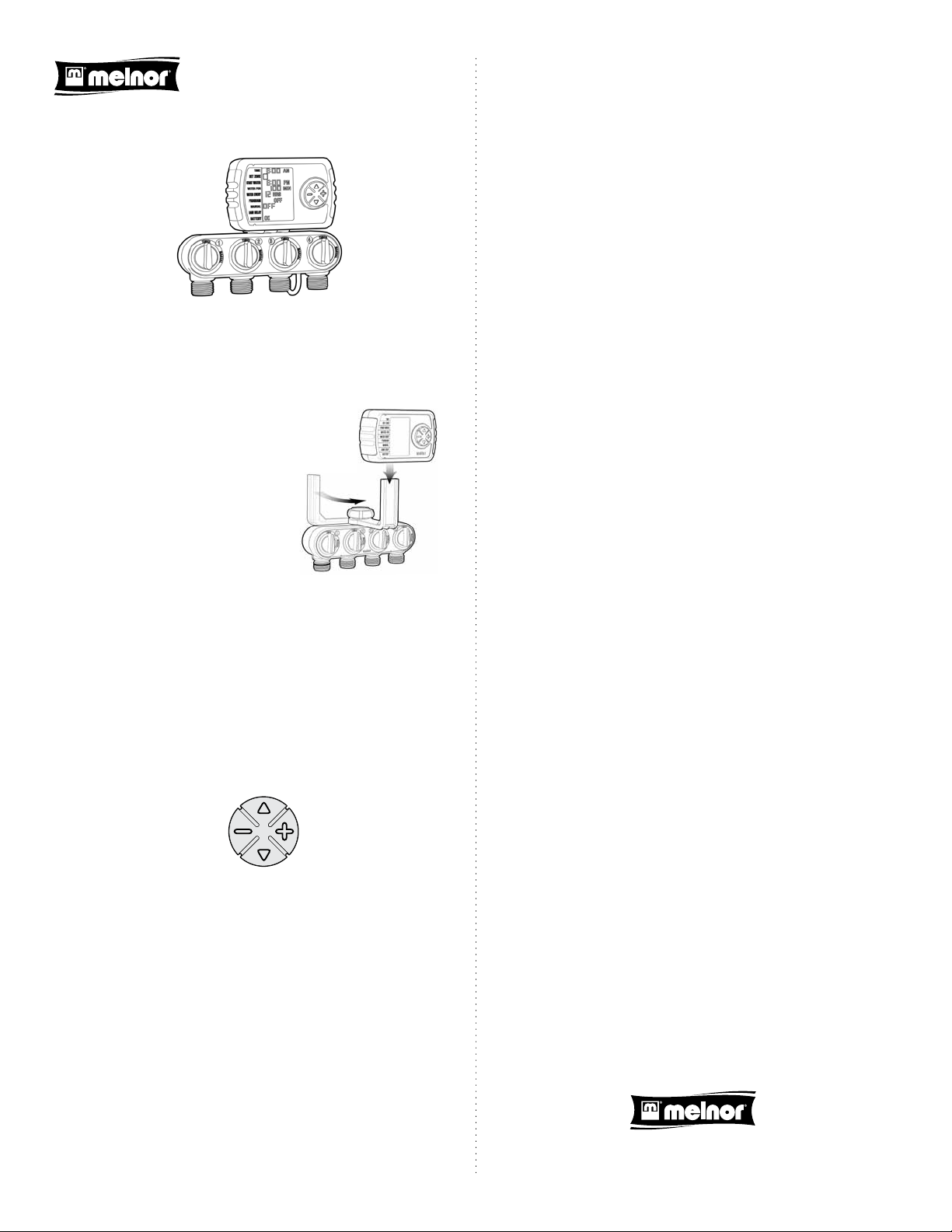
Plug the wire from the valve unit into the control unit.
Install 2 AA Alkaline batteries by
removing the battery holder from the
back of the timer and inserting the
batteries as indicated. Replace the
battery holder.
Once installed, the LCD screen will be
working with the letters “OFF” ashing
beside “MANUAL.”
Rotate the “L” shaped bracket to the
front of the unit.
Slide the control unit onto the bracket.
Attach the valve unit to an outside faucet.
Ensure the 4 valve knobs are set to “TIMER” and turn on the water
supply.
Attach a hose to any of the outlets and then to a sprinkler, soaker hose
or other watering tool. You can attach up to 4 hoses.
Activate the program by adjusting the “PROGRAM” section to ON.
Watering will begin at the “START WATER” time.
The timer is now programmed. “ON” will ash for 3 seconds and then
stop.
Move back to “ZONE” and select another unprogrammed zo ne. Re peat the
programming steps to set-up the remaining watering zones.
Once you have programmed all desired zones, the timer screen will go
blank after 5 minutes to conserve power. The time and program status,
“ON” or “OFF,” will remain visible. Pressing any button will “wake” the
timer.
Changing the Program
To make a change to the program, simply wake the timer by pressing any
button. Move to the sections you wish to change and adjust as needed.
Watering will resume at the “START WATER” time.
Manual Watering
There are 2 ways to water manually with this water timer.
The rst and easiest way is to simply turn the yellow knob above any of
the 4 outlets. This will start the water ow immediately and it will remain
on until you manually close the valve.
The second way is to open the valve with the electronic control unit. This
has the advantage of automatically closing the valve.
Using the UP and DOWN arrows, move to “MANUAL.” Using the PLUS
button, adjust the time you wish to water. The timer will wait 5 seconds
and begin to water. Manual watering can be up to 240 minutes.
Rain Delay
In the event of predicted rainfall, you can temporarily suspend automatic
watering for up to 3 days. Simply move to “RAIN DELAY” and use the PLUS
button to select the desired delay. The delay is in eect for all zones. After
the delay period has passed the timer will return to the programmed
operation.
Automatic Rain Delay
This timer will work with AquaSentry, Melnor’s exclusive Automatic Rain
Delay. AquaSentry actually monitors the moisture in the soil and delays
watering if it is not needed. For more information, visit:
www.melnor.com/conservation/aqua-sentry.html.
Programming the Timer
Press the UP key until the numbers beside “TIME” are ashing.
UP
MINUS PLUS
DOWN
Set the current time using the PLUS and MINUS keys. By holding the key
down the time will change rapidly. A tap will cause a stepped change.
Once you have set the correct time, use the DOWN arrow key to move to
the next section.
Use the PLUS and MINUS keys to select the “ZONE” you want to
program. Each “ZONE” represents one of the outlets. Use the DOWN key
to move to the next section.
Select when you want to begin watering in the “START WATER” section.
Again adjust the time using the PLUS and MINUS keys. Move to the next
section.
Set how long you wish the water to run in the “WATER FOR” section.
This time can be adjusted up to 240 minutes. Move to the next section.
Select how often you would like to water in the “WATER EVERY”
section. This is set in hours or days. Move to the next section.
Disabling the Program
If you would like to suspend automatic watering for an extended period,
simply change the “PROGRAM” line to “OFF.” When you are ready to
resume watering, switch “PROGRAM” to “ON.” Watering will begin at the
“START WATER” time. Each “ZONE” is disabled or enabled independently.
Program Memory
This timer has memory. If the battery fails or is removed, even for
extended periods, the program will be retained. After installing a fresh
battery you simply need to set the “TIME.” The timer will retain the
existing program.
Melnor, Inc. • Winchester, Virginia 22603, USA
877-283-0697 • www.melnor.com
3280_INS_EN_WEB_00
 Loading...