

Page 1
GB
FACILE SMART
Thank you for choosing a MELICONI remote control.
The FACILE SMART replacement remote control was designed as a TV control. Thanks to its large
database and numerous functions it is ideal for replacing any lost, defective or broken remote control.
Its ergonomic form and casing in soft rubber make it easy to grip and protect it against falls and bumps.
The large keys are easy to see and to use.
Keep this booklet in case you ever need to consult us in the future.
For anyone with internet, via the website www.meliconi.com/guide,
it is even easier and quicker to programme the remote control
and discover all the potential of the FACILE SMART thanks to the on-line guide.
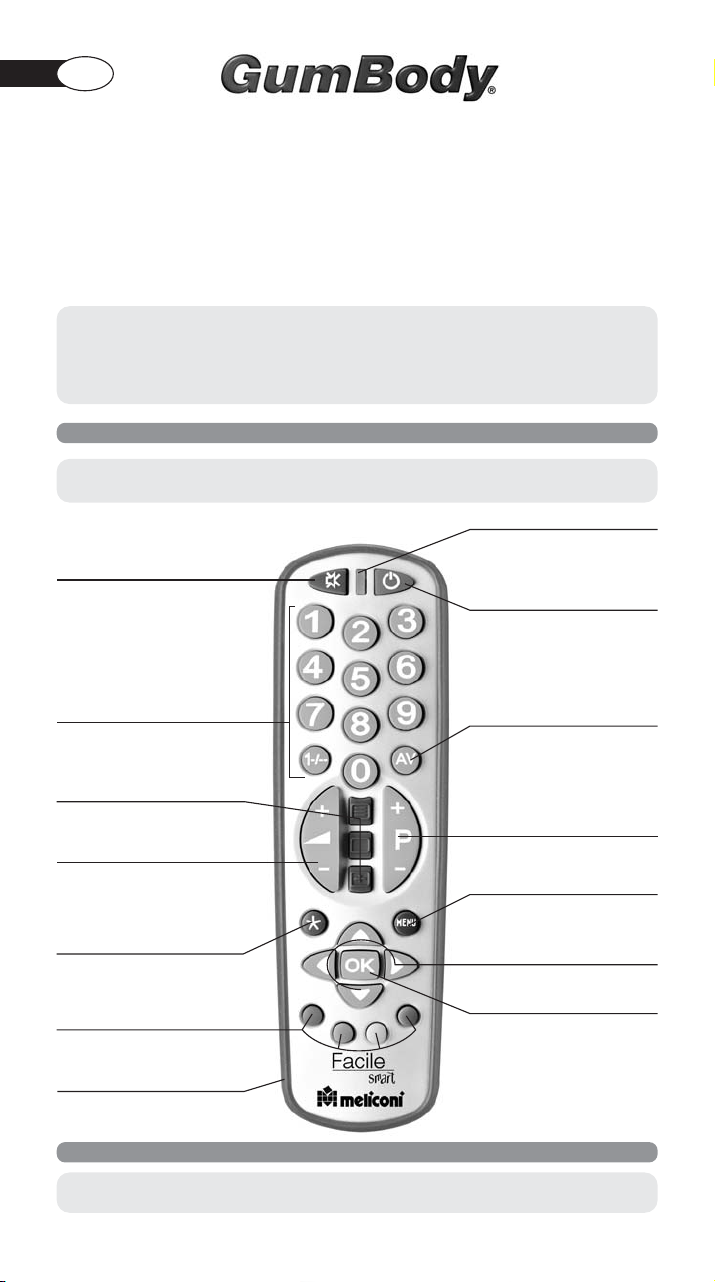
USING THE KEYS AND FUNCTIONS
The functions described below are only available
if they are already foreseen by your TV.
Light indicator
MUTE
turns the volume on and off
TV ON/OFF key
Number keys
Teletext keys
Control the volume using
Key with additional TV functions
Fastext functions or to select
submenus by means of the colours
Impact-proof rubber casing
+
–
/
To select an external input terminal
To select the next (P+) or
previous (P-) channel or programme
To access the MENU
To move around within
the MENU or to control
the BRIGHTNESS/COLOUR
Confirm key
PREPARE FOR USE
Read these instructions carefully
before programming your remote control!
1
Page 2
FITTING THE BATTERIES
Before programming and using the remote control,
fit the batteries.
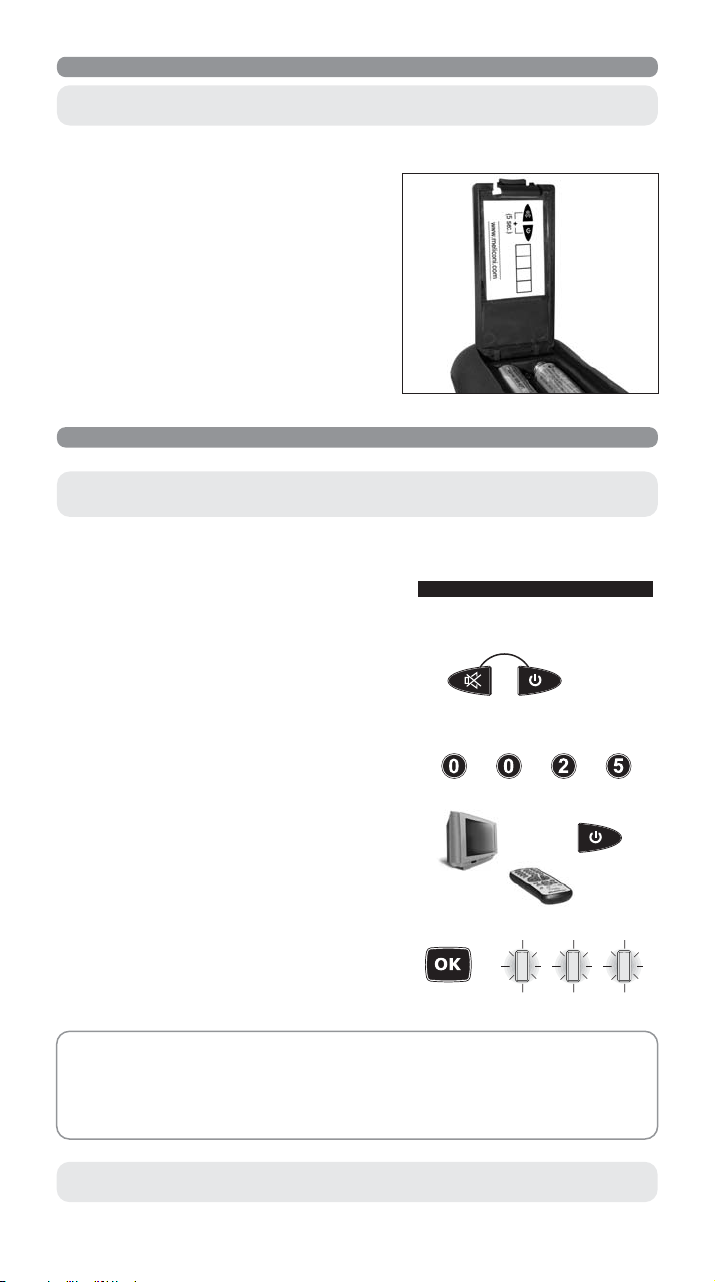
The remote control requires 2 new AAA/LR03 batteries. Insert the batteries as shown:
• Change the batteries if the light indicator starts to flash
during use. The batteries are low.
• When you remove the batteries, fit the new ones within
5 minutes or you may have to reprogramme your remote
control.
• Make a note of the code for your TV on the adhesive label
inside the battery cover in case you have to reprogramme
your remote control.
HOW TO PROGRAMME THE REMOTE CONTROL
The quickest and easiest way to programme the remote control is
by consulting the website www.meliconi.com/guide.
1. Switch on the TV.
2. Look for the brand of your TV in the Code Book and make
a note of the corresponding code indicated alongside (
Philips 0025
).
e.g.
PHILIPS 0025
3. Hold down the MUTE and ON/OFF keys together for 5
seconds until the light indicator starts to flash indicating
that the remote control is being programmed.
+
5 SEC.
4. Release the keys and within 12 seconds enter the make
e.g. 0025
code previously identified (
flashes more quickly to indicate that the remote control
). The light indicator
+++
is ready for the search.
5. Point the remote control at the TV. Press and slowly release
the ON/OFF key several times, stopping when the TV
goes off.
6.
When the TV goes off, press the OK key to confirm
.
Three flashes indicate that the operation has been
completed correctly.
ADDITIONAL CHECK
Check that some of the other functions used on your original remote control are working correctly. If the
commands function incorrectly or erratically, you have probably entered a code for a similar remote control
but not the right one. In this case, repeat the search procedure starting from point 3, entering the code
previously used (e.g. 0025).
To display and make a note of the code memorized by means of the search,
follow the instructions described in the paragraph CURRENT CODE DISPLAY.
2
Page 3
N.B. THE LIGHT INDICATOR STOPS FLASHING.
The remote control exits programming mode and the light indicator stops flashing:
• if no keys are pressed for 14 seconds
• if an invalid brand code is entered
• if the end of the code search list has been reached. In this case, consult our website www.meliconi.com/guide
GLOBAL SEARCH REMOTE CONTROL PROGRAMMING
This operation can take up to 20 minutes and should be carried out if you have not succeeded in programming
the remote control by means of the method described above.
The quickest and easiest way to programme the remote control is
by consulting the website www.meliconi.com/guide.
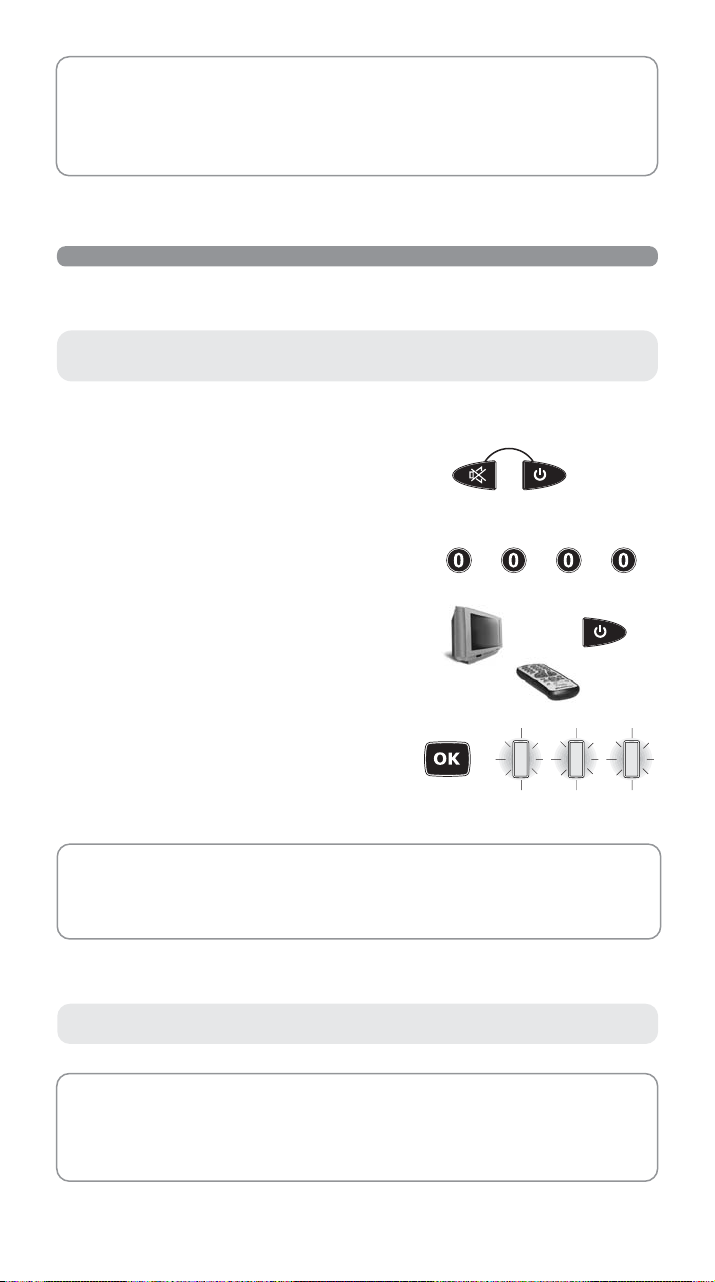
1. Switch on the TV.
2. Hold down the MUTE and ON/OFF keys together for 5
seconds until the light indicator starts to flash indicating
+
5 SEC.
that the remote control is being programmed.
3. Release the keys and enter the code 0000 within 12
seconds. The light indicator flashes more quickly to indicate
that the remote control is ready for the search.
+++
4. Point the remote control at the TV. Press and slowly release
the ON/OFF key several times, stopping when the TV
goes off.
When the TV goes off, press the OK key to confirm
5.
.
Three flashes indicate that the operation has been
completed correctly.
ADDITIONAL CHECK
Check that some of the other functions used on your original remote control are working correctly. If the
commands function incorrectly or erratically, you have probably entered a code for a similar remote control
but not the right one. In this case, repeat the search procedure starting from point 2.
To display and make a note of the code memorized by means of the search,
follow the instructions described in the paragraph CURRENT CODE DISPLAY.
N.B. THE LIGHT INDICATOR STOPS FLASHING.
The remote control exits programming mode and the light indicator stops flashing:
• if no keys are pressed for 14 seconds
• if the end of the code search list has been reached. In this case, consult our website www.meliconi.com/guide
3
Page 4
CURRENT CODE DISPLAY
To find out the code of your remote control, follow this procedure:
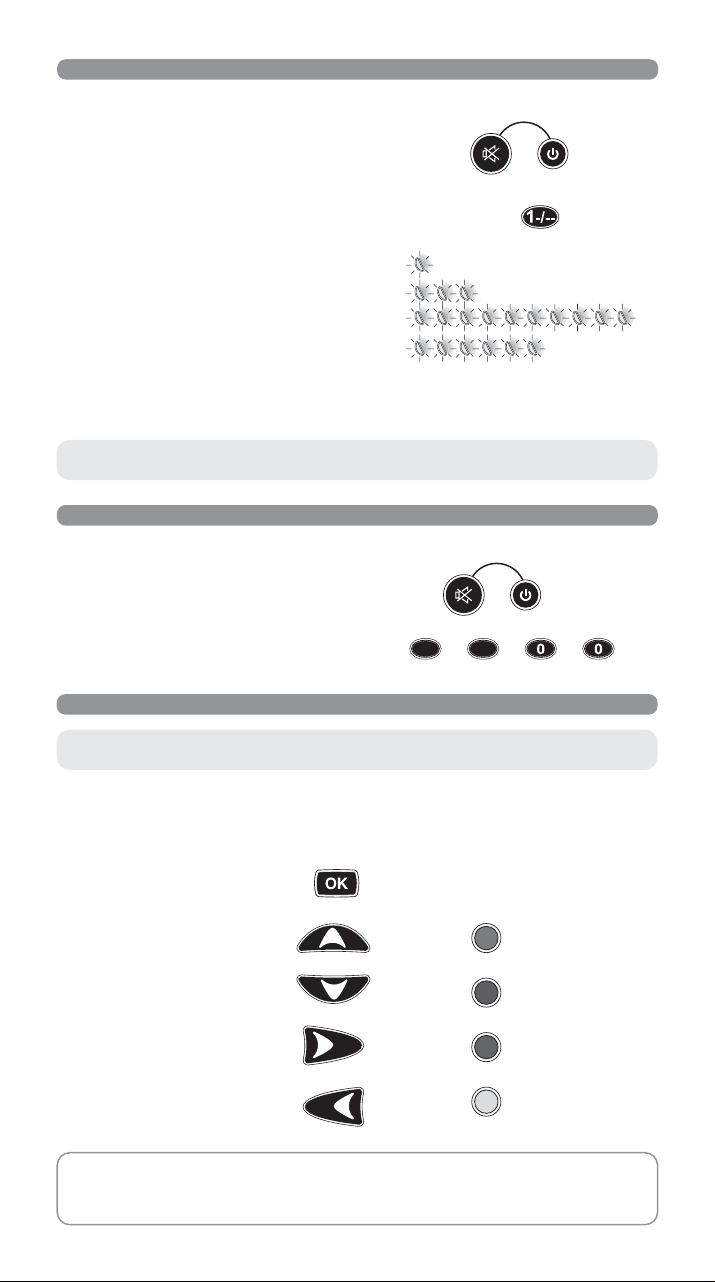
1. Hold down the MUTE and ON/OFF keys together for 5
seconds until the light indicator starts to flash.
+
2. Release the MUTE and ON/OFF keys and press and
release the 1-/-- key within 8 seconds.
3. After a few seconds, the light indicator communicates
the code you are looking for by flashing the four numbers
separately. Count the number of flashes; each series of
flashes corresponds to one figure in the code. 10 flashes
correspond to 0.
........................................................ = 1
............................................ = 3
= 0
.......................... = 6
4. Make a note of the code on the adhesive label inside the
battery cover for quick and easy future reprogramming.
Code obtained = 1306
.
N.B. this operation cannot be interrupted and the remote control
cannot therefore be used until the end of the 4 series of flashes.
ENTERING THE CODE
If you know the exact code with which to programme the remote control, enter it as follows:
1. Hold down the MUTE and ON/OFF keys together for 5
seconds until the light indicator starts to flash.
1. Release the keys and enter the code (
flashes indicate that the operation has been completed
correctly.
HOW TO USE THE ADDITIONAL COMMANDS WHICH DO NOT APPEAR ON THE KEYPAD
e.g: TV 1100
). Three
11
+
+++
5 SEC.
5 SEC.
Although not indicated on the keypad,
some keys can be used for additional commands.
Find them on your
FACILE SMART
remote control by pressing the keys one by one and discovering the
commands that interest you..
In particular, the additional functions most frequently used, such as NORMALIZATION, COLOUR and BRIGHTNESS,
can be found on the following keys:
Normalization:
Brightness (+): or green
Brightness (-): or red
Colour (+): or blue
Colour (-): or yellow
For the functions used less frequently, look for the additional commands on the site
www.meliconi.com/guide. As well as easily finding the code to programme your remote control,
consult the on-line guide to help you to find which keys on the
correspond to the additional commands.
4
4
FACILE SMART
remote control
Page 5

PROBLEM SOLVING
PROBLEM
The TV does not respond and the light indicator
does not light up when a key is pressed.
SOLUTION
Try some of the other frequently-used keys. If the
problem persists, check that the batteries are fitted
correctly. If necessary, replace them with 2 new 1.5
V AAA/LR03 batteries.
The TV does not respond but the light indicator
does light up.
Check that the batteries are new and that the remote
control is pointing at the TV without any obstacles
in the way. If required, reset the remote control
code, following the programming procedure.
The light indicator flashes when a key is held
down but the TV does not respond
.
The remote control commands are not all
working correcting.
The batteries are low. Change them.
You may have used the wrong code. Reset the
remote control code, following the programming
procedure.
The code for your appliance make is not in
the Code Book.
To find the code with which to programme your
remote control consult the on-line guide at
www.meliconi.com/guide
INFO-LINE
If you have any queries about your FACILE SMART remote control:
• read this Instruction Booklet carefully - you will find an answer to most of your questions
• consult the website www.meliconi.com/guide where you will find the answers you need easily and
quickly.
WARRANTY: 2 years
Dealer’s stamp
The warranty ceases to be valid if the product
is tampered with or used incorrectly.
Remote control type GumBody
Model FACILE SMART
Purchase date / /
The symbol of the crossed trash can shown on the remote control indicates that once the product has reached the end of its working life it
should be disposed of separately from other waste. The user should, therefore, take the remote control to a specialised collection centre
for electronic and electrical waste, or hand it over to the dealer when purchasing a new similar remote control, on a one to one basis. Correct
separated collection for subsequent recycling, processing and environmentally compatible disposal contributes in preventing possible
negative effects on the environment and on health and favours the recycling of the materials used in producing the remote control. Improper
disposal of the product by the user leads to application of the penalties as per legislative decree no. 22/1997 (article 50 and following of
decree no. 22/1997).
5
 Loading...