

Page 1
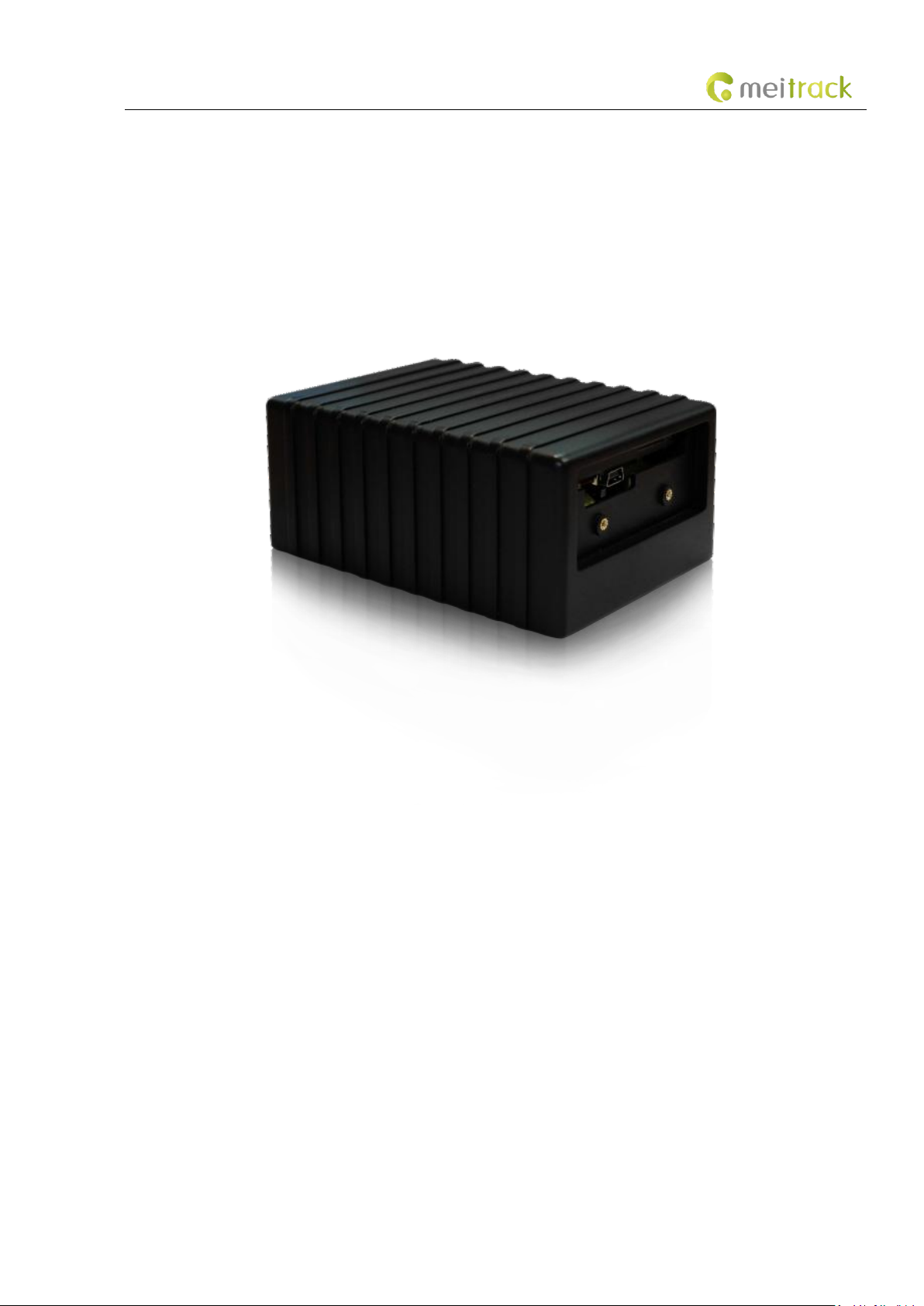
MEITRACK T355 User Guide
MEITRACK T355 User Guide
Page 2

MEITRACK T355 User Guide
File Name
MEITRACK T355 User Guide
Created By
Kyle Lv
Project
T355
Creation Date
Update Date
2011-05-16
2015-08-24
Subproject
User Guide
Total Pages
12
Version
V1.2
Confidential
External Documentation
Change History
Copyright © 2015 Meitrack Group All rights reserved. - 2 -
Page 3

MEITRACK T355 User Guide
Contents
1 Copyright and Disclaimer ...............................................................................................................................................................- 4 -
2 Product Overview ..........................................................................................................................................................................- 4 -
3 Product Function and Specifications .............................................................................................................................................- 4 -
3.1 Product Function ................................................................................................................................................................- 4 -
3.2 Specifications ......................................................................................................................................................................- 4 -
4 T355 and Accessories ....................................................................................................................................................................- 5 -
5 Panel ..............................................................................................................................................................................................- 6 -
5.1 Appearance .........................................................................................................................................................................- 6 -
5.2 LED Indicator .......................................................................................................................................................................- 7 -
6 First Use .........................................................................................................................................................................................- 7 -
7 Configured by Computer ...............................................................................................................................................................- 8 -
8 Quick Start Command ....................................................................................................................................................................- 9 -
8.1 Real-Time Tracking ..............................................................................................................................................................- 9 -
8.2 Smart Sleep – A73 .............................................................................................................................................................- 10 -
9 MS03 Tracking System .................................................................................................................................................................- 11 -
10 Installing the T355 .....................................................................................................................................................................- 11 -
11 Safety and Usage Instructions ...................................................................................................................................................- 12 -
Copyright © 2015 Meitrack Group All rights reserved. - 3 -
Page 4

MEITRACK T355 User Guide
Item
Parameter
Specifications
Outer case
Dimension
105 mm x 75 mm x 45 mm
Material
ABS
1 Copyright and Disclaimer
Copyright © 2015 MEITRACK. All rights reserved.
and are trademarks that belong to Meitrack Group.
The user manual may be changed without notice.
Without prior written consent of Meitrack Group, this user manual, or any part thereof, may not be reproduced for any
purpose whatsoever, or transmitted in any form, either electronically or mechanically, including photocopying and recording.
Meitrack Group shall not be liable for direct, indirect, special, incidental, or consequential damages (including but not limited to
economic losses, personal injuries, and loss of assets and property) caused by the use, inability, or illegality to use the product
or documentation.
2 Product Overview
The T355 is a magnetic GPS tracker developed by Meitrack Group and newly released in 2015. It is mainly used to track goods,
valuables, equipment, and other assets.
Two internal magnets make the tracker attached to the vehicle body and free of installation. If the tracker drops, a drop alarm
will be generated.
The unique rugged design of the shell ensures that the tracker is water resistant, dustproof, shockproof, and durable. The
standby time can last more than 365 days.
3 Product Function and Specifications
3.1 Product Function
GPS + GSM dual-module tracking
Power magnet, easy to install
Drop alarm
Long standby time
IP66 water resistant
Embedded vibration sensor
Tracking on demand, and by time interval and distance
Enter/Exit Geo-fence alarm
Get a location by call
Rugged/shockproof design
Direction change report
Speeding alarm
External GPS antenna disconnect alarm
Heartbeat report
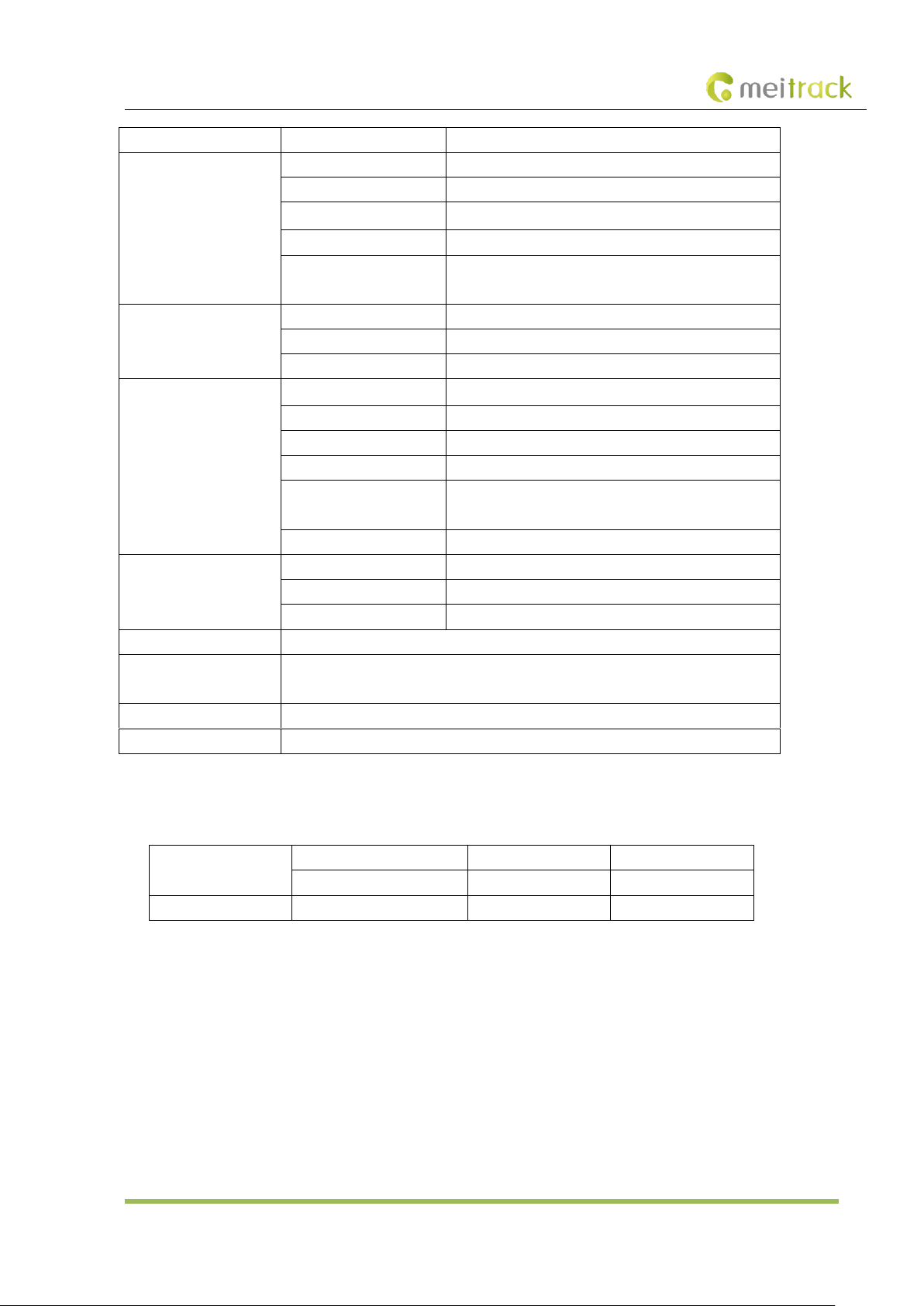
3.2 Specifications
Copyright © 2015 Meitrack Group All rights reserved. - 4 -
Page 5
MEITRACK T355 User Guide
Water resistance
IP66
Power consumption
Working voltage
3.7 V
Average current
50 mA
Standby current
0.7 mA
Internal battery
7400 mAh/3.7 V
Working hour
Consecutive working hours: > 120 hours
Standby time: > 8760 hours
GSM
Frequency band
850/900/1800/1900 MHz
Network
GSM/GPRS
Antenna
Internal antenna
GPS
Speed
0.1 m/s
Tracking sensitivity
-162 dBm
Positioning time
Cold start < 42s, hot start < 3s, recapture time < 2s
Positioning accuracy
10m, 2D RMS
Satellite receiving
channel
56 channels
Antenna
Internal/External antenna
Ambient environment
Operating temperature
-15°C to 65°C
Storage temperature
-25°C to 70°C
Humidity
5%–95% non-condensing
Weight
322g
Sensor
Internal 3D acceleration sensor (used to determine movement, vibration and
non-movement.)
Memory
8 MB flash (8,192 GPRS caches and 100 SMS caches)
LED indicator
LED indicators showing Power, GPS, and GSM status
Standard Accessories
T355
Travel adapter
Mini USB cable
CD
Switch sticker
Optional Accessories
External GPS antenna
4 T355 and Accessories
Copyright © 2015 Meitrack Group All rights reserved. - 5 -
Page 6
MEITRACK T355 User Guide
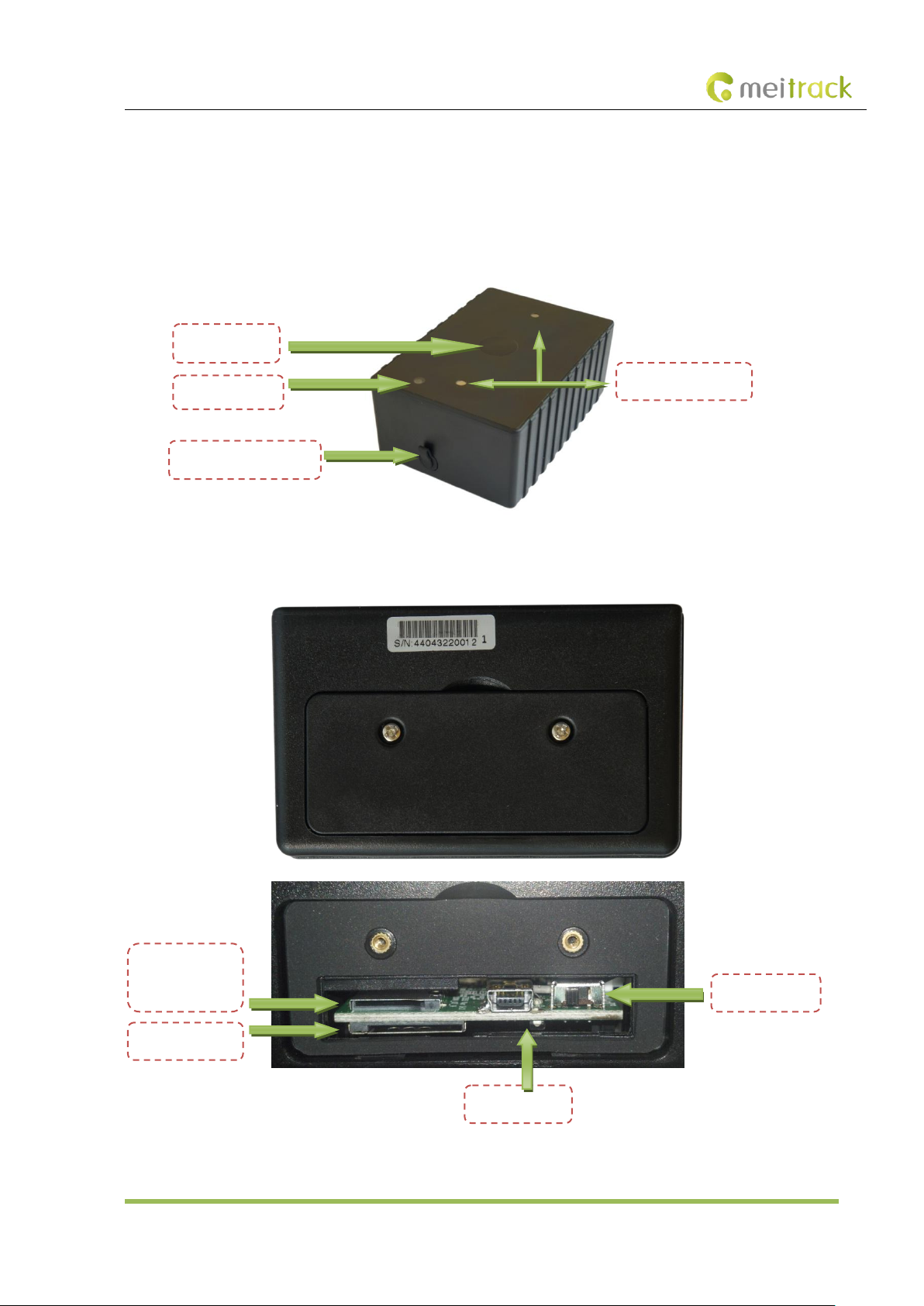
Micro SD card
slot
SIM card slot
Slide switch
USB port
Drop switch
LED indicator
Power magnet
External GPS antenna
5 Panel
5.1 Appearance
Copyright © 2015 Meitrack Group All rights reserved. - 6 -
Page 7
MEITRACK T355 User Guide
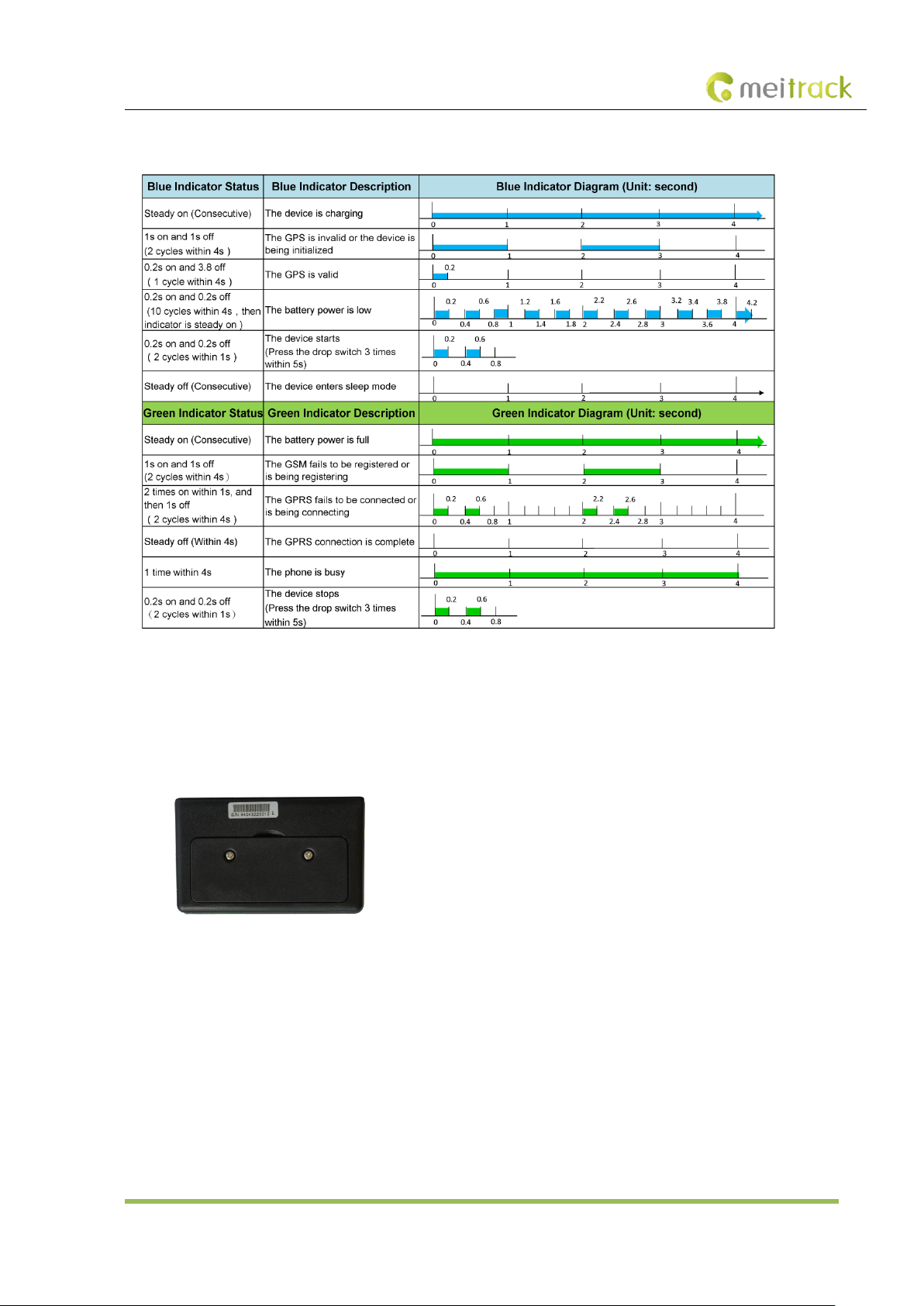
5.2 LED Indicator
The blue and green LED indicators will alternately blink every 8 seconds.
6 First Use
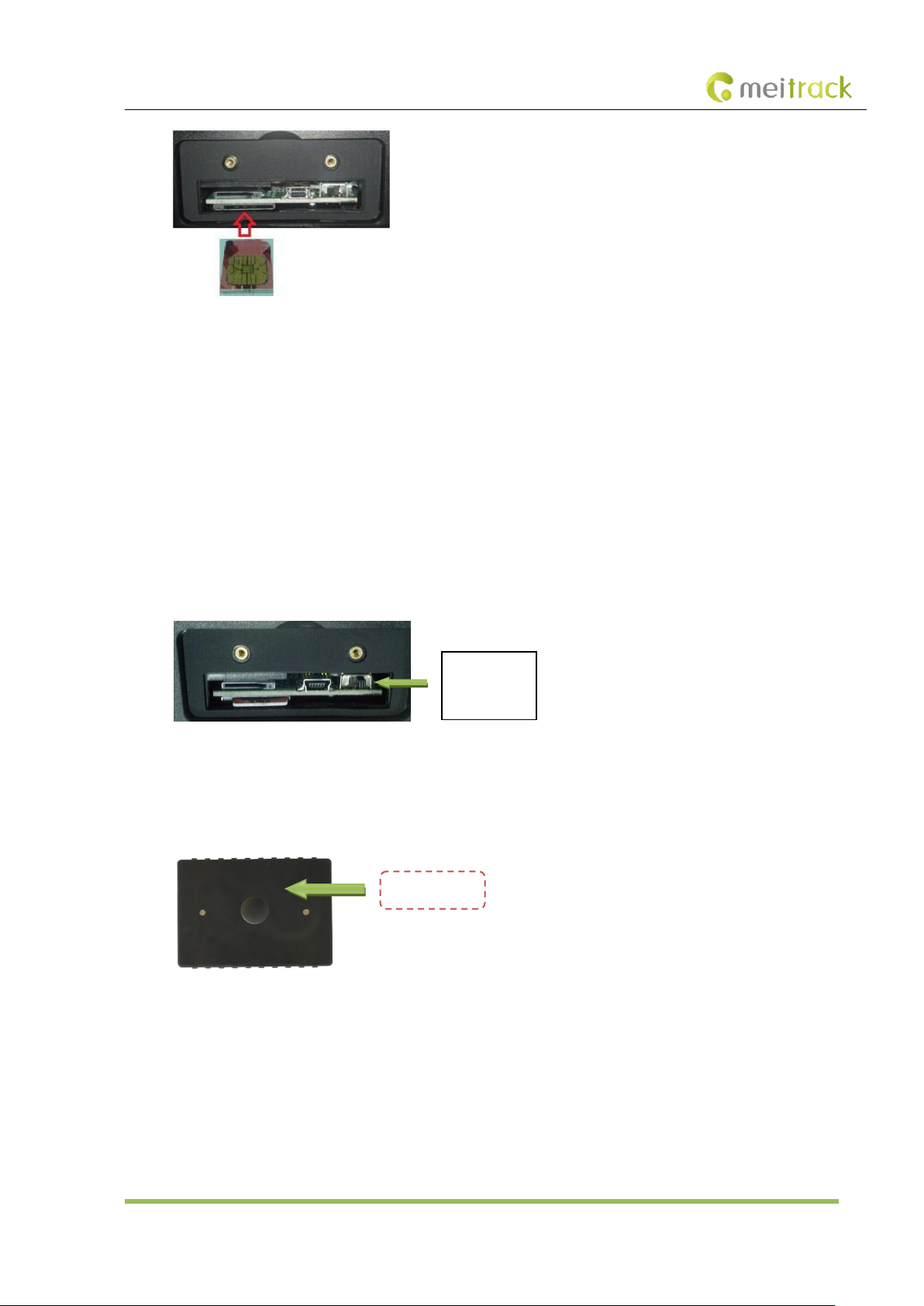
1. Remove the device cover.
Use the mini screwdriver to remove the two screws to release the cover.
2. Insert the SIM card.
Gently push the SIM card into the card slot until you hear a click with its gold-plated contacts facing up.
Note: Ensure that the SIM PIN lock is closed, and the SIM card has sufficient balance and has subscribed the call ID service.
If you want to use the GPRS function, learn about the SIM card GPRS charging first.
Ensure that the device is turned off before replacing the SIM card. Hot plugging is not supported.
Copyright © 2015 Meitrack Group All rights reserved. - 7 -
Page 8
MEITRACK T355 User Guide
Left: close
Right: start
Drop switch
3. Charge the battery.
To charge the battery, you can connect the device to the wall charger or a computer through the USB cable. When using
the device for the first time, you are advised to turn off the device and then charge the battery fully. When the battery
power is full, the LED indicator turns green.
Note: While charging, the device may heat up. This is normal, and this does not affect your device’s lifespan or
performance. If the battery power is low, it may affect positioning and data transmission. In this way, charge the battery
before use.
4. Start the device.
Turn the slide switch to the rightmost position, then press the drop switch 3 times within 5 seconds. The blue LED
indicator will blink 0.2s on and 0.2s off, indicating that the device has started. After power-on, wait for 15 seconds to allow
the device to complete the power-on self-test (POST) process.
Note: Ensure that the SIM card had properly installed before starting the device.
5. Stop the device.
Press the drop switch 3 times within 5s. The green LED indicator will blink 0.2s on and 0.2s off, indicating that the device
has stopped. After the device has stopped, wait for 5 seconds before restarting the device.
6. Install the device cover.
Place the back cover, and tighten the two screws by using the mini screwdriver.
7 Configured by Computer
This section describes how to use Meitrack Manager to configure the T355 on a computer.
Procedure:
Copyright © 2015 Meitrack Group All rights reserved. - 8 -
Page 9
MEITRACK T355 User Guide
Parameter
Description
Remarks
Now
Indicates the current location.
SMS header: indicates the alarm type.
For details about the SMS header, see the
MEITRACK SMS Protocol and MEITRACK GPRS
1. Install the USB driver and Meitrack Manager.
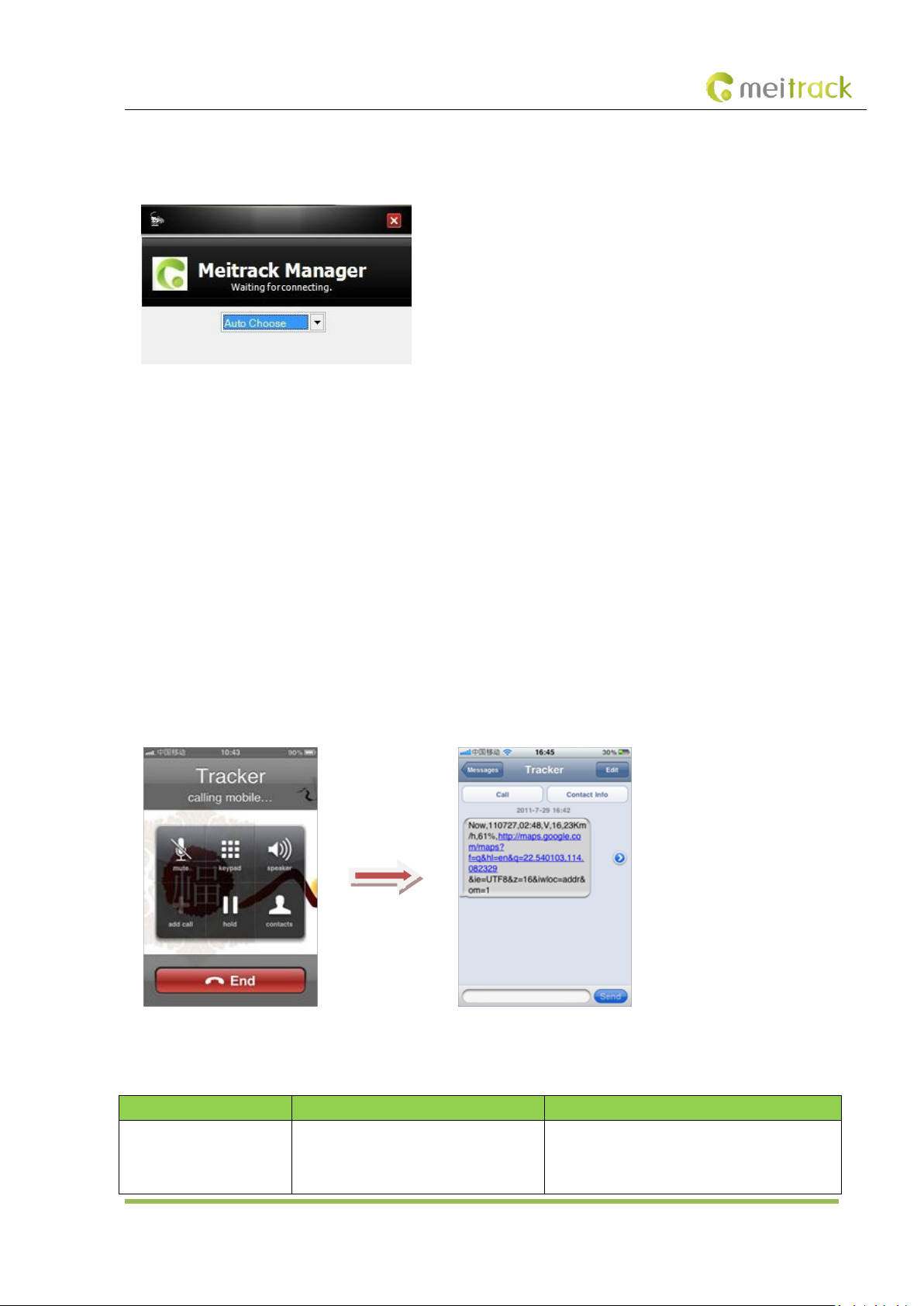
2. Connect the T355 to a PC with a USB cable.
3. Run Meitrack Manager, and start the T355. Meitrack Manager will automatically detect the tracker model.
For details about Meitrack Manager, see the MEITRACK Manager User Guide.
Note: The CD delivered with the tracker contains Meitrack Manager. The software language will be automatically switched
according to the operating system language. Press Ctrl + L to manually switch the language.
8 Quick Start Command
Before normal usage, common parameters must be set either by SMS command or by software.
8.1 Real-Time Tracking
This section describes how to query the current location of the T355, ensuring that the GPS is working normally.
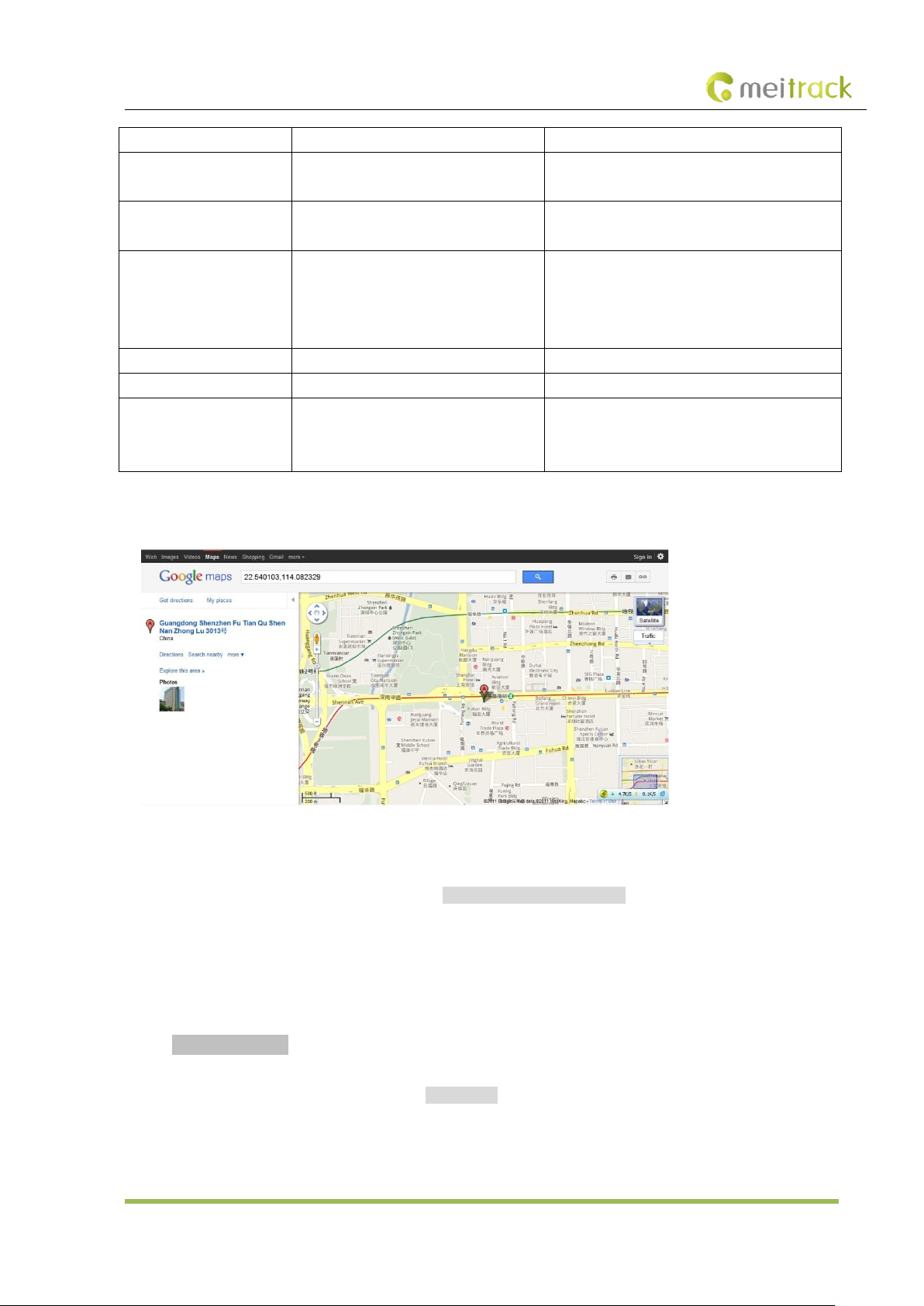
Call the SIM card phone number that is used in the T355, and hang up after the dial tone rings 2-3 times.
Note: If an authorized phone number was set by SMS command A71, only this authorized phone number can call the SIM card
phone number and receive device's location information.
An SMS with a map link is received. Click the link to query the location.
SMS example:
Now,072714 02:48,V,16,23Km/h,61%,http://maps.google.com/maps?f=q&hl=en&q=22.540103,114.082329
The following table describes the SMS format:
Copyright © 2015 Meitrack Group All rights reserved. - 9 -
Page 10
MEITRACK T355 User Guide
Protocol.
072714 02:48
Indicates the date and time in MMDDYY
hh:mm format.
None
V
The GPS is invalid.
A = Valid
V = Invalid
16
Indicates the GSM signal strength.
Value: 1–32
The larger the value is, the stronger the signal is.
If the value is greater than 12, GPRS reaches the
normal level.
23Km/h
Indicates the speed.
Unit: km/h
61%
Indicates the remaining battery power.
None
http://maps.google.com/m
aps?f=q&hl=en&q=22.5401
03,114.082329
This is a map link.
Latitude: 22.540103
Longitude: 114.082329
None
If there is no valid GPS available, the tracker will reply the most recent valid position, along with GSM LBS information by AGPS.
If your mobile phone does not support HTTP, enter the latitude and longitude on Google Maps to query a location.
Note: The default password of the tracker is 0000. The password can be changed by using Meitrack Manager or SMS commands.
After the password is changed successfully by using an SMS command, only the authorized phone number can receive SMS
reports. The common format of an SMS command is: Password,Command,Parameter.
8.2 Smart Sleep – A73
This command is used to enable the sleep mode function, prolonging standby time to 8760 hours. In this mode, the scheduled
tracking and location tracking functions are disabled.
SMS text:
0000,A73,Sleep level
Send the text to the embedded SIM card phone number.
The device automatically replies to the SMS: IMEI,A73,OK. It indicates that the sleep mode is set successfully.
If the scheduled tracking function is required, disable the sleep mode.
Note:
When the sleep level is 0, the sleep mode is disabled.
Copyright © 2015 Meitrack Group All rights reserved. - 10 -
Page 11

MEITRACK T355 User Guide
When the sleep level is 1, the tracker enters the normal sleep mode. The GSM module always works, and the GPS module
occasionally enters the sleep mode. If the tracker is inactive (drop/incoming call/SMS/vibration) for 5 minutes, enable sleep
level 1. If the tracker is activated (drop/incoming call/SMS/vibration), sleep level 0 is enabled. In the device running mode,
sleep level 0 or 1 will be enabled alternatively.
The mode is not recommended for users who set the scheduled tracking at a short interval. This setting will affect tracking
integrity
When the sleep level is 2 (default value), the tracker enters the deep sleep mode. If the tracker is inactive (drop/incoming
call/SMS/vibration) for 5 minutes, the tracker enters deep sleep mode. In this way, a triggering event (drop/incoming
call/SMS/vibration) can wake the device up, and then the device enters working mode. In deep sleep mode, if there is no
triggering event (drop/incoming call/SMS/vibration) within 25 minutes, the device will automatically enter super power-saving
mode. In this mode, only a drop or vibration event can wake the device up. GPS and GSM modules can be enabled intelligently
based on vehicle driving status, which saves power.
In deep sleep mode, the tracker can be woken up when the tracker drops or vibrates. If the tracker is activated (drop/vibration),
sleep level 0 is enabled. In the device running mode, sleep level 0 or 2 will be enabled alternatively. In sleep mode, the
scheduled tracking and distance tracking functions will be disabled.
Example: 0000,A73,2
Reply: 353358017784062,A73,OK
For details about SMS commands, see the MEITRACK SMS Protocol.
9 MS03 Tracking System
Visit http://ms03.meiligao.com, enter the user name and password, and log in to the MS03. (Purchase the login account from
your provider.)
For more information about how to add a tracker, see the MEITRACK GPS Tracking System MS03 User Guide (chapter 4 "Getting
Started").
The MS03 supports the following functions:
Track by time interval or distance.
Query historical traces.
Set polygon geo-fences.
Bind driver and vehicle information.
View various reports.
Send commands in batches.
Support OTA updates.
For details, see the MEITRACK GPS Tracking System MS03 User Guide.
10 Installing the T355
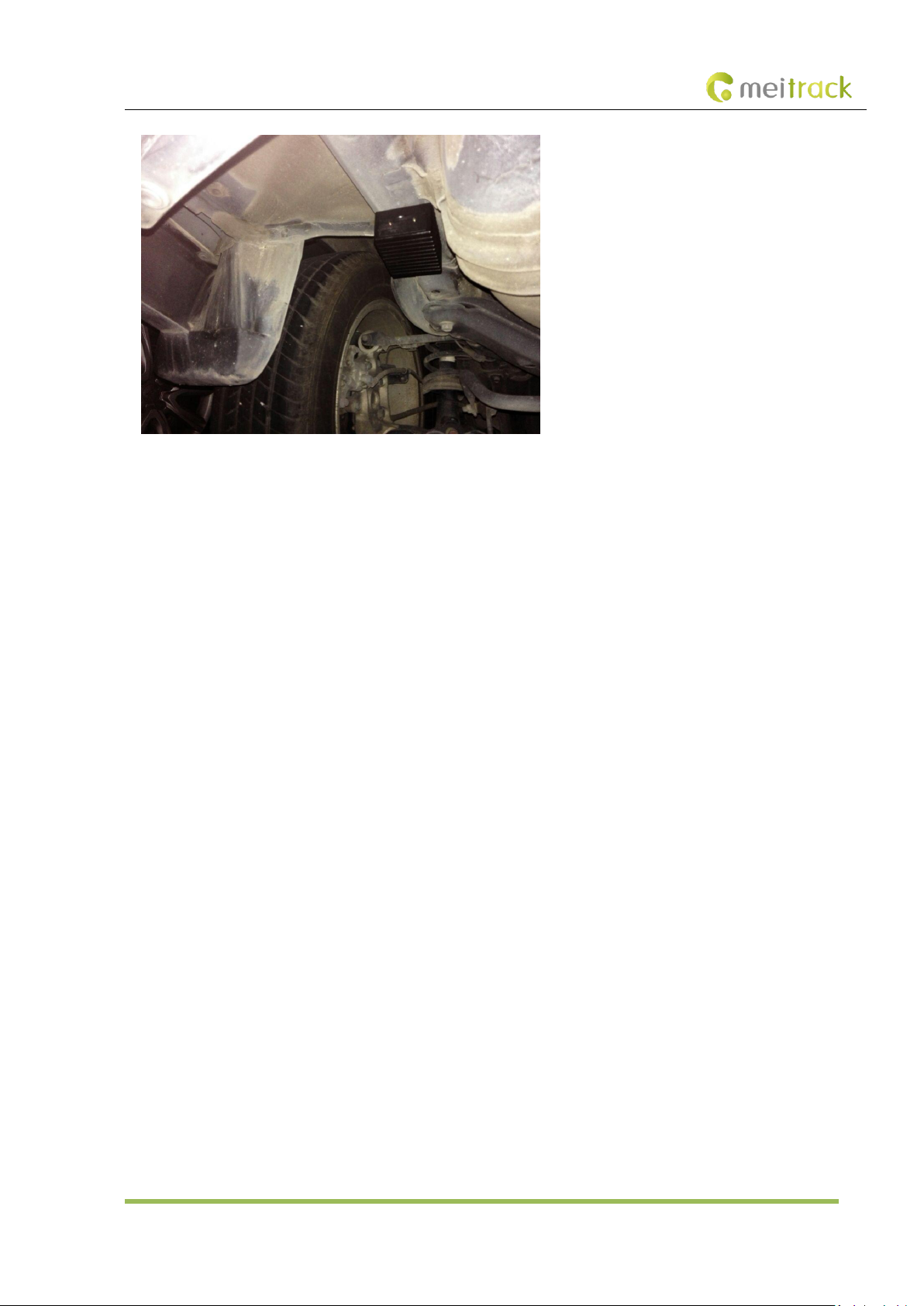
After the device is attached to the body of the vehicle, the drop switch will be triggered. After 5 seconds, two beeps will sound,
indicating that the device has been installed successfully.
Copyright © 2015 Meitrack Group All rights reserved. - 11 -
Page 12
MEITRACK T355 User Guide
Note: If the tracker has not been attached to the vehicle for over 5 seconds, a drop alarm will be generated. After 5 minutes, if
no event (incoming call/SMS/vibration) is triggered, the device automatically enters the deep sleep mode. In any mode, the
deep sleep mode will be automatically enabled after the drop alarm is generated.
11 Safety and Usage Instructions
Use only Meitrack-approved accessories.
Incompatible accessories may cause serious injuries or damages to your device.
Handle the battery and charger carefully.
Use batteries specified by Meitrack and chargers exclusively designed for your device. Incompatible batteries and
chargers may cause serious injuries or damages to your device.
Do NOT place batteries or devices on fire or in heating devices, such as microwave ovens, ovens, or radiators. Batteries
may explode when overheated.
If you have any questions, do not hesitate to email us at [email protected].
Copyright © 2015 Meitrack Group All rights reserved. - 12 -
 Loading...