

Page 1
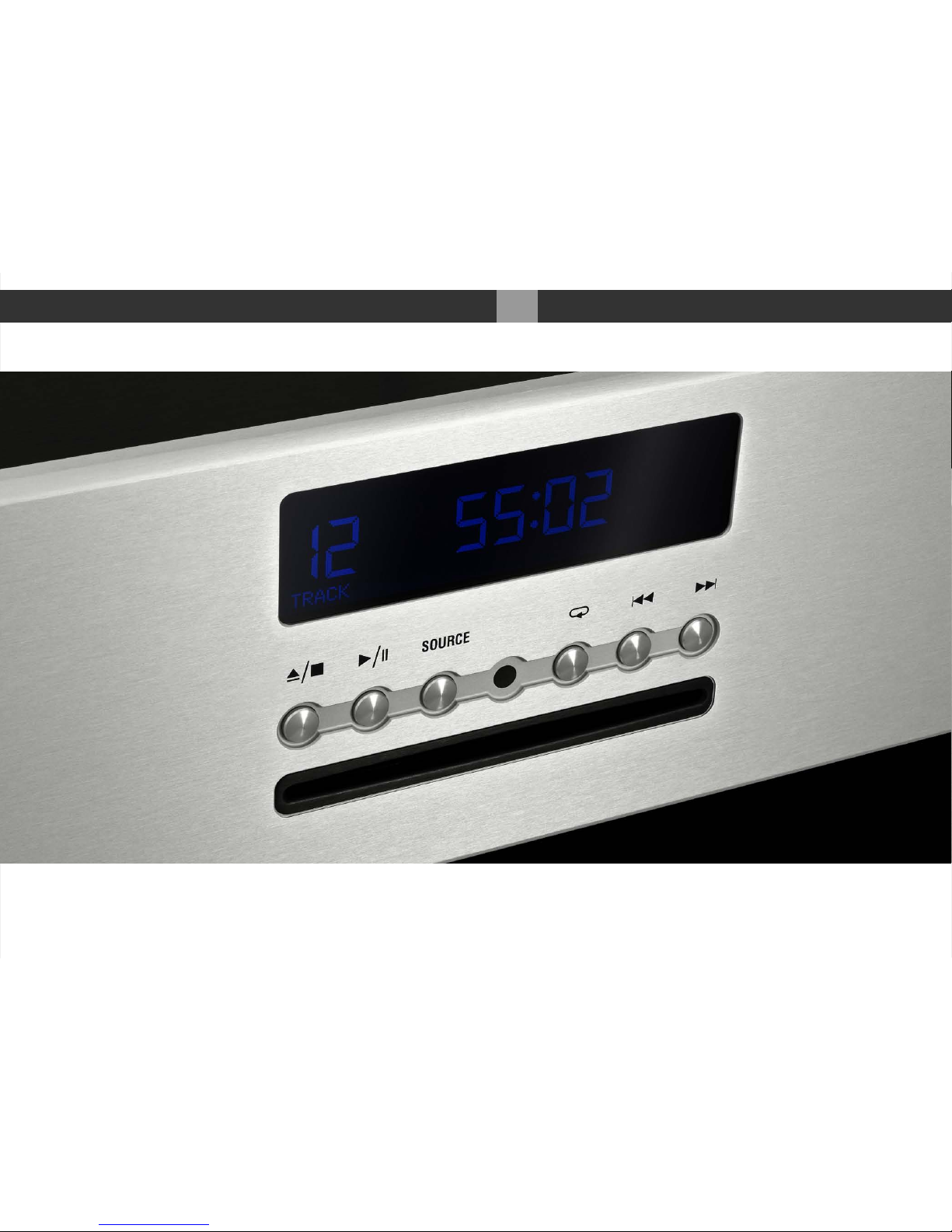
MA-2 Integrated Playback System
001
Version 1.6
meitner © 2012 Meitner Audio, All Rights Reserved. Meitner Audio reserves the right to amend specifications & design without notice.
Page 2

002
Safety Instructions
Safety Instructions
Prior to Installing you new Meitner Audio product please read the following
safety instructions:
• Read and follow all instructions.
• Keep these instructions.
• Do not use or install product near any sources of water, rain and/or
moisture.
• Clean using only a dry cloth.
• Install only in accordance with the manufacturer’s instructions.
• Refer all servicing to approved service personnel.
• Do not install near any heat sources such as radiators, heat registers,
stoves, or other apparatus (including amplifiers) that produce heat.
• Do not install product outdoors or in direct sunlight.
• Leave at least 10cm or 4 inches around product to ensure proper
ventilation.
• Do not place product near strong electrical or magnetic
radiation/emmissions or near a power amplifier.
This Meitner product must be connected to a mains socket outlet with a
protective earthing connection (grounding pin).
WARNING: TO REDUCE THE RISK OF FIRE OR ELECTRIC SHOCK, DO
NOT EXPOSE THIS APPARATUS TO WATER OR MOISTURE.
EEC: This product has been designed and tested to comply with the limits
set out in EN55013, EN55020 and EN 60065:2009 (electrical safety).
meitner © 2012 Meitner Audio, All Rights Reserved. Meitner Audio reserves the right to amend specifications & design without notice.
MA-2 Integrated Playback System
Page 3
003
Safety Instructions
Safety Instructions
CAUTION
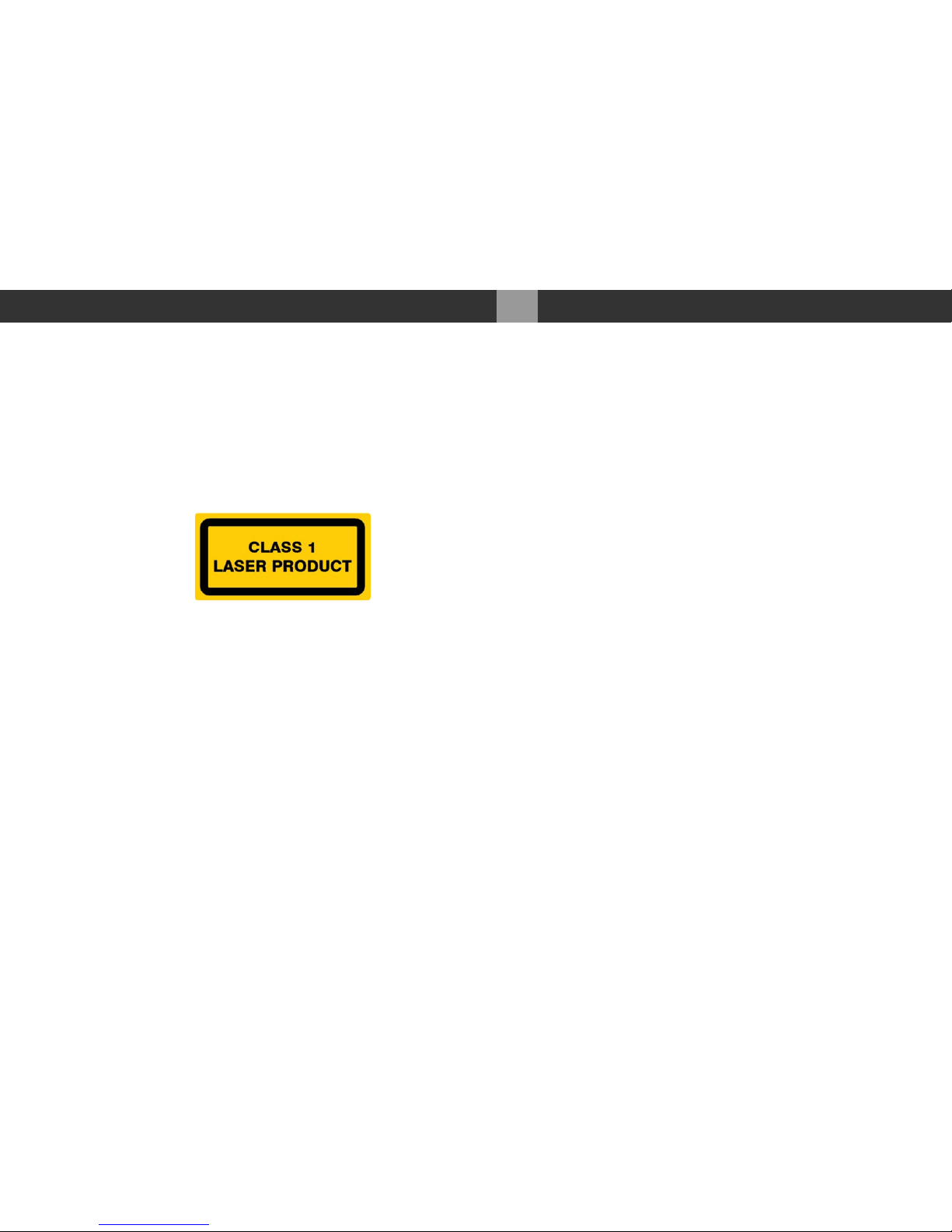
This product is a Class 1 laser product, but this product contains a laser
diode higher than Class 1. To ensure continued safety do not remove any
covers or attempt to gain access to the inside of the product. Refer all
servicing to qualified personel. The following caution label appears on your
unit on the rear panel:
CAUTION
Use of controls or adjustments or performance of procedures other than
those specified herein may result in hazardous radiation exposure. The use
of optical instruments with this product will increase eye hazard.
Information To The User
Alteration or modification carried out without appropriate approval may
invalidate the user’s right to operate the equipment.
meitner © 2012 Meitner Audio, All Rights Reserved. Meitner Audio reserves the right to amend specifications & design without notice.
MA-2 Integrated Playback System
Page 4

004
Introduction
Introduction
Welcome and congratulations on purchasing a Meitner Audio product.
We at Meitner Audio have strived to build and perfect the absolute best
product using our award winning technology and decades of experience.
We are confident that our products will bring you musical joy and enjoyment
for many years to come.
This manual provides important information regarding the use, installation
and care of your new Meitner Audio product.
meitner © 2012 Meitner Audio, All Rights Reserved. Meitner Audio reserves the right to amend specifications & design without notice.
MA-2 Integrated Playback System
Page 5

005
Table of Contents
Table of Contents
Safety Instructions page 02
Introduction page 04
Warranty page 06
MA-2 Integrated Playback System page 07
Features & Specifications page 08
Front Panel & Functions page 10
Rear Panel & Functions page 13
Connecting and Operating the MA-2 page 15
USB Input page 16
DSD Audio page 17
Infrared Remote Control page 18
Track Jump Operation page 19
Serial Remote Control page 20
meitner © 2012 Meitner Audio, All Rights Reserved. Meitner Audio reserves the right to amend specifications & design without notice.
MA-2 Integrated Playback System
Page 6

Warranty
Meitner Audio warrants the MA-2 product against defects in material and
workmanship under normal use and service for a period of time specified by
the product’s serial number from the date of first delivery to the owner. The
warranty time period is 1 year for the drive unit and associated drive
electronics. 5 years for all other parts.Warranty is limited to the original owner
and is non-transferable.
Meitner Audio will pay for return shipping charges back to the owner when
the product is sent to Meitner Audio within the first 90 days after purchase
(US and Canada end-users only). Otherwise, owner will be responsible for all
shipping charges to and from Meitner Audio.
For all warranty claims, a copy of the original invoice must accompany the
product.
Opening the product or modifying it in any way by the owner, including but
not limited to cryogenic treatment, will void any warranty.
Please contact Meitner Audio ([email protected]) for RMA number and
shipping instructions before shipping any product to Meitner Audio.
Meitner Audio products are sold worldwide through authorized dealers with
restricted territories. Meitner Audio product purchased from non-authorized
dealers or from a dealer selling outside his/her authorized territory will
automatically void product warranty.
006
Warranty
meitner © 2012 Meitner Audio, All Rights Reserved. Meitner Audio reserves the right to amend specifications & design without notice.
MA-2 Integrated Playback System
Page 7

MA-2 Integrated Playback System
The MA-2 is a high-performance CD player and stereo digital converter with
a wide variety of user selectable digital inputs. It has been refined from our
high end and acclaimed professional converter systems which are used
worldwide in professional studios to create some of the finest recordings.
The MA-2 provides Redbook CD playback and near instantaneous digital to
analog conversion from a host of digital inputs.
The MA-2 includes digital inputs for USB, AES, TOSLINK and SPDIF.
Word lengths up to 24bit, and sample frequencies up to 192kHz are
supported on all digital inputs.
DSD streaming is also supported on the USB digital audio input.
007
MA-2 Stereo Digital Converter
meitner © 2012 Meitner Audio, All Rights Reserved. Meitner Audio reserves the right to amend specifications & design without notice.
MA-2 Integrated Playback System
Page 8

Features & Specifications
Redbook CD Playback
2-Channel Digital to Analog Conversions (All Digital Inputs):
• 44.1kHz, 48kHz, 88.2kHz, 96kHz, 176.4kHz & 192kHz
• Word lengths up to 24bit
2-Channel DSD (1bit, 2.8Mhz) Digital to Analog Conversion is supported using DoP 1.0
specification via the USB digital audio input.
Available Digital Inputs:
• 1x USB
• 1x AES/EBU (XLR)
• 1x SPDIF (RCA)
• 1x TOSLINK (Optical)
Analog Outputs:
• Balanced (XLR)
Output Line Level (0dBfs signal on AES/EBU input): 4.6Vrms
Output Impedance: 300Ω
• Un-Balanced (RCA)
Output Line Level (0dBfs signal on AES/EBU input): 2.3Vrms
Output Impedance: 150Ω
Note:
1. XLR analog outputs are balanced with pin 2 hot, pin 3 cold and pin 1 ground.
2. For proper digital audio data transfer (especially at 176kHz and 192kHz) appropriate high
quality TOSLINK, SPDIF, AES and USB 2.0 cables must be used.
008
Features & Specifications
meitner © 2012 Meitner Audio, All Rights Reserved. Meitner Audio reserves the right to amend specifications & design without notice.
MA-2 Integrated Playback System
Page 9

009
Features & Specifications
Features & Specifications
System:
• System control via serial RS-232
• USB data port for software upgrades
Power supply:
• Power factor corrected
• Universal 90V-260V, 50/60Hz operation
• Power consumption: 50W
• CE Approved
Remote control: Infrared
Dimensions: W x D x H: 435 x 400 x 92mm
Weight: 7.43kg
meitner © 2012 Meitner Audio, All Rights Reserved. Meitner Audio reserves the right to amend specifications & design without notice.
MA-2 Integrated Playback System
Page 10
Front Panel & Functions
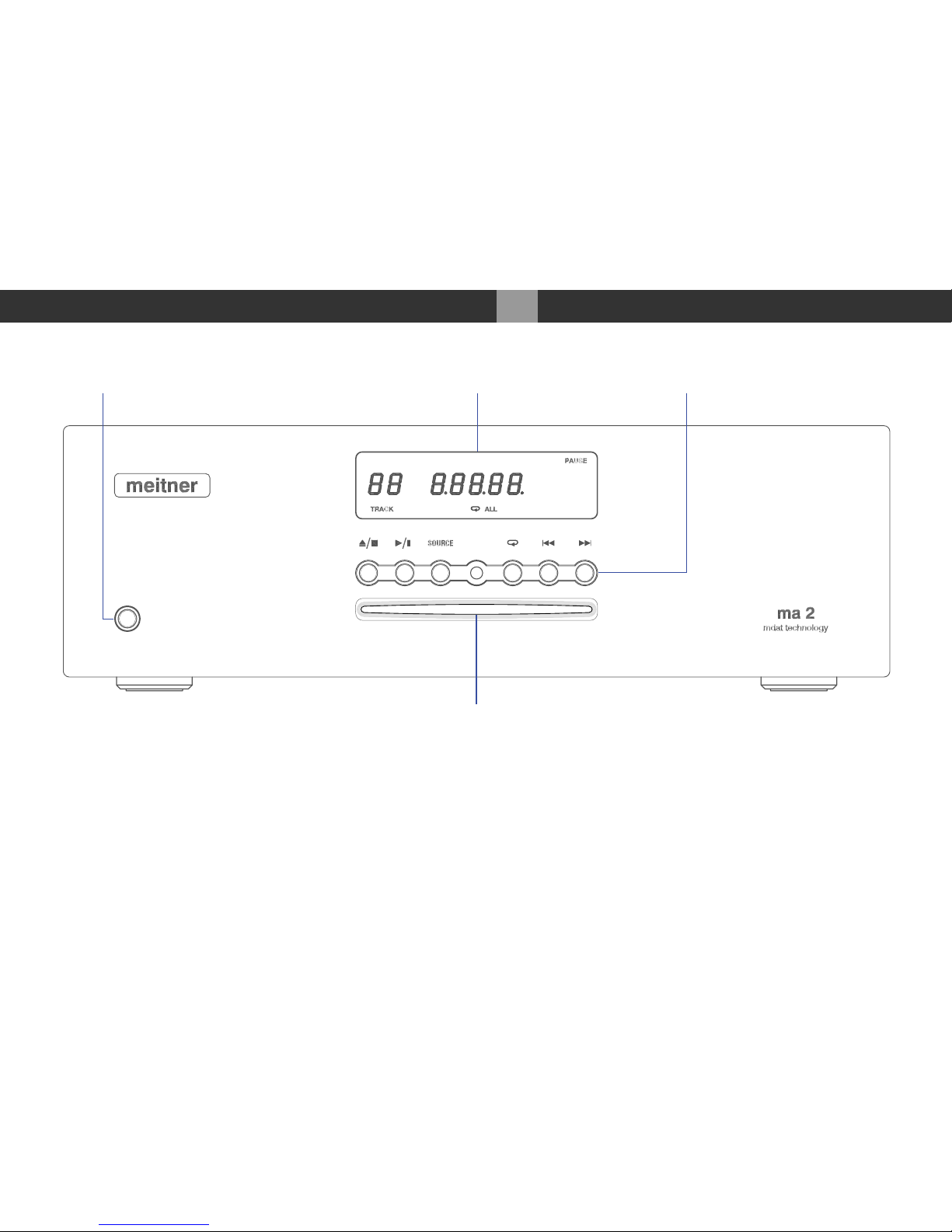
1. Standby/Power-Save button:
Toggles the operation between on and power-save mode. In power save mode the
remote control and all front panel functions become inactive.
2. Display:
Display can be dimmed or brigthened using the display brightness button.
3. MA-2 drive slot.
010
Front Panel & Functions
meitner © 2012 Meitner Audio, All Rights Reserved. Meitner Audio reserves the right to amend specifications & design without notice.
MA-2 Integrated Playback System
Page 11
Front Panel & Functions
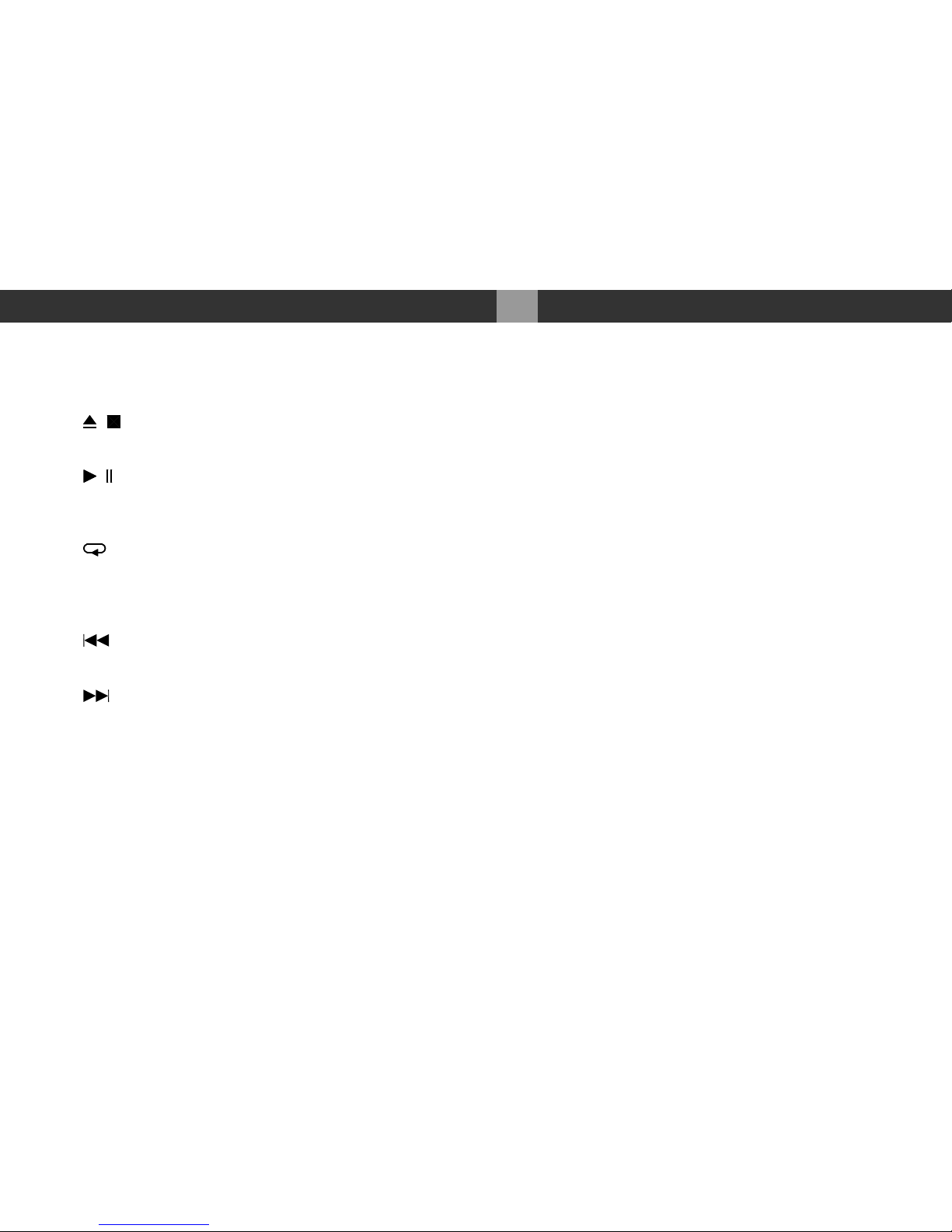
4. Front Panel Buttons and Functions:
• : EJECT/STOP - Stops CD playback. Pressing stop a second time or when
the drive is already in stop mode ejects the CD from the slot drive.
• : PLAY/PAUSE - Starts or Pauses CD playback.
• Source : Toggles between the various available digital inputs.
• : REPEAT - This buttons toggles through 3 states:
• Repeat Track – repeats current track
• Repeat All – repeats entire disc
• Repeat Off - turns repeat function off
• : PREVIOUS - Jumps back a CD track. Press and hold to enter reverse scan
mode.
• : NEXT - Jumps ahead a CD track. Press and hold to enter forward scan
mode.
All digital inputs support 44.1kHz, 48kHz, 88.2kHz, 96kHz, 176.4kHz and 192kHz.
All digital inputs support word lengths up to 24bit.
USB input also supports DSD streaming over USB using DoP 1.0 specification.
011
Front Panel & Functions
meitner © 2012 Meitner Audio, All Rights Reserved. Meitner Audio reserves the right to amend specifications & design without notice.
MA-2 Integrated Playback System
/
/
Page 12

Front Panel & Functions
Please note:
1. The Meitner Audio MA-2 is a Class 2.0 USB Audio device. Class 2 audio devices are
supported natively in OSX 10.5.7 and higher, and on Linux with ALSA 1.0.23 and
higher.
2. For Windows XP, Vista and Windows 7, Class 2 USB Audio device drivers are included
with the MA-2. Please see page 14 for installation instructions.
3. Please use USB 2.0 compliant devices for maximum high resolution audio
compatibility. Using the MA-2 with a USB 1.0 and 1.1 device/interface may limit digital
audio bandwidth to 44.1/48kHz sample frequencies.
4. For proper high definition audio transfer (especially 176.4 and 192kHz sample
frequencies) using the TOSLINK interfaces please ensure that your digital source
device and optical cables support sample frequencies above 48kHz.
MA-2 Stereo D/A Converter Manual
012
Front Panel & Functions
meitner © 2012 Meitner Audio, All Rights Reserved. Meitner Audio reserves the right to amend specifications & design without notice.
Page 13
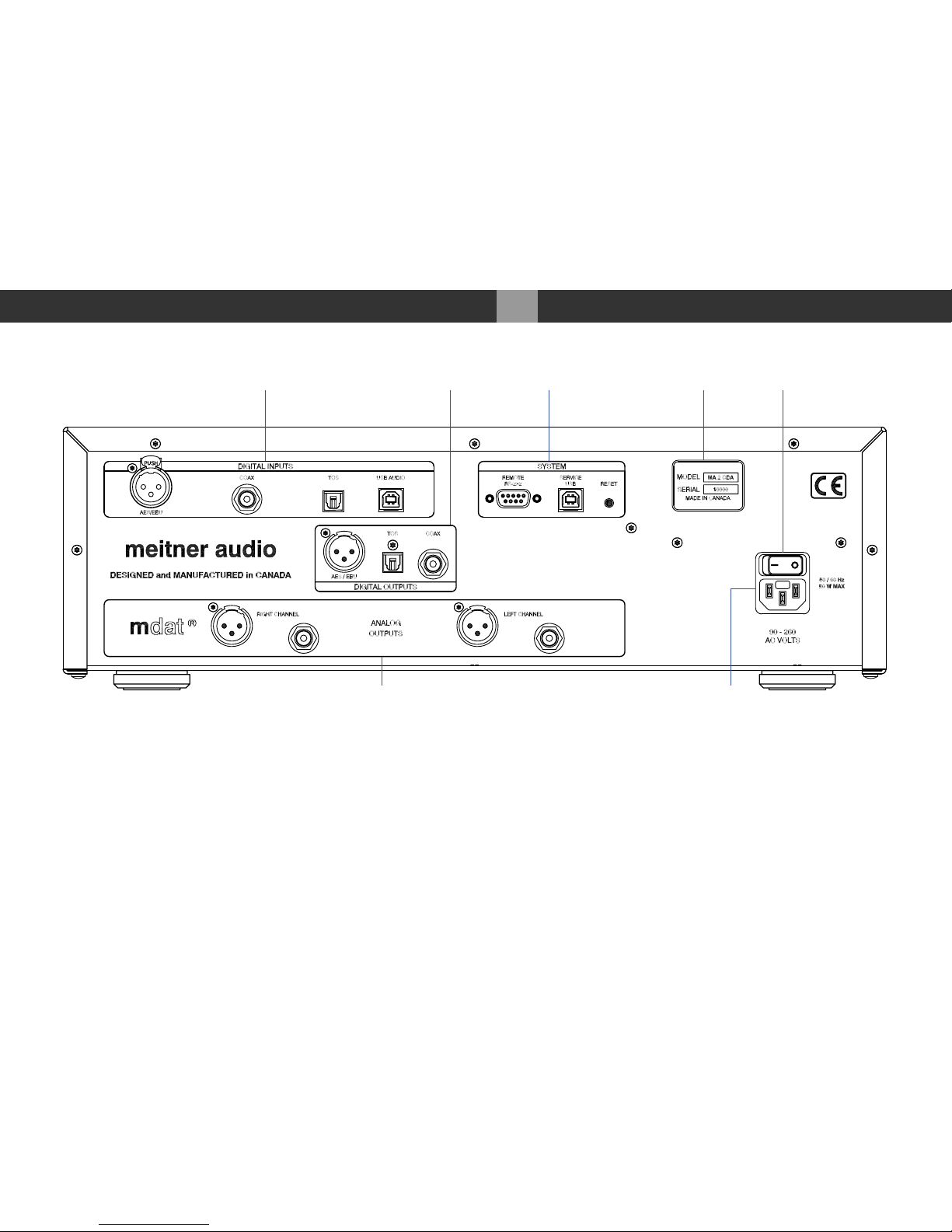
Rear Panel & Functions
1. Main Power connector
2. Main Power Switch.
3. Product model and serial number indicator:
Warranty void if model/serial number indicator is not attached to unit, missing or
damaged whereby serial number cannot be seen.
013
Rear Panel & Functions
meitner © 2012 Meitner Audio, All Rights Reserved. Meitner Audio reserves the right to amend specifications & design without notice.
MA-2 Integrated Playback System
Page 14

Rear Panel & Functions
4. System
Remote:
• Wired RS232: RS232 communication port
Service:
• USB: Software update port.
• RESET: Used to access the backup firmware in connection with
software upgrades via the USB port. Should not be used during
normal operation.
5. Digital Outputs (Redbook CD Playback, 44.1kHz):
• AES/EBU: AES/EBU (XLR) PCM digital output.
• COAX : SPDIF (RCA) format PCM digital output.
• TOS : SPDIF (TOSLINK) format PCM digital output.
6. Digital Inputs:
• AES/EBU: AES/EBU (XLR) PCM digital audio input.
• COAX: SPDIF (RCA) format PCM digital audio input.
• TOS: SPDIF (TOSLINK) format PCM digital audio input.
• USB Audio: USB format PCM and DSD digital audio input.
7. Analog Line Output:
• Left and Right Balanced (XLR) Connectors
• Left and Right Un-Balanced (RCA) Connectors
• Level (Output Line Level with 0dBfs signal on AES/EBU input):
XLR outputs: 4.6Vrms (+15.45dBu)
RCA outputs: 2.3Vrms (+9.45dBu)
014
Rear Panel & Functions
meitner © 2012 Meitner Audio, All Rights Reserved. Meitner Audio reserves the right to amend specifications & design without notice.
MA-2 Integrated Playback System
Page 15

Connecting & Operating the MA-2
Please see next page with regards to installing the MA-2’s USB Audio drivers.
1. Connect the included power cable to the MA-2 power connector than to a free power
receptacle.
2. Connect the appropriate digital source connections up to the MA-2's digital inputs
using the appropriate high quality digital audio and USB cables.
3. Connect the appropriate analog outputs of the MA-2 to your pre-amp or integrated
amplifier.
4. Turn on the MA-2 using the main power switch and select the CD or a digital input by
pressing SOURCE selector button or using the remote.
5. Insert a CD into the slot drive to start playing Redbook CDs.
6. Once locked to a sample frequency the MA-2 will start its conversion process and you
will almost instantaneously be able to listen to music.
7. The MA-2 remembers the last digital input it was switched too prior to being switched
off.
015
Connecting & Operating the MA-2
meitner © 2012 Meitner Audio, All Rights Reserved. Meitner Audio reserves the right to amend specifications & design without notice.
MA-2 Integrated Playback System
Page 16
Connecting & Operating the MA-2
USB Audio Input:
1. First, use only well-sheilded certified USB 2.0* cables to connect the MA-2’s USB
Audio input to any USB digital audio source component (computer, laptop, media
server etc.)
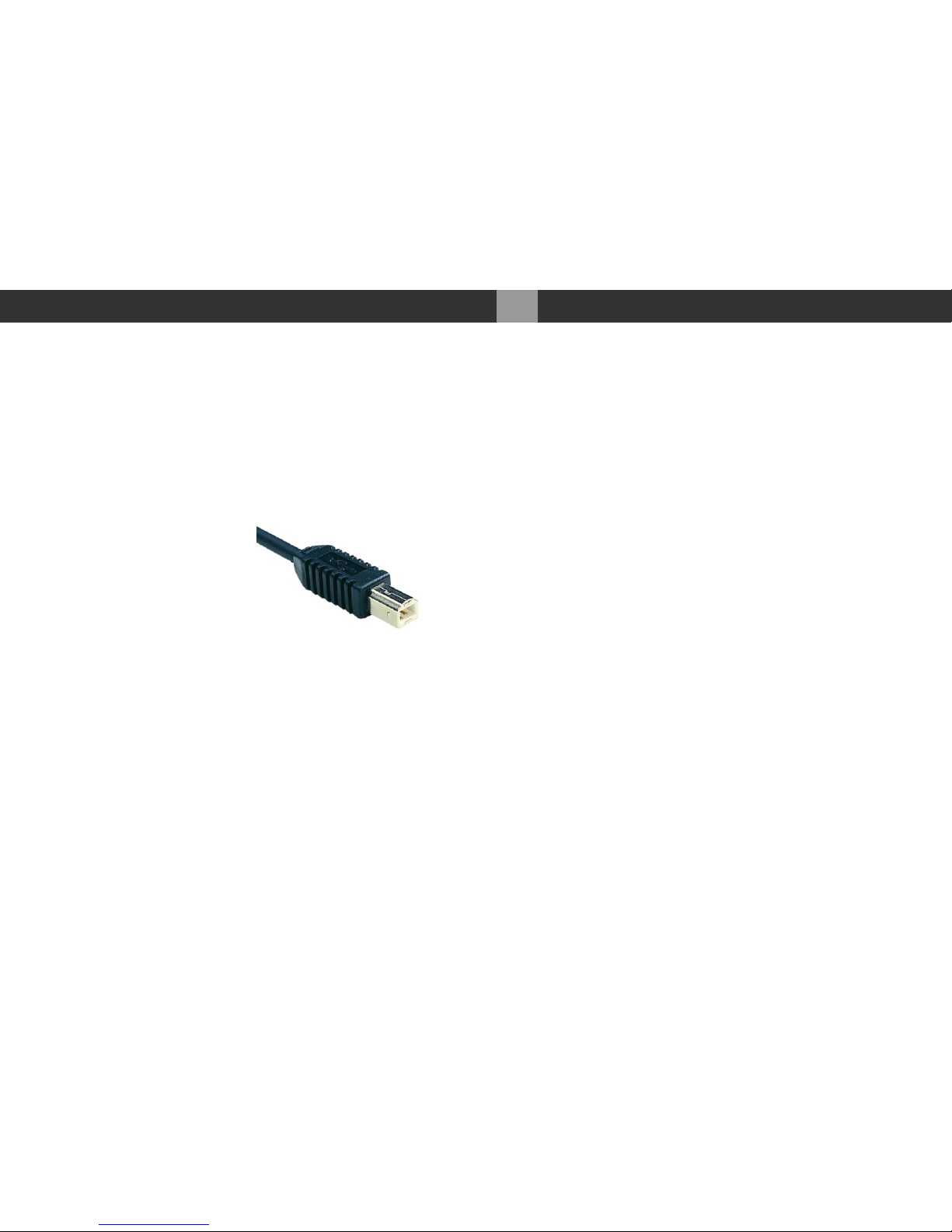
2. The MA-2’s USB Audio interface uses the B-type USB connector similar to connectors
used on printers. Please see image below:
3. Select the USB Audio input using front panel input selector buttons.
4. For MAC OSX systems, no driver is needed. OSX has the appropriate USB driver
already installed.
5. For Windows XP, Vista (32 or 64bit) and Windows 7 (32 or 64bit) systems install the
provided USB driver located on the software CD in folder named “Meitner MA-2 USB
Audio Driver” and run the “setup.exe” file. Read and follow the installation instructions.
6. Kernal, ASIO and WASAPI (Vista and Windows 7) drivers will be installed.
*Not using proper cables will cause audio issues between digital source and DAC.
016
Connecting & Operating the MA-2
meitner © 2012 Meitner Audio, All Rights Reserved. Meitner Audio reserves the right to amend specifications & design without notice.
MA-2 Integrated Playback System
Page 17

Connecting & Operating the MA-2
7. For Windows Media Player playback; in Windows Control Panel set the default sound
playback to the MA-2 USB Audio device (XMOS XS1-L1 Audio).
8. In general for most audio applications you will be able to select the MA-2 USB Audio
device (XMOS XS1-L1 Audio) from within the application and choose the appropriate
driver Kernal, ASIO or WASAPI.
DSD Audio
1. The MA-2 currently supports DSD audio streaming and conversion over USB using
DoP 1.0 specification.
2. Currently there are many different media players that support DSD audio file playback.
Some of them that have been fully tested in-house eg. JRiver for Windows, and
Audivarna and Pure Music for OSX.
3. Every media player will have specific software installation instructions and setup
procedures for enabling DSD streaming. Please consult the specific software manual.
4. Some software manufacturers have also provided quickstart and software setup
guides for download and online. If available Meitner Audio will post links to this on the
MA-2 support website.
5. When setup correctly and DSD data is detected, the MA-2 will display DSD on its front
display window as digital audio format.
017
Connecting & Operating the MA-2
meitner © 2012 Meitner Audio, All Rights Reserved. Meitner Audio reserves the right to amend specifications & design without notice.
MA-2 Integrated Playback System
Page 18
Infrared Remote Control
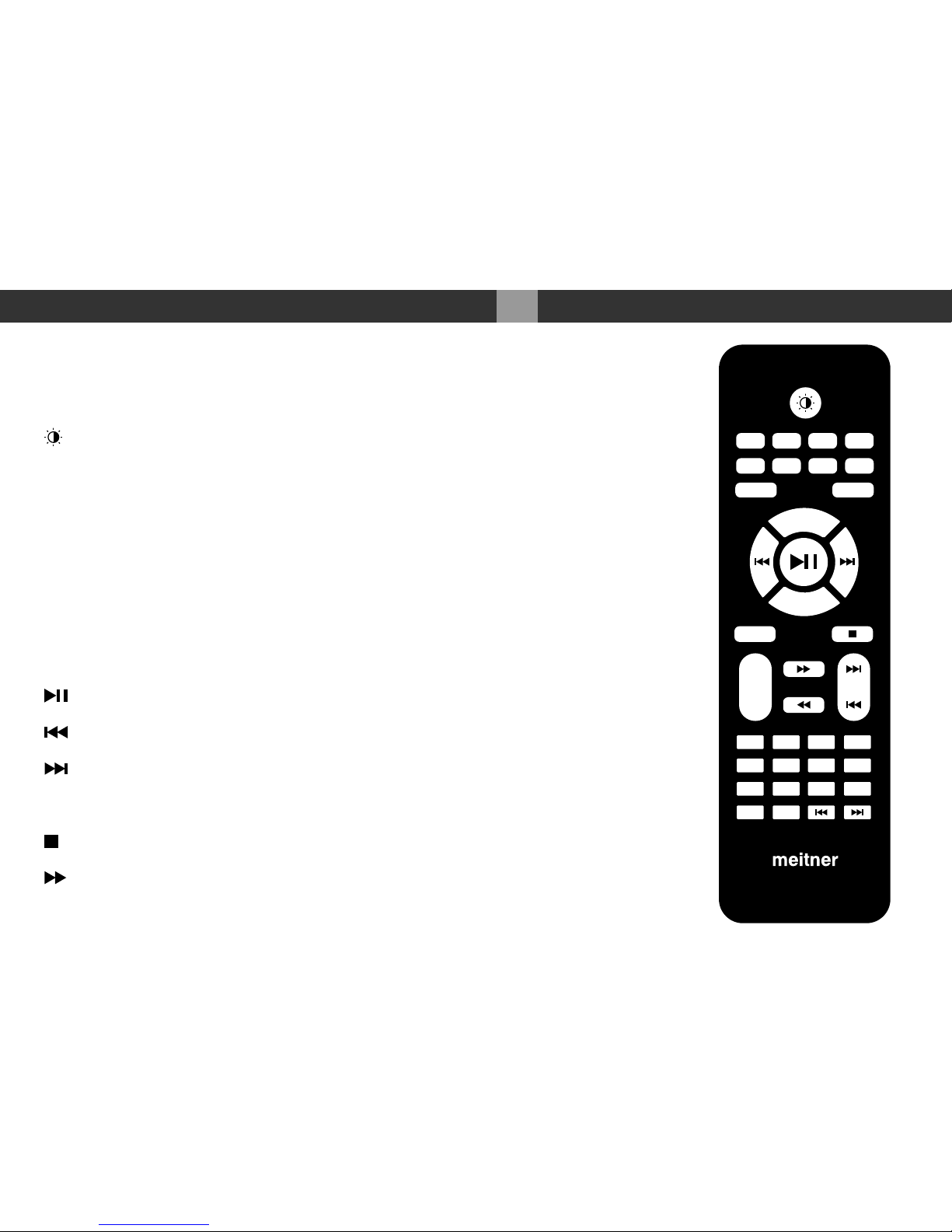
Included with the MA-2 is an infrared remote control. Please see remote guide provided to
the right:
: Display brightness control.
SOURCE : Toggles between CD and digital inputs.
CD : Selects CD player mode.
USB : Selects the USB input
AES : Selects the AES/EBU input via balanced XLR digital connector.
COAX1 : Selects the COAXIAL SPDIF input via COAX RCA connector.
TOS1 : Selects the TOSLINK SPDIF input via TOS optical connector.
: CD player PLAY/PAUSE control.
: CD player PREVIOUS track function.
: CD player NEXT track function.
MUTE : Mutes the analog outputs.
: CD player STOP playback function.
: CD player FORWARD SCAN function.
018
Infrared Remote Control
meitner © 2012 Meitner Audio, All Rights Reserved. Meitner Audio reserves the right to amend specifications & design without notice.
MA-2 Integrated Playback System
4 5 6
7 8 9
1 2 3
0./..
TRACK
ALL
CD
USB
AES
TOS2 COAX2
MA-1
VOL+
VOL-
VOL+
VOL-
MUTE
SOURCE
TOS1
COAX1
MA-2
REPEAT
Page 19
Infrared Remote Control
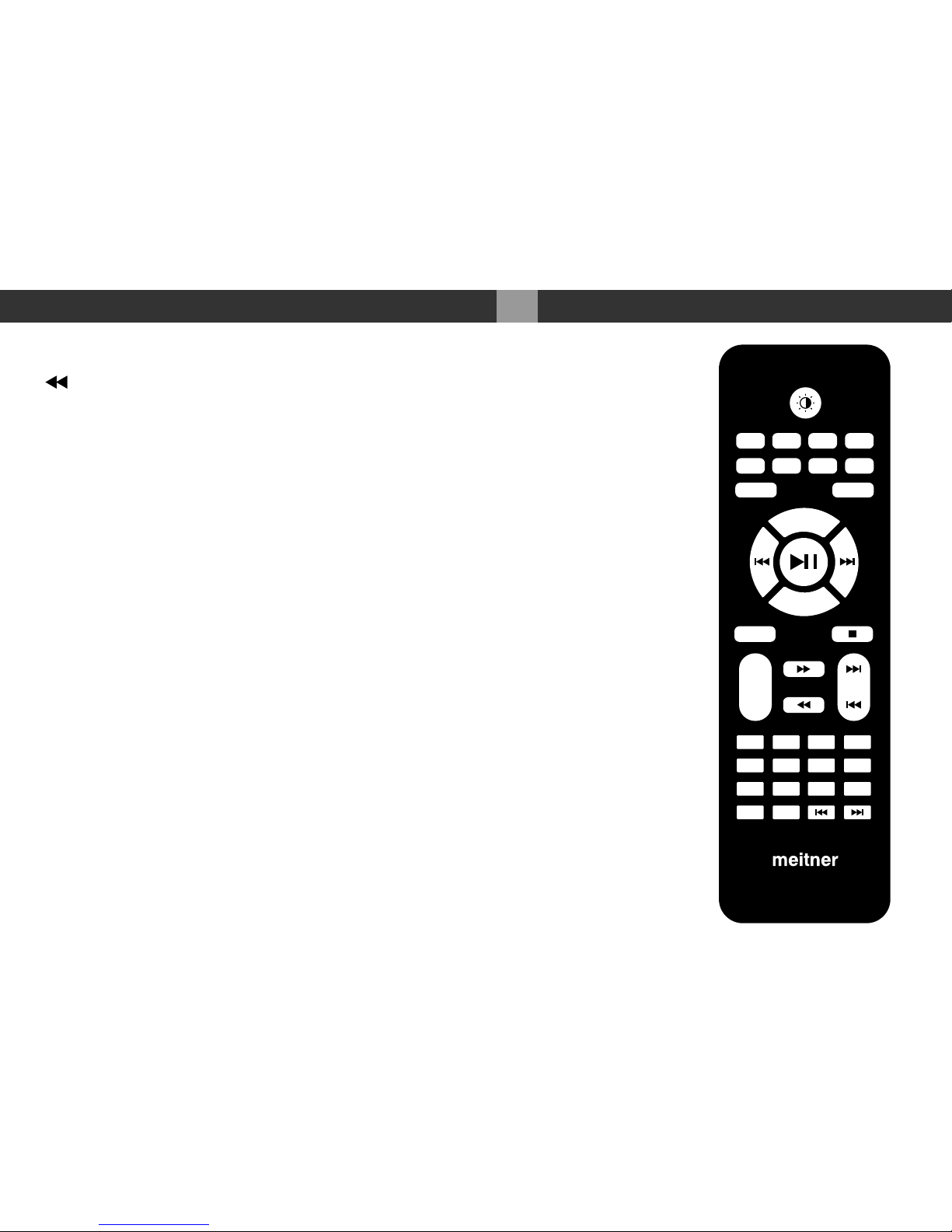
: CD player REVERSE SCAN function.
REPEAT : Toggles through the different CD player REPEAT functions.
TRACK : CD player TRACK REPEAT function.
ALL : CD player REPEAT ALL function.
Track Jump Operation
The MA-2 responds to a 2 numeric button input to jump immediately to a track.
Eg.1 : To immediately jump to track 5 press “0” then press “5” within 2 seconds.
Eg.2 : To jump to track 15 press “1” then press “5” within 2 seconds.
If the MA-2 receives just one numeric input, after 2 seconds, it will jump to the associated
single numbered track.
Eg. : When you just press “5”, after 2 seconds the MA-2 will jump to track 5.
019
Infrared Remote Control
meitner © 2012 Meitner Audio, All Rights Reserved. Meitner Audio reserves the right to amend specifications & design without notice.
MA-2 Integrated Playback System
4 5 6
7 8 9
1 2 3
0./..
TRACK
ALL
CD
USB
AES
TOS2 COAX2
MA-1
VOL+
VOL-
VOL+
VOL-
MUTE
SOURCE
TOS1
COAX1
MA-2
REPEAT
Page 20
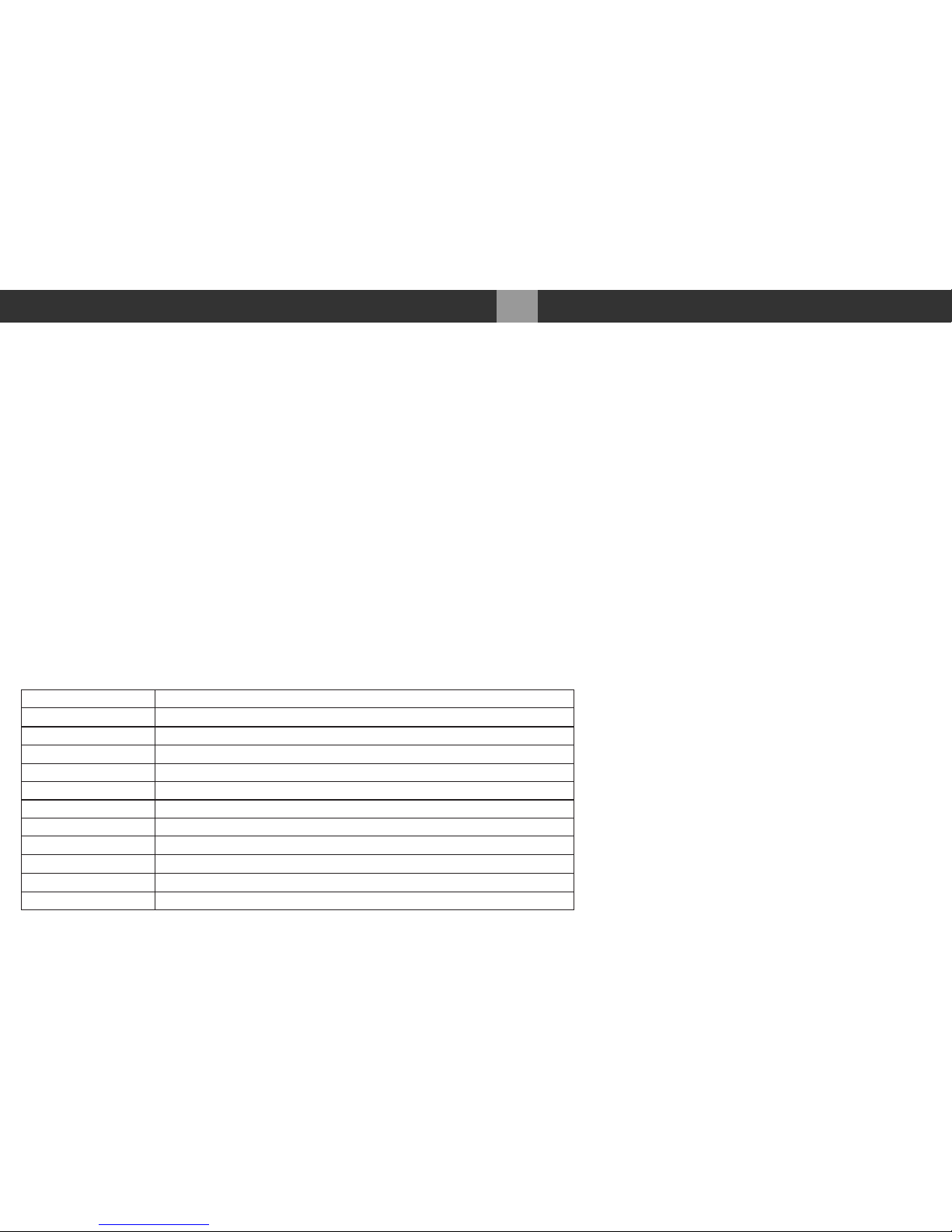
Serial Remote Control (RS232)
The MA-2 is equipped with a 9-pin RS232 port for system remote control via a serial cable
(not provided by Meitner Audio). Please use a standard RS232 cable. Do not use a null
model cable, as this will not work. RS232 communication port settings:
• 19,200 baud
• 8 bits
• 1 stop bit
• no flow control
• no parity bit
Commands to the MA-2
All commands sent to the MA-2 consist of 3 ASCII characters (all lowercase) followed by a
carraige return or <CR>. Repeating a <CR> will repeat the last command sent. Received
commands are not stored in a stack. They need to be sent in intervals of at least 50ms to
allow enough time for the MA-2 to execute a command before receiving the next one.
Command Function
ply<CR> Starts playback
pse<CR> Pauses playback
stp<CR> Stops playback (or if stopped will eject CD)
try<CR> Ejects the CD from the drive (if playing, stops playback)
nxt<CR> Jumps ahead a track
prv<CR> Jumps back a track
sfw<CR> Scan forward
sbw<CR> Scan backward
rpt<CR> Toggles through the different repeat modes
rtr<CR> Selects repeat track function
ral<CR> Selected repeat all function
020
Serial Remote Control (RS232)
meitner © 2012 Meitner Audio, All Rights Reserved. Meitner Audio reserves the right to amend specifications & design without notice.
MA-2 Integrated Playback System
Page 21
Serial Remote Control (RS232)
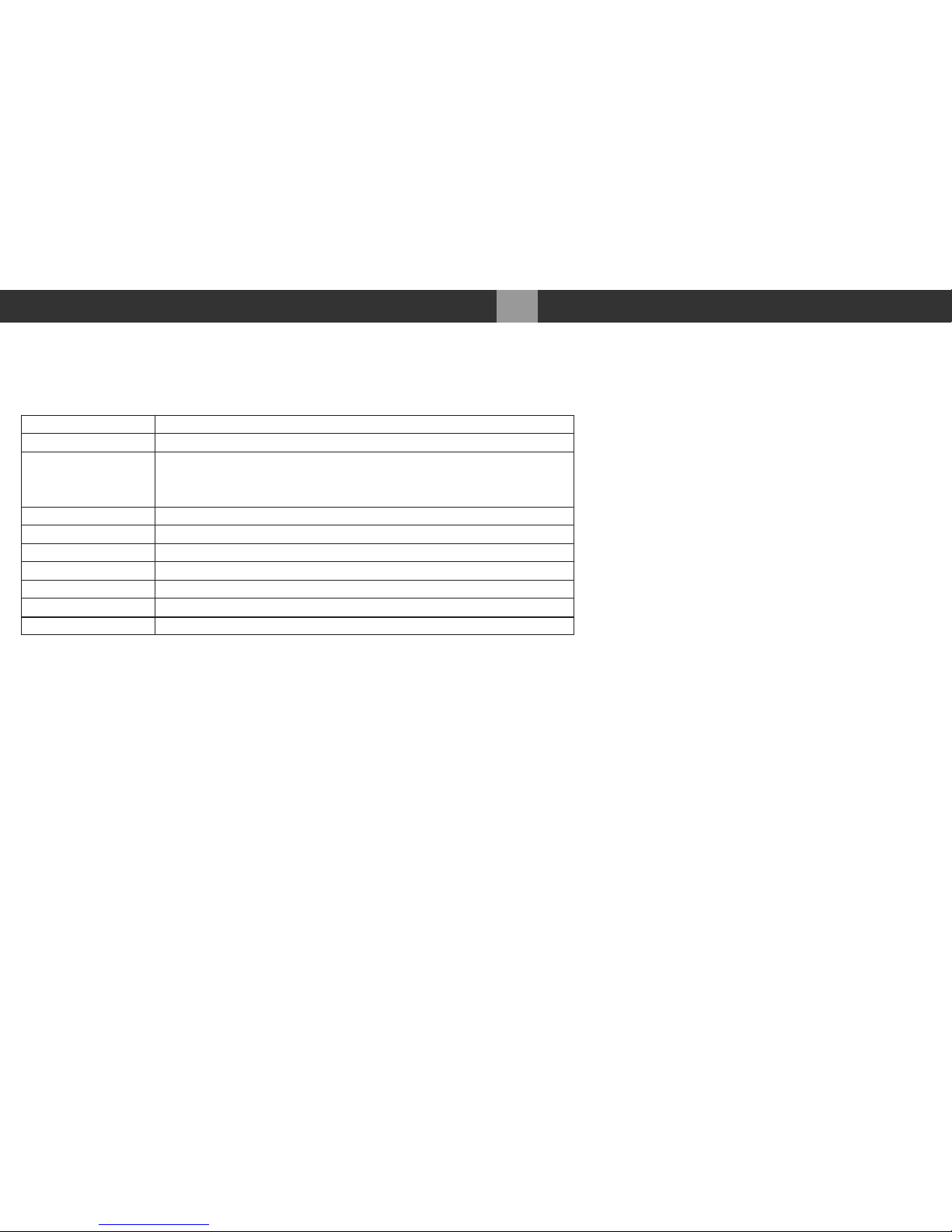
Commands to the MA-2 (Cont’d)
Command Function
tr(x)<CR> Jump to a particular track (x). See example below:
tr(x) examples Jump to track 5 : tr0<CR>, tr5<CR>
Jump to track 10 : tr1<CR>, tr0<CR>
Jump to track 18 : tr1<CR>, tr8<CR>
src<CR> Toggles between MA-2’s CD player and digital inputs
dsc<CR> Selects CD player as digital source
aes<CR> Selects AES digital input
to1<CR> Selects TOS as digital input
co1<CR> Selects COAX as digital input
usb<CR> Selects USB Audio as digital input
dim<CR> Toggles the display brightness
021
Serial Remote Control (RS232)
meitner © 2012 Meitner Audio, All Rights Reserved. Meitner Audio reserves the right to amend specifications & design without notice.
MA-2 Integrated Playback System
Page 22

Serial Remote Control (RS232)
Status bytes sent from MA-2
The MA-2 will send back 9 bytes terminated by <CR> every second or when there is a change in
status. Byte order will be:
<Byte 0><Byte 1><Byte 2><Byte 3><Byte 4><Byte 5><Byte 6><Byte 7><Byte 8><CR>
Bytes 0 through 6 are encoded in ASCII format.
Byte 0 Seconds ones in ASCII
Byte 1 Seconds tens in ASCII
Byte 2 Minutes ones in ASCII
Byte 3 Minutes tens in ASCII
Byte 4 Hours ones in ASCII
Byte 5 Track number ones in ASCII
Byte 6 Track number tens in ASCII
Bytes 7 through 9 are status bytes where each bit represents a machine status flag. 0 indicates
that the particular bit is set.
Byte 7
bit 7 1 (Not Used)
bit 6 1 (Not Used)
bit 5 USB Audio input
bit 4 TOSLINK input
bit 3 1 (Not Used)
bit 2 COAX input
bit 1 DISC
bit 0 AES input
022
Serial Remote Control (RS232)
meitner © 2012 Meitner Audio, All Rights Reserved. Meitner Audio reserves the right to amend specifications & design without notice.
MA-2 Integrated Playback System
Page 23

Serial Remote Control (RS232)
Status bytes sent from MA-2 (Cont’d)
Byte 8
bit 7 1 (Not Used)
bit 6 1 (Not Used)
bit 5 DSD over PCM detected
bit 4 4x sampling frequency
bit 3 2x sampling frequency
bit 2 1x sampling frequency
bit 1 48khz base sampling frequency
bit 0 44.1khz base sampling frequency
Byte 9
bit 7 Play
bit 6 Pause
bit 5 Stop
bit 4 Scan Fwd
bit 3 Scan Rev
bit 2 Rpt All
bit 1 Rpt Track
bit 0 No Disc in tray
023
Serial Remote Control (RS232)
meitner © 2012 Meitner Audio, All Rights Reserved. Meitner Audio reserves the right to amend specifications & design without notice.
MA-2 Integrated Playback System
 Loading...