

Page 1
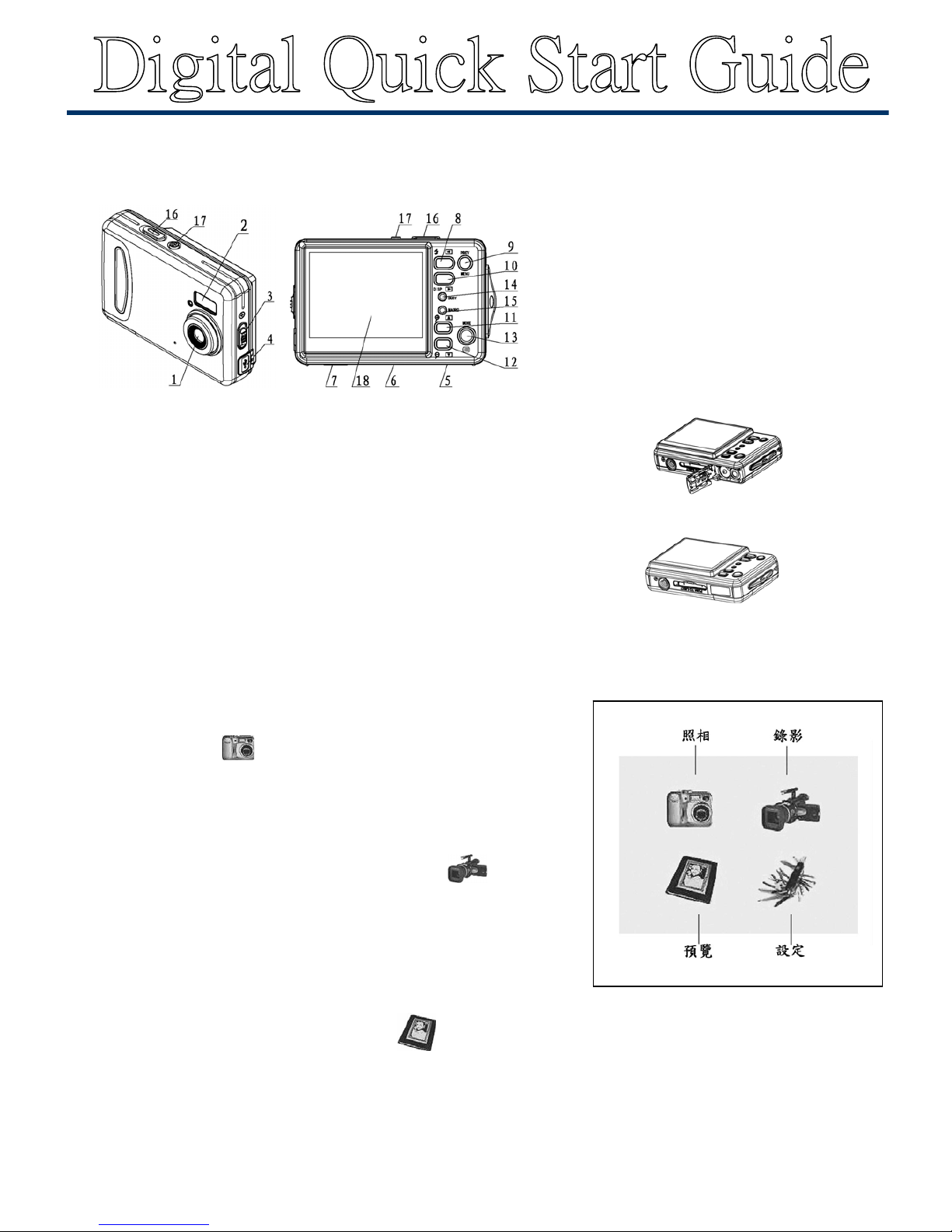
相機導覽
快速啟動
1. 裝入電池
打開電池蓋, 依電池門標示之正負極指示, 正確裝入兩個 AAA 電池後關
閉電池蓋。
2. 插入記憶卡
將SD卡標籤朝向與相機正面同一位置, 依箭頭方向指示將卡片插入插槽,
確定 SD 卡正確插入。
3. 拍照 / 錄影
※拍照
(a). 按電源按鍵開啟相機進入拍照模式,或按 ”選單” 鍵進入選單模式後,
選擇拍照模式”
“ 後, 按” OK”鍵進入拍照模式。
(b). 按快門鍵開始照相。
.
※錄影
(a). 按”選單” 鍵進入選單模式後,選擇 “錄影模式” “後,按”
OK”鍵進入拍照模式。
(b). 按快門鍵開始照相。
4. 預覽
(a). 按”MENU” 鍵鍵進入選單模式。
(b). 按上下左右鍵移動紅色框框, 選擇 “ 預覽” 進入預覽模式。
(c). 按左右鍵選擇預覽相片或影片。
**其他設定及詳細功能描述請參考說明書手冊**
1. 鏡頭
2. 閃光燈
3. 近拍調整紐
4. USB 接頭
5. 電池蓋
6. SD 卡插槽
7. 三腳架孔
8. 左鍵
9. 選單鍵
10. 右鍵 / 顯示
11. 上鍵
12. 狀態鍵
13. 下鍵
14. 忙碌顯示燈
15. 近拍顯示燈
16. 快門/ OK 鍵
17. 電源鍵
18. LCD 顯示器
裝 入 電 池
插 入 記 憶 卡
Page 2
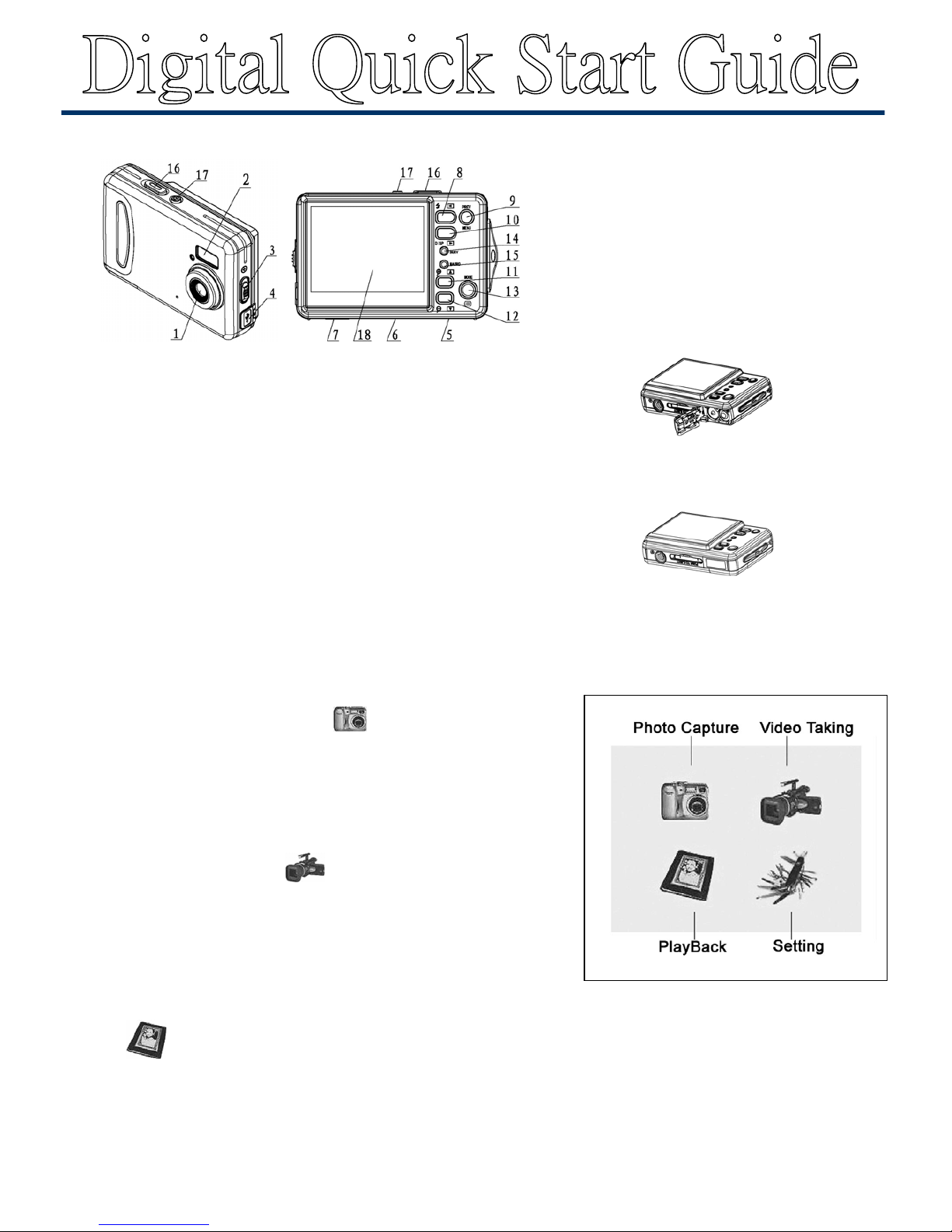
Camera Overview
Quick Start
1. Load the batteries
Open the battery cover and put in batteries according to the polarity
indicated on the battery door.
2. Insert the memory card
Make the front side of the card facing the front face of the camera, then
insert the card inside softly.
3. Taking Pictures
※Photo Capture
(a). Press “POWER” button to enter capture mode or press “MENU”
button to select “capture mode”
,
then press “OK” button.
(b). Press Shutter button to take pictures.
Taking ※ Video
(a). Press “POWER” button and then press “MENU” button to enter main
menu, select “video mode”
, and press “OK” button
(b). Press “SHUTTER” button to start or stop recording.
4. Playback
(a). Press “MEMU” button to enter main menu
(b). Press “Left / Right key to move red box and select “playback”
mode then press “OK” to enter playback mode
(c). Press “Left / Right” button to playback pictures or video clip display
** For further set up functions and details, please check users
manual for more information. **
1. Lens
2. Flash light
3. Macro button
4. USB Jack
5. Battery Cover
6. SD card slot
7. Tripod socket
8. Left /Flash
9. Menu Button
10. Right / Disp
11. Up
12. Mode Button
13. Down
14. Busy Light
15. Macro light
16. Shutter / Ok button
17. Power button
18. TFT LCD Display
Insert the Memory card
Load the batteries
 Loading...