

Page 1
USER’S MANUAL
In order to continue serving our customers and providing the best
products, our product information including user manual may receive
updates continually. Please check our website (megawheels.com) for
the latest user manual and product materials.
Page 2

Thank you for your purchase of the Two Wheels Self Balancing
Hoverboard by MEGAWHEELS® !
You’re about to take the next step in the evoluon of transportaon. The
MEGAWHEELS hoverboard will offer you funny riding experience aer
you take few minutes to learn how to ride it.
To ensure your safety and the safety of others, please read and follow
the guidelines in this User Manual carefully and thoroughly before riding.
If you have any quesons or concerns, send us an email or call us at
001-855-783-1888 for further assistance. MEGAWHEELS Team will offer
full support and service unl you sasfied with your purchase!
Happy Riding!
-MEGAWHEELS® Team
01
Page 3

1 GENERAL INFORMATION
1.1 ABOUT THE PRODUCT
1.2 WHAT'S IN THE BOX
1.3 WHAT'S NEW
1.4 SAFETY NOTICES
2 PRODUCT FEATURES
2.1 MEGAWHEELS HOVERBOARD DIAGRAM
2.2 QUADRUPLE PROTECTIONS
2.3 BLUETOOTH
3 HOW TO RIDE
3.1 RIDING INSTRUCTIONS
3.2 HOW IT WORKS
3.3 RE-CALIBRATION
4 SAFE RIDING TECHNIQUES
5 BATTERY INFORMATION
5.1 CHARGING INSTRUCTIONS
5.2 BATTERY INDICATOR
5.3 RANGE PER CHARGE
5.4 SAFETY WARNINGS
6 MAINTENANCE
6.1 CLEANING
6.2 STORAGE
6.3 TRANSPORTATION
7 SPECIFICATIONS
8 ONE YEAR LIMITED WARRANTY
CONTACT US
...............................................................03
..............................................................03
..................................................................03
..............................................................................04
......................................................................04
......................................................................05
................................05
...................................................05
................................................................................06
..................................................................................07
.............................................................07
.........................................................................09
.....................................................................11
.........................................................12
...............................................................14
........................................................14
.................................................................15
..................................................................16
....................................................................16
..............................................................................19
.................................................................................19
.................................................................................19
....................................................................19
............................................................................20
..................................................21
CONTENTS
02
Page 4

1 GENERAL INFORMATION
03
This User Manual will guide you through the functions and usage of
your MEGAWHEELS
®
hoverboard. Before operating this vehicle, read
all the instructions for safe assembly, charging and operation.
Please inspect the MEGAWHEELS
®
unit upon unpacking for any signs
of physical damage or defects.
Additionally, ensure that the MEGAWHEELS
®
item is fully charged
before calibrating and using.
Have any question, or have any defect for the MEGAWHEELS
®
unit,
write an Email to us before you attempt to use or return your hoverboard.
The MEGAWHEELS
®
Hoverboard is a self-balancing, personal
transporter that uses gyroscopic technology to revolutionize the way
you travel. Steering and stopping are controlled by Dynamic Equilibrium all based on the shifting of your body weight. It’s simple to operate,
easy to control and looks incredibly cool!
The MEGAWHEELS
®
can move forwards, backwards, turn in either
directions or turn in circles. Besides, it is environmentally friendly and
uses only the highest quality components and industry-leading safety
features.
1.1 ABOUT THE PRODUCT
1.2 WHAT'S IN THE BOX?
- 1* MEGAWHEELS Hoverboard
- 1* Charge Adaptor
- 1* User’s Manual
Page 5

04
The two wheels hoverboard carries the latest technology from
MEGAWHEELS
®
, including many new features that make riding safer
and more fun.
- Built-in Bluetooth, so you can enjoy your music when riding the
hoverboard;
- High grade aluminum alloy frame, aluminum wheels with superior
traction tires;
- Non-slip foot pedals for comfortable, more stable riding;
- High-purity copper motor with strong power;
- Battery life at a glance with the LED Battery Indicator;
MEGAWHEELS
®
has been designed with the utmost safety in mind for
its riders. Extra precautions have been taken to protect the user from
product hardware malfunctions through our meticulous design and
engineering.
However, like any other riding products, the MEGAWHEELS
®
has
inherent hazards associated with its use (for example: losing control,
falling off, or riding it into a hazardous situation). Therefore, it is
important to read and follow all instructions and warnings in the User
Manual and use good judgment in order to ride safely.
By riding the MEGAWHEELS
®
, the user acknowledges and accepts
personal responsibility of all risks associated with it, which may include,
but are not limited to muscle injuries, broken bones, lacerations, or
other serious injuries that may be sustained while using the hoverboard.
1.3 WHAT'S NEW?
1.4 SAFETY NOTICES
IF YOU ARE EVER IN AN ACCIDENT, PLEASE CONTACT EMS /
DIAL 911 IMMEDIATELY.
Page 6
05
2 PRODUCT FEATURES
Your safety is our top priority. That’s why the MEGAWHEELS® utilizes
a premium quality lithium ion battery pack that is specifically designed
for the hoverboard. We’ve also added multilayered protection to give
you peace of mind.
Topping it all off is a smart Battery Management System (BMS) that
constantly monitors the following areas for your utmost safety:
- Overvoltage protection
- Temperature increases protection
- Overcharging protection
- Over-current and short circuit protection
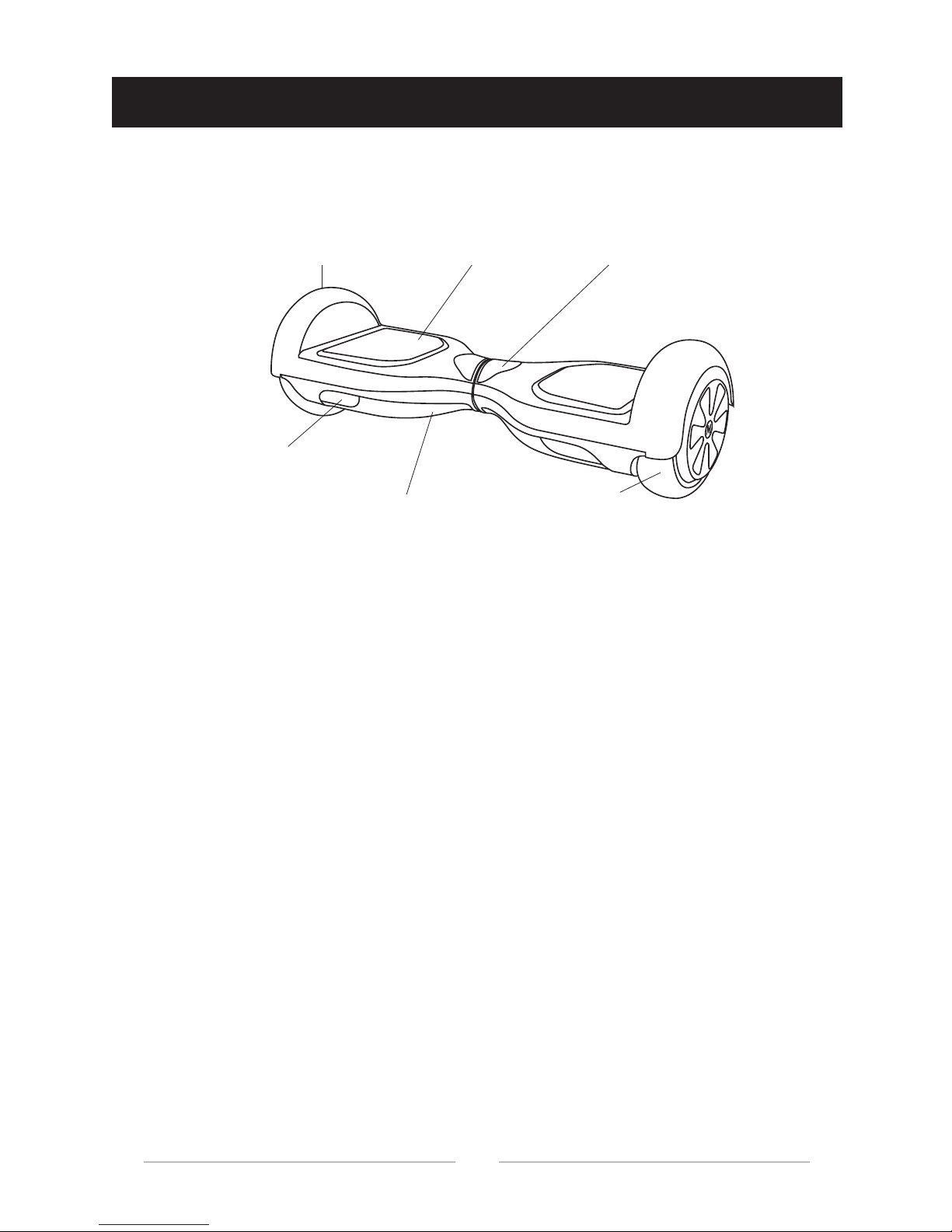
2.1 MEGAWHEELS® HOVERBOARD DIAGRAM
2.2 QUADRUPLE PROTECTIONS
Fender Pedal Indicator
Tire
Decorative Light
Protective cap for chassis
Page 7

06
A. After you turn on the hoverboard, it will make a sound of "Dingdong"
to indicate that the Bluetooth is on and awaiting for your possible
connection.
B. Using your phone, turn on Bluetooth
®
, and make it "discoverable" if
needed, then search. The Bluetooth name "MEGAWHEELS" should
appear.
C. Select "MEGAWHEELS" and begin connecting if you would like to
play music on your MEGAWHEELS
®
.
D. After successfully connecting your board, you may begin playing
music at any time anywhere.
E. To end the connection between the devices, you just need to turn
off Bluetooth
®
on your mobile device.
2.3 BLUETOOTH
Page 8
3 HOW TO RIDE
It is highly recommended to begin your first scooter experience with
the help of a friend. Having a helping hand during initial use will
increase your confidence and help you become acclimated to your
scooter. Besides, always wear the proper safety gear before riding the
hoverboard.
Before operating, charge your MEGAWHEELS unit with the included
power adapter. Charge time can take up to 90-120 minutes.
Put the hoverboard on the horizontal floor or table, keep it level. Press
and hold the power button, then you will hear a beep voice, the battery
indicator light will light up in green, which indicate that the unit is on.
07
3.1 RIDING INSTRUCTIONS
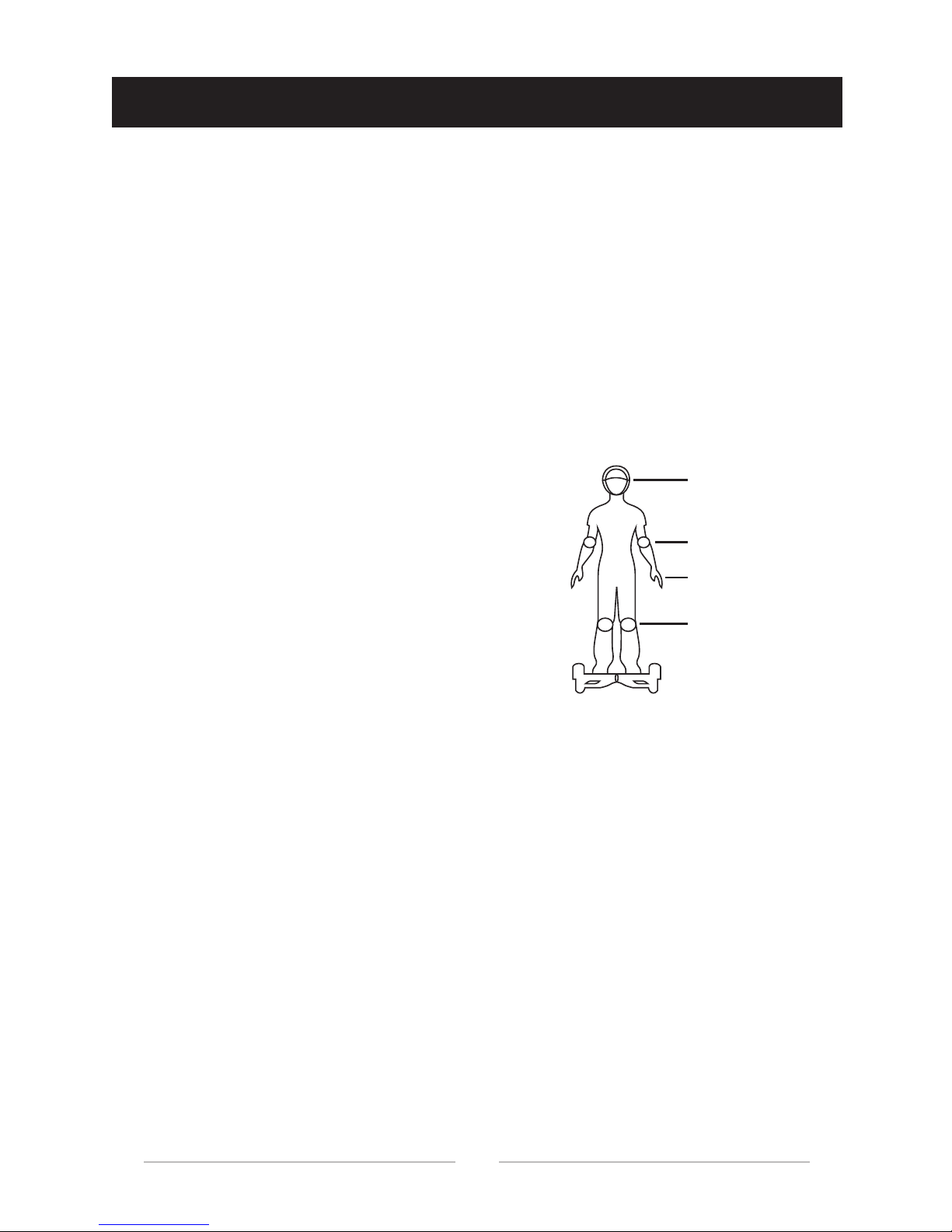
Step 1- Put on your Safety Gear
Step 2 -Getting Started
On the top of the board, there are two indicator lights: Battery power
level indicator light and system indicator light. When the board is on,
the battery power level indicator light should be lit, indicating there is
power to the device.
A. Battery Power Level Indicator:
The Green LED light indicates that the scooter is fully charged, while
red LED light indicates the power is down to 10% or less, then you will
need to recharge the device.
Step 3- Checking The Status
Helmet
Elbow Pads
Wrist Guards
Knee Pads
Wear all proper safety gear that you have,
including, but not limited to a helmet, knee
pads, elbow pads and wrist guards.
Page 9
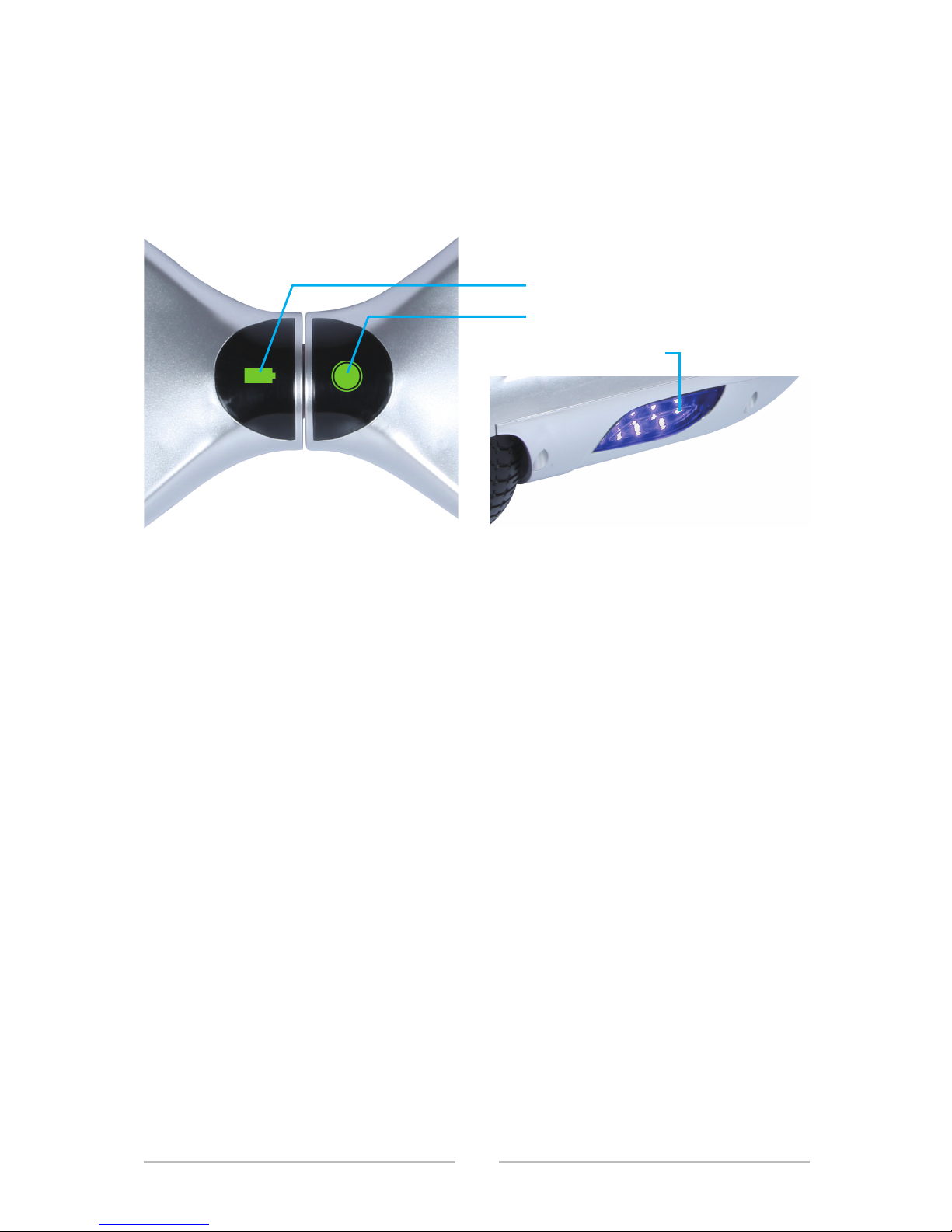
B. System Indicator:
When the gyroscope on pedal is triggered, the green system indicator
light will light up, which means that the system work correctly. When
the system has an error during operation, the system indicator light will
turn red and the system will alert the rider with a "beep" voice.
Step on one pedal to trigger the sensor, the system will enter
self-balancing mode. Then step on the second pedal with your other
foot quickly.
08
Step 4- Step on the board
Stand upright but relaxed. Do not make any sudden or jerky movements.
The MEGAWHEELS
®
has 4 sensor points on the sides of both pedals that
nearby wheels. When the rider steps on a pedal, the MEGAWHEELS
®
will
adjust itself to balance automatically.
If the board does not seem to work, check to be sure your feet are on
pedals near the wheels to trigger the sensors.
If the MEGAWHEELS
®
does not enter self-balancing mode when triggering
the sensor, the System indicator will turn red and flashing, together with
"beep" voice. DO NOT operate the MEGAWHEELS
®
under these
conditions. Please power the unit off and back on again. If this fails resolve
the issue, re-calibrate the board by following the Calibration Instructions
on Section 3.3.
Step 5- Staying balanced
Blue LED lights
(A) Battery Power Level Indicator
(B) System Indicator
Page 10
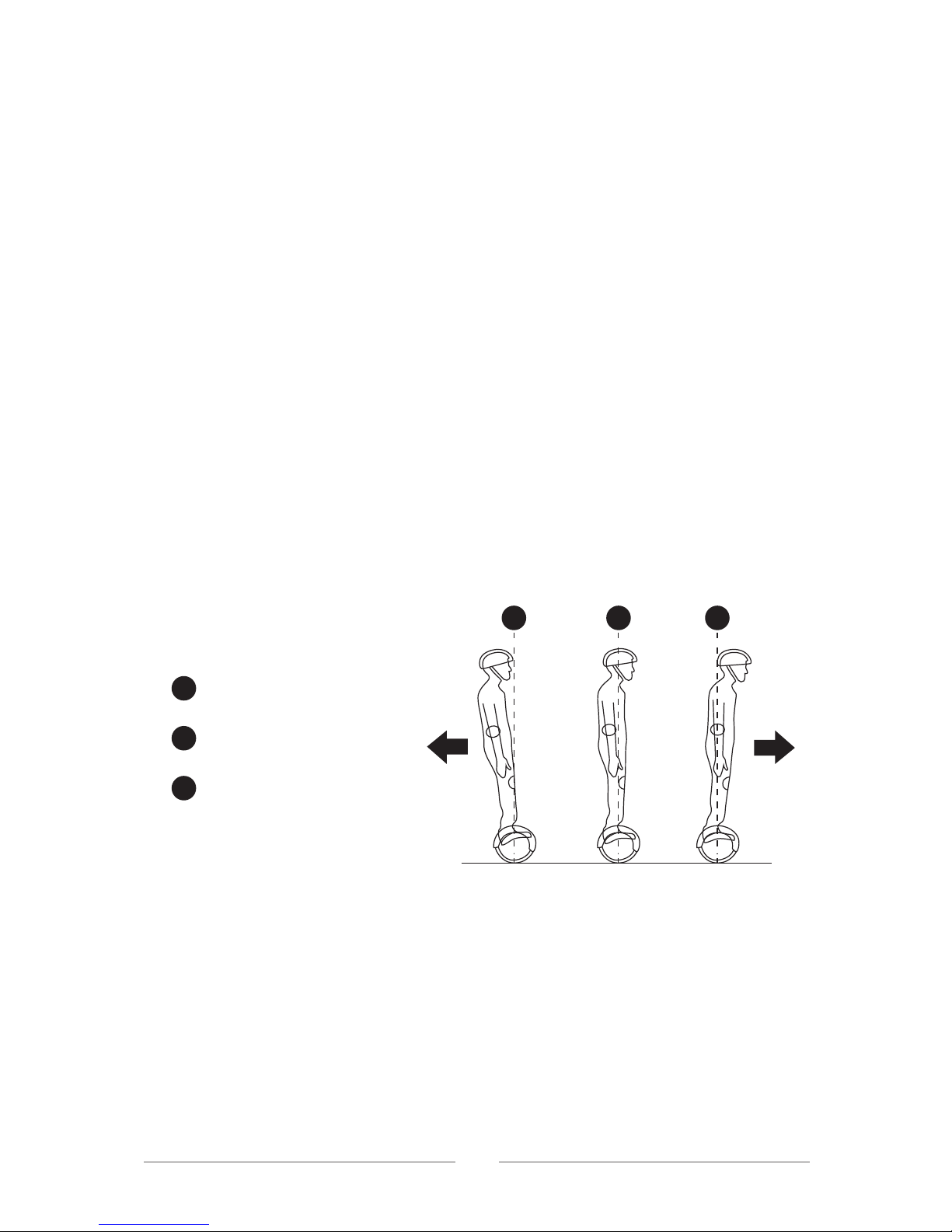
NOTE: When riding the MEGAWHEELS® , you must make sure both feet
are touching the pedals for proper detection. Do not put other objects on
the pedals, as it could cause the system to lock or move on its own.
NOTE:
- Do not tilt forward or backwards beyond 10º, as the unit may malfunction.
- The MEGAWHEELS
®
will not function if your unit flips upside down.
- Avoid uneven or rocky surfaces as the board may not function properly.
- Avoid hills or slopes of more than 20º incline.
- When the operator exceeds the maximum speed, the MEGAWHEELS
®
will emit a warning alarm.
The MEGAWHEELS
®
self-balances and moves because of Dynamic
Equilibrium. This is generated by the shifting of your body weight. The
hoverboard uses an internal gyroscope with acceleration sensors to move
based on your center of gravity. When you lean forward, it will sense your
actions and accelerate. When you need to turn, slow down and gently shift
the weight on your left or right foot to turn towards the opposite direction.
Start by just thinking about moving forward. It’s natural to lean in the
direction you want to go, and just a slight weight shift toward the front of
the hoverboard will move it.
If the hoverboard isn’t moving yet, slowly and carefully lean forward until
the hoverboard begins to move. Don’t worry if you move in circles at first.
The board will turn when you lean toward one side or the other, so finding
the perfect balance to go straight takes a little practice. Continue using it
with a spotter beside until you get the hang of it.
09
3.2 HOW IT WORKS
A. Lean forward slowly
To move backwards
To stop
To move forwards
A
A
B
C
B C
Page 11

10
To turn left, push your right toe forward slightly. Push forward with your left
toe to turn right. After a bit of practice, it will seem like the board knows
where you want to go before you do!
For a sharper turn, pull back with the opposite foot just a little. For
example, if you want to make a sharp left turn, push forward with your right
toe while pulling back your left toe. With practice, you’ll even be able to spin
in circle.
The hoverboard can move backward, too. Make sure the space behind you
is clear. Lean back just a little. The board will move in the direction you
lean. Remember, just a slight shift in weight is all that it takes to move the
board.
Stand straight up and down until the board slows and stops. Then, simply
reverse what you did to get on the board. Shift your weight to your dominant foot and step off with the other foot. Use your core to control.
Getting on and off the board is the hardest part. Practice this with a spotter
until you are very comfortable. Remember, don’t jump off the board.
The MEGAWHEELS
®
has an inertial dynamic stabilization system that
keeps you upright. However, it will stop detecting you if you lean too far left
or right or if you take a foot off of the board. Slow down before turning or
you will fall off and be injured.
NOTE:
- Avoid turning suddenly when riding fast, as this may result in an accident.
- Avoid riding sideways or turning on slopes. The self-balancing sensors
may malfunction and may require recalibration.
- Do not step on the center pivot point of the MEGAWHEELS
®
.
- If the board flips over or rotates more than 180 degrees, the motor and
riding capability will be disabled. To restore normal functionality, power off
the unit and then power it back on. After this, continue to ride as normal.
B. Turning
C. Moving backward
D. Stepping off
Page 12
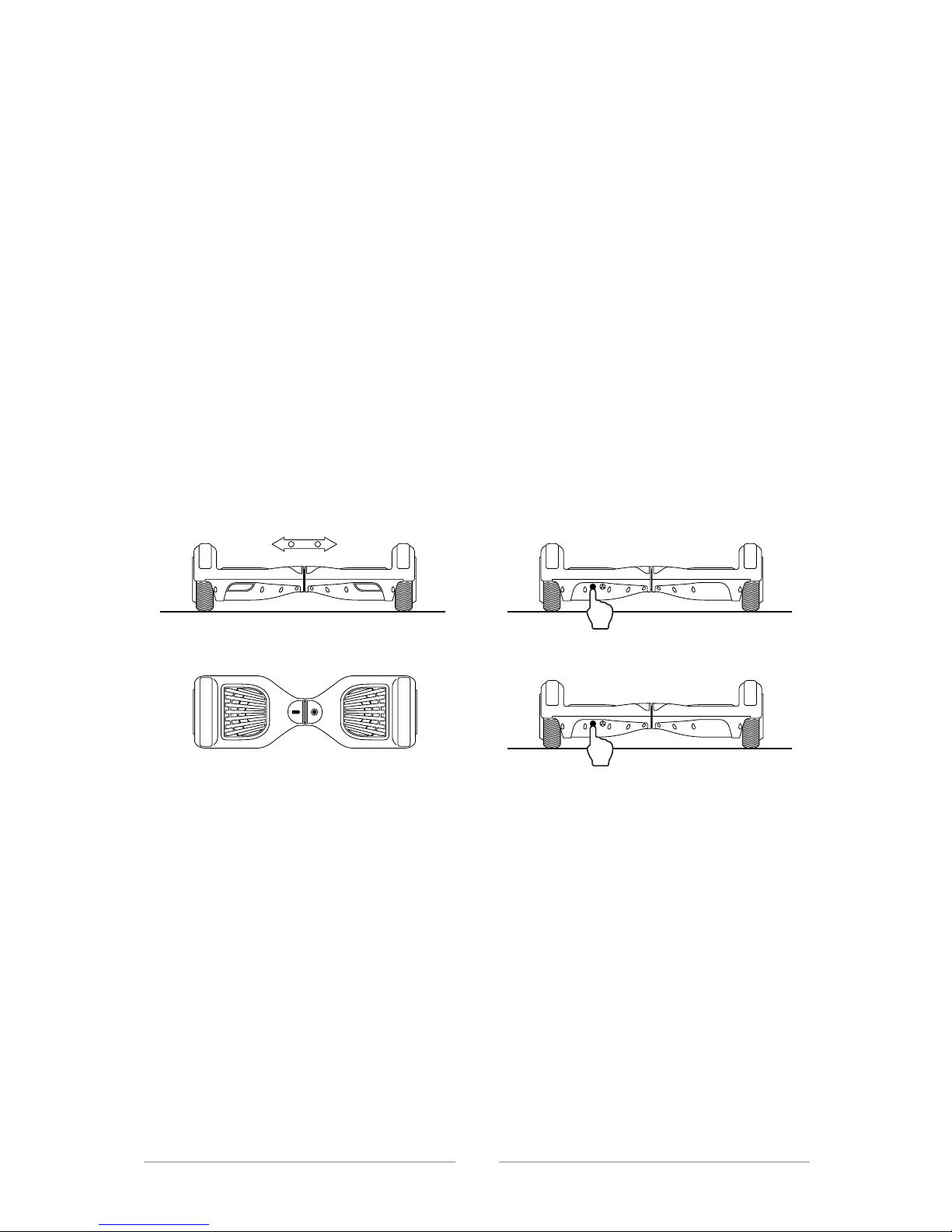
11
3.3 RE-CALIBRATION
If your MEGAWHEELS® seems to pull to the left or right during your ride, or
the system indicator flashing red light together with beep voice and other
situations that the board seems to be unbalanced, you may need to
recalibrate its sensors. To calibrate your unit, follow the instructions below.
Step 1- Power your hoverboard off
Step 2- Place your MEGAWHEELS
®
horizontally, make the both wheel
bases are level to the ground.
Step 3- Long press the power button and keep your finger on it, the system
indicator light on the hoverboard will be on and flash for 5 times and come
out a beep voice.
Step 4- Release your finger, the system indicator light will keep on, and
then press the power button to power it off.
Step 5- Power on the hoverboard again, the balance is adjusted.
If the MEGAWHEELS
®
can't be calibrated correctly, repeat step 1 to 5 or
contact customer support for additional assistance.
Keep level Press for 5S
Lights flashing Turn off
Page 13

12
4 SAFE RIDING TECHNIQUES
We sincerely hope every user can ride the MEGAWHEELS® safely. Think
back to when you first learned to ride a bike, skateboard or even drive a
car.
Although the MEGAWHEELS
®
is designed with gyroscopic balancing
technology in order to maintain maximum stability, it is still possible to
"override" the hoverboard and tip over when riding too fast for the conditions.
Following these techniques can help ensure that you have a safe, fun
riding experience on the MEGAWHEELS
®
.
NOTE:
- MEGAWHEELS
®
highly recommends wearing appropriate safety gear
before riding your hoverboard.
- When going through doorways, remember that you are only 11 cm taller
on the board, don't ride it through.
- Wear flat shoes to maintain flexibility and stability.
- Use your best judgment to keep yourself out of dangerous situations with
your scooter.
- Make sure your feet are always on the pedals. Taking your feet off the
board while riding is incredibly dangerous.
- Bend your knees when riding on bumpy or uneven pavement to absorb
the shock and vibration, which help keep your balance. If you are unsure if
you can safely ride on a specific terrain, step off and carry your scooter.
- Ensure the vehicle speed is safe for yourself and others, and be ready to
stop at any time.
- When riding near others, keep a safe distance to avoid collisions.
Page 14

13
- Be alert to your surroundings in order to ensure a safe ride.
- Stay in open spaces and flat areas. Avoid steeps slopes or high traffic
areas until you’re familiar with riding.
- The hoverboard can only support the weight of one person at a time.
- Only ride the MEGAWHEELS
®
where it is permitted. You MUST comply
with local laws and give way to pedestrians.
WARNING:
Never ride at high speeds on uneven terrain or slopes.
Never perform stunts or turn abruptly without checking your
surroundings.
Never carry one or more passengers on the board with you.
Never carry heavy items while riding.
Never ride in the rain, dark, or dimly lit areas.
Never continuously spin in place, it will cause dizziness and you
could fall and injure yourself.
Never use the MEGAWHEELS
®
to do anything that may cause
personal injury or property damage.
Never ride backwards for long distances or at high speeds.
Never step off the board when it is in motion.
Never place anything on the rider detection pads except your feet.
Doing so may cause the MEGAWHEELS
®
to travel on its own, risking
collision with a person or property and causing injury or damage.
Never operate your MEGAWHEELS
®
near flammable vapor, liquids,
dust, or other fire hazards.
Never ride your MEGAWHEELS
®
after consumption of alcohol, drugs,
or while intoxicated. You can be arrested for drunk driving.
Never try and use the scooter once the battery has run out.
Page 15
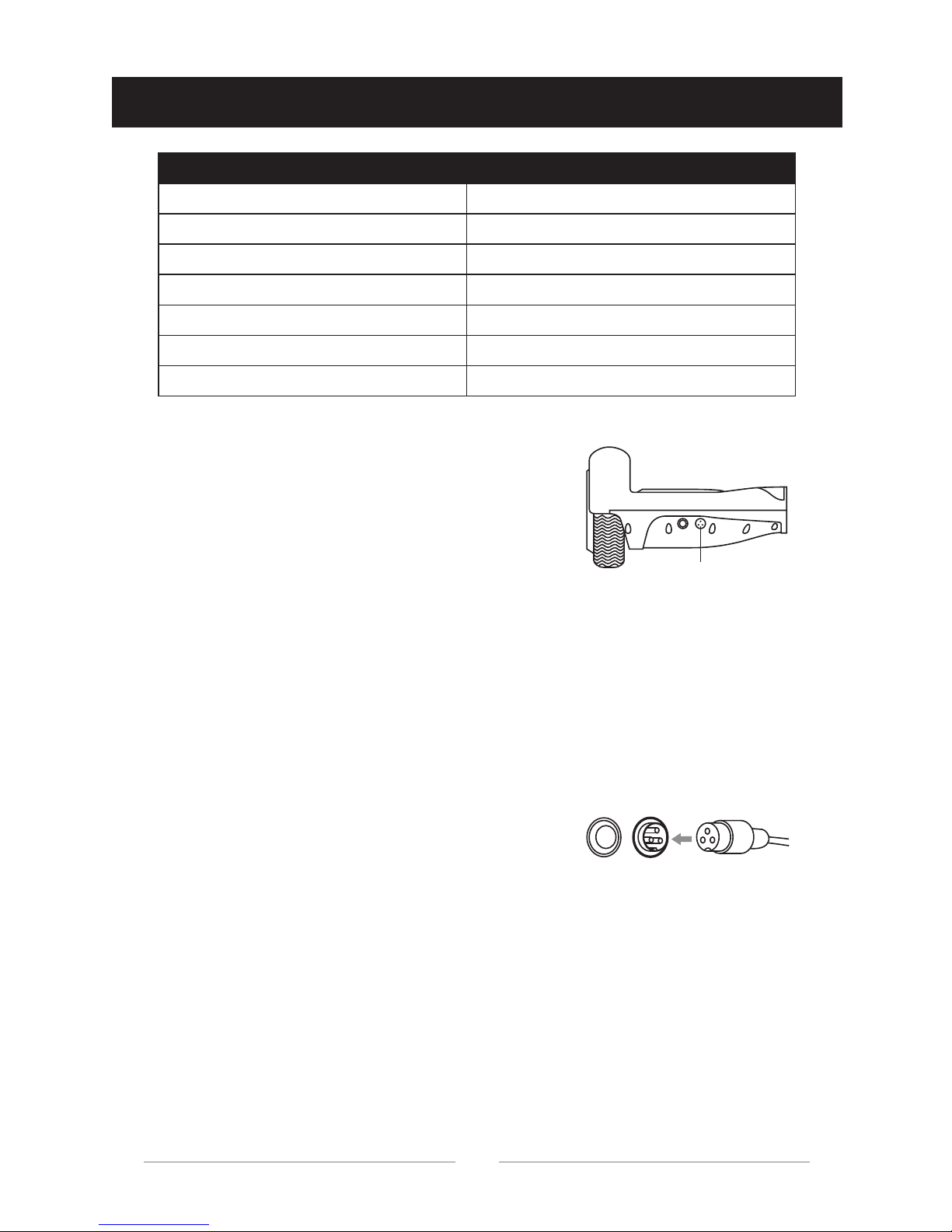
14
5 BATTERY INFORMATION
For the safety of yourself and others and to
extend the battery’s life, please be sure to
abide by the following instructions.
Step 1- Plug the charger into a grounded wall outlet (100-240V; 50-60Hz).
Now the charger light is in green color.
Before charging, make sure that the charging port is clean and dry.
Step 3- The total charging time is approximate 90-120 minutes.
Use only the charger provided with your MEGAWHEELS
®
hoverboard. If
you have lost or misplaced your charger, contact our customer support to
obtain a replacement.
Step 2- Connect the charging cable into the
charging port of the scooter. The indicator
light on the charger should change to RED,
which indicate that your scooter is now
being charged. When the RED indicator
light on your charger turns back to GREEN,
your scooter is fully charged.
5.1 CHARGING INSTRUCTIONS
ITEM PARAMETER
Battery type Lithium-ion Battery
Charging time 90-120 minutes
Voltage 36V/2.0Ah
Working Temperature -20°C~60°C
Charging Temperature 0°C~45°C
Storage Temperature 0°C~40°C
Power Requirement AC~100-240V/50-60 Hz
Charging port
Page 16

NOTE:
- When the battery is fully charged, please STOP CHARGING and unplug
the unit.
- Please keep your charging environment clean and dry.
- If the charging port is damp or has any liquid on it, do not charge your
hoverboard.
- Avoid charging your MEGAWHEELS
®
in extremely hot or extremely cold
environments.
DO NOT charge the battery in the following cases:
- There is excessive odor or heat.
- Leakage or physical damage.
WARNING:
Disassembly and battery maintenance should only be performed by an
authorized professional. DO NOT touch or consume any substances
leaking out of the battery. DO NOT allow children and animals to touch or
consume the battery.
When the battery indicator is at the lowest level or starts flashing, you
MUST cease operation of your MEGAWHEELS
®
immediately.
NOTE:
- Indicators cannot be turned off.
- Immediately stop riding the board if the warning light is flashing. The unit
may be unable to properly self-balance.
- If the battery is overloaded, the temperature has become too hot. A short
buzzer will sound and the System Indicator will begin to flash. Gradually
slow down, get off and power down the unit to allow it to cool down. Once
the battery and unit have had time to cool down, the unit will power up
normally. If the problem persists, do not ride the unit and contact customer
support immediately.
15
5.2 BATTERY INDICATOR
Page 17
The mileage of your MEGAWHEELS® on a full charge is about 7-10km,
However, many factors need to be considered when determining the actual
range per charge.
If the battery voltage is too low or over-worked during operation, the
MEGAWHEELS
®
unit will power off after 15 seconds to protect the internal
components from damage.
Misusing the battery may cause the battery to get hot, rupture or ignite and
cause serious injury. Be sure to follow the safety rules listed below:
- Do not place the battery in fire or direct contact with high temperature
objects.
- Do not pierce the battery with sharp objects, strike the battery with a
hammer, step on the battery, or otherwise subject it to strong impacts or
shocks.
- Do not expose the battery to water or any liquids, or allow it to get wet.
16
5.3 RANGE PER CHARGE
5.4 SAFETY WARNINGS
A. When using the battery
FACTOR COMMENT
Speed and Riding Style
Keep a moderate, consistent speed.
Frequent starting, stopping, acceleration,
and deceleration will reduce riding range.
Rough terrains or slopes can decrease your
range due to motor use. Ride on smooth or
even roads for maximum performance.
The weight of the operator can influence
your riding distance.
Avoid environments that are too hot or too
cold, as the motor will decrease power to
protect itself.
Topography
Weight
Temperature
Page 18

Note: Be sure to follow the rules listed below while charging the battery.
Failure to do so may cause the battery to become hot, rupture or ignite and
cause serious injury.
- When charging the battery, use a specified battery charger provided in
the package together with MEGAWHEELS
®
.
- Do not exceed recommended charging time.
- Do not place the battery in or near fire, or under direct sunlight.
- Do not continue charging the battery if it does not recharge within the
specified charging time. Doing so may cause the battery to become hot,
rupture or ignite.
- Do not disassemble or modify the battery. The battery contains safety
and protection devices which, if damaged, may cause the battery to
generate heat, rupture or ignite.
- Do not place the battery on or near fires, stoves, or other high-temperature locations.
- Do not place the battery in direct sunlight, or use or store the battery
inside cars in hot weather. Doing so may cause the battery to generate
heat, rupture or ignite. Using the battery in this manner may also result in a
loss of performance and a shortened life expectancy.
- If the device is to be used by children, the adult should explain the
contents of the user manual to the children, and provide adequate supervision to ensure that the device is being used properly.
- Immediately discontinue use of the battery if, while using, charging, or
storing the battery, the battery emits an unusual smell, feels hot, changes
color, changes shape, or appears abnormal in any other way.
- Do not place the batteries in microwave ovens, high-pressure containers,
or on induction cookware.
- In the event that the battery leaks and the fluid gets into one’s eye, do not
rub the eye. Rinse well with water and immediately seek medical care. If
left untreated, the battery fluid could cause damage to the eye.
17
B. When charging
Page 19

-The charging temperature of the battery is 0℃~40℃. Charging the
battery at temperatures outside of this range may cause the battery to
become hot or to break. Besides, it may also harm the performance of the
battery or reduce the battery’s life expectancy.
Do not discharge the battery using any device except for the specified
device. Otherwise, it may damage the performance of the battery or reduce
its life expectancy, and if the device causes an abnormal current to flow, it
may cause the battery to become hot, rupture or ignite and cause serious
injury.
18
C. When discharging the battery
Page 20

Your MEGAWHEELS® needs to be maintained in order to have the best
riding experience. Follow the bellowed tips to keep your board running in
top condition.
Proper operation to clean your MEGAWHEELS
®
can promote a longer
lifespan and a smoother riding experience.
- Wipe the outer shell of your board with a soft, dry microfiber cloth.
- Check around the wheels and ensure that there is no blockage.
- MEGAWHEELS
®
can withstand splashes. However, do not submerge the
board in water.
- Do not let water and liquids get into the electric parts or battery of
hoverboard.
19
6 MAINTENANCE
6.1 CLEANING
Before storing your hoverboard, fully charge the battery to avoid over
discharging due to non-use.
- Discharge and recharge the battery every three months.
- Store your MEGAWHEELS
®
indoors at a dry and suitable temperature at
0°C to 40°C. DO NOT store it in an unheated garage or shed.
6.2 STORAGE
NOTE:
Lithium ion batteries are considered as hazardous materials, therefore
transportation is governed by federal, state and local laws.
International law prohibits the shipping of bare lithium ion batteries. If you
are shipping your MEGAWHEELS
®
, you must ship it with the battery
installed.
6.3 TRANSPORTATION
Page 21
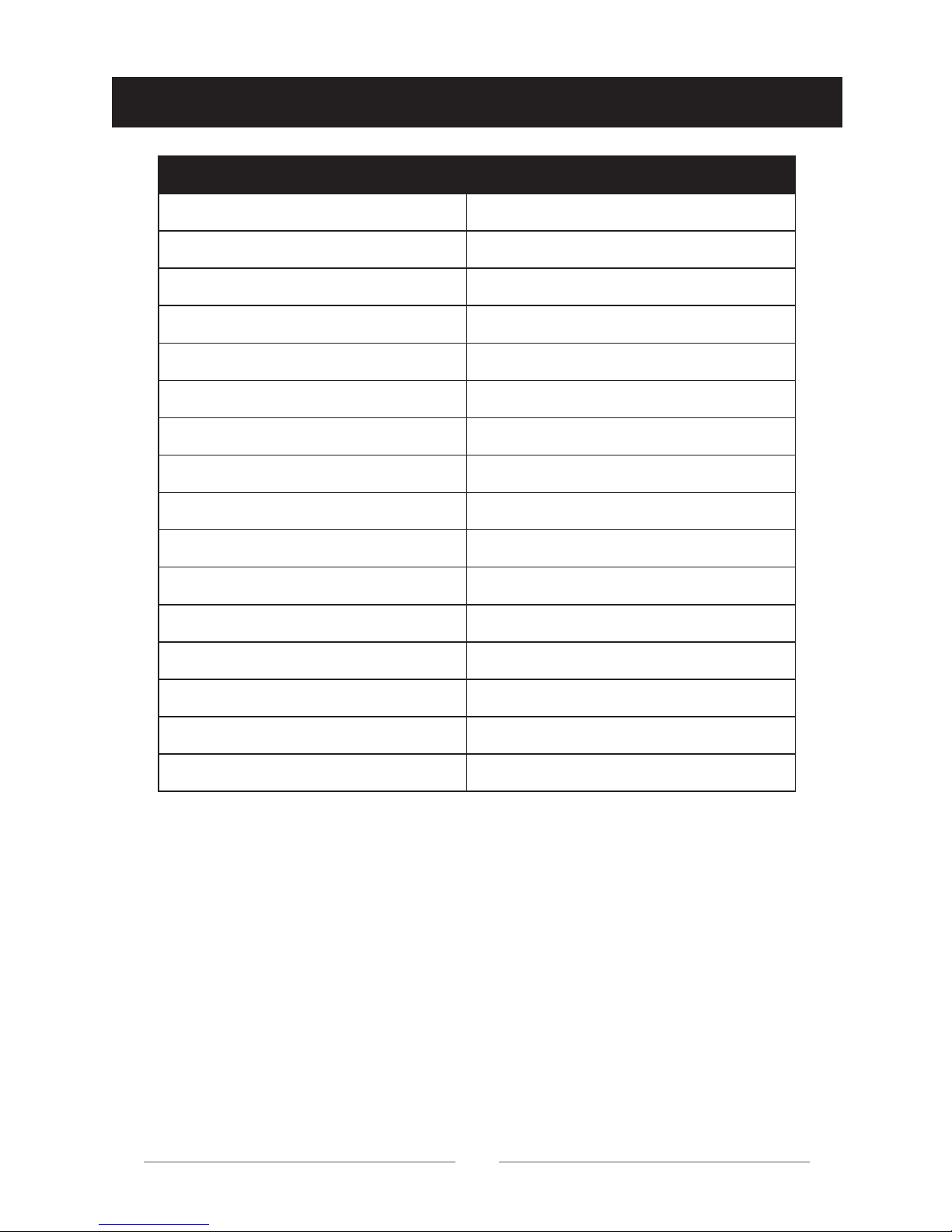
7 SPECIFICATIONS
20
ITEM PARAMETER
Net Weight 8.3kg
Body size 580*170*180mm
Frame Aluminum alloy
Tire material Hard Rubber Tire
Motor 500W (250W*2)
Max load 100kg
Min load 20kg
Max speed 10km/h
Max range About 7-10km per full charge
Min turning radius 0°
Climbing capacity 15°- 20°
Pedal height 110mm
Tire diameter 6.5"
System Dual system
Certificate Standard UL2272,CE,RoHS
Bluetooth Yes
Page 22

8 ONE YEAR LIMITED WARRANTY
Your MEGAWHEELS Hoverboard includes a One Year Limited Hardware
Warranty ("Warranty"). The Warranty covers product defects in materials
and workmanship under normal use. This Warranty is limited to residents
of the United States and is available only to original purchasers.
This Warranty starts on the date of your purchase and lasts for one year
(the "Warranty Period").
The Warranty Period is not extended if the Product is repaired or replaced.
We may change the availability of this limited warranty at our discretion,
but any changes will not be retroactive.
Warranty services are provided by MEGAWHEELS™. If a hardware defect
arises and a valid claim is received within the Warranty Period, at its option
and to the extent permitted by law, MEGAWHEELS™ will:
(1) Repair the hardware defect by using new or refurbished parts that are
equivalent to new in performance and reliability;
(2) Exchange the Product with a product that is new or refurbished which is
substantially equivalent to the original product. This Warranty is for one
replacement only of like-items and does not cover items out of production if
the product is no longer made or stocked.
This Warranty is not assignable or transferable.
This warranty only covers technical hardware defectiveness during the
warranty period and under normal use conditions. MEGAWHEELS™ does
not warrant uninterrupted or error-free operation of this Product.
Terms & conditions (Refund /Replacement /Maintenance):
(1) When purchase time (from the time when customer bought the product)
is less than 1 month, we can offer refund or replacement;
(2) When purchase time is 1-3 months, free maintenance or
replacement will be available, and we will cover the shipping and maintenance fees;
21
Page 23

(3) When purchase time is 3-6 months, we offer free maintenance and pay
the shipping fee to send it back to customer, but customer should cover the
shipping fee to send the defect product back to us;
(4) When purchase time is 6-12 months, we only offer free maintenance,
customers should pay for all the shipping fees.
The following conditions are not covered by the warranty, only the maintenance service is provided but the maintenance fee is charger.
(1) Damage caused by any man-made factors, including improper use and
failure to keep in accordance with the instructions.
(2) This limited warranty doesn't cover any problem that is caused by
conditions, malfunctions, or damage not resulting from defects in material
or workmanship. This conditions may include, but not limited to, road
hazards, accidents and improper operation or maintenance.
Important: Do not disassemble the Product. Disassembling the Product will
void this Warranty. Only MEGAWHEELS™ or a party expressly authorized
by MEGAWHEELS™ should perform service on this Product.
22
Page 24
CONTACT US
NEED HELP?
Send us e-mail for replacement parts and product support.
[email protected] For Amazon Customer Support
[email protected] For eBay Customer Support
[email protected] For Official Website Customer Support
Or call our customer service line on:
US Local Service : (626) 453-0189
Global Free Call: 001-855-783-1888
https://www.megawheels.com
 Loading...