

Megavoice ENVOY 2 Elite Z, ENVOY 2 Echo, ENVOY 2 Elite, ENVOY 2 Ember, ENVOY 2 Equip User Manual
...Page 1
ENVOY 2
E/EZ SERIES
SOLAR AUDIO PLAYER
Models: Elite/Z, Echo/Z, Equip/Z, Ember/Z
USER MANUAL
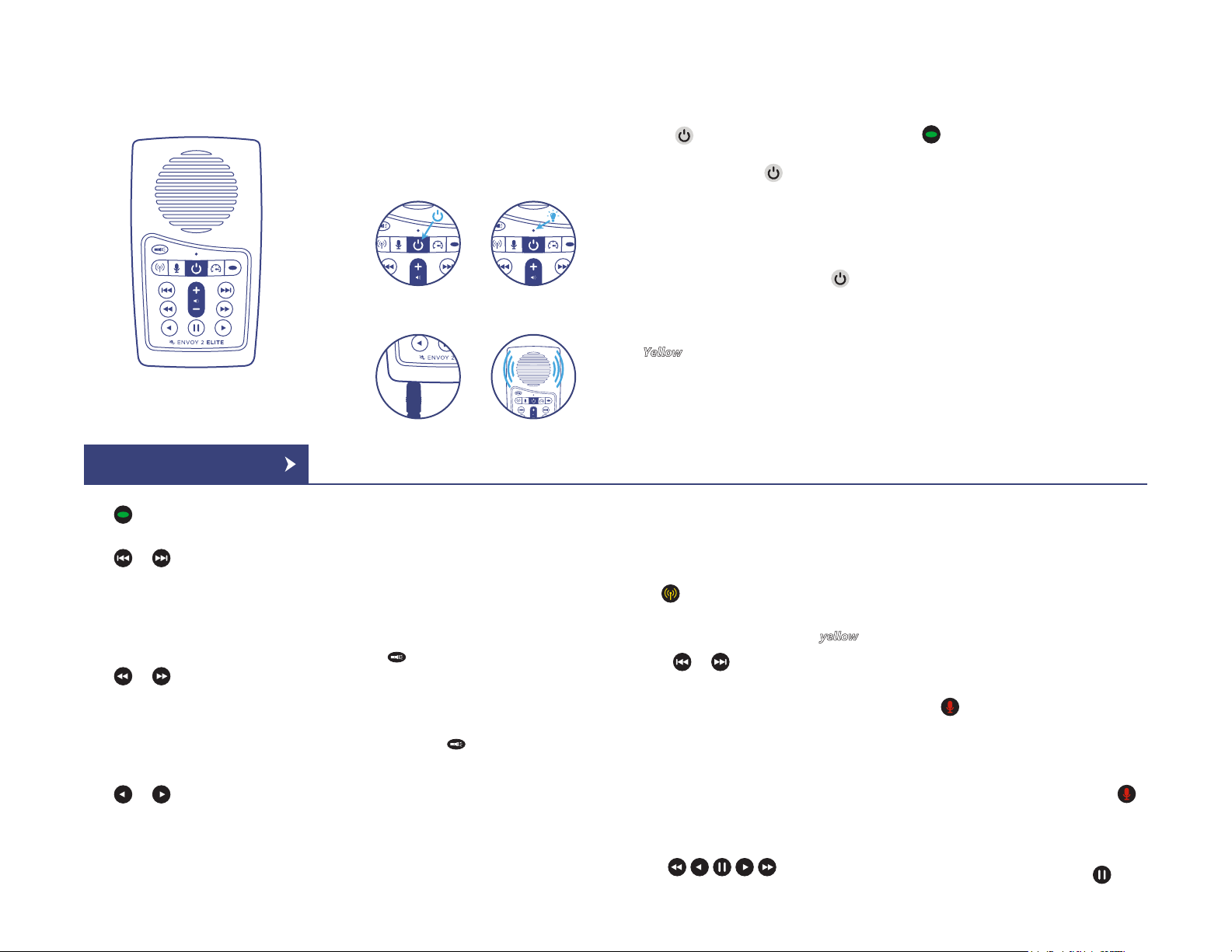
*Envoy 2 Elite Pictured
EASY START
Press and hold the power button until
the light turns on. The player will start to
play automatically.
1
3
1
2
4
TURNING THE
PLAYER ON/OFF
Press in the middle of the keypad for
2 seconds to turn the player on (player
will beep once). Press again for 2
seconds to turn the player off (player will
beep twice).
*The player will remember its last mode
when turned off.
**While the player is on, a click on
will perform a battery test. The LED will
blink rapidly for 2 seconds indicating the
remaining capacity (Green: 30-100%,
: 10-29%, Red: 0-9%).
Yellow
2
SELECTING A
LANGUAGE GROUP
While playing one Language group,
a 2-second press will navigate to the
beginning of the next Language group.
If a microSD card is present, the player
will beep once and navigate to the first
Language group on the card.
*During playback mode the LED is green.
NAVIGATING
DURING PLAYBACK
Each Language group is subdivided into
one or more Sections, containing one or
more Books, containing one or more
Chapters.
3
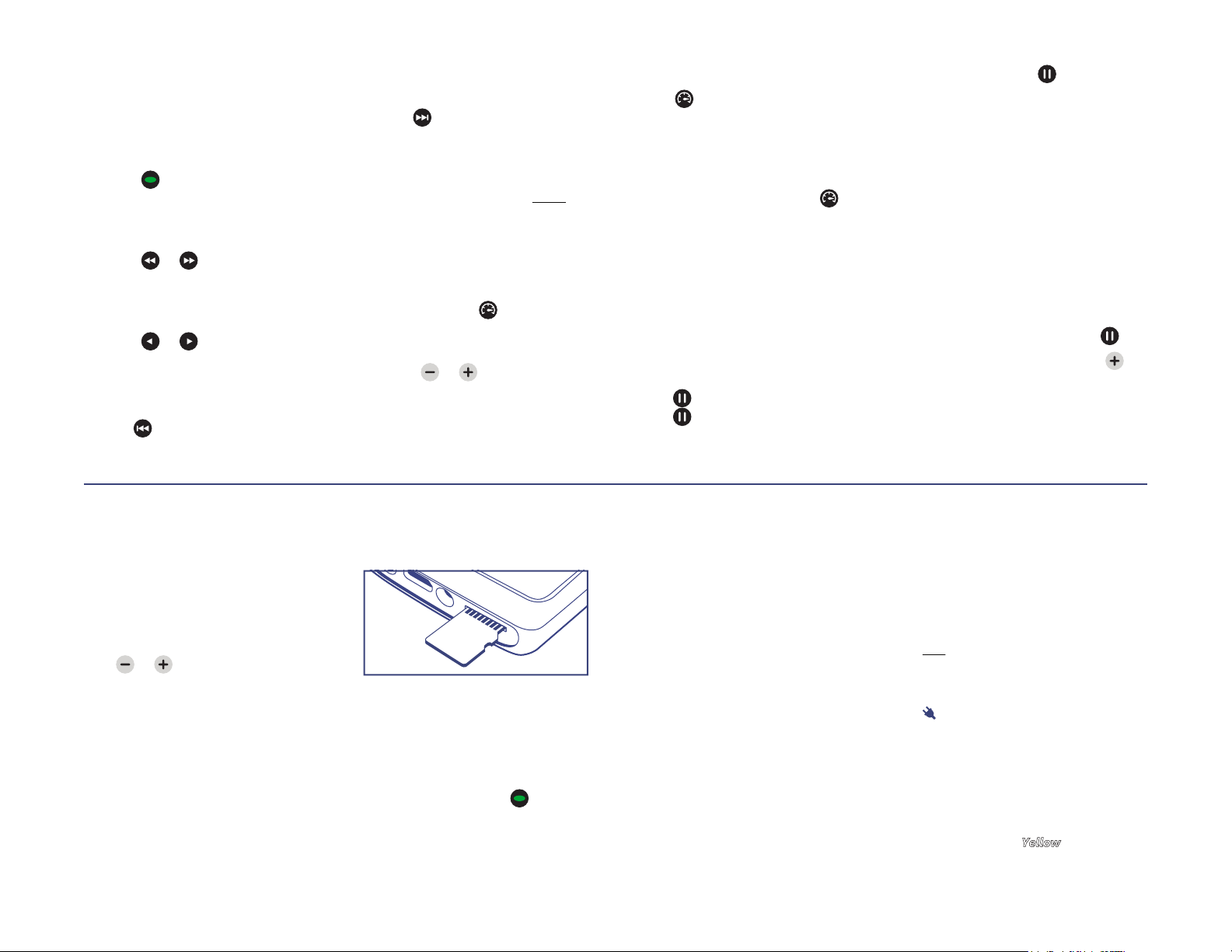
Click to skip to the next Section
within the current Language.
Click or to jump backward or
forward one Book. A 2-second press will
skip 5 Books at a time. Press and hold
will continue until the button is released
or the beginning/end of the Section is
reached.
Click or to jump backward or
forward one Chapter. A 2-second press
will skip 5 Chapters at a time. Press and
hold will continue until the button is
released or the beginning/end of the
Book is reached.
Click or to jump backward or
forward 20 seconds* in the current file.
Press and hold will perform a fast
rewind/fast forward until the button is
4
released or the beginning/end of the file
is reached.
*Actual time may vary.
LED TORCH
Envoy 2 E Series only
Use to control the LED Torch and its
intensity. Each click will change the
intensity as follows:
Low > Medium > High > OFF
Press and hold to turn on the Torch
in high intensity. The Torch will stay on
until the button is released.
*The Torch may be used while other
functions are active or player is off.
5
RADIO
Envoy 2 Elite/Z & Equip/Z only
From any other mode, a 2-second press
on will put the player in radio mode
(player will beep once).
*While in Radio mode the LED is yellow.
Click or to decrease/increase the
frequency by 0.1MHz. A 2-second press
will scan for the previous/next FM
station.
When scan reaches the beginning/end
of the FM frequency range (87.0 –
108.0MHz) the player will beep.
An additional click will loop and
continue the operation from the
beginning/end respectively.
The buttons may be
6
pre-programmed with default
frequencies. A click on each will tune the
radio to the setting for that button. A
2-second press will re-program that
button to the current frequency.
RECORDING
Envoy 2 Elite/Z & Echo/Z only
From any other mode, a 2-second press
on will put the player in recording
mode (player will beep once).
*While in Record mode the LED is red;
Player defaults to microSD card if present.
Once in recording mode, a click on
will begin recording with a single beep.
An additional click will stop recording,
beep once and save the recorded file.
While recording, a click on the
7
1/4
Page 2
button will pause the recording. An
additional click will resume recording.
All recording files are stored in a folder
named “RECORD” in the root folder
(onboard memory and microSD).
A click on will begin playback of
recorded files, beginning with the last
recording. If the RECORD folder is
empty, player will beep 3 times.
A click on or will skip to the
previous/next recording file. A 2-second
press will skip 5 files backwards or
forwards.
A click on or will
reverse/forward 20 seconds* in the
currently played recording file.
*Actual time may vary.
Pressing for 2 seconds will delete
8
the current recording file and beep 4
times.
Pressing for 2 seconds will reset the
recording file counter to 000 and beep 4
times.
*If player function is changed while
recording, the file will be saved before
changing mode and some truncation may
occur.
SPEED CONTROL
A 2-second press on will put the
player in speed control mode allowing
you to adjust the speed for playback.
A click on or will adjust playback
speed. The LED will alternate red and
green as you change the speed. Press
and hold will decrease/increase until the
9
minimum/maximum speed is reached.
Press again to exit and save the
setting. Pressing any other button will
exit speed control mode without saving
changes.
To reset the speed to normal, enter
speed control mode, then press
again for 2 seconds. Player will return to
playback mode.
*Speed control does not affect recording
speed. It is not saved when switching
modes or turning player off.
PAUSING/
BOOKMARKING
Click to pause playback. To resume,
click again or one of the other
navigation buttons.
10
A 2-second press on will place a
bookmark at the current position (player
will beep 3 times). When player is turned
back on later, playback will begin from
the bookmark.
*Player supports a single playback
bookmark.
CHANGE/RESET
THE BOOKMARK
To reset the bookmark to the beginning
of the messages, do the following:
1. While in playback mode, click .
2. After pausing the player, press for
2 seconds (player will beep once).
3. The bookmark is now reset to the
beginning. You may resume playback or
turn player off.
11
EARPHONES,
SPEAKERS AND
VOLUME
Insert earphone or speaker plug into the
3.5mm stereo audio jack on the bottom
of the unit.
Press or to decrease or increase
volume. The volume will remain set at
this level even after the player is turned
off and restarted.
12
USING THE
MICROSD CARD
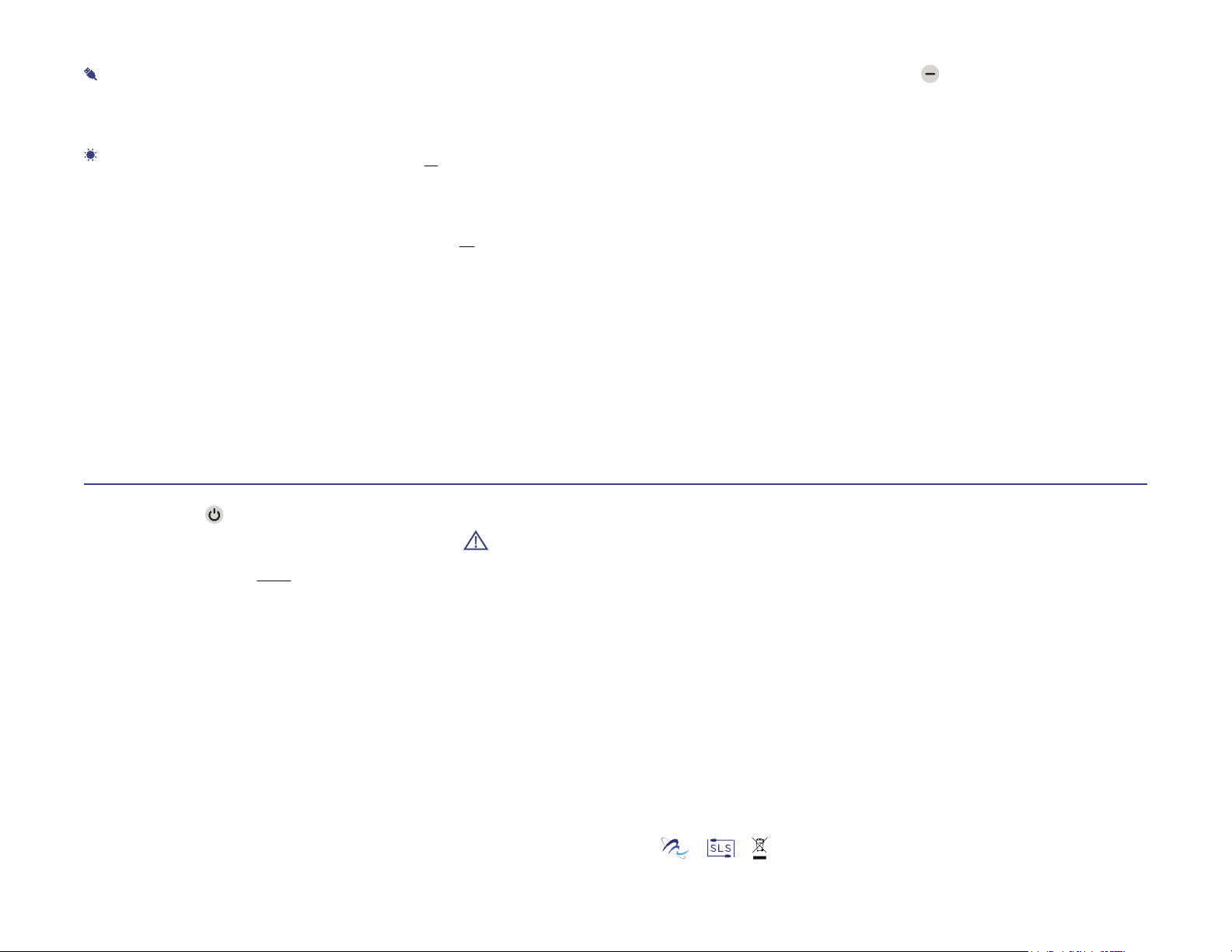
The Envoy 2 E/EZ can also play audio
from a properly formatted microSD card.
With the player facing you, insert the
card with the brass contacts showing
until it locks in place.
Once card is loaded, press for 2
seconds repetitively until the player
beeps once. Playback will now begin
from the card.
13
To remove a card, gently push it in. The
reader will unlock and push it out so you
can remove it. If the player was in
playback mode from the card when
removed, it will beep once and revert to
the onboard memory. If any other
function was active, it will continue with
no change.
You can view, format and prepare an SD
card while loaded in the Envoy’s microSD
card reader when the player is
connected to a Computer using a USB to
micro-USB cable. You may also do the
same with the card loaded in a microSD
adaptor connected to a Computer.
See details on how to prepare the card
in the Envoy 2 E/EZ User Guide
document.
14
CHARGING
INSTRUCTIONS
With proper care, the Audio Player’s
Lithium-Ion battery should perform well
for several years. When shipped, the
battery is only partially charged. Please
fully charge the player before the first
use following one of the charging
methods below:
For fastest charge, connect any
standard “USB” charger (regulated
+5VDC, minimum 300mA) to the
micro-USB port on the bottom of the
player for about 2 hours or until the LED
stops blinking. While charging, the LED
will blink according to the charge level
(Green: 30-100%, Yellow
Red: 0-9%).
: 10-29%,
15
2/4
Page 3
Plug player into any standard
computer USB port using a “USB to
micro-USB” cable for about 3 hours or
until the LED stops blinking.
For solar charging, place the player
with the solar panel facing bright
sunlight for at least 8 hours.
Before storing the player for prolonged
periods, make sure the battery is at least
partially charged. If stored for extended
periods, it is recommended to recharge
the player at least every 6 months, in
order to prevent the battery from losing
its ability to recharge.
Should the battery become damaged
and unable to accept a charge, you can
still operate the player using the power
cord (charger).
CHARGING/
COMMUNICATION
MODES
1. Player is on and in Playback mode (or
Radio/Recording modes if so equipped).
2. Connect to computer: the player will
enter Computer Communication mode
and turn the unit off.
3. The player will connect with the
computer.
4. Depending on the computer and the
battery level, the LED will blink (Charging
/communication indication).
5. After a few seconds, pressing on the
Power Button will disconnect the player
from Computer Communication mode,
and return to the player’s prior mode.
6. At this point, physically disconnecting
the player from the computer will stop
the battery charging.
7. To connect to the computer again, the
player will need to be disconnected, and
reconnected.
8. While connected to the computer, the
player’s battery will be charging,
regardless of the mode it is in.
*Changing to Computer Communication
mode is essential to allow programming
of the unit/Firmware.
RESETTING PLAYER
DEFAULTS
Resetting player defaults (listed below) is
done by pausing the player and pressing
for 2 seconds (player will beep 3
times and turn off).
• Last used mode
• Playback bookmark
• Playback speed
• Volume level
• Radio bookmark (Elite/Z, Equip/Z only)
• Preset frequencies (Elite/Z, Equip/Z only)
• Recording counter (Elite/Z, Echo/Z only)
PROBLEMS WITH
THE PLAYER?
If the unit will not turn on, please try the
following:
1. Make sure the battery is charged
according to the “Charging Instructions”.
2. If the battery is OK, force a reboot of
16
the player by holding for about 10
seconds. The player should restart
automatically.
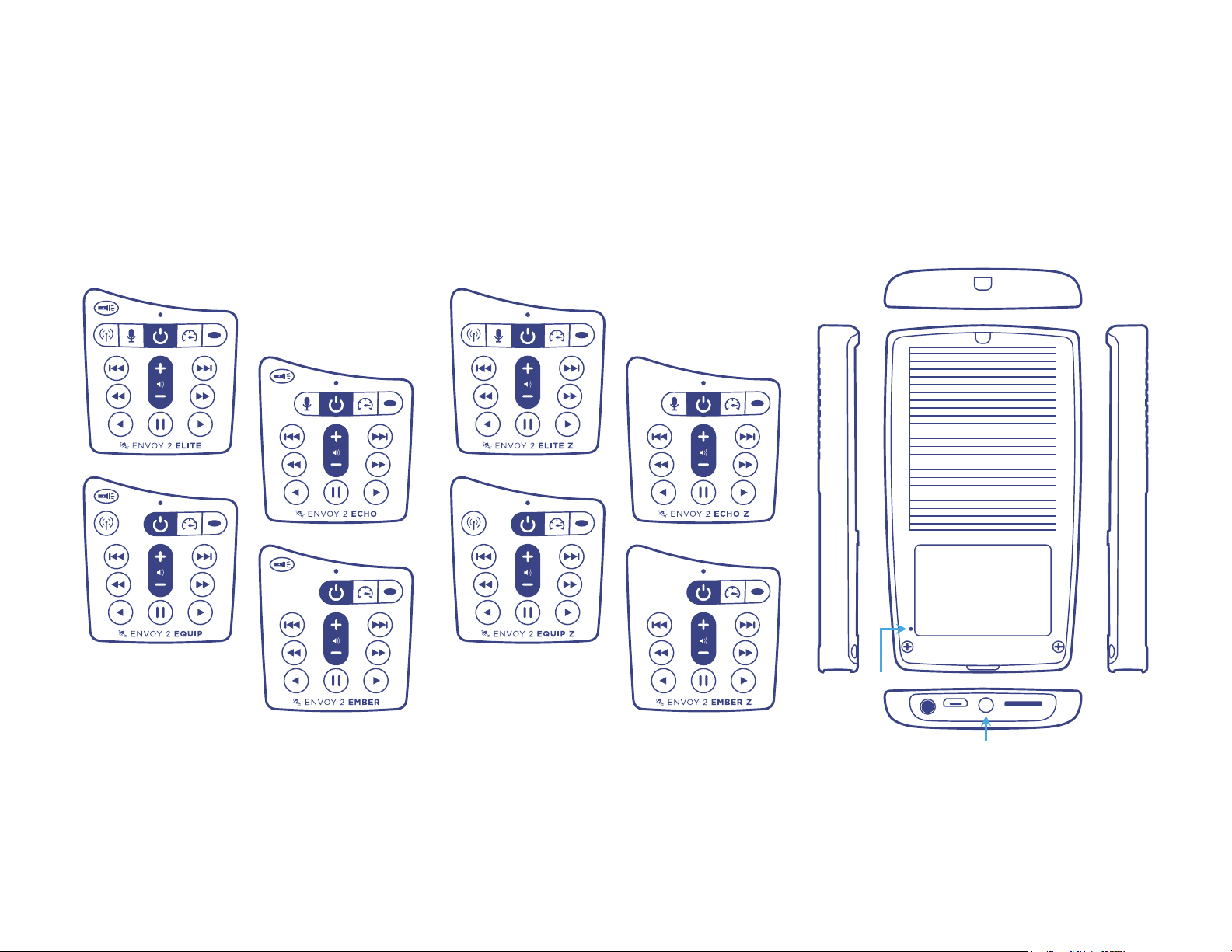
3. If #2 fails, reset the player by gently
inserting the end of a paper clip for a
few seconds into the reset hole on the
back of the player, just above the
left-most screw holding the back panel.
This is the same as disconnecting/
reconnecting the battery. Then try to
turn the player on.
4. If none of the above succeeded,
please contact your sales representative
for support.
20
17
WARNINGS
• Care must be taken to set the volume
at the lowest level that can be heard
comfortably. Prolonged exposure to
loud sound can cause gradual hearing
loss.
• DO NOT expose player or battery to
fire or extreme heat.
• Stop using player if you observe
abnormal heat, odor, discoloration,
leakage or deformation, especially near
battery. Refer to a qualified technician
for service.
• If the battery is removed from the
player, handle it with care. Keep the
exposed battery out of reach of children.
21
18
DO NOT burn, puncture, disassemble, or
modify battery.
• If battery leaks, dispose of it carefully in
accordance with all local laws. Wash any
skin or clothing exposed to battery liquid
and avoid swallowing or contact with
eyes. In the case of swallowing or
contact with eyes, seek medical care
immediately.
Made in China
Envoy 2 E/EZ Series User Manual - US Letter - English - 2018.02.22-1.0.1
22
19
3/4
Page 4
ENVOY 2 E SERIES ENVOY 2 EZ SERIES OTHER SIDES
*Reset Button
*The Envoy 2 EZ Series players do not have the LED Torch on the bottom.
4/4
 Loading...