

Page 1
www.megatech.com
Entire contents © Megatech 2002
Page 2

Congratulations! You have just purchased the EASIEST plane to y in the world! Learning
to y has never been so fun! Get ready to hand launch into gravity-defying action with
Megatech’s Sky Vector! Climb to heights over 1500 feet at speeds over 25 MPH/ 40KPH… no
experience needed! Sky Vector’s patented Divergent-Reex™ Control Linkage system helps
to cancel out the novice yer’s tendency to over control a model making it easy to go from
beginner to expert in minutes!
Please Read ALL Instructions Carefully Before Attempting to Fly!
If you experience any problems DO NOT take your Sky Vector back to the
store! Call one of our MegaTechnicians at 1-888-MEGA-911 or send an e-mail to
info@megatech.com
SAFETY WARNING
Please read these before operating your Sky Vector
General
• Do not y your airplane if other models on the same frequency are being operated
in the area.
• Do not attempt to disassemble any of the airplane’s components or allow them to get
wet or electrical damage may occur.
• Never y your airplane from roadways or after dark.
• Fly in wide-open areas free from obstructions such as trees or telephone poles and
wires.
• When operating/ying always be aware of spinning propellers being careful not to let
them come close to your person, others and loose clothing. Keep spectators behind
you when ying.
• Since your airplane is controlled by a radio link it is very important to always use fresh
dry cell batteries in the transmitter.
• Before ying make sure you perform a range check maintaining control at least 25-feet
from transmitter to model with the transmitter antenna collapsed.
• No solvents or liquid cleaners should be used to clean this model. Doing so may
damage the plane. Use a dry, soft cloth for cleaning.
• Never leave the ight pack battery unattended while charging. Constant monitoring is
required while charging ight pack battery. Only charge the ight pack battery until it
becomes warm, not too hot
• To prevent ight pack battery from overheating damage, allow the pack to completely
cool after each ight before recharging.
• Safe radio operation tip. The transmitter should always be the rst thing on—and
the last thing off.
• The transmitter’s antenna must be fully extended for optimum radio link during ight.
• The ight pack battery should never be left in the model while not in use.
Batteries
Radio
Page 3
• Do not trim the airplanes antenna, it is cut to a specic frequency length and to do so
would drastically affect radio range.
• Never-never-never-never-never disassemble any of the radio components or expose
them to moisture.
1. Getting Acquainted with your Sky Vector
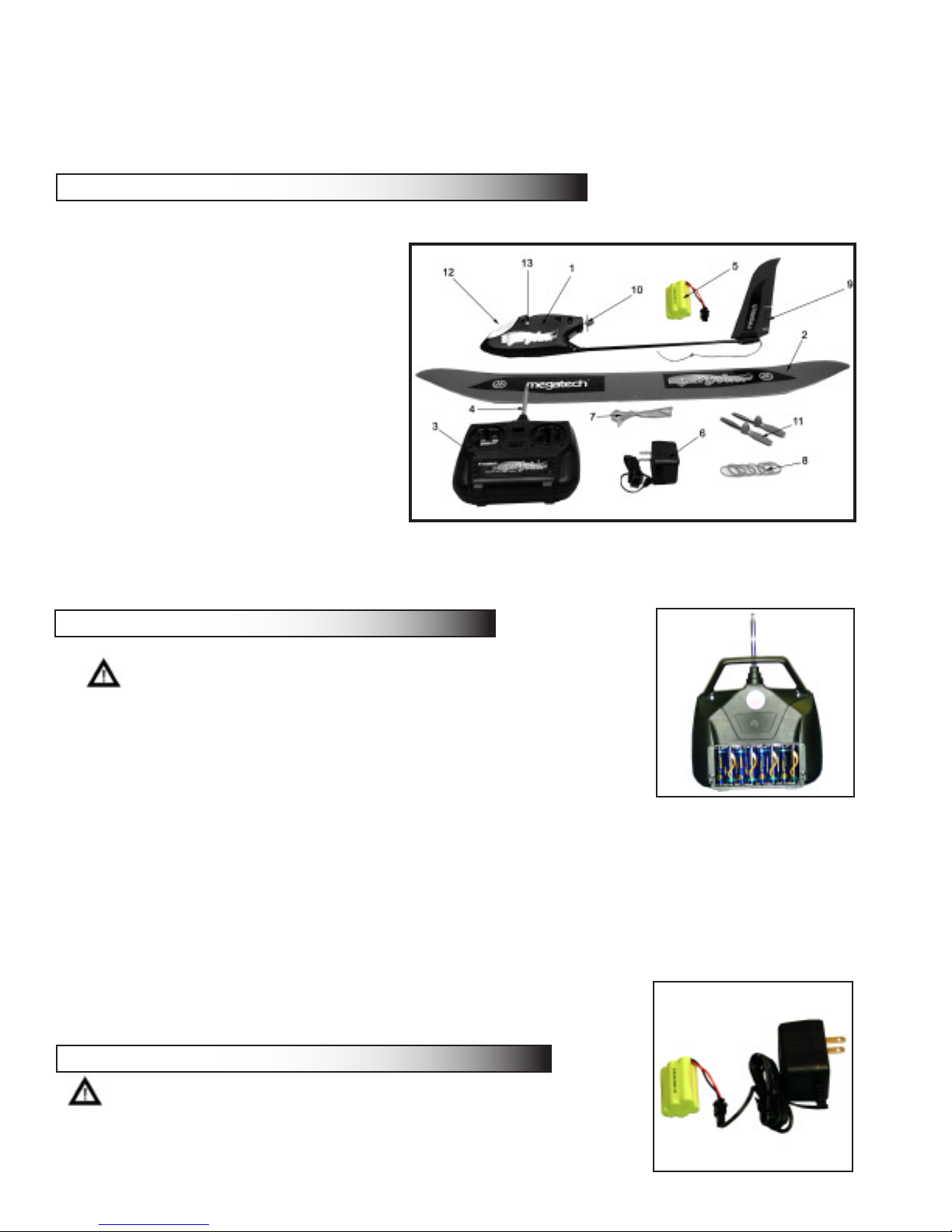
• First make sure the contents of your package are complete:
1. Sky Vector Fuselage
2. Main Wing
3. Transmitter
4. Transmitter antenna
5. Battery
6. Charger
7. Wing Detection Ribbon
8. Wing Bands
9. V-tail Assembly
10. Propeller
11. Spare propellers
12. Battery Hatch
13. Motor Start Button
2. Installing the Transmitter Batteries
Caution: Make sure not to mix old and new batteries.
Only use fresh alkaline (non-rechargeable) batteries in
the transmitter to assure best radio signal link.
• The transmitter uses 8 “AA” batteries
• Remove the battery compartment hatch on the back of
the transmitter
• Install the 8 fresh “AA” alkaline batteries paying careful
attention to proper “+” and “-“ polarity
• Slide the battery hatch cover back into place until it locks
• Turn your tranmitter on by sliding the “on”switch on the front of the transmitter. Both
the green and red lights on your transmitter should be illuminated. If they are not,
make sure you are using all fresh alkaline batteries and recheck that the batteries
have been inserted using the proper polarity. If you still
have problems contact Megatech. DO NOT ATTEMPT
TO FIX THE TRANSMITTER ON YOUR OWN.
3. Charging the Flight Pack Battery
• We use the latest NiMH (nickel-metal-hydride) technology
available. The characteristics of these batteries are such
that they do not come up to full potential until they have
Page 4

gone through 3 or 4 charge and discharge cycles. After that, you should be attaining
full ight duration times.
NEVER LEAVE A CHARGING BATTERY UNATTENDED!! Always let the ight pack
cool before recharging.
• Connect the battery to the wall charger.
• Note: Only use a charger that is approved for use with this battery
• Plug the charger into an electrical outlet
• Children must have parental supervision during the charging process
• Charge the battery for 1-2 hours.
• Always monitor the charging process. The ight pack should become good and
warm but do not let it become extremely hot! DO NOT OVERCHARGE THE
BATTERY. Use extra caution when touching the battery because it may become
very hot.
4. Attaching the Main Wing
• Place the main wing onto the fuselage with the polyhedral design curving upwards
and wingtips pointing towards the v-tail.
• Make sure the small arrows imprinted into the wing are centered over the fuselage
• Wrap the Wing Bands around the fuselage and the wing in an “X” pattern and then
a “II” pattern as shown
Wing Band Placement
5. Installing the Flight Pack into the Fuselage
• Open the battery hatch on the front of the Sky Vector
fuselage
• Make sure to leave all foam pieces inside the fuselage,
this ensures proper placement of the ight pack
• Place battery into fuselage with the wide section of the
battery towards the front as shown
• Attach the battery connector with the connector inside
the fuselage
• Close battery hatch cover when done
Center Wing on Fuselage
Flight Pack Placement
Page 5

6. Pre-ight Test
• First make sure both trim tabs on your transmitter are centered
• Turn on your transmitter rst, then install a charged battery into your plane.
• Holding your plane in one hand, with your ngers and loose objects away from the
propeller, move the right control stick of your transmitter all the way to the right
a. The right side of the v-tail should go down while the left side goes up.
b. Now try moving the right control stick all the way to the left. The opposite
• Now press the Motor Start Button on the side of the fuselage. The motor should
not start until this safety switch is pushed. Now push the left control stick forward.
The propeller should spin rapidly and stop when the control stick is back in its
neutral state
Caution: Keep hands, clothing and loose objects away from the propeller!
function should occur.
Trim Tabs
7. Flying your Sky Vector
• Always y your airplane in a nice open area free from wires, trees, and other
obstructions. For your rst ight, pick a day with little or no wind. Do not y in heavy
winds or rainy weather
• Always fully extend your antenna and turn the transmitter on rst then install the ight
pack. Make sure both lights on your transmitter are illuminated. If the green light goes
dark, your transmitter batteries are low. You should land your plane and change them
right away.
• Attach your Wind Indicator Ribbon to the end of your transmitter antenna to determine
the direction of the wind. Make sure the transmitter antenna is fully extended for
maximum radio link. Always launch your airplane into the wind.
• Push the red Start Button the the side of the fuselage and push the left control stick
completely forward. Toss the plane into the wind, ensuring the plane is level with the
control stick right
control stick left
Page 6

horizon. If the plane is tilted upwards or downward, your launch may not be successful.
• Allow the model to climb to a safe altitude (50-75 feet) before attempting turns. You
do not want the airplane to get too far away from you so once it is at a safe altitude
move the right control stick gently in the direction you wish to turn. Once it has turned
towards the direction you want, release the right control stick
• If you begin to gain too much altitude, release the left control stick and let the Sky
Vector glide to a more comfortable level. When the model gets too low to the ground,
add motor thrust by pushing the left control stick forwards.
Important Tip! When the airplane is coming towards you, the controls are reversed.
(moving the stick left will make the model turn to your right) This is the most important
thing to get used to. Try to imagine you are actually sitting in the model’s cockpit will
help you.
• Do not panic if you feel you begin to spin or make erratic movements with the plane,
simply release both control sticks and the Sky Vector’s Self-Righting Mechanism
kicks in and in a few seconds you will return to a steady glide.
wrong
correct
wrong
8. Landing
• Always try to land into the wind keeping the wingtips as level as possible
• Setup for a landing by making a gentle shallow turn until the airplane is facing into
the wind
• When the airplane is level and facing into the wind, release both control sticks and the
plane will descend to the ground.
• If slight corrections are needed as the airplane makes its way to the ground, move
the right control stick in the appropriate direction but only for a moment so as to keep
the airplane descending on a straight heading. Over controlling will put the airplane
into another turn which can make it crash if you are too close to the ground. Keep the
model ying straight until it lands safely
Helpful Tip
• If the main wing on your Sky Vector gets damaged, simply apply clear packing tape
to the affected area.
Page 7

Spare Parts List
Part Number Description
MTC SV007-ch TRANSMITTER (specify channel 1-6)
MTC 735001 TRANSMITTER ANTENNA
MTC SV012 PROPELLER (2PCS)
MTC SV013 110V WALL CHARGER
MTC SV017 8.4V 10AMP SPEED CONTROL
MTC SV018-ch 4 CHANNEL RECEIVER (SPECIFY CHANNEL 1-6)
MTC 202 MICRO SERVO
MTC SV020 MOTOR
MTC SV024 RUBBER WING BANDS
MTC SV025 FUSELAGE BATTERY HATCH COVER
MTC SV034 FUSELAGE
MTC SV065 MAIN WING
MTC SV066 V-TAIL ASSEMBLY
Page 8

Limited Warranty
Megatech International guarantees the parts included in this kit to be free from defects that exist
at the time of purchase for a period of 90 days from date of purchase. If any component of this
product fails to function properly due to defects in materials or manufacturing process during this 90
day period, the Manufacturers obligations are limited and manufacturer can choose to either repair
the defective part or replace it.
This warranty does not cover any damage caused by use, misuse, alteration, accident, or neglect,
nor does it cover normal wear and tear of the product. This warranty is void if the part/product in
question has been altered or modied or repaired by anyone other than Megatech International or
an authorized agent.
Under no circumstances will Megatech International or any of its representatives be held liable for
injury to persons or property damage resulting from assembly or use of the product. Megatech is not
liable if any outside radio frequencies interfere with the product’s frequency causing loss of control.
Megatech International will not be held liable for any personal injury or property damage resulting
from an out-of-control model caused by use or misuse of the product.
Megatech International expressly excludes any and all express warranties not specically stated
here and all implied warranties of merchantability and tness for a particular purpose. There are no
warranties which extend beyond the description of the warranties contained herein.
Contact Megatech International before returning any part/product that is defective according to the
limitations listed above. Please be sure to pack the returned item(s) carefully and insure it as this
warranty does not cover loss or damage during transit
Megatech International
8300 Tonnelle Avenue
North Bergen NJ 07047
(201) 662-2800
 Loading...