

Page 1
mDongle
D1 User Manual Rev.4.0 Updated on 31 Oct, 2016
MegaByte
User Manual Rev. 4.0
Model: mDongle-D1
(This user manual / product specification is subjected to be changed without prior notice) P.
1
Page 2
mDongle
D1 User Manual Rev.4.0 Updated on 31 Oct, 2016
Table of Content
FCC statement..................................................................................................... 3
CE statement ....................................................................................................... 3
Chapter 1 Introduction of mDongle D1 ............................................................. 4
1.1
Overview of mDongle D1 ..............................................................4
1.2
Ports Description D1 .....................................................................5
1.3
Buttons in mDongle D1 .................................................................6
1.4
Indicators LEDs in mDongle D1 ....................................................7
1.5
Specification: .................................................................................8
Chapter 2 Installation of mDongle ..................................................................... 9
2.1
Connect to Windows PC .............................................................9
2.2
Connect to Smartphone .............................................................. 14
2.3
Environment ................................................................................ 16
2.4
Caution ........................................................................................ 16
Chapter 3 Regulatory Information ................................................................... 17
3.1
Federal Communications Commission (FCC) Compliance ......... 17
3.2
CE Compliance ........................................................................... 17
Chapter 4 Disclaimer Notice ............................................................................ 18
Chapter 5 Warranty ........................................................................................... 19
Chapter 6 Support ............................................................................................. 20
(This user manual / product specification is subjected to be changed without prior notice) P.
2
Page 3
mDongle
D1 User Manual Rev.4.0 Updated on 31 Oct, 2016
FCC statement
FCC NOTICE:
To comply with FCC part 15 rules in the United States, the system must be
professionally installed to ensure compliance with the Part 15 certification. It is
the responsibility of the operator and professional installer to ensure that only
certified systems are deployed in the United States.
The use of the system in any other combination (such as co-located antennas
transmitting the same information) is expressly forbidden.
CE statement
CE NOTICE:
The CE Mark applies to products regulated by certain European health, safety
and environmental protection legislation. The CE Mark is obligatory for
products it applies to: the manufacturer affixes the marking in order to be
allowed to sell his product in the European market.
(This user manual / product specification is subjected to be changed without prior notice) P.
3
Page 4
mDongle
D1 User Manual Rev.4.0 Updated on 31 Oct, 2016
Chapter 1 Introduction of mDongle D1
1.1 Overview of mDongle D1:
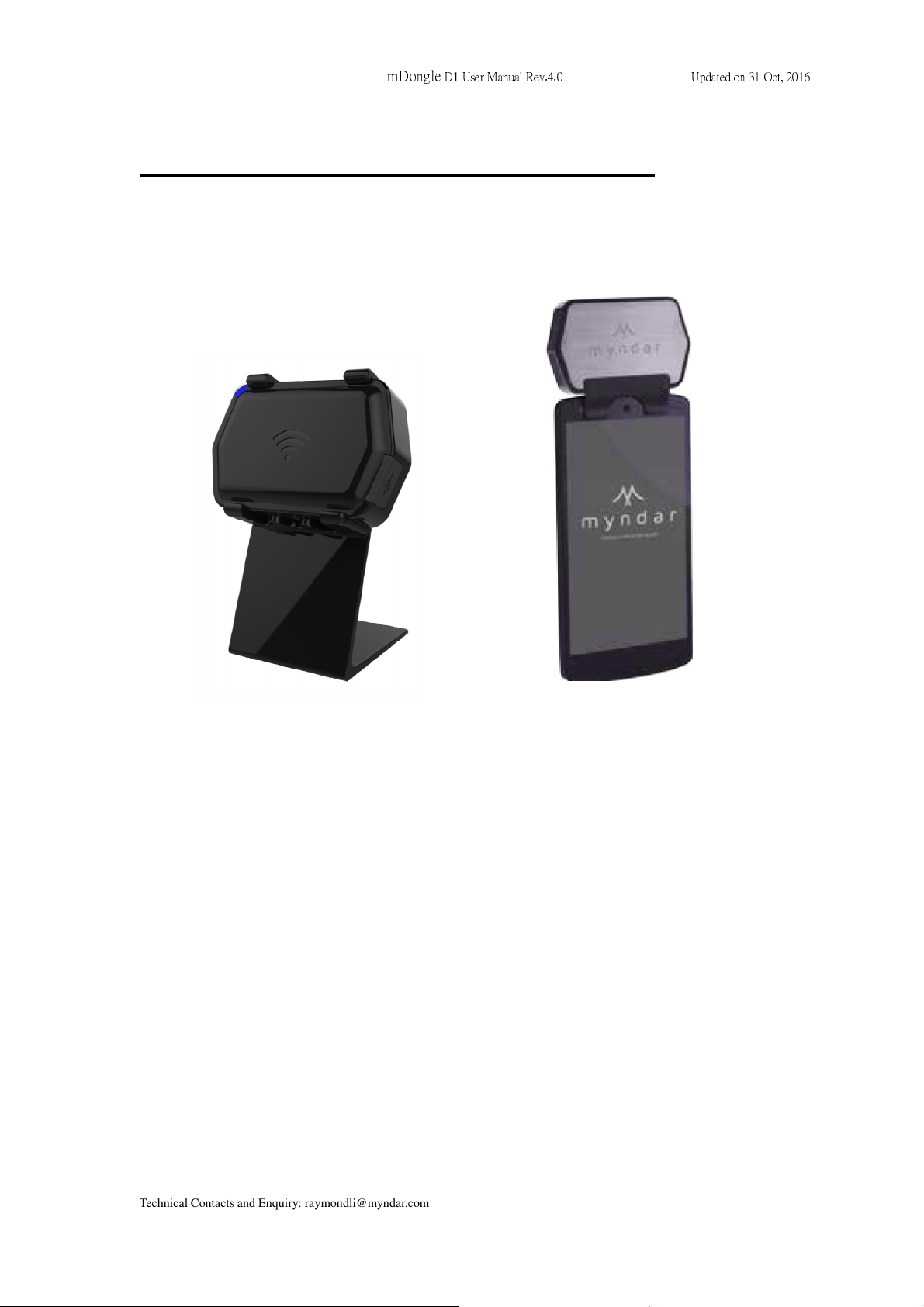
Mounted on stand Mounted on smartphone
mDongle D1 is an UHF EPC C1G2 portable RFID reader. It designed for close
proximity reading. mDongle is a compact NFC and RFID reader and OS
independent with Bluetooth connectivity to any mobile devices. It serves as a
handy checkpoint at different stages throughout the value chain, such as
logistics operations, inventory management and POS system etc.
• The mDongle D1 Intelligent RFID Reader supports protocols, UHF
CLASS 1 GEN2 EPC C1G2/ISO 18000-6C, (917-927 MHz RFID
frequency band) in United States.
(This user manual / product specification is subjected to be changed without prior notice) P.
4
Page 5
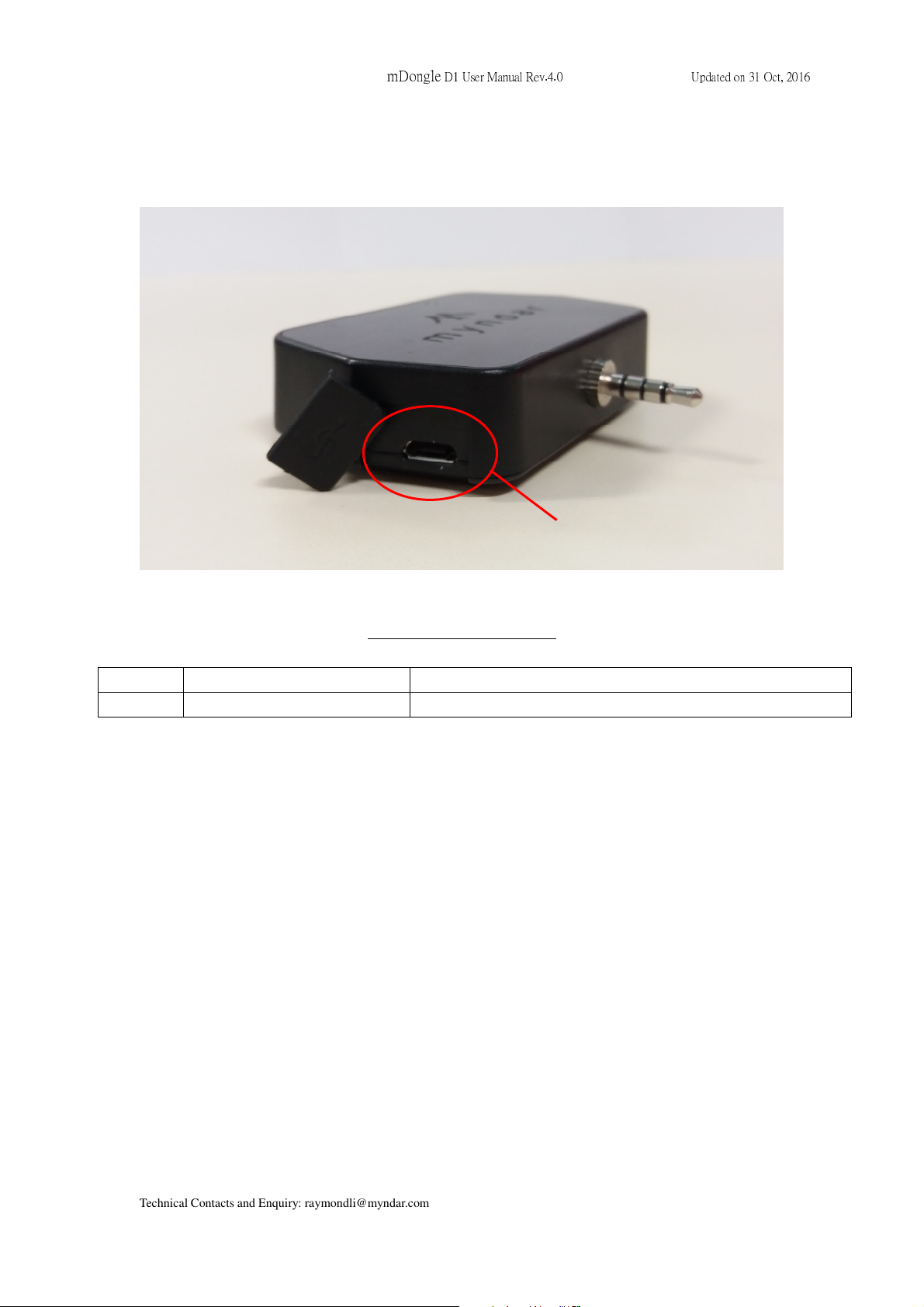
1.2 Ports Description
mDongle
D1 User Manual Rev.4.0 Updated on 31 Oct, 2016
Input port of the mDongle:
Items no. Name Description
1 USB plug USB charging port
(1) Battery charging port
(This user manual / product specification is subjected to be changed without prior notice) P.
5
Page 6
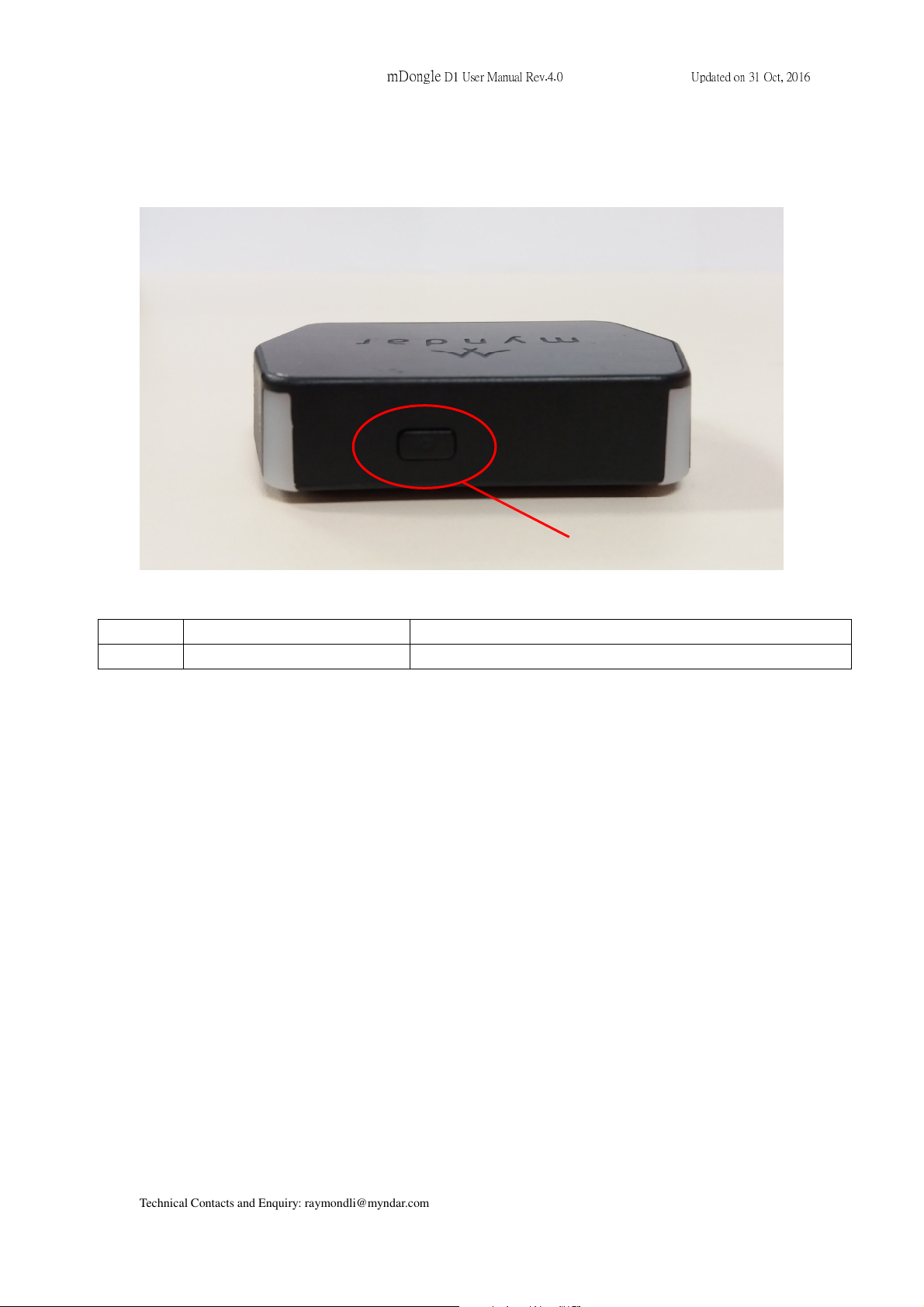
(2)
Power O
N B
utton
1.3 Buttons in mDongle
mDongle
D1 User Manual Rev.4.0 Updated on 31 Oct, 2016
Items no. Name Description
2 Power ON Button Press to switch the device on
(This user manual / product specification is subjected to be changed without prior notice) P.
6
Page 7
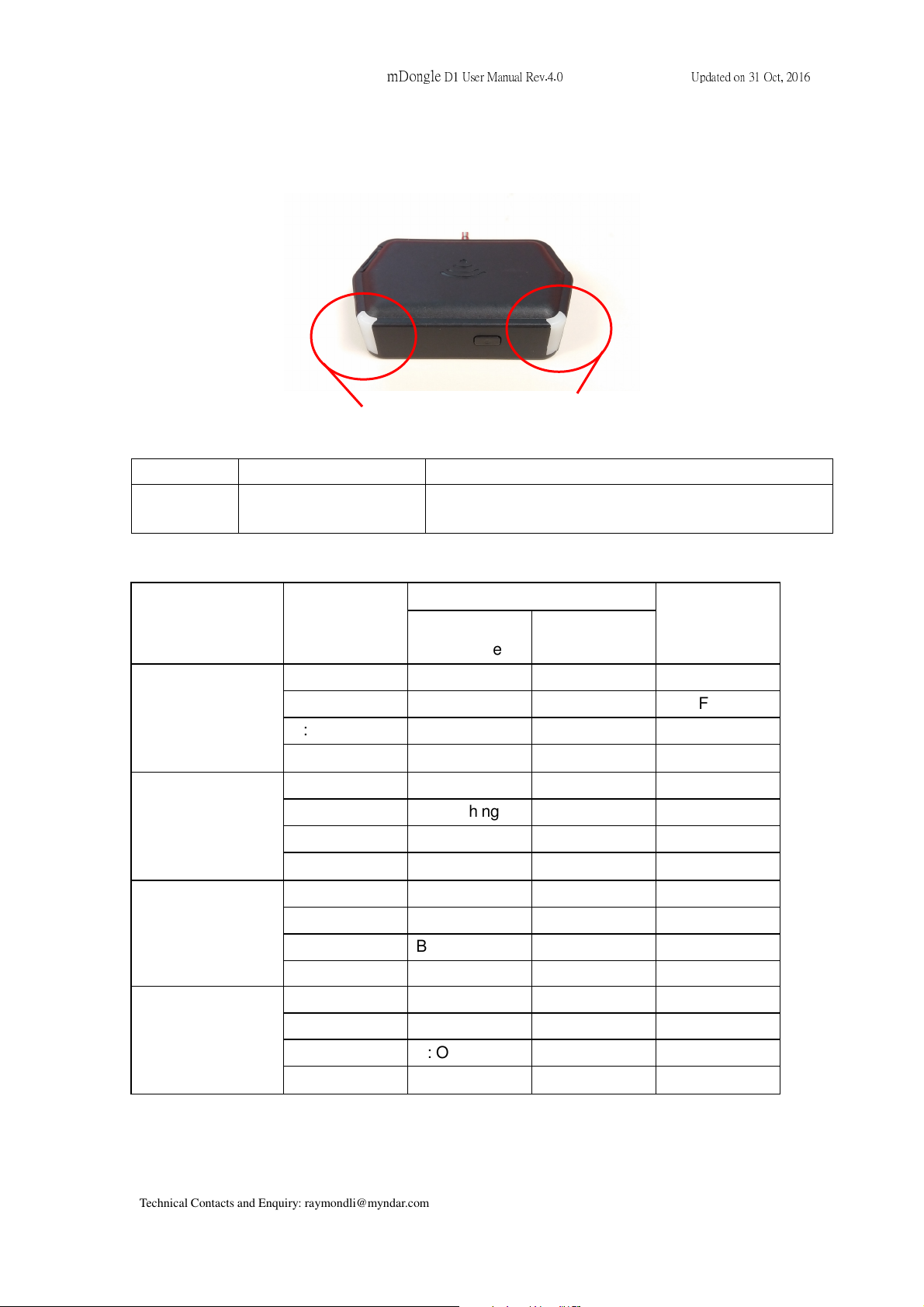
colours
mDongle
1.4 Indicators LEDs in mDongle
D1 User Manual Rev.4.0 Updated on 31 Oct, 2016
(3), (4) LEDs in different
Items no. Name Description
3 & 4 Red, Green, Blue and
Indicate different status which is listed below.
White LED (LED3)
LEDs of the mDongle D1 indicate the following reader status.
No USB
USB
(Charging)
Paring Mode
both RFID &
R: OFF R: OFF R: OFF R: OFF
G: OFF G: OFF G: OFF G: OFF
B: OFF B: ON B: Flashing B: OFF
W: ON W: OFF W: OFF W: OFF
R: OFF R: Flashing R: Flashing R: Flashing
G: OFF G: Flashing G: Flashing G: Flashing
B: OFF B: ON B: Flashing B: OFF
W: ON W: OFF W: OFF W: OFF
SPP connected
NFC Idle
RFID or NFC
Reading
OFF Mode
USB
(Charging full)
No USB but
Low Battery
R: OFF R: OFF R: OFF R: OFF
G: OFF G: ON G: ON G: ON
B: OFF B: ON B: Flashing B: OFF
W: ON W: OFF W: OFF W: OFF
R: OFF R: ON R: ON R: OFF
G: OFF G: OFF G: OFF G: OFF
B: OFF B: ON B: Flashing B: OFF
W: ON W: OFF W: OFF W: OFF
*R: Red, G: Green, B: Blue, W: White
(This user manual / product specification is subjected to be changed without prior notice) P.
7
Page 8
1.5 Specification:
Item Specification
Input 1 power ON button
mDongle
D1 User Manual Rev.4.0 Updated on 31 Oct, 2016
LED indicator
Bi-color LED: Red / Green
Bi-color LED: White / Blue
Connectivity USB
Battery 500mAh standard battery
Charger 5V 2000mA ac to dc power adapter
Bluetooth Bluetooth Classic, Bluetooth 4.0
RFID EPC C1G2 / ISO18000-6C (UHF C1G2)
NFC
Talk/ Standby
time
Mifare Classic and Mifare Ultralight
1Hours continuous operation
Yes
Charging time Charge completion <2 hours
Operation
temp.
0 to +40 deg C
Storage temp. -20 to +60 deg C
Operating
Humidity
20% to 90%
(This user manual / product specification is subjected to be changed without prior notice) P.
8
Page 9
mDongle
D1 User Manual Rev.4.0 Updated on 31 Oct, 2016
Chapter 2 Installation of mDongle
2.1 Connect to Windows PC
2.1.1 BT connection
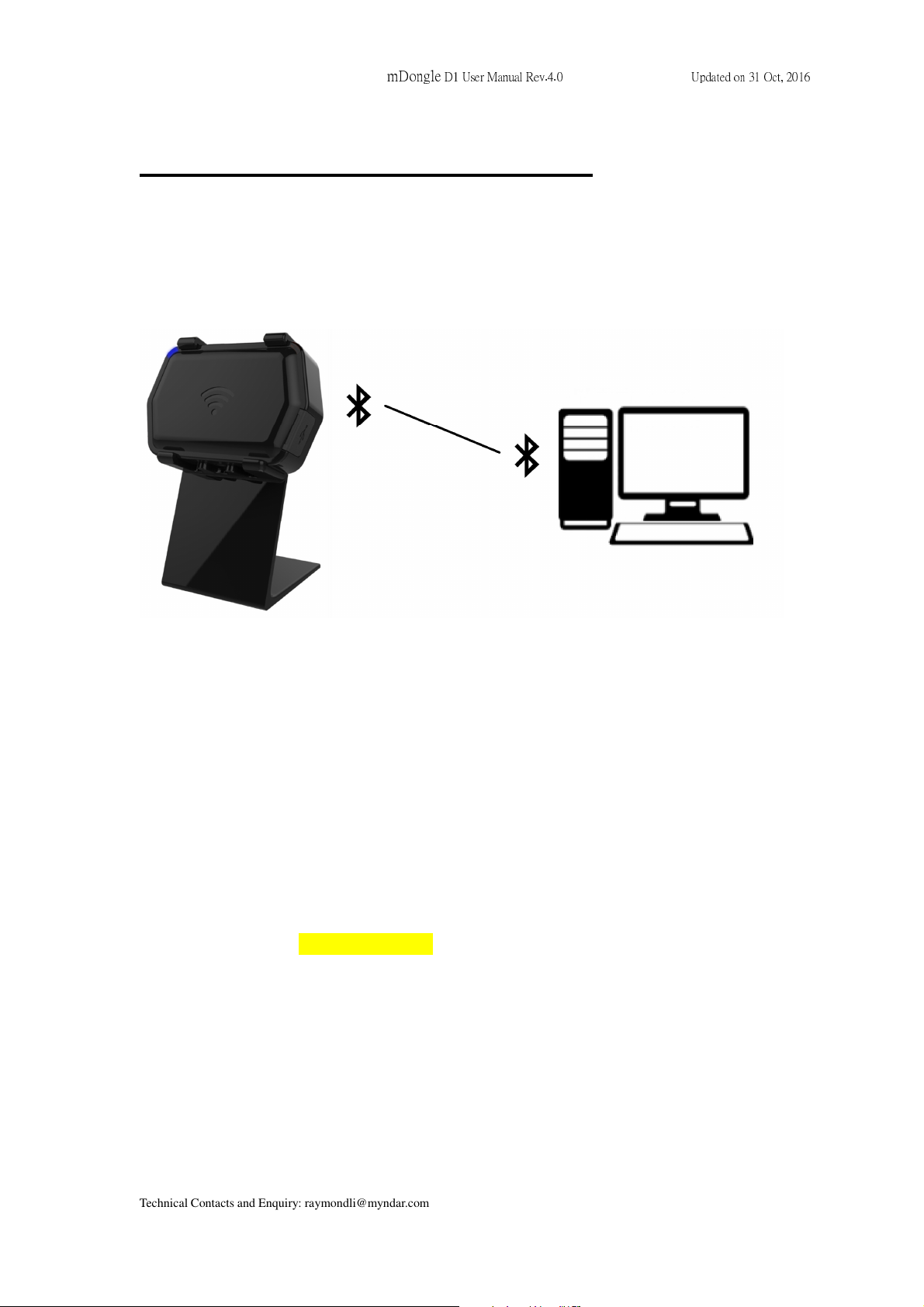
This section explains how to set-up mDongle D1 and connect the mDongle D1 to your
computer:
I. Power On the mDongle D1 by pressing the Power On button.
II. White LEDs on both sides light up, which indicates the Bluetooth is ready.
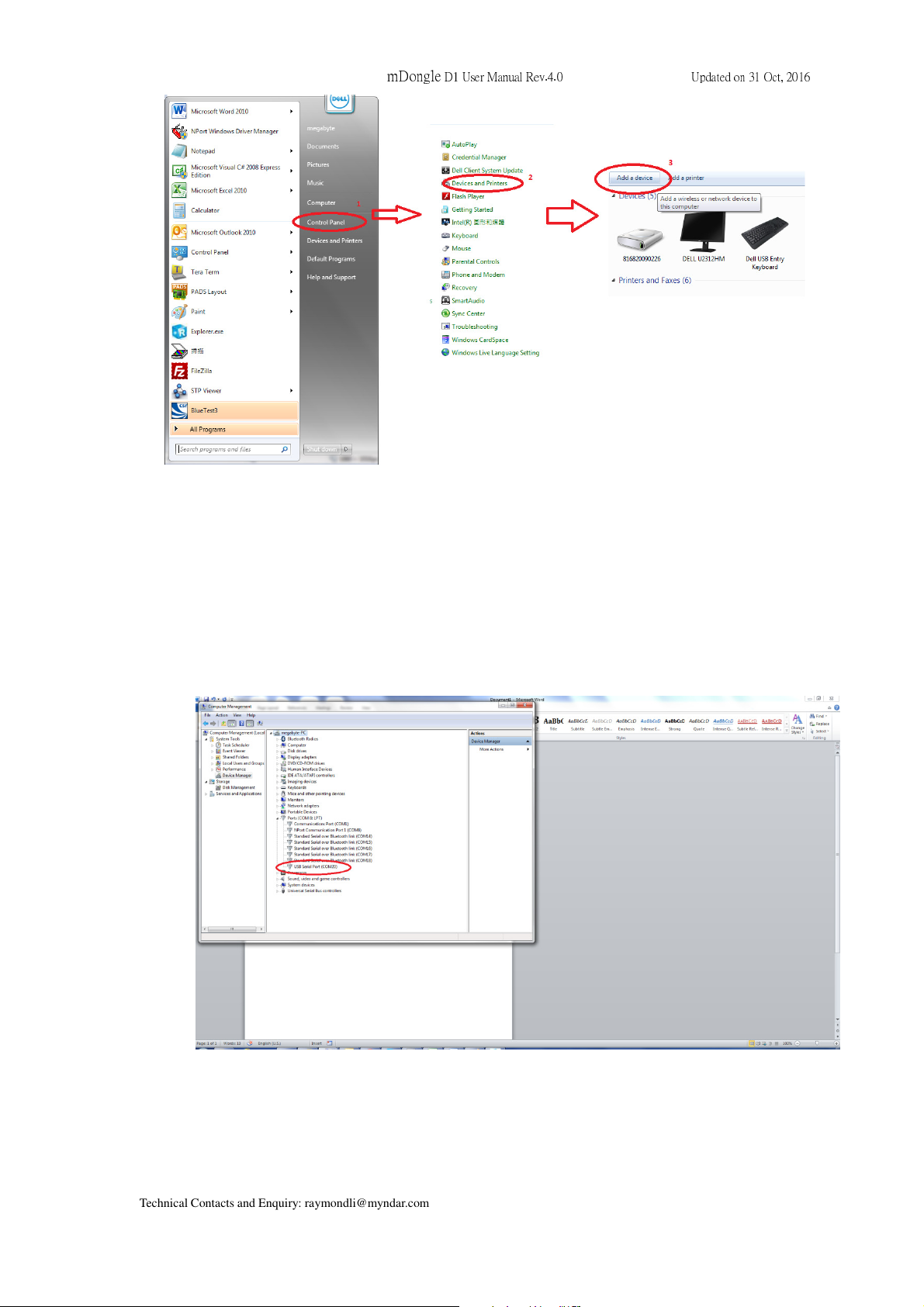
III. Search and Pair the Bluetooth with your computer:
• In startup manual, choose “Control Panel”.
• In “Control Panel”, choose “Devices and Printers”
• In “Devices and Printers”, press the button “add a device”, then select
mDongle D1 BT address to pair. In general, the mDongle D1 BT name is
called “ mDongle- XXXX”
(This user manual / product specification is subjected to be changed without prior notice) P.
9
Page 10
mDongle
D1 User Manual Rev.4.0 Updated on 31 Oct, 2016
IV. When the Bluetooth is connected, LEDs turn blue.
V. After BT is connected, then run the test program in the computer to control the
mDongle D1 operation.
VI. Set the “COM” number in the program which is generated after paired. The “COM”
number can be found in the device manager in the computer.
VII. Run the web application program. Then set the parameter.
(This user manual / product specification is subjected to be changed without prior notice) P.
10
Page 11

mDongle
D1 User Manual Rev.4.0 Updated on 31 Oct, 2016
(This user manual / product specification is subjected to be changed without prior notice) P.
11
Page 12

2.1.2 USB connection
mDongle
D1 User Manual Rev.4.0 Updated on 31 Oct, 2016
(This user manual / product specification is subjected to be changed without prior notice) P.
12
Page 13

mDongle
D1 User Manual Rev.4.0 Updated on 31 Oct, 2016
Run the web application program. Then set the parameter.
(This user manual / product specification is subjected to be changed without prior notice) P.
13
Page 14
2.2 Connect to smartphone
2.2.1 BT connection
mDongle
D1 User Manual Rev.4.0 Updated on 31 Oct, 2016
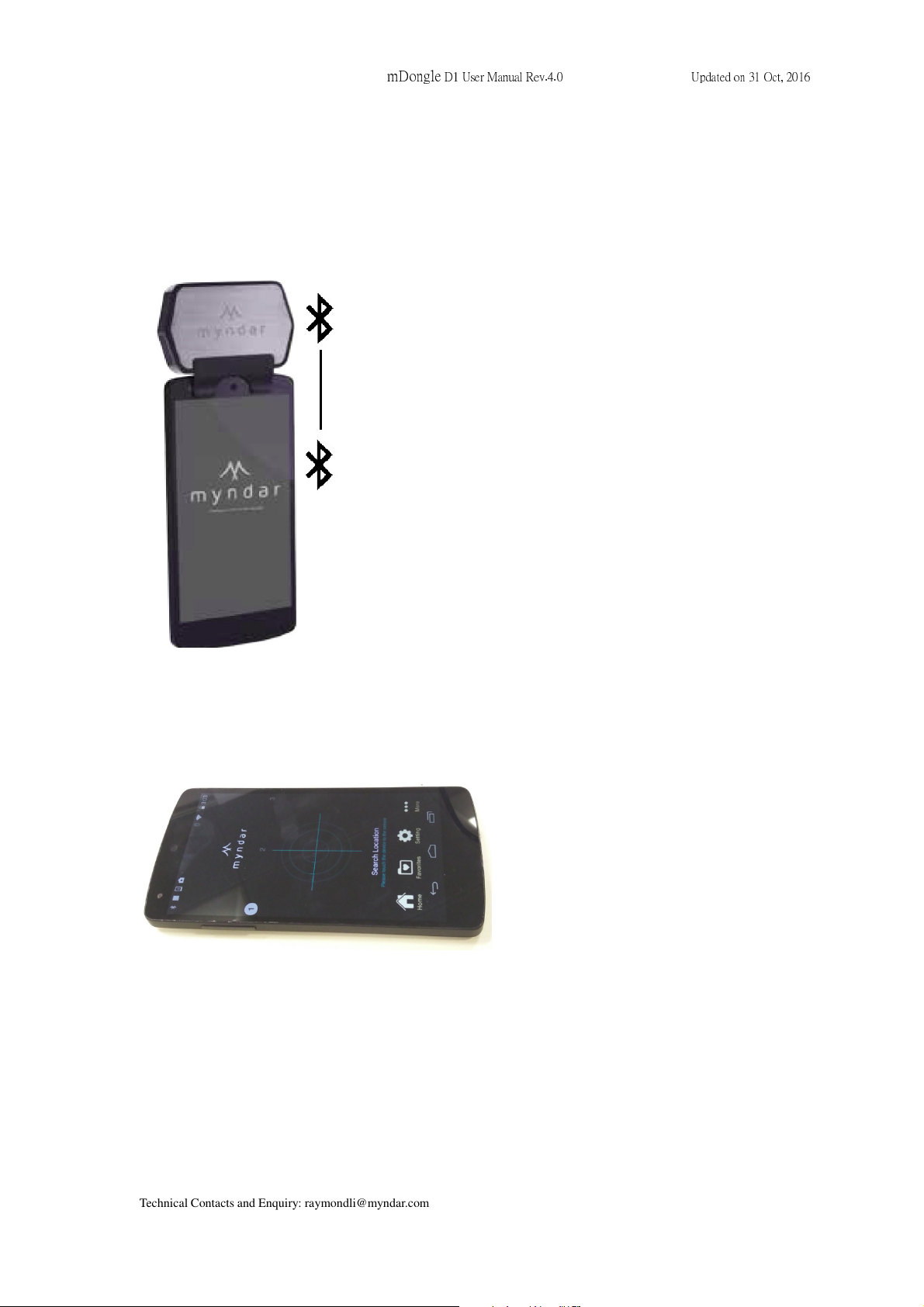
mDonlge mounted on smart phone.
Android application to read the NFC and RFID tag.
(This user manual / product specification is subjected to be changed without prior notice) P.
14
Page 15
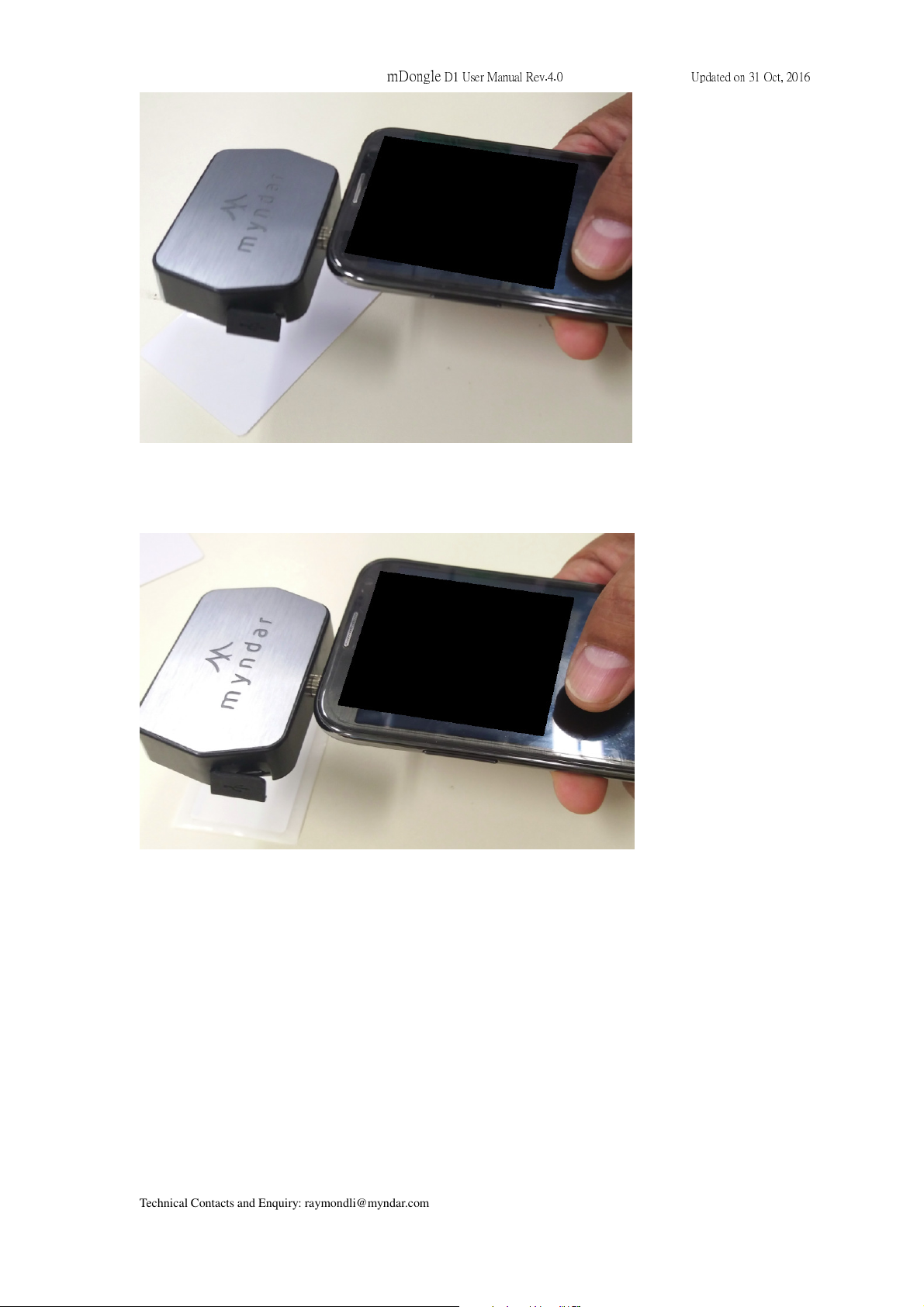
Typical NFC read
mDongle
D1 User Manual Rev.4.0 Updated on 31 Oct, 2016
Typical RFID read
(This user manual / product specification is subjected to be changed without prior notice) P.
15
Page 16
mDongle
D1 User Manual Rev.4.0 Updated on 31 Oct, 2016
2.3 Environmental Requirements
The next table includes environmental requirements for the mDongle D1. Choose a
location that meets these requirements.
Description Minimum Maximum
Operating temperature 0ºC 40ºC
Storage temperature -20ºC 60ºC
Humidity (non-condensing) 20% 90%
2.4 Caution
Danger of Electric Shock
• Disconnect the device from the electric supply before cleaning or performing
maintenance on the machine.
• Keep this device dry.
• Turn off or unplug the machine when it is not in use.
Please read the information contained within this user manual prior to attempting
installation and operation of the RFID Reader. Failure to install and operate the RFID
Terminal (mDongle D1) in accordance with the information contained in this manual may
result in unsatisfactory performance.
(This user manual / product specification is subjected to be changed without prior notice) P.
16
Page 17
mDongle
D1 User Manual Rev.4.0 Updated on 31 Oct, 2016
Chapter 3 Regulatory Information
3.1 Federal Communications Commission (FCC) Compliance
This device complies with part 15 of the FCC Rules. Operation is subject to the following
two conditions: (1) This device may not cause harmful interference, and (2) this device
must accept any interference received, including interference that may cause undesired
operation.
N
OTE
B digital device, pursuant to part 15 of the FCC Rules. These limits are designed to
provide reasonable protection against harmful interference in a residential installation.
This equipment generates, uses and can radiate radio frequency energy and, if not
installed and used in accordance with the instructions, may cause harmful
interference to radio communications. However, there is no guarantee that
interference will not occur in a particular installation. If this equipment does cause
harmful interference to radio or television reception, which can be determined by
turning the equipment off and on, the user is encouraged to try to correct the
interference by one or more of the following measures:
: This equipment has been tested and found to comply with the limits for a Class
—Reorient or relocate the receiving antenna.
—Increase the separation between the equipment and receiver.
—Connect the equipment into an outlet on a circuit different from that to which the
receiver is connected.
—Consult the dealer or an experienced radio/TV technician for help.
WARNING: DO NOT ATTEMPT TO SERVICE THE WIRELESS COMMUNICATION DEVICE
YOURSELF. SUCH ACTION MAY VOID THE WARRANTY. THE MDONGLE D1 IS FACTORY TUNED.
NO CUSTOMER CALIBRATION OR TUNING IS REQUIRED. CONTACT MEGABYTE LTD.
TECHNICAL SUPPORT FOR INFORMATION ABOUT SERVICING YOUR WIRELESS
COMMUNICATION DEVICE
.
Note:
Changes or modifications not expressly approved by the party responsible for compliance
could void the user’s authority to operate the equipment.
(This user manual / product specification is subjected to be changed without prior notice) P.
17
Page 18
mDongle
D1 User Manual Rev.4.0 Updated on 31 Oct, 2016
3.2 CE Compliance
This device has been tested to and conforms to the regulatory requirements of the
European Union and has attained CE Marking. The CE Mark is a conformity marking
consisting of the letters "CE". The CE Mark applies to products regulated by certain
European health, safety and environmental protection legislation. The CE Mark is
obligatory for products it applies to: the manufacturer affixes the marking in order to be
allowed to sell his product in the European market.
The CE Marking is not a quality-mark. Foremost, it refers to the safety rather than to the
quality of a product. Secondly, CE Marking is mandatory for the product it applies to,
whereas most quality markings are voluntary.
Chapter 4 Disclaimer Notice
Disclaimer Notice
The manufacturer shall not be liable for errors contained herein or for incidental or
consequential damages in connection with the furnishing, performance or use of this
material. This document contains proprietary information, which is protected by
international patent applications and copyright. All rights reserved. No part of this
document may be copied, reproduced or translated without prior written consent of the
manufacturer. The manufacturer reserves the right to revise this publication and to make
changes from time to time in the contents hereof without obligation to notify any person of
such revisions or changes. The manufacturer also reserves the right to change the
specifications without notice.
(This user manual / product specification is subjected to be changed without prior notice) P.
18
Page 19
mDongle
D1 User Manual Rev.4.0 Updated on 31 Oct, 2016
Chapter 5 Warranty
1. MegaByte Ltd warrants to the User that the Products sold to the User will comply with their
published specifications and will be of satisfactory quality and that MegaByte Ltd is entitled
to sell the Products to the User. MegaByte Ltd warrants that for a period of twelve (12)
months from date of purchase (“the Warranty Period”), the products will be free from defects
in materials and workmanship.
2. During the Warranty Period, MegaByte Ltd will repair, or if in MegaByte Ltd’s opinion
necessary replace, the defective product returned to MegaByte Ltd’s head office in Hong
Kong. The defective production must be returned in its original packaging and all shipping
and handling charges shall be borne by the Users.
3. The Warranty Period shall not be extended by reason of any repair or replacement.
4. MegaByte Ltd shall have no liability to the User for any damage to or defects in any of the
Products caused by fair wear and tear, improper use, negligent handling, failure to observe
this User Manual and the instructions accompanying the Products or any alterations
maintenance or repair to the Products by any person other than MegaByte Ltd, use of
non-MegaByte Ltd parts, accessories or equipment, or third party software which would
damage the Products.
5. Unless in the case of any damage to or defect in the Products which would have been
apparent on reasonable visual inspection, the User notifies MegaByte Ltd of the same in
writing within 7 days after the date of purchase thereof, or in the case of any damage to or
defects in the Products which would not have been apparent on reasonable visual inspection
the User notifies MegaByte Ltd of the same in writing 7 days after the defect becomes
apparent to the User, the User shall not be entitled to reject the Products concerned.
6. The User shall be responsible for properly storing and making backup copies of all data
which may be stored in the Products. MegaByte Ltd shall not be responsible for any lost of
data as a result of any repair or replacement.
7. Except as expressly provided in this User Manual no warranty, condition, undertaking, or
term, express or implied, statutory or otherwise, as to the condition, quality, performance,
durability or fitness for purpose of the Products is given or assumed by MegaByte Ltd and
all such warranties, conditions, undertakings and terms are hereby excluded to the fullest
extent permitted by law.
(This user manual / product specification is subjected to be changed without prior notice) P.
19
Page 20
mDongle
D1 User Manual Rev.4.0 Updated on 31 Oct, 2016
Chapter 6 Support
Technical support/Sales Enquiry can be obtained from MegaByte Limited
Please email to: [email protected]
(This user manual / product specification is subjected to be changed without prior notice) P.
20
 Loading...