

Page 1
Page 2

2
OS-I-MVOIN-8 • Effective 1-30-12
MedRx Video Otoscope
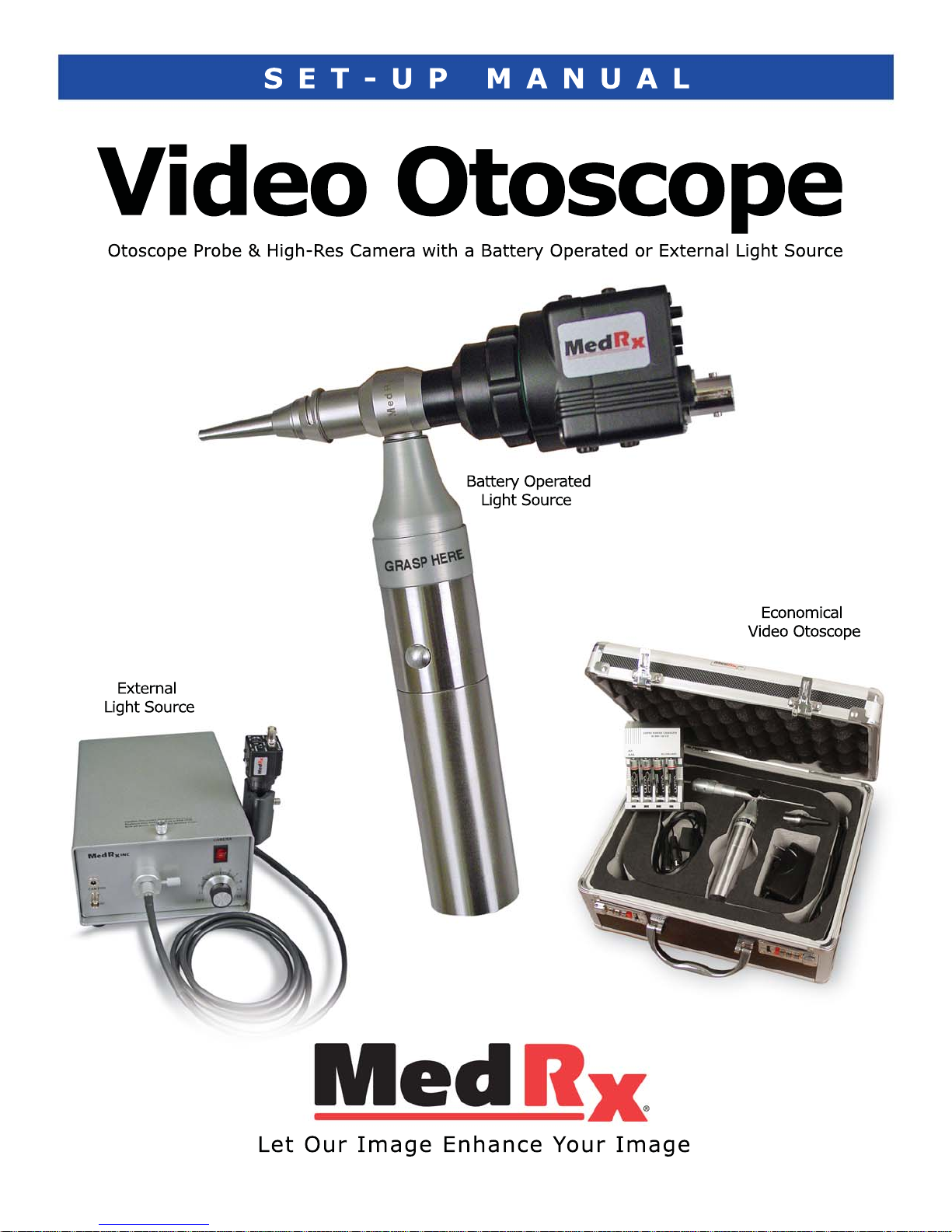
MedRx sells several different
Video Otoscope configurations with
either the battery powered light
source or the external light source
We have combined the wiring instructions, trouble shooting & warranty
information into one manual.
In addition to the camera, probe and light source each configuration comes
with additional components as listed below. See the manuals that come with
your particular configuration for additional information.
Deluxe Video Otoscope
Printer, Cart & 19” Flat Screen Monitor.
Ultra Lite Video Otoscope
Comes with a flat screen monitor.
Video Companion
USB 2.0 video capture cable and the MedRx VO Software.
The AVANT™
HIT Chamber, Speakers, Headsets, Bone & Air Conductors, Mics, Handswitch
and Testing, Fitting & Presentation Software.
The AVANT™ Audiometer
Speakers, Headsets, Bone & Air Conductors, Mics, Handswitch.
AVANT™ REM Speech+& AVANT™ A2D+Audiometer
Speakers, Headsets, Bone & Air Conductors, Mics, Handswitch.
NEW - The Economical Video Otoscope System
Carrying case, battery charger, rechargeable batteries, a sleeve of Welch
Allyn®4mm specula.
If you would like to upgrade your system
call MedRx toll free at 888-392-1234
Page 3

1200 Starkey Rd., #105, Largo FL 33771
Toll Free: (888) 392-1234 • (727) 584-9600
Fax: (727) 584-9602 • Email: [email protected]
MedRx's Authorized Representative in Europe (Regulatory affairs only)
Emergo Europe, Molenstraat 15
2513 BH The Hague, The Netherlands
Tel: (31) (0) 70 345-8570 • Fax: (31) (0) 70 346-7299
3
OS-I-MVOIN-8 • Effective 1-30-12
Using The Video Otoscope.............................................4
Battery Operated Light Source - Charging Batteries ......5
Battery Replacement
WARNING ...................................6
Wiring Diagram - Economical Video Otoscope...............7
Wiring Diagrams - Battery Operated Light Source:
Deluxe Video Otoscope System.......................8
Ultra Lite Video Otoscope System....................8
Video Companion ..........................................8
AVANT™ Audiometer .....................................8
AVANT™ REM Speech & A
2
D Audiometer ..........8
The AVANT™ ................................................9
Wiring Diagram - External Light Source
Deluxe Video Otoscope System ................10-11
Ultra Lite Video Otoscope System .............10-11
Video Companion ...................................10-11
AVANT™ Audiometer...............................10-11
AVANT™ REM Speech & A
2
D Audiometer....10-11
The AVANT™..........................................10-11
Trouble Shooting Guide.............................................. 12
Cleaning & Disinfecting .............................................. 13
Transporting Your Video Otoscope ............................... 13
Limited Warranty ...................................................... 14
Contents
www.medrx-usa.com
Page 4

4
OS-I-MVOIN-8 • Effective 1-30-12
MedRx Video Otoscope
Using the Video
Otoscope
CAUTION: The MedRx Video Otoscope is only to be used by
a person qualified in the use of an Otoscope. Misuse can
cause a patient pain and possible injury.
Video otoscopy has multiple purposes in hearing assessment and hearing instrument fitting.
The Video Otoscope is used for:
• Performing the initial otoscopic examination prior to testing.
• Capturing and storing images to the NOAH™ patient database.
• Troubleshooting problems with the hearing aid, such as blocked
receivers and microphones.
• Probe microphone placement for Live Speech Mapping
measurements.
Always perform an otoscopic examination of the ear canal prior to testing
to determine if earwax or other foreign matter will interfere with probe
tube insertion. If this is a problem, the patient should be referred to an
appropriate resource for removal of the wax or debris. If abnormal ear
conditions are noticed on this examination, an appropriate medical referral
is recommended before evaluating hearing or fitting hearing instruments.
The speculum is always to be used with the system.
The speculum must be cleaned or replaced between usage per
accepted medical practice procedures.
Prior to insertion, the probe should be held within 1/4" of a
known object, such as your finger, to check the quality of the
image. Sometimes the lens is smeared with cerumen or other
matter and will need to be vigorously cleaned with an alcohol wipe
in order to provide a clear image.
IMPORTANT: Since the Video Otoscope incorporates glass
lenses for image transmission it is breakable. Although the
tip is tapered to improve durability, any impact or crushing to the
tip may cause serious damage to the instrument.
Page 5
5
OS-I-MVOIN-8 • Effective 1-30-12
MedRx Video Otoscope
Battery Operated Light Source
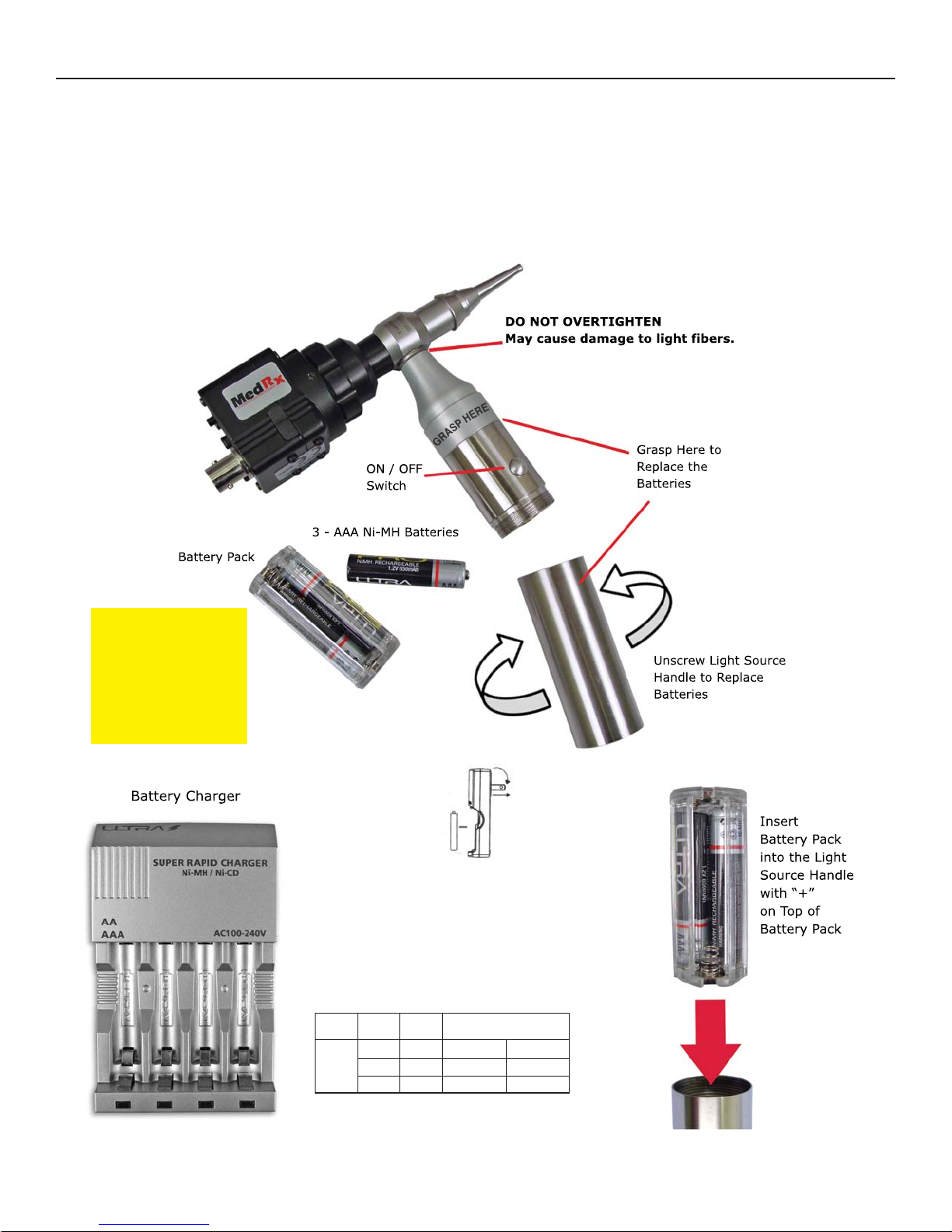
Install Freshly Charged Batteries Every Day
A Second Set Of 3 Batteries Is Supplied
So That A Fully Re-Charged Set Is Always Available
Charging
Main Features:
• Micro Computer
Control
• AAA Battery Types are compatible-but
do not put in charger
• Suitable for Ni-CD and Ni-MH
rechargeable batteries
• Four charge channels that can charge
one to four batteries
• Folding AC plug blade for easy
Note: The handle
will become HOT if
left on when not in
use for an extended
period of time and
the batteries will
become discharged
Type
NI-MH
NI-CD
Size
AAA
AAA
CAP.
600 mA
850mA
Charging Time
1, 2 cells
Approx. 80min
Approx. 120min
1,2,3,4, cells
Approx. 150min
Approx. 200min
Page 6
6
OS-I-MVOIN-8 • Effective 1-30-12
MedRx Video Otoscope
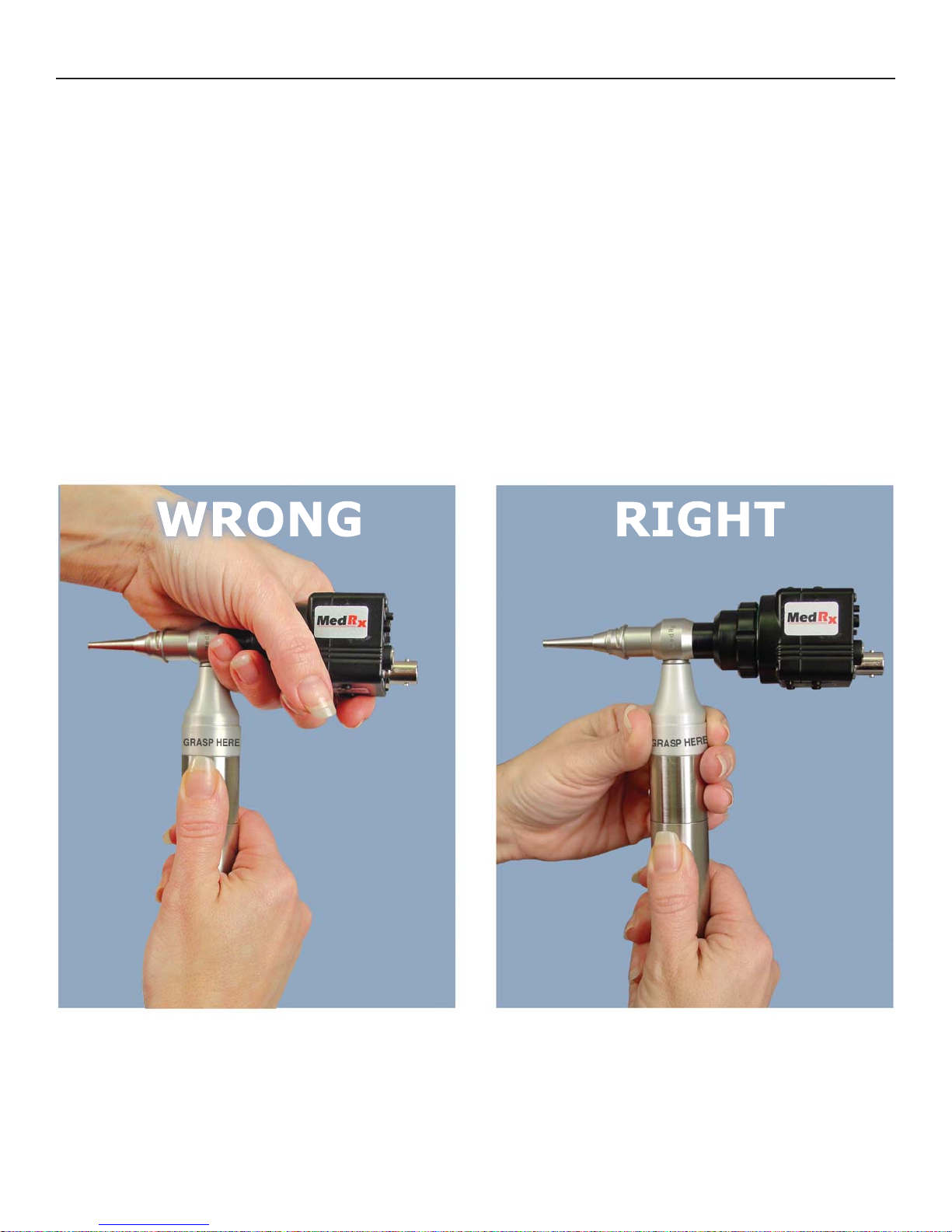
Battery Replacement WARNING
IMPORTANT
Grasp the Upper Portion of the Silver Handle,
NOT the Probe or Camera,
When Unscrewing the Lower Section to Replace the Batteries.
Otherwise, Possible Damage May Occur
to the Probe.
Refer to Pictures Below.
Page 7
7
OS-I-MVOIN-8 • Effective 1-30-12
MedRx Video Otoscope
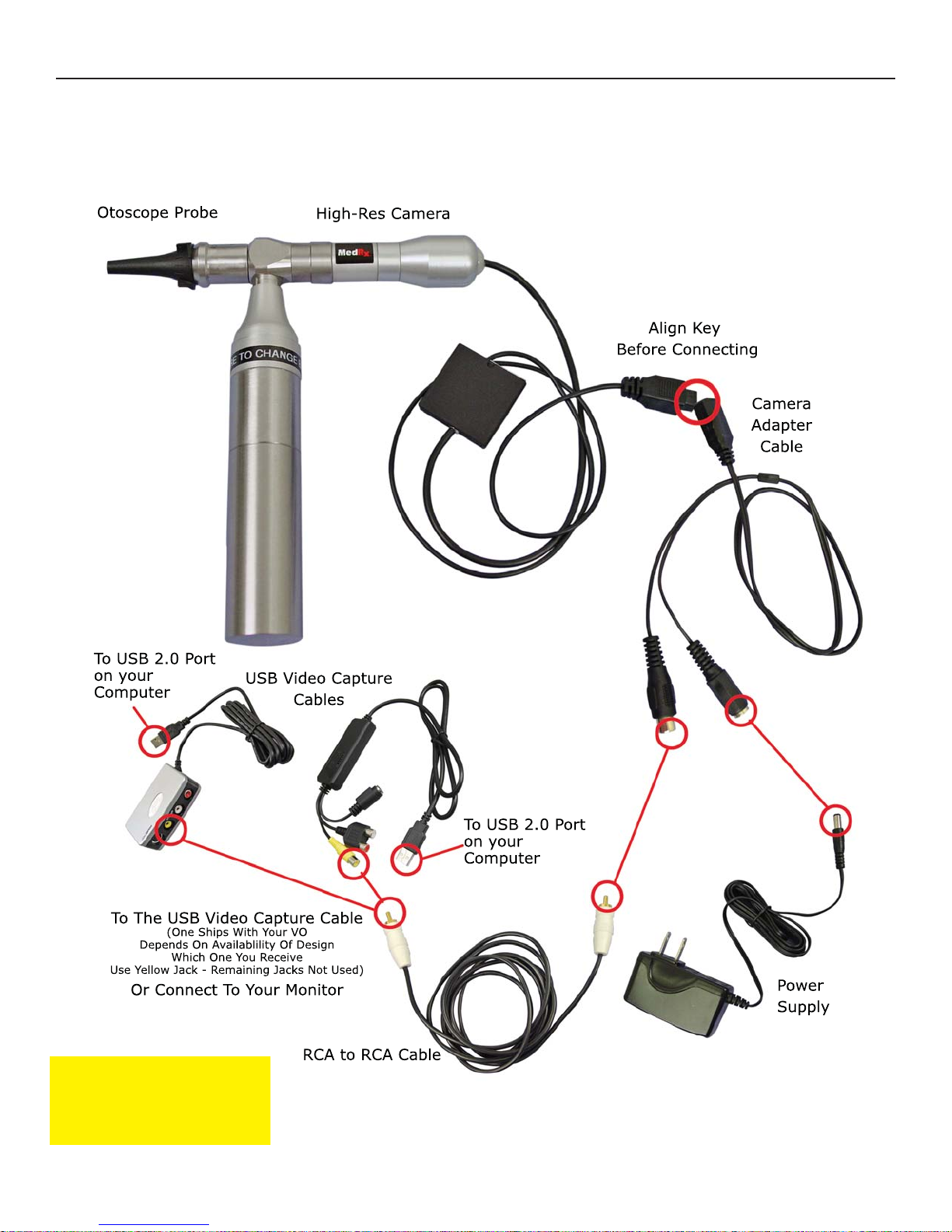
Wiring Diagram - Economical VO with
Battery Operated Light Source
Note: The handle will become
HOT if left on when not in use
for an extended period of time
and the batteries will become
discharged.
Install Freshly Charged Batteries Into the Light Source Every Day.
A Second Set Of 3 Batteries Is Supplied So That A Fully Re-Charged Set Is Always Available.
Page 8
8
OS-I-MVOIN-8 • Effective 1-30-12
MedRx Video Otoscope
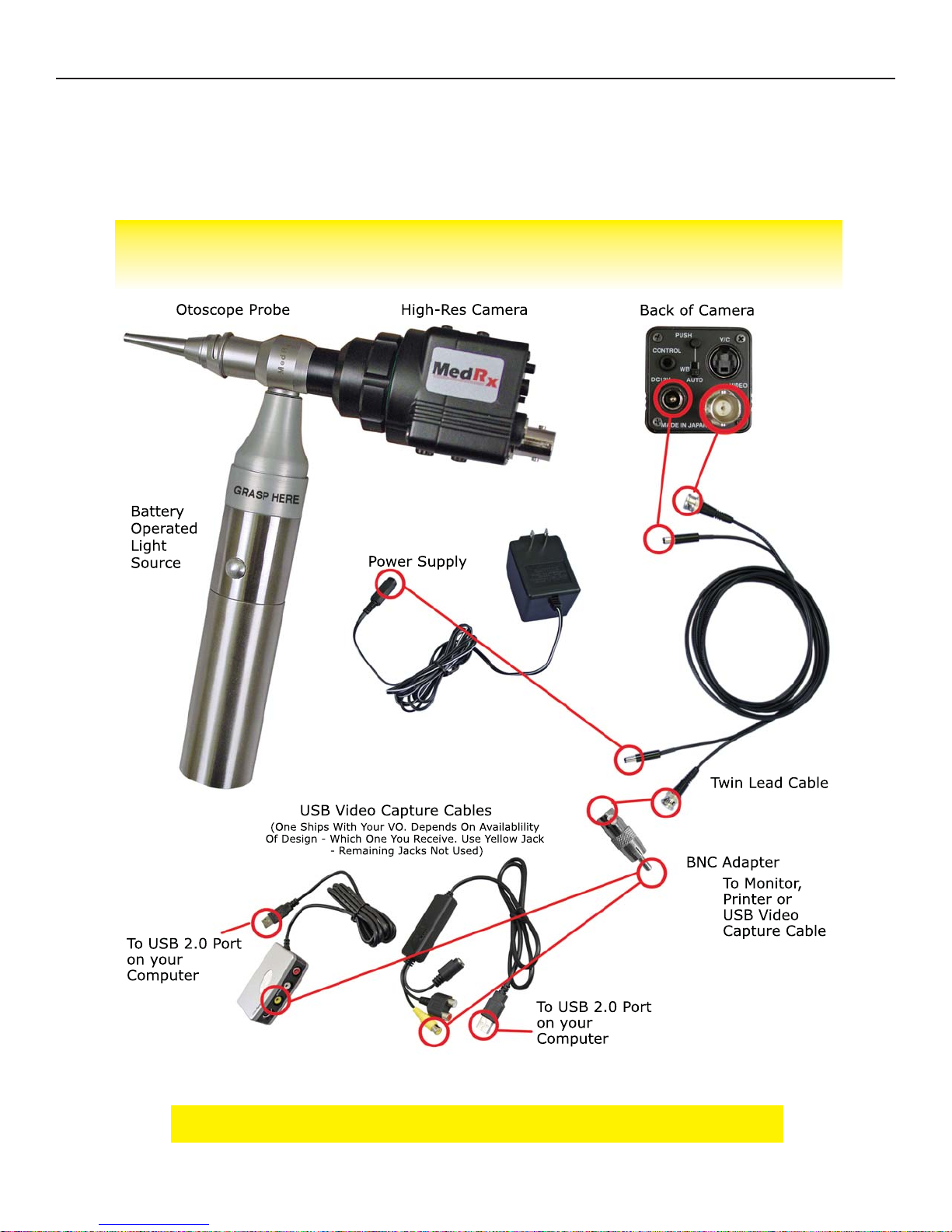
Wiring Diagram - Battery Operated
Light Source
• Deluxe VO • Ultra Lite VO System • Video Companion System
• AVANT™ Audiometer • AVANT™ REM Speech+& A2D+Audiometer
Install Freshly Charged Batteries Into the Light Source Every Day.
A Second Set Of 3 Batteries Is Supplied So That A Fully Re-Charged Set Is Always Available.
Note: The handle will become HOT if left on when not in use for an extended period of
time and the batteries will become discharged.
Page 9
9
OS-I-MVOIN-8 • Effective 1-30-12
MedRx Video Otoscope
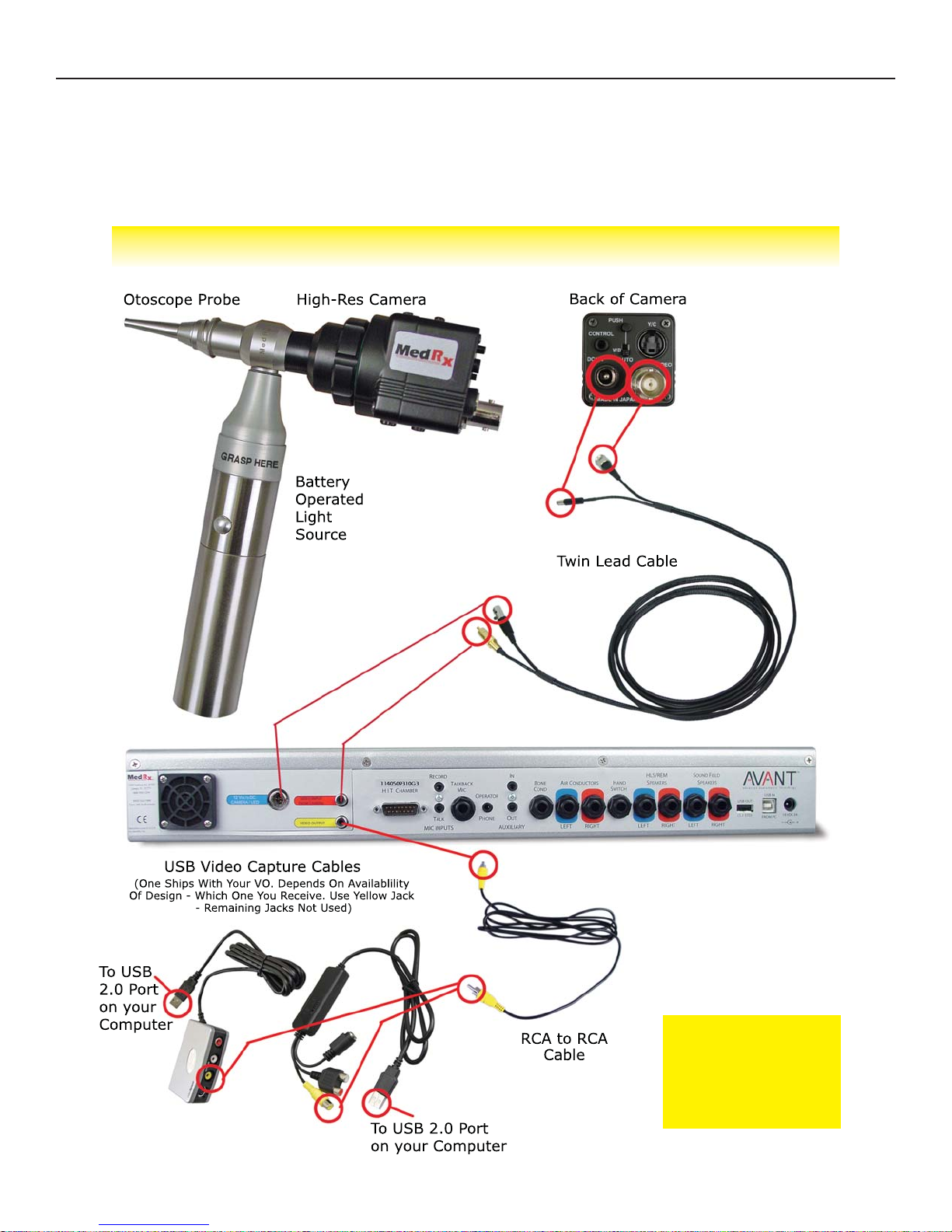
Wiring Diagram - Battery Operated
Light Source
• The AVANT™
Install Freshly Charged
Batteries Into the Light
Source Every Day.
A Second Set Of 3 Batteries
Is Supplied So That A Fully
Re-Charged Set Is Always
Available.
Note: The handle will
become HOT if left on
when not in use
or an extended period of
time and the batteries
will become discharged.
Page 10
10
OS-I-MVOIN-8 • Effective 1-30-12
MedRx Video Otoscope
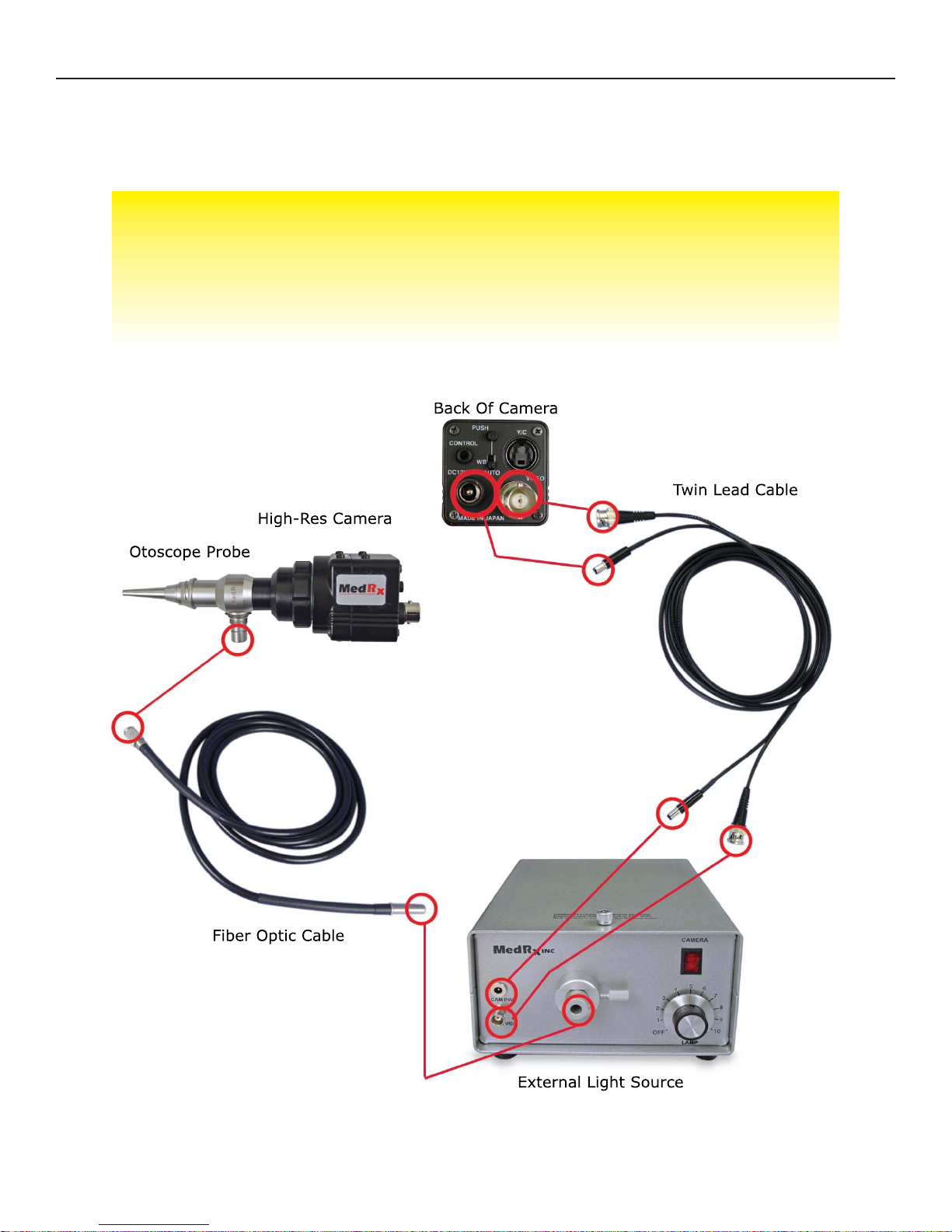
Wiring Diagram - External Light Source
• Deluxe Video Otoscope System
• Ultra Lite Video Otoscope System
• Video Companion System • AVANT™ Audiometer
• AVANT™ REM Speech & A2D Audiometer • The AVANT™
Page 11
11
OS-I-MVOIN-8 • Effective 1-30-12
MedRx Video Otoscope
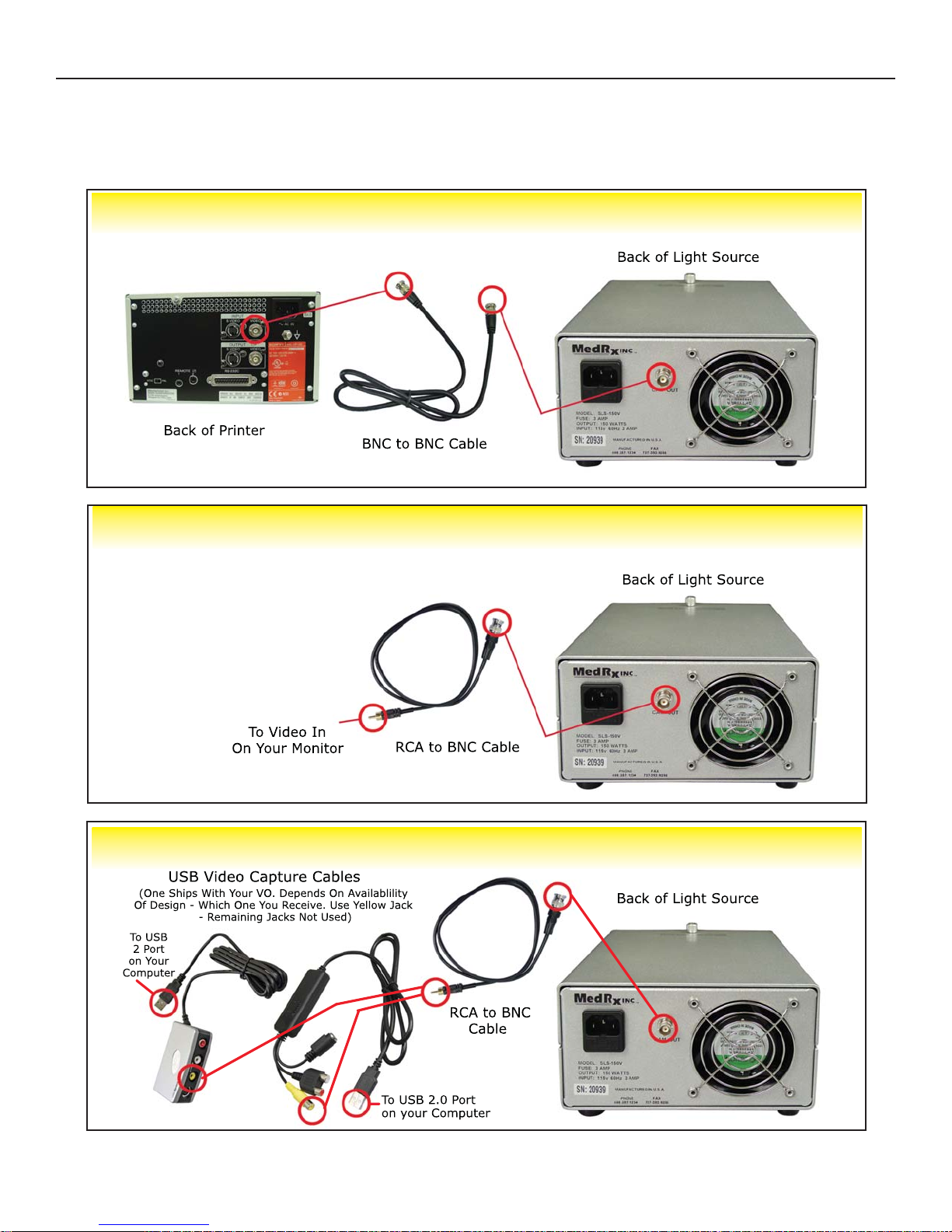
Wiring Diagram Cont. - External Light Source
• Video Companion • AVANT™ • AVANT Audiometer • AVANT A2D & REM
• Ultra Lite Video Otoscope System
• Deluxe Video Otoscope System without Printer
• Deluxe Video Otoscope System with Printer
Page 12
12
OS-I-MVOIN-8 • Effective 1-30-12
MedRx Video Otoscope
Trouble Shooting Guide
External Light Source
Problem
Fuzzy or out of focus
picture
No picture on display
Indicator light switch on
light source not on
No light from probe tip
Picture is dark
Cleaning probe does not
improve picture
Main Cause
Dirty probe tip (dried
cerumen)
Short in twin lead cable.
Light Source not turned
on
Loose wire connection
Power supply not
plugged in
Short in twin lead cable
Light source not on
Bulb burnt out
Switch on back of
camera in wrong position
Light source too low
Probe dropped and
physically damaged
Solution
Carefully clean probe tip
with an alcohol wipe
Replace twin lead cable
Turn light source on
Re-check wire connection
Plug in power supply
Unplug twin cable from
light source; see if light
comes on, if so replace
twin lead cable
Turn on light source
Replace bulb
Move camera shutter
switch to off position
Turn up intensity of light
source
Call MedRx for service
This guide was designed to assist you in diagnosing minor problems.
Should service be needed, please call MedRx at 888-392-1234 for Technical Support
Monday—Friday, EST 9AM to 5PM
Page 13

13
OS-I-MVOIN-8 • Effective 1-30-12
MedRx Video Otoscope
The probe tip cover should be retained and used for
additional transportation protection of the videoscope
optics while in or out of the case.
When transporting or storing your Video Otoscope, it is best to use the
original packing case or similar packaging. Store the system in a cool, dry
location and do not place your system in direct sunlight. Care must be
taken to protect the system from shock, moisture damage and mishandling. Do not place heavy objects on any of the system's components.
To assure proper operation and warranty protection, use manufacturer's
replacement components only.
Cleaning & Disinfecting
Your MedRx Video Otoscope has been designed to
provide years of trouble-free service. Do not remove
or open the camera housing, as there are no user
serviceable components inside.
Cleaning
To keep your system looking new, wipe the exterior of the components
with a soft cloth. Stubborn stains may be removed using a cloth moistened with water and mild detergent. Do not allow debris or fluid to enter
into the components. Use an alcohol wipe to clean the lens on the end of
the Otoscope probe, or a common disinfectant.
Video Otoscope Disinfecting
The Video Otoscope is sealed so that it may be wiped with the following
surface cleaners to disinfect:
75% Alcohol • Chlorhexiderm • Cidex • Nolvasan • Parvocide • Parvosol •
Roccal • Synphenol
The scope should NEVER be heat sterilized, gas sterilized or
soaked in liquid because damage may result.
Transportation &
Storage
Page 14

14
OS-I-MVOIN-8 • Effective 1-30-12
MedRx Video Otoscope
Limited Warranty
MedRx, Inc warrants this product to be free from defects in material and
workmanship for one year from the time of purchase. If this system fails to perform
as specified during this period, the purchaser is responsible for calling MedRx at
(888) 392-1234 or (727) 584-9600. The company's representative will advise the
owner to either return specific components or the entire system to:
MedRx, Inc.
1200 Starkey Road #105
Largo, FL 33771 USA
MedRx will repair or replace any defective devices, fully test the system and/or
components and ship the system promptly back to the owner. There is no cost for the
repair or return shipping, provided the system is one year old or less and has not
been misused, abused or damaged. Such damage includes, but is not limited to,
dropping, exposure to excessive heat greater than 100ºF and water/liquid damage.
Repair or replacement of the system as provided under this warranty is the sole and
exclusive remedy of the purchaser. MedRx shall not be liable for any consequential
or incidental damages or for breach of any express or implied warranty. Except to the
extent of applicable law, any implied warranty, merchantability or fitness of this
product is limited to the duration of this warranty.
MedRx will, at its discretion, service and repair out of warranty products at the
purchaser's request, charging for parts and labor as necessary.
The limited warranty is deemed void if software or hardware is installed on this
product which is not pre-approved by MedRx, Inc. Approved software includes
NOAH™ and HIMSA approved hearing aid manufacturer programming modules for
fitting hearing aids.
MedRx, Inc is not responsible for problems resulting from installation of unapproved
software or hardware. In the event of unapproved software or hardware installed on
the system causing a conflict, MedRx will service the product for a fee to be
determined at the time of service.
Any extension of this warranty past the initial one-year warranty is subject to the
following (where applicable).
1. A $300 deductible per repair.
2. Extended warranty does not include cables, connectors or peripherals.
3. Extended warranty of the Video Otoscope covers optics only.
 Loading...