

Page 1
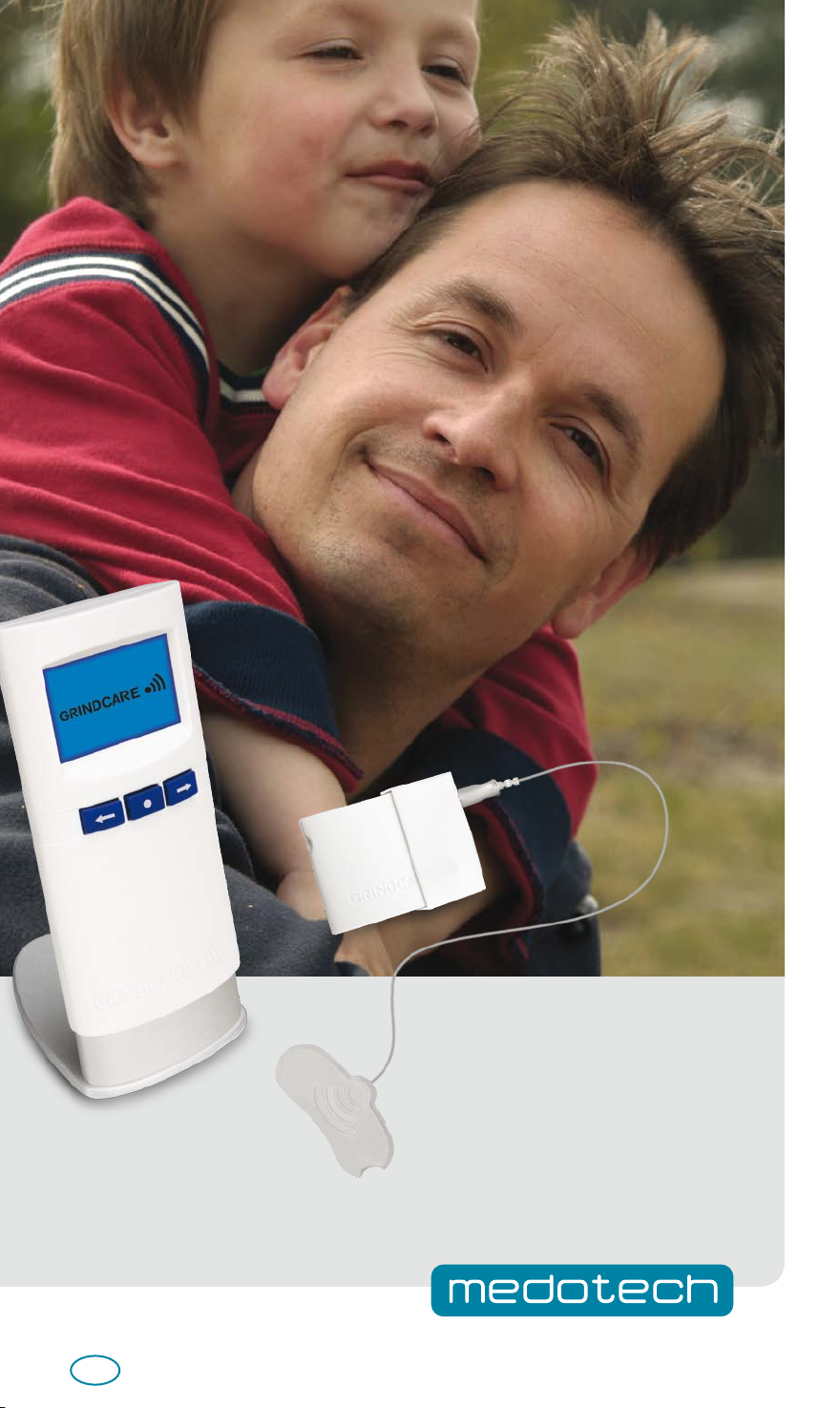
User Manual GRINDCARE 3.0
US
Page 2

2
Page 3
CONTENTS
INTRODUCTION . . . . . . . . . . . . . . . . . . . . . . . . . . . . . . . .4
GENERAL INSTRUCTIONS . . . . . . . . . . . . . . . . . . . . . . . .5
USAGE . . . . . . . . . . . . . . . . . . . . . . . . . . . . . . . . . . . . . . .6
DATA . . . . . . . . . . . . . . . . . . . . . . . . . . . . . . . . . . . . . . . .7
CONFIGURATION. . . . . . . . . . . . . . . . . . . . . . . . . . . . . . .8
TROUBLE SHOOTING. . . . . . . . . . . . . . . . . . . . . . . . . . . .9
MAINTENANCE . . . . . . . . . . . . . . . . . . . . . . . . . . . . . . .10
TECHNICAL SPECIFICATIONS. . . . . . . . . . . . . . . . . . . . .13
3
Page 4

INTRODUCTION
Before use
Before using your GRINDCARE for the first time, you should read the user manual carefully
and keep it for future reference.
CAUTION: Federal (U.S.) Law restricts this device to sale by or on the order of physician.
Application
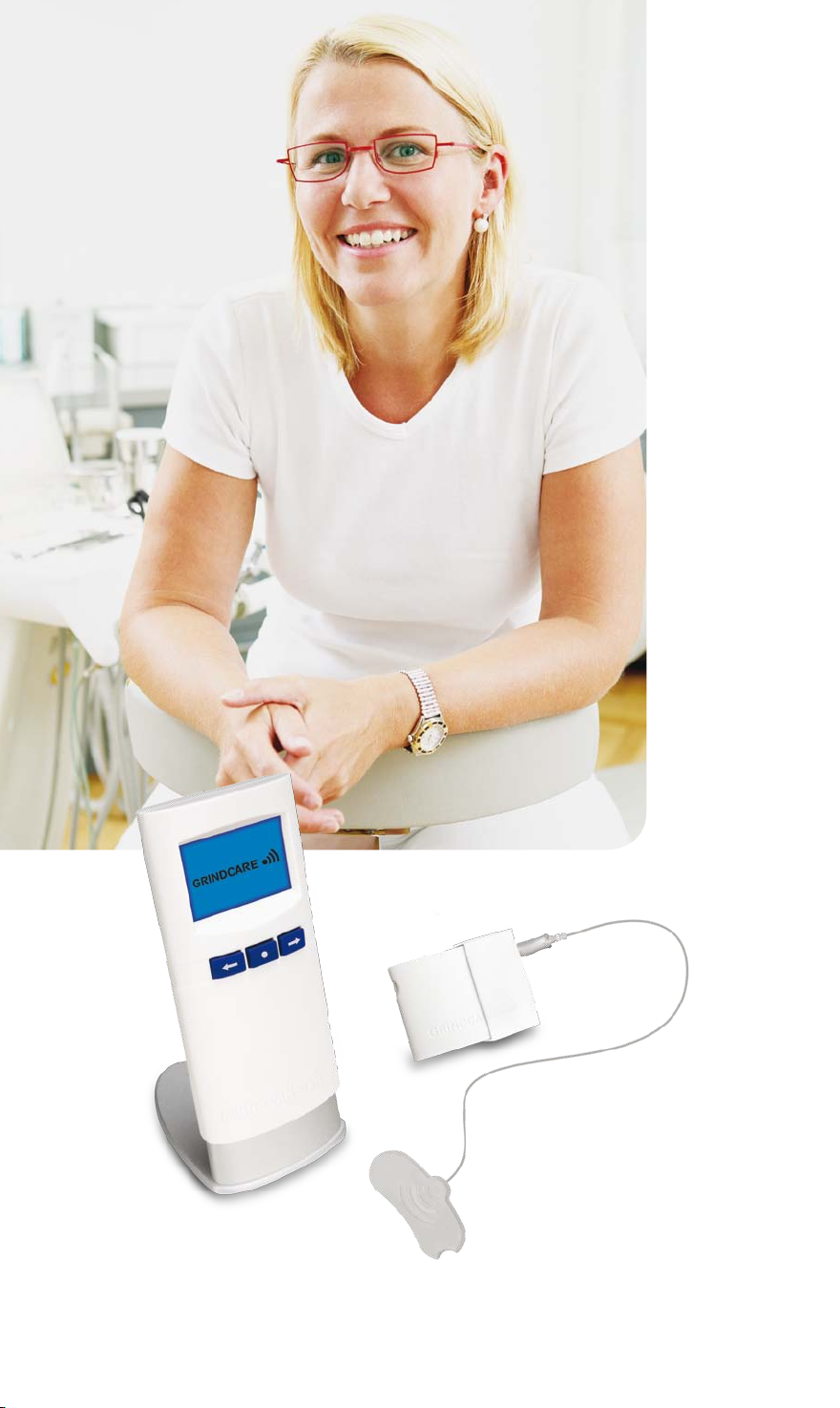
GRINDCARE is a device intended for use by
people who suffer from tooth grinding/
clenching, also called bruxism. GRINDCARE
can measure and help to manage bruxism.
During use, GRINDCARE emits a small
electrical impulse – what is known as
bio-feedback.
GRINDCARE consists of
Stimulator, which is the central unit. The
Stimulator registers your grinding and sends
bio-feedback. All usage data is saved.
Grinddock, which is used to operate the
Stimulator and display the data from your
use of GRINDCARE. Wireless communication
(i.e. communication between the docking
station and stimulator) is used when the
Stimulator is to be operated, and when data
is to be transferred from the Stimulator to
Grinddock.
This wireless communication is terminated
automatically when the device is in use.
Grinddock is also used to charge the Stimulator
and to transfer data from the Stimulator to
your doctor’s PC.
Electrode, which is connected to the Stimulator
and placed on the temporalis muscle on the
temple. This electrode measures electrical
signals from the muscle when it moves and
emits an electrical impulse which makes the
muscle relax.
This impulse makes the jaw muscles relax and
may help you to stop grinding your teeth.
Your doctor or dentist will advise you as to
the most appropriate way to use GRINDCARE
for your particular condition.
The electrode is combined with a cover which
operates as a clip and at the same time ensures
that the electrode cannot be placed into any
other socket.
Safety cord, which can be attached to the clip
and hung around the neck.
Rubber clip, which is used to attach the wire
from the electrode to the safety cord.
Disposable gel pads, (x30) placed on the
electrode to ensure good contact between
the electrode and the skin.
Charger, which is connected to Grinddock for
charging both Grinddock and the Stimulator.
Stand, which Grinddock is placed in when not
in use, when it is to be charged and when
data is to be transferred to a PC.
Your doctor has reviewed with you the
general instructions for using GRINDCARE
when you received your device. Keep these
instructions for reference to help you
remember how to use your device.
4
Page 5
GENERAL INSTRUCTIONS
Ready for use
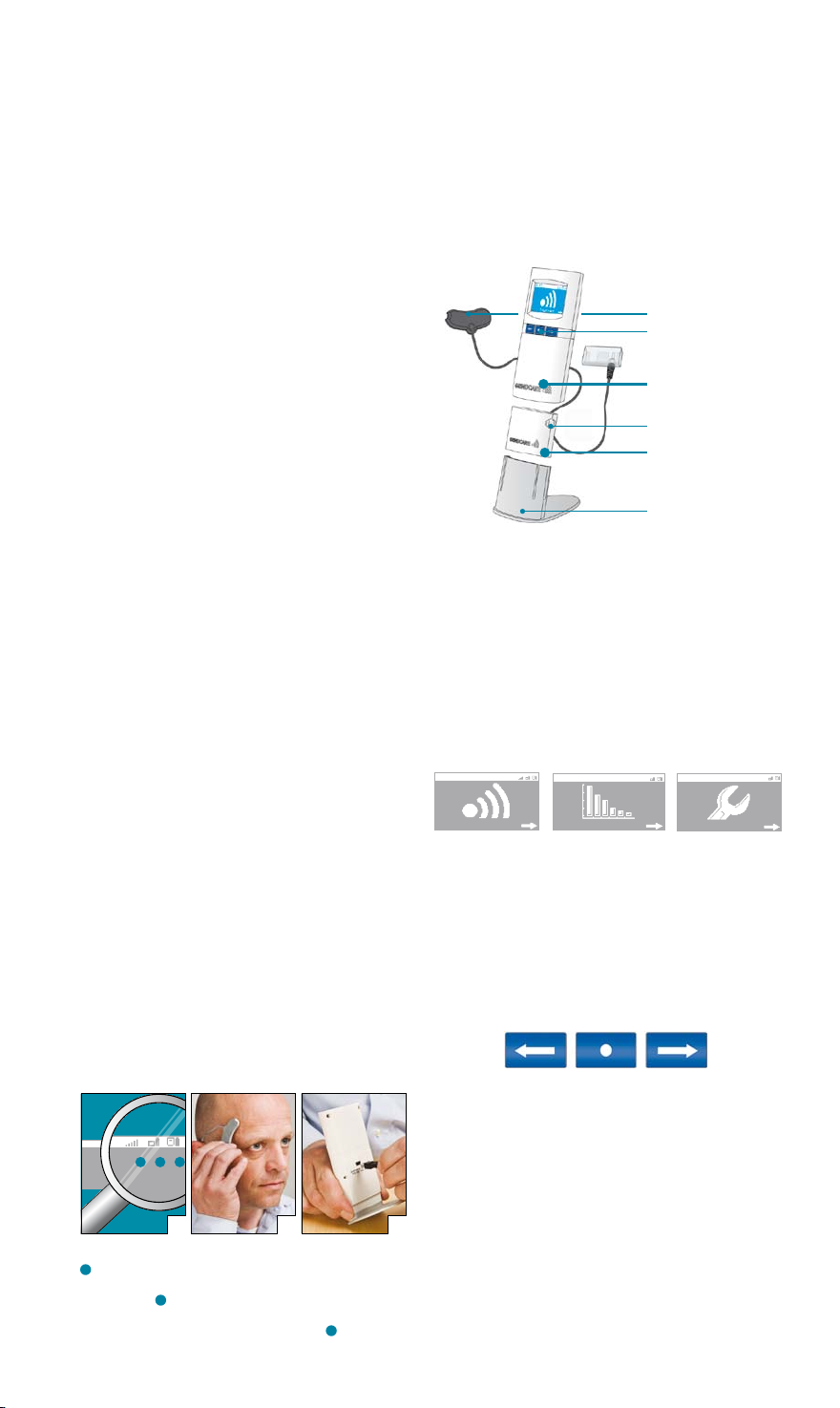
1. Switch on the Stimulator and Grinddock.
Check that both are charged, see Fig. 1,
Photo A, icons 2 and 3. Make sure that
there is contact between Grinddock and
the Stimulator, see Fig. 1, Photo A,
icon 2.
2. Connect the electrode to the Stimulator.
3. Place the electrode on a flat surface.
Remove the short plastic liner from the
gel pad. Place the gel pad with the
recesses over the three terminals. Remove
the long plastic liner from the gel pad.
Check that there is no gel left on the
liner.
4. Place the electrode with the gel pad
directly on the skin. It is important to
ensure that the skin is clean and dry.
The electrode must be placed over the
temporalis muscle on the temple as shown
in Fig. 1, Photo B. You can locate this by
placing a couple of fingers on your temple
and biting down – you will feel the muscle
bulging out.
5. Attach the Stimulator to your
nightclothes using the clip, or hang it
around your neck using the safety cord
supplied. The safety lock must be at the
back of your neck. Switch on the Stimulator
by pressing Stimulator button for 1 sec.
Blue LED will flash once and stay on for a
few sec. (On status is then indicated by a
short blue LED flash every 30 sec. and by
Grinddock Fig. 1, Photo A, icon 2 active).
6. Check that there is good contact with the
skin. You must see a minimum of three
bars in the contact icon, see Fig. 1,
Photo A, icon 1. The electrode must stick
to the skin along its entire length so that
all three terminals maintain good contact
with the skin.
7. The electrode is now correctly placed and
you can start calibrating GRINDCARE
(see page 6).
8. Before use, GRINDCARE must measure
how much you grind your teeth. Find out
more about this baseline function in the
section on configuration (see page 8).
3
1 2
BA
Figure 1: Usage Photos A, B and C
1
indicates the contact between the electrodes and
skin - a minimum of 3 bars is required for adequate
performance.
whether the Stimulator is docked or not. The battery symbol
is only visible if the Stimulator is switched on.
the Grinddock battery charge.
2
indicates the Stimulator battery charge and
3
indicates
Charging
Grinddock and the Stimulator must be charged at
least once every five days. Place the Stimulator in
Grinddock (the Stimulator can only be charged
when the electrode is disconnected). Connect the
Electrode
On/o,
OK button
Grinddock
On/o button
Stimulator
Stand
charger to Grinddock, as shown in Fig. 1, photo C.
Set GRINDCARE for charging in the stand.
Grinddock
When Grinddock is switched on, the display
shows the “Activate” icon.
Levels on menu 1:
Activate
The middle button allows you to make selections
(OK, or enter). The two arrow buttons allow you
to scroll through the options. Pressing the right
arrow button takes you to the next menu entry.
Pressing the left arrow button takes you back to
the previous level. Holding down the left arrow
button will return you to the start.
Switching off GRINDCARE
Hold down the middle button to switch off
Grinddock. Switch off the Stimulator by pressing
the on/off button for 3 sec. (until blue LED
switches on, then release button). The Stimulator
will also turn off automatically if left unused or
C
without electrode contact for 10 min.
Data
Config
5
Page 6
USAGE
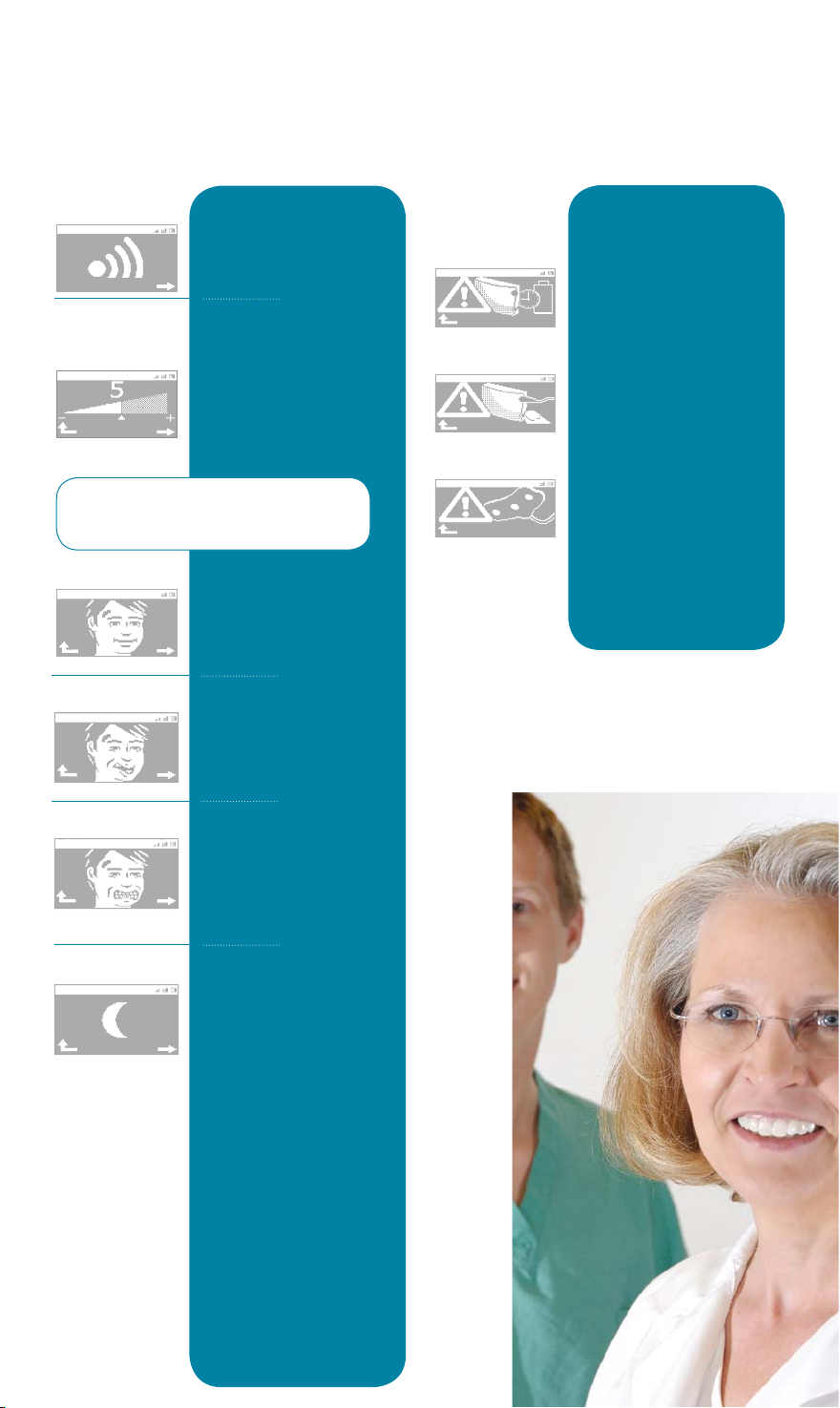
Activate
Setting
bio-feedback
Before every activation, you have to
calibrate GRINDCARE to suit your
grinding pattern.
Relax
Grimace
To begin using the device,
select “Activate” from the
main menu.
Select a bio-feedback level
using the arrow buttons.
Press the middle button
to test it. The level is
correct when you can feel
a tingling sensation. Press
OK to confirm, or select a
different level.
Start by relaxing your
facial muscles. When
the arrow disappears
completely, you will
proceed automatically.
Now make a grimace,
without clenching. When
the arrow disappears
completely, you will
proceed automatically.
Possible error
sources
These icons are displayed
only if:
The battery needs
charging
There is no contact with
the Stimulator.
There is poor contact
between the skin and
the electrode.
Find out more under:
General Instructions on
the previous page.
Grind
Ready
6
Clench your teeth in a
good, firm bite (around
60% of your maximum
bite strength). Repeat a
couple of times until the
arrow disappears.
Your activation has now
started and there is no
wireless communication
between the Stimulator
and Grinddock. You can
place Grinddock in its
stand (it will switch to
standby after 5 sec.).
Next morning: Carefully
remove the electrode
from your temple without
pulling on the wire. The
device will automatically
stop. Before reviewing
data, switch the Stimulator
off and then on again and
the Stimulator battery
symbol will reappear on
the display.
Page 7
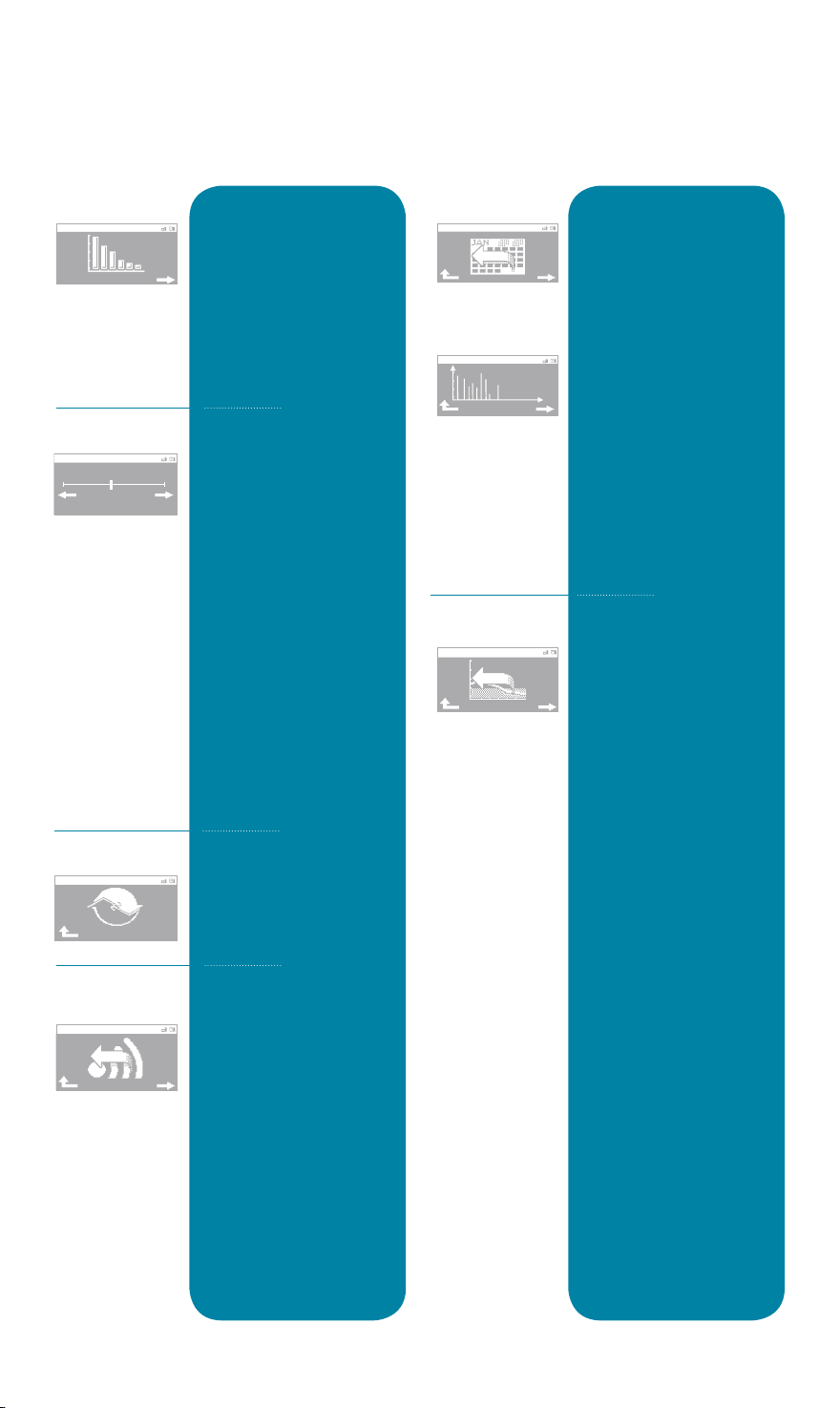
DATA
0 10
Data
Tension/Pain
Synchronizing
Last activation
Select “Data” from the
main menu to view the
results of your activation.
Start by making sure
there is contact between
Grinddock and the
Stimulator (find out
more under:
General Instructions).
After every activation, you
should rate your sensation
of facial tension/pain on a
scale from 1 to 10. Use the
arrow buttons and press
OK to approve your
settings. GRINDCARE has
now saved data on your
tension/pain.
The “Tension/Pain”
function gives you an
opportunity to record your
own experiences of any
tension or pain. You can
enable or disable the
tension/pain query in the
“Config” menu.
GRINDCARE transfers data
from the Stimulator to
Grinddock.
Select “Last activation” to
view the results of your last
activation, according to:
• How much you have
been grinding your
teeth in total (Grinds)
• How many hours your
activation lasted (Hours)
• How many times an
hour you have been
grinding your teeth
(Grinds/Hour)
• Experienced tension/
pain (Tension/Pain)
30 activations
Last Baseline
Select “30 activations” to
view the results of your
last 30 activations. Each
column displays data for
one activation, according to:
• How much you have
been grinding your
teeth, in total (Grinds)
• How many hours your
activations lasted
(Hours)
• How many times an
hour you have been
grinding your teeth
(Grinds/Hour)
• Experienced tension/
pain (Tension/Pain)
Select “Last Baseline”
to view your latest
baseline data:
• How much you have
been grinding your
teeth, in total (Grinds)
• How many hours
measurement
continued (Hours)
• How many times an
hour you have been
grinding your teeth
(Grinds/Hour)
• Experienced tension/
pain (Tension/Pain)
• How hard you have
been grinding your
teeth (Intensity)
7
Page 8
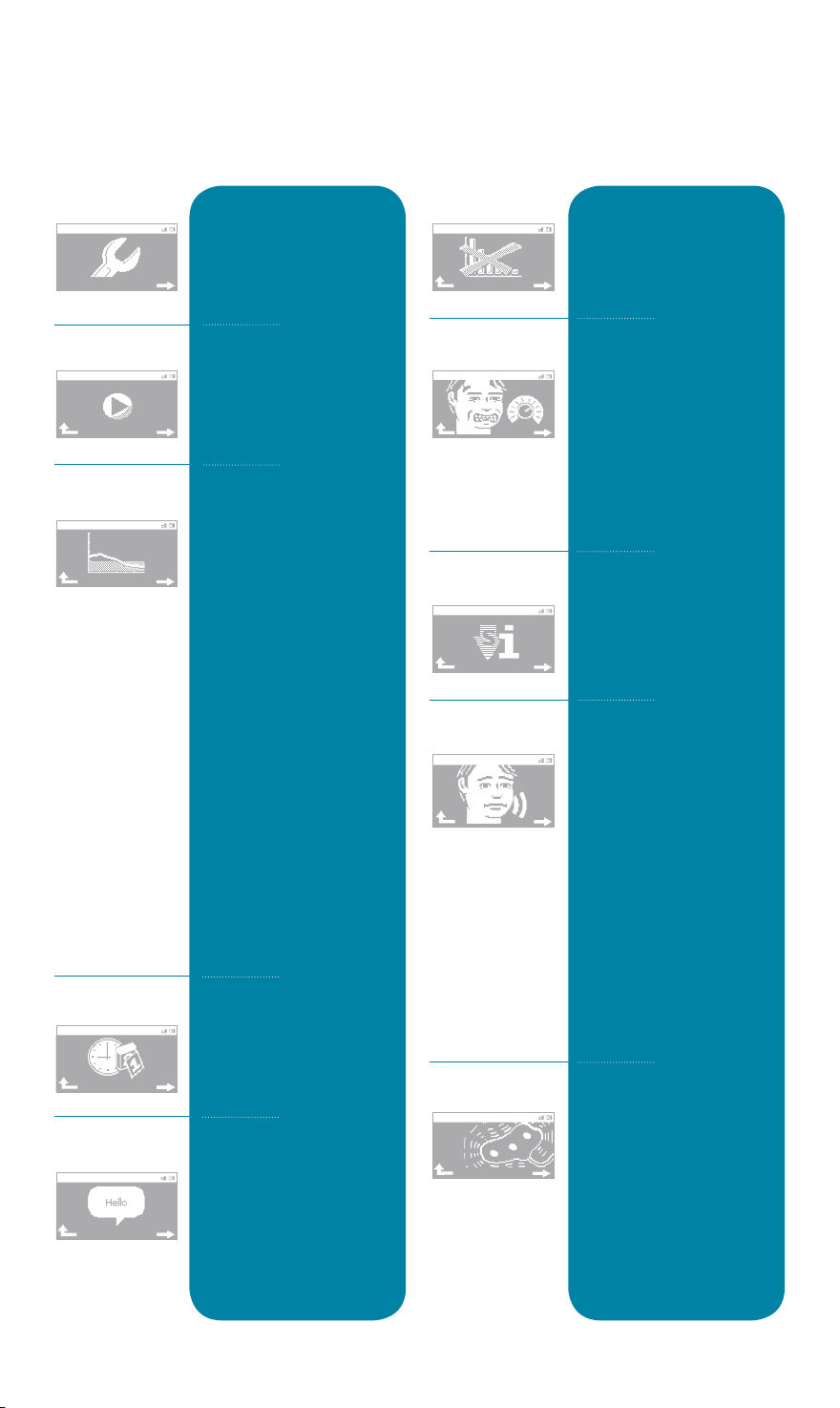
CONFIGURATION
Settings
Demo
Baseline
Time/Date
Language
In “Config”, you can
change your settings and
view more information
on your GRINDCARE and
how to use it.
Select “Demo” if
you want to feel a
bio-feedback impulse.
Select “Baseline” when
you want to measure how
much you actually grind
your teeth before you
commence activation with
GRINDCARE. All data will
be saved so that you can
review it later and assess
the effect of your
activations.
Start by working through
steps 1-7 under General
Instructions. Then select
“Baseline” from “Config”
and work through the
three steps for adjusting
GRINDCARE (in the same
way as described under
“Activation” on page 6.)
In “Baseline”, bio-feedback
is automatically set to zero.
Set the date and time
using the arrow buttons.
Approve your settings by
pressing OK.
Choose your required
language using the arrow
buttons. Approve your
settings by pressing OK.
Clear Data
Set Sensitivity
SW Info
Tension/Pain
Signal Quality
Select “Clear Data” if
you want to delete all
activation data.
In “Set Sensitivity”, you can
adjust the sensitivity of the
electrode. Use the arrow
buttons to select a number
between 1 and 99, then
press OK. The lower the
number, the less hard a bite
is required before you
receive bio-feedback.
Select “SW Info” if you
would like to view more
information on the
software installed on
your GRINDCARE.
Here, you can enable
or disable the query on
tension /pain which is
asked by default when
you select “Data” from
the main menu. Use the
right arrow button to
select, then press OK.
Remember that “Tension/
Pain” is your option
for rating your own
experiences of any
tension/pain on a scale
from 1 to 10.
In “Signal Quality”, you
can view the number of
times the electrode lost
contact during your last
activation. If this figure is
greater than 10, you
should check the contact
between the electrode
and your skin.
8
Page 9

TROUBLE SHOOTING
1. The gel on the gel pad sticks to the electrode
You have positioned the gel pad the wrong
way round! The gel should be against your
skin, not against the electrode.
2. I wake up at night and get bio-feedback
even though I am not grinding my teeth
Make sure that the electrode is sticking to
your skin along its entire length so that all
terminals maintain good contact with the
skin. Review your activation settings again
and try to bite down harder. This allows
you to set a higher threshold for when
GRINDCARE is sending bio-feedback.
3. I find it difficult to achieve good contact
between the electrode and my skin
Make sure your skin is clean and dry. There
must be no hair between the electrode and
your skin. The electrode must be attached
along its entire length. If necessary, try
dampening the gel on the gel pad with
a drop of water before you calibrate
GRINDCARE.
9
Page 10

MAINTENANCE
GRINDCARE unit
May only be wiped clean with a damp cloth.
Electrode
There may be a little gel left on the electrode after use. Wipe the
electrode down with water on a damp cloth. The electrode must not be
cleaned with cleaning fluids such as ethanol, propylalcohol or similar.
Gel pads
These are for single use only and must not be cleaned. These must be
replaced every night before use of GRINDCARE.
Storage of gel pads
The properties of the gel pads may be reduced if they are stored in
temperatures below 5°C (41°F) and above 40°C (104°F). To keep the gels
moist, it is important to keep the gel pads in the plastic bag provided.
The gel pads must not be exposed to direct sunlight.
10
Page 11

SAFETY MEASURES
Contraindications
Patients with a pacemaker are not allowed to use GRINDCARE.
Warnings
1. The long-term effects of chronic use of GRINDCARE are unknown.
2. The GRINDCARE electrode is only intended to be placed over the temporalis
muscle on the temple. The electrode should not be applied in the following
areas:
a. over the carotid sinus nerves (on the side of the throat),
b. on the chest since the introduction of electrical current into the heart may
cause cardiac arrhythmias,
c. over the cerebrum ( brain),
d. over swollen, infected or inflamed areas or skin eruptions, e.g. phlebitis,
varicose veins, etc.
e. over or near cancer lesions.
3. Simultaneous connection of a patient to high-frequency surgical equipment
may result in burns at the site of the Stimulator electrodes and possible
damage to the Stimulator.
4. Operation in close proximity (e.g. 1 m, 3 ft.) to short wave or microwave
therapy equipment may produce instability in the Stimulator output.
The following precautions must be observed when using
GRINDCARE:
When using GRINDCARE together with a hearing aid, the function of the hearing
aid may be impaired.
Approximately 5% of the population will have an allergic reaction to electrode
gel, i.e. redness, rash or irritation at the point of contact. In such case, remove
electrode, wash off any gel residue and contact your clinician.
Electric blankets and magnetic bed linen must not be used when the device is
in use.
The GRINDCARE warranty will be void in the event of failure to
comply with the following:
1. The device must not be subjected to jolts, knocks or other mechanical impacts.
2. The electric unit must not be immersed in any fluid and must be protected
against moisture.
3. The device must be cleaned in accordance with the instructions. See the
section on maintenance.
4. The performance of the device may be impaired if it is exposed to
temperatures below 10°C (50°F) and above 40°C (104°F).
5. The device must not be dismantled.
6. Only the charger supplied may be used to charge the device.
7. Only the supplied battery may be recharged. If it needs replacing,
return the device to the supplier.
8. During transportation, the device must be kept in the original packaging
supplied, otherwise the warranty will be void.
9. If the device stops working as intended for any reason, the supplier must
be contacted.
11
Page 12
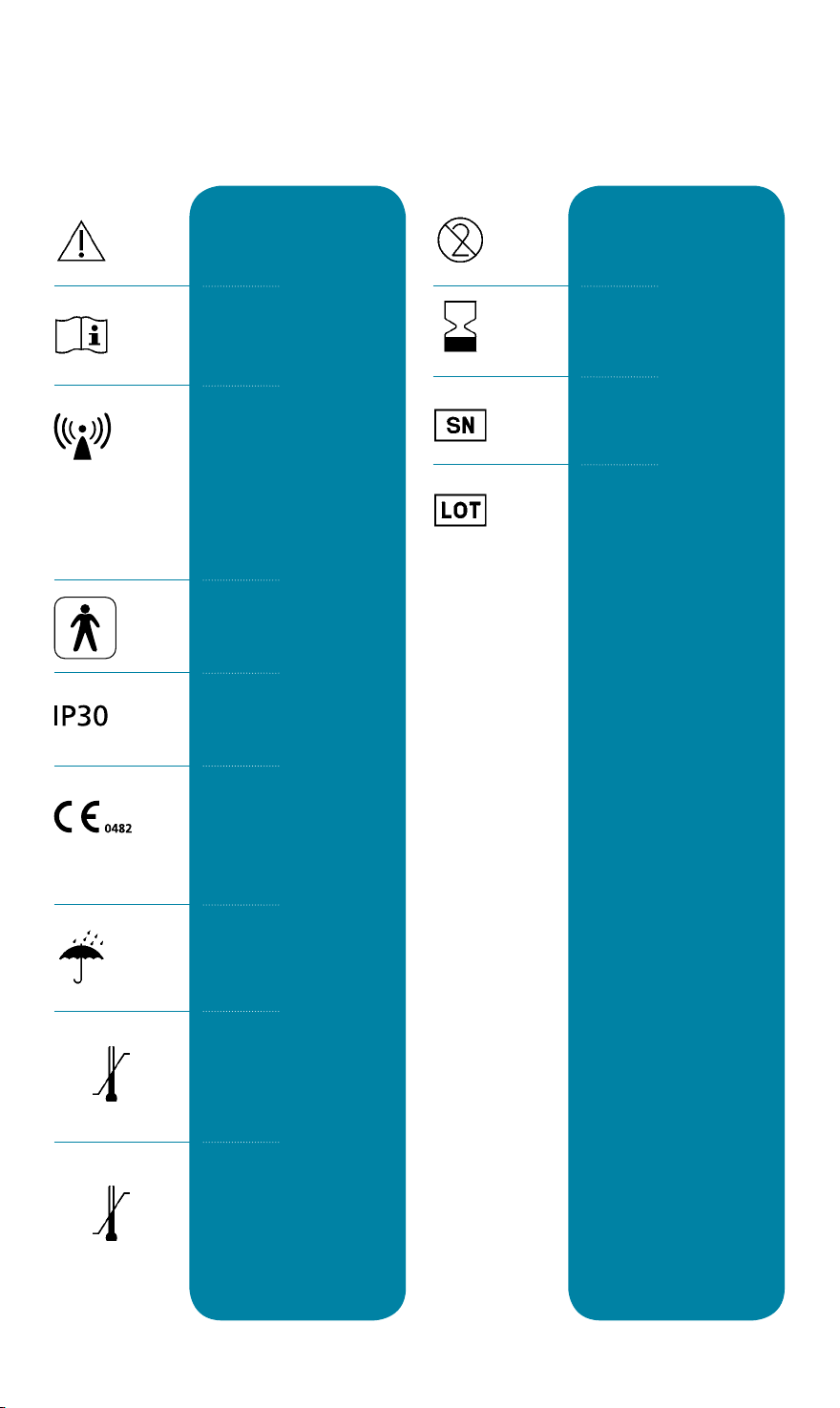
KEY TO SYMBOLS
Warning! Read the user
manual before starting to
use GRINDCARE.
Read the user manual
before starting to use
GRINDCARE.
There is wireless communication between the Stimulator and Grinddock which
may affect patients with
pacemakers or hearing
aids. See the section on
contraindications.
Type BF equipment
IP classification
200x-xx
Not for reuse
Expiry date
(year and month).
Serial number
Batch number
50˚F
10˚C
41˚F
5˚C
104˚F
40˚C
104˚F
40˚C
CE labelling, applicable in
accordance with directive
MDD 93/42/EEC.
The equipment must not
be exposed to moisture.
Specification of general
temperature range.
Specification of
temperature range
for gel pads.
12
Page 13
TECHNICAL SPECIFICATIONS
Output from the Stimulator
Current controlled, biphasic,
charge-balanced pulses, up to 7 mA
with voltage max ±40 V. Pulse
duration 250 µs, frequency 230 Hz.
Classification
Type BF
Protection class
IP 30
EMG
Yes
Sample rate
2000 Hz
Input impedance
4.4 MOhm
CMRR
90 dB
Max. wireless range
2 m (6’ 6”) in a straight line
Battery
3.7 V Lithium-Polymer battery
Average battery charge time
3.5 hours
Anticipated operating time between
charges
5 days
Temperature during operation
10ºC - 40ºC
50ºF - 104ºF
Storage and transport temperature
10ºC - 40ºC
50ºF - 104ºF
Storage temperature, gel pads
5ºC - 40ºC
41ºF - 104ºF
Dimensions of the Stimulator
53.8 x 39.9 x 13.4 mm
2.12” x 1.57” x 0.53”
(W x H x D)
Length of electrode
Max. 50 cm (19”)
Data memory capacity
30 days activation data
Charger
100 - 240 V AC, 50-60 Hz
Dimensions of Grinddock
62 x 120.8 x 21 mm
2.44” x 4.76” x 0.83”
(W x H x D)
Weight of the Stimulator
27 g
0.9 oz.
Weight of Grinddock
200 g
7 oz.
Gel pad shelf life
See gel pad pack
13
Page 14
14
Page 15

15
Page 16

Complaints
Complaints may be submitted in accordance with applicable legislation.
An invoice/receipt showing the date of purchase must be submitted with
any complaints. In the event of a complaint, the device must be returned
to the place where it was purchased.
GC3 User Manual US
About Medotech
Medotech A/S is a Danish biotech company offering unique expertise in the field of development
and design of medical equipment. Medotech’s core expertise relates to the development of custom
devices capable of recording and analysing signals from the human body.
Medotech A/S
43A Marielundvej - DK-2730 Herlev, Denmark
Tlf.: +45 86 72 15 00 - www.medotech.dk
71-3003-021R1.0
 Loading...