

Page 1
19V 7.89 A
12V 7A
ML941ML830
ML830 SET-UP GUIDE
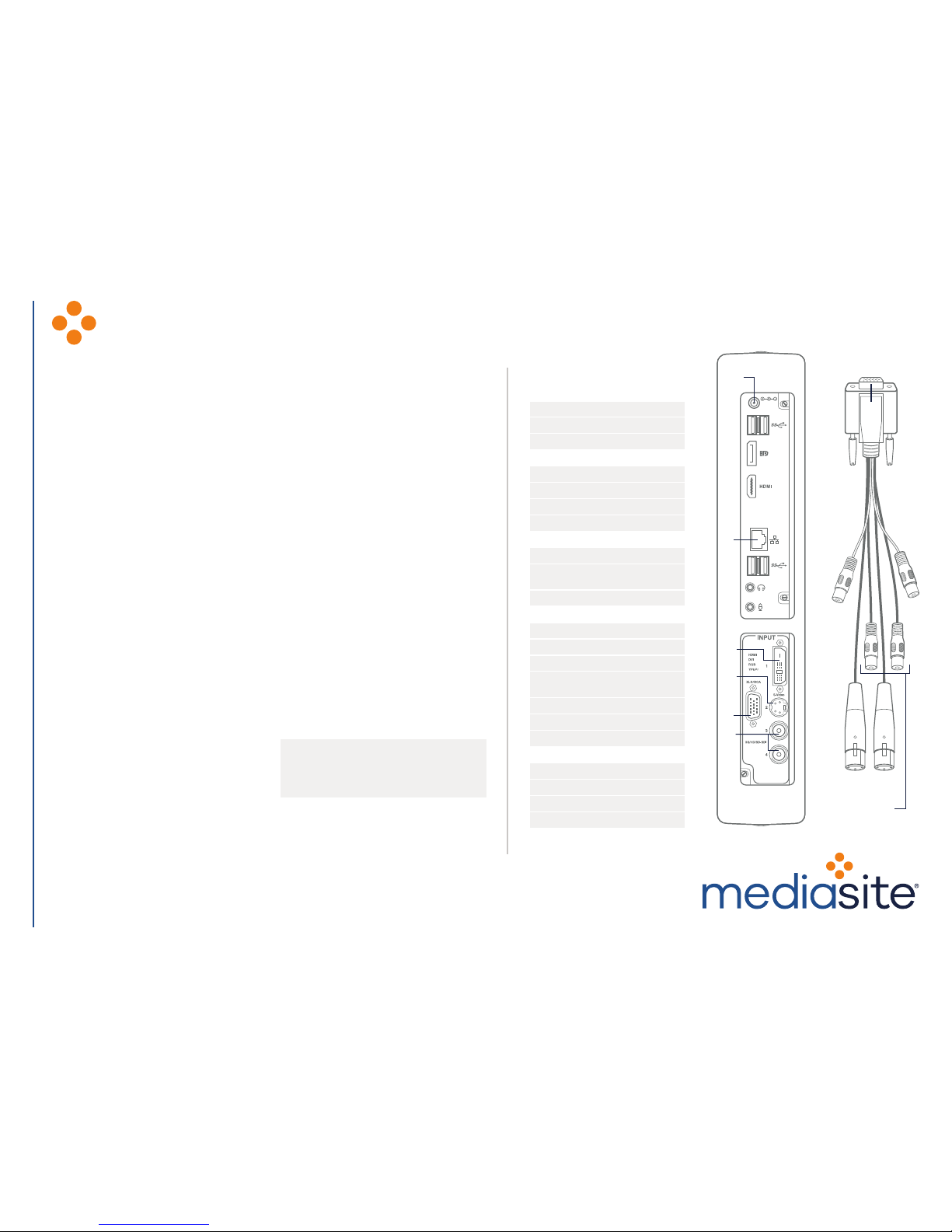
SETTING UP YOUR MEDIASITE ML MULTIVIEW RECORDER
SET-UP
1. CONNECT VIDEO/CONTENT
SOURCE(S)
A. Connect an SDI video source to
an SDI port. It is recommended
to match video refresh rate.
B. Connect a standard definition
video source to the S-Video/
Composite port.
C. Connect an HDMI/DVI/VGA
source to the DVI port using
the included adapters. Then
connect your laptop, white
board, document camera or any
content source to the adapter.
2. CONNECT THE AUDIO SOURCE
Connect the breakout cable to
the Recorder. Then connect an
audio source to the appropriate
connector on the breakout cable.
3. TURN ON SOURCES
4. CONNECT THE RECORDER TO
THE NETWORK
5. CONNECT THE POWER CABLE
Connect the power cable to the
Recorder and then plug the DC
power adapter into a power source.
6. POWER ON THE RECORDER
The power button is located on
the left side of your ML Recorder
(not shown).
CONFIGURATION
7. SELECT YOUR SOURCES
On the Recorder page, click the
In/Out Settings button to select the
appropriate video and audio inputs.
8. PREVIEW INPUTS
Use the Recorder page to preview
your inputs. Monitor incoming audio
levels and adjust them using the
audio level fader (analog only).
Connect headphones to Y cable
adapter on the breakout cable
for monitoring incoming recorder
audio. Monitor the incoming video
and content sources and adjust
your equipment settings to get the
desired effect.
9. START RECORDING
Once you are satisfied with the
inputs, you can begin recording. It
is always a good idea to record and
review a test presentation, located
on the Presentations page.
If you ever need support during your
event, contact our Mediasite Rental
department at 608.441.RENT.
5.
4.
1C.
2.
1B.
1A.
ML830 BREAKOUT
CABLE
2.
RCA
(UNBALANCED)
XLR
(BALANCED)
©2017 Sonic Foundry, Inc. All rights reserved. Sonic Foundry, the Sonic Foundry logo, Mediasite and the Mediasite logo are registered trademarks of Sonic Foundry, Inc.
All other trademarks are the property of their respective owners. ML830 09/2017
rentals.sonicfoundry.com | 608.441.RENT
QUICK REFERENCE
VIDEO INPUTS
1 – HDMI, DVI-D, RGB (VGA)
1 – S-Video/Composite
2 – 3G/HD/SD-SDI
AUDIO INPUTS
1 – HDMI (Embedded)
1 – RCA (Unbalanced)
1 – XLR (Balanced)
2 – SDI (Embedded)
ON BACK OF RECORDER
Embedded handle
Adjustable kickstand for desktop
placement
Kensington Security Slot
INCLUDED EQUIPMENT
HDMI to DVI-I adapter
RGB (VGA) to DVI-I adapter
Composite to S-Video adapter
Audio breakout cable
(XLR and RCA)
Power cable
DC power adapter
Keyboard + Mouse
POWER REQUIREMENTS
150W Power
50-60Hz Input frequency
100-240V AC voltage input
595 BTU/h Max heat dissipation
 Loading...