

Page 1
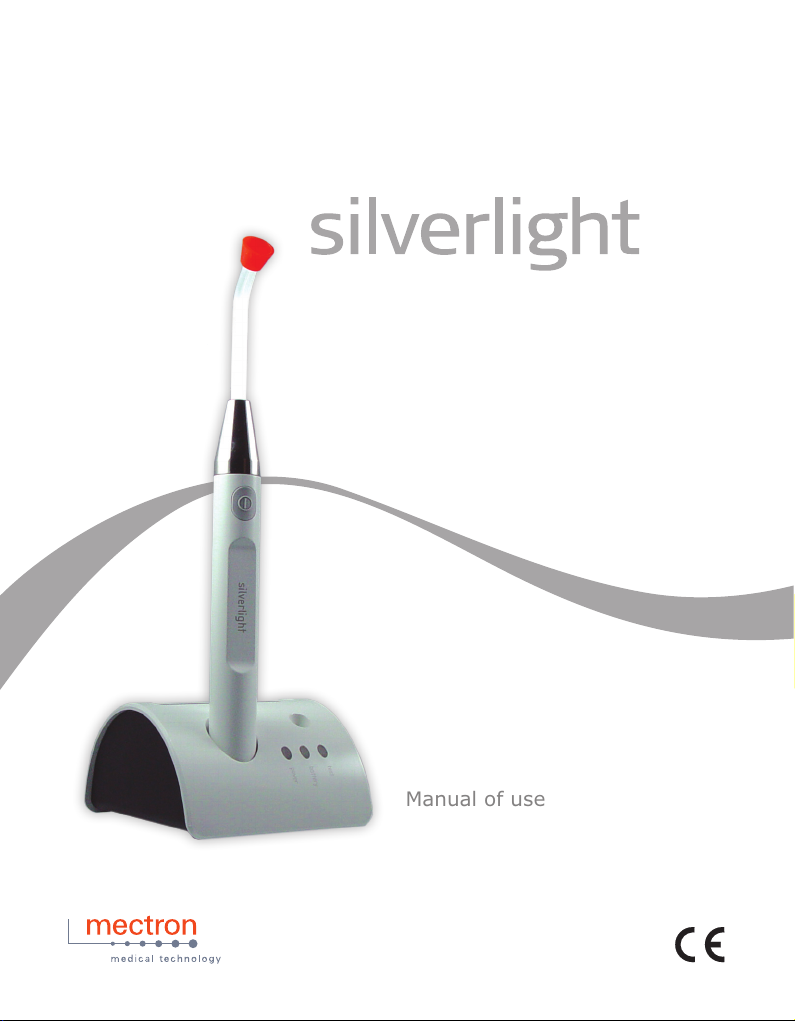
Manual of use and maintenance
Page 2

Summary
00.0 Introduction ......................................................................................................................................... 2
00.1 Foreword .................................................................................................................................... 2
00.2 Description of the apparatus ...................................................................................................... 2
00.3 Intended use .............................................................................................................................. 2
00.4 Safety requirements .................................................................................................................... 3
01.0 Identication data ................................................................................................................................4
01.1 Identication datas ...................................................................................................................... 4
01.2 Identication plate of the recharging unit .................................................................................... 4
01.3 Identication plate of the silverlight handpiece ........................................................................... 5
02.0 Testing ................................................................................................................................................. 5
02.1 Testing of the equipment .............................................................................................................5
03.0 Delivery................................................................................................................................................ 5
03.1 Delivery of the device ................................................................................................................. 5
03.2 List of material included in the standard supply .......................................................................... 6
04.0 Installation ...........................................................................................................................................7
04.1 Safety requirements at the time of installation ............................................................................ 7
04.2 Description of the controls and signaling lamps ......................................................................... 7
04.3 Connecting the device ................................................................................................................ 9
05.0 Battery ................................................................................................................................................. 9
05.1 New battery - rst charging ......................................................................................................... 9
05.2 Battery low signal ........................................................................................................................ 9
05.3 Battery dead signal ................................................................................................................... 10
05.4 Battery failed signal ..................................................................................................................10
05.5 Battery problems ....................................................................................................................... 10
05.6 Safety requirements relating to the battery ............................................................................... 10
06.0 Use .................................................................................................................................................... 11
06.1 Connecting the accessories ...................................................................................................... 11
06.2 Safety requirements during use ................................................................................................ 12
06.3 Instructions for use ...................................................................................................................12
06.4 Measuring the light intensity ..................................................................................................... 13
06.5 Safety protection ....................................................................................................................... 14
06.6 Red battery LED on the recharging unit illuminated ................................................................. 14
07.0 Cleaning, disinfection, sterilization ....................................................................................................14
07.1 Cleaning and disinfection of the casing of the recharging unit ................................................. 14
07.2 Cleaning and disinfecting the Silverlight handpiece ................................................................. 14
07.3 Sterilization procedure .............................................................................................................. 15
07.4 Cleaning, disinfection e sterilization of the optical bre ............................................................ 15
07.5 Cleaning, disinfection and sterilization of the optical protection ............................................... 16
08.0 Disposal procedures and precautions ............................................................................................... 16
09.0 Symbols ............................................................................................................................................. 16
10.0 Problem-solving ................................................................................................................................ 17
11.0 Technical specications .....................................................................................................................18
11.1 Electromagnetic compatibility EN 60601-1-2 ............................................................................ 19
12.0 Limited Warranty ...............................................................................................................................23
12.1 Customer service - RETURNS ................................................................................................. 24
2
silverlight - manual of use and maintenance
Page 3

00.0 Introduction
�
�
00.1 Foreword
Before proceeding with the installation, use, maintenance or any other activities on the equipment
please read this manual carefully.
Always keep this manual within easy reach.
Important: To avoid causing personal injuries or damage to property, read all the points concerning
“Safety requirements” contained in this manual with particular attention.
Depending on the level of risk involved, safety requirements are classed under the following indications:
DANGER (always referred to personal injury)
WARNING (referred to possible damage to property)
The purpose of this manual is to ensure that operators are aware of the safety requirements, of the
installation procedures and of the instructions for correct use and maintenance of the apparatus.
The user is not authorized to tamper with the equipment under any circumstances.
If any problems are encountered, please contact a GC America Customer Service.
Any attempts on the part of the user or any unauthorized personnel to tamper with or alter the apparatus
will invalidate the warranty and release the manufacturer, Mectron S.p.A and the importer distributor, GC
America Inc, from any liability in respect of any harm or damage to persons or property.
The information and illustrations contained in this manual are updated to the date of publication indicated
on the last page.
The manufacturer Mectron S.p.A. is committed to continuous updating of products, which may entail
changes to components of the equipment.
If there are any discrepancies between the descriptions contained in this manual and your equipment,
please contact your dealer or the GC America Inc. Customer Service for explanations.
Using this manual for purposes other than those relating to the installation, use and maintenance of the
equipment is strictly prohibited.
00.2 Description of the apparatus
The Silverlight is an apparatus for polymerizing photo-hardening composites. It uses a source of light
consisting of a very high-efciency monochromatic LED (wavelength comprised between
440 and 480 nm).
The light emitted by the LED is directed to the treatment area by means a ber optic.
The equipment consists of a charging unit and a handpiece powered by a rechargeable lithium-ion battery.
The Silverlight can be used to operate in either of two emission modes:
- Constant intensity of emission - FAST (cycle lasting 10 seconds);
- Gradual intensity of emission - SLOW RISE (cycle lasting 20 seconds).
00.3 Intended use
The Silverlight device is a dental curing light unit intended for use in the oral cavity for the polymerization
of photo-hardening dental materials that are activated in the 440 – 480 nm. wavelength range.
IMPORTANT:
Although most dental composite materials are activated within this wavelength range, in case of
uncertainty consult the manufacturer’s composite specications
3
silverlight - manual of use and maintenance
Page 4

00.4 Safety requirements
�
�
�
�
�
�
�
�
�
The manufacturer Mectron S.p.A. and the importer/distributor, GC America Inc, will not accept any liability
for direct or incidental personal injury or damage to property in the following cases:
1 If the equipment is used for purposes other than that for which it is intended.
2 If the equipment is not used in accordance with all the instructions and requirements described in this
manual.
3 If the wiring system in the room where the equipment is used does not comply with the applicable
standards and appropriate requirements.
4 If any assembly operations, extensions, settings, alterations or repairs have been carried out by
personnel not authorized by GC America Inc. or its afliates.
5 If the environmental conditions in which the device is kept and stored do not comply with the
requirements indicated in the chapter on technical specications.
DANGER: Qualied and specialized personnel.
The equipment should be used only by specialized personnel having the appropriate training.
The equipment does not produce any side effects if it is correctly used.
DANGER: Intended use.
Use the equipment solely for the purpose for which it is intended (see point “00.3”). Failure to comply with
this requirement could lead to serious harm to the patient and/or to the operator and/or damage to/failure
of the equipment.
DANGER: Contraindications.
Do not use this equipment on patients tted with pace-makers or any other implantable electronic devices.
This requirement applies equally to the operator.
DANGER: Point the beam of light directly at the material to be polymerized.
Do not use the beam of light on the gums or other soft tissues (if necessary these parts should be suitably
shielded). The effect of the light should be limited to that part of the oral cavity to be clinically treated.
DANGER: Never point the beam of light towards the eyes.
The effect of the light should be limited to that part of the oral cavity to be clinically treated.
DANGER: Contraindications
Do not use this equipment for patients who have a case history of positive reaction to stimulation by light
e.g. urticaria solaris and/or porphyria, etc. or who are receiving treatment with photosensitizing drugs. In
all cases of possible risk consult a specialized physician.
DANGER: Contraindications
Adopt strict safety measures for patients who have undergone cataract surgery and who are therefore
particularly sensitive to light (e.g. protective goggles able to lter out blue light should be worn).
DANGER: Contraindications
Patients who have a case history of diseases of the retina should consult their optician beforehand and be
specically authorized to receive treatment with the Silverlight.
DANGER: Cleaning, disinfection and sterilization of new or repaired products.
Before treatment, all new or repaired products should be cleaned and disinfected and, if suitable for this
treatment, autoclave sterilized following the instructions provided under point “07.0” strictly.
4
silverlight - manual of use and maintenance
Page 5
�
DANGER: Infection control.
�
�
�
�
In order to ensure maximum safety for both the patient and the operator, clean, disinfect and sterilize the
ber optic and the optical protection before each treatment. Follow the instructions provided under point
“07.0” closely.
DANGER: Use only original Mectron S.p.A. accessories and spare parts.
DANGER: Checking the condition of the device before treatment.
Before each treatment always check that the equipment is in proper working order and that the
accessories are efcient.
Do not carry out the treatment if any problems are encountered in operating the apparatus.
If the problem concerns the equipment, contact an authorized technical service center.
DANGER: Do not install the equipment anywhere there is a risk of explosions.
The equipment cannot function in places where there is an inammable atmosphere (anesthetic mixtures,
oxygen, etc.).
DANGER: Do not use the recharging unit to recharge other types of batteries or other
equipment with rechargeable batteries.
01.0 Identication data
01.1 Identication datas
An exact description of the model including the serial number of the equipment will make it easier for GC
America Inc. Customer Service to provide rapid and effective answers.
Always provide the above information whenever you contact GC America Inc. Customer Service.
01.2 Identication plate of the recharging unit
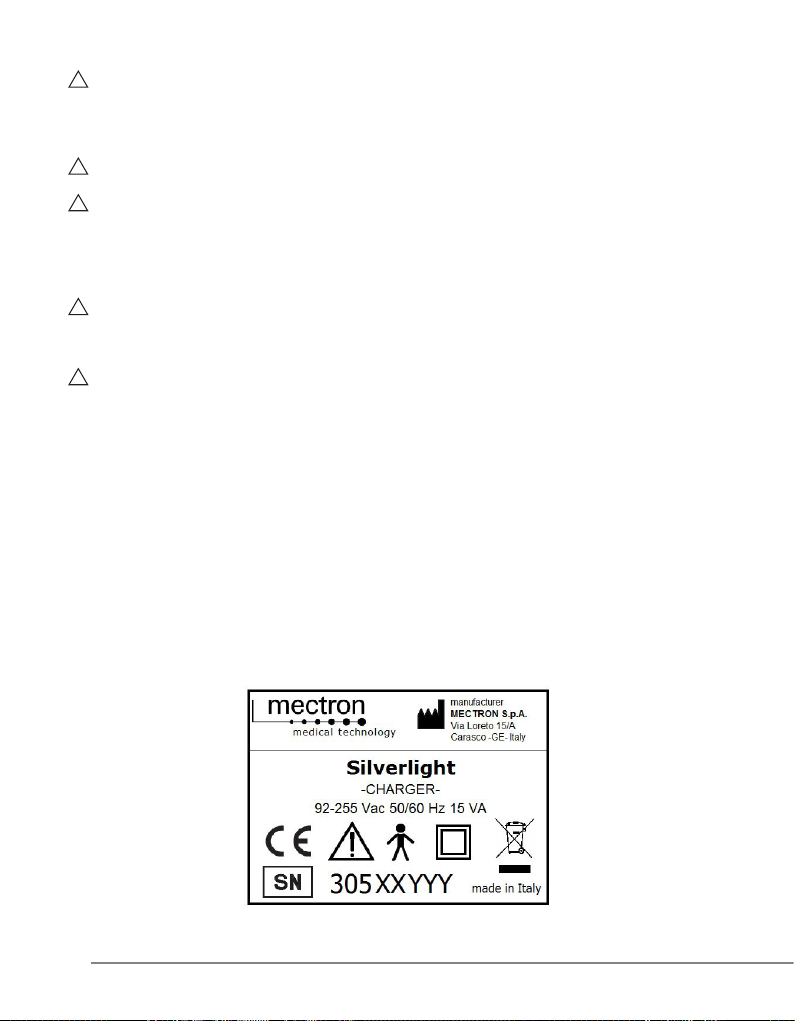
Each recharging unit has an identication plate (Fig. 1) on which the technical specications and the serial
number are indicated. The identication plate is xed to the underside of the equipment. The remaining
data are contained in this manual (see point “11.0”).
Fig. 1
5
silverlight - manual of use and maintenance
Page 6
01.3 Identication plate of the silverlight handpiece
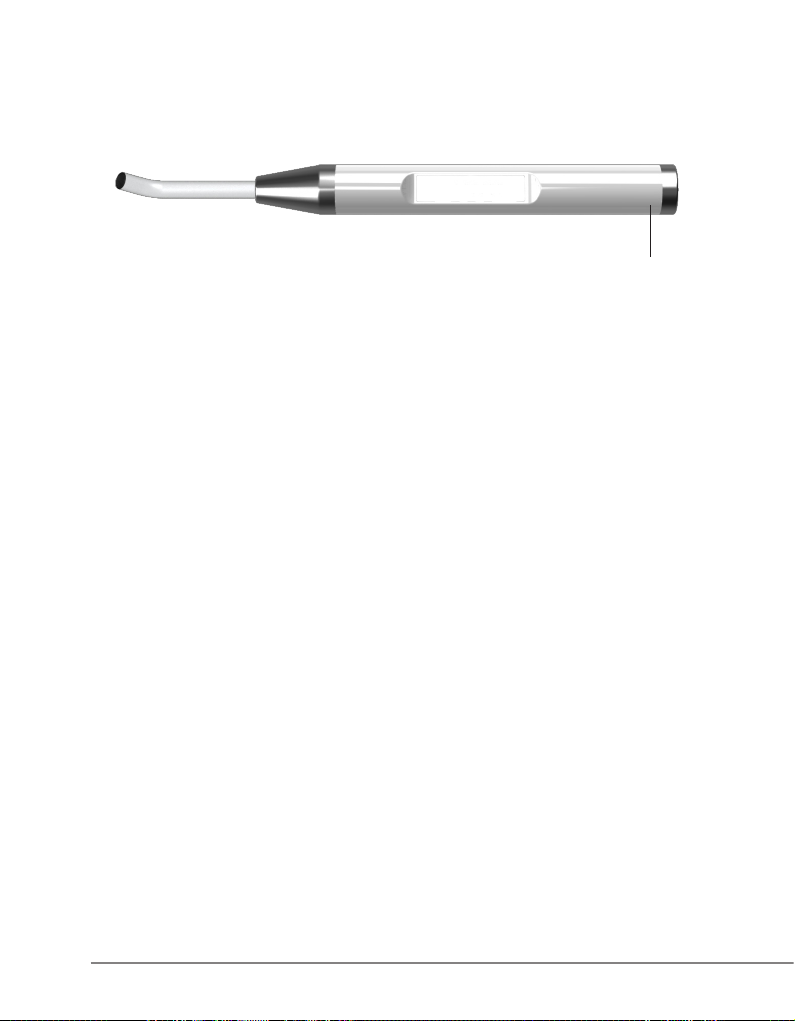
The Silverlight handpiece serial number is engraved on the shell near the back steel ring nut
(Fig.2 - Ref.A).
Fig. 2
A
02.0 Testing
02.1 Testing of the equipment
All equipment, including all components, is thoroughly checked and tested by the manufactured Mectron.
During the testing procedure the components are subjected to a number of operational work cycles.
This procedure ensures proper functioning and reliability of all components.
03.0 Delivery
03.1 Delivery of the device
The equipment contains electronic components that may be damaged by impacts even inside the
packaging.
Special care must therefore be taken during both transport and storage.
In order to avoid crushing, do not place cartons on top of one another.
All material shipped by GC America Inc. is checked at the time of shipment.
The equipment is delivered properly protected and packaged.
If the shipping packaging is damaged or the protective material shows signs of stress, immediately notify
the carrier.
Keep the shipping material for carrier inspections.
6
silverlight - manual of use and maintenance
Page 7
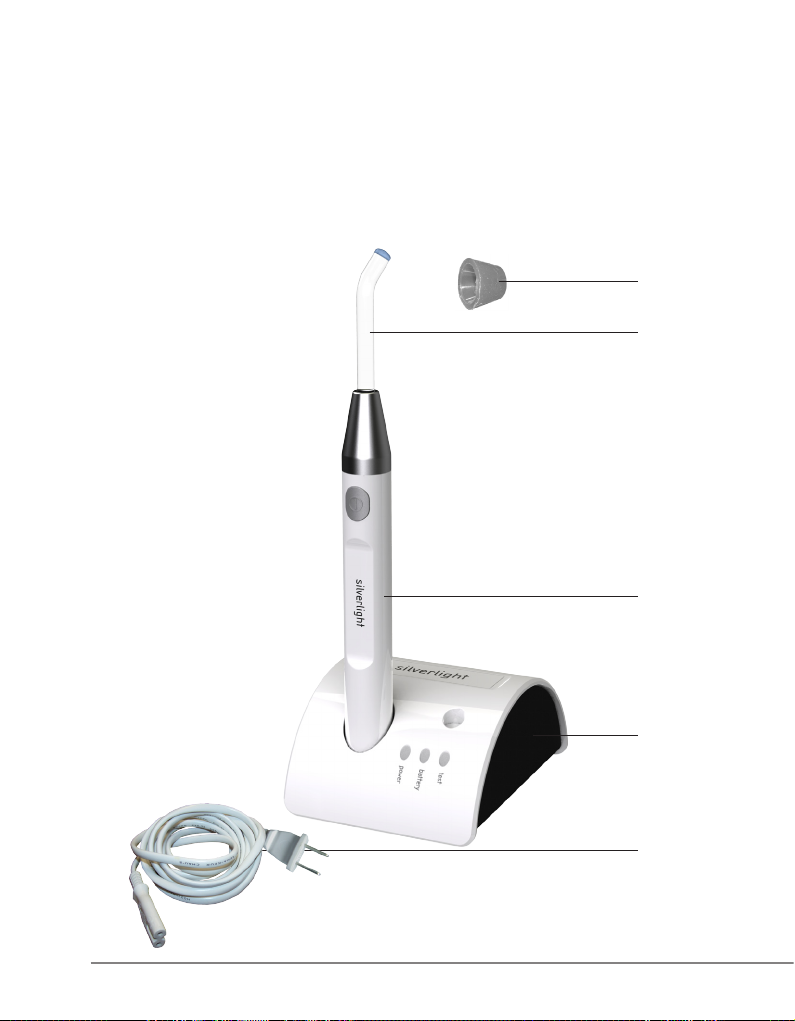
03.2 List of material included in the standard supply
A Silverlight recharging unit (Fig.3 - Ref.A).
B Silverlight handpiece with rechargeable lithium-ion battery (Fig.3 - Ref.B).
C Fiber optic (Fig.3 - Ref.C).
D Optical protection (Fig.3 - Ref.D).
E Power supply cable for the recharging unit (Fig.3 - Ref.E).
This equipment may vary at the time of promotional campaigns.
D
C
B
A
E
Fig. 3
7
silverlight - manual of use and maintenance
Page 8
04.0 Installation
�
�
�
�
�
�
�
04.1 Safety requirements at the time of installation
DANGER: The wiring system of the premises where the apparatus is installed and used must comply
with the applicable standards and the relevant electrical safety requirements.
DANGER: Do not install the apparatus in places where there is a risk of explosion. The apparatus
may not be used in areas where there are inammable atmospheres (anesthetic mixtures, oxygen, etc.).
DANGER: Install the apparatus in a place where it will be protected from blows and from accidental
sprays of water or other liquids.
DANGER: Do not install the apparatus above or in the vicinity of sources of heat. Make sure there is
sufcient air circulating around the apparatus.
DANGER: Do not short circuit the electric contacts of the recharging unit with metal objects
(Fig.5 - Ref.B) and do not touch them with your hands while the apparatus is switched on.
WARNING: The apparatus is transportable, however it must be handled with care when moved.
WARNING: Do not expose the apparatus to direct sunlight or sources of UV light.
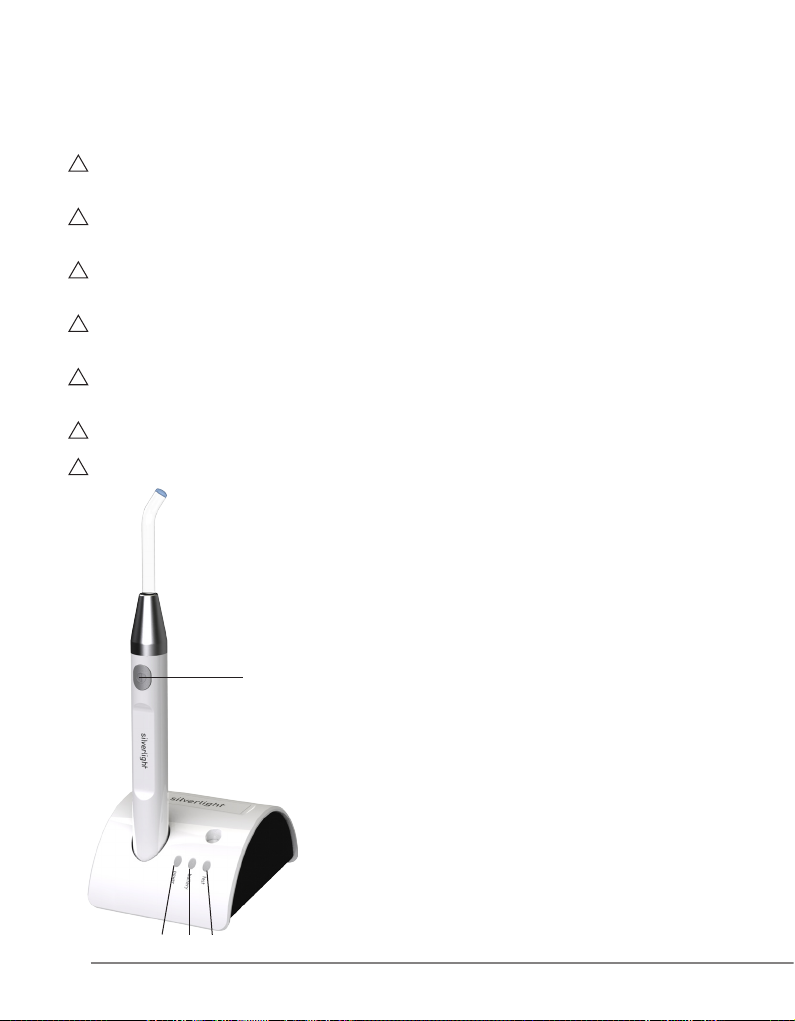
04.2 Description of the controls and
signaling lamps
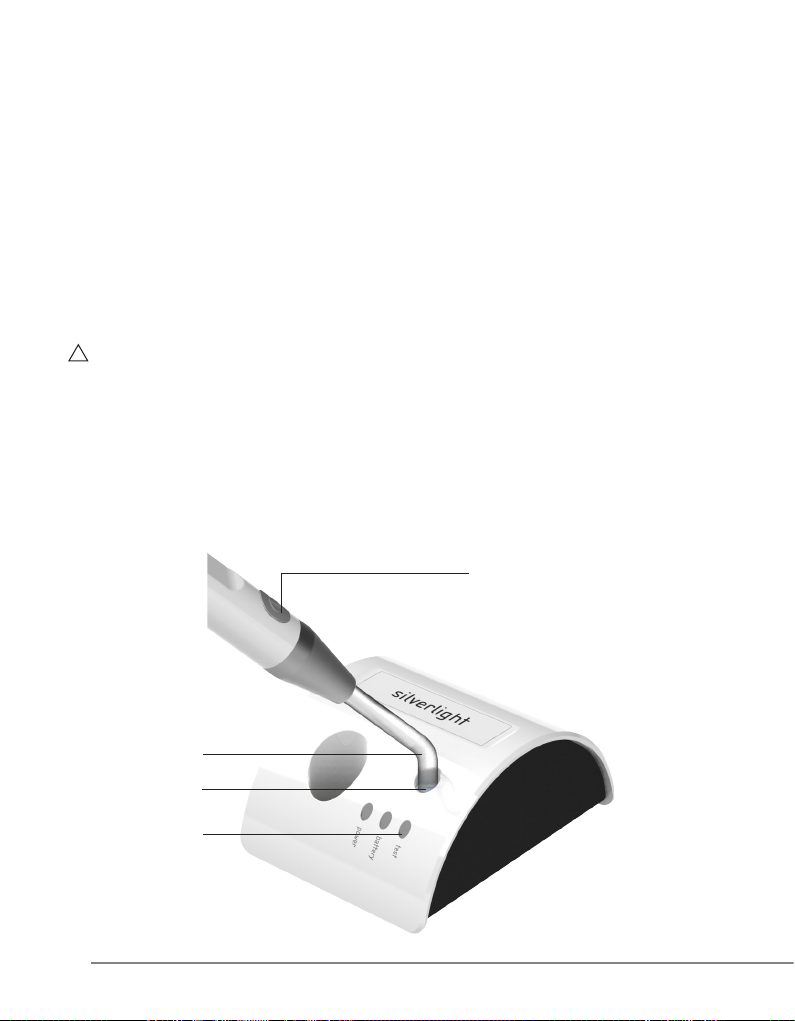
Description of the controls (Fig. 4):
Ref. A Green power LED.
Function: This indicates that the recharging unit is
D
Fig. 4
A
CB
8
Ref. B Battery LED.
Function Green: Indicates that the battery of the
Red: Indicates that the battery of the
Ref. C Test LED.
Function Green: Indicates that the light intensity is
Red: Indicates that the light intensity is
Ref. D Push-button for activating and cutting off
Function: This starts or stops a polymerization cycle.
silverlight - manual of use and maintenance
powered up.
Silverlight is being charged.
Silverlight has failed.
suitable for effective therapy.
insufcient.
the emission of light.
Page 9
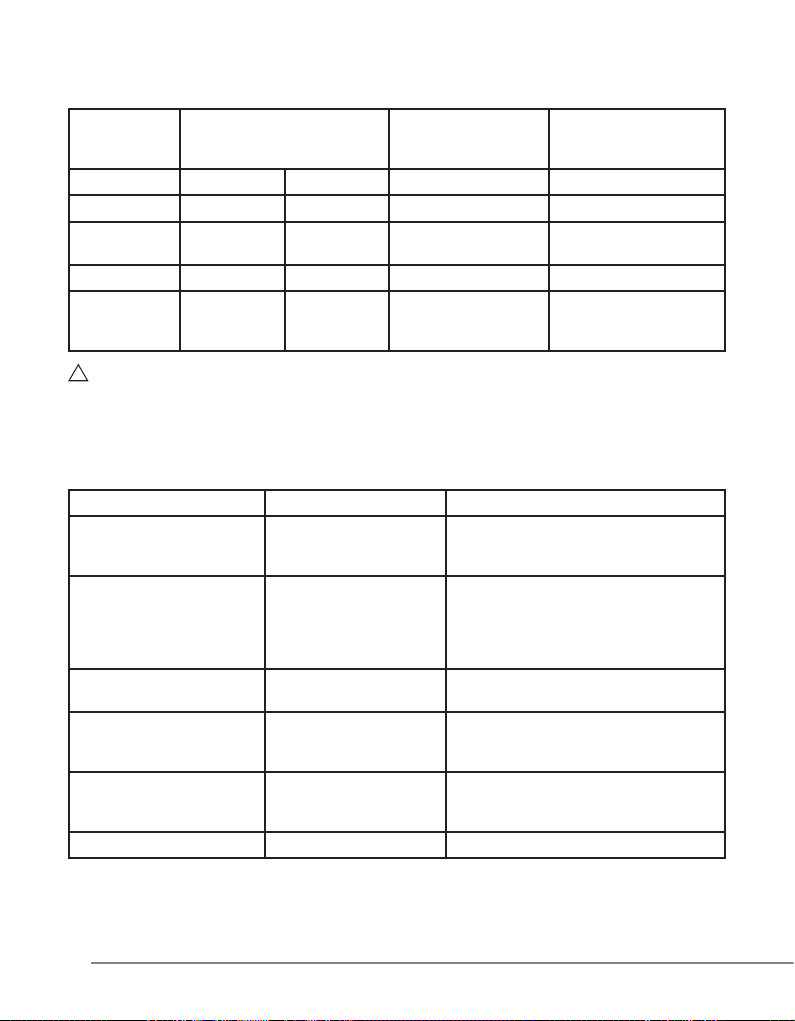
Description of signaling for the recharging unit:
�
(Table 1):
Green Power
LED
ON OFF OFF Not in place Recharging unit powered
ON ON OFF In place Battery being recharged
ON OFF OFF In place
ON OFF ON In place Battery failed.
ON OFF ON Not in place
WARNING: Do not tamper with the recharging unit electrical contacts.
The recharging unit recognizes the battery state. If after some exposure cycles the battery is not at
enough when the handpiece is placed on the recharging unit, the green battery LED does not switch on.
This is normal.
Description of the acoustic signals of the handpiece:
(Table 2)
Function Push-button control Acoustic signal
FAST polymerisation
SLOW RISE polymerisation
Interruption of exposure
cycle
Battery low signal. The
residual charge is sufcient
for 6 cycles.
Battery dead signal
Thermal protection signal 3 beeps during the exposure cycle
Battery LED
Green Red
Brief pressure of push
button
Pressure of push button
for at least 2 seconds
Pressure of push button
during exposure
Pressure of push button
for FAST or SLOW RISE
polymerisation
Position of
Silverlight in the
recharging unit
1 beep on starting exposure
1 beep on completing exposure (10
seconds)
1 beep when starting and 1 beep after 2
seconds
1 beep after 10 seconds of exposure
1 beep on completing exposure (20
seconds)
1 beep
2 beeps on completing the exposure
cycle
2 beeps - No light emission
Function
Recharging completed.
Battery charged.
Electric contacts of the
recharging unit short-
circuited.
9
silverlight - manual of use and maintenance
Page 10
�
�
B
A
Fig. 5
04.3 Connecting the device
In order to render the apparatus operational it is necessary to proceed as follows:
1. Place the recharging unit on a at surface.
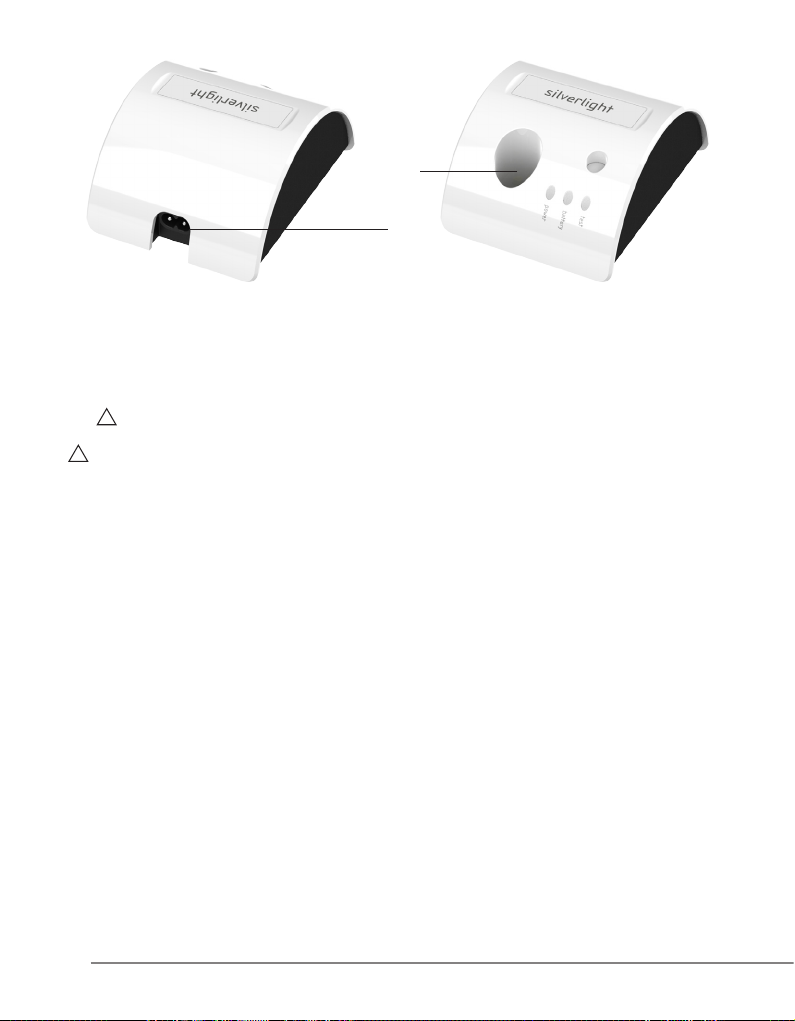
2. Plug the power cable (Fig.3 - Ref.E) into the connector on the rear of the apparatus (Fig.5 - Ref.A)
and then into the power outlet. The green power LED should light up (Fig.4 - Ref.A).
WARNING: Make sure that the voltage and frequency of the power-supply line match the values
indicated on the identication label under the recharging unit.
DANGER: Check the condition of the power cable regularly. If it is found to be damaged, replace it
with an original Mectron S.p.A. spare part.
05.0 Battery
The Silverlight is powered by a rechargeable lithium-ion battery already contained inside the handpiece,
with no memory effect.
The Silverlight is equipped with microprocessors that check the battery continuously and maintain the
optimum battery charging parameters.
The handpiece may therefore be placed back into the recharging unit at the end of each treatment and left
there, regardless of the charge of the battery.
05.1 New battery - rst charging
NOTE: The battery of the Silverlight is supplied in a partly charged condition.
To charge the battery completely:
1. Insert the handpiece into its housing in the recharging unit (Fig.5 - Ref.B). The green battery LED will
light up (Fig.4 - Ref.B).
2. The recharging phase has been completed when the green battery LED extinguishes.
05.2 Battery low signal
When the charge of the battery becomes low after frequent use of the Silverlight, the microprocessor will
allow 6 more exposures to be carried out (FAST or SLOW RISE) without any need to recharge the battery.
A battery low state is signaled at the end of each of these six cycles by means of two beeps.
Once the six cycles have been completed, the handpiece enters a battery dead state (see point “05.3”).
Place the Silverlight back into the recharging unit.
10
silverlight - manual of use and maintenance
Page 11
05.3 Battery dead signal
�
�
�
The battery of the Silverlight is dead if no light is emitted when the push-button is pressed and at the same
time an acoustic signal is heard (two beeps).
To recharge the battery:
1. Place the handpiece in its housing in the recharging unit (Fig.5 - Ref.B). The green battery LED will
light up (Fig.4 - Ref.B).
2. When the green battery LED extinguishes the recharging phase has been completed.
05.4 Battery failed signal
If the red battery LED (check) on the recharging unit lights up, this indicates that the battery has failed
(Fig.4 - Ref.C).
NOTE: This failure condition disables operation of the recharging unit. To restore proper working
conditions proceed as follows:
1 Remove the handpiece from the recharging unit.
2 Cut off the power supply to the recharging unit for a few seconds (disconnect the power cable). All the
LEDs will extinguish.
3 Reconnect the cable of the recharging unit. The green power LED will light up.
05.5 Battery problems
To replace a failed battery, contact GC America Inc. Customer Service. Do not attempt to open, remove,
change, replace, or in any other way adjust the battery. These or similar actions will void the Warranty
(see Section 12.0). Call GC America Inc Customer Service for any battery issue that is not resolved by
Problem Solving Tips (see Section 10.0)
Fig. 6
05.6 Safety requirements relating to the battery
The battery can cause damage to property and/or personal injuries such as burns if conducting materials
such as jewelry, keys or beaded necklaces come into contact with the exposed terminals.
The conducting material could close an electrical circuit (short circuit) and become very hot.
Make a habit of handling the device with care, particularly if it is placed inside a pocket, bag or other
container in which there are metal objects.
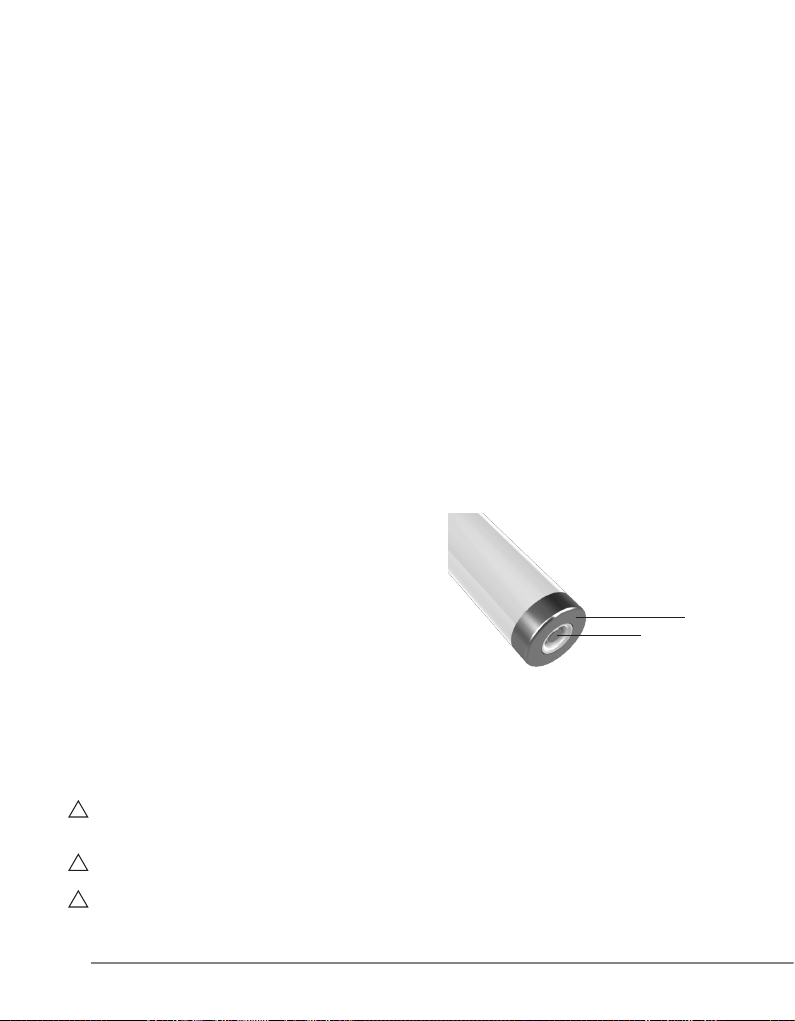
DANGER: Do not short-circuit the electric contacts of the handpiece with metal objects or
liquids (Fig. 6 - Ref. A Ref. B).
DANGER: Keep the battery out of the reach of children.
WARNING: Use only original Mectron S.p.A batteries.
Contact GC America Inc. Customer Service for battery problems.
11
silverlight - manual of use and maintenance
A
B
Page 12
�
WARNING: Recharge the battery only with the Silverlight recharging unit.
�
�
�
�
�
�
�
Do not attempt to recharge the battery using a generic battery charger.
This entails a risk of explosion and re.
WARNING: The battery should be recycled or disposed of in the appropriate manner according
to national rules and regulations.
The battery should not be thrown away with normal waste.
The user will be liable for any damages caused by improper disposal of the battery.
WARNING: Do not use the battery for purposes other than those for which it is intended.
WARNING: Do not open, pierce or crush the battery. It contains toxic substances.
WARNING: Do not burn, incinerate or expose the battery to a high temperature. There is a risk
of explosion.
WARNING: Do not short-circuit the battery terminals. This could cause burns and re.
06.0 Use
06.1 Connecting the accessories
DANGER: Check the condition of the device before the treatment.
Before each treatment, always make sure that the apparatus is working properly and check the efciency
of the accessories. If any improper functioning is noted, do not proceed with the treatment. If the problem
concerns the apparatus contact an authorized technical assistance center.
DANGER: Infection control.
To ensure maximum safety both of the patient and of the operator, clean, disinfect and sterilize the ber
optic and the optical protection before each treatment. Follow the instructions given under point “07.0”
very carefully.
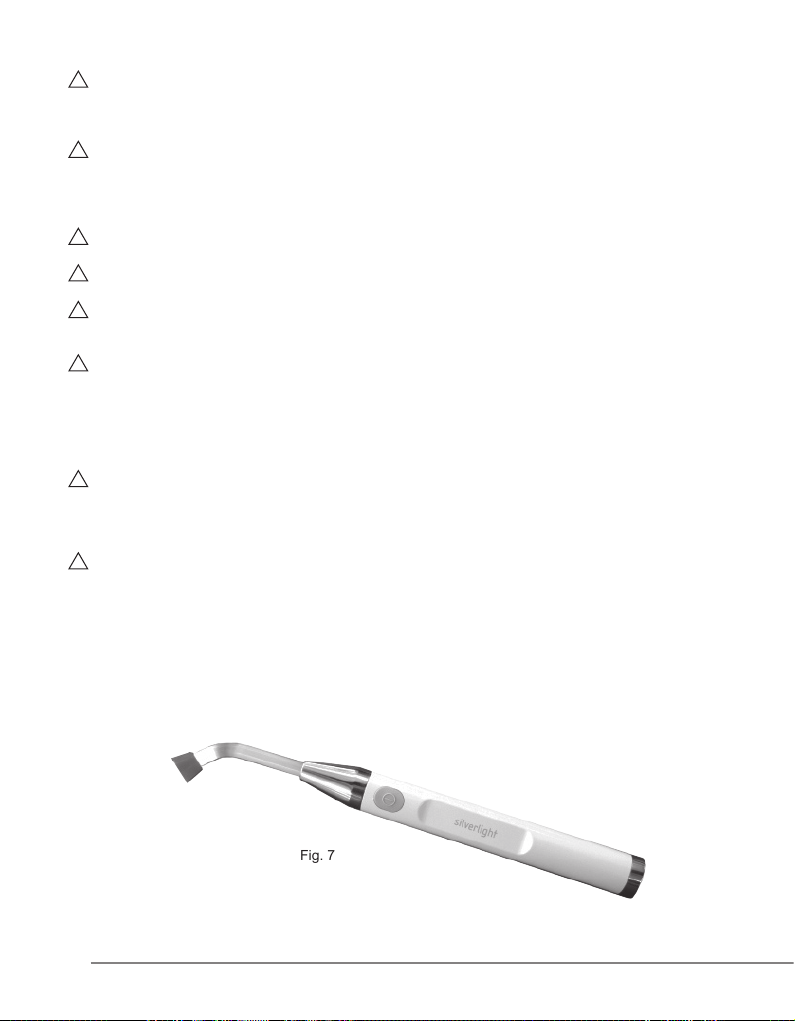
In order to use the Silverlight, the following accessories have to be connected:
1. Fit the ber optic into the handpiece. Do this by hand, rotating it slightly in a clockwise direction until it
reaches the end of travel.
2. Fit the optical protection onto the ber optic by hand. Fig. 7
Fig. 7
12
silverlight - manual of use and maintenance
Page 13

06.2 Safety requirements during use
�
�
�
�
�
�
�
DANGER: Never point the beam of light in the direction of the eyes.
DANGER: Before each cycle of exposure make sure that the ber optic is tted correctly and
fully into the handpiece.
DANGER: Before each cycle of exposure always make sure that the optical protection has
been tted onto the end of the ber optic Fig.7.
DANGER: Point the beam of light directly onto the material to be polymerized.
Do not subject the gum or other soft tissues to the beam of light (shield these parts suitably if necessary).
The effect of the light should be limited to the oral cavity and in particular to the sector requiring clinical
treatment.
DANGER: Do not short-circuit the electric contacts of the handpiece with metal objects or
liquids (Fig. 6 - Ref. A Ref. B).
DANGER: During the rst few seconds of exposure avoid contact of the ber optic with the
material to be polymerized.
Deposits of composite material adhering to and polymerized to the surface of the tip of the ber optic
lower the amount of light transmitted and will therefore prejudice subsequent polymerization operations.
WARNING: If the ber optic is damaged or not efcient, this will reduce the intensity of the
light being emitted considerably.
In such cases it should therefore be replaced.
06.3 Instructions for use
The silverlight can be used in two different modes:
- FAST: exposure time of 10 seconds at the maximum light intensity.
- SLOW RISE: exposure time 20 seconds with a gradual increase of the light intensity during the rst
three seconds up to the maximum intensity.
Selecting the FAST exposure mode.
- To start the FAST exposure cycle press the push button on the handpiece briey (Fig.4 - Ref.D). An
acoustic signal will be heard (1 beep).
- After 10 seconds an acoustic signal will be heard (one beep). The FAST cycle has been completed.
Selecting the SLOW RISE exposure mode.
- To start the SLOW RISE exposure cycle hold the push button on the handpiece down for two seconds
(Fig.4 - Ref.D). At the start an acoustic signal will be heard and after two seconds another acoustic
signal to conrm the SLOW RISE cycle beginning.
- After 10 seconds an acoustic signal will be heard (one beep).
- After 20 seconds an acoustic signal will be heard (one beep). The SLOW RISE cycle has been com-
pleted.
After the end of the treatment, place the Silverlight handpiece back into the recharging unit (Fig.5 - Ref.B).
NOTE: Interrupting the cycle.
Both in the FAST and in the SLOW RISE mode, the exposure cycle can be broken off at any time by
pressing the push button on the handpiece (Fig.4 - Ref.D).
13
silverlight - manual of use and maintenance
Page 14
NOTE: Additional exposure cycles.
�
At the end of any exposure cycle, it is possible to carry out one or more additional cycles by pressing the
push button on the handpiece again each time (Fig.4 - Ref.D).
For a quick guide to the signaling, see Tables 1 and 2.
06.4 Measuring the light intensity
To determine whether the light intensity is sufcient:
1 Place the ber optic (Fig.8 - Ref.A) at on the surface of the light-intensity sensor without pressing it
(Fig.8 - Ref.B);
2 Press the button (Fig.8 - Ref.C) to switch on the lamp.
The test LED (Fig.7 - Ref.D) will indicate the working luminous ux measured:
- Green = luminous ux suitable for effective treatment
- Red = luminous ux insufcient.
WARNING: If the working luminous ux is not sufcient, do not proceed with the treatment on the
patient and carry out the following checks:
1 Make sure that the ber optic is correctly inserted onto the handpiece
2 Check whether the ber optic is dirty. Clean the ber optic (see point 7.4 - Cleaning, disinfecting and
sterilizing the ber optic)
3 Check whether the ber optic is damaged and, if appropriate, replace it with a new one.
If these measures do not lead to improved performance, place the device out of commission
(by disconnecting it from the mains) and make sure that it cannot be started by unauthorized persons.
Contact GC America Inc. Customer Service.
C
A
B
D
Fig. 8
14
silverlight - manual of use and maintenance
Page 15

06.5 Safety protection
�
�
�
�
�
�
In the event of extreme heady duty use, with long and repeated exposure cycles, a thermal protection
device is triggered automatically.
An acoustic signal (three beeps) will be heard.
This protection device will temporarily prevent use of the lamp for a few minutes.
06.6 Red battery LED on the recharging unit illuminated
The red battery LED (check) on the recharging unit indicates the following:
1. Battery failed (see point 05.4).
2. Contacts on the recharging unit short-circuited.
In the second case, to restore correct functioning of the charging unit:
1. Disconnect the charging unit from the power supply. All LEDs extinguished
2. Eliminate the cause of the short circuit
3. Re-connect the charging unit to the power supply - green power LED on.
07.0 Cleaning, disinfection, sterilization
07.1 Cleaning and disinfection of the casing of the recharging unit
DANGER: Switch off the recharging unit.
Before carrying out any cleaning and disinfection, disconnect the recharging unit from the main power
supply.
DANGER: The casing of the recharging unit is not protected against the entry of liquids.
DANGER: Do not spray liquids directly onto its surface or onto the electrical contacts of the
recharging unit.
DANGER: The recharging unit must not be sterilized.
Proceed as follows after each treatment:
1 Remove the handpiece from the recharging unit.
2 Clean and disinfect the surface of the casing using a cloth moistened with a solution of mild
detergent/disinfectant having a neutral pH (pH = 7).
Follow carefully the instructions provided by the manufacturer of the disinfectant solution.
Allow the disinfectant solution to air dry before reconnecting the recharging unit to the power supply.
Above all, make sure that the electric contacts are completely dry.
NOTE: Water-based disinfectants with a neutral pH are strongly recommended. Some alcohol-based
disinfectant solutions may be harmful and cause damage to plastic materials.
07.2 Cleaning and disinfecting the Silverlight handpiece
DANGER: The handpiece is not protected against the penetration of liquids.
DANGER: Do not spray liquids directly onto its surface or onto the electric contacts.
15
silverlight - manual of use and maintenance
Page 16

�
DANGER: Do not short-circuit the electric contacts of the handpiece with metal objects or
�
�
�
�
�
liquids.
DANGER: The handpiece should not be sterilized.
Proceed as follows after each treatment:
1 Remove the ber optic and optical protection from the handpiece.
2 Clean and disinfect the surface of the handpiece using a cloth moistened with a solution of mild
detergent/disinfectant having a neutral pH (pH = 7). Follow carefully the instructions provided by the
manufacturer of the disinfectant solution.
Allow the disinfectant solution to air dry on the handpice before placing it back in the recharging unit.
Above all, make sure that the electric contacts are completely dry.
NOTE: Water-based disinfectants with a neutral pH are strongly recommended. Some alcohol-based
disinfectant solutions may be harmful and cause damage to plastic materials.
07.3 Sterilization procedure
WARNING: Carry out sterilization only in a steam autoclave.
Do not use any other sterilization procedures (dry heat, radiation, ethylene oxide, gas, low-temperature
plasma, etc.).
DANGER: The handpiece and recharging unit must not be sterilized.
DANGER: Infection control - Sterilizable parts.
To avoid infection caused by bacteria or viruses, always clean the following components after each
treatment:
1. Fiber optic;
2. Optical protection.
Sterilization of the above components have been validated by independent laboratory, using a
pre-vacuum steam autoclaving.
Recommend minimum sterilization parameters that provide a 10-6 Sterility Assurance Level (SAL):
- Three times pre-vacuum cycle
- Minimum sterilization temperature: 132°C (interval 0 °C; + 3 °C)
- Sterilization time: 4 minute
- Drying Time: 10 min
Do not exceed 135°C
07.4 Cleaning, disinfection and sterilization of the optical ber
WARNING: Do not use sharp-edged objects to clean the ber optic.
Carry out the following operations:
1. Eliminate any residues of polymerized composites from the surface of the ber optic with alcohol.
2. Disinfect the surface using a cloth moistened with a solution of mild detergent/disinfectant having a
neutral pH (pH = 7).
3. Dry.
4. Seal the ber optic in a disposable bag on its own.
5. Autoclave sterilize the ber optic.
16
silverlight - manual of use and maintenance
Page 17
07.5 Cleaning, disinfection and sterilization of the optical protection
�
�
�
�
WARNING: Do not use sharp-edged objects to clean the optical protection.
Proceed as follows:
1. Clean and disinfect the surface using a cloth moistened with a solution of mild detergent/disinfectant
having a neutral pH (pH = 7).
2. Dry.
3. Seal the optical protection in a disposable bag on its own.
4. Autoclave sterilize the optical protection
08.0 Disposal procedures and precautions
WARNING: This device contains a LITHIUM-ION battery.
The battery must be disposed of and treated as waste requiring separate collection.
This equipment must be disposed of and treated as waste requiring separate collection
Dispose of unserviceable batteries and curing light according to national rules and regulations.
Batteries must not be incinerated
DANGER: Hospital waste.
Treat the following items as hospital waste:
- Fiber optic, when worn or broken
- Optical protection, when worn or broken
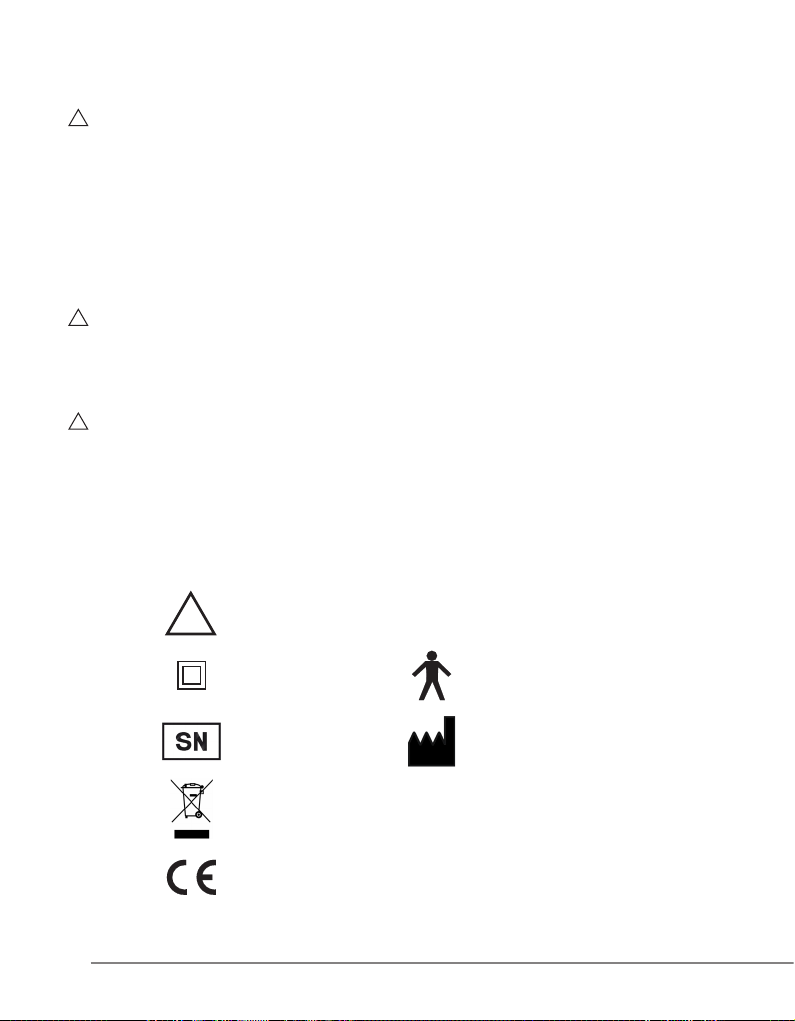
09.0 Symbols
N.B.: Please read carefully
the instructions for use
Class II apparatus Type “B” applied part
Serial number Manufacturer
This device and its accessories shouldn’t be
disposed or treated as solid urban waste
Apparatus in accordance with EC Directive 93/42 EEC.
Including EN 60601-1 and EN 60601-1-2
17
silverlight - manual of use and maintenance
Page 18

10.0 Problem-solving
If the device appears not to be working correctly, read the instructions again and then check the following
table.
PROBLEM POSSIBLE CAUSE SOLUTION
The recharging unit does not
switch on (none of the LEDs will
light up).
The red battery LED (check) of
the recharging unit is ON.
The red battery LED (check) of
the recharging unit is ON.
There is no beam of light when
the push button of the Silverlight
is pressed and an acoustic signal
is heard (two beeps).
An acoustic signal is heard at the
end of the exposure cycle
(two beeps).
An acoustic signal (three beeps)
is heard during the exposure
cycle and at the end of the cycle
Silverlight will not enable any fur-
ther treatment to be carried out.
The power cable is not connected
correctly.
The power cable is faulty.
The recharging unit is out of
order.
The contacts of the
recharging unit have been short-
circuited.
Battery failed. Contact GC America Inc.
Battery dead. Recharge the battery. See point
Battery low. Recharge the battery. See point
The thermal protection has been
activated.
Connect the cable both to the
recharging unit and to the wall
socket.
Replace the power cable.
Contact GC America Inc.
Customer Service
See point “06.6”.
Customer Service.
See point “05.4” and “05.5”.
“05.3”.
“05.2”.
It will be possible to use the
device only after it has cooled
down.
The polymerisation is insufcient. The surface of the tip of the ber
The green battery LED does not
light up when the handpiece is
placed back on the charging unit.
18
optic is soiled.
Recharging complete. Battery
charged.
silverlight - manual of use and maintenance
See point “07.4”.
See point 04.2 - Table 1.
Page 19

11.0 Technical specications
This apparatus complies with Directive 93/42/EEC: Class I
Class according to EN 60601-1: II
Type B
IP 20 (Recharging unit)
IP 20 (Silverlight)
Power supply for the recharging unit: 92-255 VAC 50/60 Hz 15 VA.
Power supply for the silverlight handpiece: Rechargeable Lithium-ion battery, 3.7 V
Handpiece for intermittent operation: 120” ON 40” OFF.
Source of light: High-luminosity LED with optics.
Light radiation: 440 - 480 nm.
Average life: 1,800,000 cycles of 20 seconds each.
Fiber optic included in the supply: Diameter 8 mm.
Composition: Drawn coherent bers melted in
Sterilizable by steam autoclave.
Minimum sterilization parameters:
Three times pre-vacuum cycle at 132°C for 4
(max. temp. 135°C – max. 500 cycles)
Exposure: FAST: Exposure time 10 seconds
Acoustic signals indicating start and end of
SLOW RISE: Exposure time 20 seconds
Acoustic signal at the start, after 10 seconds and at
The cycles can be stopped or repeated at any time
Time required to recharge a dead battery: About two hours.
Operating conditions: From +10°C to +40°C
Relative humidity from 30% to 75%
Transport and storage conditions: From -10°C to +70°C
Relative humidity from 10% to 90%
Air pressure P: 500 hPa/1060 hPa
Weights and dimensions: Recharging unit: Weight 555 g.
96 x 120 x 58 mm.
Silverlight handpiece: Weight 105 g.
L 198 mm Max. Ø 22.5 mm.
transparent quartz.
minutes. Drying time. 10 minutes.
exposure.
the end of the 20 seconds.
19
silverlight - manual of use and maintenance
Page 20
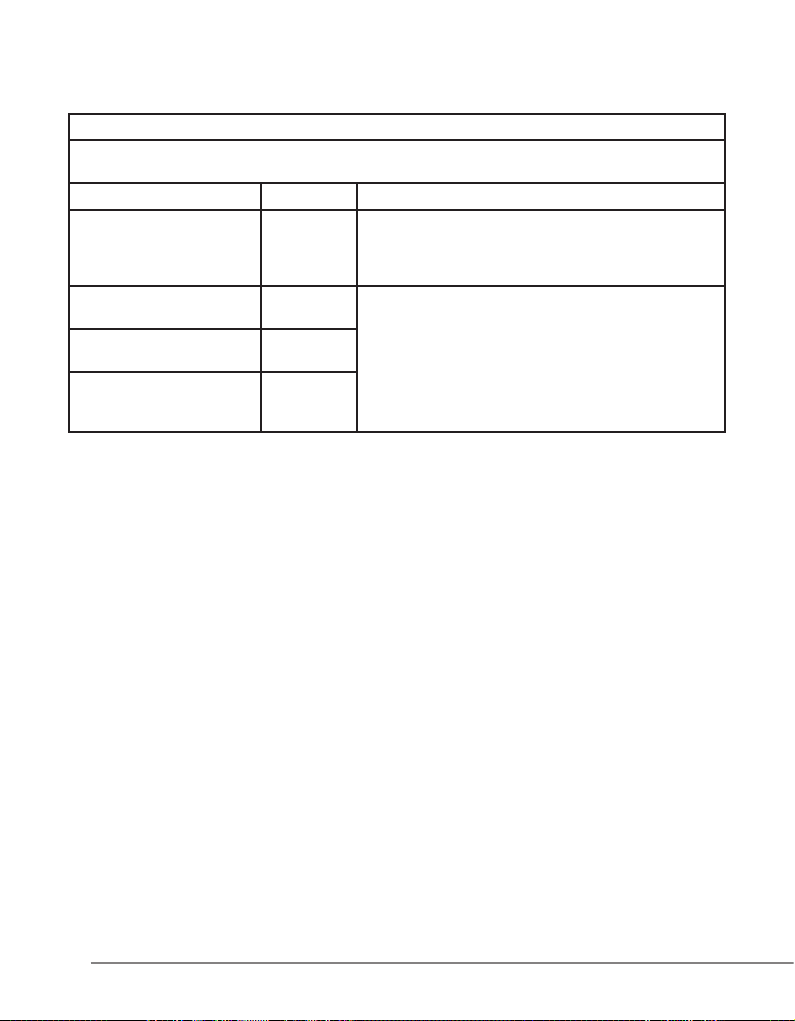
11.1 Electromagnetic compatibility EN 60601-1-2
Guidance and manufacturer’s declaration - Electromagnetic emissions
The Silverlight is intended for use in the electromagnetic environment specied below.
The customer or the user of the Silverlight should assure that it is used in such an environment.
Emissions test Compliance Electromagnetic environment - Guidance
RF emissions
CISPR 11
RF emissions
CISPR 11
Harmonic emissions
IEC 61000-3-2
Voltage uctuations / icker
emissions
IEC 61000-3-3
Group 1 The Silverlight uses RF energy only for its internal
Class B The Silverlight is suitable for use in all establishments,
Class A
Complies
function. Therefore, its RF emissions are very low and
are not likely to cause any interference in nearby elec-
tronic equipment.
including domestic establishments and those directly
connected to the public low-voltage power supply network that supplies buildings used for domestic purposes.
20
silverlight - manual of use and maintenance
Page 21

Guidance and manufacturer’s declaration - Electromagnetic immunity
The Silverlight is intended for use in the electromagnetic environment specied below.
The customer or the user of the Silverlight should assure that it is used in such an environment.
Immunity test IEC 60601
Electrostatic
discharge (ESD)
IEC 61000-4-2
Electrical fast
transient/burst
IEC 61000-4-4
Surge
IEC 61000-4-5
Voltage dips, short interruptions and voltage
variations on power
supply input lines
IEC 61000-4-11
Power frequency
(50/60 Hz) magnetic
eld
IEC 61000-4-8
NOTE: UT is the a.c. mains voltage prior to application of the test level.
test level
±6 kV contact
±8 kV air
±2 kV for power supply
lines
±1 kV for input/output
lines
±1 kV differential mode
±2 kV common mode
<5 % UT (>95 % dip in
UT) for 0,5 cycle
40 % UT (60 % dip in
UT) for 5 cycle
70 % UT (30 % dip in
UT) for 25 cycle
<5 % UT (>95 % dip in
UT) for 5 s
3 A/m 3 A/m Power frequency
Compliance level Electromagnetic envi-
±6 kV contact
±8 kV air
±2 kV for power supply
lines
±1 kV for input/output
lines
±1 kV differential mode
±2 kV common mode
<5 % UT (>95 % dip in
UT) for 0,5 cycle
40 % UT (60 % dip in
UT) for 5 cycle
70 % UT (30 % dip in
UT) for 25 cycle
<5 % UT (>95 % dip in
UT) for 5 s
ronment - Guidance
Floors should be wood,
concrete or ceramic
tile. If
oors are covered with
synthetic material, the
relative humidity should
be at least 30 %.
Mains power quality should be that of a
typical
commercial or hospital
environment.
Mains power quality should be that of a
typical
commercial or hospital
environment.
Mains power quality should be that of a
typical commercial or
hospital environment.
magnetic elds should
be at levels characteristic of a typical location
in a
typical commercial or
hospital environment.
21
silverlight - manual of use and maintenance
Page 22
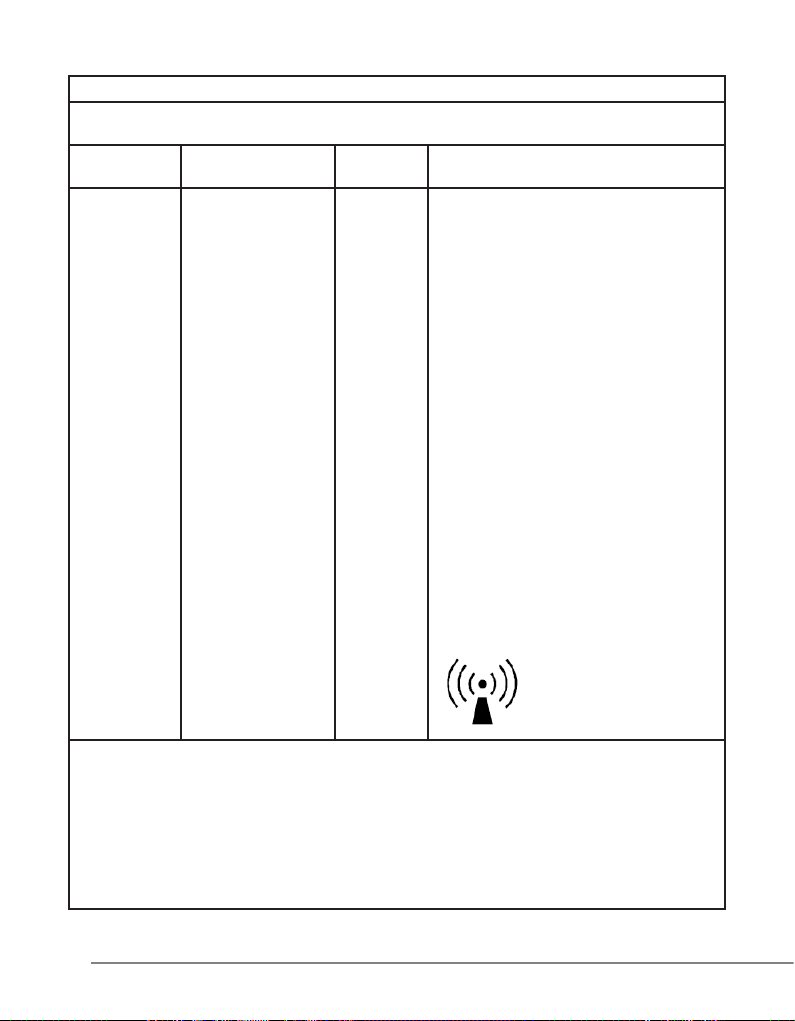
Guidance and manufacturer’s declaration - Electromagnetic immunity
The Silverlight is intended for use in the electromagnetic environment specied below.
The customer or the user of the Silverlight should assure that it is used in such an environment.
Immunity test IEC 60601 test level
Complian-
ce level
Electromagnetic environment - Guidance
Portable and mobile RF communications
equipment should be used no closer to
any part of the disposal including cables,
than the recommended separation distance calculated from the equation applicable to the frequency of the transmitter.
Recommended separation distance
Conducted RF
IEC 61000-4-6
Radiated RF
IEC 61000-4-3
3 Veff
150 kHz to 80 MHz
3 V/m
80 MHz to 2,5 GHz
3 Vrms
3 V/m
d = 1,2 √P
d = 1,2 √P 80 MHz to 800 MHz
d = 2,3 √P 800 MHz to 2,5 GHz
where P is the maximum output power
rating of the transmitter in watts (W)
according to the transmitter manufacturer
and d is the
recommended separation distance in
metres (m).
Field strengths from xed RF transmit-
ters, as determined by an electromagnetic
site survey,a should be less than the com-
pliance level in each frequency rangeb.
Interference may occur in the vicinity of
equipment marked with the following
symbol:
Notes:
(1) At 80 MHz and 800 MHz, the higher frequency range applies.
(2) These guidelines may not apply in all situations. Electromagnetic propagation is affected by absorption and reec-
tion from structures, objects and people.
a Field strengths from xed transmitters, such as base stations for radio (cellular/cordless) telephones and land
mobile radios, amateur radio, AM and FM radio broadcast and TV broadcast cannot be predicted theoretically with
accuracy. To assess the electromagnetic environment due to xed RF transmitters, an electromagnetic site survey
should be considered. If the measured eld strength in the location in which the Silverlight is used exceeds the
applicable RF compliance level above, the Silverlight should be observed to verify normal operation. If abnormal
performance is observed, additional measures may be necessary, such as re-orienting or relocating the Silverlight.
b Over the frequency range 150 kHz to 80 MHz, eld strengths should be less than 3 V/m.
22
silverlight - manual of use and maintenance
Page 23
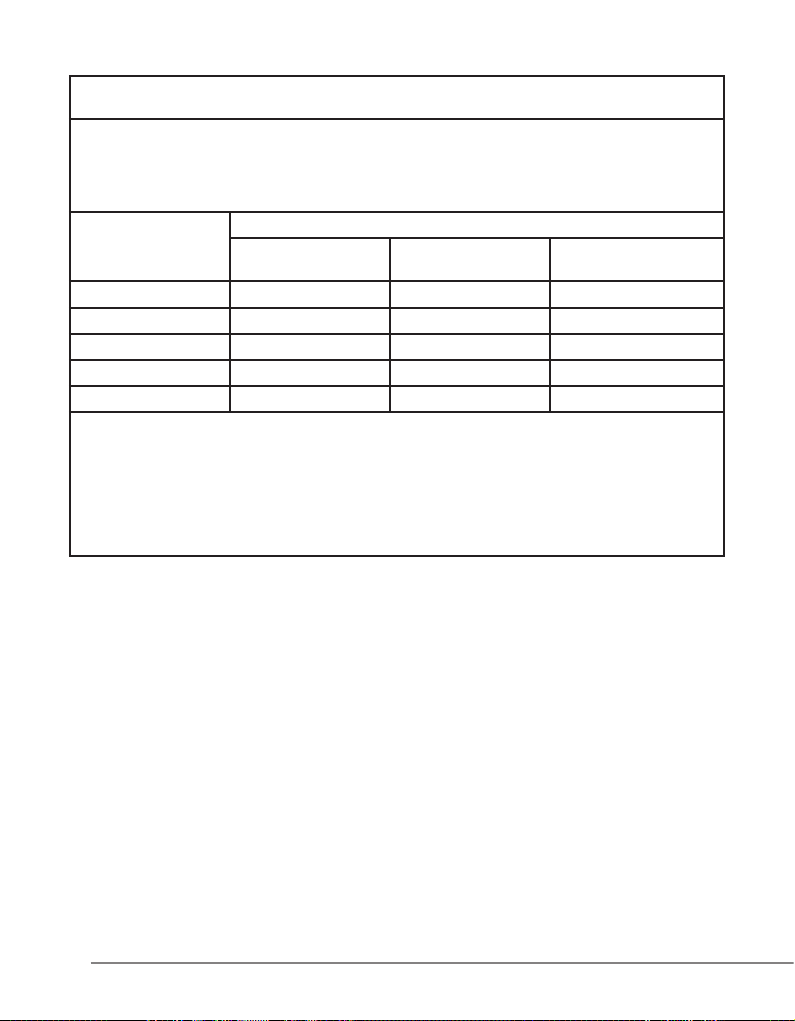
Recommended separation distances between portable and mobile RF communications
The Silverlight is intended for use in an electromagnetic environment in which radiated RF
disturbances are controlled. The customer or the user of the Silverlight can help prevent
electromagnetic interference by maintaining a minimum distance between portable and mobile RF
communications equipment (transmitters) and the Silverlight as recommended below, according to the
maximum output power of the communications equipment.
Rated maximum
output power of
transmitter “W”
0,01 0,12 0,12 0,23
0,1 0,38 0,38 0,73
1 1,2 1,2 2,3
10 3,8 3,8 7,3
100 12 12 23
For transmitters rated at a maximum output power not listed above, the recommended separation
distance d in metres (m) can be estimated using the equation applicable to the frequency of the
transmitter, where P is the maximum output power rating of the transmitter in watts (W) according to
the transmitter manufacturer.
Note:
(1) At 80 MHz and 800 MHz, the separation distance for the higher frequency range applies.
(2) These guidelines may not apply in all situations. Electromagnetic propagation is affected by
absorption and reection from structures, objects and people.
equipment and the Silverlight
Separation distance according to frequency of transmitter “m”
150 kHz to 80 MHz
d = 1,2 √P
80 MHz to 800 MHz
d = 1,2 √P
800 MHz to 2,5 GHz
d = 2,3 √P
23
silverlight - manual of use and maintenance
Page 24

12.0 Limited Warranty
For all Silverlight products unless otherwise specied.
Any non-approved usage of the Silverlight device and accessories will void the warranty.
Any usage of non-Silverlight parts, components/accessories or procedures will void the warranty.
The manufacturer, Mectron S.p.A., warrants to the rst original purchaser (customer) that their products
have been tested, inspected and shipped in proper working order.
All Silverlight products are covered by warranty for a period of one year from the date of purchase.
Products are warranted to be free from defects in material and workmanship.
This limited warranty does not apply to any unit/accessory which has been subject to abnormal wear
and tear, misuse, abuse, neglect, improper installation or operation or that has been altered, adjusted or
tampered with by any person other than GC America Inc. authorized personnel.
The warranty is valid only if GC America Inc. is notied within thirty (30) days following discovery of a
defect.
For returning procedure make reference to the paragraph “CUSTOMER SERVICE – RETURNS”
Returns must be authorized by GC America Inc.
GC America Inc. cannot accept responsibility for returns which have not been authorized.
Contact GC America Inc. Customer Service at 800-323-7063 for return authorization.
GC America Inc. will investigate and shall correct any defect covered by warranty by providing a replace-
ment of the product.
If upon examination by GC America Inc.’s service personnel it is determined that the malfunction is caused
by abnormal wear and tear or by damage caused by misuse, abuse, tamper with, or by failure to perform
normal and routine maintenance as set out in the instructions for use and maintenance booklet provided
with the unit, warranty provisions will not apply.
GC America Inc will not replace or repair any product or part of the product after the warranty period (one
year from date of purchase) has expired.
24
silverlight - manual of use and maintenance
Page 25

12.1 Customer service - RETURNS
Returning products for any reason, must be authorized by GC America Inc. Customer Service and the
following information must be provided:
• Product name
• Serial number/lot number (if applicable)
• Reason of return and detailed description of the problem.
• Original Invoice Number
• Date of purchase
The above information must be always included in the package of the returning products under warranty.
GC America will not replace product, product parts, or product accessories that are out of warranty period
(one year from date of purchase).
RETURNED GOODS.
Contact GC America Inc Customer Service for instructions on how to return product.
WARNING: Packaging
Pack the equipment in its original packaging to ensure it is not damaged during shipment.
DANGER
All the products must be cleaned and sterilized before returning.
GC America Inc. will not accept and process potentially bio-contaminated products which do not meet this
requirement.
Contaminated products will be immediately returned to you for decontamination and sterilization.
This warranty gives you specic legal rights and you may have other rights which vary by state and
municipality.
The foregoing limited warranty is in lieu of all other warranties, expressed or implied, including, but not
limited to, the implied warranties of merchantability and tness for a particular purpose.
Except claims for personal injury, in no case shall the company be liable for any special, incidental or
consequential damages based upon breach of warranty or any other legal theory.
Some jurisdictions do not allow limits on warranties, or on remedies, and, in such jurisdictions, the limit in
this and the preceding paragraphs may not apply.
25
The information given in this manual is not binding and can be modied without prior notice.
silverlight - manual of use and maintenance
Page 26

Distributed in the U.S. by:
GC America Inc.
3737 West 127th St. Alsip, IL 60803
Phone:800-323-7063
Fax: 800-GCFAXME
Caution: US Federal Law restricts this device to sale by or on the order of a dentist.
manufacturer:
Mectron S.p.A.
Via Loreto 15/A
16042 Carasco (Ge) Italy
Tel. +39 0185 35361
Fax +39 0185 351374
www.mectron.com
e-mail: [email protected]
silverlight V. USA
Rev. 01del 02-18-2010
 Loading...