

Page 1

User
Manual
Page 2

“ ...changed my life for the better.
My hearing was so bad that I felt left out
and didn’t go out very much. I hear sounds
now that I haven’t heard in years.”
1
— Phyllis G.
Page 3

CONGRATULATIONS!
Enjoy the sounds around you and conversations with
your family and friends again. Please read this User
Manual in its entirety. Your satisfaction with hearing
aids will depend on the type and degree of your hearing
loss and your expectations. While no hearing aid will
restore normal hearing, we are here to help you make
the most of your investment. Frequent use of your
aids will allow you to enjoy the full benets of better
hearing in your life.
2
Page 4

Our hearing instrument specialists are ready
to provide assistance with any questions you
may have. Take advantage of our free
one-on-one phone consultations.
312-366-3899
Mon. – Fri. 8:30 am – 4:30 pm (CST)
support@MDHearingAid.com
24 hours a day, 7 days a week
WE’RE ALWAYS
HERE FOR YOU
3
Page 5

4
Page 6

TABLE OF CONTENTS
5
Page 7

Package Contents .......... 7
VO LT Diagram .............9
Quick Start Guide..........11
1. Charge
VO LT ..........12
2. Place
VO LT On Ear .....13
3. Turn
VO LT On ..........14
Replacing Tips and Tubing ..15
Replacing ComfortTIP™....16
Replacing Thin Tubing ....17
Using High Volume Kit ...18
Care and Cleaning .........19
Program Selection .........21
Using the Telephone .......22
Troubleshooting...........23
Protection Plan and........28
Replacement Parts
Warranty and Repair .......29
Return Policy .............31
Warning to Hearing ........33
Aid Dispensers
Important Notice for .......35
Prospective Users
Notice of Cancellation .....37
Technical Specications ....38
6
Page 8

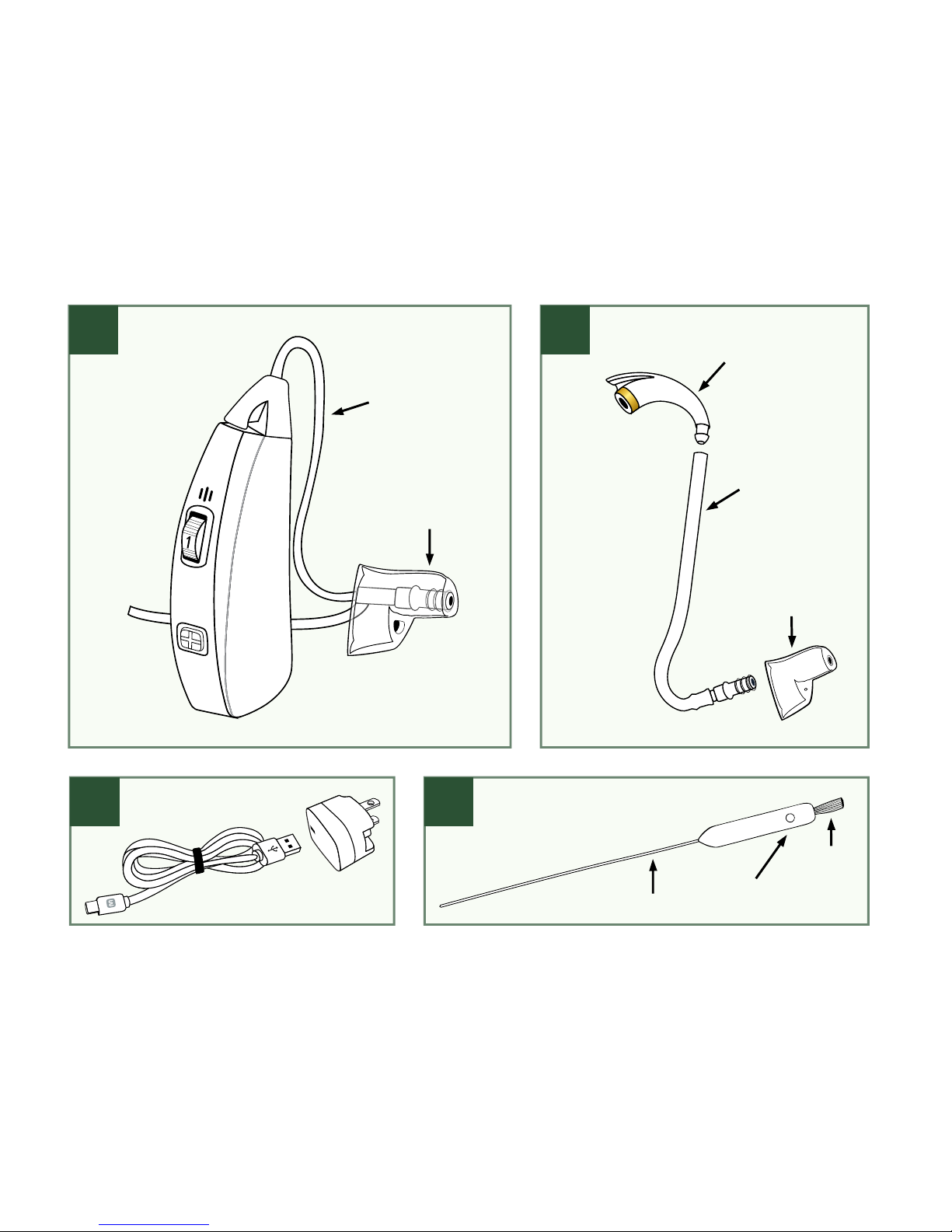
A) MDHearingAidVOLT
with Thin Tubing and Open
ComfortTIP
™
, assembled for
your convenience.
B) High Volume Kit
with Earhook, 13PLUS Tubing,
and Closed ComfortTIP.
Requires customization;
see page 18.
C) Charger
with USB Cord and
Plug. See page 12
for instructions.
D) Cleaning Tool
with Brush, Magnet,
and Wire. See page 19
for instructions.
PACKAGE CONTENTS
*
7
Page 9
B
)
A
)
D
)
Open
ComfortTIP
™
Earhook
Closed
ComfortTIP
™
13PLUS
Tubing
Magnet
Brush
Wire
Thin
Tubing
*Contents will vary depending on product ordered.
C
)
8
Page 10
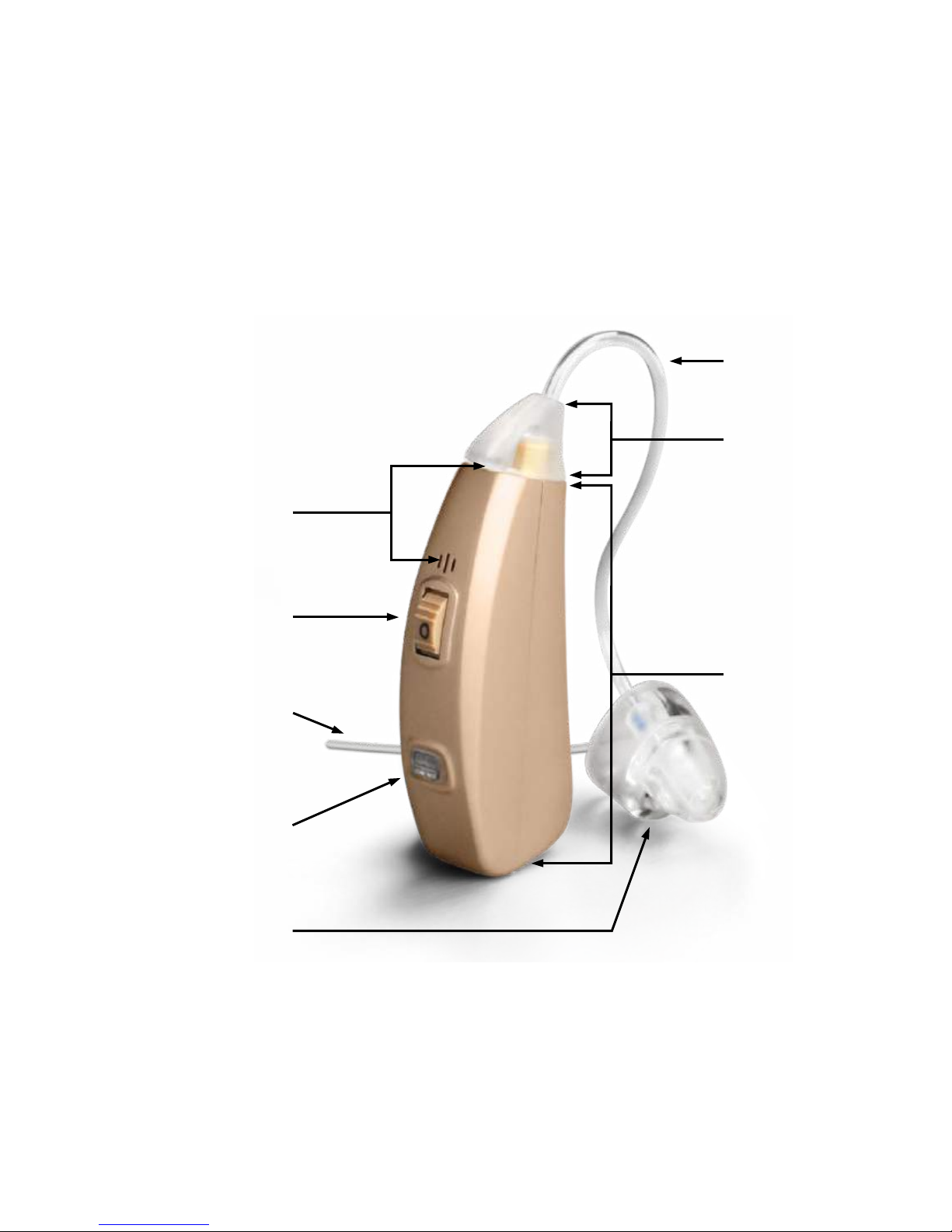
VOLT
DIAGRAM
Tubing Base
Volume Dial
(on/off switch)
Stabilizer Bar
Hearing Aid
Body
Thin Tubing
ComfortTIP
™
Program Button
& Charging Light
Microphones
9
Page 11

“ Love being able to just punch a
button and change the program
to meet the environment I’m in.
Not having to change the
batteries is a big plus.”
— Marc B.
10
Page 12
STEPS
Three Easy Steps for Using
Your
MDHearingAidVO LT
Step 1: Charge VOLT
Step 2: Place VOLT On Ear
Step 3: Turn
VO LT On
QUICK START GUIDE
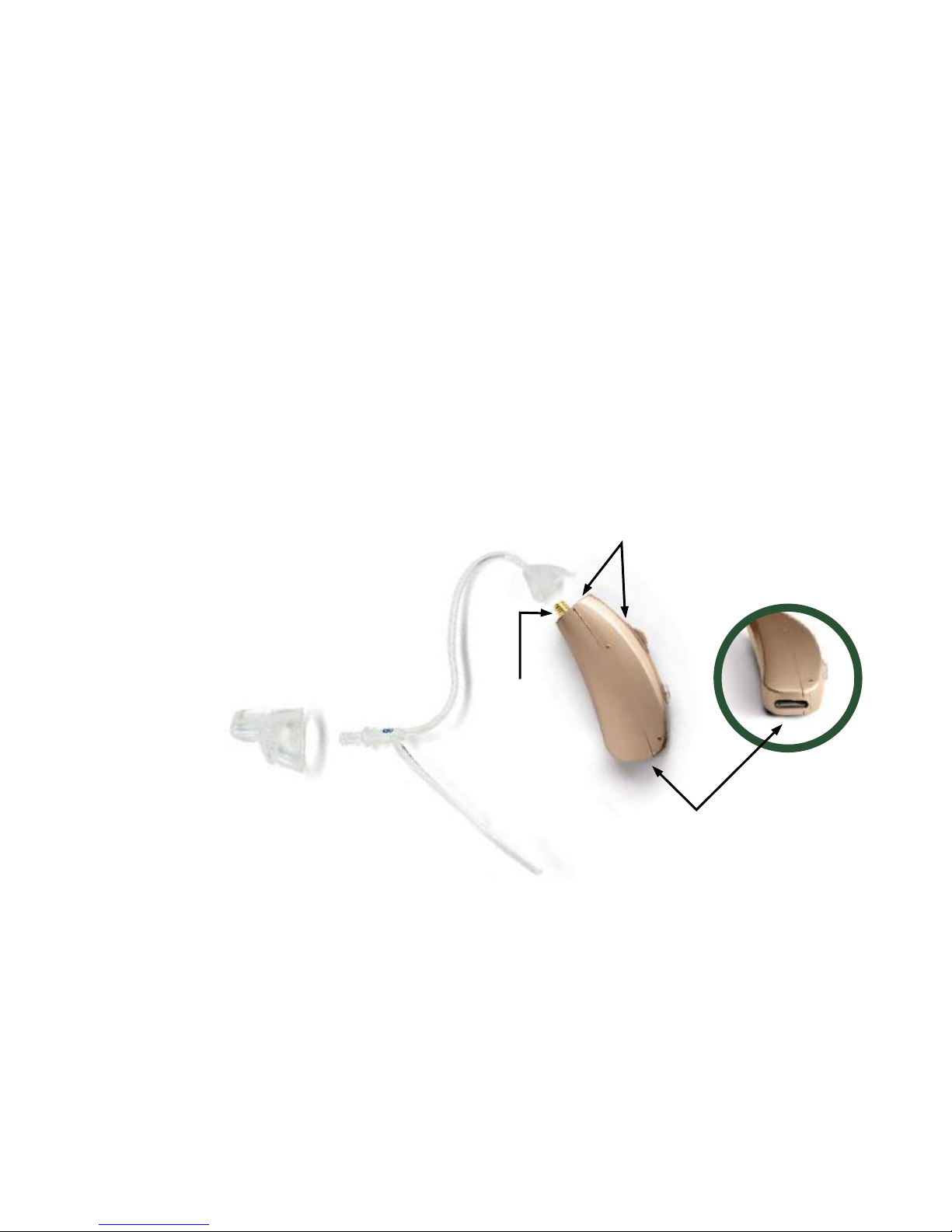
Charging Port
Threaded
End
Microphones
VO LT comes assembled for your convenience.
11
Page 13
STEP 1
Charging Light
faces left
Blue Light = Charging
Green Light = Fully Charged
Light Off = Not Charging
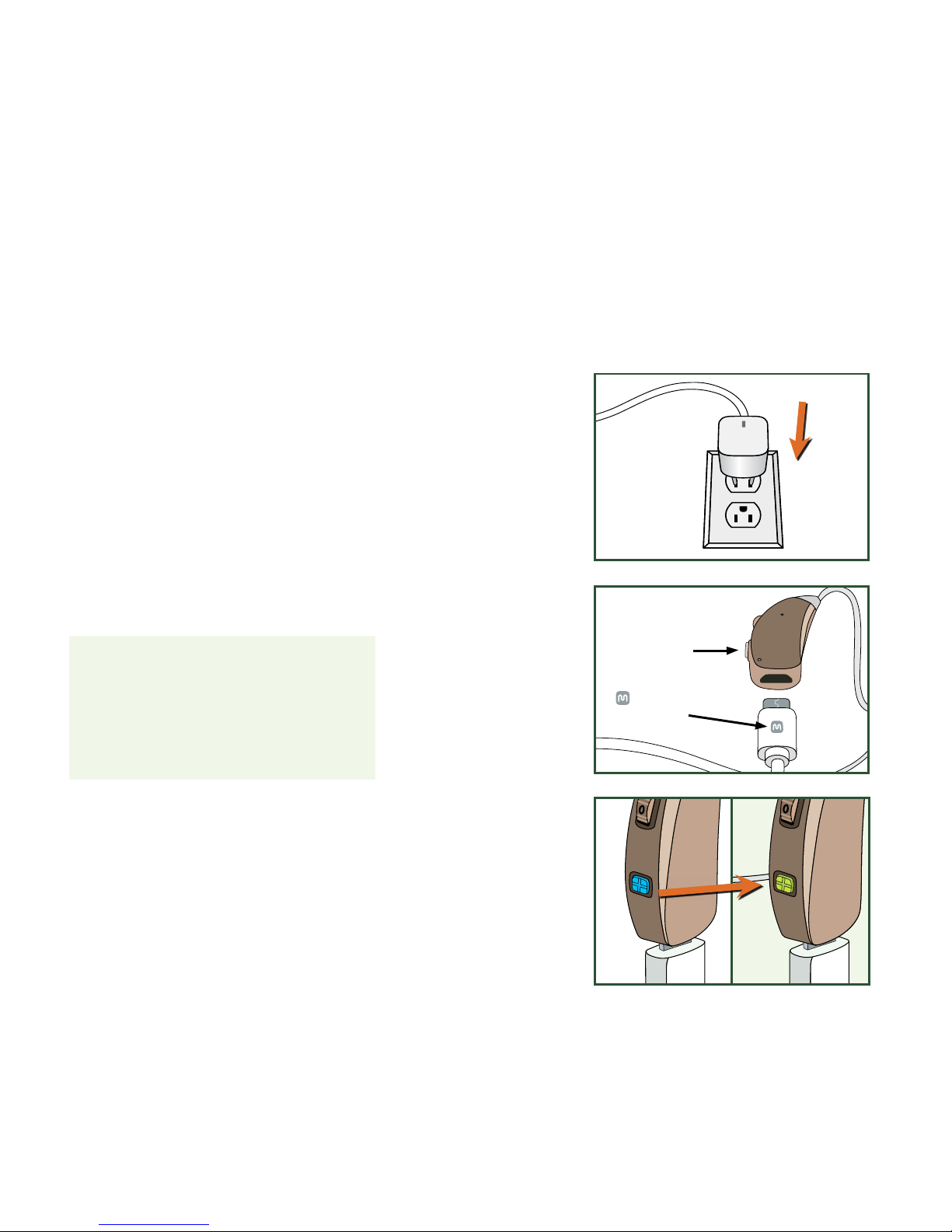
STEP 1: CHARGE
VOLT
a) Plug charger into standard outlet.
b) Connect VO LT to USB cord.
Blue light will turn on.
c) When fully charged, blue light
will turn green and VOLT is ready
to use.*
b)
a)
c)
* On average, a full charge lasts 18-22 hours.
symbol
faces up
12
Page 14
STEP 2
ý
þ
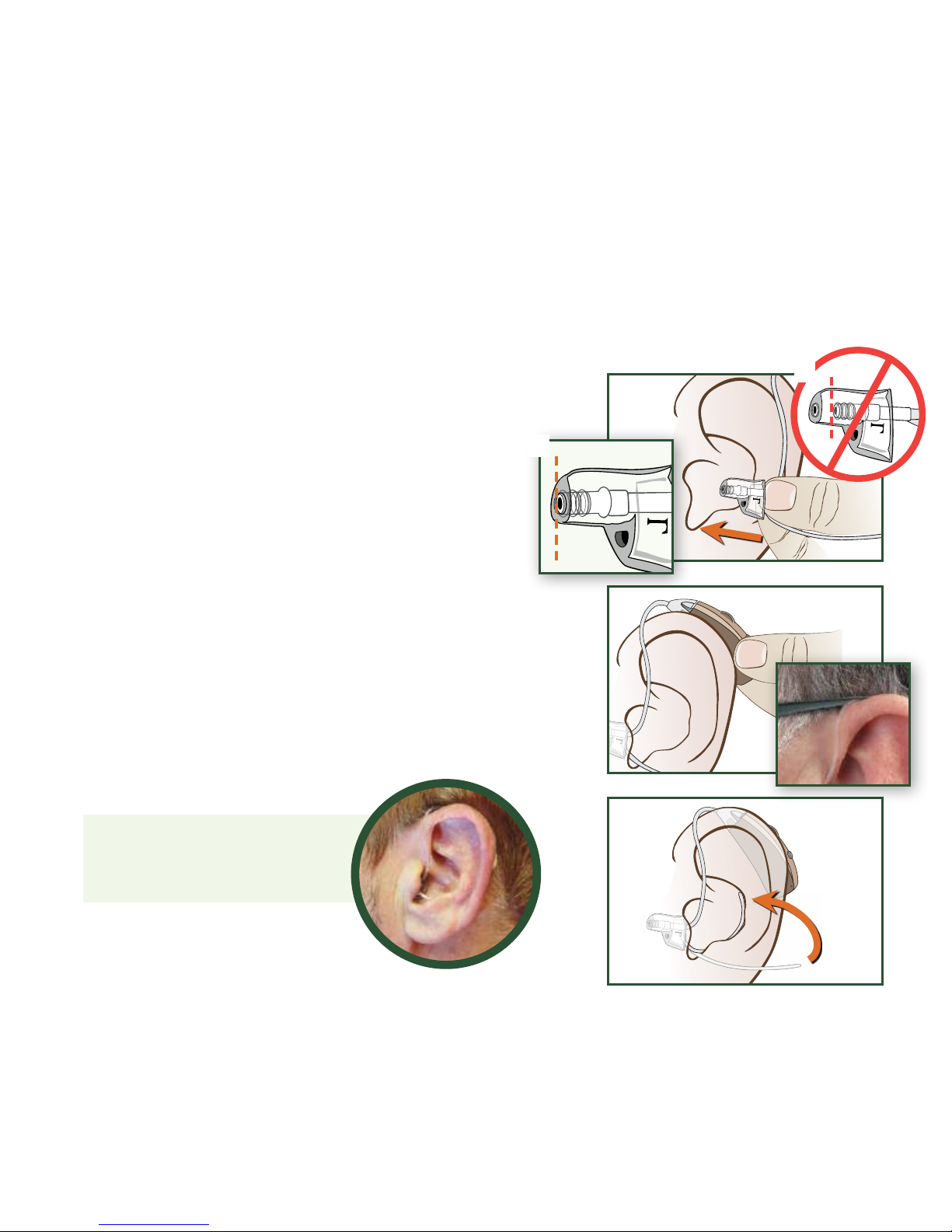
a) Hold Thin Tubing at Stabilizer Bar
junction. Insert ComfortTIP with gentle
pressure into ear canal.
b) Place VOLT Body behind ear. The curve
of Thin Tubing should rest on top of ear
comfortably (next to glasses).
c) Tuck Stabilizer Bar in outer bowl
of ear. It may be trimmed to suit the
size of your ear.
b)
a)
c)
The MDHearingAidV OLT
in nal position
STEP 2: PLACE
VOLT
ON YOUR EAR
Prevent Tip from coming off in ear.
Always verify ComfortTIP™ is pushed all the
way on Tubing before inserting Tip in ear.
13
Page 15
STEP 3STEP 2
OFF
ON
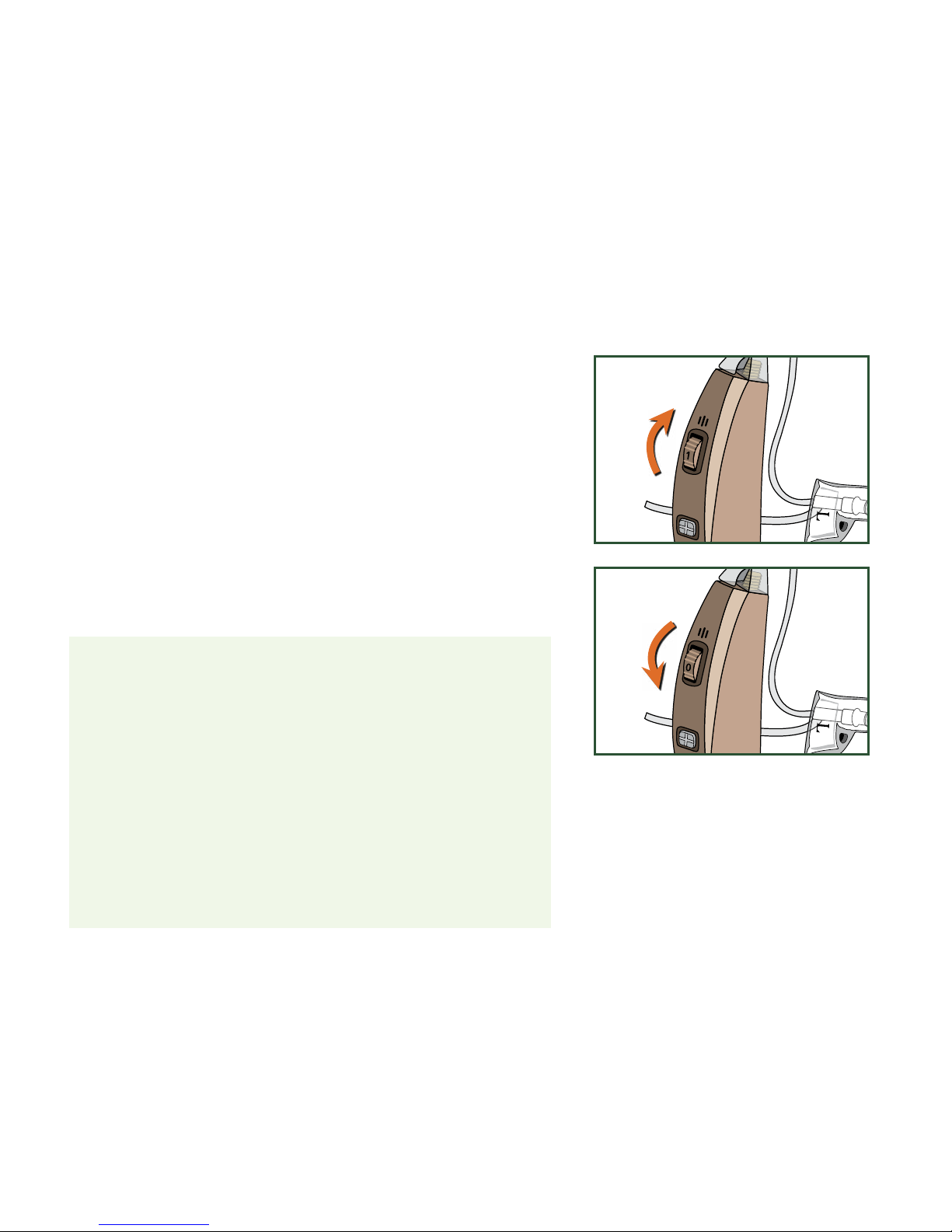
The VO LT uses a Volume Dial with a built in
on/off control (like a radio).
• To turn V OLT ON, turn Volume Dial upward,
past the click.
• To turn V OLT OFF, turn Volume Dial
downward, past 0 until you feel a click.
IMPORTANT: When VO LT is turned ON, it will
take a few seconds to begin amplifying sound.
Please raise the volume SLOWLY to avoid a
sudden blast of sound.
WARNING: Whistling may be heard if VOLT is
turned ON but NOT positioned securely in your
ear. This is normal. Once the ComfortTIP is
properly inserted in your ear, whistling will stop.
STEP 3: TURN
VOLT
ON
14
Page 16
Open
Closed
Closed
Open
Thin Tubing
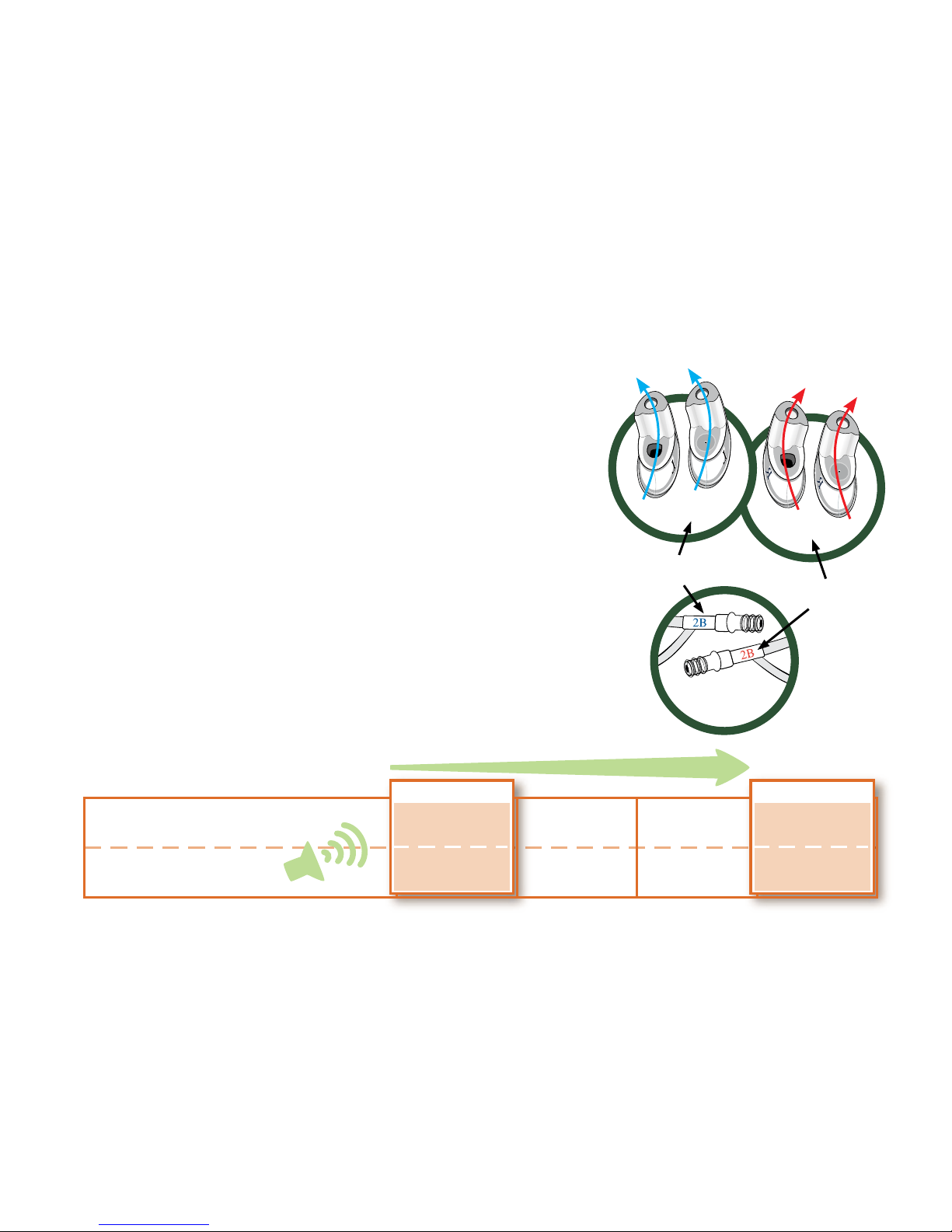
Select ComfortTIP™:
ComfortTIPs are right and left ear specic.
• Open: Allows natural sound and better air ow.
• Closed: Allows highest volume without feedback.
Select Tubing:
• Right Thin Tubing (red label): Use for tting right ear.
• Left Thin Tubing (blue label): Use for tting left ear.
• 13PLUS Tubing: Use this wider tube if you require
higher volume or a custom tube length (see page 18).
REPLACING TIPS AND TUBING
INITIAL ASSEMBLY
Thin
Open
MAX. OUTPUT
Type of ComfortTIP
Type of Tubing
Closed Open
13PLUSThin
Closed
13PLUS
TO INCREASE OUTPUT
ComfortTIP and Tubing combinations which allow for more gain (higher volume)
Left
Right
15
Page 17
ý
Replacing ComfortTIP™
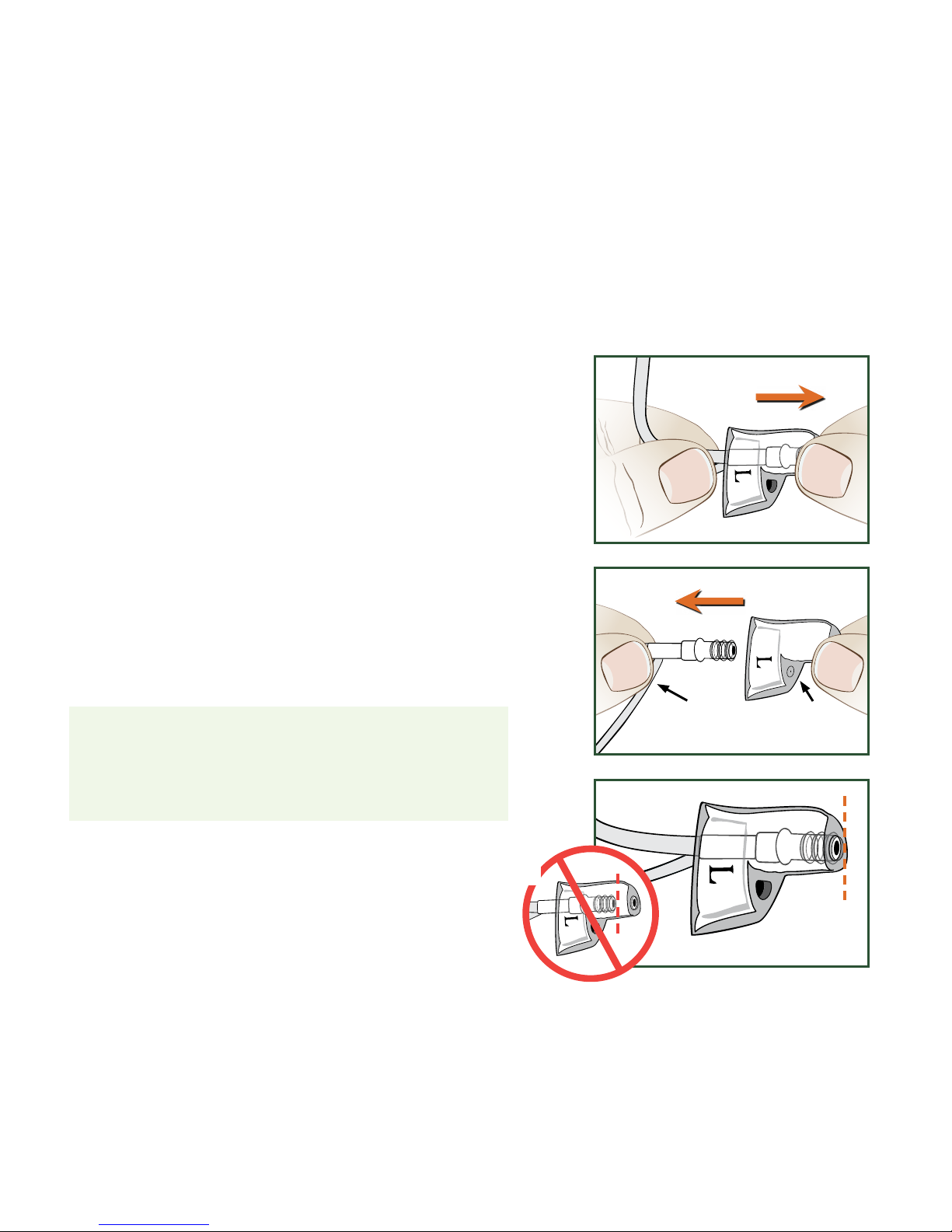
a) Hold Tubing with one hand and
remove ComfortTIP with other hand.
b) Align new ComfortTIP
so vented end is
lined up with Stabilizer Bar. Push Tip
over the ridges on end of Tubing.
c) IMPORTANT: The end of the Tubing should be
visible through the opening of the ComfortTIP.
Otherwise, Tube may detach from Tip when
removing VOLT from your ear.
If you are experiencing whistling at higher
volumes, remove Open ComfortTIP and
replace with Closed ComfortTIP.
Vented
End
b)
a)
c)
Stabilizer
Bar
16
Page 18
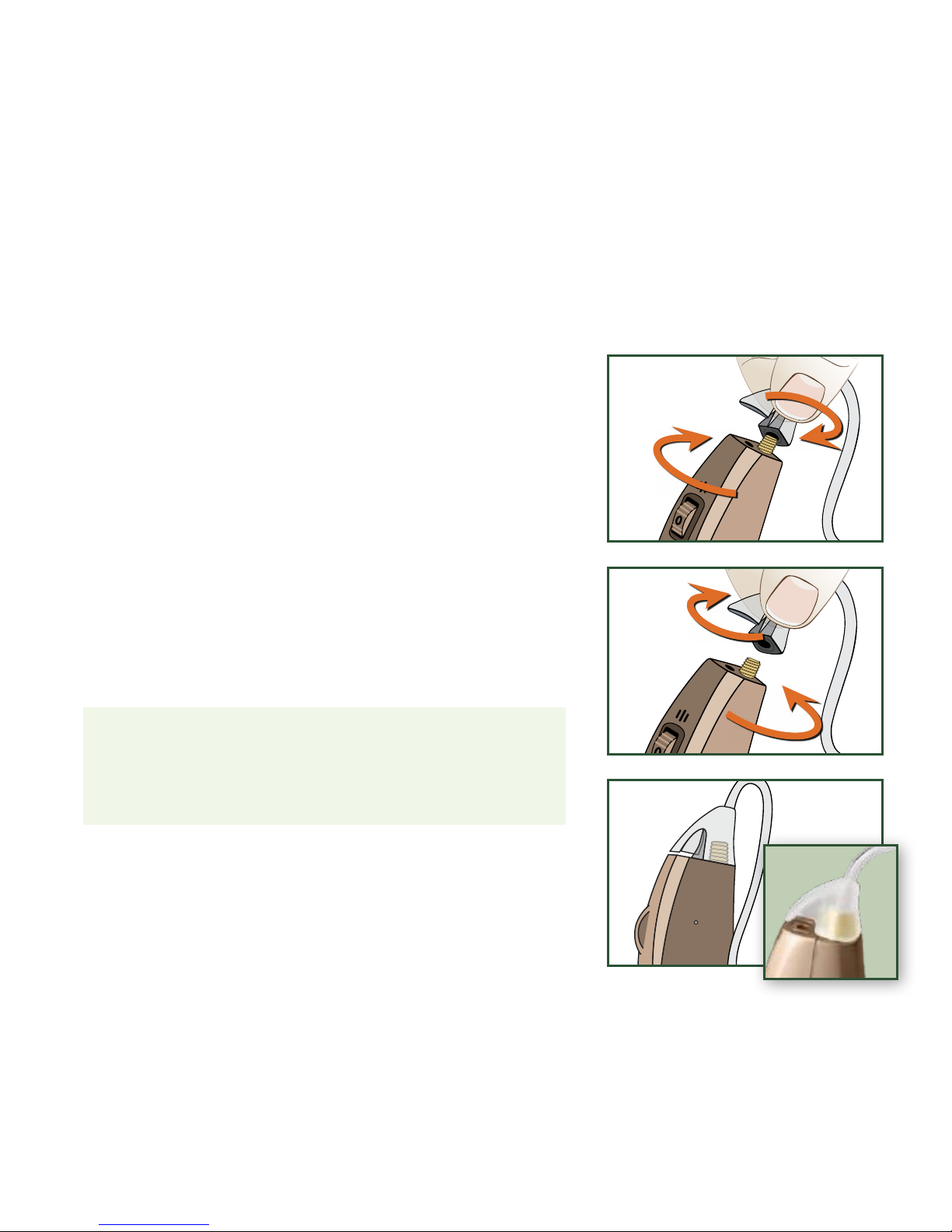
Replacing Thin Tubing
a) Remove Tubing: Turn Tubing Base
counter-clockwise (like a bottle cap),
or hold Tubing Base rm and twist
VO LT Body clockwise to detach.
b) Attach new Tubing: Gently turn Tubing
Base clockwise onto VOLT Body, or twist
VO LT Body counter-clockwise into Tubing Base.
c) Make sure Tubing Base is ush with
sides of VO LT Body when you are nished.
Please note: The
VO LT Body can be used for
either the left or right ear. Only Thin Tubing
and ComfortTIPs™ are ear-specic.
b)
a)
c)
17
Page 19
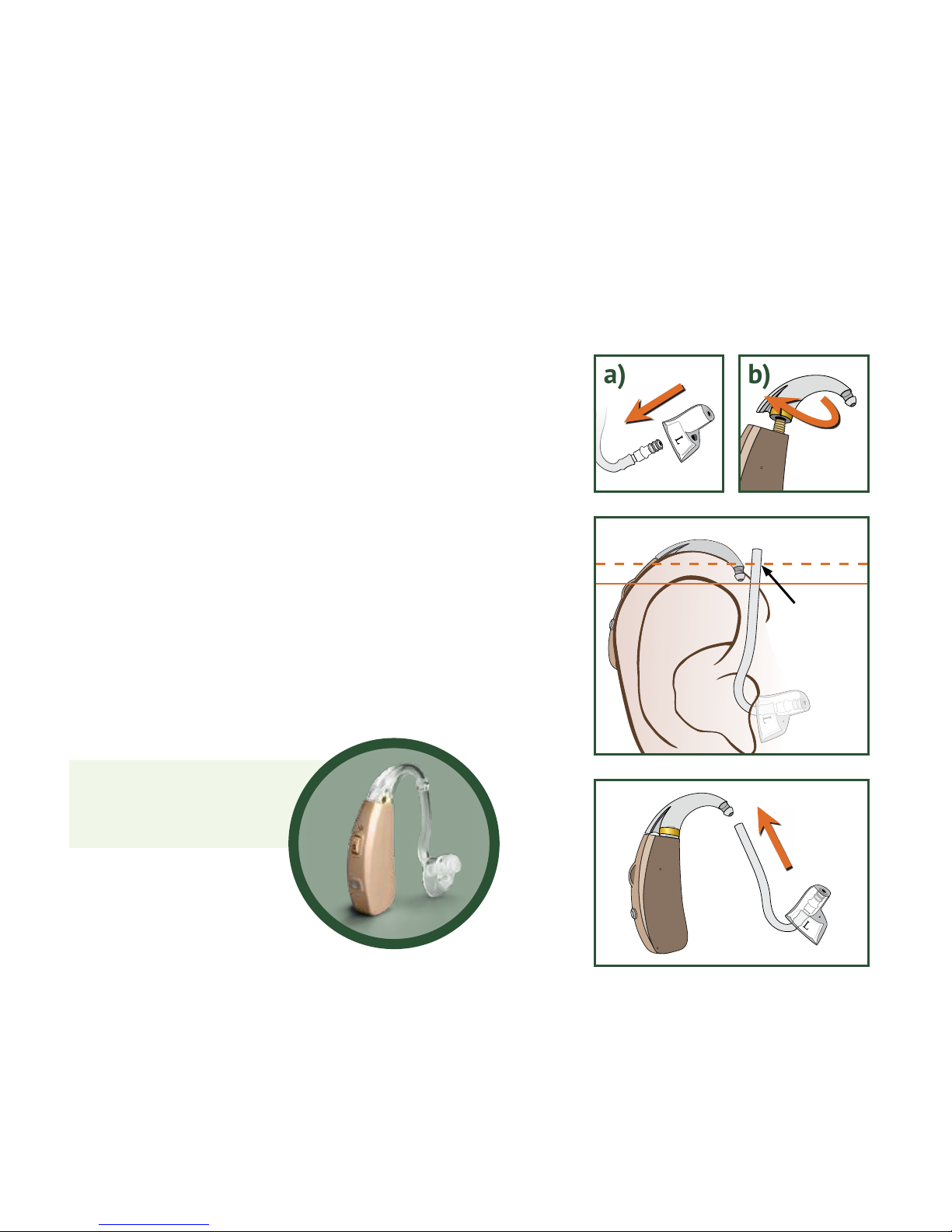
Using High Volume Kit (Optional)
a) Attach ComfortTIP to 13PLUS Tube.
b) Twist Earhook clockwise onto VOLT Body.
c) Insert ComfortTIP with 13PLUS Tube
attached into ear canal. Place VO LT Body
behind ear so Earhook rests on top of ear.
Mark a line on Tube ABOVE bottom of
Earhook. Cut Tube at marked line.
d) Push cut end of 13PLUS Tube
onto Earhook until it slides OVER
the end of Earhook.
c)
a)
d)
b)
Mark &
Cut Here
Overlap
The High Volume Kit
assembled
18
Page 20
1
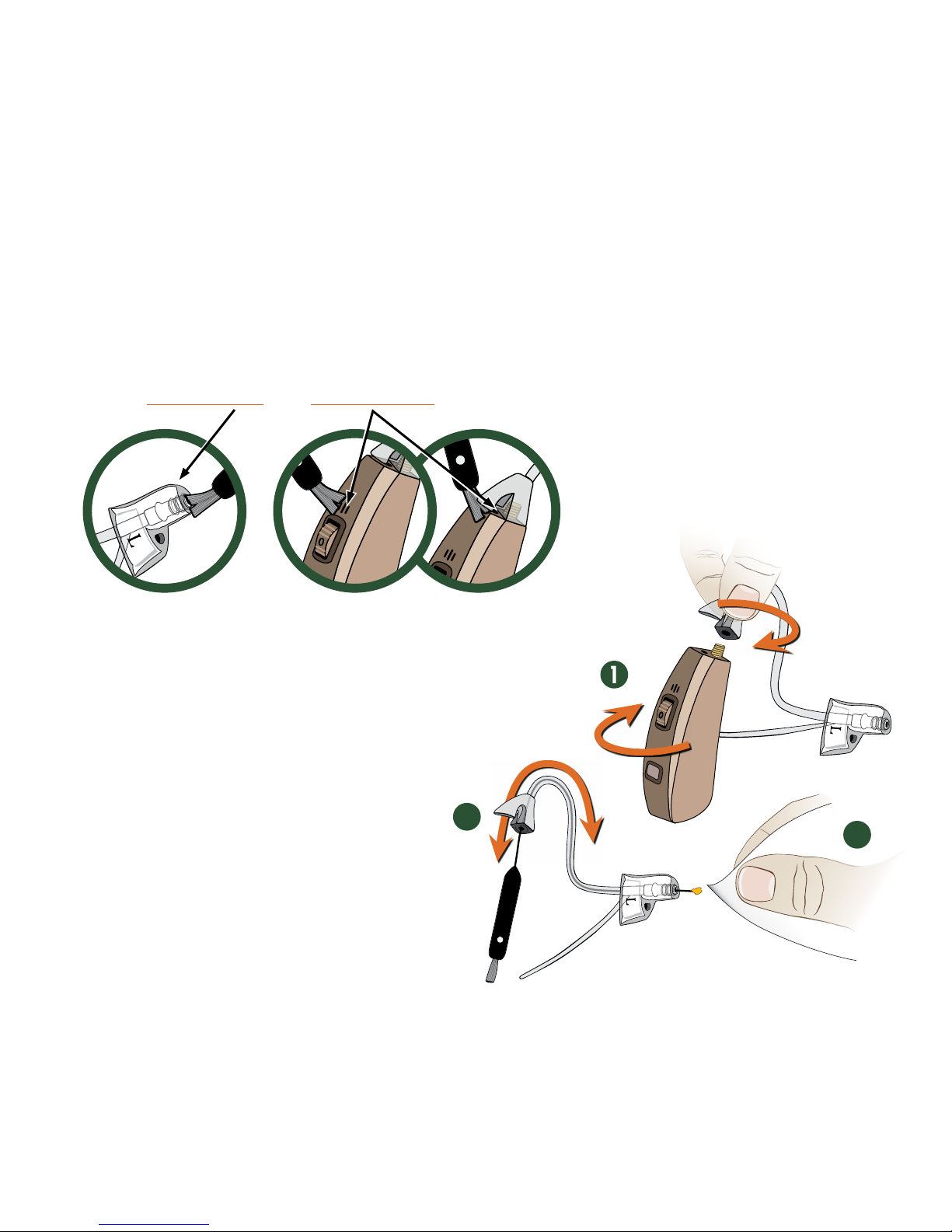
CARE AND CLEANING
Brush ComfortTIP™ and Microphones daily.
Use Cleaning Tool Wire regularly.
1. Turn Tubing Base counter-clockwise to
remove. Or hold Tubing Base rm and
twist VO LT Body clockwise to detach.
2. Insert Wire through Tubing Base.
3. Wipe end of wire clean.
4. Repeat as necessary.
5. Reattach Tubing to
VO LT Body.
2
3
19
Page 21
Follow these tips for optimal performance:
• Avoid physical shock, such as dropping on the oor.
• For maximum battery life, charge
VOLT until blue light turns
green with each charge.
• Store in a cool dry place when not in use, such as a
hearing aid dehumidier.
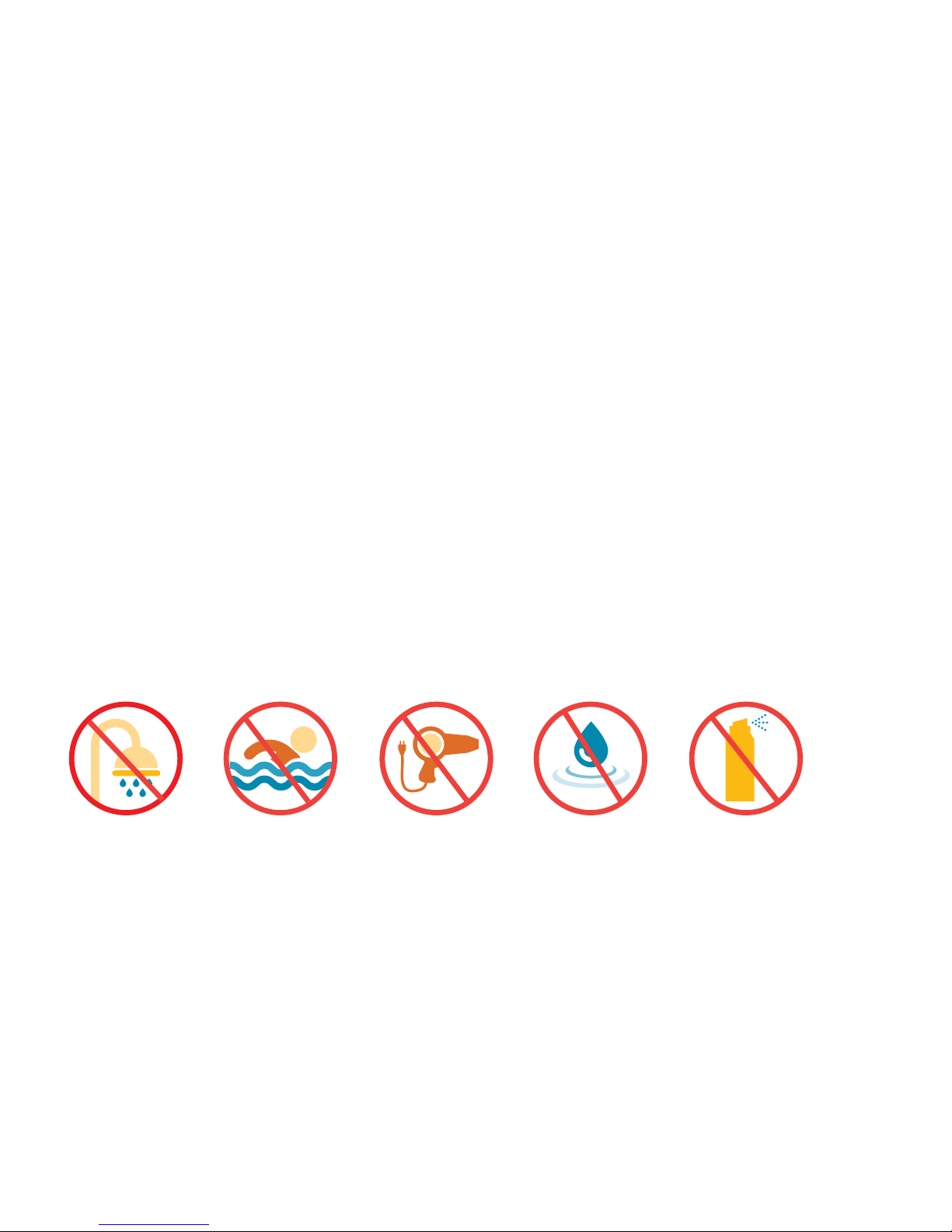
• Do not let your VO LT get wet.
• Do not use hair spray or a hair dryer while wearing your V OLT .
• Do not expose your VOLT to excess moisture or heat.
20
Page 22
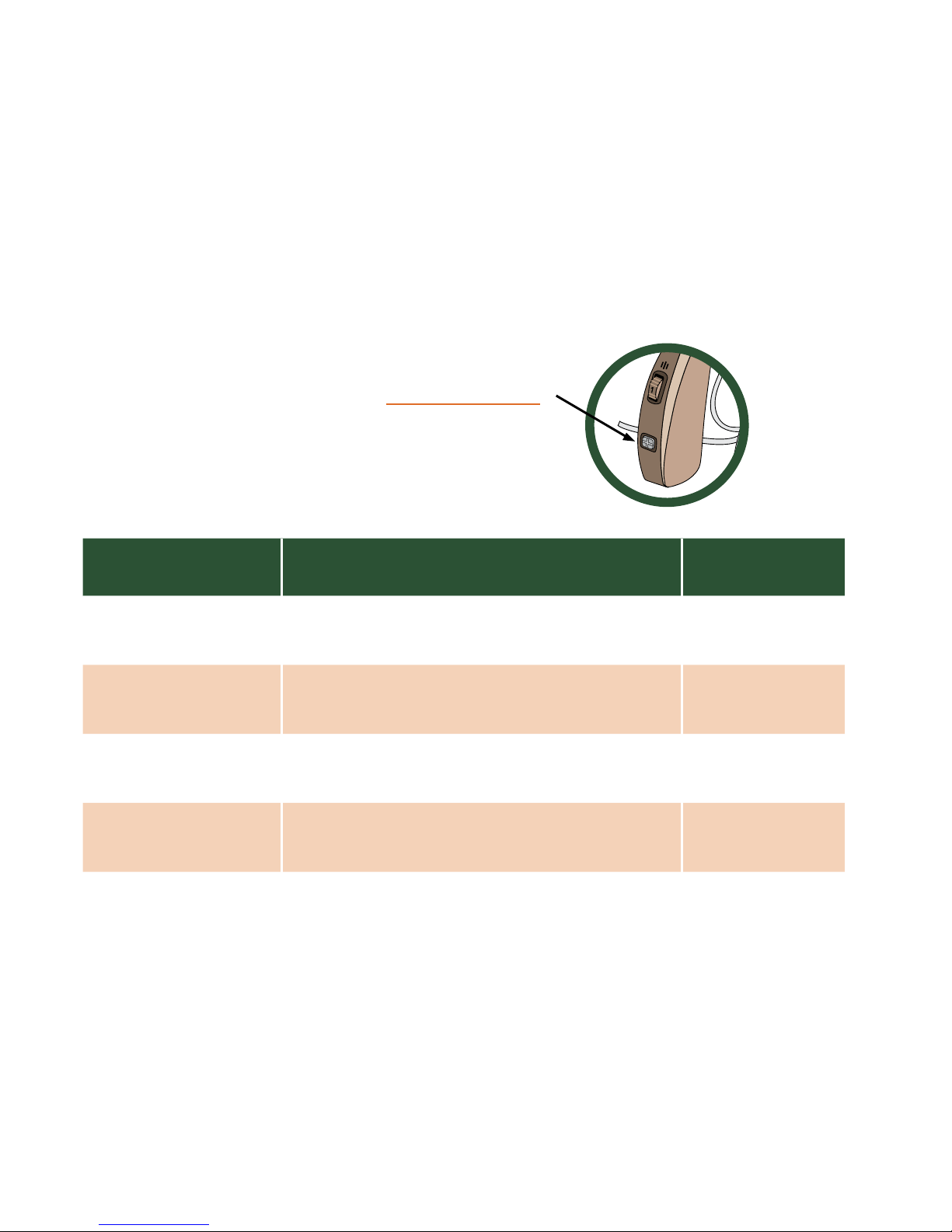
To change programs, press the Program Button.
Experiment with these programs to nd which
works best for you.
PROGRAM BEST FOR INDICATOR
1. Everyday* Hearing high and low pitched sounds.
One Beep
2. High Frequency High pitched sounds: nature sounds
or high octave music.
Two Beeps
3. Restaurant One-on-one conversations or reducing
background noise in restaurants.
Three Beeps
4. Groups Small group (three-ve people)
conversations in background noise.
Four Beeps
PROGRAM SELECTION
*Program one is the default setting. When V OLT is turned OFF, it will reset to Program one.
21
Page 23
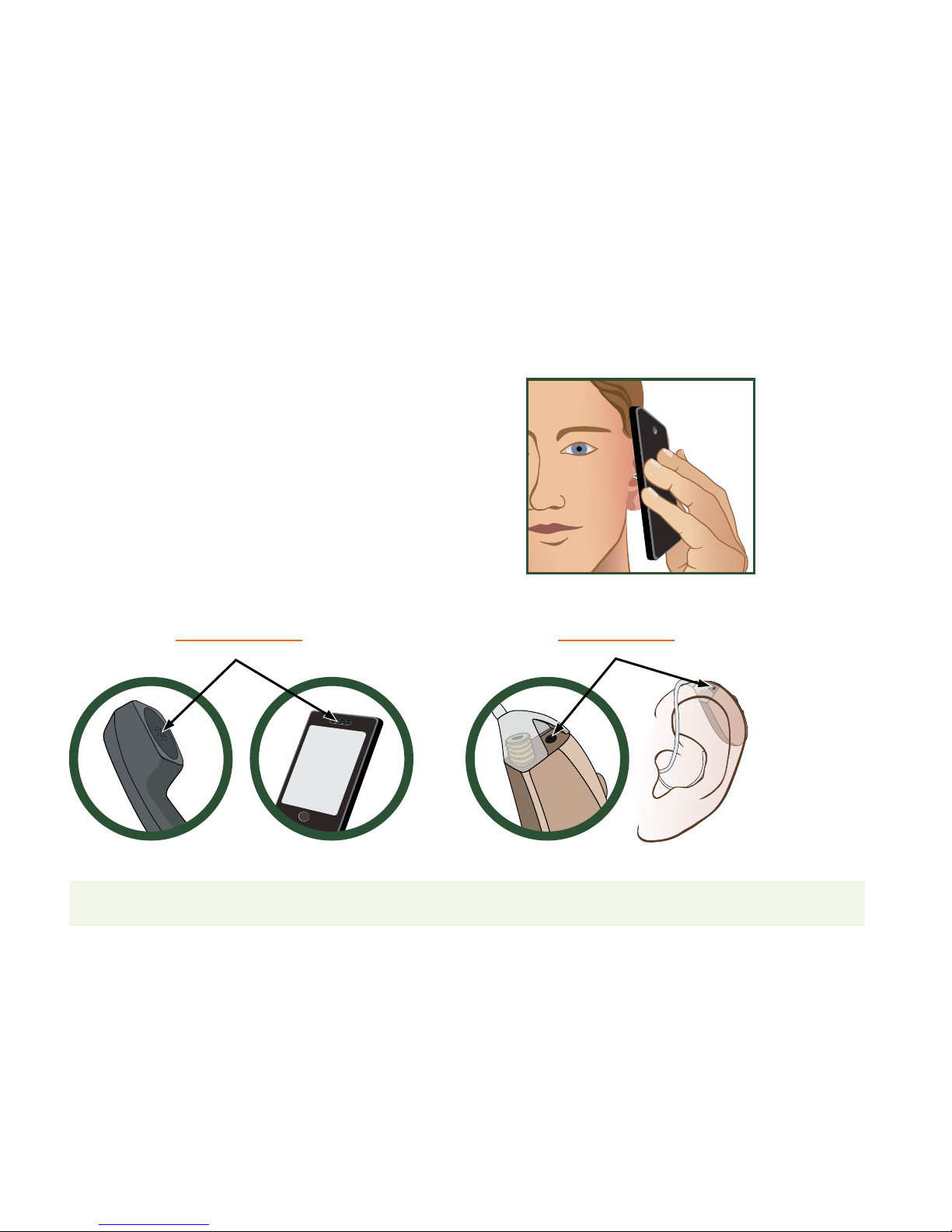
USING THE TELEPHONE
Please note: The speaker function on your phone also works well with your VO LT .
Use Program 1 (one) or 2 (two) when using
the phone. You may need to make slight
adjustments to the volume of either your
VO LT or phone. If whistling occurs, try
different positions with the phone’s audio
output and VO LT microphone until you
nd what works best for you.
audio output microphone
22
Page 24
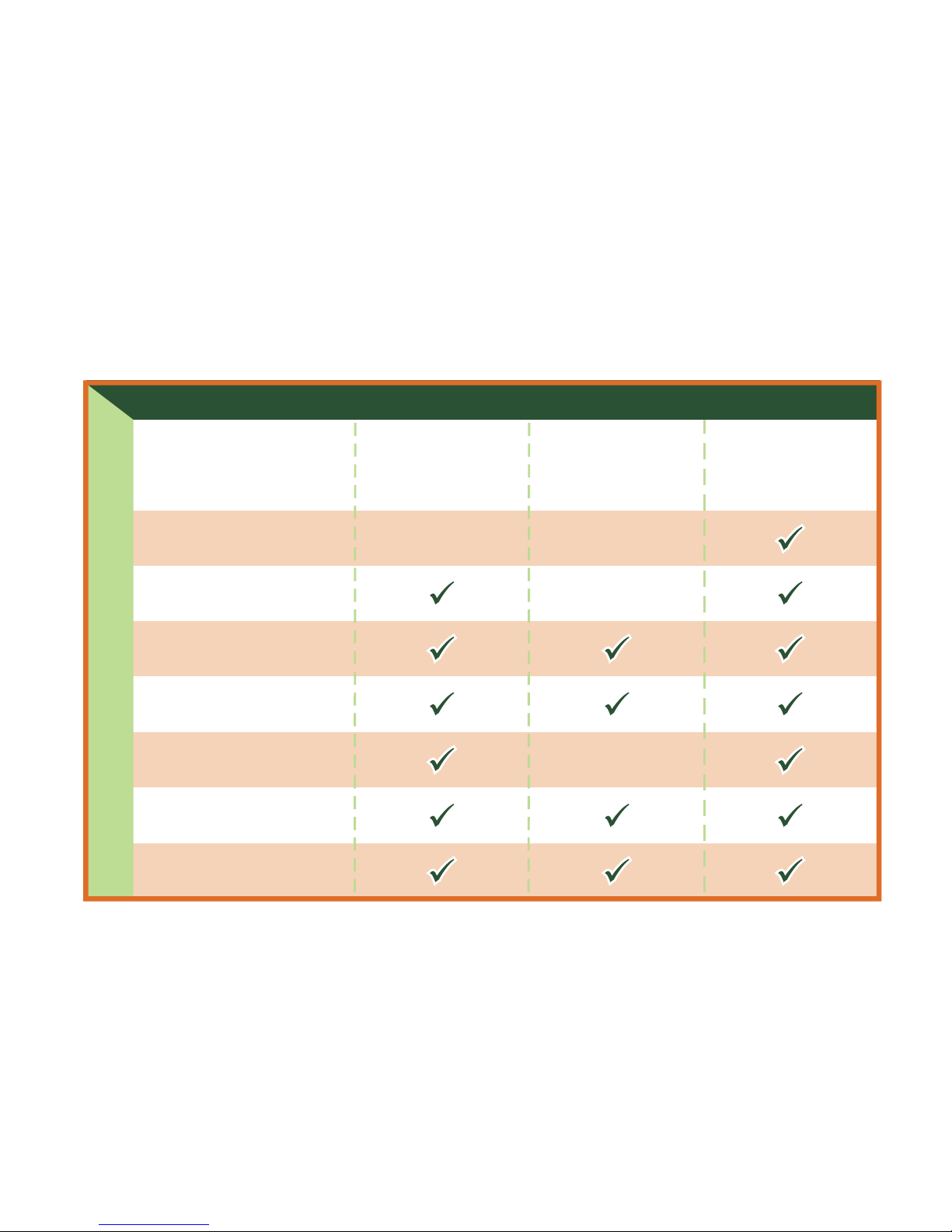
Turn VOLT on
Charge
VOLT
Adjust volume
Clean Tubing/Tip
Use dehumidifier
Change Tubing/Tip
Clean ear canal
For more detailed troubleshooting tips, see the following pages.
ISSUE
:
AC
TION STEPS
:
Feedback:
Whistling/
squealing
Intermittent
or distorted
sound
Weak or
no sound
TROUBLESHOOTING
23
Page 25

1. Sound is distorted or intermittent.
• Rotate Volume Dial (on/off control)
back and forth, in case dust or lint
has collected in the controls.
• Trapped moisture may be
distorting the amplied sounds.
Consider using a hearing aid
dehumidier overnight.
• Lower the volume.
• Turn
VO LT OFF. Charge until
blue light turns green and turn
VO LT back ON.
• Check Tubing/Tip for wax or
debris that may be blocking
sound. Clean Tubing/Tip.
Replace Tubing/Tip if they
appear worn.
For optimal performance, ComfortTIP
™
and Tubing should be replaced
every three months. Replacements and additional cleaning accessories
can be ordered at: www.MDHearingAid.com.
24
Page 26

2. Instrument makes a whistling sound.
• Whistling (feedback) occurs when
amplied sound returns to the
microphone and is re-amplied.
• Most hearing aids whistle when
not inserted properly. Try
reinserting the ComfortTIP™
into ear canal so it ts better.
• Lower the volume.
• If whistling occurs when you
raise the volume, try using a
Closed ComfortTIP.
• If whistling occurs after trying
a Closed ComfortTIP, you might
require more gain (volume) and
should try the High Volume Kit
(see page 18).
• Clean any wax or debris from
Tubing/Tip and/or ear canal.
Whistling will disappear when
the condition is corrected.
Please note: When an object (hand, hood, person, chair, wall... etc.)
comes close to your ear while wearing hearing aids, you may experience
whistling. This is normal for all microphones when temporarily obstructed,
not just microphones in hearing aids.
25
Page 27
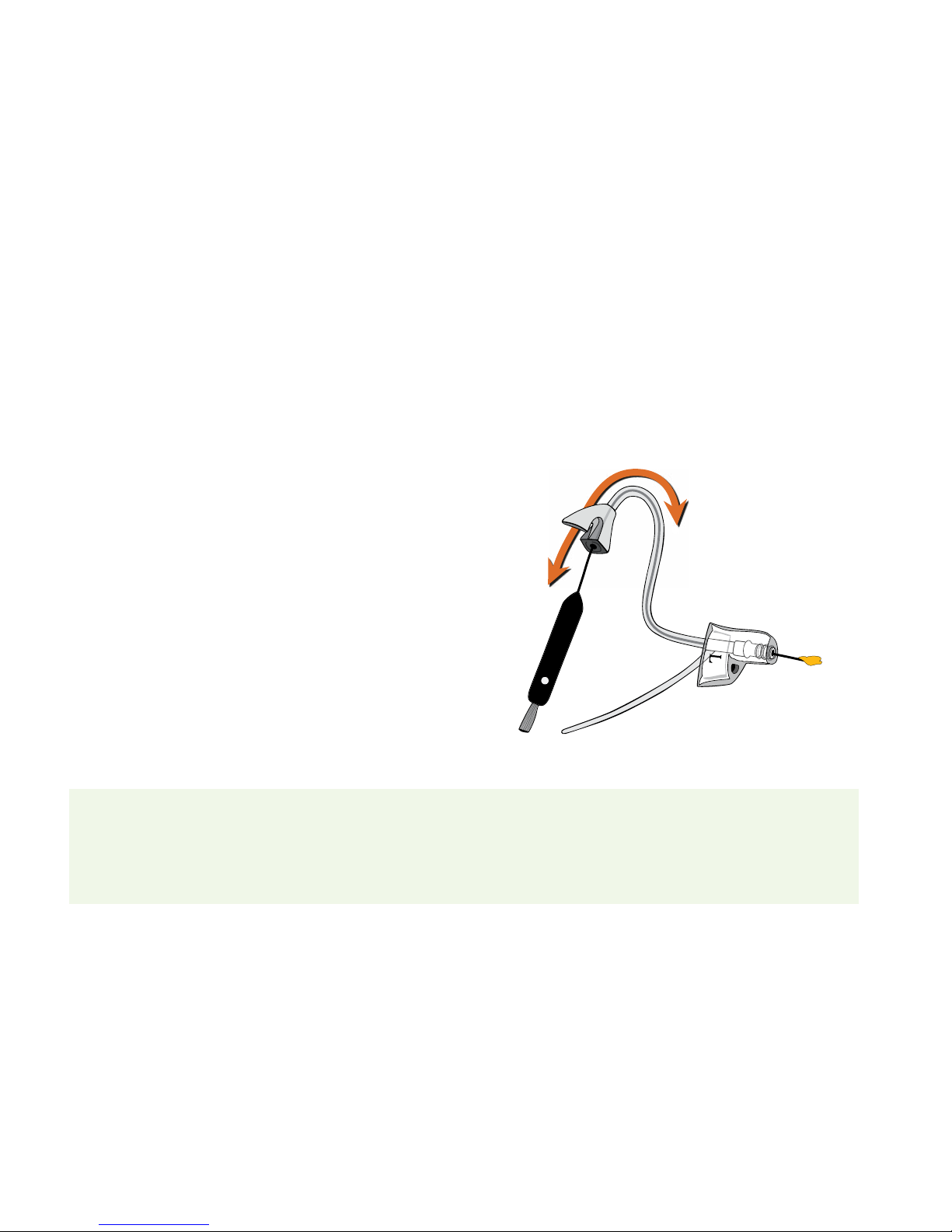
Tube Cleaning Tips: Remove Tubing from VO LT Body. Thread Cleaning Tool Wire
through Tubing ve-six times starting at the triangular Tubing Base. Then wipe
debris from Tubing/Tip and reattach Tubing to VOLT Body.
3. Instrument has a weak or no sound.
• Make sure your MDHearingAidVOLT
is turned ON.
• Rotate Volume Dial (on/off control)
back and forth, in case dust or lint
has collected in the controls.
• Make sure VOLT is fully charged.
• Remove Tubing from VOLT Body
and rotate Volume Dial to three. If it
whistles, your VOLT is working and
the Tubing/Tip needs to be cleaned
or replaced.
• If you are still having difculty,
please email us at
support@
MDHearingAid.com.
26
Page 28

“ I got my VO LTs wet, sent them
in for repair, and had them back
in ve days. Friendly, prompt,
courteous, knowledgeable, and
truly ready to listen and
solve problems.”
— Daniel W.
27
Page 29

Product
Protection
Plan
P
R
O
T
E
C
T
I
O
N
MDShield
TM
P
L
A
N
MDShield
TM
P
L
A
N
MDShield
™
Protection Plan
• Offers 100% protection from ALL types of accidental damage,
including damage not covered by our standard 90-Day Warranty
(water damage, pet damage, etc.) Product loss is not included.
• This service contract lasts for 1 (one) year from the date of purchase.
• MDShield coverage must be purchased within your initial
90 days of ownership.
Tubing and ComfortTIP™ Replacement
For OPTIMAL PERFORMANCE, Tubing and ComfortTIP should be replaced every
3 (three) months. Regular replacement keeps your VO LTs
sounding and feeling like new.
PROTECTION PLAN & REPLACEMENTS PARTS
Visit www.MDHearingAid.com to order Tubing, ComfortTIPs,
and
MDShield Protection Plans.
28
Page 30

MANUFACTURER’S WARRANTY & REPAIR
The MDHearingAidV OLT is covered against defects in materials and workmanship
for 90 days from the date you receive your order. If our examination determines
that the unit failed to work due to parts, materials, or workmanship, we will repair
or replace it for free. This warranty does not cover malfunctions due to unusual wear
and tear or mistreatment of your VOLT , such as physical shock, damage from moisture
or sweat, excessive wax build-up, or tampering with the instrument, all of which void
the warranty (with MDShield
TM
Protection Plan these are covered, see page 28).
If you require Warranty or Repair Service, please contact us for a Return Merchandise
Authorization (RMA) number, repair costs (if applicable), and instructions.
For fastest service e-mail:
support@MDHearingAid.com
Or, call: 312-366-3899
Ofce hours: Monday to Friday,
8:30 am to 4:30 pm (CST).
Repair Facility:
MDHearingAid, Inc.
Repairs Department
24151 Telegraph Rd, #100
Southeld, MI 48033
Do not mail to this address
without a RMA number.
29
Page 31
RMA
#
MDHearingAid, Inc.
Repairs Department
24151 Telegraph Rd, # 100
Southfield, MI 48033
Repair Packaging Guidelines
Please use the following guidelines when mailing to our Repair Facility.
Do:
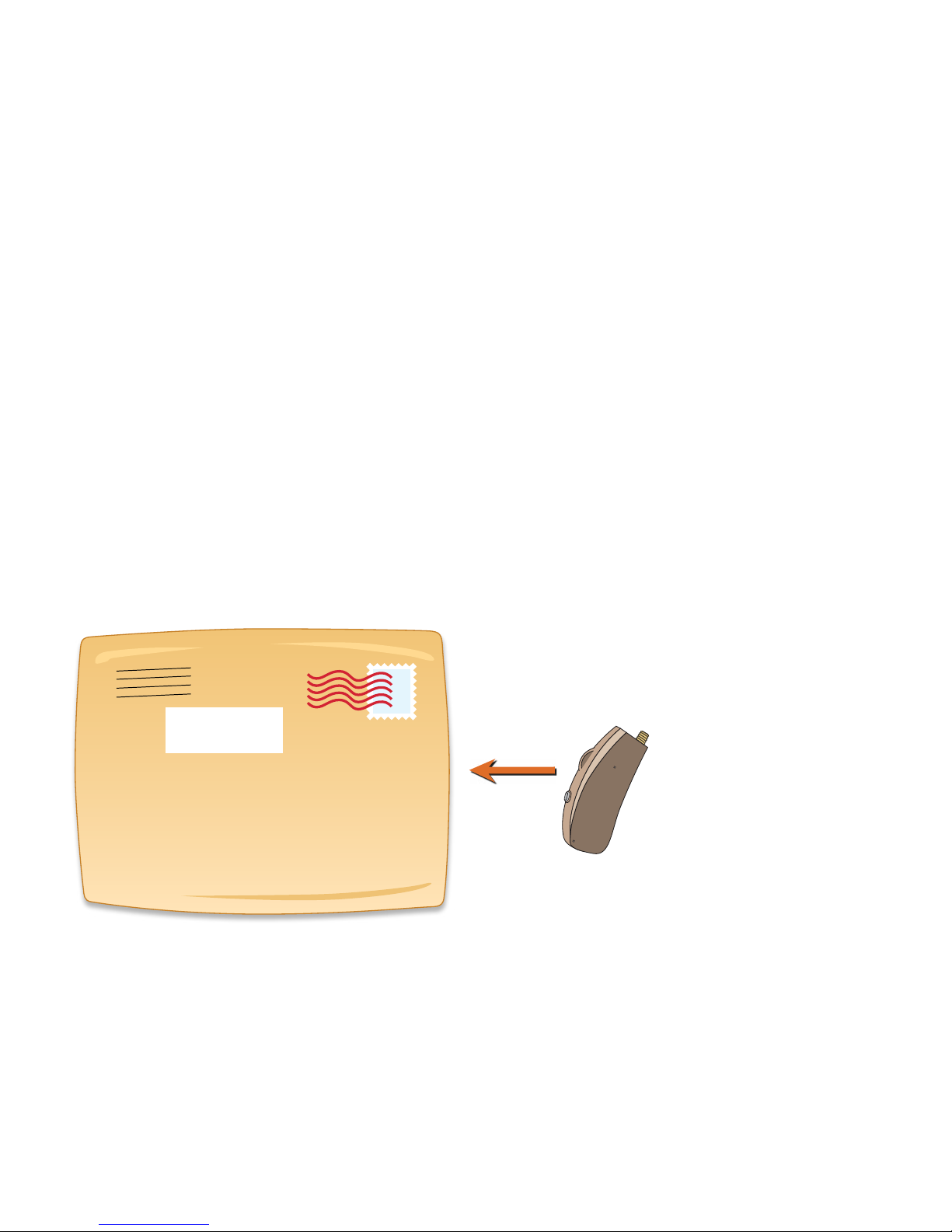
• Send ONLY the VO LT Body
• Use a small padded envelope
• Write RMA number on the
OUTSIDE of envelope
DON’T send:
• Travel case
• Packing materials
• Charger or other accessories
(unless otherwise instructed)
30
Page 32

Your satisfaction is guaranteed. If you are not satised with your
MDHearingAidV OLT , you have 45 days from the date of purchase
to return it for a full refund.
MDHearingAid requires a minimum trial period of 21 days. This
minimum trial period is required because medical studies show that
your brain requires about three weeks to adjust to new hearing aids.
Return requests prior to 21 days from date of invoice will incur a
ten percent (10%) Early Return Fee.
All products MUST include a Return Merchandise Authorization (RMA)
number for proper processing. Products returned without a RMA number
will incur a twenty percent (20%) No-RMA Fee.
Please e-mail support@MDHearingAid.com for a RMA number and
specic return instructions. We are available 24 hours a day, 7 days a week
(a calendar day equals a business day). Or you may call Customer Service,
312-366-3899 Monday to Friday, 8:30 am to 4:30 pm Central Standard Time.
RETURN POLICY
31
Page 33

Return Facility:
MDHearingAid, Inc.
Returns Department
24151 Telegraph Rd, #100
Southeld, MI 48033
Contact customer support for
a RMA number before mailing
to this address.
We are unable to honor return requests after 45 days from
the date of purchase as shown on your invoice.
DAYS FROM
INVOICE
1-20
21-45
46+
AMOUNT REFUNDED
with RMA w/out RMA
90% 80%
100% 80%
No Refund No Refund
32
Page 34

WARNING TO HEARING AID DISPENSERS
A hearing aid dispenser should advise a prospective hearing aid user to consult
promptly with a licensed physician (preferably an ear specialist) before dispensing
a hearing aid if the hearing aid dispenser determines through inquiry, actual
observation, or review of any other available information concerning the
prospective user, that the prospective user has any of the following conditions:
• Visible congenital or traumatic
deformity of the ear.
• History of active drainage from the
ear within the previous 90 days.
• History of sudden or rapidly
progressive hearing loss within
the previous 90 days.
• Acute or chronic dizziness.
• Pain or discomfort in the ear.
• Unilateral hearing loss of sudden
or recent onset within the
previous 90 days.
• Audiometric air-bone gap equal to
or greater than 15 decibels at 500
hertz (Hz), 1000 Hz, and 2000 Hz.
• Visible evidence of signicant
cerumen accumulation or a
foreign body in the ear canal.
33
Page 35

Stop using the MDHearingAidV OLT and consult a physician if:
• Hearing in one or both ears
worsens.
• Hearing does not improve while
using the VO LT.
• Skin irritation develops in or
around your ear canal.
• Your ear becomes occluded with
excessive ear wax.
• You develop an infection of your
ear or ear canal.
Special care should be exercised in selecting and tting a hearing aid whose
maximum sound pressure level exceeds 132 decibels because there may be
risk of impairing the remaining hearing of the hearing aid user.
A hearing aid will not restore normal hearing and will not prevent or improve a
hearing impairment resulting from organic conditions. In most cases infrequent
use of a hearing aid does not permit a user to attain full benet from it. The
use of hearing aids is only part of hearing rehabilitation and may need to be
supplemented by auditory training and instruction in lip reading.
34
Page 36

Good health practice requires that a person with a hearing loss have a medical
evaluation by a licensed physician (preferably a physician who specializes in
diseases of the ear) before purchasing a hearing aid. Licensed physicians who
specialize in diseases of the ear are often referred to as otolaryngologists,
otologists or otorhinolaryngologists. The purpose of a medical evaluation is
to assure that all medically treatable conditions that may affect hearing are
identied and treated before the hearing aid is purchased.
Following the medical evaluation, the physician will give you a written
statement that states that your hearing loss has been medically evaluated
and that you may be considered a candidate for a hearing aid. The physician
will refer you to an audiologist or a hearing aid dispenser, as appropriate,
for a hearing aid evaluation.
The audiologist or hearing aid dispenser will conduct a hearing aid evaluation
to assess your ability to hear with and without a hearing aid. The hearing aid
evaluation will enable the audiologist or dispenser to select and t a hearing
aid to your individual needs.
IMPORTANT NOTICE FOR PROSPECTIVE USERS
35
Page 37

If you have reservations about your ability to adapt to amplication, you should
inquire about the availability of a trial/rental or purchase/option program. Many
hearing aid dispensers now offer programs that permit you to wear a hearing aid
for a period of time for a fee after which you may decide if you want to purchase
the hearing aid.
Federal law restricts the sale of hearing aids to those individuals who have
obtained a medical evaluation from a licensed physician. Federal law permits a
fully informed adult to sign a waiver statement declining the medical evaluation
for religious or personal beliefs that preclude consultation with a physician. The
exercise of such a waiver (without prior consultation by an ear specialist) is not
in your best health interest and its use is strongly discouraged.
Children with hearing loss
This product is not for use by anyone under 18 years of age. In addition to seeing
a physician for a medical evaluation, a child with a hearing loss should be
directed to an audiologist for evaluation and rehabilitation. Hearing loss may
cause problems in language development, educational growth, and social growth
of a child. An audiologist is qualied by training and experience to assist in the
evaluation and rehabilitation of a child with a hearing loss.
36
Page 38

NOTICE OF CANCELLATION
YOU MAY CANCEL THIS TRANSACTION, WITHOUT ANY PENALTY OR OBLIGATION,
WITHIN 45 DAYS FROM THE DATE OF PURCHASE. IF YOU CANCEL, ANY
PROPERTY TRADED IN, ANY PAYMENTS MADE BY YOU UNDER THE CONTRACT
OR SALE LESS ANY NONREFUNDABLE RESTOCKING FEE, AND ANY NEGOTIABLE
INSTRUMENT EXECUTED BY YOU WILL BE RETURNED WITHIN 10 BUSINESS
DAYS FOLLOWING RECEIPT BY THE SELLER OF YOUR CANCELLATION
NOTICE AND ALL MERCHANDISE PERTAINING TO THIS TRANSACTION, AND
ANY SECURITY INTEREST ARISING OUT OF THE TRANSACTION WILL BE
CANCELED. IF YOU CANCEL, YOU MUST RETURN TO THE SELLER, IN
SUBSTANTIALLY AS GOOD CONDITION AS WHEN RECEIVED, ANY GOODS
DELIVERED TO YOU UNDER THIS CONTRACT OR SALE. TO CANCEL THIS
TRANSACTION, MAIL OR DELIVER A SIGNED AND DATED COPY OF THIS
CANCELLATION NOTICE OR ANY OTHER WRITTEN NOTICE, OR SEND A TELEGRAM,
TO MDHEARINGAID, 917 W. WASHINGTON BLVD, SUITE 202, CHICAGO, IL 60607
NO LATER THAN MIDNIGHT OF THE 45TH DAY AFTER THE INITIAL TRANSACTION.
“I HEREBY CANCEL THIS TRANSACTION,” SIGNED:
(Buyer’s Signature) (Date)
37
Page 39

TECHNICAL SPECIFICATIONS
MAX OSPL90 ..............................125 dBSPL
HF Average OSPL90 ........................116 dBSPL
HFA Full-on-gain ............................ 40 dBSPL
THD@ ...................................500 Hz 1.0%
. . . . . . . . . . . . . . . . . . . . . . . . . . . . . . . . . . . . . . . . .800 Hz 0.3%
. . . . . . . . . . . . . . . . . . . . . . . . . . . . . . . . . . . . . . . .1600 Hz 0.7%
EQUIV INPUT NOISE .............................20 dB
38
Page 40

Printed in U.S.A.
|
01.17
 Loading...