

Page 1
V 1.1.1
Page 2
Table of content
Introduction 3
Installation 4
Customer support 5
The RX950 6
The interface 7
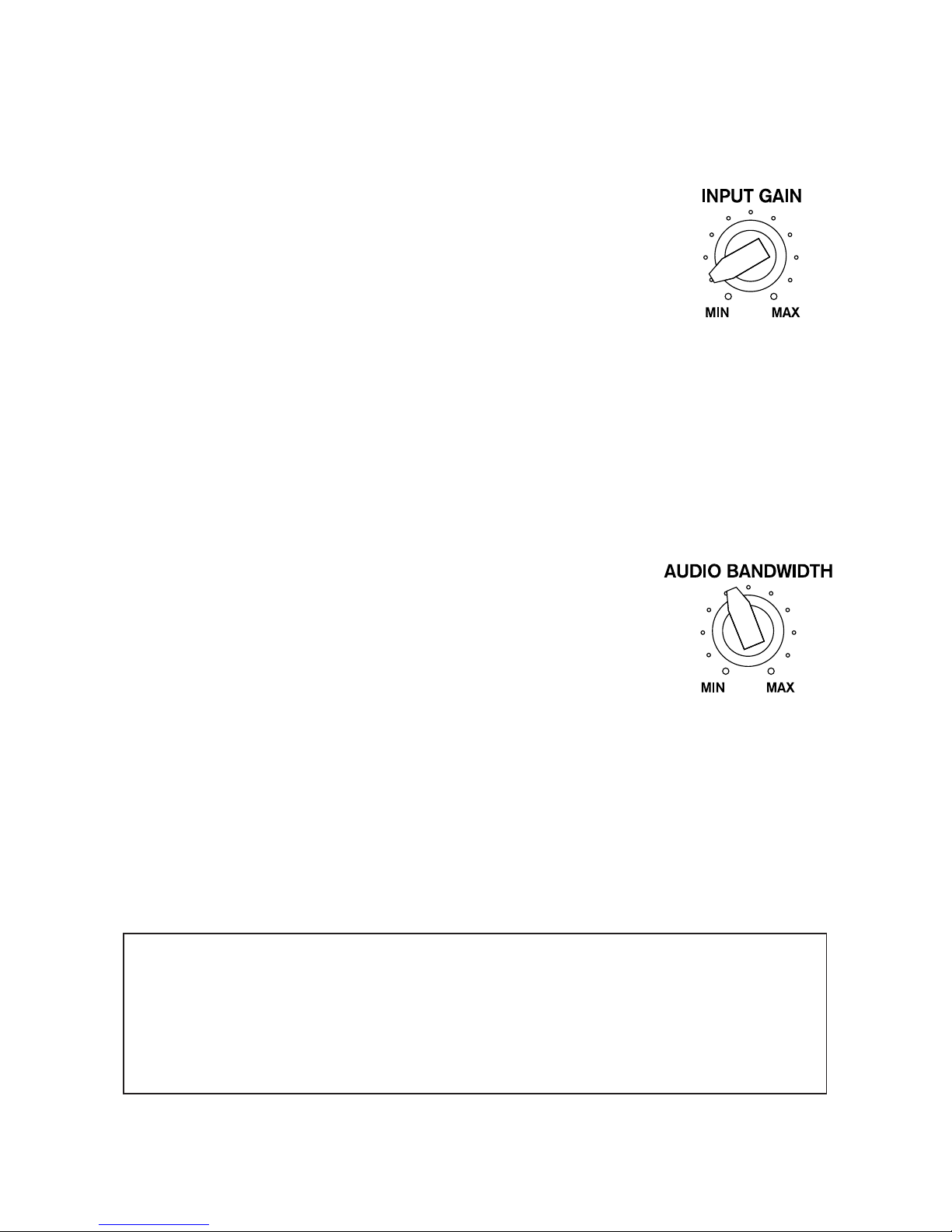
The Input Gain knob 8
The Audio Bandwidth knob 8
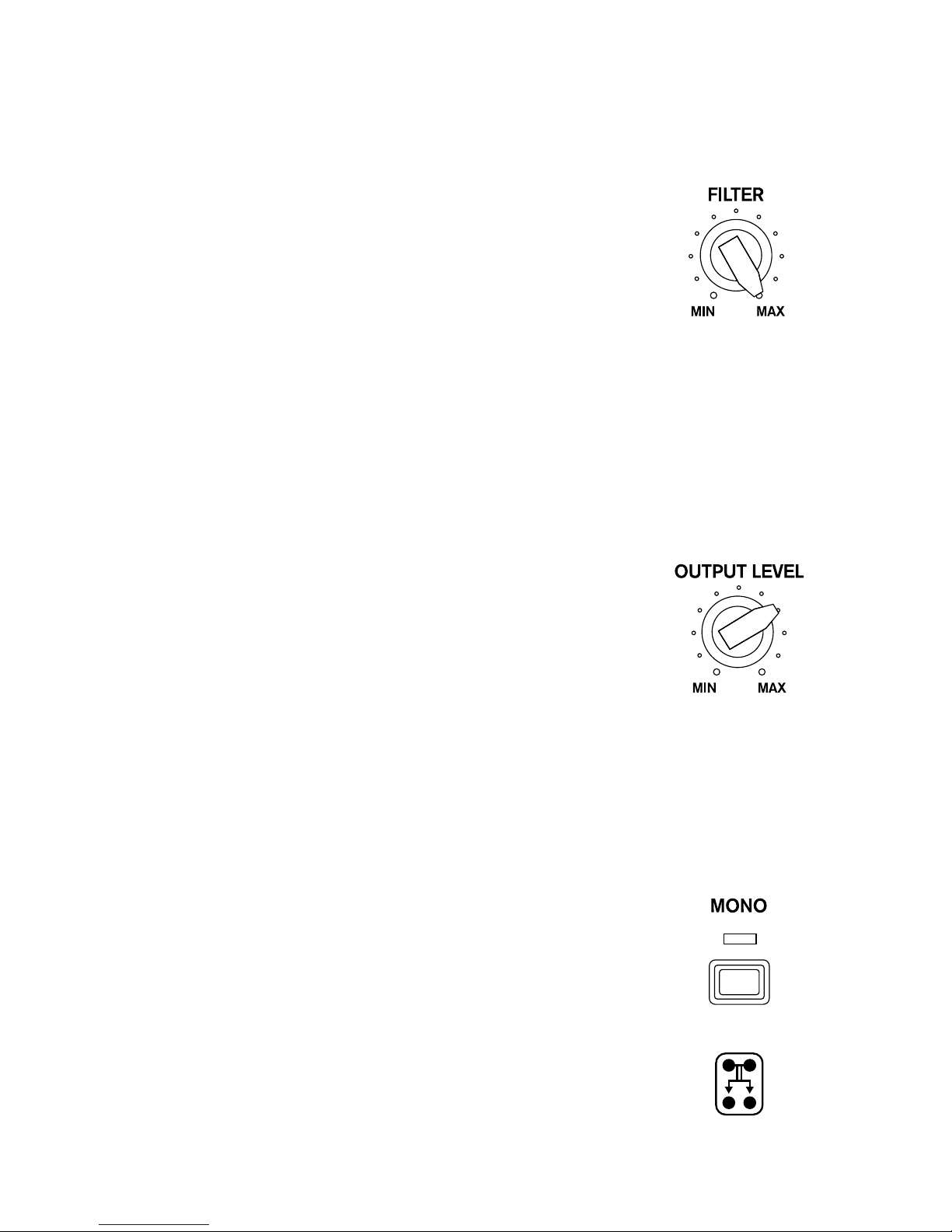
The Filter knob 9
The Output Level knob 9
The Mono button 9
Presets suggestions 10
The Settings panel 11
Display Scale setting 11
Audio Bandwidth Brilliance knob 11
Parameter Value Keyboard Typing 11
The Back panel 12
MIDI Control Change table 12
Default NKS controls 13
End-User License Agreement (EULA) 14
Disclaimer 16
Credits & Thanks 17
2
Page 3

Introduction
FOREWORD
Does the Akai S950 need an introduction? If you’re reading these pages, probably not. Also, you
probably already know the holly reputation this iconic sampler, released in 1989, still has today.
Personnally, I had the chance to learn to use one of these when I was 7. At the time, I was fascinated
by the ease of use of this hefty machine for seamlessly playing back anything we would throw into it
(not to mention the « reverse » feature that is quite hilarious to play with when you’re a child). Years
later, I only heard about this device’s sound characteristic its fans call the « grit ». And I eventually
could personnally experience it. Yes, this instrument affects the sound. This is not an audio myth.
Everybody talks about the 12-bit resolution. But is it all?
This simple question gave birth to the RX950. And to a whole year of work. Because it required a lot
of precision and patience to gather such subtle ingredients.
FOR CURIOUS PEOPLE
The answer to our foreword’s question is: no, the 12-bit resolution does not make it all. A disassembly
and a long reverse engineering of our own S950 has revealed an actual poem of conception signed
by Akai.
This sound « color » comes in particular from the gain applied to the input signal that is later
generously ltered before being sampled. At this state, the spectrum is already nicely altered. Then
comes the very analog-to-digital conversion with a 12-bit resolution (which is all by itself an actual
masterpiece that we managed to replicate). During playback, the sound, converted back to analog is
affected by a last lter whose the frequency cut depends on both the playback setting, but also on
the bandwidth setting while recording. This allows to reduce aliasing artifacts as much as possible,
thanks to, in particular, the use of 6th-order Butterworth low-pass lters.
At each step, it has been fascinating to note that Akai’s ambition had obviously been restrained
by technical limitations (as well as costs) at the time, but in any case these issues were solved in a
musical way.
We hope you’ll love to play with our plug-in as much as we had pleasure to develop it.
Sincerely,
Mathieu Demange
3
Page 4
Installation
VST2, VST3, NKS, AUDIO UNIT, AAX
https://www.mathieudemange.fr/rx950-classic-ad-da-converter/
Windows Minimal requirements: Windows Vista (32/64-bit) and higher
Mac OS X Minimal requirements: macOS 10.7 (32/64-bit) and higher
1. Download the installation program from your order conrmation email
2. Run the installation program
3. Choose the desired plug-in versions
4. Run your DAW and nd the RX950 in the effects list
RACK EXTENSION (PROPELLERHEAD REASON)
https://shop.propellerheads.se/rack-extension/rx950-classic-adda-converter/
Windows / Mac OS X Minimal requirements: Reason v7.1 and higher
1. Download the RX950 from the Propellerhead Shop
2. Recommanded: sync your Rack Extensions for ofine use
3. Run Reason and n the RX950 in the effects list
AUv3 / IAA
https://itunes.apple.com/app/rx950-classic-ad-da-converter/id1406136418
iPhone / iPad / iPod Touch Minimal requirements: iOS 9.3 and higher
1. Download the RX950 from the App Store
2. Run the RX950 or open it as an effet from a third-party musical app.
4
Page 5

Customer support
Thank you so much for buying our product!
We swear we won’t let you down if your have questions:
‐ Read our FAQ,
‐ Contact us for any information,
‐ Report a bug...
Reach us at: https://www.mathieudemange.fr/support/
You can also get in touch with us on social networks:
https://www.facebook.com/mathieudemange.fr/
https://www.instagram.com/mathieu.demange
https://twitter.com/mathieudemange
https://www.youtube.com/MathieuDemange
https://soundcloud.com/mathieu_demange/
5
Page 6

The RX950
The RX950 Classic AD/DA Converter is an effect plug-in designed to be used in your DAW running
on Windows, macOS or iOS.
The RX950 has been designed to give your sound the unique color, the warmth and grit of the
Akai S950 sampler. Indeed, this iconic sampler from the end of the 80’s was famous for its musical
qualities, and even if the hi- standards weren’t entirely met, it induced a soft saturation, a 12-bit
resolution, a subtle aliasing effect and a low-pass lter everyone recognize. These are all the
qualities you can expect from a real music instrument that played its part in the birth of major music
genres like hip hop and house music.
To perform the entire range of these characteristics, the RX950 follows, step by step, every stage
of audio processing of the original machine, as if your sound had been sampled then played back in
real time:
‐ Line input
‐ Analog gain
‐ Pre-ltering
‐ A/D conversion
‐ D/A conversion
‐ Post-ltering
‐ Line output
Our own S950 has been paintaskly studied and its sound thoroughly compared in order to obtain
these unique sound capabilities.
The RX950 is used :
‐ to process separate tracks (beats, basslines, synth parts, loops...)
‐ to process the master output bus of your entire composition
‐ to process wet signals of your delays or reverbs
‐ to process things we probably don’t know yet.
We hope that the RX950 will give you full satisfaction, and that as a connaisseur (or not) of
the legendary sampler our plugin is inspired of, you’ll like the sound of it and the creative possibilities
it offers.
6
Page 7
The interface
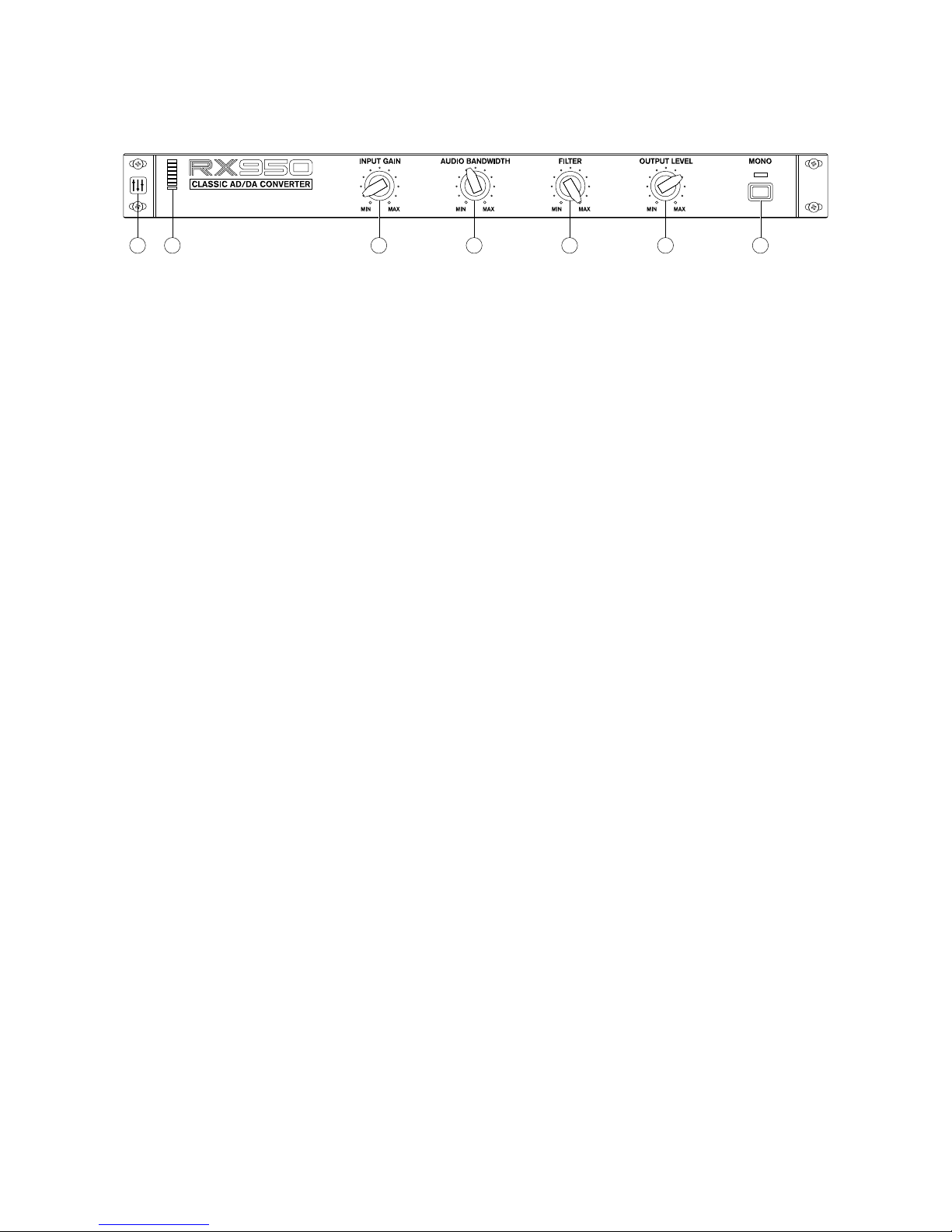
1. Settings button (all versions except Rack Extension)
Access graphical interface scaling options
Access sound brilliance knob setting
Displays software version informations (useful for support requests)
2. Input signal LED-meter
Monitors the input signal processed by the RX950
3. Input gain knob
Adjusts the S950’s characteristic soft saturation
4. Audio bandwidth knob
Adjusts the sampling frequency circuitry
5. Filter knob
Adjusts the low-pass lter’s frequency cut
6. Output level knob
Adjusts the nal output level
7. Mono toggle button
Operates a 50/50 mix of left and right channels for working in mono (as done by the S950)
7
1 2 3 4 5 6 7
Page 8
The Input Gain knob
The Audio Bandwidth knob
This knob adjusts the analog gain simulation for applying a non-linear,
soft saturation. Its very high amplitude allows it to adapt to many types
of sounds for giving them the famous S950’s grit.
This knob sets the sampling circuitry’s bandwidth. It impacts the pre-
ltering stage as well as the sampling frequency stricly speaking.
Internally, this value is muliplied by 2.5 to obtain the sampling frequency
(so the S950 was able to sample up to 19 200 x 2.5 = 48 KHz).
Note that the audio circuitry of the S950 induces a light boost in the
upper spectrum. This can be heard when the Audio Bandwidth knob is
set near its max values. You can enhance or tame this setting using the
Brilliance knob in the Settings panel.
FINE-TUNING VALUES
To obtain more precise controls with the knobs, once the left mouse button is pressed, press
simultaneously the Alt key (or Shift in Reason).
8
Page 9
The Filter knob
The Output Level knob
The Mono button
This knob adjusts the S950’s famous low-pass lter. It’s a nonresonant 6th-order Butterworth lter.
This know sets the output level of the RX950, and allows for example
to compensate an excessive input gain level.
This knows allows to toggle the plug-in’s output in mono mode, by
applying a 50/50 left and right channels mix. This process allows to
work in the same conditions as on a S950, but is also a useful mixing
tool (for detecting phase issues in particular).
9
Page 10
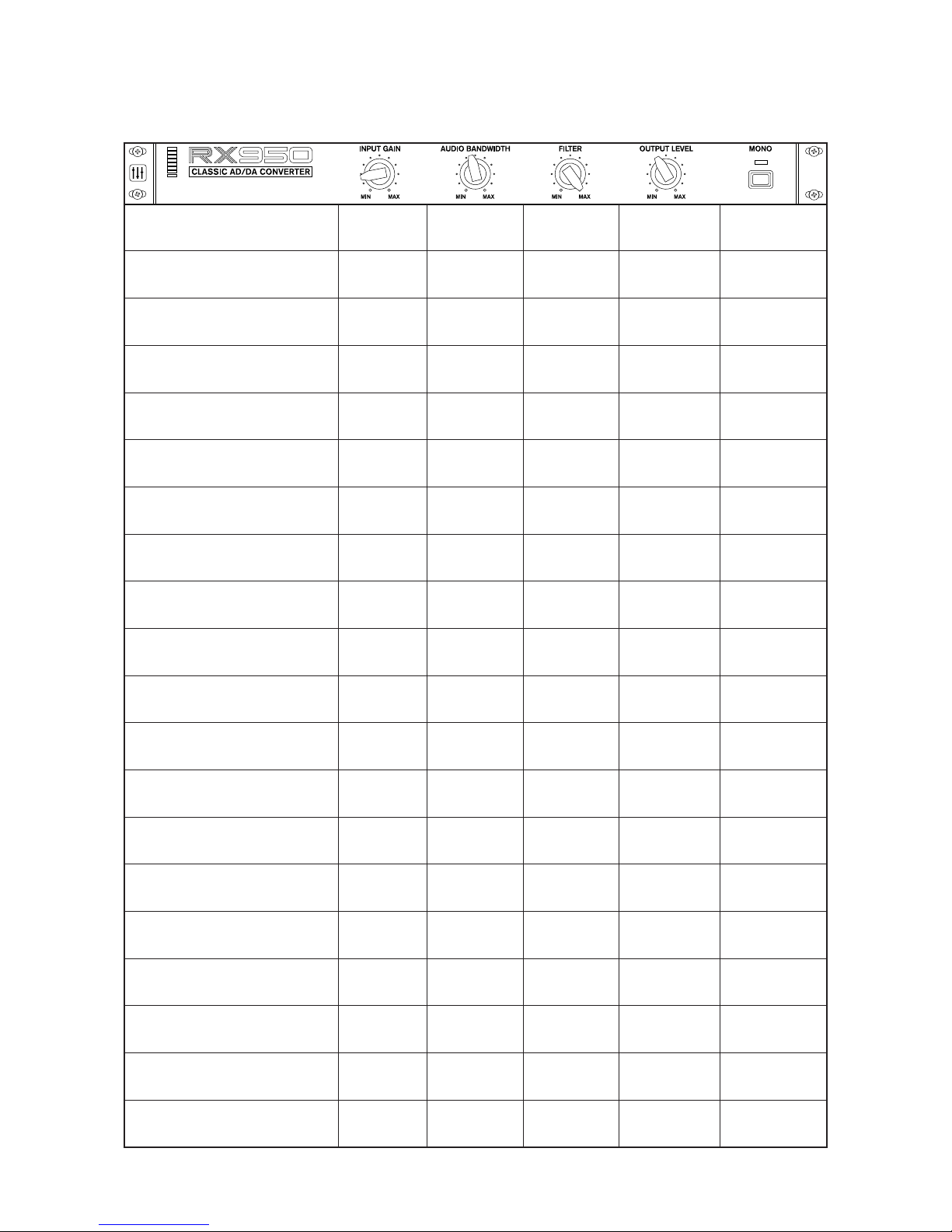
Presets suggestions
10
Default settings
0.00 10000 99 0.00 OFF
Drums Fattener
10.40 12769 99 -6.85 OFF
Floppy Fire
17.69 19200 44 -10.35 ON
Golden Era
1.78 5866 97 -0.30 ON
Hi-Fi Brightness
1.39 19200 99 -2.34 OFF
Lo-Fi Goodness
1.39 7015 99 -2.34 OFF
Monomaniac
0.00 18079 65 0.00 ON
Party Inside
7.55 3000 0 -3.64 ON
Radio AM
18.29 9350 53 -12.18 ON
RAM Shortage
1.40 4676 99 -1.56 ON
Resampled
7.89 6687 59 -6.03 ON
Saturated Vox
18.29 9788 99 -12.87 ON
Sound System
8.94 19200 60 -6.17 OFF
Speaker Destroyer
19.54 5467 99 -10.51 OFF
Stone Deaf
12.10 9535 40 -4.93 ON
Street Cred
3.24 9009 63 -3.48 OFF
Subtle Warmth
1.68 13880 99 -1.71 OFF
Twelveness
2.83 3000 99 -1.24 ON
Vocal Thickener
11.95 12462 99 -7.72 OFF
Worn Out
4.32 4810 48 -1.37 OFF
Page 11
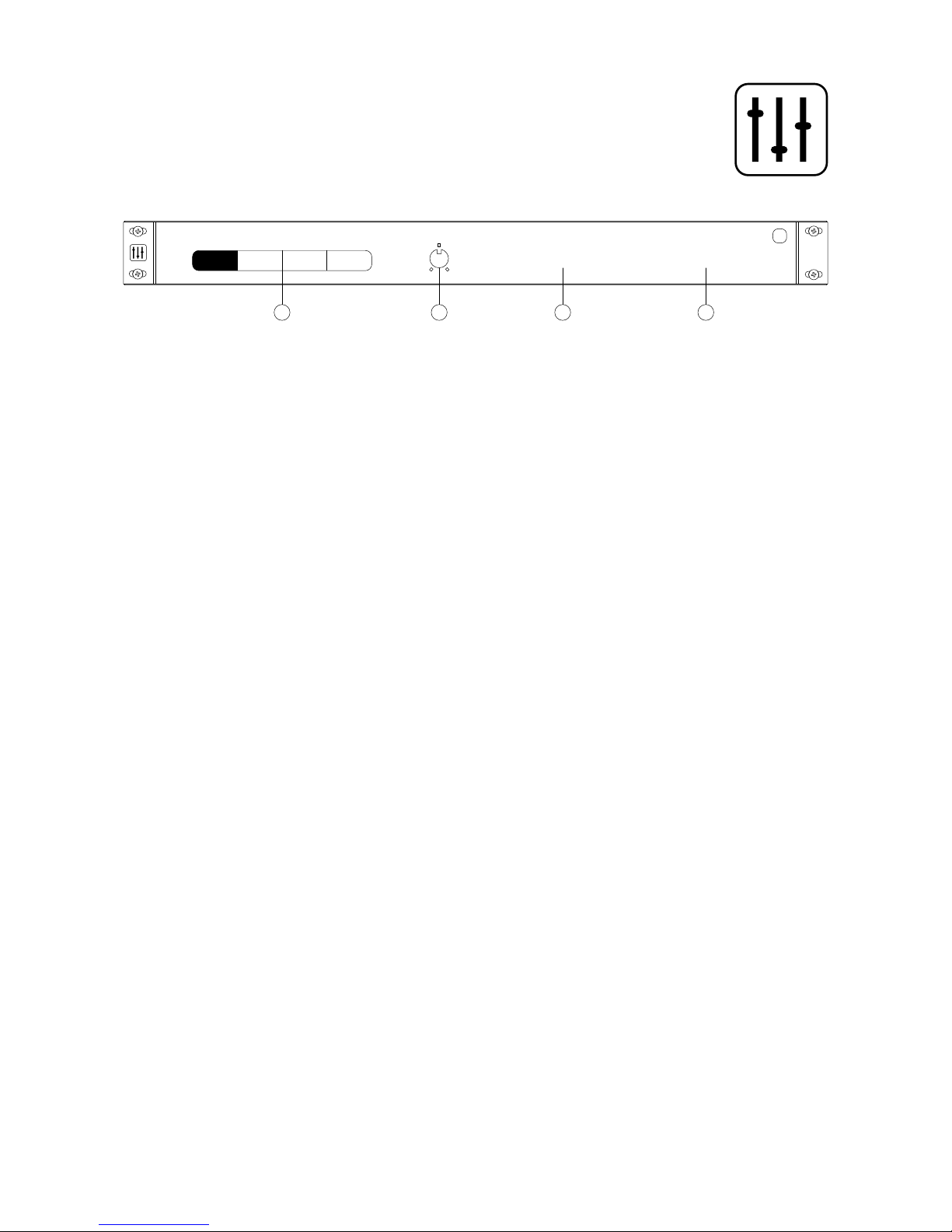
The settings panel
(all versions except Rack Extension)
Parameter value keyboard typing
(all versions except Rack Extension)
If tweaking the knobs with your mouse is not precise enough for you, you can manually type the
parameters with your keyboard.
1. Double-click on a knob to pop-up an input eld
2. Type in a value
3. Conrm with the Enter key
Note : You don’t have to type the units (Hz or dB)
1. Display scale setting
If the RX950’s graphical interface looks too small on screen, you can adjust its scale. Click the
settings button on the left of the RX950 and choose a scaling factor from 100% to 250%.
2. Audio bandwidth Brilliance setting
This knob enhances or tames a light boost in the upper spectrum that can be heard when the
Audio Bandwidth knob is set near its max values.
3. RX950 version informations
in order to check if you have the latest version.
4. System informations
to give us in any customer support request.
11
1 2 3 4
Display Scaling
150% 200% 250%
Plug-in Format: VST Architecture: 64-bit
x
macOSPlatform:
1.1.1
Version:
Brilliance Informations
100%
Page 12
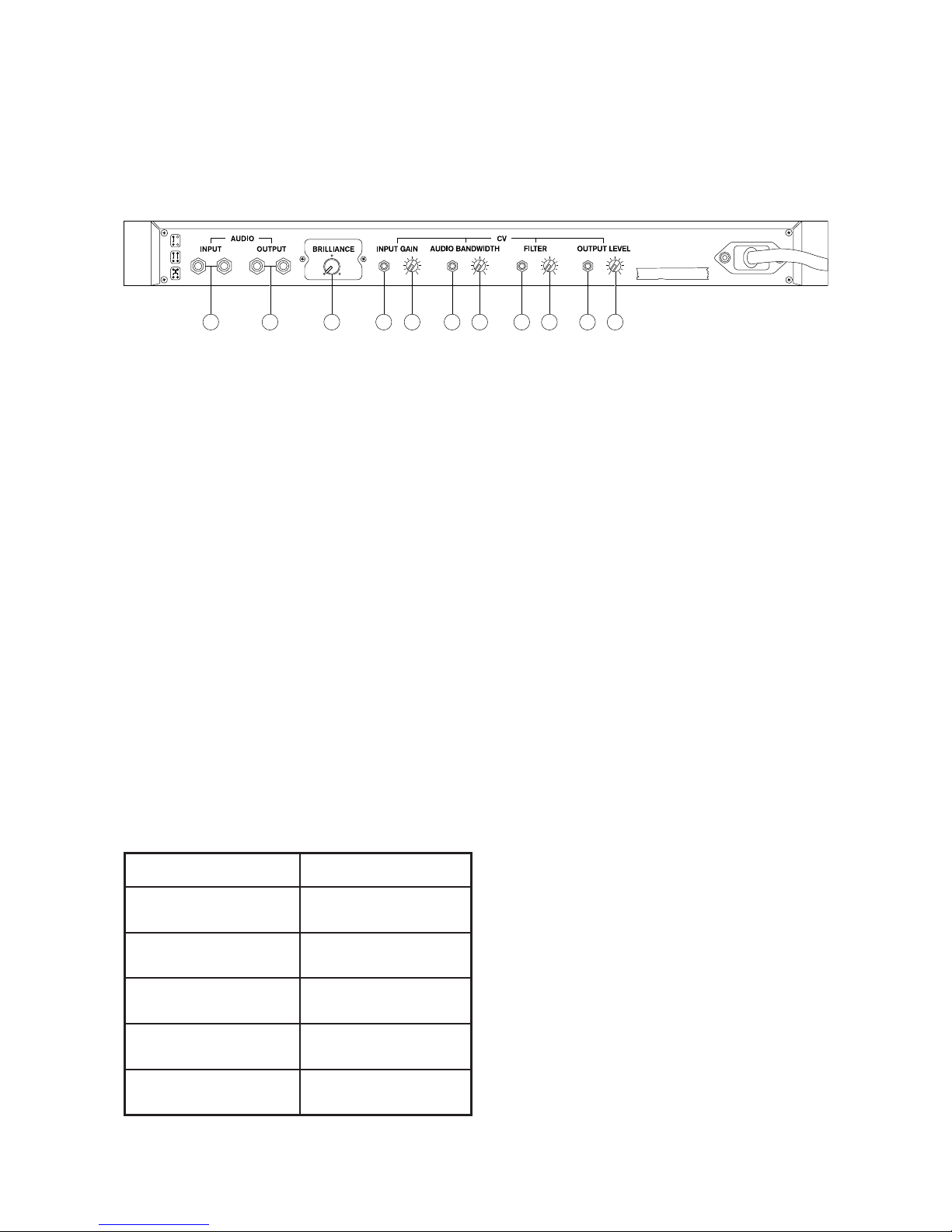
The back panel
(Rack Extension version only)
MIDI Control Change control table
(Rack Extension version only)
1. Stereo audio input
2. Stereo audio output
3. Audio bandwidth brilliance knob
4. Input gain CV input
5. Trim knob for input gain CV input
6. Audio bandwidth CV input
7. Trim knob for audio bandwidth CV input
8. Filter CV input
9. Trim knob for lter CV input
10. Output level CV input
11. Trim knob for output level CV input
12
1 2 43 5 6 7 8 9 1110
Control MIDI CC
Input gain CC 12
Audio Bandwidth CC 13
Filter CC 14
Output Level CC 15
Mono CC 16
Page 13
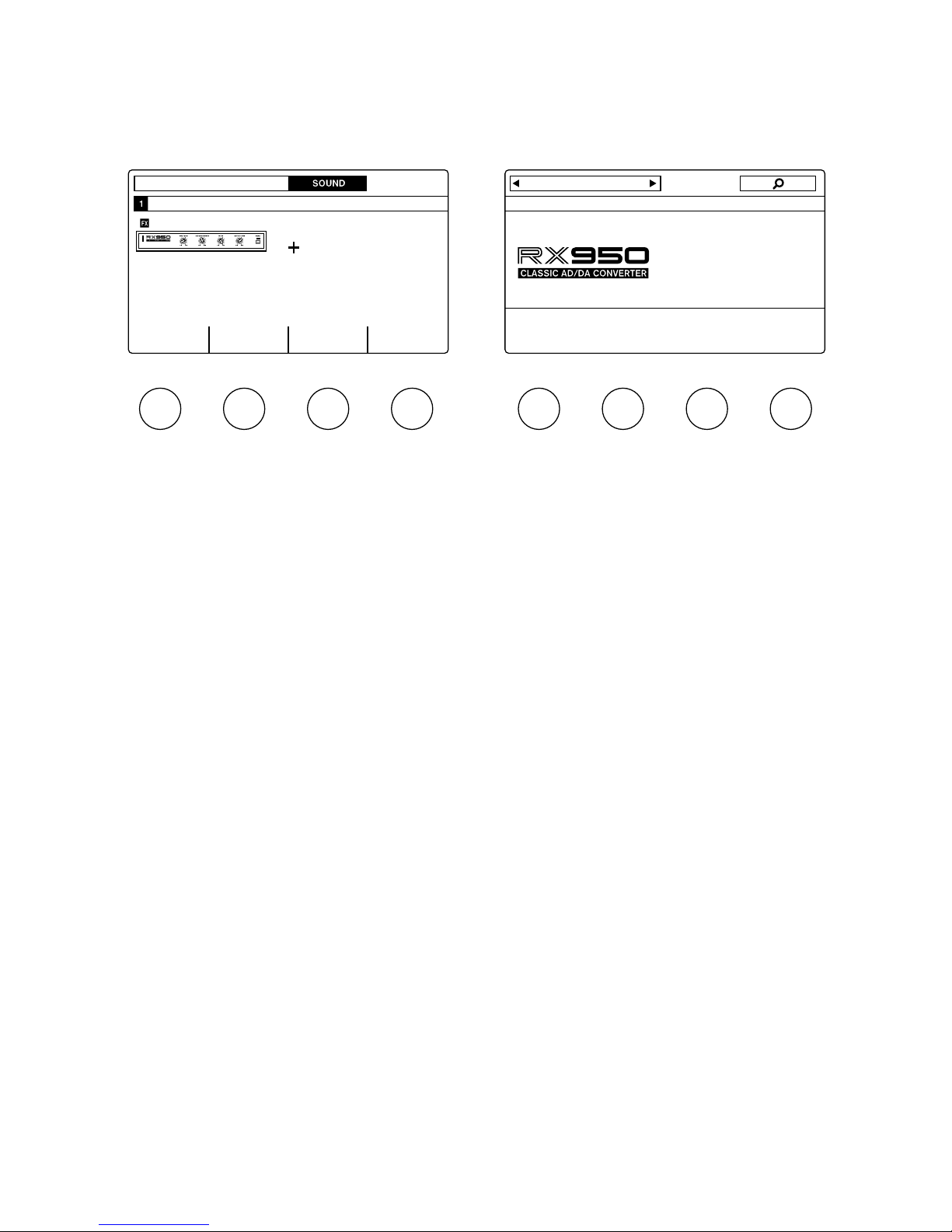
Default NKS controls
(VST version with compatible Native Instruments controllers)
End-User License
Agreement
Last updated: March 07, 2018
Please read this End-User License Agreement
(“Agreement”) carefully before clicking the
“Agree” button, downloading or using RX950
Classic AD/DA Converter (“Application”).
By clicking the “Agree” button, downloading
or using the Application, you are agreeing to
be bound by the terms and conditions of this
Agreement.
This Agreement is a legal agreement between
you (either an individual or a single entity) and
Mathieu Demange and it governs your use
of the Application made available to you by
Mathieu Demange.
If you do not agree to the terms of this
Agreement, do not click on the “Agree” button
and do not download or use the Application.
The Application is licensed, not sold, to you by
Mathieu Demange for use strictly in accordance
with the terms of this Agreement
License
Mathieu Demange grants you a revocable, nonexclusive, non-transferable, limited license
to download, install and use the Application
strictly in accordance with the terms of this
Agreement.
Restrictions
You agree not to, and you will not permit others
to:
• license, sell, rent, lease, assign, distribute,
transmit, host, outsource, disclose or
otherwise commercially exploit the
Application or make the Application available
to any third party.
• modify, make derivative works of,
disassemble, decrypt, reverse compile or
reverse engineer any part of the Application.
• remove, alter or obscure any proprietary
notice (including any notice of copyright
or trademark) of Mathieu Demange or its
afliates, partners, suppliers or the licensors
of the Application.
13
MASTER GROUP RX950
BPM 120.00 Scene 1 Default settingsDefault settings
RX950 Classic AD/DA Converter
0.00 dB Hz dB10000 99 0.00 Mono
INPUT GAIN AUDIO BANDWIDTH FILTER OUTPUT LEVEL MONO
RX950
Page 14

Intellectual Property
The Application, including without limitation all
copyrights, trademarks, and other intellectual
property rights directly related to the
Application are, and shall remain, the sole and
exclusive property of Mathieu Demange.
Modications to Application
Mathieu Demange reserves the right to
modify, suspend or discontinue, temporarily or
permanently, the Application or any service to
which it connects, with or without notice and
without liability to you.
Updates to Application
Mathieu Demange may from time to time
provide enhancements or improvements to
the features/functionality of the Application,
which may include patches, bug xes, updates,
upgrades and other modications (“Updates”).
Updates may modify or delete certain features
and/or functionalities of the Application. You
agree that Mathieu Demange has no obligation
to (i) provide any Updates, or (ii) continue to
provide or enable any particular features and/
or functionalities of the Application to you.
You further agree that all Updates will be (i)
deemed to constitute an integral part of the
Application, and (ii) subject to the terms and
conditions of this Agreement.
Term and Termination
This Agreement shall remain in effect until
terminated by you or Mathieu Demange.
Mathieu Demange may, in its sole discretion, at
any time and for any or no reason, suspend or
terminate this Agreement with or without prior
notice.
This Agreement will terminate immediately,
without prior notice from Mathieu Demange,
in the event that you fail to comply with any
provision of this Agreement. You may also
terminate this Agreement by deleting the
Application and all copies thereof from your
computer.
Upon termination of this Agreement, you shall
cease all use of the Application and delete all
copies of the Application from your computer.
Termination of this Agreement will not limit
any of Mathieu Demange’s rights or remedies
at law or in equity in case of breach by you
(during the term of this Agreement) of any of
your obligations under the present Agreement.
Indemnication
You agree to indemnify and hold Mathieu
Demange and its parents, subsidiaries,
afliates, ofcers, employees, agents, partners
and licensors (if any) harmless from any claim
or demand, including reasonable attorneys’
fees, due to or arising out of your: (a) use of
the Application; (b) violation of this Agreement
or any law or regulation; or (c) violation of any
right of a third party.
No Warranties
The Application is provided to you “AS IS”
and “AS AVAILABLE” and with all faults and
defects without warranty of any kind. To the
maximum extent permitted under applicable
law, Mathieu Demange, on its own behalf
and on behalf of its afliates and its and their
respective licensors and service providers,
expressly disclaims all warranties, whether
express, implied, statutory or otherwise, with
respect to the Application, including all implied
warranties of merchantability, tness for a
particular purpose, title and non-infringement,
and warranties that may arise out of course of
dealing, course of performance, usage or trade
practice. Without limitation to the foregoing,
Mathieu Demange provides no warranty or
undertaking, and makes no representation of
any kind that the Application will meet your
14
Page 15

requirements, achieve any intended results, be
compatible or work with any other software,
applications, systems or services, operate
without interruption, meet any performance or
reliability standards or be error free or that any
errors or defects can or will be corrected.
Without limiting the foregoing, neither Mathieu
Demange nor any Mathieu Demange’s provider
makes any representation or warranty of any
kind, express or implied: (i) as to the operation
or availability of the Application, or the
information, content, and materials or products
included thereon; (ii) that the Application will
be uninterrupted or error-free.
Some jurisdictions do not allow the exclusion
of or limitations on implied warranties or the
limitations on the applicable statutory rights
of a consumer, so some or all of the above
exclusions and limitations may not apply to
you.
Limitation of Liability
Notwithstanding any damages that you might
incur, the entire liability of Mathieu Demange
and any of its suppliers under any provision
of this Agreement and your exclusive remedy
for all of the foregoing shall be limited to the
amount actually paid by you for the Application.
To the maximum extent permitted by applicable
law, in no event shall Mathieu Demange or its
suppliers be liable for any special, incidental,
indirect, or consequential damages whatsoever
(including, but not limited to, damages for loss
of prots, for loss of data or other information,
for business interruption, for personal injury,
for loss of privacy arising out of or in any way
related to the use of or inability to use the
Application, third-party software and/or thirdparty hardware used with the Application, or
otherwise in connection with any provision of
this Agreement), even if Mathieu Demange or
any supplier has been advised of the possibility
of such damages and even if the remedy fails
of its essential purpose.
Some states/jurisdictions do not allow
the exclusion or limitation of incidental or
consequential damages, so the above limitation
or exclusion may not apply to you.
Severability
If any provision of this Agreement is held to
be unenforceable or invalid, such provision will
be changed and interpreted to accomplish the
objectives of such provision to the greatest
extent possible under applicable law and the
remaining provisions will continue in full force
and effect.
Waiver
Except as provided herein, the failure to
exercise a right or to require performance
of an obligation under this Agreement shall
not effect a party’s ability to exercise such
right or require such performance at any time
thereafter nor shall be the waiver of a breach
constitute waiver of any subsequent breach.
Amendments to this Agreement
Mathieu Demange reserves the right, at its sole
discretion, to modify or replace this Agreement
at any time. If a revision is material we will
provide at least 30 days notice prior to any
new terms taking effect. What constitutes a
material change will be determined at our sole
discretion.
By continuing to access or use our Application
after any revisions become effective, you agree
to be bound by the revised terms. If you do
not agree to the new terms, you are no longer
authorized to use the Application.
Governing Law
The laws of France, excluding its conicts of
law rules, shall govern this Agreement and
your use of the Application. Your use of the
15
Page 16

Application may also be subject to other local,
state, national, or international laws.
Contact Information
If you have any questions about this Agreement,
please contact us.
Mathieu Demange
84 avenue Daumesnil
75012 Paris, France
[email protected]
https://www.mathieudemange.fr
Entire Agreement
The Agreement constitutes the entire
agreement between you and Mathieu
Demange regarding your use of the Application
and supersedes all prior and contemporaneous
written or oral agreements between you and
Mathieu Demange.
You may be subject to additional terms
and conditions that apply when you use or
purchase other Mathieu Demange’s services,
which Mathieu Demange will provide to you at
the time of such use or purchase.
Disclaimer
The Akai brand and the S950 product name are the property of Akai and are in no way
associated or afliated with Mathieu Demange and the software RX950 Classic AD/DA
Converter.
Logos of VST, NKS, Audio Units, AAX, Rack Extension and iOS are the property of they
respective brands.
Protect your ears. Exposing them to high-pressure acoustic levels is a severe risk for your
audition.
16
Page 17

Credits & Thanks
The RX950 Classic AD/DA Converter has been conveived, concepted and produced by Mathieu
Demange, and co-designed by Mathieu Demange and William Lamy. Visuals and the RX950 logo
have been produced by William Lamy.
THANK YOU!
Joey Luck, Noel Gonzalez, Mats Karlof, Dwayne Smith, Myron Reese, James Flamestar, Pierre
Doursout, Marco Raaphorst, Luc Leroy, Quincy Valentine, Michel Desangles, Yoann Turpin, Francis
Demange, Thomas Demange, Miguel Randriana, Hervé Honoré, Emmanuel Oriol, Charlie DavisMiller, Rembert Gantke, Ramon Pankert, Faheem Hasan, Alan Platten, Ed Gray.
VISIT OUR WEBSITE!
https://www.mathieudemange.fr/
FOLLOW US!
https://www.facebook.com/mathieudemange.fr/
https://www.instagram.com/mathieu.demange
https://twitter.com/mathieudemange
https://www.youtube.com/MathieuDemange
https://soundcloud.com/mathieu_demange/
17
Page 18

 Loading...