

Page 1
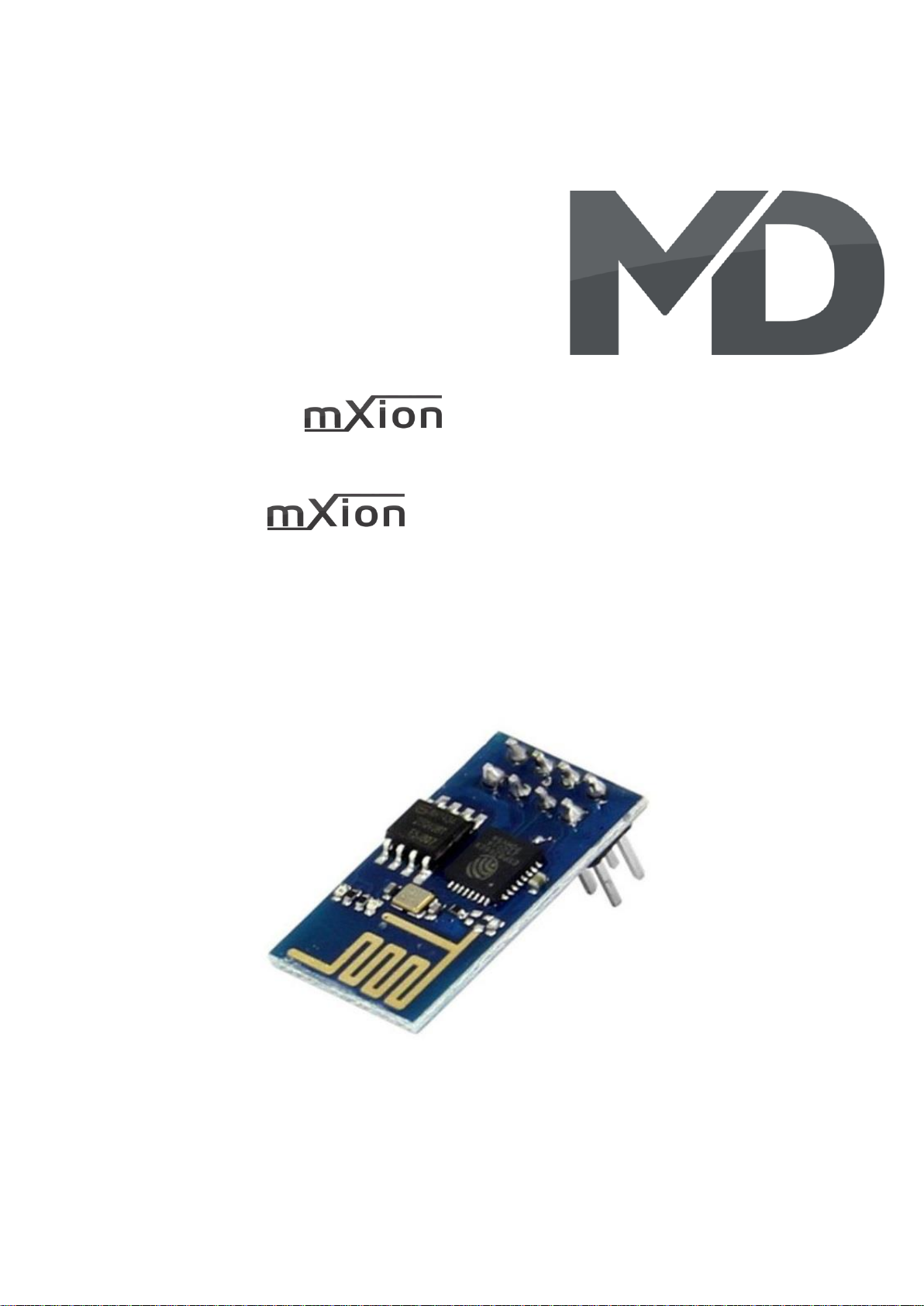
MZSpro-Z21 Funkadapter
Bedienungsanleitung
MZSpro-Z21 WLAN Adapter
User manual
Page 2
2 MZSpro Z21-WLAN
Einleitende Information Introduction
Sehr geehrte Kunden, wir empfehlen Dear customer, we strongly
die Produktdokumentation und vor recommend that you read these
allem auch die Warnhinweise vor der manuals and the warning notes
Inbetriebnahme gründlich zu lesen und thouroughly before installing and
diese zu Beachten. Das Produkt ist kein operating your device. The device
Spielzeug (15+). is not a toy (15+).
HINWEIS: Vergewissern Sie sich, ob die NOTE: Make sure that the outputs
Ausgangsspannungen zu ihrem Verbrauch- are set to appropriate value
er passen, da dieser sonst zerstört werden before hooking up any other
kann! Für Nichtbeachtung übernehmen wir device. MD can’t be responsible
keine Haftung. For any damage if this is
disregarded.
HINWEIS: Funktionsausgang A3
Page 3
3 MZSpro Z21-WLAN
Inhaltsverzeichnis Table of Contents
Grundlegende Informationen General information 4
Funktionsumfang Summary of functions 5
Lieferumfang Scope of supply 6
Inbetriebnahme Hook-Up 7
Anschlussbuchsen Connectors 8
Produktbeschreibung Product description 9
WLAN-Einbindung WLAN integration 10
Technische Daten Technical data 13
Garantie, Reparatur Warranty, Service, Support 14
Hotline Hotline 15
Page 4
4 MZSpro Z21-WLAN
Grundlegende Informationen General information
Wir empfehlen die Anleitung gründlich We recommend studying this manual
zu lesen, bevor Sie Ihr neues Gerät in thoroughly before installing and
Betrieb nehmen. operating your new device.
HINWEIS: Einige Funktionen sind nur mit NOTE: Some funktions are only
der neusten Firmware nutzbar, führen available with the latest firmware.
Sie daher bei Bedarf ein Update durch. Please make sure that your device
is programmed with the latest
firmware.
Page 5
5 MZSpro Z21-WLAN
Funktionsumfang Summary of Funktions
▪ WLAN-Z21 100% Kompatibilität WLAN-Z21 100% compatibility
▪ WLAN Modul und 2.4 Ghz Modul WLAN module and 2.4 Ghz module
▪ Einbindung von Handregler, Rückmelder For controller and feedback
▪ Einbindung von MD-Rückmelder per Funk möglich MD feedback modules with wifi possible
▪ Steuerung über App möglich (Android & Apple) Controlling over App (Android & Apple)
▪ Z21-App Z21-App
▪ MultimausWLAN nutzbar MultimausWLAN possible
▪ WLAN einbindbar in Haus-WLAN WLAN Client-Mode possible
▪ WLAN Direktaufschaltung möglich (Access-Point) WLAN AP-Mode possible
▪ Kein Freischaltcode nötig No code neccassary
▪ Kein Router notwendig No Router neccassary
▪ Triple-Buffer WLAN Triple-Buffer WLAN
▪ 80 m Reichweite (freies Feld) 80 m field reach
▪ Reichweite bei Clientmodus abhängig vom Hauswlan Reach of wireless depends on house wlan
Page 6
6 MZSpro Z21-WLAN
Lieferumfang Scope of supply
▪ Bedienungsanleitung Manual
▪ mXion MZSpro WLAN Adapter Z21 mXion MZSpro WLAN Adapter Z21
Page 7
7 MZSpro Z21-WLAN
Inbetriebnahme Hook-Up
Bauen bzw. platzieren Sie Ihr Install your device in compliance with
Gerät sorgfältig nach den Plänen the connecting diagrams in this manual.
dieser Bedienungsanleitung. The device is protected against shorts and
Die Elektronik ist generell gegen excessive loads. However, in case of a
Kurzschlüsse oder Überlastung connection error e.g. a short this safety
gesichert, werden jedoch Kabel feature can’t work and the device will be
vertauscht oder kurzgeschlossen destroyed subsequently.
kann keine Sicherung wirken und Make sure that there is no short circuit
das Gerät wird dadurch ggf. zerstört. caused by the mounting screws or metal.
Achten Sie ebenfalls beim befestigen
darauf, dass kein Kurzschluss mit
Metallteilen entsteht.
Page 8
8 MZSpro Z21-WLAN
Anschlussbuchsen Connectors
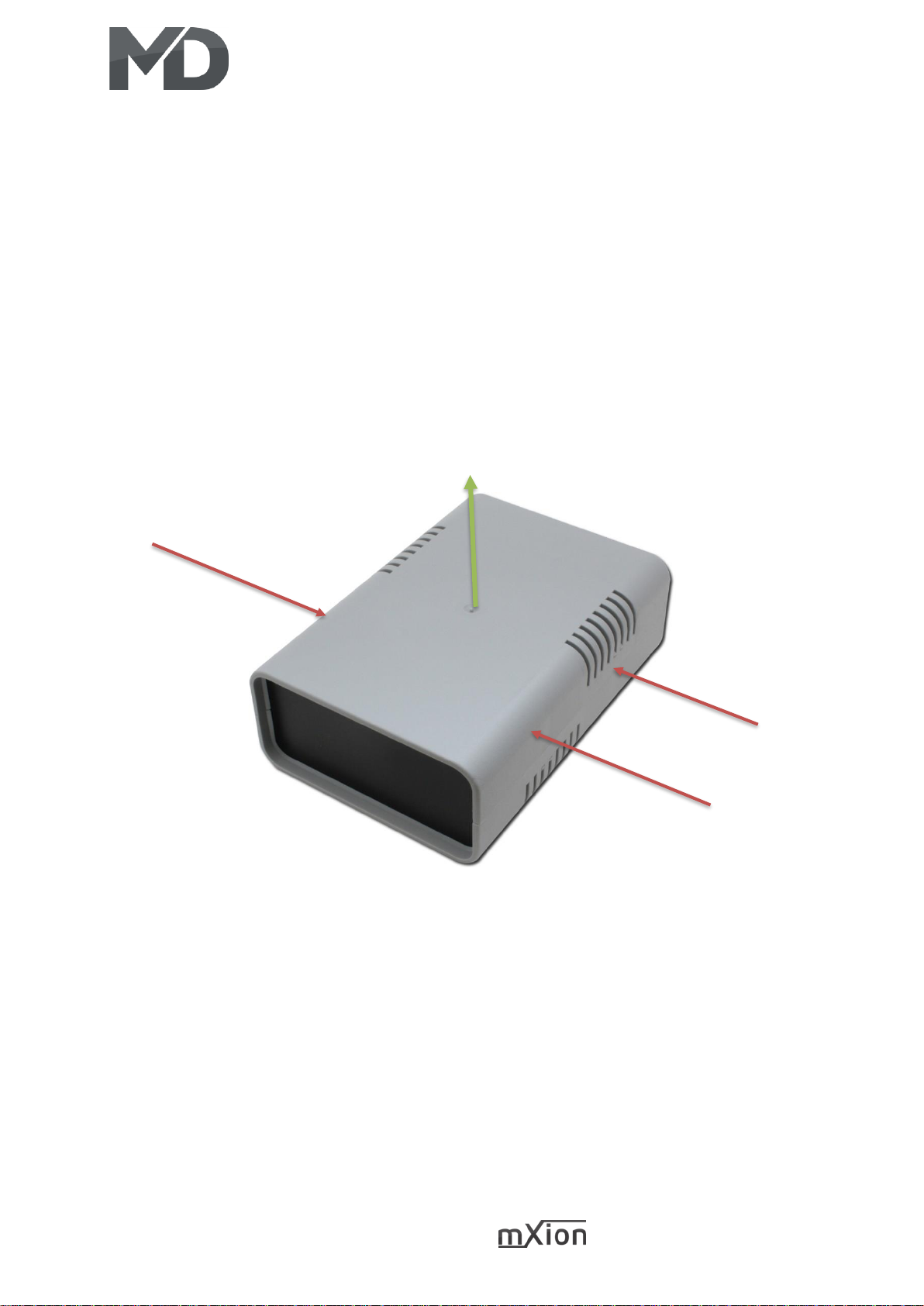
Wir bauen den WLAN-Adapter ein, wenn Sie beides We will install the Wifi adapter if you have
zusammenkaufen. Falls nicht, ist die Montage aber both together buy. If not, but the assembly
denkbar einfach. Klappen Sie das Gehäuse auf und is very easy. Open the housing and plug the
stecken Sie den Adapter auf den dafür vorgesehen adapter into it slot (plug with marks on PCB
Steckplatz ein (Stiftleiste, „Funk-Z21-Adapter“). „Funk-Z21-Adapter“).
DRÜCKEN / PRESS
ZIEHEN / FLOW
Page 9
9 MZSpro Z21-WLAN
Produktbeschreibung Product description
Der mXion MZSpro Funk-Adapter ist ein universeller The mXion MZSpro is a universal wireless
Funk-Adapter Z21 Adapter zur Funkeinbindung für adapter for integration of wireless to
die MZSpro Zentrale. Dabei ist es möglich, 2.4 Ghz the MZSpro. It is possible to 2.4 Ghz
Handregler einzubinden. and WiFi. In addition, our 2.4 Ghz back
Außerdem können unsere 2.4 Ghz Rück- und and forth occupancy detectors are integraded.
Belegtmelder eingebunden werden.
Das High-Light des WLAN-Adapters ist jedoch However, the high-light of the wireless
das integrierte Full-Access Triple-Buffer WLAN adapter is the integrated full-access triple
Modul. Das bietet enorme Schnelligkeit und buffer WLAN module. That offers tremendous
viele Möglichkeiten. So ist es möglich, dass speed and many possibilities. So it is possible
die Roco®-Z21® App (Apple & Android) als auch that the Roco®-Z21® App (Apple & Android) as
die Roco MultimausWLAN genutzt werden well the Roco MultimausWLAN are used can.
kann. Dabei ist es möglich, den Handregler oder It is possible, the hand controller or run the
die App über das eigene Haus-WLAN laufen app on your own home Wi-Fi to let the
zu lassen und den Adapter ins WLAN adapter into the WLAN integrate. Of course
einzubinden. Natürlich (gerade für eine (just for one outdoor area) it is possible to
Außenanlage) ist es möglich, sich direkt go directly to be able to switch to the
auf das Modul schalten zu können, sodass module so that your mobile phone or the
sich Ihr Handy oder die MultimausWLAN MultimausWLAN switch directly to the
direkt mit der Zentrale verbinden, ohne ext. module without ext. router. It will be
WLAN. Es wird dabei weder ein Router noch neither a router nor an unlock code is
ein Freischaltcode benötigt, beides ist needed, both are already included and
bereits enthalten und integriert. integrated.
Page 10
10 MZSpro Z21-WLAN
WLAN-Einbindung WLAN integration
Es gibt 2 Möglichkeiten, über WLAN mit dem There are 2 ways to connect to wifi modules
Modul zu kommunizieren. to communicate.
Der erste Modus ist die Direktaufschaltung, The first mode is the direct connection, that
das heißt, Sie müssen sich im WLAN des Gerätes means you have to be in the WLAN of the
einloggen. Wählen Sie am Handy oder in der device log in. Choose on the phone or in
MultimausWLAN das Netzwerk „mXion MZSpro Z21“ the MultimausWLAN the network mXion
aus und geben Sie das Passwort MDELEC1207 ein. MZSpro Z21 and entert he password
Danach wird Ihr Handy mit dem WLAN verbunden MDELEC1207. Afterwards you mobile phone
bzw. die MultimausWLAN. Ändern Sie nun die IP in will be connected to the WLAN. Set now the
der MultimausWLAN new IP adress in the MultimausWLAN
(Einstellungen -> WLAN -> Z21-IP-ADRESSE) (Settings -> WLAN -> Z21-IP-ADRESS) or set
bzw. in der App (Einstellungen -> Z21 Einstellungen) App (Settings -> Z21 Settings)
auf 192.168.111.111. Sie können nun steuern. to 192.168.111.111.
Mehr ist nicht nötig. Achten Sie beim Handy darauf, You can now control your trains and switches.
dass Sie im WLAN bleiben, wenn eine Nachricht More is not necessary. Pay attention to the
kommt, drücken Sie „Nein“ um im Netzwerk zu cell phone that you stay in the wifi when a
bleiben. Bei der MultimausWLAN finden Sie message comes, press „no“ to join the
den Punkt WLAN unter Einstellungen dann network stay. With the MultimausWLAN you
drücken Sie auf SSID, wählen mXion MZSpro Z21 will find the point WLAN under atitudes then
aus und geben das Passwort von oben ein. press SSID, select mXion MZSpro Z21 and
Achten Sie drauf, dass Sie die Shift-Taste drücken entert he password from above. Make sure
um Großbuchstaben zu schreiben. Auf freiem that you press the shift key to write uppercase
Feld hat man ca. 80m Reichweite. letters. On free field has about 80 m range.
Der zweite Modus ist die Clientaufschaltung, The second mode is the client intrusion,
das heißt, Sie fügen das Modul in Ihr Haus-WLAN that means you insert the module into your
ein und können es über Ihr normales Netzwerk home WLAN and can it over your normal
steuern. Ihr Handy hat dadurch weiterhin network control. Your mobile phone will
Internet, jedoch ist eine Steuerung nur möglich, continue to do so internet, but control is
wenn Sie sich innerhalb des WLAN befinden. only possible if you are inside the WLAN.
Vorteil ist die bessere Steuerung durch Wände. Advantage is the better control by walls.
Die Aufschaltung erfolgt über den integrierten The connection takes place via the
Webserver. Dort können einige Einstellungen integrated web server. There can be some
gemacht werden. Folgen Sie die nachfolgenden settings be made. Follow the following steps
Page 11
11 MZSpro Z21-WLAN
Schritte für die Integration in Ihr WLAN. for integration into your WLAN.
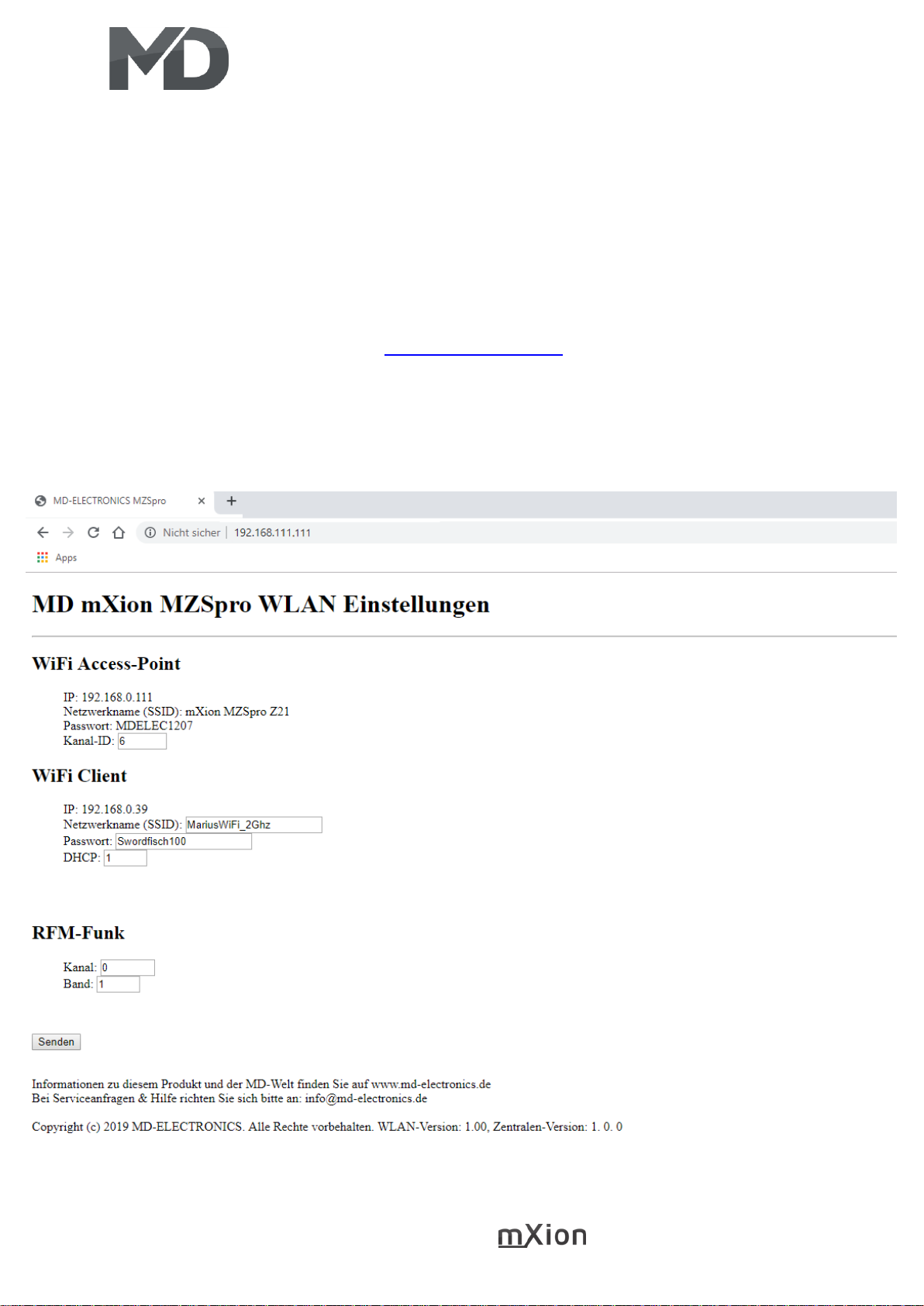
Verbinden Sie ihr Handy oder PC mit dem WLAN Connect your mobile phone or PC
mXion MZSpro Z21 mit dem Passwort MDELEC1207. to the WLAN mXion MZSpro Z21
Danach öffnen Sie Ihren Browser und geben with password MDELEC1207. Then
folgendes ein: open your browser and enter following:
http://192.168.111.111
und drücken Enter. Es baut sich dann folgendes and press Enter. It then builds up
auf: the following on:
Page 12
12 MZSpro Z21-WLAN
Wichtig hier ist der Client-Modus. Dieser Important here is the client mode. This
Modus ist der zweite von oben erwähnte. modus is the second one mentioned above.
Dieser ist nötig, wenn Sie das Modul im This is necessary if you have the module in
eigenen WLAN aufschalten möchten. Geben the want to switch on your own WLAN.
Sie die SSID (Netzwerkname) Ihres Haus-WLAN Give the SSID (network name) of your home
ein ebenso wie Ihr Passwort. DHCP kann gewählt WLAN one as well as your password. DHCP
werden (Wert = 1) wenn die IP dynamisch can be chosen (value = 1) if the IP is in dyn.
vergeben werden soll (nur bei Bedarf). should be awarded (only if necessary).
Über RFM-Funk stellen Sie den Kanal und Use RFM radio to set the channel and
das Band ein, auf dem die Funk-Rückmeldemodule the tape on which the radio feedback
von uns (MD-700x) laufen sofern vorhanden. modules run by us (MD-700x) if available.
Die gleichen Werte müssen auch im Modul The same values must also be in the modules
eingestellt sein (siehe Anleitung BM, RM, RBM). be set (see instructions BM, RM, RBM).
Wenn Sie alles eingestellt haben, klicken Sie When you have finished everything, click
auf „Senden“ und warten Sie, bis das System to „send“ and wait for the system has
sich aktualisiert hat. Sie sehen dann die IP des updated. You then see the IP of the
Systems, die in der App/MultimausWLAN system included in the App or
eingegeben werden kann. MultimausWLAN can be entered.
HINWEIS: NOTE:
Wenn Sie die o.g. IP des Webservers aufrufen und If you like the o.g. IP address of the web server
Ihre Heimnetzwerkdaten eingeben, verbindet sich and enter your home network data connects
die Zentrale direkt mit Ihrem Heimnetzwerk. Sie the central office directly with your home
können dann direkt steuern. Verbinden Sie die network. You can then control directly. Join
MultimausWLAN ebenso mit Ihrem Heimnetzwerk. the MultimausWLAN also with your home
Wählen Sie jedoch die Direktaufschaltung (Sie network. However, select the direct
verbinden das Handy/MultimausWLAN direkt connection (you connect the mobile phone
mit dem Netzwerk der Zentrale), müssen Sie die IP or MultimausWLAN directly with the central),
des Webservers in der App unter you need the IP of the web server in the app
Einstellungen -> Z21 Einstellungen bzw. (Settings -> Z21 Settings) or in the Multimaus
in der Multimaus unter (Settings -> WLAN -> Z21-IP-ADRESS) to the
Einstellungen -> WLAN -> Z21-IP-ADRESSE webserver (192.196.111.111), so that you
an die des Webservers (192.168.111.111) anpassen, can control!
damit Sie steuern können!
Page 13
13 MZSpro Z21-WLAN
Technische Daten Technical data
Stromaufnahme: Current:
100mA 100mA
Temperaturbereich: Temperature range:
-40 bis 70°C -40 up to 70°C
Abmaße L*B*H (cm): Dimensions L*B*H (cm):
2.5*5.3*3.0 2.5*5.3*3.0
HINWEIS: Um Kondenswasserbildung NOTE: In case you intend to utilize this
zu vermeiden benutzen Sie die Elektronik device below freezing temperatures, make
bei Temperaturen unter 0°C nur, wenn sure it was stored in a heated environment
diese vorher aus einem beheizten Raum before operation to prevent the generation
kommt. Im Betrieb sollte sich kein weiteres of condensed water. During operation is
Kondenswasser bilden können. sufficient to prevent condensed water.
Page 14
14 MZSpro Z21-WLAN
Garantie, Reparatur Warranty, Service, Support
MD Electronics gewährt die MD Electronics warrants this product
Fehlerfreiheit dieses Produkts für ein against defects in materials and
Jahr. Die gesetzlichen Regelungen workmanship for one year from the
können in einzelnen Ländern abweichen. original date of purchase. Other countries
Verschleißteile sind von der Garantieleistung might have different legal warranty
ausgeschlossen. Berechtigte Beanstandungen situations. Normal wear and tear,
werden kostenlos behoben. Für Reparatur- consumer modifications as well as improper
oder Serviceleistungen senden Sie das use or installation are not covered.
Produkt bitte direkt an den Hersteller. Peripheral component damage is not covered
Unfrei zurückgesendete Sendungen werden by this warranty. Valid warrants claims will be
nicht angenommen. Für Schäden durch serviced without charge within the warranty
unsachgemäße Behandlung oder Fremdeingriff period. For warranty service please return
oder Veränderung des Produkts besteht the product to the manufacturer. Return
kein Garantieanspruch. Der Anspruch auf shipping charges are not covered by
Serviceleistungen erlischt unwiderruflich. MD Electronics. Please include your proof of
Auf unserer Internetseite finden Sie die purchase with the returned good. Please
jeweils aktuellen Broschüren, check our website for up to date brochures,
Produktinformationen, Dokumentationen product information, documentation and
und Softwareprodukte rund um software updates. Software updates you can
MD-Produkte. do with our updater or you can send us
Softwareupdates können Sie mit the product, we update for you free.
unserem Updater durchführen,
oder Sie senden uns das Produkt zu;
wir updaten für Sie kostenlos.
Irrtümer und Änderungen vorbehalten. Errors and changes excepted.
Page 15
15 MZSpro Z21-WLAN
Hotline Hotline
Bei Serviceanfragen und Schaltplänen For technical support and schematics for
für Anwendungsbeispiele richten Sie sich application examples contact:
bitte an:
MD Electronics MD Electronics
www.md-electronics.de www.md-electronics.de
MD-TV MD-TV
 Loading...