

Page 1
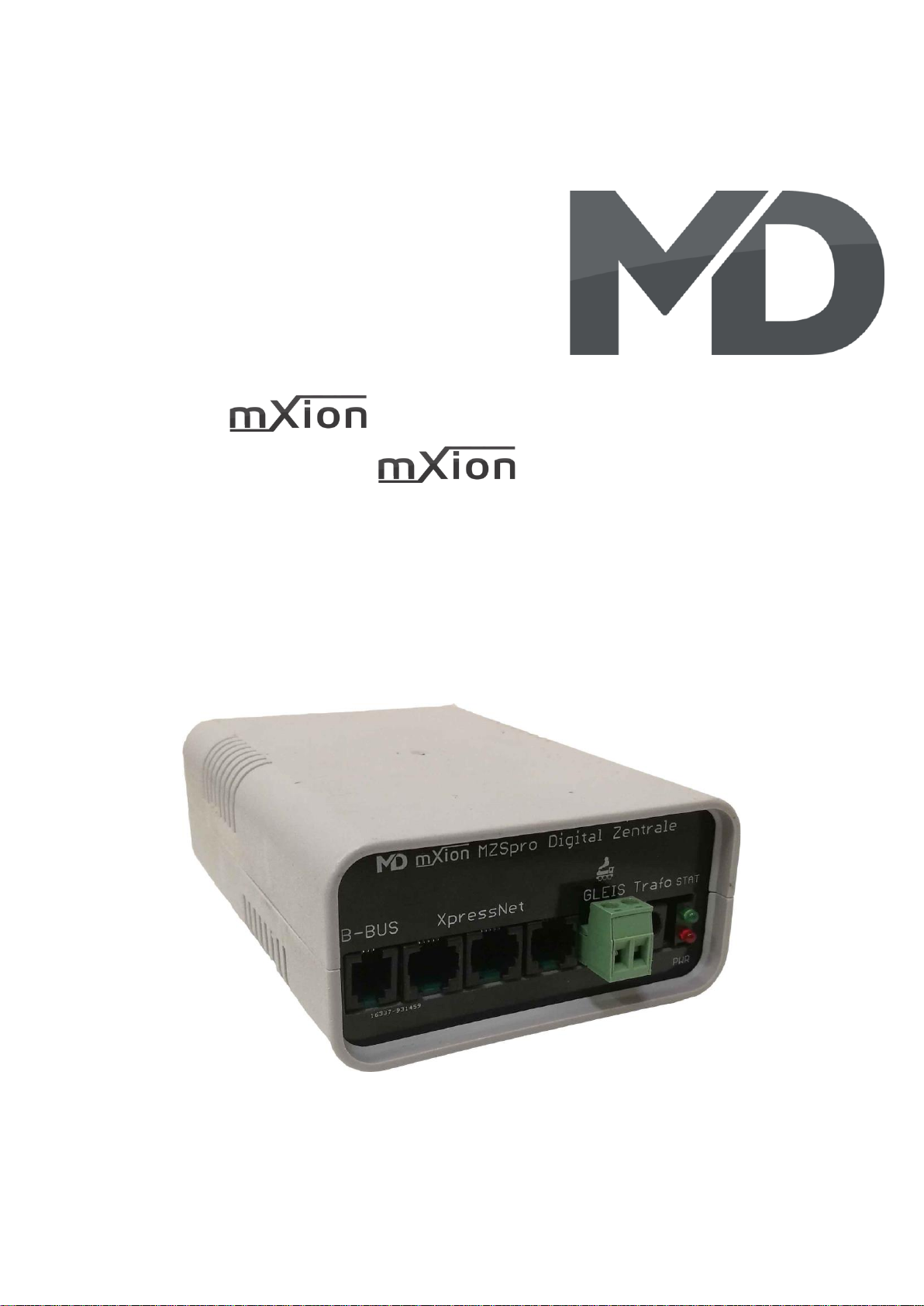
MZSpro Bedienungsanleitung
MZSpro User manual
Page 2

2 MZSpro
Einleitende Information Introduction
Sehr geehrte Kunden, wir empfehlen Dear customer, we strongly
die Produktdokumentation und vor recommend that you read these
allem auch die Warnhinweise vor der manuals and the warning notes
Inbetriebnahme gründlich zu lesen und thouroughly before installing and
diese zu Beachten. Das Produkt ist kein operating your device. The device
Spielzeug (15+). is not a toy (15+).
HINWEIS: Vergewissern Sie sich, ob die NOTE: Make sure that the outputs
Ausgangsspannungen zu ihrem Verbrauch- are set to appropriate value
er passen, da dieser sonst zerstört werden before hooking up any other
kann! Für Nichtbeachtung übernehmen wir device. MD can’t be responsible
keine Haftung. For any damage if this is
disregarded.
HINWEIS: Funktionsausgang A3
Page 3

3 MZSpro
Inhaltsverzeichnis Table of Contents
Grundlegende Informationen General information 4
Funktionsumfang Summary of functions 5
Lieferumfang Scope of supply 6
Inbetriebnahme Hook-Up 7
Anschlussbuchsen Connectors 8
Produktbeschreibung Product description 9
Rückmeldung Feedback 10
PC-Einbindung PC-Inclusion 10
Reichweite für Funk Option Reach for wireless option 10
PC Steuerung PC controlling 11
Technische Daten Technical data 12
Garantie, Reparatur Warranty, Service, Support 13
Hotline Hotline 13
Page 4

4 MZSpro
Grundlegende Informationen General information
Wir empfehlen die Anleitung gründlich We recommend studying this manual
zu lesen, bevor Sie Ihr neues Gerät in thoroughly before installing and
Betrieb nehmen. operating your new device.
HINWEIS: Einige Funktionen sind nur mit NOTE: Some funktions are only
der neusten Firmware nutzbar, führen available with the latest firmware.
Sie daher bei Bedarf ein Update durch. Please make sure that your device
is programmed with the latest
firmware.
HINWEIS: Alle Loks sind per Auslieferung mit 28 NOTE: All locos are set to 28 speep steps.
Fahrstufen eingestellt! Die Änderung kann über This can be changed with the hand
das Handgerät/Steuergerät erfolgen und wird controller and is stored in the central
in der Zentrale gespeichert. station unit.
HINWEIS: Schalten Sie die Zentrale immer für mind. NOTE: Switch off the station for at least
30 sek. aus, da es sonst Probleme geben kann! 30 seconds. Also note, Z21 WLANMAUS
Außerdem, schalten Sie Z21 WLANMAUS erst mind. must switched on at least 10 sec. after
10 sek. später an als die Zentrale! power on the central station.
Page 5

5 MZSpro
Funktionsumfang Summary of Funktions
▪ DCC Zentrale für alle DCC Decoder Booster for all protocolls
▪ 100% DCC NMRA und LGB® kompatibel 100% DCC NMRA and LGB® compatible
▪ Betriebsspannung 14 – 24 V Operating voltage 14 – 24 V
▪ 8A Fahrstrom am Gleis 8A traction current on the track
▪ Parallele Funktionsauslösung Parallel function output
▪ 14, 28, 128 Fahrstufen (für jede Lok einstellbar) 14, 28, 128 speed steps (adjust. each loco)
▪ Weichenpositionsspeicherung mit Rückmeldung Switch position memory with feedback
▪ F0-F28, 10239 Loks und 2048 Weichen schaltbar F0-F28, 10239 locos, 2048 switches control
▪ Betriebskontrolle Operational control led
▪ Aktivitätskontrolleuchte mit Lichtmustern Activity check led with light patterns
▪ 3x Anschluss für Steuergeräte (XpressNet) 3x connection for control units (XpressNet)
▪ 1x Anschluss für Booster (B-BUS) 1x connection for booster (B-BUS)
▪ 1A Steuerbus (bis zu 31 Eingabe- und Steuergeräte) 1A control bus (31 input and control devices)
▪ WLAN Option für Funkmäuse/Handy WLAN Option for wireless function
▪ Programmierung (CVs lesen/schreiben) möglich Programming (CVs read/write) possible
▪ POM Programmierung POM programming
▪ Temperaturgesteuerter Lüfter Temperature-controlled fan
▪ Interne Temperatur und Strommessung Internal temperature and current monitor
▪ Externe Spannungsversorgung mit jedem DC External power supply with each DC
Netzteil möglich und jeder Spannung bis 24V power supply with an voltage up to 24V
▪ Nutzbar für alle Spuren mit passendem Netzteil Usable for all tracks with matching power
▪ Stabile Schraubklemmen Sturdy screw terminals
PC-Steuerungssoftware: PC-Control software
- Rocrail (wie z21®) - Rocrail (same like z21®)
- alle Software mit z21®-Support - all software with z21® support
Mit unserem WLAN Funk-Adapter (Art. Nr. 6003) ist es möglich, WLAN und Funk einzubinden. Dieser
Adapter wird in der Zentrale eingesteckt. Damit sind die Z21 WLANMAUS Handy mit App nutzbar. In der
App sind alle Messdaten und Steuerungen abrufbar. Die App finden Sie im App- und Playstore („Z21®“).
With our WLAN radio adapter (item no. 6003) it is possible to integrate WLAN and radio. This
adapter is plugged into the control panel. Thus the Z21 WLANMAUS as well as Handy with
App can be used. In the app, all measurement data and controls are available. You can find
the app for a fee in the App and Playstore ("Z21®").
Page 6

6 MZSpro
Lieferumfang Scope of supply
▪ Bedienungsanleitung Manual
▪ mXion MZSpro Digitalzentrale mXion MZSpro digital central unit
Page 7

7 MZSpro
Inbetriebnahme Hook-Up
Bauen bzw. platzieren Sie Ihr Install your device in compliance with
Gerät sorgfältig nach den Plänen the connecting diagrams in this manual.
dieser Bedienungsanleitung. The device is protected against shorts and
Die Elektronik ist generell gegen excessive loads. However, in case of a
Kurzschlüsse oder Überlastung connection error e.g. a short this safety
gesichert, werden jedoch Kabel feature can’t work and the device will be
vertauscht oder kurzgeschlossen destroyed subsequently.
kann keine Sicherung wirken und Make sure that there is no short circuit
das Gerät wird dadurch ggf. zerstört. caused by the mounting screws or metal.
Achten Sie ebenfalls beim befestigen
darauf, dass kein Kurzschluss mit
Metallteilen entsteht.
Page 8
8 MZSpro
Anschlussbuchsen Connectors
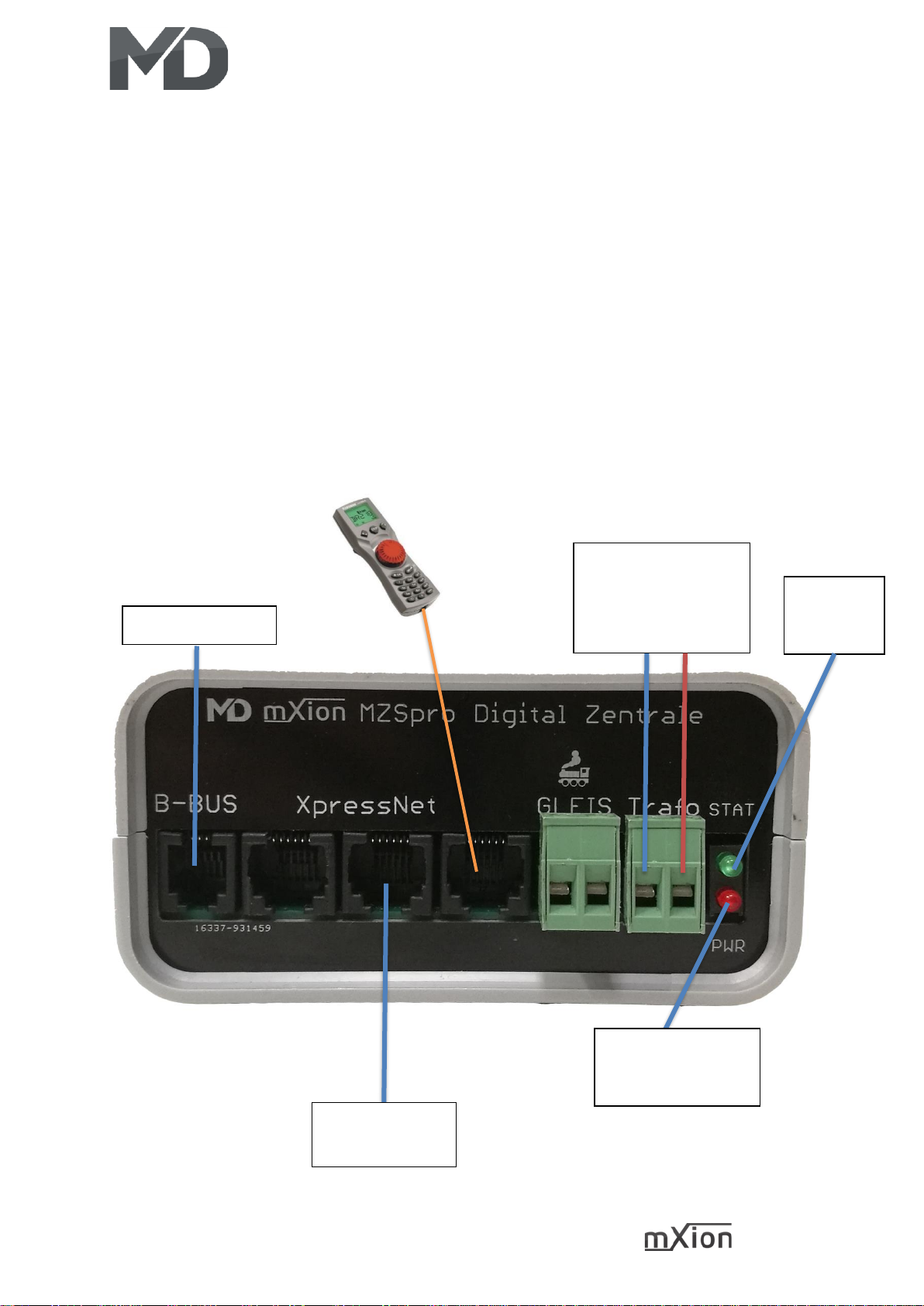
Achten Sie auf ausreichend großen Querschnitt Make sure you have sufficiently large cross
je nach Leistungsabgabe (Empfohlen: 2.5 mm2). section depending on the power output.
Achten Sie auf die Trennung, wenn Sie mehrere Pay attention to the separation, if you
Booster oder Zentrale/Booster-Gemisch betreiben. have several operate booster or central
or booster/central mixture.
Der PLUSPOL liegt bei der LED-Anzeige The plus pole is next to the LED states.
VERPOLUNG ZERSTÖRT DIE ZENTRALE! SPONGE DESTROYS THE CENTRAL!
Bspw. mXion PS2/PS5
(Art. Nr. 0002/0004)
rot = +
blau = -
Gleisspannung ativ
Track power active
Status-LED
State LED
Busanschluss für
Handregler uvm
Booster-Anschluss
Page 9

9 MZSpro
Produktbeschreibung Product description
Die mXion MZSpro ist unsere kleinste und The mXion MZSpro is our most compact
kompakteste Zentrale mit einer Dauerleistung von and smallest digital controlling unit with
8A. Ausgestattet mit 3 Anschlüssen für Steuer- und an output of 8 Amps. for the tracks.
Eingabegeräte, 1 Anschluss für Booster (B-BUS), Equipped with 3 connections for control
einer Status-LED sowie einer Gleis-LED. and 1 connection for boosters (B-BUS),
Die rote LED zeigt an, ob Spannung auf dem Gleis a state LED and track LED. The red LED
anliegt. Die grüne LED zeigt den aktuellen Status an. indicates if there is tension on the track is
Die Zentrale bietet modernen Umfang mit bis zu applied. The greed LED indicates the current
28 Funktionstasten, 2048 Weichenadressen und status. The head office offers modern scope
10239 Lokadressen. Zudem ist für jede Lok with up to 28 function keys, 2048 points
separat einstellbar, ob diese mit 14, 28 oder addresses and 10239 loco addresses.
128 Fahrstufen betrieben wird. Bis zu 100 Moreover, for every locomotive
Loks können gleichzeitig angesprochen und separately adjustable, whether with 14, 28
abgespeichert werden. Die aktuelle bzw. and 128 speed steps is operated. Up to 100
letzte Position von Weichen werden gespeichert locos can be addressed simultaneously and
und auch am Handregler live angezeigt. be stored. The current or last position of
Ebenso werden live Funktionstasten und points are saved and also displayed live on
Übernahmefunktionen am Handregler the hand controller. Likewise, live function
dargestellt. keys and transfer functions on the hand
controller shown.
Über unseren MZSpro Funk-Adapter lässt sich About our MZSpro wireless adapter can be
bequem (einsteckbar in die Zentrale) WLAN und convenient (pluggable in the central station)
Funk nachrüsten, sodass die Komponenten WLAN and retrofit radio so that the
(Z21 WLANMAUS und App) genutzt werden components (Z21 WLANMAUS and App)
können. are used can.
LED-Status: LED-States:
langsames blinken (1 sek.) ➔ Stop/Halt slow flashing (1 sek.) ➔ stop
mittleres blinken (0.5 sek.) ➔ Übertemperatur middle flashing (0.5 sek.) ➔ over temperature
schnelles blinken (0.2 sek.) ➔ Kurzschluss slow flashing (0.2 sek.) ➔ short circuit
CV-Programmierung (lesen/schreiben) und POM CV-Programming (read/write) and POM
ist ebenfalls mit Rückmeldung möglich. with feedback is also possible.
Page 10

10 MZSpro
Rückmeldung Feedback
Um eine PC gestützte Steuerung zur ermöglichen ist To enable a PC based control system it
es möglich, unsere Rück- und Belegtmelder (MD-700x) is possible to use our feedback and
an die Zentrale anschließen zu können. Dies funktioniert occupancy detectors (MD-700x) to be able
entweder über Kabel (XpressNet) oder drahtlos per Funk. to connect to the central office. This works
Die Übertragung zum PC erfolgt dabei allerdings stets either via cable (XpressNet) or wireless.
drahtlos über WLAN. The feedback data will also be send over
wifi to your PC.
PC-Einbindung PC-Inclusion
Um einen PC einzubinden für automatisierte Abläufe To integrate a PC for automated processes or
oder Steuerungen wird zwingend unser WLAN-Adapter controllers will necessarily be our wireless
MD-6003 benötigt. Die Zentrale kann dann per adapter MD-6003 needed. The center can
Direktaufschaltung oder im Client-Modus (Zentrale then per direct connection or in client mode
ist mit dem Haus-WLAN verbunden) eingebaut (central is connected to the house wifi)
werden. Als Steuersoftware kann alles mit Z21® installed become. As a control software,
Support genutzt werden (bspw. RocRail®). Die everything can be done with Z21® support can
Einbindung ist identisch, ggf. muss die IP anders be used (e.g. Rockrail®). The integration is
eingestellt werden (siehe Webserver des MZSpro identical, if necessary, the IP must be different
Funk Adapters). Mit unserem DCC-TOOL ist zudem be set (see web server of the MZSpro radio
eine Steuerung und Programmierung möglich. adapter). In addition our DCC-TOOL works too
Reichweite für Funk-Option Range for radio option
Die Reichweite des WLAN ist stark abhängig von den The range of the WLAN is strongly dependent
Beschaffenheiten der Umgebung. Bei der on the textures of the environment. In the
Direktschaltung liegt diese bei ca. 100m auf freiem direct circuit this is at about 100m on free
Feld. Ein Vorteil bietet hier die Einbindung ins eigene field. An advantage here is the integration
Haus-WLAN. Dadurch erhöht sich die Reichweite um into your own house wifi. This increases the
die des Haus-WLAN, zudem lässt sich die Reichweite range by that of your wifi, besides, the range
leicht mit handelsüblichen Repeatern verstärken. Auch can be slightly reinforced with commercial
Wände sind nun kein Problem mehr. Das ist der repeaters. Also walls are no longer a problem.
Vorteil der WLAN-Technologie im Gegensatz zum That’s the advantage of WLAN technology as
klassischen 2.4 Ghz Funksystem. opposed to classic 2.4 Ghz radio system.
Page 11

11 MZSpro
PC Steuerung PC Controlling
Es wird für diese Funktion der MZSpro Funkadapter It will be for this function the MZSpro
benötigt mit der Artikelnummer MD-6003! wireless adapter required with article
number MD-6003!
Neben der automatisierten Steuerung über den PC In addition to automated control via the
mit bspw. RocRail® gibt es eine einfache Alternative PC with RocRail® for example there is a
von uns. Mit unserem MD-DCC-TOOL können (zu simple alternative from us. With our
finden auf unserer Website im Downloadbereich) MD-DCC-TOOL you can (to find on our
Sie neben Updates ebenso die Steuerung der website in the download area). In addition
Zentrale vornehmen. Das beinhaltet nicht to updates as well you control the central
nur das Fahren von Loks sondern auch das station. That does not include only the
komfortable lesen und schreiben von CVs, driving of locomotives but also that
CV-Listen uvm. Ebenso wird diese Software confortable reading and writing of CVs
kontinuierlich erweitert um auch kleinere CV lists and much more likewise this
automatisierungsaufgaben uvm. damit zu software continously expanded to include
erledigen. Nachfolgend finden Sie vom smaller ones automation tasks and much more
aktuellen Stand (12/2019) Bilder dieser with it too take care of. Below you will find
Software. Die Einbindung von from current status (12/2019) pictures of
Programmiervorlagen ist zu diesem Zeitpunkt this software. The involvement of programming
noch nicht implementiert. Der Bereich SUSI
templates is at this time not implemented yet.
ist nicht verfügbar für die Zentrale sondern The area SUSI is not available for the central
bezieht sich auf unseren CV Programmer mit station but refers to our CV Programmer the
der Artikelnummer 0024. Die Software passt article number 0024. The software fits
sich automatisch an die jeweilige Hardware an. automatically to the respective hardware.
Je nach Aufschaltmöglichkeit (Client oder Accesspoint) Depending on the connection option
mit dem Funkadapter muss die IP angepasst werden (client or access point) with the wireless
und (bei Accesspoint) der PC mit dem Zentralen WLAN adapter the IP must be adjusted and
verbunden werden. Hier muss dann die IP auf (with access point) the PC with the central
192.168.111.111 geändert werden. Danach drücken WLAN get connected. Here then the IP must
Sie auf die Schaltfläche „Verbinden WLAN“. 192.168.111.111 be changed. Then press
click on the „Connect WLAN” button.
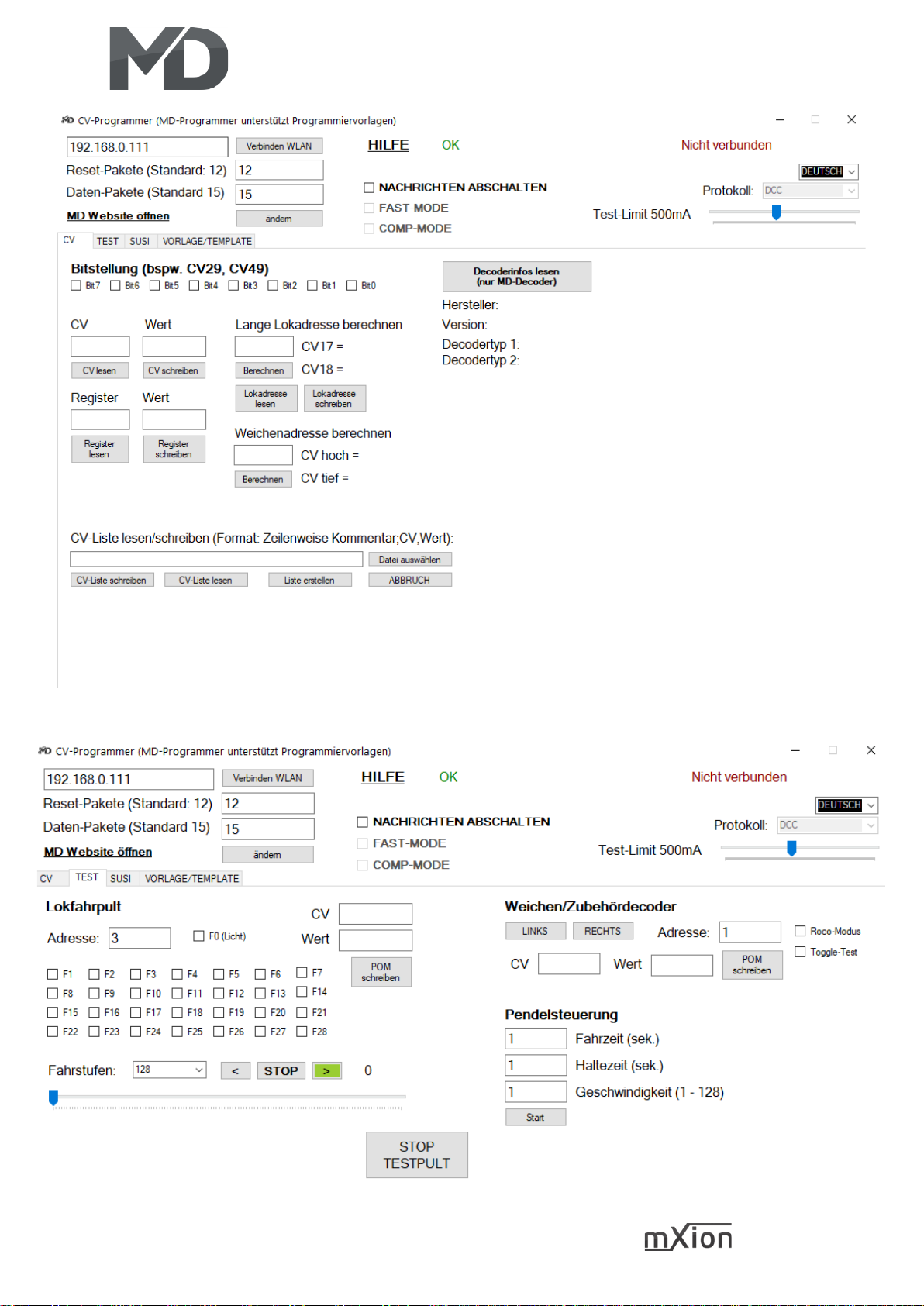
Über den Reiter „CV“ können Sie CVs lesen und Via the tab „CV“ you can read and write CVs
schreiben, Adressen bearbeiten und Listen erstellen. edit addresses and create lists.
Page 12
12 MZSpro
Über „TEST“ können Sie Loks fahren, Funktionen schalten und Züge pendeln lassen lassen.
With "TEST" you can drive locomotives, switch functions and let trains commute.
Page 13

13 MZSpro
Technische Daten Technical data
Spannung: Power supply:
14 - 24V DC 14 – 24V DC
Nur Gleichstromtrafos nutzen! Only use DC-Trafos!
Stromaufnahme: Current:
50mA, abgeschaltete Stufe 50mA, switched off booster
Maximaler Gesamtstrom: Maximum current:
10A kurzzeitig 10 Amps. for short time
8A dauerhaft 8 Amps all time
Temperaturbereich: Temperature range:
-40 bis 60°C -40 up to 60°C
Abmaße L*B*H (cm): Dimensions L*B*H (cm):
9.5*13.5*4.5 9.5*13.5*4.5
HINWEIS: Um Kondenswasserbildung NOTE: In case you intend to utilize this
zu vermeiden benutzen Sie die Elektronik device below freezing temperatures, make
bei Temperaturen unter 0°C nur, wenn sure it was stored in a heated environment
diese vorher aus einem beheizten Raum before operation to prevent the generation
kommt. Im Betrieb sollte sich kein weiteres of condensed water. During operation is
Kondenswasser bilden können. sufficient to prevent condensed water.
Page 14

14 MZSpro
Garantie, Reparatur Warranty, Service, Support
MD Electronics gewährt die MD Electronics warrants this product
Fehlerfreiheit dieses Produkts für ein against defects in materials and
Jahr. Die gesetzlichen Regelungen workmanship for one year from the
können in einzelnen Ländern abweichen. original date of purchase. Other countries
Verschleißteile sind von der Garantieleistung might have different legal warranty
ausgeschlossen. Berechtigte Beanstandungen situations. Normal wear and tear,
werden kostenlos behoben. Für Reparatur- consumer modifications as well as improper
oder Serviceleistungen senden Sie das use or installation are not covered.
Produkt bitte direkt an den Hersteller. Peripheral component damage is not covered
Unfrei zurückgesendete Sendungen werden by this warranty. Valid warrants claims will be
nicht angenommen. Für Schäden durch serviced without charge within the warranty
unsachgemäße Behandlung oder Fremdeingriff period. For warranty service please return
oder Veränderung des Produkts besteht the product to the manufacturer. Return
kein Garantieanspruch. Der Anspruch auf shipping charges are not covered by
Serviceleistungen erlischt unwiderruflich. MD Electronics. Please include your proof of
Auf unserer Internetseite finden Sie die purchase with the returned good. Please
jeweils aktuellen Broschüren, check our website for up to date brochures,
Produktinformationen, Dokumentationen product information, documentation and
und Softwareprodukte rund um software updates. Software updates you can
MD-Produkte. do with our updater or you can send us
Softwareupdates können Sie mit the product, we update for you free.
unserem Updater durchführen,
oder Sie senden uns das Produkt zu;
wir updaten für Sie kostenlos.
Irrtümer und Änderungen vorbehalten. Errors and changes excepted.
Page 15
15 MZSpro
Hotline Hotline
Bei Serviceanfragen und Schaltplänen For technical support and schematics for
für Anwendungsbeispiele richten Sie sich application examples contact:
bitte an:
MD Electronics MD Electronics
www.md-electronics.de www.md-electronics.de
MD-TV MD-TV
 Loading...