

Page 1
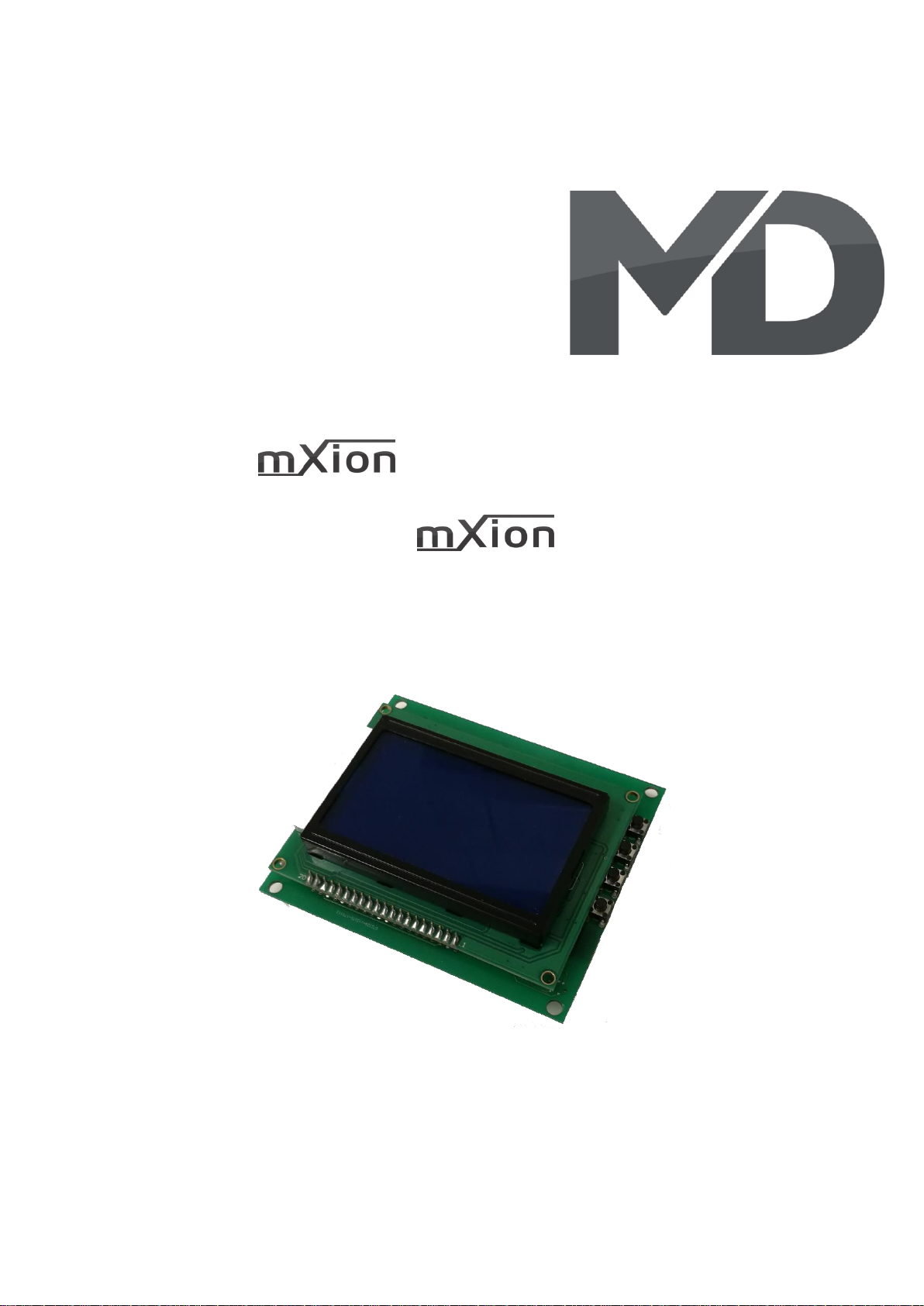
DMSA Bedienungsanleitung
DMSA User manual
Page 2

2 DMSA
Einleitende Information Introduction
Sehr geehrte Kunden, wir empfehlen Dear customer, we strongly
die Produktdokumentation und vor recommend that you read these
allem auch die Warnhinweise vor der manuals and the warning notes
Inbetriebnahme gründlich zu lesen und thouroughly before installing and
diese zu Beachten. Das Produkt ist kein operating your device. The device
Spielzeug (15+). is not a toy (15+).
HINWEIS: Vergewissern Sie sich, ob die NOTE: Make sure that the outputs
Ausgangsspannungen zu ihrem Verbrauch- are set to appropriate value
er passen, da dieser sonst zerstört werden before hooking up any other
kann! Für Nichtbeachtung übernehmen wir device. MD can’t be responsible
keine Haftung. For any damage if this is
disregarded.
Page 3

3 DMSA
Inhaltsverzeichnis Table of Contents
Grundlegende Informationen General information 4
Funktionsumfang Summary of functions 5
Lieferumfang Scope of supply 6
Inbetriebnahme Hook-Up 7
Anschlussbuchsen Connectors 8
Produktbeschreibung Product description 10
Technische Daten Technical data 12
Garantie, Reparatur Warranty, Service, Support 13
Hotline Hotline 14
Page 4

4 DMSA
Grundlegende Informationen General information
Wir empfehlen die Anleitung gründlich We recommend studying this manual
zu lesen, bevor Sie Ihr neues Gerät in thoroughly before installing and
Betrieb nehmen. operating your new device.
Bauen Sie das Modul an einem geschützten Place the decoder in a protected location.
Platz ein. Schützen Sie es vor andauernder The unit must not be exposed to moisture.
Feuchtigkeit.
HINWEIS: Einige Funktionen sind nur mit NOTE: Some funktions are only
der neusten Firmware nutzbar, führen available with the latest firmware.
Sie daher bei Bedarf ein Update durch. Please make sure that your device
is programmed with the latest
firmware.
Page 5

5 DMSA
Funktionsumfang Summary of Funktions
▪ Anschluss für Messschieber jeder Art Connecting measurements each way
▪ Anschluss durch Micro-USB Kabel Connecting via Micro-USB cables
▪ Anschluss durch Lötkontakte Connecting via solder pads
▪ Direktanschluss für bspw. WABECO® Directy connecting e.g. WABECO®
▪ 4 Messgeräte anschließbar 4 devices can displayed
▪ mm und inch mm and inches
▪ 1.5V Regler für batterielosen Betrieb eingebaut 1V5 supply for battery-less powering
▪ 2 Schriftarten für Anzeige verfügbar 2 fonts available for displaying all letters
▪ Für jede Achse einzeln einstellbar For each axes configurable
- Verdoppelung des Wertes (bspw. Drehbank) - Double the axes value (e.g. bank)
- Halbierung des Wertes - Half the axes value
- Vierteilung des Wertes - Quarter the axes value
▪ Mathefunktionen für Achsenpaare einstellbar Math functions for axle pairs configurable
- Achsen addieren (bspw. X+Y) - Axes adding (e.g. X+Y)
- Achsen subtrahieren (bspw. X-Y) - Axes subtract (e.g. X-Y)
- Achsen dividieren (bspw. X/Y) - Axes divide (e.g. X/Y)
- Achsen multiplizieren (bspw. X*Y) - Axes multiply (e.g. X*Y)
▪ Unterstützte Protokolle Possible protocolls
- Wabeco® - Wabeco®
- 1x24 Bit - 1x24 Bit
- 2x24 Bit - 2x24 Bit
- Mitutoyo - Mitutoyo
- Digitrax - Digitrax
- BCD/7x4 - BCD/7x4
- 6x4 - 6x4
▪ USB-Anschluss für Stromversorgung USB powered
▪ Großes, kontrastreiches Display Big, contrast display
▪ Kontrast einstellbar Contrast configurable
▪ Bluetooth® (Pin = 1207) Bluetooth® (Pin = 1207)
▪ Alle Anzeigen/Einstellungen auch über App/PC All displays/settings also via App/PC
▪ Kostenlose App und PC-Programm zur Darstellung Free App and PC terminal for displaying
▪ Rücksetzen über Taster OnBoard und App/PC Reset over switchtes OnBoard and App/PC
▪ Updatefähig Updatable
Page 6

6 DMSA
Lieferumfang Scope of supply
▪ Bedienungsanleitung Manual
▪ mXion DMSA mXion DMSA
▪ USB-Kabel Typ-B USB cable B-Type
▪ USB-Netzteil USB power supply
Page 7

7 DMSA
Inbetriebnahme Hook-Up
Bauen bzw. platzieren Sie Ihr Install your device in compliance with
Gerät sorgfältig nach den Plänen the connecting diagrams in this manual.
dieser Bedienungsanleitung. The device is protected against shorts and
Die Elektronik ist generell gegen excessive loads. However, in case of a
Kurzschlüsse oder Überlastung connection error e.g. a short this safety
gesichert, werden jedoch Kabel feature can’t work and the device will be
vertauscht oder kurzgeschlossen destroyed subsequently.
kann keine Sicherung wirken und Make sure that there is no short circuit
das Gerät wird dadurch ggf. zerstört. caused by the mounting screws or metal.
Achten Sie ebenfalls beim befestigen
darauf, dass kein Kurzschluss mit
Metallteilen entsteht.
Page 8
8 DMSA
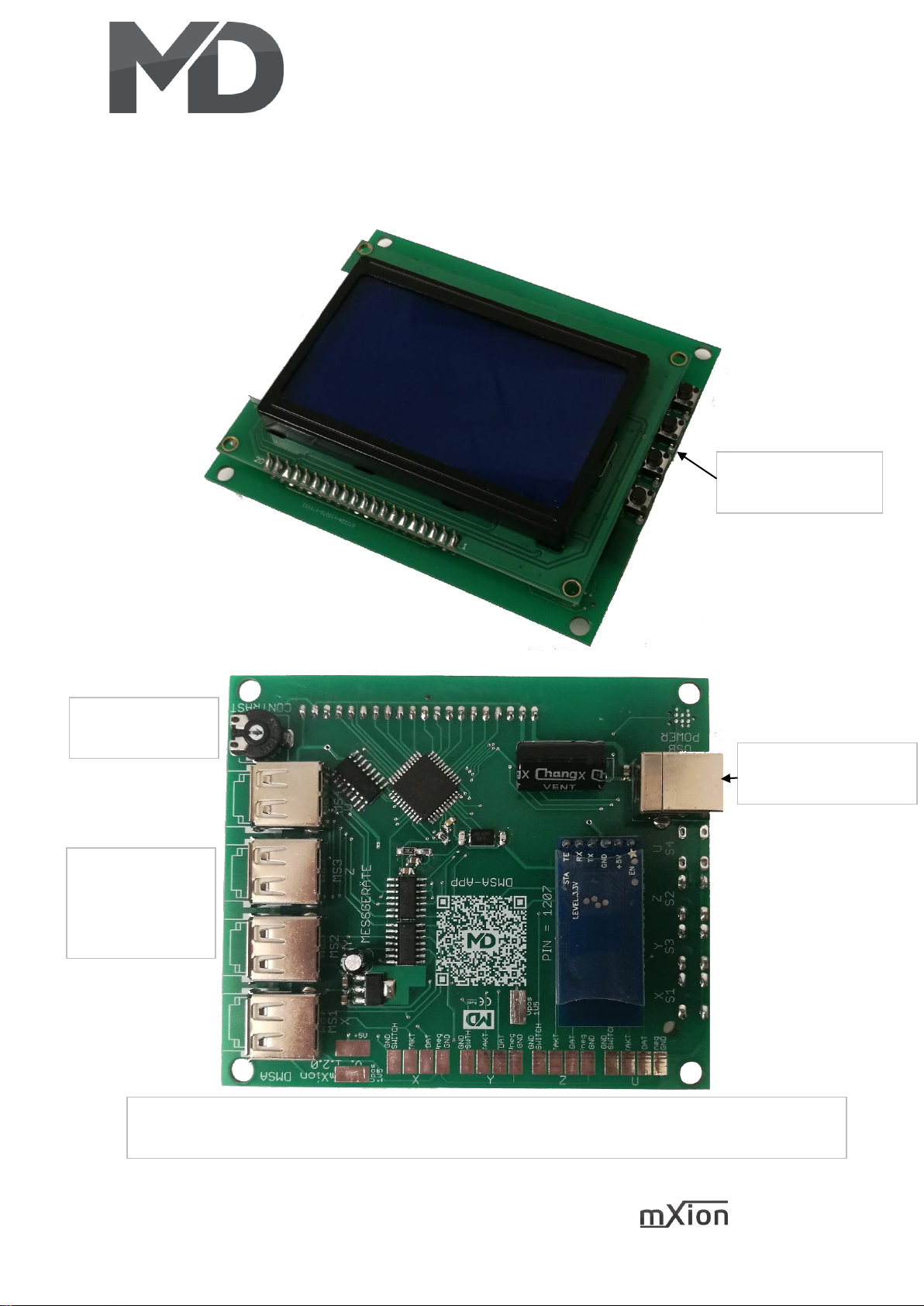
Anschlussbuchsen Connectors
Rücksetzschalter
Reset switches
USB Stromversorgung
USB power supply
Messgeräte mit
USB-Anschluss
Devices with USB
connection
Alle Achsen (X,Y,Z,U) als Lötkontakte ausgeführt zum Anschluss von Messchiebern ohne USB-Buchse
All axes (X, Y, Z, U) designed as solder contacts for connection of slide slides without USB socket
Kontraststeller
Contrast config
Page 9
9 DMSA
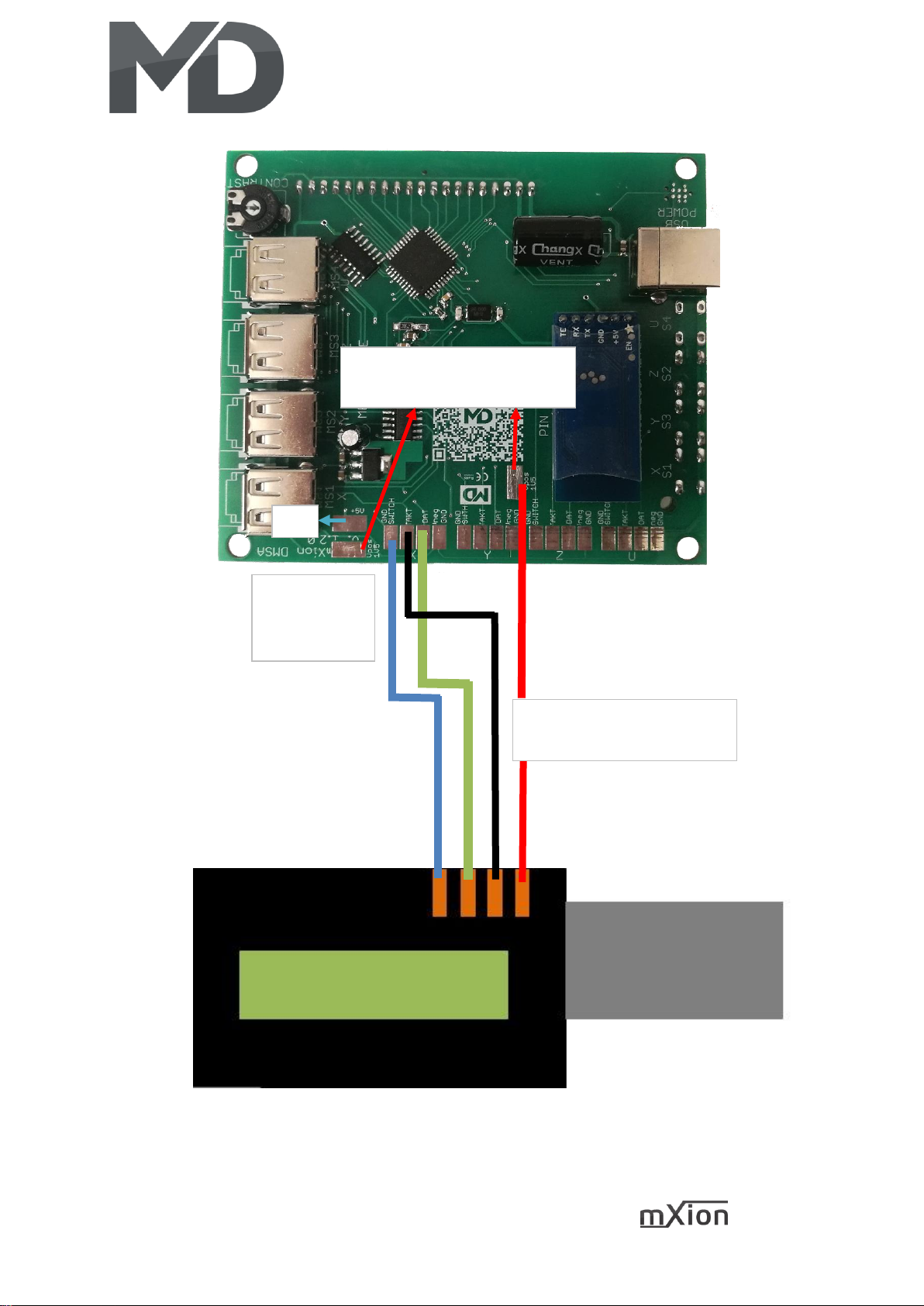
Wenn ohne Batterie (Vpos)
If without batterie (Vpos)
GND/MASSE
DATEN/DATA
TAKT/CLOCK
1.5V für batterielosen Betrieb
1V5 for battery-less supply
5V
Page 10

10 DMSA
Produktbeschreibung Product description
Das MD mXion DMSA ist ein universelles The MD mXion DMSA is a universal
DRO Anzeigemodul. Es unterstützt alle DRO display module. It supports everyone
gängigen Messgeräte mit RB-5 Schnittstelle common measuring instruments with RB-5
(bspw. WABECO®). Durch das große, interface (e.g. WABECO®). By the big,
kontrastreiche Display können alle Werte high contrast display can displayed all
gut lesbar dargestellt werden. Zudem besitzt values be displayed legibly. Also owns
dass mXion DMSA gleich 4 Schnittstellen, sodass the mXion DMSA equals 4 interfaces,
4 Messgeräte gleichzeitig angezeigt werden so 4 gauges are displayed simultaneously.
können. Hierbei ist es wahlweise möglich, It is optionally possible to use commercially
handelsübliche USB-Kabel zu verwenden oder available USB cable or the standard
die normgerechten USB-RB5-Kabel mit dem USB-RB5 cable with the RJ10 plug
RJ10-Stecker (Buchsentyp bei Bestellung (socket type with order specify!). With the
angeben!). Mit den 4 eingebauten Schaltern 4 built-in switches can display any ad on the
kann jede Anzeige am großen Display big screen be automatically reset. The ad
automatisch zurückgesetzt werden. Die Anzeige supports both the representation in mm as
unterstützt sowohl die Darstellung in mm als also in inches with 3 decimals places.
auch in Inch mit 3 Nachkommastellen.
Das MD mXion DMSA kann durch seine The MD mXion DMSA can by ist integrated
integrierte Bluetooth®-Schnittstelle seine Bluetooth® interface ist data either to the
Daten wahlweise an die APP DMSA oder an App DMSA or to send and display the PC
den PC mit dem MDTerm® senden und darstellen. with the MDTerm®. Not only the values can
Hierüber können nicht nur die Werte dargestellt, be shown here, but also settings are made.
sondern auch Einstellungen vorgenommen werden. These include besides the setting of the
Darunter zählen neben der Einstellung des Protokolls protocol also math functions for each axis
auch Mathefunktionen für jede Achse als auch as well as axis pairs. The solder pads make it
Achsenpaare. Die Lötkontakte ermöglichen es possible in addition, connect further
zudem, weitere Messgeräte ohne Buchse anschließen measuring devices without socket to be able
zu können. to.
Die eingestellte Funktion wird zudem im Display The set function is also shown in
angezeigt (bspw. d = doppelt, usw). the display (d = double, etc).
Page 11
11 DMSA
Mit dem MD mXion DMSA können Sie Ihre With the MD mXion DMSA you can use your
Werkstatt mit einer gut lesbaren, graphischen workshop with a readable, graphic equip the
Anzeige für Ihre Messschieber ausstatten. display for your calipers. The handling is very
Die Handhabung ist denkbar einfach, die simple, the possible equipment was on
mögliche Ausstattung wurde auf ein maximum extended to everyone to have
Maximum ausgedehnt, um jeden comfort.
Komfort zu haben.
Das Gerät schaltet sich zudem nach The device also turns off about 3 minutes
ca. 3 Minuten in den Stand-by wenn in the stand-by if no measuring instruments
keine Messgeräte angeschlossen sind. are connected. Then the display brightness
Die Displayhelligkeit wird dabei runtergeregelt. is powered down.
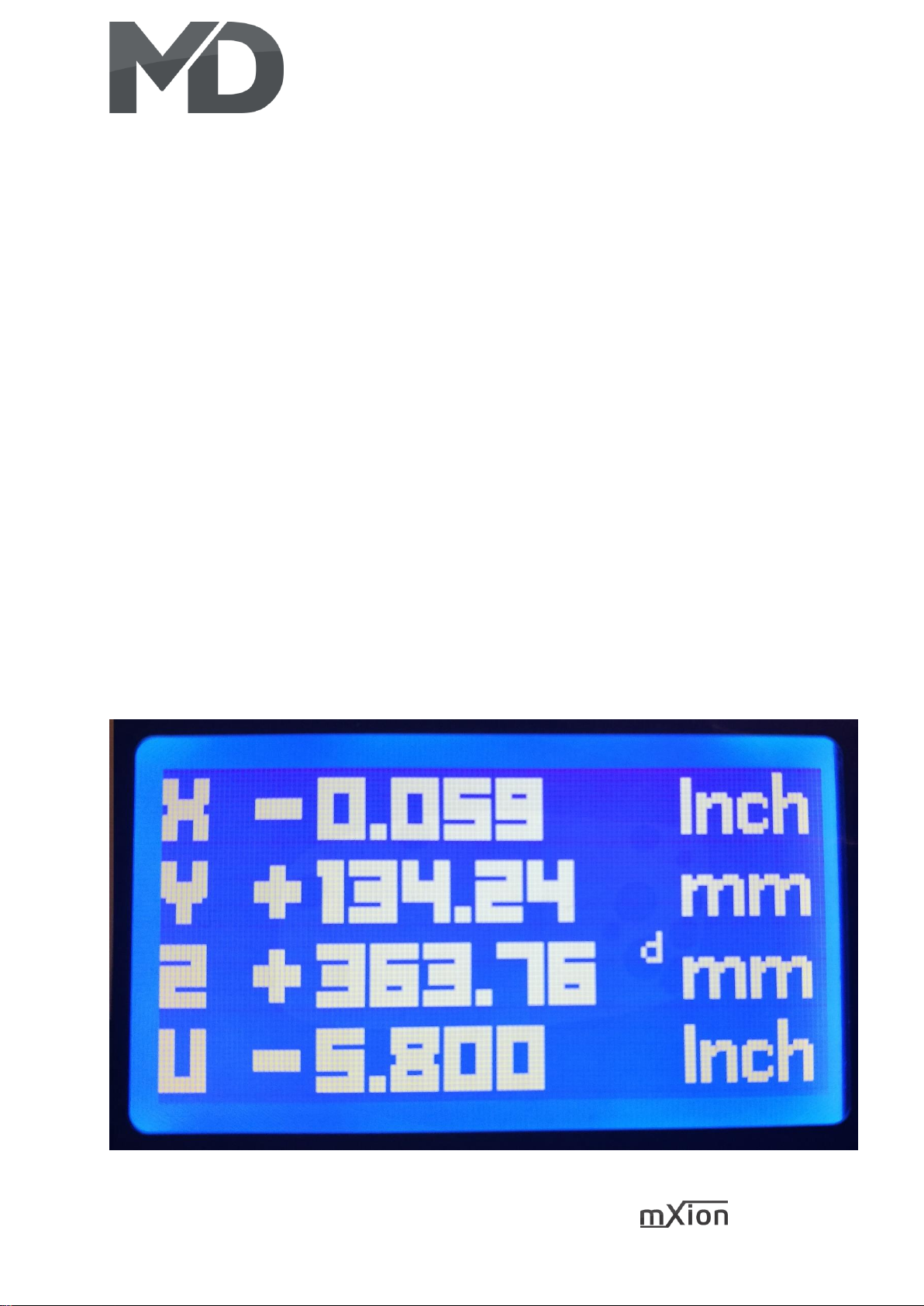
Das nachfolgende Bild zeigt exemplarisch 2 The following picture shows 2 devices
angeschlossene Messschieber in mm und Inch. connected to the DMSA. One in mm unit
and one in Inches.
Sie können für jede Achse per Bluetooth You can for each axes via Bluetooth
den angezeigten Wert verdoppeln oder halbieren. double or half the values. Or other maths.
Oder auch andere Mathefunktionen. Diese werden This will be shown in the display like the
auch im Display angezeigt (bspw. d = doppelt, siehe next picture. The d at the z axes shown the
Z-Achse im folgenden Bild). double value.
Page 12

12 DMSA
Technische Daten Technical data
Spannung: Power supply:
USB (5.5V, 0.3 A max.) USB (5.5V, 0.3 A max.)
Stromaufnahme: Current:
20mA (ohne Funktionsausgänge) 20mA (with out functions)
Temperaturbereich: Temperature range:
-20 bis 80°C -20 up to 80°C
Abmaße L*B*H (cm): Dimensions L*B*H (cm):
10*8*6 10*8*6
HINWEIS: Um Kondenswasserbildung NOTE: In case you intend to utilize this
zu vermeiden benutzen Sie die Elektronik device below freezing temperatures, make
bei Temperaturen unter 0°C nur, wenn sure it was stored in a heated environment
diese vorher aus einem beheizten Raum before operation to prevent the generation
kommt. Im Betrieb sollte sich kein weiteres of condensed water. During operation is
Kondenswasser bilden können. sufficient to prevent condensed water.
Bei Benutzung des NTC (Temperaturwiderstand) In terms of the NTC (temperature resistor)
sollten Sie auf den Temperaturbereich des NTC you should to the temperature range of the
achten, da sonst keine einwandfreie Funktion NTC otherwise no proper function can
gewährleistet werden kann. be guaranteed.
Page 13

13 DMSA
Garantie, Reparatur Warranty, Service, Support
MD Electronics gewährt die MD Electronics warrants this product
Fehlerfreiheit dieses Produkts für ein against defects in materials and
Jahr. Die gesetzlichen Regelungen workmanship for one year from the
können in einzelnen Ländern abweichen. original date of purchase. Other countries
Verschleißteile sind von der Garantieleistung might have different legal warranty
ausgeschlossen. Berechtigte Beanstandungen situations. Normal wear and tear,
werden kostenlos behoben. Für Reparatur- consumer modifications as well as improper
oder Serviceleistungen senden Sie das use or installation are not covered.
Produkt bitte direkt an den Hersteller. Peripheral component damage is not covered
Unfrei zurückgesendete Sendungen werden by this warranty. Valid warrants claims will be
nicht angenommen. Für Schäden durch serviced without charge within the warranty
unsachgemäße Behandlung oder Fremdeingriff period. For warranty service please return
oder Veränderung des Produkts besteht the product to the manufacturer. Return
kein Garantieanspruch. Der Anspruch auf shipping charges are not covered by
Serviceleistungen erlischt unwiderruflich. MD Electronics. Please include your proof of
Auf unserer Internetseite finden Sie die purchase with the returned good. Please
jeweils aktuellen Broschüren, check our website for up to date brochures,
Produktinformationen, Dokumentationen product information, documentation and
und Softwareprodukte rund um software updates. Software updates you can
MD-Produkte. do with our updater or you can send us
Softwareupdates können Sie mit the product, we update for you free.
unserem Updater durchführen,
oder Sie senden uns das Produkt zu;
wir updaten für Sie kostenlos.
Irrtümer und Änderungen vorbehalten. Errors and changes excepted.
Page 14
14 DMSA
Hotline Hotline
Bei Serviceanfragen und Schaltplänen For technical support and schematics for
für Anwendungsbeispiele richten Sie sich application examples contact:
bitte an:
MD Electronics MD Electronics
www.md-electronics.de www.md-electronics.de
MD-TV MD-TV
 Loading...