

Page 1
WARRANTY
AirMaster warranties all its power units against
electrical component failure for a period of five
(5) years. Any parts (excluding filters) required
within the first five years will be furnished free
of charge by the Authorized Dealer from whom
the power unit was originally purchased.
Additionally , all AirMaster units are guaranteed
for life against defects in materials and
workmanship. In the event an Authorized
Dealer is not nearby, AirMaster will honor and
perform warranty services provided the power
unit is returned to the factory , freight pre-paid.
This warranty is non-transferrable and does not
apply to commercial applications, misuse,
abuse, acts of God, operating without the filter,
or if the unit has been worked on by an
unauthorized person.
Instruction Manual for AirMaster C300
8
Please read this manual before operating.
Page 2

Congratulations on the purchase of your new MD Air Master Central Vacuum System.
This manual covers safety, operation, and maintenance features built into this system.
W e recommend that you carefully read this instruction book so that you may take best
advantage of them.
BEFORE YOU BEGIN
This system has been designed to be fitted by the home user but if in doubt
please consult an approved installer.
This product must be operated in accordance with these instructions and used only for
domestic cleaning to remove DRY dirt and dust from household carpets, flooring and
fabrics.
This system is intended for domestic household use only and is not designed for the
collection of vitreous building material including particle board, construction
products, and similar products such as wood/fibers, sand, cement, fillers, fiber glass,
etc. Picking up these materials may be harmful to your system and may void the
manufacturers warranty.
SAFETY REMINDERS AND TAKING CARE OF YOUR MD AIR MASTER
CENTRAL VACUUM SYSTEM
Please read these instructions thoroughly . This will ensure that you obtain full
benefit from your system. Keep this instruction book in a handy place for future
reference.
IMPORTANT
Always switch the system off and remove the plug from the electricity supply before
cleaning, when not in use, or when attempting any maintenance task. The system must
only be connected to an AC supply at the voltage shown on the rating plate. This
system should only be used for its intended purpose as described in these instructions.
NOTES
Never operate this system without filters.
DO NOT pick up hard or sharp objects, matches, hot ashes, cigarette ends or similar
items.
DO NOT pick up flammable liquids such as cleaning fluids, petroleum products, etc.,
or use in the presence of such vapors.
DO NOT use out of doors or on any wet surface or for WET pick-up.
DO NOT allow children, elderly, or the ill to operate this system without supervision.
· It must not be used on people or animals.
· Always disconnect the system from the power outlet by pulling out the plug
directly, NEVER by pulling on the supply cord.
· If using an extension cord, please ensure that it is UL approved and that it is
fully extended. Failure to do so could cause your central vacuum to overheat
and become damaged.
2
7
Page 3
CARE AND MAINTENANCE
This product, once correctly fitted, will give you years of trouble-free operation.
Maximum performance will depend on keeping the filters clean or replacing when
they have reached their operational life. Filters must always be fitted to prevent motor
damage. The dust container should be emptied when full or when indicated by
the light.
Make sure unit is switched off and power cord removed.
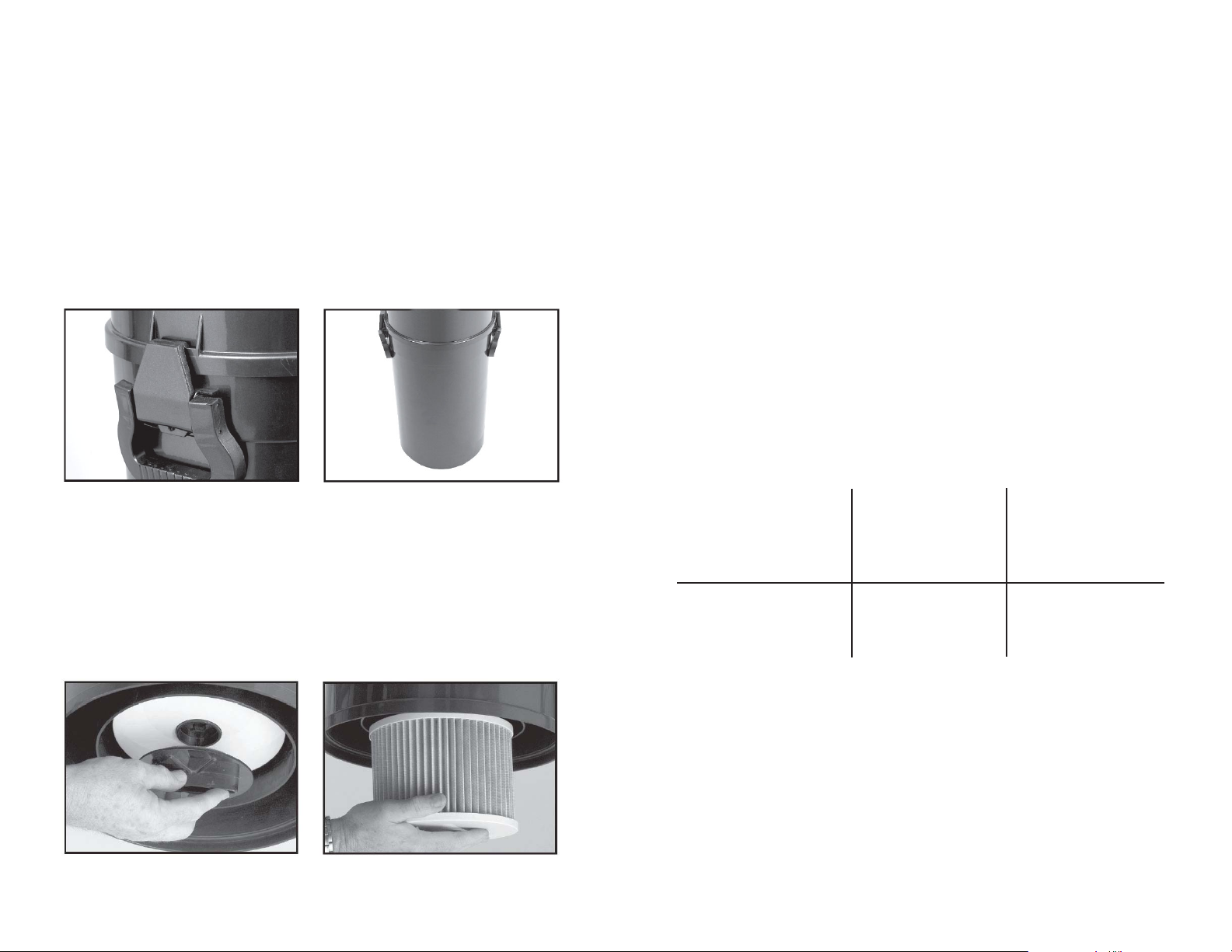
TO EMPTY DUST CONTAINER
· There are two clips on either side of the container.
· Place your hand underneath the container to support it and undo the clips.
· Empty container.
· Refit, making sure the clips are fully secured.
FAULTS
Do not continue to use this system if it appears to be faulty or the supply cord is
damaged. If a fault cannot be rectified, please return to the location of purchase.
If damaged, return the canister for repair to an authorized central vacuum dealer
location in order to avoid a safety hazard.
Consult the trouble-shooting guide in this manual if your system fails to operate
properly. Contact an authorized dealer if your problem persists.
AFTER USE
Switch the system off and remove the plug from the electricity supply . Always switch
off and remove the plug before attaching any accessories or cleaning the system.
.
M.D. Manufacturing
AirMaster
Model C300
TROUBLE SHOOTING
TO REPLACE FILTER
Y our MD Air Master Central Vacuum System has an efficient HEPA filter fitted for
maximum cleaning performance and it should be cleaned when the suction level falls,
or when dirty. Follow the same procedures for removing the bottom container. You
will see that the HEP A filter is held in place by a locking device.
· Turn anti-clockwise to remove the HEPA filter .
· Tapping the filter or using a soft bristle brush will dislodge dirt.
· To refit or replace a new HEPA filter, replace locking device by turning
clockwise.
· Refit bottom section of container making sure clips are fully secured.
6
PROBLEM CAUSE REMEDY
Motor does not start or stops. No power supply. Check cable, plug and
socket. If still inoperative, contact authorized
central vacuum dealer.
Suction force gradually Dust-container is full, Empty dust-container,
decreases. suction hose, wand is remove objects from
blocked or dirty filters. hose, wand, replace or
clean filters.
Due to our commitment to continuous product improvement and innovation,
sometimes the product you buy may differ slightly from the one shown on this
product carton.
3
Page 4
8
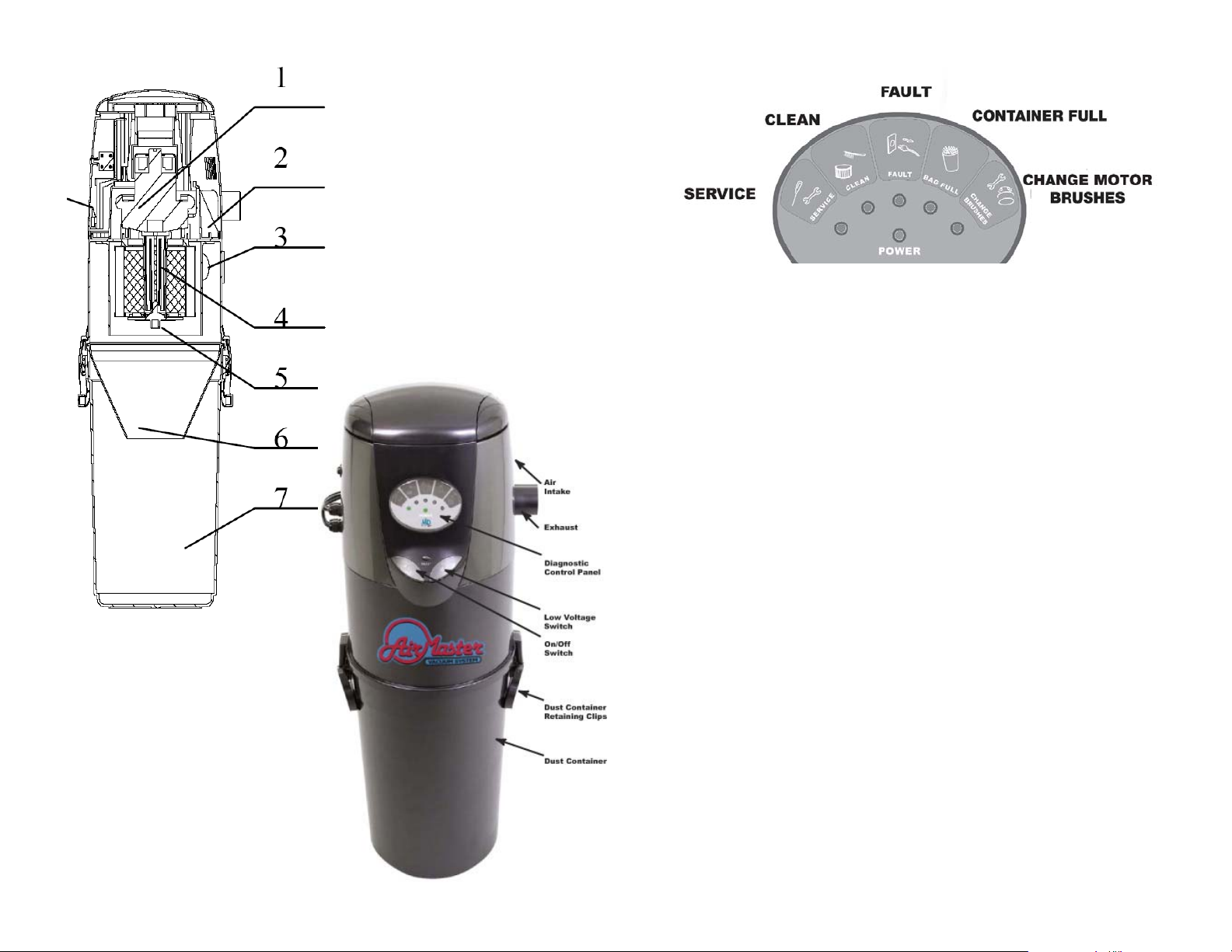
1. Motor
2. Exhaust
3. Air Intake
4. HEPA Filter
5. Filter Latch
6. Funnel
7. Debris Container
8. Hook Stand
CONTROL P ANEL
The C300 vacuum system is equipped with a diagnostic control panel that will tell at a
glance, by the corresponding indicator light, if there is a fault. It will also tell when the
HEP A filter needs cleaning or changing, when the dust container is full, or when
service is needed, etc.
POWER: Green=Ready for operation. “AC” Switch turns the POWER light
on. “DC” Switch turns the vacuum suction on (there may be 5-
SECOND DELA Y).
SERVICE: After 400 hours call for maintenance.
CLEAN: After 60 hours clean HEP A filter.
F AULT: Overload protection triggered. Unplug unit and plug in again. If it
continues to happen, the motor is most likely expiring.
BAG FULL: Empty the bottom container.
CHANGE BRUSHES: After 500 hours have a pr ofessional change the motor
brushes.
Before making any changes, make sure the system is turned off and disconnected
from the main power supply . REMOVE THE PLUG FROM THE POWER
SOURCE.
TO RESET THE SYSTEM: INSER T PLUG BACK INTO THE POWER
SOURCE’S SOCKET . SWITCH ON. FLIP THE ON/OFF SWITCH,
LOCATED ON THE UNIT , TO THE ON POSITION.
The system is now reset and ready.
If a diagnostic light still indicates a fault, etc., repeat the above procedures.
Refer to an authorized central vacuum dealer if a fault cannot be corrected or if an
indicator light remains on.
4
5
 Loading...