

Page 1
EN
UC 300
UNIVERSAL COUNTER
USER’S MANUAL
NR.1111-EN
Page 2

UNIVERSAL COUNTER UC 300
This product complies with EMC requirements as defined by
Directives 2004/108/CE and successive modifications
in accordance with standard EN ISO 14982 applied
Manufacturer
Address
: MC elettronica S.r.l.
: Via E. Fermi, 450/486
Fiesso Umbertiano (ROVIGO) – ITALY
Tel. +39 0425 754713 Fax +39 0425 741130
E-mail: [email protected]
Internet: www.mcelettronica.it
Manual code
Issued
Edition
: 1111-EN
: November 2011
: April 2014
MC elettronica S.r.l. is not obliged to give notice of any further modifications of the product.
The information given in this manual does not allow unauthorized personnel to tamper the product
in any way. The guarantee on the equipment will no longer be valid if tampering should be
detected.
© Copyright MC elettronica 2014
User’s manuale
2
Page 3

UNIVERSAL COUNTER UC 300
Content
1. Rules and general warning .................................................................................. 4
1.1 Introduction ....................................................................................................... 4
1.2 Terms of guarantee .......................................................................................... 5
1.3 Service .............................................................................................................. 5
2. General description .............................................................................................. 6
3. Description of the panel and electrical connections ......................................... 7
4. Overall dimensions ............................................................................................... 8
5. Operation ............................................................................................................... 9
6. Low battery warning ............................................................................................. 9
7. Standby mode ..................................................................................................... 10
8. Programming ...................................................................................................... 10
8.1 Programming the “Un” (unit of measurement) parameter ............................... 11
8.2 Manual programming of parameter “C” (pulses of the speed sensor) ............ 11
8.3 Automatic programming of parameter “C” (pulses of the speed sensor) ........ 12
8.4 Programming parameter “L” (working width) .................................................. 13
9. Maintenance ........................................................................................................ 14
9.1 Ordinary maintenance .................................................................................... 14
9.1.1 How to protect the main connector .......................................................... 14
9.2 Extraordinary maintenance ............................................................................. 14
10. Technical data ................................................................................................... 15
User’s manual
3
Page 4

UNIVERSAL COUNTER UC 300
1. Rules and general warning
1.1 Introduction
This manual gives all the specific information that you need for a proper use of the
equipment.
After buying the instrument, read the manual carefully and refer to it any time you
have doubts on how to use the equipment or when you have to carry out
maintenance operations.
Keep the manual on the machine. If this is not possible, keep it ready to hand.
ALL RIGHTS RESERVED. THIS MANUAL IS INTENDED FOR CUSTOMERS ONLY. ANY
OTHER USE IS FORBIDDEN.
User’s manuale
4
Page 5
UNIVERSAL COUNTER UC 300
!!!!
1.2 Terms of guarantee
• SUBJECT OF THE GUARANTEE: the guarantee is applied to the product and to
those parts which are marked with the serial number or any other identification
number used by MC elettronica;
HOW LONG THE GUARANTEE IS EFFECTIVE: MC elettronica S.r.l.
guarantees the UC 300 for a period of 1 year from the manufacturing date
(printed on the identification label which is to be found on the rear side of the
equipment) and also accessories.
The guarantee covers the product and any repair carried out within the agreed
terms.
This guarantee does not apply in the event of:
•
accidental damage;
•
improper use;
•
modifications which haven’t been agreed upon, improper installation (or
setting);
•
damage caused when a non-MC elettronica equipment, which is
mechanically or electrically connected to our instruments, breaks or does
not function properly;
•
act of God (lightning, floods, fire or other causes which do not depend from
MC elettronica).
Repairs under guarantee, which must be carried out in the laboratories of our
authorized centres, are entirely free of charge provided the equipment is directly
transported to said laboratories or sent free port. Transport charges and risks
are entirely borne by the Customer.
The above-mentioned guarantee is valid unless otherwise stated between MC
elettronica and the Customer.
Warning
Mc elettronica declines any liability for damages or direct or indirect
charges, as a consequence of improper use or inability of the Customer
to use the equipment separately and/or together with other instruments.
1.3 Service
Service is available in all the countries where the equipment is officially supplied by
MC elettronica (during and after the guarantee period).
Any kind of operation that is to be carried out on the UC 300 must be done in
accordance with the instructions stated in this manual or as agreed with MC
elettronica. If not, the relative terms of guarantee might become void.
User’s manual
5
Page 6

UNIVERSAL COUNTER UC 300
2. General description
The UC 300 Universal Counter is powered by a rechargeable battery and stores all
the main functions of a hectare counter in a small container which can be installed
easily on any public works vehicle. You can choose between metric and imperial
units of measurement to calculate area, distance and speed. The UC 300 Universal
Counter can also count the working hours when the machine is running. Displayed
on the screen are:
1) independent total counter for surface area (in hectares or acres, in units of 10 m²
or 0.001 acres)
2) independent partial counter for surface area (in hectares or acres, in units of 10
m² or 0.001 acres)
3) speed of travel (in km/h or mph, in units of 0.1 km/h or 0.1 mph)
4) counter of distance covered (in metres or feet, in units of 1 metre or 1 foot)
5) working hour counter (in units of 0.1 hours)
Provided with the UC 300 are a battery charging cable, a magnetic sensor and a
magnet of reference: the code for the complete kit is 00KIT-0014;
When the battery is running low, this is signalled on the display (refer to the section
“Operation”). The user can connect the charging cable to the battery of the tractor
and continue working during the charging process, or disconnect the sensor and
charge the monitor separately.
Inside the connector of the magnetic sensor is a jumper for powering the UC 300:
disconnecting the sensor turns off the monitor, saving on battery power. PLEASE
NOTE: it is advisable to disconnect the sensor only when the machine is at standstill
to avoid the partial loss of data of the totalizes; the programmable parameters,
however, remain saved.
Essential requirements for the Universal counter:
a) Powered by 3.6V internal rechargeable batteries
b) Nominal battery charge voltage: 12V (16V max)
c) Maximum dimensions: 78 mm in width, 78 mm in height and 38 mm in
depth.
d) 5-digit display + indicators, not backlit
e) External application (IP66).
User’s manuale
6
Page 7
UNIVERSAL COUNTER UC 300
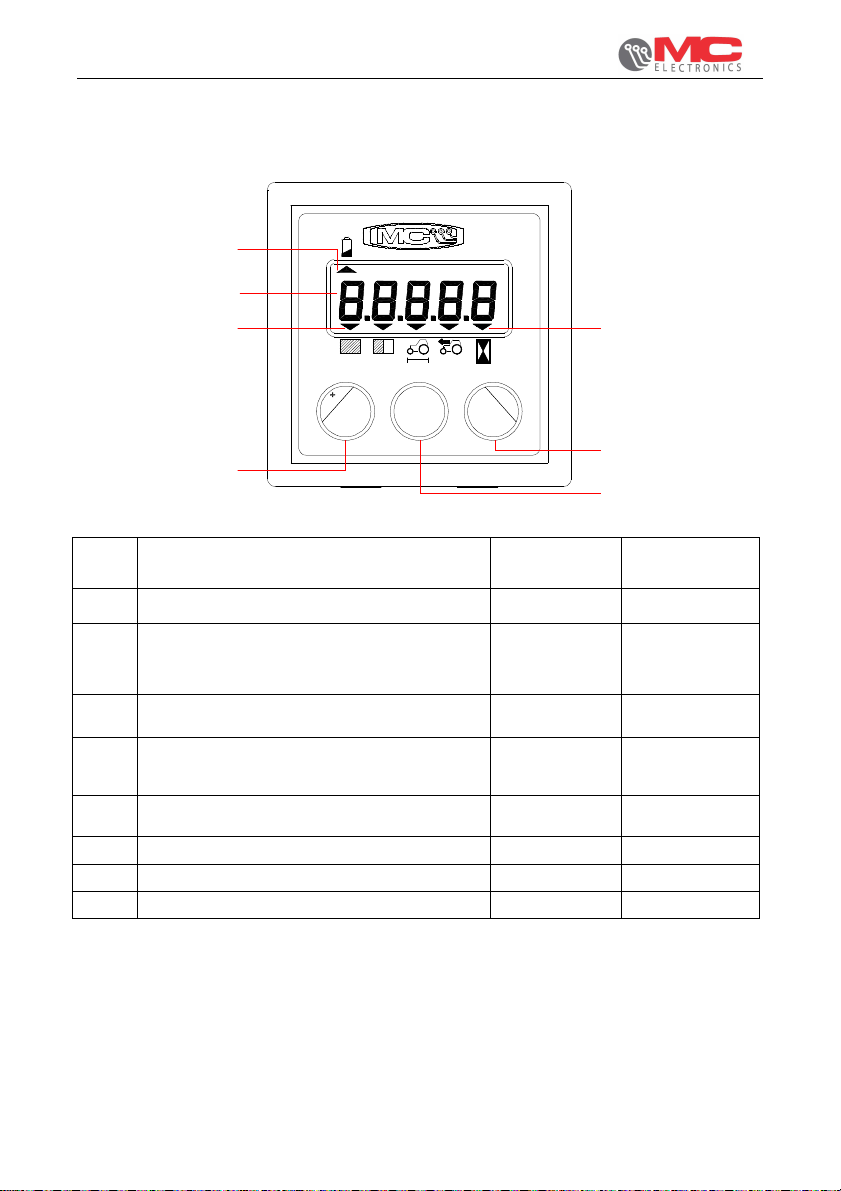
3. Description of the panel and electrical connections
mph m
UC 300
ft
h
-
A5
A6
A
A1
+ -
ha ac RPM
Km/h
Select Reset
PROG
D
B
C
Rif. Description signal Type
INput/OUTput
A LCD Display:
A1-A5: arrows indicating the size selected
A6: arrow indicating low battery - -
B Selection key size and "-" in programming - C Programming key: allows you to enter the
phase of programming parameters
D Selection key size and "-" in programming - -
- -
Pin connector
S.SEAL 4-way
Input magnetic sensor (*) IN NPN NO 4
Mass for the magnetic sensor OUT GND 1
Pin for bridge power monitor - 2 e 3
(*) = Maximum input frequency 35Hz magnetic sensor
User’s manual
7
Page 8
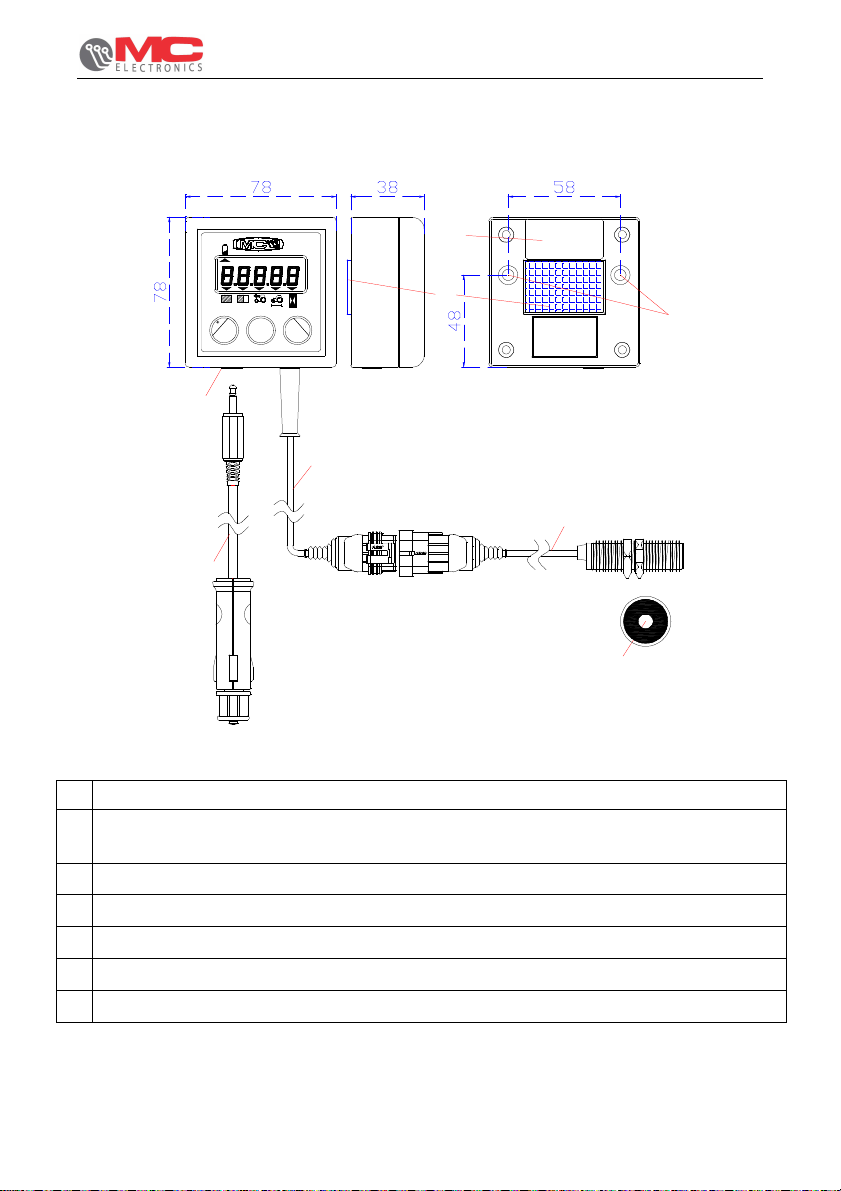
4. Overall dimensions
UNIVERSAL COUNTER UC 300
+ -
UC 3000
Km/h mph m ftha ac RPM
h
F
E
-
PROG
Select Reset
A
C
D
B
3.5 jack connector panel for battery charging
A
Cable 50 cm with cigarette lighter plug for charging battery (supplied)
B
cod. CAV-0017
cable 20 cm with conn. s.seal 4-way for connection the magnetic sensor
C
sens. magnetic supplied cable 200 cm and magnet diam.20mm (D1)
D
3M DUAL LOCK for removable mechanical attachment
E
label with identification parameters
F
M5 threaded inserts for mechanical fixing to panel
G
G
D1
User’s manuale
8
Page 9
UNIVERSAL COUNTER UC 300
5. Operation
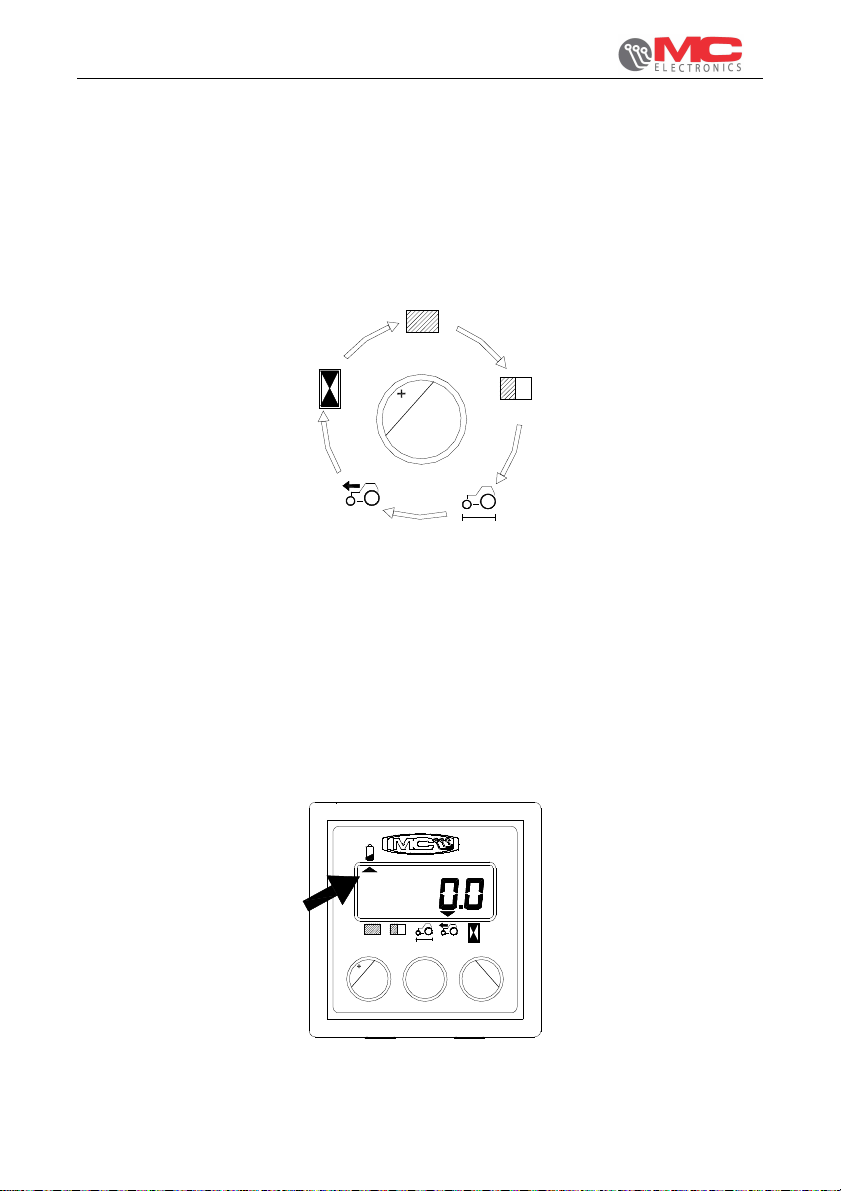
When the counter is started up for the first time (or after the battery is charged after
having run down completely), the total area counter is shown on the display. The UC
300 is set by default to show metric measurements: the area is given in hectares, the
speed in km/h and the distance covered in metres. The initial sequence is, therefore:
Pressing the “select” button during operation shows the next measurement on the
display, as follows
Select
After selecting a measurement it is possible to reset it by pressing and holding the
"reset" button for 3 seconds (with the exception of the speed of travel, which is
instantaneous data).
6. Low battery warning
When the battery is nearly run down, the arrow under the battery symbol in the top
left-hand corner lights up;
Km/h
Prog.
UC 300
-
+ -
Select Reset
User’s manual
9
Page 10
UNIVERSAL COUNTER UC 300
the residual autonomy of the UC 300 before it turns off completely is limited and will
depend also on use. If the battery runs down completely and the UC 300 turns off,
some of the data may be lost (refer to the previous section); to charge the battery,
connect the cable with the jack connector (provided) to a 12V battery: Do NOT use
car battery charging devices. The charging process generally takes about 10
hours, while the autonomy between a charging cycle and the next is about 2.5 years
(although this depends on the extent and conditions of use); it is not necessary for
the speed sensor to be connected while the battery is charging.
7. Standby mode
To save on energy and increase the autonomy of the batteries, the UC 300
automatically goes into standby after 5 minutes if it does not receive any pulses from
the speed sensor and none of the buttons are pressed. In standby mode, power
consumption is less than 30µA and the last data remains on the display without any
other information. The UC 300 exits standby mode when the next pulse is received
from the speed sensor or when you press any button for at least 1 second.
8. Programming
As with the totalizers, either metric or imperial units of measurement can be used for
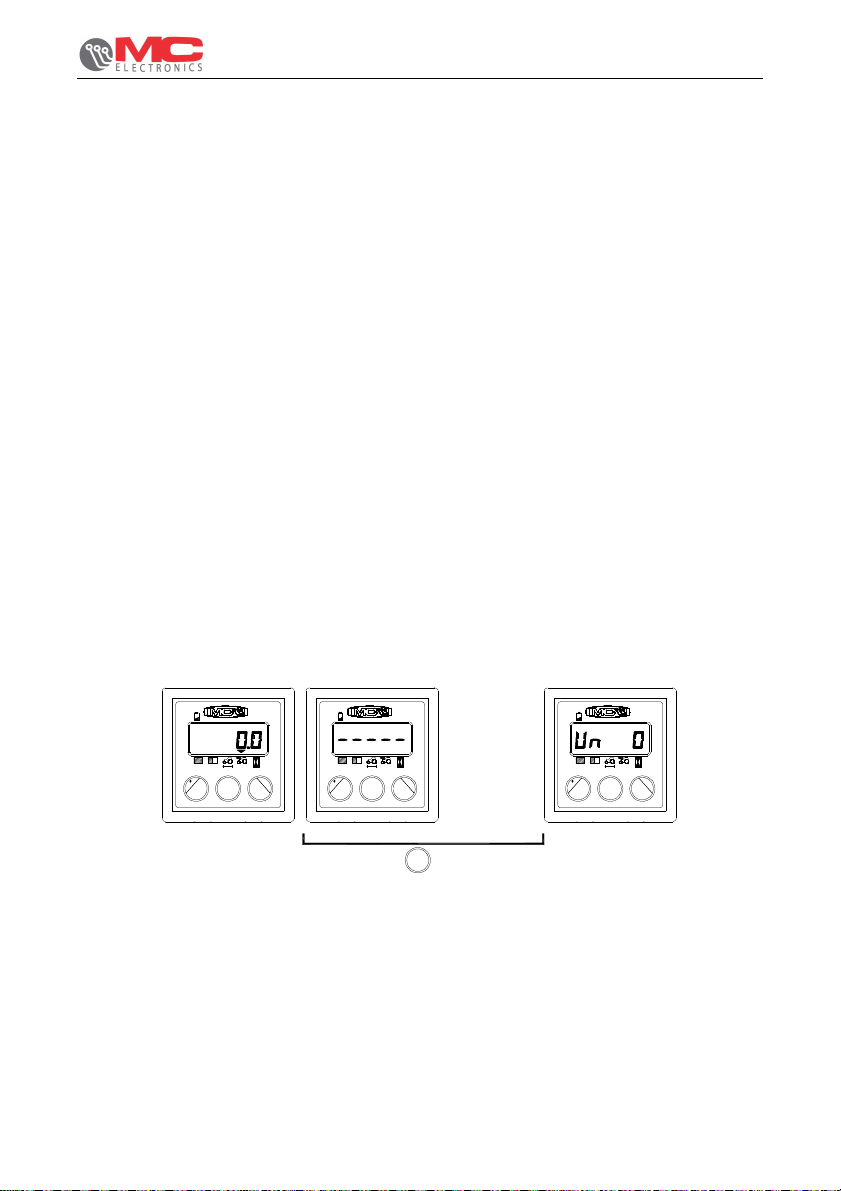
the programmable speed and area parameters. To access the programming phase
with the UC 300 turned on, press the “Prog” button for 3 seconds and five horizontal
dashes appear on the display. The first programmable parameter, “Un”, then
appears as shown below;
+ -
Km/h
Prog.
Select Reset
UC 300
UC 300
+ -
Select Reset
-
Prog.
Prog.
3"
+ -
Prog.
Select Reset
UC 300
-
During the programming phase, you can use the “+” and “-” buttons to edit the value
of the parameter, then press the “Prog” button to confirm your changes and move on
to the next parameter;
User’s manuale
10
Page 11
UNIVERSAL COUNTER UC 300
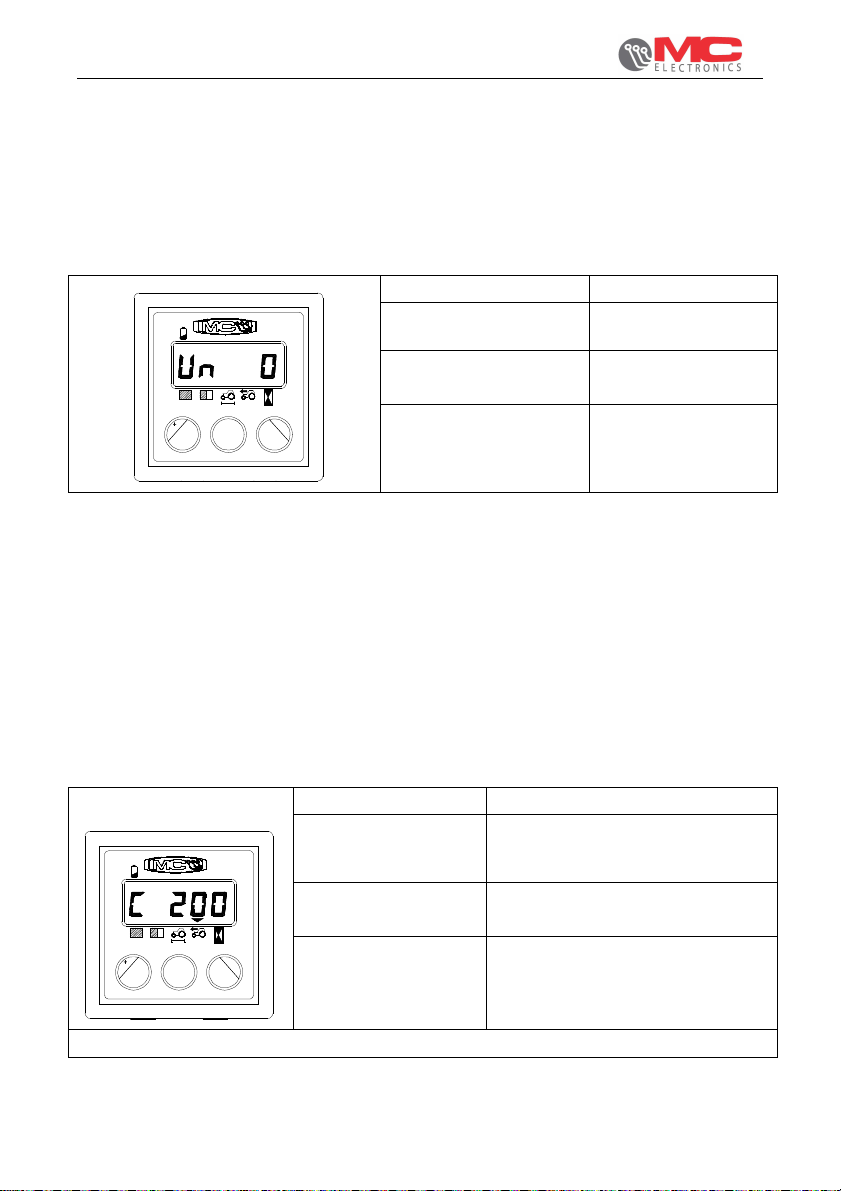
8.1 Programming the “Un” (unit of measurement) parameter
Programming of this parameter is very important to the work in hand and to the
programmable parameters. You need to select either the metric or imperial unit of
measurement; you then only need to program the parameters of the UC 300 for the
chosen unit of measurement.
Name of parameter: Un
+ -
UC 300
Description: selection of unit of
measurement
Programmable range: 0 (=metric units) or
1 (=imperial units)
Prog.
Select Reset
-
Default value: 0
8.2 Manual programming of parameter “C” (pulses of the speed
sensor)
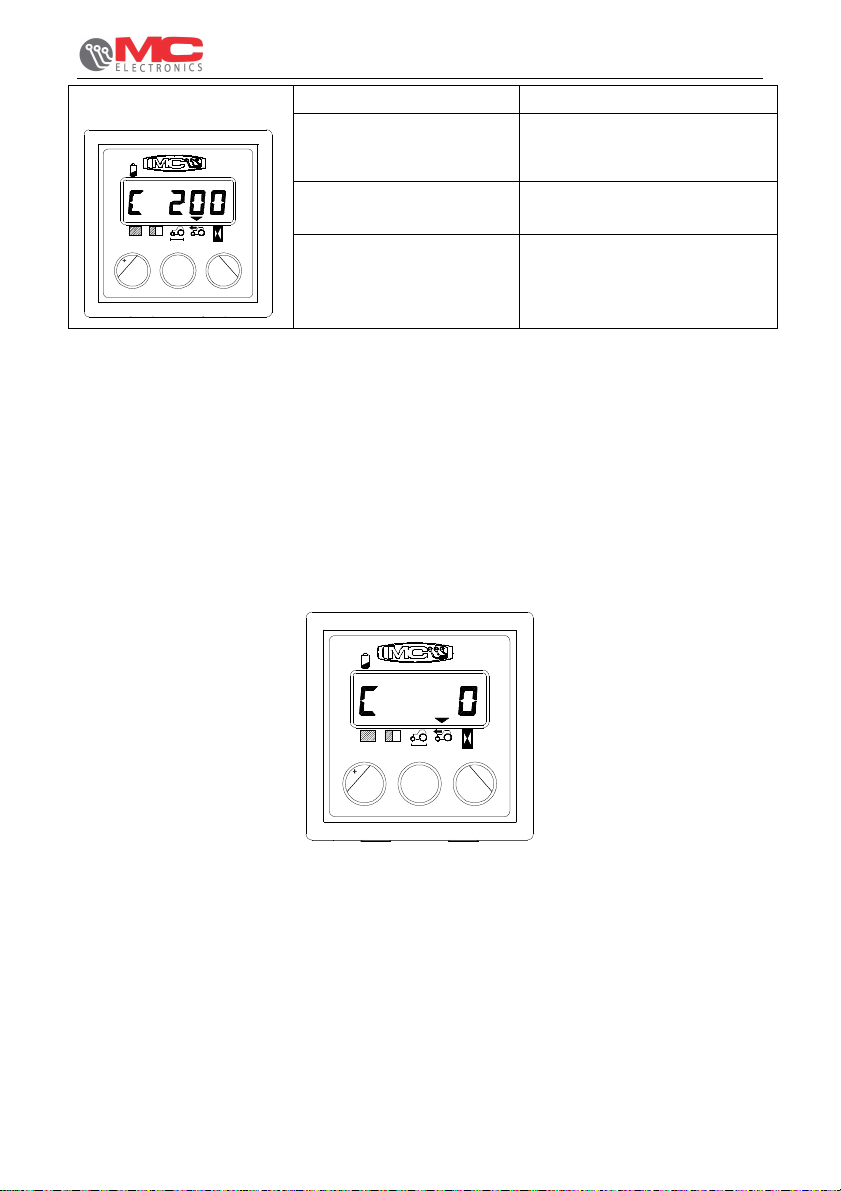
This parameter represents the number of pulses emitted by the speed sensor after
each 100 linear metres (or 328 feet) covered by the public works machine;
Enter the programming phase as described above and edit the value with the “+” and
“-” buttons; pressing and holding either button will speed up the editing process.
After setting the required value, press "Prog" to confirm and move on to the next
parameter.
with “Un” = 0
+ -
Select Reset
UC 300
Km/h
Prog.
-
Name of parameter: C
Description: Pulses of the speed sensor after
every 100m covered by the
machine
Programmable
range:
20 to 999
Steps of 1 pulse
Default value: 200
User’s manual
11
Page 12
with “Un” = 1
Name of parameter: C
UNIVERSAL COUNTER UC 300
Description: Pulses of the speed sensor
+ -
UC 300
mph
after every 330 feet covered
by the machine
Programmable range: 20 to 999
Steps of 1 pulse
Prog.
Select Reset
-
Default value: 200
8.3 Automatic programming of parameter “C” (pulses of the
speed sensor)
It is possible to program parameter C automatically: after entering the programming
phase as instructed above, and with “C” shown on the display followed by the value
currently programmed, press both the “+” and “-” buttons at the same time and the
following appears on the display
Prog.
UC 300
-
Reset
+ -
Select
At this point, travel 100 metres (or 330 feet) in the machine and the number will
increase automatically on the display. After covering this distance, press the "Prog"
button to confirm the data. It is advisable to repeat this operation at least twice.
If you try to acquire a value of less than 20 pulses, “Err” appears on the display and
the UC 300 retains the last valid value to have been saved.
User’s manuale
12
Page 13
UNIVERSAL COUNTER UC 300
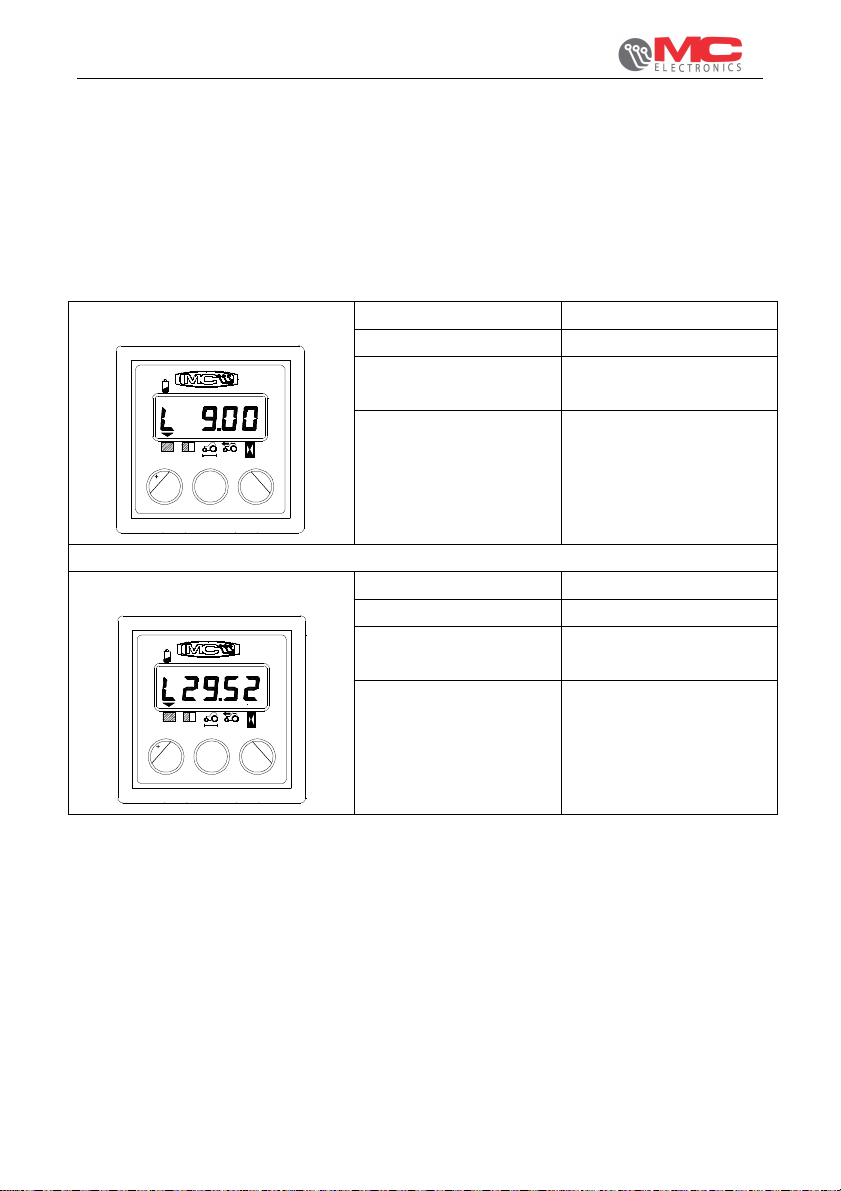
8.4 Programming parameter “L” (working width)
This parameter is the working width of the machine in metres (or feet).
Enter the programming phase as described above and edit the value with the “+” and
“-” buttons; pressing and holding either button will speed up the editing process.
After setting the required value, press "Prog" to confirm and exit the programming
phase.
with “Un” = 0
+ -
Select Reset
UC 300
m
-
Prog.
with “Un” = 1
+ -
UC 300
ft
Name of parameter: L
Description: Working width in metres
Programmable range: 00.10 to 30.00
Steps of 0.01m
Default value: 9.00
Name of parameter: L
Description: Working width in feet
Programmable range: 00.32 to 98.40
Steps of 0.01 feet
Default value: 29.50
Prog.
Select Reset
-
User’s manual
13
Page 14
!!!!
!!!!
UNIVERSAL COUNTER UC 300
9. Maintenance
This chapter gives instructions on how to carry out ordinary and extraordinary
maintenance.
Ordinary maintenance refers to those operations which must be carried out
periodically. As they do not require specific skills, they can be carried out by the
users (operators etc.).
Extraordinary maintenance refers to unforeseeable operations due to mechanic or
electric failures. They require specific technical skills, so they should be exclusively
carried out by qualified personnel (maintenance personnel etc.)
9.1 Ordinary maintenance
Ordinary maintenance consists in cleaning the instrument. Clean the instrument with
a wet cloth and mild detergent to avoid erasing the serigraphs on the panel.
Warning
•
Do not use pressure water jets.
•
Do not use abrasive products, solvents or alcohol.
•
Do not press on the keyboard with pointed or hard objects in order
to avoid damaging the polyester film, thus endangering the
impermeability of the keyboard.
9.1.1 How to protect the main connector
In case of an extended use of the Monitor it is advisable to disconnect the main
signal connector from the harness. It is advisable to insulate both the connectors (of
the Monitor and of the Harness) by using a Nylon protection.
If the connectors of the monitor and of the harness are NOT disconnected no
protection is needed.
9.2 Extraordinary maintenance
Warning
Extraordinary maintenance must be carried out by authorized personnel
only.
User’s manuale
14
Page 15
UNIVERSAL COUNTER UC 300
10. Technical data
Power supply voltage 3.6 Vdc (internal batteries)
Max. energy consumption in stand by < 50µA
Protection degree IP 65
Range of operating temperature -20 / +70 °C
Range of storage temperature -25 / +85 °C
Mechanic vibrations resistance 2 g random
WARNING: THIS PRODUCT CONTAINS TIN AND LEAD. IT MUST BE
DISPOSED OF AT THE END OF ITS LIFE CYCLE AT THE
DESIGNATED DISPOSAL FACILITIES OR DELIVERED DIRECTLY TO
MC ELETTRONICA SRL (ITALY).
User’s manual
15
Page 16
Electronic equipments for agricultural
www.mcelettronica.it
Printed in Italy
 Loading...